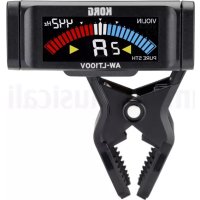
AWLT100V - Electronic tuner KORG - Free user manual and instructions
Find the device manual for free AWLT100V KORG in PDF.


| Product Type | Clip-on Electronic Tuner |
| Brand | Korg |
| Model | AW-LT100V |
| Dimensions (L x D x H) | 60 mm x 39 mm x 72 mm |
| Weight (including battery) | 32 g |
| Power Supply | 1 AAA battery |
| Battery Life | Approximately 100 hours (light backlight, continuous use) |
| Detection Range | A0 (27.50 Hz) to C8 (4186 Hz) |
| Accuracy | +/- 1 cent |
| Reference Pitch (Calibration) | A4 = 410 – 480 Hz (adjustable in 1 Hz steps) |
| Tuning Modes | Chromatic, Violin, Viola (Pure Fifth) |
| Display | Segment display, backlight (auto or light) |
| Indicators | Note name, pitch, correct tuning, low battery |
| Automatic Power Off | After approximately 20 minutes without signal |
| Attachment | Clip onto instrument head, adjustable angle |
| Included Accessories | User manual, 1 AAA battery |
| Maintenance and Cleaning | Clean with a dry cloth; do not use solvents or liquid products |
| Safety | Avoid exposure to sunlight, heat, humidity, dust; do not spill liquids |
| Batteries | User-replaceable (compartment on back) |
| Repairability | No spare parts specified; the device contains no user-serviceable parts (except battery) |
Frequently Asked Questions - AWLT100V KORG
User questions about AWLT100V KORG
0 question about this device. Answer the ones you know or ask your own.
Ask a new question about this device
Download the instructions for your Electronic tuner in PDF format for free! Find your manual AWLT100V - KORG and take your electronic device back in hand. On this page are published all the documents necessary for the use of your device. AWLT100V by KORG.
USER MANUAL AWLT100V KORG
Thank you for purchasing the Korg AW-LT100V Clip-on Tuner. To help you get the most out of your new instrument, please read this manual carefully.
Using the unit in the following locations can result in a malfunction.
In direct sunlight
- Locations of extreme temperature or humidity
- Excessively dusty or dirty locations
- Locations of excessive vibration
- Close to magnetic fields
Power supply
Be sure to turn off the power when the unit is not in use. Remove the battery in order to prevent it from leaking when the unit is not in use for extended periods.
Interference with other electrical devices
Radios and televisions placed nearby may experience reception interference. Operate this unit at a suitable distance from radios and televisions.
Handling
To avoid breakage, do not apply excessive force to the switches or controls.
Care
If the exterior becomes dirty, wipe it with a clean, dry cloth. Do not use liquid cleaners such as benzene or thinner, or cleaning compounds or flammable polishes.
Keep this manual
After reading this manual, please keep it for later reference.
Keeping foreign matter out of your equipment
Never set any container with liquid in it near this equipment. If liquid gets into the equipment, it could cause a breakdown, fire, or electrical shock. Be careful not to let metal objects get into the equipment.
THE FCC REGULATION WARNING (for USA)
NOTE: This equipment has been tested and found to comply with the limits for a Class B digital device, pursuant to Part 15 of the FCC Rules. These limits are designed to provide reasonable protection against harmful interference in a residential installation. This equipment generates, uses, and can radiate radio frequency energy and, if not installed and used in accordance with the instructions, may cause harmful interference to radio communications. However, there is no guarantee that interference will not occur in a particular installation. If this equipment does cause harmful interference to radio or television reception, which can be determined by turning the equipment off and on, the user is encouraged to try to correct the interference by one or more of the following measures:
Reorient or relocate the receiving antenna.
- Increase the separation between the equipment and receiver.
- Connect the equipment into an outlet on a circuit different from that to which the receiver is connected.
- Consult the dealer or an experienced radio/TV technician for help.
If items such as cables are included with this equipment, you must use those included items.
Unauthorized changes or modification to this system can void the user's authority to operate this equipment.
Notice regarding disposal (EU only)

If this symbol is shown on the product, manual, battery, or package, you must dispose of it in the correct manner to avoid harm to human health or damage to the environment. Contact your local administrative body for details on the correct disposal method. If the battery contains heavy metals in excess of the regulated amount, a chemical symbol is displayed below the symbol on the battery or battery package.
This device complies with Part 15 of the FCC Rules.
Operation is subject to the following two conditions: (1) This device may not cause harmful interference, and (2) this device must accept any interference received, including interference that may cause undesired operation.
CANICES-3B/NMB-3B.
IMPORTANT NOTICE TO CONSUMERS
This product has been manufactured according to strict specifications and voltage requirements that are applicable in the country in which it is intended that this product should be used. If you have purchased this product via the internet, through mail order, and/or via a telephone sale, you must verify that this product is intended to be used in the country in which you reside.
WARNING: Use of this product in any country other than that for which it is intended could be dangerous and could invalidate the manufacturer's or distributor's warranty.
Please also retain your receipt as proof of purchase otherwise your product may be disqualified from the manufacturer's or distributor's warranty.
- All product names and company names are the trademarks or registered trademarks of their respective owners.

En Parts of the AW-LT100V
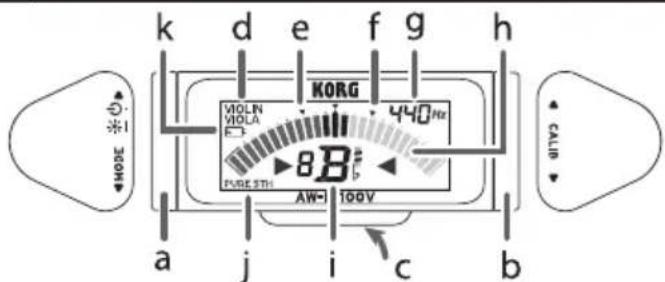
a. Left shuttle switch
c. Battery compartment (Rear)
e. Pure major third
g. Reference pitch indicator
i. Note name indicator
k. Battery indicator
b. Right shuttle switch
d. Tuner mode indicator
f. Pure minor third
h. Meter
j. PURE 5TH indicator
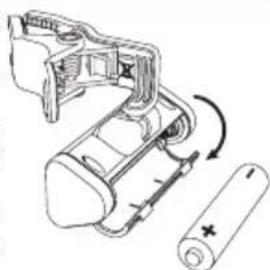
Installing the battery
When the battery becomes depleted, a battery symbol (I will appear on the display. Immediately replace the battery with a new one.
1. Open the battery compartment cover on the rear of the tuner in the direction of the arrow.
2. Insert the battery, making sure to observe the correct polarity, and then close the cover.
Attaching to the instrument and range of motion
The AW-LT100V tunes by picking up the vibrations of the instrument. Therefore, attach the AW-LT100V to the headstock of your instrument in order to tune it. Additionally, the AW-LT100V can be freely moved so that the display is easy to read.
The AW-LT100V may be damaged if you apply excessive force within its range of motion, or attempt to move it beyond its intended range of motion.
Please carefully attach the AW-LT100V to your instrument. Leaving the AW-LT100V attached for a long time may damage or mark the instrument's surface.
Depending on various factors such as age-related change or the surface finish, there is
a possibility that your instrument may be damaged by attaching this product.
Tuning
Tuning procedure
- Turn the left shuttle switch upward. Each time you turn the shuttle switch, the AW-LT100V will be turned on or off.
If the power is left on for approximately 20 minutes without any user input, it will turn off automatically (Auto power-off function).
- If necessary, change the reference pitch (calibration) and tune mode.
The procedure with the tuner mode set to chromatic (factory default; no mode indicator,) is described below.
- Play a single note on your instrument.
The note name closest to the detected pitch appears in the note name indicator. Tune your instrument until the correct note name appears in the display and the meter segments at the center (▼) light up.
An indicator toward the right will light
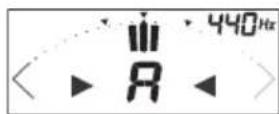
Meter indications when correctly tuned
up if the pitch is too high, and an indicator toward the left will light up if the pitch is too low. If you want to tune to a pure major third or pure minor third above a certain note, adjust the pitch to the pure major or minor third marks on the meter. For example if you want to tune to a pure major third above A, make the note name indicator read C#, and tune so that the meter indicates the left. Alternatively, if you want to tune to a pure minor third above A, make the note name indicator read C, and tune so that the meter indicates the right.
Even if the pitch is within the range of detection, it may not be possible to detect the pitch of an instrumental sound that contains large numbers of overtones or a sound that has a rapid decay.
The meter may respond to vibrations it picks up from the environment; however, this will not affect tuning of the instrument.
Setting the tuner mode (*M)
Each time you turn the left shuttle switch downward, the tuner mode changes, with the current mode shown by the tuner mode indicator.
Chromatic (no indicator) Violin (VIOLIN) Viola (VIOLA) Chromatic ...
In the violin and viola modes, the string number closest to the detected pitch appears to the left of the note name indicator.
Note name indicators for violin mode : 4G, 3D, 2A, 1E
Note name indicators for viola mode : 4C, 3G, 2D, 1A
In the violin and viola modes, PURE 5TH appears in the lower-left corner of the display to indicate the pure fifth temperament relative to the A string.


Violin Brd string
Viola Ith string
Reference pitch settings (calibration) (^*M)
Each time you turn the right shuttle switch upward (or downward), the reference pitch (calibration value) increases (or decreases) in 1 Hz steps.
Backlight
After turning the left shuttle switch upward to turn on the AWLT100V, you can change the brightness of the display by keeping the left shuttle switch turned upward for approximately 2 seconds.
Auto: The backlight will light brightly when sound is inputted or when a shuttle switch is operated. When there has been no sound input or shuttle switch operation for approximately three seconds after the power has been turned on, the backlight will turn off in order to prevent the battery from being depleted.
Soft: The backlight will light at a lower level of brightness in order to prevent the battery from being depleted.
Specifications
| Scale: | 12-note equal temperament (Chromatic) Pure fifth (Violin, Viola) |
| Range (sine wave): | Chromatic A0 (27.50 Hz)-C8 (4186 Hz) |
| Precision: | +/-1 cent |
| Reference pitch: | A4 = 410-480 Hz (1 Hz steps) |
| Dimensions (W x D x H): | |
| 60 mm x 39 mm x 72 mm / 2.36" x 1.54" x 2.83" | |
| Weight: | 32 g/1.13 oz. (including battery) |
| Power supply: One AAA Battery | |
| Battery life: | approximately 100 hours (Backlight:Soft, tuner continuously operating, A4 input, when using alkaline battery) |
| Included items: | Owner's manual, One AAA battery |
*M Settings are remembered even when the power is off.
- Specifications and appearance are subject to change without notice for improvement.
