USER MANUAL ReadyWarm 9000 Touch CECOTEC
natural_image
Row of modern black and white server units with wheels, displayed against a dark background (no text or symbols visible)
ES · Este producto no es adecuado para calefacción primaria. Este producto está indicado únicamente para lugares abrigados o para una utilización puntual. EN · This product is not suitable for primary heating purposes. This product is only suitable for well insulated spaces or occasional use. FR · Ce produit n'est pas approprié pour un chauffage primaire. Cet appareil a été conçu seulement pour être utilisé dans des espaces intérieurs ou pour une utilisation momentanée.. DE · Dieses Produkt ist nicht für primäre Heizzwecke geeignet. Dieses Produkt ist nur für gut isolierte Räume oder gelegentlichen Gebrauch geeignet. IT · Questo prodotto non è adeguato per essere usato come fonte primaria di riscaldamento. Questo prodotto è indicato unicamente per luoghi protetti o per un uso specifico. PT · Este produto não está adequado para aquecimento primário. Este produto está indicado unicamente para lugares abrigados ou para uma utilização pontual. PL · Ten produkt nie nadaje się do wstępnego ogrzewania. Ten produkt jest wskazany tylko w miejscach ostoniętych lub do okazjonalnego użytku. CZ · Tento přístroj není vhodný jako primární topidlo. Tento přístroj je vhodný jako přídavné topení v krytých prostorách na občasné použití.
Manual de instrucciones
Instruction manual
Manuel d'instructions
Bedienungsanleitung
Manuale di istruzioni
Manual de instruções
Instrukcja obstugi
Návod k použití
-
Parts and components 32
-
Before use 32
-
Product assembly 32
-
Operation 33
-
Cleaning and maintenance
-
Technical specifications 34
-
Disposal of old electrical appliances
B. Technical support and warranty
SOMMAIRE
This product is not suitable for primary heating purposes. This product is only suitable for well insulated spaces or occasional use.
SAFETY INSTRUCTIONS
Read these instructions thoroughly before using the appliance. Keep this instruction manual for future reference or new users.
Make sure that the mains voltage matches the voltage stated on the rating label of the appliance and that the wall outlet is grounded.
This appliance is intended for household use only. Do not use for industrial or commercial purposes.
This product is only suitable for well insulated spaces or occasional use.
Always disconnect the heater from the main supply when not in use and when cleaning.
Do not leave the heater unattended while operating.
Do not cover the device as this may lead to risk of fire.
Check the power cord regularly for visible damage. If the cord is damaged, it must be replaced by the official Technical Support Service of Cecotec in order to avoid any type of danger.
Do not place the appliance close to heat sources, flammable substances, wet surfaces where it can fall or be pushed into water or allow it to come into contact with water or other liquids. Do not operate outdoors.
Do not cover the air inlet or outlet openings while the appliance is operating. Keep the device at a distance of at least 90 cm from any combustible material, such as furniture, curtains, bedding cloths or papers.
Keep the heater clean. Do not allow objects to enter the
ENGLISHENGLISH
ventilation, as this may cause electric shock, fire or damage the heater.
Do not allow the cord to touch hot surfaces.
Do not place on or near a hot gas or electric burner.
Never use the appliance with a damaged cord or plug or after the appliance has malfunctioned or been damaged in any way.
This device is filled with a precise quantity of special oil.
Repairs requiring opening of the oil container are only to be made by the Technical Support Service of Cecotec, who should be contacted if there is an oil leakage.
Do not use this device in the immediate surroundings of a bath, a shower or a swimming pool.
Never attempt to open any part or dismantle the controls.
Do not place the appliance immediately below a power socket.
Do not turn the device upside-down during operation.
The product's surface will reach high temperatures during operation. Avoid skin from getting in contact with it and use the handle to move it.
Any reparation that requires opening the oil tank must be carried out by a qualified person. Contact the official Technical Support Service of Cecotec if detected.

Follow the special regulations concerning the disposal of oil when the device is going to be disposed of.
Avoid the use of an extension cord as this may overheat and cause a risk of fire. Do not use any multiple sockets.
Do not connect other high-power appliance to the same circuit. The appliance is not intended to be used by children under the age of 8. It can be used by children over the age of 8, as long as they are given continuous supervision.
This appliance can be used by children aged 8 and above, and persons with reduced physical, sensory or mental capabilities
or lack of experience and knowledge, as long as they have been given supervision or instruction concerning the use of the appliance in a safe way and understand the hazards involved. Children shall not play with the appliance.
Supervise young children to make sure that they do not play with the appliance. Close supervision is necessary when the appliance is being used by or near children.
DO NOT COVER

FRANÇAISFRANÇAIS
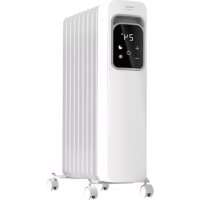
ReadyWarm 7000 Touch Connected (05362)
ReadyWarm 7000 Touch Black (05387)
ReadyWarm 7000 Touch Connected Black (05388)
1500 W, 220-240V-. 50/60 Hz
9 elementos:
ReadyWarm 9000 Touch (05383)
ReadyWarm 9000 Touch Connected (05384)
ReadyWarm 9000 Touch Black (05389)
ReadyWarm 9000 Touch Connected Black (05390)
2000 W, 220-240 V-, 50/60 Hz
11 elementos:
ReadyWarm 11000 Touch (05385)
ReadyWarm 11000 Touch Connected (05386)
ReadyWarm 11000 Touch Black (05391)
ReadyWarm 11000 Touch Connected Black (05392)
2500 W, 220-240 V-, 50/60 Hz
- Display
- On/off
- Power level/°C-°F
- Temperature/time increase
- Temperature/time decrease
- Timer
- Wi-Fi (only for Connected models)
2. BEFORE USE
Remove all packaging elements.
Check all parts of the appliance for visual damage. Unwind the power cord completely and inspect it for damage. If there are any signs, contact the official Technical Support Service of Cecolec. Make sure you have read and understood all instructions and warnings in this instruction manual. Pay particular attention to the safety instructions on previous pages.
Place the appliance on an even, heat-resistant surface.
3. PRODUCT ASSEMBLY
Turn the heater upside down.
Place the casters base assemblies between the end fins.
Attach them to the heater using the U-bolts and wing nuts supplied.
Tighten the wing nuts.
Turn the heater the right way up.
Fig. 3.
4. OPERATION
Note: This device has a safety switch which turns the electricity off as soon as the device falls over. The safety switch prevents dangerous situations caused by overheating.
Switch the power switch to 0.
Connect the device to a properly installed earthed socket.
Switch the device on from the side switch. The device will beep, and all the LED indicators and the screen will light up on for 1 second.
The device will automatically enter standby mode and the power LED indicator will be displayed on the screen.
Fig. 4.
Press the power button on the screen, the device will beep and the heater will enter high heating power level (P3). The device will show the room temperature. Press the power button again to switch to standby mode.
Heating power levels
During operation, press the mode button to select °C or °F.
Hold down the mode button to enter heating settings. The display will show P3. Press repeatedly to select P3->P2->P1.
P3: High heating power level
P2: Medium heating power level
P1: Low heating power level
While the device is heating, press the '+' and '-' buttons to set the desired temperature, from 10 °C to 35 °C.
Thermostat
When room temperature reaches the set temperature, the heater will automatically turn off. When the room temperature is lower than the set temperature, the heater will turn automatically on again. After 5 seconds, the system will automatically exit the setting mode and the display will show the room temperature.
Timer
While the device is heating, press the timer button to enter the timer settings. The display will show "OH".
Press the "+" and "-" buttons to set the desired operating time, from 1 to 9 hours.
After 5 seconds, the system will automatically enter countdown, and the screen will display the room temperature.
When the countdown gets to 0 and the set operating time is over, the device will automatically enter standby mode.
ENGLISHENGLISH
Note:
When the heater has been set to turn off automatically, the current temperature and the remaining time will appear on the screen for 5 seconds alternating.
After turning off the main power switch or cutting off the power supply, the set timer and temperature will be cleared.
When the heater is tilted, the device will automatically stop operating and the screen will display ^1 EQ ^2 . If the heater is placed correctly again, press the power button to restart. The temperature display can reflect the indoor temperature correctly after the heater is running for at least 20 minutes.
If any error occurs, the screen will display "Ex". Contact the Technical Support Service of Cecotec.
5. CLEANING AND MAINTENANCE
Always turn off, unplug and allow the appliance to cool down before cleaning.
Do not use abrasive scouring pads, powders or cleaners to clean the product.
Use a soft, clamped and clean cloth to clean the product's outer housing. Be careful not to touch the heating elements.
If the heater is not going to be operated for a long period of time, store it in a dry and safe place where it is protected from dust.
6. TECHNICAL SPECIFICATIONS
7 fins
ReadyWarm 7000 Touch (05381)
ReadyWarm 7000 Touch Connected (05382)
ReadyWarm 7000 Touch Black (05387)
ReadyWarm 7000 Touch Connected Black (05388)
1500 W, 220-240V-, 50/60 Hz
9 fins:
ReadyWarm 9000 Touch (05383)
ReadyWarm 9000 Touch Connected (05384)
ReadyWarm 9000 Touch Black (05389)
ReadyWarm 9000 Touch Connected Black (05390)
2000 W, 220-240 V-, 50/60 Hz
11 fins:
ReadyWarm 11000 Touch (05385)
ReadyWarm 11000 Touch Connected (05386)
ReadyWarm 11000 Touch Black (05391)
ReadyWarm 11000 Touch Connected Black (05392)
2500 W, 220-240 V-, 50/60 Hz
Made in China | Designed in Spain
7. DISPOSAL OF OLD ELECTRICAL APPLIANCES

The European directive 2012/19/EU on Waste Electrical and Electronic Equipment (WEE), specifies that old household electrical appliances must not be disposed of with the normal unsorted municipal waste. Old appliances must be collected separately, in order to optimize the recovery and recycling of the materials they contain and reduce the impact on human health and the environment.
The crossed out "wheeled bin" symbol on the product reminds you of your obligation to dispose of the appliance correctly.
Consumers must contact their local authorities or retailer for information concerning the correct disposal of old appliances and/or their batteries.
8. TECHNICAL SUPPORT AND WARRANTY
This product is under warranty for 2 years from the date of purchase, as long as the proof of purchase is submitted, the product is in perfect physical condition, and it has been given proper use, as explained in this instruction manual.
The warranty will not cover the following situations:
The product has been used for purposes other than those intended for it, misused, beaten, exposed to moisture, immersed in liquid or corrosive substances, as well as any other fault attributable to the customer.
The product has been disassembled, modified, or repaired by persons, not authorised by the official Technical Support Service of Cecotec.
Faults deriving from the normal wear and tear of its parts, due to use.
The warranty service covers every manufacturing defects of your appliance for 2 years, based on current legislation, except consumable parts. In the event of misuse, the warranty will not apply.
If at any moment you detect any problem with your product or have any doubt, do not hesitate to contact Cecotec Technical Support Service at +34 963 210 728.
FRANÇAISFRANÇAIS
1. PIÈCES ET COMPOSANTS
Img.1.
7 éléments:
ReadyWarm 7000 Touch (05381)
ReadyWarm 7000 Touch Connected (05382)
ReadyWarm 7000 Touch Black (05387)
ReadyWarm 7000 Touch Connected Black (05388)
1500 W, 220-240V\~, 50/60 Hz
9 éléments :
ReadyWarm 9000 Touch (05383)
ReadyWarm 9000 Touch Connected (05384)
ReadyWarm 9000 Touch Black (05389)
ReadyWarm 9000 Touch Connected Black (05390)
2000 W, 220-240 V-, 50/60 Hz
11 éléments:
ReadyWarm 11000 Touch (05385)
ReadyWarm 11000 Touch Connected (05386)
ReadyWarm 11000 Touch Black (05391)
ReadyWarm 11000 Touch Connected Black (05392)
2500 W, 220-240 V-, 50/60 Hz
ReadyWarm 7000 Touch Connected (05382)
ReadyWarm 7000 Touch Black (05387)
ReadyWarm 7000 Touch Connected Black (05388)
1500 W, 220-240V\~, 50/60 Hz
9 Heizrippen:
ReadyWarm 9000 Touch (05383)
ReadyWarm 9000 Touch Connected (05384)
ReadyWarm 9000 Touch Black (05389)
ReadyWarm 9000 Touch Connected Black (05390)
2000 W, 220-240 V\~, 50/60 Hz
11 Heizrippen:
ReadyWarm 11000 Touch (05385)
ReadyWarm 11000 Touch Connected (05386)
ReadyWarm 11000 Touch Black (05391)
ReadyWarm 11000 Touch Connected Black (05392)
2500 W, 220-240 V\~, 50/60 Hz
ReadyWarm 7000 Touch Connected (05382)
ReadyWarm 7000 Touch Black (05387)
ReadyWarm 7000 Touch Connected Black (05388)
1500 W, 220-240V-, 50/60 Hz
9 elementi:
ReadyWarm 9000 Touch (05383)
ReadyWarm 9000 Touch Connected (05384)
ReadyWarm 9000 Touch Black (05389)
ReadyWarm 9000 Touch Connected Black (05390)
2000 W, 220-240 V-, 50/60 Hz
11 elementi:
ReadyWarm 11000 Touch (05385)
ReadyWarm 11000 Touch Connected (05386)
ReadyWarm 11000 Touch Black (05391)
ReadyWarm 11000 Touch Connected Black (05392)
2500 W, 220-240 V-, 50/60 Hz
ReadyWarm 7000 Touch Connected (05382)
ReadyWarm 7000 Touch Black (05387)
ReadyWarm 7000 Touch Connected Black (05388)
1500 W, 220-240V-, 50/60 Hz
9 elementos:
ReadyWarm 9000 Touch (05383)
ReadyWarm 9000 Touch Connected (05384)
ReadyWarm 9000 Touch Black (05389)
ReadyWarm 9000 Touch Connected Black (05390)
2000 W, 220-240 V-, 50/60 Hz
POLSKIPORTUGUÊS
11 elementos:
ReadyWarm 11000 Touch (05385)
ReadyWarm 11000 Touch Connected (05386)
ReadyWarm 11000 Touch Black (05391)
ReadyWarm 11000 Touch Connected Black (05392)
2500 W, 220-240 V-, 50/60 Hz
ReadyWarm 7000 Touch Connected (05382)
ReadyWarm 7000 Touch Black (05387)
ReadyWarm 7000 Touch Connected Black (05388)
1500 W, 220-240V-, 50/50 Hz
9 elementów:
ReadyWarm 9000 Touch (05383)
ReadyWarm 9000 Touch Connected (05384)
ReadyWarm 9000 Touch Black (05389)
ReadyWarm 9000 Touch Connected Black (05390)
2000 W, 220-240 V-, 50/60 Hz
ČEŠTINAPOLSKI
11 elementów:
ReadyWarm 11000 Touch (05385)
ReadyWarm 11000 Touch Connected (05386)
ReadyWarm 11000 Touch Black (05391)
ReadyWarm 11000 Touch Connected Black (05392)
2500 W, 220-240 V-, 50/60 Hz
ReadyWarm 7000 Touch Connected (05382)
ReadyWarm 7000 Touch Black (05387)
ReadyWarm 7000 Touch Connected Black (05388)
1500 W, 220-240V-, 50/60 Hz
9 prvků:
ReadyWarm 9000 Touch (05383)
ReadyWarm 9000 Touch Connected (05384)
ReadyWarm 9000 Touch Black (05389)
ReadyWarm 9000 Touch Connected Black (05390)
2000 W, 220-240 V-, 50/60 Hz
11 prvků:
ReadyWarm 11000 Touch (05385)
ReadyWarm 11000 Touch Connected (05386)
ČEŠTINA
ReadyWarm 11000 Touch Black (05391)
ReadyWarm 11000 Touch Connected Black (05392)
2500 W, 220-240 V-, 50/60 Hz
Follow these steps to link the product with our App:
Download the EnergySilence app, which you can find in both Google Play and App Store.
If this is your first time using the app, register your account, otherwise log in
Once inside the app, tap on the "+" at the top right corner and then tap on "ReadyWarm Touch".
Turn on your device using the side switch and press the power button until you hear a beep. After this, a LED light will start flashing quickly in the display.
Enter your Wi-Fi password and press confirm.
After this, the linking process will start automatically.
In the event of a failed linking, press the power button until you hear a beep and the LED light will begin to flash slowly.
Confirm your Wi-Fi network's password again and follow the instructions in the App.
*Only available in Connected models.
CONNECTIVITÉ
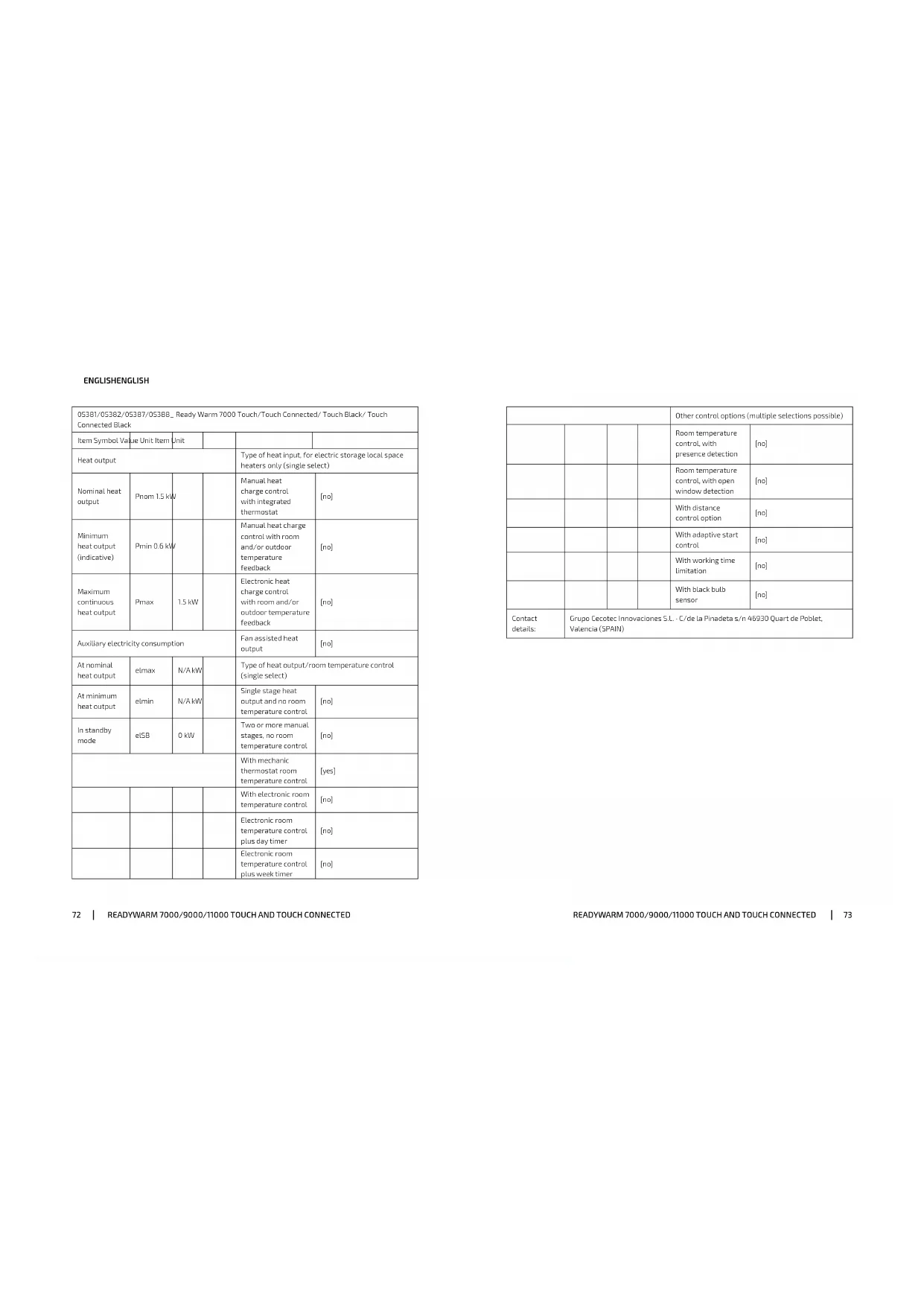
| 05381/05382/05387/05388_ Ready Warm 7000 Touch/Touch Connected/ Touch Black/ Touch Connected Black |
| Item Symbol Value Unit Item | Unit | | | |
| Heat output | Type of heat input, for electric storage local space heaters only (single select) |
| Nominal heat output | Pnom 1.5 kW | | Manual heat charge control with integrated thermostat | [no] |
| Minimum heat output (indicative) | Pmin 0.6 kW | | Manual heat charge control with room and/or outdoor temperature feedback | [no] |
| Maximum continuous heat output | Pmax | 1.5 kW | | Electronic heat charge control with room and/or outdoor temperature feedback | [no] |
| Auxiliary electricity consumption | Fan assisted heat output | [no] |
| At nominal heat output | elimax | N/A kW | | Type of heat output/room temperature control (single select) |
| At minimum heat output | dimin | N/A kW | | Single stage heat output and no room temperature control | [no] |
| In slonely mode | cISB | 0 kW | | Two or more manual stages, no room temperature control | [no] |
| With mechanic thermostat room temperature control | [yes] |
| | | | With electronic room temperature control | [no] |
| | | | Electronic room temperature control plus day timer | [no] |
| | | | Electronic room temperature control plus week timer | [no] |
| Other control options (multiple selections possible) |
| | | | Room temperature control, with presence detection | [no] |
| | | | Room temperature control, with open window detection | [no] |
| | | | With distance control option | [no] |
| | | | With adaptive start control | [no] |
| | | | With working time limitation | [no] |
| | | | With black bulb sensor | [no] |
| Contact details | Grupo Cecuotec Innovaciones S.L.-C/ de la Pinadela s/n 46930 Quart de Poblet, Valencia (SPAN) |
ENGLISHENGLISH
| 05363/05384/05389/05390 Ready Warm 9000 Touch/Touch Connected/ Touch Black/ Touch Connected Black |
| Item Symbol Value Unit Item Unit | | | | | |
| Heat output | Type of heat input, for electric storage local space heaters only (single select) |
| Nominal heat output | Prom 2.0 kW | | Manual heat charge control with integrated thermostat | [no] |
| Minimum heat output (Indicative) | Pmin 0.9 kW | | Manual heat charge control with room and/or outdoor temperature feedback | [no] |
| Maximum continuous heat output | Pmax | 2.0 kW | | Electronic heat charge control with room and/or outdoor temperature feedback | [no] |
| Auxiliary electricity consumption | Fan assisted heat output | [no] |
| At nominal heat output | clmax | N/A | kW | Type of heat output/room temperature control (single select) |
| At minimum heat output | elimin | N/A | kW | Single stage heat output and no room temperature control | [no] |
| In standby mode | eUSB | 0 | kW | Two or mere manual stages, no room temperature control | [no] |
| With mechanic thermostat room temperature control | [yes] |
| | | | With electronic room temperature control | [no] |
| | | | Electronic room temperature control plus day timer | [no] |
| | | | Electronic room temperature control plus week time: | [no] |
| Other control options (multiple selections possible) |
| | | | Room temperature control, with presence detection | [no] |
| | | | Room temperature control with open window detection | [no] |
| | | | With distance control option | [no] |
| | | | With adaptive start control | [no] |
| | | | With working time limitation | [no] |
| | | | With black bulb sensor | [no] |
| Contact details: | Grupo Ceroter Innovaciones S.L. - C/de la Pinadeta s/n 46930 Quart de Poblet, Valencia (SPAIN) |
ENGLISHENGLISH
| 05385/05386/05391/05392_ Ready Warm 11000 Touch/Touch Connected/ Touch Black/ Touch Connected Black |
| Item Symbol Value Unit Item Unit | | | |
| Heat output | Type of heat input, for electric storage local space heaters only (single select) |
| Nominal heat output | Pnom 2.5 kW | | Manual heat charge control with integrated thermostat | [no] |
| Minimum heat output (indicative) | Pmin 0.8 | kW | | Manual heat charge control with room and/or outdoor temperature feedback | [no] |
| Maximum continuous heat output | Pmax | 2.5 kW | | Electronic heat charge control with room and/or outdoor temperature feedback | [no] |
| Auxiliary electricity consumption | Fan assisted heat output | [no] |
| At nominal heat output | elmax | N/A | kW | Type of heat output/room temperature control (single select) |
| At minimum heat output | elmin | N/A | kW | Single stage heat output and no room temperature control | [no] |
| In standby mode | e15B | C | kW | Two or more manual stages, no room temperature control | [no] |
| With mechanic thermostat room temperature control | [yes] |
| | | | With electronic room temperature control | [no] |
| | | | Electronic room temperature control plus day timer | [no] |
| | | | Electronic room temperature control plus week timer | (no) |
| Other control options (multiple selections possible) |
| | | | Room temperature control, with presence detection | (no) |
| | | | Room temperature control, with open window detection | (no) |
| | | | With distance control option | (no) |
| | | | With adaptive start control | (no) |
| | | | With working time limitation | (no) |
| | | | With black bulb sensor | (no) |
| Contact details: | Grupo Cecotec Innovaciones S.L. - C/de la Pinadeta s/n 46930 Quart de Poblet, Valencia (SPAIN) |
FRANÇAISFRANÇAIS
Quart de Poblet, Valencia (Spain)
PE01200709