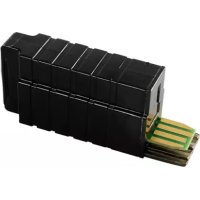
XKS 3100 W - Refrigerator MIELE - Free user manual and instructions
Find the device manual for free XKS 3100 W MIELE in PDF.



| Product type | Wi-Fi module for Miele refrigerator |
| Model | XKS 3100 W |
| Brand | Miele |
| Compatibility | Miele refrigerators with slot for Wi-Fi module |
| Connectivity | 2.4 GHz Wi-Fi (IEEE 802.11 b/g/n) |
| Main functions | SuperVision, time synchronization, control via Miele@mobile |
| Connection mode | WPS, Wi-Fi access point (soft AP), Miele@mobile app |
| Frequency band | 2.412 - 2.472 GHz |
| Maximum transmission power | < 100 mW |
| Approximate dimensions | 50 x 30 x 10 mm |
| Approximate weight | 20 g |
| Power supply | Via refrigerator (internal connection) |
| Installation | Insert into the designated slot, to the left of the display |
| Network configuration | Via smartphone/tablet with the Miele@mobile app |
| Compatible operating systems | iOS 9+ or Android 4.4+ |
| Safety | Compliant with Directive 2014/53/EU |
| Environmental protection | Recycling via Miele or municipal collection points |
| Spare parts | Only genuine Miele parts |
| General information | Installation and assembly instructions included |
Frequently Asked Questions - XKS 3100 W MIELE
User questions about XKS 3100 W MIELE
0 question about this device. Answer the ones you know or ask your own.
Ask a new question about this device
Download the instructions for your Refrigerator in PDF format for free! Find your manual XKS 3100 W - MIELE and take your electronic device back in hand. On this page are published all the documents necessary for the use of your device. XKS 3100 W by MIELE.
USER MANUAL XKS 3100 W MIELE
en Fitting and installation instructions for
Miele@home
fr Miele@home
Warning and Safety instructions 36
Caring for the environment 38
Description and fitting 39
WiFi stick XKS 3100 W. 39
Installing the WiFi stick 40
Signing a household appliance onto the WiFi network via smartphone/tablet 41
Signing on using the Miele@mobile App. 41
Technical data 45
Conformity declaration. 45
This WiFi stick complies with current safety requirements. Inappropriate use can, however, lead to personal injury and damage to property.
Please read these fitting and installation instructions before using the WiFi stick. They contain important information on installation, safety and use of the WiFi stick. This is to protect yourself from injury, and from damaging the stick and your appliance.
Keep these fitting and installation instructions in a safe place and pass them on to any future owner.
These fitting and installation instructions describe the scope of function of the WiFi stick.
Correct application
The WiFi stick has the sole function of establishing a WiFi connection between a Miele domestic appliance and a WiFi network within a building.
WiFi technology, as supported by the WiFi module, can be intermittently or completely disrupted. For this reason availability of featured functions cannot always be guaranteed. The range of the wireless connection can be increased by using a commercially available WiFi repeater. For more information please consult your Miele dealer or Miele Service.
Technical safety
-
Check the WiFi stick for any visible damage before installation. Do not install and use a damaged WiFi stick.
The WiFi stick is only disconnected from the mains electrical supply if: -
the mains fuses are switched off, or
- the screw-out fuse is removed (where applicable), or
- the mains cable has been disconnected from the power supply. If the cable is fitted with a plug, pull on the plug and not the cable when disconnecting it from the power supply.
- the residual current device (RCD) has been activated.
Disconnect the Miele appliances from the mains power supply before installing or removing the WiFi stick.
- Miele can only guarantee the safety of the appliance when genuine original Miele replacement parts are used. Faulty components must only be replaced by Miele spare parts.
Disposal of the packing material
The packaging is designed to protect the appliance from damage during transportation. The packaging materials used are selected from materials which are environmentally friendly for disposal and should be recycled.
Recycling the packaging reduces the use of raw materials in the manufacturing process and also reduces the amount of waste in landfill sites.
Disposing of your old appliance
Electrical and electronic appliances often contain valuable materials. They also contain specific materials, compounds and components, which were essential for their correct function and safety. These could be hazardous to human health and to the environment if disposed of with your domestic waste or if handled incorrectly. Please do not, therefore, dispose of your old appliance with your household waste.

Please dispose of it at your local community waste collection / recycling centre for electrical and electronic appliances, or contact your dealer or Miele for advice. You are also responsible (by law, depending on country) for deleting any personal data that may be stored on the appliance being disposed of. Please ensure that your old appliance poses no risk to children while being stored prior to disposal.
WiFi stick XKS 3100 W
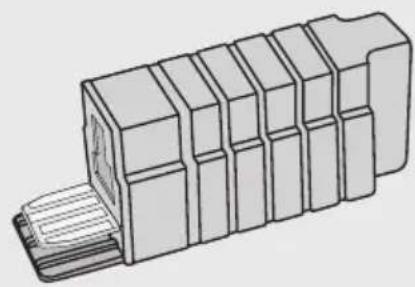
The WiFi stick is intended for use in Miele freestanding refrigeration appliances.
The WiFi stick must first be plugged into the refrigeration appliance (see "Installing the WiFi stick").
To use the Miele@mobile app or Miele@home features such as SuperVision or time synchronisation, your Miele refrigeration appliance must be connected to your WiFi network.
These instructions show you how to install the WiFi stick and how to connect to a WiFi network using a smartphone or tablet (iOS® and Android™ systems).
Please read the operating and installation instructions supplied with your refrigeration appliance carefully before using the refrigeration appliance with the WiFi stick for the first time. They contain important information on safety, installation, use and maintenance. This is to protect yourself from injury, and from damaging your refrigeration appliance
The refrigeration appliance must be disconnected from the power supply during installation work.
- Disconnect the refrigeration appliance from the mains electricity supply.
The WiFi stick is fitted on the left-hand side next to the display. The cover must first be removed.
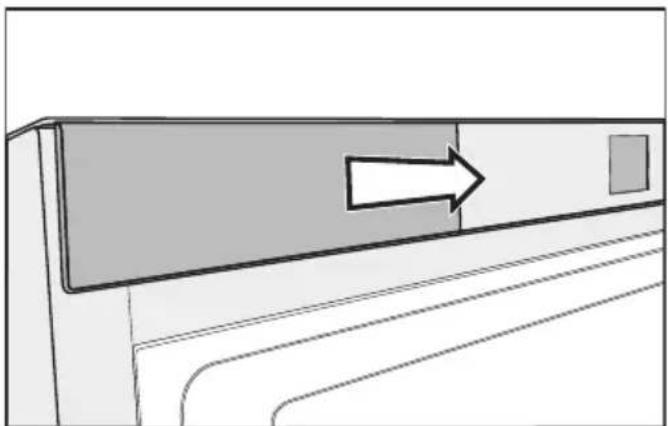

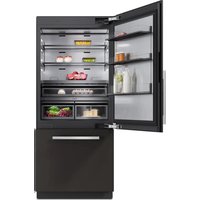
Right-hand hinged refrigeration appliance
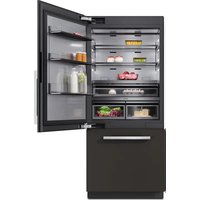
Left-hand hinged refrigeration appliance
Release the cover.
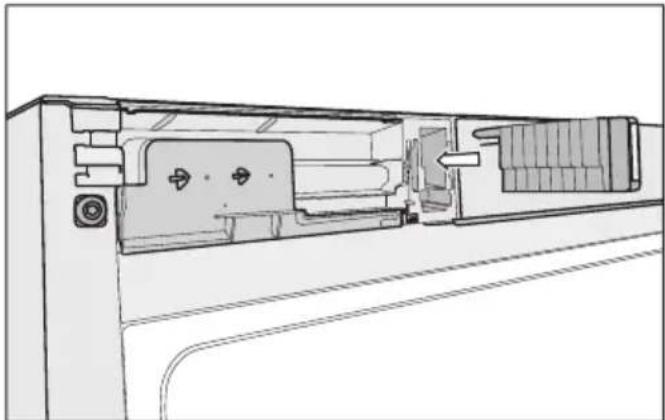
Fit the WiFi stick in the opening until it is fully inserted and engaged.
Refit the cover.
- Connect the refrigeration appliance to the mains electricity supply.
After approx. 60 seconds you can sign your refrigeration appliance onto your WiFi network.
en - Signing a household appliance onto the WiFi network via smartphone/tablet
Signing on using the Miele@mobile App
Please note that the refrigeration appliance can only be networked with a WiFi network of frequency 2.4 GHz (Standard b/g/n).
The WiFi stick must be fitted.
To connect via the app you will need:
- a smartphone or tablet with the Miele@mobile app installed on it
- the name of your local WiFi network and its password
- the serial number of your Miele refrigeration appliance (you find it on the data plate; see the refrigeration appliance's operating instructions)
the serial number of your Miele refrigeration appliance is the password for signing on. The password consists of the last 9 digits of the serial number, excluding the "0" at the beginning.
Download the Miele@mobile app
You can download the appropriate Miele@mobile app for the WiFi module for free from the respective app stores.
Search in App Store or Google PlayTM for the Miele@mobile app.


Download the app to your mobile device.
Start the Miele@mobile app and set up a Miele user account.
If you already have a Miele user account, you can use these details to log on to the app.
The logon process depends on the operating system of your smartphone or tablet.
en - Signing a household appliance onto the WiFi network via smartphone/tablet
Integrating a household appliance via a mobile device
You have logged on to your user account in the Miele@mobile app and your smartphone or tablet is using the WiFi network to which the household appliance is to be connected.
Make sure that the signal of your WiFi network is sufficiently strong in the place where you want to set up your appliance.
Touch the start screen
- Scroll to the left or the right with the < or > arrow key until the symbol for Miele@home system settings @ appears.
Touch @.
Scroll to the left or the right with the < or > arrow key until · appears.
Touch
The wireless access point (Soft access point) will start on the WiFi stick, and a direct connection will be established between your household appliance and your smartphone or tablet.
- Select "Add Miele appliance/gateway" from the app.
Select "Add new Miele appliance".
■ Select "Carry out WiFi connection via app". - Follow the further instructions given by the app.
When successfully logged on you will see your household appliance displayed in the Miele@mobile app. The
start screen with the symbol at the top right-hand side will appear in the refrigeration appliance's display.
Tip: It can take a few seconds for your household appliance to show in the app.
- Select "Start Miele@mobile" to use the features of the Miele@mobile app for your household appliance.
Apple, the Apple Logo, iPhone and iPad are trademarks of Apple Inc., registered in the U.S. and other countries. App Store is a service mark of Apple Inc.
en - Signing a household appliance onto the WiFi network via smartphone/tablet
Options in the sub-menu @ Miele@home system settings
Certain settings can be adjusted in Settings mode on your refrigeration appliance via @ Miele@home system settings.
| WPS WPS pushbutton | |
| ·»(«· Wireless access point (soft access point) | |
| Reset WiFi module | |
| WiFi module default settings |
- WPS pushbutton
As an alternative to networking via the Miele@mobile App we recommend using WPS (Wireless Protected Setup).
To do so you will need a WPS-compatible router.
Touch WPS.
For a certain time an attempt will be made to create a WiFi link.
Activate the "WPS" function on your router within two minutes.
Once connection has been created, will appear in the display.
Confirm with OK.
The display changes to the start screen, and appears in the top right.
If a connection could not be created, the display shows .
You have probably not activated WPS at your router quickly enough. Repeat the steps above.
- Wireless access point (soft access point)
You can create a direct link from your refrigeration appliance to your mobile device (e.g. smartphone or tablet). This connection is necessary in order to create a network connection with the Miele@mobile app.
A full description for this can be found under "Signing on using the Miele@mobile App", Integrating a household appliance via a mobile device".
Touch
For a certain time an attempt will be made to create a direct link.
- Confirm the link creation at the mobile device.
The display changes to the start screen, and appears in the top right.
If no link is confirmed after approx. 15 minutes, the procedure is cancelled. The display changes to the start screen.
en - Signing a household appliance onto the WiFi network via smartphone/tablet
- Reset WiFi module
You can reset all entered settings and values for Miele@home to standard settings. All settings, which do not affect Miele@home will remain unchanged and the WiFi stick will be switched on.
Touch
appears.
Confirm with OK.
The WiFi module is restarted. After a successful restart, the display changes to the start screen and appears in the top right.
WiFi module default settings
If you wish to reset all entered settings and values for Miele@home, you can restore the factory default settings on your WiFi module. All settings, which do not affect Miele@home will remain unchanged and the WiFi module will be switched off.
Touch
appears.
Confirm with OK.
The WiFi module is reset and switched off. The display changes to the start screen and the symbol for an active WiFi connection disappears.
Conformity declaration
Miele hereby declares that this XKM 3100 W complies with Directive 2014/53/EU.
The complete text of the EU declaration of conformity is available from one of the following internet addresses:
- Products, Download from www.miele.co.uk
- For service, information, operating instructions etc: go to www.miele.co.uk/domestic/customer-information-385.htm and enter the name of the product or the serial number
Frequency band of the WiFi module 2.412 GHz - 2.472 GHz
Maximum transmitting power of the < 100 mW WiFi module
fr - Table des matieres
- Bouton application push WPS
UcTaHOBKaMoDyJWi-Fi 106
Perictpaia np6opab Cetn Wi-Fi c nomoubocmaptoha/nilanweta... 107
Pernctpaunc n oomou npnloxne Miele@mobile 107
Texnueckne xapaKtepncTkn 111
3aBHeHne O COOTBeTCTBn TObapa 111
Modylb Wi-Fi OTBeyaet HopMaTexHnuecko 6e30nacHocTn. Tem He MeHee, HeHaJIeXaUaJЯ 3KcIpyaTaUJЯ MOxKET pINBecTn K TpaBMam I MaTePnaIbHOMy yUepe6y.
BHNMaTeIbHo npOHTaIe IHCTpyKcIIO NO MOHTaKy uYCTaHOBe,
IpeJxJe Yem BBOITb B 3KcPlyaTaUH MoyIb Wi-Fi. B Hjem co-
dePkaTcBaxKhIe yKa3aHnI NO MOHTaKy MoyIa Wi-Fi n TexHnke
6e3OpacHocTn. Tem cambl Bbl oBe3OpacIte ce6n I ppeIoTbpaTtTe IOBpeXdEHHa MoyIa N np6Opa.
CoxpaHnTe daHHoe pyKOBoIcTBO IO MOHTaJy I yCTaHOBKe I NO BO3MOxHocTn IpeJaIte erO cIeDyIOUeMy BlaJeIbCu.
Bo3MOxHOCTn yCTaHOBKN B IOdMeHOCNCTeMHbIX HAcTpoEK
Miele@home
B pexnme yctaHOBOK BaUero npi-6opa Bbl MOKeTe BblIOJHNTb ONpeDeJIeHHbIe HAcTPOIKN B NOdMeHIO CNCTemHbIX HAcTpoEK Miele@home @.
WPS Push Button (Khonka WPS)
B KaueCTBe aIbTepHaTINbI DoCTyPa K Cetn PnI NOMOUs IpnIOxEHHa Miele@mobileMbI peKoMeHdyeM yCTaHOBtB coeINHeHne yepe3 WPS (Wireless Protected Setup).
Ecn coeHHeNe yCTaHOBt b He ydaIocb,Ha DCnJIee NOBITcR
Bo3MOxH0, BbI aKTHBnPoBaJI WPS HeOCTaTOUHO 6bICTpo. NOBTOPrTe BblweyKa3aHHbIe 7aRn.
- Бесний достуна (Soft access point)
Mожно установпь пreamое-coeINHeHne Baшero npибopa c BaшIM MOБиьHbIM KOHeuHbIM yCTpoIcTBOM (HaPn-Mep, cMapTfoHOM, ПlaHWeTOM n T.I.).TaKoe pOdkluoyehne Tpe6yETcЯ дя установс сетeBOrO coeINHeHnC npInLoxKeHNem Miele@mobileApp.
Бол gee podpo6hoe onncahne Bbl haIeTe B rIabe «Pernctpaunc noMoUb npInloXeHn Miele@mobile», pa3dcl «PoiKJIoueHne np6opa c noMoUb MOBnBHO yCTpOiCTBa>.
KochnTeCb
B TeueHne onpeJeHHoro BpeMeHn CnCTema 6yDet nbTaTbCra yCTaHOBTb npAme COeINHeHne.
I OoTBePAnTe NOnbITky CoeINHeHnHa MoBnJIbHOM yCTpOInCTBe.
HnDnKaunpeeNDeT B peXm CTapTOBOrO 3KpaHa, IN BBepxu CnpaBa NOBNTcra
Ecnno ncteHn npimepHo 15 MNHyT coeHHHeHne He 6ydt NOITBepKdeHO, NOnbITKn COeHHHeHna 6ydyT npepBaHbI. INdkaun nepeiDET B pexmCTapTOBOrO 3KpaHa.
ru - Perinctraçania prnóba B cétn Wi-Fi c nomoúbócmaprfoha/πlaHseTa
-пенисторузka мodyлЯ Wi-Fi
Mожно сброчь BCE Вылолн HeHbIe NaCTpoиКИ BBeДeHHbIe 3HaueHnЯ ДЯ cnCTembl Miele@home. BCE NaCTpoиKn, He OTHOscAuNecr K CnCTeMe Miele@home, coxpaHЯOTcR, MoDyJIb Wi-Fi BkIIOUaTeCra.
KochnTecb
PONBNTC
I OndTbePdnte HaxaTneM OK.
Modylb Wi-Fi nepe3anyuhen. Nocle ycneHoro nepe3anycka nHdkaunna nepexoNT B pexnM cTapTOBOrO 3kpaHa, a cnpaBa BBepxny noBnEeTcya
- 3aBoDcKne HacTpoiKn MoDyJn Wi-Fi
EcIn BbIXOTITE C6pOcNTB BCE BbINOJIHeHHbIe HAcTPOiKN I BBeIeHHbIe 3Ha-ueHnI dIa CnCTeMbI Miele@home, MoKHO CHOBABOCCTaHOBITb 3aBOIDCKne Ha-CTPOiKN MOyJN Wi-Fi. Bce HacTPOiKN, He OTHOCSIeCk K CnCTeMeMiele@home, coxpaHIOrTcR, MOyJbWi-Fi BBIKIIOuHaETcR.
KochnTeCb.
NoBNTcra
I OndTbePdnte HaxkataHem OK.
Y MoDyIa Wi-Fi BOCCTaHaBJIbAeTcra NC-XOJHOE COCTOAHne, I OH BBIKJIIOUaETcra. HNdkaunr nepexoNT B peXIM CTapTOBOrO 3KpaHa, a CNMBOL ak- TnBHorO Wi-Fi-coeINHeHnra rachet.
3aBHeHne O COOTBeTCTBn TOBapa
HacToaIIM KOMpaHnIe Miele 3aBnIeT, YTO daHbI XKM 3100 W COOTBeTCTByeT DInpeKtIbe 2014/53/EC.
ПолныйTekCT 3аяВлесеня O COOTBeTCTBи TObapa Tpe6OBaHЯM EC MOxHo haHTn Ha ODNOM N3 CLEdYIOxN INHTepHET-CanTOB:
- PódykTbI, CkaaTaB, Ha www.miele.de
- CepBnC, 3anpoc nHΦopMaζη, INcTpyKζη nO ΘKcπIyataζηn Ha www.miele.de/haushalt/informationsanforderung-385.htm c yka3aHneM ha3Ba-Hnra np6opa nIi 3aBODcKO rO Homepa.
- Correct application
- Technical safety
- Disposal of the packing material
- Disposing of your old appliance
- WiFi stick XKS 3100 W
- en - Signing a household appliance onto the WiFi network via smartphone/tablet
- Signing on using the Miele@mobile App
- Download the Miele@mobile app
- Integrating a household appliance via a mobile device
- Options in the sub-menu @ Miele@home system settings
- - WPS pushbutton
- - Reset WiFi module
- WiFi module default settings
- Conformity declaration
- fr - Table des matieres
- - Bouton application push WPS
- Bo3MOxHOCTn yCTaHOBKN B IOdMeHOCNCTeMHbIX HAcTpoEK
- Miele@home
- WPS Push Button (Khonka WPS)
- - Бесний достуна (Soft access point)
- ru - Perinctraçania prnóba B cétn Wi-Fi c nomoúbócmaprfoha/πlaHseTa
- -пенисторузka мodyлЯ Wi-Fi
- - 3aBoDcKne HacTpoiKn MoDyJn Wi-Fi
- 3aBHeHne O COOTBeTCTBn TOBapa
Brand : MIELE
Model : XKS 3100 W
Category : Refrigerator