VD33 - Watch TMI - Free user manual and instructions
Find the device manual for free VD33 TMI in PDF.


| Product Type | Quartz watch |
| Brand | TMI |
| Model | VD33 |
| Power | Button cell battery - replace every 1 to 2 years |
| Main Functions | Local time, dual time zone (GMT), date (VD33 model), 24-hour hand, dual hour/minute hands |
| Display | Hour, minute, central second hands, 24-hour hand at 3 o'clock subdial, dual hands at 9 o'clock (12h) and 6 o'clock subdials, date window at 3 o'clock |
| Time Setting | Crown with 2 positions (first click for date, second click for time) |
| Dual Time Setting | Buttons A and B: press to adjust +/- 1 hour (normal position); crown at second click to adjust minutes |
| Dual Hands Reset | Long simultaneous press on A and B (more than 2 seconds) with crown in second click position, then individual adjustment with A or B |
| Care | Clean with a soft dry cloth. Avoid water, shocks and magnetic fields |
| Battery Replacement | Entrust to a professional watchmaker to ensure water resistance |
| Spare Parts | Standard battery available from watchmaker; standard TMI movement |
| Repairability | Repair possible by a watchmaker |
| Manual | 21 pages, downloadable free in PDF from the website |
| Available Languages | FR, DE, EN, ES, IT, PT, ZH and others on request |
Frequently Asked Questions - VD33 TMI
User questions about VD33 TMI
0 question about this device. Answer the ones you know or ask your own.
Ask a new question about this device
Download the instructions for your Watch in PDF format for free! Find your manual VD33 - TMI and take your electronic device back in hand. On this page are published all the documents necessary for the use of your device. VD33 by TMI.
USER MANUAL VD33 TMI
| VD33 | VD34 | |||
| Local Time | Time Indication | Hour hand | Center hour hand | |
| Minute hand | Center minute hand | |||
| Second hand | Center second hand | |||
| 24 hour hand | 3H subdial hand | |||
| Date window | O | X | ||
| Time setting(by turning CROWN) | Crown at : | |||
| 1st click | Date setting | Time setting | ||
| 2nd click | Time setting | X | ||
| Dual Time | Time Indication | Dual hour hand | 9H subdial hand (12 hr) | |
| Dual minute hand | 6H subdial hand | |||
| Time setting(by pushing BUTTONS) | Crown at : | |||
| Normal position | Button A: -1 hour / pushButton B: +1 hour / push | |||
| 2nd click (VD33) | Button A: -1 minute / push | |||
| 1st click (VD34) | Button B: +1 minute / push | |||
Note : The dual minute hand rotates one revolution at every quarter (15 minutes). There is no problem as it is typical function of the movement.
ADJUSTING DUAL TIME HANDS POSITION
- After setting or changing the battery, before setting the time, check if the dual hour hand and dual minute hand are at the "0" (12 o'clock) position.
- If either the dual hour hand or the dual minute hand is not at the "0" position, reset it/them following the procedure shown below:
1) Pull out the crown to second click (VD33) / first click (VD34)
2) Keep the buttons A & B pressed at the same time for more than 2 seconds, then release the buttons.
- Dual minute hand moves and returns to where it was
3) Press button A or B to reset the dual time hands to "0" position.
- Button A : hands move counter-clockwise Button B : hands move clockwise
- The dual hour hand moves correspondingly with the dual minute hand
- The dual hour hand and dual minute hand move quickly if the respective buttons are kept pressed.
4) Push the crown back in the normal position.
Note : The dual minute hand rotates one revolution at every quarter (15 minutes). There is no problem as it is typical function of the movement.
LOCAL TIME SETTING
1) Pull out the crown to second click (VD33) / first click (VD34) when the second hand is at the 12 o'clock position.
2) Turn the crown to set the hour and minute hands. (make sure 24 hour hand is set correctly).
3) Push the crown back in the normal position in accordance with a time signal.
Note:
- The 24 hour hand moves correspondingly with the hour hand.
- The moment the date changes is midnight. When setting the hour hand, make sure that AM/PM is correctly set by using the 24 hour hand as an AM/PM indicator.
DUAL TIME SETTING
- When moving to a country or area in a different time zone, adjust the dual hour hand to that country / area :
[Quick set the dual time]
1) Crown at normal position.
2) Adjust the time by pressing the button A or B.
Button A: -1 hour / push
Button B: +1 hour / push
[ Precise adjustment of the dual time ]
1) Pull out the crown to second click (VD33) / first click (VD34) when the second hand is at the 12 o'clock position.
2) Adjust the time by pressing the button A or B.
Button A: -1 minute / push
Button B: +1 minute / push
3) Push the crown back in the normal position in accordance with a time signal.
Note: The dual minute hand rotates one revolution at every quarter (15 minutes). There is no problem as it is typical function of the movement.
DATE SETTING (VD33 only)
- Before setting the date, be sure to set the time.
1) Pull out the crown to the first click.
2) Turn the crown clockwise until the desired date appears.
3) Push the crown back in the normal position.
Note:
- Do not set the date during any time between 9:00 P.M. and 1:00 A.M. Otherwise, the date may not change properly. If it is necessary to set the date during that time period, first change the time to any time outside it, set the date and then reset the correct time.
时间显示及表冠/按钮操作
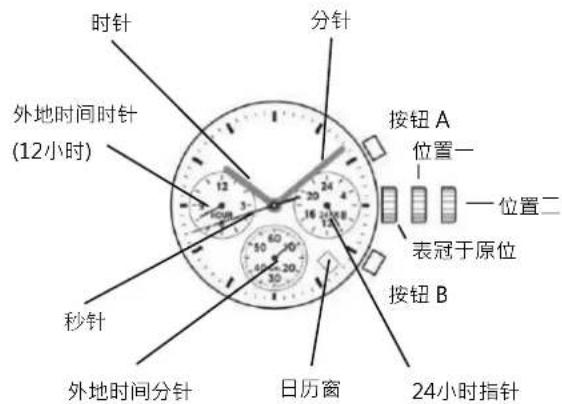
[VD33]
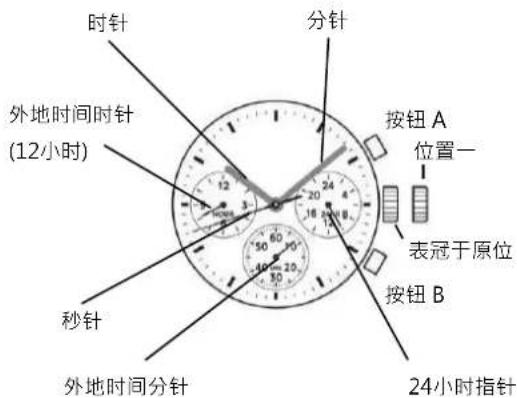
[VD34]
Taste B: +1 Stunde / Drucken