VK64 - Watch TMI - Free user manual and instructions
Find the device manual for free VK64 TMI in PDF.


| Product Type | Chronograph Watch |
| Brand | TMI |
| Model | VK64 |
| Movement | Quartz |
| Display | Hands (hours, minutes, seconds, 24h, chronograph) |
| Main Functions | Hour, minute, second, date, 24h, 60-minute chronograph |
| Chronograph | Capacity up to 60 minutes, standard or elapsed time measurement |
| Chronograph Controls | Button A (start/stop), Button B (reset) |
| Crown | 3 positions: normal (0), first click (date adjustment), second click (time adjustment) |
| Time Setting | Pull crown to 2nd position, turn to set hours/minutes, verify AM/PM |
| Date Setting | Pull crown to 1st position, turn clockwise. Avoid between 9 PM and 3 AM |
| Battery | Requires replacement by a watchmaker |
| Reset after battery change | Method 2: pull crown to 2nd position, press B for 2 seconds, return crown. Chrono hands reset to zero |
| Accuracy | Standard quartz |
| Water Resistance | Not specified - avoid contact with water |
| Maintenance | Clean with a soft dry cloth, avoid chemicals |
| Strap | Replacement possible by a watchmaker |
| Warranty | Not specified |
Frequently Asked Questions - VK64 TMI
User questions about VK64 TMI
0 question about this device. Answer the ones you know or ask your own.
Ask a new question about this device
Download the instructions for your Watch in PDF format for free! Find your manual VK64 - TMI and take your electronic device back in hand. On this page are published all the documents necessary for the use of your device. VK64 by TMI.
USER MANUAL VK64 TMI
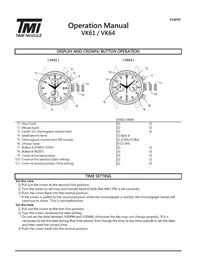
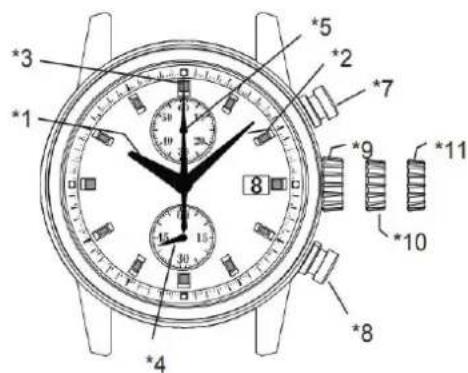
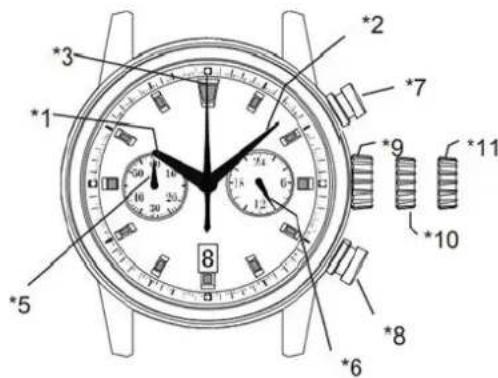
1: Hour hand
2:Minute hand
3: Center 1/5 chronograph second hand
4: Small second hand
5: Chronograph minute hand (60 minute)
6:24 hour hand
7:Button A (START/ STOP)
8:Button B (RESET)
9: Crown at normal position
10 : Crown at first position (Date setting)
*11: Crown at second position (Time setting)
VK61 VK64
1) Pull out the crown to the second click position.
2) Turn the crown to set hour and minute hand (Check that AM / PM is set correctly)
3) Push the crown back into the normal position.
* If the crown is pulled to the second position while the chronograph is started, the chronograph hands will continue to move. This is not malfunction.
Set the date
1) Pull out the crown to the first click position.
2) Turn the crown clockwise for date setting
- Do not set the date between 9:00PM and 3:00AM, otherwise the day may not change properly. If it is necessary to set the date during that time period, first change the time to any time outside it, set the date and then reset the correct time.
3) Push the crown back into the normal position.
HOW TO RESET (AFTER BATTERY CHANGE)
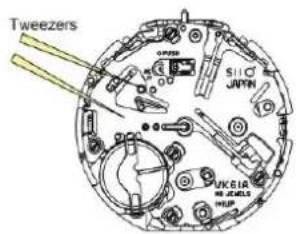
Method 1
1) Set the crown to the normal position
2) Touch the AC terminal of circuit block and the switch spring with conductive tweezers to reset the circuit.
3) The small second hand will move at two-second interval for 10 seconds as a demonstration. (VK61 only)
Method 2
1) Pull out the crown to the second click position.
2) Press the button B for two seconds and release the button.
3) Push the crown back to the normal position.
4) The small second hand will move at two-second interval for 10 seconds as a demonstration (VK61 only)
- If the crown is operated within the 10 seconds, the two-second interval movement will not be activated (VK61 only)
- It is not necessary to set the chronograph hands after the battery is exchanged. If the chronograph hand positions are incorrect, follow below procedure all the chronograph hands will be reset to "0" position.

HOW TO USE THE CHRONOGRAPH
[Standard measurement : e.g. 100m race ]
Press the buttons in the following order: A A B
![TMI VK64 - [Standard measurement : e.g. 100m race ] - 1](/content/2026/03/492148/images/e8105ad3f4aa195a5af07fa50422256d72af183b6a092de4771b67a881f72967.jpg)
![TMI VK64 - [Standard measurement : e.g. 100m race ] - 2](/content/2026/03/492148/images/fb0071c3ba40a98d15bf92190baa4c4a19d2de83e7fad262d4a41880c1dbe7d0.jpg)
START
![TMI VK64 - [Standard measurement : e.g. 100m race ] - 3](/content/2026/03/492148/images/ab36c3bfbee0b151e5ecb3f4eaa0b181983bbf764c8c10dec4ce36226bc9f7da.jpg)
STOP (Finish)
![TMI VK64 - [Standard measurement : e.g. 100m race ] - 4](/content/2026/03/492148/images/f48ddd8e9a973ef7b961a5811cb63670589e3495bc546a2c07b8f2b88d78a2c3.jpg)
RESET
(20 minutes 10 seconds)
-
Press button A again to stop the chronograph. The chronograph hands stop to indicate the elapsed time.
-
Press button B to reset the chronograph. All the chronograph hands will be reset to "0" position.
-
Press button A to start the chronograph. The chronograph hands will start moving.
-
The chronograph can measure up to 60 minutes and chronograph stops after a measurement for 60 minutes.
- After the maximum measurement time finished, to restart the chronograph function :
- During the chronograph operation, button B (reset) can be pushed. It will not cause any problem.
Operation Manual VK61 / VK64
[Accumulated elapsed time measurement : e.g. baseketball game ]
Press the buttons in the following order: A A/A... A B
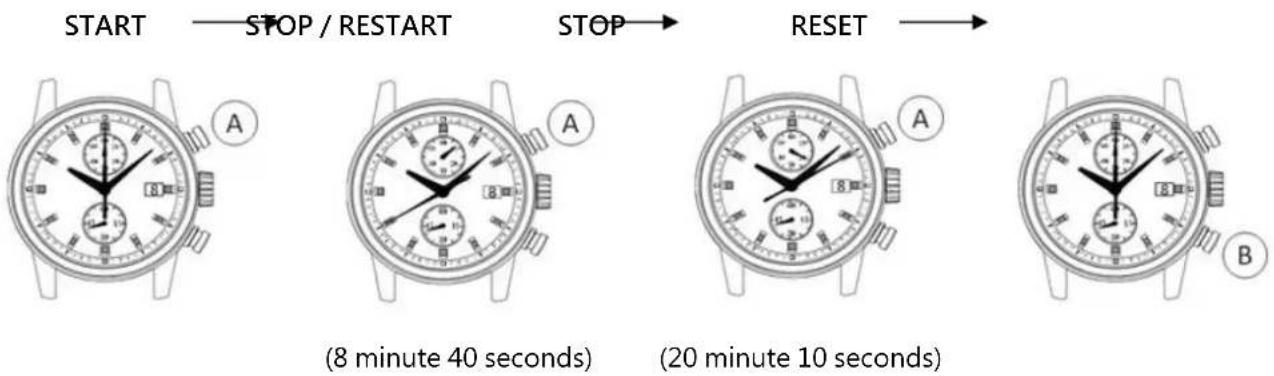
- Restart and stop of the chronograph can be repeated as many times as necessary by pressing button A.
時間顯示及錶冠/按鈕操作
[VK61]
[VK64]
VK61 VK64
(20 minutes 10 seconds)
(20 minutes 10 seconds)
(20 minutes 10 seconds)