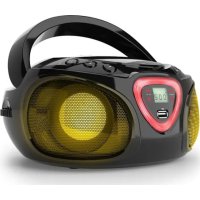
Roadie Boombox - Mp3 player Auna - Free user manual and instructions
Find the device manual for free Roadie Boombox Auna in PDF.


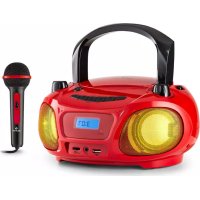
| Product Type | MP3 player with radio, CD, Bluetooth and AUX input |
| Brand | Auna |
| Model | Roadie Boombox |
| Article Numbers | 10029813, 10029814, 10029815, 10038356, 10038357 |
| Power Supply | 230 V ~ 50 Hz (mains) or 6 x C-type batteries (1.5 V each) |
| Power Consumption | 8 W (standby: 0.45 W) |
| Audio File Formats | MP3 (32 ~ 320 kbps) |
| USB Port | USB 2.0 |
| FM Radio | 87.5 - 108 MHz |
| AM Radio | 530 - 1600 kHz |
| Bluetooth | 2.400 - 2.480 GHz, A2DP and AVRCP profiles, RF power 4 dBm |
| CD Player | Yes, audio CD and MP3 |
| AUX Input | 3.5 mm jack |
| Headphone Jack | Yes |
| LED Light Effects | Yes, synchronized with music |
| Package Contents | Device, power cord, user manual |
| Safety Instructions | Laser protection, avoid condensation, battery precautions, do not expose to humidity or excessive heat |
| Recycling | Do not dispose of with household waste, drop off at a collection point |
| Declaration of Conformity | Compliant with directive 2014/53/EU, manufacturer: Chal-Tec GmbH |
Frequently Asked Questions - Roadie Boombox Auna
User questions about Roadie Boombox Auna
0 question about this device. Answer the ones you know or ask your own.
Ask a new question about this device
Download the instructions for your Mp3 player in PDF format for free! Find your manual Roadie Boombox - Auna and take your electronic device back in hand. On this page are published all the documents necessary for the use of your device. Roadie Boombox by Auna.
USER MANUAL Roadie Boombox Auna
CLASS 1 LASER PRODUCT
CLASS 1 LASER PRODUCT
CAUTION: INVISIBLE LASER RADIATION WHEN OPEN AND INTERLOCKS DEFEATED. AVOID EXPOSURE TO BEAM.

This product contains a low power laser device.
Berlin Brands Group UK Limited PO Box 42 272 Kensington High Street London, W8 6ND United Kingdom
Congratulations on purchasing this equipment. Please read this manual carefully and take care of the following hints on installation and use to avoid technical damages. Any failure caused by ignoring the items and cautions mentioned in the operation and installation instructions are not covered by our warranty and any liability.

CONTENTS
Technical Data 18
Safety Instructions 19
Product Overview 21
Initial Operation 24
Operation 25
Disposal Considerations 27
Declaration of Conformity 27
TECHNICAL DATA
| Item # | 10029813, 10029814, 10029815, 10038356, 10038357 |
| Power supply | Mains socket AC 230 V~ 50 Hz / batteries (6 x 1.5 V type „C”) |
| Power consumption | 18 W (standby: 0.45 W) |
| Supported file types (USB/CD) | MP3 (32 ~ 320 kbps) |
| USB | 1, 2.0 |
| FM radio band | 87.5-108 MHz |
| AM radio band | 530-1600 kHz |
| BT: | 2.400 GHz - 2.480 GHz; Profile: A2 DP, AVRCP Radio-frequency power 4 dBm |
| Accessories | Device, AC power cable, instruction manual |
CLASS 1 LASER PRODUCT
CLASS 1 LASER PRODUCT APPAREIL A LASER DE CLASSE 1 PRODUCTO LASER DE CLASE 1
CAUTION INVISIBLE LASER RADIATION WHEN OPEN AND INTERLOCKS DEFEATED. AVOID EXPOSURE TO BEAM.

This product contains a low power laser device.
Follow the safety instructions below to operate the unit safely.
Protection against radiation
- Do not attempt to disassemble the unit's casing as the laser's radiation exposure is harmful to the eyes.
- Switch off the unit immediately if liquids or solid objects get inside the unit.
- Do not touch or bump the lens, as this could damage the lens and cause the unit to stop working properly.
- Do not insert anything into the safety groove as this will activate the laser diode while the CD tray is still open.
- If you are not going to use the unit for a long period of time, switch the unit off. Unplug the mains plug from the socket. Always pull out the mains plug by the plug itself and never by the cable.
- This unit contains a laser. Improper use of the unit may result in hazardous radiation exposure.
General advice
Children should be supervised when using the unit. - Never wrap the headphone cord around a person or animals. - Special care should be taken with long cables as they can easily become a trip hazard.
Choice of location
- Do not use the unit in extremely hot, cold, dusty or humid locations.
- Do not expose the unit to direct sunlight.
- Keep the unit away from heaters and sources of electrical noise, such as fluorescent lamps or motors.
- Place the unit on a flat and level surface.
- Be careful not to obstruct the air circulation of the unit, by a place with insufficient ventilation or by covering it with a cloth or placing it on a carpet.
- Use the unit only in combination with a trolley, stand, tripod, bracket or table recommended by the manufacturer or supplied with the unit.
Condensation
- If the unit is placed in a warm and humid heated room, water droplets or condensation may form inside the unit.
- Condensation inside the unit may affect the operation of the unit.
- In this case, leave the unit for 1-2 hours before switching it on or gradually warm up the room and allow it to dry before using the unit.
- If any problems occur with the unit, please contact customer service.
Battery instructions
- There is a risk of explosion if the battery is not replaced properly. Replace flat batteries only with batteries of the same or similar type.
- Do not use old and new batteries at the same time.
- Never mix alkaline, standard (carbon-zinc) or rechargeable (nickel-cadmium) batteries.
- Remove the batteries from the battery compartment if you will not be using the appliance for a long period of time. Old or leaking batteries may damage the unit and void the warranty.
- Do not attempt to charge batteries that are not suitable for this purpose; the batteries may overheat and burst (follow the battery manufacturer's instructions).
- Do not throw old batteries into a fire. This could cause the batteries to leak and/or explode.
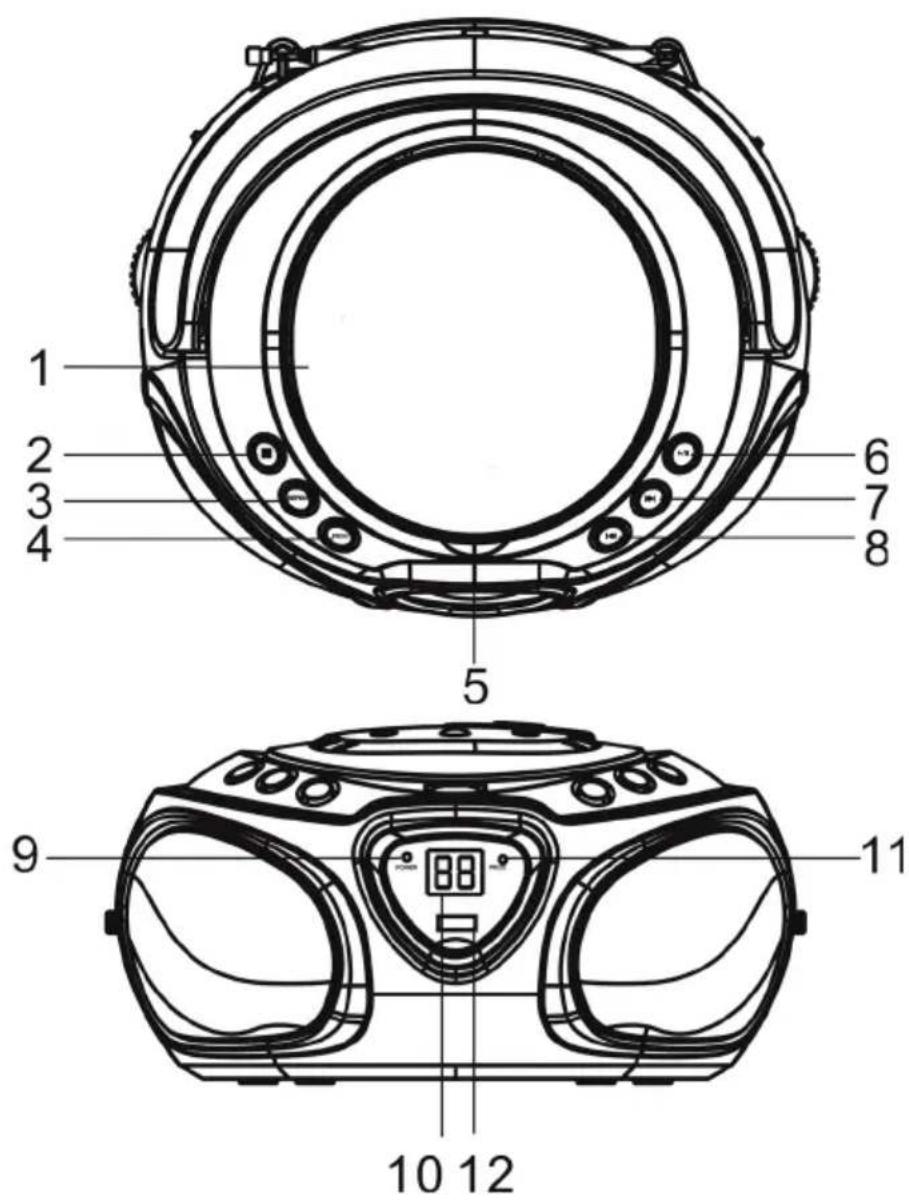
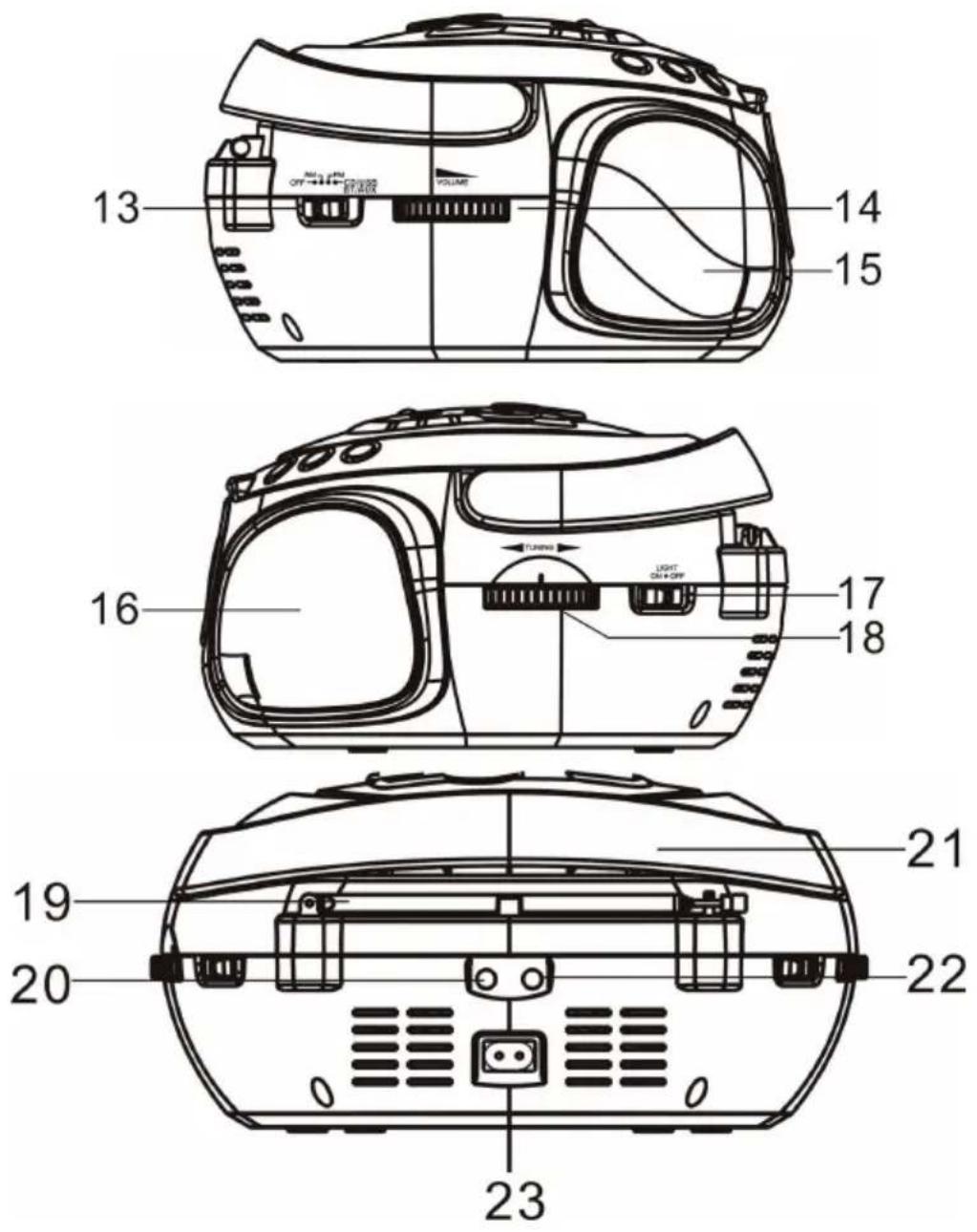
| CD tray | 13 | FUNCTION (OFF/AM/FM/CD/AUX/USB/BT) |
| ■ STOP / BT PAIR | 2 14 VO LUME | |
| PLAY MODE | 3 15 Speaker | |
| ALBUM | 4 16 Speaker | |
| Open CD tray | 5 17 LIGHT ON/OFF | |
| PLAY/PAUSE / FUNCTION(USB/BT/CD) | 6 18 TUNING | |
| ► | 7 19 Antenna | |
| ► | 8 20 AUX IN jack | |
| Power LED | 9 21 Handle | |
| Display | 10 22 Headphone jack | |
| FM Stereo indicator | 11 23 AC IN jack | |
| USB port | 12 | |
INITIAL OPERATION
This unit operates on AC 230 V~ 50 Hz or 6 pieces of 1.5 V "C" (UM-2) batteries. Do not attempt to operate the radio on any other power source. You could cause damage to the unit and void your warranty. Please be sure the power outlet you plug this unit into is working and receives constant (unswitched) power.
Battery operation:
Remove the battery door on the bottom. Install 6 x DC1.5V "C" (UM-2) batteries (not included) according to the polarity diagram inside the battery compartment. Be sure that the batteries are installed correctly. Wrong polarity may damage the unit. Close the Battery Door.
AC mains operation:
Plug the detachable AC cord into a standard AC outlet (230 V~50 Hz). When the AC power cord (included) is connected to the AC Power Socket on the back of the unit and the other end is plugged into a 230 V AC~ 50 Hz wall outlet, the unit will disconnect the batteries automatically, and operate on AC Power only.
Power on/off
Slide the FUNCTION SWITCH to "CD/AUX/USB/BT" for AUX or CD play, "FM" for FM radio, "AM" for AM radio and "OFF" for unit power off.
OPERATION
Radio
Fully extend the antenna.
Slide the FUNCTION switch to FM or AM.
Rotate the TUNING wheel to tune in the desired station.
Rotate the VOLUME knob to adjust the volume.
CD
Slide the FUNCTION switch to CD/AUX/USB/BT. The display lights up.
Open the CD tray pressing △ and insert a (audio or MP3) CD with the printed side facing up.
Use and to operate CD playback.
Repeat & random modes:
Press MODE repeatedly for:
REP (repeat current track)
REP ALL (audio CDs: repeat all tracks)
REP FOLDER (MP3s: repeat current folder)
RANDOM (play tracks in random order)
Press again to deactivate and continue normal playback. Corresponding icons disappear from the display.
Programmed playback:
Put in a CD. Press , in case the CD player is not in STOP mode yet.
Press MODE. The display shows: P01 (flashing).
Use back/next to select further tracks. Press MODE to add. The display now states: P02 (flashing).
Repeat this procedure for all tracks you want to add.
(Audio CD: max. 20 tracks; MP3: max. 99 tracks)
USB
Slide the FUNCTION switch to CD/AUX/USB/BT. The display lights up.
Press and hold USB/BT to change from CD to USB to BT.
Press ALBUM, to select the desired folder (use back/next to select) or simply use back/next to scroll your music library.
Press for play/pause.
BT
Slide the FUNCTION switch to CD/AUX/USB/BT. The display lights up.
Press and hold to change from CD to USB to BT.
Activate BT on your BT device, search for ROADIE and pair.
When prompted to enter a password, enter "0000".
The BT LED indicates any successfully established BT connection.
Use your external device to playback music. Adjust the volume level with the external device or with the volume knob on the ROADIE.
Press and hold the STOP/BT PAIR button to disconnect the currently paired device and switch to pairing mode.
Please mind: To playback music via BT, your BT device must comply to A2DP streaming profile.
AUX
Connect any external media players with the AUX in using a 3.5mm audio cable. Slide the FUNCTION switch to CD/AUX/USB/BT. Use your external device (typically a laptop PC, smartphone, tablet, MP3 player, etc.) to play media. Adjust the output volume level using the VOL control on both the ROADIE and your external media player.
Light Effects
Slide the LIGHT switch to ON or OFF to activate / de-activate the LED effects.
DISPOSAL CONSIDERATIONS
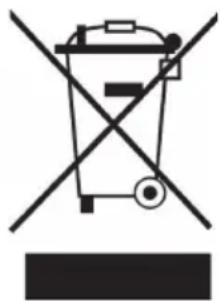
If there is a legal regulation for the disposal of electrical and electronic devices in your country, this symbol on the product or on the packaging indicates that this product must not be disposed of with household waste. Instead, it must be taken to a collection point for the recycling of electrical and electronic equipment. By disposing of it in accordance with the rules, you are protecting the environment and the health of your fellow human beings from negative consequences. For information about the recycling and disposal of this product, please contact your local authority or your household waste disposal service.
This product contains batteries. If there is a legal regulation for the disposal of batteries in your country, the batteries must not be disposed of with household waste. Find out about local regulations for disposing of batteries. By disposing of them in accordance with the rules, you are protecting the environment and the health of your fellow human beings from negative consequences.
DECLARATION OF CONFORMITY
CE UK CA
Manufacturer:
Chal-Tec GmbH, Wallstrasse 16, 10179 Berlin, Germany.
Importer for Great Britain:
Berlin Brands Group UK Limited
PO Box 42
272 Kensington High Street
London, W8 6ND
United Kingdom
Hereby, Chal-Tec GmbH declares that the radio equipment type Roadie is in compliance with Directive 2014/53/EU. The full text of the EU declaration of conformity is available at the following internet address: use.berlin/10029813
For Great Britain: Hereby, Chal-Tec GmbH declares that the radio equipment type Roadie is in compliance with the relevant statutory requirements. The full text of the declaration of conformity is available at the following internet address: use.berlin/10029813
Dear customer,
CLASS 1 LASER PRODUCT
CLASS 1 LASER PRODUCT APPAREIL A LASER DE CLASSE 1 PRODUCTO LASER DE CLASE 1
CAUTION INVISIBLE LASER RADIATION WHEN OPEN AND INTERLOCKS DEFEATED. AVOID EXPOSURE TO BEAM.
This product contains a low power laser device.
Playback modes (Repeat/Random):
Berlin Brands Group UK Limited
PO Box 42
272 Kensington High Street
London, W8 6ND
United Kingdom
CLASS 1 LASER PRODUCT
CLASS 1 LASER PRODUCT APPAREIL A LASER DE CLASSE 1 PRODUCTO LASER DE CLASE 1
CAUTION INVISIBLE LASER RADIATION WHEN OPEN AND INTERLOCKS DEFEATED. AVOID EXPOSURE TO BEAM.
This product contains a low power laser device.
Berlin Brands Group UK Limited PO Box 42
272 Kensington High Street London, W8 6ND
United Kingdom
CLASS 1 LASER PRODUCT
CLASS 1 LASER PRODUCT APPAREIL A LASER DE CLASSE 1 PRODUCTO LASER DE CLASE 1
CAUTION INVISIBLE LASER RADIATION WHEN OPEN AND INTERLOCKS DEFEATED. AVOID EXPOSURE TO BEAM.

This product contains a low power laser device.
Berlin Brands Group UK Limited
PO Box 42
272 Kensington High Street
London, W8 6ND
United Kingdom
- CLASS 1 LASER PRODUCT
- CONTENTS
- TECHNICAL DATA
- PROTECTION AGAINST RADIATION
- GENERAL ADVICE
- CHOICE OF LOCATION
- CONDENSATION
- BATTERY INSTRUCTIONS
- INITIAL OPERATION
- BATTERY OPERATION
- AC MAINS OPERATION
- POWER ON/OFF
- OPERATION
- RADIO
- CD
- REPEAT & RANDOM MODES
- PROGRAMMED PLAYBACK
- USB
- BT
- AUX
- LIGHT EFFECTS
- DISPOSAL CONSIDERATIONS
- DECLARATION OF CONFORMITY
- CE UK CA
- MANUFACTURER
- IMPORTER FOR GREAT BRITAIN
- DEAR CUSTOMER
- PLAYBACK MODES (REPEAT/RANDOM)
Brand : Auna
Model : Roadie Boombox
Category : Mp3 player