EasyManual
DLP1000 BICOLOR - Lighting Dörr - Free user manual and instructions
Find the device manual for free DLP1000 BICOLOR Dörr in PDF.


| Technical Features | Dörr DLP1000 BICOLOR, LED lighting, Color temperature: 3200K to 5600K, Power: 1000W, Brightness: 10000 LUX at 1m |
|---|---|
| Usage | Ideal for photography and videography, use in studio or outdoors, compatible with various mounting accessories. |
| Maintenance and Repair | Regularly clean surfaces, check electrical connections, replace bulbs if necessary, consult a professional for complex repairs. |
| Safety | Use only with compliant cables and plugs, avoid exposure to moisture, do not cover heat sources. |
| General Information | Weight: 2.5 kg, Dimensions: 30 x 30 x 10 cm, Warranty: 2 years, Included accessories: mounting bracket, diffusion filter. |
Frequently Asked Questions - DLP1000 BICOLOR Dörr
User questions about DLP1000 BICOLOR Dörr
0 question about this device. Answer the ones you know or ask your own.
Ask a new question about this device
Download the instructions for your Lighting in PDF format for free! Find your manual DLP1000 BICOLOR - Dörr and take your electronic device back in hand. On this page are published all the documents necessary for the use of your device. DLP1000 BICOLOR by Dörr.
USER MANUAL DLP1000 BICOLOR Dörr
THANK YOU for choosing this DORR quality product.
Please read the instruction manual and safety hints carefully before first use.
Keep this instruction manual together with the device for future use. If other people use this device, make this instruction manual available. This instruction manual is part of the device and must be supplied with the device in case of sale.
DORR is not liable for damages caused by improper use or the failure to observe the instruction manual and safety hints.
01 SAFETY HINTS
- Do not look directly into the LED and do not direct the light beam into the eyes of humans or animals. CAUTION: Looking into the light for an extended period of time may cause an irreversible damage to the retina.
- Only for the illumination for photographic purposes. Not suited for permanent room lightning.
- Protect the device from rain, moisture, direct sunlight and extreme temperatures.
- Do not operate or touch the device with wet hands.
- Protect the device against impacts. Do not use the device if it has been dropped. In this case a qualified electrician should inspect the device before you use it again.
- Do not attempt to repair the device by yourself. Risk of electric shock! When service or repair is required, contact qualified service personnel.
- People with physical or cognitive disabilities should use the device with supervision.
- People with cardiac pacemakers, defibrillators or any other electrical implants should maintain a minimum distance of 30~cm , as the device generates magnetic fields.
- Ensure sufficient ventilation during operation. After use, please switch the device off.
- Make sure to use the device with an appropriate, high-quality Li-ion battery type NP-F750.
- To avoid deep-discharge of the Li-ion battery when device is not in use for a longer period, please charge Li-ion battery up to approx. 60% .
- Never leave the battery charger unattended while charging the batteries. After charging disconnect the charger from power supply.
- Only operate with the supplied original power adaptor. Do not use an extension cord.
- Make sure to turn off the device at main switch before disconnecting from power or removing the battery.
- When unfolding or retracting, as well as when aligning the bardoors there is a risk that your fingers get caught. Watch your fingers.
- To avoid tilting of the LED light, align the light over a widely spread tripod leg. Make sure that the light stand stands on an even and dry ground.
- The housing and the bardoors heat up slightly during operation - turn off the LED light after use and allow it to cool down before touching the housing or the bardoors, or before stowing the device in the bag.
- Do not use the device nearby mobile phones and devices that generate strong electromagnetic fields.
- This device is not a toy. To prevent accidents and suffocation keep the device, the accessories and the packing materials away from children and pets.
- Protect the device against dirt. Never use aggressive cleansing agents or benzine to clean the device. We recommend a soft, slightly damp microfiber cloth to clean the outer parts of the device. Turn off the device and remove batteries or disconnect from power source before cleaning.
- Store the device in a dust-free, dry and cool place.
- If the device is defective or without any further use, dispose of the device according to the Waste Electrical and Electronic Equipment Directive WEEE. For further information, please contact your local authorities.
02 | SAFETY HINTS FOR RECHARGEABLE BATTERIES
Only use high-quality batteries of popular brands. When inserting the battery please respect the correct polarity (+/-) . Please remove battery when device is not in use for a long period of time. Do not throw the batteries into fire, do not short-circuit and do not disassemble them. Never charge non-rechargeable batteries - risk of explosion! Remove leaking batteries from the device immediately. Risk of battery acid burn! Clean the contacts before inserting fresh batteries. In case of contact with battery acid, rinse the affected area immediately with water and contact a doctor. Batteries can be dangerous to life if swallowed. Keep batteries away from small children and pets. Do not dispose of batteries in household waste (see also capture "Disposal of Batteries/Accumulators").
03 | PRODUCT DESCRIPTION
Continuous LED light kit for brilliant photo and video recordings.
- Long-life Bi-Colour LEDs
Colour temperature adjustable from 3200 - 5500 K - Brightness adjustable
04 | NOMENCLATURE
1 Barndoors
2 Magnetic holders
3 Locking screws
4 Swivel frame
5 Battery slot
5a) Battery contact pins
6 LCD display
7 Main switch
8 Socket for power adapter
9 Control dial/press button
10 Socket for light stand with spigot
10a) Locking screw
11 Diffusor plate white/orange
11a) Magnetic mounts
12 Power adapter
12a) Power cable socket
12b) Connection plug
12c) Screw lock
12d) Power cable
Only included in kit Item No. 373482:
13 Remote control
13a) Display
13b) Control buttons +/-
13c) SET button
13d) On/Off button
13e) Button for group/channel selection
13f Battery compartment
14 Battery charger
14a) LED charging indicator
14b) Battery contact pins +/-
14c) Battery slot
14d) Socket for power cable
14e) Power cable
15 Li-Ion battery
15a) Battery contacts +/-
05 | FIRST COMMISSIONING
CAUTION
Before connecting or disconnecting cable connections, make sure that the main switch (7) is on position 0 = Off .
Insert the connection plug (12b) into the socket (8) at the LED light. Pay attention to the pins and holes. Screw tight the screw lock (12c). To disconnect the cable connection, make sure to open the screw lock (12c) first! Plug the power cable (12d) into the power cable socket (12a) and connect the power supply to a socket outlet.
Switch on the LED light at the main switch (7): position I = On .
CAUTION
After each use please turn off the LED light (main switch 7 = position O = Off).
06|LED DISPLAY/ SETTINGS
LCD Display (6)
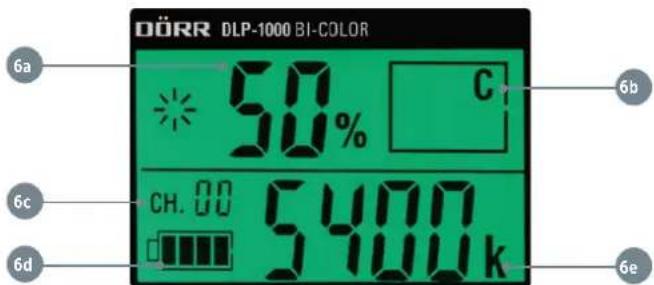
6a) Brightness 0 - 100%
6b) Group selection A - F (for operation with remote control)
6c) Channel selection 1 - 50
6d) Battery capacity indicator
6e)Colour temperature 3200-5500K
Turn the control dial (9) to select the desired brightness (6a) from 0 - 100%. Press the control dial (9) to confirm your selection. Turn the control dial (9) again to enter selection for colour temperature (6e) (display flashes). Turn the control dial (9) to select the desired colour temperature from 3200 - 5500K. Press the control dial (9) to confirm your selection. Press and hold the control dial (9) to enter the channel selection 1 - 50 (6c) or the group selection A - F (6b).
After a few seconds without operation, the display illumination will automatically switch off. Once you make a new adjustment, the display illumination will light up again.
07 | ATTACHING/CHANGING THE DIFFUSOR PLATES
The magnetic mounts (11a) at the diffusor plate and the magnetic holders (2) allow fast and easy attachment/exchange of the diffusor plates.
White diffusor plate provides soft light, reduces harsh shadows Orange diffusor plate provides warm light
The following functions only for kit Item No. 373482:
Before first operation with batteries, please fully charge the Li-ion batteries (15) with the supplied battery chargers (14).

CAUTION
Only charge rechargeable Li-1on batteries of the type NP-F750 with the supplied battery charger! The charger is not suited to charge other battery types!
Insert the power cable (14e) to the cable socket of battery charger (14d) and connect with an electrical outlet. The LED charging indicator (14a) lights up green.
Place the Li-1on battery (15) over the centre of the charging slot (14c) and pay attention to the correct polarity (markings +/- on the battery and in the charging slot). Slide the battery fully forward until it touches the battery contact pins (14b). If battery is inserted properly and the charging process has started, the LED charging indicator (14a) lights up red. When battery is fully charged, the LED charging indicator (14a) turns green. Slide the Li-1on battery backwards and remove it from the charging slot. Disconnect the battery charger from the electrical outlet.

CAUTION
Never leave the battery charger unattended while charging the battery. After charging, disconnect the charger from the power supply.
NOTE
To avoid deep-discharge of the Li-1on batteries when DLP-1000 light is not in use for a longer period, please charge Li-1on batteries up to approx. 60% .
08.2 INSERTING THE LI-ION BATTERIES

CAUTION
Before inserting or removing the Li-ion batteries, make sure that the LED light is turned off (main switch (7) to position O = Off).
Insert the Li-Ion batteries (15) into the battery slots (5) with the battery contacts (15a) facing to the battery contact pins (5a). Slide the battery fully forward until it touches the battery contact pins (5a).
To remove the Li-Ion batteries, slide the batteries backwards and remove them out of the battery slots.
09 | REMOTE CONTROL
Insert the 2 supplied AAA batteries according to the polarity markings (+/-) into the battery compartment (13f). Press the On/Off button (13d).
Display (13a)
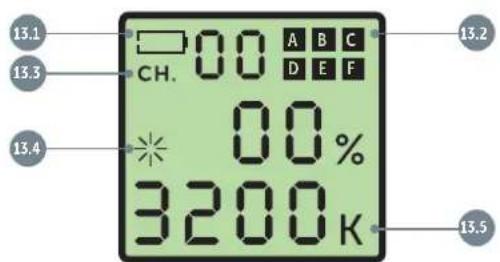
13.1) Battery capacity indicator
13.2) Group selection A-F
13.3) Channel Selection 1-50
13.4) Brightness 0-100%
13.5) Colour temperature 3200 - 5500K
To pair the LED light with the remote control, first select the group (A - F) at the LED light. Then press the button for group selection (13e) at the remote control. Use the control buttons +/- (13b) to select the same group as set for LED light. To confirm, press the SET button (13c) at the remote control.
Use the control buttons + / - (13b) to make your settings and confirm them by pressing the SET button (13c). Press the button for group selection (13e) twice to switch to the channel selection 0-50.
After a few seconds without operation, the remote control will automatically switch off. To activate the remote control again, press the On/Off button (13d).
NOTE
After use turn off the LED light at the main switch (7, position O = Off) and disconnect from power source. Please remove batteries when the LED light is not in use for a longer period.
10 | CLEANING AND STORAGE
Never use aggressive cleansing agents or benzine to clean the device. We recommend a soft, slightly damp microfiber cloth to clean the outer parts of the device. Turn off the device and disconnect from power source or remove batteries before cleaning. Store the device in a dust-free, dry and cool place. This device is not a toy - keep it out of reach of children. Keep away from pets.
11 | TECHNICAL SPECIFICATIONS
| Number of LEDs 576 Bi-Color | |
| Illuminance approx. 2500 Lux/1 m | |
| Colour temperature 3200 - 5500 K | |
| Power | 40 W |
| Colour rendering index (CRI) | >90 Rs |
| Operating voltage | DC 15 V 3 A |
| Power adapter | AC 100~240 V, 50/60 Hz DC 15 V 3 A |
| Dimensions illuminated area | approx. 20 x 20 cm |
| Dimensions | approx. 28,5 x 32 x 6 cm |
| Weight | approx. 1450 g |
| LED Continuous Light DLP-1000 Bi-Color Kit / Item No. 373482 | |
| Charger for NP-F750 | Input AC 100-240 V, 50/60 Hz 150 mA (max.) |
| Output DC 8,4 V/600 mA | |
| Dimensions approx. 8,5 x 4,6 x 4 cm | |
| Weight approx. 118 g | |
| Battery | (Replace-) Sony NP-F750 Li-Ion battery 7,2 V 4400 mAh ( ≧31,68 Wh) |
| Remote control | Frequency 2,4 GHz Batteries 2 x AAA batteries (included) |
| Light stand max. height | approx. 215 cm |
12 | SCOPE OF DELIVERY
Item No. 373484 LED continuous light DLP-1000 Bi-Color single:
1x LED continuous light DLP-1000
1x Diffusor plate white
1x Diffusor plate orange
1x Power adapter
1x Safety hints
Item No. 373482 LED continuous light DLP-1000 Bi-Color kit:
2x LED continuous light DLP-1000
2x Diffusor plate white
2x Diffusor plate orange
2x Power adapter
2x Light stand
4x Li-ion battery NP-F750
4x Battery charger
1x Remote control
2x AAA batteries for remote control
1x Bag
1x Safety hints
13 | DISPOSAL, CE MARKING, SIMPLIFIED EU DECLARATION OF CONFORMITY

13.1 DISPOSAL OF BATTERIES/ACCUMULATORS
Batteries are marked with the symbol of a crossed out bin. This symbol indicates that empty batteries or accumulators which can no longer be charged should not be disposed of with household waste. Waste batteries may contain harmful substances that can cause damage to health and to the environment. Please use the return and collection systems available in your country for the disposal of the waste batteries.

13.2 WEEE INFORMATION
The Waste Electrical and Electronic Equipment Directive (WEEE Directive) is the European community directive on waste electrical and electronic equipment, which became European law in February 2003. The main purpose of this directive is to prevent electronic waste. Recycling and other forms of waste recovery should be encouraged to reduce waste. The symbol (trash can) on the product and on the packing means that used electrical and electronic products should not be disposed of with general household waste. It is your responsibility to dispose of all your electronic or electrical waste at designated collection points. Disposing of this product correctly will help to save valuable resources and it is a significant contribution to protect our environment as well as human health. For more information about the correct disposal of electrical and electronic equipment, recycling and collection points please contact your local authorities, waste management companies, your retailer or the manufacturer of this device.
13.3 ROHS CONFORMITY
This product is compliant with the European RoHS directive for the restriction of use of certain hazardous substances in electrical and electronic equipment and its amendments.

13.4 CE MARKING
The CE marking complies with the European standards and indicates that the product meets the requirements of the applicable EU directives.
13.5 SIMPLIFIED EU DECLARATION OF CONFORMITY
Hereby, DORR GmbH declares that the radio equipment type [373482, 373484, 373487] is in compliance with Directive 2014/53/EU. The full text of the EU declaration of conformity is available at the following internet address: http://www.doerr-foto.de