
Goggles Racing Edition - VR glasses DJI - Free user manual and instructions
Find the device manual for free Goggles Racing Edition DJI in PDF.
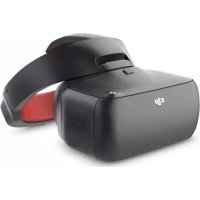


| Product Type | Virtual Reality (VR) Headset for FPV Drone |
| Brand | DJI |
| Model | Goggles Racing Edition |
| Housing Dimensions | 195 × 155 × 110 mm |
| Headband Dimensions (folded) | 255 × 205 × 92 mm |
| Housing Weight | 502 g |
| Headband Weight | 500 g |
| Screen Size | 2 × 5 inches (12.7 cm) |
| Screen Resolution | 3840 × 1080 (1920 × 1080 per eye) |
| Built-in Battery | 9440 mAh |
| Maximum Battery Life | Approximately 6 hours |
| Charging Time | Approximately 4 hours |
| Recommended Charger | Input 100-240 V AC, output 5 V/3 A, 9 V/2 A, 12 V/4.5 A |
| Transmission Frequency | 2.4 GHz / 5.8 GHz |
| Maximum Transmission Range | 7 km (FCC 2.4 GHz) |
| Minimum Latency | 50 ms (480p50 mode) |
| Main Functions | OcuSync video transmission, head tracking, HD video playback, compatible with DJI drones and OcuSync modules |
| Supported Video Playback Formats | MP4, MOV, MKV (H.264, AAC, AC-3, DTS, MP3) |
| Maintenance and Cleaning | Clean the lenses with a dry microfiber cloth. Avoid moisture and dust. Store in a dry place. |
| Safety | Do not touch the aerial unit after use (it gets hot). Follow local regulations for frequencies. Avoid interference. |
| Spare Parts / Repairability | Replaceable antennas (pagoda, cylindrical, dipole). Built-in battery not user-replaceable. |
| Operating Temperature | 0 °C to 40 °C |
| Box Contents | DJI Goggles RE headset, headband, 3 antennas (pagoda, cylindrical, dipole), micro USB cable, charger, documentation |
Frequently Asked Questions - Goggles Racing Edition DJI
User questions about Goggles Racing Edition DJI
0 question about this device. Answer the ones you know or ask your own.
Ask a new question about this device
Download the instructions for your VR glasses in PDF format for free! Find your manual Goggles Racing Edition - DJI and take your electronic device back in hand. On this page are published all the documents necessary for the use of your device. Goggles Racing Edition by DJI.
USER MANUAL Goggles Racing Edition DJI
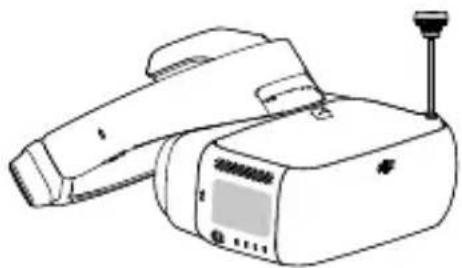
DJI Goggles Racing Edition (hereafter abbreviated as "DJI Goggles RE") are equipped with high-performance displays and an ultra-low latency video downlink for use with DJI™ aircraft, giving you a real-time First Person View (FPV) aerial experience. DJI Goggles RE can also be used to display HD videos, bringing you a more immersive high-definition viewing experience. DJI Goggles RE support head tracking, allowing both aircraft and gimbal to be controlled with head movements for a whole new style of flying. *
Precisely engineered for racing, DJI Goggles RE are compatible with DJI's advanced OCUSYNC™ video transmission module, supporting both analog and 2.4/5.8 GHz dual-band digital video signal with up to 7 km transmission distance and latency as low as 50 ms. ** DJI Goggles RE comes with a set of three compatible antennas for different scenarios. The DJI OcuSync Air System comes equipped with an array of powerful features, such as 1280×960 HD transmission, automatic Frequency-Hopping Spread Spectrum (FHSS) transmission, and access to up to 19 selectable transmission channels. This module is compatible with a variety of multi-rotor and fixed-wing aircraft.
DJI Goggles RE
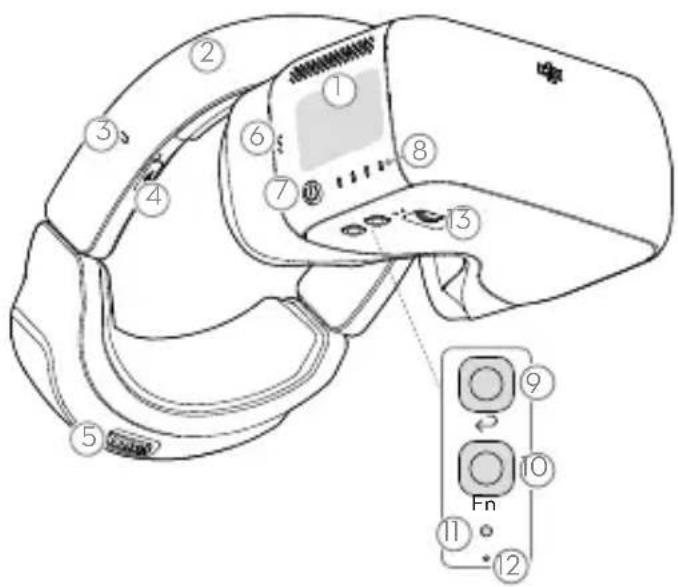
- Touch Panel
- Headband
- Charging Status Indicator
- Micro USB Port
- Headband Knob
- Speaker
- Power Button
- Battery Level Indicators
- Back Button
- Function Button
- Link Button
- Linking Status Indicator
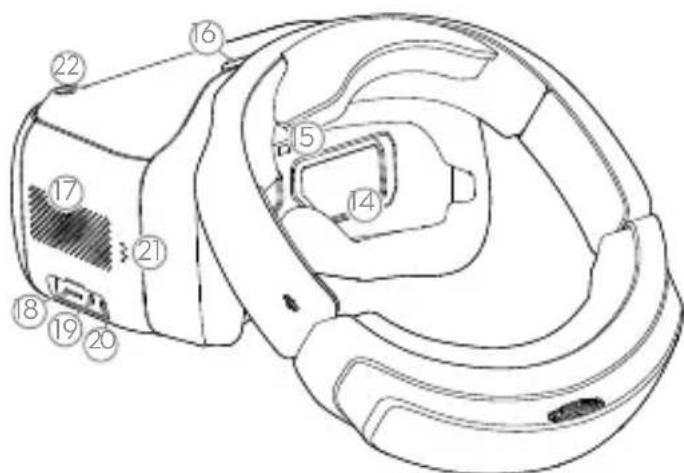
- IPD (Interpupillary Distance) Knob
- Lens
- Proximity Sensor
- Headband Buckle
- Heat Vent
- Micro SD Card Slot
- 3.5 mm Audio Port, HDMI Type-D Port
- Speaker
- SMA Antenna Port
- Only some aircraft are supported. Please refer to the User Manual for specific models and operations. ** The DJI Goggles RE can reach their maximum transmission distance (2.4 GHz, FCC) in a wide open area with no EMI (electromagnetic interference), achieving minimum latency in 480p50 live view mode.
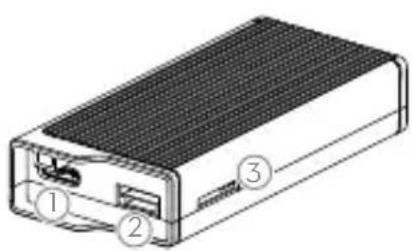
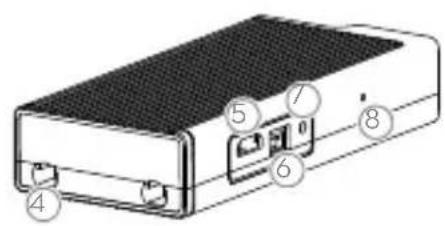
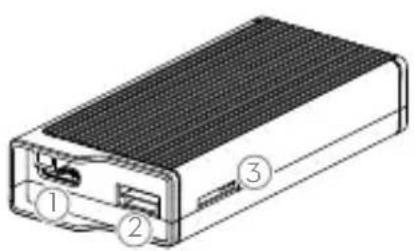
- Camera Port* Connects to the DJI OcuSync Camera.
- S_BUS Port Connects with the 3-in-1 Cable (Power, S_BUS, UART), and connects to the power, flight controller, and OSD port based on the information below.
RED: Power
BLACK: Power GND
WHITE: UART RX (Connects to OSD TX)
GRAY: UART TX (Connects to OSD RX)
BROWN: Signal GND
YELLOW: S.Bus (Connects to Flight Controller RX)
- Micro SD Card Slot: Insert the Micro SD card to store the recorded video.
- Note that both this port and the camera connector plug are customized Type-C interfaces, and they are not compatible with third-party equipment.
- Antenna Ports (MMCX): Used to attach the Air Unit antennas.
- Micro USB Port: Connects to your PC for firmware updates through DJI ASSISTANTTM 2. (When the Air Unit is powered on)
- PPM Port Connects to external devices that can handle PPM signals via the PPM Cable. Set the corresponding channel in DJI Goggles RE to control the device remotely with head movements. (coming soon) RED: Power BLACK: Signal GND WHITE: PPM signal
- Link Button Press this button to link the DJI OcuSync Air Unit with the DJI Goggles RE.
- Linking Status Indicator Indicates the linking status of the DJI OcuSync Air Unit and the DJI Goggles RE.
Installation and Wearing
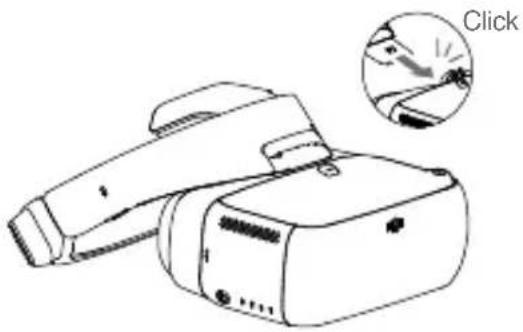
Insert the Headband Buckle into the slot above the DJI Goggles RE body.
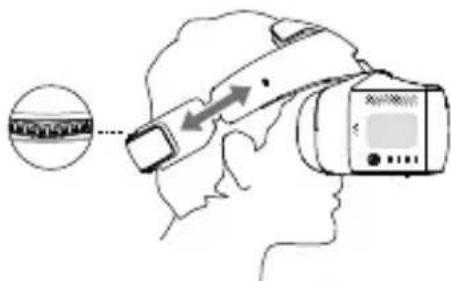
Wear the DJI Goggles RE and adjust the Headband.
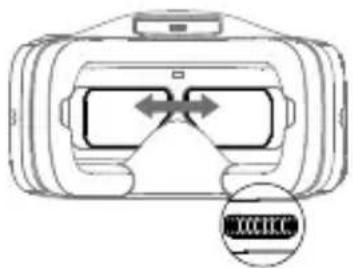
Adjust interpupillary distance.
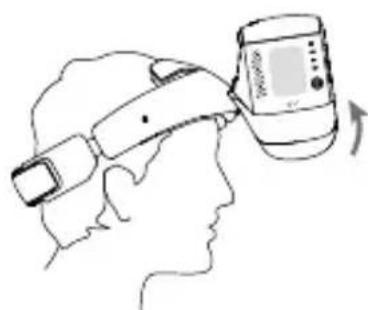
Flip the DJI Goggles RE body to see outside.
Check the Battery Level and Charging
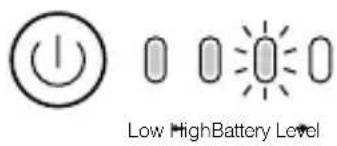

Press once to check the battery level.
Press once, then again and hold to turn on/off.
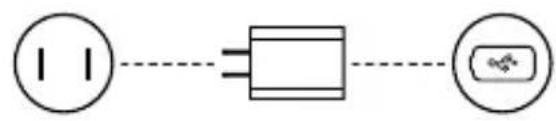
Power Outlet 100~240V
USB Charger Micro USB Port
The battery is fully charged when the Charging Status Indicator or the Battery Level Indicators turn off.
Charge time: approximately 4 hours. Maximum run-time: approximately 6 hours.
Module Connections
When using with third-party racing drones, you can choose between either analog or digital video transmission. Please follow the instructions below for installation and connection. Skip this section if you plan on using the goggles with a dedicated DJI drone.
Analog Video Transmission
Install the Pagoda antenna (SMA interface) to the SMA Port of DJI Goggles RE directly.
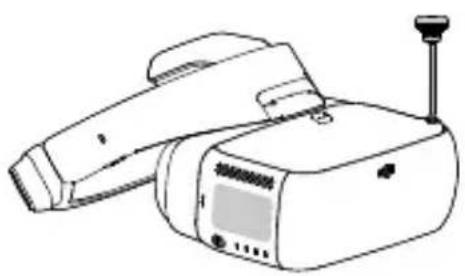

The analog frequency band is 5.650 GHz - 5.925 GHz, of which 5.725 GHz - 5.850 GHz are ISM frequency bands. You may use these frequencies without permission but please follow local regulatory procedures when using the other frequency bands. The Pagoda antenna is an omnidirectional left hand circularly polarized (LHCP) antenna design. It is recommended to use the Pagoda antenna or other left hand circularly polarized antennas for analog transmitters to get the best transmission performance.

In a multi-aircraft flying environment, the adjacent frequency interval should be higher than 25 MHz to avoid the live view of your DJI Goggles RE being affected by a nearby frequency.
Digital Video Transmission
In addition to installing the Pagoda antenna (SMA interface) to the SMA Port of the DJI Goggles RE, you will also need to install the DJI OcuSync Air System on a third-party racing drone to work with the goggles. Refer to the illustration below to mount and connect the modules onto your aircraft.
3-in-1 Cable (Power, S.Bus, UART) RED: Power (9-16.8 V) WHITE: UART RX (Connects to OSD TX, 0-3.3 V) BLACK: Power GND GRAY: UART TX (Connects to OSD RX, 0-3.3 V) BROWN: Signal GND YELLOW: S.Bus (Connects to Flight Controller RX, 0-3.3 V)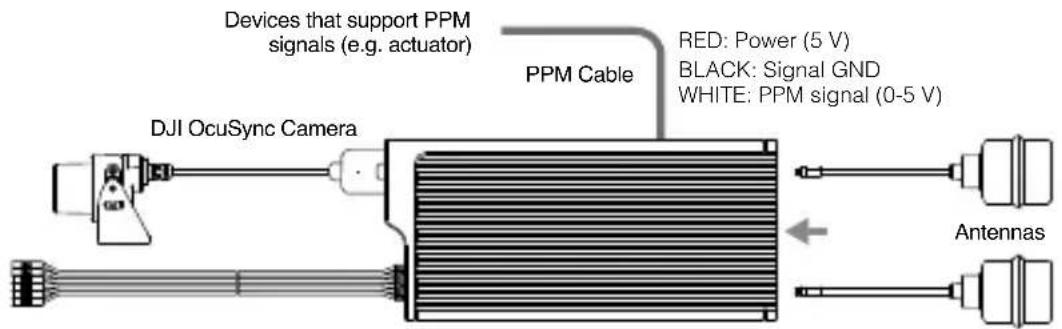

- The S.Bus Port and the PPM Port on the Air Unit are only used when transmitting the remote control signal. These ports don't need to be connected if video downlink is used only.
- There are up to 19 channels (5.8 GHz: 12 channels, 2.4 GHz: 7 channels) for digital video transmission, and each bandwidth is 10 MHz. You can select the transmission channel manually to avoid interference from other devices.

Please be aware that the Air Unit may become very hot during, or after operation. DO NOT touch it before it has cooled down sufficiently. - Please avoid using the Air Unit for an extended time when there is no external cooling equipment. Otherwise, it might get overheated and enter into overheat protection mode. Wait for the module to cool down and then you can restart it. It is recommended to have an external fan installed to dissipate heat. - Place the two antennas on the Air Unit vertically and parallel to each other at least 30 mm apart. Please note that you should avoid placing the antennas level with any type of conductor. Also, make sure to keep the bottom of the antenna at least 25 mm away from potential conductors like cables, carbon fiber frames, batteries, and metals, etc. If you are only using the Air Unit to transmit the downstream video signal, DO NOT use the same frequency band as the upstream control signal to avoid interference.
| Antenna Description | |
| Pagoda Antenna | 5.8 GHz single frequency circular polarization omnidirectional, small size, recommended for racing. Do not use this antenna when using the 2.4 GHz frequency band. |
| Cylindrical Antenna | Dual-frequency circular polarization omnidirectional, providing a smooth video transmission experience. |
| Dipole Antenna | Dual-frequency linear polarization omnidirectional, suitable for close-up flight. |
After familiarizing yourself with the digital video transmission, you can connect the trainer port of a third-party remote controller and the audio port on the DJI Goggles RE through the trainer cable to transmit the control signal to the racing drone.
Activation and Connection
If you do not have a MAVIC™ series aircraft, please download the latest DJI Assistant 2 to activate them.*
When the DJI OcuSync Air Unit is powered on, connect it to your PC and run DJI Assistant 2 to activate it.*
- Ensure to update both the DJI Goggles RE and the Air Unit to the latest version after activation for the best performance.
Ensure all devices are powered on and that the aircraft is linked with the remote controller. Make sure both are updated to their latest firmware versions.
MAVIC Series
OCUSYNC
Press the Link Buttons on the Mavic aircraft and DJI Goggles RE, or enter Tools > Settings > Linking Settings to connect.
Activate with
DJI GO™ 4 App
Please update the app first. DJI Assistant 2 can also be used for activation.
INSPIRE™ 2 PHANTOM™ 4 Series SPARK™
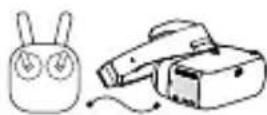
Micro USB cable
** Prepare an OTG cable and connect it to the Micro USB port of the remote controller.
INSPIRE Series PHANTOM 4 PRO+ PHANTOM 4 ADVANCED+
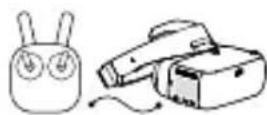
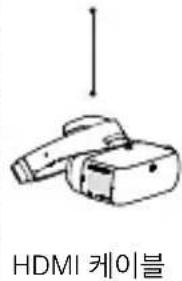
HDMI cable
Live view only.
Video Play Device
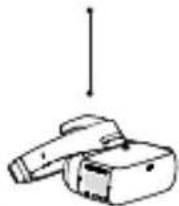
HDMI cable
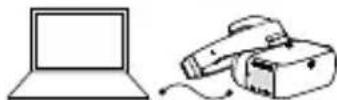
Activate with DJI Assistant 2
Download: www.dji.com/dji-goggles-re
DJI Assistant 2 supports Windows 7 (or later) or OS X 10.11 (or later).
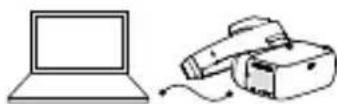
Connect DJI Goggles RE to your PC with Micro USB cable, then run DJI Assistant 2 to activate.
The following steps show how to link the goggles with third-party racing drones:
Analog Video Transmission
Power on the DJI Goggles RE, swipe downward with two fingers on the touch panel to enter the shortcut menu and select Racing Drone (Analog) > Frequency Scanning to search for the frequency you need.
Digital Video Transmission
- Power on the DJI OcuSync Air Unit and press the link button on the air unit with an appropriate tool when the linking status indicator is solid green. The indicator will turn solid red when the air unit is waiting for linking.
- Power on the DJI Goggles RE, then directly press the link button with an appropriate tool in the main menu, or just swipe downward with two fingers on the touch panel to enter the shortcut menu and select Racing Drone (Digital) > Linking Settings.
- Make sure the distance between the goggles and the Air Unit is within 2 m. Both the two linking status indicators will turn solid green when successfully linked, and the video will display normally.
Controls
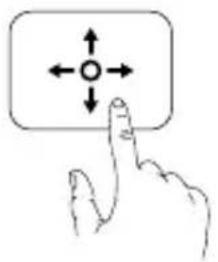
Single Finger Touch / 5D Button*
- Swipe to scroll on the menu Tap to confirm
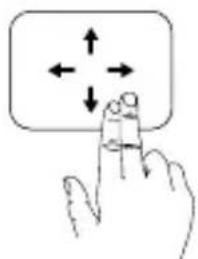
Two Fingers Touch
- Swipe forward/backward to unlock/lock the touch panel
- Swipe upward/downward to exit/enter the shortcut menu
Back Button / C2 Button*
Press to return to the previous menu, or exit the current Intelligent Flight Mode.
Function Button / C1 Button*
DJI aircraft: Press to display the cursor, then swipe forward/backward with one finger to zoom in or zoom out. Move your head then tap the touch panel to define the focus point.
Other aircraft: Press to start/stop video recording (digital video transmission only).
- When connected to Mavic series aircraft, the 5D, C1, and C2 buttons on the remote controller will be used to control the DJI Goggles RE, and their original functions will be disabled.
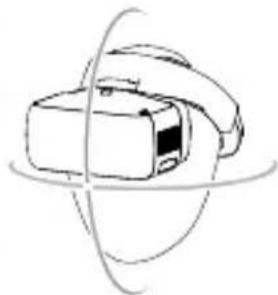
Somatic Control
DJI Goggles RE support head tracking, allowing aircraft and gimbal to be controlled using head movements. Multi Intelligent Flight Modes are also supported.
Only supports:
Mavic Series
Spark
Phantom 4 Series
Inspire 2
Specifications
DJI Goggles RE
Weight (Typical) DJGoggles RE Body: 502 g; Headband: 500 g
Dimensions DJGoggles RE Body: 195 x 155 x 110 mm
Headband (folded): 255 x 205 x 92 mm
Screen Size 5-inch x 2
Screen Resolution 3840 x 1080 (single screen: 1920 x 1080)
Communication Frequency 2.4 GHz / 5.8 GHz
Transmitter Power (EIRP) 2.4 GHz; 25.5 dBm (FCC); 18.5 dBm (CE); 19 dBm (SRRC)
5.8 GHz: 25.5 dBm (FCC); 12.5 dBm (CE); 18.5 dBm (SRRC)
Live View Modes 1080p30, 720p60, 720p30
Video Format MP4 (H.264)
Supported Video Play Format MP4, MOV, MKV (Video format: H264;
Audio format: AAC-LC, AAC-HE, AC-3, DTS, MP3)
Battery Capacity 9440 mAh
Operating Temperature Range 32° to 104° F (0° to 40° C)
Charger Input: 100-240 VAC, 50/60 Hz 0.5 A
Output: 5 V
3A/9V 2A/12V 1.5A
DJI OcuSync Air System
Weight Air Unit: 43.7 g; Camera (cable included): 18.2 g
Pagoda Antenna: 9.4 g; Cylindrical Antenna: 9.4 g
Dipole Antenna: 4.2 g
Dimensions Air Unit: 72 × 33 × 14 mm
Camera: 29.4 × 28.2 × 22.6 mm
Communication Frequency 2.4 GHz / 5.8 GHz
Transmitter Power (EIRP) 2.4 GHz; 22.5 dBm (FCC); 18.5 dBm (CE); 19 dBm (SRRC)
5.8 GHz: 25.5 dBm (FCC); 12.5 dBm (CE); 25.5 dBm (SRRC)
Live View Modes and Min. Latency 960p50: 70 ms; 720p60: 60 ms; 480p50: 50 ms
Max. Transmission Distance 2.4 GHz: 7 km (FCC); 4 km (CE); 4 km (SRRC)
5.8 GHz: 4 km (FCC); 0.7 km (CE); 4 km (SRRC)
Recommended Frequency Band FCC: 5.8 GHz; CE: 2.4 GHz; SRRC: 5.8 GHz
Video Format MP4 (MPEG4)
I/O Interface S.Bus, Micro USB, PPM, UART, MMCX, Micro SD card slot
Supported Flight Control System F3, F4, KISS, NAZE
Supported Remote Controller X9D (Frsky), DEVO 10 (Walkera), T8FG (Futaba),
T14SG (Futaba), WTF09sII (WFLY), AT9S (RadioLink)
Operating Temperature Range: 32° to 104° F (0° to 40° C)
Input Power: 9-16.8 V (3S-4S)
Camera Sensor: 1/3'' CMOS; Effective pixels: 1.2M
Lens: 2.65 mm, f/2.0
Lens Group: 6G + IR
Shutter: Global shutter
ISO: 100-3200
FOV: 148° (D); 111° (H); 79.5° (V)
Understanding DJI Goggles Racing Edition
DJI OcuSync supports image transmission.
2. S.Bus
Supports 3-in-1 (T, S.Bus, UART) connection, enabling HKT to receive FOSD data.
hello: UART RX (OSD TX)
HH: UART TX (OSD RX)
NotarLck: S.Bus (1)
- Micro SD card slot
DJI Goggles RE
Make sure to update the firmware via DJI Assistant 2 before use.
INSPIRE™ 2 PHANTOM™ 4 | | Ze SPARK™ **
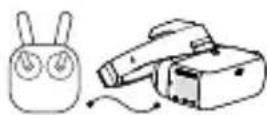
Micro USB port
OTG cable for connecting to the main controller's Micro USB port
INSPIRE | | | PHANTOM 4 PRO+ PHANTOM 4 ADVANCED+

HDMI cable
```bash gencounts /C1 *
5.8GHz: 25.5dBm(FCC), 12.5dBm(CE), 18.5dBm(SRRC)
1080p30,720p60,720p30
Video encoding: MP4 (H.264)
JW, MOV, MKV (compatibility: H264)
Audio encoding: AAC-LC, AAC-HE, AC-3, DTS, MP3
[Battery] 9440mAh
Operating temperature: 0° to 40°C (32°~104°F)
Charger: 100~240VAC, 50/60Hz, 0.5A
Output: 5V
3A/9V 2A/12V 1.5A
DJI OcuSync
Weight: [E] 43.7g, [K] 18.2g
and daAnTeN: 9.4g,
Daily: 4.2g
Camera: 29.4 × 28.2 × 22.6 mm
Communication card: 2.4GHz/5.8GHz
Communication: 2.4GHz: 22.5dBm (FCC), 18.5dBm (CE), 19dBm (SRRC)
5.8GHz: 25.5dBm (FCC), 12.5dBm (CE), 25.5dBm (SRRC)
[1] 960p50: 70ms, 720p60: 60ms, 480p50: 50ms
Value: 2.4GHz: 7km (FCC), 4km (CE), 4km (SRRC)
5.8GHz: 4km (FCC), 0.7km (CE), 4km (SRRC)
Han Jingfeng Sun Heyong Building: FCC: 5.8GHz, CE: 2.4GHz, SRRC: 5.8GHz
Soap MP4 (MPEG4)
I/O Interface: S.Bus, Micro USB, PPM, UART, MMCX, Micro SD Card
F3, F4, KISS, NAZE
X9D (Frsky), DEVO 10 (Walkera), T8FG (Futaba),
T14SG (Futaba), WTF09sII (WFLY), AT9S (RadioLink)
0° to 40°C (32° to 104°F)
19~16.8V (3S~4S)
Camera: 1/3-inch CMOS, same
Lens: 2.65mm, f/2.0
Lens 6G+IR
Sensor: Global Shutter
ISO: 100~3200
FOV: 148° (D), 111° (H), 79.5° (V)
DJI Goggles Racing Edition
Compatible remote control X9D (Frsky), DEVO 10 (Walkera), T8FG (Futaba),
T14SG (Futaba), WTF09sII (WFLY), AT9S (RadioLink)
Operating temperature range: 0 to 40°C (32 to 104°F)
BROWN: GROUND Signal
3-in-1 cable (power, S.Bus, UART)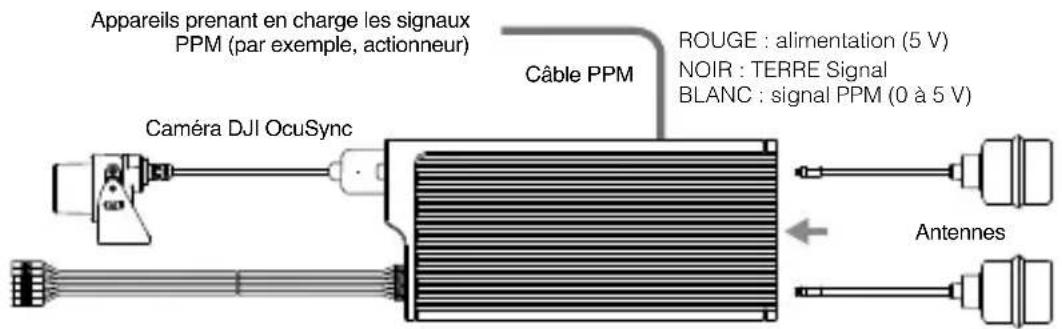
Analog video transmission
Analog video transmission
Analog video transmission
Supported: X9D (Frsky), DEVO 10 (Walkera), T8FG (Futaba),
T14SG (Futaba), WTF09sII (WFLY), AT9S (RadioLink)
Camera Sensor: 1/3 CMOS, effective pixels: 1.2M
Lens: 2.65 mm, f/2.0
Lens group: 6G + IR
Shutter: Global shutter
ISO: 100-3200
Field of view: 148° (D); 111° (H); 79.5° (V)
DJI Goggles Racing Edition
Compatible remote controllers: X9D (Frsky), DEVO 10 (Walkera), T8FG (Futaba),
T14SG (Futaba), WTF09sII (WFLY), AT9S (RadioLink)
Operating temperature range: 32° to 104° F (0° to 40° C)
The terms HDMI and HDMI High-Definition Multimedia Interface, and the HDMI Logo are trademarks or registered trademarks of HDMI Licensing LLC in the United States and other countries.
If you have any questions about this document, please contact DJI by sending a message to DocSupport@dji.com.
- DJI GOGGLES RE
- INSTALLATION AND WEARING
- CHECK THE BATTERY LEVEL AND CHARGING
- MODULE CONNECTIONS
- ANALOG VIDEO TRANSMISSION
- DIGITAL VIDEO TRANSMISSION
- ACTIVATION AND CONNECTION
- MAVIC SERIES
- OCUSYNC
- ACTIVATE WITH
- DJI GO™ 4 APP
- MICRO USB CABLE
- HDMI CABLE
- ACTIVATE WITH DJI ASSISTANT
- CONTROLS
- SINGLE FINGER TOUCH / 5D BUTTON
- TWO FINGERS TOUCH
- BACK BUTTON / C2 BUTTON
- FUNCTION BUTTON / C1 BUTTON
- SOMATIC CONTROL
- SPECIFICATIONS
- DJI OCUSYNC AIR SYSTEM
- UNDERSTANDING DJI GOGGLES RACING EDITION
- MICRO USB PORT
- DJI GOGGLES RACING EDITION
Brand : DJI
Model : Goggles Racing Edition
Category : VR glasses