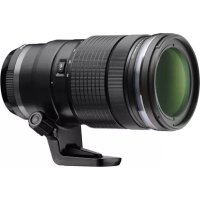
OLYMPUS M.Zuiko Digital ED 40150mm f2.8 Pro - Lens

M.Zuiko Digital ED 40150mm f2.8 Pro - Lens OLYMPUS - Free user manual and instructions

Find the device manual for free M.Zuiko Digital ED 40150mm f2.8 Pro OLYMPUS in PDF.

📄 82 pages English EN 💬 AI Question 8 questions ⚙️ Specs
Notice OLYMPUS M.Zuiko Digital ED 40150mm f2.8 Pro - page 4
Feature Details
Lens type OLYMPUS M.Zuiko Digital ED 40-150mm f/2.8 Pro
Mount Micro Four Thirds
Focal length range 40-150 mm
Maximum aperture f/2.8
Optical construction 16 elements in 10 groups
Minimum focusing distance 70 cm
Stabilization Not built-in, depends on the camera
Dimensions Approx. 70 x 150 mm
Weight Approx. 780 g
Recommended use Portrait, sports, nature photography
Maintenance Clean with a soft cloth, avoid harsh chemicals
Warranty Check with the retailer
Included accessories Front cap, rear cap, lens hood

Frequently Asked Questions - M.Zuiko Digital ED 40150mm f2.8 Pro OLYMPUS

How can I install the OLYMPUS M.Zuiko Digital ED 40-150mm f2.8 Pro lens on my camera?
To install the lens, align the red mark on the lens with the red mark on the camera mount. Turn the lens clockwise until it locks securely in place.
My lens is not focusing correctly, what should I do?
Make sure the lens is properly attached to the camera. Also check that you are using an appropriate shooting mode and that you are not too close to the subject. If the problem persists, try resetting the camera settings.
The lens is blurry, what can I do to improve sharpness?
Check that your lens is clean and dust-free. Use a microfiber cloth to clean the lenses. Also ensure you are using a suitable shutter speed to avoid motion blur. Consider using a tripod if necessary.
Can I use filters with this lens?
Yes, the OLYMPUS M.Zuiko Digital ED 40-150mm f2.8 Pro is compatible with 62 mm diameter filters. Make sure to choose high-quality filters to avoid any image degradation.
What are the advantages of the f2.8 aperture on this lens?
The f2.8 aperture allows excellent low-light performance, pleasant background blur (bokeh), and depth of field control. This makes the lens ideal for portraits and indoor shooting.
My lens makes a strange noise when focusing, is this normal?
A slight noise can be normal during autofocus. However, if the noise is loud or the lens fails to focus, it is recommended to contact after-sales service for inspection.
How can I safely clean my lens?
Use a blower to remove dust, then clean the lenses with a microfiber cloth. Avoid using harsh chemicals. If the lens is very dirty, use a lens cleaner specifically designed for lenses.
Is this lens waterproof?
Yes, the OLYMPUS M.Zuiko Digital ED 40-150mm f2.8 Pro is designed with weather-resistant construction, making it suitable for use in harsh weather conditions. However, avoid prolonged immersion in water.

Download the instructions for your Lens in PDF format for free! Find your manual M.Zuiko Digital ED 40150mm f2.8 Pro - OLYMPUS and take your electronic device back in hand. On this page are published all the documents necessary for the use of your device. M.Zuiko Digital ED 40150mm f2.8 Pro by OLYMPUS.

USER MANUAL M.Zuiko Digital ED 40150mm f2.8 Pro OLYMPUS

© 2014 ED 40-150mm f2.8 PRO WC730901 Printed in China date of issue 2014.10

01L1042JUABjp.indd501L1042JUABjp.indd5 2014/08/2519:00:222014/08/2519:00:226 EN INSTRUCTIONS Thank you for purchasing this Olympus product. To ensure your safety, please read this instruction manual before use, and keep it handy for future reference. Switching the focusing method (Fig. 1) Slide the focus ring (

) in the direction of the arrow to switch the focusing method. A: AF/MF

  • MF is possible in the camera settings. B: MF
  • AF does not work if the focus ring position is set MF position (B). Autofocus stops while the L-Fn button (2) is pressed. Storing the hood (Fig. 2) Attaching the hood (Fig. 3) Storing the hood (Fig. 4) When storing the hood, turn the ring (3) of the hood a little, then slide to rear. When shooting, slide to front until it clicks. Notes on Shooting
  • Edges of pictures may be cut off if more than one filter is used or if a thick filter is used.
  • When using a flash, flash light may be blocked by the lens body, lens hood, etc.
  • The focus distance may change when the focusing method is switched from MF to AF/MF and then back to MF. Readjust the focus distance.
  • The distance indicator is intended as a guide only. Main Specifications Mount : Micro Four Thirds mount Focal distance : 40 – 150 mm (1.5 – 5.9 in.) (equivalent to 80 to 300 mm on a 35 mm camera) Max. aperture : f2.8 Image angle : 30° – 8.2° Lens configuration : 10 groups, 16 lenses Iris control : f2.8 to f22 Shooting range : 0.7 m (27.5 in.) to ) (infinite) Focus adjustment : AF/MF switching Weight : 760 g (26.5 oz.) (excluding hood, cap and tripod mount) ENEN 7 Dimensions : Max. dia. Ø 79.4 (3.1 in.) × length 160.0 mm (6.3 in.) Lens hood mount : Bayonet Filter mount thread diameter : Ø 72 mm (2.8 in.)

Specifications are subject to change without any notice or obligation on the part of the manufacturer. Precautions: Be Sure to Read the Following Warnings: Safety Precautions

  • Do not view the sun through the lens. It may cause blindness or vision impairment.
  • Do not leave the lens without the cap. If solar light is converged through the lens, a fire may result.
  • Do not point the camera lens at the sun. Sunlight will converge in the lens and focus inside the camera, possibly causing a malfunction or fire. Micro Four Thirds and the Micro Four Thirds logo are trademarks or registered trademarks of OLYMPUS IMAGING Corporation. Technical Support (U.S.A.) 24/7 online automated help : http://www.olympusamerica.com/support Phone customer support : Tel.1-800-260-1625 (Toll-free) Our phone customer support is available from 9 am to 9 pm (Monday to Friday) ET E-Mail : distec@olympus.com For customers in USA FCC Notice This device complies with part 15 of the FCC rules. Operation is subject to the following two conditions: (1) This device may not cause harmful interference, and (2) this device must accept any interference received, including interference that may cause undesired operation. Any unauthorized changes or modifications to this equipment would void the user’s authority to operate. For customers in CANADA This Class B digital apparatus complies with Canadian ICES-003. CAN ICES(B)/NMB-3(B)8 EN For customers in Europe The “CE” mark indicates that this product complies with the European requirements for safety, health, environment and customer protection. CE-mark products are for sale in Europe. This symbol [crossed-out wheeled bin WEEE Annex IV] indicates separate collection of waste electrical and electronic equipment in the EU countries. Please do not throw the equipment into the domestic refuse. Please use the return and collection systems available in your country for the disposal of this product. European Technical Customer Support Please visit our homepage http://www.olympus-europa.com or call: Tel. 00800 - 67 10 83 00 (Toll-free) +49 40 - 237 73 899 (Charged)

Micro Four Thirds Micro Four Thirds

Manual assistant
Powered by ChatGPT
Waiting for your message
Product information

Brand : OLYMPUS

Model : M.Zuiko Digital ED 40150mm f2.8 Pro

Category : Lens