KD65XF8505 - TV SONY - Free user manual and instructions
Find the device manual for free KD65XF8505 SONY in PDF.


| Features | Details |
|---|---|
| Screen Size | 65 inches |
| Resolution | 4K Ultra HD (3840 x 2160) |
| Display Technology | LED |
| Screen Type | LCD |
| Refresh Rate | 100 Hz |
| Smart TV | Yes, with access to apps and streaming services |
| Connectivity | Wi-Fi, Ethernet, HDMI, USB |
| Number of HDMI Ports | 4 |
| Number of USB Ports | 3 |
| Audio | 2 x 10 W, Dolby Digital |
| Dimensions (without stand) | 144.3 x 83.5 x 7.5 cm |
| Weight (without stand) | 25 kg |
| Power Consumption | About 200 W |
| Energy Class | A+ |
| Maintenance | Clean the screen with a soft cloth, regular firmware updates |
| Safety | Avoid exposure to moisture, use a stable stand |
| Warranty | 2 years |
Frequently Asked Questions - KD65XF8505 SONY
User questions about KD65XF8505 SONY
0 question about this device. Answer the ones you know or ask your own.
Ask a new question about this device
Download the instructions for your TV in PDF format for free! Find your manual KD65XF8505 - SONY and take your electronic device back in hand. On this page are published all the documents necessary for the use of your device. KD65XF8505 by SONY.
USER MANUAL KD65XF8505 SONY
Parts and Controls 9
Controls and Indicators 9
Using Remote Control 10
Remote Control Parts Description. 10
Connection Diagram 12
Installing the TV to the Wall 14
Using the optional Wall-Mount Bracket . . . 14
KD-85/75XF85xx only. 15
Troubleshooting. 18
Troubles and Solutions. 18
Specifications 19
Internet Connection and Data Privacy
This product connects to the internet during initial setup as soon as a network is connected in order to confirm internet connection, and later to configure the Home screen. Your IP address is used in these and all other internet connections. If you do not want your IP address be used at all, do not set-up the wireless internet function and do not connect an internet cable. Please refer to the privacy information presented in the set-up screens for further details of internet connections.
Introduction
Thank you for choosing this Sony product.
Before operating the TV, please read this manual thoroughly and retain it for future reference.
Note
Before operating the TV, please read the "Safety Information" (page 3).
- Images and illustrations used in the Setup Guide and this manual are for reference only and may differ from the actual product.
- The "xx" that appears in the model name corresponds to a numeric digit, related to design, colour or TV system.
Attaching the Table-Top Stand to the TV
Refer to the Setup Guide on top of the cushion.

Help
Find more troubleshooting and other useful information directly from your TV. Press HELP on the remote control to display a list of topics, or to search by keyword.
Help Guide (Manual)
For more detailed information, select [Help Guide] from the Help menu on your TV. You can also check the Help Guide from your PC or smartphone (information provided on the back cover).
Location of the identification label
Labels for the TV Model No., Production Date (year/month) and Power Supply rating are located on the rear of the TV or package.
For models with supplied mains adaptor: Labels for the mains adaptor Model No. and Serial No. are located on the bottom of the mains adaptor.
WARNING
TO PREVENT THE SPREAD OF FIRE, KEEP CANDLES OR OTHER OPEN FLAMES AWAY FROM THIS PRODUCT AT ALL TIMES.

NOTICE FOR CUSTOMERS IN THE UNITED KINGDOM
A moulded plug complying with BS1363 is fitted to this equipment for your safety and convenience.
Should the fuse in the plug supplied need to be replaced with the same rating of fuse approved by ASTA or BSI to BS 1362 (i.e., marked with or) must be used.
If the plug supplied with this equipment has a detachable fuse cover, be sure to attach the fuse cover after you change the fuse. Never use the plug without the fuse cover. If you should lose the fuse cover, please contact your nearest Sony service station.
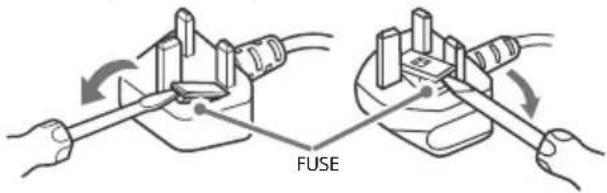
How to replace the fuse
Open the fuse compartment with a blade screwdriver, and replace the fuse.
Please refer to the illustration that actually equipped with the product.
IMPORTANT NOTICE
This product has been manufactured by or on behalf of Sony Visual Products Inc.
EU Importer: Sony Europe Limited.
Inquiries to the EU Importer or related to product compliance in Europe should be sent to the manufacturer's authorized representative, Sony Belgium, bijkantoor van Sony Europe Limited, Da Vincilaan 7-D1, 1935 Zaventem, Belgium.
Notice for Radio Equipment

Hereby, Sony Visual Products Inc. declares that the radio equipment types
KD-85XF8596, KD-75XF8596
KD-65XF8796, KD-65XF8599, KD-65XF8596, KD-65XF8588
KD-65XF8577, KD-65XF8505, KD-55XF8796, KD-55XF8599
KD-55XF8596, KD-55XF8588, KD-55XF8577, KD-55XF8505,
KD-49XF8796.KD-49XF8599.KD-49XF8596.KD-49XF8588.
KD-49XF8577, KD-49XF8505, KD-43XF8796, KD-43XF8599
KD-43XF8596, KD-43XF8588, KD-43XF8577, KD-43XF8505 are in compliance with Directive 2014/53/EU. The full text of the EU declaration of conformity is available at the following internet address: http://www.compliance.sony.de/
This radio equipment can be operated in the EU without infringing applicable requirements on the use of radio spectrum.
Notice for customers: the following information is only applicable to equipment sold in countries applying EU directives.
TV wireless system may be operated in following countries: AT, BE, HR, CY, CZ, DK, EE, FI, FR, DE, EL, HU, IE, IT, LV, LT, LU, MT, NL, PL, PT, SK, SI, ES, SE, UK, IS, LI, NO, CH, BG, RO, TR, AL, BA, MK, MD, RS, ME, Kosovo
This equipment can be operated in other non-European countries.
Safety Information
WARNING
Caution
Risk of explosion if the battery is replaced by an incorrect type. Batteries must not be exposed to excessive heat such as sunshine, fire or the like or extremely low air pressure that can result in an explosion or leakage of flammable liquid or gas.
Stability Hazard
The television set may fall, causing serious personal injury or death.
Never place a television set in an unstable location. A television set may fall, causing serious personal injury or death. Many injuries, particularly to children, can be avoided by taking simple precautions such as:
- Using cabinets or stands recommended by the manufacturer of the television set.
- Only using furniture that can safely support the television set.
- Ensuring the television set is not overhanging the edge of the supporting furniture.
- Not placing the television set on tall furniture (for example, cupboards or bookcases) without anchoring both the furniture and the television set to a suitable support.
- Not placing the television set on cloth or other materials that may be located between the television set and supporting furniture.
- Educating children about the dangers of climbing on furniture to reach the television set or its controls. If your existing television set is being retained and relocated, the same considerations as above should be applied.
Installation/Set-up
Install and use the TV set in accordance with the instructions below in order to avoid any risk of fire, electric shock or damage and/or injuries.
Apparatus connected to the protective earthing of the building installation through the mains connection or through other apparatus with a connection to protective earthing - and to a television distribution system using coaxial cable, may in some circumstances create a fire hazard. Connection to a television distribution system therefore has to be provided through a device providing electrical isolation below a certain frequency range (galvanic isolator, see EN 60728-11).
Installation
- The TV set should be installed near an easily accessible mains socket.
- Place the TV on a stable, level surface to prevent it from falling over and causing personal injury or property damage.
Install the TV where it cannot be pulled, pushed, or knocked over. - Install the TV so that the TV's Table-Top Stand does not protrude out from the TV stand (not supplied). If the Table-Top Stand protrudes out from the TV stand, it may cause TV set to topple over, fall down, and cause personal injury or damage to the TV.
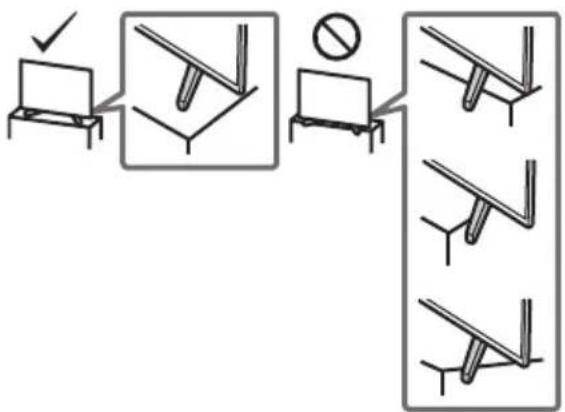
-
Only qualified service personnel should carry out wall-mount installations.
-
For safety reasons, it is strongly recommended that you use Sony accessories, including:
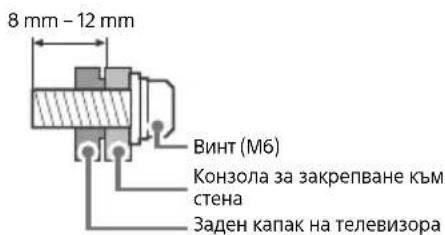
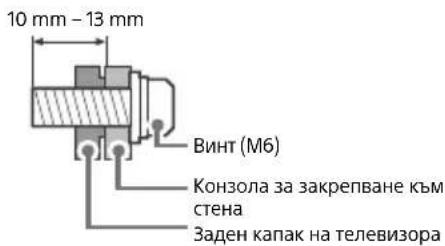
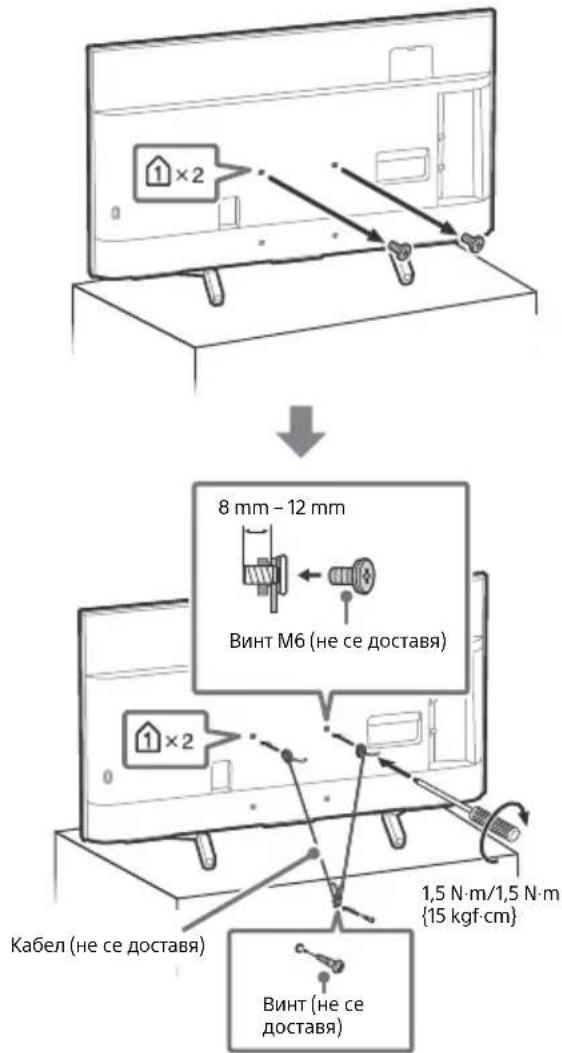
Wall-Mount Bracket SU-WL450 (Except KD-85/75XF85xx) - Be sure to use the screws supplied with the Wall-Mount Bracket when attaching the Wall-Mount Bracket to the TV set. The supplied screws are designed as indicated by illustration when measured from the attaching surface of the Wall-Mount Bracket. The diameter and length of the screws differ depending on the Wall-Mount Bracket model. Use of screws other than those supplied may result in internal damage to the TV set or cause it to fall, etc.
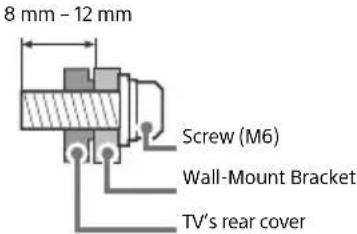
KD-85/49/43XF85xx, KD-49/43XF87xx
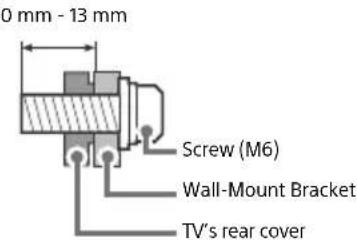
KD-75/65/55XF85xx, KD-65/55XF87xx
Transporting
- Before transporting the TV set, disconnect all cables.
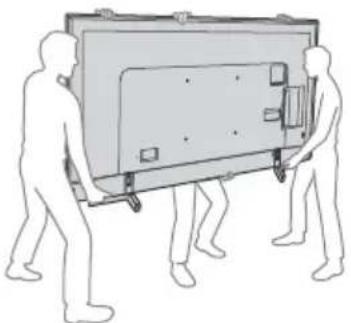
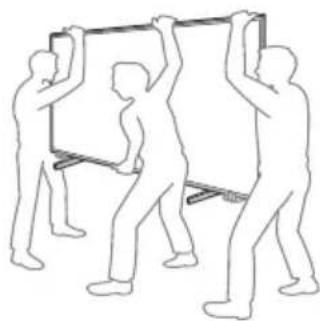
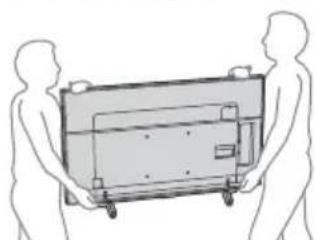
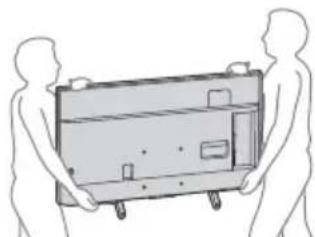
- Two or more people (three or more people for KD-85XF85xx) are needed to transport a large TV set.
- When transporting the TV set by hand, hold it as shown below. Do not put stress on the LCD panel and the frame around the screen.
- When lifting or moving the TV set, hold it firmly from the bottom.
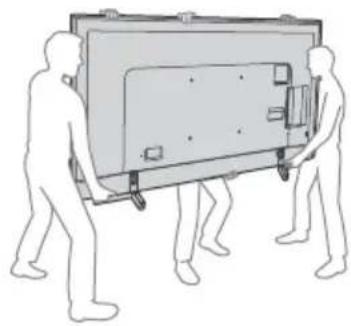
KD-85XF85xx
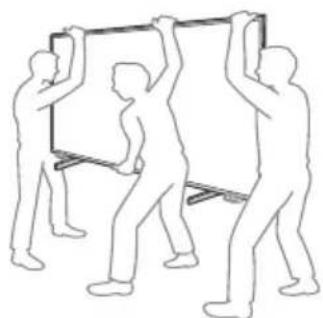
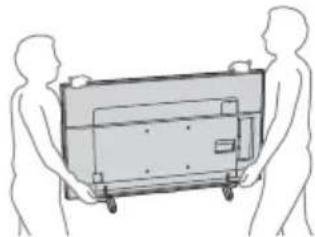
KD-75/65/55XF85xx, KD-65/55XF87xx
KD-49/43XF87xx, KD-49/43XF85xx
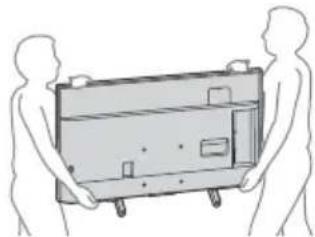
- When transporting the TV set, do not subject it to jolts or excessive vibration.
- When transporting the TV set for repairs or when moving, pack it using the original carton and packing material.
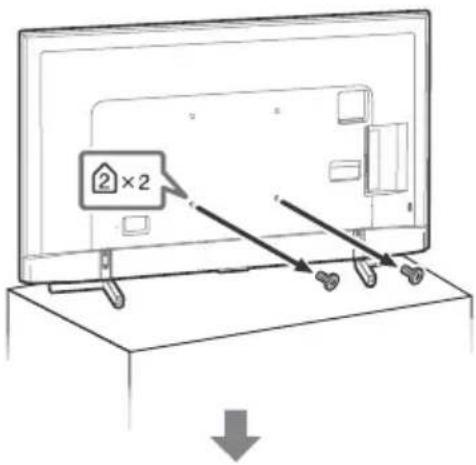
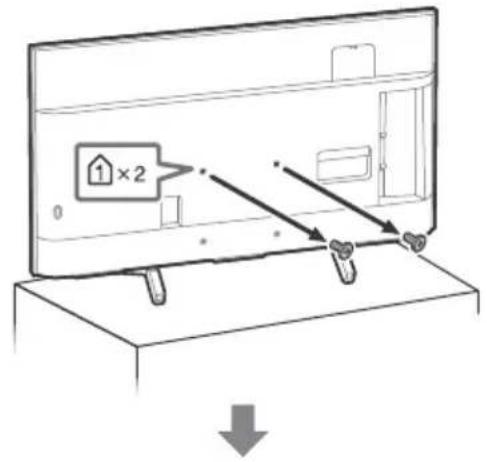
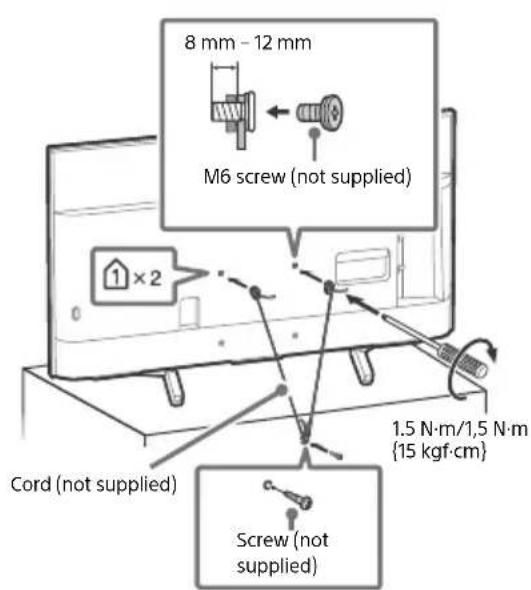
Topple prevention
KD-85XF85xx
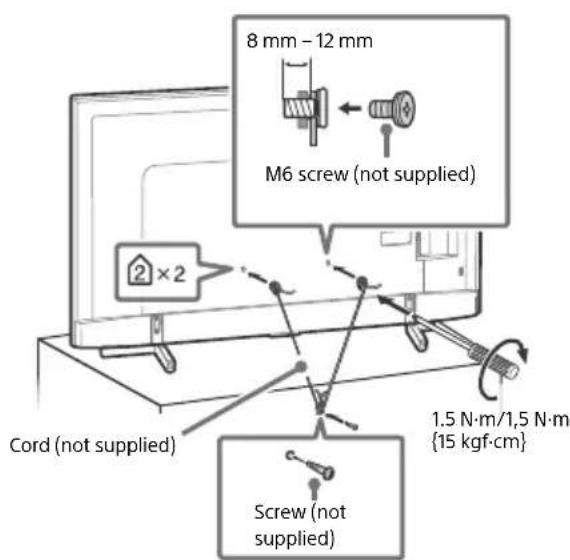
KD-75/65/55XF85xx, KD-65/55XF87xx
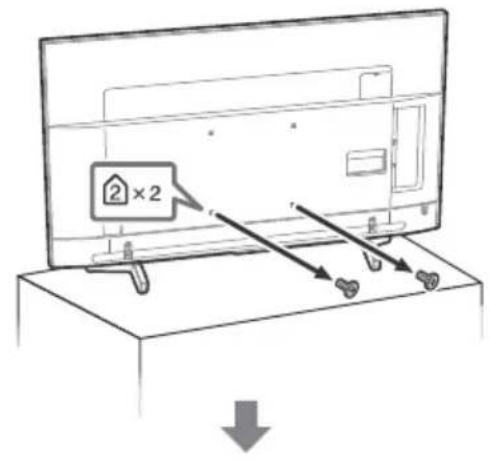
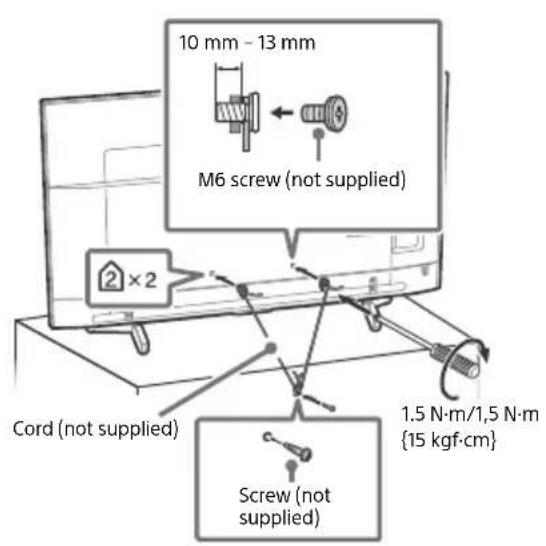
KD-49/43XF87xx, KD-49/43XF85xx
Ventilation
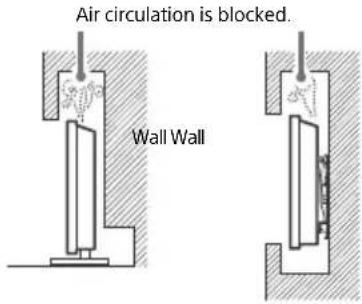
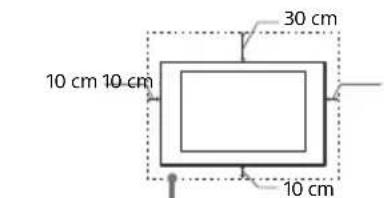
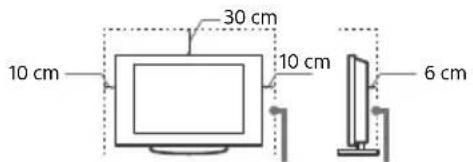
- Never cover the ventilation holes or insert anything in the cabinet.
- Leave space around the TV set as shown below.
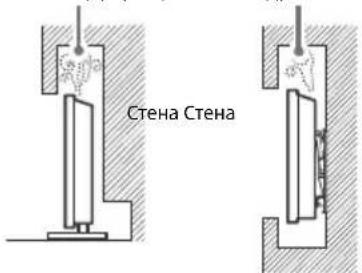
- It is strongly recommended that you use a Sony Wall-Mount Bracket in order to provide adequate air circulation.
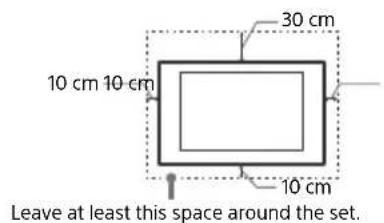
Installed on the wall
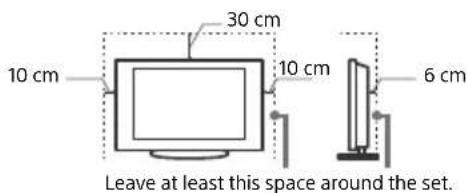
Installed with stand
To ensure proper ventilation and prevent the collection of dirt or dust:
- Do not lay the TV set flat, install upside down, backwards, or sideways.
- Do not place the TV set on a shelf, rug, bed or in a closet.
- Do not cover the TV set with a cloth, such as curtains, or items such as newspapers, etc.
- Do not install the TV set as shown below.
Mains lead
Handle the mains lead and socket as follows in order to avoid any risk of fire, electric shock or damage and/or injuries:
- Use only mains leads supplied by Sony, not other suppliers.
- Insert the plug fully into the mains socket.
- Operate the TV set on a 220V - 240V AC supply only.
- When wiring cables, be sure to unplug the mains lead for your safety and take care not to catch your feet on the cables.
- Disconnect the mains lead from the mains socket before working on or moving the TV set.
- Keep the mains lead away from heat sources.
- Unplug the mains plug and clean it regularly. If the plug is covered with dust and it picks up moisture, its insulation may deteriorate, which could result in a fire.
Note
- Do not use the supplied mains lead on any other equipment.
- Do not pinch, bend, or twist the mains lead excessively. The core conductors may be exposed or broken.
- Do not modify the mains lead.
- Do not put anything heavy on the mains lead.
- Do not pull on the mains lead itself when disconnecting the mains lead.
- Do not connect too many appliances to the same mains socket.
- Do not use a poor fitting mains socket.
NOTE ON MAINS ADAPTOR (models with supplied mains adaptor only)
Warning
To reduce the risk of fire or electric shock, do not expose this apparatus to rain or moisture.
To prevent fire or shock hazard, do not place objects filled with liquids, such as vases, on the apparatus. Do not install this equipment in a confined space, such as a bookshelf or similar unit.
- Please ensure that the mains socket is installed near the equipment and shall be easily accessible.
- Be sure to use the supplied mains adaptor and mains lead.
- Do not use any other mains adaptor. It may cause a
malfunction - Connect the mains adaptor to an easily accessible mains socket.
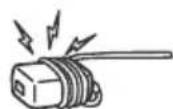
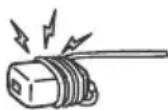
- Do not coil the mains lead around the mains adaptor. The core wire may be cut and/or it may cause a malfunction of the media receiver.
- Do not touch the mains adaptor with wet hands.
If you notice an abnormality in the mains adaptor, disconnect it from the mains socket immediately. - The set is not disconnected from the mains source as long as it is connected to the mains socket, even if the set itself has been turned off.
- As the mains adaptor will become warm when it is used for a long time, you may feel hot when touching it by hand.
Prohibited Usage
Do not install/use the TV set in locations, environments or situations such as those listed below, or the TV set may malfunction and cause a fire, electric shock, damage and/or injuries.
Locations:
- Outdoors (in direct sunlight), at the seashore, on a ship or other vessel, inside a vehicle, in medical institutions, unstable locations, near water, rain, moisture or smoke.
Environments:
- Places that are hot, humid, or excessively dusty; where insects may enter; where it might be exposed to mechanical vibration, near flammable objects (candles, etc.). The TV set shall not be exposed to dripping or splashing and no objects filled with liquids, such as vases, shall be placed on the TV.
Situations:
- Use when your hands are wet, with the cabinet removed, or with attachments not recommended by the manufacturer. Disconnect the TV set from mains socket and aerial during lightning storms.
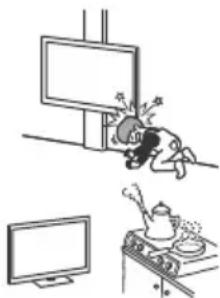
- Install the TV so that it sticks out into an open space. Injury or damage from a person or object bumping into the TV may result.
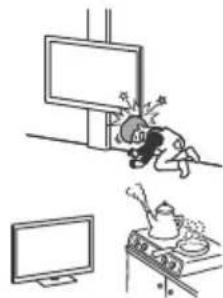
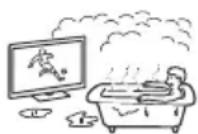
- Place the TV in a humid or dusty space, or in a room with oily smoke or steam (near cooking tables or humidifiers). Fire, electric shock, or warping may result.
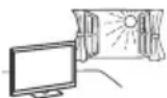
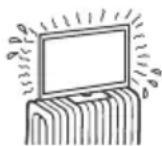
- Install the TV in places subject to extreme temperature such as in direct sunlight, near a radiator or a heating vent. The TV may overheat in such condition which can cause deformation of the enclosure and/or TV malfunction.
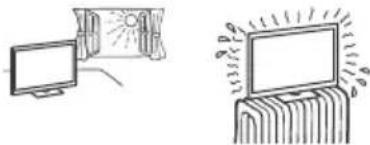
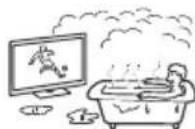
If the TV is placed in the changing room of a public bath or hot spring, the TV may be damaged by airborne sulfur, etc.
- For best picture quality, do not expose the screen to direct illumination or sunlight.
- Avoid moving the TV from a cold area to a warm area. Sudden room temperature changes may cause moisture condensation. This may cause the TV to show poor picture and/or poor colour. Should this occur, allow moisture to evaporate completely before powering the TV on.
Broken pieces:
- Do not throw anything at the TV set. The screen glass may break by the impact and cause serious injury.
- If the surface of the TV set cracks, do not touch it until you have unplugged the mains lead. Otherwise this may cause an electric shock.
When not in use
- If you will not be using the TV set for several days, the TV set should be disconnected from the mains for environmental and safety reasons.
- As the TV set is not disconnected from the mains when the TV set is just turned off, pull the plug from the mains socket to disconnect the TV set completely.
- Some TV sets may have features that require the TV set to be left in standby to work correctly.
For children
- Do not allow children to climb on the TV set.
- Keep small accessories out of the reach of children, so that they are not mistakenly swallowed.
If the following problems occur...
Turn off the TV set and unplug the mains lead immediately if any of the following problems occur.
Ask your dealer or Sony service centre to have it checked by qualified service personnel.
When:
- Mains lead is damaged.
- Poor fitting of mains socket.
- TV set is damaged by being dropped, hit or having something thrown at it.
- Any liquid or solid object falls through openings in the cabinet.
About LCD TV Temperature
When the LCD TV is used for an extended period, the panel surrounds become warm. You may feel hot when touching there by the hand.
Precautions
Viewing the TV
View the TV in moderate light, as viewing the TV in poor light or during long period of time, strains your eyes.
- When using headphones, adjust the volume so as to avoid excessive levels, as hearing damage may result.
LCD Screen
- Although the LCD screen is made with high-precision technology and 99.99% or more of the pixels are effective, black dots may appear or bright points of light (red, blue, or green) may appear constantly on the LCD screen. This is a structural property of the LCD screen and is not a malfunction.
- Do not push or scratch the front filter, or place objects on top of this TV set. The image may be uneven or the LCD screen may be damaged.
- If this TV set is used in a cold place, a smear may occur in the picture or the picture may become dark. This does not indicate a failure. These phenomena disappear as the temperature rises.
- Ghosting may occur when still pictures are displayed continuously. It may disappear after a few moments.
- The screen and cabinet get warm when this TV set is in use. This is not a malfunction.
- The LCD screen contains a small amount of liquid crystal. Follow your local ordinances and regulations for disposal.
Handling and cleaning the screen surface/ cabinet of the TV set
Be sure to unplug the mains lead connected to the TV set from mains socket before cleaning.
To avoid material degradation or screen coating degradation, observe the following precautions.
-
To remove dust from the screen surface/cabinet, wipe gently with a soft cloth. If dust is persistent, wipe with a soft cloth slightly moistened with a diluted mild detergent solution.
-
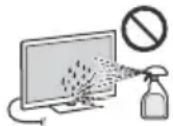
Never spray water or detergent directly on the TV set. It may drip to the bottom of the screen or exterior parts and enter the TV set, and may cause damage to the TV set.
- Never use any type of abrasive pad, alkaline/acid cleaner, scouring powder, or volatile solvent, such as alcohol, benzene, thinner or insecticide. Using such materials or maintaining prolonged contact with rubber or vinyl materials may result in damage to the screen surface and cabinet material.
- Do not touch the TV if your hand is covered in any chemical substance such as hand cream or sunblock.
Periodic vacuuming of the ventilation openings is recommended to ensure proper ventilation. - When adjusting the angle of the TV set, move it slowly so as to prevent the TV set from moving or slipping off from its table stand.
Optional Equipment
- Keep optional components or any equipment emitting electromagnetic radiation away from the TV set. Otherwise picture distortion and/or noisy sound may occur.
- This equipment has been tested and found to comply with the limits set out in the EMC Directive using a connection signal cable shorter than 3 meters.
- This equipment has been tested and found to comply with the limits set out in the EMC Directive using a RF cable shorter than 30 meters for terrestrial/satellite/CATV terminal.
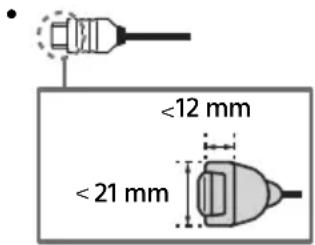
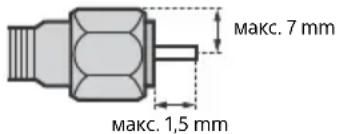
Recommendation of F type plug
Projection of the inner wire from the connection part must be less than 1.5mm
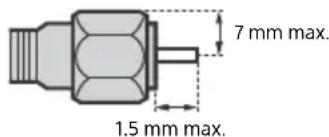
(Reference drawing of the F type plug)
Wireless Function of the unit
- Do not operate this unit near medical equipment (pacemaker, etc.), as this may result in the malfunction of the medical equipment.
- Although this unit transmits/receives scrambled signals, be careful of unauthorised interception. We cannot be responsible for any trouble as a result.
- This equipment should be installed and operated keeping a separation distance of 20cm or more between the antenna of this device and a person's body.
Caution about handling the remote control
- Observe the correct polarity when inserting batteries.
- Do not use different types of batteries together or mix old and new batteries.
- Dispose of batteries in an environmentally friendly way. Certain regions may regulate the disposal of batteries. Please consult your local authority.
- Handle the remote control with care. Do not drop or step on it, or spill liquid of any kind onto it.
- Do not place the remote control in a location near a heat source, a place subject to direct sunlight, or a damp room.
Disposal of the TV set
m = 311
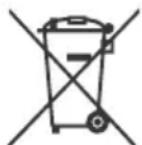
Disposal of old electrical & electronic equipment (applicable in the European Union and other countries with separate collection systems)
This symbol on the product or on its packaging indicates that this product shall not be treated as household waste. Instead it shall be handed over to the appropriate collection point for the recycling of electrical and electronic equipment.
By ensuring that this product is disposed of correctly, you will help to prevent potential negative consequences for the environment and human health, which could be caused by inappropriate waste handling of this product. The recycling of materials will help to conserve natural resources. For more detailed information about recycling of this product, please contact your local Civic Office, your household waste disposal service or the shop where you purchased the product.
Disposal of waste batteries (applicable in the European Union and other countries with separate collection systems)
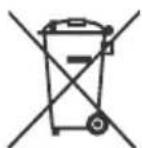
This symbol on the battery or on the packaging indicates that the battery provided with this product shall not be treated as household waste.
On certain batteries this symbol might be used in combination with a chemical symbol. The chemical symbol for lead (Pb) is added if the battery contains more than 0.004% lead. By ensuring that these batteries are disposed of correctly, you will help to prevent potentially negative consequences for the environment and human health which could be caused by inappropriate waste handling of the battery. The recycling of the materials will help to conserve natural resources. In case of products that for safety, performance or data integrity reasons require a permanent connection with an incorporated battery, this battery should be replaced by qualified service staff only. To ensure that the battery will be treated properly, hand over the product at end-of-life to the appropriate collection point for the recycling of electrical and electronic equipment. For all other batteries, please view the section on how to remove the battery from the product safely. Hand the battery over to the appropriate collection point for the recycling of waste batteries. For more detailed information about recycling of this battery, please contact your local Civic Office, your household waste disposal service or the shop where you purchased the product or battery.
Parts and Controls
Controls and Indicators
KD-85/75/65/55XF85xx, KD-65/55XF87xx
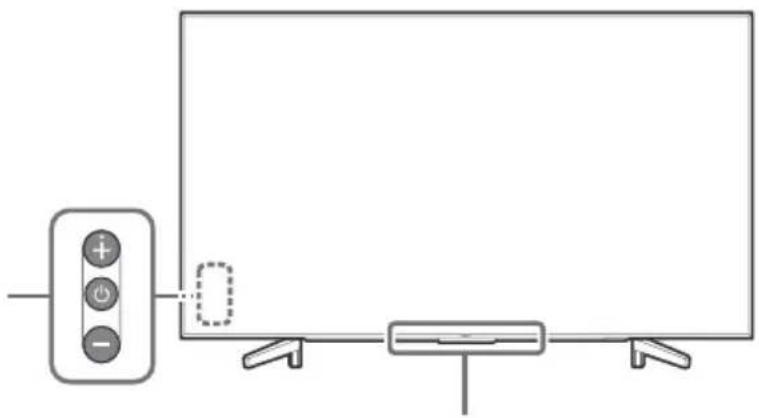
KD-49/43XF87xx, KD-49/43XF85xx
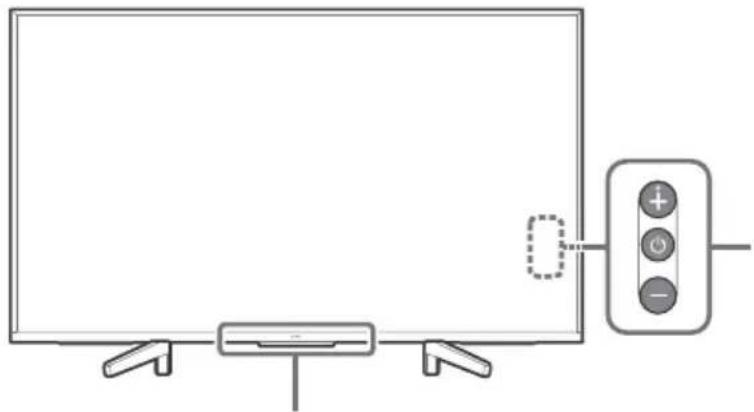
1 (Power) /+/-
When the TV is off,
Press to power on.
When the TV is on,
Press and hold to power off.
Press repeatedly to change the function, then press ^+ or - button to:
- Adjust the volume.
- Select the channel.
- Select the input source of TV.
Remote Control sensor*/Light sensor*/Illumination LED
The illumination LED lights up or blinks according to the status of the TV.
For more information, refer to the Help Guide.
- Do not place anything near the sensor.
Using Remote Control
Remote Control Parts Description
The remote control shape, location, availability and function of remote control buttons may vary depending on your region/country/TV model.
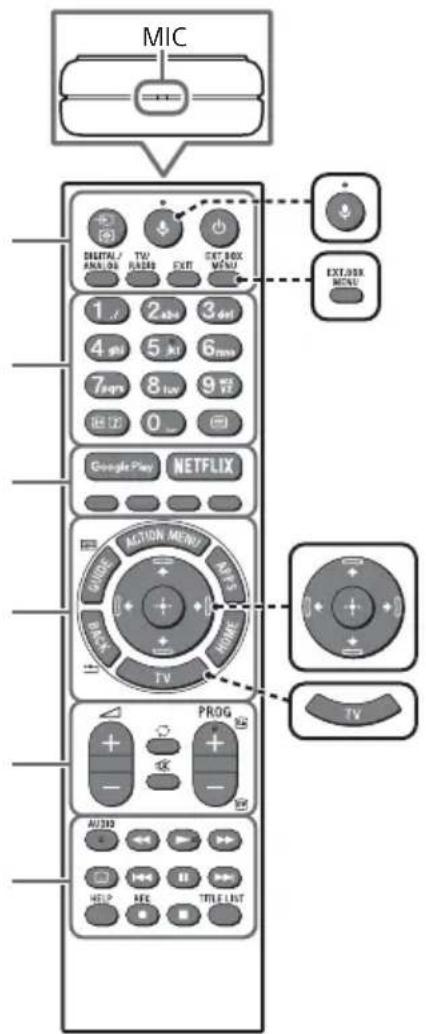

(Microphone)
Use Voice Search. (e.g., Search various content by voice.)

EXT.BOX MENU
Display the connected External Box (cable/satellite box) menu.
- For models with supplied IR Blaster, connect and set up the IR Blaster (page 13).
- The External Box menu may be displayed for some HDMI CEC compatible devices when the IR Blaster is not supplied/connected.
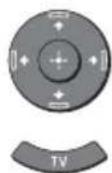
/ / / (Navigation D-Pad)
On screen menu navigation and selection.
TV
Switch to a TV channel or input and display the TV Menu Bar.
1 (Input select/Text hold)
In TV mode: Display and select the input source.
In Text mode: Hold the current page.
(TV standby)
Turn on or turn off the TV (standby mode).
DIGITAL/ANALOG
Switch between digital and analogue mode.
TV/RADIO
Switch between TV or RADIO broadcasts.
EXIT
Return to the previous screen or exit from the menu. When an Interactive Application service is available, press to exit from the service.
Number buttons

( Info / Text re v
Display information.
日 (Text)
Display text information.
3 Google Play
Access the "Google Play" online service.
NETFLIX (Only on limited region/ country/TV model)
Access the "NETFLIX" online service.
Colour buttons
Execute corresponding function at that time.
4 ACTION MENU
Display a list of contextual functions.
GUIDE/国
Display the digital programme guide.
APPS
Access various services and applications.
BACK/
Return to the previous screen.
HOME
Display the TV Home Menu.
5 +/-(Volume)
Adjust the volume.
(Jump)
Jump back and forth between two channels or inputs. The TV alternates between the current channel or input and the last channel or input that was selected.
(Muting)
Mute the sound. Press again to restore the sound.
PROG+/-/E/A/E
In TV mode: Select the channel.
In Text mode: Select the next (3) or previous (7) page.
6 AUDIO
Change the language for the programme currently being viewed.
<>/>>/1<>/
Operate media contents on the TV and connected BRAVIA Sync-compatible device.
(Subtitle setting)
Turn subtitles on or off (when the feature is available).
HELP
Display the Help menu. Help Guide can be accessed from here.
REC
Record the current programme with the USB HDD recording function.
TITLE LIST
Display the Title list.
Connection Diagram
For more information on connections, refer to the Help Guide by pressing HELP on the remote control.
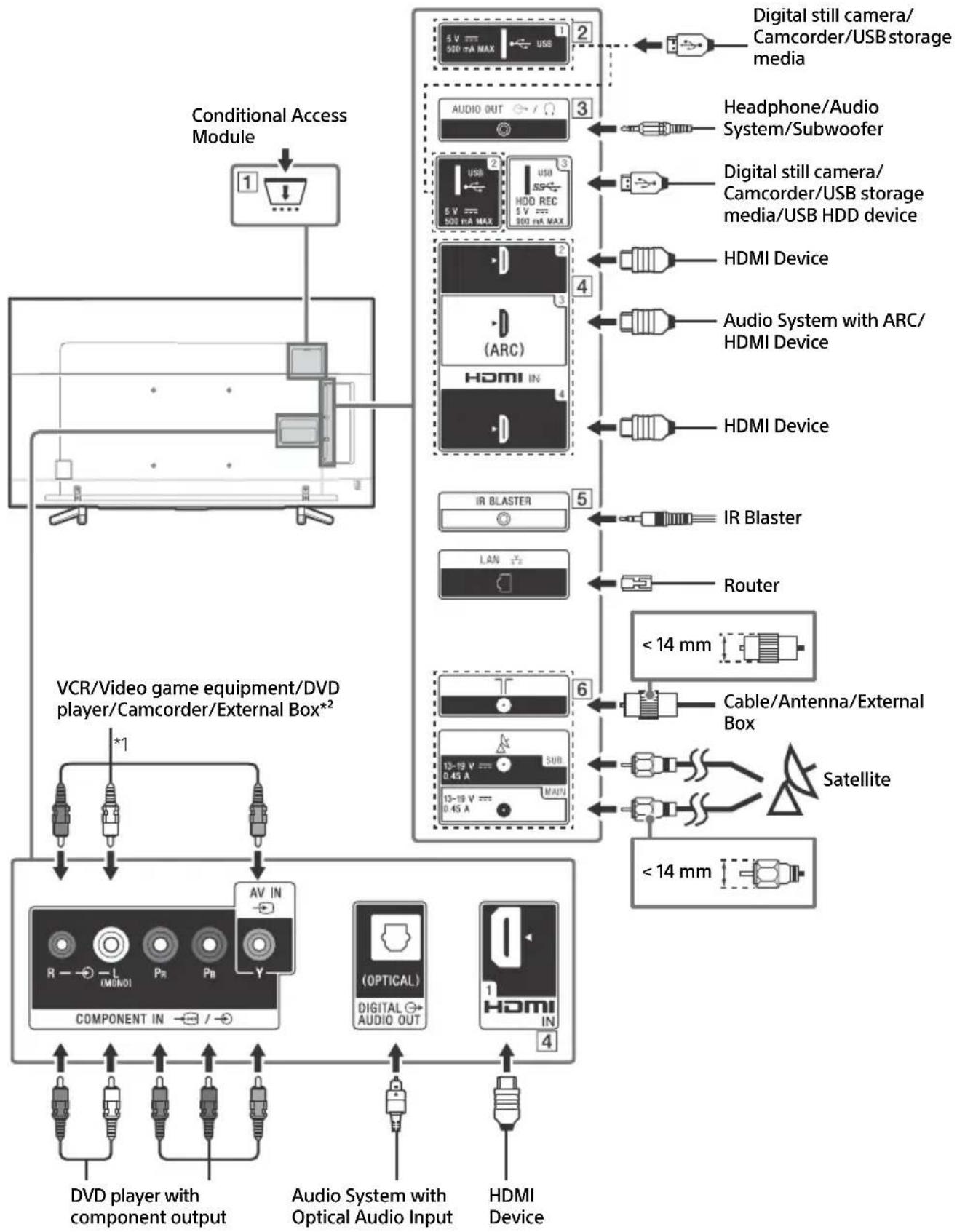
CAM (Conditional Access Module)
- Provides access to pay TV services. For details, refer to the instruction manual supplied with your CAM.
- Do not insert the smart card directly into the TV CAM slot. It must be fitted into the Conditional Access Module provided by your authorised dealer.
- CAM is not supported in some countries/ areas. Check with your authorised dealer.
- A CAM message may appear when you switch to a digital programme after using the Internet video.
2 USB1/2,USB3(HDDREC)* 3
- Connecting a large USB device may interfere with other connected devices beside it.
- When connecting a large USB device, connect to the USB 1 port.
- Connect a USB HDD device to the USB 3 port (blue).
3 AUDIO OUT
Supports 3-pole stereo mini jack only.
- To listen to the TV's sound through the connected equipment, press HOME. Select [Settings] [Sound] [Headphone/Audio out] and then select the desired item.
HDMI IN 1/2/3/4
- HDMI interface can transfer the digital video and audio on a single cable.
HDMI IN 3 ARC (Audio Return Channel)
Connect your audio system to the HDMI IN 3 to route TV audio to your audio system. An audio system that supports HDMI ARC can send video to the TV, and receive audio from the TV via the same HDMI cable. If your audio system does not support HDMI ARC, an additional connection with DIGITAL AUDIO OUT (OPTICAL) is necessary.
5 IR BLASTER
- Use your Sony remote control to control your External Box (cable/satellite box). Connect the IR Blaster Cable*3 to the IR Blaster port on your TV. Place one or both of the other two ends as shown below.
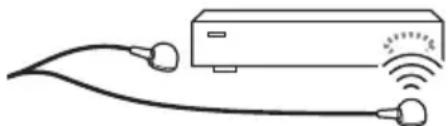
- To perform IR Blaster setup, press HOME and select [Settings] [External inputs] [IR Blaster setup].
6 (RF input), (Satellite input)
- Connections for terrestrial/cable and satellite. Connection steps: SUB. MAIN Antenna
- For SUB. jack, connect only when you are using twin tuner mode except for Single Cable Distribution EN50494.
1 When connecting mono equipment, connect to the L (MONO) audio jack (socket).
2 For an external device which has only SCART AV OUT, use a SCART-RCA adaptor and Analogue Extension Cable.
*3 Only on limited region/country/TV model.
Installing the TV to the Wall
Using the optional Wall-Mount Bracket
This TV's instruction manual only provides the steps to prepare the TV for Wall-Mount installation before it is installed on the wall.
To Customers:
For product protection and safety reasons, Sony strongly recommends that installation of your TV be performed by Sony dealers or licensed contractors. Do not attempt to install it yourself.
To Sony Dealers and Contractors:
Provide full attention to safety during the installation, periodic maintenance and examination of this product.
Sufficient expertise is required for installing this product, especially to determine the strength of the wall for withstanding the TV's weight. Be sure to entrust the attachment of this product to the wall to Sony dealers or licensed contractors and pay adequate attention to safety during the installation. Sony is not liable for any damage or injury caused by mishandling or improper installation.
Use the Wall-Mount Bracket SU-WL450 (not supplied) (Except KD-85/75XF85xx) to install the TV to the wall.
When installing the Wall-Mount Bracket, also refer to the Operating Instructions and Installation Guide supplied with the Wall-Mount Bracket.
Note
- Be sure to store the removed screws in a safe place, keeping them away from children.
- Place the TV with its screen facing down on a level and stable surface covered with a thick and soft cloth when removing the Table-Top Stand from the TV to prevent damaging the surface of the LCD display. (KD-49/43XF87xx, KD-49/43XF85xx only)

For instructions on Wall-Mount Bracket installation, see the Installation Information (Wall-Mount Bracket) on the product page for your TV model.
www.sony.eu/support/
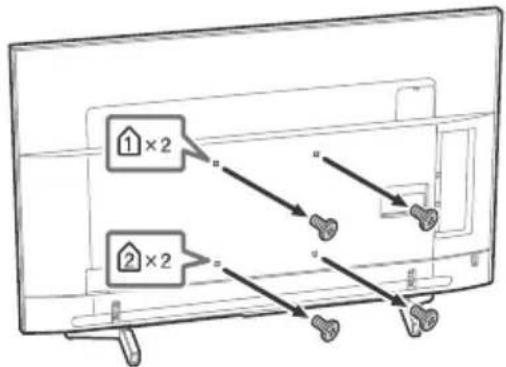
Remove the screws from the rear of the TV.
KD-65/55XF87xx, KD-65/55XF85xx KD-49/43XF87xx, KD-49/43XF85xx
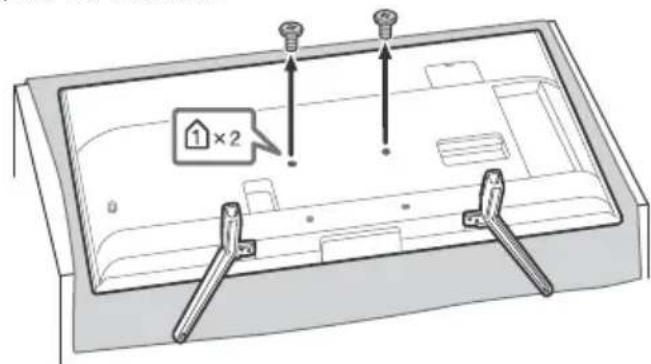
KD-85/75XF85xx only
Your TV can be mounted on a wall using a Wall-Mount Bracket (not supplied) out of the box as packaged.
Prepare the TV for the Wall-Mount Bracket before making cable connections.
For product protection and safety reasons, Sony strongly recommends that installation of your TV on the wall be performed by qualified professionals. Do not attempt to install it yourself.
- Follow the instruction guide provided with the Wall-Mount Bracket for your model. Sufficient expertise is required in installing this TV, especially to determine the strength of the wall for withstanding the TV's weight.
- Be sure to store the unused screws and Table-Top Stand in a safe place until you are ready to attach the Table-Top Stand. Keep the screws away from small children.
1 Remove the screws from the rear of the TV. KD-85XF85xx KD-75XF85xx
2 Attach the Wall-Mount Bracket (not supplied) using the screws (not supplied).
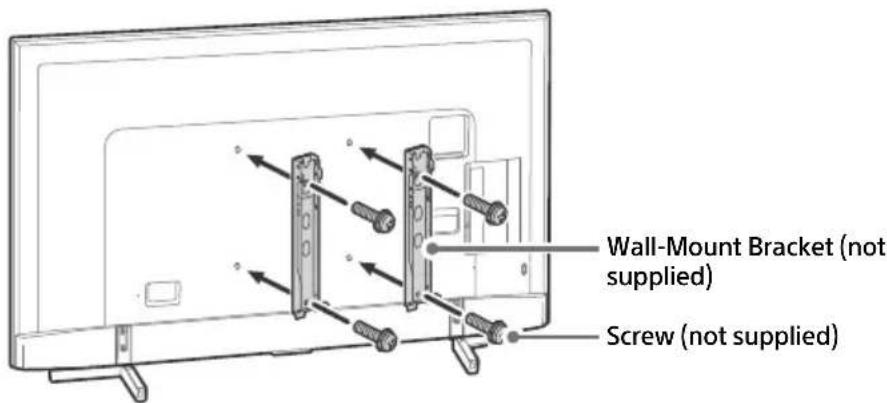
KD-85XF85xx
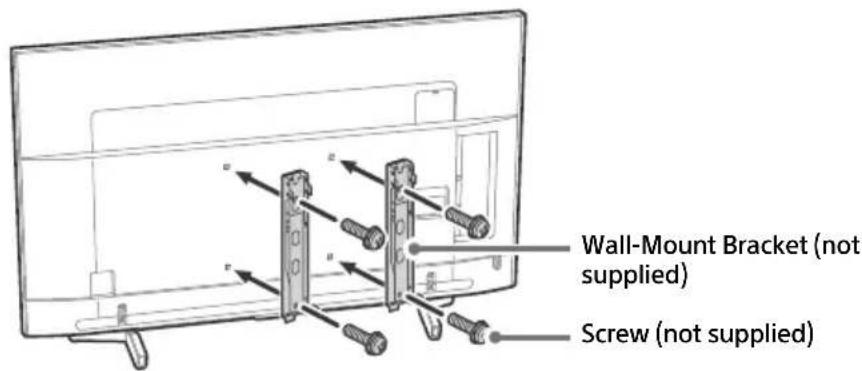
KD-75XF85xx
Note
- If using an electric screwdriver, set the torque at approximately 1.5N· m {15 kgf·cm}.
3 Detach the Table-Top Stand from the TV.
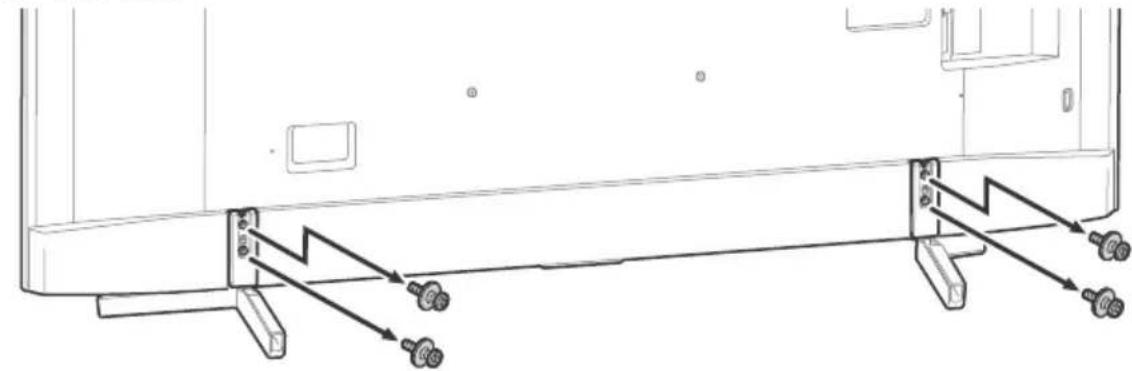
KD-85XF85xx
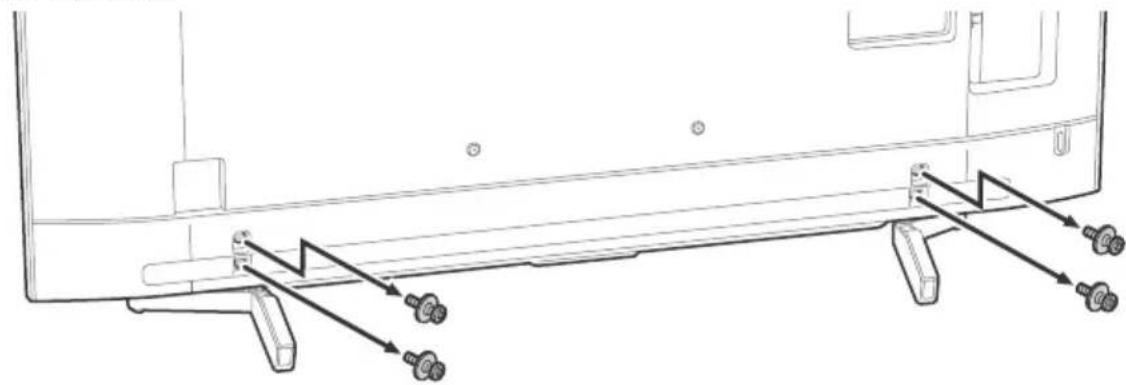
KD-75XF85xx
Troubleshooting
General troubleshooting for issues like: black screen, no sound, frozen picture, TV does not respond, or network is lost, do the following steps.
1 Restart your TV by pressing the power button on the remote control until a message appears. The TV will restart. If the TV does not recover, try unplugging the TV from the mains lead for two minutes and then plug it in again.
2 Refer to the Help menu by pressing HELP on the remote control.
3 Connect your TV to the Internet and perform a software update.
4 Visit Sony support website (information provided on the back cover).
When [A new TV system software update is available...] message is displayed.
Sony strongly recommends you to update the TV software by selecting [Update Now]. These software updates improve your TV performance or add new features.
The following screen with [Updating...] will appear and the illumination LED flashes white while software is updating.
![SONY KD65XF8505 - When [A new TV system software update is available...] message is displayed. - 1](/content/2026/03/438065/images/85e4cc5c165d6bbbf61119789c3fb41267e888ac7eb891fc8cfdb81b7d5d0515.jpg)
Do not unplug the mains lead during the software update. If you do, the software update may not finish completely, and it may cause a software malfunction. Software updates can take up to 15 minutes.
When you plug in the TV, the TV may not be able to turn on for a while even if you press the power button on the remote control or the TV.
It takes time to initialize the system. Wait for about one minute, then operate it again.
Troubles and Solutions
When the illumination LED is flashing in red.
- Count how many times it flashes (interval time is three seconds).
Reboot the TV by disconnecting the mains lead for two minutes, then turn on the TV.
If the problem persists, disconnect the mains lead, and contact your dealer or Sony service centre with the number of times the illumination LED flashes.
Terrestrial/cable service cannot be received.
- Check the antenna (aerial)/cable connection and booster settings.
- Select terrestrial/cable service by pressing DIGITAL/ANALOG on the remote control. If the broadcasting service is not displayed, press TV and then press DIGITAL/ANALOG.
- Terrestrial signal might be suppressed if there is a strong signal supplied nearby. Set [LNA (CH---)] to [Off] in digital tuning settings.
- After moving to a new house or trying to receive new services, attempt a service search by selecting [Digital Tuning].
Satellite service cannot be received.
- Check the satellite cable connection.
- When [No signal. LNB overload detected...] message is displayed, unplug the mains lead. Then, ensure the satellite cable is not damaged and the satellite signal line is not short-circuited in the satellite connector.
The remote control does not function.
- Replace the batteries.
The EXT.BOX MENU button on the remote control does not work.
- Connect and set up the IR Blaster (models with supplied IR Blaster only) (page 13).
- Connect HDMI CEC compatible device (except models with supplied IR Blaster) and change to that input.
The parental lock for broadcast password has been forgotten.
- Enter 9999 for the PIN code and select [Change PIN Code].
The TV surrounds become warm.
- When the TV is used for an extended period, the TV surrounds become warm. You may feel hot when touching there by the hand.
Specifications
System
Panel system LCD (Liquid Crystal Display) Panel, LED Backlight
TV system Depending on your country/area selection/TV model
Analogue: B/G, D/K, I
Digital: DVB-T/DVB-C
DVB-T2*
Satellite*: DVB-S/DVB-S2
Colour system PAL/SECAM/NTSC3.58 (Video only)/NTSC4.43 (Video only)
Channel coverage Depending on your country/area selection/TV model
Analogue: UHF/VHF/Cable
Digital: UHF/VHF/Cable
Satellite*: IF Frequency 950-2,150 MHz
Sound output 10W + 10W
Wireless technology Protocol IEEE802.11ac/a/b/g/n (IEEE802.11ac may not be available depending on countries/regions.)
Bluetooth Version 4.1
Frequency band(s)
| Wireless LAN (IEEE802.11ac/a/b/g/n) | |
| Frequency range Output Power | |
| 2400-2483.5 MHz < 20.0 dBm | |
| 5150-5250 MHz < 23.0 dBm | |
| 5250-5350 MHz < 20.0 dBm | |
| 5470-5725 MHz < 20.0 dBm | |
| 5725-5850 MHz < 13.9 dBm |
| Bluetooth | |
| Frequency range Output Power | |
| 2400-2483.5 MHz < 10.0 dBm |
RMF-TX311E/TX310E/TX221ES
| Bluetooth | |
| Frequency range Output Power | |
| 2400-2483.5 MHz < 10.0 dBm |
Software version
TV: PKG. EUA
Press HELP on the remote control to know the software version.
Remote control: Press HOME, then select [Settings] [Voice Remote Control] [Software version].
Any updates of software/firmware for this equipment/accessories/components will never affect its conformity to Directive 2014/53/EU in future.
- Not all the TV sets have DVB-T2 or DVB-S/S2 technology or satellite antenna terminal.
Input/Output jacks
Antenna (aerial)/cable 75 ohm external terminal for VHF/UHF
Satellite antenna Female F Type Connector, 75 ohm. DiSEqC 1.0, LNB 13 V/18 V & 22 kHz tone, Single Cable Distribution EN50494.
C O M P O N E N T YPBPR (Component Video): 1080p (50, 60 Hz), 1080i (50, 60 Hz), 720p (50, 60 Hz), 576p, 576i, 480p, 480i Audio input (phono jacks)
AVIN Video input (common phono pin with Y input) HDMI IN 1/2/3/4 (support 4K resolution, HDCP 2.2-compatible)
Video:
4096 × 2160p (50, 60 Hz)1, 4096 × 2160p (24 Hz)1, 3840 × 2160p (50, 60 Hz)2, 3840 × 2160p (24, 25, 30 Hz), 1080p (30, 50, 60 Hz), 1080/24p, 1080i (50, 60 Hz), 720p (30, 50, 60 Hz), 720/24p, 576p, 576i, 480p, 480i, PC Formats*3
1 When 4096 × 2160p is input and [Wide mode] is set to [Normal], the resolution is displayed as 3840 × 2160p . To display 4096 × 2160p , set [Wide mode] setting to [Full 1] or [Full 2].
2 HDMI IN 2/3 only. To support 18 Gbps, set [HDMI signal format] to [Enhanced format].
*3 Refer to the Help Guide for details.
Audio: 5.1 channel linear PCM: 32/44.1/48/88.2/96/ 176.4/192 kHz 16/20/24 bits, Dolby Digital, Dolby Digital Plus and DTS
ARC (Audio Return Channel) (HDMI IN 3 only) (Two channel linear PCM: 48 kHz 16 bits, Dolby Digital, Dolby Digital Plus, DTS)
DIGITAL AUDIO OUT (OPTICAL) Digital optical jack (Two channel linear PCM: 48 kHz 16 bits, Dolby Digital, DTS)
AUDIO OUT (Stereo mini jack) Headphone, Audio output, Subwoofer
1,2-3(HDBREC)*
1
USB device port. (USB HDD device for REC feature)
USB port 1 and 2 support High Speed USB (USB 2.0)
USB port 3 supports Super Speed USB (USB 3.1 Gen 1)

CAM (Conditional Access Module) slot
品 LAN
10BASE-T/100BASE-TX connector (Depending on the operating environment of the network, connection speed may differ. 10BASE-T/ 100BASE-TX communication rate and communication quality are not guaranteed for this TV.)
DC IN 19.5 V (models with supplied
mains adaptor only) Mains adaptor input
IR BLASTER*1
IR Blaster Cable input (mini jack)
Others
Optional accessories
Wall-Mount Bracket: SU-WL450
(Except KD-85/75XF85xx)
Operating temperature
0^ - 40^
Operating humidity
10% - 80% RH (non-condensing)
Power, Product Fiche and others
Power requirements
except models with supplied mains adaptor
220V-240VAC,50Hz
models with supplied mains adaptor only
19.5 V DC with mains adaptor
Rating: Input 220 V - 240 V AC, 50 Hz
Energy Efficiency Class
KD-85XF85xx: A
KD-75XF85xx: A+
KD-65XF87xx / KD-65XF85xx: A+
KD-55XF87xx / KD-55XF85xx: A
KD-49XF87xx / KD-49XF85xx: A
KD-43XF87xx / KD-43XF85xx: B
Screen size (measured diagonally) (Approx.)
KD-85XF85xx: 214.8 cm / 85 inches
KD-75XF85xx: 189.3 cm / 75 inches
KD-65XF87xx / KD-65XF85xx: 163.9 cm /
65 inches
KD-55XF87xx / KD-55XF85xx: 138.8 cm / 55 inches
KD-49XF87xx / KD-49XF85xx: 123.2 cm /
49 inches
KD-43XF87xx / KD-43XF85xx: 108.0 cm /
43 inches
Power consumption
In [Standard] mode
KD-85XF85xx:233W
KD-75XF85xx:149W
KD-65XF87xx / KD-65XF85xx: 120 W
KD-55XF87xx / KD-55XF85xx: 103 W
KD-49XF87xx / KD-49XF85xx: 88 W
KD-43XF87xx / KD-43XF85xx: 76 W
In [Vivid] mode
KD-85XF8596:400W
KD-75XF8596:272W
KD-65XF8796:218W
KD-65XF8599:218W
KD-65XF8596:218W
KD-65XF8588:218W
KD-65XF8577:218W
KD-65XF8505:218W
KD-55XF8796:192W
KD-55XF8599:192W
KD-55XF8596:192W
KD-55XF8588:192W
KD-55XF8577:192W
KD-55XF8505:192W
KD-49XF8796:160W
KD-49XF8599:160W
KD-49XF8596:160W
KD-49XF8588:160W
KD-49XF8577:160W
KD-49XF8505:160W
KD-43XF8796:143W
KD-43XF8599:143W
KD-43XF8596:143W
KD-43XF8588:143W
KD-43XF8577:143W
KD-43XF8505:143W
Average annual energy consumption*2
KD-85XF85xx: 323 kWh
KD-75XF85xx: 207 kWh
KD-65XF87xx / KD-65XF85xx: 166 kWh
KD-55XF87xx / KD-55XF85xx: 143 kWh
KD-49XF87xx / KD-49XF85xx: 122 kWh
KD-43XF87xx / KD-43XF85xx: 105 kWh
Standby power consumption*3*4
0.50 W (25 W in software/EPG update mode)
Display resolution
3,840 dots (horizontal) × 2,160 lines (vertical)
Output Rating
USB 1/2
5V-500mA MAX
USB3
5V-900mA MAX
Dimensions (Approx.) (w× h× d)
with Table-Top Stand
KD-85XF85xx: 191.1 × 117.6 × 42.9 ~cm
KD-75XF85xx: 167.3 × 103.1 × 37.1 cm
KD-65XF87xx / KD-65XF85xx: 145.0 × 90.0 ×
31.5 cm
KD-55XF87xx / KD-55XF85xx: 123.1 × 77.6 × 31.5 cm
KD-49XF87xx / KD-49XF85xx: 109.8 × 70.3 ×
27.9 cm
KD-43XF87xx / KD-43XF85xx: 96.5 × 62.8 ×
27.9 cm
without Table-Top Stand
KD-85XF85xx: 191.1 × 109.8 × 7.3 cm
KD-75XF85xx: 167.3 × 96.3 × 5.4 cm
KD-65XF87xx / KD-65XF85xx: 145.0 × 83.6 ×
5.2 cm
KD-55XF87xx / KD-55XF85xx: 123.1 × 71.3 × 5.2 cm
KD-49XF87xx / KD-49XF85xx: 109.8 × 64.4 ×
5.8 cm
KD-43XF87xx / KD-43XF85xx: 96.5 × 56.9 × 5.8 cm
Mass (Approx.)
with Table-Top Stand
KD-85XF85xx: 46.2 kg
KD-75XF85xx: 40.1 kg
KD-65XF87xx / KD-65XF85xx: 26.5 kg
KD-55XF87xx / KD-55XF85xx: 20 kg
KD-49XF87xx / KD-49XF85xx: 13.7 kg
KD-43XF87xx / KD-43XF85xx: 11.3 kg
without Table-Top Stand
KD-85XF85xx: 44.1 kg
KD-75XF85xx: 38.9 kg
KD-65XF87xx / KD-65XF85xx: 25.6 kg
KD-55XF87xx / KD-55XF85xx: 19.1 kg
KD-49XF87xx / KD-49XF85xx: 13.2 kg
KD-43XF87xx / KD-43XF85xx: 10.8 kg
*1 Only on limited region/country/TV model.
*2 Energy consumption per year, based on the power consumption of the television operating 4 hours per day for 365 days. The actual energy consumption will depend on how the television is used.
*3 Specified standby power is reached after the TV finishes necessary internal processes.
*4 Standby power consumption will increase when your TV is connected to the network.
Note
- Do not remove the dummy card or cover from TV CAM (Conditional Access Module) slot other than to insert a smart card fitted in CAM.
- Optional accessories availability depends on countries/region/TV model/stock.
- Design and specifications are subject to change without notice.
Notes on Digital TV function
- Digital TV (DVB terrestrial, satellite and cable), interactive services and network functions may not be available in all countries or areas. Some functions might not be enabled or might not operate correctly with some providers and network environments. Some TV service providers may charge a fee for their services.
- This TV supports digital broadcasting using MPEG-2, H.264/MPEG-4 AVC and H.265/HEVC CODECs, but compatibility with all operator/service signals, which may change over time, cannot be guaranteed.
Trademark information
- The terms HDMI and HDMI High-Definition Multimedia Interface, and the HDMI Logo are trademarks or registered trademarks of HDMI Licensing Administrator, Inc. in the United States and other countries.
Manufactured under license from Dolby Laboratories. Dolby, Dolby Audio, and the double-D symbol are trademarks of Dolby Laboratories. - "BRAVIA", Band BRAVIA Sync are trademarks or registered marks of Sony Corporation.
- Gracenote, the Gracenote logo and logotype, "Powered by Gracenote" logo are either registered trademarks or trademarks of Gracenote, Inc. in the United States and/or other countries.
- Vewd® Core. Copyright 1995-2017 Vewd Software AS. All rights reserved.
- Google, Android TV, Google Play, Chromecast built-in, YouTube and other related marks and logos are trademarks of Google LLC.
- Wi-Fi®, Wi-Fi Alliance®, Wi-Fi Direct® and Miracast® are registered trademarks of Wi-Fi Alliance.
- Wi-Fi Protected Setup™ is a trademark of Wi-Fi Alliance.
-
The Wi-Fi CERTIFIED™ Logo is a certification mark of Wi-Fi Alliance.
-
For DTS patents, see http:// patents.dts.com. Manufactured under license from DTS, Inc. DTS, the Symbol, & DTS and the Symbol together are registered trademarks, and DTS Digital Surround is a trademark of DTS, Inc. © DTS, Inc. All Rights Reserved.
- The Bluetooth® word mark and logos are registered trademarks owned by the Bluetooth SIG, Inc. and any use of such marks by Sony Corporation is under license. Other trademarks and trade names are those of their respective owners.
- Netflix is a registered trademark of Netflix, Inc.
- DiSEqCTM is a trademark of EUTELSAT. This TV supports DiSEqC 1.0. This TV is not intended for controlling motorized antennas.
- TUXERA is a registered trademark of Tuxera Inc. in the US and other countries.
- USB-IF SuperSpeed USB Trident logo is a registered trademark of USB Implementers Forum, Inc.
- All other trademarks are the property of their respective owners.
Table des matieres
AVIS IMPORTANT. 3
AT, BE, HR, CY, CZ, DK, EE, FI, FR, DE, EL, HU, IE, IT, LV, LT, LU, MT, NL, PL, PT, SK, SI, ES, UK, IS, LI, NO, CH, BG, RO, TR, AL, BA, MK, MD, RS, ME, Kosovo
6 (Entree RF),(Entree satellite)
Analogue: B/G, D/K, I
Analogue: UHF/VHF/Cable
2160p (24, 25, 30 Hz), 1080p (30, 50, 60 Hz),
1080/24p, 1080i (50, 60 Hz), 720p (30, 50,
60 Hz), 720/24p, 576p, 576i, 480p, 480i, Formats PC*3
ARC (Audio Return Channel) (HDMI IN 3 uniquely)
DIGITAL AUDIO OUT (OPTICAL)
10% - 80% HR (sans condensation)
DIGITAL AUDIO OUT (OPTICAL)
Toma digital optica (PCM lineal de dos canales: 48 kHz 16 bits, Dolby Digital, DTS)
AUDIO OUT 念 / 念 (minitoma estereo)
Auricular, Salida de audio, Altavoz de graves
1,2,SS3(HDDREC)
Puerto para dispositivo USB (dispositivo HDD SS 3 USB para funciona REC)
10% - 80% RH (sin condensation)
AT, BE, HR, CY, CZ, DK, EE, FI, FR, DE, EL, HU, IE, IT, LV, LT, LU, MT, NL, PL, PT, SK, SI, ES, SE, UK, IS, LI, NO, CH, BG, RO, TR, AL, BA, MK, MD, RS, ME, Kosovo
2160p (24, 25, 30 Hz), 1080p (30, 50, 60 Hz),
1080/24p, 1080i (50, 60 Hz), 720p (30, 50,
60 Hz), 720/24p, 576p, 576i, 480p, 480i,
Pc-formaten
(Tweekanaals lineaire PCM: 48 kHz 16 bits, Dolby
Digital, Dolby Digital Plus, DTS)
KD-55XF8588, KD-55XF8577, KD-55XF8505, KD-49XF8796,
KD-49XF8599, KD-49XF8596, KD-49XF8588, KD-49XF8577
KD-49XF8505, KD-43XF8796, KD-43XF8599, KD-43XF8596
AT, BE, HR, CY, CZ, DK, EE, FI, FR, DE, EL, HU, IE, IT, LV, LT, LU, MT, NL, PL, PT, SK, SI, ES, SE, UK, IS, LI, NO, CH, BG, RO, TR, AL, BA, MK, MD, RS, ME, Kosovo
Satellite*: IF Freqenz 950-2.150 MHz
Tonausgänge
10W+10W
Wireless-Technologie
Protokoll IEEE802.11ac/a/b/g/n
2160p (24, 25, 30 Hz), 1080p (30, 50, 60 Hz),
1080/24p, 1080i (50, 60 Hz), 720p (30, 50,
60 Hz), 720/24p, 576p, 576i, 480p, 480i,
Computerformate*
DIGITAL AUDIO OUT (OPTICAL)
High-Speed-USB (USB 2.0)
AT, BE, HR, CY, CZ, DK, EE, FI, FR, DE, EL, HU, IE, IT, LV, LT, LU, MT, NL, PL, PT, SK, SI, ES, UK, IS, LI, NO, CH, BG, RO, TR, AL, BA, MK, MD, RS, ME, Kosovo
Estequipment podeserutilidnootrospaisesnaneuropeus.
Instalar o television na parede
Utilizar o Suporte de parede optional
DIGITAL AUDIO OUT (OPTICAL)
Tomada digital otica (PCM linear deinous canais:
48 kHz 16 bits, Dolby Digital, DTS)
AUDIO OUT (Mini-tomada estereo)
Auscultador, saía de audio, subwoofer
1,2,SS3(HDDREC)*
AT, BE, HR, CY, CZ, DK, EE, FI, FR, DE, EL, HU, IE, IT, LV, LT, LU, MT, NL, PL, PT, SK, SI, ES, SE, UK, IS, LI, NO, CH, BG, RO, TR, AL, BA, MK, MD, RS, ME, Kosovo
Pannello LCD (cristalli liquidi), Retroillumination a LED
Sistema TV
DIGITAL AUDIO OUT (OPTICAL)
EU-importor: Sony Europe Limited.
Fragor till EU-importoren aller fragor som rörprodukternas overensstammelse i Europa skall sändas till tillverkarens auktoriserade representant, Sony Belgium, bijkantoor van Sony Europe Limited, Da Vincilaan 7-D1, 1935 Zaventem, Belgien.
Meddelande for radioutrustning

Härmed fösakrar Sony Visual Products Inc.
attenna typ av radioustrusting KD-85XF8596, KD-75XF8596, KD-65XF8796, KD-65XF8599, KD-65XF8596, KD-65XF8588, KD-65XF8577, KD-65XF8505, KD-55XF8796, KD-55XF8599, KD-55XF8596, KD-55XF8588, KD-55XF8577, KD-55XF8505, KD-49XF8796, KD-49XF8599, KD-49XF8596, KD-49XF8588, KD-49XF8577, KD-49XF8505, KD-43XF8796, KD-43XF8599, KD-43XF8596, KD-43XF8588, KD-43XF8577, KD-43XF8505
överensstämmer med direktiv 2014/53/EU. Den fullständiga
texten till EU-fösakran om overensstammelse finns på foljande
webbadress: http://www.compliance.sony.de/
Se Hjalpguiden for mer information.
- Placera ingenting nara sensorn.
Anvanda fjarrkontrollen
2160p (24, 25, 30 Hz), 1080p (30, 50, 60 Hz),
1080/24p, 1080i (50, 60 Hz), 720p (30, 50,
60 Hz), 720/24p, 576p, 576i, 480p, 480i,
PC-format*3
DIGITAL AUDIO OUT (OPTICAL)
EU Importor: Sony Europe Limited.
/ / / (Navigering D-Pad)
Skaermmenunavigering og valg.
TV
2160p (24, 25, 30 Hz), 1080p (30, 50, 60 Hz),
1080/24p, 1080i (50, 60 Hz), 720p (30, 50
60 Hz), 720/24p, 576p, 576i, 480p, 480i, Pc-formater*3
*1 Nár 4096 × 2160p er input og
(to-kanals lineaer PCM: 48 kHz 16 bit, Dolby
Digital, Dolby Digital Plus, DTS)
DIGITAL AUDIO OUT (OPTICAL)
Digitalt optisk stik (to-kanals lineaer PCM: 48 kHz
16 bit, Dolby Digital, DTS)
AUDIO OUT (Stereo-minijack)
Hovedtelefon, lydudgang, subwoofer
1,2,SS3(HDDREC)*
USB-port. (SSS HDD-enhed for REC-funktion)
USB-port 1 og 2 understotter High Speed USB (USB 2.0)
USB-port 3 understotter Super Speed USB (USB 3.1 Gen 1)

CAM (Conditional Access Module)-holder
LAN
10BASE-T/100BASE-TX-stik
2160p (24, 25, 30 Hz), 1080p (30, 50, 60 Hz),
1080/24p, 1080i (50, 60 Hz), 720p (30, 50
60 Hz), 720/24p, 576p, 576i, 480p, 480i,
PC-muodot*3
DIGITAL AUDIO OUT (OPTICAL)
EU-importor: Sony Europe Limited.
Spørsmål til EU-importøren eller spørsmål vedrørende** produktets overensbestemmelse i Europa skal sendes til produsentens autoriserte representant, Sony Belgium, bijkantoor van Sony Europe Limited, Da Vincilaan 7-D1, 1935 Zaventem, Belgia.
Merknad for radioutstyr
Hered erkrlaer Sony Visual Products Inc. at radioustyrstypene KD-85XF8596, KD-75XF8596, KD-65XF8796,

KD-65XF8599, KD-65XF8596, KD-65XF8588, KD-65XF8577, KD-65XF8505, KD-55XF8796, KD-55XF8599, KD-55XF8596, KD-55XF8588, KD-55XF8577, KD-55XF8505, KD-49XF8796, KD-49XF8599, KD-49XF8596, KD-49XF8588, KD-49XF8577, KD-49XF8505, KD-43XF8796, KD-43XF8599, KD-43XF8596, KD-43XF8588, KD-43XF8577, KD-43XF8505 er i samsvar me direktiv 2014/53/EU. EU-erklaering fulltekst finner du pa Inte under: http://www.compliance.sony.de/
Vis TV-ens home-meny.
5 +/-(Volum)
Juster volumet.
(Hopp)
Lydinngang (phonoplugger)

VIN
Videoi ngang (felles phonopinne med Y-inngang)
HDMI IN 1/2/3/4 (stotter 4K-opplønsing, HDCP 2.2-kompatibel)
Video:
4096 × 2160p (50, 60 Hz)12, 4096 × 2160p
(24Hz)^1 3840× 2160p (50,60Hz)^2 3840×
2160p (24, 25, 30 Hz), 1080p (30, 50, 60 Hz),
1080/24p, 1080i (50, 60 Hz), 720p (30, 5
60 Hz), 720/24p, 576p, 576i, 480p, 480i, PC-formater
DIGITAL AUDIO OUT (OPTICAL)
Digital optisk kontakt (tokenans lineær PCM:
48 kHz 16 biter, Dolby Digital, DTS)
AUDIO OUT (minijack, stereo)
Hodetelefon, lydutgang, subwoofer
1,2,SS3(HDDREC)
The Heights, Brooklands
Weybridge, Surrey, KT 13 0XW
United Kingdom.
Importer w UE: Sony Europe Limited.
KD-55XF8599, KD-55XF8596, KD-55XF8588, KD-55XF8577
KD-55XF8505, KD-49XF8796, KD-49XF8599, KD-49XF8596
KD-49XF8588, KD-49XF8577, KD-49XF8505, KD-43XF8796
KD-43XF8599, KD-43XF8596, KD-43XF8588, KD-43XF8577
AT, BE, HR, CY, CZ, DK, EE, FI, FR, DE, EL, HU, IE, IT, LV, LT, LU, MT, NL, PL, PT, SK, SI, ES, SE, UK, IS, LI, NO, CH, BG, RO, TR, AL, BA, MK, MD, RS, ME, Kosovo
2160p (24, 25, 30 Hz), 1080p (30, 50, 60 Hz),
1080/24p, 1080i (50, 60 Hz), 720p (30, 50,
60 Hz), 720/24p, 576p, 576i, 480p, 480i, formaty
komputerowe*3
DIGITAL AUDIO OUT (OPTICAL)
AT, BE, HR, CY, CZ, DK, EE, FI, FR, DE, EL, HU, IE, IT, LV, LT, LU, MT, NL, PL, PT, SK, SI, ES, SE, UK, IS, LI, NO, CH, BG, RO, TR, AL, BA, MK, MD, RS, ME, Kosovo
Toto vybaveni muze byt pouzito vostatnich neevropskych zemich.
2160p (24, 25, 30 Hz), 1080p (30, 50, 60 Hz),
1080/24p, 1080i (50, 60 Hz), 720p (30, 50,
60 Hz), 720/24p, 576p, 576i, 480p, 480i, PC formáty
DIGITAL AUDIO OUT (OPTICAL)
DC IN 19.5 V (pouze modely s dodanym
napajecim adapérem)
Vstup pro napajeci adaptor
IR BLASTER*1
Vstup pro kabel IR Blaster (mini konektor)
Ostatni
2160p (24, 25, 30 Hz), 1080p (30, 50, 60 Hz),
1080/24p, 1080i (50, 60 Hz), 720p (30, 50, 60 Hz), 720/24p, 576p, 576i, 480p, 480i, Formaty PC*3
DIGITAL AUDIO OUT (OPTICAL)
EU importor: Sony Europe Limited.
KD-55XF8577, KD-55XF8505, KD-49XF8796, KD-49XF8599
KD-49XF8596, KD-49XF8588, KD-49XF8577, KD-49XF8505
KD-43XF8796, KD-43XF8599, KD-43XF8596, KD-43XF8588
AT, BE, HR, CY, CZ, DK, EE, FI, FR, DE, EL, HU, IE, IT, LV, LT, LU, MT, NL, PL, PT, SK, SI, ES, SE, UK, IS, LI, NO, CH, BG, RO, TR, AL, BA, MK, MD, RS, ME, Kosovo
DIGITAL AUDIO OUT (OPTICAL)
Importer UE: Sony Europe Limited.
Intrebari catre importatorul UE sau referitoare la conformitatea produsului in Europa se trimit catre representantul autorizat al producatorului, Sony Belgium, bijkantoor van Sony Europe Limited, Da Vincilaan 7-D1, 1935 Zaventem, Belgia.
Observatie cu privire la echipamentul radio

Prin prezenta, Sony Visual Products Inc.
declarà cà tipurile de echipament radio KD-85XF8596,
KD-75XF8596, KD-65XF8796, KD-65XF8599, KD-65XF8596,
KD-65XF8588, KD-65XF8577, KD-65XF8505, KD-55XF8796,
KD-55XF8599, KD-55XF8596, KD-55XF8588, KD-55XF8577,
KD-55XF8505, KD-49XF8796, KD-49XF8599, KD-49XF8596,
KD-49XF8588, KD-49XF8577, KD-49XF8505, KD-43XF8796,
KD-43XF8599, KD-43XF8596, KD-43XF8588, KD-43XF8577,
KD-43XF8505 sunt in conformitate cu Directiva 2014/53/UE. Textul integral al declaratiei UE de conformitate este disponibil la urmātoarea adresā internet: http://www.compliance.sony.de/
Analogic: B/G, D/K, I
Digital: DVB-T/DVB-C
DVB-T2*
Satelit*: DVB-S/DVB-S2
Sistemculoare
PAL/SECAM/NTSC3.58 (Numai video)/NTSC4.43 (Numai video)
Acoperire canale
Analogic: UHF/VHF/Cablu
Digital: UHF/VHF/Cablu
Satelit*: Frecventa IF 950 - 2.150 MHz
lesire audio
10W+10W
Tecnologie wireless
Protocol IEEE802.11ac/a/b/g/n
(Este posibil ca, in functie de tari/regiuni, protocolul IEEE802.11ac sa nu fie disponibil.)
2160p (24, 25, 30 Hz), 1080p (30, 50, 60 Hz),
1080/24p, 1080i (50, 60 Hz), 720p (30, 50,
60 Hz), 720/24p, 576p, 576i, 480p, 480i, Formate PC*3
DIGITAL AUDIO OUT (OPTICAL)
Mufa optica digitala (PCM liniar pe doua canale: 48 kHz 16 biti, Dolby Digital, DTS)
AUDIO OUT / (mini mufä stereo)
Castei, ieire audio, subwoofer
1,2-3(HBDREC)* 1
Port disposizitiv USB. (Disposi- positive HDD
N3NoJ3BaHe Ha NICTaHcNOHHO
ynpaBneHne 10
MoHTax Ha TeJIeBn3opa Ha cTeHa .14
To3n npOdyKT e npOn3BeDeH ot nJIn OT mMeTo Ha Sony Visual Products Inc.
Bbocnten BC: Sony Europe Limited.
3aNTBaHn DO BHOCnteI INI 3aNTBaHn CBp3AHn CbC cBoTBeCTBnTo HA npOyKTnTe CbLnacHO 3aKOHOaTeNCTBOTo HA EBponeckn CbO3, CneBa Da ce OTnpaBRT KbM ybnHOMoUHe npeDCTabuTeH naPOn3BOUHe Nsory Belgium, bijkantoor van Sony Europe Limited, Da Vincilaan 7-D1, 1935 Zaventem, Bcnr.
3a6eIeKka 3a paINo o6OpyDbaHe

C hactoTo Sony Visual Products Inc.
deknapa,ue TnObepeaioooobpydBaHe
KD-85XF8596,KD-75XF8596,KD-65XF8796,KD-65XF8599,
KD-65XF8596,KD-65XF8588,KD-65XF8577,KD-65XF8505,
KD-55XF8796,KD-55XF8599,KD-55XF8596,KD-55XF8588,
KD-55XF8577,KD-55XF8505,KD-49XF8796,KD-49XF8599,
KD-49XF8596,KD-49XF8588,KD-49XF8577,KD-49XF8505,
KD-43XF8796,KD-43XF8599,KD-43XF8596,KD-43XF8588,
KD-43XF8577,KD-43XF8505cbOTBeCTBaTHaInpeKtNbA
2014/53/EC.LIIOCTHNIATeKTHaECdeknapaunraTa 3a
cB0TeBETCBHeMoKe Da Ce HaMeRHa CneDNHINHTepHET aDpec:
http://www.compliance.sony.de/
Toba paIIO obOpUyBaHe MoKeJa ce I3NoI3Ba B EC, 6e3 Ja ce HApUlaBaT npUIOXUMITE N3NCKBAHnO OTHOCHO I3NoI3BaHETO Ha paIIOueCToTHnI CnEkTbp.
3a6eNEXKa 3a NoTpe6bTeHn: CneIHaTa INHΦOpMaunCe OTHacr cAmo 3a 0bOpyDbaHe, npOdaBaHO B CTpaHn, KbTeO ce npInarat dIpeKtNBtE Ha EC.
Be3KnUHaTa TeIeBn3N0HHa CnCTema MoKe Da Ce N3NoJ3Ba B CnEHNHTe DbpxkAbN:
AT, BE, HR, CY, CZ, DK, EE, FI, FR, DE, EL, HU, IE, IT, LV, LT, LU, MT, NL, PL, PT, SK, SI, ES, SE, UK, IS, LI, NO, CH, BG, RO, TR, AL, BA, MK, MD, RS, ME, Kocobo
ToBaOBpyuBaHeMOXeJaCeN3NON3BaBdpyrHHeEBPoneckn CTpaHn.
HΦopMaζηa 3a 6e3oNaChocT
PPEyPEXKDEHNE
BHHMaHHe
Onacnoct ot ekcnnoia, ako 6atepnaTa 6bJe noMeHeHa c HnnpaBnEn Tn6abepeir.
BaTePnIte He Tpr6Ba Da ce N3laRaT Ha npeKaJeHa ToPnHa, HAnpIMep CbHueBa CBeTnHa, OBrH NnIOdo6nNnHa n3KIOUHTeNo HnCKo aTMocΦepHo HaNraHe, KoEt MoKe Ja DoBeDe Do eKcPiO3nNn N3TuHa He 3aNaJIIma TeuHOCT nnr Ra3.
Onachoct, Cbbp3aHa cbc cta6nHocTtA
TeNeBn3OpbT MoKe Da NaDHe N Da PnUHHn CepNo3Ho HapaHbAbe NmCmbT.
HnKora He cnaarTe TeneBUNOp Ha HecTabuHn NoBbpxHOCTN.
TeIeBn3OpbT MoKe Da NaIHe N Da PrnUHH CepNo3Ho HapaHraBaHe NmCbpt. MHoro HapaHraBaHna, OcO6eHo npu Deua, MORa Ta Ce n36erHaT, KaTo Ce B3Emat IpocTn PpeJa3HN MEpku Kato:
-ИЗползване нашkaфови Stойк,在penopьчанOT npoIN3BODNTeЯHaTeleBnOpa.
-ИЗнорзвахама На Мбел,在КоТо могат Бсэпано ддьржатTekeCTTаНТeLEВ3opa.
Ja Ce BHMABA TeLEBn3OpbT Da He N3JIN3a N3BbH Pb6a Ha Me6eNTe,Ha KOnTO e NoCTaBeH.
TeIeBn3OpbT da He ce nocTaB Bbpxy BucOKn Me6enn (hApIMep WkafoBe nn 6n6nnotek), 6e3 TeJIeBn3OpbT n cbOTBeTHaTaMe6en Da 6bDaT PnKcupaHn KbM NOxOJaOnopa.
-Да He ce NOCTABe TeneBn3Opa Bbpyx IJIaT INN dpyrN MaTePnaIN, KOnto MOrA da Ce HAMnPaT MeXy TeNeBn3Opa N Me6EJIne, Ha KOnTo e NOCTaBEH.
Ja ce o6rHHT Ha decaTa onaCHoCTHe O KaTepeHe No Me6BeHnTe, 3a Ce dcOCTnHe TeLeBn3OpbT UIN HeRoBnTe opraHHn 3a ynpabJNeHne.
Ako npn CmHa Ha JxuuiuTe OTo 3ana3nte HacToaunrCn TeJeBnOp, CneBDa BA B3MeTe NpeDbNd CbUIne CbOpaXeHnA, KaKTo rOpEnJNoKeHnTe.
HCTaJauHAcTpoKa
HCTaInpaTe n 3nOJIb3BaJIte TeneBUN3OpA B cBJTcTBne C HNCTpyKUInTE, ONuCAHn NO-dony, 3a da N36BerHete pNCK OT N0Xap, TOKOB yAp nIN Nobpe Da n/NNn HapAHBAHn. YpeD, CBp3An KbM 3aUnTHOTo 3a3EmBAHe Na crpaHATA HNCTaIauy Upe3 Bp3Ka C MPexKOBO ENEKTPO3aXpaHBAHe Nn Ipe3 DpyTO yCtPOJCTBO C Bp3Ka KbM 3aUnTHOTo 3a3EmBAHe, N KbM TeLEBUNOHHa pa3nPpeJNTeHn CaCTema, INIOJ3BaJa KoakcnaleH Ka6en, MoKe npn OOnpeJeHn ObCToTeLCTBa Da Cb3dJe ONaCHocT OT Noxap. 3aTOba CBp3BaHETo KbM TeLEBUNOHHa pa3nPpeJNTeHn CaCTema Tpr6Ba Da ce OCbJecTBn Ype3 YcTpoCTBO, PpeOCTABJIo eNEKTPnuCeKa nOlaNoI IO nOpeJeHn YceToteH dnaanaOH (ranbaHueh nOlaTop, Bx. EN 60728-11).
HCTaJau
TeBn3OpbTpr6BaJa 6bIe HCTaIIpaH 6n3o Do necho doctbneH KOHTK.
- NocCTabeTe TELEBN3Opa HA CTa6bIMHa, paBaH aNoBbPxHOCT, 3a da H3eBHeTae NaHETo My, KOEt MoKeJa pUHN HapAraBaHe Ha cOBek NNIOBpeDa HA IMyUeCTBO.
- MoHTnpaIte TeIeBn3Opa Ha MaIcTo, KbIeTO He MoXe Da 6bIe dpbHnat, 6yTHaT nn Ipeo6bPHaT.
- NocTabeTe TELBn3Opa TaKa, Ye CToKkata 3a Maca Ha TB Da He e CTbpyoT MaCata, HA KOrTO e NoCTabE H TeLEBn3OpBT (He ce DoCTaB). Ako CToKkata 3a Maca e N3dahe Ha HABh CNpMa Mo Macata, Ha KOrTO e NoCTabE TELBn3Opa, TOBA MOKeJa da DOBeDe Do Npeo6pbUaHe Nm NaDaHe Ha TELBn3Opa N da DOBeDe Do HapAHBaHe Na OboE Knn NIOpePa Ha TELBn3Opa.
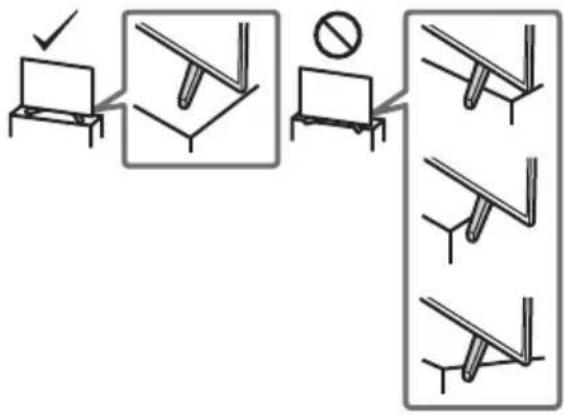
- MoHTaXbT Ha YcTpOyCTBOTO KbM CTeHaTa TpA6Ba Da ce N3BbPm CaMo OT KBaIINHnUpaH nepcoHAn.
- 3a no-roJlMa 6e30nAcHocB NppeOpbByaMe Da n3No13BaTe opnHaJIHnTe Akcecoapn Ha Sony, BKIOuYteIHO: -KoH3Ola 3a 3aKpenBaHe KbM cTeHa SU-WL450 (6e3 KD-85/75XF85xx)
Ha BcKa ZaHa N3NoJ3BaIte BnHToBeTe npNIOXeHN KbM KOH3ONaTa 3a 3aKpENBaHe KbM CTeHa, KORATo 3aKaUaTe KOH3ONaTa 3a 3aKpENBaHe KbM CTeHa KbM TEJIeBn3Opa. IpiNIOXeHIne BnHToBe Ca IpoeKTIpaHn KaKTo e NOKa3aHo Ha NIIocTpaunra, N3MepBaHeTo e HAnpaBeHo cnpMo 3aKaHbAaTa TNObPxHOCT Ha KOH3ONaTa 3a 3aKpENBaHe KbM CTeHa.
IaMaMeTbPbT NblJXHnHaTa HbBnTOBete ce pa3JIuHabat B 3aBNCUMOCT OT MoJeNa HoKOHoJaTa 3a 3akpenBaHe KbM CTEHa.
IV3N0N3BaHTo Ha BnHTObe, pa3JNUyH N OT Te3N B KOMNJIeKTA Ha KOH3OJaTAta, MoKe Da IOBede NO BbTpewH N NOBpeH NaTeEbn3Opa nn Da CTHe pnuHa 3a naDaHTo My n T.H.
KD-85/49/43XF85xx, KD-49/43XF87xx
KD-75/65/55XF85xx, KD-65/55XF87xx
Ppehae
-ПпсддмecTNTe TeNeBn3opa,ИЗКЛЮЧTe BCNUKn Ka6eNn OTHero.
-ПпснэгToHaTOrJMaTeNeBn3OpN3NcKBaДВaMaИИNoBeue dyuIN(TpmaИИNoBeue duu3aKD-85XF85xx)
Korato MeCTIte TeLEBUN3opa Ha pLue, DpIbXTe Ro, KaKTo e noka3aHO no-dony. He HATnckaIe LCD naHena u paMKaTa OKONO ekpHaHa.
Korato noBnIraTe nn MeCTnTe TeneBn3opa, ro npbXTe 3dpaboOTdoJy.
KD-85XF85xx
KD-75/65/55XF85xx, KD-65/55XF87xx
KD-49/43XF87xx, KD-49/43XF85xx
- Pn npenacane He n3naarate TeleBn3opa Ha cbtpceHn nn npekane Hn6paun.
Korato npehacate TeleBn3opa npn peMOHT nnn npn cMaHa Ha KINuIeTo, NaKeTnpaTe ro, KaTo n3No3BaTe opnHaHata onaKOBka mMaTePnaN 3a NaKeTnpaHe.
PpeoTbpaTaBaHe Ha napaHe
KD-85XF85xx
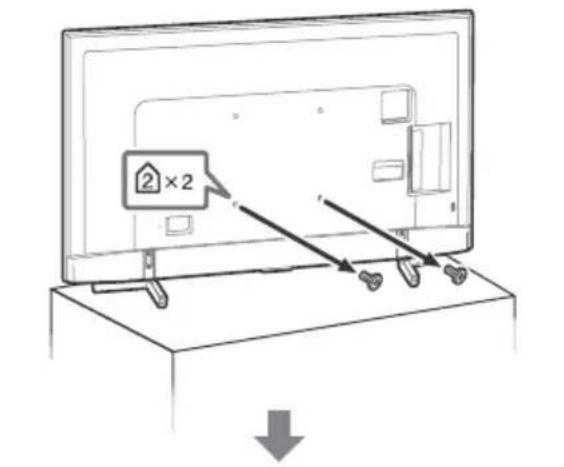
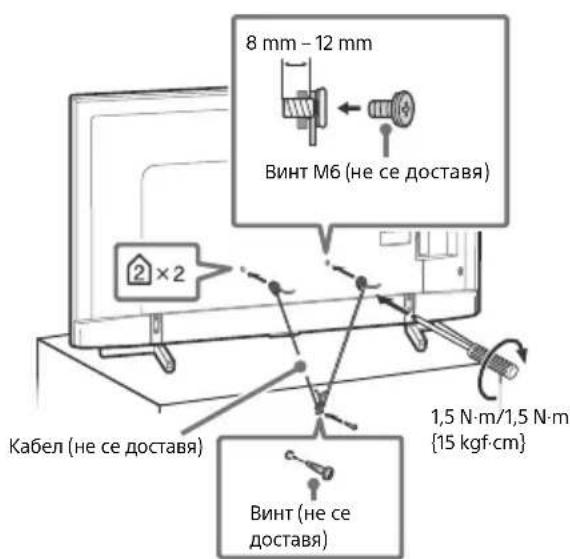
KD-75/65/55XF85xx, KD-65/55XF87xx
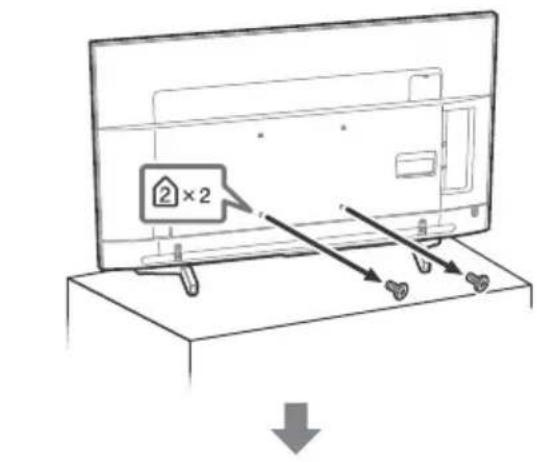
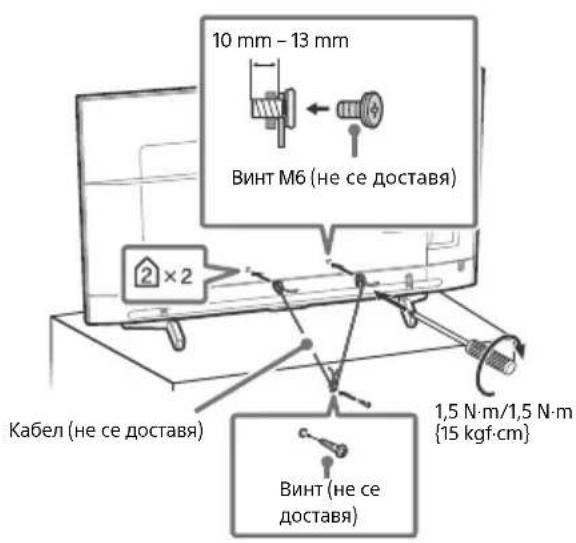
BG
BeHTnlaun
HnKora He NOKpNBaIe BeHTnlaUHOHHte OTBOpN HBe BkapBaIte npEIMTe B Kopnyca.
Octabete CBO6OJHO MRCTO OKIO TeneBUN3opa KaKTo e IOKa3aHO NO- DONY.
IpenopbHTeHoe a n3nON3BATE opunHaHnHaTa KOHc0la 3a 3akpenBaHe KbM cTeHa Ha Sony, 3a da ocUpynte doCTaTbHa UPKylnuaHa Hb3dyxa.
HCTaJaunHa CTeHa
Octabete Hau-Majko ToJkoBa MRCTO OKOYO YCTPOINCTBOTO.
HCTaInpaHe c nOmoUta Ha noctabKa
OCTaBeTe HAI-MAJIKO TOJIKOBA MRCTO OKJIO YCTPOINCTBOTO.
3a da noCTnHete npabuHa BeHTnlaucn 3a da npedOTbpaNTe CbnpaHETo Ha npax Nm MPcOTnA
He cnaaTe TeJeBn3opaJeHaJI, He ro MoHTnpaIte Osbphat C rOpHnKpaHaoJy, HaonaknNn CTpaHnHO.
He cnaarnte TeneBn3opa Bbpxy pafoBe,KnIm,JeIIO nIN B dpeHHNK.
He noKpBaiTe TeneBn3Opa Cnapeta NlaT, KaTo npPeTa nnC DpyTN PpeMeTu, KaTO BcTHNuN nDp.
He nHCTaIpaIte TeneBn3opa, KaKTo e noka3aHO no-dony.
LpKynlaunTaHaBb3dyx e6JoknPapaHa.
3axpaHbau Ka6eI
3a da npedotbpaTne pnc OT noXap, TOKOB yAp, NOBpea N/nn HapaHbAHe, pa6oTeTe c6 3axpaHbAunKa6e KaKTo CNEba:
- 3n03BaTe caMo opuHaJeH 3axpaHbaa Ka6eHa Sony. He n3no3BaTe DpyrMaPkn.
BkapaTe 1eCena NbTHO INoKpaB KOKtAkaT.
BkIIOUyBaIte TeIeBu3Opa CaMO KbM IpOMeHINBOTOKOBO 3axpaHaBaHe oT 220 V-240 V.
Korato npokapbate Ka6e, 3a Ba7a 6e0nacHcT ce yBepTe, ye Cte N3KIOUHH 3axpaHbAunKa6e; BHMabaTe Da He Ce cnBHeTe B Ka6eNITE.
-ИЗКИЮЧЕТахранвашик Кбел OT Мржета OT 220 V,пенидда мсгтite Ил ИЗБьршВATEОпацин Нд Тelenевзора. - Na3eTe 3axpaHbauaKa6eJ DaJIeU OT N3TOHnU Ha TOnnHa.
-3KIOUeTe 3axpaHbuaaKa6eI rO nouCTBaTpePOBHO. Ako 3axpaHbuaaTKe Ka6eI e3aMbpceH Nn npaueH nNo Hero ce Oba3yBa Bnara, H3oJaunTa My Moke Da Ce Hapywn I TOBA MOKe Da DOBeE Do NoXap.
3a6eJekka
He n3no3BaTe npnloKeHna 3axpaHbaa Ka6e c npyro o6opydahe.
He dyuHte He orBaTne H He ycKBaIe IpeKoMePHO 3axpaHbAunKaBn. BtpeHHTe npOboHNmu MoTa da ce orOJrNII ppeKbChat.
- He npenpaBraTe 3axpaHbuaKabEn.
He noctabraye Teekn npedmetn Bbpxy 3axpaHbaunka6eJ.
He IbpnaTe camn 3axpaHbaU Ka6eN, KOraTo ro n3KIOuBaTe OT KOHTaKTa.
He Cbbp3BaIe TBbpDe MHORO yCTpoiCTBa KbM eINH IN CbIaIKOHtAKT.
He n3no3BaIte KOHTaKT, KOITo He 3axBaIa Cta6nHIO
BENEKKA OTHOCHO 3AXPAHBAUNAANTOP (cAmo moJeN cDocTaBeH 3axpaHbaa aantop)
PpeDynpexKeHne
3a da hamaite onachocTt oT nokap nnn enektpnuecknyap, He nlae anapata Ha dbxndn Bna.
3a Da npedotbpaTtne nokap mnn TOKOB yap, He nocTabraIte npedmTe, nbHn C BObA, Hanpimep Ba3n, Bbpyx anapata. He MOHTnPaTte TOBA oboOpDyBaHe B 3aTBOpeHO pOcTpaHCTBO,
Hanpimep 6n6noTeKa nIIOo6Ha Me6eJ.
MOny, yBepete ce, ye eneKtpnwecKnT KOHTaKT e MOHTnpAH 6n3o do o60pydBaHTo n e necho DoCTbneH.
- YBepete ce, Ye n3no13BaTe DoctabeHnte 3axpaHbaua aanTOp u Ka6en.
He n3no3BaIte HnKaKbB pyr 3axpaHbAa anTOp. Toba MoKe Da npuHHn HeN3npaBHOCT.
CbpxTe 3axpaHbaunna aanTop KbM IecHO IOCTbne H eEeKtpueckn KOHTaT.
He HABINBaIte 3axpaHbAunna KaBEn Okono 3axpaHbAunna aanTOp. BbTepeHNHT npoBOdNHK MoKe Na ppekbche N ToBA da npnPHN HeM3npaBHOCT Ha npnEMHNA.
He DoKocBaIte 3axpaHbAun aanTOp c BnaJn pbue.
-Ako3a6eJKeNTeU3MeHHeHbB3axpaHbAunApaTOp, n3KIOUcTe RoOT eJeKTpuueckn KOHTAKr He3a6abHO.
TeNEBIM3OpBTHe nE3KJIOUeHOT 3aXpaHbAHeTo,doKaTO e Cbbp3Ah KbM eJEKeTpuYeCKn KoHTaKT, DOpn aKO CaMnT 耿NEBIm3Op E n3KJIOUeH.
-Понже 3axpaHbauIaДanTOp ce 3aTOnIIa,akOce n3nON3Ba npOdbJIxKInTeJIHO,MOKeJaNoUyBCTBaTe TOnJIHa,KoratoTo DOKOCHeTe CpKa.
3a6paheHa ynoTppe6a
He Hnctanipaate/3noJ3BaIte TeNeBn3opa Ha CneIeHnTe MeCta IuN B cTytuaTe, OONcAHNo-doJy. B npOTuBEH cnUaIe TeneBn3pBT MOKe Da ce NOBpeDN da pNpuHNn NooKap, TOKOY udap, taeta U/nnHapAHaBe.
MecToHaxOxKeHne:
Ha oTkpuTo (npraKa CbHYeBa CBeTlnHa), Ha MOpcknB 6pR, Ha Kopa6 nn Dpyr PnaBateHeh CbI, BbB BbTpEwHocCTHa npeBO3HO CpeCTBO, BMeuHcKn 3aBeDeHn, Ha HectaBnHn NOBbpxHocTn, 6bn3o Do BOda, NIOXKeH Ha DbXd, Bnara nn nywek.
OkoJHa cpea:
- MecTa, KOnTo ca ropeu, BnaxKn HnnpkeaHHe npauH; TaM, KbTeTo MoKe Da Bn3aT HaceKoMn; KbTeTo MoKe Da 6bJe n3NoXeHa MexaHnHn Bn6paun, B6n3ocT Do 3anaIIMn npEdMeTu (CBeuN np..) TeLeBn3OpB Tp8Ba da 6bJe npednaeHOT NOnBaHe C TeHuOCT; He NoctBaYne B6n3ocT Do yCTpoiCTBOTo npedMeTu, PbHn C TeHuOCTu, KaTO HanPnPmep Ba3N.
Cunyaun:
He n3no3BaIte, ako CTc mOKpn pbcke, KORATO kanaKbT Ha yctpOoiCTBOTO e CBaEN HIN C akcecoapn, KOtO He ca npenOpbaHOn OTnpoN3B0DnteJI. No Bpeme Ha rPbMOTeBuHn 6ypn N3KIOUHBAITe TELEBN3Opa OKTaKaTn CbIo n3BaXdaIte aHTEHN Ka6eN
- He MoHTnpaIte TeLEBn3Opa Taka, Ye da CTbpyN. MoKe Da Bb3HnKHe HapaHraBaHe NnIOBpeDa OT cblcbk Ha YOBek NnI pPeMet B TEeBn3Opa.
He noctabnTe TeneBn30paHa BnaXHO nIN pauHNO MCTO, INN B CTa C Ma3eH dMm Nnnpapa (6bn3o Do KxHECN PTOBe nIN OBnaxKnTeJI).MoKe Da Bb3HnKHe NOkAp, eNeKTPueckn Ydap INN DeΦopMaun.
He nocTabraTe TelenBn3opa Ha MeCTa, H3NoXeHn Ha BnCOKn Temnepatypn,HaNPmEpDnpeKTHa CbHueBa CBeTnHa,6n3o Do paiaTop nIINOTonNtENHO TaIO. B TakBa YcNoBnA TeelenBn3OpBT MOKe Da npperpee, KoTo Da npuHHn DeΦopMaunr Ha KopnyCa n/nn NobPeDa Ha TelenBn3opa.
AkoTeIeBn3OpbT6bJeNoCTaBeH Cb6IekalHa 6oEcTBeHa 6aHa NIN MNHepaNHa 6aHa,TeIeBn3OpbT MoKe da ce NOBpeNOTcpaTa BB B3dyxa nDp.
- 3a NaH-ДбОр КаЧЕТБО На KapTINHaTA, He ИЗлагITE ekpaHA Н AnДпeКТЮ OCBETЯВЕ НИ NСЛНЧЕВ CBETПИHA.
-ИЗБЯВаNTeпремсТВаHETe HTeLEBn3OpaOTCTUDEHOHa TOnIIO MЯСTO.BHe3aHNHTe NpOMeHbTEmNepaTypata Ha CTaTaMOraTdAnPpUHnRrKoHEn3Ha Bnara.TObA MoKeJa e npuHnHa 3a NOKa3BaHe HaNoLa KapTuHnHa/NInLouINuCBTeOBe.B TaKb CnyauHn3aKaJaTe BnArata Da ce n3napn HAnbNHO,ПЕДАВКнOHTe TELEBn3Opa.
CuyneHn napyeTa:
He XbIpaJIte HnIO KbM TeneBnOpa. CbKJIoTo Ha ekpHaMoKe Da ce Chyni Na ekCnIOJa npu yda pa n da npuHn cepno3n HapAHBaHna.
Ako NOBbpxHocTtHa DnCnner ce nponyka, He JdoKocBaHTe, DOkato He n3KnIOuHTe 3aXpaHBaunKa6eJ. B npOTuBEh Cnyau ToBa MoKe Da npUHHI TOKOB yIap.
Korato He n3no3BaTe yCTpoNCTBOTo
- Nopadn npuHnH, CbBp3aHn C 6e3oNaChocTtA n OKoJHaTa cpeDa, Bn npenopbUBaMe Da n3KIOuBATE TeNEBu3Opa OT MpeXaTa, KOrTo He IPhaHpaTe Da rO n3NoJ3BaTe HkOkoDnH.
TeIeBn3OpbT He e N3KJIIOueH oT MpeKaTa, KOraTo e N3KJIIOueH oT KOnyTe. 3a Da N3KJIOUHTe HaNbIHO UcTPOICTBOTo, N3KJIIOueTe Ka6ena Ha 3axpaHBaHeTO oT eNEKtpuYeckaTa MPexa.
HЯко TeJIeBn3Op npITeXkBaT ΦYHKUIN, KONTO n3NCKBaT yCTpoIcTBOTO da 6bJe octaBeHO B pexKIM FOToBHOCT.
OTHOCHOeata
- He no3B0JaBaIte Ha da Ce KaBbAT Bbpxy TeJeBn3opa.
- Na3eTe MaKNTe akcecoapn daJeu OT Deua, 3a Da He 6bDaT NOBnHaTN OT TReX NO HEBHMaHHe.
Ako Bb3HnKHaT CneHnTe npo6IeMn...
He3abHn NkHouTe TeBnOpa N3BaJeTe 3axpaHbUaNna Ka6eB Cnyuay, Ye B3HNKHe HAKON O T CneDHnTE npo6nEM. KOHCytnpaTe ce CaWuaN DOCTaBvNK INI cepBn3eH cHTbp Ha Sony daIe n HANOIXeHTo TeBn3OpBT da 6bIe npOBepen OT KBAHnHnupan cepBn3.
Koraro:
-3axpaHbuaT KaBEn e nobpeDeH.
-ΓHe3dToHa KOHTaKaTa He 3axBaUa Cta6nH0 UeNceJa.
TeBn3OpbTe nobpeH, noHeke e n3nyChaT, ydapeHnn Heo e Xbplno HrO Hero.
TeuHn TbbpnppeMetn Ca nonaHaBn B OTBOpnte Ha Kopnyca.
OTHOCHO TEMNEPAtypata Ha LCD TeJeBn3opa
Korato LCD TeIeBn3OpbT ce n3NoI3Ba IpoIbIKnTeIhO BpeMe, pAMkATo OKoJIo naHena ce 3aTOnJI. MoKe da ycTeTIte TOnJIHa, aKa o JdoKocheTe. MoKe da ycTeTIte TOnJIHa, KOrato JdoKoChete Cpbka.
Ppepa3HmepKn
TneJaHe Ha TeNeBn3n
- IneJaIte TeNEBUNB CpeDHO OCBeteHc CTa, Tb KaTo IneJaHeTO Ha TneBUNBn B Cna6o OCBeteHc CTa HAToBapBa DOJIbIHHTeJHO OUYTE Bn.
Korato n3non3BaTe cnlyaJnK, HAcTpoTe cnlaTa Ha 3Byka Taka, Ye da npedotbpatnte yBpejdahe Ha cnlya.
LCD ekpaH
BbnpeknueLCDekpaHbTe n3paboTeH NO BucOko-npeuHa texHOorrna noBoeue OT 99,99%OT NIKceIte My ca eFeKTINBn, BbpxL CD ekpana Moxe TpaHNo da CE NOBtT cepHN NcBcTIn TOckN (cepBeHn, CnH NnN 3eJeH).ToBa e ctpyKTypha Ooc6eHoct Ha LCD ekpana Hne npedctabraBA He3npaBOCT.
HeHaNTCKaIteHneDpaKaNTePpeHNHnFTbpN He NoCTABaHTe PpeMetu Bbpxy YcTPOINCTBOTo. N3o6paKeHMeTO MoKe Da e HepaBHOMepHO nIN LCD ekpaHbT MoKe da ce NobpeKn.
Ako n3NoN3BaTe yCTpoHCTBOTo Ha CTyEHO MRCTO, KAPTuHaTAMOKe Da ce 3AmBfnn Nn Da cTaHe No- TbMHa. ToBa He e Hen3npaBHOCT. To3n fehOMEH n3Ye3Ba, Korato TemnepaTypataCe NOBUnn
KoraTo Ha ekpaHa npOdbJIKNTeHNO BpeMe ca nOKa3AHn HEnoDbNkHN N3O6paKeHn, Bb3MOxHO e Da Ce NOBRT OcTaBUnn Obpa3n. Te MoRaT Da N3e3HaT CneH NkoJIO KeKYHdN.
EkpaHbT N KopnycbT ce 3aToNnT, Korato n3non3BaTe yCTpOcTBTO.ToBa He e HEm3npaBHOCT.
LCDekpaHbTcbDbpkaMaNKoKoJIuecTBoTeuHNKpIcTaII. CneBaIte MeCTHIne npaBnna 3aKoHN 3aN3XbPJIrHe Ha noOobHnOTNaDbu.
IopdpbKKa n nouchTbaHe Ha nobbpxHocTTa Ha ekpaHa/Kopnyca Ha TeleBn3opa
YBepeTe Ce,Ye CTE N3KJIIOHUNI CBbP3aHNA KBM TeJIeBn3Opa 3axpaHbAa Ka6en, npEi Da 3anOuHeTe NoUcTbaHe.
3a da npedotbpatnte nobpeHa nokpntmeTo ha ekpaHa, cneBaTte HnCTpyKunTe, n36poEHn No-dony.
3a da npemaxhe Te npaxo OT nobbpxhocTt Ha ekpaHa/Kopnyca, nouctbaIte C Meko cyxo napye nata. Ako noienHannr Tpax He Moxe Da ce noctn, nouctBaTe ekpHa C Meko napye nata, neko HABnaxHeO CbC cna6 noctBaU pa3TBop.
Hnkora He npbckaTe Boda mnn pa3TbOp dIpeKTHO Bbpxy TeNeBn3Opa. No ekpana HmBbHnHTe qactN, MoKe da Ce o6pa3yBaT KaKN, KOINTa NOteKaT, Da HabJe3HtB DOJIHa TaCt Ha TeNeBn3Opa n Da rO nobpeJr.
- He n3non3BaIte rpanabn napyeTa nlaT, noNCTBaU npenapaTu Ha aKanHa/KncEINHHa OCHOBa, noNCTBaU npaxOBe Hn pa3TbOpu, Kato HanpImep aIKOXo1, 6eH3o1, pa3peDntel nn HnCEKTnUd. N3non3BaHeTo Ha TaKInBa BeuecTBa Nn InpOdbLnKNTeHNrT KOHTaKT C rYMa Nn BnHnMoXe Da NobpeDi NOBbPxHOCTTa Ha ekpaHa Nn NOBbPxHOCTTa Ha Kopnyca Ha YcTpoiCTBO.To.
He nnaTe TeneBn3opa, aKo pbkata Bn e nokpnta C xmmuHOBeecTBO KaTo Kpem 3a pBue Nnn CbHue3aunTeH Kpem.
-Пренильва се nepиондунно поочтва с прахocmykaчka на OTворпгte за поветраве с сел осигурва на паынна BeHTINaця.
Korato perynapate bfbna Ha TeleBn3ope, MeCTe 6abHO yctpoiCTBOTo, 3a da npedeTbPAnte N3MeCTBaHe Ha TeLEBm3Opa NnI nanaDe OT Macata nnI cTOkNtA.
DonblnHTeJHo 06OpyBaHe
He pBkTe 6n3o Do TeJeBn30pa DOnbHnHTeHNHTe KOMTOHETN NAnKAKBOTO N da e 6NIO O6OpyBaHe, n3bYbaIoo enekTpOMaRTHTN BbNIn. B npOTnBE Hcnyae I Bb3MOxHO KaPTNHATA n/INN 3ByKbT Da 6bDat CbC CMUeHnA
ToBa O6OpYBaHe e TectBAHO n CbOTBetCTBa HA IN3NCKBAHnraTHa NIpKePTNb EMC, Kato IINoIIN3Ba Cbbp3BaU cnHAne H Ka6eNo-KcO T 3 Mepa.
ToBA 06OpUdBaHe e TcTBaHO nCbOTbETCTBa HA N3NCKBAHnTA Ha NInpeKTHBa EMC, Kato IN3NoJI3Ba RF Ka6eI NO-Kbc OT 30 Metpa 3a Ha3EmE/HcatENTeH/CATV N3BOD.
Ipenopbkn 3a KOHeKTop TnF
BbtpewHnT npoBOdNHK Tp6Ba Da e n3daeH cnpyMo Cbbp3BaAaTa YacT He NoBce oT 1,5 mm.
- He noctabraye Hnio B 6n30ct do ceh3opa.
BG
HabirataBekpaHHOTMeHIO n360p.
TV
IpeBkIIOUBaHe Ha TeJIeBn3IOHOHe KaHaJI NII BxOД I NOKa3BaHe Ha JeHTaTc MeHIOHa TeJIeBn3Opa.
1 (H36op Ha BxOa/3aIbpxKaHe Ha TeKcT)
B TB pexm: Poka3Ba n 136npa BXoHnna H3TOUHnK. B pexm Tekt: 3a npbka Tekyuata cTpaHnua.
( TB roTOBHOCT)
BknIOUba nIIN n3KNIIOUBA TeIeBN3Opa (peXIM IOTOBHOCT).
DIGITAL/ANALOG
IpeBkIIOyBa MeKdy uNΦpOB n aHaIOrOB peXIM.
TV/RADIO
IpeBkIIOUbMa MeKdY TV nIN RADIO npedabAHn.
EXIT
Bbpbua KbM npednweH ekpaH nn n3nn3a ot MeHIO.To. Korato pa6OTn INHTepaKTNBHO npuIooXeHne,HaTNCHeTe,3a Da n3Je3eTe OT ycnyrata.
2 ByToHn c uΦpN
i/(NHfo/Noka3BaHeHaTeKCT) Noka3BaNHΦopMaζη.
TeKCT
Ioka3Ba TeKCTOBA INHΦOpMaζη.
3 Google Play
He ce npneMaT caTeJInTH yCnyr.
- Поберете сателпота кабелна Врька.
KoratoCe noBn CbO6HHe [HrMa cnHaJI. OTuTeHo e npTeOBapBaHe Ha LNB...], n3BaJeTe 3axpaHbAaJnKa6eI.CleTToBa ce yBepTe,Ye caTeNtHnT Ka6eJI He e NOBpeDeH, a JInHraTa Ha caTeNtHnCnHaJI He e DaJaHa KaBCo B caTeNtHn KOHeKTOp.
KoHeKTop TnF,KeHcKn,750ma.
DiSEqC 1.0, LNB 13 V/18 V & 22 kHz TOH,
PaznepeJne no 1 ka6eJ EN50494.
COMPONENT IN
YPBPR (KOMnoHHTHO BnDeo): 1080p (50, 60 Hz), 1080i (50, 60 Hz), 720p (50, 60 Hz), 576p, 576i, 480p, 480i
AydnoBxoD(oHOjkaKOBe)
AVIN
Bndeo BXoJ (O6u,foHO nHH c YBXoJa)
HDMI IN 1/2/3/4 (noДьрka 4K pezoюя,
CbbMeCTnM c HDCP 2.2)
Bnpeo:
4096× 2160p (50, 60 Hz)*1*2, 4096× 2160p (24Hz)^*1 , 3840 × 2160p (50, 60 Hz)*2, 3840 × 2160p (24, 25, 30 Hz), 1080p (30, 50, 60 Hz), 1080/24p, 1080i (50, 60 Hz), 720p (30, 50, 60 Hz), 720/24p, 576p, 576i, 480p, 480i, PC opMaTn*3
^*1 Korato ce nodaBa 4096 × 2160p n [Unpokoekepaen pexim] e hactpoeh Ha [HopmaeH], pe3oIouyra Ce noka3Ba KaTo 3840× 2160p . 3a noka3BaHe Ha 4096 × 2160p cNojTe hactpoiKaTa [Unpokoekepaen pexim]Ha[PiJeH1]nIn[PiJeH2].
2 Camo HDMI IN 2/3. 3a noДьрхане Ha 18 Gbps Hab相对较ite [Формат Ha HDMI сигнана.] Ha [Poboljsani format].
3 3a NOBuee INHΦOpMaζη BuxTe NOMOιHOTOPbKOBODCTBO.
Aydno:
5,1 kaHaleh JInHeeH PCM: 32/44,1/48/88,2/96/ 176,4/192 kHz 16/20/24 6nta,Dolby Digital, Dolby Digital Plus n DTS
ARC (Audio Return Channel) (camo HDMI IN 3)
(Дыкален Лионг PMC: 48 kHz 16 6nTa, Dolby Digital, Dolby Digital Plus, DTS)
DIGITAL AUDIO OUT (OPTICAL)
LnΦpOB ONTnueH JαK (ДуКананглИн HeeH PCM: 48 kHz 16 6nta, Dolby Digital, DTS)
AUDIO OUT 念 / 念 (CTepeo MmHn JkaK)
CnyuzaJIkn, Aynno n3xoJ, Cb6yΦep
1,2-3(HBPEC)* 1
IopT3aUSByctpoiCtBO.(SSSB HDD
yctpojCTBO3a yHKUNREC)
USB nopT 1 n 2 noДьржat High Speed USB (USB 2.0)
USB nopT 3 noДьрka Super Speed USB (USB 3.1 Gen 1)

CAM (MOyI 3a ycIOBeH IOCTbI) rHe3do
品LAN
10BASE-T/100BASE-TX KOHeKTop (B 3aBnCmOcT OYUCNoBnTa Ha pa6oTa Ha MpeKaTa,CKOpocTTa Ha IpeHoc Ha DaHHnTe MoKe Da ce pa3nUaBa.
10BASE-T/100BASE-TX 3a To3n TeJeBu3Op He rapaHTnpa CKOpocT N KaueCTBO Ha KOMyHNKaUraTa.)
DC IN 19.5 V (camo mojeи cdoctabeh 3axpaHbaa aanTOp)
OTHOCHTeHa BnaXHOCT 10% -80% (6e3
06pa3yBaHe Na KOHdeH3)
3axpaHbaHe,ΦnshHa npOdyKta n dpyrn
N3nCKBaHna 3a 3axpaHbAHeTo
OCBeH MoJeI, KOITo Ce IOCTaBc 3axpaHbUa, aAnTop
220V-240VAC,50Hz
cAmO MoIeJI N C IOCTaBEn 3aXpaHbAa, aIaIaTOp
19,5VDCcb3axpaHbaua aanTop
HomHaJIHo BxOДNo HAppeKeHne: BxOДHo
HanpexeHne 220 V - 240 V AC, 50 Hz
EheprnKnaC
KD-85XF85xx: A
KD-75XF85xx: A+
KD-65XF87xx / KD-65XF85xx: A+
KD-55XF87xx / KD-55XF85xx: A
KD-49XF87xx / KD-49XF85xx: A
KD-43XF87xx / KD-43XF85xx: B
Pa3mep Ha ekpaHa (n3mepen no daarOHa) (npu6).
KD-85XF85xx: 214,8 cm / 85 inHua
KD-75XF85xx:189,3cm/75 mHua
KD-65XF87xx / KD-65XF85xx: 163,9 cm / 65 inHua
KD-55XF87xx / KD-55XF85xx: 138,8 cm / 55 inHua
KD-49XF87xx / KD-49XF85xx: 123,2 cm / 49 nHua
KD-43XF87xx / KD-43XF85xx: 108,0 cm / 43 inHua
KohcymaunHa eHepnra
B [CtaHdapTeH] pekIM
KD-85XF85xx:233W
KD-75XF85xx:149W
KD-65XF87xx / KD-65XF85xx: 120 W
KD-55XF87xx / KD-55XF85xx: 103 W
KD-49XF87xx / KD-49XF85xx: 88 W
KD-43XF87xx / KD-43XF85xx: 76 W
B [ApbK] pekIM
KD-85XF8596:400W
KD-75XF8596:272W
KD-65XF8796:218W
KD-65XF8599:218W
KD-65XF8596:218W
KD-65XF8588:218W
KD-65XF8577:218W
KD-65XF8505:218W
KD-55XF8796:192W
KD-55XF8599:192W
KD-55XF8596:192W
KD-55XF8588:192W
KD-55XF8577:192W
KD-55XF8505:192W
KD-49XF8796:160W
KD-49XF8599:160W
KD-49XF8596:160W
KD-49XF8588:160W
KD-49XF8577:160W
KD-49XF8505:160W
KD-43XF8796:143W
KD-43XF8599:143W
KD-43XF8596:143W
KD-43XF8588:143W
KD-43XF8577:143W
KD-43XF8505:143W
CpeiHo roiHNO noTpe6JIeHHe Ha eHepn*2
KD-85XF85xx:323 kWh
KD-75XF85xx: 207 kWh
KD-65XF87xx / KD-65XF85xx: 166 kWh
KD-55XF87xx / KD-55XF85xx: 143 kWh
KD-49XF87xx / KD-49XF85xx: 122 kWh
KD-43XF87xx / KD-43XF85xx: 105 kWh
Kohcymaun Ha eheprnBpekum TOTOBHOCT*4
0,50 W (25 W B peKIM Ha aKtyaIIN3aIINHa coΦTyep/EPG)
U3XoDNH HOMHaJIHN DaHHN
USB 1/2
5V,500mA(makc.)
USB3
5V,7900mA(MaKc.)
Pa3mepn (npn6π.) (w × B × d)
C NOCTaBKa 3a Maca
KD-85XF85xx: 191,1 × 117,6 × 42,9 cm
KD-75XF85xx: 167,3× 103,1× 37,1cm
KD-65XF87xx / KD-65XF85xx: 145,0 × 90,0 ×
31,5 cm
KD-55XF87xx / KD-55XF85xx: 123,1 × 77,6 × 31,5 cm
KD-49XF87xx / KD-49XF85xx: 109,8 × 70,3 ×
27,9 cm
KD-43XF87xx / KD-43XF85xx: 96,5 × 62,8 ×
27,9 cm
6e3 NOCTaBka 3a MaCa
KD-85XF85xx: 191,1 × 109,8 × 7,3 cm
KD-75XF85xx: 167,3×96,3×5,4 cm
KD-65XF87xx / KD-65XF85xx: 145,0 × 83,6 ×
5.2 cm
KD-55XF87xx / KD-55XF85xx: 123,1× 71,3× 5,2cm
KD-49XF87xx / KD-49XF85xx: 109,8 × 64,4 ×
5.8 cm
KD-43XF87xx / KD-43XF85xx: 96,5 × 56,9 × 5,8 cm
Tero (npn6).
C NOCTaBKa 3a Maca
KD-85XF85xx:46,2 kg
KD-75XF85xx: 40,1 kg
KD-65XF87xx / KD-65XF85xx: 26,5 kg
KD-55XF87xx / KD-55XF85xx: 20 kg
KD-49XF87xx / KD-49XF85xx: 13,7 kg
KD-43XF87xx / KD-43XF85xx: 11,3 kg
6e3 nOCTaBka 3a Maca
KD-85XF85xx: 44,1 kg
KD-75XF85xx: 38,9 kg
KD-65XF87xx / KD-65XF85xx: 25,6 kg
KD-55XF87xx / KD-55XF85xx: 19,1 kg
KD-49XF87xx / KD-49XF85xx: 13,2 kg
KD-43XF87xx / KD-43XF85xx: 10,8 kg
1 Camo 3a onpeJeHn perNoHn/ctpaHn/MoJIeN TeJebu3Opn.
^2 KOncymaunHa eHepnHa rOuHa, 6a3npaHo Ha KOHCymaunTa Ha TeJeBn3Op, KOTo pa60Tu 4aca Ha DeH, 365 dH. JeIcTBnTeJHaTa KOHCymaun Ha eHepn 3abncn OT TOBa KaK Ce n3NoJ3Ba TeJeBn3Opa.
^3 Yka3aHaT a KOHCyMaun Ha eHepnB BpeKIM TOTOBHOCT Ce DOCTnra CneI KaTO TeJeBn3OpbT PpIKHOUH Heo6XoDmNTe BbTpewH NPOUecN.
4 KoHcyMaIaIHa eHepnB pexm rTOBHOCT Ie Ce yBeJIuN, KOrato BaIurT TeJIeBu3Op e Cbbp3aH KbM MpeJa.
3a6eJekka
He n3BaXdAaTe NcBdo-KapTaTaNJn KaNaKaOT cNoTa Ha TV CAM (Moyn 3a ycNoBeH DoCTbN) OCBEN 3a Da NbxHe TcMapr KapTa B CAM.
HaIyuHTo Ha DonbHnTeHn Akcecoapn 3aBncn O T bpxkabata/pernoHa/MoJeHa TeNeBn3opa n HauuHocTt.
-Ди3aHbTи cneuФнkaunTe nOJIeKaT Ha npomraHa 6e3 npedynpekdeHne.
3a6eIeKka 3a unΦpoBaTa ΦyHKunHa TeLeBn3opa
- LüΦpOBA TeJIeBn3n (DVB Ha3eMHo, caTeJIHTHO n Ka6eJIHO), INHTepaKTbHN YcIyrN mpeKOBn ΦyHKuN MoKe dA He ca DoCTbHn BbB BCuKN CTpaHn IJn paJOh. HЯkon ΦyHKuN MoKe dA He ca aKTbUpaHn IJN MoKe dA He pa6OTaT npaBnHc HЯkon DoCTaBcUnc n MpeKOBn cpei. HЯkon DoCTaBcUnc Ha TeJIeBn3NoHHn YcIyrN MoKe dA NaHCJIaBaT TaKCa 3a YcIyrnte Cn.
To3n TeIeBn3Op noDlbpka ufoPBO npedabahe, n3noJ3Baikn MPEG-2, H.264 / MPEG-4AVCnH.265/HEVCKoedeun, Ho He MoKe da 6bnde rapaHTnpaHa CbBMecTUMOCCTTa CBCNUCKuHaJIi Ha onepaTopu/YcIyTu, KOITOMoKe da ce IpnomEHNCTeueHne Ha BpeMeTO.
HΦopMaζηa TbproBcKn MapKn
- TepmHHTe HDMI n INTepfeic 3a MyJTMMeiNc BnCoka pa3deJIteJIHa cnocO6Hocr HDMl (HDMI-High-Definition Multimedia Interface), KaKTo n Iloroto HDMI ca 3ana3eHn MapKn Ha HDMI Licensing Administrator, Inc. B CbeDInHeHnTe uatn n npytn DbprXabN.
- ПонЗБеДено Лицен3 Ha Dolby Laboratories. Dolby, Dolby Audio n CnMBoJbT ДВОИно "D" ca TbpROBcN Марки Ha Dolby Laboratories.
"BRAVIARAVIBRAVIA Sync ca TbpROBcN MapKn nn peRncTpnpaHn MapKn Ha Sony Corporation. - Gracenote, Логото и логотиьт Gracenote, К akто и логото "Powered by Gracenote" cap ernstprupaHn TbproBckn Марки Илп ТьproBCKn Марки Ha Gracenote, Inc.В CAU n/нлдpyгДыржави.
-
Vewd® Core. Copyright 1995-2017 Vewd Software AS. All rights reserved.
-
Google, Android TV, Google Play, Chromecast built-in, YouTube и ручи CBbp3aHn Марки Илora са зараетени Марки на Google LLC.
Wi-Fi, Wi-Fi Alliance, Wi-Fi Direct in Miracast ca perinctpupaH TbproBckn MapKn Ha Wi-Fi Alliance. - Wi-Fi Protected Setup™ e TBproBcKa Mapka Ha Wi-Fi Alliance.
- Jloroto Wi-Fi CERTIFIED™ e ceptnФикuaционен 3нak Ha Wi-Fi Alliance.
- 3a DTS naTeHTn, BuxTe http:// patents.dts.com. ПронзveДeно Лицен Ha DTS, Inc. DTS, CmBOnbT, & DTS n CmBoJbT 3aEДHo ca perinctpupaHn TbproBcKn Маркn, a DTS Digital Surround e TbproBcKa Марka Ha DTS, Inc. © DTS, Inc. BcnuKn npaba 3ana3eHn.
- 3HaKbT Bluetooth®и Фирмени Te 3Haци ca pernctpupaHи TbpROBckn Mapkn co6CTBeHocT Ha Bluetooth SIG, Inc. n I3NoJ3BaHeTo Ha Te3N 3Haци OT Sony Corporation e no JInceH3. Дугн TbpROBckn Mapkn И TbpROBCKn IMeHa ca npntExaHne Ha CbOTBEHTHnte IM CO6CTBeHnU.
- Netflix e pernctpupaHa TbproBcKa Mapka Ha Netflix, Inc.
- DiSEqCTM e TbproBcKa Mapka Ha EUTELSAT. To3n TeJebn3Op noDlbpxKa DiSEqC 1.0. To3n TeJebn3Op He e npedHa3NaueH 3a ynpabJIeHHe Ha aHTeHc MoTOp.
TUXERA epernctpupaHa TbproBcKa MapKa Ha Tuxera Inc. B CAU n npyrn cpaHn. - JloroTo USB-IF SuperSpeed USB Trident e peRncTpnpaHa TbproBcKa Mapka Ha USB Implementers Forum, Inc. SS
- BCnUKN DpyrN TbprOBCKn MapKn Ca npntExKaHne Ha CbOTBeTHnte NM CO6CTBeHnCi.
περιεχόμενα
H M ANTIKH H MEI H 4
II npophiiec oxetikα μe tnv αoφλεια .4
PpOΦuλεIc 9
Eeapntnmaata kai xeiipotnpia. 11
XeIpiotnpiKaI EvdeltaEic 11
XpnoTou TnExeipoiotnpiou. 12
DIGITAL AUDIO OUT (OPTICAL)
Dijital: UHF/VHF/Kablolu
Uydu*: IF Frekansi 950-2.150 MHz
Se ciksi
10W+10W
DIGITAL AUDIO OUT (OPTICAL)
Dijital optik jak (iki kanal dogrusal PCM: 48 kHz, 16 bit, Dolby Digital, DTS)
AUDIO OUT (Stereo Mini Jak) Kulaklik, Ses Çişi, Subwoofer
1, 2, SS 3 (HDD REC)*1
USB cihaz portu. (S3Kayit özellişi în USB HDD cihazi)
1 ve 2 USB portu High Speed USB'yi (USB 2.0)
destekler
3 USB portu Super Speed USB'yi (USB 3.1 Gen 1)
destekler

CAM (Kosullu Erisim Modulu) yuvasi

LAN
http://rd1.sony.net/help/tv/faep1/h_aep/
ucao do ecr: 3840 x 2160 pixels
For useful information about Sony products