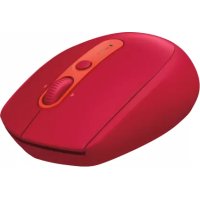
LOGITECH M590 - Mouse

M590 - Mouse LOGITECH - Free user manual and instructions

Find the device manual for free M590 LOGITECH in PDF.

English EN Download 💬 AI Question 9 questions ⚙️ Specs
📄

Document temporarily unavailable

The manual is currently being transferred to our new server. It will be accessible again in a few hours. Thank you for your patience.

View the manual : Français FR English EN Español ES Português PT
Pick your language and provide your email: we'll send you a specifically translated version.
Features Details
Mouse type Wireless mouse
Connectivity Bluetooth and Unifying USB receiver
Resolution 1000 DPI
Battery life 24 months with a single AA battery
Additional features Silent mode, programmable buttons
Dimensions 102 x 59 x 34 mm
Weight 101 g (with battery)
Compatibility Windows, macOS, Chrome OS, Linux
Maintenance Regular cleaning, battery replacement
Security Use of a secure connection, protection against interference
Warranty 2 years limited warranty

Frequently Asked Questions - M590 LOGITECH

The Logitech M590 mouse does not connect to my computer. What should I do?
Check that the mouse is turned on and that the battery is properly installed. Make sure the USB receiver is plugged in correctly. Try resetting the Bluetooth connection or unplugging and plugging back in the USB receiver.
How do I change the battery of my Logitech M590 mouse?
To change the battery, turn the mouse over and remove the battery compartment cover. Replace the old battery with a new AA battery, respecting the indicated polarity. Close the cover and turn on the mouse.
The mouse does not respond properly to movements. What should I do?
Make sure the surface you are using the mouse on is clean and suitable. A mouse pad can improve accuracy. Also check that the optical sensor is not obstructed by dust.
How do I customize the buttons on my Logitech M590 mouse?
Download and install the Logitech Options software from the Logitech website. Connect your mouse and open the software to customize the buttons according to your preferences.
Does the M590 mouse work with Android devices?
Yes, the Logitech M590 mouse is compatible with Android devices that support Bluetooth. Make sure Bluetooth is enabled on your device and follow the connection instructions.
How do I check the battery level of my Logitech M590 mouse?
The battery level is not displayed directly. However, you can estimate the battery life based on usage. If the mouse starts disconnecting or behaving erratically, it is time to replace the battery.
Is the M590 mouse rechargeable?
No, the Logitech M590 mouse uses a non-rechargeable AA battery. You will need to replace it when the battery is depleted.
What should I do if my M590 mouse frequently disconnects?
This may be due to Bluetooth interference or a weak battery. Try moving the mouse closer to the USB receiver, replace the battery, or check that no nearby device is causing interference.
How do I enable or disable the silent mode on my mouse?
Silent mode is enabled by default. If you want to disable it, use the Logitech Options software to change your mouse settings.

User questions about M590 LOGITECH

0 question about this device. Answer the ones you know or ask your own.

Ask a new question about this device

The email remains private: it is only used to notify you if someone responds to your question.

No questions yet. Be the first to ask one.

Download the instructions for your Mouse in PDF format for free! Find your manual M590 - LOGITECH and take your electronic device back in hand. On this page are published all the documents necessary for the use of your device. M590 by LOGITECH.

USER MANUAL M590 LOGITECH

Manual assistant
Powered by Anthropic
Waiting for your message
Product information

Brand : LOGITECH

Model : M590

Category : Mouse