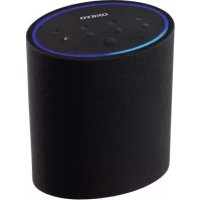
USER MANUAL Smart Speaker VCPX30 ONKYO
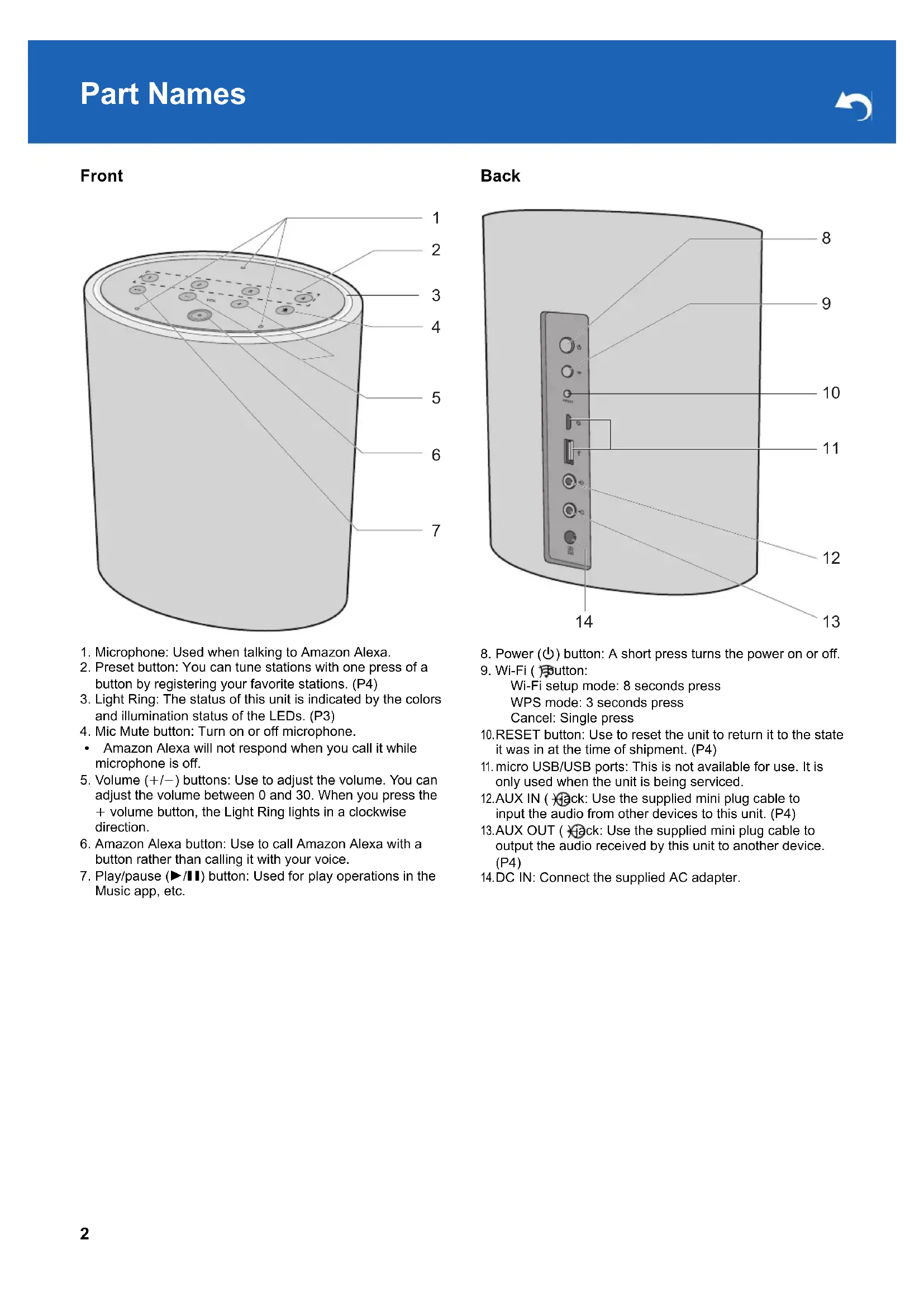
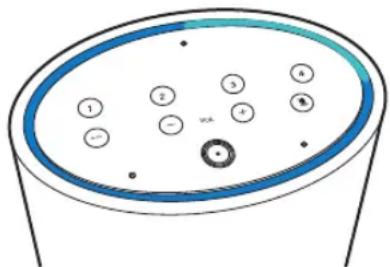
- Microphone: Used when talking to Amazon Alexa.
- Preset button: You can tune stations with one press of a button by registering your favorite stations. (P4)
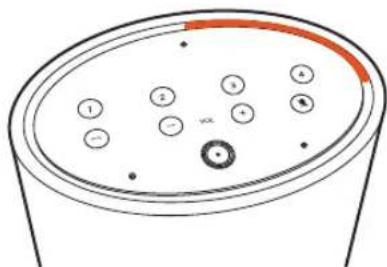
- Light Ring: The status of this unit is indicated by the colors and illumination status of the LEDs. (P3)
-
Mic Mute button: Turn on or off microphone.
-
Amazon Alexa will not respond when you call it while microphone is off.
- Volume (+ / - ) buttons: Use to adjust the volume. You can adjust the volume between 0 and 30. When you press the + volume button, the Light Ring lights in a clockwise direction.
- Amazon Alexa button: Use to call Amazon Alexa with a button rather than calling it with your voice.
- Play/pause (▶/■) button: Used for play operations in the Music app, etc.
Back
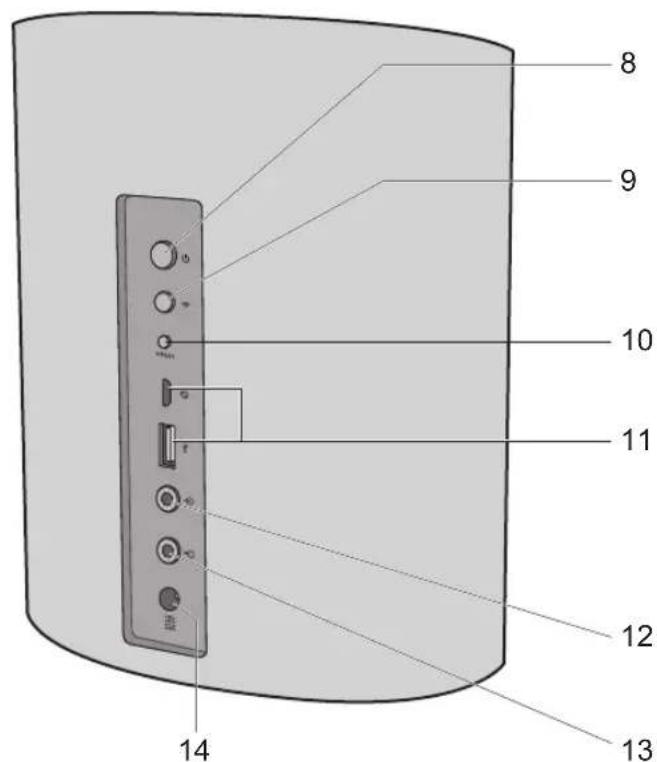
- Power ( ) button: A short press turns the power on or off.
9.Wi-Fi()Button:
Wi-Fi setup mode: 8 seconds press
WPS mode: 3 seconds press
Cancel: Single press
- RESET button: Use to reset the unit to return it to the state it was in at the time of shipment. (P4)
- micro USB/USB ports: This is not available for use. It is only used when the unit is being serviced.
12.AUX IN (ack: Use the supplied mini plug cable to input the audio from other devices to this unit. (P4)
13.AUX OUT (ack: Use the supplied mini plug cable to output the audio received by this unit to another device. (P4)
14.DC IN: Connect the supplied AC adapter.
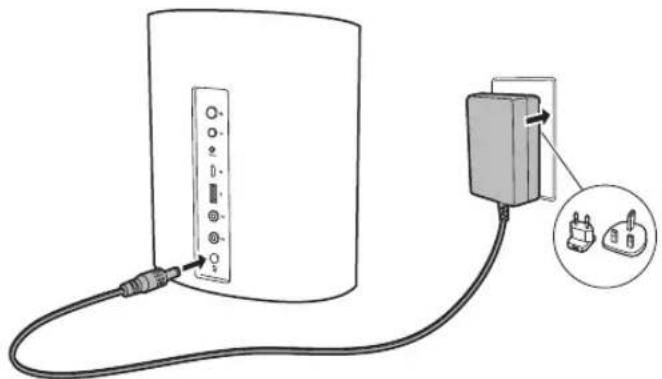
Power Cord Hookup
This unit is supplied with a removable AC adapter. Connect the power cord to DC IN of the unit and then connect to the outlet. Always disconnect the outlet side first when disconnecting the power cord.
Download the Music Control app
Use the Music Control app to setup the unit and operate it. Download the Music Control app from Google Play or the App Store to your smartphone or tablet.
Refer to the following for Music Control app: http://www.onkyo.com/playfi/app_o.html
Refer to the FAQ section for information about versions of operating systems supporting the Music Control app. Refer to the following for FAQ: http://www.eu.onkyo.com/en/faq/
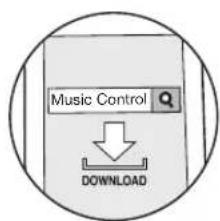
The smartphone or tablet needs to be connected to the same network as this unit to setup and operate the unit. Check network connection beforehand.
Initial Setup
Perform the following operation while the Light Ring on this unit lights orange and rotates. Note that you need an Amazon account to use the Amazon Alexa Voice Service on this unit. Arrange an Amazon account before starting.
When using an Android handset
-
Connect your Android handset to the access point.
-
Start the Music Control app.
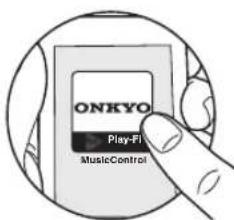
- After tapping "Set Up Play-Fi Device", follow the on-screen instructions to connect this unit to the network.
- Register this unit with Amazon Alexa. Sign in with your Amazon account and register this unit.
When using an iOS device
- Connect your iOS device directly to this unit via Wi-Fi.
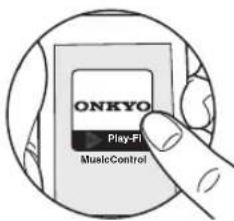
- Start the Music Control app.
-
Select the access point to connect the Play-Fi device (this unit).
-
After connecting this unit to the access point, register this unit with Amazon Alexa. Sign in with your Amazon account and register this unit.
-
You can also register with Amazon Alexa later. Tap "in the Home screen of the app, select "Amazon Alexa" and register this unit.
Refer to "Using Amazon Alexa" (P4) for how to use Amazon Alexa.
Checking the status of this unit
The illumination and blinking status of the Light Ring on the top of the unit lets you see the status of the unit.
| The Light Ring lights blue and a brighter blue light rotates around the ring | Starting |
| All off On standby | |
| The Light Ring lights orange and rotates | Connected by Wi-Fi |
| Lights white Adjusting the | volume |
Using Amazon Alexa
Either face the unit and say "Alexa" or press the Amazon Alexa button to call up the Amazon Alexa Voice Service. When you have spoken to the unit and Alexa has recognized a question, the Light Ring lights blue and a brighter blue light rotates around the ring.
Alexa answers the question after a while.
Alexa will not respond if the microphone is off, even if you call her.
Registering a station
You can register up to 4 of your favorite radio stations. You can call up stations with one press of a button by registering them. Perform the following procedure when the unit is on.
- Play the station you want to register on the Music Control app.
- Press and hold one of the Preset buttons 1 to 4 for 4 seconds. Repeat steps 1 and 2 to register your favorite stations.
- This feature may not be supported by some services. Refer to the FAQ for stations you can register. Refer to the following for FAQ: http://www.eu.onkyo.com/en/faq/
- You cannot register stations which you started playing with Amazon Alexa.
Connecting external devices
To output audio from other devices
You can output the audio being played on this unit through the speakers of another audio device. Turn off this unit before connecting the supplied mini plug cable.
- Connect the supplied mini plug cable to the AUX OUT jack on the rear and to the audio input jack on your audio device, etc.
-
Turn on this unit and start play on the music app.
-
If there is no sound output from the audio device you connected, check whether the audio output level on this unit is too low.
- Also refer to the instruction manual of the audio device you want to connect for connection and operation details.
You can input the audio from other audio devices into this unit, then stream to other devices on the Play-Fi network for play via this unit. Turn off this unit before connecting the supplied mini plug cable.
- Connect the supplied mini plug cable to the AUX IN jack on the rear and to the audio output jack on your audio device, etc.
- After turning this unit on, tap the "+" at the top of the screen in the Home screen of the app, then tap "Line In".
-
In the Line In selection screen, tap the device connected with the mini plug (this unit).
-
Select the device for streaming from the list of Play-Fi compatible devices in the network.
-
Start play on the connected audio device.
-
If there is no audio output, check whether the audio output level on your audio device is too low.
- Also refer to the instruction manual of the audio device you want to connect for connection and operation details.
Initialize
Initialize the settings of the unit to return the settings to the status at the time of purchase. This returns the unit to the status at the time of purchase, so take note of the settings before proceeding. To initialize, press and hold RESET for 8 seconds. The unit makes a sound when initializing starts. It takes about 30 seconds to initialize. When initializing is finished, the Light Ring lights orange and rotates and the unit is on stand by to receive initial settings.
Wi-Fi settings
Q: Cannot connect with Wi-Fi router.
A: It may not be possibly to connect with your Wi-Fi router if it is in stealth mode.
Settings
Q: Failed to update the software.
A: Check the internet connection.
A: Before trying to update the software, stop any play operations. If this doesn't work, trying quitting the app, then restarting it and trying the update again.
Play
Q: Cannot control play with voice commands.
A: Content that you started playing using the Music Control app cannot be voice controlled using the Amazon Alexa Voice Service. Operate using the Music Control app.
Audio Section
Frequency Response
28 Hz - 20 kHz
Descriptions required by the RE Directive of the European Union (EU)
Maximum radio-frequency power transmitted in the
frequency band(s) (For European models)
2400 - 2483.5 MHz: 20 dBm (Equivalent Isotropic
Radiated Power)
5150 - 5350 MHz: 21 dBm (Equivalent Isotropic Radiated
Power)
5470 - 5725 MHz: 20 dBm (Equivalent Isotropic Radiated
Power)
General
Power Supply
AC 220 - 240 V, 50 / 60 Hz
Power Consumption
7W
0.4 W (Standby mode)
6.5 W (No sound)
Dimensions (W× H× D)
166.7 mm × 201.5 mm × 106 mm
(6-9/16" × 7-15/16" × 4-3/16")
Weight
1.6 kg (3.5 lbs.)
Analog
AUX IN: 1
Output jack
Analog
AUX OUT: 1
Other jacks
micro USB × 1
USB type A × 1
These jacks are not available for use.
.mp3 (8-48 kHz/16 bit, 24-320 bps)
.m4a and .aac (8-48 kHz/16 bit (24 bit: Apple Lossless only)
16-320 bps)
.flac (8-48 kHz/16, 24 bit)
.wav (8-48 kHz/16, 24 bit)
.aiff (8-48 kHz/16, 24 bit)
Other features (Speaker)
Full Range 2.5 in 4 ohm NEO, 2 pieces
Passive Radiator: 105 × 59 , 2 pieces
Specifications and appearance are subject to change without notice.
We will not accept responsibility for damage arising from the connection of equipment manufactured by other companies.
License and Trademark
Apple and the Apple logo are trademarks of Apple Inc., registered in the U.S. and other countries. App Store is a service mark of Apple Inc., registered in the U.S. and other countries.
Google Play and the Google Play logo are trademarks of Google Inc.
Amazon, Alexa and all related logos are trademarks of Amazon.com, Inc. or its affiliates.
For DTS patents, see http://patents.dts.com. Manufactured under license from DTS, Inc. DTS, Play-Fi, the Symbol, and Play-Fi together in combination with the Symbol are trademarks of DTS, Inc. DTS and Play-Fi are registered trademarks of DTS, Inc. © DTS, Inc. All Rights Reserved.
All other trademarks are the property of their respective owners. / Toutes les autres marques commerciales sont la propriété de leurs détenateurs respectifs. / El resto de MARCAS commerciales son propidad de sus respectivos propriétarios. / Tutti gli altri marchi di fabbrica sono di proprietà dei rispetti propriétari. / Alle anderen Warenzeichen sind das Eigentum ihrer jeweiligen Eigentümer. / Alle andere handelsmerken waren eigendom van de desbetreffende rechtsbembenden. / Alla andra varumärkem tillhör deras respektive ägare. / Käikkmuut tuotemerkit ovat omistajensa omaisuutta. /所有其他商標為各自所有者所有。
1-10-5 Yokoami, Sumida-ku, Tokyo 130-0015 Japan
http://www.onkyo.com/
18 Park Way, Upper Saddle River, N.J. 07458, U.S.A.
For Dealer, Service, Order and all other Business Inquiries:
Tel: 201-785-2600 Fax: 201-785-2650
http://www.us.onkyo.com/
For Product Support Team Only: 1-800-229-1687 http://www.us.onkyo.com/
Gutenbergstrasse 3, 82178 Puchheim, Germany
Tel: +49-8142-4401-0 Fax: +49-8142-4208-213
http://www.eu.onkyo.com/
Anteros Building, Odyssey Business Park, West End Road, South Ruislip, Middlesex, HA4 6QQ United Kingdom Tel: +44 (0)871-200-1996 Fax: +44 (0)871-200-1995 For Product Support only: +44 (0)208-836-3510 http://www.uk.onkyo.com/en/
6, Avenue de Marais F - 95816 Argenteuil Cedex FRANCE
For Product Support only: +33 969 368 138
http://www.fr.onkyo.com/fr/
Unit 1033, 10/F, Star House, No 3, Salisbury Road, Tsim Sha Tsui Kowloon, Hong Kong.
Tel: +852-2429-3118 Fax: +852-2428-9039
http://www.hk.onkyo.com/
302, Building 1, 20 North Chaling Rd., Xuhui District, Shanghai, China 200032, Tel: +86-21-52131366 Fax: +86-21-52130396
http://www.cn.onkyo.com/
Please contact an Onkyo distributor referring to Onkyo SUPPORT site.
http://www.intl.onkyo.com/support/
The above-mentioned information is subject to change without prior notice. Visit the Onkyo web site for the latest update.
Smart Speaker
VC-PX30
Instruction Manual
Mode d'emploi
.mp3 (8-48 kHz/16 bit, 24-320 bps)
.m4a et .aac (8-48 kHz/16 bits (24 bits : Apple Lossless
uniquement) 16-320 bps)
.flac (8-48 kHz/16, 24 bits)
.wav (8-48 kHz/16, 24 bits)
.aiff (8-48 kHz/16, 24 bits)
Apple and the Apple logo are trademarks of Apple Inc., registered in the U.S. and other countries. App Store is a service mark of Apple Inc., registered in the U.S. and other countries.
Google Play and the Google Play logo are trademarks of Google Inc.
Amazon, Alexa and all related logos are trademarks of Amazon.com, Inc. or its affiliates.
For DTS patents, see http://patents.dts.com. Manufactured under license from DTS, Inc. DTS, Play-Fi, the Symbol, and Play-Fi together in combination with the Symbol are trademarks of DTS, Inc. DTS and Play-Fi are registered trademarks of DTS, Inc. © DTS, Inc. All Rights Reserved.
All other trademarks are the property of their respective owners. / Toutes les autres marques commerciales sont la propriété de leurs détenateurs respectifs. / El resto de MARCAS commerciales son propidad de sus respectivos propriétarios. / Tutti gli altri marchi di fabbrica sono di proprietà dei rispetti propriétari. / Alle anderen Warenzeichen sind das Eigentum ihrer jeweiligen Eigentümer. / Alle andere handelsmerken waren eigendom van de desbetreffende rechtsbembenden. / Alla andra varumärkem tillhör deras respektive ägare. / Käikkmuut tuotemerkit ovat omistajensa omaisuutta. /所有其他商標為各自所有者所有。
1-10-5 Yokoami, Sumida-ku, Tokyo 130-0015 Japan
http://www.onkyo.com/
18 Park Way, Upper Saddle River, N.J. 07458, U.S.A.
For Dealer, Service, Order and all other Business Inquiries:
Tel: 201-785-2600 Fax: 201-785-2650
http://www.us.onkyo.com/
For Product Support Team Only: 1-800-229-1687 http://www.us.onkyo.com/
Gutenbergstrasse 3, 82178 Puchheim, Germany
Tel: +49-8142-4401-0 Fax: +49-8142-4208-213
http://www.eu.onkyo.com/
Anteros Building, Odyssey Business Park, West End Road, South Ruislip, Middlesex, HA4 6QQ United Kingdom Tel: +44 (0)871-200-1996 Fax: +44 (0)871-200-1995 For Product Support only: +44 (0)208-836-3510 http://www.uk.onkyo.com/en/
6, Avenue de Marais F - 95816 Argenteuil Cedex FRANCE
For Product Support only: +33 969 368 138
http://www.fr.onkyo.com/fr/
Unit 1033, 10/F, Star House, No 3, Salisbury Road, Tsim Sha Tsui Kowloon, Hong Kong.
Tel: +852-2429-3118 Fax: +852-2428-9039
http://www.hk.onkyo.com/
302, Building 1, 20 North Chaling Rd., Xuhui District, Shanghai, China 200032, Tel: +86-21-52131366 Fax: +86-21-52130396
http://www.cn.onkyo.com/
Please contact an Onkyo distributor referring to Onkyo SUPPORT site.
http://www.intl.onkyo.com/support/
The above-mentioned information is subject to change without prior notice. Visit the Onkyo web site for the latest update.
Smart Speaker
VC-PX30
Instruction Manual
Mode d'emploi
.mp3 (8-48 kHz/16 bit, 24-320 bps)
.m4a y .aac (8-48 kHz/16 bit (24 bit: Apple Lossless solo)
16-320 bps)
.flac (8-48 kHz/16, 24 bit)
.wav (8-48 kHz/16, 24 bit)
.aiff (8-48 kHz/16, 24 bit)
Apple and the Apple logo are trademarks of Apple Inc., registered in the U.S. and other countries. App Store is a service mark of Apple Inc., registered in the U.S. and other countries.
Google Play and the Google Play logo are trademarks of Google Inc.
Amazon, Alexa and all related logos are trademarks of Amazon.com, Inc. or its affiliates.
For DTS patents, see http://patents.dts.com. Manufactured under license from DTS, Inc. DTS, Play-Fi, the Symbol, and Play-Fi together in combination with the Symbol are trademarks of DTS, Inc. DTS and Play-Fi are registered trademarks of DTS, Inc. © DTS, Inc. All Rights Reserved.
All other trademarks are the property of their respective owners. / Toutes les autres marques commerciales sont la propriété de leurs détenteurs respectifs. / El resto de commas commerciales son propidad de sus respectivos propriétarios. / Tutti gliali marchi di fabbrica sono di proprietà del rispetto propriétari. / Alle anderen Warenzeichen sind das Eigentum ihrer jeweiligen Eigentümer. / Alle andere handelsmerken zijn eigendom van de desbettreffende rechtebbenden. / Alla andra varumärken tillhör deras respective āgare. / Kaiki mutut tuotemerkit ovat omistajiensa omaisuutta. /所有其他商標為各自所有者所有。
1-10-5 Yokoami, Sumida-ku, Tokyo 130-0015 Japan
http://www.onkyo.com/
18 Park Way, Upper Saddle River, N.J. 07458, U.S.A.
For Dealer, Service, Order and all other Business Inquiries:
Tel: 201-785-2600 Fax: 201-785-2650
http://www.us.onkyo.com/
For Product Support Team Only: 1-800-229-1687 http://www.us.onkyo.com/
Gutenbergstrasse 3, 82178 Puchheim, Germany
Tel: +49-8142-4401-0 Fax: +49-8142-4208-213
http://www.eu.onkyo.com/
Anteros Building, Odyssey Business Park, West End Road, South Ruislip, Middlesex, HA4 6QQ United Kingdom Tel: +44 (0)871-200-1996 Fax: +44 (0)871-200-1995 For Product Support only: +44 (0)208-836-3510 http://www.uk.onkyo.com/en/
6, Avenue de Marais F - 95816 Argenteuil Cedex FRANCE
For Product Support only: +33 969 368 138
http://www.fr.onkyo.com/fr/
Unit 1033, 10/F, Star House, No 3, Salisbury Road, Tsim Sha Tsui Kowloon, Hong Kong.
Tel: +852-2429-3118 Fax: +852-2428-9039
http://www.hk.onkyo.com/
302, Building 1, 20 North Chaling Rd., Xuhui District, Shanghai, China 200032, Tel: +86-21-52131366 Fax: +86-21-52130396
http://www.cn.onkyo.com/
Please contact an Onkyo distributor referring to Onkyo SUPPORT site.
http://www.intl.onkyo.com/support/
The above-mentioned information is subject to change without prior notice. Visit the Onkyo web site for the latest update.
Smart Speaker
VC-PX30
Instruction Manual
Mode d'emploi
.mp3 (8-48 kHz/16 bit, 24-320 bps)
.m4a e .aac (8-48 kHz/16 bit (24 bit: solo Apple Lossless) 16-320 bps)
.flac (8-48 kHz/16, 24 bit)
.wav (8-48 kHz/16, 24 bit)
.aiff (8-48 kHz/16, 24 bit)
Apple and the Apple logo are trademarks of Apple Inc., registered in the U.S. and other countries. App Store is a service mark of Apple Inc., registered in the U.S. and other countries.
Google Play and the Google Play logo are trademarks of Google Inc.
Amazon, Alexa and all related logos are trademarks of Amazon.com, Inc. or its affiliates.
For DTS patents, see http://patents.dts.com. Manufactured under license from DTS, Inc. DTS, Play-Fi, the Symbol, and Play-Fi together in combination with the Symbol are trademarks of DTS, Inc. DTS and Play-Fi are registered trademarks of DTS, Inc. © DTS, Inc. All Rights Reserved.
All other trademarks are the property of their respective owners. / Toutes les autres marques commerciales sont la propriété de leurs détenateurs respectifs. / El resto de MARCAS commerciales son propidad de sus respectivos propriétarios. / Tutti gli altri marchi di fabbrica sono di proprietà dei rispetti propriétari. / Alle anderen Warenzeichen sind das Eigentum ihrer jeweiligen Eigentümer. / Alle andere handelsmerken waren eigendom van de desbetreffende rechtsbembenden. / Alla andra varumärkem tillhör deras respektive ägare. / Käikkmuut tuotemerkit ovat omistajensa omaisuutta. /所有其他商標為各自所有者所有。
1-10-5 Yokoami, Sumida-ku, Tokyo 130-0015 Japan
http://www.onkyo.com/
18 Park Way, Upper Saddle River, N.J. 07458, U.S.A.
For Dealer, Service, Order and all other Business Inquiries:
Tel: 201-785-2600 Fax: 201-785-2650
http://www.us.onkyo.com/
For Product Support Team Only: 1-800-229-1687 http://www.us.onkyo.com/
Gutenbergstrasse 3, 82178 Puchheim, Germany
Tel: +49-8142-4401-0 Fax: +49-8142-4208-213
http://www.eu.onkyo.com/
Anteros Building, Odyssey Business Park, West End Road, South Ruislip, Middlesex, HA4 6QQ United Kingdom Tel: +44 (0)871-200-1996 Fax: +44 (0)871-200-1995 For Product Support only: +44 (0)208-836-3510 http://www.uk.onkyo.com/en/
6, Avenue de Marais F - 95816 Argenteuil Cedex FRANCE
For Product Support only: +33 969 368 138
http://www.fr.onkyo.com/fr/
Unit 1033, 10/F, Star House, No 3, Salisbury Road, Tsim Sha Tsui Kowloon, Hong Kong.
Tel: +852-2429-3118 Fax: +852-2428-9039
http://www.hk.onkyo.com/
302, Building 1, 20 North Chaling Rd., Xuhui District, Shanghai, China 200032, Tel: +86-21-52131366 Fax: +86-21-52130396
http://www.cn.onkyo.com/
Please contact an Onkyo distributor referring to Onkyo SUPPORT site.
http://www.intl.onkyo.com/support/
The above-mentioned information is subject to change without prior notice. Visit the Onkyo web site for the latest update.
Smart Speaker
VC-PX30
Instruction Manual
Mode d'emploi
.mp3 (8-48 kHz/16 Bit, 24-320 bps)
.flac (8-48 kHz/16, 24 Bit)
.wav (8-48 kHz/16, 24 Bit)
.aiff (8-48 kHz/16, 24 Bit)
Apple and the Apple logo are trademarks of Apple Inc., registered in the U.S. and other countries. App Store is a service mark of Apple Inc., registered in the U.S. and other countries.
Google Play and the Google Play logo are trademarks of Google Inc.
Amazon, Alexa and all related logos are trademarks of Amazon.com, Inc. or its affiliates.
For DTS patents, see http://patents.dts.com. Manufactured under license from DTS, Inc. DTS, Play-Fi, the Symbol, and Play-Fi together in combination with the Symbol are trademarks of DTS, Inc. DTS and Play-Fi are registered trademarks of DTS, Inc. © DTS, Inc. All Rights Reserved.
All other trademarks are the property of their respective owners. / Toutes les autres marques commerciales sont la propriété de leurs détenteurs respectifs. / El resto de MARCAS commerciales son propietede sus respectivos propriétarios. / Tutti gli altri marchi di fabbrica sono di proprietà dei rispetti proprietari. / Alle anderen Warenzeichen sind das Eigentum ihrer jeweiligen Eigentümer. / Alle andere handelsmerken zijn eigendom van de desbetreffende rechtsbembenden. / Alla andra varumärken tilhör deras respektive ägare. / Käikkmuut tuotemerkit ovat omistajensma osaisuutta. /所有其他商標為各自所有者所有。
1-10-5 Yokoami, Sumida-ku, Tokyo 130-0015 Japan
http://www.onkyo.com/
18 Park Way, Upper Saddle River, N.J. 07458, U.S.A.
For Dealer, Service, Order and all other Business Inquiries:
Tel: 201-785-2600 Fax: 201-785-2650
http://www.us.onkyo.com/
For Product Support Team Only: 1-800-229-1687 http://www.us.onkyo.com/
Gutenbergstrasse 3, 82178 Puchheim, Germany
Tel: +49-8142-4401-0 Fax: +49-8142-4208-213
http://www.eu.onkyo.com/
Anteros Building, Odyssey Business Park, West End Road, South Ruislip, Middlesex, HA4 6QQ United Kingdom Tel: +44 (0)871-200-1996 Fax: +44 (0)871-200-1995 For Product Support only: +44 (0)208-836-3510 http://www.uk.onkyo.com/en/
6, Avenue de Marais F - 95816 Argenteuil Cedex FRANCE
For Product Support only: +33 969 368 138
http://www.fr.onkyo.com/fr/
Unit 1033, 10/F, Star House, No 3, Salisbury Road, Tsim Sha Tsui Kowloon, Hong Kong.
Tel: +852-2429-3118 Fax: +852-2428-9039
http://www.hk.onkyo.com/
302, Building 1, 20 North Chaling Rd., Xuhui District, Shanghai, China 200032, Tel: +86-21-52131366 Fax: +86-21-52130396
http://www.cn.onkyo.com/
Please contact an Onkyo distributor referring to Onkyo SUPPORT site.
http://www.intl.onkyo.com/support/
The above-mentioned information is subject to change without prior notice. Visit the Onkyo web site for the latest update.
Smart Speaker
VC-PX30
Instruction Manual
Mode d'emploi
.mp3 (8-48 kHz/16 bit, 24-320 bps)
.m4a en .aac (8-48 kHz/16 bit (24 bit: Alleen Apple Lossless)
16-320 bps)
.flac (8-48 kHz/16, 24 bit)
.wav (8-48 kHz/16, 24 bit)
.aiff (8-48 kHz/16, 24 bit)
Apple and the Apple logo are trademarks of Apple Inc., registered in the U.S. and other countries. App Store is a service mark of Apple Inc., registered in the U.S. and other countries.
Google Play and the Google Play logo are trademarks of Google Inc.
Amazon, Alexa and all related logos are trademarks of Amazon.com, Inc. or its affiliates.
For DTS patents, see http://patents.dts.com. Manufactured under license from DTS, Inc. DTS, Play-Fi, the Symbol, and Play-Fi together in combination with the Symbol are trademarks of DTS, Inc. DTS and Play-Fi are registered trademarks of DTS, Inc. © DTS, Inc. All Rights Reserved.
All other trademarks are the property of their respective owners. / Toutes les autres marques commerciales sont la propriété de leurs détenateurs respectifs. / El resto de MARCAS commerciales son propidad de sus respectivos propriétarios. / Tutti gli altri marchi di fabbrica sono di proprietà dei rispetti propriétari. / Alle anderen Warenzeichen sind das Eigentum ihrer jeweiligen Eigentümer. / Alle andere handelsmerken waren eigendom van de desbetreffende rechtsbembenden. / Alla andra varumärkem tillhör deras respektive ägare. / Käikkmuut tuotemerkit ovat omistajensa omaisuutta. /所有其他商標為各自所有者所有。
1-10-5 Yokoami, Sumida-ku, Tokyo 130-0015 Japan
http://www.onkyo.com/
18 Park Way, Upper Saddle River, N.J. 07458, U.S.A.
For Dealer, Service, Order and all other Business Inquiries:
Tel: 201-785-2600 Fax: 201-785-2650
http://www.us.onkyo.com/
For Product Support Team Only: 1-800-229-1687 http://www.us.onkyo.com/
Gutenbergstrasse 3, 82178 Puchheim, Germany
Tel: +49-8142-4401-0 Fax: +49-8142-4208-213
http://www.eu.onkyo.com/
Anteros Building, Odyssey Business Park, West End Road, South Ruislip, Middlesex, HA4 6QQ United Kingdom Tel: +44 (0)871-200-1996 Fax: +44 (0)871-200-1995 For Product Support only: +44 (0)208-836-3510 http://www.uk.onkyo.com/en/
6, Avenue de Marais F - 95816 Argenteuil Cedex FRANCE
For Product Support only: +33 969 368 138
http://www.fr.onkyo.com/fr/
Unit 1033, 10/F, Star House, No 3, Salisbury Road, Tsim Sha Tsui Kowloon, Hong Kong.
Tel: +852-2429-3118 Fax: +852-2428-9039
http://www.hk.onkyo.com/
302, Building 1, 20 North Chaling Rd., Xuhui District, Shanghai, China 200032, Tel: +86-21-52131366 Fax: +86-21-52130396
http://www.cn.onkyo.com/
Please contact an Onkyo distributor referring to Onkyo SUPPORT site.
http://www.intl.onkyo.com/support/
The above-mentioned information is subject to change without prior notice. Visit the Onkyo web site for the latest update.
Smart Speaker
VC-PX30
Instruction Manual
Mode d'emploi
Apple and the Apple logo are trademarks of Apple Inc., registered in the U.S. and other countries. App Store is a service mark of Apple Inc., registered in the U.S. and other countries.
Google Play and the Google Play logo are trademarks of Google Inc.
Amazon, Alexa and all related logos are trademarks of Amazon.com, Inc. or its affiliates.
For DTS patents, see http://patents.dts.com. Manufactured under license from DTS, Inc. DTS, Play-Fi, the Symbol, and Play-Fi together in combination with the Symbol are trademarks of DTS, Inc. DTS and Play-Fi are registered trademarks of DTS, Inc. © DTS, Inc. All Rights Reserved.
All other trademarks are the property of their respective owners. / Toutes les autres marques commerciales sont la propriété de leurs détenateurs respectifs. / El resto de MARCAS commerciales son propidad de sus respectivos propriétarios. / Tutti gli altri marchi di fabbrica sono di proprietà dei rispetti propriétari. / Alle anderen Warenzeichen sind das Eigentum ihrer jeweiligen Eigentümer. / Alle andere handelsmerken waren eigendom van de desbetreffende rechtsbembenden. / Alla andra varumärkem tillhör deras respektive ägare. / Käikkmuut tuotemerkit ovat omistajensa omaisuutta. /所有其他商標為各自所有者所有。
1-10-5 Yokoami, Sumida-ku, Tokyo 130-0015 Japan
http://www.onkyo.com/
18 Park Way, Upper Saddle River, N.J. 07458, U.S.A.
For Dealer, Service, Order and all other Business Inquiries:
Tel: 201-785-2600 Fax: 201-785-2650
http://www.us.onkyo.com/
For Product Support Team Only: 1-800-229-1687 http://www.us.onkyo.com/
Gutenbergstrasse 3, 82178 Puchheim, Germany
Tel: +49-8142-4401-0 Fax: +49-8142-4208-213
http://www.eu.onkyo.com/
Anteros Building, Odyssey Business Park, West End Road, South Ruislip, Middlesex, HA4 6QQ United Kingdom Tel: +44 (0)871-200-1996 Fax: +44 (0)871-200-1995 For Product Support only: +44 (0)208-836-3510 http://www.uk.onkyo.com/en/
6, Avenue de Marais F - 95816 Argenteuil Cedex FRANCE
For Product Support only: +33 969 368 138
http://www.fr.onkyo.com/fr/
Unit 1033, 10/F, Star House, No 3, Salisbury Road, Tsim Sha Tsui Kowloon, Hong Kong.
Tel: +852-2429-3118 Fax: +852-2428-9039
http://www.hk.onkyo.com/
302, Building 1, 20 North Chaling Rd., Xuhui District, Shanghai, China 200032, Tel: +86-21-52131366 Fax: +86-21-52130396
http://www.cn.onkyo.com/
Please contact an Onkyo distributor referring to Onkyo SUPPORT site.
http://www.intl.onkyo.com/support/
The above-mentioned information is subject to change without prior notice. Visit the Onkyo web site for the latest update.
Smart Speaker
VC-PX30
Instruction Manual
Mode d'emploi
For DTS patents, see http://patents.dts.com. Manufactured under license from DTS, Inc. DTS, Play-Fi, the Symbol, and Play-Fi together in combination with the Symbol are trademarks of DTS, Inc. DTS and Play-Fi are registered trademarks of DTS, Inc. © DTS, Inc. All Rights Reserved.