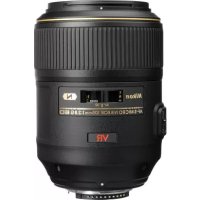
AFS 105mm f2.8G ED IF VR Micro - Camera lens NIKON - Free user manual and instructions
Find the device manual for free AFS 105mm f2.8G ED IF VR Micro NIKON in PDF.


| Product type | Macro photographic lens |
| Brand and model | Nikon AF-S 105mm f/2.8G ED IF VR Micro |
| Focal length | 105 mm |
| Maximum aperture | f/2.8 |
| Aperture range | f/2.8 to f/32 |
| Optical construction | 14 lenses in 12 groups (1 ED glass, nano crystal coating) |
| Number of diaphragm blades | 9 (circular) |
| Angle of view | 23°20' (FX), 15°20' (DX) |
| Minimum focusing distance | 0.314 m (life size 1:1) |
| Maximum reproduction ratio | 1:1 |
| Focusing system | Internal (IF) with Silent Wave motor, manual via separate ring |
| Vibration reduction | VR II, 4-stop advantage |
| Accessory diameter | 62 mm |
| Dimensions (diameter x length) | 83 mm x 116 mm |
| Weight | 750 g |
| Supplied accessories | Front cover LC-62, rear cover, lens hood HB-38, case CL-1020 |
| Maintenance and cleaning | Blower brush, soft cloth with ethyl alcohol; do not use solvent |
| Safety information | Do not disassemble, do not look at the sun, keep out of reach of children |
| General information | G-type lens, Nikon mount, compatible with AF-S TC-14EII/TC-17EII/TC-20EIII teleconverters |
Frequently Asked Questions - AFS 105mm f2.8G ED IF VR Micro NIKON
User questions about AFS 105mm f2.8G ED IF VR Micro NIKON
0 question about this device. Answer the ones you know or ask your own.
Ask a new question about this device
Download the instructions for your Camera lens in PDF format for free! Find your manual AFS 105mm f2.8G ED IF VR Micro - NIKON and take your electronic device back in hand. On this page are published all the documents necessary for the use of your device. AFS 105mm f2.8G ED IF VR Micro by NIKON.
USER MANUAL AFS 105mm f2.8G ED IF VR Micro NIKON
User's Manual (PP. 16–29)

安全上のご注意
■取り外し方
Touching the internal parts of the camera or lens could result in injury. Repairs should be performed only by qualified technicians. Should the camera or lens break open as the result of a fall or other accident, take the product to a Nikon-authorized service representative for inspection after unplugging the product and/or removing the battery.
Turn off immediately in the event of malfunction
Should you notice smoke or an unusual smell coming from the camera or lens, remove the battery immediately, taking care to avoid burns. Continued operation could result in injury. After removing or disconnecting the power source, take the equipment to a Nikon-authorized service representative for inspection.
Do not use the camera or lens in the presence of flammable gas
If the electronic equipment is operated in the presence of flammable gas, it could result in an explosion or a fire.
Do not look at the sun through the lens or viewfinder
Viewing the sun or other strong light sources through the lens or viewfinder could cause permanent visual impairment.
Keep out of reach of children
Particular care should be taken to prevent infants from putting the batteries or other small parts into their mouths.
Observe the following precautions when handling the camera and lens
- Keep the camera or lens unit dry. Failure to do so could result in a fire or electric shock.
- Do not handle or touch the unit with wet hands. Failure to do so could result in electric shock.
- In backlit shooting, keep the sun well out of the frame. The sunlight could focus into the lens body and cause a fire. When the sun gets close to the frame, it can also cause a fire.
- When the lens will not be used for a long time, attach both front and rear lens caps and store the lens away from direct sunlight. Failure to do so could result in a fire, as the lens might focus sunlight onto an object.
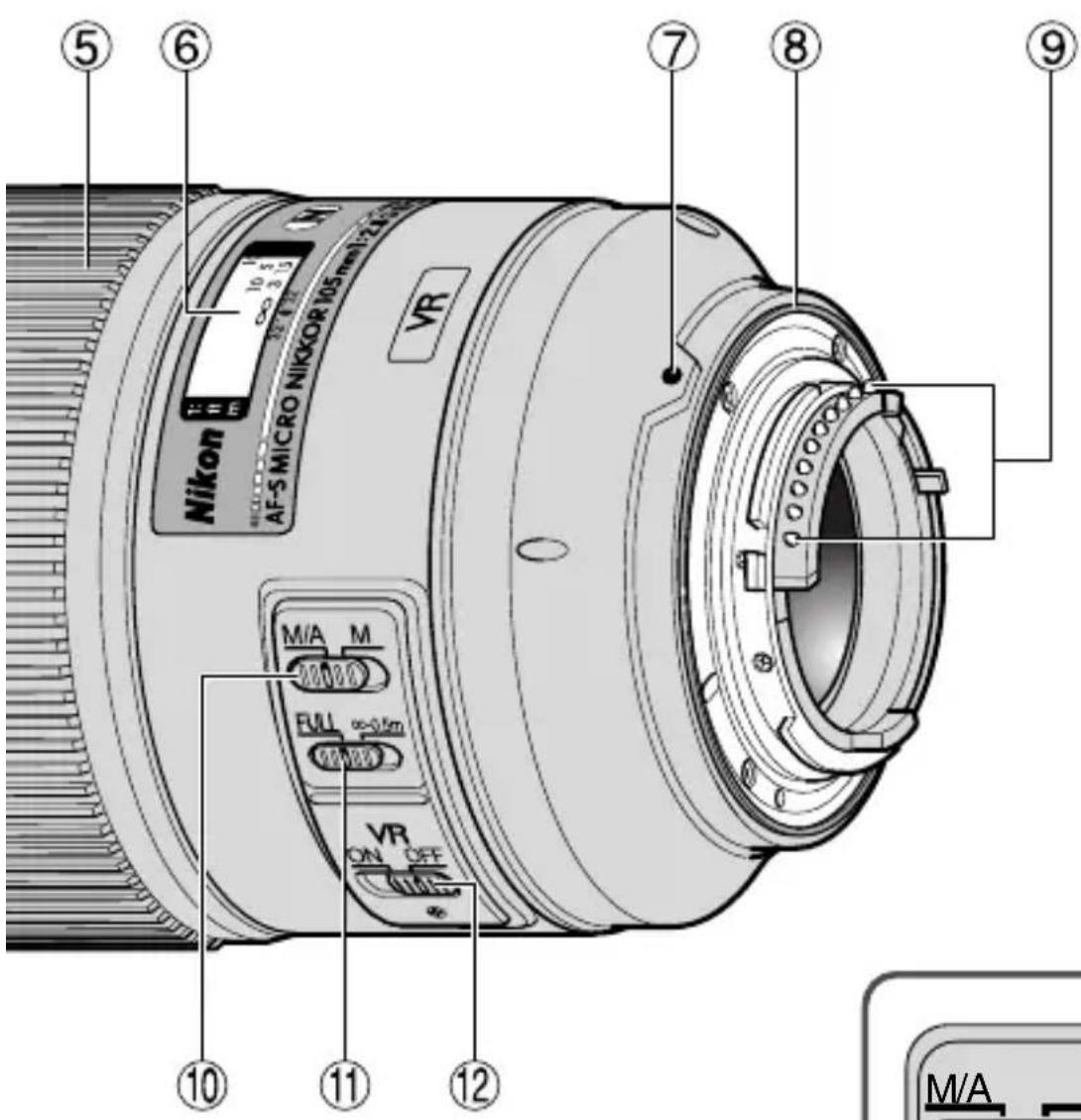
Nomenclature ( ): Reference page
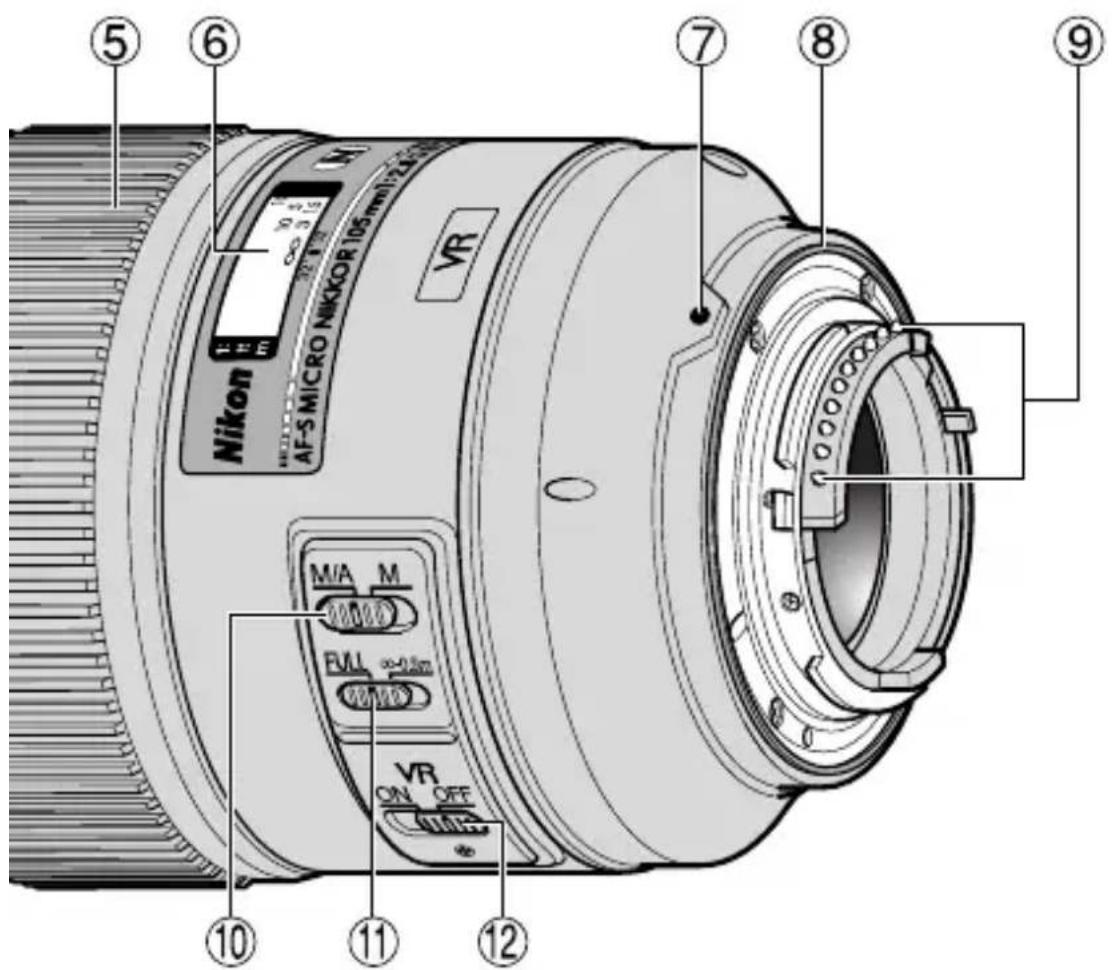
① Lens hood (p.24)
② Lens hood attachment index (p.24)
③ Lens hood setting index (p.24)
④ Lens hood mounting index (p.24)
⑤ Focus ring (p.20)
⑥ Distance scale
⑦Mounting index
⑧ Lens mount rubber gasket (p.19)
⑨CPU contacts (p.19)
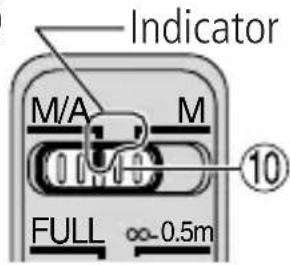
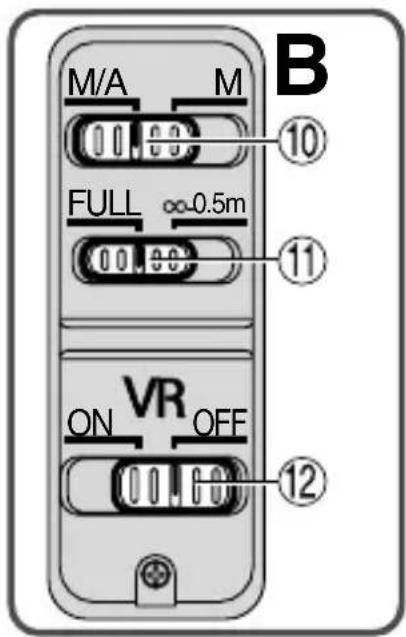
⑩ Focus mode switch (p.20)
⑪ Focusing limit switch (p.20)
⑫Vibration reduction ON/OFF switch (p.21)
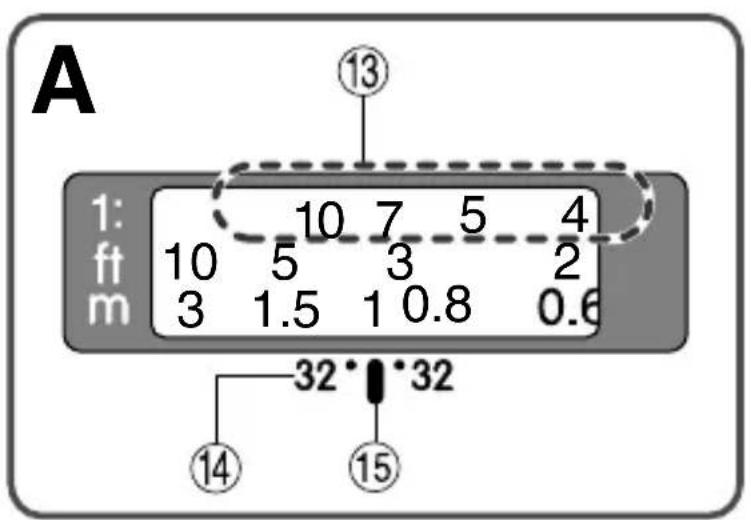
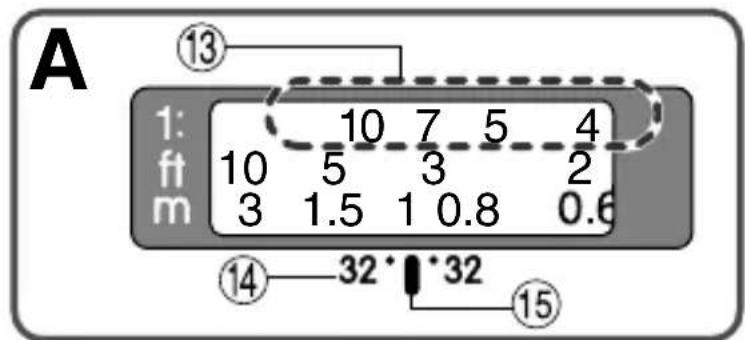
⑬Reproduction ratio scale (p.22)
⑭Depth-of-field indicators (p.22)
⑮ Distance index line (p.22)
Usable cameras and available functions
There may be some restrictions or limitation for available functions. Refer to your camera user's manual for details.
| Cameras | Function | Exposure mode | |||||
| Vibration reduction | Autofocus | P*1 | S | A | M | ||
| Nikon digital SLR(Nikon FX/DX format) cameras | ○ | ○ | ○ | ○ | ○ | ||
| F6, F5, F100, F80-Series/N80-Series*,F75-Series/N75-Series*,F65-Series/N65-Series* | ○ | ○ | ○ | ○ | ○ | ||
| Pronea 600i/6i*, Pronea S*2 | × | ○ | ○ | ○ | ○ | ||
| F4-Series, F90X/N90s*, F90-Series/N90*, F70-Series/N70* | × | ○ | ○ | × | × | ||
| F60-Series/N60*, F55-Series/N55-Series*, F50-Series/N50*,F-401x/N5005*, F-401s/N4004s*,F-401/N4004* | × | × | ○ | ○ | ○ | ○ | |
| F-801s/N8008s*, F-801/N8008*,F-601m/N6000* | × | × | ○ | ○ | × | × | |
| F3AF, F-601/N6006*, F-501/N2020**, Nikon MF cameras(except F-601m/N6000*) | × | × | × | × | × | × | |
○: Possible ✗: Impossible
*Sold exclusively in the USA. **Sold exclusively in the USA and Canada.
*1 P includes AUTO (General-Purpose Program) and Vari-Program System.
*2 Manual (M) is not available.
- If this lens is used with cameras not compatible with vibration reduction, set the vibration reduction ON/OFF switch ⑫ to [OFF]. With the Pronea 600i/6i camera, in particular, battery power may become quickly depleted if this switch is left [ON].
1. Introduction
Thank you for purchasing the AF-S VR Micro-Nikkor 105mm f/2.8G IF-ED lens. This is a high-performance Micro lens featuring special Vibration Reduction (VR II) and high-speed Internal Focusing (IF) mechanisms. It also employs a Silent (S) Wave Motor to drive the focusing mechanism.
■ Major features
- At infinity ( ) to 1/30x reproduction ratio, pictures can be taken at shutter speeds approx. 4 stops* slower than is possible without using a VR II lens, thus expanding the range of usable shutter speed options and making shooting without a tripod much easier. (*Under Nikon measurement conditions. The effects of vibration reduction vary depending on individual and shooting conditions.)
- Panning is also possible, as the lens automatically distinguishes panning from camera shake and vibration reduction works effectively.
- Autofocus (A) or manual (M) mode can easily be selected with the Focus mode switch.
- Autofocusing with manual override is provided, allowing instant change from autofocusing to manual focusing.
- More accurate exposure control is possible when this is mounted on a Nikon camera having 3D Matrix Metering capability, because subject distance information is transferred from the lens to the camera body.
- The use of an ED (extra-low dispersion) lens element ensures sharp pictures virtually free of color fringing. Also, by utilizing a 9-blade diaphragm that produces a nearly circular aperture, out-of-focus images in front of or behind the subject are rendered as pleasing blurs.
- The Nano Crystal Coat deposited on some of the lens elements ensures that fine, clear images can be reproduced under any shooting conditions, from the sunny outdoors to spotlighted interior scenes.
■ Important
- Be careful not to soil or damage the CPU contacts ⑨.
- With the TC-20E/TC-20EII/TC-20EIII attached, minimum aperture is limited to within f/90.
- When mounted on Nikon digital SLR (Nikon DX format) cameras, such as the D300-Series and D7000, the lens' picture angle becomes 15^20' and its 35mm equivalent focal length is approx. 157.5mm.
- If the lens mount rubber gasket ⑧ is damaged, be sure to visit the nearest Nikon authorized dealer or service center for repair.
- A total of four Wireless Remote Speedlights SB-R200 can be attached to the front of the lens.
2. Focusing
Set your camera's focus mode selector according to this chart.
| Cameras | Camera's focus mode | Lens' focus mode | |
| M/A | M | ||
| Nikon digital SLR (Nikon FX/DX format) cameras, F6, F5, F4-Series, F100, F90X/N90s*, F90-Series/N90*, F80-Series/N80-Series*, F75-Series/N75-Series*, F70-Series/N70*, F65-Series/N65-Series*, Pronea 600i/6i*, Pronea S | AF | Autofocus with manual priority | Manual focus (Focus assist is available.) |
| MF | Manual focus (Focus assist is available.) | ||
| F55-Series/N55-Series*, F60-Series/N60*, F50-Series/N50*, F-801s/N8008s*, F-801/N8008*, F-601m/N6000*, F-401x/N5005*, F-401s/N4004s*, F-401/N4004* | AF MF | Manual focus (Focus assist is available, except with the F-601m/N6000*.) | |
* Sold exclusively in the USA.

■ Autofocus with manual override (M/A mode)
1 Set the Focus mode switch ⑩ to [M/A].
Note: Be sure to set the switch so that the indicator aligns with [M/A] precisely.
2Autofocus is provided, but you can manually override the focus by operating the separate Focus ring ⑤ while lightly depressing the shutter release button or the AF start (AF-ON) button on the camera.
3To cancel manual override, again lightly depress the shutter release button or the AF start button on the camera. This will return the camera to autofocus mode.
■ To limit the range of autofocus
(For AF cameras compatible with AF-S Nikkor lenses only)
With AF operation, if the subject is always more than 0.5m (1.6 ft) away, set the focusing limit switch ⑪ to [-0.5m] to reduce focusing time.
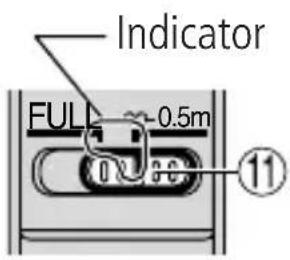
Note: Be sure to set the switch so that the indicator aligns with [-0.5m] precisely.
- If the subject is sometimes 0.5 ~m (1.6 ft) or closer, set it to [FULL].
3. Vibration reduction mode (VR II)
■ Basic concept of vibration reduction
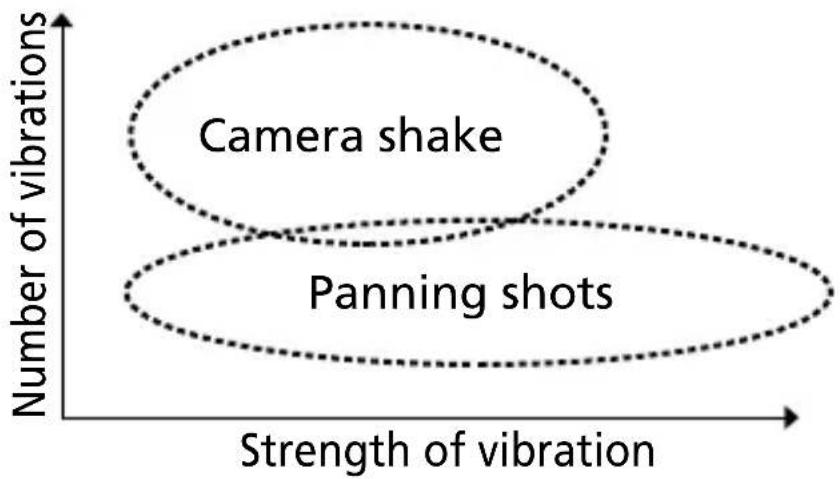
scatter
| Strength of vibration | Number of vibrations | | --------------------- | --------------------- | | Camera shake | High | | Panning shots | Low |■ The effects of vibration reduction
- When the subject is from infinity ( ) to approx. 3m (9.8 ft) away (at 1/30x reproduction ratio), pictures can be taken at shutter speeds approx. 4 stops* slower than is possible without using a VR II lens. As the reproduction ratio increases from 1/30x, the effects of vibration reduction gradually decrease. (*Under Nikon measurement conditions. The effects of vibration reduction vary depending on individual and shooting conditions.)
■ Setting the vibration reduction ON/OFF switch
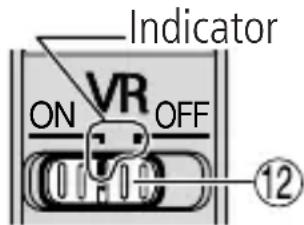
1 Set the Vibration reduction ON/OFF switch ⑫ to [ON]. Note: Be sure to set the switch so that the indicator aligns with [ON] precisely.
2Vibration is reduced when the shutter release button is lightly pressed. Because vibration is reduced in the viewfinder, auto/manual focusing and exact framing of the subject are made easier.
3To cancel the vibration reduction mode, set the Vibration reduction ON/OFF switch ⑫to [OFF].
■ Notes on using vibration reduction mode
- Wait until the image in the viewfinder stops vibrating before fully depressing the shutter release button after you have lightly pressed the shutter release button.
- If you move the camera in a wide arc when panning, vibration in the direction of that movement is not affected. For example, if you pan the camera horizontally, only vibration in the vertical direction is reduced, making smooth pans much easier.
- Due to the characteristics of the vibration reduction mechanism, the image in the viewfinder may become slightly blurred after releasing the shutter. This is not a malfunction.
- Do not turn the camera power OFF or remove the lens from the camera while the vibration reduction mode is in operation. (Otherwise, the lens may emit a chattering noise if the camera is shaken. This is not a malfunction. Turn the camera power ON again to correct this.)
- With cameras featuring a built-in flash, vibration reduction does not function while the built-in flash is charging.
- When the lens is mounted on a tripod, set the vibration reduction ON/OFF switch ⑫ to [OFF]. However, set the switch to [ON] when using a tripod without securing the tripod head, or when using a monopod.
4. Depth of field
The depth-of-field indicators ⑭ are engraved beside the distance index line ⑮. At close distances, however, so little is in focus that it may be better to check the depth of field table (on page 126). If your camera has a depth of field preview button or lever, use it to check the depth of field in the viewfinder.
5. Focusing at a predetermined reproduction ratio
The reproduction ratio is the relation between the size of the image recorded on film and the actual subject size. If, for example, the image on the focusing screen is one-fifth the actual subject size, the reproduction ratio is 1:5.
To photograph at a predetermined reproduction ratio, use the following procedure:
1 Manually turn the focus ring until the desired reproduction ratio scale ⑬ number is aligned with the distance index line ⑮.
2Aim at the subject, then change your position, moving closer to or farther away from the subject, until the image in the viewfinder sharpens.
To obtain the appropriate reproduction ratio for each focused distance, see the table on page 126.
6. Notes on close-up photography and duplication work
Camera shake
The AF-S VR Micro-Nikkor 105mm f/2.8G IF-ED provides such exceptionally high image magnification that even the slightest movement during shooting can cause the image to blur. Be sure to mount the camera on a tripod and use a cable release or remote cord to release the shutter.
Close working distance
At the high reproduction ratios used in close-up shooting, the depth of field is very shallow. To ensure greater depth of field, stop down the lens, then carefully position the camera to ensure the most important surface of the subject is in the same zone of sharp focus.
- Use manual focus when using the close-up lens.
| Close-up attachment | Reproduction ratio | Subject field (cm/inch) | Focused distance (cm/inch) |
| No. 5T 1/6.3 | -1.22 15.0 × 22.5 | -1.97 × 2.95/ 82.4–28.1/325.9 × 8.9–0.8 × 1.2 | .4–11.1 |
| No. 6T 1/3.3 | -1.44 8.0 × 12.0 | -1.67 × 2.5/ 49.8–26.1/19.63.1 × 4.7–0.7 × 1.0 | -10.3 |
| No. 5T + 6T | 1/2.2–1.65 | 5.24 × 7.86–1.45 × 2.18/2.1 × 3.1–0.6 × 0.9 | 38.1–24.3/15.0–9.6 |
7. Exposure factor
The f-number of a lens indicates brightness of the image formed by the lens set at "infinity" shooting distance. The higher the reproduction ratio is, the more the brightness of the image will decrease. The actual brightness of the image is called the "effective f-number," and the exposure compensation value for the change of the effective f-number is called the "exposure factor."
8. Effective f-number variation (P. 124)
With this lens, the higher the reproduction ratio is, the more the brightness of the image on the film (image sensing device) will decrease and the effective f-number will increase (the amount of light that comes through the lens' aperture will decrease). This variation is automatically compensated for by the camera's exposure meter, so the user can determine exposure or operate TTL flash shooting without having to consider the exposure factor. The f-number displayed in the camera's LCD panel or viewfinder is the value automatically compensated.

9. Setting the aperture
Set the aperture on the camera body. When exposure (or shooting) mode is set at "A" (Aperture Priority auto) or "M" (manual), the camera will control to maintain the predetermined f-number (up to approx. 1.6 stops) as the effective f-number varies with shooting distance.
10. Using bayonet hood HB-38
■ Attaching the hood
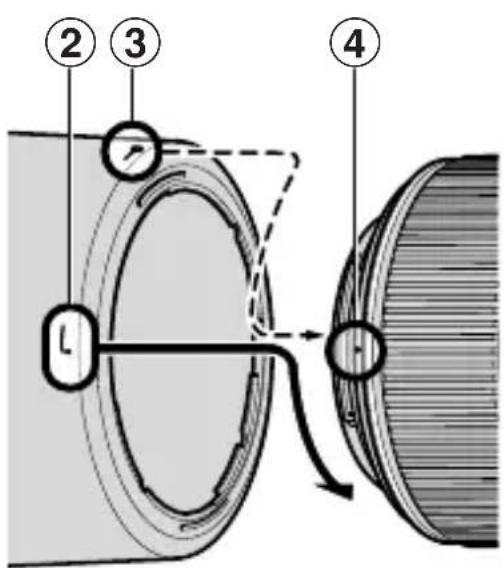
Align the lens hood attachment index ( )② on the hood (either one of the two indexes) with the lens hood mounting index ④on the lens, and turn the lens hood ①clockwise until it click stops to secure.
- Make sure that the lens hood mounting index ④ aligns with the lens hood setting index (—○) ③.
- If the lens hood is not correctly attached, vignetting can occur.
- To facilitate attachment or removal of the hood, hold it by its base (around the lens hood attachment index) rather than its outer edge.
- To store the lens hood, attach it in the reverse position.
■ Detaching the hood
While holding the base of the hood (near the lens hood attachment index) rather than its outer edge, turn it counterclockwise to detach.
11. Flash pictures using cameras with a built-in flash
To prevent vignetting, do not use a lens hood ①.
12. Recommended focusing screens
Various interchangeable focusing screens are available for certain Nikon SLR cameras to suit any picture-taking situation. The ones recommended for use with this lens are:
| Screen Camera | A | B | C | E | EC-B EC-E | G^2 | G1 | G3 | G4 | J | K L | M | P U | |||
| F6 | ◎ | ◎ | — | ◎ | — | — | — | ◎ | — | ◎ | — | |||||
| F5+DP-30 | ◎ | ◎ | ◎ | ◎ | — | ○(+0.5) | ◎ | — | ◎ | — | ||||||
| F5+DA-30 | ◎ | ◎ | ◎ | ◎ | — | ◎ | — | ◎ | — | |||||||
| F4+DP-20 | — | ◎ | ◎ | — | ○ | ◎ | ◎ | — | ◎ | |||||||
| F4+DA-20 | — | ◎ | ◎ | — | ○ | ◎ | ◎ | — | ◎ |
◎ : Excellent focusing
○ : Acceptable focusing
Slight vignetting or moiré patterns appear in the viewfinder, but not on the film.
—: Not available.
( ): Indicates degree of exposure compensation needed (Center-Weighted metering only). For F6 cameras, compensate by selecting "Other screen" in Custom Setting "b6: Screen comp." and setting the EV level to -2.0 to +2.0 in 0.5 EV steps. When using screens other than type B or E, "Other screen" must be selected even when the required compensation value is "0" (no compensation required). For F5 cameras, compensate using Custom Setting #18 on the camera body. For F4-Series cameras, compensate using the Exposure Compensation Dial for the focusing screen.
See user's manual of the camera body for more details.
Blank box means not applicable. Since type M screen can be used for both macro photography at a magnification ratio of 1:1 or above and for photomicrography, it has different applications than other screens.
■ Important
- For F5 cameras, only EC-B, EC-E, B, E, J, A, L focusing screens are usable in Matrix Metering.
- When using the B and E focusing screens in cameras other than those listed above, refer to the columns for the B and E screens.
13. Lens care
- Clean the lens surfaces with a blower brush. To remove dirt and smudges, use a soft, clean cotton cloth or lens tissue moistened with ethanol (alcohol) or lens cleaner. Wipe in a circular motion from center to outer edge, taking care not to leave traces or touch other parts of the lens.
- Never use thinner or benzene to clean the lens as this might damage it, result in a fire, or cause health problems.
- To protect the front lens element, an NC filter is available. A lens hood ① also helps protect the front of the lens.
- When storing the lens in its lens case, attach both front and rear caps.
- When the lens will not be used for a long time, store it in a cool, dry place to prevent mold. Also store the lens away from direct sunlight or chemicals such as camphor or naphthalene.
- Do not get water on the lens or drop it in water as this will cause it to rust and malfunction.
- Reinforced plastic is used for certain parts of the lens. To avoid damage, never leave the lens in an excessively hot place.
14. Standard accessories
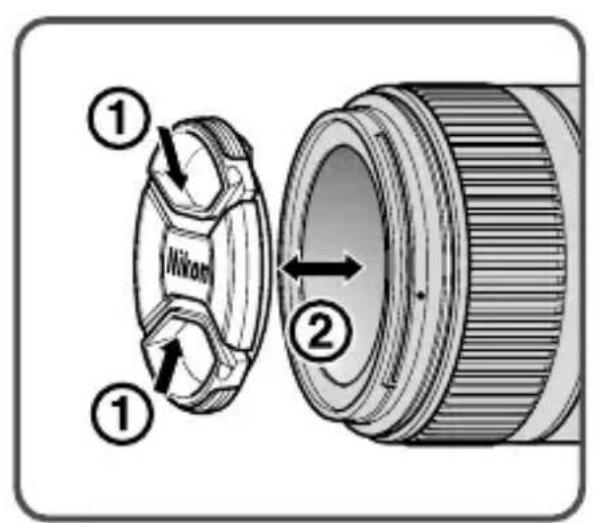
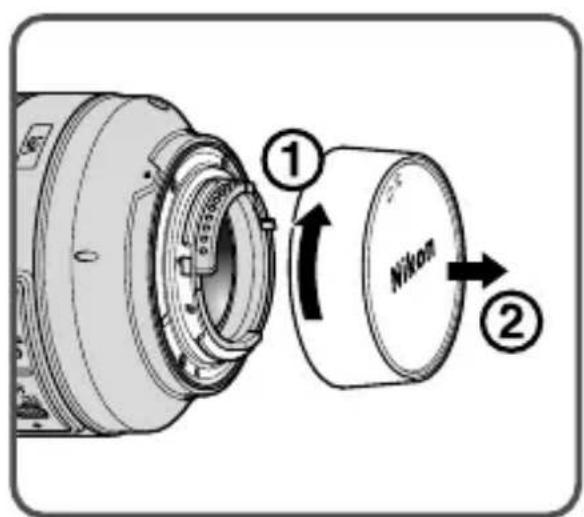
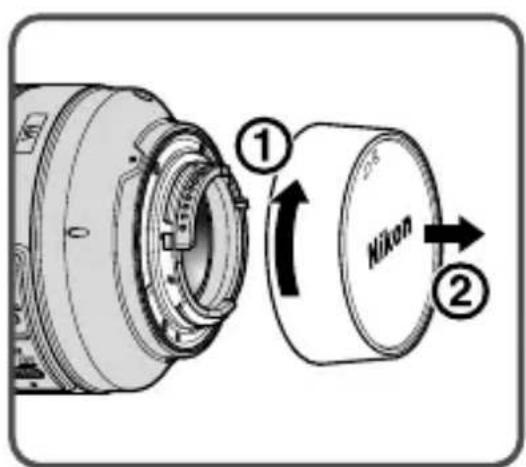
- 62mm snap-on front lens cap LC-62 • Rear lens cap
- Bayonet hood HB-38
- Flexible lens pouch CL-1020
15. Optional accessories
- 62mm screw-in filters
- AF-S Teleconverters* TC-14EII/TC-17EII/TC-20EIII can be used.
*Autofocus operation is not possible. (VR and AE functions are available.)
16. Incompatible accessories
- Auto Ring BR-4 and all models of Auto Extension Ring PK, K Ring and Bellows focusing attachment.
Other accessories may not be suitable for use with this lens. For details, carefully read your accessories user's manual.
17. Specifications
Type of lens: G-type AF-S Micro-Nikkor lens with built-in CPU and Nikon bayonet mount
Focal length: 105mm
Maximum aperture: f/2.8
Lens construction: 14 elements in 12 groups (1 ED and some Nano Crystal Coat-deposited lens elements)
Picture angle: 23°20' with 35 mm (135) format Nikon film-SLR cameras and Nikon FX format digital SLR cameras 15°20' with Nikon DX format digital SLR cameras 18°40' with IX240 system cameras
Reproduction ratio scale: 1:10 to 1:1 (life-size)
Distance information: Output to camera body
Focusing: Nikon Internal Focusing (IF) system (utilizing an internal Silent Wave Motor); manually via separate focus ring
Focusing limit switch: Provided; two ranges available: Full ( -0.314m) or -0.5m
Vibration reduction: Lens-shift method using voice coil motors (VCMs)
Shooting distance scale: Graduated in meters and feet from 0.314m (1 ft) to infinity ( )
Closest focus distance: 0.314m (1 ft) from focal plane (life-size)
No. of diaphragm blades: 9 pcs. (rounded)
Diaphragm: Fully automatic
Aperture range: f/2.8 to f/32
Exposure measurement: Via full-aperture method
Attachment size: 62mm (P = 0.75mm)
Dimensions: Approx. 83mm dia. x 116mm (extension from the camera's lens mount flange)
Weight: Approx. 750g (26.5 oz)
En
Specifications and designs are subject to change without any notice or obligation on the part of the manufacturer.
En
⚠️ ACHTUNG


Sc
名称 ():参考页
| 照相机\对焦屏 | A | EC-BEC-E | F | G1G2 | G4 | GBCE | K | |||||||
| F6 | ◎ | ◎ | — | ◎ | — | — | — | — | ⊖ | — | ◎ | — | ||
| F5+DP-30 | ◎ | ◎ | ◎ | ◎ | — | (+0.5) | ◎ | — | ◎ | — | ||||
| F5+DA-30 | ◎ | ◎ | ◎ | ◎ | — | ◎ | — | ◎ | — | |||||
| F4+DP-20 | — | ◎ | ◎ | — | ○ | ◎ | ◎ | — | ◎ | |||||
| F4+DA-20 | — | ◎ | ◎ | — | ○ | ◎ | ◎ | — | ◎ |
◎:最佳对焦
○:可能对焦
12. 請使用聚焦屏
Closest shooting distance
Aperture range when shooting at the closest shooting distance\*
— Display on camera's LCD panel/viewfinder (f-number at "infinity")
--- Display on camera's LCD panel/viewfinder (f-number at closest shooting distance)
* The largest f-number (f/57) will vary according to the camera's exposure value increment. The chart accounts for 1/3 EV increment settings.
| Focused distance | Depth of field | Reproduction ratio | |||||||
| f/2.8* | f/4* | f/5.6* | f/8* | f/11* | f/16* | f/22* | f/32* | ||
| 1 | 1 ft 6/16 in.1 ft 6/16 in. | 1 ft 6/16 in.1 ft 6/16 in. | 1 ft 6/16 in.1 ft 6/16 in. | 1 ft 6/16 in.1 ft 6/16 in. | 1 ft 6/16 in.1 ft 6/16 in. | 1 ft 5/16 in.1 ft 7/16 in. | 1 ft 5/16 in.1 ft 7/16 in. | 1 ft 5/16 in.1 ft 8/16 in. | 1/1.0 |
| 1.1 | 1 ft 1-3/16 in.1 ft 1-3/16 in. | 1 ft 1-3/16 in.1 ft 1-3/16 in. | 1 ft 1-3/16 in.1 ft 1-4/16 in. | 1 ft 1-2/16 in.1 ft 1-4/16 in. | 1 ft 1-2/16 in.1 ft 1-4/16 in. | 1 ft 1-2/16 in.1 ft 1-4/16 in. | 1 ft 1-2/16 in.1 ft 1-4/16 in. | 1 ft 1-1/16 in.1 ft 1-5/16 in. | 1/1.3 |
| 1.3 | 1 ft 3-9/16 in.1 ft 3-10/16 in. | 1 ft 3-9/16 in.1 ft 3-10/16 in. | 1 ft 3-9/16 in.1 ft 3-10/16 in. | 1 ft 3-9/16 in.1 ft 3-11/16 in. | 1 ft 3-8/16 in.1 ft 3-11/16 in. | 1 ft 3-8/16 in.1 ft 3-11/16 in. | 1 ft 3-7/16 in.1 ft 3-12/16 in. | 1 ft 3-6/16 in.1 ft 3-14/16 in. | 1/1.9 |
| 1.5 | 1 ft 5-15/16 in.1 ft 6-1/16 in. | 1 ft 5-15/16 in.1 ft 6-1/16 in. | 1 ft 5-15/16 in.1 ft 6-1/16 in. | 1 ft 5-15/16 in.1 ft 6-2/16 in. | 1 ft 5-14/16 in.1 ft 6-2/16 in. | 1 ft 5-13/16 in.1 ft 6-3/16 in. | 1 ft 5-12/16 in.1 ft 6-4/16 in. | 1 ft 5-10/16 in.1 ft 6-6/16 in. | 1/2.6 |
| 1.8 | 1 ft 9-9/16 in.1 ft 9-11/16 in. | 1 ft 9-9/16 in.1 ft 9-12/16 in. | 1 ft 9-9/16 in.1 ft 9-12/16 in. | 1 ft 9-8/16 in.1 ft 9-13/16 in. | 1 ft 9-7/16 in.1 ft 9-14/16 in. | 1 ft 9-5/16 in.1 ft 9-15/16 in. | 1 ft 9-4/16 in.1 ft 10-2/16 in. | 1 ft 9 in.1 ft 10-5/16 in. | 1/3.5 |
| 2 | 1 ft 12 in.2 ft 2/16 in. | 1 ft 11-15/16 in.2 ft 3/16 in. | 1 ft 11-14/16 in.2 ft 3/16 in. | 1 ft 11-13/16 in.2 ft 4/16 in. | 1 ft 11-12/16 in.2 ft 6/16 in. | 1 ft 11-10/16 in.2 ft 8/16 in. | 1 ft 11-7/16 in.2 ft 11/16 in. | 1 ft 11-4/16 in.2 ft 15/16 in. | 1/4.1 |
| f/2.8* | f/4* | f/5.6* | f/8* | f/11* | f/16* | f/22* | f/32* | ||
| 3 | 2 ft 11-11/16 in.3 ft 2/16 in. | 2 ft 11-9/16 in.3 ft 3/16 in. | 2 ft 11-8/16 in.3 ft 5/16 in. | 2 ft 11-5/16 in.3 ft 8/16 in. | 2 ft 11-2/16 in.3 ft 12/16 in. | 2 ft 10-12/16 in.3 ft 1-1/16 in. | 2 ft 10-6/16 in.3 ft 1-10/16 in. | 2 ft 9-12/16 in.3 ft 2-7/16 in. | 1/7.0 |
| 5 | 4 ft 11-11/16 in.5 ft 1 in. | 4 ft 11-7/16 in.5 ft 1-5/16 in. | 4 ft 11-1/16 in.5 ft 1-11/16 in. | 4 ft 10-8/16 in.5 ft 2-5/16 in. | 4 ft 9-13/16 in.5 ft 3-1/16 in. | 4 ft 8-13/16 in.5 ft 4-6/16 in. | 4 ft 7-9/16 in.5 ft 6-1/16 in. | 4 ft 5-11/16 in.5 ft 9-2/16 in. | 1/12.9 |
| 10 | 9 ft 9-6/16 in.10 ft 3-3/16 in. | 9 ft 8-4/16 in.10 ft 4-8/16 in. | 9 ft 6-12/16 in.10 ft 6-5/16 in. | 9 ft 4-8/16 in.10 ft 9-2/16 in. | 9 ft 1-14/16 in.11 ft 13/16 in. | 8 ft 9-13/16 in.11 ft 7-9/16 in. | 8 ft 5-5/16 in.12 ft 4-10/16 in. | 7 ft 10-10/16 in.13 ft 10-14/16 in. | 1/27.6 |
| ∞ | 381 ft 2-13/16 in.∞ | 267 ft 5/16 in.∞ | 190 ft 10-15/16 in.∞ | 133 ft 9-15/16 in.∞ | 97 ft 5-11/16 in.∞ | 67 ft 2-5/16 in.∞ | 49 ft 3/16 in.∞ | 33 ft 10-11/16 in.∞ | 1/∞ |
* The f-number on the "Depth of field" chart is the value when the lens is set at "infinity". • Due to the optical characteristics of this lens, as the lens is focused closer, the focal length decreases.
Nikon
No reproduction in any form of this manual, in whole or in part (except for brief quotation in critical articles or reviews), may be made without written authorization from NIKON CORPORATION.
Printed in China
TT4C01(9L)
7MAA299L-01 ▲ G13




