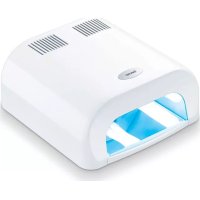
MP 38 - Nail dryers BEURER - Free user manual and instructions
Find the device manual for free MP 38 BEURER in PDF.



| Product type | UV nail dryer |
| Brand | Beurer |
| Model | MP 38 |
| Dimensions | L 220 x l 210 x H 100 mm |
| Weight (with tubes) | 1610 g |
| Power supply | 220-230 V, ~50 Hz |
| Rated power | 36 W |
| Number of UV lamps | 4 |
| UV lamp type | UV-9W-L, 365 nm, 9 W |
| UV type of device | UV-A lamp Type 3 |
| Timer | 120 seconds or continuous use |
| Intended use | Curing UV nail gel for hands and feet |
| Lower tray | Removable for cleaning and tube replacement |
| Reflection sheet | Integrated for uniform curing |
| Maintenance | Clean with a slightly damp cloth, without detergent |
| Tube replacement | Replace all 4 tubes at the same time |
| Spare parts | UV fluorescent tubes ref. 163.655 |
| Safety | Do not look at the UV lamp, keep out of reach of children |
Frequently Asked Questions - MP 38 BEURER
User questions about MP 38 BEURER
0 question about this device. Answer the ones you know or ask your own.
Ask a new question about this device
Download the instructions for your Nail dryers in PDF format for free! Find your manual MP 38 - BEURER and take your electronic device back in hand. On this page are published all the documents necessary for the use of your device. MP 38 by BEURER.
USER MANUAL MP 38 BEURER
natural_image
White compact device with ventilation slots and a closed lid, no visible text or symbols on the body.D UV-Nageltrockner Gebrauchsanweisung......2-6
GB UV nail dryer
Instruction for Use....7-11
F Sèche-ongles à UV
Mode d'emploi .... 12-16
E Secador de uñas UV
Manual de instrucciones.....17-21
Asciuga unghie UV
Instruzioni per l'uso 22-26
TR UV tırnak kurutucu
Kullanım kılavuzu......27-31
RUS УФ-сушилка для ногтей
Инструкция по применению..32-36
PL Suszarka do paznokci UV
Instrukcja obsługi ..... 37-41
NL UV-Nageldroger
Gebruiksaanwijzing ...... 42-46
P Secador de unhas por UV
Instruções de utilização ..... 47-51
GR Στεγνωτήρας νυχιών με υπεριώδεις ακτίνες
Οδηγίες χρήσεως ...... 52-56
DEUTSCH
Inhalt
natural_image
Diagram of a device with an arrow pointing to a rectangular component, no text or symbols present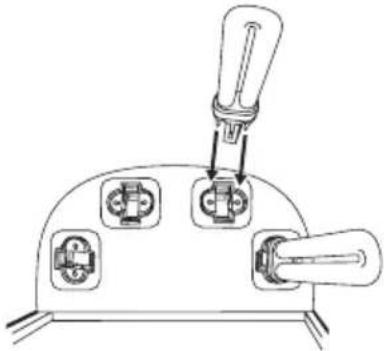
natural_image
Technical line drawing of a mechanical switch or lever assembly with three ports and a handle (no text or symbols)
Achtung
natural_image
Diagram of a device with an arrow indicating direction, showing internal components and a cable (no text or symbols)4. Bedienung
- Getting to know your device......8
- Device description....9
- Initial use....9
- Operation ...... 10
-
Maintenance and cleaning ....10
-
What if there are problems? .....10
- Replacement parts and wearing parts .....10
- Disposal....11
- Technical data ....11
Dear customer,
thank you for choosing one of our products. Our name stands for high quality and thoroughly tested products for applications in the areas of heat, weight, blood pressure, body temperature, pulse, gentle therapy, massage, beauty, baby and air.
Please read these instructions for use carefully and keep them for later use, be sure to make them accessible to other users and observe the information they contain.
With kind regards,
Your Beurer team
Included in delivery
1 MP 38 UV nail dryer
4 9 Watt UV tubes
1 Instructions for use

WARNING
- The unit is only intended for domestic/private use, not for commercial use.
- This device may be used by children over the age of 8 and by people with reduced physical, sensory or mental skills or a lack of experience or knowledge, provided that they are supervised or have been instructed on how to use the device safely, and are fully aware of the consequent risks of use.
• Children must not play with the device. - Cleaning and user maintenance must not be performed by children unless supervised.
- If the mains connection cable of this device is damaged, it must be disposed of.
Intended use
Use the device exclusively on human nails for curing UV nail gel.
The device is only intended for the purpose described in these instructions for use. The manufacturer is not liable for damage resulting from improper or careless use. The device is intended for domestic use only, not for commercial purposes.
Safety notes
Symbols
The following symbols appear in these instructions for use.
 | Warning Warning instruction indicating a risk of injury or damage to health. | |
 | Important Safety note indicating possible damage to the unit/accessory. | |
 | Note Note on important information. | |
 | Disposal in accordance with EC Directive WEEE (Waste Electrical and Electronic Equipment). | |
Important safety notes

Warning
Before using the device, read the safety notes through carefully.
Non-observance of the following information may result in personal injury or material damage. Store these instructions for use and make them accessible to other users. Make sure you include these instructions for use when handling over the device to third parties.
- Do not use the device if you have been diagnosed with skin cancer, suffer from unusual discolouration of the skin, take medicines which increase sensitivity to light or suffer from an illness which increases your sensitivity to light.
- Store the device out of the reach of children. The device is not suitable for children under 14 years.
- Keep packaging material away from children! Choking hazard.
- Do not place or store the device in a location in which it is able to fall or be pushed into a bath, sink or other container containing water. Do not place the device in water or allow it to fall into water or any other liquid. This can lead to severe electric shock. Never reach for a device that has been submerged in water. Disconnect it from the mains immediately.
- Never look directly at UV light.
- Do not use the device during pregnancy.
- Overexposure to UV radiation may cause sunburn to the skin. Too frequent exposure to UV radiation may lead to skin changes and increases the risk of skin cancer.
- Excessive exposure to UV radiation can cause damage to the skin and eyes. Please seek medical assistance if you notice any changes to your skin.
- If you are aware of any allergy to UV radiation, consult your doctor before using the device.
- Only use light sources of the prescribed type. Failure to comply will invalidate the warranty.
- Protect the device from impacts, humidity, dirt, chemicals, marked temperature fluctuations and direct sunlight.
- Never place any objects on the device. Do not cover the device while it is in operation.
- Repairs must only be carried out by Customer Services or authorised suppliers. Failure to comply will invalidate the warranty.
- Keep sensitive areas of skin such as scars and tattoos away from radiation.
- Never use the device near open flames or hot surfaces.
- Never pull the mains plug out of the socket using the mains cable or with wet hands.
- Do not use the device if it is visibly damaged, does not function properly or if the mains plug or mains cable is damaged. In these cases, contact Customer Services.
1. Getting to know your device
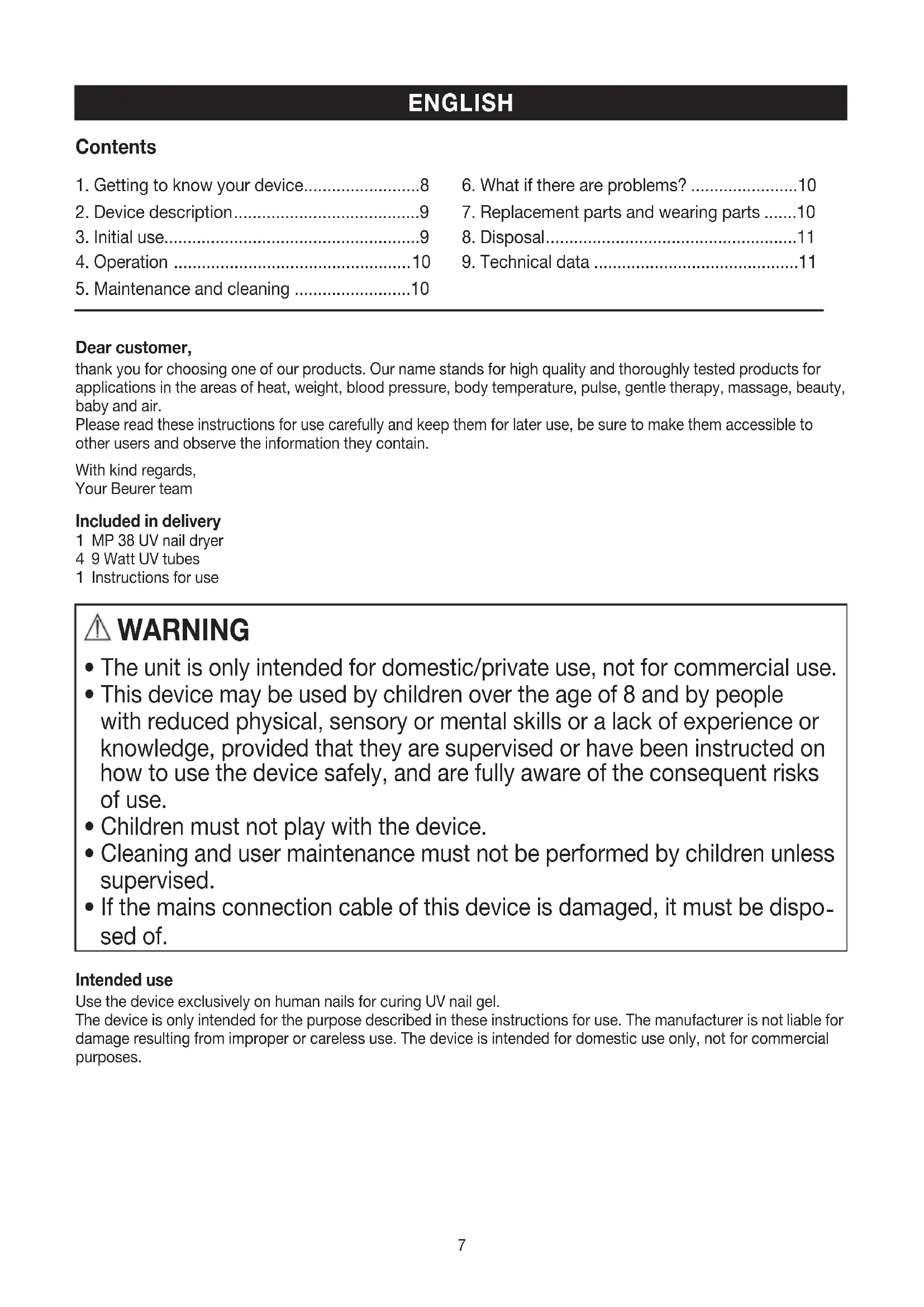
The MP 38 UV nail dryer is intended for nail art using UV gel. It can be used for manicure as well as pedicure.
The special tunnel-like structure of the device and its reflecting foil incorporated into the interior help to ensure clean and even drying of the nails. To make cleaning and disinfection more efficient and more comfortable, the UV nail dryer is equipped with a removable base plate. This also helps to simplify the installation and replacement of the fluorescent tubes.
The timer function makes using the device even more convenient.
2. Device description
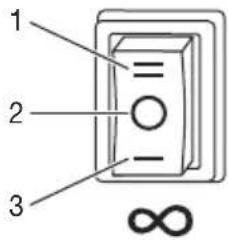
- Selection switch
- Start button
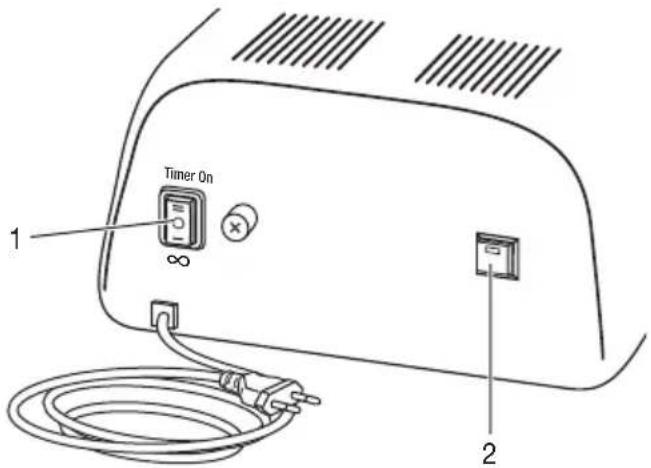
Control panel
- 120-second timer
- Off
- Continuous operation
Timer On
3. Initial use
- Check to ensure that the package contains all the parts that should be included in the delivery. If any parts are missing or damaged, contact Customer Services.
- Remove all packaging material.

Warning
Keep packaging material away from children! Choking hazard.
- Place the device on a firm, level and dry surface.
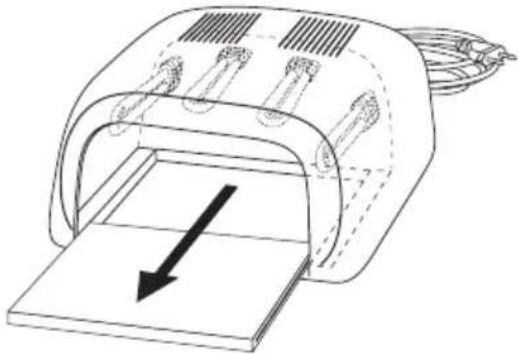
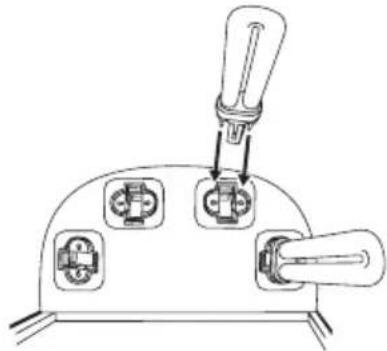
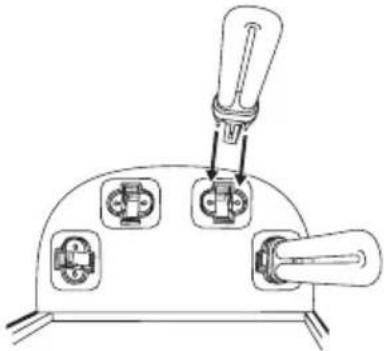
Before you can begin using the UV nail dryer, you must insert the UV fluorescent tubes. In order to do this, follow the steps below:
- Remove the base plate. 2. Carefully insert the fluorescent tubes into the sockets.
natural_image
Diagram of a device with an arrow indicating direction, showing internal components and a base plate (no text or symbols)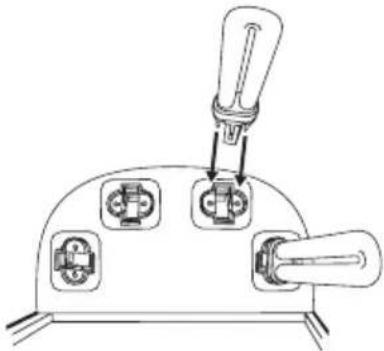
natural_image
Technical line drawing of a mechanical component with three ports and a lever (no text or symbols)
Important
Ensure that the brass terminals are correctly inserted.
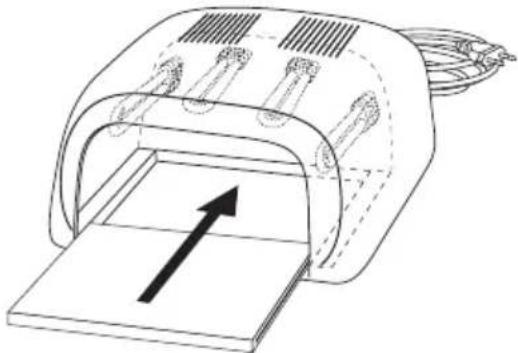
- Insert the base plate.
natural_image
Diagram of a device with an open lid and internal components, showing a black arrow pointing upward (no text or symbols present)4. Operation
Drying UV nail gel
-
Insert the mains plug into the socket.
-
There are two different UV light exposure settings available (120-second timer and continuous operation).
-
To set the exposure time to 120 seconds, set the switch to Timer On. Then press the Start button. The UV light will light up for 120 seconds. The UV light will automatically go off after 120 seconds. The majority of commercially available UV nail gels have a curing time of 120 seconds. For more information, please observe the information from the corresponding nail gel manufacturer. After the 120 seconds, you can restart the 120-second timer by pressing the Start button.
To set the exposure time to “Continuous operation”, set the switch to ∞. The UV light will light up continuously. This mode is required for gels with a shorter or longer curing time than 120 seconds.
-
Insert your nails varnished with UV nail gel into the opening in the device (with your nails facing upwards).
-
Switch the device off once you have finished using it. For this purpose, set the switch to the centre position and disconnect the device from the mains.
5. Maintenance and cleaning
Replacing the fluorescent tubes
If one of the four fluorescent tubes ceases to work properly, replace all four fluorescent tubes.
You can order the required fluorescent tubes from Customer Services.

Warning
Before replacing the fluorescent tubes, pull the mains plug out of the socket!

Important
Only insert UV-9W-L type fluorescent tubes into the device.
To replace the fluorescent tubes, follow the steps contained in section "3. Initial use".
Cleaning

Warning
Before beginning cleaning, pull the mains plug out of the socket!
- Clean the base plate after each use.
- Clean the surface of the device and the base plate carefully using a slightly damp cloth only.
- Do not use any cleaning agents or solvents.
6. What if there are problems?
| Problem Possible cause $solution | ||
| Device will not switch on. | Mains plug not plugged in. Insert the mains | plug into the socket. |
| No voltage at mains socket. Check your fusebox. | ||
| UV nail gel does not dry. | Treatment time with UV light too short. Set a longer UV light treatment time. | |
| UV fluorescent tube does not light up. | UV fluorescent tube not correctly inserted. | Check that the UV fluorescent tube has been correctly inserted. |
| UV fluorescent tube faulty. Insert a new UV fluorescent tube. | ||
7. Replacement parts and wearing parts
Replacement parts and wearing parts are available from the corresponding service address (according to the service address list). Please state the corresponding order number.
| Designation Item number and/or order number |
| UV fluorescent tubes, 4 units 163.655 |
8. Disposal
Please dispose of the device in accordance with EC Directive – WEEE (Waste Electrical and Electronic Equipment).
If you have any queries, please contact the appropriate local authorities.

9. Technical data
Model no. MP 38
Dimensions L 220 x W 210 x H 100 mm
Weight 1610 g (including UV fluorescent tubes)
Power supply 220-230V, \~ 50 Hz
Nominal power 36 W
Permissible storage conditions Store in a clean and dry place
Number of UV lamps 4
UV lamp type UV-9W-L 365 nm, 9W
UV type of device UV-A lamp type 3
Switch-off times 120 seconds, continuous operation
FRANÇAIS
Sommaire
natural_image
Diagram of a device with an arrow indicating direction, showing internal components and a base plate (no text or symbols)les supports.
natural_image
Technical line drawing of a device with three ports and a lever (no text or symbols)
Attention
natural_image
Diagram of a device with an arrow pointing to a rectangular component, no text or symbols present4. Utilisation
natural_image
Technical line drawing of a mechanical device with an arrow indicating direction (no text or symbols present)
natural_image
Technical line drawing of a mechanical component with three socket ports and a lever (no text or symbols)
Atención
natural_image
Diagram of a device with an arrow pointing to a rectangular component (no text or symbols present)4. Manejo
natural_image
Diagram of a device with an arrow indicating direction, showing internal components and a base plate (no text or symbols)natural_image
Technical line drawing of a mechanical switch or connector with three ports and a lever (no text or symbols)
Attenzione
natural_image
Diagram of a device with an arrow pointing to a rectangular component (no text or symbols present)4. Funzionamento
natural_image
Diagram of a device with an arrow indicating direction, showing internal components and a base plate (no text or symbols)natural_image
Diagram of a device with three ports and a lever, no text or symbols present
Dikkat
natural_image
Diagram of a device with an open lid and internal components, showing an upward arrow (no text or symbols present)4. Kullanım
UV lamba tipi UV-9W-L 365 nm, 9 W
Cihazın UV tipi UV-A lamba tip 3
natural_image
Diagram of a mechanical device with a downward arrow indicating force or direction (no text or symbols present)крепления.
natural_image
Technical line drawing of a mechanical switch or connector with three ports and a lever (no text or symbols)
Внимание
natural_image
Diagram of a device with an arrow pointing to a rectangular component, no text or symbols present4. Обслуживание
natural_image
Diagram of a device with an arrow pointing to a rectangular component, no text or symbols present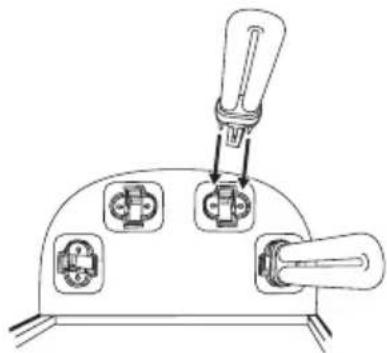
natural_image
Diagram of a device with three ports and a handle, no text or symbols present
Uwaga
natural_image
Technical line drawing of a mechanical device with an arrow indicating direction (no text or symbols)4. Obsługa
natural_image
Diagram of a device with an arrow indicating direction, showing internal components and a base plate (no text or symbols)natural_image
Diagram of a device with three ports and a lever, no text or symbols present
Let op
natural_image
Diagram of a device with an arrow pointing to a rectangular component, no text or symbols present4. Bediening
natural_image
Line drawing of a mechanical device with an arrow indicating direction (no text or symbols)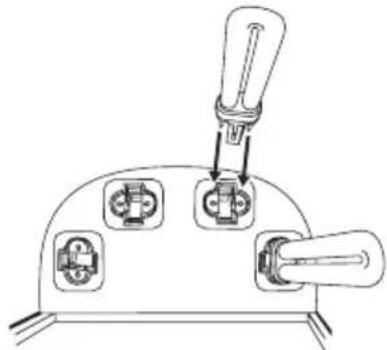
natural_image
Technical line drawing of a mechanical device with three ports and a lever (no text or symbols)
Atenção
natural_image
Diagram of a device with an arrow pointing to a rectangular opening, no text or symbols present4. Utilização
Endurecer o gel UV das unhas
natural_image
Diagram of a mechanical device with a downward arrow indicating force or direction (no text or symbols present)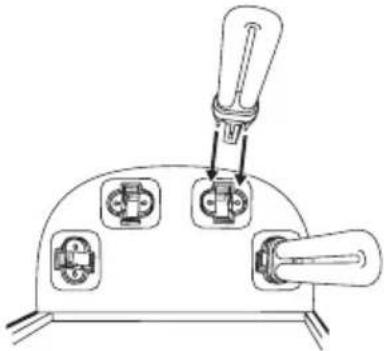
natural_image
Technical line drawing of a mechanical switch or connector with three ports and a lever (no text or symbols)