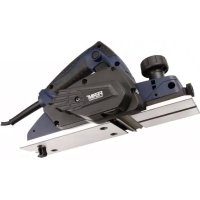
PPM1015P - Electric planer Ferm - Free user manual and instructions
Find the device manual for free PPM1015P Ferm in PDF.



| Product type | Electric planer |
| Brand | Ferm |
| Model | PPM1015P |
| Voltage | 220-240 V~ |
| Frequency | 50 Hz |
| Power consumption | 620 W |
| No-load speed | 17 000 /min |
| Planing width | 82 mm |
| Max. planing depth | 2.0 mm |
| Max. rebating depth | 9.0 mm |
| Weight | 3.1 kg |
| IP class | IP20 |
| Sound pressure level (LpA) | 84.7 dB(A) |
| Sound power level (LwA) | 95.7 dB(A) |
| Vibration value | 4.27 m/s² |
| Power supply | Mains (with plug) |
| Insulation type | Double insulation (Class II) |
| Main functions | Planing, chamfering (V-groove), parallel guide |
| Depth adjustment | Via rotary knob (0-2 mm) |
| Switch | On/Off with lock |
| Chip ejection | Yes, with dust extraction connection |
| Spare parts included | Parallel guide, wrench, adjustment tool, sharpening holder |
| Maintenance and cleaning | Regular cleaning with soft cloth, no lubrication required |
| Belt replacement | Possible, toothed belt |
| Safety | Emergency stop by releasing switch, disconnect before maintenance |
| Warranty | Full warranty (see enclosed certificate) |
| Repairability | Spare parts available, repair by authorized workshop |
Frequently Asked Questions - PPM1015P Ferm
User questions about PPM1015P Ferm
0 question about this device. Answer the ones you know or ask your own.
Ask a new question about this device
Download the instructions for your Electric planer in PDF format for free! Find your manual PPM1015P - Ferm and take your electronic device back in hand. On this page are published all the documents necessary for the use of your device. PPM1015P by Ferm.
USER MANUAL PPM1015P Ferm

natural_image
Blue FERM power tool with black handle and control panel (no visible text or symbols)PPM1015P
Fig. 3a Fig. 3b
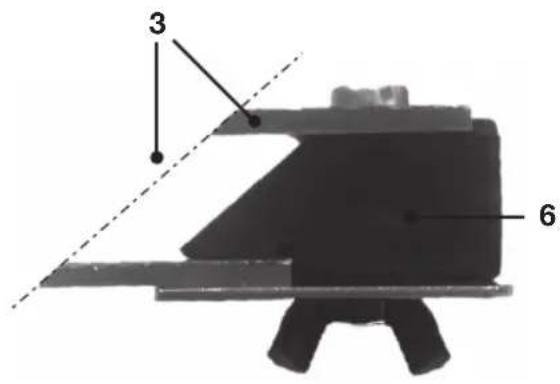
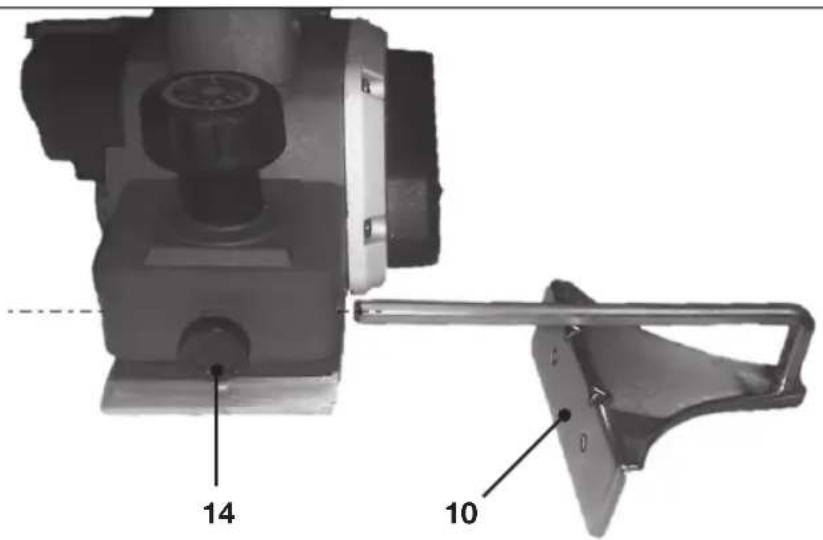
Fig. 4
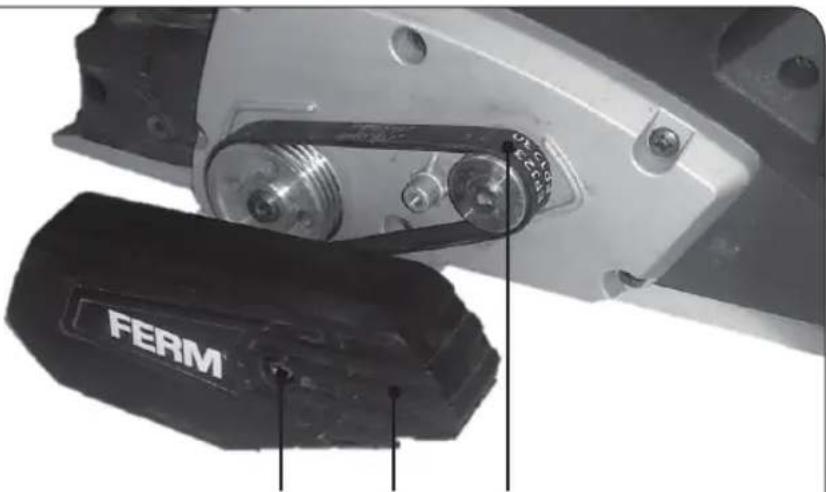
Fig. 5
10 11 12
PLANER 620W PPM1015P
Thank you for buying this Ferm product. By doing so you now have an excellent product, delivered by one of Europe's leading suppliers. All products delivered to you by Ferm are manufactured according to the highest standards of performance and safety. As part of our philosophy we also provide an excellent customer service, backed by our comprehensive Warranty. We hope you will enjoy using this product for many years to come.
The numbers in the following text correspond with the pictures at pages 2 + 3

Read this operators guide carefully, before using the machine. Ensure that you know how the machine works, and how it should be operated. Maintain the machine in accordance with the instructions, and make certain that the machine functions correctly. Keep this operator's guide and other enclosed documentation with the machine.
Product description
This double insulated electric tool is designed to be manually operated. It is safe and reliable when in operation. It is suitable for planing wooden beams or boards.
Contents
- Machine informatie
- Safety instructions
- Operation
- Care and maintenance
1. MACHINE INFORMATION
Technical specifications
Voltage 220-240 V\~
Frequency 50 Hz
Power consumption 620 W
Number of revolutions, idle 17.000/min
Max. planing width 82 mm
Max. planing depth 2.0 mm
Max. rebate depth 9.0 mm
Protection class IP 20
Weight 3.1 kg
LpA (sound pressure) 84.7 dB(A)
LwA (sound capacity) 95.7 dB(A)
Vibration value 4.27 m/s
Vibration level
The vibration emission level stated in this instruction manual has been measured in accordance with a standardised test given in EN 60745; it may be used to compare one tool with another and as a preliminary assessment of exposure to vibration when using the tool for the applications mentioned.
- using the tool for different applications, or with different or poorly maintained accessories, may significantly increase the exposure level
- the times when the tool is switched off or when it is running but not actually doing the job, may significantly reduce the exposure level
Protect yourself against the effects of vibration by maintaining the tool and its accessories, keeping your hands warm, and organizing your work patterns.
Parts list
Fig. 1 + 2
- depth adjustment knob
- Indication of planing depth
- On/off switch
-
Lock-on Button
-
Handle
-
Belt cover
-
Planer shoe with V-groove
-
Dust & chip outlet
-
Protection stand
-
Parallel guide
-
Blade exchange spanner
-
Blade adjustment tool
-
Blade sharpening holder
2. SAFETY INSTRUCTIONS
Explanation of symbols

Denotes risk of personal injury, loss of life or damage to the tool in case of nonobservance of the instructions in this manual.

Indicates electrical shock hazard.

Wear ear and eye protection

Wear a dust mask
Switch off the machine immediately in case of:
- Malfunction in the mains plug, power cable or damaging of cable.
•Brokenswitch. - Smoke or stench of scorched insulation.

Wait for the cutter to stop before setting the tool down. An exposed cutter may engage the surface leading to possible loss of control and serious injury.
Electrical safety
When using electric machines always observe the safety regulations applicable in your country to reduce the risk of fire, electric shock and personal injury. Read the following safety instructions and also the enclosed safety instructions. Keep these instructions in a safe place!

Always check that the power supply corresponds to the voltage on the rating plate.

Class II machine. Your machine is double insulated; therefore no earthed wire is required.
When replacing old cables or plugs
Throw away old cables or plugs immediately as soon as new ones have replaced these. It is dangerous to put the plug of a loose cable into the socket outlet. When using extension cables Only use an approved extension cable that is suitable for the machine's power. The cores must have a diameter of at least 1.5 mm2. When the extension cable is on a reel, unroll the cable in its entirety.
3. OPERATION

Before setting up, repair or maintenance of the appliance you must always turn off the operating switch and pull out the mains plug!
Before initial operation
- Check if the rated voltage and rated frequency of the mains supply correspond to the details of the type plate.
- Place the workbench on a stable and even base.
Operation
Fig. 1
- To adjust the planing depth, turn the control knob (1) in a clockwise direction. On the control knob there is a pointer which shows the planing depth in mm. Turn the control knob until the desired planing depth is shown.

Never alter the planing depth during an operating cycle, otherwise this will result in an uneven surface. To prevent operating errors turn the control knob back to "0" when planing is completed.
- Secure the work piece with clamps or similar.
- Place the front sole on the edge of the work piece in such a way that the planing tool does not yet touch the work piece. The work piece must be level.
Switching on and off
Fig. A
- Switch the machine on by pressing the On/Off
- switch (3). When you release the On/Off switch
• (3) the machine will turn off.
Lock-on Button
Fig. A
- You can lock the On/Off switch (3) by pressing the On/Off switch (3) and then pressing the lock-on button (4).
- To release the switch-lock; shortly press the On/Off switch (3) again'
- The planer is now switched on and you can let go of the release button.
• Always hold the planer with both hands on the handles, so as to gain the best possible
control over your planing operations. Besides you do not risk becoming in touch with the moving parts.
- When the machine has reached full speed it can be pushed to the front over the work piece. At the beginning of the planing operation, put some pressure on the front and at the end of the operation, on the rear of the appliance. This results in the appliance remaining flat on the work piece and prevents the corners from getting rounded off.
- To obtain a level and smooth surface use a greater planing depth when rough planing and a lesser planing depth when planing a layer. Hold the electric tool straight during the operation, otherwise you will obtain an uneven surface. After the operation switch off the electric tool and remove the mains plug.
Bevelling edges
Fig. 1
The V-groove in the planer shoe allows easy beveling of workpiece edges. Place the planer with the V-groove (7) onto the edge of the workpiece and guide along the edge.

Warning! Use spindle lock only in stand still mode.
• Take care that your hand never comes in contact with the work piece during the operation.
- Only use the electric plane on the upper side of the work piece, never from below or from the side.
- Store the appliance only after it has come to a complete standstill.
- Use a suction device to suck off wood shavings or dust. For this use the connecting pipe and connect a suction pipe to it.
- Use a holding device to work on small work pieces.
Fitting the parallel guide
Fig. 4
- Loosen knob (14).
- Insert the parallel guide (10) into the slot provided.
- Set the correct cut width and tighten the knob (14).
4. CARE & MAINTENANCE

Before undertaking any care or maintenance always remove the mains plug from the socket.
The planing tool becomes worn after a period of operation. If you use a blunt or damaged planing tool operational efficiency is reduced and the electric motor might become overloaded. Check the planing tool regularly with regard to wear or damage. Depending on its condition, the planing tool will have to be replaced or sharpened.
Removal of plane blade
Fig. 2
Use the enclosed spanner (11). First unscrew the three clamping screws (1) and remove the drum cover (2) and plane blade (3), from the drum (4).
Sharpening the blades
Fig. 3a
To sharpen the blades first remove the two screws (5) and the adjusting plate (6). Fit the planing blades (3) into the sharpening holder (6) as shown in the right figure and tighten the butterfly nuts.. Use a wet sharpening stone, and keep the holder so that both blades contact the stone simultaneously, and sharpen the blades.
Adjusting the blades
Fig. 3b
If needed first loosely replace the adjusting plate (6) with the two screws (5). Push the sharp edge against the back of the adjustment tool (7), and line up the adjusting plate (6) with the edge of the adjustment tool (7) and tighten the screws (5). Your plane blades are now correctly adjusted, and can be replaced on the drum.
Installation of plane blade
Fig. 2
Take a (new) plane blade (3) and position it between the drum cover (2) and the drum (4). With the adjustment plate (6) in the groove of the drum (4). Now fasten the clamping screws (5) into the drum.

Warning!
- When installing and removing the plane blade, care has to be taken that all parts (plane blade, drum cover and screws) are clean. Dirt or possible existing layers of dirt have to be removed. Check regularly if the clamping screws are tightened firmly.
Replacing the drive belt
Fig. 5
- Loosen screw (10) and take off the belt cover (11).
- Remove worn drive belt (12).
- Before assembling a new drive belt, clean both belt pulleys.
- Place the new drive belt on the small pulley first and then work it on the large pulley by hand while rotating.
- Reattach the belt cover (11) and tighten with the screw (10).
Troubleshooting
-
The operating switch is switched on, but the motor is not working.
-
The electric circuit is broken.
- Have the electric circuit repaired.
- Wires in the mains plug or in the socket are loose.
- Have socket and plug checked or repaired.
- The switch is faulty.
• Have the switch replaced.
-
The operating switch is switched on, but unusual noises can be heard, the motor is not working or only very slowly.
-
Component jammed.
- Have the electric tool checked or repaired.
- Too much thrust, as a result the motor is dragging.
-
Use less thrust during the task.
-
Motor gets hot.
• Foreign substances have got inside the motor.
- Have the foreign substances removed.
- Pressure too high.
• Use less thrust during the task
- The motor is working, but the planing tool is not moving.
•V-beltworn.
- Have V-belt replaced.
-
Frequent or strong sparks on the commutator.
-
Short circuit on the armature.
• Have the armature replaced.
• Carbon brushes worn out or jammed - Have the carbon brushes checked.
- Rough running of the commutator.
- Have the surface of the commutator cleaned or ground
For your own safety, never remove parts or accessories of the electric tool during operation. In case of fault or damage have the electric tool repaired only by a specialist workshop or by the manufacturer.

Use only original spare parts and original plane blades!
Maintenance

Make sure that the plug is removed from the mains when carrying out maintenance work on the motor.
The machines have been designed to operate over a long period of time with a minimum of maintenance. Continuous satisfactory operation depends upon proper machine care and regular cleaning.
Cleaning
Regularly clean the machine housing with a soft cloth, preferably after each use. Keep the ventilation slots free from dust and dirt. If the dirt does not come off use a soft cloth moistened with soapy water. Never use solvents such as petrol, alcohol, ammonia water, etc. These solvents may damage the plastic parts.
Lubrication
The machine requires no additional lubrication.
Faults
Should a fault occur, e.g. after wear of a part, please contact the service address on the warranty card. In the back of this manual you find an exploded view showing the parts that can be ordered.
GUARANTEE
The guarantee conditions can be found on the separately enclosed guarantee card.
ENVIRONMENT
To prevent damage during transport, the appliance is delivered in a solid packaging which consists largely of reusable material. Therefore please make use of options for recycling the packaging.

Faulty and/or discarded electrical or electronic apparatus have to be collected at the appropriate recycling locations.
Only for EC countries
Do not dispose of power tools into domestic waste. According to the European Guideline 2012/19/EU for Waste Electrical and Electronic Equipment and its implementation into national right, power tools that are no longer usable must be collected separately and disposed of in an environmentally friendly way.
SCHAAF MACHINE 620W PPM1015P
• Schakelaar defect.
CE
DECLARATION OF CONFORMITY
PPM1015P - PLANER
(EN) We declare under our sole responsibility that this product is in conformity with directive 2011/65/EU of the European parliament and of the council of 8 June on the restriction of the use of certain hazardous substances in electrical and electronic equipment is in conformity and accordance with the following standards and regulations:
(DE) Der Hersteller erklärt eigenverantwortlich, dass dieses Produkt der Direktive 2011/65/EU des Europäischen Parlaments und des Rats vom 8. Juni 2011 über die Einschränkung der Anwendung von bestimmten gefährlichen Stoffen in elektrischen und elektronischen Geräten entspricht. den folgenden Standards und Vorschriften entspricht:
(NL) Wij verklaren onder onze volledige verantwoordelijkheid dat dit product voldoet aan de conform Richtlijn 2011/65/EU van het Europees Parlement en de Raad van 8 juni 2011 betreffende beperking van het gebruik van bepaalde gevaartlijke stoffen in elektrische en elektronische apparatuur en in overeenstem ming is met de volgende standaarden en reguleringen:
(FR) Nous déclarons sous notre seule responsabilité que ce produit est conforme aux standards et directives suivants: est conforme à la Directive 2011/65/EU du Parlement Européen et du Conseil du 8 juin 2011 concernant la limitation d'usage de certaines substances dangereuses dans l'équipement électrique et électronique.
(ES) Declaramos bajo nuestra exclusiva responsabilidad que este producto cumple con las siguientes normas y estándares de funcionamiento: se encuentra conforme con la Directiva 2011/65/UE del Parlamento Europeo y del Consejo de 8 de junio de 2011 sobre la restricción del uso de determinadas sustancias peligrosas en los equipos eléctricos y electrónicos.
(PT) Declaramos por nossa total responsabilidade de que este produto está em conformidade e cumpre as normas e regulamentações que se seguem: está em conformidade com a Directiva 2011/65/EU do Parlamento Europeu e com o Conselho de 8 de Junho de 2011 no que respeita à restrição de utilização de determinadas substâncias perigosas existentes em equipamento eléctrico e electrónico.
(IT) Dichiariamo, sotto la nostra responsabilità, che questo prodotto è conforme alle normative e ai regolamenti seguenti: è conforme alla Direttiva 2011/65/UE del Parlamento Europeo e del Consiglio dell'8 giugno 2011 sulla limitazione dell'uso di determinate sostanze pericolose nelle apparecchiature elettriche ed elettroniche.
(SV) Vi garanterar på eget ansvar att denna produkt uppfyller och följer följande standarder och bestämmelser: uppfyller direktiv 2011/65/EU från Europeiska parlamentet och EG-rådet från den 8 juni 2011 om begränsningen av användning av farliga substanser i elektrisk och elektronisk utrustning.
(FI) Vakuutamme yksinomaan omalla vastuullamme, että tämä tuote täyttää seuraavat standardit ja säädökset: täyttää Euroopan parlamentin ja neuvoston 8. kesäkuuta 2011 päivätyn direktiivin 2011/65/EU vaatimukset koskien vaarallisten aineiden käytön rajoitusta sähkö- ja elektronisissa laitteissa.
(NO) Vi erklærer under vårt eget ansvar at dette produktet er i samsvar med følgende standarder og regler: er i samsvar med EU-direktivet 2011/65/EU fra Europa-parlamentet og Europa-rådet, pr. 8 juni 2011, om begrensning i bruken av visse farlige stoffer i elektrisk og elektronisk utstyr.
(DA) Vi erklærer under eget ansvar, at dette produkt er i overensstemmelse med følgende standarder og bestemmelser: er i overensstemmelse med direktiv 2011/65/EU fra Europa-Parlamentet og Rådet af 8. juni 2011 om begrænsning af anvendelsen af visse farlige stoffer i elektrisk og elektronisk udstyr.
(HU) Felelősségünk teljes tudatában kijelentjük, hogy ez a termék teljes mértékben megfelel az alábbi szabványoknak és előírásoknak: je v souladu se směrnící 2011/65/EU Evropského parlamentu a Rady EU ze dne 8. června 2011, která se týká omezení použití určitých nebezpečných látek v elektrických a elektronických zařízeních.
(CS) Na naši vlastní zodpovědnost prohlašujeme, že je tento výrobek v souladu s následujícími standardy a normami: Je v súlade s normou 2011/65/EÚ Európskeho parlamentu a Rady z j.úna 2011 týkajúcej sa obmedzenia používania určitých nebezpečných látok v elektrickom a elektronickom vybavení.
(SK) Vyhlasujeme na našu výhradnú zodpovednosť, že tento výrobok je v zhode a súlade s nasledujúcimi normami a predpismi: Je v súlade s normou 2011/65/EÚ Európske ho parlamentu a Rady z 8. júna 2011 týkajúcej sa obmedzenia používania určitých nebezpečných látok ve elektrickom a elektronickom vybavení.
(SL) S polno odgovornostjo izjavljamo, da je ta izdelek v skladu in da odgovarja naslednjim standardom terpredpisom: je v skladu z direktivo 2011/65/EU Evropskega parlamenta in Sveta z dne 8. junij 2011 o omejevanju uporabe določenih nevarnih snovi v električni in elektronski opremi.
(PL) Deklarujemy na własną odpowiedzialność, że ten produkt spełnia wymogi zawarte w następujących normach i przepisach: jest zgodny z Dyrektywą 2011/65/UE Parla mentu Europejskiego i Rady z dnia 8 czerwca 2011 r. w sprawie ograniczenia stosowania niektórych niebezpiecznych substancji w sprzęcie elektrycznym i elektronicznym.
(LT) Prisiimdami visą atsakomybę deklaruojame, kad šis gaminys atitinka žemiau paminėtus standartus arba nuostatus: atitinka 2011 m. birželio 8 d. Europos Parlamento ir Tarybos direktvą 2011/65/EB dėl tam tikrų pavojingų medžiagų naudojimo elektros ir elektroninėje jrangoje apribojimo.
(LV) Ir atbilstoša Eiropas Parlamenta un Padomes 2011. gada 8. jūnija Direktīvai 2011/65/ES par dažu bīstamu vielu izmantošanas ierobežošanu elektriskās un elektroniskās iekārtās.
(ET) Apgalvojam ar visu atbildību, ka šis produkts ir saskaņā un atbilst sekojošiem stand-artiem un nolikumiem: ir atbilstoša Eiropas Parlamenta un Padomes 2011. gada 8. jūnija Direktīvai 2011/65/ES par dažu bīstamu vielu izmantošanas ierobežošanu elektriskās un elektroniskās iekārtās.
(RO) Declarăm prin aceasta cu răspunderea deplină că produsul acesta este în conformitate cu următoarele standarde sau directive: este în conformitate cu Directiva 2011/65/UE a Parlamentului European și a Consiliului din 8 iunie 2011 cu privire la interzicerea utilizării anumitor substanțe periculoase la echipamentele electrice și electronicice.
(HR) Izjavljujemo pod vlastitom odgovorno,šu da je strojem ukladan sa slijedešim standardima ili standardiziranim dokumentima i u skladu sa odredbama: usklađeno s Direktivom 2011/65/EU europskog parlamenta i vijeća izdanom 8. lipnja 2011. o ograničenju korištenja određenih opasnih tvari u električnoj i elektroničkoj opremi.
(SR) Pod punom odgovornošću izjavljujemo da je usaglašen sa sledecim standardima ili normama: usaglašen sa direktivom 2011/65/EU Evropskog parlamenta i Saveta od 8.juna.2011. godine za restrikciju upotrebe određenih opasnih materija u električnoj i elektronskoj opremi.
(BG) Ние декларираме на наша отговорност, че този продукт отговаря на съответствие с Директива 2011/65/EC на Европейския парламент и на Съвета от 8 юни 2011 г. относно ограничението на употребата на определени опасни вещества в електрическото и електронното оборудване, в съответствие следните стандарти и наредби:
(RU) Под свою ответственность заявляем, что данное изделие соответствует следующим стандартам и нормам: соответствует требованиям Директивы 2011/65/EU Европейского парламента и совета от 8 июня 2011 г. по ограничению использования определенных опасных веществ в электрическом и электронном оборудовании
(UK) На свою власну відповідальність заявляемо, що дане обладнання відповідає наступним стандартам і нормативам: задовольняє вимоги Директиви 2011/65/ЄС Європейського Парламенту та Ради від 8 червня 2011 року на обмеження використання деяких небезпечних речовин в електричному та електронному обладнанні.
(EL) Δηλώνουμε υπεύθυνα όπ το προϊόν αυτό συμφωνεί και τηρεί τους παρακάτω κανονισμούς και πρότιπα: συμμφρώνεται με την Οδηγία 2011/65/ΕΕ του Ευρωπαϊκού Κοινοβουλου και του Συμβουλίου της θης Ιουνίου 2011 για τον περιορισμό της χρήσης ορισμένων επικιδυνων συσιών σε ηλεκτρικό και ηλεκτρονικό εξοπτιλισμό.
(AR) كيلاتلا تامي جوxtلار ري ياعجنا عم قغازوتي جتنجلا الله نا آندج و انتيeltروىسم ولبع نلعتن
(TR) Tek sorumlusu biz olarak bu ürünün aşağıdaki standart ve yönergelere uygun olduğunu beyan ederiz.
EN60745-1, EN60745-2-14, EN55014-1, EN55014-2, EN61000-3-2, EN61000-3-3,
2006/42/EC, 2014/30/EU, 2012/19/EU, 2011/65/EU
Zwolle, 01-05-2018
H.G.FRosberg
CEO FERM B.V.
FERM B.V. - Lingenstraat 6 - 8028 PM - Zwolle - The Netherlands
- PPM1015P
- PLANER 620W PPM1015P
- The numbers in the following text correspond with the pictures at pages 2 + 3
- Product description
- Contents
- MACHINE INFORMATION
- Technical specifications
- Vibration level
- Parts list
- Fig. 1 + 2
- SAFETY INSTRUCTIONS
- Explanation of symbols
- Wear a dust mask
- Electrical safety
- When replacing old cables or plugs
- OPERATION
- Before initial operation
- Operation
- Fig. 1
- Switching on and off
- Fig. A
- Lock-on Button
- Bevelling edges
- Fitting the parallel guide
- Fig. 4
- CARE & MAINTENANCE
- Removal of plane blade
- Fig. 2
- Sharpening the blades
- Fig. 3a
- Adjusting the blades
- Fig. 3b
- Installation of plane blade
- Warning!
- Replacing the drive belt
- Fig. 5
- Troubleshooting
- Maintenance
- Cleaning
- Lubrication
- Faults
- GUARANTEE
- ENVIRONMENT
- Only for EC countries
- SCHAAF MACHINE 620W PPM1015P
- CE
- DECLARATION OF CONFORMITY
- PPM1015P - PLANER
Brand : Ferm
Model : PPM1015P
Category : Electric planer