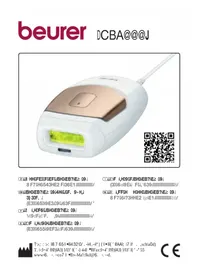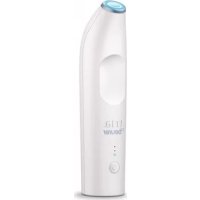
Precision LAS 50 - IPL hair remover BEURER - Free user manual and instructions
Find the device manual for free Precision LAS 50 BEURER in PDF.



| Brand | Beurer |
| Model | Precision LAS 50 |
| Category | Intense pulsed light hair removal device |
| Laser type | Diode, class 1 (IEC 60825-1) |
| Wavelength | 810 nm |
| Maximum fluence | 20 J/cm² |
| Energy levels | 3 (low, medium, high) |
| Power supply | Rechargeable lithium-ion battery (via mains charger) |
| Battery life | Approximately 15 minutes of continuous use |
| Charging time | At least 2 hours |
| Expected lifespan | 3 years |
| Skin tone sensor | Built-in, ensures safe use |
| Display | Green LED indicators |
| Included accessories | Mains charger, user manual, skin tone chart |
| Maintenance | Clean with a soft cloth and soapy water |
| Safety | Automatic skin contact sensor, automatic lock |
| Certification | CE, WEEE, IP22 |
| Usage | Personal household use |
Frequently Asked Questions - Precision LAS 50 BEURER
User questions about Precision LAS 50 BEURER
0 question about this device. Answer the ones you know or ask your own.
Ask a new question about this device
Download the instructions for your IPL hair remover in PDF format for free! Find your manual Precision LAS 50 - BEURER and take your electronic device back in hand. On this page are published all the documents necessary for the use of your device. Precision LAS 50 by BEURER.
USER MANUAL Precision LAS 50 BEURER
HAIR REMOVAL LASER PRECISION
Instructions for Use


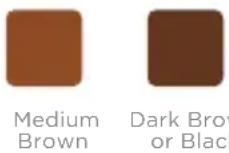
SKIN TONE CHART
CHECK YOUR SKIN TONE to find out if you can safely use the Tria Hair Removal Laser Precision. Match the skin in the area you wish to treat to the range of skin tones shown on this chart. If your skin tone matches any of the skin tones labeled "Not Safe" for treatment, then DO NOT USE the Tria Laser Precision.
INTENDED SKIN TONES:

NOT SAFE:
READ THESE INSTRUCTIONS
BEFORE USE
Before you use your new Tria Laser Precision, read this booklet for important information:
- Confirm that the Tria Laser Precision is safe for you
- Learn how to use the Tria Laser Precision
View our treatment results timeline - Read our tips for best results
- Review contraindications and warnings, which are marked with the symbol below:
This Warning Symbol appears next to information about possible safety risks. Be sure to read and follow all the warnings and safety information.
We recommend that you save these instructions for future reference. If you have questions or concerns, please contact Tria Beauty Customer Service. You can also find the Quick Start Guide on our website (see back cover).
TABLE OF CONTENTS
INTRODUCTION 2
GETTING TO KNOW YOUR TRIA LASER PRECISION 3
WHAT THE TRIALASER PRECISION IS USED FOR (INDICATIONS) 5
WHO SHOULD NOT USE THE TRIA LASER PRECISION (CONTRAINDICATIONS) 5
WARNING 6
BENEFITS AND RISKS 8
TRIA LASER PRECISION TREATMENT OVERVIEW 9
WHAT TO EXPECT 10
BEFORE YOUR FIRST TREATMENT 10
BEFORE EVERY TREATMENT 12
HOW TO TREAT 14
TAKING CARE OF YOUR TRIA LASER PRECISION 16
TROUBLESHOOTING 17
CONGRATULATIONS ON YOUR NEW TRIA LASER PRECISION
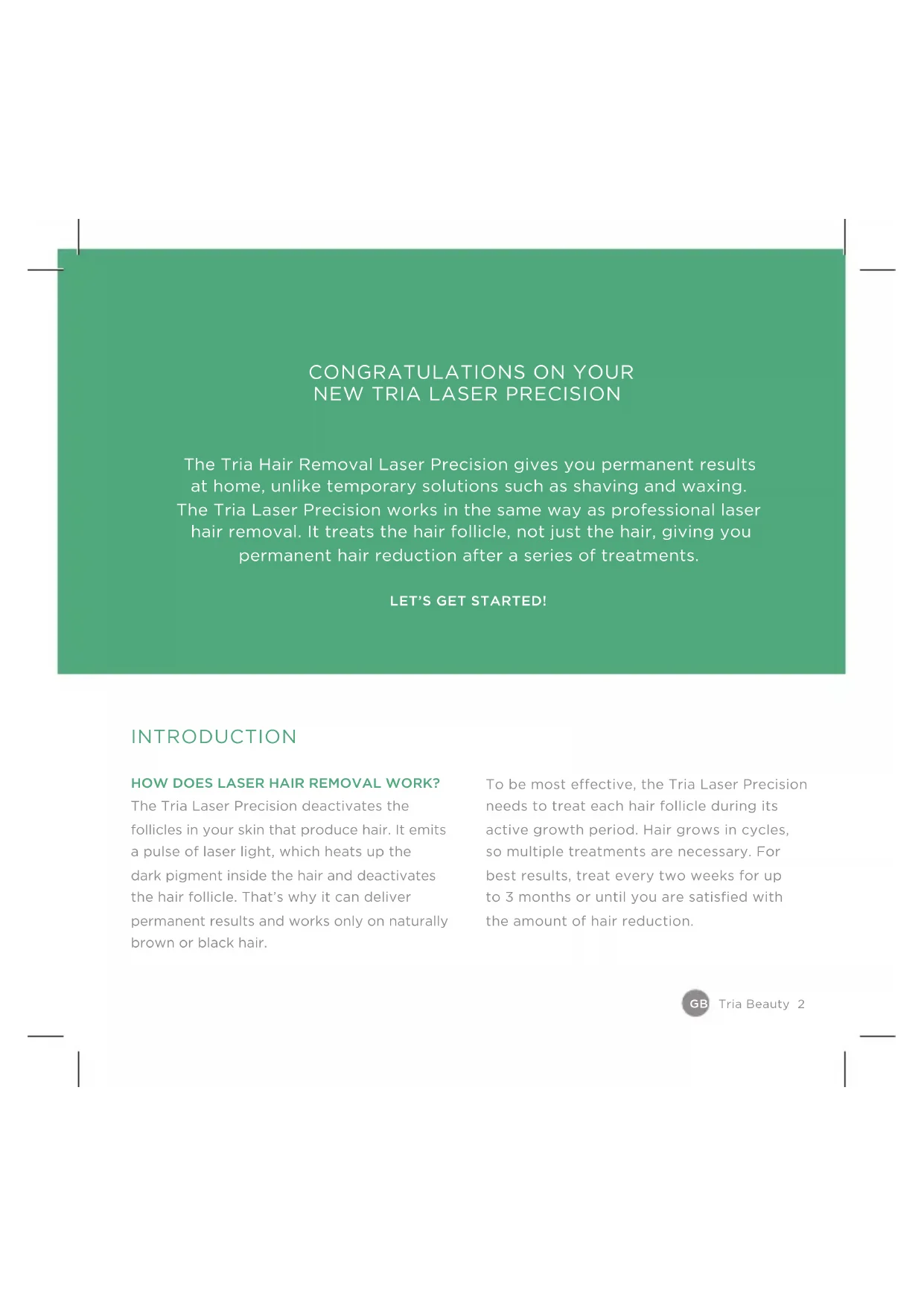
The Tria Hair Removal Laser Precision gives you permanent results at home, unlike temporary solutions such as shaving and waxing. The Tria Laser Precision works in the same way as professional laser hair removal. It treats the hair follicle, not just the hair, giving you permanent hair reduction after a series of treatments.
LET'S GET STARTED!
INTRODUCTION
HOW DOES LASER HAIR REMOVAL WORK?
The Tria Laser Precision deactivates the follicles in your skin that produce hair. It emits a pulse of laser light, which heats up the dark pigment inside the hair and deactivates the hair follicle. That's why it can deliver permanent results and works only on naturally brown or black hair.
To be most effective, the Tria Laser Precision needs to treat each hair follicle during its active growth period. Hair grows in cycles, so multiple treatments are necessary. For best results, treat every two weeks for up to 3 months or until you are satisfied with the amount of hair reduction.
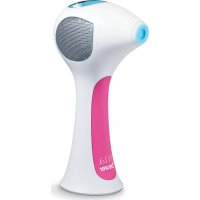
GETTING TO KNOW YOUR TRIA LASER PRECISION
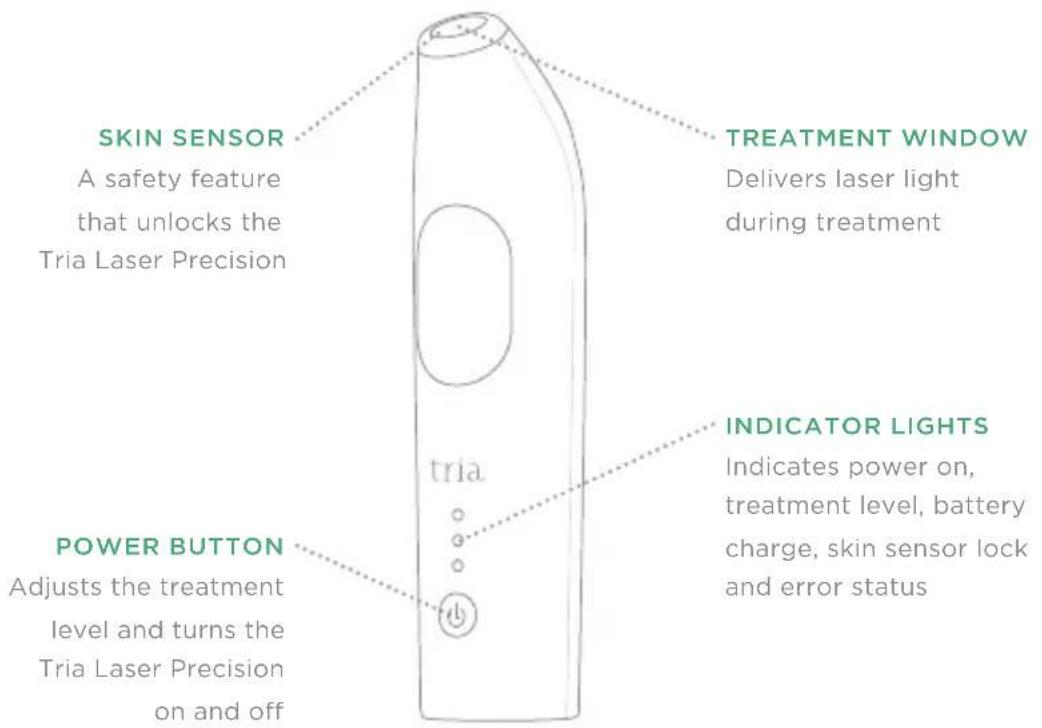
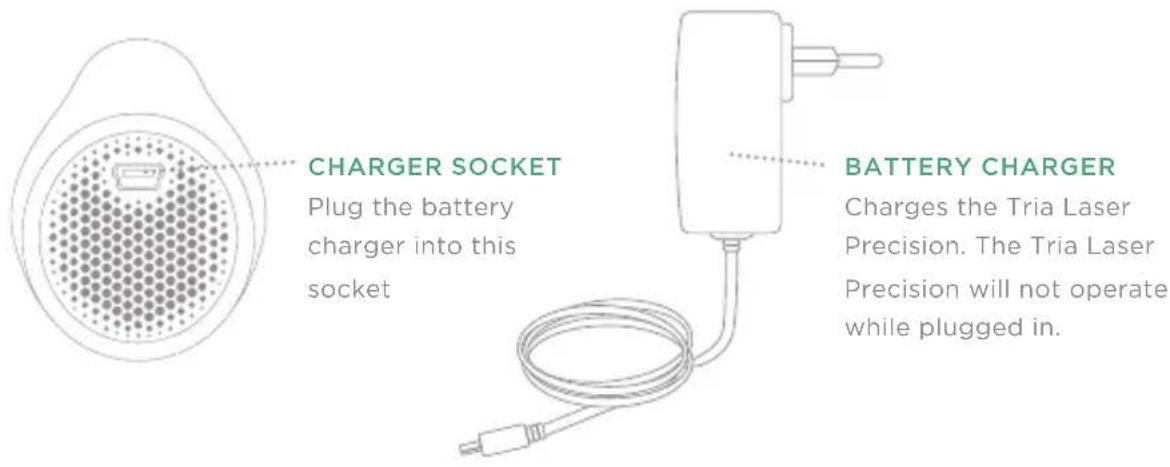
BOTTOM OF DEVICE
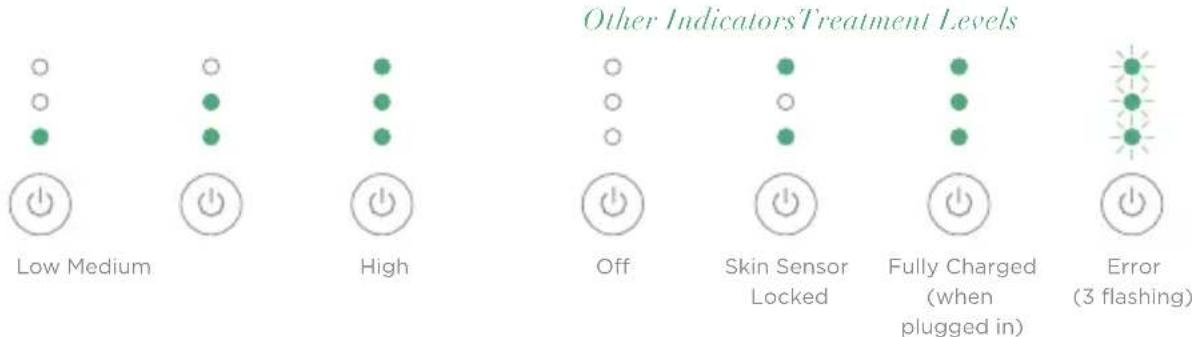
INDICATOR LIGHTS GUIDE

Tria Beauty 4
WHAT THE TRIA LASER PRECISION IS USED FOR (INDICATIONS)
The Tria Hair Removal Laser Precision is used to remove unwanted hair. It is an overthe-counter system intended for adjunctive use with shaving for hair removal sustained with periodic treatments. It is also intended for permanent reduction in hair regrowth defined as long-term, stable reduction in the number of hairs regrowing when measured out to 6, 9 and 12 months after the completion of the treatment regimen.
It is intended for use only on light to medium skin tones (see the Skin Tone Chart on the inside front cover) and naturally brown or black hair. It will not work on white, grey, blonde, or red hair.
WHO SHOULD NOT USE THE TRIA LASER PRECISION (CONTRAINDICATIONS)
DO NOT USE the Tria Laser Precision if your skin tone matches one listed as "Not Safe" on the Skin Tone Chart on the inside
front cover of this booklet. If you use the Tria Laser Precision on skin "Not Safe" for treatment, the skin may absorb too much laser light and be injured (burned, discoloured, or scarred).
PLEASE NOTE: The skin sensor is a safety feature that unlocks the Tria Laser Precision. If it is not safe for you to use the Tria Laser Precision, you won't be able to unlock it with the skin sensor.
DO NOT USE the Tria Laser Precision if you are under the age of 18 or use it on anyone else under the age of 18. The use of the Tria Laser Precision on or by children has not been studied and could result in serious injury.
DO NOT USE the Tria Laser Precision if you have a lighter hair colour, such as blonde, white, red or grey. In order for the laser to work, you must have naturally dark hair where you are treating. Lighter hair pigments will not absorb enough of the laser's energy to disable the hair follicle.
WARNING
DO NOT USE the Tria Laser Precision on or around the eyes, eyebrows, or eyelashes. Doing so can cause permanent eye injury.
DO NOT USE the Tria Laser Precision if the Skin Tone Chart shows that your skin tone is not suitable. If you have African, Indian, Native American or Pacific Island heritage, you may have a skin tone that is not suitable—be sure to check the Skin Tone Chart. Darker skin tones can absorb too much laser light, which can injure the skin.
DO NOT USE the Tria Laser Precision anywhere on the ears, nipples, genitals or around the anus. These areas may have more sensitive skin, a darker skin tone, and/or a greater hair density, and using the Tria Laser Precision there may cause serious skin injury.
DO NOT USE the Tria Laser Precision on parts of your skin that are darker than your usual skin tone: tattoos, dark brown or black spots (such as large freckles, birthmarks or moles), or skin that is red or swollen from a previous treatment. Dark skin may absorb too much laser light, which can injure the skin.
DO NOT USE the Tria Laser Precision on a man's face, jaw or neck. The hair in a man's beard area is too dense, and using the Tria Laser Precision in these areas may result in skin injury.
Hair removal by laser can cause increased hair growth in some individuals. Based upon currently available data, the highest risk groups for this response are females of Mediterranean, Middle Eastern and South Asian heritage treated on the face and neck.
DO NOT USE the Tria Laser Precision on damaged skin, including open wounds, cold sores, sunburns or areas where you have had a skin peel or other skin resurfacing procedure within the last 6-8 weeks (check with your doctor). These conditions can make the skin more susceptible to injury.
DO NOT USE the Tria Laser Precision if you are pregnant or breast-feeding. The Tria Laser Precision has not been tested on pregnant women. Hormonal changes could increase skin sensitivity and the risk of skin injury.
DO NOT USE the Tria Laser Precision if it appears damaged, and DO NOT attempt to open, modify or repair the Tria Laser Precision. These actions increase the risk of skin or eye injury. Please contact Customer Service for assistance.
Always follow basic safety precautions for electrical devices: DO NOT get the Tria Laser Precision or the charger damp or wet. DO NOT use the Tria Laser Precision while bathing or put it next to a tub or sink. DO NOT operate a charger with a damaged plug or cord. ALWAYS keep the cord away from heated surfaces. Failure to follow these precautions can cause electrocution or electric shock.
This equipment needs to be installed and put into service in accordance with the information in the accompanying documents. Wireless communications equipment such as wireless home network devices, mobile phones, cordless telephones and their base stations, and walkie talkies can affect this equipment and should be kept at least a distance of 3.3m (10 ft) away from the equipment.
DO NOT USE the Tria Laser Precision for any purpose other than hair removal.
The Tria Laser Precision is for personal use. The Tria Laser Precision is not for use in a medical office, clinic, salon or other commercial setting.
DO NOT USE the Tria Laser Precision on any area where you may someday want your hair to grow back. The results may be permanent and irreversible.
! Invisible Laser Radiation. Do Not View Directly with Optical Instruments. Class 1 Laser Product.
No modification of this equipment is allowed.
BENEFITS AND RISKS
A medically supervised clinical study has shown that the Tria Laser Precision is safe and works when used as directed.
Seventy-nine (79) users performed a 6-week course of treatment (3 treatments) and all side effects were observed. The number of hairs at each treatment site was counted before each treatment and at 1, 2, 3, 6, and 12 months after the last treatment. No additional treatments were performed after the third treatment.
BENEFITS
When used as directed, the Tria Laser Precision gives you permanent results. The results vary from person to person and depend on which body area is treated and how closely treatment instructions are followed. The clinical study demonstrated the following benefits:
- 61 % average reduction in hair count 3 weeks after the first treatment
- 70 % average reduction in hair count 3 weeks after the second treatment
-
60 % average reduction in hair count 1 month after the third treatment
-
6 % average reduction in hair count 3 months after the third treatment
33% average reduction in hair count 12 months following the third treatment
In the study, 69 of 79 users (87%) reported finer hair at 1 month after the last treatment than before any treatment. And 55 of 79 users (70%) reported lighter hair at 1 month after the last treatment than before any treatment.
These results were obtained with only 3 treatments. For best results, treat every
2 weeks for 3 months or until you are satisfied with the amount of hair reduction.
RISKS
It is important to use the Tria Laser Precision properly. Make sure that you understand and follow all warnings (see page 6). The skin sensor will prevent use of the device on contraindicated skin types (see page 5).
If you use the Tria Laser Precision as directed, the risks are low:
- In the clinical study, almost all users reported mild to moderate pain or discomfort during
their first treatment, with a reduction in sensitivity reported in their later treatments. This is normal. You may feel warmth, burning, tingling or itching; some users described feeling the same level of discomfort as when a rubber band snaps against the skin. If the pain is too intense or persists after a treatment, stop using the Tria Laser Precision and check with your doctor before using it again.
- Your skin may become red right after treatment or within 24 hours. This redness generally clears up within a few hours. See your doctor if the redness does not go away within 2-3 days.
- In rare cases, some users may see an increase in the number of hairs in the treated area after the initial treatment. If this increase persists over several treatments, stop using the Tria Laser Precision and see your doctor.
The following symptoms affected no users in the clinical study (0 out of 88) but have been reported with other hair removal lasers:
-
Skin swelling, especially around the hair follicle. If the swelling doesn't go away within 2-3 days, stop using the Tria Laser Precision and see your doctor.
-
Temporary or permanent skin discolouration. If your skin colour changes, stop using the Tria Laser Precision and see your doctor.
- Blisters. This is very unlikely for people with a light or medium skin tone. If you do develop a blister, stop using the Tria Laser Precision and don't let the blister become infected. Consult your doctor if needed.
TRIA LASER PRECISION TREATMENT OVERVIEW
BEFORE YOUR FIRST TREATMENT
- Six weeks before your treatment, stop waxing or plucking hair and do not get a skin peel.
- At least 1 day before treatment, perform a patch test on your skin (see page 11).
BEFORE EVERY TREATMENT
Charge your Tria Laser Precision (see page 10)
- Unplug it from the battery charger
- Cleansse, shave, and dry your skin (see page 12)
- Turn on the Tria Laser Precision (see page 12)
- Unlock it with the skin sensor located in the tip (see page 12)
- Set the treatment level (see page 13)
BETWEEN TREATMENTS
- Shave, but don't wax or pluck hair.
TREAT UNTIL YOU'RE DONE
- Be consistent and follow treatment instructions.
- For best results, treat every 2 weeks for up to 3 months or until you see the desired results.
WHAT TO EXPECT
WHILE USING THE TRIA LASER PRECISION
- The sensation varies, depending on the person, treatment area and treatment level. Some users may feel the sensation of a rubber band snapping on the skin. Others will feel a warm, prickling sensation.
- As the amount of hair in the treated areas decreases, the sensation will also decrease. For this reason, you may be able to use a higher treatment level after your initial treatments.
- Some users experience mild redness that goes away within 24 hours.
DURING YOUR FIRST 3 MONTHS OF TREATMENT
After your first treatment, there will be no visible change to the hair. Laser hair
removal does not cause hair to immediately fall out.
- With additional treatments, there will be a gradual reduction in the number of hairs with each treatment.
- The hair that does regrow will also begin to lighten and become finer.
AFTER 3 MONTHS OF TREATMENT
- Hair follicles that have been deactivated by the Tria Laser Precision will not regrow hair.
- Do occasional touch-ups or additional treatments if necessary.
BEFORE YOUR FIRST TREATMENT
CHARGE THE TRIALASER PRECISION
Charge the Tria Laser Precision for at least 2 hours before you use it or anytime the battery is low (device automatically turns off). If you are covering multiple areas or have the Tria Laser Precision set to a high treatment level, you may need to charge the Tria Laser Precision in the middle of a treatment. This is normal.
TO CHARGE:
- Plug the battery charger into the Tria Laser Precision charger socket and into a power outlet.
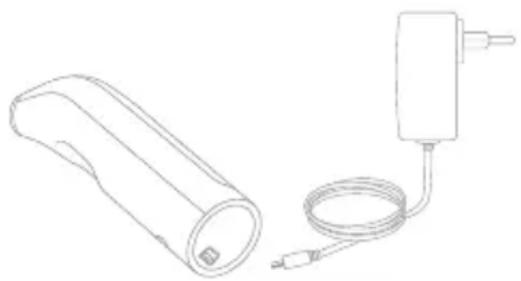
- The indicator lights will flash one after another while the Tria Laser Precision is charging.
- Once fully charged, indicator lights will stop flashing and stay green and you may unplug the charger. The Tria Laser Precision can remain plugged in for extended periods of time without damage.
NOTE: To prevent damage to your Tria Laser Precision, use only the included Tria battery charger. If you lose the charger, please contact Customer Service.
NOTE: You may charge the laser in Quiet mode (charges without the sound of cooling fan), but it will take longer. To change charging modes, press the power button while charging.
TEST THE LASER ON A PATCH OF SKIN
Before your first full treatment on a new area of your body, we recommend you test the Tria Laser Precision on a patch of skin there and try different treatment levels, starting at Low.
- Prepare your skin and unlock the Tria Laser Precision (see pages 12-13). The Tria Laser Precision will be set to Low.
- Place the treatment window flat against your skin, and test one laser pulse.
- If Low was tolerable for you, then move to another test area and increase to Medium, testing a patch at that level with one laser pulse. To adjust the Tria Laser Precision setting up or down, press the power button (see page 13).
-
If Medium was tolerable for you, change test locations and increase to High, testing a patch at that level with one laser pulse.
-
Wait 24 hours and then examine the test areas. If the skin appears normal, start your first treatment at the highest level you are comfortable using.
Retest your skin if your skin tone changes dramatically (due to tanning).
If you notice blistering, burns, changes in your skin tone or any other side effects, or if you are not sure about the outcome of the test, DO NOT USE your Tria Laser Precision. Contact Customer Service or your doctor.
BEFORE EVERY TREATMENT
PREPARE YOUR SKIN
- Cleansse the treatment area, removing all cosmetics, lotions, and creams that may block the laser light.
- Shave the treatment area. This removes the surface hair, which improves comfort and allows the laser light to better reach the hair in the follicle.
- Dry the treatment area.
UNLOCK THE LASER
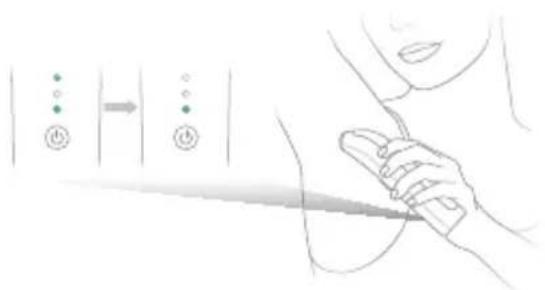
The Tria Laser Precision will lock when it's not in use. A locked device is indicated by the lit top and bottom indicator lights. To unlock the Tria Laser Precision, use the skin sensor, which helps confirm that the Tria Laser is safe for your skin tone.
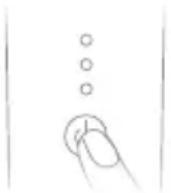
- Unplug the Tria Laser Precision from the battery charger and press the power button to turn it on.
- To unlock, hold the device tip with the built-in skin sensor against the skin in the area you wish to treat. The skin sensor will automatically sense and check your skin. If the Tria Laser Precision is safe for your skin tone, the laser will emit a series of beeps and unlock.
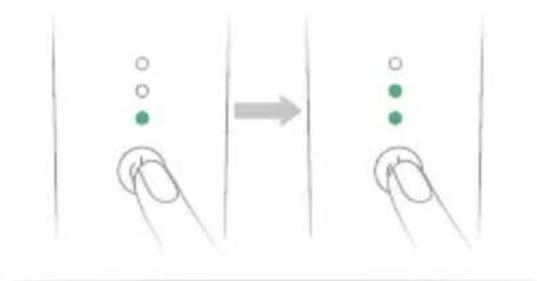
When the Tria Laser Precision is on and unlocked, press the power button to select your desired treatment level. Each time you press the power button, the level will increase. Once the Tria Laser Precision is at the maximum level, pressing the power button again will return it to the lowest level.
- If the top and bottom lights remain lit and you do not hear a series of beeps, then it may not be safe for you to use the Tria Laser Precision. Or, you may be using the skin sensor incorrectly and need to try again. To try again, lift the device tip from your skin and follow Steps 1 and 2 above. If you still cannot unlock the Tria Laser Precision, please contact Customer Service for assistance.
SET THE TREATMENT LEVEL
The Tria Laser Precision offers three different treatment levels: low, medium and high. In a clinical study, higher levels were found to be 2-3 times more effective. So for best results, we recommend you use the highest level that you can tolerate.
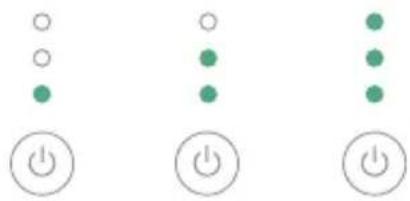
Treatment Levels
Low HighMedium
HOW TO TREAT
- TURN ON THE LASER, UNLOCK IT AND SET THE TREATMENT LEVEL (SEE PAGES 12-13)
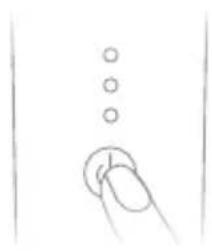
- TOUCH THE TREATMENT WINDOW TO THE SKIN. WHEN YOU HEAR A SINGLE BEEP IMMEDIATELY LIFT THE DEVICE AND MOVE TO STEP 3
If you do not hear a beep within a few seconds, make sure that the treatment window is flat against your skin. The laser will only pulse when the entire window is touching your skin.
- If you hear a buzzing tone instead of a beep, you lifted the device from the skin before the pulse was over. It is normal for time between beeps to lengthen as you progress through each treatment. This should not affect your results.
NOTE: It is normal for the cooling fan to turn on and emit warm air through the bottom vent as soon as you unlock your device. You can continue treatment while this is happening and do not need to wait for the fan to turn off before treating the next area.
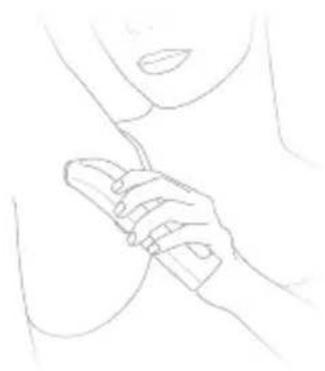
- PLACE THE LASER BACK ON THE SKIN SO THAT IT OVERLAPS THE PREVIOUS AREA
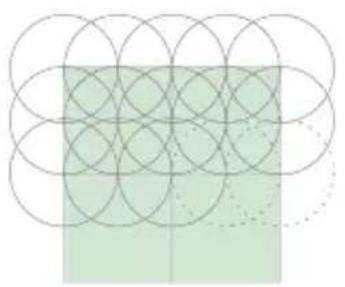
Each time you reposition the treatment window, move it about half the distance of the window (about 1/4 inch or 5mm ) in a stamping motion.
- This creates an overlapping pattern in the treatment area, which ensures you cover all the hair follicles. This works out to about 25 laser pulses per square inch or 40 pulses per 10 square cm.
DO NOT treat repeatedly in the same spot. Always move the treatment window to a new area after each laser pulse. Failure to do so may result in discomfort or skin heating, which could cause skin injury.
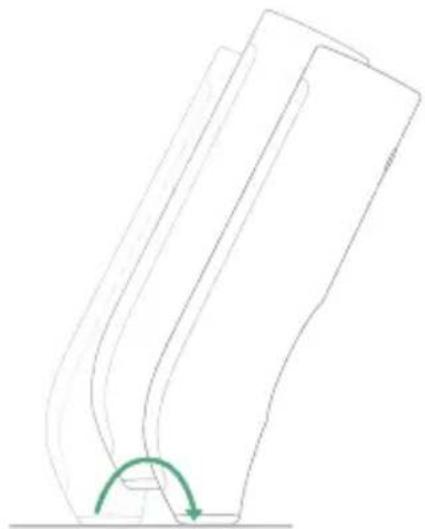
4. REPEAT STEPS 2 AND 3 UNTIL YOU HAVE COMPLETELY COVERED THE AREA YOU WANT TO TREAT
Always follow the treatment instructions and warnings provided in this booklet.
NOTE: You may need to recharge the Tria Laser Precision when treating multiple areas.
5. TURN OFF THE LASER BY HOLDING DOWN THE POWER BUTTON
Repeat treatments every 2 weeks for up to 3 months or until you reach the desired results.
TAKING CARE OF YOUR TRIALASER PRECISION
The Tria Laser Precision doesn't require special care, but we do recommend that you keep it clean, especially the treatment window.
CLEANING INSTRUCTIONS
- Make sure that the Tria Laser Precision is turned off and unplug the battery charger from the Tria Laser Precision and the power outlet.
- To clean the Tria Laser Precision and battery charger, moisten a soft cloth with water and mild soap, and wipe the treatment window and the exterior of the device. Be careful not to damage the treatment window. Allow to dry completely before charging or turning on your Tria Laser Precision.
DO NOT get the Tria Laser Precision or battery charger wet. If it gets wet, DO NOT use the Tria Laser Precision or the battery charger. Contact Customer Service. Performing a treatment with a wet Tria Laser Precision (or component) can cause electrocution or electric shock.
LONG-TERM STORAGE
If you do not plan on using your device for a long period of time, we recommend that you recharge the device every 3 months to maintain the life of the battery.
RECYCLING/DISPOSAL
The Tria Laser Precision contains lithium batteries that cannot be replaced. To recycle or dispose, please follow the regulations where you live or contact Customer Service for information.
TROUBLESHOOTING
Please contact Customer Service for additional help.
| YOUR QUESTION IT'S POSSIBLE THAT HOW TO TROUBLESHOOT | ||
| My Tria Laser Precision won't turn on. | Your Tria Laser Precision is not charged. | Charge your Tria Laser Precision (see pages 10-11). |
| While I'm charging my Tria Laser Precision, the indicator lights do not flash one after another. | Your Tria Laser Precision is not connected properly. | Confirm that your Tria Laser Precision is firmly plugged into the battery charger and the wall outlet. |
| Your Tria Laser Precision is already fully charged and ready to use. | Unplug the battery charger from the wall and from the Tria Laser Precision. | |
| Even after I charge my Tria Laser Precision, the indicator lights do not fully light up. | Your Tria Laser Precision isn't fully charged. | Charge your Tria Laser Precision (see pages 10-11). |
| YOUR QUESTION IT'S POSSIBLE THAT HOW TO TROUBLELSHOOT | ||
| When I put my Tria Laser Precision against my skin, nothing happens. | Your Tria Laser Precision is locked. | The Tria Laser Precision will lock when it's not in use. Unlock your Tria Laser Precision with the skin sensor (see pages 12-13). |
| Your Tria Laser Precision is plugged into the battery charger. | Your Tria Laser Precision will not work when it is plugged into the battery charger. Unplug your Tria Laser Precision. | |
| The treatment window isn't completely in contact with your skin. | Confirm that the treatment window is completely flat against your skin. | |
| The area you're trying to treat is too small, curved, or bony to treat. | Try again, pulling the skin flat. If you can't get the entire treatment window to touch the treatment area, then the Tria Laser Precision won't work on that area. | |
| YOUR QUESTION IT'S POSSIBLE THAT HOW TO TROUBLESHOOT | ||
| I can't use my Tria Laser Precision, and the top and bottom indicator lights are lit. | Your Tria Laser Precision is locked. | The Tria Laser Precision will lock when it's not in use. Unlock your Tria Laser Precision with the skin sensor (see pages 12-13). |
| The indicator lights are flashing quickly. | Your Tria Laser Precision is not working properly. | Please contact Customer Service for assistance. |
| Dirt or debris is stuck to the treatment window. | Your Tria Laser Precision needs to be cleaned. | See cleaning instructions on page 16. If you can't get the area clean, contact Customer Service for assistance. |
| I tried to unlock the Tria Laser Precision, but it's still locked. | It may not be safe for you to use the Tria Laser Precision. | Match your skin tone to the Skin Tone Chart on the inside cover of this booklet, and contact Customer Service with any questions. |
| You didn't use the skin sensor correctly. | Try again, holding the skin sensor flat against your skin (see pages 12-13). | |
| When I reposition the Tria Laser Precision, it seems to take a long time before the next pulse of laser light. | The room is warm. The Tria Laser Precision may pulse at a slower rate in a warm environment. | Use the Tria Laser Precision in a cooler environment. |
| My Tria Laser Precision was working properly, but then it stopped working. The indicator lights are off and do not turn on even when I press the power button. | The battery needs to be charged. | Charge your Tria Laser Precision (see pages 10-11). |
| When I'm using my Tria Laser Precision, I can hear a fan working. | This is normal. Continue your treatment. | |
TECHNICAL SPECIFICATIONS
MODEL: HRLp
LASERTYPE:
Diode laser, complies with IEC 60825-1:2007
(2nd edition)
LASERCLASS:1
OUTPUT WAVELENGTH: 810 nm
MAX OUTPUT LASER RADIATION: 40W
MAX PULSE DURATION: 400 ms
OUTPUT FLUENCE: 7-20 J/cm²
BATTERY CHARGER INPUT:
100-240 V ~ 50/60 Hz, 0.3 A
BATTERY CHARGER OUTPUT:
5 V DC 1.0 A
EXPECTED SERVICE LIFE: 3 Years
OPERATING TEMPERATURE: 5^ to 30^
OPERATING RELATIVE HUMIDITY:
Non-condensing 15-85%
OPERATING ATMOSPHERIC PRESSURE:
700 hPa 1060 hPa
TRANSPORT AND STORAGE
TEMPERATURES: -20°C to 50°C
TRANSPORT RELATIVE HUMIDITY:
Non-condensing 0-93%
IP22 RATING: This product is protected against insertion of fingers and will not be damaged or become unsafe during a specified test in which it is exposed to vertically or nearly vertically dripping water.
SYMBOL GLOSSARY

Warning Symbol

Date of Manufacture Symbol

Laser Warning Symbol

Manufacturer Symbol

WEEE Symbol
Temperature Limitation Symbol

Type BF Symbol

Power On/Off Symbol

Serial Number Symbol

Accompanying Documentation Just be Consulted Symbol

CE Mark

Class II Equipment
ÉPILATEUR LASER PRECISION
MASSIMA RADIAZIONE LASER IN USCITA: 40 W
MASSIMA DURATA IMPULSO: 400 ms
FLUENZA IN USCITA: 7-20 J/cm²
INGRESSO CARICABATTERIA: 100-240 V - 50/60 Hz, 0,3 A
USCITA CARICABATTERIA: 5,0 V CC 1,0 A
ABGEGBENE WELLENLANGE:810 nm
MAXIMALE LASERLEISTUNG:40W
MAXIMALE IMPULSDAUXER:400ms
LASERFLUENZ:7-20J/cm²
LADEGERÄTEINGANG: 100-240 V ~ 50/60 Hz, 0.
LADEGERÄTAUSGABE:5VDC1,O A
FLUENCJA NA WYJSCIU: 7-20 J/cm³
MOC WEJSCIOWA LADOWARKI: 100-240 V - 50/60 Hz, 0,3 A
MOC WYJSCIOWA LADOWARKI: 5 V DC 1,0 A
CZAS DZIAŁANIA POMIEDZY LADOWANIAMI: 15 minut
Symbol zasilania On/Off

ONTHARINGSLASER PRECISIE
Gebruiksaanwijzing
NL
HUIDSKLEURENOVERZICH
CONTROLERUW HUIDSKLEUR om
HOE GAAT LASERONTHARING IN ZIJN WERK?
VEILIGHEIDSWAARSCHUWINGEN

GEBRUIK DE TRIA LASER PRECISION
VERMOGEN FLUENTIE: 7-20 J/cm²
VERMOGEN BATTERIJOPLADER INVOER: 100-240 V ~ 50/60 Hz, 0,3 A
VERMOGEN BATTERIJOPLADER UITVOER: 5 V DC 1,0 A
OPERATIONELE Tijd TUSSEN OPLAADMOMPENTEN: 15 minuten