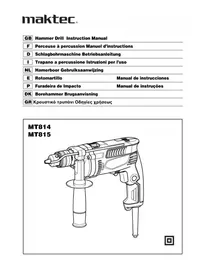
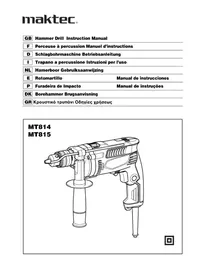
MT814 - Drill Maktec - Free user manual and instructions
Find the device manual for free MT814 Maktec in PDF.


| Product Type | Impact Drill |
| Brand | Maktec |
| Model | MT814 |
| Drilling capacity (concrete) | 16 mm |
| Drilling capacity (wood) | 30 mm |
| Drilling capacity (steel) | 13 mm |
| No load speed | 0 - 3200 min⁻¹ |
| Impact rate | 0 - 48,000 impacts/min |
| Overall length | 296 mm |
| Net weight | 2.1 kg |
| Safety class | Double insulation (Class II) |
| Power supply | Single-phase, mains voltage (230 V typical) |
| Chuck type | Keyed chuck, 3 jaws |
| Auxiliary handle | Yes, adjustable 360° |
| Impact function | Yes, with selection of rotation only or rotation with impact |
| Reverse rotation switch | Yes |
| Variable speed | Yes, by trigger pressure |
| Switch lock | Yes, for continuous operation |
| Depth rod | Yes, adjustable |
| Sound pressure level | 98 dB(A) |
| Sound power level | 109 dB(A) |
| Vibration (concrete drilling) | 16.5 m/s² (uncertainty 2.0 m/s²) |
| Maintenance | Clean with dry cloth, do not use solvents. Repairs by Makita authorized service center. |
Frequently Asked Questions - MT814 Maktec
User questions about MT814 Maktec
0 question about this device. Answer the ones you know or ask your own.
Ask a new question about this device
Download the instructions for your Drill in PDF format for free! Find your manual MT814 - Maktec and take your electronic device back in hand. On this page are published all the documents necessary for the use of your device. MT814 by Maktec.
USER MANUAL MT814 Maktec
Explanation of general view
| 1 | G | r | i | p | b | a | s | e | 7 Drill chuck | 13 Switch trigger | ||||
| 2 | Teeth | 8 Chuck key | 14 Lock button | |||||||||||
| 3 | Side grip (auxiliary handle) | 9 S I e e v e | 15 Reversing switch lever | |||||||||||
| 4 | P | r | o | t | r | u | s | i | o10 Ring | 16 Action mode changing lever | ||||
| 5 | Loosen | 11 Side grip | ||||||||||||
| 6 | T | i | g | h | t | e | n | 12 Depth gauge | ||||||
SPECIFICATIONS
| Model MT814 MT815 | |||
| Capacities | Concrete 16 mm | ||
| Wood 30 mm | |||
| Steel 13 mm | |||
| No load speed (min-1) | 0-3,200 | ||
| Blows per minute | 0-48,000 | ||
| Overall length | 296 mm | 295 mm | |
| Net weight | 2.1 kg | 2.0 kg | |
| Safety class | ☐/II | ||
- Due to our continuing program of research and development, the specifications herein are subject to change without notice.
- Specifications may differ from country to country. Weight according to EPTA-Procedure 01/2003
ENE039-1
Intended use
The tool is intended for impact drilling in brick, concrete and stone as well as for drilling without impact in wood, metal, ceramic and plastic.
ENF002-1
Power supply
The tool should be connected only to a power supply of the same voltage as indicated on the nameplate, and can only be operated on single-phase AC supply. They are double-insulated in accordance with European Standard and can, therefore, also be used from sockets without earth wire.
GEA010-1
General Power Tool Safety Warnings
WARNING Read all safety warnings and all instructions. Failure to follow the warnings and instructions may result in electric shock, fire and/or serious injury.
Save all warnings and instructions for future reference.
GEB003-5
HAMMER DRILL SAFETY WARNINGS
- Wear ear protectors when impact drilling. Exposure to noise can cause hearing loss.
- Use auxiliary handle(s), if supplied with the tool. Loss of control can cause personal injury.
- Hold power tool by insulated gripping surfaces, when performing an operation where the cutting accessory may contact hidden wiring or its own cord. Cutting accessory contacting a "live" wire may make exposed metal parts of the power tool "live" and could give the operator an electric shock.
- Always be sure you have a firm footing. Be sure no one is below when using the tool in high locations.
- Hold the tool firmly with both hands.
- Keep hands away from rotating parts.
- Do not leave the tool running. Operate the tool only when hand-held.
- Do not touch the bit or the workpiece immediately after operation; they may be extremely hot and could burn your skin.
- Some material contains chemicals which may be toxic. Take caution to prevent dust inhalation and skin contact. Follow material supplier safety data.
SAVE THESE INSTRUCTIONS.
WARNING:
DO NOT let comfort or familiarity with product (gained from repeated use) replace strict adherence to safety rules for the subject product. MISUSE or failure to follow the safety rules stated in this instruction manual may cause serious personal injury.
ASSEMBLY
Installing side grip (auxiliary handle) (Fig. 1)
CAUTION:
- Always be sure that the tool is switched off and unplugged before installing or removing the side grip.
Always use the side grip to ensure operating safety. Install the side grip so that the teeth on the grip fit in between the protrusions on the tool barrel. Then tighten the grip by turning clockwise at the desired position. It may be swung 360° so as to be secured at any position.
Installing or removing drill bit
CAUTION:
- Always be sure that the tool is switched off and unplugged before installing or removing the bit.
For Model MT814 (Fig. 2)
To install the bit, place it in the chuck as far as it will go. Tighten the chuck by hand. Place the chuck key in each of the three holes and tighten clockwise. Be sure to tighten all three chuck holes evenly. To remove the bit, turn the chuck key counterclockwise in just one hole, then loosen the chuck by hand. After using the chuck key, be sure to return it to the original position.
For Model MT815 (Fig. 3)
Hold the ring and turn the sleeve counterclockwise to open the chuck jaws. Place the bit in the chuck as far as it will go. Hold the ring firmly and turn the sleeve clockwise to tighten the chuck.
To remove the bit, hold the ring and turn the sleeve counterclockwise.
Depth gauge (Fig. 4)
The depth gauge is convenient for drilling holes of uniform depth. Loosen the side grip and insert the depth gauge into the hole in the grip base. Adjust the depth gauge to the desired depth and tighten the side grip.
NOTE:
- The depth gauge cannot be used at the position where the depth gauge strikes against the gear housing.
FUNCTIONAL DESCRIPTION
Switch action (Fig. 5)
CAUTION:
- Before plugging in the tool, always check to see that the switch trigger actuates properly and returns to the "OFF" position when released.
To start the tool, simply pull the switch trigger. Tool speed is increased by increasing pressure on the switch trigger. Release the switch trigger to stop. For continuous operation, pull the switch trigger, push in the lock button and then release the switch trigger. To stop the tool from the locked position, pull the switch trigger fully, then release it.
Reversing switch action (Fig. 6)
This tool has a reversing switch to change the direction of rotation. Move the reversing switch lever to the ⇔ position (A side) for clockwise rotation or to the ⇒ position (B side) for counterclockwise rotation.
CAUTION:
- Always check the direction of rotation before operation.
- Use the reversing switch only after the tool comes to a complete stop. Changing the direction of rotation before the tool stops may damage the tool.
Selecting the action mode (Fig. 7)
This tool has an action mode change lever. For rotation with hammering, slide the action mode change lever to the right ( symbol). For rotation only, slide the action mode change lever to the left ( symbol).
CAUTION:
- Always slide the action mode change lever all the way to your desired mode position. If you operate the tool with the lever positioned halfway between the mode symbols, the tool may be damaged.
OPERATION
Hammer drilling operation
CAUTION:
- There is tremendous and sudden twisting force exerted on the tool/bit at the time of hole break-through, when the hole becomes clogged with chips and particles, or when striking reinforcing rods embedded in the concrete. Always use the side grip (auxiliary handle) and firmly hold the tool by both side grip and switch handle during operations. Failure to do so may result in the loss of control of the tool and potentially severe injury.
When drilling in concrete, granite, tile, etc., slide the action mode change lever to the position of symbol to use "rotation with hammering" action. Be sure to use a tungsten-carbide tipped bit. Do not apply more pressure when the hole becomes clogged with chips or particles. Instead, run the tool at an idle, then remove the bit partially from the hole. By repeating this several times, the hole will be cleaned out.
After drilling the hole, use the blow-out bulb to clean the dust out of the hole.
Drilling operation
When drilling in wood, metal or plastic materials, slide the action mode change lever to the position of the symbol to use "rotation only" action.
Drilling in wood
When drilling in wood, the best results are obtained with wood drills equipped with a guide screw. The guide screw makes drilling easier by pulling the bit into the workpiece.
Drilling in metal
To prevent the bit from slipping when starting a hole, make an indentation with a center-punch and hammer at the point to be drilled. Place the point of the bit in the indentation and start drilling. Use a cutting lubricant when drilling metals. The exceptions are iron and brass which should be drilled dry.
CAUTION:
- Pressing excessively on the tool will not speed up the drilling. In fact, this excessive pressure will only serve to damage the tip of your bit, decrease the tool performance and shorten the service life of the tool.
- There is a tremendous force exerted on the tool/bit at the time of hole break through. Hold the tool firmly and exert care when the bit begins to break through the workpiece.
- A stuck bit can be removed simply by setting the reversing switch to reverse rotation in order to back out. However, the tool may back out abruptly if you do not hold it firmly.
- Always secure small workpieces in a vise or similar hold-down device.
MAINTENANCE
CAUTION:
- Always be sure that the tool is switched off and unplugged before carrying out any work on the tool.
- Never use gasoline, benzine, thinner, alcohol or the like. Discoloration, deformation or cracks may result.
To maintain product safety and reliability, repairs, maintenance or adjustment should be carried out by a Makita Authorized Service Center.
SAFETY WARNINGS FOR HAMMER DRILL
Read all safety warnings and all instructions.
HAMMER DRILL - SAFETY WARNINGS
- Wear ear protectors when hammer drilling. Exposure to noise can cause hearing loss.
- Use auxiliary handle(s), if supplied with the tool. Loss of control can cause personal injury.
- Hold power tool by insulated gripping surfaces, when performing an operation where the cutting accessory may contact hidden wiring or its own cord. Cutting accessory contacting a "live" wire may make exposed metal parts of the power tool "live" and could give the operator an electric shock.
- Never leave the machine unattended while it is in operation. Always stay with the machine while it is in use.
- Hold the machine firmly with both hands.
- Do not bring your hands near moving parts.
- Do not leave the machine running. Use the machine only while holding it.
- Do not touch the blade or the blade guard near the blade directly with the machine not in operation, it may be hot and could burn your skin.
- Some materials contain chemicals that may be toxic. Take care to avoid dust inhalation and skin contact. Follow the safety data of the material manufacturer.
SAVE THESE INSTRUCTIONS.
WARNING:
Do not let the comfort or familiarity with the product (from repeated use) replace strict adherence to the safety rules of this power tool. Misuse or failure to follow the safety rules stated in this instruction manual may cause serious personal injury.
ASSEMBLY
Placement of the auxiliary handle (auxiliary handle) (Fig. 1)
WARNING:
For European countries only
EC Declaration of Conformity
We Makita Corporation as the responsible manufacturer declare that the following Makita machine(s):
Designation of Machine:
Hammer Drill
Model No./ Type: MT814, MT815
are of series production and
Conforms to the following European Directives: 2006/42/EC
And are manufactured in accordance with the following standards or standardised documents: EN60745
The technical documentation is kept by our authorized representative in Europe who is:
Makita International Europe Ltd,
Michigan, Drive, Tongwell
Milton Keynes, MK15 8JD, England
FRENCH
Michigan, Drive, Tongwell,
Milton Keynes, MK15 8JD, England
GERMAN
Michigan Drive, Tongwell,
Milton Keynes, MK15 8JD, England
ITALIAN
Michigan Drive, Tongwell,
Milton Keynes, MK15 8JD, England
4.11.09
Tomoyasu Kato
Director
3-11-8, Sumiyoshi-cho,
Anjo, Aichi, JAPAN
DUTCH
Michigan Drive, Tongwell,
Milton Keynes, MK15 8JD, England
SPANISH
For European countries only
Michigan Drive, Tongwell,
Milton Keynes, MK15 8JD, England
PORTUGUESE
Michigan Drive, Tongwell,
Milton Keynes, MK15 8JD, England
DANISH
For European countries only
EU Declaration of Conformity
Michigan Drive, Tongwell,
Milton Keynes, MK15 8JD, England
4.11.09
Tomoyasu Kato
Director Director
Director Director
Makita Corporation
3-11-8, Sumiyoshi-cho,
Anjo, Aichi, JAPAN
GREEK
For service in Europe
Authorized Representative
Michigan, Drive, Tongwell,
Milton Keynes, MK15 8JD, England (UK)
4.11.09
Tomoyasu Kato
Director
Makita Corporation
3-11-8, Sumiyoshi-cho,
Anjo, Aichi, JAPAN
ENGLISH
Noise
The typical A-weighted noise level determined according to EN60745:
Sound pressure level (LpA): 98 dB (A)
Sound power level (LWA): 109 dB (A)
Uncertainty (K): 3 dB (A)
Wear ear protection.
Vibration
The vibration total value (tri-axial vector sum) determined according to EN60745:
Work mode: impact drilling into concrete
Vibration emission (ah,IP): 16.5 m/s²
Uncertainty (K): 2.0 m/s²
Work mode: drilling into metal
Vibration emission (ah,D): 3.0 m/s²
Uncertainty (K): 1.5m / s2
- The declared vibration emission value has been measured in accordance with the standard test method and may be used for comparing one tool with another.
- The declared vibration emission value may also be used in a preliminary assessment of exposure.
WARNING:
- The vibration emission during actual use of the power tool can differ from the declared emission value depending on the ways in which the tool is used.
- Be sure to identify safety measures to protect the operator that are based on an estimation of exposure in the actual conditions of use (taking account of all parts of the operating cycle such as the times when the tool is switched off and when it is running idle in addition to the trigger time).
FRENCH
Noise
Uncertainty (K): 2.0 m/s²

- INTENDED USE
- POWER SUPPLY
- GENERAL POWER TOOL SAFETY WARNINGS
- HAMMER DRILL SAFETY WARNINGS
- SAVE THESE INSTRUCTIONS
- WARNING
- ASSEMBLY
- INSTALLING SIDE GRIP (AUXILIARY HANDLE) (FIG. 1)
- CAUTION
- INSTALLING OR REMOVING DRILL BIT
- FOR MODEL MT814 (FIG. 2)
- FOR MODEL MT815 (FIG. 3)
- DEPTH GAUGE (FIG. 4)
- NOTE
- FUNCTIONAL DESCRIPTION
- SWITCH ACTION (FIG. 5)
- REVERSING SWITCH ACTION (FIG. 6)
- SELECTING THE ACTION MODE (FIG. 7)
- OPERATION
- HAMMER DRILLING OPERATION
- DRILLING OPERATION
- DRILLING IN WOOD
- DRILLING IN METAL
- MAINTENANCE
- SAFETY WARNINGS FOR HAMMER DRILL
- HAMMER DRILL - SAFETY WARNINGS
- PLACEMENT OF THE AUXILIARY HANDLE (AUXILIARY HANDLE) (FIG. 1)
- FRENCH
- GERMAN
- ITALIAN
- DUTCH
- SPANISH
- FOR EUROPEAN COUNTRIES ONLY
- PORTUGUESE
- DANISH
- EU DECLARATION OF CONFORMITY
- GREEK
- ENGLISH
- NOISE
- WEAR EAR PROTECTION
- VIBRATION
Brand : Maktec
Model : MT814
Category : Drill