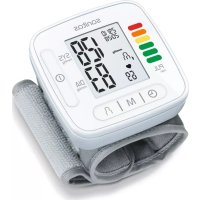
SBC 22 - Blood pressure monitor SANITAS - Free user manual and instructions
Find the device manual for free SBC 22 SANITAS in PDF.



| Product type | Automatic wrist blood pressure monitor |
| Brand and model | Sanitas SBC 22 |
| Measurement method | Non-invasive oscillometric |
| Pressure measurement range | Cuff pressure: 0–300 mmHg Systolic: 60–260 mmHg Diastolic: 40–199 mmHg |
| Pulse measurement range | 40–180 beats/minute |
| Accuracy | Pressure: ±3 mmHg Pulse: ±5 % of displayed value |
| Memory | 2 x 60 slots (2 users) |
| Display | Systolic pressure, diastolic pressure, pulse, date, time, risk indicator, arrhythmia detection |
| Special functions | WHO risk indicator, heart rhythm disorder detection, calculation of average values (morning/evening), automatic shut-off |
| Compatible wrist circumference | 14 – 19,5 cm |
| Power supply | 2 AAA LR03 1.5 V batteries (alkaline) |
| Battery life | Approximately 170 measurements |
| Dimensions (L x W x H) | 84 mm x 60 mm x 29 mm |
| Weight | Approximately 92 g (without batteries, with cuff) |
| Operating conditions | +10 °C to +40 °C, relative humidity ≤ 85 % |
| Storage conditions | -20 °C to +50 °C, relative humidity ≤ 85 % |
| Protection rating | IP22 |
| Classification | Type BF equipment, internal power supply |
| Package contents | 1 blood pressure monitor with cuff, 2 AAA batteries, 1 storage box, 1 instruction manual |
| Care and cleaning | Clean with a slightly damp cloth, without detergent or solvent. Do not immerse. |
| Safety | Do not use on newborns, children, or animals. Consult a doctor in case of heart conditions, pregnancy, etc. |
| Warranty | See the provided warranty card |
Frequently Asked Questions - SBC 22 SANITAS
User questions about SBC 22 SANITAS
0 question about this device. Answer the ones you know or ask your own.
Ask a new question about this device
Download the instructions for your Blood pressure monitor in PDF format for free! Find your manual SBC 22 - SANITAS and take your electronic device back in hand. On this page are published all the documents necessary for the use of your device. SBC 22 by SANITAS.
USER MANUAL SBC 22 SANITAS
Read these instructions for use carefully and keep them for later use. Make them accessible to other users and note the information they contain.
Table of contents
- Included in delivery 22
- Signs and symbols 23
- Intended use 24
4.Warnings and safety notes 24 - Device description 27
-
Initial use 28
-
Usage 29
- Cleaning and maintenance 34
- Remedy 34
- Disposal 35
- Technical specifications 36
12.Warranty/service 37
1. INCLUDED IN DELIVERY
Check that the exterior of the cardboard delivery packaging is intact and make sure that all contents are present. Before use, ensure that there is no visible damage to the device or accessories and that all packaging material has been removed. If you have any doubts, do not use the device and contact your retailer or the specified Customer Service address.
1x Blood pressure monitor with cuff
2x 1.5 V LR03 AAA batteries
1x Storage box
1x Instructions for use
2. SIGNS AND SYMBOLS
The following symbols are used in these instructions for use, on the packaging and on the type plate for the device and the accessories:
| WARNING Warning notice indicating a risk of injury or damage to health | |
| IMPORTANT Safety note indicating possible damage to the device/accessory | |
| Product information Important information to note | |
| Observe the instructions Read the instructions before starting work and/or operating devices or machines | |
| Isolation of applied parts Type BF Galvanically isolated application part (F stands for “floating”); meets the requirements for leakage currents for type B |
| = = = | Direct current The device is suitable for use with direct current only |
| Disposal in accordance with the Waste Electrical and Electronic Equipment EC Di-rective - WEEE | |
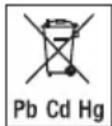
| Pb Cd Hg | Do not dispose of batteries containing hazardous substances with household waste |
| 21 PAP | Dispose of packaging in an environmentally friendly manner |
| B A | Marking to identify the packaging material. A = material abbreviation, B = material number: 1-6 = plastics, 20-22 = paper and cardboard |
| Manufacturer | |
| Temperature limit The temperature limit values to which the medical device can safely be exposed are indicated | |
| Humidity, limit Indicates the humidity range to which the medical device can safely be exposed | |
| IP22 | IP class Device protected against foreign objects ≥ 12.5 mm and against water dripping at an angle |
| SN | Serial number |
| CE0483 | CE labelling This product satisfies the requirements of the applicable European and national directives. |
3. INTENDED USE
Purpose
The blood pressure monitor is intended for the fully automatic, non-invasive measurement of arterial blood pressure and
pulse values on a wrist with a wrist circumference of 14 cm to 19.5cm . It is intended for use indoors and by adults only.
Target group
It is designed for self-measurement by adults in the home environment and is suitable for users whose wrist circumference is within the range printed on the cuff.
Indication/clinical benefits
The user can record their blood pressure and pulse values quickly and easily using the device. The recorded values are classified according to internationally applicable guidelines and evaluated graphically. The device saves the recorded measurements and can also output average values of previous measurements.
4. WARNINGS AND SAFETY NOTES
Contraindications
- Do not use the blood pressure monitor on newborns, children or pets.
People with restricted physical, sensory or mental skills should be supervised by a person responsible for their
safety and receive instructions from this person on how to use the device.
- If you have any of the following conditions, it is essential you consult your doctor before using the device: irregular heartbeat, circulatory problems, diabetes, pregnancy, pre-eclampsia, hypotension, chills, shaking
- People with pacemakers or other electrical implants should consult their doctor before using the device.
- The blood pressure monitor must not be used in connection with a high-frequency surgical unit.
- Do not use the cuff on people who have undergone a mastectomy.
- Do not place the cuff over wounds as this may cause further injury.
- Make sure that the cuff is not placed on a wrist in which the arteries or veins are undergoing medical treatment, e.g. intravascular access or intravascular therapy, or an arteriovenous (AV) shunt.

General warnings
- The measurements taken by you are for your information only - they are no substitute for a medical examination! Discuss the measured values with your doctor and never
make your own medical decisions based on them (e.g. regarding dosages of medicines).
- The device is only intended for the purpose described in these instructions for use. The manufacturer is not liable for damage resulting from improper or incorrect use.
- Using the blood pressure monitor outside your home environment or whilst on the move (e.g. whilst travelling in a car, ambulance or helicopter, or whilst undertaking physical activity such as playing sport) can influence the measurement accuracy and cause incorrect measurements.
- Cardiovascular diseases may lead to incorrect measurements or have a detrimental effect on measurement accuracy.
- Do not use the device at the same time as other medical electrical devices (ME equipment). This could lead to a malfunction of the measuring device and/or an inaccurate measurement.
- Do not use the device outside of the specified storage and operating conditions. This could lead to incorrect measurements.
-
Only use the cuffs included in delivery or cuffs described in these instructions for use for the device. Using another cuff may lead to measurement inaccuracies.
-
Note that when inflating the cuff, the functions of the limb in question may be impaired.
- Do not perform measurements more frequently than necessary. Due to the restriction of blood flow, some bruising may occur.
- During the blood pressure measurement, the blood circulation must not be stopped for an unnecessarily long time. If the device malfunctions, remove the cuff from the wrist.
- Place the cuff on your wrist only. Do not place the cuff on other parts of the body.
- Small parts may present a choking hazard for small children if swallowed. They should therefore always be supervised.
General precautions
- The blood pressure monitor is made from precision and electronic components. The accuracy of the measurements and service life of the device depend on its careful handling.
- Protect the device from impacts, moisture, dirt, marked temperature fluctuations and direct sunlight.
- Ensure the device is at room temperature before measuring. If the measuring device has been stored close to the
maximum or minimum storage and transport temperatures and is placed in an environment with a temperature of 20^ , it is recommended that you wait approx. 2 hours before using the measuring device.
- Do not drop the device.
- Do not use the device in the vicinity of strong electromagnetic fields and keep it away from radio systems or mobile telephones.
- We recommend that the batteries be removed if the device will not be used for a prolonged period of time.
Measures for handling batteries
If your skin or eyes come into contact with battery fluid, rinse the affected areas with water and seek medical assistance.
- Choking hazard! Small children may swallow and choke on batteries. Therefore, batteries should be stored out of the reach of small children.
- Risk of explosion! Do not throw batteries into a fire.
- If a battery has leaked, put on protective gloves and clean the battery compartment with a dry cloth.
- Do not disassemble, open or crush the batteries.

- Observe the plus (+) and minus (-) polarity signs.
- Protect batteries from excessive heat.
- Do not charge or short-circuit the batteries.
- If the device is not to be used for a long period of time, remove the batteries from the battery compartment.
- Use identical or equivalent battery types only.
Always replace all batteries at the same time. - Do not use rechargeable batteries.

Notes on electromagnetic compatibility
- The device is suitable for use in all environments listed in these instructions for use, including domestic environments.
- The use of the device may be limited in the presence of electromagnetic disturbances. This could result in issues such as error messages or the failure of the display/device.
-
Avoid using this device directly next to other devices or stacked on top of other devices, as this could lead to faulty operation. If, however, it is necessary to use the device in the manner stated, this device as well as the other devices must be monitored to ensure they are working properly.
-
The use of accessories other than those specified or provided by the manufacturer of this device can lead to an increase in electromagnetic emissions or a decrease in the device's electromagnetic immunity; this can result in faulty operation.
- Failure to comply with the above can impair the performance of the device.
5. DEVICE DESCRIPTION
The corresponding drawings are shown on page 3.
1 Display
4 Start/stop button ①
2 Wristcuff
5 Memory button
3 Riskindicator
6 Battery compartment lid
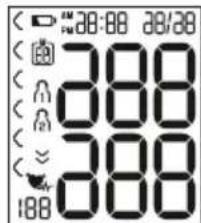
Information on the display:
The corresponding drawings are shown on page 3.
1 Systolic pressure
2 Diastolic pressure
3 Calculated pulse rate
4Cardiacarrhythmia symbol
5 Pulse symbol
6 Release air
7Usermemory/
6. INITIALUSE
Inserting the batteries
- Remove the battery compartment lid on the left side of the device A.
-
Insert two 1.5 V AAA micro (alkaline type LR03) batteries. Make sure that the batteries are inserted the correct way round in accordance with the markings A. Do not use rechargeable batteries.
-
Close the battery compartment lid again carefully.
If the battery replacement symbol is displayed, you can no longer perform any measurements and must replace all batteries.
Adjusting the settings
You must make sure that the device has the correct settings before use in order to be able to make full use of all functions. Only by doing so can your measurements with associated date and time be saved and accessed later by you.
There are two different ways to access the menu from which you can adjust the settings:
- Before initial use and after each time you replace the battery:
When inserting batteries into the device, you will be taken to the relevant menu automatically.
- If the batteries have already been inserted: With the device switched off press and hold the START/ STOP button for approx. 5 seconds.
In this menu you can adjust the following settings in succession:

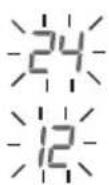
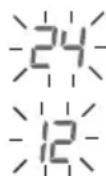
Hour format
The hour format flashes on the display.
- Select the desired hour format using the memory button and confirm with the START/STOP button
Date
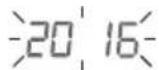
The year flashes on the display.
- Select the desired year using the memory button and confirm with the START/ STOP button ①
The month flashes on the display.
- Select the desired month with the memory button and confirm with the START/STOP button

The day flashes on the display.
- Select the desired day using the memory button and confirm with the START/STOP button ①

If the hour format is set as 12h, the day/month display sequence is reversed.
Time
The hours flash on the display.
- Select the desired hour using the memory button and confirm with the START/STOP button ①
The minutes flash on the display.
- Select the desired minute using the memory button and confirm with the START/STOP button
Once all the data has been set, the device switches off automatically.
7.USAGE
Attaching the cuff
-
Fundamentally, blood pressure can be measured on both wrists. Certain deviations between the measured blood pressure on the right wrist and left wrist are due to physiological causes and completely normal. You should always perform the measurement on the wrist with the highest blood pressure values. Before starting self-measurement, consult your doctor in this regard. From this point on, always take measurements on the same wrist.
-
The device may only be operated with the cuff attached when supplied. Before using the device, the user should check the fit of the cuff and, in doing so, ensure that their wrist circumference is within the range printed on the cuff.
- Uncover your wrist. Ensure that the circulation of the wrist is not hindered by tight clothing or similar.
- Now place the cuff on the wrist so that the palm of your hand and the device display are facing upwards [B1].
- Position the cuff so that there is a distance of 1.0 - 1.5cm between it and the heel of your hand [B2].
- Now fasten the cuff tightly around your wrist using the hook-and-loop fastener. Make sure that it is tight but that it does not cut into your wrist B3.
Adopting the correct posture
- To carry out a blood pressure measurement, make sure you are sitting upright and comfortably. Lean back so your back is supported.
- Place your arm on a surface [C].
- Place your feet flat on the ground next to one another.
- The cuff must be level with your heart.
- Stay as still as possible during the measurement and do not speak.
Performing the blood pressure measurement
Measurement
Press the START/STOP button to start the blood pressure monitor. All display elements are briefly displayed.
- Press the START/STOP button to start the blood pressure monitor ① All displays will illuminate briefly.
The last measured value is displayed and the blood pressure monitor automatically begins the measurement after 3 seconds.
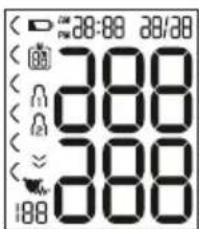
You can cancel the measurement at any time by pressing the START/STOP button
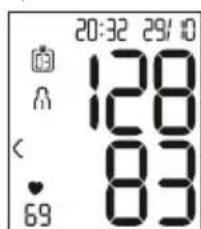
As soon as a pulse is found, the pulse symbol will be displayed.
Systolic pressure, diastolic pressure and pulse measurements are displayed.
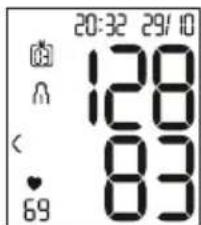
- Fappears if the measurement has not been performed properly. Observe the chapter on error messages/troubleshooting in these instructions for use and repeat the measurement.
- Now select the desired user memory by pressing the memory button If you do not select a user memory, the measurement is stored in the most recently used user memory. The relevant or symbol appears on the display.
- Press the START/STOP button ① to switch off the blood pressure monitor. The measurement is then stored in the selected user memory.
If you forget to turn off the device, it will switch off automatically after approx. 1 minute.
In this case too, the value is stored in the selected or most recently used user memory.
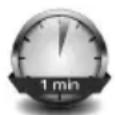
Wait for at least 1 minute before taking another measurement.
Evaluating the results
General information about blood pressure
-
Blood pressure is the force with which the bloodstream presses against the arterial walls. Arterial blood pressure constantly changes in the course of a cardiac cycle.
-
Blood pressure is always stated in the form of two values: - The highest pressure in the cycle is called systolic blood pressure. This arises when the heart muscle contracts and blood is pumped into the blood vessels. - The lowest is diastolic blood pressure, which is when the heart muscle has completely stretched back out and the heart fills with blood.
- Fluctuations in blood pressure are normal. Even during repeat measurements, considerable differences between the measured values may occur. One-off or irregular measurements therefore do not provide reliable information about the actual blood pressure. Reliable assessment is only possible when you perform the measurement regularly under comparable conditions.
Risk indicator
The World Health Organization (WHO) has defined the internationally recognised classification for the evaluation of measured blood pressure values listed in the table below:
| Blood pressure value category | Systole (in mmHg) | Diastole (in mmHg) | Action |
| Level 3: severe hypertension | ≥180≥110 | Seek medical attention | |
| Level 2: moderate hypertension | 160–179 | 00–109 | Seek medical attention |
| Level 1: mild hypertension | 140–159 | 0–99 | Regular monitoring by doctor |
| High normal 130–149 | 3985–89 | Regular monitoring by doctor | |
| Normal 120–129.80 | 0–84 | Self-monitoring | |
| Optimal < 120 < 80 | Self-monitoring | ||
Source: WHO, 1999 (World Health Organization)
The risk indicator (the arrow in the display and the associated scale on the device) shows which category the recorded blood pressure values fall into. If the measured values are in two different classifications (e.g. systole in the high normal category and diastole in the normal category), the risk indicator then always shows you the higher category - "high normal" in the example described.
Please be aware that these standard values can only serve as a general guideline, as the individual blood pressure varies in different people and different age groups, etc.
Furthermore, it must be noted that measurements taken yourself while at home are generally lower than those that are taken by the doctor. For this reason, it is important that you regularly consult your doctor for advice. Only they are able to give you your personal target values for controlled blood pressure – in particular if you receive medicinal therapy.
Irregular heartbeat
This device can identify any irregular heartbeat disturbances as part of the analysis of your recorded pulse signal during blood pressure measurement. In this case, after the measurement, the device will indicate any irregularities in your pulse by displaying the symbol in the display. This can be an indicator for irregular heartbeat.
If the symbol appears on the display after the measurement, the measurement must be repeated as the measurement accuracy may be impaired. To assess your blood pressure, only use the results that have been recorded without corresponding irregularities in your pulse. If the symbol appears frequently, please consult your doctor. Only they can establish the existence of an arrhythmia during a checkup, using their means of diagnosis.
Saving, accessing and deleting measured values
User memory
The results of every successful measurement are stored together with the date and time. The oldest measurement is overwritten in the event of more than 60 measurements.
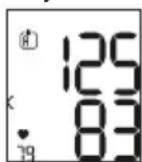
- To retrieve the measurement, press the memory button

Flashes on the display.
The average value of all saved measured values in this user memory is displayed.
To change the user memory, press and hold the memory button for approx. 2 seconds.
Average values
Press the memory button
Amashes on the display.
The average value of the morning measurements for the last 7 days is displayed (morning: 5 a.m. - 9 a.m.).
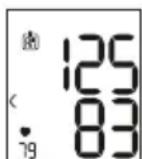
Press the memory button
Flashes on the display.
The average value of the evening measurements for the last 7 days is displayed (evening: 6 p.m. - 8 p.m.).
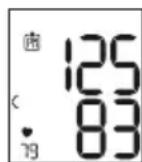
Individual measured values
- When you press the memory button again, the last individual measurement is displayed (in this example, measurement 03).
- When you press the memory button again, you can view your individual measured values.
- To switch the device off again, press the START/STOP button ①
You can exit the menu at any time by pressing the START/ STOP button ①
Deleting measured values
- To clear the relevant user memory, you must first select a user memory.
-
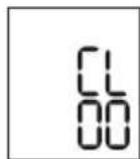
Start the retrieval of the average measured values. R flashes on the display and the average value of all saved measured values in this user memory is displayed.
-
Press and hold the memory button and the START/ STOP button for 5 seconds, depending on the user
memory you are in.
All values of the current user memory are deleted and the device switches off.
8. CLEANING AND MAINTENANCE
- Clean the device and cuff carefully using a slightly damp cloth only.
- Do not use any cleaning agents or solvents.
- Under no circumstances hold the device and cuff under water, as this can cause liquid to enter and damage the device and cuff.
- If you store the device and cuff, do not place heavy objects on the device and cuff. Remove the batteries.
9. REMEDY
| Error message | Possible cause Solution |
| Er 1or Er2 | The systolic or diastolic pressure could not be measured. Please wait one minute and repeat the measurement. Ensure that you do not speak or move during the measurement. |
| Hi or Lo | The systolic or diastolic pressure is outside of the measurement range. Please wait one minute and repeat the measurement. Ensure that you do not speak or move during the measurement.If the message is displayed again, you should seek medical assistance and check the accuracy of your procedure. |
| Er 3or Er4 | The cuff was not attached correctly. Please observe the information in the chapter on “Attaching the cuff”. |
| Error message | Possible cause | Solution |
| Er5 | The blood pressure is higher than 300 mmHg for more than 1.5 seconds. | Please wait one minute and repeat the measurement. Ensure that you do not speak or move during the measurement. If the message is displayed again, you should seek medical assistance and check the accuracy of your procedure. |
| Er6 | Pumping up takes longer than 180 seconds. | Please take another measurement to check whether the cuff can be correctly inflated. Please observe the information in the chapter on “Attaching the cuff”. |
| ErA,ErO Er7or Er8 | There is a system or device error. | Please contact customer service. |
| Error message | Possible cause S | Solution |
| The batteries are almost empty. | Insert new batteries into the device. |
10. DISPOSAL

Repairing and disposing of the device
- Do not repair or adjust the device yourself. Proper operation can no longer be guaranteed in this case.
- Do not open the device. Failure to comply with this instruction will void the warranty.
- Repairs must only be carried out by Customer Services or authorised retailers. Before making a claim, please check the batteries first and replace them if necessary.
- For environmental reasons, do not dispose of the device
in the household waste at the end of its useful life. Dispos of the device at a suitable local collection or recycling point in your country. Disp ose of the device in accordance with EC Directive - WEEE (Waste Electrical and Electronic Equipment). If you have any questions, please contact the local authorities responsible for waste disposal.

Disposing of the batteries
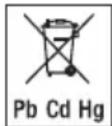
- Batteries must not be disposed of in the household waste. They may contain poisonous heavy metals and are subject to special refuse treatment.
- The codes below are printed on batteries containing harmful substances:
Pb = Battery contains lead,
Cd = Battery contains cadmium,
Hg = Battery contains mercury.
11. TECHNICAL SPECIFICATIONS
Type SBC 22
| Model SBC 15 | |
| Measurement method | Oscillometric, non-invasive blood pressure measurement on the wrist |
| Measurement range | Cuff pressure 0 – 300 mmHg, systolic 60 – 260 mmHg, diastolic 40 – 199 mmHg, pulse 40 – 180 beats/minute |
| Display accuracy | Systolic ± 3 mmHg, diastolic ± 3 mmHg, pulse ± 5% of the value shown |
| Measurement uncer-tainty | Max. permissible standard deviation according to clinical testing:systolic 8 mmHg / diastolic 8 mmHg |
| Memory 2 x 60 memory spaces | |
| Dimensions L 84 mm x W 60 mm x H 29 mm | |
| Weight Approx. 92 g(without batteries, with cuff) | |
| Cuff size 140 to 195 mm | |
| Permissible operating conditions | + 10°C to +40°C, ≤85% relative humidity (non-condensing) |
| Permissible storage conditions | -20°C to +50°C, ≤ 85% relative humidity, 800 -1050 hPa ambient pressure |
| Power supply | 2 x 1.5-V — — AAA batteries |
| Battery life For approx. | 170 measurements, de-pending on levels of blood pressure and inflation pressure |
| Classification | Internal supply, IP22, no AP or APG, continuous operation, application part type BF |
The serial number is located on the device or in the battery compartment.
Technical information is subject to change without notification to allow for updates.
- This device complies with the European standard EN 60601-1-2 (compliance with CISPR 11, IEC 61000-4-2, IEC 61000-4-3, IEC 61000-4-8) and is subject to special precautionary measures with regard to electromagnetic compatibility. Please note that portable and mobile HF communication systems may interfere with this device.
-
The device complies with the EU Medical Devices Directive 93/42/EEC, the German Medical Devices Act (Medizinproduktgesetz) and the standards EN 1060-1 (Non-invasive sphygmomanometers - Part 1: General requirements), EN 1060-3 (Non-invasive sphygmomanometers - Part 3: Supplementary requirements for electro-mechanical blood pressure measuring systems) and IEC 80601-2-30 (Medical electrical equipment - Part 2 - 30: Particular requirements for the basic safety and essential performance of automated non-invasive sphygmomanometers).
-
The accuracy of this blood pressure monitor has been carefully checked and developed with regard to a long useful life. If the device is used for commercial medical purposes, it must be regularly tested for accuracy by appropriate means. Precise instructions for checking accuracy may be requested from the service address.
12. WARRANTY/SERVICE
Further information on the warranty and warranty conditions can be found in the warranty leaflet supplied.
FRANÇAIS

Mesures relatives aux piles

Source: WHO, 1999 (World Health Organization)
Fonte: WHO, 1999 (World Health Organization)
OCHOBhIe MepbI npeoctopoXHOCTN
-Прибордяизмереня крobгого дabнehа COCTOIT 3 BbICOKOTOHbIX n 3JIeKTPoHHbIX KOMnHOHTOB.ToHOCt bI3MpeHm n cpoK cnJxK6bl np6bopa 3aBnCrt OT 6epeXHOrO obpaueHn C Hm.
3aunuane npnbop ot yapob, BnaH, 3arpzHeHn, cnIbHbIX KOle6aHn TemnepaTypbl n npraMbIX coJIHeHbIX Lyuei.
-Дя npOBeHnI n3MepeHn TempeHpaTp np6opa DOJXHa COOTBcTCTBOBaT KOMHaTHoH. Ecn np6op XpaHnICr npMakCmAlbHOH NIN MInHMaJIbHO TEmpeHApTe XpaHEnHn I TpaHCnOpTnpOBKn, a 3aTEM NOMeUaETcB CpeNy c TempeHpyo2 0^ peKomeHyetcnojdaTb OKOIO 2 Yacob nepeI erO nCNoJIb3ObaHnEM.
- He poHraIte npu6Op.
He nCnoB3yIte np6op pIOM C cIbHbIMN 3neKtpoMaHHTbIMN IONM, DEPKITE erO BdaIIN OT paIIOannapaTypbI IN MObNbHbIX TelefoHOB.
Ecnn np6op He nCnoJb3yeTcra dNITeJIbHoe BpeM, n3BnKeNTe 6aTaapeKu.
Yka3aHnno no 6paueHHo c 6aTapeKamn

- Ppi nonaahan nn KndKocTn n3 aKKyMyJrTopa Ha KOxynn B rna3a Heo6xOIMO npomblb COOTBeTCTByuOuyn yactOK 60nbunm KOINcEChBOM BObln ObaTnTbcn K BpaCy.
Onachoctb nporjtaBbAHMa MeJkx Yacte! MaJIeHbKne Detn MoYr nporIOTnb 6aTapeKu N noaBHTbcr MM. NoToMg 6aTapeKn Heo6xOmo XpaHHTb B HeoCTyHOM DnA Deten MeCTe! - Onachoctb B3pbIbA! He 6pocaiTe 6aTapeKn B OTOHb.
- EcIn 6aTapeKka nToEknla, ouHCTnTe oTceK nIra 6a-tapeek cyxoi caHfetkoi, npedBapnteJbHo HaeB3aunTHbIe nepaTkn.
-
He pa36npaTe, He otKpbBaIte n He pa36nBaIte 6a-tapeiKn.
-
O6paaIte BHMaHne Ha 06o3HaueHne nOJIpaHocTn: pIIOc (+) n MInHyc (-).
3aunuTe 6aTapeKn OT Upe3MepHoro BO3deNCTBNA TENla.
He 3apjaaTe n He 3ambkaaTe 6aTaapeuKn HakopoTko.
- EcIn np6op dInTeIbHoe BpeM He nCnOJIb3yeTcA, n3BJIeKInTe n3 Hero 6aTapeiKn.
- IcnoIb3yIte 6aTapeKn TOnbKO Ondoro Tnna nn paBHOeHHbIX TnIOB.
Bcerda 3aMeHnTe Bce 6aTaapeKn cpa3y.
He nCnoIb3yIte aKKyMylTOpbl!

Yka3aHnno 3JekTpomarHHTHOB COBMECTUMOCTN
- Pnp6op npedha3Haen nna pa6oTb B ycNoBnx, nepeHcJIeHHbIX B HAcToaIe INHCTpyKUIN NO npIMHeHIO, B TOM YNCJIe B DOMaHHX ycNoBnx.
-Пин haINuHn 3JIeKTpOMaHrHTbIx NOMex BO3MOXHOCTn nCNoJIb3OBAHnЯ ПИбopa mOryT 6bITb OrpaHnueHb.IB 3tOM cIyuae BO3MOxHbI, K npImepy, COo6UeHnOB o6 OwIn6kax IIN BbIXoD n3 CToP rAnCpIe IIN caMOro npIbopa.
He nCnoNb3yIte daHbI np6Op pIOM c DpyrMMu yCTPOINCTBaMn H He yCTaHabNBAInTe erO Ha Hx - 3TO MOKeT Bbl3BaTb C6On B pa6ote. Ecn np6Op BCE Je npNXoNTcR NcNoJIb3OBaTB B ONcaHHbIX BblIe ycNOBIAx, CneJyET Ha6JIIOaTb 3a Hm N dpYrMMu yCTPOINCTBaMn, YTO6bI y6eINTbcraB IN HAJIeXaUeJ pa6ote.
- PpimHeHne cToPOHHnx npHaJnEJXHOCTe, otIuauIOxxC8 OT yKa3aHHbIX npOn3BOJNTeJem nn npNlaraEmbIX K daHHomy npu6Opy, MoKet npUBeCTN K Bo3pactaHIO 3NeKTpOMarHHTbIX NOMEX NN OcJa6JeHIO NOMexOyCToHnBOcTn npu6opa N TEM CaMbIM Bbl3BaTbOUn6Kn B erO pa6ote.
- HecobJIOHeHne daHHoro yKa3aHnMoKet OtpuCaTeNbO cKa3aTbCra Ha pa6oHx xapaKTepncTnKax np60pa.
5.ОПИСАНЕПРИБОРА
PncyHKn, COOTBETCTBYIOUne 06O3HaueHnIaM HIXKe, npedctabJIeHbI Ha cTp.3.
1 DnCnnei
2 ManxetaHa 3aIyCTbe
3 VHdNkaToppncka
4 KhoNkaBKJI./BbIKJI. ①
5 KhoNka BbI3Oba NaMRTN
6 KpbIuKa OTeKa nla 6aTaapeek
Hdkaunha dncnnee
PncyHKn, COOTBeTCTByIOUne 06o3HaueHnIaM HIXKe, npedctaBJIeHbI Ha cTp.3.
1 Cnctolnyeckoe daBJIeHne
2ДиacToIuYeCKoe DaBJIeHHe
3 N3MepeHHoe3HaueHne nyIbca
4 CmBOnHapUWeHn cepDeuHOro pTuMa
5 CnMBoI npIbca
8 INHdkaToppncka(
9Homepaeyekn namrN/HHdkauncpeDHeO 3NaueHnI 3coxpaneHHbIX BnarnT(HTpOM ()Beepom()
10 CmboJHeo6xOIMOCTN 3aMeHb6aTapeek
11BpemnIdata
A
6. ПОДГOTOBКАРБОТ
YctahOBka 6aTapeek
- CHINMTE KpbIkiKy OTdeneHnna dJa 6aTaapeek, paCnoJIOKeHHoro C IeBOI CTOpOHbl npi6opaA.
BCTaBbTe DBe aKanHOBbIe 6aTapeiKn 1,5 B AAA Micro (TIN LR03).PnYcTaHOBKe 6aTapeek co6JIIOaIte npabNtHyIO NOJrPHoCTb corJaIACHO MapKnIpOBKe A He nCIOJIb3yIte MHOROKpATHO 3apJXAeMbIe aKKymJITOpbl. - Choba TuaTeJbHo 3aKpOIne KpbIuKy OToCeKa dJa 6aTaapeek.
Pn OTo6paXeHn CmB0la Heo6xOIMocTn 3aMeHb 6aTapeek PpoBeHeHne N3MpeHn HeBO3MOxHo; CNeDyET 3aMeHnTB BCE 6aTapeEKN.
BbINOJIHeHne HacTpoek
YTo6bI B noJHOn Mepe NoJIb3OBAtBCa BCEMn FyHKUaMn, nepei nCnoJIb3OBAHmE Heo6xOIMo npaBnIbHO HAcTpOHTb np6op. TOnkO TaK Bbl CMOKeTe CoXpaHrTb N3MepeHHbIe 3HaueHnA C COOTBeTCTByIOUeJ DaTOI N BPemHeM N NO3Ke npocMatpNBaTB IX.

MeHIO DnBbIOnHeHnHaCTpoEe Bbl3bIbaETcRdByMn CnOco6aMn.
- Ecnn 6aTapeKn yKe yCTaHOBJIeHbI.
Pn BbIKIOeHHOM np6ope HaxMnte KONky BKJ. BblKl. ① n ydepXnBaIte ee haxKaToB TeueHne 5 ceKyHd.
B 3TOM MEHIO Bb MOKeTe NocJeIOBaTeJIbHO BbIOJIHNITb CJIe- dyIOUne HAcToPouKn:
Yacobon fopmat DataBpeMa
YacobonΦopmat
Ha nncnnee muraet fopmat oTo6paXeHnBpeMeHN.
C NOMOUI KHOKN COXpAHN HbI6epnte HyKbI YACOB ΦOpMaT I NOITBepnTe Bbl-6op HaKaTneM KHOKN BKN./BblKn. ①
Data
Ha nncnnee 3amraet Hndkaunr roda.
C NOMOJI KHOKN COXpAHENI 6epHTe HxHbI rOg INoTBePdTe Bbl-6op HaxaTNEM KHONKn BKJ./BblKJ. ①
Ha nucnplee 3amuraet Hndkaunmecra.
C NOMOuBIO KHOINCOXpAHENBaBb6epNTe HxHbIM MeCaI INoTBePnTe Bb6Op HaKaTIeM KHOIN BKN./BblKn. ①

Ha ducnJIee 3aMURAe INHdNkaUaJra HJ.
C NOMOsbK HONKn COXpAHn BbI6epHTe HxHbI DeHb I NOITBepDnTe BbI6Op HaKaTneM KHOKN BkJ./BblKI. ①

EcnBb6npaetc12-ycobOyΦopMaT BpeMeHn, nocJeDoBaTeJbHOCTb OTo6paXeHn Dn H MeCya MeHreTc.
Bpemr
Ha ducnnee 3amnrae Hndkaun yacob.
C NOMOuH KHOKN COXpAHn HbIepeH-Te HyxHoe 3NaueHne dJa YacOB nIOaTBepn-Te BbI6Op HaxaTHeM KHONKn BKJ./BblKn. ①

Ha ducnJIee 3amIrae INHdNkaCuaMmHyT.
C NOMOuH KHOKN COxpaHeHH BbIeepnTe HxKHOE 3NaueHne Ia MInHyT INoITBepnTe BbI6Op HaxaTNem KHOKN BKJ./BblKJI. ①

Iocne yctahOBKn BCex daHHbIX np6op aBtOMaTnueckn OTKJIIOHTcR.
7. ПРUMЕΗΝΕ
HaJoxKeHne MaHXKeTbI
- KaK npaBnIO, KpOBAHoe DaBJIeHne MoXHO n3MepeTb Ha o6oNx 3aIЯCTbI. OnpeJeleHbIe OTKLOHeHn MexkDy n3MepeHHbIM apTePnAIBHbIM daBJIeHnEM Ha npabOM I NebOM 3aIЯCTbe obycNoBJIeHbI φu3NoJOrUYeCKMn Oco6eHHocTMy I abCOJIOTHO HopMaIbHbI. Bcerda npOBODTe n3MepeHnHa 3aIЯCTbe C 6OJIee BlicOKMn POKa3aTeJIaMn DaBJIeHn. Ipeed Tem kak npicTynatb K n3MepeHnO CBOero DaBJIeHn, npokoCytTpIpyITcB c BpaYom. NocJe 3toro n3MepeTte daBJIeHne Bcerda Ha ODNOM I TOM Xe 3aIЯCTbe.
- Pππδop pa3peωaetcηιCNOJb3OBaTb TOLbKO C npOu-HO pπPκρeΠηEHHΟ K HεMy MaHxΘeTOB B NOCTaBJIaEMOM COCTOHN. Πepeι NCNoJb3OBaHηm πpδopa Nolb3OBaTeNb DΩJKeH NpOBeμrTb, NODXoDNT JI M aHxΘe Ta Nppa3Mepy, I y6eɪntbC8 B TOM, YTO dɪnHa OxbaTa 3a-NЯCTbI hαOДNTcR B npeIeλx yka3aHHO Ha MaHxΘe Dɪnana3OHa.
-
OroJnte 3aIacTbe. CneJnte 3a Tem, yTO6bl KPOBOcHa6-JxHHe 3aIacTbe He 6bINO HApUSeHo n3-3a CnIIJKOM y3-Koro pykaba BaWei oDExKdBi n T. n.
-
HanoXnTe MaXkety Ha 3aIaCTbe TaK, YTObI NaOHB nDcPiIe np6opa 6bln ObaapeHb BBepx B1.
- PpocneDnte 3a Tem,HTo6bI MExdy MaHKeToN I NOyUweKoY OCHOBaHn8 60JIbWoO NaIbUca OCTaBaIOcbpacctoHHe 1,0-1,5 cmB2
- PpoH0 3acteHHTe MaHKeTy BOKpyr 3aIaCTb8 C NOMO- ⅢbIO 3acteKKn-IlnyuKn. CneIte 3a TeM, YTO6bl MaH- XeTa IIOTHo npnIerana, Ho He CdaBnBana 3aIaCTbe B3.
PpabnIbHoe nOJXeHne TeJa
-ДяиИЗМереня КрOBЯHorO ДаВлЕня CиЯЗMuTe ydo6Hoe nOLOXKeHne. ПпсJOHITecb CnIHOr K pOBHOI NOBepxHOCrN.
-Плобхштуку Ha onopy C
- NocTaBbTe CTyHnHO pOBHo HnOJI.
MaHxKeta doJiXHa HaxOuNTbCra Ha ypoBHe cepua.
Bo Bpemn n3mpeHn CneDyET BcTn Ce6n CnOKoHo n He pa3ROBAPNBaTb.
I3MepeHne KPOBHaHO rDaBHeHHa
N3mepenne
YTo6bIKIOHHTb npI6Op IIN3MepeHnKPOBHOrO daBneHn, HaxMITE KONKy BKJ./BbIKJ. Ha KopOTKe BpemHa DCNPIee OTO6pa3rCBA CcIeMeHTbl.
- YTo6bI BKIOUHTb np6Op IIN3MepeHn KPOBHOO DaJIeHnHAHXMITE KHONKY BKN/
BbIKL. Ha KopoTkoe BpeMHa DCnnee 3aropTcBce HndKkTopbl. - OTo6pa3ntcTnocIeHHe n3MepeHHoe 3NaueHne, u Chee3 3cekyHbI npi6op DnA n3MepeHnKPOBAnHO DaBnEHN ABTomaTuYeCKn HaHT eN3MepeHne.
1 N3MepeHne MOxHO npeBaTb B JIO6oMOMeHT, HaxaB KHOKNy BKN./BblKl. ①
Kak toIbko np6op pacno3Haet nybc, oTo6pa3ntcra CMBON
yIbca
- OTo6pa3rTcpe3yNbTaTbIu3MepeHnCnCTOJIueCKORo DaBJeHn,JaactOJIueCKORo DaBJeHn nIyJbCa.
Co06eHne Er nOBnErc,ecnn n3MepeHne He ydaIocb BbINOJNHTb npaBnIbHo. IpOuHTaTe rIaby "Coo6eHne 6 oOn6Ke/ycTpaHe- Hne HncnPabHOCTe" B daHHoN IHCTpyK- CIN NO pPIMHeHIO N NOBTOPeHne.
Tepe npn nomou nKHOOK coxpaHn Ebi6epnte Hxkyo noIb3OBaTeNbckyIO naMBy. Ecni Bby He Bbl 6paII noIb3OBaTeNbckyIO naMBy, pe3yIbTaT n3MepeHn 6ydt COXPAHEN B noJIb3OBaTeNbckOIN naMIn NOcneHrO noIb3OBaTeN. Ha dncnnee noBHTcoOTBeTCTBYUOn CMBON (m)
BbIKIOHTe np6Op IIN3MepeHn KPOBHOrO daBJIeHn, Haxab KhoNky BkI./BbIKI. ①. PezylbTaT n3-MepEHn COxpaHITcB Bbl6paHHo NOnb3OBaTeJbCKoI naRTn.
Ecnn Bbl 3a6ynde Te BbIKNIOHTb npn6op, OH BBIKIHOHTcra aB- Tomatueckn uepe3 1 MNHyT.
JaKe B 3TOM Cnyae pe3yIbTaT n3MepeHn8 Byedet COxpaHeB BB6paHHo nnnoCneHn NCNoB3OBAHHo NOJb3OBA
TeJIbCKoI NaMrtu.
Ipepe IOBTOPBIM I3MepeHnEM NOOxKdTe He MeHee 1 MInHyTb!
Ouěнka peʒúnbTaTob
067a HOpMaun O KPOBHaHOM daBJeHn
KpoBraHoe daBHeHne npedctabnreT co6o cnny, c KOTopoK kpOBtOK daBHT Ha CTeKN apTePN. ApTePnaIbHoe daBHeHne IOCTOaHHo 13MeHReTCB TeueHne cepdeHo- ro zMKna.
KpoBraHoe daBJIeHne BcerIa yKa3bIbaETcB BnIe DByX 3HaYeHn.
-BepxHee daBneHne B cepdeHOM uKJIe Ha3bIaETc TaCToJnueckm apTePnaIbHbIM daBneHem. OHO BO3HnKaeT, KOrDa cepdeHaA MblUa COKpaUaetcra, BblaBnBaar KPOBb BCocybl.
Hnxhee daBneHne - nactOnnueckoe apTepeNaIb-Hoe daBHeHne, KOtOpoe Bo3HnKaeT pRn PONHom paCcna6BeHn cepDeHNo MbluN HAnOJHeHn cepDua KPOBbIO.
KoJIe6aHnApTePnAJIbHOrO DaBHeHn - HopMaJIbHoE RaJIeHne. JAnke PnIOBTOpHOM N3MepeHn NOKa3aTeJIN DaBHeHn MOyT 3AmETHO OTNIuATbcrpyrOT Dpyra. OTeJIbHbIe INI HeperyJIrpHbIe N3MepeHn He IIO3BOJRAIOT COCTaBHTb OBekTnBHOe CxJdHne O oKaTIueckOM DaBHeHn. IOCTOBepHa OceHKa BO3MOXHa JINUB B TOM
Clyuae,ecn pepyarpho npoBOOnTb n3MepeHnB OndHaKOBbIX yCNOBnX.
HdMkaTop pUCKa
B Tablue Hnke npuBeHa onpeJeHHa BO3 (BceMmHOn opraHn3aune 3dpabooxpaHeHn) n npn3HaHHa BO BcEM MPe KnaCCnФnKaunI dIy OeHN I3MepeHHbIX 3NaueHn KPOBAnHO DaBHeHn:
IcToHnK: WHO, 1999 (World Health Organization).
HnDnKaTOp pNcKa (CTpeKn Ha dnCnnee Hn Kana Ha np6ope) noka3bIbaeT, B KaKOM dnaNa3OHe HaxODNTc H3MepeHHoe daBnEHe. Ecnn n3MepeHHbe 3NaYeHn HaxODaTcB DByx pa3HbIX dnaNa3OHaX (HaPnMep, CnCTOnuCeCKoe DaBLeHne - BbICOKOE B DOyuctMbIX PpeJax, a DnAcToNJueCKOE - HopMaJIbHOe), To INDnKaTOp pNcKa BCerda 6ydet Noka3bIbTa b 60Jee BBICOKm DnAna3OH, TO eCTb B ONcaHHom npIMepe: «BbICOKOE B DOyCTMbIX PpeJax>.
UyTHTe, YTO 3TN CTaHapTHbIe 3HaueHn IpeDCTabJIOT CO60 NCKJIIOHTeJIbHO O6Une OPHeNTnpbl, NOCKOJbKU INHINBIVaJIbHBe NOKa3aTeJI KPOBARHO DaJIeHnY pa3JIuHbIX JIODe, BO3pAcTHbIX rpynn I T. N. MOrTy pa3JIuHaTbcra.
Kpome TOrO, npn cAmocToTaeIbHOM n3MepeHm IOMa, KaN npabuNo, noLyauoT 60Jee Hn3Kne 3NaueHnra, Yem npN n3MepeHn y Bpaqa. NTOI npUHe BaXHo pEryIrpHO KOHCyIbTInPOBaTbC C BpaQom. ToBko OH B COCToHn COo6uNTb Bam nHdNbUdyalbHbIe ueJeBbIe 3NaueHn KOHTpOnIpyeMoro
KPOBraHOrO daBHeHnA - oO6eHNo ecn Bbl noLyHaTe MeiKaMeHTo3HoeJeHeHne.
Hapyuenn cepdenuo pntma
B pamkax aHaIIm3a 3anicaHoro cHnHaJ na Ybca Bo BpeMn3MepeHn KPOBraHOrO daBHeNn np6Op MoKet ONpeDeNTb BO3MOXHbIe HApUSeHn cepDeyHoro puTm. B 3tOM cnYae nocJe n3MepeHn Ha dncPiee np6Op oTo6paKaetc CmBOI, KOtopbl yKa3bIbAet Ha BO3MOXHbIe HApUSeHn nplbca. 3TO MOKeT yKa3bIbAtb Ha apITMNIO.
Ecnn nocne n3MepeHnHa dnCnnee oTo6paXkaetc cMBOJ, NOBTOpNTe n3MepeHne, T. K., BO3MOxHO, NepBOe n3MepeHne 6bINo HeToCHbIM. Ia OueKN KPOBAnOro daBHeHn IcNOJIb3yIte ToIbKO pe3yIbTaTbI, 3apeNCTpnpoBaHHble 6e3 COOTBeTCTByUxnx HApUWeHn NylbcA. Ecnn CmBOJ NOBnRAETcYacTo, 6paTntecb K BpaCy. ToIbKO OH MOKeT B pAMkax CBOIN DNarHOCHTuYeCKNX BO3MOxHOCTe NocJe 06CNEIOBaHn ONpeDeInTB HANuHne apITMN.
CoxpaHeHne, npocMoTp n ydaJIeHne pe3yIbTaTOBn3MepeHn
Pojlb3OBaTeNbcka namrTb
Pe3yIbTaTbKaKdOrO yCneUHOro n3MepeHn coXpaHrIoTCc yka3aHnEM daTbI n BpeMeHn n3MepeHn. KOrJa KOJIue-
CTBO COxpaHeHHbIX pe3yIbTaTOB 3MpeHnI ppeBbIaet 60, 6OJee paHHne daHHbe nepe3aNNcbiBaIOTCra.
- TTo6bI CHOBA Bb3BaTb pe3yNbTaTb I3MepeHnHa dnCnne, HaxMMTe KONKy COxpaHeHn
Ha ducnnee 3amuraet R
OTo6pa3ntcpeHHe 3HaueHne BcexC coXpaHeHHbIX B DaHHo N0lb3OBaTeJIbCKoI namrTn pe3yJbTaTOB n3MepeHn.
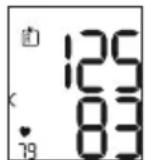
YTo6bI CMeHHTb IOnJIb3OBaTeJIbCKyIO nAmrTb, 18 ydepXnBaIe KHOJKy coxpaHeHry OKOJO 2 cekyHd.
CpeHne 3NaueHnA
HaxMMTe KHOKNy COxpaHeHHa
Ha ducnnee 3amuraet
OTo6pa3ntcpeDHee 3NaueHne pe3yIbTaTOB yTpEHHNx n3MepeHn 3a nocJeHne7 dHe (yTpo:05:00-09:00).
HaxMMTe KHOIIky COxpaHeHHa
Ha ducnnee 3amuraet P
OTo6pa3ntcpeJHee 3NaueHne pe3yIbTaTOB BeuepHnx n3MepeHn 3a nocJeHne7 dHei (Beep:18:00-20:00).
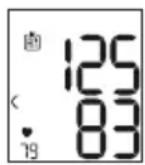
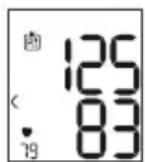
Pe3yIbTaTbI OTdIeNbHbIX N3MepeHn
-При NOВTOPHOM HaKaTn KHOJIKn COxpaHeHnHa DInCnIe OTo6pa3ntcpe3yIbTaT NocIeHero I3MepeHnB (B KaueCTBe npIMepa nCNoIb3yeTcR I3MepeHne 03).
- EcIn eUe pa3 HaxaTb KHNKy coXpaHeHn moXHo npocMOTpeTb pe3yIbTaTbI OTdJIbHbIX n3MepeHn.
- YTo6bI CHOBA BbIKJIIOHTb npu6Op, HAXMMTe KHOKNKy BKJ./BbIKJ. ①.
BbIITN3 MeHIO MOXHO B JIO6OE Bpemr, HaxaB KONKy BKJ./BbIKI. ①
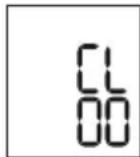
YdaenHepe3yNbTaTOB n3MepeHnA
- UTo6bI ydaNTb coDepeXIMoe NOlb3OBaTeJbCKoN nAMrTn, Chayana BbIePe NTpe6yEmyIO NOlb3OBaTeJbCKyIO nAMrTb.
3aynctte 3anpoc cpeHnX pe3yIbTaTOB n3MepeHn. Ha dincnnee 3amiraet R, n OTo6pa3ntcra cpeDHee 3ha-ueHne BCex COxpaHeHHbIX B daHHoN NOJIb3OBATeNbCKoI pAmrTn pe3yIbTaTOB n3MepeHn. - UdepKnBaIte HakaToB TteYeHne 5 cKeYHKnONky coXpaHeHnE KONKy BKN/.BblkN.①B3aBNCIMOCTn
OTTOBKAKOINOLb3OBaTeNbCKOINAMrN Bbl HAXoNTecb.
Bce 3naeHnTekyu eonnoIb3oBaTeNbcko naMaTn 6dyT ydaIeHbl, a np6op BvIKNIOHTc.
8. OYNCTKA N YXOD
OunpaIe npnbop mMaHKeTy c octopoXHoCTbIO. NcNoJIb3yIte ToJbKO CnerKa yBnaXHeHHyO caIpeTKy.
He nCnoJb3yIte yHCTTae cpeCDtBa nn pactBopnte.
HnB Koem cnyae He onyckaIte npnbop n MaHxety BBOy, TAK KAK IOnaHaHne BObI npNBedET K NOBpeKdEHNIO npnbopa n MaHxkTebl.
- Pn xpaHEn Hc CTaBbTe Ha npnbop mHaHKeTy TJeKJIble npedMeTbI. N3BLeKeNTe 6aTapeKIn.
9. YCTPAHEHNE ППОБЛЕмbl
Pb-6aTapeKc coepknt CBNHeU,
Cd-6aTapeiKa coepKNT KaMmN,
Hg-6aTaapeKa coepKNT pTyTb.
11. TEXHUNECKNE XAPAKTEPNCTUKN
Tun SBC 22
MoDJIb SBC 15
MeToI n3MepeHnOcUINLOMeTpUeCKoe HEnHBa3NBHOe n3MepeHne KpOBaHOrO daBJeHnHa 3aJaCTbe
Zródló: WHO, 1999 (World Health Organization)
12. GWARANCJA/SERWIS
4. WAARSCHUWINGEN EN VEILIGHEIDSRICHTLIJNEN

Contra-indications
Bron: WHO, 1999 (World Health Organization)

- Read these instructions for use carefully and keep them for later use. Make them accessible to other users and note the information they contain.
- Table of contents
- INCLUDED IN DELIVERY
- SIGNS AND SYMBOLS
- INTENDED USE
- Purpose
- Target group
- Indication/clinical benefits
- WARNINGS AND SAFETY NOTES
- Contraindications
- General warnings
- General precautions
- Measures for handling batteries
- Notes on electromagnetic compatibility
- DEVICE DESCRIPTION
- Information on the display:
- INITIALUSE
- Inserting the batteries
- Adjusting the settings
- Hour format
- Date
- Time
- 7.USAGE
- Attaching the cuff
- Adopting the correct posture
- Performing the blood pressure measurement
- Measurement
- Evaluating the results
- General information about blood pressure
- Risk indicator
- Irregular heartbeat
- Saving, accessing and deleting measured values
- User memory
- Average values
- Individual measured values
- Deleting measured values
- CLEANING AND MAINTENANCE
- REMEDY
- DISPOSAL
- Repairing and disposing of the device
- Disposing of the batteries
- TECHNICAL SPECIFICATIONS
- WARRANTY/SERVICE
- FRANÇAIS
- Mesures relatives aux piles
- OCHOBhIe MepbI npeoctopoXHOCTN
- Yka3aHnno no 6paueHHo c 6aTapeKamn
- Yka3aHnno 3JekTpomarHHTHOB COBMECTUMOCTN
- 5.ОПИСАНЕПРИБОРА
- Hdkaunha dncnnee
- ПОДГOTOBКАРБОТ
- YctahOBka 6aTapeek
- BbINOJIHeHne HacTpoek
- YacobonΦopmat
- Data
- Bpemr
- ПРUMЕΗΝΕ
- HaJoxKeHne MaHXKeTbI
- PpabnIbHoe nOJXeHne TeJa
- I3MepeHne KPOBHaHO rDaBHeHHa
- N3mepenne
- Ouěнka peʒúnbTaTob
- 067a HOpMaun O KPOBHaHOM daBJeHn
- HdMkaTop pUCKa
- Hapyuenn cepdenuo pntma
- CoxpaHeHne, npocMoTp n ydaJIeHne pe3yIbTaTOBn3MepeHn
- Pojlb3OBaTeNbcka namrTb
- CpeHne 3NaueHnA
- Pe3yIbTaTbI OTdIeNbHbIX N3MepeHn
- YdaenHepe3yNbTaTOB n3MepeHnA
- OYNCTKA N YXOD
- YCTPAHEHNE ППОБЛЕмbl
- TEXHUNECKNE XAPAKTEPNCTUKN
- GWARANCJA/SERWIS
- WAARSCHUWINGEN EN VEILIGHEIDSRICHTLIJNEN
- Contra-indications
Brand : SANITAS
Model : SBC 22
Category : Blood pressure monitor