
Milano 170 BT - Car radio BLAUPUNKT - Free user manual and instructions
Find the device manual for free Milano 170 BT BLAUPUNKT in PDF.
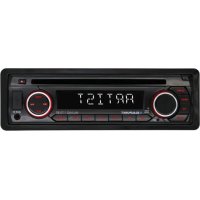


| Product type | Car radio |
| Brand | Blaupunkt |
| Model | Milano 170 BT |
| Dimensions (L x W x H) | 178 x 160 x 50 mm |
| Weight (approx.) | 1 kg |
| Power supply | 12 V DC, negative ground |
| Max output power | 4 x 40 W |
| Current consumption | 10 A max |
| FM radio | 87.5 – 109 MHz, sensitivity 4 µV, stereo separation >25 dB |
| AM radio (MW) | 522 – 1620 kHz, sensitivity 36 dBµV |
| CD player | Signal-to-noise ratio >55 dB, channel separation >45 dB, frequency response 40 Hz-18 kHz |
| Supported audio formats | CD, MP3, WMA |
| Bluetooth | Yes (hands-free calling, A2DP, phonebook) |
| Connectivity | USB, front AUX input, TF card, infrared remote control |
| Radio presets | 18 presets (FM1/2/3, AM1/2) |
| Equalizer | FLAT, CLASSICS, POP, ROCK, EQ OFF; XBASS |
| Front panel | Removable, lockable |
| RDS functions | AF, REG, TA, TP, PTY |
| Maintenance and cleaning | Clean the front panel connectors with a cotton swab moistened with isopropyl alcohol |
| Safety | Removable front panel, RESET button, auto power-off |
| Spare parts and repairability | After-sales service via www.blaupunkt.com; manufacturer warranty |
| General information | Car radio compatible with CD/MP3/WMA, Bluetooth, USB, AUX and TF card |
Frequently Asked Questions - Milano 170 BT BLAUPUNKT
User questions about Milano 170 BT BLAUPUNKT
0 question about this device. Answer the ones you know or ask your own.
Ask a new question about this device
Download the instructions for your Car radio in PDF format for free! Find your manual Milano 170 BT - BLAUPUNKT and take your electronic device back in hand. On this page are published all the documents necessary for the use of your device. Milano 170 BT by BLAUPUNKT.
USER MANUAL Milano 170 BT BLAUPUNKT
Location of keys 4
Turn on/off the unit 5
Mute. 5
Faceplate release 5
Sound adjustment 5
REG on/off 5
TA volume 5
LOC on/off 5
Stereo/mono 5
Beep on/off 5
AREA 5
EQ 6
XBASS 6
Display information. 6
Set the time 6
Liquid crystal display 6
ESP function 6
Auxiliary input 6
Reset function 6
Radio operation 6
Switching to radio mode 6
Selecting the frequency band 6
Selecting station 7
Automatic memory storing& program scanning. 7
Manually store station & recall presentation 7
RDS (Radio Data System) operation
CD/ MP3/WMA operation 8
Switching to disc mode 8
Selecting tracks/file 8
Pausing playing 8
Scan play all tracks/files 8
Repeating the same track/file 8
Playing all tracks/files in random 8
Ejecting a disc 8
Select directory up/down. 8
Selecting files by button .9
USB play operation 9
TF operation 9
Disc notes 10
Bluetooth operation*) .11
Remote control 13
Specification 14
Trouble shooting .15
Installation instructions 208
*) Only for devices with Bluetooth function
Declaration of conformity
The Blaupunkt Competence Center Car Multimedia-Evo Sales GmbH declares that the device complies with the basic requirements and the other relevant regulations of the directive 2014/53/EU. The declaration of conformity can be found on the Internet under www.blaupunkt.com
CE
Declaration of Conformity with regard to the RE Directive 2014/53/EU Declaration of Conformity with regard to the RoHS Directive 2011/65/EU
Warranty
The warranty terms can be called up from www.blaupunkt.com
Warranty
If you ever need to use a repair service, you will find information about service partners in your country under www.blaupunkt.com
LOCATION OF KEYS
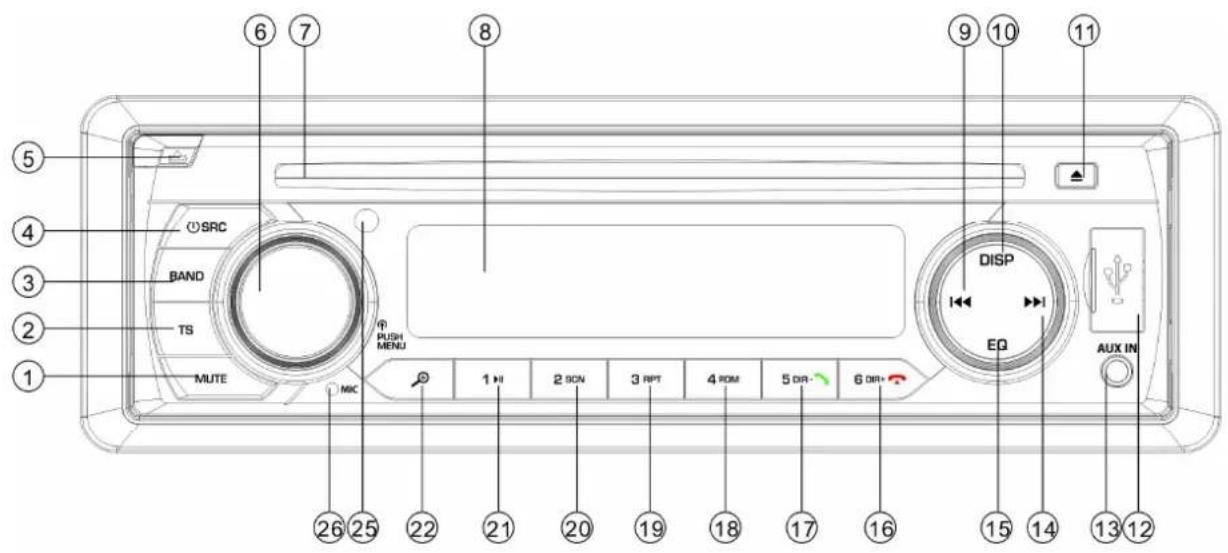
- "MUTE" button.
- "TS" button.
- "BAND" button.
- "①/SRC (source)" button.
- "▲" (panel release) button.
- "VOL/MENU" button.
- DISC Slot.
- LCD display.
- "SEEK DOWN) button.
- "DISP" button.
- "Eject" button.
- USB port
-
"AUX IN" jack.
-
" (SEEK UP) button.
- "EQ" button.
- "6 DIR+/ button.*)
- "5 DIR- f button.*)
- "4 RDM" button
- "3 RPT" button.
- "2 SCN" button.
- "1 button.
- MP3 search button
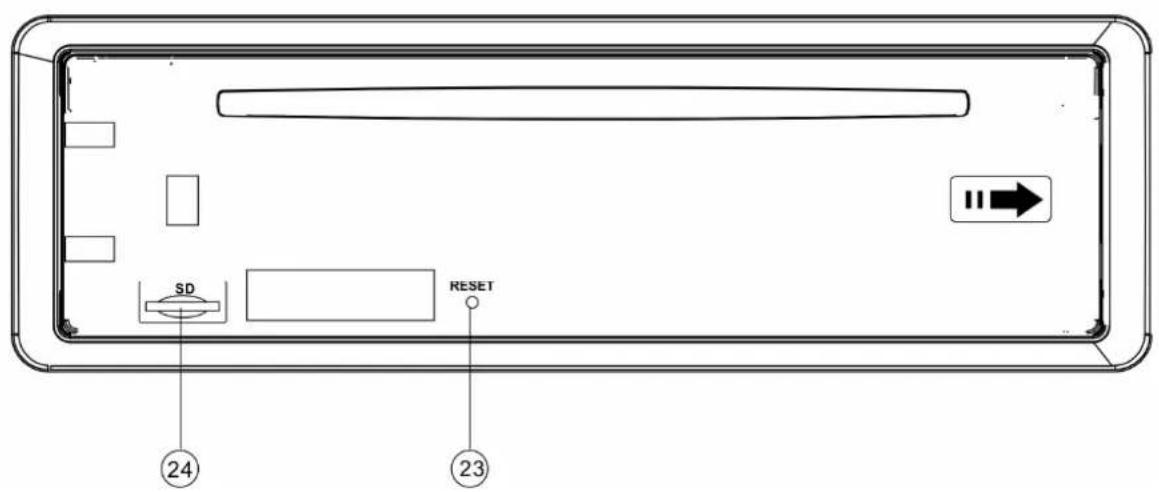
- RESET button.
- TF card slot.
25.IR SENSOR
26.MICPHONE
*) Only for devices with Bluetooth function
OPERATION
TURN ON/OFF THE UNIT
Turn on the unit by pressing button(4). When system is on. Press and hold button (4) for 2 seconds to turn off the unit.
MUTE
Shortly press MUTE button(1) to muting the audio output. Press it again to recover output.
FACEPLATE RELEASE
Press release button (5) to detach the removable faceplate.
SOUND ADJUSTMENT
Press MENU button (6) shortly to select the desired adjustment mode. The adjustment mode will change in the following order: -BAS-TRE-BAL-FAD-VOL-
BAS: bass
TRE:treble
BAL: balance
FAD: fader
VOL: volume
By rotating the audio knob (6) it is possible to adjust the desired sound quality.
Press and hold MENU button (6) for 2 seconds into the system menu as below:
TA: Traffic Announcement
REG: region
TAVOL: TA volume
LOC: local
STEREO
AREA: Europe
REG on/off
When AF function is on. In REG item of the system menu you can switch it on or off. Some broadcasting stations change their program from normal broadcasting to regional broadcasting for a certain time period. When region is on, the
current listening program remains unchanged.
TA volume
This function allows you to define the minimum volume for the traffic announcements. The adjustable range is 20 43 .The defaulted value is 25. Rotate the volume knob to adjust the volume of the traffic.
LOC on/off
In this item rotating the audio knob (6) to turn on/off local function. In LOC ON mode the unit will reduce the receiving sensitivity when you search station. That means you can receive the station that sound is good. It will ignore the station that sound is not good. In LOC OFF mode it will increase the receiving sensitivity when you search the station. That means you can receive more stations.
STEREO/MONO
In this item rotating the audio knob (6) to choose STEREO or MONO mode. In STEREO mode you can receive FM stereo signal. In MONO mode the stereo station will be switched to monochrome. Sometimes when the signal is not good. If you change it to MONO mode. The noise will be reduced.
BEEP on/off
The car audio device is equipped with 2 beep tone modes. Rotate the volume knob to choose one.
- Beep on mode: The confirmation beep sound is heard whenever a button is pressed.
- Beep off mode: The confirmation beep is switched off whenever a key is pressed
AREA
In this item, rotate the volume to select Europe/USA/LAT area.
OPERATION
XBASS
Press and hold the EQ button for 2 seconds to active the XBASS function. Press it and hold it again to cancel this function.
EQ (Equalisation)
Press EQ button shortly to select the preset EQ mode as below:
FLAT-CLASSICS-POP-ROCK-EQ OFF
DISPLAY INFORMATION
Press DISP button (10) to show the time for 5 seconds. Then it returns to show the information.
SET THE TIME
(1) Manual setting:
Press and hold DISP button for 2 seconds. The hour of the time will be flashing. Press / button to set the correct hour.
Press DISP button shortly to change to minute. Also use button to set the correct minute. After that press DISP button to confirm.
(2) Synchronize the time from the RDS station:
To receive a RDS station which has good signal(The AF symbol of the LCD does not flashing).Several minutes later the time will be synchronized to the correct time by the station's signal. (Note: None RDS station does not have this function.)
LIQUID CRYSTAL DISPLAY
Exhibit current frequency and activated functions on the display.
ESP FUNCTION
The unit can be shockproof between ten seconds and twenty seconds.
AUXILIARY INPUT
The unit can be connected to a portable
audio player through the AUX IN jack (13). Pressing SRC button to switch to AUX mode when inserted an audio source to the unit.
RESET FUNCTION
RESET button (23) must be activated with either a ballpoint pen or thin metal object.
The RESET button is to be activated for the following reasons:
- Initial installation of the unit when all wiring is completed.
- All the function buttons do not operate.
- Error symbol on the display.
Note: if press RESET button (23), the unit can't work yet, please use a cotton swab soaked in isopropyl alcohol to clean the socket on the front panel.
RADIO OPERATION
SWITCHING TO RADIO MODE
Press SRC button (4) to select radio mode, the radio mode appears in the display together with the memory band and frequency.
At radio mode, press BAND button (3) to select the desired band.
The reception band will change in following order:

SELECTING STATION
Press button (14) or button (9) shortly to activate automatic seek function. It will search up/down a station automatically. Press for 2 seconds until "MANUAL" appears on the display, the manual tuning mode is selected. In this
mode you can turn up/down a step frequency one by one till searched a station. If both buttons have not been pressed for 5 seconds, it will return to seek tuning mode and "AUTO" appears on the display.
AUTOMATIC STORING & PROGRAM SCANNING
Automatic storing
- Press TS button (2) for 2 seconds the radio searches from the 87.5MHz frequency and checks the signal strength until one cycle search is finished. And then some strong stations are stored into the corresponding preset number button of the FM3 band. In the first cycle it will in LOCAL mode to receive the stronger station. If it is less than 6 pcs station it will searching stations in 2nd cycle in LOCAL OFF mode.
- Program scanning
Press TS button (2) shortly to scan preset station. The radio is holding at that preset number for 5 seconds with release mute.
- MANUALLY STORE STATION & RECALL PRESET STATION
To receive a station, Press one of the preset button (1~6) for 2 seconds. The current station is stored into the number button. Shortly press the preset button (1~6) to directly listen the station that saved in the corresponding preset button.
In AF item of system menu. Rotating audio knob to switch on or off the AF function.
Whenever AF is on, symbol "AF" appears on the display.
Program name is displayed on receiving
a RDS station.
"AF" starts blinking if the broadcasting signal getting worse.
"ALARM" will be displayed when an emergency broadcasting is received, meanwhile sound output level will be adjusted to the preset output level automatically when the volume control is set at minimum.
Regional Program Operation
When AF function is on. In REG item of system menu. Rotating audio knob to turn the REG function on or off. When AF function is off. The REG function can't set to off.
Some broadcasting stations change their program from normal broadcasting to regional broadcasting for a certain time period. When region is on, the current listening program remains unchanged. When region is off, it allows the reception moves to the regional station.
- Listening to Traffic Announcement
In TA item of system menu. Rotating audio knob to switch on or off the TA function. When TA mode is on and a traffic announcement is transmitted:
When the unit was in CD (MP3) or AUX mode, it will switch temporarily to radio mode.
Temporary switch over to an EON linked station when EON detects a traffic announcement on that other program.
If the volume level was under the threshold point it will be raised to the threshold point.
When TA mode is on, TA of individual segment is turned on. When a TP station is received, TP of individual segment is turned on.
TA interruption function
The current traffic announcement is cancelled by turn the TA function to STOP (in TA item of RDS menu, when
the TA station is not received it only has
on/off. But when received a TA station the TA item will have on/stop/off for your selection).But the TA mode will not be off.
unwanted EON TA switching, which EON TA information was received from current station and the radio switched to that EON linked station, but no Information could not be received because the EON linked station is located too far from that area. So the radio is switched back to current station again. In above operation, a customer listens to a wrong program or mute sound for a while. The RDS data used are the PI, PS, AF, TP, TA, EON and PTY data.
PS: Program Service Name
Broadcast station name data expressed in alphanumeric characters
AF: Alternative Frequencies
Frequency list of broadcasting stations transmitting the same program
TP: Traffic Program Identification
Identification data for traffic information-broadcasting station
TA: Traffic Announcement Identification Identification data showing traffic information is being transmitted or not.
EON: Enhanced Other Networks Information
Broadcasting information on PI, AF, TP, TA, etc, relating to networks other than the network used for current reception.
SWITCHING TO DISC MODE
If there is no disc inserted in the driver:
Gently insert a disc with the printed side uppermost into the disc compartment until you feel some resistance. The disc is drawn into the driver automatically. disc playback begins.
If a disc is already inserted in the driver: Keep pressing SRC button (4) shortly until the DISC mode display appears.
- SELECTING TRACKS/FIL
Press button (14) or button (9) to move to the previous track/file or the following track/file. Track/file number
shows on the display.
Hold button (14) or button (9) to fast reverse or fast forward. disc play starts from when you release the button.
- PAUSING PLAYING
Press button (21) to pause playing.
Press it again to resume play.
- SCAN PLAY ALL TRACKS/FILES
Press SCN button (20) to play first several seconds of each track/file. Press again to stop intro play and listen to track/file.
- REPEATING
THE SAME
TRACK/FILE
Press RPT button (19) to continuously repeat the same track/file. Press it again to repeat all the tracks/files.
- PLAYING ALL TRACKS IN RANDOM
Press RDM button (18) to play all tracks /files in random order. Press it again to cancel the random function.
EJECTING A DISC
Press button (11) to stop disc playing and eject the disc from the disc slot (6).
SELECT DIRECTION UP/DOWN
Press DIR-button (17) or DIR+ button (16) to select previous directory or next directory. If the MP3/WMA disc does not contain any directory, there is no function of pressing DIR- button (17) or
DIR+ button (16).
- SELECTING FILES BY BUTTON

(22) is assigned as selection button in MP3/WMA operation.
When pressed, it is activated the selecting each mode as below:
Search from folder. = > Search file number.
Search From Folder
Press ton for one time. It enter into "Searching from folder" mode. Rotating the VOL knob to select desired folder. After that press
MENU knob (6) to enter the folder. Rotating knob (6) to select desired file. And then press MENU knob (6) again to play. Press button will back to previous folder.
Search File number
Press ton for two times. It is activated the "Search file number" mode. Rotating knob (21) to select the file number then press MENU knob (4) to confirm. The unit searches the selected file to play. You also can enter the file's number. In front panel except there are 1~6 digit. please note7/8/9/0 as below:
EQ:7
:8
:9
DISP:0.
If the file number was selected. The unit wait for seconds. The unit searches the track after few seconds, even if the MENU (4) button is not pressed.
USB PLAY OPERATION
In the front panel of the unit, there is an USB interface (10). You can connect an USB driver through this interface (12).
When you connect an USB driver through the interface, the unit will search the MP3/WMA files in the USB driver and start to play. If in other mode, you can also press
SRC button to select USB mode.
When playing the MP3/WMA files in the device, the operation is the same with the CD/MP3/WMA operation described above.
Note:
The main unit can only support the standard USB-memory disc which is approved by Microsoft.
- USB MP3 player is not a standard which means different brand name or different models have their own standard. So our product cannot support every MP3 player.
- When connecting an MP3 player which has normal battery (non rechargeable battery), you should remove the battery from the MP3 player then connect it to the USB interface. Otherwise, it may cause battery burst.
TF OPERATION
There is a TF interface (24) on the front panel of the unit.
When you insert a TF card in the TF interface, the unit will search the MP3/WMA files in the card and start to play. The operation is the same with the
CD/MP3/WMA operation described above.
If in other mode. You can also press SRC (4) button to select SD mode.
SUPPORTED MP3/WMA DECODING MODES
The main unit supports MP3/WMA (Windows Media Audio) decoding modes as below.
| Standard | Bit Rate (kbps) | Supports Mode |
| MPEG1 Audio Layer 3 (44.1kHz) | 32,48,64,96, 128,192,256, 320 | Stereo |
| Windows Media Audio (44.1kHz) | 64,96,128,192 | Stereo |
The USB solution can support:
- Folder: 500 max.
- File: 999 max.
- Depth of folder: 8 layers
- Size: 32 GB
CAUTION
When there are important files in the USB device or TF card, do not connect it to the main unit to play. And don't play the CD-R/RW disc that has important files in it. Because any wrong operation may cause files loss. And our company assumes no responsibility for this.
DISC NOTES
A. Notes on discs:
Attempting to use non-standard shape discs (e.g. square, start, heart) may
- damage the unit. Be sure to use round shape CD discs only for this unit.
- Do not stick paper or tape, etc, onto the label side or the recording side of any discs, as it may cause a malfunction.
- Dirt, dust, scratches and warping discs will cause mis-operation.
B. Notes on CD-Rs (recordable CDs)/CD-RWs (rewritable CDs):
- Be sure to use discs with following marks only for the unit to play:

DIGITAL AUDIO

DIGITAL AUDIO
Recordable

DIGITAL AUDIO
ReWritable
- The unit cannot play a CD-R and CD-RW that is not finalized. (Please refer to the manual of your CD-R/CD-RW recorder or
CD-R/CD-RW software for more information on finalization process).
- Depending on the recording status, conditions of the disc and the equipment used for the recording, some
CD-Rs/CD-RWs may not be played on this unit. (see *1)
*1: To have more reliable play back, please 0 see following recommendations:
a: Use CD-RWs with speed 1x to 4x and write with speed 1x to 2x.
b. Use CD-Rs with speed 1x to 8x and write with speed 1x to 2x.
c. Do not play a CD-RW which has been written for more than 5 times.
C. Notes on MP3 files (MP3 Version Only):
- The disc must be in the ISO9660 level 1 or level 2 format, or Joliet or Romeo in the expansion format.
- When naming a MP3 file, be sure the file name extension is“.MP3”.
- For a non-MP3 file, even though the file name extension is ".MP3", the unit cannot recognize it.
(i) When use Bluetooth, please make sure the mobile phone supports Bluetooth function.
(ii) For the different kind of mobile phone, Bluetooth emissive power has some difference. To get the best conversation quality, it is commended that the distance between the mobile phone and the unit is within 3m. And please don't put any metal object or any obstacle between the path of the mobile phone and the unit.
- PAIRING
1) On the mobile phone, select the Bluetooth set up. (Please refer to the instruction manual of your mobile phone on how to operate Bluetooth.)
2) "CAR KIT" should appear in the list on your
mobile phone, please select "BP 170 BT" and then input password "0000". If it needs a password.
3) When successful paired, the BT mark will be displayed on LCD.
- Answering / rejecting an incoming call
When there is a phone is coming in. Press key to answer the call. Press key to reject the call.
- Hang up a call
When finished a conversation, press key to hang up this call.
Checking phone book / received / dialed / missed call (for Android and Iphone mobile)
Press SRC key it will show "PHONE" on the display. press button it will show BOOK on the LCD. Then repeatedly press it will show items as below:
Note: In the first time your mobile will receive a message that the unit will visit your mobile through Bluetooth. You have to agree and press "YES" to confirm.
(Note: It is necessary the phone number is in the phone not in the SIM card).
- Call out
1) Making an outgoing call by inputting the phone number manually.
Press SRC key it will show "PHONE" on the
display. Press and hold key. The LCD
will become BLANK. Then you can enter phone number and press key to confirm
the dialing. (Note: If you inputted wrong
numbers. Press the key to cancel wrong numbers.)
In front panel except there are 1~6 digit. please note 0/7/8/9/*/# as below:
0: DISP button.
7:EQ
8:
9:
*: press and hold 5 key for 2 seconds.
: press and hold 6 key for 2 seconds.
1) Redialing an outgoing call
Press SRC key it will show "PHONE" on the display. Press and hold key for 2 seconds it will redial the last phone number
2) Making an outgoing call from the phone book / received / dialed / missed call (for Android and Iphone mobile)
- Please reference "Checking phone book / received / dialed / missed call" item then select a phone number. Press key to dial.
Note: If there are 2 pcs of SIM card in your mobile phone. When you dial out a call from the front panel of the unit. The call will be dialed out from the default card (or asking using which card each time dial out).
- Transfer the call between mobile phone and unit
During the talking mode, you can press button (22) to transfer the phone call between the mobile phone and the unit.
- Bluetooth audio (A2DP function)
Press SRC button (4) it will show "PHONE" on the display. Then turn on the music player of your mobile phone and playing a song. The sound will come out from the speaker of the
unit. Press key (21) of the front panel of the unit to pause/play the song. Press button (14) or 卡 button (9) to select next/previousong.
Connect/disconnect bluetooth
Press and hold SRC button for 2 seconds to connect/disconnect bluetooth.
*) Only for devices with Bluetooth function
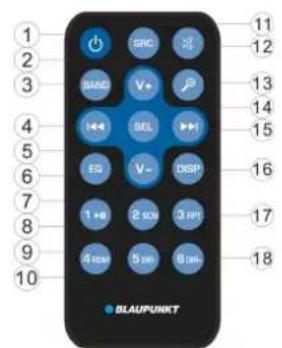
FUNCTION KEY & CONTROL
- ⑤
- VOL+:
-
BAND:
4. -
VOL-:
- EQ:
- 2 SCN:
- 1
- 4RDM:
- 5 DIR:
- SRC:
-
:
-
SEL:
- DISP:
- 3 RPT:
- 6 DIR+:
When incoming a call or finish a call. It is key. *).
*) Only for devices with Bluetooth function
Power ON/OFF Button.
Volume up button.
To select FM1/FM2/FM3/AM1/AM2 band in RADIO mode.
In RADIO mode: Press it shortly for seek down function. Press
and hold it for manual turn down.
In CD/MP3/WMA mode: Press it shortly for skip previous one track/file. Press and hold it for fast reverse.
Volume down button.
It is EQ button.
In RADIO mode: Number 2. See page 11 MANUALLY STORE STATION & RECALL PRESET STATION.
In CD/MP3/WMA mode: Press it turn on/off SCANNING function.
In RADIO mode: Number 1. See page 11 MANUALLY STORE STATION & RECALL PRESET STATION.
In CD/MP3/WMA mode: Press to pause/resume playing.
In RADIO mode: Number 4. See page 11 MANUALLY STORE STATION & RECALL PRESET STATION.
In CD/MP3/WMA mode: turn on/off random function.
In RADIO mode: Number 5. See page 11 MANUALLY STORE STATION & RECALL PRESET STATION.
In MP3/WMA mode: Press it back to previous folder.

is key in BT mode. *)
It is SRC key.
Press it to mute/recover the sound.
In RADIO mode: It is TS function. See page 11 AUTOMATIC PROGRAM SCANNING
STORING &
In MP3/WMA mode: It is file searching function. (See page 12).
In PHONE mode. Its function seeing page 15 BLUETOOTH OPERATION
Press it shortly for audio menu. Press and hold for system menu
(See page 9). In MP3/WMA searching mode press it for confirm function (See page 13).
In RADIO mode: Press it shortly for seek down function. Press
and hold it for manual turn up.
In CD/MP3/WMA mode: Press it shortly for skip next one track/file. Press and hold it for fast forward.
Press DISP to show the time.
In RADIO mode: Number 3. See page 11 MANUALLY STORE STATION & RECALL PRESETATION.
In CD/MP3/WMA mode: Press it turn on/off repeat function.
In RADIO mode: Number 6. See page 11 MANUALLY STORE STATION & RECALL PRESET STATION.
In MP3/WMA mode: Press it to next folder
When incoming a call or finish a call. It is key.*
SPECIFICATION
GENERAL
Power Supply Requirements : DC 12 Volts, Negative Ground
Chassis Dimensions : 178 (W) x 160 (D) x 50 (H)
Tone Controls
- Bass (at 100 Hz) : ±10 dB
- Treble (at 10 kHz) : ±10 dB
- Maximum Output Power : 4x40 watts
- Current Drain : 10 Ampere (max.) (For Normal Power Version)
CD PLAYER
Signal to Noise Ratio : More than 55 dB
Channel Separation : More than 45 dB
Frequency Response : 40Hz - 18 kHz
RADIO
FM
Frequency Coverage 87.5 to 108 MHz
IF 10.7 MHz
Sensitivity (S / N = 30dB) 4µV
Stereo Separation >25dB
AM(MW)
Frequency Coverage 522 to 1620 kHz
IF 450 kHz
Sensitivity (S / N = 20dB) 36 dBuV
Before going through the checklist, check wiring connection. If any of the problems persist after checklist has been made, consult your nearest service dealer.
| Symptom Cause Solution | ||
| No power. | The car ignition switch is not on. | If the power supply is connected to the car accessory circuits, but the engine is not moving, switch the ignition key to "ACC". |
| The fuse is blown. Replace the fuse. | ||
| Disc cannot be loaded or ejected. | Presence of CD disc inside the player. | Remove the disc in the player, then put a new one. |
| Inserting the disc in reverse direction. | Insert the compact disc with the label facing upward. | |
| Compact disc is extremely dirty or detective disc. | Clean the disc or try to play a new one. | |
| Temperature inside the car is too high. | Cool off or until the ambient temperature return to normal. | |
| Condensation. | Leave the player off for an hour or so, then try again. | |
| No sound. | Volume is in minimum | Adjust volume to a desired level. |
| Wiring is not properly connected. | Check wiring connection. | |
| Sound skips. | The installation angle is more than 30 degree. | Adjust the installation angle less than 30 degree. |
| The disc is extremely dirty or defective disc. | Clean the compact disc, then try to play a new one. | |
| The operation keys do not work. | The built-in microcomputer is not operating properly due to noise. | Press the RESET button. Front panel is not properly fix into its place. |
| The radio does not Work. The radio station automatic selection does not work. | The antenna cable is not connected. | Insert the antenna cable firmly. |
| The signals are too weak. | Select a station manually. | |
INHALTSVERZEICHNIS
Bedienung 18
Tastenlage 18

DIGITAL AUDIO
ReWritable
Activer/désactiverLOC 35
Mode stéreo / mono 35
Activer/désactiver le bip sonore 35
ZONE 35
EQ 36

DIGITAL AUDIO
ReWritable
INFORMATIE WEERGEVEN
Tidsinstallinging. 102
WYBOR KATALOGU W GORE/W DOL

DIGITAL AUDIO
ReWritable
VAESKEKRYSTAL DISPLAY 150
EKSTRAINDGANG 150
RESET FUNKTION 150
RADIO DRIFT. 150
RDS (RADIO DATASYTEM) BETJENING151
TA-AFBBRYDELSESFUNKTION 151
CD / MP3 / WMA DRIFT 152
VAELG KATALOG OP/NED 152
BETJENING AF USB-AFSPILLER 153
TF BETJENING 153
AFKODNINGSTILSTANDE, DER
UNDERSTOTTER MP3/WMA 154
ADVARSEL 154
DISK BEMAERKNINGER 154
BLUETOOTH DRIFT*) 154
FUNCTION KEY & CONTROL 157
GENERELLE OPLYSNINGER 159
VAESKEKRYSTAL DISPLAY
TP: Identification of traffic program
Identifikationsdata for trafikinformations-tv-station
TA: Identification af trafikmeddeleser
Identifikationsdata, der viser trafikoplysninger, der overfores aller ej.
0:DISP-knap.
7:EQ:
8:
9:
*: tryk og hold 5 knappen i 2 sekunder.
: tryk og hold 6 tasten i 2 sekunder.
Remoçao do paine frontal 164
Reproducao com "scan" de todas as
→FM1→FM2→FM3→MW1(AM1)→MW2(AM2)
Lemelezjatsz as elinditasa 183
0: Kijelzés gomb (DISP)
7:EQ:
8:
9:
*: A gombot (5) tartsa lenyomva 2 masodpercig.
: A gombat (6) tartsa lenyomva 2 masodpercig.
→FM1→FM2→FM3→MW1(AM1)→MW2(AM2)
VYBER STANICE
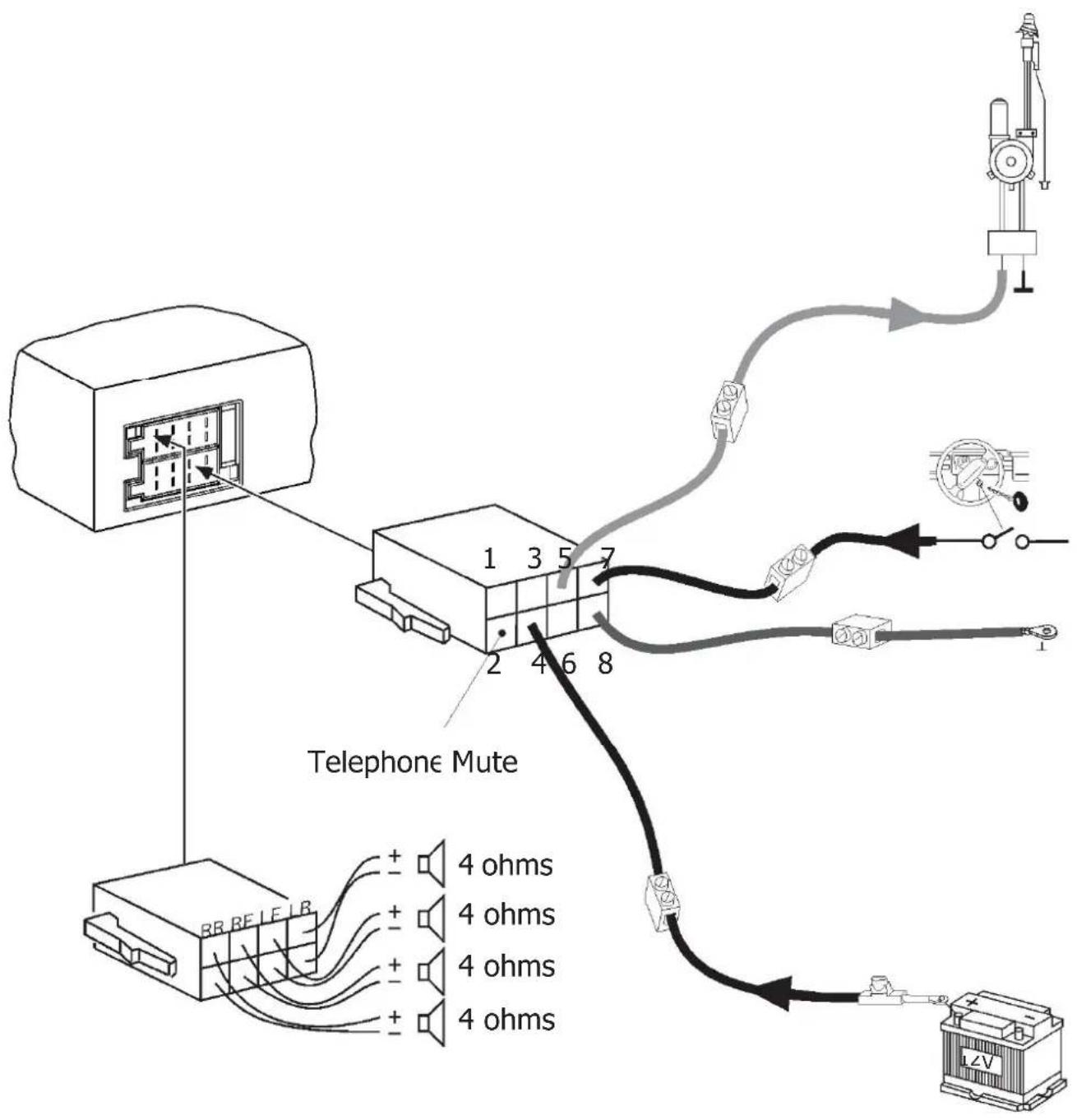
Supplied mounting hardware
Available as an option
| B | |||
| 1 | NC | 1 | Speaker out RR+ |
| 2 | NC | 2 | Speaker out RR- |
| 3 | NC | 3 | Speaker out RF+ |
| 4 | Permanent +12V | 4 | Speaker out RF- |
| 5 | Auto antenna* | 5 | Speaker out LF+ |
| 6 | NC | 6 | Speaker out LF- |
| 7 | TI.15/Ignition | 7 | Speaker out LR+ |
| 8 | Ground | 8 | Speaker out LR- |

- Switched power supply +12 V / max. 150 mA
Subject to modifications! • Vorbehaltlich Modifi kationen! • Sous réserve de modifi cations!
- iModificaciones reservadas! - Sobresherva dealteracos! - Modifiche riservate! - Zmiany technicne zastrzezone! - Zmeyvyhrazeny! - Valtoztatas joga fenntartva!
- Onder voorbehoud van modifi caties - Omfattas av modifi kationer - Jollei uudistustoitä
Underlagt modifi kationer
Evo-Sales GmbH
Hastenbecker Weg33


- ) ONLY FOR DEVICES WITH BLUETOOTH FUNCTION
- DECLARATION OF CONFORMITY
- CE
- WARRANTY
- LOCATION OF KEYS
- OPERATION
- TURN ON/OFF THE UNIT
- MUTE
- FACEPLATE RELEASE
- SOUND ADJUSTMENT
- REG ON/OFF
- TA VOLUME
- LOC ON/OFF
- STEREO/MONO
- BEEP ON/OFF
- AREA
- XBASS
- EQ (EQUALISATION)
- DISPLAY INFORMATION
- SET THE TIME
- MANUAL SETTING
- SYNCHRONIZE THE TIME FROM THE RDS STATION
- LIQUID CRYSTAL DISPLAY
- ESP FUNCTION
- AUXILIARY INPUT
- RESET FUNCTION
- RADIO OPERATION
- SWITCHING TO RADIO MODE
- SELECTING STATION
- AUTOMATIC STORING & PROGRAM SCANNING
- MANUALLY STORE STATION & RECALL PRESET STATION
- REGIONAL PROGRAM OPERATION
- LISTENING TO TRAFFIC ANNOUNCEMENT
- TA INTERRUPTION FUNCTION
- SWITCHING TO DISC MODE
- SELECTING TRACKS/FIL
- PAUSING PLAYING
- SCAN PLAY ALL TRACKS/FILES
- REPEATING
- THE SAME
- TRACK/FILE
- PLAYING ALL TRACKS IN RANDOM
- EJECTING A DISC
- SELECT DIRECTION UP/DOWN
- SELECTING FILES BY BUTTON
- SEARCH FROM FOLDER
- SEARCH FILE NUMBER
- USB PLAY OPERATION
- SRC BUTTON TO SELECT USB MODE
- NOTE
- TF OPERATION
- SUPPORTED MP3/WMA DECODING MODES
- CAUTION
- DISC NOTES
- NOTES ON DISCS
- ATTEMPTING TO USE NON-STANDARD SHAPE DISCS (E.G. SQUARE, START, HEART) MAY
- NOTES ON CD-RS (RECORDABLE CDS)/CD-RWS (REWRITABLE CDS)
- NOTES ON MP3 FILES (MP3 VERSION ONLY)
- PAIRING
- ANSWERING / REJECTING AN INCOMING CALL
- HANG UP A CALL
- CHECKING PHONE BOOK / RECEIVED / DIALED / MISSED CALL (FOR ANDROID AND IPHONE MOBILE)
- CALL OUT
- MAKING AN OUTGOING CALL BY INPUTTING THE PHONE NUMBER MANUALLY
- FUNCTION KEY & CONTROL
- SPECIFICATION
- GENERAL
- CD PLAYER
- RADIO
- FM
- AM(MW)
- INHALTSVERZEICHNIS
- BEDIENUNG
- INFORMATIE WEERGEVEN
- WYBOR KATALOGU W GORE/W DOL
- VAESKEKRYSTAL DISPLAY
- TRYK OG HOLD 6 TASTEN I 2 SEKUNDER
- A GOMBAT (6) TARTSA LENYOMVA 2 MASODPERCIG
Brand : BLAUPUNKT
Model : Milano 170 BT
Category : Car radio