
EIV9467 - Cooker ELECTROLUX - Free user manual and instructions
Find the device manual for free EIV9467 ELECTROLUX in PDF.
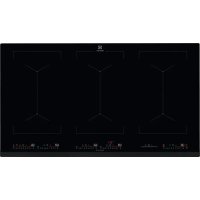


| Product type | Built-in induction hob |
| Brand | Electrolux |
| Model | EIV9467 |
| Number of cooking zones | 3 flexible zones (6 burners) |
| Electrical supply | 230 V / 400 V, 11.0 kW |
| Maximum power per zone (PowerBoost) | 3200 W (max 10 minutes) |
| Cookware diameter | 125 - 210 mm |
| Main functions | Bridge, PowerBoost, Pause, Timer (countdown, CountUp, Timer), Hob²Hood, PowerSlide, Key Lock, Child safety device, Power management, Automatic switch-off, OffSound Control |
| Residual heat indicator | OptiHeat Control (3 levels) |
| Control type | Touch controls |
| Surface material | Glass ceramic |
| Cleaning | Soft cloth, non-abrasive detergent, scraper for stubborn dirt |
| Safety | Key lock, child safety, automatic switch-off, power management |
| Energy consumption | 186.8 Wh/kg (cooking hob) |
| Weight | Not specified in the manual |
| Appliance dimensions (Width x Depth) | Not specified in the manual |
| Hood compatibility | Hob²Hood (infrared communication with compatible hood) |
| Spare parts | Use only original parts, contact after-sales service |
| Repairability | Repair only by a qualified professional |
| Warranty | Refer to the warranty booklet provided |
Frequently Asked Questions - EIV9467 ELECTROLUX
User questions about EIV9467 ELECTROLUX
0 question about this device. Answer the ones you know or ask your own.
Ask a new question about this device
Download the instructions for your Cooker in PDF format for free! Find your manual EIV9467 - ELECTROLUX and take your electronic device back in hand. On this page are published all the documents necessary for the use of your device. EIV9467 by ELECTROLUX.
USER MANUAL EIV9467 ELECTROLUX
How to install your Electrolux Induction Hob - Worktop installation
4. PRODUCT DESCRIPTION
WE'RE THINKING OF YOU
Thank you for purchasing an Electrolux appliance. You've chosen a product that brings with it decades of professional experience and innovation. Ingenious and stylish, it has been designed with you in mind. So whenever you use it, you can be safe in the knowledge that you'll get great results every time.
Welcome to Electrolux.
Visit our website to:

Get usage advice, brochures, trouble shooter, service and repair information: www.electrolux.com/support

Register your product for better service: www.registerelectrolux.com

Buy Accessories, Consumables and Original spare parts for your appliance: www.electrolux.com/shop
CUSTOMER CARE AND SERVICE
Always use original spare parts.
When contacting our Authorised Service Centre, ensure that you have the following data available: Model, PNC, Serial Number.
The information can be found on the rating plate.
Warning / Caution-Safety information 1 General information and tips Environmental information
Subject to change without notice.
CONTENTS
1. SAFETY INFORMATION 22 2. SAFETY INSTRUCTIONS 24 3. INSTALLATION 27 4. PRODUCT DESCRIPTION 28 5. DAILY USE 29 6. HINTS AND TIPS 34 7. CARE AND CLEANING 37 8. TROUBLESHOOTING 37 9. TECHNICAL DATA 39 10. ENERGY EFFICIENCY 39 11. ENVIRONMENTAL CONCERNS 40
1. SAFETY INFORMATION
Before the installation and use of the appliance, carefully read the supplied instructions. The manufacturer is not responsible
for any injuries or damage that are the result of incorrect installation or usage. Always keep the instructions in a safe and accessible location for future reference.
1.1 Children and vulnerable people safety
- This appliance is not intended for use by persons (including children) with reduced physical, sensory or mental capabilities, or lack of experience and knowledge, unless they have been given supervision or instruction concerning use of the appliance by a person responsible for their safety.
- Children should be supervised to ensure that they do not play with the appliance.
- Keep all packaging away from children and dispose of it appropriately.
- WARNING: Keep children and pets away from the appliance when it operates or when it cools down. Accessible parts become hot during use.
- If the appliance has a child safety device, it should be activated.
- Children shall not carry out cleaning and user maintenance of the appliance without supervision.
1.2 General Safety
- WARNING: The appliance and its accessible parts become hot during use. Care should be taken to avoid touching heating elements.
- WARNING: Unattended cooking on a hob with fat or oil can be dangerous and may result in fire.
- NEVER try to extinguish a fire with water, but switch off the appliance and then cover flame e.g. with a lid or a fire blanket.
- WARNING: The appliance must not be supplied through an external switching device, such as a timer, or connected to a circuit that is regularly switched on and off by a utility.
- CAUTION: The cooking process has to be supervised. A short term cooking process has to be supervised continuously.
- WARNING: Danger of fire: Do not store items on the cooking surfaces.
- Metallic objects such as knives, forks, spoons and lids should not be placed on the hob surface since they can get hot.
- Do not use the appliance before installing it in the built-in structure.
- Do not use a steam cleaner to clean the appliance. After use, switch off the hob element by its control and do not rely on the pan detector.
- If the glass ceramic surface / glass surface is cracked, switch off the appliance and unplug it from the mains. In case the appliance is connected to the mains directly using junction box, remove the fuse to disconnect the appliance from power supply. In either case contact the Authorised Service Centre.
- If the supply cord is damaged, it must be replaced by the manufacturer, an authorized Service or similarly qualified persons in order to avoid a hazard.
- WARNING: Use only hob guards designed by the manufacturer of the cooking appliance or indicated by the manufacturer of the appliance in the instructions for use as suitable or hob guards incorporated in the appliance. The use of inappropriate guards can cause accidents.
2. SAFETY INSTRUCTIONS
2.1 Installation

WARNING!
Only a qualified person must install this appliance.

WARNING!
Risk of injury or damage to the appliance.
- Remove all the packaging.
- Do not install or use a damaged appliance.
- Follow the installation instructions supplied with the appliance.
- Keep the minimum distance from other appliances and units. Always take care when moving the appliance as it is heavy. Always use safety gloves and enclosed footwear.
- Seal the cut surfaces with a sealant to prevent moisture from causing swelling.
- Protect the bottom of the appliance from steam and moisture.
- Do not install the appliance next to a door or under a window. This prevents hot cookware from falling from the appliance when the door or the window is opened. Each appliance has cooling fans on the bottom.
- If the appliance is installed above a drawer:
- Do not store any small pieces or sheets of paper that could be pulled in, as they can damage the cooling fans or impair the cooling system.
- Keep a distance of minimum 2 cm between the bottom of the appliance and parts stored in the drawer.
- Remove any separator panels installed in the cabinet below the appliance.
2.2 Electrical Connection

WARNING!
Risk of fire and electric shock.
- All electrical connections should be made by a qualified electrician. The appliance must be earthed.
- Before carrying out any operation, make sure that the appliance is disconnected from the power supply.
- Make sure that the parameters on the rating plate are compatible with the electrical ratings of the mains power supply.
- Make sure the appliance is installed correctly. Loose and incorrect electricity mains cable or plug (if applicable) can make the terminal become too hot.
- Use the correct electricity mains cable.
- Do not let the electricity mains cable tangle.
- Make sure that a shock protection is installed.
- Use the strain relief clamp on the cable.
- Make sure the mains cable or plug (if applicable) does not touch the hot appliance or hot cookware, when you connect the appliance to a socket.
- Do not use multi-plug adapters and extension cables.
- Make sure not to cause damage to the mains plug (if applicable) or to the mains cable. Contact our Authorised Service Centre or an electrician to change a damaged mains cable.
- The shock protection of live and insulated parts must be fastened in such a way that it cannot be removed without tools.
- Connect the mains plug to the mains socket only at the end of the installation. Make sure that there is access to the mains plug after the installation.
- If the mains socket is loose, do not connect the mains plug.
- Do not pull the mains cable to disconnect the appliance. Always pull the mains plug.
- Use only correct isolation devices: line protecting cut-outs, fuses (screw type fuses removed from the holder), earth leakage trips and contactors.
- The electrical installation must have an isolation device which lets you disconnect the appliance from the mains at all poles. The isolation device must have a contact opening width of minimum 3 mm.
2.3 Use

WARNING!
Risk of injury, burns and electric shock.
- Remove all the packaging, labelling and protective film (if applicable) before first use.
- This appliance is for household (indoors) use only.
- Do not change the specification of this appliance. Make sure that the ventilation openings are not blocked.
- Do not let the appliance stay unattended during operation.
- Set the cooking zone to "off" after each use.
- Do not put cutlery or saucepan lids on the cooking zones. They can become hot.
- Do not operate the appliance with wet hands or when it has contact with water.
- Do not use the appliance as a work surface or as a storage surface.
- If the surface of the appliance is cracked, disconnect immediately the appliance
from the power supply. This to prevent an electrical shock.
- Users with a pacemaker must keep a distance of minimum 30 cm from the induction cooking zones when the appliance is in operation.
- When you place food into hot oil, it may splash.

WARNING!
Risk of fire and explosion
- Fats and oil when heated can release flammable vapours. Keep flames or heated objects away from fats and oils when you cook with them.
- The vapours that very hot oil releases can cause spontaneous combustion. Used oil, that can contain food remnants, can cause fire at a lower temperature than oil used for the first time.
- Do not put flammable products or items that are wet with flammable products in, near or on the appliance.

WARNING!
Risk of damage to the appliance.
- Do not keep hot cookware on the control panel.
- Do not put a hot pan cover on the glass surface of the hob.
- Do not let cookware boil dry.
- Be careful not to let objects or cookware fall on the appliance. The surface can be damaged.
- Do not activate the cooking zones with empty cookware or without cookware.
- Do not put aluminium foil on the appliance.
- Cookware made of cast iron, aluminium or with a damaged bottom can cause scratches on the glass / glass ceramic. Always lift these objects up when you have to move them on the cooking surface.
- This appliance is for cooking purposes only. It must not be used for other purposes, for example room heating.
2.4 Care and cleaning
- Clean the appliance regularly to prevent the deterioration of the surface material.
- Switch off the appliance and let it cool down before cleaning.
- Do not use water spray and steam to clean the appliance.
- Clean the appliance with a moist soft cloth. Use only neutral detergents. Do not use abrasive products, abrasive cleaning pads, solvents or metal objects.
2.5 Service
To repair the appliance, contact the Authorised Service Centre. Use only original spare parts. The lamp(s) inside this product and spare part lamps sold separately are intended to withstand extreme physical conditions in household appliances, such as temperature, vibration, humidity, or to signal information about the operational status of the appliance. They are not intended for use in other applications and are not suitable for household room illumination.
2.6 Disposal

WARNING!
Risk of injury or suffocation.
- For information on how to dispose of the appliance, contact your dealer, the manufacturer's authorized person, or your local solid waste operator.
- Disconnect the appliance from the mains supply.
- Cut off the mains electrical cable close to the appliance and dispose of it.
3. INSTALLATION

WARNING!
Refer to Safety chapters.
3.1 Before the installation
Before you install the hob, write down the information below from the rating plate. The rating plate is on the bottom of the hob.
Serial number
3.2 Built-in hobs
Only use the built-in hobs after you assemble the hob into correct built-in units and work surfaces that align to the standards.
3.3 Connection cable
The hob is supplied with a connection cable. - To replace the damaged mains cable, use the cable type: H05V2V2-F which withstands a temperature of 90°C or higher. Contact an Authorised Service Centre. The connection cable may only be replaced by a qualified electrician.
3.4 Assembly
If you install the hob under a hood, please see the installation instructions of the hood for the minimum distance between the appliances.
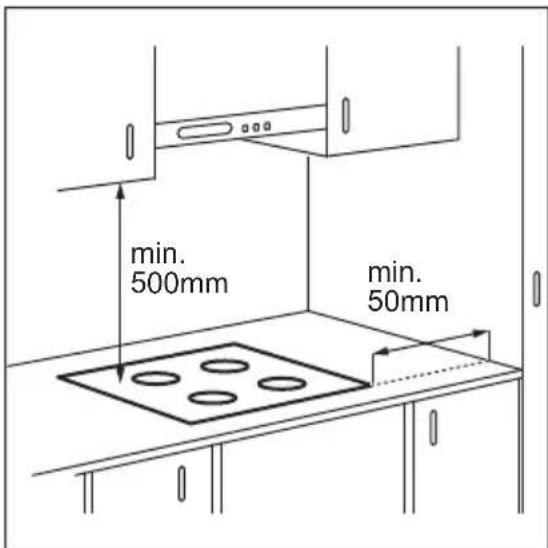
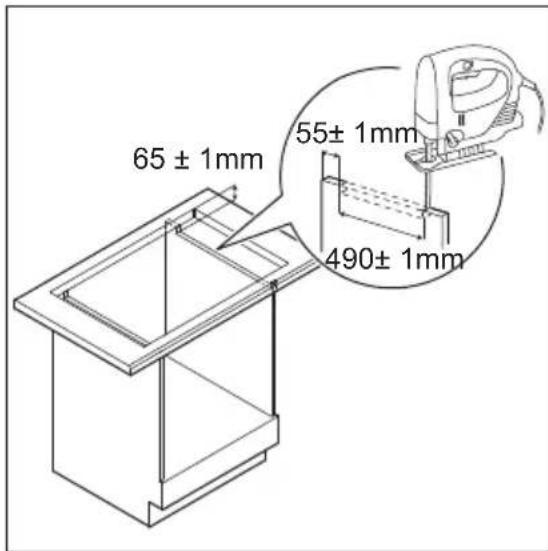
If the appliance is installed above a drawer, the hob ventilation can warm up the items stored in the drawer during the cooking process.
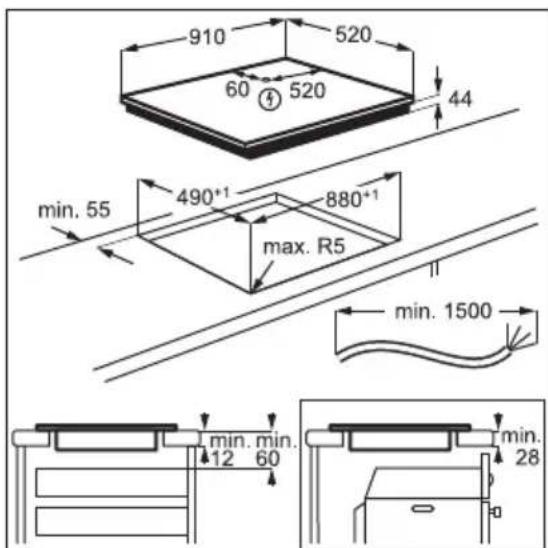
Find the video tutorial "How to install your Electrolux Induction Hob - Worktop installation" by typing out the full name indicated in the graphic below.

YouTube
www.youtube.com/electrolux www.youtube.com/aeg
How to install your Electronlux Induction Hob - Worktop installation

4.PRODUCT DESCRIPTION
4.1 Cooking surface layout
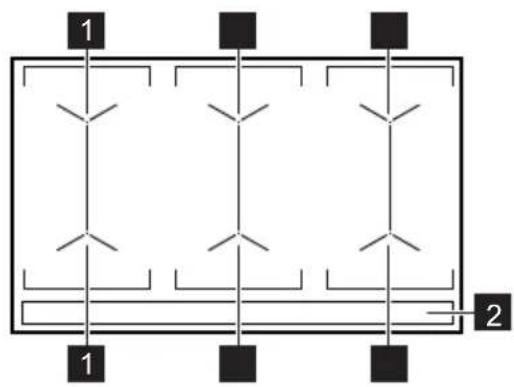
1 Induction cooking surface 2 Control panel
4.2 Control panel layout
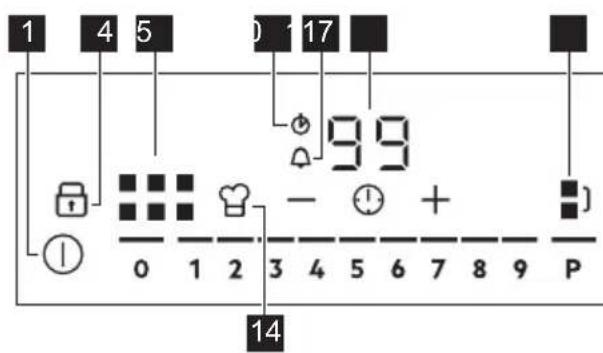
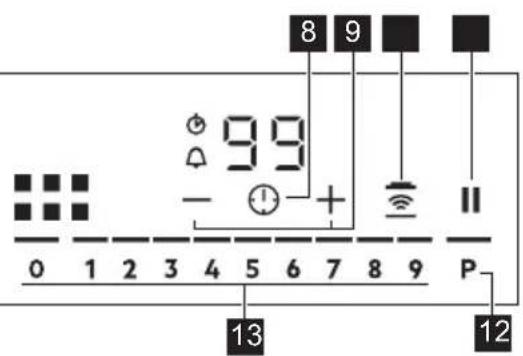
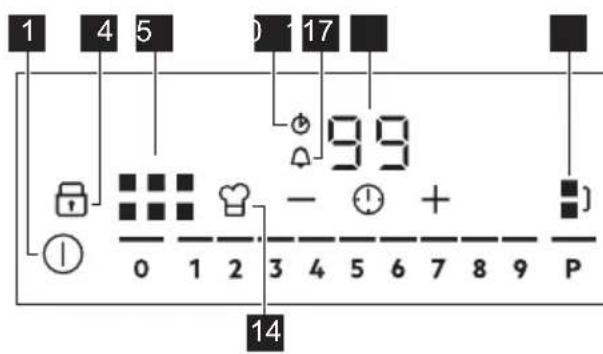
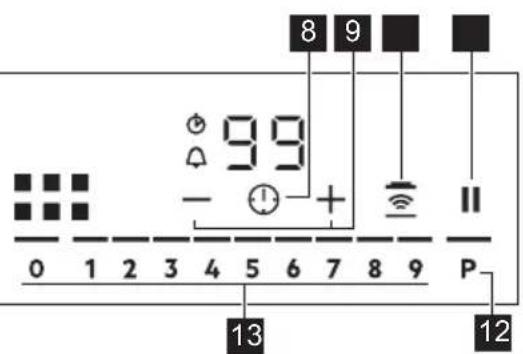
Use the sensor fields to operate the appliance. The displays, indicators and sounds tell which functions operate.
Sensor field Comment
| 1 | ① | To activate and deactivate the hob. |
| 2 | To activate and deactivate Lock or Child Safety Device. | |
| 3 | To show the active zone. | |
| 4 | CountUp Timer indicator. | |
| 5 | Count Down Timer indicator. | |
| 6 | - Timer display: 00 - 99 minutes. | |
| 7 | To activate and deactivate Bridge and to switch between the modes. | |
| 8 | To select Timer functions. | |
| 9 | +/- | To increase and decrease the time. |
Sensor field Comment
| 10 | To activate and deactivate Hob2Hood. |
| 11 | To activate and deactivate Pause. |
| 12 | To activate PowerBoost. |
| 13 | - To set a heat setting: 0 - 9. |
| 14 | To activate and deactivate.PowerSlide. |
5. DAILY USE

WARNING!
Refer to Safety chapters.
5.1 Activating and deactivating
Touch for 1 second to activate or deactivate the hob.
The control panel comes on after you activate the hob and goes off after you deactivate the hob.
5.2 Automatic Switch Off
The function deactivates the hob automatically if:
- you do not place any cookware on the hob for 50 seconds,
- you do not set the heat setting for 50 seconds after you place the cookware,
- you spill something or put something on the control panel for more than 10 seconds (a pan, a cloth). When you hear the acoustic signal, the hob deactivates. Remove the object or clean the control panel.
- the hob gets too hot (e.g. when a saucepan boils dry). Let the cooking zone cool down before you use the hob again.
- you do not deactivate a cooking zone or change the heat setting. After some time, the hob deactivates.
The relation between the heat setting and the time after which the hob deactivates:
Heat setting The hob deactivates after
1-2 6 hours 3-4 5 hours 5 4 hours 6-9 1.5 hours
5.3 Using the cooking zone

CAUTION!
Do not place hot cookware on the control panel. There is a risk of damage to the electronic parts.
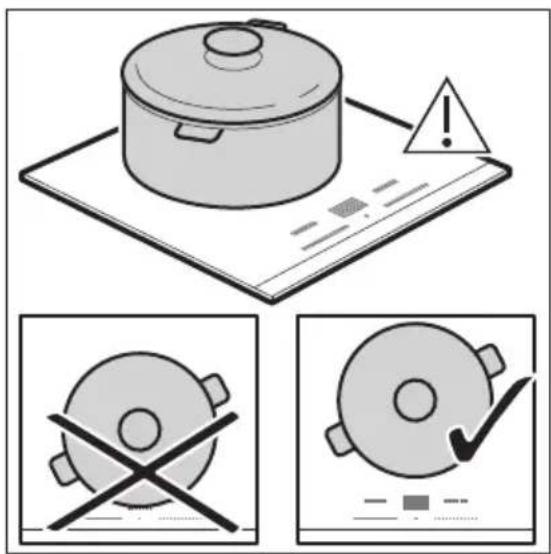
Place the cookware in the centre of the selected zone.
Induction cooking zones adapt to the dimension of the bottom of the cookware automatically.
When you place the cookware in the correct position, the hob recognizes it and the appropriate control bar comes on. A red cooking zone indicator appears above the control bar and indicates the position of the pot.
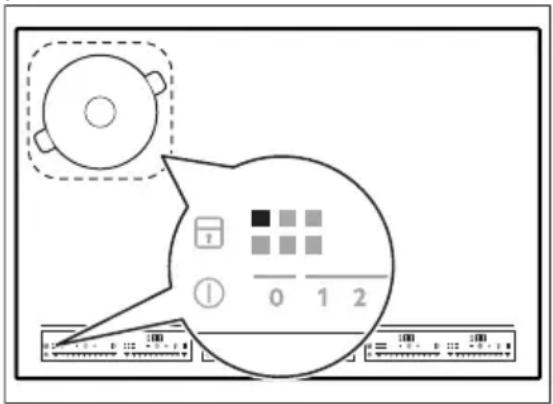
Each square on the control panel represents one cooking zone on the induction cooking surface. Zone indicators show which cooking zone is controlled by the appropriate control bar.
5.4 Heat setting
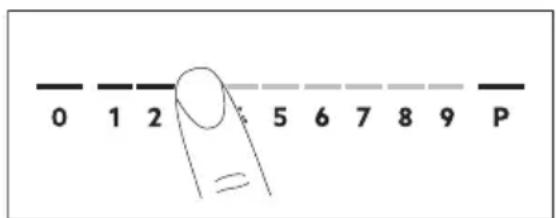
- Press the desired heat setting on the control bar. You can also move your finger along the control bar to set or change the heat setting for a cooking zone.
- To deactivate a cooking zone, press 0. Once you place a pot on the cooking zone and set the heat setting, it remains the same for 2 minutes after you remove the pot. The control bar and the cooking zone indicator blink for 2 minutes. If you place the pot on the cooking zone again within this time, the heat setting reactivates. Otherwise the cooking zone deactivates.
5.5 OptiHeat Control (3 step Residual heat indicator)

WARNING!
As long as the indicator is on, there is a risk of burns from residual heat.
The induction cooking zones produce the heat necessary for the cooking process directly in the bottom of the cookware. The glass ceramic is heated by the heat of the cookware.
The indicators appear when a cooking zone is hot. They show the level of the residual heat for the cooking zones you are currently using.
The indicator may also appear:
for the neighbouring cooking zones even if you are not using them, - when hot cookware is placed on cold cooking zone, - when the hob is deactivated but the cooking zone is still hot.
The indicator disappears when the cooking zone has cooled down.
5.6 Bridge
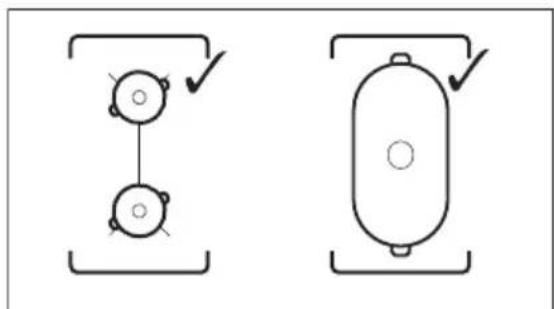
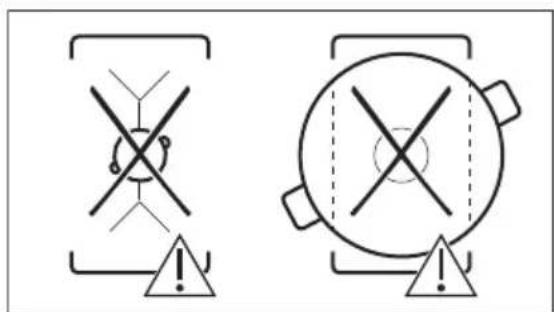
This function connects two cooking zones and they operate as one. You can use the function with large cookware.
- Place the cookware on two cooking zones. The cookware must cover the centres of both zones.
turns white. 2. Touch B activate the function. 3. Set the heat setting. The cookware must cover the centres of both zones but not go beyond the area marking.
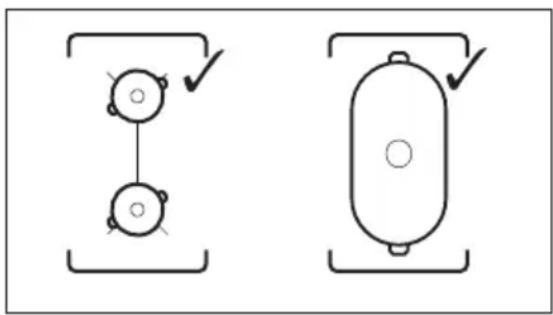
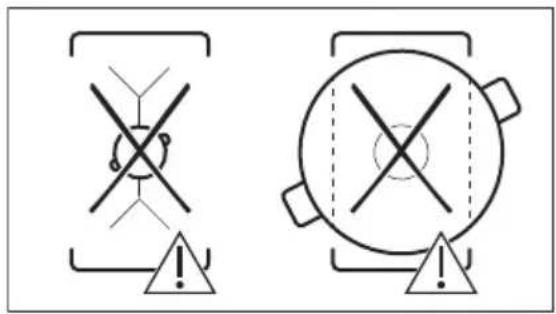
To deactivate the function, touch The cooking zones operate independently.
5.7 PowerBoost
This function activates more power for the appropriate induction cooking zone, depending on the cookware size. The function can be activated only for a limited period of time.
Touch P to activate the function for the cooking zone.
The symbol turns red.
The function deactivates automatically.
For maximum duration values, refer to "Technical data".
5.8 Pause
When the function is active, and symbols can be used.
The function does not stop the timer functions.
Press to activate the function. The symbol turns red. The heat setting is lowered to 1.
To deactivate the function: press The symbol turns white. The previous heat setting comes on.
5.9 Timer

Count Down Timer
Use this function to specify how long a cooking zone should operate during a single cooking session.
First set the heat setting, then set the function.
- Touch to activate the function or change the time. The timer digits and the indicators + and come on the display. turns red, and turns white. If the timer is not set, all indicators disappear after 4 seconds.
- Touch or to set the time (00 - 99 minutes). After 3 seconds, the timer starts to count down automatically. The indicators 1 , and disappear. Stays red.
When the time comes to an end, a signal sounds and flashes. To stop the signal, touch
To deactivate the function: touch The indicators and come on. Use or to set on the display. Alternatively, set the heat level to 0. As a result, a signal sounds and the timer is cancelled.

CountUp Timer
You can use this function to monitor how long a cooking zone operates.
Touch twice to activate the function. The indicator turns red, the timer starts to count up automatically.
To deactivate the function: touch When the indicators light up, touch

Minute Minder
You can use this function when the hob is activated but no cooking zone operates.
To see the control panel, place a pot on a cooking zone.
- Touch, until the indicator turns red, to activate the function.
- Touch or to set the time. The function starts automatically after 4 seconds. The indicators, and disappear. Stays red.
When you set the function, you can remove the pot.
When the time comes to an end, a signal sounds and flashes. Touch to stop the signal.
To deactivate the function: touch The indicators + and light up. Use or to set on the display.

The function has no effect on the operation of any cooking zone.
5.10 Lock
You can lock the control panel while the hob operates. It prevents an accidental change of the heat setting.
Set the heat setting first.
Touch to activate the function. The symbol turns red and blinks.
To deactivate the function, touch The symbol turns white.

When you deactivate the hob, you also deactivate this function.
5.11 Child Safety Device
This function prevents an accidental operation of the hob.
Activate the hob first and do not set the heat setting.
Touch until it turns red to activate the function. The control bars disappear. Deactivate the hob.

When you deactivate the hob, the function is still active.
To deactivate the function for only one cooking time: Activate the hob with ① comes on. Touch until it turns white. The control bars appear. Set the heat setting within 50 seconds. You can operate the hob. When you deactivate the hob with ① the function is still active.
To deactivate the function permanently: Activate the hob and do not set the heat setting. Touch until it turns white. The control bars appear. Deactivate the hob.
5.12 PowerPoint
This function allows you to adjust the temperature by moving the cookware to a different position on the induction cooking area.
The function divides the induction cooking area into three areas with different heat settings. The hob detects the position of the cookware and adjusts the heat setting corresponding to the position.

Use only one pot when you operate the function. If you want to change the heat setting, lift up the cookware and place it on a different zone. Sliding the cookware can cause scratches and discolouration of the surface.
The zone indicator shows both zones in a bridge even if only one of the zones is used.
- You may adjust the heat setting manually only if at least one of the zones is activated automatically.
- You can change the heat settings for each position separately. When you deactivate the hob, it remembers your heat settings and applies them next time you activate the function.
- If you want to change the heat setting, lift up the cookware and place it on a different zone. Sliding the cookware can cause scratches and discolouration of the surface.
Touch to activate the function. The symbol turns red and the control bar displays the default heat setting. All cooking zones operate for 9 minutes. After 9 minutes, an acoustic signal sounds and the empty cooking zones are deactivated. Touch to resume this function. You can move the pot or place it in a new position.
To modify the default heat setting manually, touch the control bar and choose the appropriate level.
- You may change the default heat setting only if the function is active.
- You can change the default heat settings for each position separately. When you deactivate the hob, it remembers your settings and applies them the next time you activate the function.
To deactivate the function, touch the symbol. The symbol turns white.
5.13 Hob²Hood
It is an advanced automatic function which connects the hob to a special hood. Both the hob and the hood have an infrared signal communicator. The speed of the fan is defined automatically based on the mode setting and the temperature of the hottest cookware on the hob. You can also operate the fan from the hob manually.

For most hoods, the remote system is originally deactivated. Activate it before you use the function. For more information, refer to the hood user manual.
Operating the function automatically
To operate the function automatically, set the automatic mode to H1 - H6. The hob is originally set to H5. The hood reacts whenever you operate the hob. The hob recognizes the temperature of the cookware automatically and adjusts the speed of the fan.
Activating the light
You can set the hob to activate the light automatically whenever you activate the hob. To do so, set the automatic mode to H1 - H6.

The light on the hood deactivates 2 minutes after deactivating the hob.
Automatic modes
| Auto- | matic light | Boiling 1) | Frying 2) |
| Mode H0 Off Off Off | |||
| Mode H1 On Off Off | |||
| Mode H23) | On Fan speed 1 | Fan speed 1 | |
| Mode H3 On Off Fan speed | 1 | ||
| Mode H4 On Fan speed | 1 | Fan speed 1 | |
| Mode H5 On Fan speed | 1 | Fan speed 2 | |
| Mode H6 On Fan speed | 2 | Fan speed 3 | |
1) The hob detects the boiling process and activates the fan speed in accordance with the automatic mode. 2) The hob detects the frying process and activates the fan speed in accordance with the automatic mode. 3) This mode activates the fan and the light and does not rely on the temperature.
Changing the automatic mode
- Deactivate the appliance.
- Touch for 3 seconds. The display comes on and goes off.
- Touch for 3 seconds.
- Touch a few times until it comes on.
- Touch the Timer to select an automatic mode.
When you finish cooking and deactivate the hob, the hood fan may still operate for a certain period of time. After that time, the system deactivates the fan automatically and prevents accidental activation of the fan for the next 30 seconds.

To operate the hood directly on the hood panel, deactivate the automatic mode of the function.
Operating the fan speed manually
You can also operate the fan from the hob manually.
Touch when the hob is active.
This deactivates automatic operation of the function and allows you to change the fan speed manually.
When you press, you raise the fan speed by one. When you reach an intensive level and press again, you set the fan speed to 0, which deactivates the hood fan. To start the fan again with fan speed 1, touch.

To activate automatic operation of the function, deactivate the hob and activate it again.
5.14 OffSound Control (Deactivating and activating the sounds)
Deactivate the hob first.
- Touch for 3 seconds to activate the function.
The display comes on and goes out.
- Touch for 3 seconds.
bO or bcomes on.
- Touch of the timer to choose one of the following:
- the sounds are off
- the sounds are on
- Wait until the hob deactivates automatically to confirm your selection.
When the function is set to byou can hear the sounds only when:
·you touch ①
6. HINTS AND TIPS

WARNING!
Refer to Safety chapters.
- Minute Minder comes down
- Count Down Timer comes down
- you put something on the control panel.
5.15 Power management
If multiple zones are active and the consumed power exceeds the limitation of the power supply, this function divides the available power between all cooking zones.
The hob controls heat settings to protect the fuses of the house installation.
- Cooking zones are grouped according to the location and number of the phases in the hob. Each phase has a maximum electricity loading of 3680 W. If the hob reaches the limit of maximum available power within one phase, the power of the cooking zones will be automatically reduced.
- For cooking zones that have a reduced power, the control panel shows the maximum possible heat settings.
- If a higher heat setting is not available reduce it for the other cooking zones first. The activation of the function depends on the number and size of pots.
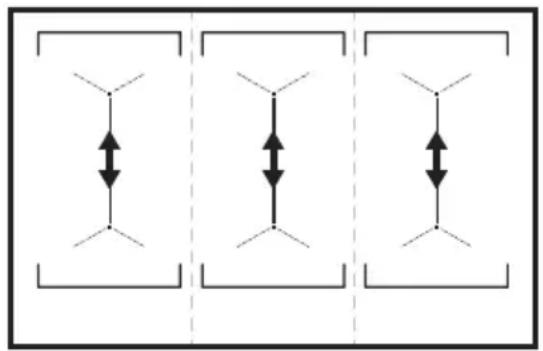
Refer to the illustration for possible combinations in which power can be distributed among the cooking zones.
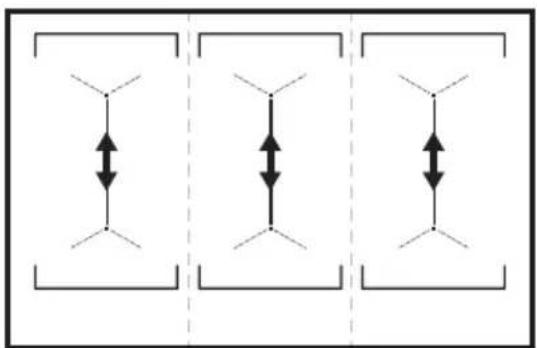
6.1 Cookware

For induction cooking zones a strong electro-magnetic field creates the heat in the cookware very quickly.
Use the induction cooking zones with suitable cookware.
- The bottom of the cookware must be as thick and flat as possible.
- Ensure pan bases are clean and dry before placing on the hob surface.
- In order to avoid scratches, do not slide or rub the pot across the ceramic glass.
Cookware material
- Correct: cast iron, steel, enamelled steel, stainless steel, multi-layer bottom (with a correct marking from a manufacturer). Not correct: aluminium, copper, brass, glass, ceramic, porcelain.
Cookware is suitable for an induction hob if:
- Water boils very quickly on a zone set to the highest heat setting.
- A magnet pulls on to the bottom of the cookware.
Cookware dimensions
- Induction cooking zones adapt to the dimension of the bottom of the cookware automatically.
- The cooking zone efficiency is related to the diameter of the cookware. The cookware with a diameter smaller than the minimum receives only a part of the power generated by the cooking zone.
- For both safety reasons and optimal cooking results, do not use cookware larger than indicated in "Cooking zones specification". Avoid keeping cookware close to the control panel during the
cooking session. This might impact the functioning of the control panel or accidentally activate hob functions.

Refer to "Technical data".
6.2 The noises during operation
If you can hear:
- Crack noise: cookware is made of different materials (a sandwich construction). Whistle sound: you use a cooking zone with a high power level and the cookware is made of different materials (a sandwich construction).
- humming: you use a high power level.
- clicking: electric switching occurs.
- hissing, buzzing: the fan operates.
The noises are normal and do not indicate any malfunction.
6.3 Öko Timer (Eco Timer)
To save energy, the heater of the cooking zone deactivates before the countdown timer sounds. The difference in the operation time depends on the heat setting level and the length of the cooking operation.
6.4 Examples of cooking applications
The correlation between the heat setting of a zone and its consumption of power is not linear. When you increase the heat setting, it is not proportional to the increase of the consumption of power. It means that a cooking zone with the medium heat setting uses less than a half of its power.

The data in the table is for guidance only.
| Heat setting Use to: Time | Hints (min) |
| 1 Keep cooked food warm. as neces- | Put a lid on the cookware. |
| sary | |
| 1 - 2 Hollandaise sauce, melt: butter, choco-late, gelatine. | 5 - 25 Mix from time to time. |
Heat setting Use to: Time
Hints
(min)
1 - 2 Solidify: fluffy omelettes, baked eggs. 10 - 40 Cook with a lid on.
2-3 Simmer rice and milkbased dishes, heat up ready-cooked meals.
25 - 50 Add at least twice as much liquid as rice, mix milk dishes halfway through the procedure.
3 - 4 Steam vegetables, fish, meat. 20 - 45 Add a couple of tablespoons of liquid.
4 - 5 Steam potatoes. 20 - 60 Use max. 1% of water for 750g of po
tatoes.
4-5 Cook larger quantities of food, stews and soups.
60 - 150 Up to 3 l of liquid plus ingredients.
6-7 Gentle fry: escalope, veal cordon bleu, cutlets, rissoles, sausages, liver, roux, eggs, pancakes, doughnuts.
as necessities- Turn halfway through. sary
7-8 Heavy fry, hash browns, loin steaks, steaks.
5 - 15 Turn halfway through.
9 Boil water, cook pasta, sear meat (goulash, pot roast), deep-fry chips.

Boil large quantities of water. PowerBoost is activated.
6.5 Hints and Tips for Hob²Hood
When you operate the hob with the function:
- Protect the hood panel from direct sunlight.
- Do not spot halogen light on the hood panel.
- Do not cover the hob control panel.
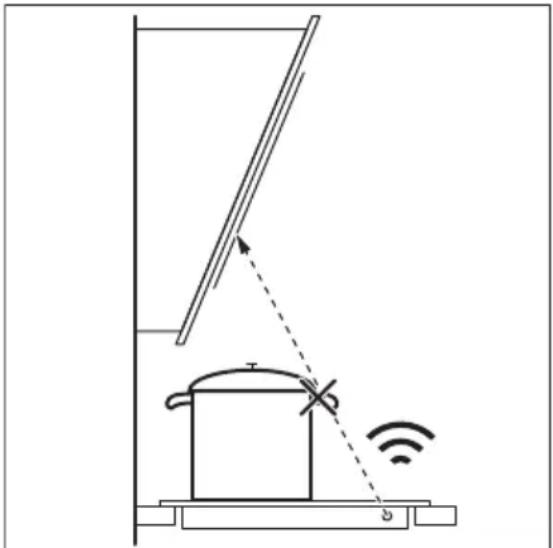
- Do not interrupt the signal between the hob and the hood (e.g. with the hand, a cookware handle or a tall pot). See the picture.
The hood in the picture is only exemplary.
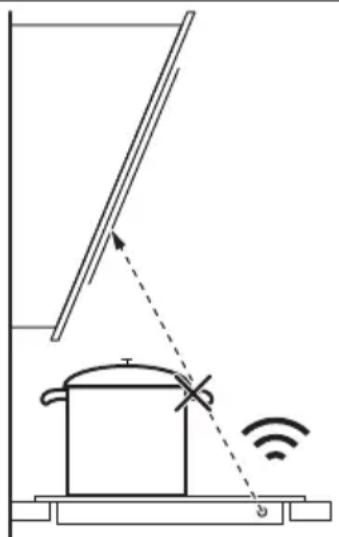

Other remotely controlled appliances may block the signal. Do not use any such appliances near to the hob while Hob²Hood is on.
Cooker hoods with the Hob²Hood function To find the full range of cooker hoods which work with this function refer to our consumer website. The Electrolux cooker hoods that work with this function must have the symbol
7. CARE AND CLEANING

WARNING!
Refer to Safety chapters.
7.1 General information
Clean the hob after each use. Always use cookware with a clean base. - Scratches or dark stains on the surface have no effect on how the hob operates. - Use a special cleaner suitable for the surface of the hob. - Use a special scraper for the glass.
7.2 Cleaning the hob
- Remove immediately: melted plastic, plastic foil, sugar and food with sugar,
otherwise, the dirt can cause damage to the hob. Take care to avoid burns. Use a special hob scraper on the glass surface at an acute angle and move the blade on the surface.
- Remove when the hob is sufficiently cool: limescale rings, water rings, fat stains, shiny metallic discoloration. Clean the hob with a moist cloth and a non-abrasive detergent. After cleaning, wipe the hob dry with a soft cloth.
- Remove shiny metallic discoloration: use a solution of water with vinegar and clean the glass surface with a cloth.
8. TROUBLESHOOTING

WARNING!
Refer to Safety chapters.
8.1 What to do if...
Problem Possible cause Remedy
| You cannot activate or operate the hob. | The hob is not connected to an elec- trical supply or it is connected incor- rectly. | Check if the hob is correctly connected to the electrical supply. |
| The fuse is blown. Make sure that the fuse is the cause of | the malfunction. If the fuse is blown again and again, contact a qualified electrician. | |
| You touched 2 or more sensor fields at the same time. | Touch only one sensor field. | |
| Pause operates. Refer to "Daily use". | ||
| There is water or fat stains on the control panel. | Clean the control panel. | |
| You cannot select the maximum heat setting for one of the cook- ing zones. | The other zones consume the maxi- mum available power. Your hob works properly. | Reduce the heat setting of the other cooking zones connected to the same phase. Refer to "Power management". |
| An acoustic signal sounds and the hob deactivates. An acoustic signal sounds when the hob is deactivated. | You put something on one or more sensor fields. | Remove the object from the sensor fields. |
Problem Possible cause Remedy
| The hob deactivates. You put something on the sensor field ① | Remove the object from the sensor field. | |
| Residual heat indicator does not come on. | The zone is not hot because it operated only for a short time or the sensor is damaged. | If the zone operated sufficiently long to be hot, speak to an Authorised Service Centre. |
| Hob²Hood does not work. You covered the control panel. Remove the object from the control panel. | ||
| You use a very tall pot which blocks the signal. | Use a smaller pot, change the cooking zone or operate the hood manually. | |
| There is no sound when you touch the panel sensor fields. | The sounds are deactivated. Activate the sounds. Refer to "Daily use". | |
| comes on. | Child Safety Device or Lock oper- ates. | Refer to "Daily use". |
| The control bar blinks. There is no cookware on the zone or the zone is not fully covered. | Put cookware on the zone so that it fully covers the cooking zone. | |
| The cookware is unsuitable. Use suitable cookware. Refer to "Hints and tips". | ||
| The diameter of the bottom of the cookware is too small for the zone. | Use cookware with correct dimen- sions. Refer to "Technical data". | |
| PowerSlide operates. Two pots are placed on the flexible induction cooking area. | Use only one pot. Refer to "Flexible in- duction cooking area". | |
| and a number come on. | There is an error in the hob. Deactivate the hob and activate it again after 30 seconds. If comes on again, disconnect the hob from the electrical supply. After 30 seconds, connect the hob again. If the problem continues, speak to an Authorised Service Centre. | |
| You can hear a constant beep noise. | The electrical connection is incor- rect. | Disconnect the hob from the electrical supply. Ask a qualified electrician to check the installation. |
8.2 If you cannot find a solution...
If you cannot find a solution to the problem yourself, contact your dealer or an Authorised Service Centre. Give the data from the rating plate. Make sure, you operated the hob correctly. If not the
servicing by a service technician or dealer will not be free of charge, also during the warranty period. The information about guarantee period and Authorised Service Centres are in the guarantee booklet.
9. TECHNICAL DATA
9.1 Rating plate
Model EIV9467 PNC 949 596 708 00
Typ 61 E6A 04 AA 400 V 3N 50 - 60 Hz
Induction 11.0 kW Made in: Germany
Ser.Nr. 11.0 kW
ELECTROLUX
9.2 Cooking zones specification
| Cooking zone Nominal power (maximum heat setting) [W] | PowerBoost [W] PowerBoost maximum dura- tion [min] | Cookware diamie- ter [mm] |
| Left front 2300 3200 10 125 - 210 | ||
| Left rear 2300 3200 10 125 - 210 | ||
| Middle front 2300 3200 10 125 - 210 | ||
| Middle rear 2300 3200 10 125 - 210 | ||
| Right front 2300 3200 10 125 - 210 | ||
| Right rear 2300 3200 10 125 - 210 |
The power of the cooking zones can differ slightly from the data in the table. It changes with the material and dimensions of the cookware.
For optimal cooking results, use cookware no larger than the diameter in the table.
10. ENERGY EFFICIENCY
10.1 Product Information*
Model identification EIV9467
| Type of hob Built-In Hob | ||
| Number of cooking areas | 3 | |
| Heating technology Induction | ||
| Length (L) and width (W) of the cooking area | Left | L 37.9 cm W 22.0 cm |
| Length (L) and width (W) of the cooking area | Middle | L 37.9 cm W 22.0 cm |
| Length (L) and width (W) of the cooking area | Right L 37.9 cm | W 22.0 cm |
| Energy consumption of the cooking area (EC electric cooking) | Left 186.8 Wh / kg |
| Energy consumption of the cooking area (EC electric cooking) | Middle 186.8 Wh / kg |
| Energy consumption of the cooking area (EC electric cooking) | Right 186.8 Wh / kg |
| Energy consumption of the hob (EC electric hob) 186.8 Wh / kg | |
- For European Union according to EU 66/2014. For Belarus according to STB 2477-2017, Annex A. For Ukraine according to 742/2019.
EN 60350-2 - Household electric cooking appliances - Part 2: Hobs - Methods for measuring performance.
The energy measurements referring to the cooking area are identified by the markings of the respective cooking zones.
10.2 Energy saving
You can save energy during everyday cooking if you follow the hints below.
- When heating water, use only the amount you need.
- If possible, always put the lids on the cookware.
- Before you activate the cooking zone, put the cookware on it.
- Put the smaller cookware on the smaller cooking zones.
- Put the cookware directly in the centre of the cooking zone.
- Use the residual heat to keep the food warm or to melt it.
11. ENVIRONMENTAL CONCERNS
Recycle materials with the symbol Put the packaging in relevant containers to recycle it. Help protect the environment and human health by recycling waste of electrical and electronic appliances. Do not dispose of
appliances marked with the symbol with the household waste. Return the product to your local recycling facility or contact your municipal office.
WE'RE THINKING OF YOU
How to install your Electrolux Induction Hob - Worktop installation

4. APPLIANCE DESCRIPTION
Type 61 E6A 04 AA 400 V 3N, 50 - 60 Hz
How to install your Electrolux Induction Hob - Worktop installation
How to install your Electrolux Induction Hob - Worktop installation


www.electrolux.kz/support
Before using the appliance, please read the safety instructions carefully:
www.registerelectrolux.com


To purchase the necessary spare parts, consumables and special accessories for your appliance:
www.part33.ru
CUSTOMER CARE AND SERVICE
We recommend using original spare parts.
When contacting the service center, please have the following information ready: Model, Product Number, Serial Number.
The appliance is intended for household use only.
Dishwasher / Washing machine appliance and other household appliances connected to the water supply
Do not operate the appliance without a filter.
CONTENTS
1. SAFETY INFORMATION 105 2. SAFETY INSTRUCTIONS 107 3. INSTALLATION 109 4. PRODUCT DESCRIPTION 111 5. CONTROL PANEL 112 6. BEFORE FIRST USE 118 7. DAILY USE 120 8. TROUBLESHOOTING 121 9. TECHNICAL DATA 123 10. ENERGY EFFICIENCY 123 11. INFORMATION FOR TEST LABORATORIES 124
1. SAFETY INFORMATION
Before installing and using the appliance, carefully read the supplied instructions. The manufacturer is not responsible for any injury or damage that may result from incorrect installation or usage. Keep these instructions in a safe and accessible place for future reference.
1.1 Children and vulnerable people safety
Keep the device away from children and pets. If the device is not used for a long time, it should be stored in a dry place. Children should be supervised to ensure that they do not play with the device. Keep the device and its accessories out of reach of children. Store packaging materials out of reach of children. - WARNING: When the device is in operation or when it is cooling down, keep children and pets away from it. There is a risk of burns during operation. If the device has a safety hazard, it should be repaired. - Children should not perform cleaning and maintenance without supervision.
1.2 Safety
·WARNING: The device and its accessible parts become hot during operation. Be careful not to touch the heating elements. ·WARNING: If the surface is cracked, turn off the device to avoid the risk of electric shock.
- If the device is not working properly, turn it off and unplug it, then contact a qualified technician or service center.
- WARNING: Do not use the device with a timer or separate remote control system. CAUTION: The cleaning process must be supervised. If the cleaning process is short, it must be supervised without interruption.
- WARNING: There is a risk of burns: do not touch the hot surfaces.
- Do not place knives, forks, spoons, and lids on the hot metal surfaces, as they may become hot. Do not place the device on or near a hot gas or electric burner. Do not place the device in a heated oven.
- If you have used the device for a long time, unplug it and let it cool down before cleaning.
- If the glass surface is cracked, unplug the device to avoid the risk of electric shock and have it repaired. If the device is connected via an extension cord, unplug it to disconnect from the power supply. In these cases, contact a qualified service center. If the power cord is damaged, it must be replaced by the manufacturer, its service agent, or similarly qualified persons to avoid a hazard.
- WARNING: Only use the accessories recommended by the manufacturer or those specified in the user manual. Do not use accessories that are not recommended, as they may cause injury.
2. SAFETY INSTRUCTIONS
2.1 Installation

WARNING!
This device should only be installed by a qualified technician.

WARNING!
There is a risk of fire or electric shock.
We take full responsibility for the material. - Do not install or connect the device yourself. We will carry out installation work together with the device. Maintain a minimum distance between devices and loads. If the device becomes faulty, you may disconnect it from the power source and contact us. Do not use the device without a protective cover or with a damaged cover. To prevent injury from sharp edges, handle with care. Keep the device away from moisture and dust. Do not place objects on the top of the device. When opening the door or window, be careful not to touch the device with your hands. - There are 33 LEDs on the top of the device. - If the device is installed on a flat surface:
- Do not allow children or unauthorized persons to access the device, as they may cause damage or injury.
- Leave a gap of at least 2 cm between the device and any objects placed on the flat surface.
Remove any protective film that may be on the top of the device.
2.2 Electrical Connection

WARNING!
There is a risk of fire or electric shock.
- All electrical work must be performed by a qualified electrician. The device must be grounded. Before any installation, disconnect the device from the power supply. - Ensure that the electrical parameters on the rating plate match the electrical parameters of the power supply. Do not install the device if it is damaged. If the power cord or plug (if any) is damaged, it must be replaced by the manufacturer or a qualified person. - Use a properly grounded outlet. - Do not modify the power cord. - Do not use the device if the plug is damaged. - Do not use the device if it has been dropped or damaged. When plugging the device into an outlet, ensure that the power cord or plug (if any) does not touch the device or any hot surfaces. Do not use extension cords or adapters. Do not pull the plug (if any) or the power cord to disconnect the device. To disconnect the device, unplug it from the outlet. - For safety, any electrical repairs must be performed by a qualified electrician. Do not connect the device to an outlet until it is properly installed. After installation, do not touch the device with wet hands.
Before plugging in the device, check the voltage. To ensure safety, disconnect the power supply. Use the correct grounding. Do not touch the device with wet hands. Keep the device away from water and moisture. The device must be connected to a power source with a current rating of at least 3 A. The plug and socket must be compatible.
2.3 Installation

WARNING!
Danger of electric shock, fire, and toxic fumes.
- Before the first installation, remove all packaging materials and protective film (if any).
- Install the device on a surface that can support its weight.
- Do not modify the technical specifications of the device. Follow the instructions in the manual. Do not leave the device unattended while it is in operation.
- After connecting the power cord, press the "Off" (power) button.
- Do not place objects or containers with liquids on the device. They may become hot. Do not operate the device with wet hands or while it is in contact with water. Do not use the device near water or in damp conditions.
- If the device is damaged, disconnect it from the power source immediately. This is to prevent electric shock. When the device is in operation, keep it away from flammable materials.
Keep a distance of at least 30 cm from the device to any objects.
If the device is not working properly, it may overheat.

WARNING!
Risk of fire or electric shock.
The device may contain hazardous substances. Do not dispose of it with regular waste. It can be recycled. The device may contain batteries. Do not expose it to high temperatures. Do not place the device or its batteries near open flames or in direct sunlight.

WARNING!
It is possible to use the device only for its intended purpose.
- Do not store the device in high temperatures.
- Do not place the device on a hot surface or near an open flame. Do not cover the device with a cloth or other materials while it is in operation. Risk of fire. Do not place the device on soft surfaces or without supervision. Do not place the device near water. Do not touch the device with wet hands, or if it has been dropped or damaged, or if the power cord or plug is damaged. If the power cord is damaged, it must be replaced by the manufacturer or a qualified person.
- This device is intended for household use only. It should not be used for other purposes, such as commercial or industrial use.
2.4 Cleaning and maintenance
Clean the device regularly to maintain the quality of the material. Before cleaning, unplug the device and let it cool down. Use a soft, damp cloth to clean the device. Do not use abrasive cleaners. Do not use harsh chemicals, solvents, or metal objects to clean the device.
2.5 Service
Contact a qualified service center for repairs. Only use original spare parts. The following parts are subject to wear: This part is the temperature sensor,
which is designed to protect against overheating or to shut off the device in case of malfunction. They are not intended for use in other applications and must be replaced by a qualified technician.
2.6 Storage

WARNING!
There is a risk of electric shock or fire.
If the device is not used for a long time, unplug it and store it in a dry place, away from heat sources and direct sunlight. Do not expose the device to rain or moisture. If the device is damaged, do not use it and contact a qualified service center.
3. OPERATION

Check the tap water pressure.
3.1 Before installation
Before installation, prepare the appliance and the required tools. The appliance must be installed in accordance with the instructions.
Serial number
3.2 Included documents
After checking the included documents against the list and standard requirements, keep them in a safe place.
3.3 Extension cable
The appliance is supplied with an extension cable.
To extend the cable if needed, use a cable of type H05V2V2-F with a temperature rating not exceeding 90°C. Contact the service center. The extension cable must be used only with the appliance.
3.4 Installation
Install the appliance on a stable surface, away from other appliances. Follow the installation instructions.
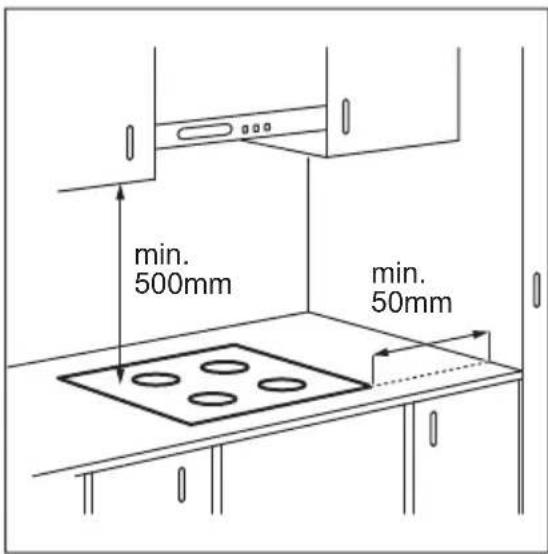
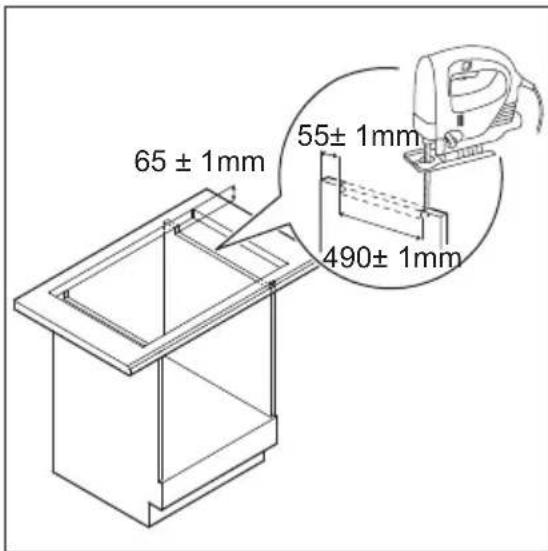
If the appliance is installed on a stable surface, the risk of tipping over is minimized.
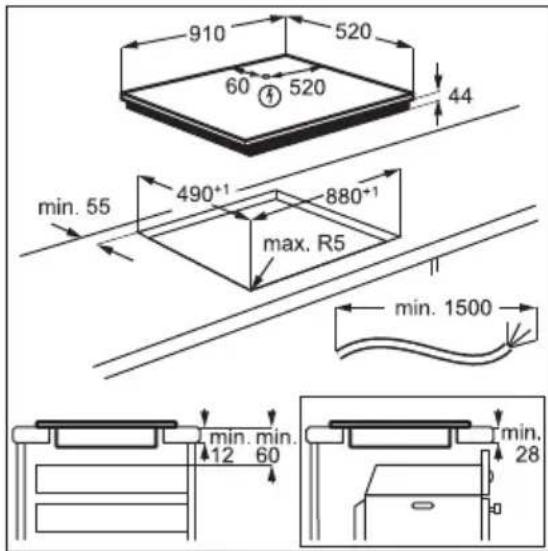
For detailed installation instructions, refer to the video tutorial "Electrolux Induction Hob Installation Guide - Installation on a Countertop".

YouTube
www.youtube.com/electrolux www.youtube.com/aeg
How to install your Electrolux Induction Hob - Worktop installation

4.1 Control panel description
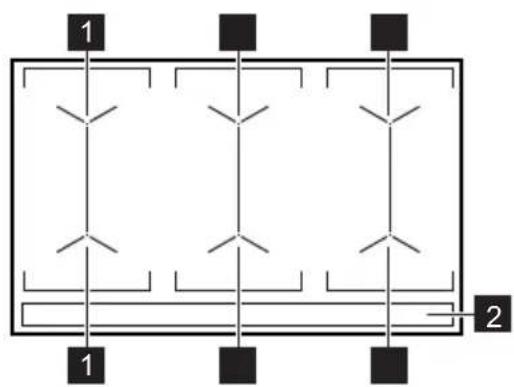
1 Power control 2 Timer display
4.2 Control panel description
Touch controls for operating the appliance. Displays, indicators and acoustic signals show which functions are active.
= /F Indicator showing when a cooking zone is in use.
The cooking zones use the residual heat of the hotplates. The ceramic glass becomes hot when the zones are in use.
The indicators show which cooking zones are in use. They show the current heat setting of the zones.
The following indicator is also available:
- If the cooking zones are not used, the residual heat indicator will light up when the zones are hot.
- If the cooking zones are not used, the residual heat indicator will light up when the zones are hot.
The indicator shows that the cooking zones are hot.
5.6 Bridge
This function is designed to protect the device from overheating. The function can be turned on for a long time.
- To use the device, you need a pipe with a diameter of at least 2 inches. Activate it. 2. To turn off the function, press the button.
- The parameters are standard. The device requires a pipe with a diameter of at least 2 inches, but it can be used without a pipe in some cases.
To turn off the function, press the button. The device settings are set individually.
5.7 PowerBoost
This function provides additional power to the device and increases its performance. This function can be turned on or off.
To turn off the function assigned to the device, press the P button. The indicator light will turn on. The function will turn off automatically.
For parameters, refer to the "Technical data" section.
5.8 Reset
The function will not work if the pipe is not connected.
The timer function stops the functions.
To turn off the function, press the button.
The indicator light will turn on. The parameters will be set to 1.
To turn off the function, press the button. The indicator light will turn on.
The data will be saved in the parameter settings.
5.9 Timer
Setting the timer
This function allows you to set a timer for a specified period of time.
The parameters are set, then the function is activated.
1. Press the function key to set or change the time.
The timer indicator lights up. The red light indicates the set time, then the green light indicates the remaining time.
If the timer is not set, the indicators will turn off after 4 seconds.
2. Press the + or - key to set the time (00-99 minutes).
After 3 seconds, the timer automatically starts counting.
The indicators flash. The red light turns on.
When the set time has elapsed, a beep sounds three times.
Press the key to stop the signal.
To select the function: press the key. + and the indicators flash.
To set the time, press the + or - key. The alternative is to set the parameters to 0.
If the signal is not stopped, the timer will stop automatically.
CountUp Timer
This function is used for counting up the elapsed time.
Press the button to use the function.
When the indicator lights up red, the timer starts counting automatically. To stop the function: press the button.
When the indicator turns off, the timer stops.
Minute counter
This function can be used when the device is in operation, but it is recommended to use it when the device is not in operation.
Press the button to view the control panel.
1. To use the function, press the button when the indicator lights up red.
2. To set the time, press the + or - button.
The function starts automatically after the set time. 1, -
The indicators will light up. Press the button to set.
After setting the function, press the button.
When the set time has elapsed, the device will emit a sound signal.
Press the button to stop the signal.
Function: Input type. + Channel indicator.
Continuously press and hold the button.
The function of the input selection is described in the summary.
5.10 Culture
When pressing the button, a beep will sound. It will not respond to changes in the parameters.
The parameters are set correctly.
To disable the function, press and hold. The button will beep and flash.
Dirt: oil, iron, enamel-coated, galvanized iron, and surfaces that have been painted.
(for example, painted surfaces).
- Dirt: alcohol, acid, alkali, ceramics, glass.
In these cases, the surface is suitable for special use:
When the surface is heated, the parameters are set correctly, and the channel is quickly. - The magnetic surface is pulled tightly.
Surface cleaning
- Inductive cleaning agents are automatically applied to the surface. - The surface diameter is based on the cleaning agent. The diameter is the same as the diameter of the surface, and the cleaning agent is applied evenly. For maximum and optimal cleaning, the surface should be larger than the diameter specified in the cleaning agent instructions. When cleaning, the surface is placed on the control panel.
Press the button. This will affect the control panel or the functions may be disabled.

6eJIIMiH KapaHbI3.
6.2 XyMbic 6apbIcbIHdafbI ybyI
ErepMbIHahbIeCTiceHi3:
- cbIpTbIJaFaH dIbIc ecIceHi3: bIDbc ep TypJI MaTePnaIapdAn JxacanFaH (KoN KaTnapbl KypblMa).
- BICKbIPfAH DbIbIC: Nicipy anaHbIH KyaTbI eTe XOFapbl XaHe bIDbc ap Typni MaTePnAaHaH XacaIFaH (cHDbNtocinimeH).
- ryndey: kofapbI KyaT deHrein H naDanaHaHcbI3.
- WbIpTbInay: 3neKtp JeNiciHi Kocblnybl.
- bICbIyay,bl3bIHday:KeIeTkiuXyMbic icTei.
UybIbIH 6onybl KaIbITbl XaFdaJ XHe 6ynap ew6ip akaydbI 6iDipMeiDi.
6.3 Oko Timer (3ko TaMep)
KyaattbI yHemdey wHnicipy aHaHBHbIH Kbl3dbIpfbWbI Kepi caHaKa TaMepiHi CNrHaJIbI ecTIImeN TypbIN cHeDi. XMbIC icTeY yaBtBnHbN ap TpyPi 6onybl Kb13y napameTpIne XHe nicipy yaBtBHa 6aJNaHbICTbl.
6.4 Θ3ipney Ke3iHnde KOndaHy KaFdaIJaPbIHbIH MbIcAJaPbI
Nicipy anaHbIHbIN KbI3y napameTpimeh KyaTTbI TYbIHy MHI e3apa Typa 6aHaNbICTbI eMec. Kbl3y napameTpIH Ke6eHTkeH Ke3de, nicipy anaHbI NaaHaHaTbIH Kyat MHI nponopuHOHaNbDbI Type Ke6eMeiDi. CoHbIKtah opTaWa Kbl3y napameTpIH KOJaHaTbIH nicipy anaHbI, e3 KyaTbIHbIH JapTBICbIH a3bIH KymcaNdbl.

KecTeDi IepeKTeP TeK HycKay petiHde 6epinreH.
| Жыл汞 napametpi | Мына ушin падалану: Укыт | Кенистор (Mин.) |
| 1 Θзірінген Тамakсы Кылі устань. КожеТ | 6оллafан жafдайda | bldістары кakпаIGNEN 星бынь.3. |
| 1 - 2 Голандялік epітінг соус: май, шokолад, келатин. | 5 - 25 Apa-тура apәаласьірьнь.3. | |
| 1 - 2 Катай耗 ушін: уліпідек омілітөр. nicipінг жуmbірTKa. | 10 - 40 Кakпаftын кayын Nicipy Kepek. | |
| 2 - 3 Куриш көне сttke nicipiİng ТаГAMDардь Баяу кayнату, дайын ТаГAMDардь Кылыт. | 25 - 50 KemiHne KryiSten eki ece кeŋс сүык KOSbHbI3, Cyt TafamDarbyn NicipydiN OpTacbHa KeJreHne apәаласьірьнь.3. | |
| 3 - 4 Кекеністерд, балыксы, etti Бүmen nicipy. | 20 - 45 BiPheSe ac KacbIK cYbIKTBk KuBHybI3. | |
| 4 - 5 KapToNTы 6umen eazipney. 20 - 60 750 r kapToPka en kəsbi ¼л су πañdaʌnaHbɪh.3. | ||
| 4 - 5 Tamakсын, 6укырmaын, кэнe coplanapdibn Ylkeniipek мeilseрлepiN nicipy. | 60 - 150 3л-гe DeiH nCyrbIKTBk ППОС ИнгroduNTTeP. | |
| 6 - 7Женін Кыру: оскалон, кордог blio сыр ETi, кOTлeTTep, фрикадьkanap, сосискалap, bayibp, py, КуMbIrTkA, панkeйКтр, doHaTTap. | КажET Боллafан Жafдайda | УakbITbH nKapTbICb l ETKeHde aydapbHbI3. |
| Жыл汞 napametpi | Мына ушin пайдану: Укыт | Кенистор (Mин.) |
| 7 - 8 Каты Кыр, Kapтог Күмамы, сөб сөдөдөдөдөдөдөдөдөдөдөдөдөдөдөдөдөдөдөдөдөдөдөдөдөдөдөдөдөдөдөдөдөдөдөдөдөдөдөдөдөдөдөдөдөдөдөдөдөдөдө �ткөдөдөдөдөдөдөдөдөдөдөдөдөдөдөдөдөдөдөдөдөдөдөдөдөдөдөдөдөдөдө �тк. Картон. | 5 - 15 Укыттын жарысы отkende aydapыныз. | |
| 9 Сүдүй салу, пада озірley, оті 키ліш, кәстрәл'de Кыр), Каты КырылfaH Картон. | ||
| P | Сүдүн көр мөлшерін кайнасыз. PowerBoostSEEнсдірінedi. | |
6.5 Hob²Hood ΦyHKcIaCbIHa apHaJIraH aKbIJI-KeHeC
Pitany keleci Function with the following:
You are protected from the consequences of pressing the button incorrectly. Do not press the button with wet hands. - Do not use the control panel. - Do not use the control panel if there is a signal between the control panel and the device (with your finger, hand, or any other object). See the figure.
See the figure for the correct way to press the button.
Do not use the control panel if the device is damaged. If the device is damaged, do not use it and contact a qualified technician for repair.
Devices with the function of pressing buttons
With this function, you can use the device's buttons to control it remotely via a web page. With this function, you can use Electrolux devices
that have buttons
7. CLEANING AND MAINTENANCE

WARNING!
See the safety instructions.
7.1 Cleaning the appliance
- Clean the appliance after each use. - Do not use abrasive cleaners or sharp objects.
- Do not use steam cleaners or high-pressure cleaners on the appliance.
- Use a soft cloth dampened with water to clean the appliance.
- Use a soft cloth dampened with water to clean the appliance.
7.2 Cleaning the device
- Before cleaning: unplug the device, remove the battery, and if the device has a battery, it is possible to remove it. To avoid damage, be careful. Do not use running water to wash the device.
Wipe it with a dry cloth.
- When cleaning the device, use a soft cloth: dry cloths, wet cloths, or cloths with mild detergent. Clean the device with a soft, lint-free cloth. After cleaning, wipe the device with a dry soft cloth. For stubborn stains: dampen a cloth with water and a little mild detergent, then clean the device with a soft cloth.
8. TROUBLESHOOTING

WARNING!
Do not touch
dangerous parts.
8.1 What to do if...
| Месе biktumal ce6e6i Sheim | ||
| Плитаны icke кosa hemeces пайдана на щима сь3. | ПлITA злескtrжуеси Косылмаман hemeces ол дурьс Жалганбаган. | Плитанын олескtrжуесид дурьс КосылмаманTekceрінiz. |
| Сakтандыр fvblk kynin ketken. Акayлбikka сakтандыр fvblktsbн ce6en Кan cehcopьik epicterdi Tуртінiz. | БOLMAfAHn Tekcepɪniz. Сakтандыр fvblk kainta-кainta kynin Коте берse,бліkti олескtr Mamahын хабарласьнiz. | |
| Сi3 6ip yakblttа 2 hemeces odn da КeI cehcopьik epicterdi Tуртінiz. | Tek 6ip сehcop epicin Tуртінiz. | |
| Кidipic kymbic icteyd. «Кунделікті колдану» Беліmin Кapаньiz. | ||
| Бackapy панелінde cy hemeces мa Дakтары 6ap. | Бackapy панелін ta3anaнiz. | |
| Пису aiMaKTapbHbN bipine maks. Кызу пarametprin ophata алмайсь3. | БаSCa nicipy aiMaKTapbI МAKC. КолжетIMdi КаТы пайдали. Сi3dIn Плитань3 dnybic kymbic ICTEN Tpy. | Осы φазаFA kocbllrMAN baska nicipy aiMaKTapbHbN Kbl3dbyp napametprinH mEHH a3aYbHb3. «Kyaattы baskapу» Беліmin KapaHb3. |
| Акystкалык сгнад дыбсы ectilin, рлITA сeнedi. ПлITA сөнгн ke3de akystickалык сгнад ectileedi. | Сi3 6ip hemeces bipheue сehcopьik epicke bipdehe Keясьiz. | Сehcopьik epicterperdi 3aTы albIn TactaHb3. |
The problem may be caused by...
| ПлNTа сенedi. | Сi3 сeнсорьк epicke bip həрce Коифаныз. | Сeнсорьк epicteri 3aTTbI aalbɪn ТаCTаныз. |
| Калдык жылу inhДикаторы ханбай тур. | Аймak bICTbI emec, ce6ebi on a3 уakbIT fana KocbIbI TpyraHne сeнсорын akaybyb6ap. | Егет aiМak bICHTbI dai y3ak yakblT ЖуMbIc icTece, yekinetti kIImet КерсETY opTaIbIbHa xa6aplnacbIbI3. |
| Hob²Hoodжуmbic ictemeit typ. Ciz 6ackary naheinih kajttbIH3. Baskary naheini deri 3aTTbI albɪn ТаCTaNыз. | ||
| Сигналfa 6eRer tжасайын ete 6nik ыdltbI NaДанДынl3. | Kiiшірек bIDbI cIbI naДaнaнынl3, nicipy aiMaFbI nAbyCtIbIbI3 He neuTIH MexaHnkaIbI KOLmeh Бaskarbyl3. | |
| Панелыдн сeнсорьк epicteriH тугken ke3de esbip сигнал ectiIMeYdi. | ДыбICTbI сигнадap ceHdIPuyni. ДыбICTbI сигнадapdyi. «Кундeпikti колдAnu» БeLIMIN КарaHbI3. | |
| Жанады. | Бana kayincizdiri Крвлгысbl Hemece KylbIITay kYmbic icTeydi. | «Кундeпikti колдAnu» BeLIMIN КарaHbI3. |
| Баckару жОлafы ЖылblktaiDyI. | Аймakта ew6ip bldlc xok hemec aIMAK toIbIFbIMeH kazbIIMaFAH. | Пису aiMaFbI nToIbIFbIMeH Жа6aTbIndai etIn bIdcIbI aMakKa KoibIbI3. |
| БiDlyc саи Keilmei.Саиkec Keletin bIDbI cOKdAnbHbI3. | «СeЗКeМeKTeRжэHe KeHecTeP» БeLIMIN KapaHbI3. | |
| БiDlyc Ty6iHdIaMeTpI aiMaK yUsh Тыm KiUKeHe. | Дурьс сeIlewemdepi 6ap bIDbIcbl КoLDaHbIbI.«ТeХИнKaIbIK сипATTama»БeLIMIN KapaHbI3. | |
| PowerSlideжуmbic icteydi. Eki | Кастюн Икemdi InHydkuzmaIbIK nicipy aiMaFbIHa opHaIaCTbIbIFaH. | Тек бр кастюн di naidanahbIbI3. «Икemdi InHydkuzmaIbIK nicipy aiMaFbI» БeLIMIN KapaHbI3. |
| Eжene сан пада soladl. | ПлNTада kaTe 6ap. ПлNTaНы сeHdipin3 De, kaia 30 cesyndtaHn KeiH icSe kOcblbI3.Егет E kaYta xanca, neuTI Tok Kezihen aftbIbIbI3. 30 seCyHdTaH KeiH ПлNTaHbI KaI Ta KocblbI3. Akaylblk ЖоьlIMaca yekinettI Kbl3MeT KepeSy opTaIbIFbHa xa6aplnacbIbI3. | |
| ТураKTы сигнал дыбicsbI eCTnci3. | Злесчтпдь baiLanbIc duPyBc emec. ПлNTaHы сeLeKtrp zeniciHEN akbpaTbIbIbI. BiLIMrI sIeKtrp mamahbHa xa6aplnacbI, onbIH opHaTbIbIbH tekcepTHi3. | |
8.2 If the problem persists...
If you cannot fix the problem yourself, contact the service center. Provide the model number from the rating plate. Describe the problem in detail. If
these conditions are not met, the warranty may be void. For information about the warranty and service centers, see the warranty card.
9. TECHNICAL DATA
9.1 Rating plate
Ynrici EIV9467 PNC 949 596 708 00
Typi 61 E6A 04 AA 400 B 3N 50 - 60 T
Induction 11.0 kW Made in: Germany
Ser.No. 11.0 kW
ELECTROLUX
9.2 Instructions for use
| Пису онлайн城乡居民 Куат (еон жогары КьИЗУ паяметри) [ВТ] | PowerBoost [ВТ] PowerBoost eн КЕР узakтбК [Мин] | ыдьICTын Диаметри [MM] |
| Сол жak онлайн 2300 3200 10 125 - 210 | ||
| Сол(apткы жak 2300 3200 10 125 - 210 | ||
| Ортынfy онлайн 2300 3200 10 125 - 210 | ||
| Ортынfy(apткы 2300 3200 10 125 - 210 | ||
| Он жak онлайн 2300 3200 10 125 - 210 | ||
| Он(apткы жak 2300 3200 10 125 - 210 |
The instructions for use may differ from the device depending on the model. They are characterized by the actual material and components.
To achieve the best cooking results, the diameter of the cookware should not be larger than the indicated one.
10. CARE AND CLEANING
10.1 Information about the appliance*
Model identifier EIV9467
| ПлNTа typi Kipictipilren ПлNTa | ||
| Пису умakтарын саны 3 | ||
| КыздыруTekhoлогиясы | Инданя | |
| Пису умakтарын yзындыfы (Y) кэн eнi (E) | Con | Y 37,9 cm E 22,0 cm |
| Пису умakтарын yзындыfы (Y) кэн eнi (E) | Opta | Y 37,9 cm E 22,0 cm |
| Пису ща м弗ын узвдьчы (Y) кени (E) OH Y 37,9 сm | E 22,0 см |
| Пису ща м弗ы пайдалианатын куат мелшepi (EC electric cooking) | Сою 186,8 Вт / кг |
| Пису ща м弗ы пайдалианатын куат мелшepi (EC electric cooking) | Орета 186,8 Вт / кг |
| Пису ща м弗ы пайдалианатын куат мелшepi (EC electric cooking) | Он 186,8 Вт / кг |
| Пештой пайдалианатын куат мелшepi (EC electric hob) 186,8 Вт / кг | |
- Complies with European standard 66/2014. For Belarus, complies with STB 2477-2017 standard. For Ukraine, complies with 742/2019 standard. EN 60350-2 - Household electric cooking appliances - Part 2: Hobs - Methods for measuring performance. The cooking performance is indicated by the symbols on the control panel.
10.2 Cleaning the hob
If you do not replace the parts mentioned below, the hob may be damaged during cleaning.
Do not use a steam cleaner.
- If possible, remove the cover.
- Before cleaning the device, disconnect it from the power supply.
- Do not use steam cleaners for cleaning.
- Do not immerse the device in water or any other liquid.
If the power cord is damaged, it must be replaced by the manufacturer.
11. CONNECTION TO THE MAINS SUPPLY
Store the supplied materials in a dry place. Store the materials in a dry place for later use. Do not dispose of electrical and electronic equipment with household waste; take them to a collection point for recycling.
Do not dispose of the appliance with household waste. Do not dispose of the appliance with household waste. Take it to a recycling center or contact your local waste disposal service.
This product is manufactured in accordance with the requirements of the European Union. The serial number is indicated on the product. The serial number is the last digit of the year of manufacture, followed by the month and day. For example, serial number 14512345 indicates that the product was manufactured in 2021, in the month of April, on the 5th. Manufacturer: Electrolux Appliances AB, St. Göransgatan 143, 105 45 Stockholm, Sweden. Importer and manufacturer's authorized representative: OOO «Electrolux Rus», 1st Kozhevnichesky proezd 1, 115114, Moscow, Russia, tel.: 8-800-444-444-8
How to install your Electrolux Induction Hob - Worktop installation

4. DESCRIPTION OF THE DEVICE
- Press for 3 seconds.
How to install your Electronux Induction Hob - Worktop installation

4. DESCRIPTION OF THE PRODUCT
1. SAFETY INSTRUCTIONS
Before installation and use of the appliance, carefully read this instruction manual. The manufacturer is not responsible for any injuries or damage resulting from incorrect installation or use. Always keep these instructions in a safe place for future reference.
1.1 Safety of children and persons with limited capabilities
- The appliance is not intended for use by persons (including children) with reduced physical, sensory or mental capabilities, or lack of experience and knowledge, unless they are supervised or have been instructed on the use of the appliance by a person responsible for their safety. - Children should be supervised to ensure they do not play with the appliance. Keep all packaging materials out of reach of children and dispose of them in an appropriate manner. CAUTION! Do not allow children or pets near the appliance during use, and also after use, until the appliance has cooled down. The exposed elements of the appliance heat up during operation. - If the appliance is equipped with a child safety device, it should be activated. The appliance should not be serviced by children without supervision.
There is a risk of damaging the appliance.
Do not place hot cookware on the control panel. Do not drop hot lids or pans onto the glass surface. Do not allow liquids to boil over completely from cookware. Ensure that no objects or cookware fall onto the appliance. The surface may be damaged. Do not switch on the hob without cookware or with empty cookware. Do not place aluminum foil on the appliance. - Cookware made of cast iron, aluminum, or with a damaged bottom may cause scratches on the glass or glass-ceramic surface. Always lift these items when moving them on the hob. - This appliance is intended exclusively for cooking. It should not be used for other purposes, such as heating the room.
2.4 Care and cleaning
- To avoid damage to the appliance surface, clean it regularly.
- Before cleaning, switch off the appliance and let it cool down. Do not use steam cleaners or high-pressure cleaners. Clean the appliance with a soft, damp cloth. Use only neutral cleaning agents. Do not use abrasive agents, scouring pads, solvents, or metal objects.
2.5 Service
For repairs, contact an authorized service center. Use only original spare parts. - About the lamps inside the appliance: the lamps sold separately as spare parts are designed to operate in household appliances under extremely difficult temperature, vibration, and humidity conditions and are intended to convey information about the operating state of the appliance. They are not intended for use in other appliances and are not suitable for lighting household rooms.
2.6 Ignition

WARNING!
There is a risk of injury or burns.
The indicator may turn on:
For adjacent burners, even if they are not in use; when a hot pan is placed on a cold burner; when the burner is turned off but the burner is still hot.
The indicator turns off after the burner has cooled down.
5.6 Bridge
First turn on the hob, but do not select a heat level.
To activate the function, touch and hold until the display changes to red.
The control line will go out. Turn off the hob.

After turning off the hob, this function continues to work.
To deactivate the function for only one cooking cycle: turn on
the hob using ①
Touch and hold until the light changes to white.
The hotplate is controlled by the control knob. Within 50 seconds, set the heating level. The hotplate can be used. After switching off, the hotplate continues to work using the residual heat.
Permanent switching off
Function: Switch on the hotplate, but do not set the heating level. Touch
the sensor until the light changes to white. The control knob lights up. Switch off the hotplate.
5.12 PowerBoost
This function allows you to regulate the temperature by moving the cookware to another position on the induction hob.
The function divides the induction zone into three areas with different heating levels. The hotplate determines the position of the cookware and sets the heating level corresponding to its position.

Use only one pan with this function. If you need to change the heating level, lift the cookware and place it on another zone. Sliding the cookware may lead to the formation of cracks and changes in the surface color.
- The hob indicator shows both zones in Bridge mode ("Joining"), even if only one zone is used. Manual change of the heating level is only possible if at least one zone was switched on automatically.
- The heating level for each position can be set separately. When switching off the hotplate, it remembers the heating level settings and uses them the next time the function is switched on.
- If you need to change the heating level, lift the cookware and place it on another zone. Sliding the cookware may lead to the formation of cracks and changes in the surface color.
To switch on the function, touch the symbol. The light changes to red, and the control panel shows the heating level set by default. All zones will work for 9 minutes.
After 9 minutes, an audible signal will be emitted, and the empty zones will switch off.
To resume the function, touch the cookware or move it to a new position.
Touch the control panel and select the desired level.
The default heating level can only be set when the function is enabled. The default heating level can be set separately for each position. When the hob is switched off, it stores the settings and uses them the next time the function is switched on.
Touch the symbol. It lights up white.
5.13 Hob²Hood
This modern function uses automation, linking the hob with a special extractor hood. Both the hob and the extractor hood maintain communication through infrared ports. The fan speed is set automatically based on the selected mode and temperature of the cookware on the hob. There is also the possibility of manual fan adjustment using the hob.

In most extractor hoods, the remote control system is disabled by default. Before using the function, enable it. More detailed information is provided in the extractor hood user manual.
Automatic operation of the function
For automatic operation of the function, set the automatic mode by selecting from the list H1 to H6. By default, mode H5 is selected on the hob. With each use of the hob, the extractor hood reacts to its operation. The hob
regulates the fan speed, automatically determining the temperature of the cookware.
Switching on the lighting
There is the possibility to set automatic switching on of the lighting with each activation of the hob. To do this, set the automatic mode by selecting from the list H1 to H6.

2 minutes after switching off the hob, the lighting on the extractor hood switches off.
Automatic modes
Manual selection of fan speed
There is also the possibility of manual fan adjustment using the hob surface.
Touch it when the hob surface is switched on.
The function automatically controls the fan speed and allows you to change the fan speed manually.
When you press the fan speed button, the speed increases by one level. When the maximum level is reached, the next press will not switch the fan speed to the exhaust level. <0>, which leads to its stop. To restart the fan at speed "1", touch

To turn off the automatic mode, turn off the control panel with the switch.
5.14 OffSound Control (Turning on/off the acoustic signaling)
First turn off the control panel.
1. To turn on the function, touch the surface for 3 seconds. 2. Touch for 3 seconds.
The display will show "on".
3. Press the timer to make the following selection:
- Acoustic signaling off - Acoustic signaling on
4. To confirm the selection, wait until the control panel turns off automatically.
The function works only if:
Touch ① - Timer counts down - Timer counts down in reverse on the control panel. An external object has been detected.
5.15 Power management system
If, when several hobs are switched on, the power consumption exceeds the electrical limit, this function distributes the available power among all hobs. The control panel controls the heating level of the cooking zones and protects the fuses installed in the electrical system.
The hobs are divided into groups according to the location and number of levels on the control panel. The maximum electrical load on each phase is 3680 W. If the control panel reaches the maximum available power in one phase, the power of the hobs is automatically reduced.
For cooktops whose power has been reduced, the control panel only displays the maximum heating levels available for them. - If the heating level is not available, reduce the heating of the other cooktops. The activation of the function depends on the number and sizes of the cookware. Possible combinations of cooktop distribution are shown in the figure.
6. USEFUL TIPS

WARNING!
See the chapters containing safety information.
6.1 Cookware

Induction cooktops use an electromagnetic field that heats the cookware very quickly.
Use induction cooktops with suitable cookware.
- The bottom of the cookware should be as thick and flat as possible.
- Before placing the cookware on the cooking surface, make sure that the bottom of the cookware is dry and clean. To avoid scratches, do not slide the cookware on the glass-ceramic surface.
Cookware material
- Correct: cast iron, steel, enameled steel, stainless steel, cookware with a multi-layer bottom (with the manufacturer's marking).
- Incorrect: aluminum, copper, brass, glass, ceramic, porcelain.
Cookware is suitable for use on induction cooking zones if:
·Water boils very quickly on the cooktop with the maximum heating level set; a magnet sticks to the bottom of the cookware.
Cookware sizes
9. TECHNICAL DATA
9.1 Table with technical data
Model EIV9467 Product number (PNC) 949 596 708 00
Tn61E6A04AA400B3N50-60
Power 11.0 kW Made in: Germany
Serial number 11.0 kW
ELECTROLUX
9.2 Hob specifications
Made in Germany
NAVRHNUTÉ PRE VÁS
Thank you for purchasing an Electrolux appliance. You have chosen a product that has been developed based on decades of professional experience and innovation. Ingenious and stylish – designed with your comfort in mind. With every use, you can be sure that you will see excellent performance. Welcome to the world of Electrolux.
How to install your Electrolux Induction Hob - Worktop installation
4. PRODUCT DESCRIPTION
How to install your Electrolux Induction Hob - Worktop installation

4. PRODUCT DESCRIPTION
How to install your Electronlux Induction Hob - Worktop installation

4. PRODUCT DESCRIPTION
ELECTROLUX APPLIANCES AB
BUSINESS SECTOR EMA-EMEA (SEE)
ST GÖRANSGATAN 143
SE-105 45 STOCKHOLM
SWEDEN
TEL: +46 (8) 738 60 00
FAX: +46 (8) 738 63 35
www.electrolux.com
Importer: Electrolux Dayanikli Tuketim Mamulleri San. ve Tic.AS.
TR-34435 Taksim-Beyoglu-Istanbul
Customer Services: 0 850 250 35 89
musteri_hizmetleri@electrolux.com
WEB: www.electrolux.com.tr
- PRODUCT DESCRIPTION
- WE'RE THINKING OF YOU
- VISIT OUR WEBSITE TO
- CUSTOMER CARE AND SERVICE
- CONTENTS
- SAFETY INFORMATION
- CHILDREN AND VULNERABLE PEOPLE SAFETY
- GENERAL SAFETY
- SAFETY INSTRUCTIONS
- INSTALLATION
- WARNING
- ELECTRICAL CONNECTION
- USE
- CARE AND CLEANING
- SERVICE
- DISPOSAL
- BEFORE THE INSTALLATION
- BUILT-IN HOBS
- CONNECTION CABLE
- ASSEMBLY
- YOUTUBE
- COOKING SURFACE LAYOUT
- CONTROL PANEL LAYOUT
- DAILY USE
- ACTIVATING AND DEACTIVATING
- AUTOMATIC SWITCH OFF
- THE FUNCTION DEACTIVATES THE HOB AUTOMATICALLY IF
- HEAT SETTING THE HOB DEACTIVATES AFTER
- USING THE COOKING ZONE
- CAUTION
- HEAT SETTING
- OPTIHEAT CONTROL (3 STEP RESIDUAL HEAT INDICATOR)
- BRIDGE
- POWERBOOST
- PAUSE
- TIMER
- COUNT DOWN TIMER
- COUNTUP TIMER
- MINUTE MINDER
- LOCK
- CHILD SAFETY DEVICE
- POWERPOINT
- HOB²HOOD
- OPERATING THE FUNCTION AUTOMATICALLY
- ACTIVATING THE LIGHT
- AUTOMATIC MODES
- CHANGING THE AUTOMATIC MODE
- OPERATING THE FAN SPEED MANUALLY
- OFFSOUND CONTROL (DEACTIVATING AND ACTIVATING THE SOUNDS)
- HINTS AND TIPS
- POWER MANAGEMENT
- COOKWARE
- COOKWARE MATERIAL
- COOKWARE IS SUITABLE FOR AN INDUCTION HOB IF
- COOKWARE DIMENSIONS
- THE NOISES DURING OPERATION
- IF YOU CAN HEAR
- THE NOISES ARE NORMAL AND DO NOT INDICATE ANY MALFUNCTION
- ÖKO TIMER (ECO TIMER)
- EXAMPLES OF COOKING APPLICATIONS
- HEAT SETTING USE TO: TIME
- HINTS
- (MIN)
- TATOES
- HINTS AND TIPS FOR HOB²HOOD
- GENERAL INFORMATION
- CLEANING THE HOB
- TROUBLESHOOTING
- WHAT TO DO IF
- IF YOU CANNOT FIND A SOLUTION
- TECHNICAL DATA
- RATING PLATE
- COOKING ZONES SPECIFICATION
- ENERGY EFFICIENCY
- PRODUCT INFORMATION
- ENERGY SAVING
- ENVIRONMENTAL CONCERNS
- APPLIANCE DESCRIPTION
- SAFETY
- CLEANING AND MAINTENANCE
- STORAGE
- OPERATION
- BEFORE INSTALLATION
- INCLUDED DOCUMENTS
- EXTENSION CABLE
- CONTROL PANEL DESCRIPTION
- RESET
- SETTING THE TIMER
- MINUTE COUNTER
- CULTURE
- IN THESE CASES, THE SURFACE IS SUITABLE FOR SPECIAL USE
- SURFACE CLEANING
- XYMBIC 6APBICBIHDAFBI YBYI
- EREPMBIHAHBIECTICEHI
- OKO TIMER (3KO TAMEP)
- Θ3IPNEY KE3IHNDE KONDAHY KAFDAIJAPBIHBIH MBICAJAPBI
- HOB²HOOD ΦYHKCIACBIHA APHAJIRAH AKBIJI-KEHEC
- DEVICES WITH THE FUNCTION OF PRESSING BUTTONS
- CLEANING THE APPLIANCE
- CLEANING THE DEVICE
- IF THE PROBLEM PERSISTS
- INSTRUCTIONS FOR USE
- INFORMATION ABOUT THE APPLIANCE
- CONNECTION TO THE MAINS SUPPLY
- DESCRIPTION OF THE DEVICE
- DESCRIPTION OF THE PRODUCT
- SAFETY OF CHILDREN AND PERSONS WITH LIMITED CAPABILITIES
- IGNITION
- PERMANENT SWITCHING OFF
- AUTOMATIC OPERATION OF THE FUNCTION
- SWITCHING ON THE LIGHTING
- MANUAL SELECTION OF FAN SPEED
- OFFSOUND CONTROL (TURNING ON/OFF THE ACOUSTIC SIGNALING)
- POWER MANAGEMENT SYSTEM
- USEFUL TIPS
- COOKWARE SIZES
- TABLE WITH TECHNICAL DATA
- HOB SPECIFICATIONS
- NAVRHNUTÉ PRE VÁS
Brand : ELECTROLUX
Model : EIV9467
Category : Cooker