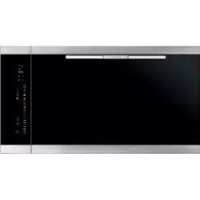
BO920TS - Oven BAUMATIC - Free user manual and instructions
Find the device manual for free BO920TS BAUMATIC in PDF.



| Product type | Built-in electric oven |
| Brand | Baumatic |
| Model | BO920TS |
| Dimensions (H x W x D) | Approximately 60 x 60 x 55 cm |
| Weight | Approximately 40 kg |
| Power supply | 230 V, 50 Hz, approximately 3 kW |
| Number of cooking functions | 12 |
| Temperature range | 50 °C to 250 °C |
| Special functions | Turbo Heat (rapid preheating), Turbo Clean (catalytic cleaning), internal temperature probe, delayed programming, timer |
| Cleaning | Turbo Clean function at 250 °C for 1 hour, removable catalytic panels |
| Safety | Control panel lock (child lock), automatic shut-off in case of inactivity, door detection (on some models) |
| Control panel | Touch control with digital display |
| Interior lighting | Yes, manual and automatic control |
| Internal temperature probe | Yes, front connector, range 30-99 °C |
| Timer | Programmable: duration, end of cooking, delayed cooking, independent timer |
| Door | Door control (audible signal and lighting) on some models |
| Spare parts and repairability | Catalytic panels available from retailer; temperature probe replaceable |
| General information | Installation by a professional recommended; demonstration mode (deactivatable by long press on light) |
Frequently Asked Questions - BO920TS BAUMATIC
User questions about BO920TS BAUMATIC
0 question about this device. Answer the ones you know or ask your own.
Ask a new question about this device
Download the instructions for your Oven in PDF format for free! Find your manual BO920TS - BAUMATIC and take your electronic device back in hand. On this page are published all the documents necessary for the use of your device. BO920TS by BAUMATIC.
USER MANUAL BO920TS BAUMATIC
Multi-language user manual
INSTRUCTION MANUAL

CreatiVe
controllo elektronico per fornii user-friendly electronic control for oven une commande physique combiniviale pour votre four bedienerfreundliche elektronische ofensteuerung controlelecrtonico para hornos fácil de usar gebruiksvriendelijke elektronische bediening voor oven controlo electronoico para fornof facile de usar
INDICE
Installation and Connection 25
Demo mode 27
Regulating the clock 28
Switching on the oven 29
Main Functions
View of front console 30
Cooking functions 30
Simple gestures for cooking 31
Regulating the cooking temperature 32
Residual heat 32
The food probe 33
Special functions: turbo heat and turbo clean 37
Oven light control 38
Programming the oven
Programming the timer: cooking time 39
Programming the timer: cooking end time 40
Programming the timer: delayed cooking 41
Programming the timer: minute counter 42
Programming the timer: cancelling the programme 43
Safety
Over lock function 43

OVEN PRESENTATION
Dear Customer, your new oven is managed by an electronic card which constantly monitors its operation in order to improve its all-round performance.
The state-of-the-art, reliable and precise touch control system.
The elegant, orderly and discreet interface, more user-friendly than ever before!
Just a few buttons, lots of functions and no difficult combination or sequence of buttons. Simply concentrate on following the recipe and the oven is ready with two movements!!!
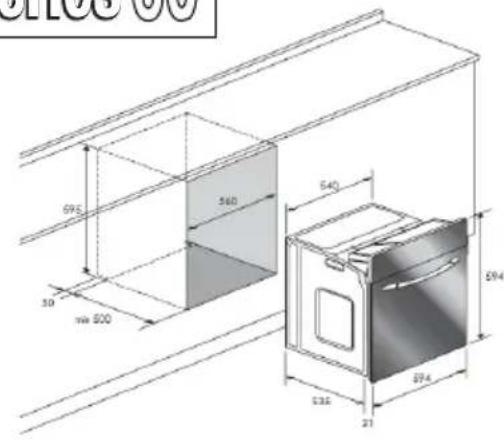
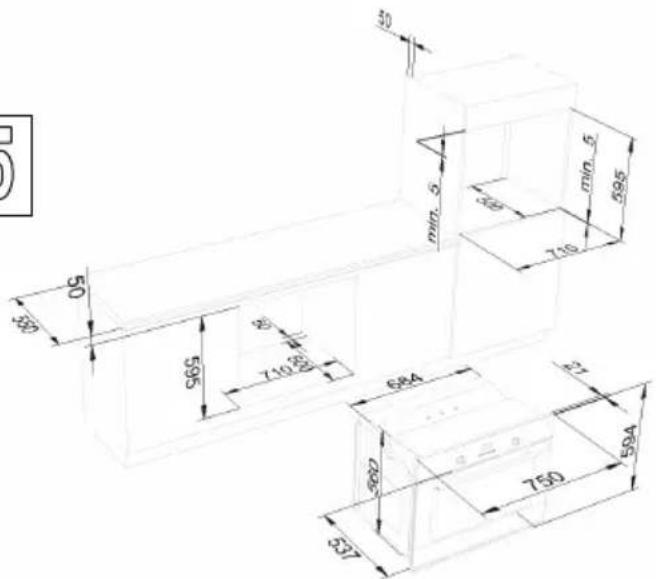
Installation and Connection
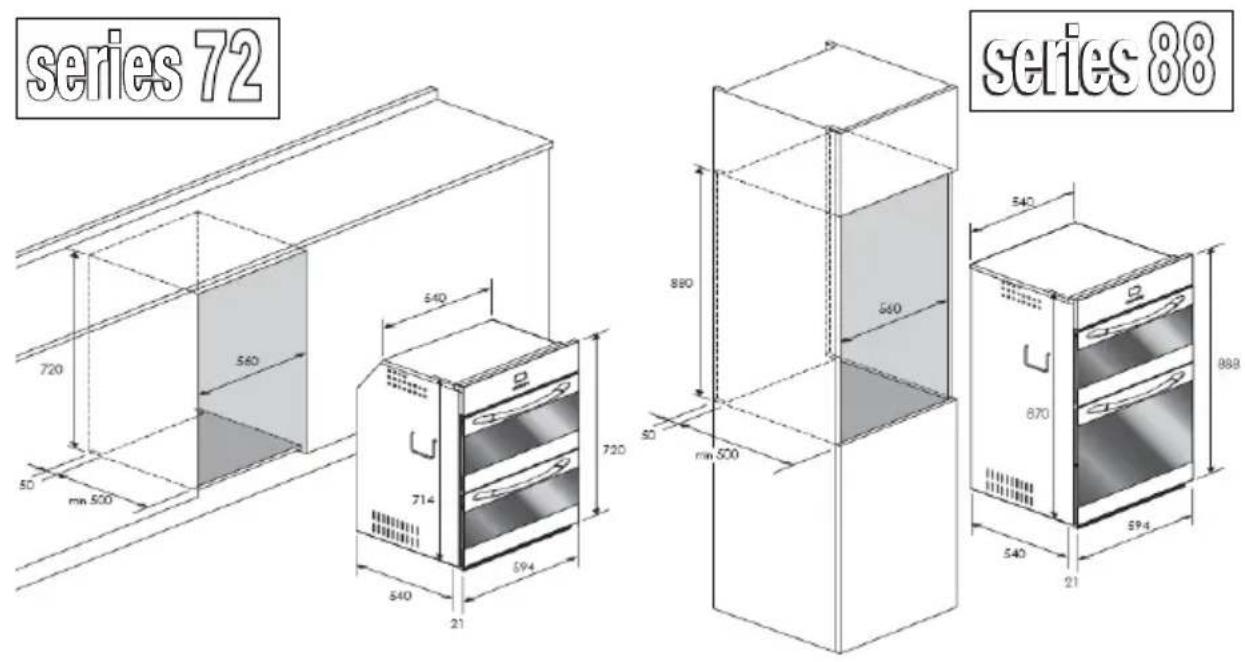
Dear Customer, this oven is a sophisticated electrical appliance, classified as a durable item. It must be installed by qualified personnel who operate in compliance with the very highest standards both for connection to the electricity supply and installation into the kitchen unit.

series 60

series 75
series 90

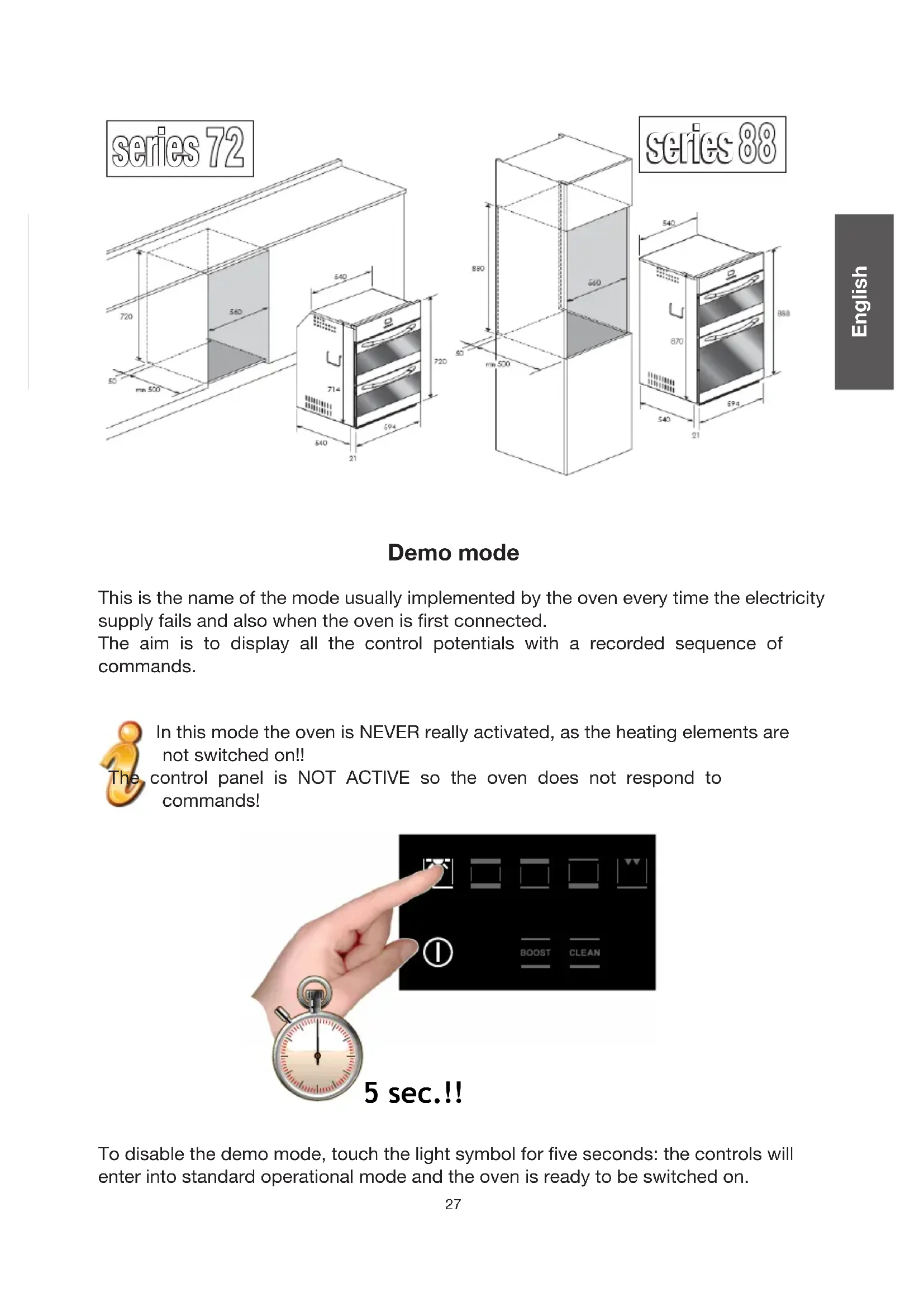
Demo mode
This is the name of the mode usually implemented by the oven every time the electricity supply fails and also when the oven is first connected.
The aim is to display all the control potentials with a recorded sequence of commands.

In this mode the oven is NEVER really activated, as the heating elements are not switched on!!
control panel is NOT ACTIVE so the oven does not respond to commands!

To disable the demo mode, touch the light symbol for five seconds: the controls will enter into standard operational mode and the oven is ready to be switched on.
Regulating the clock
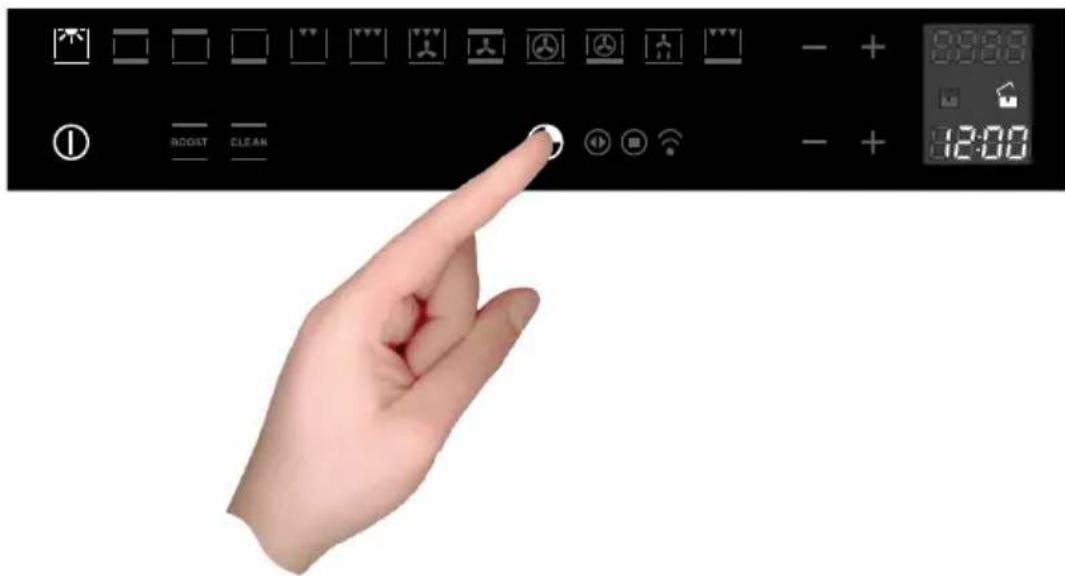
The oven signals the connection to the electricity main with a double beep. To regulate the system time, press the TIMER FUNCTIONS button for 5 sec.

Every control used is confirmed by a beep.
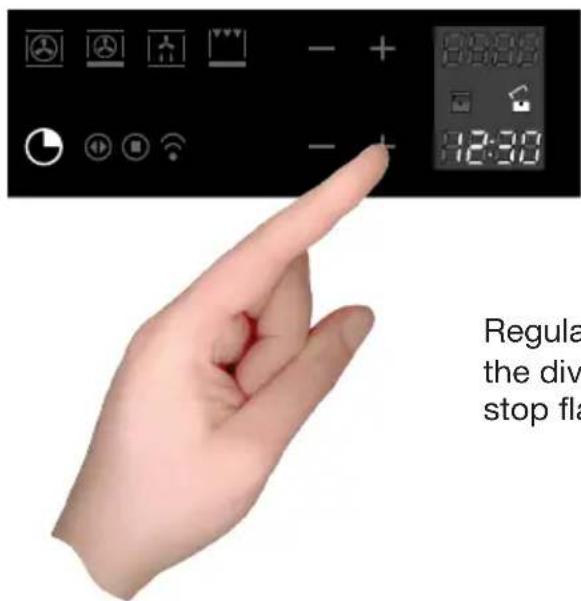
Regulate the clock using the + and - buttons: the dividing dots flash while the time is being set and stop flashing when the time has been acquired.
Switching on the oven

The oven is switched on using the ON/OFF symbol shown in the figure.
The control activates all the symbols, illuminating the background.

The control will wait eight seconds after switch-on for a cooking function to be chosen. Otherwise it interprets the switch-on as accidental and automatically switches off the oven for safety reasons.
MAIN FUNCTIONS
View of front console
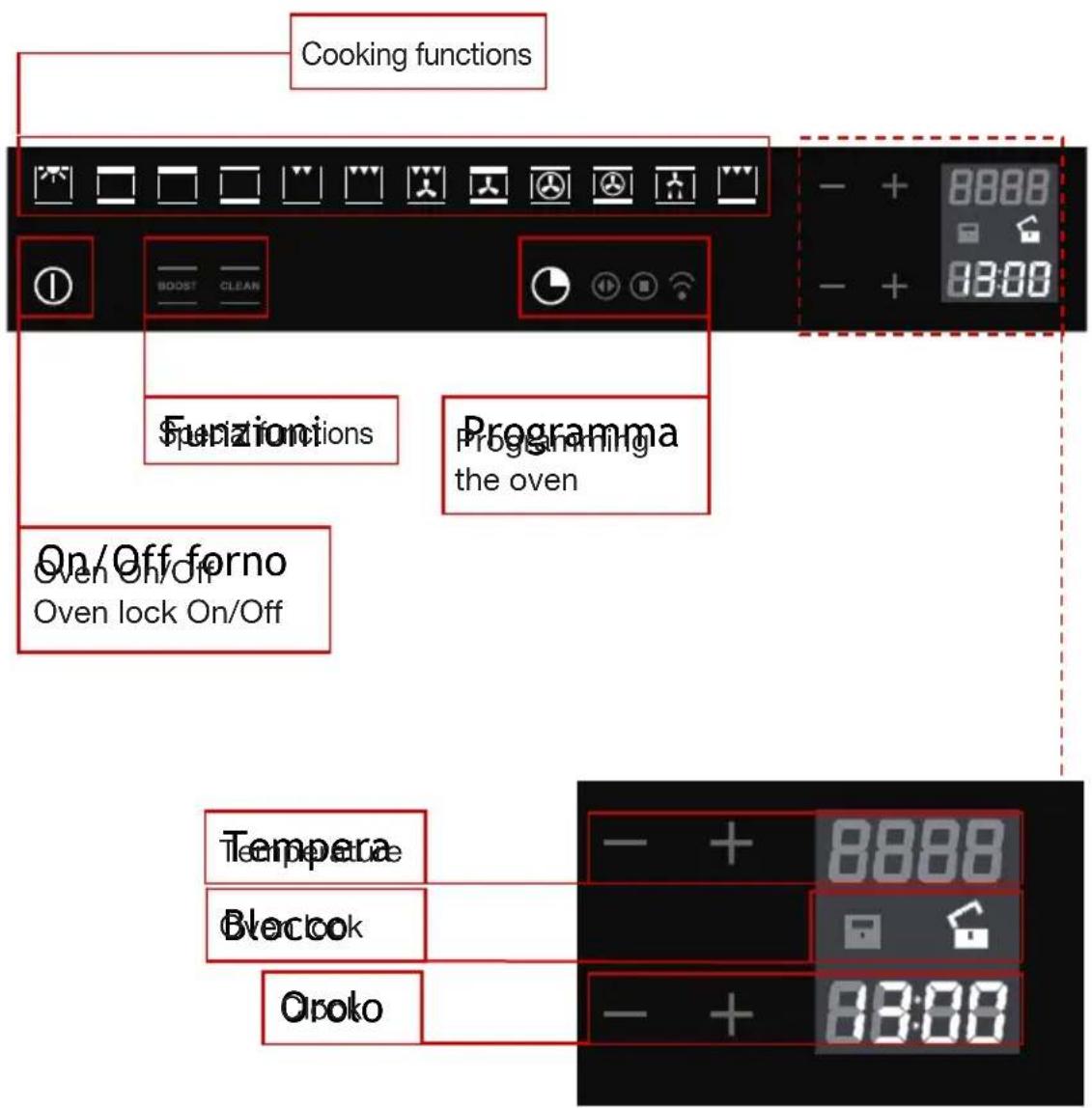
Cooking functions
The control makes a total of twelve specific cooking functions available!
Every function has a set temperature chosen on the basis of cooking tests using frequently used recipes and can easily be adjusted to suit personal preference.
The following table contains the results of the cooking tests carried out in our laboratories by a professional chef. However, this is merely a guide and the values indicated are simply to help you get started and try our your own recipes, always achieving the best results!
| F | |||||||
| °C | 160-200 | 160-180 | 140-160 | 200-230 | 210-220 | 160-180 | 190 |
| 5 | 2-3 | 2 | 2 | 1-3 | 2 | 2-3 | 2-3 |
| 30'-50' | 20'-40' | 10'-40' | 10'-20' | 45'-60' | 45'-60' | 60'-70' |
| F | |||||||||
| °C | 225-250 | 160-180 | 210-230 | 160-190 | 200-220 | 160-180 | 175-190 | 190-210 | 170-190 |
| 51 | 2 | 2 | 2 | 2 | 2-3 | 2 | 2 | 2 | 3 |
| 120'-150' | 120'-160' | 90'-120' | 90'-120' | 50'-60' | 45'-60' | 60'-70' | 40'-50' | 40'-50' | |
Simple gestures for cooking
Two simple movements are all it takes to set a cooking programme, thanks to the state-of-the-art control logic: switch on the oven and select the best function for the dish you are preparing. Simply select it and touch it!
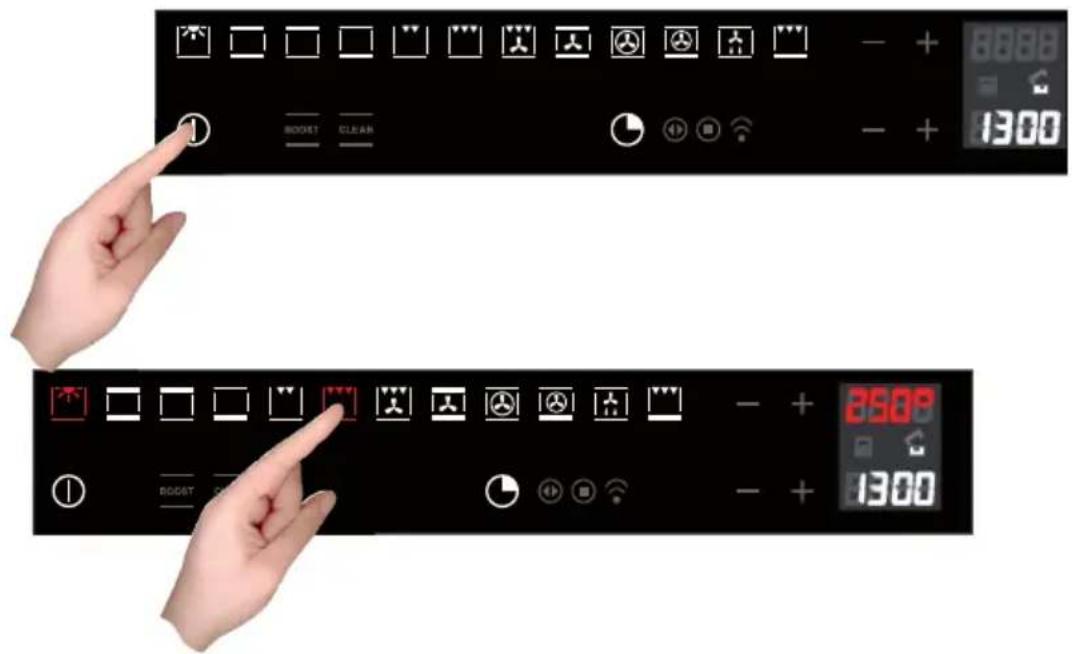

The control proposes a temperature for every function. It is possible to change it t any time, but if you are happy with it, you don't need to do anything else. The oven will be automatically activated in a few seconds!
Temperature Regulation
The control makes use of a temperature probe with a level of precision of ± 5^ offering maximum reliability of the cooking times required.
To change the temperature simply use the plus and minus symbols. The range of regulation varies from +50^ to +250^ .
It isn't necessary to confirm the change, as the control is automatically activated after just a few seconds.

During the heating process, the degrees centigrade symbol (^) symbol flashes, indicating that the heat is being regulating to reach the temperature required. When the correct temperature is reached, you will hear a beep.
Residual heat
While cooking food, the structure of the oven stores heat. This heat is kept isolated from the rest of the kitchen thanks to an excellent insulation system and certain construction details.
The heat is gradually dispersed can be used as a further cooking resource if managed appropriately: the control indicates the interior temperature, after the oven has been switched off, until it reaches 50^ .

use this feature to keep food warm or to gently complete the cooking process.
Food probe (or probe thermometer) (available on certain models)
The food probe is a thermometer which, when inserted into the food, makes it possible to check the internal temperature and use it to establish the end of cooking. For example, meat may look like it is cooked on the outside, but still be pink on the inside!
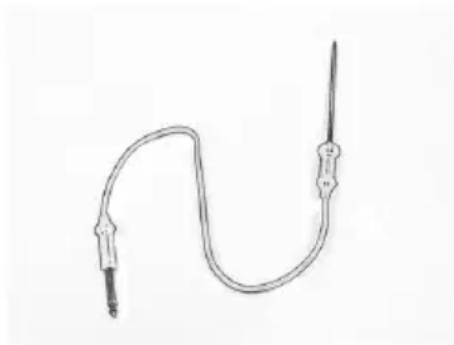
The temperature reached by food during cooking is closely linked to problems relating to health and hygiene. Bacteria can be contained in every kind of meat, poultry and fish, as well as raw eggs.
Certain types of bacteria make food go off, while others, such as Salmonella, Campylobacter jejuni, Listeria monocytogenes, Escherichia coli and Staphylococcus aureus can be seriously harmful to human health.
Bacteria multiply very quickly above a temperature of 4.4^ up to 60^ . Vince is particularly at risk from this point of view.
To prevent bacteria from multiplying, it is necessary to take the following measures:
- Do not defrost food at room temperature, always in the fridge or in the oven using the specific function. In the latter case, cook the food immediately afterwards.
- Stuff chicken just before eating it. Never buy pre-packed ready-stuffed chicken and only buy ready-cooked stuffed chicken when you intend to eat it within 2 hours.
- Marinate food in the fridge, not at room temperature.
- Use a food probe to check the temperature of meat, fish and poultry if they are more than 5cm thick, to ensure that the minimum cooking temperatures are reached. The greatest hazards are posed by poorly cooked chicken, particularly at risk from Salmonella.
- Avoid interrupting the cooking process, i.e., partially cooking food, storing completing the cooking process later. This sequence encourages the growth of bacteria due to the "warm" temperatures reached inside the food.
- Roast meat and poultry in the oven at temperatures of at least 165^ .
Using the food probe

The food probe socket is situated in the top front corner of the oven cavity, protected by a metal cover.

Push the plug in as far as it will go. If it is correctly inserted, the control will give off a double beep.


Push the probe into the centre of the food, avoiding touching bones or fatty areas.


Remember that the probe will not work if it is connected when the oven is already switched on!

Select the best cooking function for your recipe.


You can change the minimum internal temperature value to suit requirements within an interval of +30^ to +99^ , but we recommend that you consult the table below, taken from THE NATIONAL FOOD SAFETY DATABASE (USA)
| FOOD MINIMUM IN | TERNAL TEMPERATURE |
| Mince | |
| Hamburger 71°C | |
| Beef, veal, lamb, pork 74°C | |
| Chicken, turkey 74°C | |
| Beef, veal, lamb | |
| Roasts and steaks: | |
| Rare | The cooking temperature for rare meat is not indicate by the NFSD as it is unsafe for health reasons |
| Medium-rare 63°C | |
| Medium 71°C | |
| Well done 77°C | |
| Pork | |
| Chops, roasts, ribs: | |
| Medium 71°C | |
| Well done 77°C | |
| Fresh ham | 71°C |
| Fresh sausages | 71°C |
| Poultry | |
| Whole chicken or chicken pieces | 82°C |
| Duck | 82°C |
| Whole turkey (not stuffed) | 82°C |
| Turkey breast | 77°C |


If the plug is removed after cooking begins, the control blocks the oven and signals the error by beeping: plug the probe in again to resume cooking!

When cooking with the aid of the food probe, all the pre-set temperatures are changed, to maintain consistency with the philosophy of use, to 165^ : they can be varied from a minimum of 120^ to a maximum of 250^ . For the same reason, the defrosting function is deactivated.

The end of cooking, established by reaching the internal temperature set for the food probe. All the oven programming functions (timer functions) are stopped, apart from the beeper (minute counter).
When the food probe senses the temperature for which it has been set, the oven is automatically deactivated and you will hear a beep!
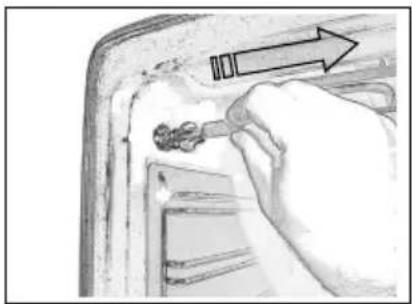
When the cooking time is up, remember to disconnect the food probe and remove it from the oven.
CAUTION: the probe is very hot after cooking.
If the probe is left connected to the oven but not inside the food, an error may be generated (ERR3) on the timer display. The error will disappear when the probe is disconnected from the oven.
SPECIAL FUNCTIONS
Boost (quick preheat)
This special function can be activated after selecting a cooking function and is used to reduce the time required to reach the set cooking temperature.
This period of time is known as preheating, and is required in practically all recipes.
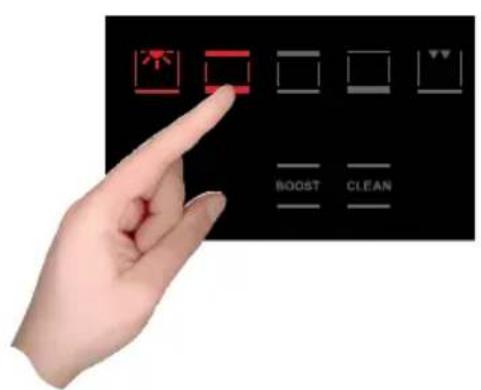

It is possible to disconnect the turbo heat function or change cooking function at any time.
Clean (quick cleaning)
Correct operation is combined with the use of the lateral panels and catalytic fan cover: the oven is treated with special enamel with a micro-porous structure, which breaks down the fat projected thanks to a catalytic oxidisation process which transforms residues into gaseous products.
The turbo clean function is only activated when no cooking function has been selected, so: switch on the oven and touch the symbol as shown in the figure for five seconds.

5 sec.!!!

The cleaning process takes place at a temperature of 250^ and lasts one hour. Do not use it for cooking food!!
The oven light is activated and can be switched off and on again at any time.
All the self-cleaning panels will perform effectively for thirty cleaning processes, after this limit the panels must be replaced.
The panels should be cleaned exclusively with tap water and replacements can be ordered from your specialised dealer.
Oven light control
The light control is active on all the cooking functions and is independent, meaning that it can be switched on or off to suit your requirements, when you want!
The oven light is usually kept on throughout the heating time and then for three minutes after reaching the temperature set. From then on, the oven light switches off to save power.
To check the cooking, it may be necessary to switch on the internal light. All you have to do is touch the light symbol: the light will stay on for three minutes and then switch off automatically. Naturally you can switch it off immediately by touching the light symbol again.
Some models are equipped with a door control. This feature uses sensor technology to detect the position of the door to control the oven light: the opening of the door is indicated by a beep and the light comes on. It switches off when the door is closed again.
PROGRAMMING THE OVEN
The programming of the oven offers three modes for controlling the cooking time. They are available with the standard cooking functions. When the food probe is used, they are deactivated (see specific chapter).
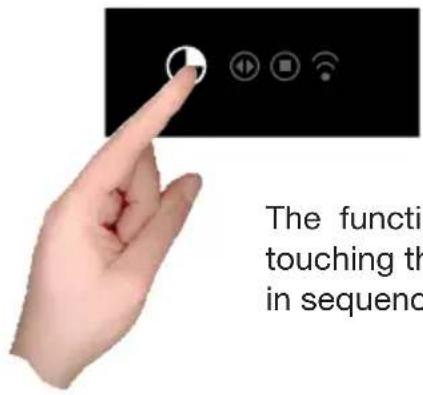
The functions can be selected in sequence, from left to right, by touching the clock symbol: every time it is touched, a symbol lights up in sequence.
Programming the timer: cooking time
Touch the timer symbol once. The relative symbol lights up. The clock display will replace the indication of the current time:

The dividing dots flash to indicate that it is possible to programme the cooking time
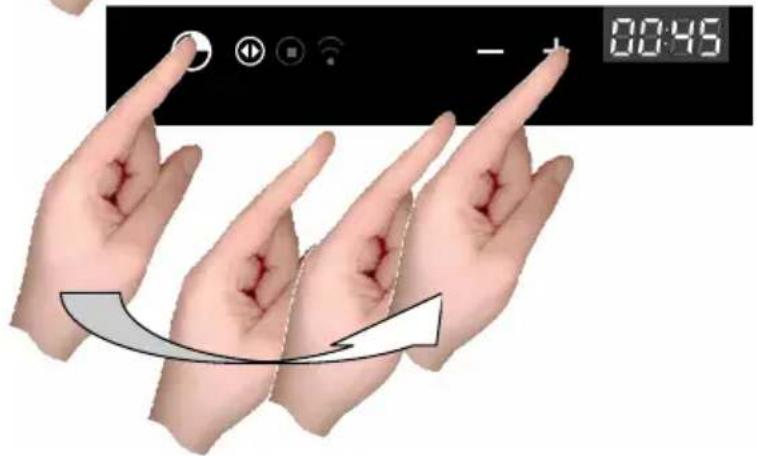

Once the cooking time has been set, the display will show the current time again and the cooking time symbol will be lit.
The count begins now. When the time is up, the oven will make a beeping sound, the heating elements will be switched off and cooking will stop. The special symbol will flash, as will the duration which was set on the clock display. Press any button to stop the beeping sound.
After eight seconds, the oven switches off automatically unless other cooking functions are programmed.
Programming the timer: cooking end time
Touch the timer symbol twice. The relative symbol lights up.


Set the cooking end time by touching the + and - symbols.
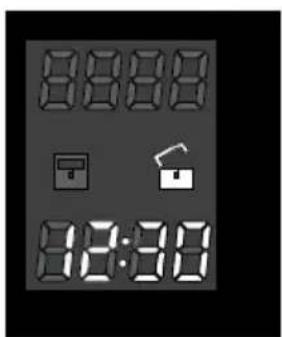
Once the cooking end time has been set, the display will show the current time again and the cooking end symbol will be lit.
The count begins now. When the set time is reached, the oven will give off a beep, the heating elements will be switched off and cooking will stop.
The special symbol will flash, as will the cooking end time which was set on the clock display: press any button to stop the beeping sound.
After eight seconds, the oven switches off automatically unless other cooking functions are programmed.
Programming the timer: delayed cooking
Using the combination of the two cooking time and cooking end time modes, it is possible to programme the oven to start cooking at a later time than the current time.
For example, it is 8.30 a.m. and you're about to leave home, but you would like a roast to be ready for 1.00 p.m.. Here's what to do:

Prepare the roast for cooking and place it in the oven.
Switch on the oven, select the cooking function and set the temperature.

Now set the cooking time, let's say two hours.
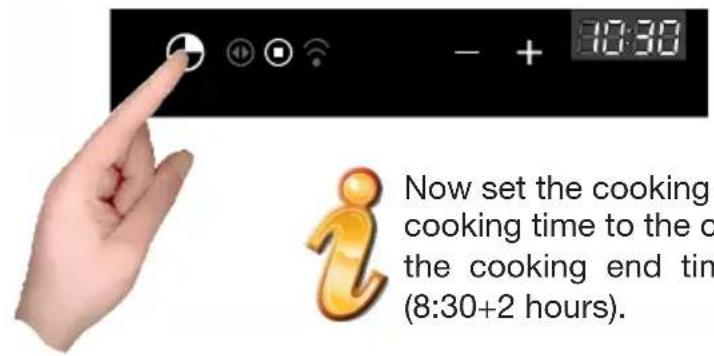
Now set the cooking end time: the control usually adds the cooking time to the current time and proposes the result as the cooking end time. In our case it will propose 10:30 (8:30+2 hours).

Change the cooking end time to make it coincide with the time you require. In our example this is 1.00 p.m.
The oven now enters into stand-by and the oven light switches off. When it is time to start cooking, the light will not be automatically switched on because it is logical to assume that the delayed start coincides with your absence, so it is pointless to leave the light on for no reason.
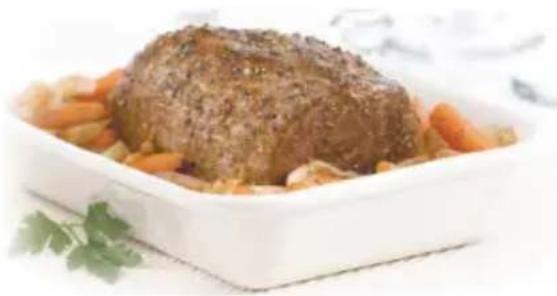
The control will automatically activate the oven at 11:00 (1:00 p.m. -2 hours) and will switch it off at 1.00 p.m., meaning that the roast will be ready when you arrive home!
Programming the timer: minute counter
The minute counter is a function of the timer which is independent of the operation of the oven, meaning that it does not block the cooking and does not switch off the oven, but acts as a beeper. You can set it at any time, as a reminder to check cooking on the hob, as well as the oven, or for other cooking activities.
This can also be used with the oven switched off. In this case all you have to do is touch the timer function symbol.
If you use it with the oven switched on, you must touch the time function symbol three times in a row.

The dividing dots flash to indicate that it is possible to set the value.

Set the minutes using the + and - symbols.
The count begins now. When the time indicated is up, the oven will make a beeping sound and the special symbol will flash. Press any button to interrupt the beeping sound.
Programming the timer: cancelling the programme
To cancel a programme, it is necessary to take the value assigned previously to zero or switch off the oven.
SAFETY: OVEN SWITCH-ON LOCK
The control males a lock available on the console to prevent the oven from being switched on or the cooking settings from being interfered with. It can be activated and deactivated at any time using the on/off button.
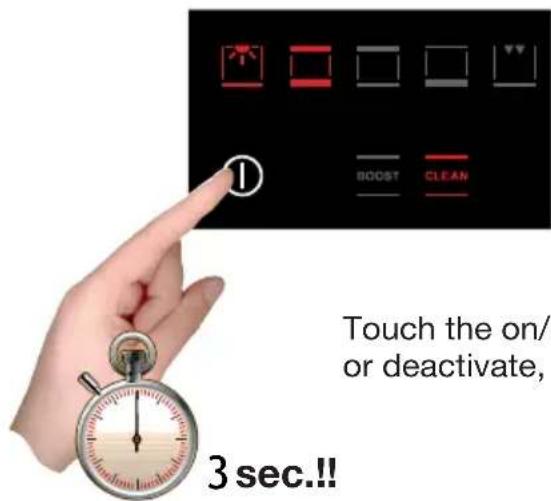
Touch the on/off symbol for at least three seconds to activate or deactivate, alternately, the oven lock.

Lock activated: red padlock closed symbol on the display Every action linked to cooking is disabled.

Lock deactivated: white padlock open symbol on the display
INDEX
PRÉSENTATION DU FOUR
Le mode "demonstration" 49
PROGRAMMATION DU FOUR
PROGRAMMATION DU FOUR
IMPORTANT: If your appliance appears not to be operating correctly, then you should disconnect it from your mains supply and then contact the Customer Care Department.
DO NOT ATTEMPT TO REPAIR THE APPLIANCE YOURSELF.
Please note that if an engineer is asked to attend whilst the product is under guarantee and finds that the problem is not the result of an appliance fault, then you may be liable for the cost of the call out charge.
The appliance must be accessible for the engineer to perform any necessary repair. If your appliance is installed in such a way that an engineer is concerned that damage will be caused to the appliance or your kitchen, then they will not complete a repair.
This includes situations where appliances have been tiled in, sealed in with sealant, have wooden obstructions placed in front of the appliance, like plinths. Or any installation other than the one specified by the manufacturer has been completed.
IMPORTANT: The manufacturer operates a policy of continuous improvement and reserves the right to adjust and modify its products without prior notification.
Baumatic
United Kingdom
Baumatic Ltd.,
Baumatic Buildings,
6 Bennet Road,
Reading, Berkshire
RG2 0QX
United Kingdom
Sales Telephone
(0118) 933 6900
Sales Fax
(0118) 931 0035
Customer Care Telephone
(0118)9336911
Customer Care Fax
(0118) 986 9124
Spares Telephone
(01235)437244
Advice Line Telephone
(0118)9336933
E-mail:
sales@baumatic.co.uk
customercare@baumatic.co.uk
spares@baumatic.co.uk
technical@baumatic.co.uk
Website:
www.baumatic.co.uk
Facebook:
www.facebook.com/baumatic.uk
Republic of Ireland
Service Telephone
1-890 812 724
Spares Telephone
091756771
Czech Republic
Baumatic CR spel s.r.o.
Lipova 665
460 01 Liberec 4
Czech Republic
+420 483 577 200
www.baumatic.cz
Slovakia
Baumatic Slovakia, s.r.o.
Panenska 34
811 03 Bratislava - Staré Mesto
Slovakia
+421 255 640 618
www.baumatic.sk
Germany
BaumaticGmbh
Bachstr.10-12
D-32 257 Bunde
Deutschland
+49(0)5223 994080
www.baumatic.de
Italy
Baumatic Italia S.R.L.
Via Galvani N.3
35011 Campodarsego (PD)
+3904 9920 2297
www.baumatic.it
Holland
Baumatic Benelux B.V.
Dukdalfweg 15d
1332 BH ALMERE
Nederland
+31(0)365491553
www.baumatic.nl
- CreatiVe
- INDICE
- Main Functions
- Programming the oven
- Safety
- Over lock function 43
- OVEN PRESENTATION
- Installation and Connection
- series 60
- series 75
- series 90
- Demo mode
- Regulating the clock
- Switching on the oven
- View of front console
- Cooking functions
- Simple gestures for cooking
- Temperature Regulation
- Residual heat
- Food probe (or probe thermometer) (available on certain models)
- Using the food probe
- SPECIAL FUNCTIONS
- Boost (quick preheat)
- Clean (quick cleaning)
- Oven light control
- Programming the timer: cooking time
- Programming the timer: cooking end time
- Programming the timer: delayed cooking
- Programming the timer: minute counter
- Programming the timer: cancelling the programme
- SAFETY: OVEN SWITCH-ON LOCK
- INDEX
- PRÉSENTATION DU FOUR
- PROGRAMMATION DU FOUR
- DO NOT ATTEMPT TO REPAIR THE APPLIANCE YOURSELF.
- Baumatic
- United Kingdom
- Sales Telephone
- Sales Fax
- Customer Care Telephone
- Customer Care Fax
- Spares Telephone
- Advice Line Telephone
- E-mail:
- Website:
- Facebook:
- Republic of Ireland
- Service Telephone
- Czech Republic
- Slovakia
- Germany
- Italy
- Holland
Brand : BAUMATIC
Model : BO920TS
Category : Oven