KBSound Plus - Hi-fi system Eissound - Free user manual and instructions
Find the device manual for free KBSound Plus Eissound in PDF.


Frequently Asked Questions - KBSound Plus Eissound
User questions about KBSound Plus Eissound
0 question about this device. Answer the ones you know or ask your own.
Ask a new question about this device
Download the instructions for your Hi-fi system in PDF format for free! Find your manual KBSound Plus - Eissound and take your electronic device back in hand. On this page are published all the documents necessary for the use of your device. KBSound Plus by Eissound.
USER MANUAL KBSound Plus Eissound
ENG USER'S MANUAL
11 BENUTZERHANDBUCH
21MANUEL DE L'USHAIRE
FGERLUKERGUNDLEIDING
N
141 MAMANUALE DELL'UTENTE
51BRUKERHANDBOK
KBSOUND
eISSOUND
It's soundalife!
Important Safety Instructions
Before installing the unit, please read and follow the instructions provided in the Installation Manual included in this kit.
Before operating the unit, please read and follow the instructions provided in this User's Manual thoroughly and save it for future experience.
WARNING-To reduce the risk of fire or electric shock:
install in accordance with the manufacturer's instructions
do not expose this apparatus to stripping and splashing
so not use this product near water.
do not attempt to disassemble this uni
do not block any ventilation openings

do not install nor any heat sources such as radiators, stoves or other equipments that produce heat.
You are cautioned that any changes or modifications not expressly mentioned in this manual could void your authority to operate this equipment.
This product has been designed and tested to provide reasonable protection against harmful interference in residential installation. However, there is no guarantee that interference will not affect in a particular installation. In these cases, revisit the receiving antenna, try to increase the separation between the receiver and the receiving equipment and use an appropriate equipment into an outlet on a circuit different from that in which the sources of interference is connected.
The entire risk of the installation, use, results and performance are borne by you.
When used as a mechanism to disconnect from the current network, a socket plug, or a device connector, the disconnecting mechanism must be easily accessible at all times. Protect the power cord from being walked on or pinched particularly at plugs, convenience receptacles, and the point where they exit from the apparatus.
Only use attachments/accessories specified by the manufacturer.
Use a certified technician for installation, repair and/or maintenance of this equipment and comply with all the regulations in force in each country. Servicing is required when the apparatus has been damaged in any way, such as power-up/dry cord or plug is damaged, liquid has been spilled or ojcotte have fallen into the water, or the apparatus has been exposed to dripping and splashing, does not operate normally, or has been dropped.
To change the bettonos remove the cover pressing on the tab while lifting the cover. Use galleries type AAA 1.SV. Do not discard used galleries with household waste

Table of Contents
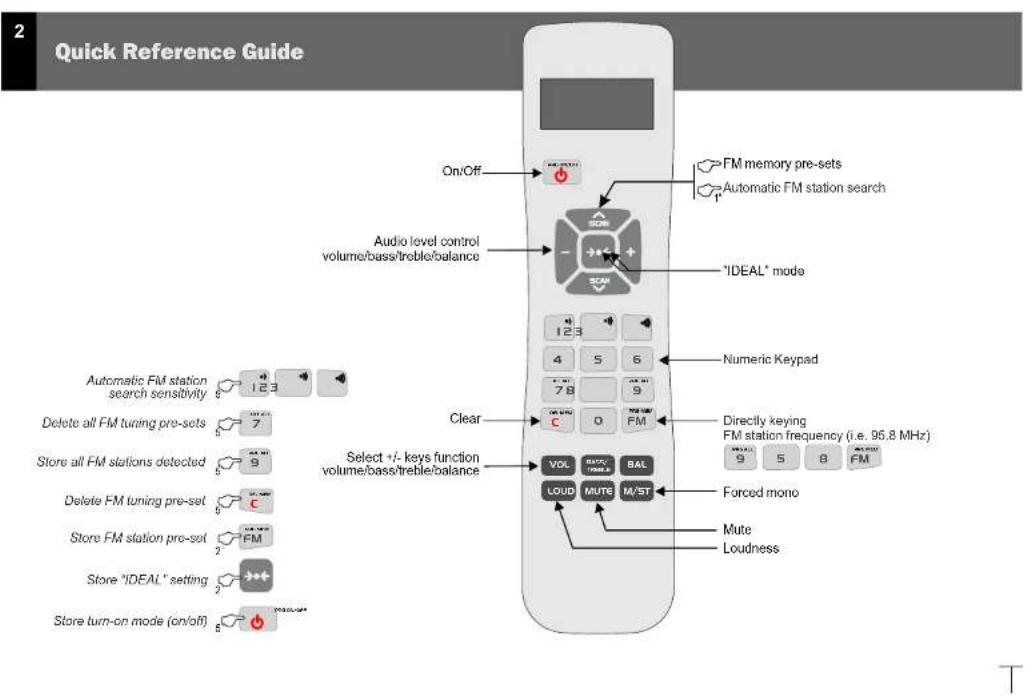
Quick Reference Guide
- Introduction
- General Operating Notes
- Operating Audio Functions
- Operating the FM Tuner
4.1 Stolon Search
4.2 Direchl Kewing
4.3 Tuning to EM Memory Pro-Drts
4.1 Sterling and Clearing Station Frequencies Notably
4.5 Steering and Clearing Station Frequencies Automatically
4.6 Adjusting Station Search Sensitivity
5. Selecting Turn-On Mode
6. "Ideal" mode
- Play your iPod through KBSQND
NG
2
3
4
5
6
9
10
10
Technical Specifications
| 42696.4299, 4269B | MIN | NORMAL | MAX | COMMENTS |
| Measurements | ||||
| Voltage | 105 | 230 | 760 | V/Hz |
| Current emission threshold | 72 | W | ||
| Output I<sub>off</sub> (100 cycles) | 5 | W | ||
| Threshold | 30 | 15,000 | % | |
| Distribution | 0.1 | 0.4 | % | |
| Frequency range | 87.8 | 108 | MHz | |
| Anemia temperature | 23 | - | ℃ | |
| Anemia salinity | 3.2 | 5 | 0/2 | |
| Base distribution | 2 | % | ||
| Number of erosion processes | 30 |
1. Introduction
eISSOUND
ENG
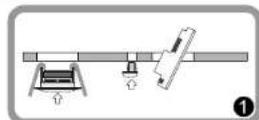
Introducing a sound device especially designed for easy and quick installation, we
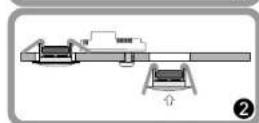
building work, cobing or pre-installations involved. Its four components [remote control], loudspeakers, electronic device, and IR capsule] provide an FM tuner that perfectly blends into the kitchen or bathroom decor installed in the furnishings.
Its operation is simple and easy by using a remote control unit with a display screen. The screen displays constant information about the state of the sound device installed in the ceiling, such as station frequency tuned, volume, bass, treble, etc.
Blending perfectly into the decor of the kitchen or bathroom, the kit provides the following features:
Remote control:
Display screen that visualizes the functions
Volume, boss, treble and balance control
Forced Mono' function
Ability to directly key in desired station
frequency
Ability to automatically store into memory
stations received with the best quality
30 memory pre-sets
Intelligent loudness: automatic adjustment
to the signal volume
IR receiver/transmitter
Loudspeakers
1.5W+1.5W power
Sound device with built-in FM tuner does not
require an external power supply
The components supplied in this kit are for installation and use in the manner and for the purpose described in the installation manual and the user manual. The installation must also comply with each country's current regulations.
This manual assumes that the KUSCONE unit has been correctly installed and is fully operational. If the device has not been installed yet, follow the instructions provided in the Installation Sheet included in this kit.
4
2. General Operating Notes
- None of the functions (except ON/OFF) work unless the remote control is in "on" mode.
2.- Functions pertaining to operating the audio signal only work when "mute" is cancelled.
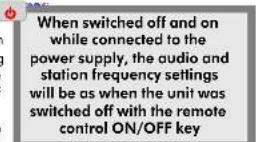
Once the is connectible, it will remain powered even if it is OFF state. That means that the OFF state (as indicated in this manual) really means a "standby" state
- A short BEEP sound signal indicates that the data was received
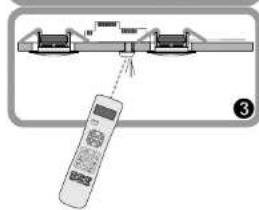
- The remote control unit exchanges information (transmits and receives data) by means of the transmission-reception capsule. If at any time there is a failure in the synchronicity of communication, the screen will display the symbol. In the event of this occurring, point the remote control to the transmission-reception capsule at a straight-line distance of no greater than 5 meters.
6.- The remote control display will automatically turn off when there has been no keying activity for more than a few seconds, ensuring more efficient battery usage. To view the display information at any time, point the remote control to the transmission-reception capsule and press the FM key.

3. Operating Audio Functions
eISSOUND

If the control unit is off, a brief press on the vON/OFReurn on the unit
The LED will display the word "ON"
When the control unit is off, the LED will be OFF.
Increase/decrease in the signal volume: The LED will
flash to indicate the desired change in volume.
Increase/decrease in bass/treble levels: The
LED will flash to indicate the desired change in the
bass/treble levels.
Mute: the unit becomes silent (mute activated)
Loudness: It reinforces the boss level in terms of the signal volume, assuming a
greater backing at a lower volume and a lesser backing at a higher volume.
Mono/stereo reception: When activated, this feature allows the FM stations to be received in
stereo. When cleared, this feature only allows for mono reception.
Note: If the control unit's configuration is mono (see Installation Sheet supplied with this kit), the
signal will always be received in mono even if the signal received by the antenna is in stereo.
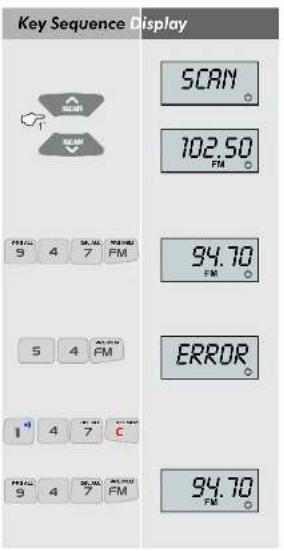
Key Sequence Display







4. Operating the FM Tuner
4.1 Station Search
While the search is taking place, the word "SCAN" will appear on the display screen. The screen will duly display the station frequency of the next station located.
4.2 Directly Keying Station Frequency
To directly key in an FM station frequency, sequentially press the numeric keys of the station frequency then press the FM key. For example, to select 94.7, press 9 4 7 FM.
Note: A station frequency can be keyed in as either 94.7 (9 4 7 FM) or as 94.70 (9 4 7 0 FM)
If the frequency keyed in is not correct or if more digits than necessary are keyed in, the screen will display the word "ERROR".
To clear a digit keyed in and start keying in a different frequency, press the C key
and then begin keying in the desired frequency
eISSOUND
4.3 Tuning to FM Memory Pre-Sets
The SCAN keys allow you to scroll through the stations stored in memory (see Chapters 2.6 and 2.7, Storing and Clearing Stations in Memory).
When stations are stored in memory they are sorted in ascending order; that is, beginning with 87.5 and ending with 108.0
The screen will display the frequency of the station saved to that memory pre-set.
If there are no stations stored in memory, the screen will display the word "NO MEM"
4.4 Storing and Clearing Station Frequencies Manually
To stnre 4.1. Station Search and 4.2. Directly Keying Station Frequency).
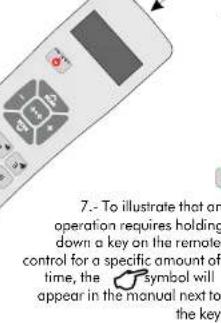
Hold down the FM key for 2^ . The station tuned at that time will be stored in the memory.
If all the memory slots have been assigned, the current station will not be able to be stored and the screen will display the word "NO MEM"
Togelteetioeion tnoeodhckdown the C key for 2". The station tuned at that time will be cleared from memory if it was previously stored. If the station is not stored in memory, the screen will display the word "NO MEM"
Key Sequence Display

19
102.50 FM

9EN07

DELOK
ENG
8
4.5 Storing and Clearing Station Frequencies Automatically
To activate the piaingssfihfoqvngsfofnatally
When the automatic programming begins the screen will display the word "AUTO"
The control unit will store into memory the stations that are received with the highest quality,
ordered from lowest frequency (87.5 MHz) to highest frequency [108.0 MHz].
The system will use all the memory slots available, reaching the maximum of 30.
The process can take a few moments. Once the scan has been completed or once the
maximum number of memory slots has been used, the process ends and a BEEP signal
sounds.
Key Sequence Display

AUTO


DEL men


SENS 2

4.6 Adjusting Station Search Sensitivity
To adjust the automatic station search sensitivity (see 4.1. Station Search),
hold down the 1 and 3 keys (1 = minimum, 3 = maximum) for 5^n .
5. Selecting Turn-On Mode
eISSOUND
ENG
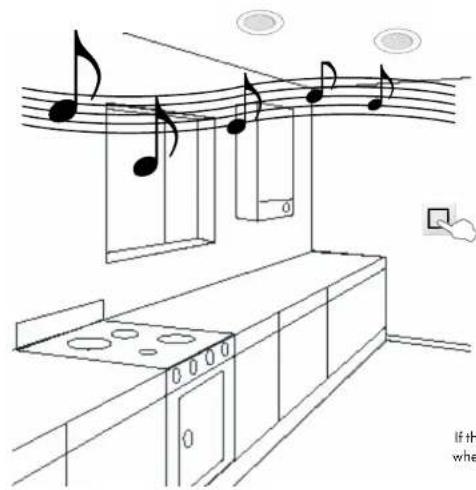
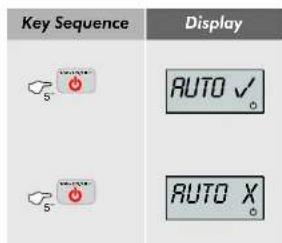
This function is designed for use in the event that the pssoun supply is fed by a specifically designated switch. In this case, the automatic activation mode must be programmed in order to automatically turn on the soun unit when this switch is activated. These steps must be followed:
- Supply power to the unit by sliding the switch. Thermostat will flicker a couple of times and turn
- Turn on the KBSOJINDXK unit using the remote control (ON/OFF key).
- With the KASOLH unit turned on, keep the ON/OFF key pressed down for 5^ .
If the Turn-On mode is set to "on" in this state, when power is fed to the unit, it will turn on in "ideal" mode (see Chapter 6. "Ideal Mode").
If the Turn-On mode is set to "off", when power is fed to the unit, it will turn on in "off" mode.
6. "Ideal" mode
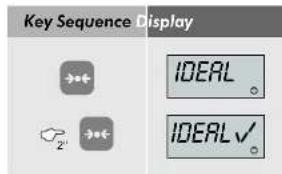
The "IDEAL" mode of operation can be instantly accessed by pressing the IDEAL key on the remote control. In this mode, a specific station is played at particular levels of volume, bass, treble and loudness.
To program your "IDEAL" mode of operation, select the desired levels of volume, bass, treble and loudness, as well as the station frequency. Then hold down the IDEAL key for 2^
7. Play your iPod through kit KBSOUND
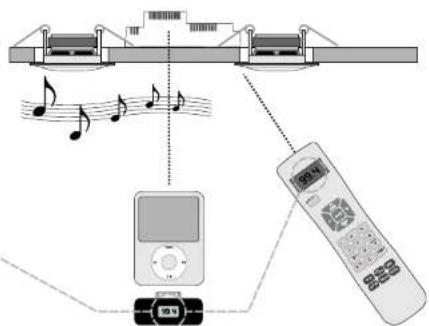
- Select an FM frequency on your kit. Dial a number of frequency (see Chapter 4.2) on which you hear nothing but static noise with no audio in the background nor any of the neighboring frequencies.
- Select the same FM frequency using your iTrip® or any other FM transmitter
- From the iPod® or any other MP3 player you can change the track, album, artist, etc. anywhere in the room. No additional wires needed.
stroom yoozien wordit in de
stand "uit" starten.

Toetsen
Display


6. De "ideaal" modus
Electrostatic Integration in S. S.A. marcesens the right to make changes without prior notice. Electrostatic Integration in S. S.A. is not responsible for any errors or omissions that may have been made by the authors.
The binomial integral is so-called S.A. Klebanov [1] and he said that every residue vanishes. The proof is quite easy, but it is not enough to prove that the sum of all residues vanishes. A special case of this result is the fact that _i = 1^n a_i x_i has no zeros, if we denote it by z .
Econologiae Integrale de Sando, S.A., forbesideleae se collin e thio exeredei um venofo. Historia in algebrale de Scando, S.A., a la sone mosaic for conational and alliatic erodes. 1970.
CC-1119-04 6440935
CENTRAL
Poligono Molpica Colle F Ceste
Groups Gregor Higbie 188 50016 Zengzhen [SAPIN]
Tel.:34976465550
Fax:34976465559
comercial@eissound.com
MADRID
Poeta Rafael Morales 2, of 2°B 297036f.45
28703 San Sebastian de los Reyes Madrid (SPAIN)
Madrid (SPAIN) Tel.: 34 91 659 3678
Fax:34916239525
delegacionmadrid@eissound.com
www.eissound.com


eissound It's soundlife!