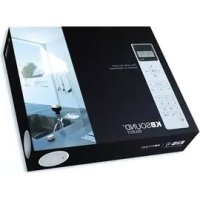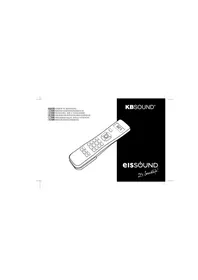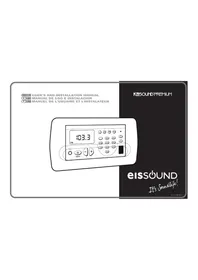
KBSound Premium DAB+ - Radio Eissound - Free user manual and instructions
Find the device manual for free KBSound Premium DAB+ Eissound in PDF.


| Product Type | DAB+/FM Radio with IR remote control |
| Brand | Eissound |
| Model | KBSound Premium DAB+ |
| External dimensions (W x H x D) | 13.5 cm x 7.0 cm x 4.4 cm |
| Internal dimensions (W x H x D) | 11.6 cm x 5.4 cm x 3.6 cm |
| Power supply | 12-16 VDC, 500 mA (terminals 2 and 4) |
| Power consumption | 120-500 mA depending on version |
| FM frequency range | 87.5 - 108 MHz |
| Number of FM presets | 20 |
| Speaker audio output | 2 x 16 ohms or 2 x 8 ohms, 1.5 W max |
| Auxiliary audio input | 3.5 mm jack (discman/MP3/iPod) |
| Display | Bright display with large characters |
| Main functions | DAB+/FM radio, 2 programmable alarms, sleep, auto standby, audio settings (bass, treble, balance, loudness), ideal mode, IR remote control |
| Available languages | Multilingual (French, English, Spanish, etc.) |
| Supplied accessories | IR remote control, control unit (white, ivory, or graphite) |
| Maintenance and cleaning | Clean with a soft, dry cloth. Do not use abrasive products. |
| Safety | Do not expose to water, do not block ventilation slots, use only supplied accessories. |
| Repairability | Repairs must be carried out by qualified personnel. Comply with applicable regulations. |
| General information | KBSound Premium DAB+ features a clear and accessible menu. Suitable for a kitchen or bathroom. |
Frequently Asked Questions - KBSound Premium DAB+ Eissound
User questions about KBSound Premium DAB+ Eissound
0 question about this device. Answer the ones you know or ask your own.
Ask a new question about this device
Download the instructions for your Radio in PDF format for free! Find your manual KBSound Premium DAB+ - Eissound and take your electronic device back in hand. On this page are published all the documents necessary for the use of your device. KBSound Premium DAB+ by Eissound.
USER MANUAL KBSound Premium DAB+ Eissound
ENG 1 USER'S AND INSTALLATION MANUAL
E 27 MANUAL DE USO E INSTALACION
F 53 MANUEL DE L'USUAIRE ET L'INSTALATEUR
KBSOUND®PREMIUM
eissound
It's Soundlife!
CC-1140-02.1

Important Safety Instructions
Before installing the unit, please read and follow the instructions provided in the Installation Manual included
Before operating the unit, please read thoroughly and follow the instructions provided in the User's Manual and save it for future use.
WARNING - To reduce the risk of fire or electric shock:
install in accordance with the manufacturer's instructions
do not expose this apparatus to rain or moisture
do not use this product near water
do not attempt to disassemble this unit
do not block any ventilation openings
do not install near any heat sources such as radiators, stoves or other equipment that produce heat.

You are cautioned that any changes or modifications not expressly mentioned in this manual could void your authority to operate this equipment.
This product has been designed and tested to provide reasonable protection against harmful interference in residential installation. However there is no guarantee that interference will not have an affect it in a particular installation. In these cases, reorient the receiving antenna, try to increase the separation between the equipment and the source of interference and/or connect the equipment into an outlet on a circuit different from that to which the source of interference is connected.
The entire risk of the installation, use, results and performance are the user's responsibility.
When used as a mechanism to disconnect from the current network, a socket plug, or a device connector; the disconnecting mechanism must be easily accessible at all times. Protect the power cord from being walked on or pinched particularly at plugs, convenience receptacles, and the point where they exit from the apparatus.
Only use attachments/accessories specified by the manufacturer.
Use a certified technician for installation, repair and/or maintenance of this equipment and comply with all the regulations in force in each country. Servicing is required when the apparatus has been damaged in any way, such as power-supply cord or plug is damaged, liquid has been spilled or objects have fallen into the apparatus, the apparatus has been exposed to rain or moisture, does not operate normally, or has been dropped.
To change the batteries remove the cover pressing on the tab while lifting the cover. Use batteries type AAA 1,5V. Do not discard used batteries with household waste
Wiring Diagram - - - - - - - - - - - - - - - - - - - 2
-
Introduction 3
-
Getting started 4
-
Installation - - - - - - - - - - - - - - - - - - - - - - - - - - - - - - - - - - - - - 7
-
Settings 9
-
User Programming - - - - - - - - - - - - - - 11
-
Operation 15
-
Operation using the IR remote control unit - 24
-
Quick Reference Guide 25
-
Technical Specifications 26
-
Accessories 26

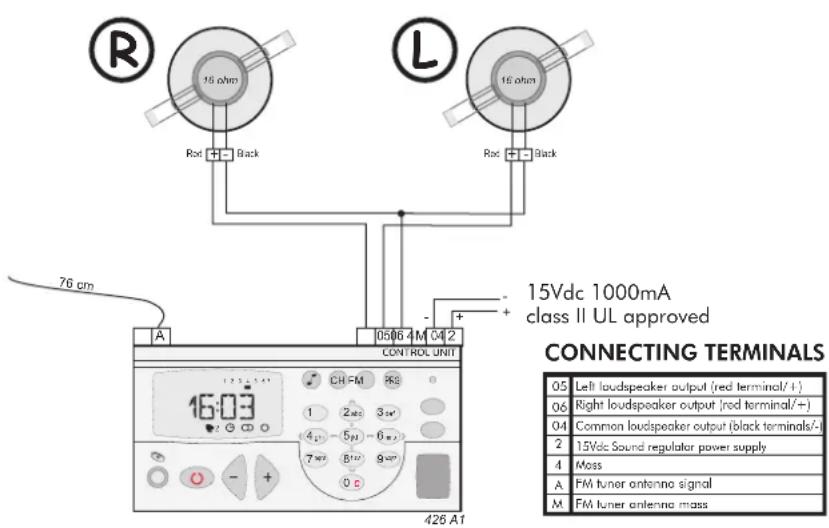
Wiring diagram
1. Introduction
KBSOUND®PREMIUM

The KBSOUND PREMIUM voice that integrates options into your
listening experience. Its clear and easily accessible menus allow the user to tailor the settings according to their needs. The direct FM tuning, the adjustable lighting, the screen with large letters and numbers, the choice of language, etc. are just some of the functions available.
The KBSOUND PREMIUMo your kitchen or bathroom.
With the KBSOUND PREMUNETE THE HEART OF YOUR HOME
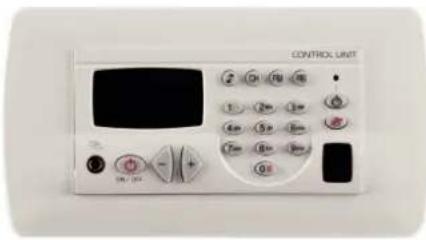
| KEYS TO UNDERSTANDING THE SYMBOLS USED IN THIS MANUAL | Some keys serve the function of a cursor to scroll through the menus. When the key in question is used as a cursor, it will be illustrated with the cursor symbols that appear on the face of the Control Unit.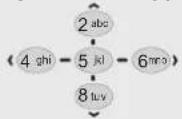 | |
The symbol over a key means the key should be pressed for the time specified. | In some cases it will be necessary to press two keys simultaneously to execute a particular command. 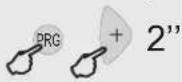 | |
2. Getting Started
2.1 The first time...
Installers
The Control Unit must be installed once power is connected for the first time. By default, the Control Unit will for 16 loudspeakers. To program other settings use the installation menu option 3.2.1. - Mono/Stereo and 3.2.2. - Audio Output.
Users
Once the Control Unit has been installed it is ready for normal operation.
Once the Control Unit is connected to the mains, will remain powered even if it is in the OFF state. That means that the OFF state (as indicated in this manual) really means a "standby" state.
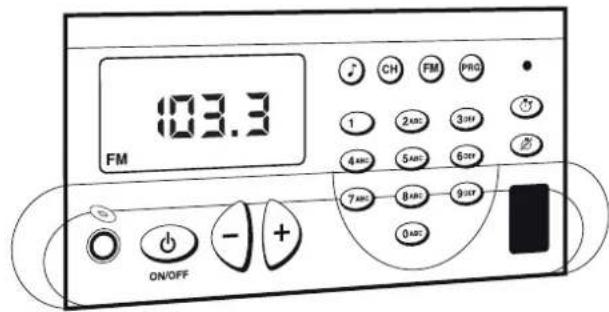
To turn on, press the ON/OFF key. The display will light up and the ⏻ icon enabled
To select discman/MP3/iPod input for the Control Unit, press CH
To adjust the volume

The +/- keys have multiple functions. The default function is to adjust the volume. If no key is pressed on the keypad a few seconds after an operation, the default function resumes.
To select the tuner, press FM
To tune to a station, key in the station frequency followed by the FM key. For example, to tune to the station at 94.7 MHz
To automatically seek stations
Key Sequence Display Visual




07:18

VOL 55
0695.50
94.70
96.70
CC-1140-02.1

2.2 Programming Menus
2.2.1 Three Access Levels
There are three menus to program different access levels.
Installation Menu
This menu stores information regarding the parameters that affect the installation's proper operation. This programming should be done by a specialized technician.
Configuration Menu
This menu stores information regarding the personalized operating mode for each user. Modifying this menu does not vitally affect the installation's operation and once the settings are defined there will be no need to change them.
Programming Menu
This menu stores information regarding the features that can be programmed by the user and which can be easily modified.
Key Sequence Display Visual
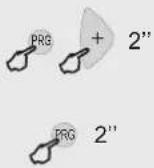 | INSTAL |
| CONFIG | |
| PRG | PROGR |
2.2.2 Scrolling Through the Menus
The programming menus are structured as levels of menus and submenus.
Once in a menu, the following keys can be used to scroll through the list of options.
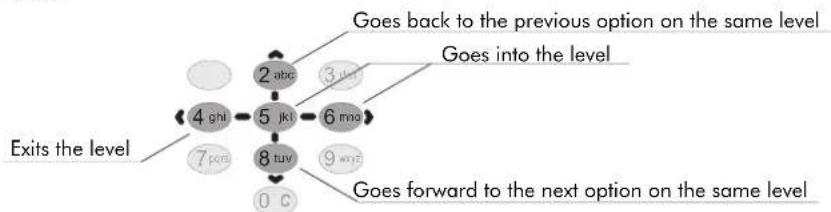
flowchart
graph TD
    A["4 ghi"] --> B["5 jkl"]
    B --> C["6 mno"]
    C --> D["8 tuv"]
    D --> E["0 c"]
    F["7 pore"] --> G["2 abc"]
    H["3 uhr"] --> I["6 mno"]
    J["9 wxt"] --> K["8 tuv"]
    L["10 c"] --> M[" goes forward to the next option on the same level"]
    N["Exits the level"] --> O["Exits the level"]
    P["Does back to the previous option on the same level"] --> Q["Does into the level"]
When the item to be programmed appears on the display it will be flashing, thus indicating it is ready to be modified. If there are several choices possible (for example, the days of the week, the digits of a date), the +/- keys can be used to scroll back and forth between the items The numeric keys can also be used to modify the item. In addition to using the numeric keys, in some cases the +/- keys themselves can be used to modify an item to be programmed
To store the new setting, press PRG. The item will flash quickly, indicating that the new setting has been stored
To delete a setting that has been entered, press the ZERO key for 1"
To exit a programming option without saving a setting, press ON/OFF
2.2.3 Immediate Access to a Menu Option
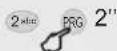
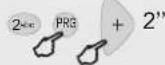
As an alternative to scrolling through the menus to reach an option, you can directly key in the option code followed by the menu access key (see the list of codes in 8. Quick Reference Guide).
To access programming menu option "adjust the tuner seek sensitivity"
To access the configuration menu option "personalize your greeting"
To access the installation menu option "select loudspeaker output impedance"
Key Sequence Display Visual


PRG



CC-1140-02.1
3. Installation
KBSOUND®PREMIUM

3.1 Wiring Diagram
Installation involves two elements: a Control Unit (powered to 15Vdc) and loudspeakers. See page 2
· If the room is monophonic, connect any of the speakers and set the Control Unit to MONO. (See 3.2.1. Mono/Stereo Installation)
- 8 Word Control Unit Compcledria the outputs. In this case, the must be set to 8 . (See 3.2.2. Audio Output Installation).
· To connect the FM antenna, connect a 76 cm wire to terminal A or connect a 75 W antenna input to terminals A (signal) and M (mass).
- If it is necessary to connect an amplifier or power stage to a Control Unit's output, the Control Unit must be set to AMPLIFIER. (See 3.2.2. Audio Output Installation). Connect the amplifier to terminals 2, 4, 05 and 06 on the Control Unit.
· All wire sections are AWG24 0)25WG18&depthsupply wires (terminals 2 and 4), which are.
3.2 Installation Menu

The following information is, in its totality, the installation data for the Control Unit. To modify the data, access the installation menu of the Control Unit itself. See 8. Quick Reference Guide
3.2.1 Mono/Stereo
Defines whether the Control Unit's audio output (terminals 04, 05, 06) is connected in mono or stereo mode. In a Control Unit in stereo, outputs 05 and 06 respond to the left and right channels. In a Control Unit in mono, both outputs are identical and can therefore be used interchangeably.
To change the output setting to mono
Store
| Key Sequence | Display Visual |
| STEREO/MONO STEREO MONO |
CC-1140-02.1
3.2.2 Audio Output
Defines the impedance connected to the Control Unit's audio output (terminals 04, 05, 06)
between the following options: 16 ohms passive loudspeaker
8 ohms passive loudspeaker
amplifier
line
To change the setting to 8 ohms
Store
3.2.3 Deleting Control Unit Installation. Manufacturer Reset.
Deletes all settings and programming data from the Control Unit, restoring manufacturer default settings.
To activate delete process
To initiate the process
Once the Control Unit starts up, the manufacturer default settings are enabled.
3.2.4 Knowing the Software Version
Shows Control Unit's software version.
Key Sequence Display Visual


AUDIO OUTPUT
16≤2
8 ≪


DELETE INSTALLATION
OFF
ON
LOADING DATA
VERSION SOFT
SOFTWARE, 112702, 141211
CC-1140-02.1
4. Settings
KBSOUND®PREMIUM

4.1 Language
To select the language of all display text.
To select a different language (for example, English)
Store
4.2 Greeting
Allows you to personalize the message that appears on the display when the Control Unit is powered on (a maximum of 18 characters).
Scroll through the name until you reach the character you want to change
Key in the new greeting using the alphanumeric keypad
Store
4.3 Permission to Store/Delete FM Tuning Pre-sets
Disallow access to save and delete tuning pre-sets.
Disallow permission
Store
| Key Sequence Display Visual | |
 | 1010A ESPAÑLENGLSH |
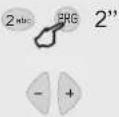 | GREETINGHELLOHELLOHELLO MHELLO MAHELLO MARHELLO MARIHELLO MARIA |
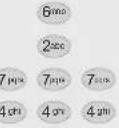 | |
 | |
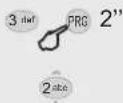 | PERMISSION TO STOREFM PRESETSONOFF |
CC-1140-02.1
4.4 Selection of IR Remote Control
Allows remote control selection.
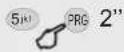
To activate the remote control operation, use the keys to scroll to number 14. +/- To block remote control operation, select a value other than 14
Store
4.5 Deleting Settings from the Control Unit
Deletes all settings and programming data from the Control Unit, restoring the initial default settings. This option does not affect installation data (3. Installation).
Activate delete process
Initiate the process
Key Sequence Display Visual
| Note | 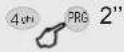 | IR REMOTE |
| IR 14 | ||
 | IR 15 | |
| [0x15] | ||
 | DELETE SETTINGS | |
| OFF | ||
 | ON | |
| [0x15] | LOADING DATA |
5. User Programming
KBSOUND®PREMIUM

5.1 Alarm 1 and 2
The Kit is equipped with two programmable alarms with two operation modes, as described in section 6.11. - Operation: Alarms
Change the enable setting, also available as a quick access function, see 8. Quick Reference Guide
Guide
Store
Scroll to next program setting in alarm mode
Enter to program time
Set the time
Store
Scroll to next program setting in alarm mode
| Key Sequence | Display Visual | ||
| 1 | 1 | PRG | ALARM 1 |
| or | ALRM1 | ||
| 1 | 2 abc | PRG | |
| ON/OFF | |||
| OFF | |||
| 2 abc | ON | ||
 | ON/OFF | ||
| HH-MM | |||
| 00-00 | |||
| [144X] | |||
| [CCBT] | |||
| [T8KS] | |||
| [972T] | |||
| [TOWE] | |||
 | |||
... CONTINUED
| Key Sequence | Display Visual | |
| Enter to program the days of the week alarm will be set | [A3BY] | NO ON |
| Scroll through days | [1XYT] | TU ON |
 | ||
| Scroll through days |  | SR ON |
| Change | [40WE] | SR OFF |
| Scroll through days | [00BX] | SU ON |
| Change | [10XX] | SU OFF |
| Store |  | |
| Scroll to next program setting in alarm mode | [2SAA] | TYPE |
| Enter program to select alarm sound | [CXDC] | BEEP |
| Change | [1CYW] | MUSIC |
| Store | [8CWE] | TYPE |
... CONTINUED
CC-1140-02.1
| Key Sequence | Display Visual | |
| Scroll to next program setting in alarm mode | 8 μv | VOLUME |
| Enter to program the alarm volume | -5 μv | VOL 75 |
| Change | - + | VOL 86 |
| Store | PRG |
5.2 Auto standby
Option to program a time for the Control Unit to automatically go into standby mode (music) shuts off)
For example, to program auto standby for 11:45 p.m. every day except Saturday and Sunday
| Key Sequence | Display Visual | ||
| 1 | 3 del | PRG | AUTOSTANDBY |
| 5 k | ON/OFF | ||
| 5 k | OFF | ||
| 2 sec | ON | ||
| PRG | ON/OFF | ||
| 8 tor | HH-MM | ||
| Key Sequence | Display Visual | |
| Store | -5 jkl- | 00-00 |
| 2 abc 3 dcf 4 ahl 5 jkl | 23:45 | |
| PRG | HH-MM | |
| 8 hrv | DAYS | |
| -5 jkl- | NO ON | |
| + | TU ON | |
| ... | ... | |
| + | SR ON | |
| 2 abc | SR OFF | |
| + | SU ON | |
| 2 abc | SU OFF | |
| PRG | DAYS | |
CC-1140-02.1
5.3 Sleep
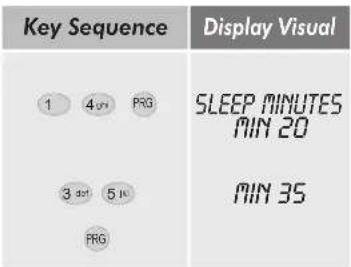
Sleep time can be adjusted to the user's needs by using the following programming option
(See 6.4. Sleep Operation)
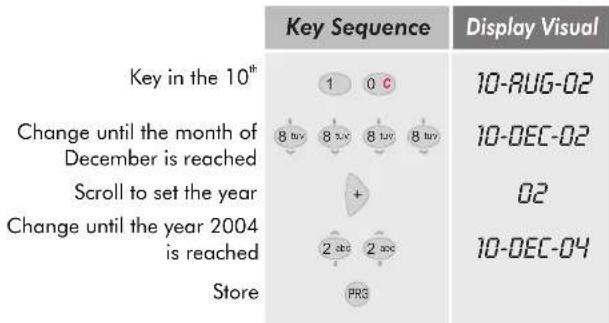
5.4 Time and Date
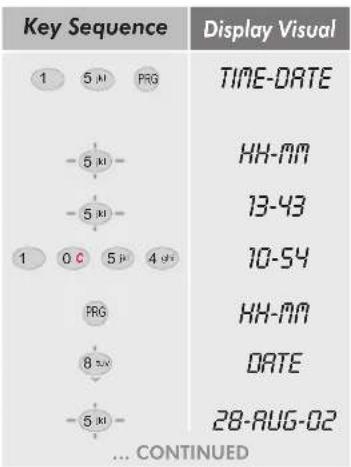
Enter time program Enter For example, to set 10:54 Store Scroll to next step Enter
5.5 FM Seek Sensitivity
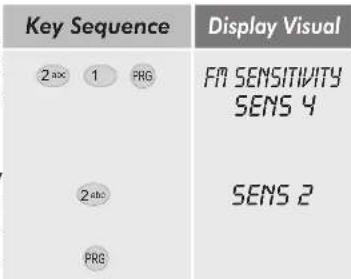
The option to adjust the automatic station seek sensitivity for the Control Unit's internal To adjust the new sensitivity; 4=max, 1=min. Store
CC-1140-02.1
5.6 Deleting FM Tuning Pre-Sets
The option to delete all the FM tuner pre-sets
To confirm the command to delete the data
To initiate the process
| Key Sequence | Display Visual | ||
| 2abc | 2abc | PRG | DELETE FM PRESETS OFF ON |
| 2abc | |||
| PRG | |||
5.7 Storing Station Frequencies Automatically
The Control Unit will memorize the stations that are received with the best quality, from lowest frequency (87.5 MHz) to highest frequency (108.0 MHz). The system will use all the memory slots available, reaching a maximum of 20.
| m of 20. | Key Sequence | Display Visual |
| Enter code |  | RUTOSCAN OFF |
| To confirm the command | [CYAC] | ON |
| To initiate the process | [BXOD] |
5.6 and 5.7 options are only available if permission for this option is enabled in the settings menu. See 4.3. Permission to Save/Delete FM Tuner Pre-Sets.
5.8 Saving "Ideal" Settings
| Key Sequence | Display Visual | |
| To store the current audio settings (volume, balance, bass, treble, loudness and selected channel) as the "ideal settings" | 3 def 1 PRG2 stroPRG | IDEALOFFON |
5.9 Off/On Dimmer
Display brightness for ON/OFF functions can be programmed from this option
| Key Sequence | Display Visual |
| 3 oct 2 abc PRGor or3 oct 3 oct PRG | LIGHT OFF |
| LIGHT ON | |
| LIGHT 5 | |
| LIGHT 8 | |
| [H8DS] | |
| PRG |
CC-1140-02.1
6. Operation
KBSOUND®PREMIUM
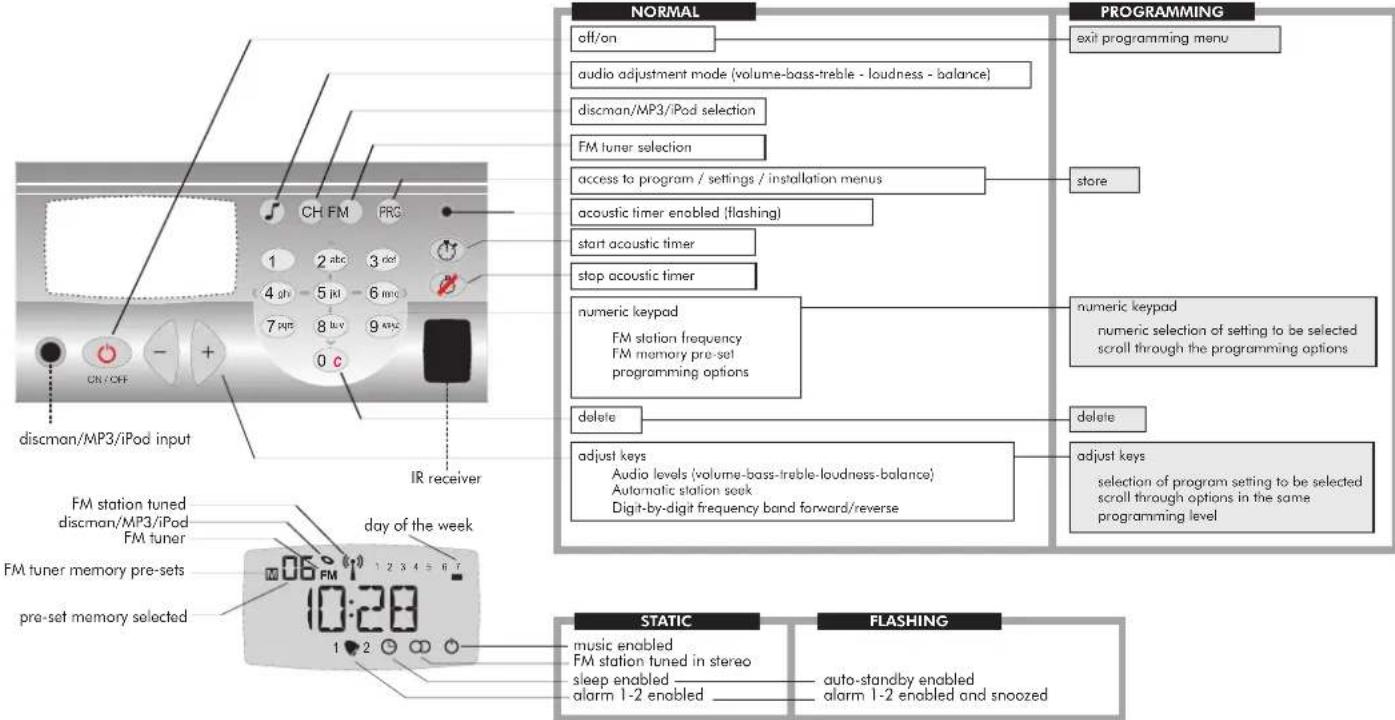
6.1 Quick Reference to Display and Keypad
CC-1140-02.1
6.2 Clock-Calendar
What Is It?
The time, date and day of the week are alternately displayed by default.
How Is It Programmed?
Access the program menu and select hour, minutes and date.

See 5.4. Programming Time and Date.
6.3 Manual ON/OFF of Control Unit
The Control Unit enables audio output with the previous settings by pressing a key. The display will be illuminated and the ⏻ icon will be enabled.
Manual power off takes place in the same manner, the display darkens and the ⏻ icon is disabled.
6.4 Sleep
What Is It?
The sleep function shuts the Control Unit off at a pre-set time after power on. The pre-set time is programmed by the user.
How Is It Programmed?
Access the program menu and select the time in minutes.

See 5.3 Programming Sleep.
Key Sequence Display Visual
| 1 | 5 AM | PRG | |
| ○ | |||
| ○ | |||
| 1 | 4 AM | 1 PRG |
KBSOUND®PREMIUM
ENG
How Is It Activated/Cleared?
It is activated by pressing the ON/OFF key for 2". The Ⓑ icon will appear static. Once the pre-set time has elapsed, the Control Unit will automatically power off If the Control Unit is powered off manually before the end of the pre-set time, the sleep function will be disabled.
6.5 Auto standby
What Is It?
The Control Unit will go into standby mode (music off) at the time and days of the week programmed.
How Is It Programmed?
Access the program menu and select the ON/OFF status, time and days of the week to execute the function.

See 5.2 Programming Auto standby.
How Is It Enabled/Disabled?
The function can be enabled or disabled from this option in the program menu.
The quick function can also be used
How Can I Tell If This Function Is Activated?
The function is activated when the ⏻ icon is flashing.
Key Sequence Display Visual
| SLEEP √ | |
| AUTO-STANOBY | |
| ON/OFF STANOBY √ STANOBY X |
CC-1140-02.1
6.6 Audio Level Adjustment
The default function for the + / - keys when the Control Unit is on is to adjust the volume
Pressing the ⏻ key switches to bass adjustment mode
In this mode, the keys have the function of adjusting the bass
Pressing the ⏻ key again switches to treble adjustment mode
In this mode, the keys have the function of adjusting the treble
Pressing the ⏻ key again switches to loudness selection mode.
(1=enabled, 0=disabled)
In this mode, the keys have the function of selecting loudness
Pressing the ⏻ key again switches to balance adjustment mode
In this mode, the keys have the function of adjusting the balance
A few seconds after the last key entry the Control Unit will return to its default function of
volume adjustment
6.7 Selecting the discman/MP3/iPod input as the Audio Channel
What Is It?
It is possible to have a music source connected through the jack on the front of the Control Unit.
How Is It Selected?
Access the discman/MP3/iPod channel directly by pressing the CH key. The discman/MP3/iPod indicator will be displayed.
Key Sequence Display Visual


VOL 55
BRS +12
BRS +24
TRB+11
TRB +17
LOUD 1
LOUD 0
BRL -23
BRL -28


CC-1140-02.1
6.8 Selecting the FM Tuner as the Audio Channel
How Do I Tune An FM Station?

By directly keying in the station frequency, for example, to select the station 89.10 Mhz

A minimum of three digits must be entered when keying in a frequency.

By directly keying in the station's memory pre-set value, for example, if pre-set #6 is set to station 89.10 MHz

To enter the memory pre-set selection mode, press FM. The display will show the frequency of the current station
We can scroll through the different pre-set stations in memory with the +/- keys
Key Sequence Display Visual
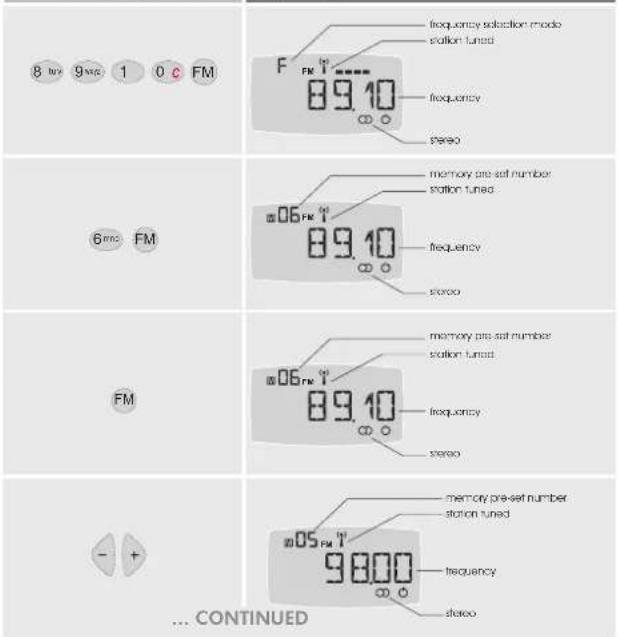

To enter the frequency selection mode, press FM again
When pressed with a short key press, the +/- keys tune the frequency in intervals of 0.05 Mhz

Similarly, by keeping the +/- keys pressed down, the tuner will automatically seek the next station (the sensitivity level is as programmed in 5.5. FM Seek Sensitivity)
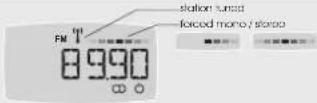
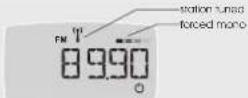
If the reception quality is not satisfactory in stereo, select the less demanding "forced mono" mode by pressing FM again
To switch between stereo and "forced mono" modes, use the +/- keys
Key Sequence Display Visual
| FM | 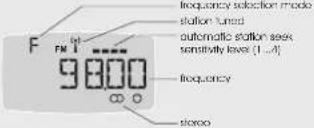 |
 quickly pressed quickly pressed | 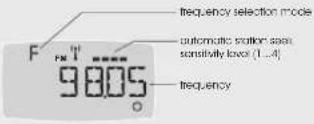 |
 held down held down | 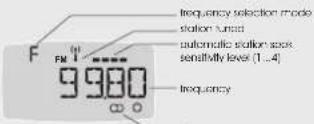 stereo stereo |
 |  |
 |  |
CC-1140-02.1
How Do I Store Station Pre-sets Into The FM Tuner
Select the station frequency to be stored using any of the methods described in the previous point. If the reception quality is not satisfactory in stereo, select the less demanding "forced mono".
To enter the store to memory mode, press the FM key
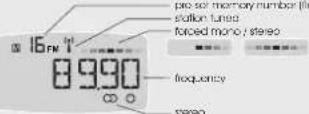
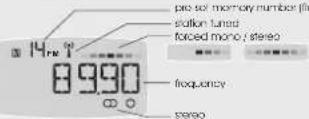
The pre-set memory number will appear flashing. By default, the Control Unit offers the first available memory slot, which may be changed using the +/- keys

The associated permission must be activated to execute this feature. See 4.3. Permission to Store/Delete FM Tuning Pre-sets.
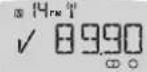
To confirm it has been stored, press FM again
To store into memory the stations that are received with the highest quality, ordered from lowest frequency (87.5 MHz) to highest frequency (108.0 MHz)
How Do I Delete Pre-sets Stored In The Tuner?
Access the program menu option (see 5.6. Deleting FM Tuning Pre-sets).

The associated permission must be activated to execute this feature. See 4.3. Permission to Store/Delete FM Tuning Pre-sets.
To adjust the automatic station seek sensitivity
Access the program menu option (see 5.5. FM Seek Sensitivity).
Key Sequence Display Visual
 |  |
 |  |
 | |
| AUTOSCAN | |
| DELETEFM PRE-SETS | |
| FM SENSIT |
6.9 Ideal Settings Mode
What Is It?
Each Control Unit has the feature to store "ideal" audio settings, which are pre-programmed settings that can be enabled quickly and immediately. These settings consist of an audio channel and pre-set levels of volume, balance, bass, treble and loudness.
How Is It Programmed?
Select the music channel to be designated as the "ideal" settings mode. For example, to select the tuner, press FM. The pre-set station will be saved as part of the "ideal" settings mode. Adjust the levels of volume, bass, treble, balance and loudness as indicated in section 6.6. Audio Level Adjustment.
Using the quick function indicated, the ideal settings mode will be automatically stored.
How is It Activated?
Pressing the +/- keys down simultaneously activates the audio ideal settings mode.
6.10 Acoustic Timer
What Is It?
The kit is equipped with a programmable timer which sets off an acoustic signal when the programmed waiting time has elapsed (between 1 and 240 minutes).
How Is It Programmed?
Key in the time desired for the timer, for example 121 minutes, followed by the timer starter key.
If the timer starter key is pressed without having selected a time, the last value entered for this function will be taken as default.
How Is It Cleared?
Pressing the timer end key clears the operation.
| Key Sequence Display Visual | |
 | 98.6VOL 72IDEAL √ |
 | IDEAL |
 | 121:00 |
CC-1140-02.1

6.11 Alarms
The Control Unit is equipped with two alarms that can be individually programmed and can operate in two different modes:
Beep Mode Alarm
☒ Operates whether the Control Unit is off or on.
At the time and days programmed, the Control Unit powers on and a specific beep signal is sounded. The alarm 1 and alarm 2 beeps are different and have programmable volumes.
It is equipped with a "snooze" function: a short key press of any key returns the Control Unit to its previous state (standby or music) and after 4' the beep signal sounds again.
To completely turn off the alarm, press any key until a continuous beep sounds: it will return to its previous state (standby or music) and the alarm function ends.
☒ If the Control Unit is powered off or on during the "snooze" period, the alarm function ends.
Also, if 4' elapse without any key press, the Control Unit returns to its previous state (standby or music) and the alarm function ends.
Music Mode Alarm:
☒ Operates only when the Control Unit is off.
At the time and days programmed, the Control Unit powers on with the last music channel selected.
The volume is programmable and different for each of the two alarms.
How Is It Programmed?
Access the program menu. Select the ON/OFF status, time and days of the week the function should operate, as well as the function mode and volume. See 5.1. Programming Alarm 1 and 2.
How Are They Activated/Cleared?
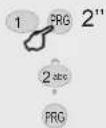
By using the quick functions... The 1 ♥ 2 icons indicate the state of the alarms (activated/cleared).
| Key Sequence Display Visual | ||
| 1 | 1 | PRG |
| 1 | 2abc | PRG |
| 1 | PRG | |
| 2abc | PRG | |
CC-1140-02.1
7. Operation using the remote control unit
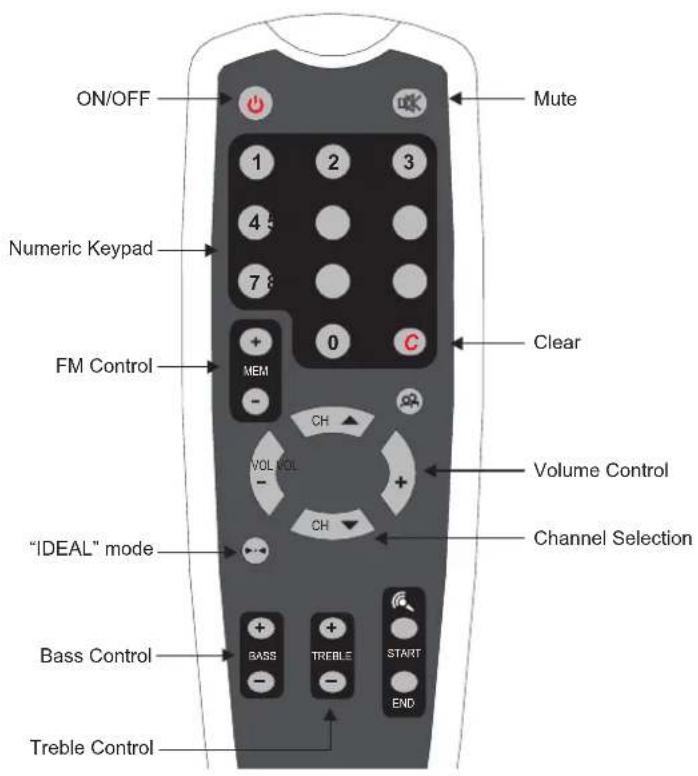
CC-1140-02.1
8. Quick Reference Guide
KBSOUND®PREMIUM
ENG
-MENU OPTIONS

To directly access a function, key in that function's numeric sequence, then press PRO and make any desired changes. To validate the operation, press PRO again.
CLOCKS
1.1 Alarm 1
1.1.1 ON/OFF status
1.1.2 Hour minutes
1.1.2 Hour, immolts 1.1.3 Days of week
1.1.3 Days of week
1.1.4 type
1.1.5 Volume
1.2 Alarm 2
1.2.1 ON/OFF status
1.2.2 Hour minutes
1.2.3 Days of week
1.2.3 Days of week 1.2.4 T
1.2.4 type
1.2.5 Volume
1.3 Auto standby
1.3.1 ON/OFF status
1.3.2 Hour, minutes
1.3.3 Days of week
1.4 Sleep
1.4.1 Minutes
1.5 Time
1.5.1 Hour, minutes
1.5.2 Day, month, year
FM TUNER
2.1 FM Seek sensitivity
2.2 Delete FM tunning pre-sets
2.3 Autoscan
ADJUSTMENTS
3.1 Store "IDEAL" settings
3.2 Dimmer off
3.3 Dimmer on
SETTING OPTIONS

To directly access a function, key in that function's numeric sequence, then press ☐ 2" and make any desired changes. To validate the operation, press ☐ again.
- Language
- Control Unit greeting
- Permission to save/delete FM tuner
pre-sets - IR remote Control Unit
- Delete settings
INSTALLATION


OPTIONS
To directly access a function, key in that function's numeric sequence, then press 2" and make any desired changes. To validate the operation, press again.
- Mono/Stereo
- Sound output
- Delete installation
- Software version
SPECIAL FUNCTIONS WITH QUICK ACCESS

2" Enable Sleep

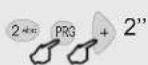
+ PRG Alarm status 1 ON/OFF

+ PRG Alarm status 2 ON/OFF

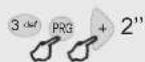
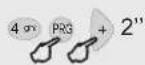
+ PRG Auto standby status ON/OFF

+ PRG Store "Ideal"

Activate "Ideal"
To access this function, the keys indicated must be pressed simultaneously.
9. Technical Specifications
| 42691/A1 | MIN | NORMAL | MAX | COMMENTS | |
| Measurements | 5,31×2,75×1,73 | in. | exterior (width x height x depth) | ||
| 4,56×2,12×1,41 | in. | cavity (width x height x depth) | |||
| 3,89×2,00 | in. | frontal (width x height) | |||
| Voltage | 12 | 15 | 16 | Vdc | terminal 2(+) 4(-) |
| Consumption demand | 120 | 220 | 500 | mA | mod. 42691, terminal 2 |
| 54 | 154 | 434 | mA | mod. 426A1, terminal 2 | |
| Input signal | 100 | mVeff | discman input | ||
| Input impedance | 100000 | ohms | discman input | ||
| Output signal (16 ohms) | 1,5 | W | terminals 05,06 | ||
| Passband | 20 | 15000 | Hz | ||
| Distortion | 0,1 | 0,4 | % | ||
| Frequency range | 87,5 | 108 | MHz | ||
| Antenna impedance | 75 | ohms | terminals A,M | ||
| Antenna sensitivity | 3,5 | 5 | uV | ||
| Tuner distortion | 3 | % | |||
| Number of station pre-sets | 20 | ||||
10. Accessories

natural_image
Simple light blue rectangular frame with rounded corners and a white center (no text or symbols)Front trim for Control Unit
Available colors: white, ivory, black.
New range coming soon.
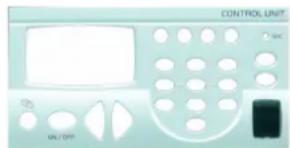
Face cover for Control Unit
Available colors: white, ivory, black.
New range coming soon.
KBSOUND PREMIUM
natural_image
Simple 3D rectangular frame with rounded corners and a white center (no text or symbols)Marco embellecedor para Mando del kit.
Comment on l'active/désactive?
Comment on les active/désactive?
natural_image
Simple light blue rectangular frame with rounded corners and a white center (no text or symbols)Electrónica Integral de Sonido, S.A. reserves the right to make changes without prior notice. Electrónica Integral de Sonido, S.A. is not responsible for any errors or omissions that may appear in this manual.
7791 Belfort Parkway
Jacksonville, FL 32256 (USA)
info@kbsound.com
www.kbsound.com
CENTRAL
ELECTRONICA INTEGRAL DE SONIDO S.A.
Polígono Malpica grupo Quejido, 87-88
50016 Zaragoza (SPAIN)
Tel.: 34 976 465 550
Fax: 34 976 465 559
comercial@eissound.com
www.eissound.com


eissound
It's Soundlife!