SKM 10 A1 - Wireless Earbuds SILVERCREST - Free user manual and instructions
Find the device manual for free SKM 10 A1 SILVERCREST in PDF.



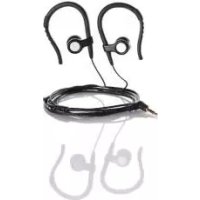
| Product type | Wired in-ear headphones |
| Brand | SilverCrest |
| Model | SKM 10 A1 |
| Impedance | 32 ohms |
| Sensitivity | 105 dB (A) at 1 kHz |
| Frequency response | 20 Hz – 20 kHz |
| Rated voltage | Approx. 100 mV |
| Connector | 3.5 mm jack |
| Cable length | Approx. 120 cm |
| Weight | Approx. 13 g (depending on design) |
| Earpieces included | 3 sizes (small, medium installed, large) |
| Operating temperature | 5 °C to 35 °C |
| Storage temperature | -10 °C to 50 °C |
| Max. humidity | 85% relative humidity |
| Maintenance | Slightly damp cloth for the headset; earpieces washable with water |
| Warranty | 3 years |
| Country of manufacture | Germany (TARGA GmbH) |
Frequently Asked Questions - SKM 10 A1 SILVERCREST
User questions about SKM 10 A1 SILVERCREST
0 question about this device. Answer the ones you know or ask your own.
Ask a new question about this device
Download the instructions for your Wireless Earbuds in PDF format for free! Find your manual SKM 10 A1 - SILVERCREST and take your electronic device back in hand. On this page are published all the documents necessary for the use of your device. SKM 10 A1 by SILVERCREST.
USER MANUAL SKM 10 A1 SILVERCREST
Last Information Update:
06/2014-Ident.No.:SKM 10A1062014-1
IAN 101413
DE AT CH
User manual and service information
IAN 101413


Deutsch 2
Francais 18
Italiano 35
English 49
Inhalt
Specifications techniques
Introduction 50
Intended use 50
Package contents 51
Technical specifications 52
Safety instructions 53
Getting started. 58
Using the headphones 58
Replacing the ear pads 58
Troubleshooting 59
Servicing 60
Cleaning 60
Environmental information 61
Conformity notes 61
Warranty 62
Introduction
Thank you for choosing a SilverCrest product. Please read the following pages for instructions on how to use your product.
Intended use
This device is a consumer electronics device. It has been designed to play music. It is suitable only for private use, not for industrial or commercial purposes. The device is also not suitable for use in tropical climates. The manufacturer is not liable for any damage or problems caused by unauthorised modifications. Please observe the regulations and laws in the country of use.
Package contents
SilverCrest SKM 10 A1 headphones
- Ear pad (medium), fitted
- Ear pad (large)
- Ear pad (small)
These operating instructions
Check the packaging for any missing contents. Please contact Customer Service immediately if any items are missing.
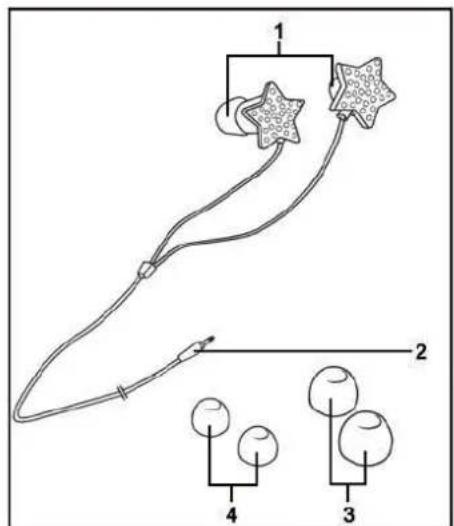
These operating instructions have a fold-out cover. On the inside of the cover is a diagram of the headphones with the components numbered. The meanings of the numbers are as follows:
1 Ear pad (medium)
2 3.5 mm jack
3 Ear pad (large)
4 Ear pad (small)
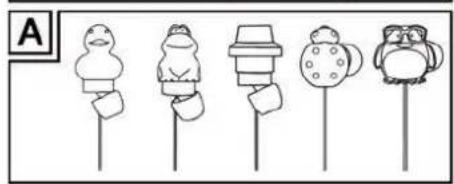
The SilverCrest SKM 10 A1 headphones are available in six different designs. The only difference is the styling of the earphones. Setup, operation, etc. is identical for all of them. Figure A shows the different designs available.
Technical specifications
| Impedance 32 Ohm +/- -4 Ohm | |
| Sensitivity 105 dB (A) +/- -10% at 1 kHz | |
| Frequency range 20 Hz -20 kHz | |
| Broadband characteristics voltage | approx. 100 mV +/- 20% |
| Connector 3.5 mm jack | |
| Cable length approx. 120 cm | |
| Weight approx. 13 g* 1,5,6 approx. 15 g*2,3 approx. 18 g*4 | |
| Operating temperature | 5°C to 35°C |
| Storage temperature | -10°C to 50°C |
| Humidity max. 85% rel. humidit y | |
The technical specifications and design can be changed without prior notice.
- depends on the design 1 = star, 2 = duck, 3 = frog, 4 = VOL, 5 = ladybird 6 = penguin
Safety instructions
Before you use these headphones for the first time, please read the following notes and heed all warnings, even if you are familiar with handling electronic devices. Keep this manual in a safe place for future reference. If you sell the headphones or pass them on, it is essential that you also hand over this manual, as it is part of the product.

CAUTION! This icon alerts you to a potentially dangerous situation. Ignoring it can lead to severe injury or even death.

WARNING! This symbol denotes important information for the safe operation of the headphones and user safety.

Make sure that:
- the device is not exposed to direct heat sources (e.g. radiators)
- the device is not exposed to direct sunlight or bright artificial light
- contact with spraying or dripping water or aggressive fluids is avoided and the device is never operated near water, the device is never submerged (do not place any items containing liquids, such as drinks, vases, etc. on or near the device).
- the device is never placed near magnetic fields (e.g. speakers)
- no naked flames (e.g. burning candles) are placed on or near the device
- no foreign bodies can penetrate into the device
- the device is not subjected to excessive shocks or vibrations
54 - English
- always hold cables by the plug and never pull on the cable itself. Never put heavy objects or furniture on the cable and make sure the cable does not get trapped, especially at the plug. To avoid damaging it, never lead the cable around hot or sharp objects or edges. Never tie knots in the cable and do not tie it to other cables. The cable must be laid so that nobody can trip over it or be obstructed by it.

Children and people with disabilities
Electrical devices are not suitable for children. Children may not understand that they can be dangerous. Persons with reduced physical, sensory or mental capabilities should also only use electrical devices in appropriate circumstances. Never allow children use electrical devices unsupervised, unless they are instructed accordingly or supervised by a competent person responsible for their safety.
Children should always be supervised to ensure that they do not play with the product. Small parts can represent choking hazards. Keep the packaging away from children and people with disabilities.

Danger of suffocation!
Warning! This is not a toy!
Risks associated with excessive volume levels
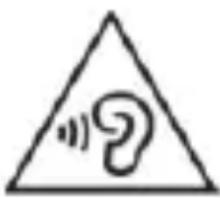
Be careful when using headphones. Listening to high volume audio can damage the hearing.
Do not use the headphones at high volume levels, this could damage your hearing and possibly disturb other people. Although the device is designed to enable you to hear external noise, never turn the volume up so high that you cannot go on around you. Please note that ambient noise can be perceived in a different and unfamiliar way.
In dangerous situations (for example when driving a vehicle or when working with machines or other situations that require your full attention), the sound may distract your attention or prevent you from being aware of what is happening around you. You should not use the device in these situations.
Getting started
Using the headphones

Set the volume of the playback device to the lowest level before connecting the headphones in order to avoid damaging your hearing. You can then set the volume to the level you want.
You can use the headphones with playback devices that have a 3.5 mm jack. Plug the 3.5 mm jack-type connector [2] into the corresponding jack on your playback device. Set the volume you want on the playback device.
Use the earpiece labelled "L" in your left ear and the earpiece labelled "R" in your right one.
Replacing the ear pads
The medium ear pads [1] are fitted by default. If the ear pads do not fit correctly, you can replace them. Proceed as follows:
- Carefully pull the ear pads off the earpiece by using your fingers.
- Select either the (large) [3] or (small) [4] ear pads and push them over the earpiece until they slide into the recess.
Troubleshooting
No sound
- Check the volume set on the playback device. Increase the volume and/or start playback.
- Make sure that the 3.5 ~mm jack-type connector [2] is properly inserted into the audio jack.
Sound output on one side only
- Check the stereo balance setting on the playback device.
- Make sure that the 3.5 ~mm jack-type connector [2] is properly inserted into the audio jack.
Servicing
The device does not contain any parts that require maintenance. Do not attempt to open the housing of the device, this will void your warranty.
Cleaning
To clean the headphones use a slightly damp cloth. Never use any solvents or cleaners that may damage the plastic. Make sure that no liquid gets into the housing.
To clean the ear pads, remove them. Clean the ear pads under running water. Dry the ear pads properly. Once the ear pads are completely dry, put them back on the earpieces.
Environmental information
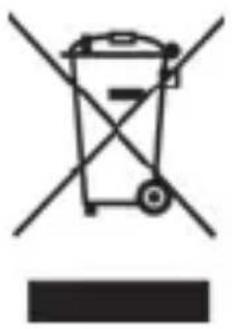
The product bears the symbol of a rubbish bin crossed out. This means it is subject to European Directive 2012/19/EU.
All electrical and electronic devices must be disposed of separately from household waste at official disposal centres. Proper disposal of the device prevents damage to the environment or your health. For further information about proper disposal, contact your local council, recycling centre or the shop where you bought the device.
Conformity notes
CE This device complies with the basic other relevant requirements of RoHS Directive 2011/65/EU. The corresponding Declaration of Conformity can be found at the end of this User Manual.
Warranty
Warranty of TARGA GmbH
This device is sold with three years warranty from the date of purchase. Please keep the original receipt in a safe place as proof of purchase. Before using your product for the first time, please read the enclosed documentation. Should any problems arise which cannot be solved in this way, please call our hotline. Please have the article number and, if available, the serial number to hand for all enquiries. If it is not possible to solve the problem on the phone, our hotline support staff will initiate further servicing procedures depending on the fault. Within the warranty period the product will be repaired or replaced free of charge as we deem appropriate. No new warranty period commences if the product is repaired or replaced. Consumables such as batteries, rechargeable batteries and lamps are not covered by the warranty.
Your statutory rights towards the seller are not affected or restricted by this warranty.
Service

Phone: 0207 - 36 50 744
E-Mail: service.GB@targa-online.com

Phone: 01 - 242 15 83
E-Mail: service.IE@targa-online.com

Phone: 800 - 62 175
E-Mail: service.MT@targa-online.com

Phone: 800 - 92 496
E-Mail: service.CY@targa-online.com

IAN: 101413
Manufacturer
TARGA GmbH
Coesterweg 45
59494 SOEST
GERMANY
C E
EU-Declaration of Conformity
Address:
Targa GmbH
Cooperweg 45
59494 Soest, Germany
Product: In ear headphone with different designs
Model: SilverCrest SKM 10 A1
Identification number: IAN 101413
The product complies with the requirements of the following European directives:
2011/65/EU
Restriction of the use of certain hazardous substances in electrical and electronic equipment
Compliance was proved by the application of the following standards:
Bohr
EN 40581-2012
Year of CE marking: 2014
Soest, 1st of August 2014
Matthias Klauke, Managing Director