BPS45 - Oven BORETTI - Free user manual and instructions
Find the device manual for free BPS45 BORETTI in PDF.



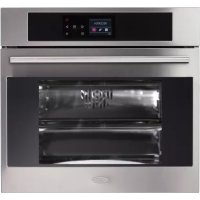
| Product type | Built-in steam oven |
| Brand | Boretti |
| Model | BPS45 |
| Width | 45 cm |
| Power supply | 230 V ~ 50 Hz |
| Total power | Approximately 2.5 kW |
| Installation type | Built-in |
| Cooking functions | Lighting, fan-assisted circulation, intensive, fan grill, grill, steam 100°C, steam 130°C, combined steam with fan, steam burst, cleaning (CLEAN), automatic recipes |
| Max temperature | 250 °C (traditional mode) |
| Steam temperature | 100 °C and 130 °C (adjustable in 5°C steps) |
| Interior lighting | 25 W bulb, G9 base, resistant to 300°C |
| Food probe | Yes, with adjustable range 30-99°C |
| Child safety | Child Lock function |
| Cleaning | CLEAN cycle for oven and steam circuit; do not use external steam cleaner |
| Cavity material | Stainless steel |
| Supplied accessories | Flat grid, perforated tray, drip tray, perforated tray support, food probe |
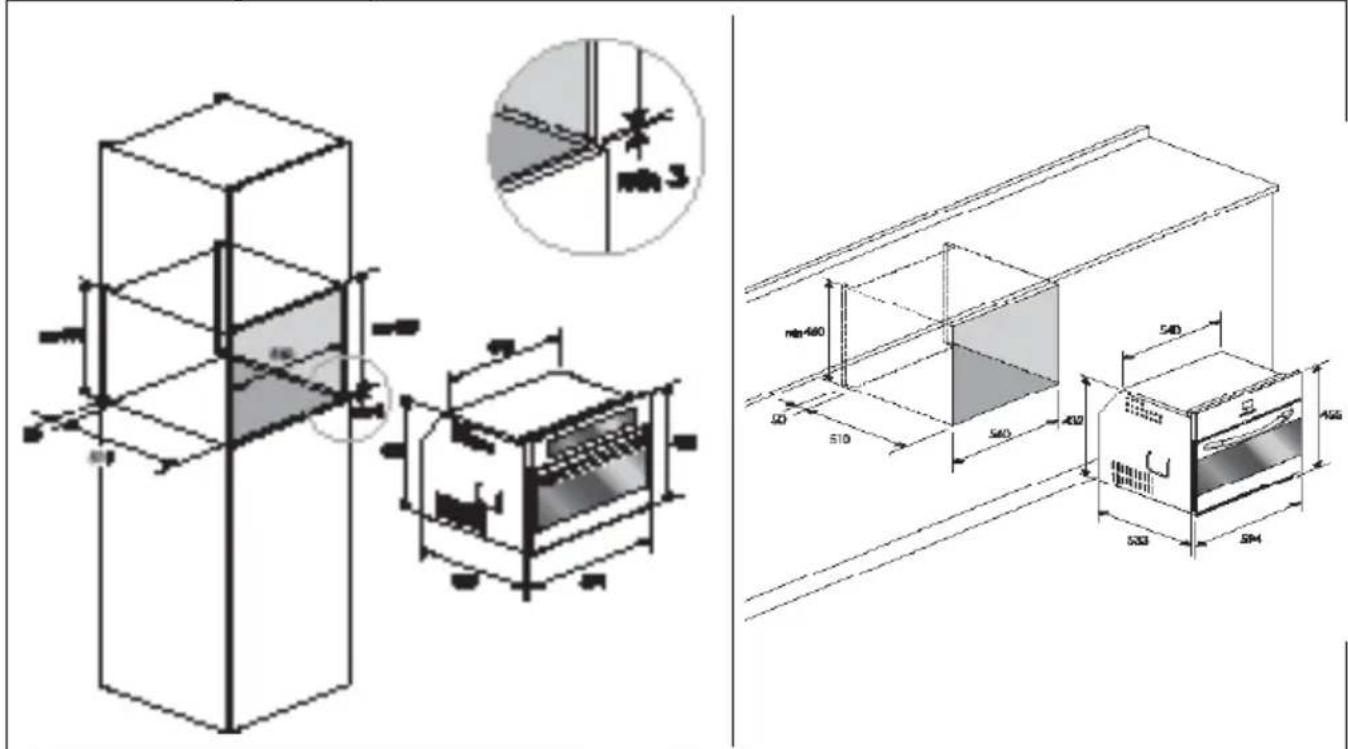
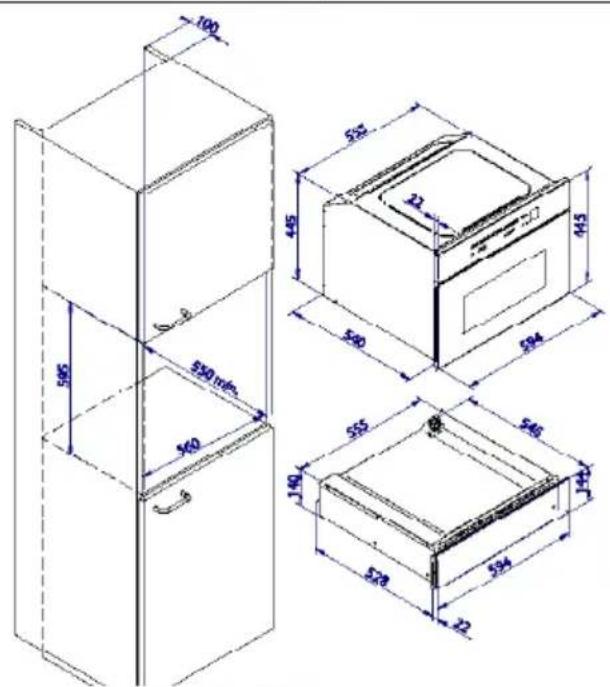
| Recess dimensions (W x H x D) | Approximately 45 x 45 x 55 cm (check diagram) |
| Net weight | Approximately 30 kg |
| Energy class | Not specified (estimated A+) |
Frequently Asked Questions - BPS45 BORETTI
User questions about BPS45 BORETTI
0 question about this device. Answer the ones you know or ask your own.
Ask a new question about this device
Download the instructions for your Oven in PDF format for free! Find your manual BPS45 - BORETTI and take your electronic device back in hand. On this page are published all the documents necessary for the use of your device. BPS45 by BORETTI.
USER MANUAL BPS45 BORETTI
FOUR A VAPEUR BPS-45
Installation - Emploi - Entretien
FR
FORNO A VAPOR BPS-45
We would like to thank you and congratulate you on your choice.
This new product has been carefully designed and built using top quality materials, and meticulously tested to ensure that it meets all your culinary requirements.
Please read and observe these simple instructions, which will enable you to achieve excellent results from the very first time you use it. This state-of-the-art appliance comes to you with our very best wishes.
GB
IMPORTANT INSTRUCTIONS AND SAFETY WARNINGS, READ CAREFULLY AND KEEP FOR FUTURE USE

IMPORTANT INSTRUCTIONS AND SAFETY WARNINGS

READ CAREFULLY AND KEEP FOR FUTURE USE

THIS PRODUCT IS DESIGNED FOR DOMESTIC USE.
THE MANUFACTURER DECLINES ALL RESPONSIBILITY FOR PERSONAL INJURY OR PROPERTY DAMAGE DERIVING FROM INCORRECT INSTALLATION OR IMPROPER, ERroneOUS OR UNSUITABLE USE.
THE APPLIANCE MUST NOT BE USED BY PEOPLE (INCLUDING CHILDREN) WITH PHYSICAL, SENSORIAL OR MENTAL IMPAIRMENTS, OR BY PEOPLE WITHOUT THE NECESSARY EXPERIENCE OR KNOWLEDGE, UNLESS THEY ARE SUPERVISED OR INSTRUCTED IN THE USE OF THE APPLIANCE BY A PERSON RESPONSIBLE FOR THEIR SAFETY.
CHILDREN MUST BE SUPERVISED TO ENSURE THAT THEY DO NOT PLAY WITH THE APPLIANCE.
DO NOT PLACE ALUMINIUM FOIL, POTS OR SIMILAR OBJECTS IN CONTACT WITH THE BASE INSIDE THE OVEN FOR COOKING.
THE APPLIANCE GETS VERY HOT DURING USE. WARNING: DON'T TOUCH THE HEATING ELEMENTS INSIDE THE OVEN.
ATTENTION: - If the door or the gasket seals of the door are damaged, the oven may not be used until it is repaired by a qualified service technician;
- This appliance and its internal components, especially electrified parts, may only be repaired, modified or customized by the manufacturer, its service department or similarly qualified persons. Incompetent repairs can cause serious accidents, damage to the appliance and its surroundings and malfunctions.
Remember that even the replacement of the lamp inside the oven must be performed by qualified personnel who will first disconnect the appliance from the mains. - If the appliance fails to operate or requires repair, contact our service department.
- Use only original replacement part.
IMPORTANT: - As a safety precaution, before cleaning the oven, always disconnect the plug from the outlet or remove the appliance's power cord.
- In addition, avoid using acid or alkaline substances (such as lemon, vinegar, salt, tomatoes, etc.). Avoid using products containing chlorine, acids or abrasives, especially for cleaning painted parts.
CARE AND MAINTENANCE
- Although the cooking chamber is made of high-quality steel, incorrect maintenance can cause corrosion;
- The oven must be cleaned periodically and all food residues must be removed;
- Do not clean the oven immediately after the dish has been removed because the residual drops of steam are still very hot (danger of burns); check that the display shows a low residual temperature or none.
-
Take care when opening the door when the oven is on because the exiting steam can cause burns.
-
If the electricity is interrupted, when it comes back on, the oven requires you to empty the circuit even though there shouldn't be any water in it.
- Do not use rough abrasives or sharp metal scrapers to clean the glass door of the oven because they could scratch the surface and cause the glass to shatter.
- During cleaning, take care that no water enters the appliance.
- Use only slightly damp rags.
- Never spray water inside or outside of the appliance.
- Do not use steam devices for cleaning because water that penetrates could cause damage.
- Do not use the appliance for heating or humidifying the room.
- Make use of the "child lock" key.
- The appliance must be installed and used in an ambient temperature between 5^ and 35^ .
- If there is a risk of frost, the residual water in the pumps could freeze and damage them.
- Use only the thermal sonde recommended for this oven.
IMPORTANT
The oven's identification plate is even accessible when the appliance is installed. This identification plate, which is visible when you open the door, shows all the information you will need when requesting replacement parts for the appliance.


FIRSTUSE
The oven should be thoroughly cleaned with soap and water and carefully rinsed.
Heat the oven for about 30 minutes at the maximum temperature; this eliminates all the residual manufacturing oils that could cause unpleasant odours during cooking. Use the circular plus fan function without accessories in the oven.
Before using the accessories for the first time, clean them carefully with a very hot alkaline washing solution and a soft cloth.
USING THE FLAT GRILL
To remove the flat grill, pull the grill towards you until it stops and then lift, by pulling upwards, until it comes completely out.
To insert the flat grill, slide it in at an angle of 45^ until it locks and then lower it horizontally and push it all the way in.


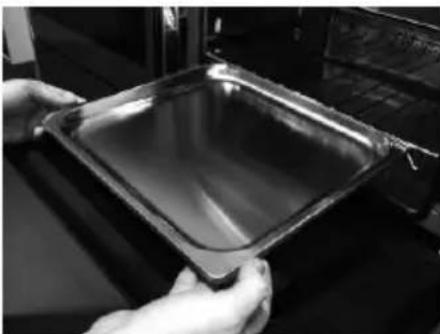
If the flat grill has a low drip tray, to remove it lift it slightly and slide it towards you. To reinsert it, slide it back until it is correctly seated.
USING THE PERFORATED TRAY
This tray is used for steam cooking and is positioned on the flat grill together with its support.


We recommend also using it in combination with the drip tray to catch everything the drips from the food during cooking.
RESPECT FOR THE ENVIRONMENT
The documentation for this appliance is printed on paper bleached without chlorine or recycled paper to contribute to protecting the environment.
The packaging was designed to prevent damage to the environment; they are ecological products that can be recovered or recycled.
Recycling the packing saves raw materials and reduces the volume of industrial and domestic waste.
THE PACKING MATERIAL is 100% recyclable and marked with the recycling symbol. Dispos of in conformity with local law. The packing material (plastic bags, polystyrene parts, etc.) must be kept out of the reach of children because it is potentially dangerous.

THIS APPLIANCE is marked in conformity with European Directive 2002/96/EC, Waste Electrical and Electronic Equipment (WEEE). By making sure that this product is disposed of correctly, the user contributes to preventing potential negative consequences for the environment and health.
THE SYMBOL on the product or accompanying documentation indicates that this product must not be treated as domestic waste but must be delivered to a suitable collection point for the recycling of electrical and electronic equipment.
DISPOSAL MUST BE MADE in conformity with local laws on waste disposal.
FOR ADDITIONAL INFORMATION about the treatment, recovery and recycling of this product, contact the local office of competence, the domestic waste collection service or the store where the product was purchased.

BEFORE SCRAPPING, make it unusable by cutting the electrical cord.
STEAM OVEN 45
COMMAND OVERVIEW


STANDARD COOKING FUNCTIONS: from 1 to 5;
SETTING TEMPERATURE, COOKING TIME: 19 and 20;
ON/OFF + CHILD LOCK: 27;
STEAM OVEN FUNCTIONS: from 6 to 9;
CLEAN FUNCTION (SELF-CLEANING): 10;
RECIPE FUNCTIONS: 11 and 12;
SCROLL MENU FUNCTIONS: 13 and 14;
TIMER FUNCTIONS: 24;
SETTING THE TIMER: 19 and 20;
1 oven light;
2 circular ventilated;
3 intensive (grill + circular ventilated);
4 ventilated grill;
5 grill;
6 steam up to 100^
7 steam up to 130^
8 steam combined with ventilated cooking;
9 steam puff;
10 CLEAN function;
11 automatic system settings (recipes);
12 confirm display settings function;
13 scroll the display downwards, decrease cooking temperature;
14 scroll the display upwards, increase cooking temperature;
15 indications of temperature settings on the display;
16 key function enabled/disabled;
17 timer indication function;
18 countdown function;
19 increase settings function;
20 decrease settings function;
21 "minute-counter" timer function;
22 "end cooking" timer function;
23 "cooking time" timer function;
24 timer function;
25 "START" function;
26 "STOP" function;
27 ON/OFF and special "child lock" function.
Note: all settings/function changes are confirmed by a beep.
Another function that can be set during steam cooking is the PAUSE function.
This function is activated by pressing the selected function key again: it will begin to flash until you press it again after you have completed what you had to do (remember to do it or it will not finish cooking!)
GB
INTRODUCTION TO THE OVEN
Dear Customer, your new oven is controlled by an electronic board that constantly monitors its operation to improve its performance.
The touch control is state-of-the-art, precise and reliable.
The interface is elegant, orderly and discrete, more intuitive than ever!
A few keys, many functions, no difficult key combinations or sequences: you just concentrate on following the recipe and the oven is ready with two gestures!
INSTALLATION AND HOOK-UP
Dear Customer, this oven is a sophisticated electronic appliance, classified as a durable good. Its installation requires qualified professionals for both the hook-up of the power line and its placement in the kitchen counter.
(SEE ASSEMBLY INSTRUCTIONS ON PAGE 60)
First hook-up
When the oven is connected to the electric mains for the first time, the display will ask you to select your language;

select the desired language with the keys use the keys to confirm your choice.
From now on, that language will remain selected even after power blackouts. Go to DEMO MODE.
DEMO MODE
This is the mode that the oven is normally in every time that there is a power failure and, consequently, when it is first hooked-up.


the purpose is to show how you can control it with a recorded sequence of commands.
In this mode, the oven is NEVER really turned on, i.e., the heating elements are never powered!
The control panel is INACTIVE and, so, the oven will not respond to commands!
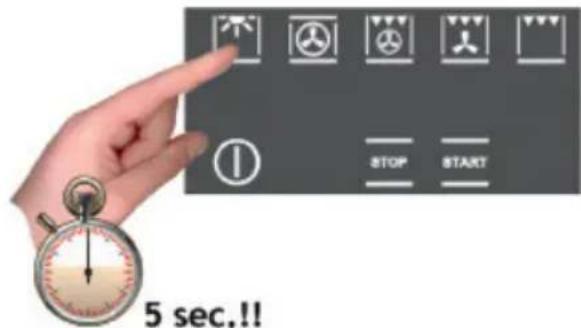
To disable the demonstration mode, touch the light symbol for five seconds: the oven will go to normal operation and be ready for turning on.
Now you can set the time but it is not necessary for turning on the oven.
SETTING THE CLOCK

The oven will signal that it is connected to the power mains with a double beep.
To set the system time, press the "TIMER FUNCTIONS" button for at least 3 seconds.

Each command activated is confirmed by a beep
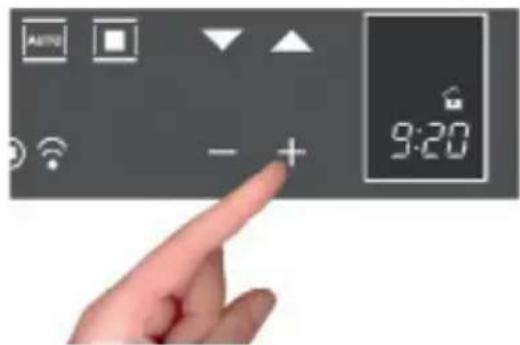
Set the clock with the + and - buttons: during setting the separator dots flash and the time has been set when the dots remain steady on.

ACTIONS POSSIBLE WITH THE OVEN OFF
- Turning on the oven light

The oven light is turned on/off by pressing the symbol as shown in the figure.
- Change the language
When the oven is off, you can change the language of the display by simultaneously selecting and the + in the lower right for at least 3 seconds.
Then, use to select the language and confirm your choice with.
- Setting the "minute-counter" timer function
See the section on page 48.
TURNING ON THE OVEN

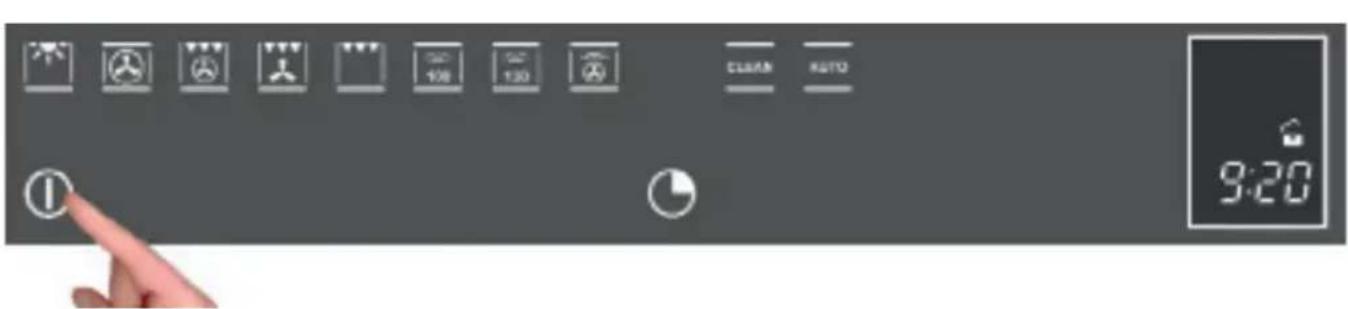
Turn the oven on by touching the symbol in the figure.
to activate the oven functions, always press ① except for the light and timer functions, which are independent.
The command activates all the icons by lighting up their backgrounds.
NOTE: Remember that the oven only turns on if the key function is deactivated


The word ON appears on the display for a minute. The control is waiting for you to select a cooking function. Otherwise, the oven assumes that it was turned on by accident and, for safety reasons, it automatically turns off, displaying the word OFF for several seconds.
Key (or child safety) function
The key function is activated/deactivated by pressing the key for at least 3 seconds.

You can activate and deactivate the oven mode at any time.
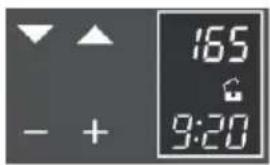
The padlock OPEN symbol means that the key function is not active.
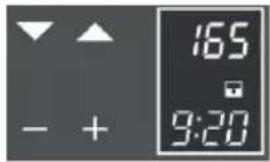
The padlock CLOSED symbol means that the key function is active.
MAIN FUNCTIONS
Overview of front panel commands

The cooking functions
The panel provides eleven specific cooking functions!
To activate a function, just touch the corresponding symbol. Each function has a temperature setting selected on the basis of cooking tests of the recipes that are typically used, which can be easily changed based on your own experience.
Oven functions

Oven lamp.


In this type of cooking, a fan located in the rear part circulates warm air inside the oven, distributing it uniformly.
This cooks food faster than conventional cooking. This system is good for cooking on several shelves and even for different types of foods (fish, meat, etc.).


Type of cooking for grilling or browning foods. The grill with the food to be cooked is placed in the 2nd or 3rd position from the bottom. Pre-heat for at least 2 minutes before putting in the dish.
Steam cooking 100^ (pre-set to 100^ and adjustable to 40^ ).
Steam cooking at 130^ (reheating)
Steam combined with ventilated cooking
Steam puff
Clean oven/Circuit steam generator (settable or automatic programs for the efficiency of the oven)
Access to preset recipes
The table below shows the results of the cooking tests conducted in our laboratories by a professional cook. In any case, these are only indicative and the values that we have selected are only a starting point for you to experiment with your own recipes to obtain better results!
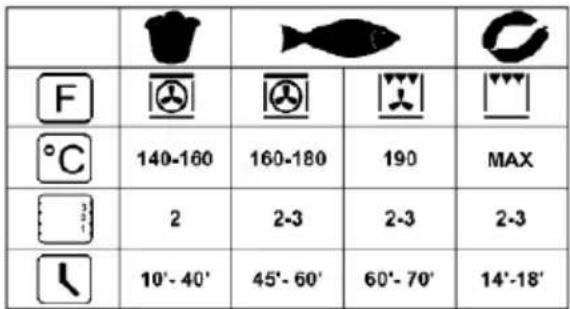

Simple cooking commands
Thanks to state-of-the-art controls, only two touches are required to set a cooking mode: turn on the oven and select the most suitable function for the dish you are about to cook... you choose it and you touch it!
GB
then

The control suggests a temperature for each function, which you can change at any time, but if you consider it suitable, you don't need to do anything else, the oven will start by itself in just a few seconds!
Setting the temperature
The control uses a temperature Sonde that is accurate to ± 5^ for the maximum reliability of the cooking temperatures requested.
You can change the temperature at any time. After selecting the cooking function just touch the symbols and the temperature can be set in a range from +50^ to MAX.

You don't need to confirm the change, the control activates by itself after a few seconds.
During heating, the centigrade symbol (^) flashes to indicate that it is heating up to reach the selected temperature.
When the temperature is reached, it beeps.
NOTE: some models may display the current temperature in the oven until the temperature set is reached. If you want to check the temperature set, press any one of the keys and, if you wish, you can use them to change the temperature set.
Note: always be very careful when opening the door of the appliance because, depending on the case, steam or boiling hot air could come out.
Residual heat
While cooking food, the structure of the oven stores heat. This heat is kept isolated from the rest of the kitchen thanks to generous heat insulation and certain construction techniques.
This heat is gradually dissipated over time and can still be a resource in the kitchen, if it is managed: the control shows the internal temperature after the oven is turned off until it falls to 50^


Use this characteristic to keep foods warm or to complete their cooking gently!
Food Sonde (or thermometer sonde)

Tenderness, aroma and flavour are the result of precise, functional control.
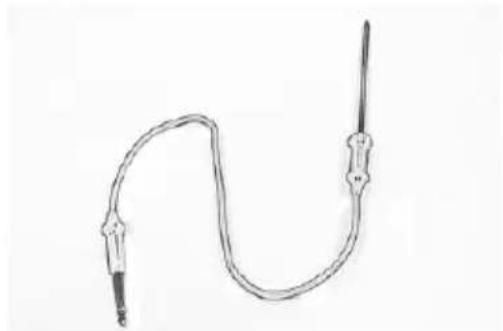
The food sonde is a thermometer which, when inserted into the food, makes it possible to check the internal temperature and use it to establish the end of cooking.
For example, meat may look like it is cooked on the outside, but still be pink on the inside!
The temperature reached by food during cooking is closely linked to problems relating to health and hygiene. Bacteria can be contained in every kind of meat, poultry and fish, as well as raw eggs.
Certain types of bacteria make food go off, while others, such as Salmonella, Campylobacter jejuni, Listeria monocytogenes, Escherichia coli and Staphylococcus aureus can be seriously harmful to human health. Bacteria multiply very quickly above a temperature of 4.4^ up to 60^ . Mince is particularly at risk from this point of view.
To prevent bacteria from multiplying, it is necessary to take the following measures:
-
Do not defrost food at room temperature, always in the fridge or in the oven until function. In the latter case, cook the food immediately afterwards.
-
Stuff chicken just before eating it. Never buy pre-packed ready-stuffed chicken and on cooked stuffed chicken when you intend to eat it within 2 hours.
-
Marinate food in the fridge, not at room temperature.
-
Use a food sonde to check the temperature of meat, fish and poultry if they are more than 5cm thick, to ensure that the minimum cooking temperatures are reached.
The greatest hazards are posed by poorly cooked chicken, particularly at risk from Salmonella.
-
Avoid interrupting the cooking process, i.e., partially cooking food, storing it and com the cooking process later. This sequence encourages the growth of bacteria due to the "warm" temperatures reached inside the food.
-
Roast meat and poultry in the oven at temperatures of at least 165^
NOTE: Always use the sonde provided by the manufacturer
HOW USE THE FOOD Sonde
As you can see from Figure 1 above, the sonde socket is located in the upper left corner of the oven chamber, protected by a metal cover with plug.
Remove the cover and insert the plug of the sonde all the way (you will hear a slight confirming click).
Insert the sonde in the food without touching fatty parts or bones.

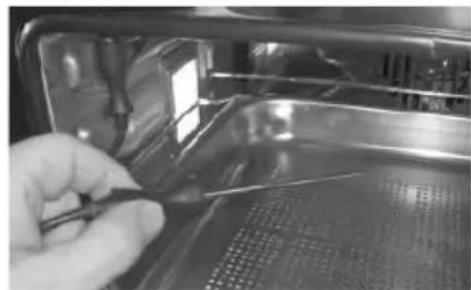

Remember that the sonde will not work if it is connected when the oven is already switched on!
In summary:
Insert the sonde with the oven off.
Put the food in the oven.
- Insert the sonde in the centre of the food, avoiding fatty parts and bones.
- Turn on the oven with the most appropriate cooking function for your dish.
- Select the temperature you want.
After a few moments, the oven will begin to cook. The display shows the temperature (66 °C preset) of the sonde, which you can change using the buttons within the allowed limits of 30 to 99 °C.
If you want to change the temperature of the oven during cooking, press the button, which turns red and allows you to change it, always using the buttons; when you are finished, the display will show the current temperature of the oven.
GB
In any case, we recommend that you consult the following table taken from the National Food Safety Database (USA).

| FOOD MINIMUM INTERNAL TEMPERATURE | |
| Mince | |
| Hamburger 71°C | |
| Beef, veal, lamb, pork 74°C | |
| Chicken, turkey 74°C | |
| Beef, veal, lamb | |
| Roasts and steaks: | |
| Rare | The cooking temperature for rare meat is not indicated by the NFSD as it is unsafe for health reasons |
| Medium-rare 63°C | |
| Medium 71°C | |
| Well done 77°C | |
| Pork | |
| Chops, roasts, ribs: | |
| Medium 71°C | |
| Well done 77°C | |
| Fresh ham 71°C | |
| Fresh sausages 71°C | |
| Poultry | |
| Whole chicken or chicken pieces 82°C | |
| Duck 82°C | |
| Whole turkey (not stuffed) 82°C | |
| Turkey breast 77°C | |
NOTE: IF THE PLUG OF THE Sonde IS REMOVED AFTER COOKING HAS STARTED, THE CONTROL BLOCKS THE OVEN AND DISPLAYS THE ERROR "CENTRE Sonde DISCONNECTED".

When cooking with the aid of the food sonde, all the pre-set temperatures are changed to 165 ^ C (except for steam) to be consistent with its philosophy of use: they can be changed from a minimum of 120^ to a maximum of 250^ .
Cooking ends when the internal temperature set for the food sonde is reached; all oven programming functions (timer functions) are inhibited except for the "Minute-counter"
When finished cooking, always remember to disconnect the sonde and insert the plug provided with the appliance.
GB
Oven light control
The oven light control is active in all cooking functions and is independent of them, i.e., it can be turned on or off depending on the need, whenever you want!
The oven light is normally kept on during heating and, then, for three minutes after the temperature setting is reached. After that time, the light is turned off to save energy.
To check how the food is cooking, you must turn on the inside light. To do this, just touch the light symbol it will stay on for three minutes and then turn off by itself. Of course, you can turn it off right away by touching the light symbol again.
The light inside the oven always turns on when the door is opened and remains on until the door is closed.
PROGRAMMING THE OVEN

Touch the timer symbol once and the relative symbol will light up. Plus, the clock display will replace the current time.
The separator dots flash to indicate that you can program the cooking time


Once the cooking time is entered, the display will flash the current time again and the "cooking time" symbol will be lit.
The countdown starts now. After the indicated cooking time has elapsed, the oven will beep and the heating elements will turn off, ending cooking. The following words will appear on the display: "Program finished remove the dish": press any button to stop the beeping or open the door.
After 1 minute, the oven will automatically turn off, if other cooking functions have not been set.
Timer programming: end-of-cooking time

Touch the timer symbol two times and the relative symbol will light up.
The separator does will flash to indicate that you can set the end-of-cooking time.
Set the end-of-cooking time by touching the "+" and "-" symbols.
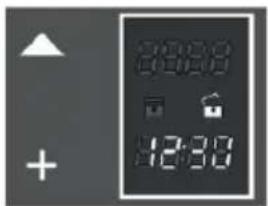
Once the end-of-cooking time is entered, the display will flash the current time again and the "end-of-cooking time" symbol will be lit.
The countdown starts now. When the set time has been reached, the oven will beep and the heating elements will turn off, ending cooking. The following words will appear on the display: "Program finished remove the dish": press any button to stop the beeping or open the door.
After eight seconds, the oven will automatically turn off, if other cooking functions have not been set.
Timer programming: delayed cooking
By combining the two modes, "cooking time" and "end-of-cooking time", you can program the oven so that cooking starts later than the current time.
For example, if you want to go out at 8:30 and you want a roast to be ready when you return at 13:00, do this:

Prepare the roast for cooking and put it in the oven.
Turn on the oven, select the cooking function and set the temperature.


Then set the cooking time, which we assume to be two hours.

Now, set the end-of-cooking time: the control normally adds the cooking time to the current time, so it proposes an end-of-cooking time, which in our case would be 10:30 (8:30+2:00).


Change the end-of-cooking time to what you want, in our example 13:00.

The oven goes to standby mode, turning off the oven light.
The control automatically turns the oven on at 11:00 (13:00-2:00) and turns it off at 13:00. The roast will be ready when you return!
Programming the timer: minute-counter
The minute-counter is a function of the timer that is independent from the operation of the oven, i.e., it does not stop cooking or turn off the oven but functions as an alarm.
You can set it at any time, such as to remind you when to check cooking on the burners, in addition to the oven, or for other kitchen tasks.
It is even available when the oven is off and, in this case, just touch the timer function symbol one time.
But, if you are using it with the oven on, you must touch the time function symbol three times:


The separator dots flash to indicate that you can set the time.
Touch the "+" and "-" symbols to set the minutes and the countdown starts now. After the indicated time passes, the over will beep and the dedicated symbol will flash: press any button to stop the beep.
Programming the timer: cancelling the program
To cancel a program, you must set the previously assigned value to zero or turn off the oven.
STEAM OPERATION
Steam cooking is used most for oriental cuisine but it is certainly very useful for our own.
It is fat and has the advantage of preserving the original flavour of the food.
In this case, the food is not cooked with water but with water vapour.
Steam cooking is different than boiling. In fact, the water vapour works on the inside of the cells, which is fundamentally different from the effect of boiling water.
In fact, steam also cooks the food completely but, except for the fat, nothing else comes out of the food.
The cell walls and tendons gradually soften, the protein coagulates without coming out, the starches swell and combine and the sugars and minerals remain unchanged.
The same goes for odours, which are reduced to a minimum, or coloured substances.
Only the fat liquefies do to the heat and, for this reason, it is almost never a good idea to steam cook large cuts of meat or fish. Vitamins are another story because heat generally tends to destroy them; however, depending on the cooking time, some of them are only slightly altered.
So, the foods that lend themselves to this cooking method are, generally, those with no fat such as, for example, fish, some types of meat, legumes, potatoes, cereals, eggs, pudding, etc.
It is not good for vegetables with tough fibres or fruits in general.
Useful tips
When using the steam oven, always start with the oven cold. Using steam in a hot oven (immediately after traditional cooking) is not recommended because the benefits of cooling with steam will be cancelled out.
For steam cooking try to use the perforated stainless steel tray together with the lower stainless steel drip tray as much as possible.
The first, resting with its support on the flat grill, allows the steam to fully cook the food while draining everything released by the food during cooking through the holes.
The second, lower tray, slid under the grill on its guides, will collect the drippings and keep the oven chamber cleaner.
When done cooking, the support of the perforated tray can be used as a support to keep the hot tray off of the counter while you remove the food you just cooked.
OPERATING MODES
STEAM COOKING AT 100°C

GB
Turn on the oven with the key
Select Steam at 100^ ....
The program starts automatically after a few seconds.
The steam produced by the generator enters the chamber at 100^ and radial ventilation distributes it so that the food is uniformly heated and cooked.
The advantage of this is that you can cook on three levels at the same time by taking care to put the "denser" foods on the highest level and less dense foods, like vegetables, on the lower ones (from the first to the third).
Note: During steam cooking, always slide the lower stainless steel drip tray under the perforated cooking tray to collect any food or condensation that might fall.
STEAM COOKING AT 130^ (reheating)
Turn on the oven with the key

Select Steam at 130^
With the keys you can adjust the temperature in 5^ intervals over the preset range from 105 ^ C to 130^
The program starts automatically after a few seconds.
During reheating, the cooking chamber is heated with steam and hot air, which heats the food quickly and evenly without drying it out.
This program allows you to change the temperature inside the oven based on the type of food to be regenerated in order to manage this function the way you like and, so, this type of function is especially suitable for:
Heating pre-cooked foods from 105^ to 130^ ;
Preparing ready and semi-ready dishes and frozen dishes from 105^ to 130^
Note: For these types of dishes, remember to use suitable pots and pans (not made of synthetic materials or similar), positioning them on the grill and making sure to remove the covers.
GB
STEAM COMBINED WITH VENTILATED COOKING
Turn on the oven with the key
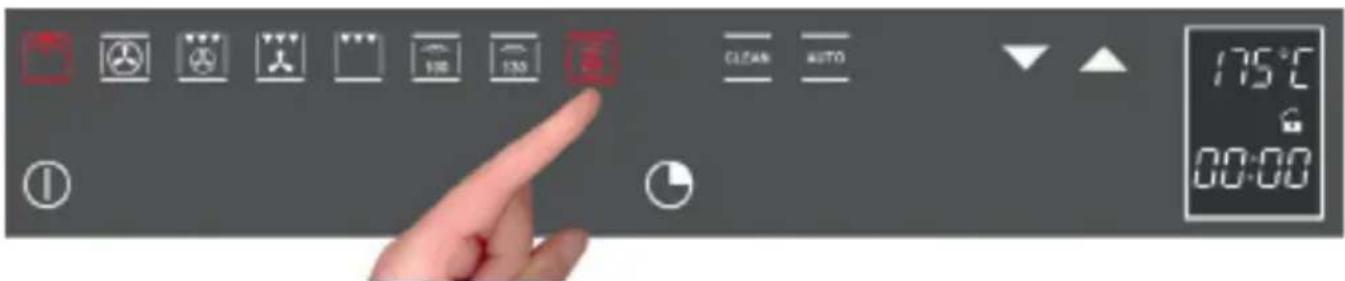
Select Combined Steam
With the keys you can adjust the temperature in 5^ intervals over the preset range from 50^ to 230^ .
This type of cooking is also called "professional cooking" because the food to be cooked is placed in the chamber cold and not preheated.
After starting, in the first step the food to be cooked is exposed to steam (also called steaming), than after exposing the food to steam for a certain time depending on the filling volume, i.e., the dimensions of the food to be cooked, the appliance automatically passes to the second step - hot air.
This type of function is especially suitable for large pieces of meat or fish; for cooking large loaves of bread made with white, dark or whole-wheat flour or leavened dough at 190^ to 210^ and fresh or frozen filled pastries from 190^ to 210^
ATTENTION: For optimal performance when using "professional cooking" twice in a row, you must let the oven cool before cooking the second dish.
STEAM PUFF
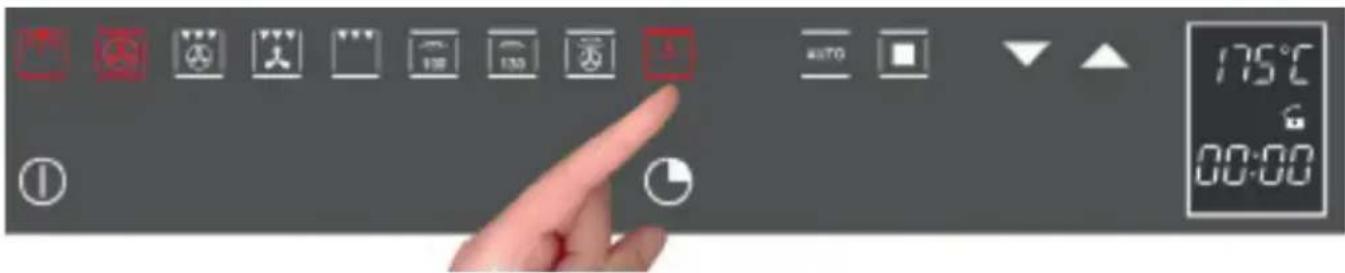
This particular function can only be used when using the traditional oven functions.

IF YOU AREN'T USING THE PUFF FOR COOKING, REMOVE THE CARAFE FROM THE OVEN.
Once the oven is turned on, the steam puff will only be available after the internal chamber has reached 100^ . It will not be possible for the button to light before then.

The puff works for five minutes, humidifying the food so that it is less dry during cooking. It is ideal for roasts in general, large pieces of meat/fish and gentler cooking.
Note: THIS FUNCTION DOES NOT AVAILABLE WITH THE STEAM COOKING FUNCTIONS.
The table below shows the results of the cooking tests conducted in our laboratories by a professional cook. In any case, these are only indicative and the values that we have selected are only a starting point for you to experiment with your own recipes to obtain better results!
| DISHES TO PREPARE | WEIGHT(g) | FUNCTION | Oven temperature °C | Steam temperature °C | LEV. | RECOMMENDED ACCESSORIES | Time (minutes) |
| PRAWNS WITH RAVIOLI 1700 Steam 100 °C 1002 Grill + Perforated | Tray + Drip-pan below | 55 | |||||
| STRAWBERRY RISOTTO 1200 Steam 100 °C 1002 Grill 15 | |||||||
| CASTELMAGNO CHEESE RISOTTO | 1200 Steam 100 °C 1002 Grill 15 | ||||||
| SHRIMP COCKTAIL 100 Steam 100 °C 1002 Grill + Perforated | Tray + Drip-pan below | 15 | |||||
| MILK ROLLSS 800 VENTILATED + Steam 100 °C | Perforated tray | 30 | |||||
| VENERE RICE SALAD | 500 Steam 100 °C 1002 Grill 35 | ||||||
| REHEATING OF FIRST COURSES | 1 portion | Steam 130 °C | 1202 Grill 20 | ||||
| REHEATING VEGETABLES | 1 portion | Steam 130 °C | 120 | 2 | Grill | 20 | |
| REHEATING SECOND COURSES WITH VEGETABLES | 1 portion | Steam 130 °C | 1202 Grill 20 | ||||
| STUFFED ROAST CHICKEN | 1800 | VENTILATED + Steam 100 °C | 210 | 1002 Grill 85 | |||
| DELICATE GILTHEAD | 1300 Steam 100 °C 1002 Grill + Perforated | Tray + Drip-pan below | 35 | ||||
| ANGLER TAIL IN ORANGE SAUCE | 800 Steam 100 °C 1002 Grill + Perforated | Tray + Drip-pan below | 30 | ||||
| STEAMED GILTHEAD WITH AUBERGINE PURÉE | 2000 | VENTILATED + Steam 100 °C | 200 | 1002 Grill + Perforated | Tray + Drip-pan below | 45 | |

| TROUT IN SPICED SAUCE 600 Steam | Steam 100 °C | 100 2 Grill + Perforated | Tray + Drip-pan below | 35 | ||
| MUSSELS AU GRATIN 1000 Steam | m 100 °C + | 100 2 Grill + PerforatedGRILL MAX | grill + Perforated | Tray + Drip-pan below | 25 | |
| Tray + Drip-pan below | 8 | |||||
| CLAMS IN WHITE WINE 1000 Steam | Steam 100 °C | 100 2 Grill + Perforated | Tray + Drip-pan below | 35 | ||
| CODFISH FILLETS IN CITRUS SAUCE | 1000 Steam | 100 °C 100 2 Grill + Perforated | Tray + Drip-pan below | 25 | ||
| SALMON FILLET IN ORANGE SAUCE | 700 Steam | 100 °C 100 2 Grill + Perforated | Tray + Drip-pan below | 20 | ||
| BOUQUETS OF VEGETABLES | 1000 Steam | 100 °C 100 2 Grill + Perforated | Tray + Drip-pan below | 35 | ||
| CAULIFLOWER AU GRATIN 700 Steam | steam 100 °C | 100 2 Grill + PerforatedGRILL MAX | grill + Perforated | Tray + Drip-pan below | 25 | |
| Tray + Drip-pan below | 10 | |||||
| DANISH POTATO SALAD | 800 Steam | 100 °C 100 2 Grill + Perforated | Tray + Drip-pan below | 45 | ||
| STEAMED VEGETABLES WITH TOFU AND TUNA SAUCE | 1000 Steam | 100 °C 100 2 Grill + Perforated | Tray + Drip-pan below | 30 |
CLEAN
Turn on the oven with the ① key;
Select the CLEAN program;
The following screen appears on the display:

Using the select "OVEN". At this point, when you select the START key, which is flashing, the program that cleans the inside of the muffle will start.
You will see
once you have turned it on (if you have already turned it on, its also OK), press START for the second time to start the cleaning cycle. Once started, the program will end in 15 minutes, the oven will beep and the following text will appear:
Open the door paying attention to the hot vapour that will come out.
With the door open, the beep is blocked. Any encrustations in the oven chamber due to cooking at high temperatures will be much easier to remove because of the cycle run.
When finished cleaning inside the oven, turn it off with the ON/OFF button
Once the oven is off, it will tell you to:

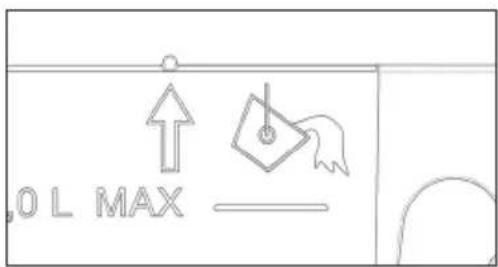
After partially extracting the tray (look at the arrow on the left side or the two notches above the carafe), press START to empty the steam production circuit and the following text will appear:
After discharging, the following text appears:
A this point, empty the carafe and leave it to drip dry.


CLEANING THE STEAM CIRCUIT
Turn on the oven with the key;
Select the CLEAN program
The following screen appears on the display:


Using the keys select "STEAM CIRCUIT". At this point, when you select the START key, which is flashing, the program that cleans the inside of the muffle will start.
You will see
once you have turned it on (if you have already turned it on, its also OK), press START for the second time to start the cleaning cycle.
Several minutes after the start, the oven will have ended the program. A beep will alert you and the following text will be displayed:
With the door open, the beep is blocked.
Afterwards, with the oven off, it will display together with the beep:

Open the door and remove the tray:



After partially extracting the tray (look at the arrow on the left side or the two notches above the carafe), press START to empty the steam production circuit and

the following text will appear:

After discharging, the following text appears:

At this point, empty the carafe and leave it to drip, keeping in mind that:
with this program, you will keep you oven healthier;
you will avoid pools of water;
you will keep the steam production circuit working properly.
Note: if, when emptying the carafe, you notice that the water is not perfectly clear, repeat the cleaning cycles until it is completely clean.
IMPORTANT NOTE
If the electricity is interrupted during one of the cleaning cycles, when it comes back on, the oven requires you to empty the circuit even though there shouldn't be any water in it.

This oven is the only one of its kind that has no need for decalcifying products to keep the steam production systems working properly.
From time to time, the oven will advise you to perform a cleaning cycle....do it!
AUTOMATIC FUNCTIONS: RECIPES
To access the recipe function, proceed as follows: Turn on the oven with the key; Select the AUTOMATIC function

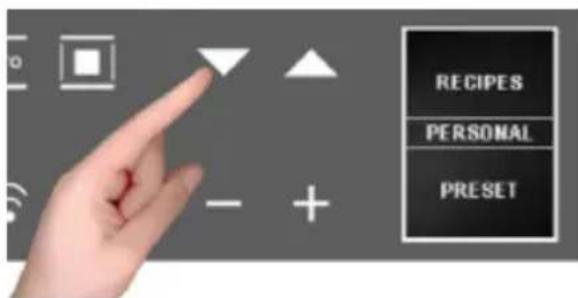
The display will show two options:
- personal recipes;
- preset recipes
Select the desired setting with key with confirm the selection;

the following menu will appear;
press the keys to select the type of dish and use the confirm the choice.

the following menu will appear;
press the keys to select the type of dish and use the key to confirm the choice.
GB

the following menu will appear;
press the keys to select the type of dish and use the key to confirm the choice.

The following weight screen will appear, press to select one of the preset values and use to confirm the choice.
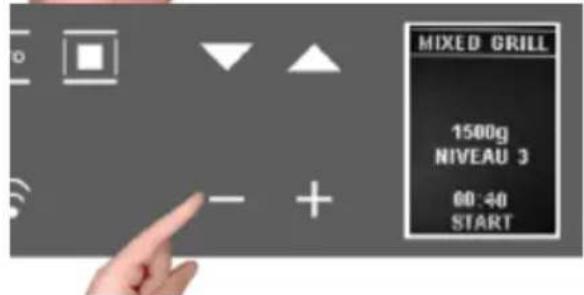
At the end of entering the settings, the display summarises the recipe set.
The colon in the cooking time (0:40) will flash to indicate that it can be changed.
To change it, press - and +.
Or directly select the function which is flashing, which starts the cooking program with a countdown of the preset time on the display.
ATTENTION: certain recipes use pre-heating, so put the dish in when the oven has reached the set temperature and the display shows "PRE-HEATING FINISHED PUT IN THE DISH"
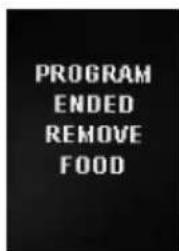
When cooking is finished the display will show the text to the side, the buzzer sounds and remains on until you press any key and open the door.
Note: at any moment, if you make a mistake choosing the values and/or you want to change the settings of your recipe, you can select STOP which cancels it and allows you start over from the beginning of the procedure.

Note: If you are cooking with the modified parameters of a preset recipe, while the oven beeps at the end of cooking, you will see:

see how to save recipes in the next paragraph.
IMPORTANT
AFTER YOU HAVE FINISHED STEAM COOKING, THE OVEN WILL START THE CYCLE FOR EMPTYING THE WATER CIRCUIT.
Once you have changed the cooking time of a preset recipe and executed it, you can save it for the next by storing the new parameters you used (weight and cooking time).
At the end of the cooking cycle of the modified recipe, the icon below will appear and, to save it, proceed as follows:

- with the + key select "YES"
- confirm with the key, the time used is displayed,
- change with the + and - keys and confirm with the weight used appears,
- change it with + and - and confirm with you will see the message
"Recipe saved POS. 1/1", and so on, in ascending order
Each time you access the "PERSONAL RECIPES" menu, you will find it saved in your recipes.

If there is insufficient memory for saving your personal recipes, you will see this message displayed: "MEMORY FULL UNABLE TO SAVE".
Before saving your recipe, you must delete others from the menu in this way:

- select the function;
- select the "PERSONAL RECIPES" section where you will find all the saved recipes;
- use the keys to scroll the menu and select the recipe you want to delete.
Note: the menu provides the names by default;
When the recipe to be deleted is displayed, select holding it down until the next screen appears:

By default, the selection will be set to NO, but, by pressing the + and - scroll keys, select YES and confirm with


- The display tells you that the recipe has been deleted;
REPLACING THE OVEN LAMP
IMPORTANT:
The oven lamp must have precise characteristics:
a) Structure suitable for high temperatures (up to 300^ );
b) Power supply: see the V/Hz value on the serial number plate;
c) power 25 W;
d) Type G9 connector.
Attention: make sure the appliance is off before replacing the lamp to avoid the possibility of electric shock.
- To avoid damage, spread a tea towel for pots and pans inside the oven;
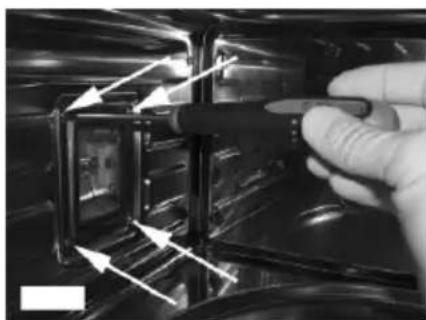
- Remove the screws holding the steel frame;
- Remove the old lamp by sliding it out of its seat and taking care not to break it;
- Insert the new bulb taking care not to touch it with your hands (we recommend using a disposable latex glove);
- Replace the stainless steel frame taking care not to pinch the silicone gasket seal;
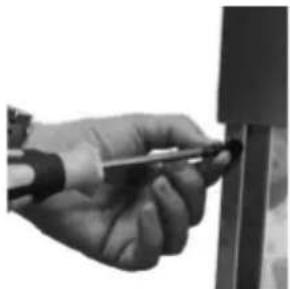
- Screw in the stainless steel screws you previously removed
- Connect the appliance to the power line.


FOR THE INSTALLER
Installing the oven in a cabinet

The oven must be installed under a cook top, in a column, or combined with the relative food-warmer drawer. The dimensions of the space must be those shown in the figure.
The cabinet material must be able to withstand the heat.
The oven must be centred within the walls of the cabinet and fixed with the screws and bushings that are provided.
ELECTRICAL HOOK-UP
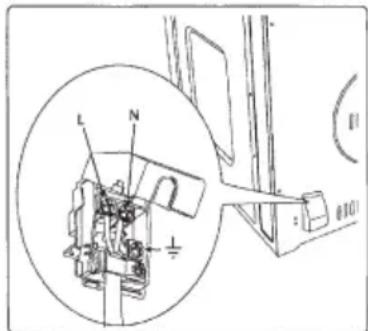
Before connecting to the electricity, make sure that:
- the characteristics of the electrical system satisfy what is shown on the serial number plate applied to the front of the oven;
- the system has an effective earth connection compliant with current standards and laws.
The earth connection is required by law. The cable must not, at any point, reach a temperature greater than 50^ above the ambient temperature.
This oven must be connected to the electricity through a power supply cable and plug that is compatible with the outlet of the electrical system that powers this oven.
If a fixed appliance does not have a power cord and plug, or another device that ensures disconnection from the mains, with an opening distance of the contacts that allows complete disconnection under the conditions of excessive voltage category III, such disconnection devices must be provided in the power supply mains conforming to the installation rules.
The omnipolar socket or switch must be easy to reach when the appliance is installed.
Note: The manufacturer declines all liability if the usual accident prevention standards and the above instructions are not followed.
| TYPE AND MINIMUM DIAMETER OF THE CABLES | |
| SASO | |
| H05RR-F 3x1,5 mm² H05RR-F 3x2,5 mm² | |
| H05VV-F 3x1,5 mm² H05VV-F 3x2,5 mm² | |
| H05RN-F 3x1,5 mm² H05RN-F 3x2,5 mm² | |
| H05V2V2-F 3x1,5 mm² H05V2V2-F 3x2,5 mm² | |
Caro CLIENTe,
FUNCTION CLEAN (auto-nettoyage): 10;

PROGRAMMATION DU FOUR
REEMPLACEMENT DE LA LAMPE DU FOUR
IMPORTANT:
E info.be@boretti.com
Belgium