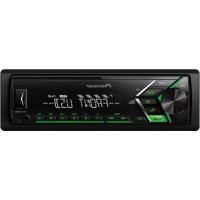
USER MANUAL MVHS100UBG PIONEER
DIGITAL MEDIA RECEIVER
RECEPTEUR NUMERIQUE MULTIMEDIA
RICEVITORE MULTIMEDIALE DIGITALE
RECEPTOR DIGITAL DE MEDIOS
DIGITALER MEDIA RECEIVER
DIGITALE MEDIA-RECEIVER
LUNΦPOBOI MEDINAPECNBEP
MVH-S100UI
MVH-S100UB
MVH-S100UBG
MVH-S100UBA
MVH-S100UBW
MVH-S010UB


Spotify
Made for
iPhone
iPod
Owner's Manual
Mode d'emploi
ILLUMINATION settings. 14
Connections/Installation 15
Additional Information. 18
About this manual:
- In the following instructions, a USB memory or USB audio player are referred to as "USB device".
- In this manual, iPod and iPhone are referred to as "iPod".
Manufacturer:
Pioneer Corporation
28-8, Honkomagome 2-chome,
Bunkyo-ku, Tokyo 113-0021, Japan
EU Representative's & Importer:
Pioneer Europe NV
Haven 1087, Keetberglaan 1, 9120 Melsele, Belgium
http://www.pioneer-car.eu
[+]MVH-S100UI, MVH-S100UBMVH-S100UBG,MVH-S100UBA,MVH-S100UBW,MVH-S010UB
English:
Hereby, Pioneer declares that the radio
equipment type [^*] is in compliance with Directive 2014/53/EU.
The full text of the EU declaration of conformity is available at the following internet address: http:// www.pioneer-car.eu/compliance
Suomi:
www.pioneer-car.eu/compliance
Deutsch:
www.pioneer-car.eu/compliance
Thank you for purchasing this PIONEER product
To ensure proper use, please read through this manual before using this product. It is especially important that you read and observe WARNINGS and CAUTIONs in this manual. Please keep the manual in a safe and accessible place for future reference.
If you want to dispose this product, do not mix it with general household waste. There is a separate collection system for used electronic products in accordance with legislation that requires proper treatment, recovery and recycling.
Private households in the member states of the EU, in Switzerland and Norway may return their used electronic products free of charge to designated collection facilities or to a retailer (if you purchase a similar new one).
For countries not mentioned above, please contact your local authorities for the correct method of disposal.
By doing so you will ensure that your disposed product undergoes the necessary treatment, recovery and recycling and thus prevent potential negative effects on the environment and human health.
WARNING
-
Do not attempt to install or service this product by yourself. Installation or servicing of this product by persons without training and experience in electronic equipment and automotive accessories may be dangerous and could expose you to the risk of electric shock, injury or other hazards.
-
Do not attempt to operate the unit while driving. Make sure to pull off the road and park your vehicle in a safe location before attempting to use the controls on the device.
CAUTION
- Do not allow this unit to come into contact with moisture and/or liquids. Electrical shock could result. Also, damage to this unit, smoke, and overheating could result from contact with liquids.
Always keep the volume low enough to hear outside sounds.
The Pioneer CarStereo-Pass is for use only in Germany.
This product is evaluated in moderate and tropical climate condition under the Audio, video and similar electronic apparatus - Safety requirements, IEC 60065.
If you experience problems
Should this unit fail to work properly, please contact your dealer or nearest authorized PIONEER Service Station.
Getting Started
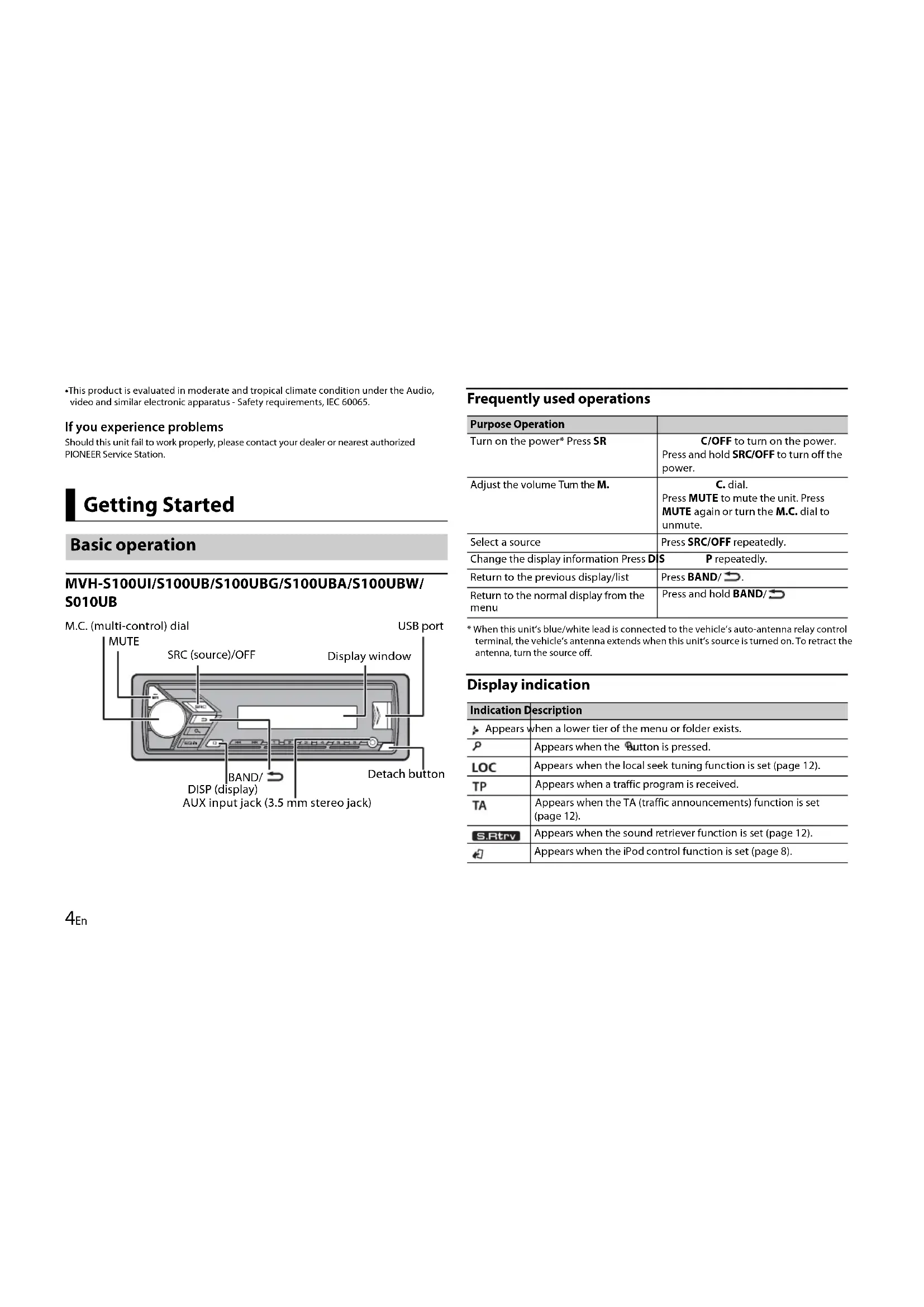
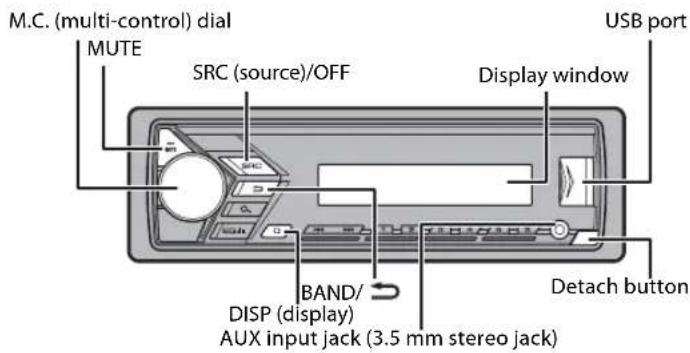
Basic operation
MVH-S100UI/S100UB/S100UBG/S100UBA/S100UBW/ S010UB
Frequently used operations
| Purpose Operation | |
| Turn on the power* Press SR | C/OFF to turn on the power. Press and hold SRC/OFF to turn off the power. |
| Adjust the volume Tum the M. | C. dial. Press MUTE to mute the unit. Press MUTE again or turn the M.C. dial to unmute. |
| Select a source | Press SRC/OFF repeatedly. |
| Change the display information Press D | S P repeatedly. |
| Return to the previous display/list | Press BAND/→. |
| Return to the normal display from the menu | Press and hold BAND/→ |
- When this unit's blue/white lead is connected to the vehicle's auto-antenna relay control terminal, the vehicle's antenna extends when this unit's source is turned on. To retract the antenna, turn the source off.
Display indication
| Indication Description |
| Appears when a lower tier of the menu or folder exists. |
| P | Appears when the Button is pressed. |
| LOC | Appears when the local seek tuning function is set (page 12). |
| TP | Appears when a traffic program is received. |
| TA | Appears when the TA (traffic announcements) function is set (page 12). |
| SRTRV | Appears when the sound retriever function is set (page 12). |
| 4 | Appears when the iPod control function is set (page 8). |
Detaching the front panel
Detach the front panel to prevent theft. Remove any cables and devices attached to the front panel and turn off the unit before detaching it.
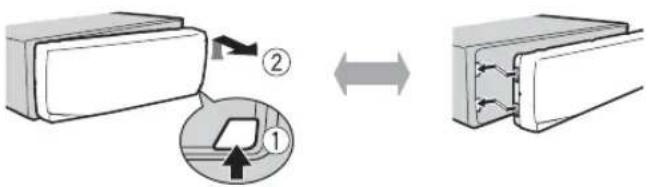
Detach Attach
Important
- Avoid subjecting the front panel to excessive shock.
- Keep the front panel out of direct sunlight and high temperatures.
Always store the detached front panel in a protective case or bag.
When you turn the ignition switch to ON after installation, [SET UP:YES] appears in the display.
1 Press the M.C. dial.
The setup menu disappears after 30 seconds of no operation. If you prefer not to set at this time, turn the M.C. dial to select [NO], then press to confirm.
2 Turn the M.C. dial to select the options, then press to confirm.
To proceed to the next menu option, you need to confirm your selection.
Menu Item Description
| LANGUAGE Select the [ENG](English), [PYC](Russian), [TUR](Turkish) | language to display the text information from a compressed audio file. |
CLOCK SET Set the clock.
FM STEP Select the FM tuning step from 100 kHz or 50 kHz.
[100], [50]
3[QUIT:YES] appears when all the settings have been made.
To return to the first item of the setup menu, turn the M.C. dial to select [QUIT:NO], then press to confirm.
4 Press the M.C. dial to confirm the settings.
NOTES
- You can cancel the menu setting by pressing SRC/OFF.
- These settings can be made at any time from the SYSTEM settings (page 13) and INITIAL settings (page 5).
Canceling the demonstration display (DEMO OFF)
1 Press the M.C. dial to display the main menu.
2 Turn the M.C. dial to select [SYSTEM], then press to confirm.
3 Turn the M.C. dial to select [DEMO OFF], then press to confirm.
4 Turn the M.C. dial to select [YES], then press to confirm.
INITIAL settings
1 Press and hold SRC/OFF until the unit turns off.
2 Press and hold SRC/OFF to display the main menu.
3 Turn the M.C. dial to select [INITIAL], then press to confirm.
4 Turn the M.C. dial to select an option, then press to confirm.
NOTE
The options vary depending on the unit.
| Menu Item Description |
| FM STEP Select the FM [100], [50] | tuning step from 100 kHz or 50 kHz. |
| SP-P/O MODE Select [REAR/SUB.W] | when there is a full-range speaker connected to the rear speaker output leads and there is a subwoofer connected to the RCA output. |
| [SUB.W/SUB.W] Select when there is a passive subwoofer connected directly to the rear speaker output leads and there is a subwoofer connected to the RCA output. |
| [REAR/REAR] Select when there are full-range speakers connected to the rear speaker output leads and RCA output. If there is a full-range speaker connected to the rear speaker output leads, and the RCA output is not used, you may select either [REAR/SUB.W] or [REAR/REAR]. |
| S/W UPDATE Select to [SYSTEM INFO] | confirm the latest system information on the unit. |
| [SYSTEM UPDATE] | Select to update the unit to the latest software and initialize the unit settings. For details on the latest software and updating, visit our website. |
| SYSTEM RESET Select [YES], [NO] | [YES] to initialize the unit settings. The unit will be restarted automatically. (Some of the settings may be retained even after resetting the unit.) |
Radio
The tuner frequencies on this unit are allocated for use in Western Europe, Asia, the Middle East, Africa and Oceania. Use in other areas may result in poor reception. The RDS (radio data system) function only works in areas that broadcast RDS signals for FM stations.
Receiving preset stations
1 Press SRC/OFF to select [RADIO].
2 Press BAND to select the band from [FM1], [FM2], [FM3], [MW] or [LW].
3 Press a number button (1 / to 6 / 一
TIP
The buttons can be also used to select a preset station when [SEEK] is set to [PCH] in the FUNCTION settings (page 12).
Best stations memory (BSM)
The six strongest stations are stored on the number buttons (1 / to 6 / 一
1 After selecting the band, press the M.C. dial to display the main menu.
2 Turn the M.C. dial to select [FUNCTION], then press to confirm.
3 Turn the M.C. dial to select [BSM], then press to confirm.
To seek a station manually
1 After selecting the band, press to select a station. Press and hold then release to seek an available station. Scanning stops when the unit receives a station. To cancel seek tuning, press
NOTE
[SEEK] needs to be set to [MAN] in the FUNCTION settings (page 12).
To store stations manually
1 While receiving the station you want to store, press and hold one of the number buttons (1/ to 6 / 一 ) until it stops flashing.
Using PTY functions
The unit searches for a station by PTY (program type) information.
1Press dfring FM reception.
2 Turn the M.C. dial to select a program type from [NEWS/INFO], [POPULAR], [CLASSICS] or [OTHERS].
3 Press the M.C. dial.
The unit begins to search for a station. When it is found, its program service name is displayed.
NOTES
To cancel the search, press the M.C. dial.
The program of some stations may differ from that indicated by the transmitted PTY.
If no station is broadcasting the type of program you searched for, [NOT FOUND] is
displayed for about two seconds and then the tuner returns to the original station.
USB/iPod/AUX
NOTE
iPod function is not available for MVH-S100UB/S100UBG/S100UBA/S100UBW/S010UB.
Playing back
Disconnect headphones from the device before connecting it to the unit.
USB devices (including Android™)/iPod
1 Open the USB port cover.
2 Plug in the USB device/iPod using an appropriate cable.
NOTE
To automatically switch to [USB] source when a USB device/IPod is connected to the unit, set [USB AUTO] to [ON] in the SYSTEM settings (page 14).
CAUTION
Use an optional Pioneer USB cable (CD-U50E) to connect the USB device as any device connected directly to the unit will protrude out from the unit, which could be dangerous.
Before removing the device, stop playback.
AOA connections
For details on AOA connection, see page 10.
MTP connection
A device installed with Android OS 4.0 or later can be connected to the unit via MTP, using the cable supplied with the device. However, depending on the connected device and the numbers of the files in the device, audio files/songs may not be able to be played back via MTP. Note that MTP connection is not compatible with WAV and FLAC file formats.
NOTE
If you use an MTP connection, [ANDROID WIRED] needs to be set to [MEMORY] in the SYSTEM settings (page 14).
AUX
1 Insert the stereo mini plug into the AUX input jack.
2 Press SRC/OFF to select [AUX] as the source.
NOTE
If [AUX] is set to [OFF] in the SYSTEM settings, [AUX] cannot be selected as a source (page 14).
Operations
You can make various adjustments in the FUNCTION settings (page 11). Note that the following operations do not work for an AUX device. To op an AUX device, use the device itself.
| Purpose Operation | |
| Select a folder/album*1 | Press 1/▲ or 2/∨. |
| Select a track/song (chapter) | Press ↘ or ↘. |
| Fast forward or reverse*2 | Press and hold ↘ or ↘. |
| Purpose | Operation |
| Search for a file from a list | 1 Press to display the list.
2Tu m the M.C. dial to select the desired file (folder) name or category, then press to confirm.
3Tu m the M.C. dial to select the desired file, then press to confirm. Playback starts. |
| View a list of the files in the selected folder/category*1 | Press the M.C. dial when a folder/ category is selected. |
| Play a song in the selected folder/ category*1 | Press and hold the M.C. dial when a folder/category is selected. |
| Alphabetical search (iPod only) 1P | ress to display the list.
2Tu m the M.C. dial to select the desired category list, then press to enter the alphabetical search mode.
(Turning the M.C. dial twice also enters the alphabetical search mode.)
3Tu m the M.C. dial to select a letter, then press to display the alphabetical list.
To cancel alphabetical search, press BAND/ |
| Repeat play Press 6/. | → |
| Random/shuffle play Press 5/. | ×× |
| Shuffle all play (iPod only) | Press and hold 5/××. |
| Pause/resume playback | Press 4/PAUSE. |
| Sound retriever | Press 3/S.Rtrv.
[1]: Effective for low compression rates
[2]: Effective for high compression rates |
| Return to root folder (USB only)*1 Press | and hold ×. |
| Purpose | Operation |
| Change drives in USB device (Devices that support the USB mass storage device class protocol only) | Press BAND/ |
1 Compressed audio files only
*2 When you use the fast forward or reverse function while playing a VBR file, the playback time may be not correct.
Useful functions for iPod
Link play mode
You can access songs based on the artist, album, or genre currently playing.
1 While listening to a song, press and hold to enter the link play mode.
2 Tum the M.C. dial to select the mode ([ARTIST], [ALBUM], [GENRE]), then press to confirm.
The selected song/album will be played after the currently playing song.
NOTE
The selected song/album may be canceled if you use functions other than those from the link play mode (e.g. fast forward and reverse).
iPod control
You can control the unit via a connected iPod.
The following iPod models are not compatible with this function.
- iPod nano 1st generation, iPod with video
1 Press BAND/ during playback, then select the control mode.
[CONTROL iPod]: The unit's iPod function can be operated from the connected iPod.
[CONTROL AUDIO]: The unit's iPod function can only be operated by the buttons on the unit or supplied remote control. In this mode, the connected iPod cannot be turned on or off.
NOTES
App Mode
(APP mode is not available for MVH-S100UB/S100UBG/S100UBA/S100UBW/ S010UB.)
You can enjoy listening to an application on an iPhone via the unit. In some cases, you can control an application by using the unit.
For details on compatible devices, visit our website.
Important
Use of third party apps may involve or require the provision of personally identifiable information, whether through the creation of a user account or otherwise, and for certain applications, the provision of geolocation data.
ALL THIRD PARTY APPS ARE THE SOLE RESPONSIBILITY OF THE PROVIDERS, INCLUDING WITHOUT LIMITATION COLLECTION AND SECURITY OF USER DATA AND PRIVACY PRACTICES. BY ACCESSING THIRD PARTY APPS, YOU AGREE TO REVIEW THE TERMS OF SERVICE AND PRIVACY POLICIES OF THE PROVIDERS. IF YOU DO NOT AGREE WITH THE TERMS OR POLICIES OF ANY PROVIDER OR DO NOT CONSENT TO THE USE OF GEOLOCATION DATA WHERE APPLICABLE, DO NOT USE THAT THIRD PARTY APP.
For iPhone users
This function is compatible with iPhones and iPod touches installed with iOS 5.0 or later.
NOTE
PIONEER IS NOT LIABLE FOR ANY THIRD PARTY APPS OR CONTENT, INCLUDING WITHOUT LIMITATION THEIR ACCURACY OR COMPLETENESS. THE CONTENT AND FUNCTIONALITY OF SUCH APPS ARE THE SOLE RESPONSIBILITY OF THE APP PROVIDER.
Playback of an application via the unit
1 Connect this unit with the mobile device.
2 Press SRC/OFF to select [APP].
3Operate the mobile device to start up the application.
Basic operations
You can make various adjustments in the FUNCTION settings (page 11).
| Purpose Operation | |
| Select a track Press or . | ▶▶ |
| Fast forward or reverse | Press and hold▶or▶. |
| Pause/resume playback Press BAND/. | → |
Spotify®
(MVH-S100UI is only compatible with Spotify installed on iPhone.)
Spotify is a music streaming distribution service not affiliated with Pioneer.
More information is available at http://www.spotify.com.
The Spotify application is available for compatible smartphones, please visit https://support.spotify.com/ for the latest compatibility information. To enjoy Spotify as you drive, first download the Spotify app to your iPhone.
You can download it on the iTunes App Store. Choose a free account or a paid Premium account, either in the app or at Spotify.com. A Premium account gives you more features, like offline listening.

Important
- This product incorporates Spotify software which is subject to 3rd party licenses found here: www.spotify.com/connect/third-party-licenses.
- For information on the countries and regions where Spotify can be used, take a look at https://www.spotify.com/us/select-your-country/.
Listening to Spotify
Update the firmware of the Spotify application to the latest version before use.
1Connect this unit with the mobile device.
2 Press SRC/OFF to select [SPOTIFY].
3Launch the Spotify application on the mobile device and start playback.
Basic operations
You can make various adjustments in the FUNCTION settings (page 11).
NOTE
The available operations may vary according to the type of contents (track/album/artist/ playlist/radio) you want to play.
| Purpose Operation | |
| Skip a track Press or . | 1 Press (list) to display the list.
2Tu m the M.C. dial to select the desired category, then press to confirm.
3Tu m the M.C. dial to select the desired file, then press to confirm. Playback starts. |
| Search for a track from a list |
| Pause/resume playback Press 4/ | PAUSE. |
| Thumbs Up (Only for radio) | Press 1/▲. |
| Thumbs Down (Only for radio) | Press 2/▼. |
| Random play (Only for track/album/artist/playlist) | Press 5/××. |
| Repeat play (Only for track/album/artist/playlist) | Press 6/←. |
| Start a radio channel based on the song currently being played. | 1Press and hold (Rt) to start a radio.
2P press the M.C. dial.
This function may not be available depending on the selected song. |
| Purpose Operation | |
| Store the information about the song currently being played. | 1 Press and hold 3/S.Rtrv. [SAVE]/[UNSAVE] appears. |
| Remove the song information stored. | 2P reess the M.C. dial. |
NOTE
Some functions of Spotify may not be operated from the unit.
Using Pioneer ARC APP
(Pioneer ARC APP for iPhone is not available for MVH-S100UB/S100UBG/ S100UBA/S100UBW/S010UB.)
You can operate the unit from Pioneer ARC APP installed on an iPhone/Android device. In some cases, you can control aspects of the application, such as source selection, pause, etc., by using the unit.
For details on what operations are available on the application, see the application's help section.

WARNING
Do not attempt to operate the application while driving. Make sure to pull off the road and park your vehicle in a safe location before attempting to use the controls on the application.
For iPhone users
This function is compatible with iPhones (iPhone 5 or later) and iPod touches installed with iOS 8.0 or later. You can download Pioneer ARC APP on iTunes App Store.
For Android device users
This function is compatible with devices that have Android OS 4.1 or later installed and also support AOA (Android Open Accessory) 2.0. You can download Pioneer ARC APP on Google PlayTM.
NOTE
Some Android devices connected via AOA 2.0 may not work properly or emit sounds due to their own software design, regardless of the OS version.
Making a connection with Pioneer ARC APP
1 Connect this unit with the mobile device.
iPhoneAndroid device via USB (page 7)
Proceed to step 6 if you select the USB connection for iPhone.
2 Press the M.C. dial to display the main menu.
3 Turn the M.C. dial to select [SYSTEM], then press to confirm.
4 Turn the M.C. dial to select [ANDROID WIRED], then press to confirm.
5 Turn the M.C. dial to select [APP CONTROL] for an Android device connected via USB.
If [ON] is selected in [P.APP AUTO ON] (page 14), Pioneer ARC APP on the Android device starts automatically, and all the steps are finished.
NOTE
If Pioneer ARC APP has not been installed on your Android device yet, a message that prompts you to install the application will appear on your Android device. Select [OFF] in [PAPP AUTO ON] to clear the message (page 14).
6 Press SRC/OFF to select any source.
7Launch Pioneer ARC APP on the mobile device.
NOTE
You can also launch the application by pressing and holding the M.C. dial for iPhone.
Listening to music on Android
1 Press SRC/OFF to select [ANDROID].
Basic operations
| Purpose Operation | |
| Select a track Press or . | | | | |
| Fast forward or reverse | Press and hold | | or | |. |
| Purpose Operation | |
| Pause/resume playback | Press 4/PAUSE. |
| Sound retriever | Press 3/S.Rtrv.
[1]: Effective for low compression rates
[2]: Effective for high compression rates |
Settings
You can adjust various settings in the main menu.
1 Press the M.C. dial to display the main menu.
2 Turn the M.C. dial to select one of the categories below, then press to confirm.
FUNCTION settings (page 11)
- AUDIO settings (page 12)
SYSTEM settings (page 13)
ILLUMINATION settings (page 14)
3 Turn the M.C. dial to select the options, then press to confirm.
NOTES
- Pod-related menu items in the following tables are not available for MVH-S100UB/S100UBG/S100UBA/S100UBW/S010UB.
- APP mode-related menu items in the following tables are not available for MVH-S100UB/S100UBG/S100UBA/S100UWB/S010UB.
FUNCTION settings
The menu items vary according to the source.
| Menu Item Description |
| FM SETTING RADIO [TALK], [STANDARD], [MUSIC] Match the sound quality level with the broadcast signal conditions of the FM band signal. (Available only when FM band is selected.) |
| BSM RADIO Store the six strongest stations on the number buttons (1/▲ to 6/▲) automatically. |
| REGIONAL RADIO [ON], [OFF] Limit the reception to the specific regional programs when AF (alternative frequencies search) is selected. (Available only when FM band is selected.) |
| LOCAL RADIO FM: [OFF], [LV1], [LV2], [LV3], [LV4] Restrict the tuning station according to the signal strength. MW/LW: [OFF], [LV1], [LV2] |
| TA RADIO [ON], [OFF] Receive current traffic information if available. (Available only when FM band is selected.) |
| AF RADIO [ON], [OFF] Allow the unit to retune to a different frequency providing the same station. (Available only when FM band is selected.) |
| NEWS RADIO [ON], [OFF] Interrupt the currently selected source with news programs. (Available only when FM band is selected.) |
| Menu Item Description |
| SEEK RADIO
[MAN], [PCH] | Assign or buttons to seek the stations one by one (manual tuning) or select a station from the preset channels. |
| SAVE SPOTIFY | Store the information about the song currently being played to your music list on Spotify. |
| UNSAVE SPOTIFY | Remove the song information stored in [SAVE]. |
| S.RTRV USB iPod APP ANDROID SPOTIFY |
| [1] (effective for low compression rates), [2] (effective for high compression rates), [OFF] | Enhance compressed audio and restore rich sound.
Not available when the FLAC file is played back. |
| AUDIO BOOK iPod
[FASTER], [NORMAL], [SLOWER] | Change the playback speed. (Not available when [CONTROL iPod] is selected in the control mode.) |
| PAUSE APP | Pause or resume playback. |
| AUDIO settings |
| Menu Item Description |
| FADER*1 | Adjust the front and rear speaker balance. |
| Menu Item Description |
| BALANCE |
| Adjust the left and right speaker balance. |
| EQ SETTING |
| [SUPER BASS], [POWERFUL], [NATURAL], [VOCAL], [CUSTOM1], [CUSTOM2], [FLAT] | Select or customise the equalizer curve. [CUSTOM1] can be set separately for each source. However, each of the below combinations are set to the same setting automatically. |
| Select an equalizer band and level for further customising. | • USB, iPod, ANDROID, SPOTIFY, and APP (iPhone) |
| Equalizer band: [80HZ], [250HZ], [800HZ], [2.5KHZ], [8KHZ] | [CUSTOM2] is a shared setting used for all sources. You can also switch the equalizer by pressing ECDmDly (Only for MVH-S100UB/S100UBG/S100UBA/S100UBW/S010UB). |
| Equalizer level: [+6] to [-6] | |
| LOUDNESS |
| [OFF], [LOW], [MID], [HI] Compensate for clear sound at low volume. |
| SUB.W*2 |
| [NOR], [REV], [OFF] Select the subwoofer phase. |
| SUB.W CTRL*2*3 |
| Cut-off frequency: [50HZ], [63HZ], [80HZ], [100HZ], [125HZ], [160HZ], [200HZ] | Only frequencies lower than those in the selected range are output from the subwoofer. |
| Output level: [-24] to [+6] |
| Slope level: [-12], [-24] |
| BASS BOOST |
| [0] to [+6] | Select the bass boost level. |
| Menu Item Description |
| HPF SETTING |
| Cut-off frequency: [OFF], [50HZ], [63HZ], [80HZ], [100HZ], [125HZ], [160HZ], [200HZ] | Only frequencies higher than the high-pass filter (HPF) cutoff are output from the speakers. |
| Slope level: [-12], [-24] | |
| SLA |
| [+4] to [-4] Adjust the volume level for each source except FM. Each of the below combinations are set to the same setting automatically. • USB, iPod, ANDROID, SPOTIFY, and APP (iPhone) |
1 Not available when [SUB.W/SUB.W] is selected in [SP-P/O MODE] in the INITIAL settings (page 6).
2 Not available when [REAR/REAR] is selected in [SP-P/O MODE] in the INITIAL settings (page 6).
*3 Not available when [OFF] is selected in [SUB.W].
| SYSTEM settings |
| You can also access to these menus when the unit is turned off. |
| Menu Item Description |
| LANGUAGE |
| [ENG](English), [PYC](Russian), [TUR](Turkish) | Select the language to display the text information from a compressed audio file. |
| CLOCK SET |
| Set the clock (page 5). |
| 12H/24H |
| [12H], [24H] Select the time notation. |
| Menu Item Description |
| AUTO PI |
| [ON], [OFF] Search for a different station with the same programming, even if using a preset station. |
| AUX |
| [ON], [OFF] Set to [ON] when using an auxiliary device connected to the unit. |
| SPOTIFY |
| [ON], [OFF] Set to [ON] when using the Spotify function. |
| MUTE MODE (Only for MVH-S100UI) |
| [MUTE], [20dB ATT], [10dB ATT] | Mute or attenuate sound automatically when a signal from equipment with a mute function is received. |
| PW SAVE* |
| [ON], [OFF] Reduce the battery power consumption. Turning on the source is the only operation allowed when this function is on. |
| ANDROID WIED |
| [MEMORY], [APP CONTROL] Select the appropriate connection method for an Android device. |
| P.APP AUTO ON |
| [ON], [OFF] | Select [ON] to automatically launch Pioneer ARC APP when an Android device is connected to the unit via AOA. (Not available when [MEMORY] is selected in [ANDROID WIED].) |
| Menu Item Description |
| USB AUTO
[ON], [OFF] Select [ON] to automatically switch to
[USB] source when a USB device/iPod is connected to the unit.
Select [OFF] when a USB device/iPod is being connected to the unit just for charging. |
- [PW SAVE] is canceled if the vehicle battery is disconnected and will need to be turned back on once the battery is reconnected. When [PW SAVE] is off, depending on connection methods, the unit may continue to draw power from the battery if your vehicle's ignition does not have an ACC (accessory) position.
| ILLUMINATION settings |
| Menu Item Description |
| DIM SETTING
[SYNC CLOCK], [MANUAL] Change the display brightness. |
| BRIGHTNESS
[1] to [10] Change the display brightness.
The available setting ranges differ depending on [DIM SETTING]. |
Connections/Installation
Connections
Important
- When installing this unit in a vehicle without an ACC (accessory) position on the ignition switch, failure to connect the red cable to the terminal that detects operation of the ignition key may result in battery drain.


ACC position No ACC position
- Use of this unit in conditions other than the following could result in fire or malfunction.
Vehicles with a 12-volt battery and negative grounding.
- When speaker output is used by 4 channels, use speakers over 50 W (maximum input power) and between 4 Ω to 8 Ω (impedance value). Do not use 1 Ω to 3 Ω speakers for this unit.
- When rear speaker output is used by 2 Ω of subwoofer, use speakers over 70 W (maximum input power).
- Please refer to connections for a connection method.
To prevent a short-circuit, overheating or malfunction, be sure to follow the directions below.
-
Disconnect the negative terminal of the battery before installation.
-
Secure the wiring with cable clamps or adhesive tape. Wrap adhesive tape around wiring that comes into contact with metal parts to protect the wiring.
-Place all cables away from moving parts, such as the shift lever and seat rails.
- Place all cables away from hot places, such as near the heater outlet.
-Do not connect the yellow cable to the battery by passing it through the hole to the engine compartment.
Cover any disconnected cable connectors with insulating tape.
-Do not shorten any cables.
- Never cut the insulation of the power cable of this unit in order to share the power with other devices. The current capacity of the cable is limited.
-Use a fuse of the rating prescribed.
- Never wire the negative speaker cable directly to ground.
- Never band together negati cables of multiple speakers.
When this unit is on, control signals are sent through the blue/white cable. Connect this cable to the system remote control of an external power amp or the vehicle's auto-antenna relay control terminal (max. 300mA12VDC ). If the vehicle is equipped with a glass antenna,
connect it to the antenna booster power supply terminal.
- Never connect the blue/white cable to the power terminal of an external power amp. Also, never connect it to the power terminal of the auto antenna. Doing so may result in battery drain or a malfunction.
- The black cable is ground. Ground cables for this unit and other equipment (especially, high-current products such as power amps) must be wired separately. If they are not, an accidental detachment may result in a fire or malfunction.
The graphical symbol placed on the product means direct current.
This unit
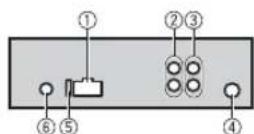
① Power cord input
Rear output or subwoofer output
③ Front output (Only for MVHS100UI)
Antenna input
⑤Fuse(10A)
6 Wired remote input (Only for MVHS100UI)
Hard-wired remote control adapter can be connected (sold separately).
Power cord
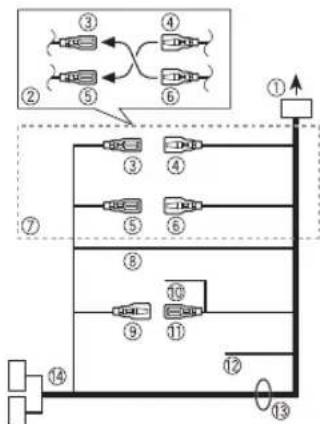
① To power cord input
② Depending on the kind of vehicle, the function of and may be different. In this case, be sure to connect to and to .6
③ Yellow Back-up (or accessory)
4 Yellow Connect to the constant 12V supply terminal.
⑤ Red Accessory (or back-up)
Red
Connect to terminal controlled by the ignition switch (12 V DC).
Connect leads of the same colour to each other.
Black (chassis ground)
Blue/white
The pin position of the ISO connector will differ depending on the type of vehicle. Connect and when Pin 5 is an antenna control type. In another type of vehicle, never connect and.
Blue/white
Connect to the system control terminal of the power amp (max. 300 mA 12 V DC).
Blue/white
Connect to the auto-antenna relay control terminal (max. 300mA12V DC).
Yellow/black (Only for MVH$100UI)
If you use equipment with a Mute function, wire this lead to the Audio Mute lead on that equipment. If not, keep the Audio Mute lead free of any connections.
Speaker leads
White:Front left White/black:Front left Gray:Front right
Gray/black:Front right
Green:Rear left or subwoofer
Green/black:Rear left or
subwoofer
Violet: Rear right or subwoofer
Violet/black: Rear right of subwoofer
ISO connector
In some vehicles, the ISO connector may be divided into two. In this case, be sure to connect to both connectors.
NOTES
- Change the initial menu of this unit. Refer to [SP-P/O MODE] (page 6). The subwoofer output of this unit is monaural.
- When using a subwoofer of 2 , be sure to connect the subwoofer to the violet and violet/black leads of this unit. Do not connect anything to the green and green/black leads.
Power amp (sold separately)
Perform these connections when using the optional amplifier.
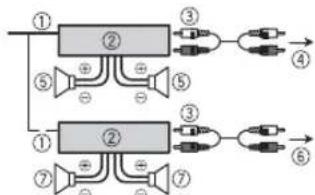
① System remote control Connect to blue/white cable.
② Power amp (sold separately)
Connect with RCA cables (sold separately)
④ To front output
⑤ Front speaker*
To rear output or subwoofer output
⑦ Rear speaker or subwoofer
Only for MVH-S100UI
Installation

Important
- Check all connections and systems before final installation.
- Do not use unauthorized parts as this may cause malfunctions.
- Consult your dealer if installation requires drilling of holes or other modifications to the vehicle.
- Do not install this unit where: -it may interfere with operation of the vehicle.
-it may cause injury to a passenger as a result of a sudden stop.
- The semiconductor laser will be damaged if it overheats. Install this unit away from hot places such as near the heater outlet.
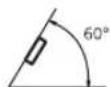
Optimum performance is obtained when the unit is installed at angle of less than
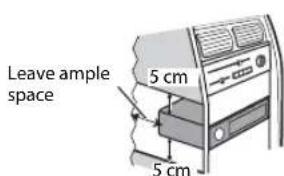
- W hen installing, to ensure proper heat dispersal when using this unit, make sure you leave ample space behind the rear panel and wrap any loose cables so they are not blocking the vents.
DIN mount installation
1 Insert the supplied mounting sleeve into the dashboard.
2 Secure the mounting sleeve by using a screwdriver to bend the metal tabs (90^) into place.
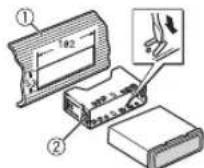
① Dashboard
② Mounting sleeve
- Make sure that the unit is installed securely in place. An unstable installation may cause skipping or other malfunctions.
When not using the supplied mounting sleeve
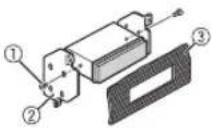
1 Line up the holes on the mounting bracket with the holes on the sides of the unit to attach the bracket.
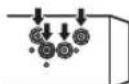
2 Screw in one screw on each side to hold the unit in place.
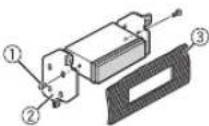
① Tapping screw (5mm× 9mm, not supplied with product)
② Mounting bracket
③ Dashboard or console
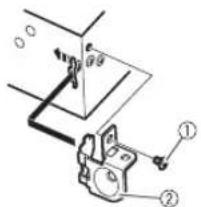
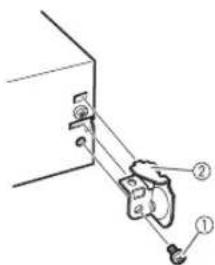
Using the included bracket
Check to make sure that the included bracket matches your particular model of vehicle and then attach it to the unit as shown below.
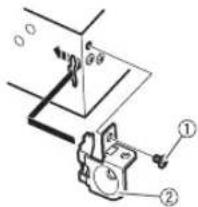
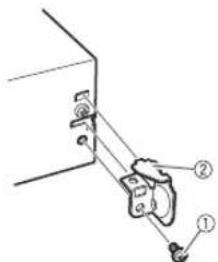
①Screw
② Bracket
Removing the unit (installed with the supplied mounting sleeve)
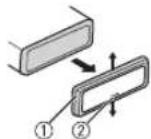
1 Remove the trim ring.
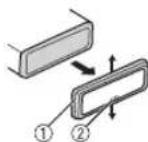
① Trim ring
Notched tab
Releasing the front panel allows easier access to the trim ring.
- When reattaching the trim ring, point the side with the notched tab down.
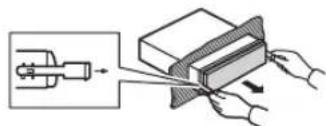
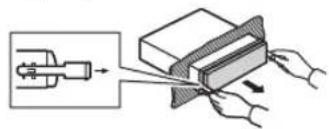
2 Insert the supplied extraction keys into both sides of the unit until they click into place.
3 Pull the unit out of the dashboard.
Troubleshooting Error messages
The display automatically returns to the normal display.
No operations have been made for about 30 seconds.
-Perform an operation.
The repeat play range changes unexpectedly.
Depending on the repeat play range, the selected range may change when another folder or track is being selected or during fast forwarding/reversing.
-Select the repeat play range again.
A subfolder is not played back.
Sub folders cannot be played when [FLD] (folder repeat) is selected.
-Select another repeat play range.
The sound is intermittent.
You are using a device, such as a cellular phone, that may cause audible interference.
-Move electrical devices that may be causing the interference away from the unit.
Common
AMP ERROR
→This unit fails to operate or the speaker connection is incorrect
The protective circuit is activated. Check the speaker connection.
-Turn the ignition switch OFF and back to ON again. If the message remains, contact your dealer or an authorized Pioneer Service Station for assistance.
NO XXXX (NO TITLE, for example)
→There is no embedded text information.
- Switch the display or play another tr ack/file.
USB device/iPod
→ Sometimes there is a delay between the start of playback and when you start to hear any sound.
Wait until the message is appears and you hear sound.
NO AUDIO
There are no songs. Transfer the audio files to the USB de vice and connect.
The connected USB device has security enabled.
Follow the USB device instructions to disable the security.
SKIPPED
→ The connected USB device contains DRM protected files.
-The protected files are skipped.
PROTECT
All the files on the connected USB device are embedded with DRM. Replace the USB device.
N/A USB
→ The connected USB device is not supported by this unit.
-Disconnect your device and replace it with a compatible USB device.
HUB ERROR
→The USB device connected via a USB hub is not supported by this unit.
-Connect the USB device directly to this unit using a USB cable.
CHECK USB
→The USB connector or USB cable has short-circuited.
-Check that the USB connector or USB cable is not caught in something or damaged.
The connected USB device consumes more than maximum allowable current.
Disconnect the USB device and do not use it. Turn the ignition switch OFF and back to ACC or
ON. Connect only compliant USB devices.
→The iPod operates correctly but does not charge.
- Make sure the connection cable for the iPod has not shorted out (e.g., not caught in metal objects). After checking, turn the ignition switch OFF and back to ON, or disconnect the iPod and reconnect.
ERROR-19
Communication failed.
-
Perform one of the following operations, then return to the USB source.
-
Turn the ignition switch OFF and back to ON.
- Disconnect the USB device.
- Change to a different source.
iPod failure.
- Disconnect the cable from the iPod. Once the iPod's main menu is displayed, reconnect the iPod and reset it.
ERROR-23
USB device was not formatted properly.
Format the USB device with FAT12, FAT16 or FAT32.
ERROR-16
The iPod firmware version is old. - Update the iPod version.
iPod failure. - Disconnect the cable from the iPod.Once the iPod's main menu
is displayed, reconnect the iPod and reset it.
STOP
→ There are no songs in the current list.
-Select a list that contains songs.
NOT FOUND
No related songs.
-Transfer songs to the iPod.
APP
STARTUPAPP
→ The application has not started running yet.
-Operate the mobile device to
start up the application.
Spotify
CHECKAPP
Connection to the Spotify application failed.
Follow the instructions that
appear on the screen.
Handling guidelines
USB storage device
- Connections via USB hubs are not supported.
-
Firmly secure the USB storage device before driving. Do not let the USB storage device fall onto the floor, where it may become jammed under the brake or accelerator pedal.
-
Depending on the USB storage device, the following problems may occur.
-Operations may vary.
The storage device may not be recognized.
-Files may not be played back properly.
The device may cause audible interference when you are listening to the radio.
iPod
- Do not leave the iPod in places with high temperatures.
- Firmly secure the iPod when driving. Do not let the iPod fall onto the floor, where it may become jammed under the brake or accelerator pedal.
- The settings of the iPod such as the equalizer and repeat play are changed automatically when the iPod is connected to the unit. Once the iPod is disconnected, those settings will return to the original settings.
Incompatible text saved on the iPod will not be displayed by the unit.
Compressed audio compatibility
-
Only the first 32 characters can be displayed as a file name (including the file extension) or a folder name.
-
The unit may not work properly depending on the application used to encode WMA files.
-
There may be a slight delay at the start of the playback of audio files embedded with image data, or audio files stored on a USB device with numerous folder hierarchies.
-
Rus sian text to be displayed on this unit should be encoded in one of the following character sets:
-Unicode (UTF-8, UTF-16)
A character set other than Unicode that is used in a Windows environment and is set to Russian in the multi-language setting

CAUTION
Pioneer cannot guarantee
compatibility with all USB mass storage devices, and assumes no responsibility for any loss of data on media players, smartphones, or other devices while using this product.
- Do not leave discs or a USB storage device in any place that is subject to high temperatures.
WMA files
| File extension .wma | |
| Bit rate 48 kbps to 320kbps(CBR), 48 kbps to 384 kbps (VBR) |
| Sampling frequency | 32 kHz, 44.1 kHz, 48 kHz |
| Windows Media™
Audio Professional,
Lossless, Voice/
DRM Stream/
Stream with video | Not compatible |
MP3 files
| File extension.mp3 | |
| Bit rate 8 kbps to 320 | kbps (CBR), VBR |
| Sampling frequency | 8 kHz to 48 kHz (32 kHz, 44.1 kHz, 48 kHz for emphasis) |
| Compatible ID3 tag version | 1.0, 1.1, 2.2, 2.3, 2.4 (ID3 tag Version 2.x is given priority over Version 1.x.) |
| M3u playlist Not com | patible |
| MP3i (MP3 interactive), mp3 PRO | Not compatible |
WAV files
WAV file formats cannot be connected via MTP.
| File extension .wav | |
| Quantization bits 8 and 16 (LPCM), 4 (MSADPCM) |
| Sampling frequency | 16 kHz to 48 kHz (LPCM), 22.05 kHz and 44.1 kHz (MS ADPCM) |
FLAC files
-
FLAC file formats cannot be connected via MTP.
-
FLAC files may not be playable, depending on the encoder.
| File extension.flac | |
| Sampling frequency | 8/11.025/12/16/
22.05/24/32/44.1/
48 kHz |
| Quantization bit rate | 16 bit |
| Channel mode 1/2 ch |
USB device
There may be a slight delay when starting playback of audio files on a USB storage device with numerous folder hierarchies.
| Playable folder hierarchy | Up to eight tiers (A practical hierarchy is less than two tiers.) |
| Playable folders Up to 500 |
| Playable files Up to 5000 |
| Playback of copyright-protected files | Not compatible |
| Partitioned USB device | Only the first partition can be played. |
iPod compatibility
This unit supports only the following iPod models. Supported iPod software versions are shown below. Older versions may not be supported. Made for iPod touch (1st through 6th generation)
-iPod classic
-iPod with video
-iPod nano (1st through 7th generation)
-iPhone 6s
iPhone 6s Plus
iPhone 6
iPhone 6 Plus
iPhone 5s
-iPhone 5c
iPhone5
-iPhone 4s
-iPhone4
-iPhone 3GS
iPhone 3G
-iPhone
- Operations may vary depending on the generation and/or software version of the iPod.
- Users of iPod with the Lightning Connector should use the Lightning to USB Cable (supplied with iPod).
- Users of iPod with the Dock Connector should use the CD-IU51. For details, consult your dealer.
Refer to the iPod manuals for information about the file/format compatibility.
- Audiobook, Podcast: Compatible
CAUTION
Pioneer accepts no responsibility for data lost on the iPod, even if that data is lost while this unit is used.
Sequence of audio files
The user cannot assign folder numbers and specify playback sequences with this unit. Sequence of audio file depends on the connected device. Note that the hidden files in a USB device cannot be played back.
Example of a hierarchy
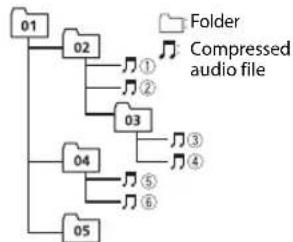
Level 1 Level 2 Level 3 Level 4
01 to 05: Folder number
① to Playback sequence
Russian character chart
| D: C | D: C | D: C |
| A: A | B: B | B: B |
| F: F | J: J | E: E, E |
| K: K | J: 3 | H: H, H |
| H: K | J: J | H: M |
| H: H | O: O | J: J |
| P: P | C: C | T: T |
| Y: Y | Φ: Φ | X: X |
| Z: Z | Y: Y | U: U, U |
| J: J | H: b1 | b: b |
| J: Θ | H: Θ | η: η |
D:Display C:Character
Copyright and trademark
iTunes
Apple and iTunes are trademarks of Apple Inc., registered in the U.S. and other countries.
WMA
Windows Media is either a registered trademark or trademark of Microsoft Corporation in the United States and/or other countries.
This product includes technology owned by Microsoft Corporation and cannot be used or distributed without a license from Microsoft Licensing, Inc.
FLAC
Copyright © 2000-2009 Josh Coalson
Copyright © 2011-2013 Xiph.Org Foundation
Redistribution and use in source and binary forms, with or without modification, are permitted provided that the following conditions are met:
-Redistributions of source code must retain the above copyright notice, this list of conditions and the following disclaimer.
-Redistributions in binary form must reproduce the above copyright notice, this list of conditions and the following disclaimer in the documentation and/or other materials provided with the distribution.
-Neither the name of the Xiph.org Foundation nor the names of its contributors may be used to endorse or promote products derived from this software without specific prior written permission.
THIS SOFTWARE IS PROVIDED BY THE COPYRIGHT HOLDERS AND
CONTRIBUTORS "AS IS" AND ANY EXPRESS OR IMPLIED WARRANTY,
INCLUDING, BUT NOT LIMITED TO, THE IMPLIED WARRANTY OF MERCHANTABILITY AND FITNESS FOR A PARTICULAR PURPOSE ARE
DISCLAIMED. IN NO EVENT SHALL THE FOUNDATION OR COLNTRIBUTORS BE LIABLE FOR ANY DIRECT, INDIRECT, INCIDENTAL, SPECIAL, EXEMPLARY, OR CONSEQUENTIAL DAMAGES
(INCLUDING, BUT NOT LIMITED TO, PROCEDURE OF SUBSTITUTE GOODS OR SERVICES;LOSS OF USE, DATA,OR PROFITS;OR BUSINESS INTERRUPTION) HOWEVER CAUSED AND ON ANY THEORY OF LIABILITY, WHETHER IN CONTRACT,STRICT LIABILITY,OR TORT (INCLUDING NEGLIGENCE OR OTHERWISE)ARISING IN ANY WAY OUT OF THE USE OF THIS SOFTWARE, EVEN IF ADJISSED OF THE POSSIBILITY OF SUCH DAMAGE.
iPhone and Lightning
Use of the Made for Apple badge means that an accessory has been designed to connect specifically to the Apple product(s) identified in the badge, and has been certified by the developer to meet Apple performance standards. Apple is not responsible for the operation of this device or its compliance with safety and regulatory standards.
Please note that the use of this accessory with an Apple product may affect wireless performance.
iPhone and Lightning are trademarks of Apple Inc., registered in the U.S. and other countries.
Siri
Works with Siri through the microphone.
Android & Google Play
Android, Google Play, and the Google Play logo are trademarks of Google Inc.
Spotify
SPOTIFY and the Spotify logo are among the registered trademarks of Spotify AB. Compatible mobile digital devices and premium subscription required, where available, see https:// www.spotify.com.
Specifications
General
Power source: 14.4 VDC (10.8 V to 15.1 V allowable)
Grounding system: Negative type Maximum current consumption: 10.0 A
Dimensions (W× H× D) DIN
Chassis: 178mm× 50mm× 97 mm
Nose: 188mm× 58mm× 17mm D
Chassis: 178mm× 50mm× 97 mm
Nose: 170mm× 46mm× 17mm light: 0.5kg
Audio
Maximum power output:
- 50W × 4ch / 4 (for no subwoofer)
- 50W× 2ch / 4 +70W× 1ch / 2 (for subwoofer)
Continuous power output: 22W× 4 (50 Hz to 15 000 Hz, 5 % THD, 4 Ω load, both channels driven)
Load impedance: 4 (4 to 8 allowable)
Preout maximum output level: 2.0 V
Loudness contour: +10 dB (100 Hz), +6.5 dB (10 kHz) (volume: -30 dB)
Equalizer (5-Band Graphic Equalizer): Frequency: 80Hz / 250Hz / 800Hz/ 2.5kHz / 8kHz Equalization range: ± 12 dB (2 dB step)
Subwoofer (mono):
Frequency: 50Hz / 63Hz / 80Hz/ 100Hz / 125Hz / 160Hz / 200Hz
Slope: -12 dB/oct, -24 dB/oct
Gain: +6 dB to -24 dB
Phase: Normal/Reverse
USB
USB standard specification: USB 2.0 full speed
Maximum current supply: 1 A
USB Protocol:
MSC (Mass Storage Class)
MTP (Media Transfer Protocol)
AOA (Android Open Accessory)
2.0
WAV signal format: Linear PCM & MS ADPCM (Non-compressed)
FM tuner
Frequency range: 87.5 MHz to 108.0 MHz
Usable sensitivity: 11 dBf (1.0 μV/75 Ω, mono, S/N: 30 dB)
Signal-to-noise ratio: 72 dB (IEC-A network)
MWtuner
Frequency range: 531 kHz to 1602 kHz
Usable sensitivity: 25 V (S/N: 20 dB)
Signal-to-noise ratio: 62 dB (IEC-A network)
LWTuner
Frequency range: 153 kHz to 281 kHz
Usable sensitivity: 28 V (S/N: 20 dB)
Signal-to-noise ratio: 62 dB (IEC-A network)
NOTE
Specifications and the design are subject to modifications without notice.
Table des matieres
Raccordements/Installation 16
Indication Description
Mémoire des秽re stations (BSM)
Raccordements/Installation
Raccordements
Important
| D: C | D: C | D: C |
| R:A | B:B | B:B |
| F:T | A:D | E:E,E |
| I:X | 3:3 | H:N,I |
| K:K | I:I | M:M |
| H:H | O:O | N:I |
| P:P | C:C | T:T |
| Y:Y | Φ:Φ | U:X |
| U:U | Y:Y | W:W, W |
| J:b | H:bl | b:b |
| J:3 | H:IO | J:Y |
Phase :normale/inverse
USB
Specification standard USB:USB 2.0
itésse pleine
Alimentation maxima: 1 A
Protocole USB:
MSC (Mass Storage Class)
MTP (Media Transfer Protocol)
AOA (Android Open Accessory)
2.0
Best stations memory (BSM)
Specifica standard USB: USB 2.0 full speed
USB Protocollo: MSC (Mass Storage Class) MTP (Media Transfer Protocol) AOA (Android Open Accessory) 2.0
Alternatively, you can use the following two methods to establish a connection between the device and the phone.
| D: C | D: C | D: C |
| A: A | B: B | B: B |
| F: F | J: J | E: E, E |
| K: K | J: 3 | H: H, H |
| H: H | O: O | I: I |
| P: P | C: C | T: T |
| Y: Y | Φ: Φ | X: X |
| U: U | Y: Y | U: U, U |
| Z: Z | H: b1 | b: b |
| J: J | H: J0 | J: J |
D: visor C: caracté
Copyright y marcas registradas
iTunes
Copyright © 2000-2009 Josh Coalson
Copyright © 2011-2013 Xiph.Org Foundation
Curva: -12 dB/oct, -24 dB/oct
Ganancia: +6 dB a -24 dB
| D: C | D: C | D: C |
| A: A | B: B | B: B |
| F: F | J: J | E: E, E |
| J: J | J: 3 | H: H, J |
| K: K | I: I | H: M |
| H: H | O: O | J: J |
| P: P | C: C | T: T |
| Y: Y | Φ: Φ | X: X |
| U: U | Y: Y | U: U, U |
| J: J | H: b1 | b: b |
| J: Θ | H: Θ | η: η |
D:Anzeige C:Zeichen
AOA (Android Open Accessory) 2.0
Best stations memory (BSM)
De Spotify-toepassing is beschikbaar voor compatibile telefoons. Raadpleeg https://support).(https://support).(https://support).(https://support).(https://support).(https://support).(https://support).(https://support).(https://support).(https://support).(https://support).(https://support).(https://support).(https://support).(https://support).(https://support).(https://support).(https://support).(https://support).(https://support).(https://support).(https://support).(https://support).(https://support).(https://support).(https://support).( https://support.(https://support.(https://support.(https://support.(https://support.(https://support.(https://support.(https://support.(https://support.(https://support.(https://support.(https://support.(https://support.(https://support.(https://support.(https://support.(https://support.(https://support.(https://support.(https://support.(https://support.(https://support.(https://support.(https://support.(https://support.(https://support.( https://support.(https://support.(https://support.(https://support.(https://support.(https://support.(https://support.(https://support.(https://support.(https://support.(https://support.(https://support.(https://support.(https://support.(https://support.(https://support.(https://support.(https://support.(https://support.(https://support.(https://support.(https://support.(https://support.(https://support.(https://support;(https:/support;(https:/support;(https:/support;(https:/support;(https:/support;(https:/support;(https:/support;(https:/support;(https:/support;(https:/support;(https:/support;(https:/support;(https:/support;(https:/support;(https:/support;(https:/support;(https:/support;(https:/support;(https:/support;(https:/support;(https:/support;(https:/support;(https:/support;(https:/support;(https:/support;(https://support;(https:/support;(https:/support;(https:/support;(https:/support;(https:/support;(https:/support;(https:/support;(https:/support;(https:/support;(https:/support;(https:/support;(https:/support;(https:/support;(https:/support;(https:/support;(https:/support;(https:/support;(https:/support;(https:/support;(https:/support;(https:/support;(https:/support;(https:/support;(https:/support;
Copyright © 2000-2009 Josh Coalson
Copyright © 2011-2013 Xiph.Org
Foundation
THD, 4-Ω-blasting, beide
kanalen)
Helling: -12 dB/occt, -24 dB/occt
Gain: +6 dB tot -24 dB
Fase: Normaal/tegengesteld
USB
MSC (Mass Storage Class)
MTP (Media Transfer Protocol)
AQA (Android Open Accessory)
20
Bestandsystem:FAT12,FAT16,FAT32
2 NOBEPHnTe M.C. nIa BbIbopa npaMeTpOB, 3aTeM haxMtTe nnoTBePckJeHH.
IJIa nepexoJa K cIeNyIOUeMy NyHKTu MeHIO Heo6xOUMO NOITBepdntb Bb6Op.
3nemehMeHOnOncaHHe
| LANGUAGE Быбовя
[ENG]
(Aнглиский),
(PYC)(Pyсский),
[TUR](ТуPECкий) | Быka дlya отобрахениTekстови
информazioni с схатого уднофайna. |
| CLOCK SET Hab相对较慢 | Часов. |
| FM STEP Быбовши
[100], [50] | Настори в FM-диапазоне (100 кГ и пь
50 кГ). |
3[QUIT:YES] OTO6paKaætcnoCne BbINONHeHnBcEx HAcTpoek.
JnBa Bo3Bpata K nepBOMy 3JeMeHTy yCTaHOBOuHOro MEHIO NOBepHnTe
M.C. JnBa Bb6opa [QUIT:NO], 3aTeM HauKmITE dIe NIOdTBeRjkDHeHn.
4 HaKmTe M.C. nIa IIOITBePxxDeHnHaCTpoek.
ПИМЕЧАНО
BbMOKeTe OTMeHHTb HAcTPOky npaMeTpMa MeHIO,HaKAB KONky SRC/OFF.
- HactpoNTbI npaAMETpbI MEHO MOHIO B hAcTPOKAX SYSTEM (CTp.15) n hAcTPOKAX INITIAL (CTp.5).
OTmeHa DEMOHCTpaCNoHHoro DnCnnej (DEMO OFF)
1 HaKMITE M.C. dny oTo6paXeHn rIaBHOr MeHIO.
2 NobeprHnte M.C. dna BbI6opa [SYSTEM], 3aTeM haxMnte dna noTBePxxdHeia.
3 NobeprHnte M.C. dna bblbopa [DEMO OFF], 3aTeM haxmnte nnoTBePxxdHenn.
4 NOBEPHnTe M.C.ДЯ BbI6opa [YES], 3aTeM haxMtTe nIy noTBePKeJdHnI.
HactpoynkN INITIAL
1 HauKMITE uyepeKbaiTe SRC/OFF, noka yctpoiCtBO He otKNIOHTcA.
2 HaxMMTE u yepxNBaIe SRC/OFF Ira OTO6paXeHn rnaBHoro MeHo.
3 NOBEPHNTe M.C.ДЯ BbI6opa [INITIAL], 3aTeM HaxMMTe DnIy NOdTBePJKDeHJ.
4 NOBepHnTe M.C. nIy BbI6opa npaMeTpA, 3aTeM HaKMITE nIy NOdTBePckJeHH.
IPIMEYAHNE
TapaMeTpbl MORYT OTNIUATbC B 3aBNCIMOCTN OYCTPOIcTBa.
Ipeedn3BneueHem yctpoiCTBa octaHOBNTBocnpoun3BeHeHne.
IopKluoyenAOA
Jnnoyehn nnonHnTeBbix Cbehen o noKnoueHN AOA cm. ctp. 11.
IopKnloueHne no MTP
YCTPOCTBO ConePAHNOHNO CNTeMO Android 4.0 Hn6Oe No3DHe MoKHO NOJIKIOHTB NO pTOKONY MTP C NOMOsbIO KABEIN, PnnaRAeMOR K YCTPOINCTBY. OHaKOB 3A3NCHMOTN OT NOKIOHNEHNO YCTPOCTBA N KONUcTeBa FAIIOB ayDNoFaiNb/ KOMN03NI MOYr 6bIb HeOCTyHb IN BOCPOnBcDEHnuepe3MTO. O6pTaHE BHHMAHNe, TFO NOKIOHNeHME MTP HecOBMeTIMO C cfoPMaTAMn WAV N FLAC.
ПРИМЕЧАНЕ
PnncnoB3oBAHmN noKnIOueHmMTP nna napMeTpa [ANDROID Wired] Heo6xOIMyctAHOBNTb 3aHaeHMe [MEMORY] B hAcptponkax SYTEM (cTp.15).
AUX
1 BCTaBBTe MNHn-CTepeopaaBem B BXoHou pa3bem AUX.
2 HaXMMTe SRC/OFF IaI BbI6opa [AUX] B KaueCTBe NcToHnKa.
IPMMEAHNE
EcnI Ia npaMeTpA [AUX] yctaHOBLeNo 3haueHne [OFF] B hAcTpoiKaX SYTEM,6yTeT HeBO3MOxHO Bb6PaTb [AUX] B KaueCTBe NcToHnKa (Ctp.15).
Onepaun
BbMoKeTe HAcTpOuNb pa3nnuHbIe npaMeTpbl B HacTpOaiKax FUnCION (cTp.13).
6opnatne BnHMAHme,HTO CNEduyouuine ONEpaunHe pa6oTaOT Ha yctpoCTBE AUX.ДЯpoTbICyCTPOINCBOMAUXNcnoNb3yIteYCTPOINCTBO HENOpceCTBENHO.
EcnBxOxaB aB KOMnIeKt yCTaHOBOUHaa WaxTa He nCNoNb3yETcR
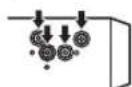
1 CoBmecTnTe OTBepCTnHa KpeneKHom KpOHuTeHne C TOBepCTnMn Ha Kopnyce YcTpoCTbNa 3aKpEniTne KpOHuTeHn.
2BkpyTHe NO OJHOMBy BHTy C kXKOI CTPOHbI, YTO6bl 3aФИКСИРОВaTb YcTPOICTBOHa MeCTe.
① Camope3 (5 MM × 9 MM, He npunaraetc K yctpoCTBY)
② KpenexHbI KPOHHTeH
③PnupbopnnaHbnn KOHCOJIb
KaK nCnObl3OBaTb KOMJIeKTHbI KPOHHT
y6eHTeCb, yTO KOMIJIeKTHbI
kPOHHTeHH PACCHTAH HA KPNENHe
B BAAEM ABTomObnE, a 3aTEM
npncoeHNtheero KYCTPOINCTBy,KAK
NOKAHO Danee.
① BnHT 2KpOHHTeHH
N3BneHne yctpoCTBa (yCTaHOBNEHORC NOMOUBIO npnlaraoemoy yctaHOBOOHou xaxTbI)
1 CHIMITE OKAHTOBKY.
① OkaHTOBka
②Палкa c 3a3y6pnuHnMn
PnCHTMnepeHne naHeN
06nneruaetcdoctynKOKaHTOBke.
-Пи NOBTOHOn yCTAHOBKe OKAHTOBKN NOBEPHIne naHEnb CTOPHOc 3a3y6peHHo nAnKo BHm3.
2 BCTaBbTe npnnaeraMbIe KIOUH n3BneHnno 06eHM CTOpOHAM yCTPOINCTBa DO UeNka.
3NotAHTEyCTPOCTBO n3 np6opHn NaHeN.
DononHntbHa HOpMaun
YcTaPaHeHne HeCnPaBHOCTe
IcnneabTOMaTnueckn Bo3BpaaaeTcB NxCOAnbpeKIM.
→BteueHHe 30cekyHn He 6bIb0 BbIOnHeHO Hkaknx Opeaun. -BbIOnHnTe opeaun.
Duaana3OH NOBTOPOBOCnpoun3BeDeHn
CAMONPON3BOJbHO N3MeHReTcR.
→B3aBcCmOCTOnOTb6paHORo DnApa30Ha NOBTOPHORO BOCPON3BeDEHnOHMOKET NMeHrTc npN Bb6opeDpyroI NaKNINDOPOKKn, a TAKKe npN nepeMOTKe BnpeE/Ha3ad. -Bb6epNTeDnAan3OHNOBTOHRo BOCpON3BeDEHnEe pa3.
BloKeHHa nIaKe He BocIpOn3BoOuTcR.
→BloxKeHHbIe npKn He Bocpn03BODaTcEcnBb6paH dmaa3oH [FLD] (NoBtOpHoe Bocpn03BeDeHne npKn.-Bb6epnTe nproyn Duaa3oN noBtOpHO Bocpn03BeDeHn.
VMeIOTcNOMExn3Byka.
→IVcnIOnb3yeTcA yCTpoiCTBO, HapnMep,COTOBy TenefoH, KOToPoe MOKeT Bb3bBaTb WymMbOIE NOMEXN.
-86epTe npB6opbl, Bb3bBaUoue NOMEXN,OT 3T0R yCTPOCTBA.
Co06ueHn8o6 own6kax
06une
AMP ERROR
→YCTPOIcTBHe pa6oTaETnnn HENpaBUNbHO NOCoEINHEn DHHAMIK.
→Cpa6oTana zenb 3auntbI. -PpOBepeTe, nOdkNIOueH Nn Dn HAMNK.
-NoBepHnTe KIOU 3aKnra nOIOJKeHne OFF n BepHnTe B nOIOJKeHne ON. EcNI COo6eI He NcUe3aET, CBXKITec C dNIIePCKM UENTPM IIN ABTOPI3OBaHHbIM cEPBNCbIM NYHKTOM Pioneer.
NO XXXN (NO TITLE, Hapnpimep) Het bctpoeHHoTektcbOBO nHΦopmaUm.
-NepeKIOUHTe IMnne Nnn BocnpOn3BeuNTe npyTuO dopokx/phiin.
USB-yctpoctBO/iPod
→HOrJa npOxCoOJNT 3aepKka MekjNHaaylOM BoCpONBBeHnry NIOBJIeHnEM 3ByKa. -3ByK NOBHTcNoCteTOROK C DInCnJeNcye3HeT COo6JeHne.
NO AUDIO
→KOMnO3nIuN OTCyTCTBvIOT.
-ΠepeHecIte aynIoNoaIbHa
3anOMnHaOoiee yctPoIcTBO USB
nIOKnIOUChIteero.
→Ha noDKJIIOUeHHOM yCTpoINCTBe USB BKIOUeHA3aUNTA. -CnEyyIte INCTpyKUNAM yCTPOINCTBA USDINCHTIN 3aUNNTB.
SKIPPED
→ПдкнунецнoeустоюUSB coapedKITФаиь,зашиевны texhONorne DRM. -3ашиевныфainny nponyckaHOTc.
PROTECT
BCE faJIbHa NoKIOueHOM yCTpOCTBE USB 3aunneBbI no TexHOJorIN DRM. -3aMeHHTy eTPOINCTBO USB.
N/A USB
→PioknHoeYcTpoCTBOUSB He noDepKnBaetCra daHHbIM yctpoCTBOM. -OTknHHTe yctpoCTBO n 3ameHHTe erO cobMeCTMmBIM ycTpoCTBOM USB
HUB ERROR
→YcTpoIcTBoUSB,nOdkHueHHeoc NOMoubIO KOHcHtpaTopa USB, He NOdepKINBaTe TaHHbIM YcTpoIcTBOM.
- NpKnOHTe yCTPOINCTBO USB HENOCPECTBEHNO KdAHHOMY yCTPOINCTB C NMOUbKa6eJIa USB.
CHECK USB
→KopotKoe 3aMbKaHHe Ha pa3beMe USB nnn Ka6ene USB.
Y6eBntTecb,HTo pa3bEm USB nnn Ka6enb USB He 3aueemn Hne nobpeJhen.
→IIOKIIHOeHoe 3aONOMHaIOoee yctpoiCTBO USB notpe6nert 60nbwe MaKcMmAbHo DOnyCTHMoCuMbTo TOKA.
-OTcoeHNHtE 3aONMnHaIOoee yCTPOIcTBO USB n He cnNoB3yIte erO.YctaHOBtne KIOU3 3aJrAraHbN B NIOJOKeHHe OFF,3aTeM -B NIOJOKeHHe ACC nn ON. POnKJIouaTe TOnbKO COBMeCTUmble 3aONMnHaIOuJe yCTPOIcTBa USB.
iPod pa60taet, Ho He nO3apJxAeTc.
-86eHTecb B OTCYCTBmKopOTKO 3aMbKaHnB KabeneIPod (HaNPmEep, YTO Ka6bHe3aKaT MeJy MeTAnNueCkMNnpedMetAm).Pocne npOBepKnKa6eIy yCTahOBInTe KInou3aKgRanHnB NIOJoxKe HOFF,a3aTEM-B NIOJoxKeHnON,Ni6o
OTKJIIOUHTe 3aHOBO nOJKnIOUHTe iPod.
ERROR-19
→C60uCBn3N.
BbIopHnTe CneDyUoJne onepaun,3aTeM CHOba bIbepeNe USB B kaucTBe nCTOCHNka.
-
NobePHTe KIOU 3aKunraHnB nIooKeHne OFF n BepHTe nIooKeHne ON.
-
OT KIIOHHTe yCTpoiCTBO USB.
-
BbIOnHnTe nepeKInoueHne HaDpyrO nCTOuHNK.
→C60n iPod.
-OTKIOUHTe Ka6enb ot iPod. PnO tO6paxehN rIabHO MeHIO iPod nepenodKIOUHTe iPod N BInONHNTc6OpC HAcTpoEoK.
ERROR-23
→YcTpOoiCTBO USB
OTΦOpMaTIpOBAHo HeBepHO.
-OTfOpMaTpyyTe yCtpoCTBO USBB FAT12,FAT16WMFAT32.
ERROR-16
YCTapeBwaB BepCnI pOuINBKn iPod.
-06HOBNTe BepCnIO iPod.
→C6oN iPod.
-OTKIIIOUHTe KaBb ot iPod. PnO tO6pbXeHmI rAabHO mEHO iPod nepenokIIIOHTe iPod n BbIOJNHTE c6poc hAcTpoek.
STOP
→BTeKyuIeM CnINcKe OTCyTCTBYIOKOMIO3NUN.
- Bb6epnTe cncok, coepkaunm My3bikalhBhe KOMPO3nUIN.
NOT FOUND
→KOMno3nHneHaHNeHO.
-3arpy3nte KOMnO3nHnHa iPod.
APP
STARTUPAPP
→PnIPOKHe eue He 3aNyUeHo.
-IVcNoB3yTe Mo6bNbHoe
yCTPOJCTBO DnI 3aNyCKa
pNIIPOKHeHn.
Spotify
CHECKAPP
→C6oI noDKIIOUeHnK npINOxoKeHnIO Spotify.
- Cnedynte HNCTpyKUmaH aKpaHe.
PekomeHdaun no 6paueHIO c n3dennem
3anomnhaiooe
yctpoicTbo USB
-ПОДКИLOЧЕп uepe3 USB-KOHцentpaTOp He noДпeрЖиBaETc.
He noKIOuAte npyue yctpoCTBa, kPome 3aONMOHaIOUx yctpoCTB USB. He onyckauTe naDEHn yctpoCTBa USB ha non, rde OHO MOKet 3aCPTPAb NOI neDaJIbIO ra3a mIN TOPMO3a.
B 3abncmocn OT Tna 3anomnHaouero yctpoNCTBa USB MoryT BO3HKnHyT cbneyUOuine npo6JIembl.
-ynpaBneHne yHKnMm MoKET OTNHaTc8.
-3aONMHaOueyUcTpoiCTBO MOKET He pacn03Habatbca.
-ФаиblMoryTHe BOCPON3BOINTbc4 KoppeKTHO.
-устбго может сддатьшюьпnomexи BO Врмяпослунваня ради.
iPod
He octabJnTe iPod B mecTx C blicOKoT empepatypoB3dyxa.
-ПиДВИЖЕHIN aBtOMO6HnI
наджно 3akpeniTe iPod. He
Доусkaite nadeHnY yCtpoiCtBa
iPod Ha non, rde OHO moKet
Застгь попдалью ra3a ИИ
TopMO3a.
- Hactpoikn iPod, takne kak
EKBaIaN3ep n NOBtOpHoe
BOCpOIN3BEHeHne, H3MEHHOCTCA
ABTOMaTIuCeckn pN oNDKIOUeHmN
iPod K cyToPcTBy. Nocne
OTKIOUeHmN iPod HAcTPOIK 6bNyT
BO3BpaUeHb K NCXODHbM.
- TekT H ecOBMECTUMO φOpMTa, coXpaHeHbH na iPod, He 6ydet OTObPaxatbCyrCTPOIcTBOM.
Poipepka cKaTbIX aydnofoaiIOB
B KaueCTBe Ha3BaHna FaaHa nn nnnn Moryr OTO6paXaTbCn TOnbKO nepBbte 32 cunbOBA (BKnIOyAra paacupeHne).
- 3To yctpoiCTBO MOKet pa6oTaTb HekOPKEKTHO B 3aBcUMOcTN OT PnIPOJeHn,NCIOJIb3OBaHHbIX DnA KODIPOBAHn WMA.
-Пин haayane Bocpon3BedeHnaynofoaHOB,coepkauxnU3o6paKeHn, n foHnOB c3anomHaouoero yctpoiCTBA USB,coepkauero paBeTbIeHnbeNepapxnn NaONK,MOXeTnpOMCXOAnTh He6oNBua 3aepkKa.
Pyckn TeKCTIg OTo6paKeHnHa DAHOM yCTPOnCTBe DOnJKeH 6bTb 3aunfoBaH B ODHOM n3 CneDyUOxH FOpMTOB:
-Unicode (UTF-8, UTF-16)
-Дугов Формат, OTЛИЧьн OT
Unicode, кOTOBи NСПОЛБУЕТСВ
сред Windows Истpoен Н
уссккий рыб.

BHIMAHHE
Pioneer He rapaHTnpyET COBMecTHMOCTb CO BCEMI yCTPOCTBAMu USB n He Hecet OTBeTCTBEHOCn 3a NIOyIO NOTeIPO DaHHbx HaMeHaNpONrPbIBaTeIAX, CmAPtFOHax nDpyIINx yCTPOCTBAX PnINCNJb3OBAHUN 3TOI N3DEJIIN.
He octabnIte nckn nn 3anomnHaouee yctpoiCTBO USB B
MeCTaX C BbICOKo TemnepaTpyoB03dyxa.
DaiNbI WMA
| Расшиpenе .wma | |
| Скорocstь neретачни данных | ot 48 КбиТ/c до 320 КбиТ/c (CBR),ot 48 КбиТ/c до 384 КбиТ/c (VBR) |
| Частota дисcopeштоци | 32 кГu, 44,1 кГu,48 кГu |
| Windows Media" Audio Professional, Lossless, Voice/ DRM Stream/Stream c noданewsки вimeo | He podдержинваetedя |
Фаилbl MP3
1do nocleioBatebHOCTb BOCnpon3BeHnA
Ta6nua cunboJOB 4ny pycckoro 3bIka
| D: C | D: C | D: C |
| A: A | B: B | B: B |
| F: F | J: J | E: E, E |
| J: J | J: 3 | H: H, H |
| K: K | I: I | H: M |
| H: H | O: O | I: I |
| P: P | C: C | T: T |
| Y: Y | Φ: Φ | X: X |
| U: U | Y: Y | W: W, W |
| Z: Z | H: b1 | b: b |
| J: J | H: I0 | J: J |
D:ДисплелС:Буква
AByTopcKoe npaBoM TOBapHbIe 3HaKN
iTunes
Apple i iTunes rBnIOTcT roTPOBbIMN 3HAKAMK KomNaHm Apple Inc., 3aerncptnpoBaHHbIMN B CJIAs n dpyrnx cTpaHax.
WMA
Windows Media - 3to
3aperncptpobaaHna Toproba
Mapka nnn Toproba Mapka Microsoft
Corporation B CUA n/nn npyrnx
ctpaHax.
B daHOM n3deJn nCnoJb3yOuTcra
Te xHoJorwn, npHaJnEJaune
kopnpaunm Microsoft, KOTOpbIe He
pa3peaetcN cNoJb3OaBt nnn
pacnpocrtpaHantb 6eJnueH3nn OT
Microsoft Licensing, Inc.
FLAC
© 2000-2009 Josh Coalson
© 2011-2013 Xiph.Org Foundation
PacnpocTpaHeHnE nNcNoIbOBAHne B
BVDNE MCxODHbIX KODOB IIN6bNAHPbIX
FaIIOB, CMOINuKApUaUMn IIN 6e3,
papreeaaTeC npOcbIOJeHN
cnDeyUOxN yCNOBn:
-BpacnpoctpaHReMOMXCxOHDOMoD0JXHO6bTbCOxpaHeHOyBeOMnHeNIO6ABTOPCKOM npabe,HaCToIIMCINCOK yCNOBNIycNOBnO6OrpAHHeHNOTBTCTBEHHOCN.
-Пи распостранен 6инарьх
файнообязателно
ВOCПОИЗБЕДЕНЕ
bIyHnOMyHyTOyBEdOMHeNnO6
ABTOPCKOM npabe,HacTOraero
CnCKA yCNOBn HnpBedeHNbIX
HnKe yCNOBn O6 orPAnuHEnn
OTBeCTBeHHoCTN B DOKyMeHTaun
n/nnn dpytnx cOpnoBoDTeNBbIX
MATEpnaJax.
-HaHmehoBaHnE Xiph.org Foundation
IMMeHa yuaCTHKnOB He doJIKNbI
NCNoIb3ObaTcBd NIO pDcpeKKn
nIIN PPOBnKeHnToTBapOB,
Co3DaHbIX C npImeHHeNEM
daHHORo nporpAMmHO
0ecneueHn,6e3
nPepBaPnteHBoHO NcMbEmHoRrO
pa3peSeHn NpaboOblaTaTeNl.
DAHHOE IIO PPEIOCTABJARETC
TPABOO5LAdATEJIEMn
COABTOPAMN "KAK ECTb" N HE
PTEIOCTABJAREH NIKAKNX RHBbIX
ANII NOpRA3YMEBAEMbIX
TAPAHTI IN PNIFOIDHOCTN IIA
TPODAX NII KOKHPETHO
MCNOJB3OBAHn.HN PNI KAKNX
OBCTOReTJeBCTBX YNPABJIHOUJIIE
m COABTOPbI HE HECYT
OTBETCTBEHHOCTH 3A PIPRMblE,
KOCBEHHbIE,CNUA/HbIE,
UNTPAOHbIE INI NOCLEUYOUUIE
VbBITNK (BKLIQUAY, HO HE
OTPAHnUHBArcs 3ATPATAMN HA
TPINOBPETHEN3 AAMEHROUIX
TOBAPOB NUCY, YTPATOI
BO3MOXHOCTN NCIONb3OBAHnR,
NOTEPEN DAHHbIX, YNJUCEHHOHN
BbIIODbI INIOBbIMN BYTKAMN B
P3EYJbTATE PNPOTACHOBNK
DETAEtBHOCTN), BO3HNAIOUUINE
HA OCHOBE COITLAWEHnR, HECEHnR
OTBETCTBEHHOCTN NIN
HAPUSEHNA O63ATEJIbCTB
(BKJIOUHY HESPEXHOCTb) INPI
NCIOJIb3OBAHIM DAHHO
IPOPTAMMHOO EOBCENEHEHNA,
DAJE ECIN KOMTAHN 5blNA
IPEDYNPEXDEHA O BO3MOXHOCTN
TAKOTO UIEPBA.
iPhone u Lightning
IcnoB3OBAHne 3aHaKa Made for
Apple o3Haayet, yTo yctpoiCTBO
6bIIO pa3pa6oTaHO cneuHaBHO dI
noKIOUeHN K pOpyKTam Apple,
yka3AHHIM Ha 3aHuKe, I
cepTnphiuPBOaHp a3pa6oTuHKOM
kAK COOTBETCTBYIOSe texHnueckm
CTaHApTAM Apple. Apple He Hecet
OTBTCTBEHNOCTb 3a pa6Oy DAHORO
ycTPOiCTBa HIN erO COOTBETCTBne
Mepam Be3oNacHocTNI
HopMaTHBbIM CTaHdaptAM.
OBpaTIte BNImAHme, YTO
ICNoB3OBAHne daHHOro akceccya
C npOyKtOM Apple MoXeT NOBInrTb
Ha pa6Oy 6eCnpOBaDHO CBsN.
iPhone n Lightning ABJIoTc
TObAPbHMn 3HaKaMn KomnaHn Apple
Inc., 3apERiNcTpiPoBaHbIMn B CUSA n
dpynx cTpaHax.
Siri
Pa6oTaetC Siri uepe3 MKNpOfoH.
Android & Google Play
Android, Google Play and Android Google Play and YouTube to Hop a h b m 3hakamc Google Inc.
Spotify
SPOTIFY INOROTINSpOTy ABJIOTcA3apeNCTPnPOBAHHBIMTTOPROBBIMMapKAMnSpOTy AB.IIa NOnyuChENCnCKaCOBMeCTMnBXMOIBNbHbIXycTPOJCTNBCEDeHNOpemYMNOINCKE,ecNIpIMEHIMO,CM.https://www.spotfly.com.
CepuHbI HOMeP
Ha 3TOM pncyKe nok3aHa HhOpMaunr O mecuie N roDe N3ROTOBnHnYCTpOCTBa.

Data n3roTOBHeHnO6OpdyoBaHn
P1-ΓoI n3rOToBnEHHa
| Гол 2001 2002 2003 2004 2005 2006 2007 2008 2009 2010 |
| Симboл | A | B | C | D | E | F | G | H | I |
| | | | | | | | | |
P2-Mecu n3rotobneHH
| Гол 2011 2012 2013 2014 2015 2016 2017 2018 2019 2020 |
| Си金融机构 | КLMN | ОРРRT | | | | | | |
| Месиц | 234 | 567 | 8910 | 11 | 12 | | | | | | |
| Симв养老金 | A | B | C | D | E | F | G | H | I | J | K |
TexHnueckne xapaKTePncTnKn
067ne
NCTOCHNK NITAHNA:14,4 B NOCT. TOKA (DONYCTMNB DNANA3OH OT 10,8B do 15,1B)
CnCTema 3a3emmHn: 3a3emnHne OTPuTaTeBHorO NOIOca
MaKcMaIbHbI nOTpe6JIaEmbI TOK: 10,0 A
Pa3Mepbl (LX×B×Γ)
DIN
Uaccu: 178mm× 50mm× 97 mm
Ipeednnaheb:188MM×58 MM×17MM
D
Uaccu: 178mm× 50mm× 97 mm
IpeaHnnaHb:170MM×46 MM×17MM
Macca: 0.5 Kr
Aydno
MaKcImaJIbHaBByXIOHaMoUHOCtB:
- 50 Bt × 4 kaHana/4 Ω (6e3 ca6bYpepa)
-50 Bt × 2 kaHana/4Ω + 70 Bt × 1 kaHana/2Ω (Дянca6byфepa)
HOMHaIbHaI BbXoDHa MoUHocTb: 22Bt×4(OT50ΓuDO15000Γc, cYMMaPHe3NaueHne KOaΦnIeHTa HeJIneHbIX nKacKeHn5%Harpy3ka4ΩdAn o6oNXKaHaJOB)
ConpoTnBneHne Harpy3Kn:4Ω (DonyctnMo-ot 4 Ωdo8Ω)
ConpoTnBneHne Harpy3kn:2,0 B
KoHTyp rPOMKOCTu: +10 d5 (100 fU), +6,5 d5 (10 KfU) (rPOMKOCTb: -30 d6)
3Kbana3ep(5-nOncbI rpaHueckn 3Kbana3ep): Yactota:80T/250T/800T/2,5 KU/8KU Dnaanazh amnntyndHOaCToTHBx xapaTePcTnK:±12 d6(cwaor2d5)
Ca6Byepep (MOHO): Yactota:50T/63T/80T/100 T/125T/160T/200T Kpytn3ha xapakTepcntkn: -12 Db/OKT, -24Db/OKT YcunHeNe: +6Db-24Db Φa3a:HopMaNbHa/O6paTHa
USB
CTaHapTHaCneuΦnKaUma USB: USB 2.0 noHocKOpocTho
MaKcMmaBna Cnna ToKa:1A IptokoJ USB: MSC (Mass Storage Class) MTP (Media Transfer Prot
AOA (Android Open Accessory) 2.0
OBAR CACTEMA: FAT12, FAT16, FAT32
MaT DeKoIpoBAnHa faiNoB MP3: MPEG-1 u 2 Audio Layer 3
MAT DeKoIupOBAHn WMaBepC7, 7, 8, 9.1, 9.2 (2-KaHaJIbHoe ayDINO)
Mat DeKoIupobaHnIA FLAC:v1.3.0 (Free Lossless Audio Codec)
MAT CUNHANA WAV: Linear PCM in MS ADPCM (6e3 Komipccnn)
#
DuaanaoH qactOT:OT87,5MfUdo108,O MfU
Pone3HAn yBCTBnteBHOCTb:12dΦ (1,0MKB/75Ω,MOHO,OTHOSeHne cnHan/uWM:30dB)
OTHOWeHne CnHn/7yM:72Dc(ceTB IEC-A)
Tiohep MW
Duaana3oHacToT:ot531KΓu do 1602 K
Pone3HnYbCTBnteBbHocTb:25MKB (OTHOWeHne CnHaN/7yM:20D6)
OTHOWeHHe CnHnA/7yM:62D6 (ceTB IEC-A)
Tiohep LW
Duaana3oH cacto:ot 153KfUdo281 K
Pone3naYyBCTbTeNbHocTb:28MKB (OTHOWEHcNHaH/WM:20D6)
OTHOWeHHe CnHnA/7yM:62D6 (ceTB IEC-A)
PpMueaHne:
BcoobTcTBnCOCTaBe53akoH PoccnckoΦeepaunnO3aunTe npabntopbeTeneN nNoctahOBEnEmpnpabntelbCTBa PoccnckoΦeepaunN720 ot 16.06.97KOMNAHNI Pioneer Europe NV orobapnaetcnyuonpckcnykblnAEDen,OFUINANbHO NOCTABJIReMbx Ha pocmckn pbHOK. ABtOMoBnBHa3NeKTPOHnka:6net IpOue HdEeNn (HayuHnKn, mKPOOBOHn T.n.):5 net
PIMMEAHN
XapakTePnCTKmN KOHCTpykua MORYT 6b1b N3MeHehbl 6e3
npeBapntenbHoro yBeDMJIeHnI.
-Данhoe yctpoIcTBO npOn3BeJeHO B INHDOHE3N.
http://www.pioneer-car.eu
Visit www.pioneer-car.co.uk (or www.pioneer-car.eu) to register your product. Visitez www.pioneer-car.fr (ou www.pioneer-car.eu) pour enregistrer votre apparéil. Si prega di visitare il site www.pioneer-car.it (o www.pioneer-car.eu) per registrar il prodotto. Visit www.pioneer-car.es (o www.pioneer-car.eu) para registrar su produit. Zum Registrieren Ihres Produktés besuchen Sieitte www.pioneer-car.de (oder www.pioneer-car.eu). Bezoek www.pioneer-car.nl (of www.pioneer-car.eu) om uw product te registriteren. Nocertte www.pioneer-rus.ru (wnnww.pioneer-car.eu) pnyperncpauyn npno6pehenro Bannm3dneia
Pioneer CarStereo-Pass
28-8, Honkomagome 2-chome, Bunkyo-ku, Tokyo 113-0021, Japan
Kopnpaia PaonHp
28-8, XOHKOMBOMA 2-HOME, ByHK6-Ky, TOKHO 113-0021, JIHOHAI
Mmnpotep OOO "TNOHEP PYC"
105064,POcCnR,r.MocKbA,HxKHH CycaIbH nepeynok,
DOM 5. cTpoeHme 19
Tel.:+7(495)956-89-01
PIONEER EUROPE NV
Haven 1087, Keetberlaan 1, B-9120 Melsele, Belgium/Belgium TEL: (0)3/570.05.11
PIONEER ELECTRONICS (USA) INC.
P.O. Box 1540, Long Beach, California 90801-1540, U.S.A.
TEL: (800) 421-1404
PIONEER ELECTRONICS ASIACENTRE PTE. LTD.
2 Jalan Kilang Barat,#07-01,Singapore 159346 TEL:65-6378-7888
PIONEER ELECTRONICS AUSTRALIA PTY, LTD. 5 Arco Lane, Heatherton, Victoria, 3202 Australia TEL: (03) 9586-6300
PIONEER ELECTRONICS DE MEXICO S.A. DE C.V.
Blvd. Manuel Avila Camacho 138, 10 piso
Col.Lomas de Chapulpec, Mexico, D.F. 11000
Tel: 52-55-9178-4270, Fax: 52-55-5202-3714
先锋股份有限公司
© 2017 PIONEER CORPORATION. All rights reserved.
© PIONEER CORPORATION, 2017. Bce npaba zauuueHbI.
EW