AVDW7900 - Car entertainment screen PIONEER - Free user manual and instructions
Find the device manual for free AVDW7900 PIONEER in PDF.


| Product Type | Car Entertainment Screen |
| Brand | PIONEER |
| Model | AVDW7900 |
| Power Supply | 14.4 VDC (10.8 V to 15.1 V acceptable) |
| Maximum Current Consumption | 0.7 A |
| Dimensions (W × H × D) | 178 × 118 × 32 mm |
| Weight | 480 g |
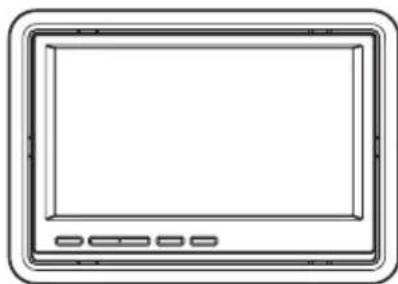
| Screen Size | 7.0 inches (diagonal) / 16:9 aspect ratio |
| Video Input Level | 1.0 Vp-p/75 Ω |
| Maximum Audio Input Level | 1.5 Vrms/22 kΩ |
| Video Output Level | 1.0 Vp-p/75 Ω |
| Maximum Audio Output Level | 1.5 Vrms/1 kΩ |
| Operating Temperature Range | -20°C to +60°C |
| Storage Temperature Range | -40°C to +95°C |
| Main Functions | Widescreen display, image adjustments (brightness, contrast, color, tint), brightness dimmer, widescreen modes (FULL, JUST, CINEMA, ZOOM, NORMAL), video inputs (VCR1, VCR2), video output for rear screen |
| Safety | Professional installation recommended; do not install in front of the driver; do not use while driving |
| Maintenance and Cleaning | Wipe with a soft, dry cloth; do not use harsh chemicals |
| Spare Parts and Repairability | Consult an authorized PIONEER service center |
| General Information | Negative ground; fuse according to specifications |
Frequently Asked Questions - AVDW7900 PIONEER
User questions about AVDW7900 PIONEER
0 question about this device. Answer the ones you know or ask your own.
Ask a new question about this device
Download the instructions for your Car entertainment screen in PDF format for free! Find your manual AVDW7900 - PIONEER and take your electronic device back in hand. On this page are published all the documents necessary for the use of your device. AVDW7900 by PIONEER.
USER MANUAL AVDW7900 PIONEER
Owner'sManual Moded'employoi
7-INCHREARSEATENTERTAINMENTDISPLAY AFFICHAGEDIVERTISSANT7POUCESPOUR SIEGESARRIERE
AVD-W7900
Thisproductconformstonewcordcolors.
Please read through these operating instructions, you will know how to operate your model properly. After you have finished reading the instructions, keep this manual as safe place for future reference.

Precautions
IMPORTANTSAFEGUARDS3
Toensuresafedriving3
-Whenusingadisplayconnectedto
VIDEOOUTPUT3
Toavoidbatteryexhaustion4

BeforeYouStart
Aboutthisunit5
Visitourwebsite5
Incaseoftrouble5
ToprotecttheLCDscreen5
For viewing LCD comfortably 6
-Changingthewidescreensize6
-Changingthepictureadjustment6
Installingandremovingthedisplayunit6
-Installingthesisplayunit6
-Removingthedisplayunit7
Resettingthemicroprocessor7

Operatingthisunit
What's What8
-Displayunit8
BasicOperations8
-PowerON/OFF8
-Selectingasource8
-Changingthewidescreenmode8
-Switchingthedimmersetting9
Setup9
-Changingthepictureadjustment9
-Selectingthevideoofmat10

Connectionandinstallation
Connections11
-ConnectionDiagram12
Installation13
-Mountingwithflushmounting
bracket13
-Removingthedisplayunit13

AdditionalInformation
Usingthedisplaycorrectly14
-Handlingthedisplay14
Liquidcrystaldisplay(LCD)screen14
-Keepingthedisplayingood
condition14
-Smallfluorescenttube15
Specifications16
Precautions
IMPORTANTSAFEGUARDS
Please read all of these instructions regarding your display and retain them for futurereference.
1Readthismanuallyandcarefullybeforeoperatingyourdisplay.
2Keepthismanualhandyasareferencefor operatingproceduresandsafetyinformation.
3Paycloseattentiontoall warningsinthis manualandfollowtheinstructionscarefully.
4 Donotallowotherpersonstousethissystemuntiltheyhavereadandunderstood theoperatinginstructions.
5 Donotinstallthedisplaywhereitmay(i) obstructthedriver'svision,(ii)impairthe performanceofanyofthevehicle'soperatingsystemssafetyfeatures,includingairbags,hazardlampbuttonor(iii) impairthedriver'sabilitytosafelyoperatethevehicle.
6Aswithanyaccessoryinyourvehicle'sinterior,thedisplayshouldnotdivertyourattentionfromthesafeoperationofyourvehicle.Ifyouexperienceddifficultyinoperatingthesystemorreadingthedisplaypleaseparksafelybeforemakingadjustments.
7Please remember how you seatbelt at all times while operating your vehicle. If you are ever in an accident, your injuries can be considered abnormally severe if your seatbelt is not properly buckled.

WARNING
- Donotattempttoinstallorserviceyour displaybyyourself.Installationorservic ingofthedisplaybypersonswithout trainingandexperienceinelectronic equipmentandautomotiveaccessories maybedangerousandcouldexposeyou
totheriskoflectricshockorotherhazards.

WARNING
-
NEVERinstallthisdisplayialocation whereitisvisiblebythedriver.Doingso cancausethedrivertobedistractby imageswhilethevehicleisinmotion.
-
Useofthisdisplayissubjecttoallgovernmentlawsregardingplacementoruse.
PIONEERdoesnotacceptanyliabilityfor anyproblems,damageorlossincurredas aresultofthedisplaybeingusedwithan incorrectsettingorinviolationofanygov ernmentlaws.

Toensuresafedriving

WARNING
- Toavoidtheriskofaccidentandthepotential violationofapplicablelaws,reardisplayunits shouldnotbeinalocationwhereitisvisible distractiontothedriver.
- This display is designed solely for use from therearseats. NEVER install the displayina locationthat enables the driver to watch images while driving.
- Insomecountiesorstatesstheviewingof imagesonadisplaysinsidevehicleevenby personsotherthanthedrivermaybeillegal. Wheresuchregulationsapply,theymustbe obeyedanddisplayunitsshouldnotbeused.
Whenusingadisplay connectedtoVIDEOOUTPUT
Thisunit'sVIDEOOUTPUTisforconnection ofadisplaytoenablepassengersinthear seatstwatchtheDVDorTV.

WARNING
NEVERinstallthereardisplayalocationthat enablesthedrivertowatchtheDVDorTVwhile driving.
Toavoidbatteryexhaustion
Besuretorunthevehicleenginewhileusing thisunit.Usingthisunitwithoutrunningthe engineanresultinbatterydrainage.
BeforeYouStart
Ifyouwanttodisposethisproduct,donotmix itwithgeneralhouseholdwaste.Thereiseaseparatecollectionsystemforusedelectronic productsinaccordancedewithlegislationthatrequirespropertreatment,recoveryandrecyclng.
Privatehouseholdsinthememberstates of theEU,inSwitzerland and Norway may return theirusedelectronicproductsfreeofcharge todesignatedcollectionfacilitiesortoaretailer(ifyoupurchaseasimilarnewone).
For countriesnotmentionedabove,please contactyourlocalauthoritiesforthecorrect methodofdisposal.
Bydoingsoyouwillensurethatyourdisposed productundergoesthenecessarytreatment, recoveryandrecyclingandthuspreventpotentialnegativeeffectsontheenvironment andhumanhealth.
Aboutthisunit

CAUTION
- Donotallowthisunittocomeintocontact withliquids. Electricalshockcouldresult. Also,damagetothisunit,smoke,andover-heatingcouldresultfromcontactwithliquids.
- Keepthismanualhandyasareferenceforoperatingproceduresandprecautions.
- Alwayskeep the volume loosenoughs that you can hear sounds from outside the vehicle.
- Protectthisunitfrommoisture.
Visitourwebsite
Visitusatthefollowingsite:
www.pioneer.co.uk
- Registryyourproduct. Wewillkeepthedetailsofyourpurchasefiletohelpyourefertothisinformationintheeventofaninsuranceclaimssuchaslosssortheft.
Weofferthelatestinformationabout PioneerCorporationonourwebsite.
Incaseoftrouble
Shouldthisproductfailtooperateproperly, contactyourdealerornearestauthorized PioneerServiceStation.
ToprotecttheLCDscreen
- Donotallowdirectsunlighttofallonthe displaywhenthisisunitisnotbeingused. Extendedexposuretdirectsunlightcan resultinLCDscreenmalfunctiondueto theresultinghightemperatures.
- When using acellulararphone, keep the antenna of the cellular arphone away from the displaytopreventdisruption of the videob by the appearance of spots, colored stripes, etc.
- Nevertouchthescreenwithanythingbesidesyourfingerwhenoperatingthetouch panelfunction.Thescreencansscratch easily.
ForviewingLCDcomfortably
Duetoitsconstruction, the viewing angle of the LCDscreenslimited. You can adjust it by changing either'screensize or picture adjustment.
Changingthewidescreenshotize
Bychangingthescreensizefrom4:3to16:9, youcanadjustthescreenshotsothatthescreen canfittothevideoimageyouareplaying. Fordetailsconcerningoperation,refto Changingthewidescreenmodeonpage8.
Changingthepictureadjustment
YoucanmakethebestadjustmenttothepicturedisplaybychangingBRIGHTNESS, CONTRAST, COLORandHUE.Youcanalsodimorenlighttheoverallpictureimageusing DIMMER.
Fordetailsconcerningoperation,referto Changingthepictureadjustmentpage9.

Installingandremoving thedisplayunit
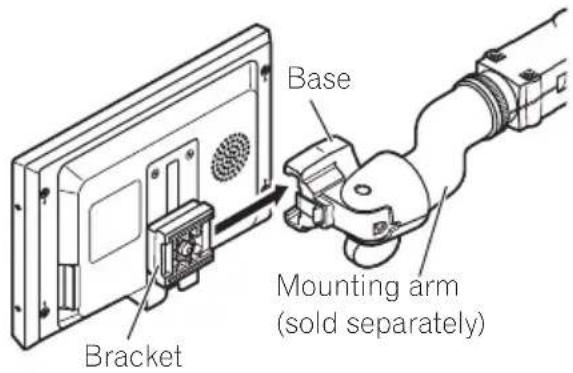
Themountingarmdescribedbelowissoldseparately.Formoreinformationontheinstallation,refertothemountingkitowner'smanualorconsultyournearestdealer.

Important
- Topreventfailure, besuretoturntheignition switchorsystempowerOFFbeforeinstalling orremovingthedisplayunit. Alsotakecare nottogripthescreenorbuttonstoofirmly andnottodropthedisplayunit.
- Donotletanywatergetontheterminalson thedisplayunitoronthecableanddonot allowtheterminalstobeshortedbyametal
objectorthelike.Thiscausesystem breakdown.
- Becarefulnottotouchterminalsonthedisplayunitoronthecable.Doingsomaycauseconnectionfailures.Ifanyterminalsaredirty, wipethemwithacleandrycloth.
Installingthedisplayunit
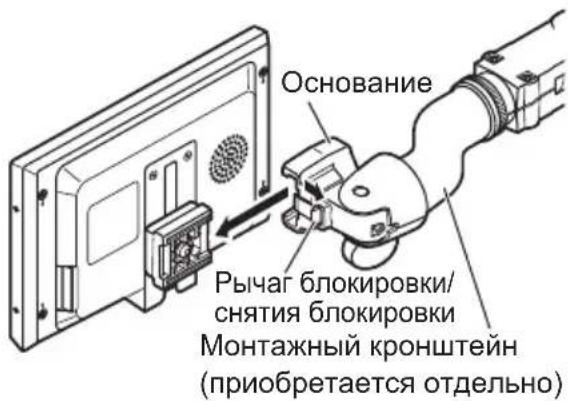
1Alignthebracketintothegroovesof thebase.
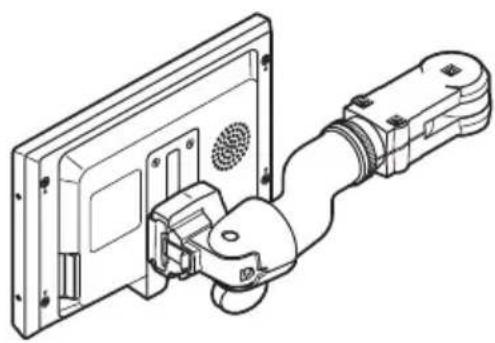
2Slidethedisplayunituntilitclicksinto place.
BeforeYouStart
3Connectthecabletothedisplayunit.
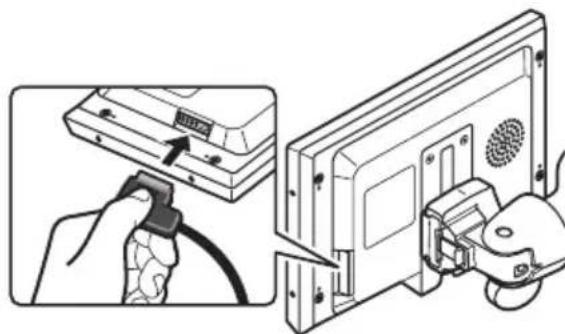
Removingthedisplayunit
Todetertheftofthedisplayunit,removeth displayunitwhenleavingthevehicle.
1Holdingthereleasesection and unplugtheconnector.
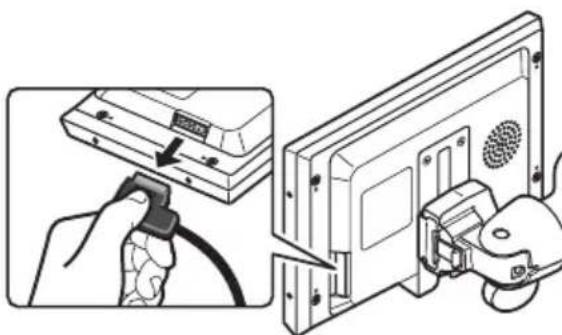
2Unlockthelockreleaselever,thenslidethedisplayunitanddetachitfromthebase.
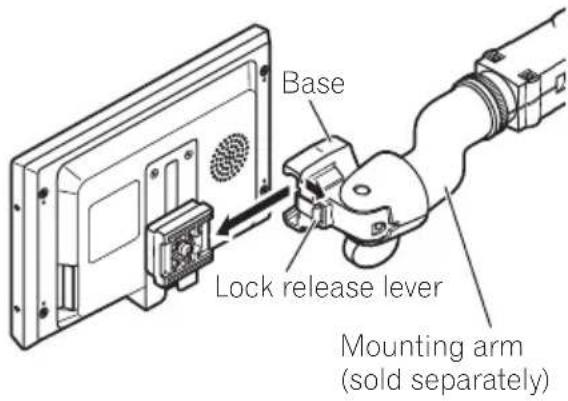

Resettingthemicroprocessor
You can reset the microprocessor to its initial settings.
Themicroprocessormustberesetunderthe followingconditions:
- Priortousingthisunitforthefirsttime afterinstallation
- If the unit fails, stop operate properly
- Whenstrangeorincorrectmessagesappearonthedisplay
1PressSOURCE/POWERandholduntil theunitturnsoff.
2HolddownSOURCE/POWERandsimultaneously.
What's What
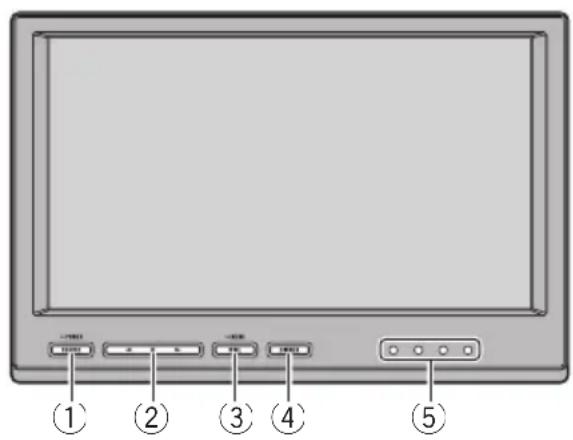
Displayunit
SOURCE/POWERbutton
Thisunitisturnedonbyselectingasource. Presstocyclethroughhaltheavailable sources.
Pressandholdtoturntheunitoff.
② buttons
Presstochangethesettingswhenthesequipmentisdisplayed.
③WIDE/MENUbutton
Presstoselectadesiredmodeforenlarging a4:3picturetoa16:9one.
Pressandholdtodisplaythesetupmenu.
④DIMMERbutton
Presstoswitchbetweenthedimmerlevels.
⑤IRtransmitter
Youcanlistentostereoaudiowithseparatelysoldcordlessheadphones(e.g.,SEIRM290).
BasicOperations
PowerON/OFF
Turningtheuniton
-PressSOURCE/POWERtoturntheunit on.
Whenyouselectasource, theunitisturned on.
Turningtheunitoff
- PressSOURCE/POWERandholduntil theunitturnsoff.

Note
Takeoffyourheadphoneswhenturningthedisplayunitonoroff.Ifyouleaveyourheadphones on,anoisemaybeheardwhenthevolumeis high.
Selectingasource
You can select asource you want to listento.
-
This unitisequippedwithtwovideoinputs,VIDEO1INPUTandVIDEO2INPUT.
-
PressSOURCE/POWERtoselecta source.
PressSOURCE/POWERrepeatedlytoswitch betweenthefollowingsources:
VCR1(VCR1)—VCR2(VCR2)
Changingthewidescreenmode
You can select desired mode forenlarginga 4:3 picturetoa16:9one.
- PressWIDE/MENUtoselectthedesired setting.
PressWIDE/MENUrepeatedlytoswitchbe-tweenthefollowingsettings:
FULL(full)JUST(just)—CINEMA(cinema)—ZOOM(zoom)—NORMAL(normal)
Operatingthisunit
FULL(full)
A4:3pictureisenlargedinthehorizontaldirectiononly.givingyoua4:3TVpicture(normalpicture)withoutanyomissions.
JUST(just)
Thepictureisenlargedslightlyatthecenterand theamountofenlargementincreaseshortizontally totheends,enablingyoutoenjoya4:3picture withoutsensinganydisparityevenonawide screen.
CINEMA(cinema)
Thepictureisenlargedbythesameproportionas FULLorZOOMinthehorizontaldirectionandby anintermediateproportionbetweenFULLand ZOOMintheverticaldirection;idealforacinem- ma-sizedpicture(widescreenpicture)wherecaptionslieoutside.
ZOOM(zoom)
A4:3pictureisenlargedinthesameproportion bothverticallyandhorizontally;idealforacinema-sizedpicture(widescreenpicture).
NORMAL(normal)
A4:3pictureisdisplayedasitis,givingyounosenseofdisparitysinceitsproportionsarethesameasthatofthenormalpicture.

Notes
- Whenvideoisviewedinawidescreenmode thatdoesnnotmatchitsoriginalaspectratio,it mayappeardifferent.
- Rememberthatusingthewidemodefeature ofthisystemforcommercialpublicviewingpurposesmayconstituteaninfringement ontheauthor'srightsprotectedbytheCopyrightLaw.
Thevideoimagewillappearcoarserwhen viewedinCINEMAorZOOMmode.
Switchingthedimmersetting
Topreventthedisplayfrombeingtoobrightat nightorwhentheambientbrightnessbecomesdark,youcandimthedisplay.
- PressDIMMERtoselectthedesired level.
PressDIMMERrepeatedlytoswitchbetween thefollowinglevels: DIMMERHIGH(high)—DIMMERMID(mid) —DIMMERLOW(low)
Setup
Changing the picture adjustment
You can adjust BRIGHTNESS (brightness), CONTRAST (contrast), COLOR (color) and HUE (hue)foreach source.
1PressWIDE/MENUandholdtodisplay thesetupmenu.
BRIGHTNESS appearsonthedisplay.
2PressWIDE/MENUtodisplayheadadjustmentfunctionnames.
PressWIDE/MENUrepeatedlytoswitchbe-tweenthefollowingadjustmentfunctions: BRIGHTNESS(brightness)CONTRAST(con-trast)-COLOR (color)—HUE (hue)—COLOURSYSTEM Colorsystem)-Exitfrom thesetupmenu
3Pressortoadjusttheselected item.
Eachpressofor increasesordecreases the level of selected item. +24 to-24 is displayedasthelevisincreasedordecreased.
BRIGHTNESS-Adjusttheblackintensity
- CONTRAST-Adjustthecontrast
- COLOR-Adjustthecolorsaturation
HUE-Adjustthetoneofcolor(redismphasizedorgreenisemphasized)
- Ifyoudonotoperatethefunctionwithinabout eightseconds,thedisplayisautomaticallyreturned.
Selectingthevideoofformat
WhenthisisconnectedtoanAVequipment,youneedtoadjustthevideoformatsuittabletothatAVequipment.
1PressWIDE/MENUandholdtodisplay thesetupmenu.
BRIGHTNESS appearsonthedisplay.
2PressWIDE/MENUtodisplay COLOURSYSTEM.
PressWIDE/MENUrepeatedlytoswitchbe-tweenthefollowingadjustmentfunctions: BRIGHTNESS(brightness)CONTRAST(con-trast)COLORcolorHUEhue)COLORSYSTEMcolorsystem)-Exitfrom thesetupmenu
3Pressor>toselectthedesiredvideo format.
Eachpressoforselectsthevideoofomat inthefollowingorder: AUTO-PAL-PAL-M-SECAM-NTSC
- If AUTO is selected, NTSC, PAL, PAL-M and SECAMareautomaticallyidentifiedanddisplayed.
- Broadcastreception may be inferior when AUTOisselected.
Ifyoudonotoperatethefunctionwithinabout eightseconds,thedisplayisautomaticallyreturned.
Connection and installation

CAUTION
- PIONEERdoesnotrecommendthatyouinstallorserviceyourdisplayunityyourself.Installingorservicingtheproductmayexposeyoutoriskofelectricshockorotherhazards.ReferallinstallationandservicingofyourdisplayunittoauthorizedPioneerservicepersonnel.
- Secureallwiringwith cableclampsorelectrical tape.Donotallowanybarewirengto remain exposed.
- Donotdrillaholeintotheenginecompartmenttoconnecttheyellowcableofthedisplayunittothevehiclebattery. Engine vibrationmayeventuallycausetheinsulation tofailatthepointwherethewirepassesfrom thepassengercompartmentintotheengine compartment.Takeextracareinsecuringthe wireatthispoint.
- Makesurethatcableswillnotinterferewith movingpartsoftthevehicle,suchasthegear-shift,parkingbrakeorseatslidingmechanism.
- Donotshortenancables.Ifyoudo,the protectioncircuitmayfailtoworkproperly.
Connections

Important
- Whenthisunitisinstalledinvehiclewithout ACC(accessory)positionontheignition switch,redcablemustbewiredtotheterminalthatcandetecttheoperationoftheignitionkey. Otherwise,batterydrainmayresult.

ACC position

No ACC position
- Useofthisunitinconditionsotherthan the followingcouldresultinfireormalfunction. Vehicleswitha12-voltbatteryandnegative grounding.
- Topreventashort-circuit,overheatingformalfunction,besuretofollowthedirections below.
—Disconnectthenegativeterminalofthe batterybeforeinstallation.
—Securethewiringwithcableclampsoradhesivetape.Toprotectthewiring,wraphesivetapearoundthemwheretheylie againstmetalparts.
-Placeallcablesawayfrommovingparts, suchasgearshiftandseatrails.
-Placeallcablesawayfromhotplaces, suchasneartheheateroutlet.
—Donotpasstheyellowcablethroughaholeintotheengineeringcompartmenttoconnecttoabattery.
—Coveranydisconnectedcableconnectors withinulatingtape.
—DonotremoveRCAcapsifRCAcablesare notused.
—Donotshortanycables.
- Nevercuttheinsulationofthepowercable ofthisunitinordertosharethepower withotherdevices.Currentcapacityofthe cableislimited.
Useafuseoftheratingprescribed.
Cordfunctionmaydifferaccordingtotheproduct,evenifcordcoloristhesame.Whenconnectingthisystem,besuretocheckallmanualsandconnectcordscorrectly.
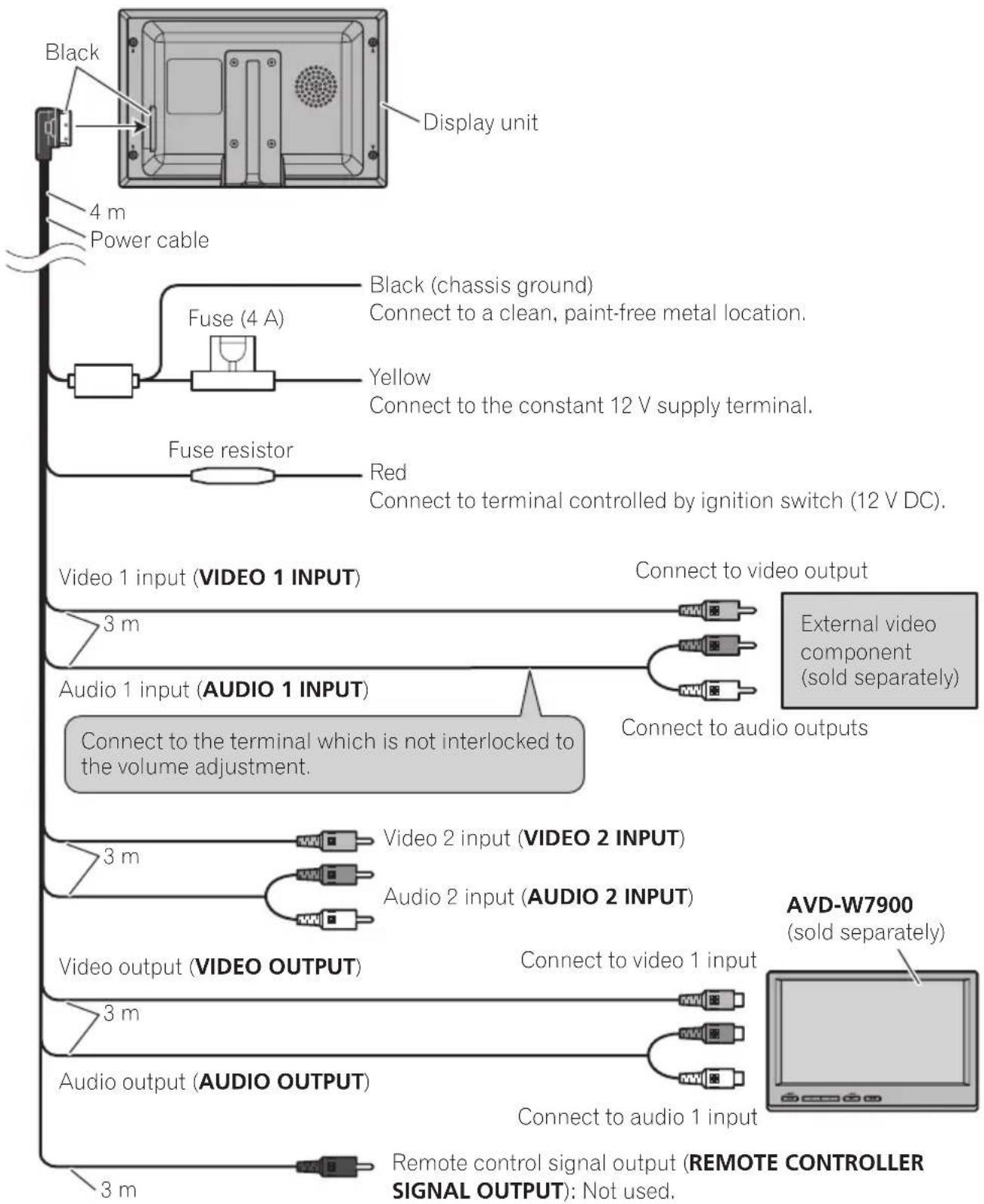
ConnectionDiagram

Connection and installation
Installation

Important
- Checkallconnectionsandsystemsbefore finalinstallation.
- Donotuseunauthorizedparts.Useofunauthorizedpartsmaycausemalfunctions.
- Consultyourdealerinstallationrequiresdrillingofholesorothermodificationstothevehicle
- Donotinstallthisunitwhere:
-itmayinterferewithoperationofthevehicle.
-itmaycauseinjurytoapassengersaresultofasuddenstop.
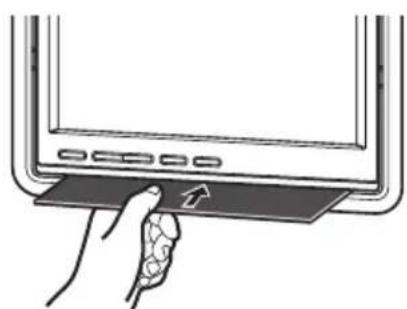
- Neverapplywithmuchforcetothedisplay unit,themountingbracketorthereleaseplates asthismaydamageit.
Mountingwithflushmounting bracket
1Installsecurelythemountingbracketin asafetylocationbyusingthesuppliedtappingscrews(M4×12).
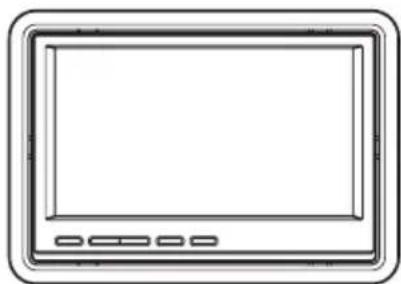
2Placethedisplayunitintothemountingbracketuntilitclicks.
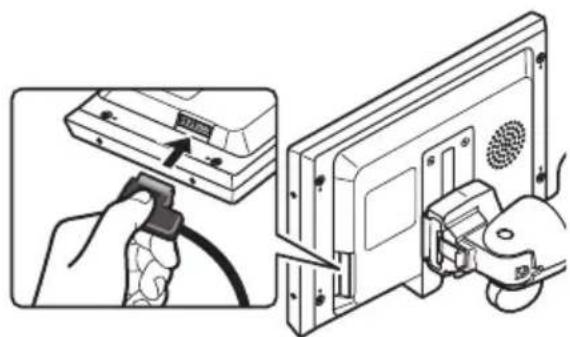
Removingthedisplayunit
- Insertthereleaseplatestogapsbes-tweenthedisplayunitandthemounting bracket.
Thedisplayunitwillbereleased.
AdditionalInformation
Usingthedisplaycorrectly

CAUTION
- If liquidorforeignmattersshouldgetinside thisunit,turnoffthepowerimmediatelyand consultyourdealerorthenearestauthorized PIONEERServiceStation.Donotusetheunit inthisconditionbecausedoingsomayresult inafire,electricshock,orotherfailure.
- Ifyou notices smoke, astrangenoiseorsmell, oranyotherabnormalsignsfromthedisplay, turnoffthepowerimmediatelyandconsult your dealerorthenearestauthorized PIONEERServiceStation.Usingthisunitin thisconditionmayresultin permanentdamagetothesystem.
- Donotdisassembleormodifythisunit,as therearehigh-voltagecomponentsinsidewhichmaycauseanelectricshock.Besure toconsultyourdealerorthenearestauthorizedPIONEERServiceStationforinternalinspection,adjustmentsorrepairs.
Handlingthedisplay
- Whenthedisplayissubjecttedtodirectsunlightforalongperiodoftime,itwillbecomeveryhotresultinginpossible damagetothelCDscreen.Whennot usingthisunit,avoidexposingittodirect sunlight.
- Thedisplayshouldbeusedwithinthetemperaturerangesshownbelow. Operatingtemperaturerange: -20^ + 60 ^ C Storagetemperaturerange: -40^ + 95 ^ C Attemperatureshigherorlowerthanthe operatingtemperaturerangedisplay maynotoperatenormally.
The LCDscreen of this unit is exposed in orderto increaseits visibility within the vehicle. Please donot press strongly on it as this may damage it. - DonotpushtheLCDscreenwithmuch forceasthismayscratchit.
Liquidcrystalldisplay(LCD)screen
- Ifthedisplayisinstalledneartheventofan airconditioner, makesurethaneairfrom the airconditioner isnotblowingonit. Heat fromtheheatermaydamagetheLCD screen, and coolairfrom thecooler may cause moistureforminsidethedisplay resulting in possibly damaged. Also, if the displayiscooledownbythecooler, the screen maybecomedark, orthelifespan ofthesmallfluorescenttubeusedinside thedisplaymaybeshortened.
- Smallblackdotsorwhitedots(brightdots) mayappearonthelLCDscreen.These are duetothecharacteristicsofthelCD screenanddonotindicateaproblemwith thedisplay.
- Atlowtemperatures, the LCDscreen may bedarkforawhileafterthepoweristurned on.
The LCDscreenwillbedifficulttoseeifitis exposedtodirectsunlight. - When using a portable phone, keep the antenna of the portable phone away from the displaytopreventdisruption of the videobye the appearance of spots, colored stripes, etc.
Keeping the displayingood condition
- Whenremovingdustfromthescreenor cleaningthedisplay,firstturnthesystem poweroff,thenwipewithasoftdrycloth.
- When wiping the screen, take care not to scratch the surface. Donot use harsh or abrasive chemical cleaners.
AdditionalInformation
Smallfluorescenttube
- Asmallfluorescenttubeisusedinsidethe displaytoilluminatetheLCDscreen.
The fluorescent tubes should last for approximately 10000 hours, depending on operating conditions. (Using the display at low temperatures reduces the service life of the fluorescent tube.)
-Whenthefluorescenttubereaches the endofitsusefullife,thescreenwill be darkandtheimagewillnolongerbe projected.Ifthishappens,consultyour dealerorthenearestauthorized PIONEERServiceStation.
AdditionalInformation
Specifications
General
Powersource.14.4VDC(10.8Vto15.1V allowable)
Groundingsystem.. Negativetype
Max.currentconsumption 0.7A
Storagetemperaturerange 40^ + 95^
Displayunit
Dimensions(W×H×D)...178×118×32mm
Weight. 480g
Screensize/aspectratio.....7.0inchwide/16:9
(effectivedisplayarea:154 × 87mm
Pixels. 336960(1440×234)
Type.TFTactivematrix,transmissivetype
Colorsystem....NTSC/PAL/PAL-M/SECAM
compatible
Videoinputlevel.1.0Vp-p/75Ω
Max.audioinputlevel.1.5Vrms/22kΩ
Videooutputlevel.1.0Vp-p/75Ω
Max.audiooutputlevel.....1.5Vrms/1kΩ
Operatingtemperaturerange 20°Cto+60°C
Installationbezel
Dimensions(W×H×D)...201×141×35mm
Weight. 100g

Note
Specificationsandthedesignaresubjecttomodificationswithoutnoticeduetoimprovements.
ParaprotegerlapantallaLCD20
ParavisualizarlapantallaLCDcon comodidad21
ParaprogerlapantallaLCD
Paravirtualizarlapantalla LCDconcomodidad
Pixels. 336960(1440x234)
TipomatrizactivaTFT,tipotransmisivo
Sistemadecolor.......CompatibleconNTSC/PAL/ PAL-M/SECAM
Niveldeentradavidevideo.....1,0Vp-p/75Ω
Nivelmaximodeentradaedeaudio 1,5Vrms/22kΩ
Niveldesalidadevideo.1,0Vp-p/75Ω
Nivelmaximodesalidadeaudio 1,5Vrms/1kΩ
Gamadetemperaturadefuncionamento 20^ + 60^
Biseldeinstalación
Dimensiones(An×AI×Pr) 201×141×35mm
Peso. 100g

Nota
AUTO—PAL—PAL-M—SECAM—NTSC
① ToucheSOURCE/POWER
AUTO—PAL—PAL-M—SECAM—NTSC
tive: 154× 87mm
Pixels. 336960(1440×234)
Type TFT matrice active, type
transmissif
Systémedecouleurs.......CompatibleNTSC/PAL/PAL
M/SECAM
Dimensions(L×H×P),....201×141×35mm
Poids. 100g

Remarque
AUTO—PAL—PAL-M—SECAM—NTSC
Dimensioni(LxAxP)....178x118x32mm
Peso. 480g
Dimensioni(LxAxP).....201x141x35mm
Peso. 100g

Nota
Demicroprocessorresetten88
03 Bedieningvanhetoestel
Watiswat89
-Display89
Basishandelingen89
-Stroomaan/uit89
-Signaalbronnenselecteren89
PPEIOCTOPOXHOCTN 100
Длг obecneueHЯ 6e3oNaCHOCTN DBNXEHNr 100
-Испльзоване Диспени, NOДКПЮЧЕНСО K VIDEO OUTPUT101
Bo n36eXaHne pa3pRAn kKymyTOpHo 6atapen 101
02 Npeed Hauanom 3Kcnnyataun
CBeHnO6 3TOM yCTpOYCTBe 102
IocTeHaHa caT 102
B cnyuae BO3HnKHOBeHHn HEnoJaOK 102
3aunTa KnKOKpncTaNJIInueckoro 3kpaHa 103
Hactpoika KK 3kpaHa dny ydo6horo npocMToPa 103
-ИзменинширокорmaTHOROpexkma 103
4He donyckaIte K nCNoJIb3OBAHnO CnCTeMbI NOCTOpOHnX JnU,He O3HaKOMNBuxxCn HcBOuBwNx DaHHbIe NHCTpyKuIN No 3KcnNyataun.
5He yctaHaBnBaIte dncnne B MeCTax, rde OH MoKET (i)3aKpbIBaTb 063Op BOHTeIIO,(ii)npenrTcTBoBA Tb HOpMaIb-HOpa6ote CnCTEm aBTOMo6nJIyNyc- TpOInCTB o6ecneueHn 6e3OnacHOCTn, TaKnx KaK NOdyuKKn 6e3OnacHOCTN,KHON-Kn abapnHOc nRHaJIN3aun,Nnn (iii)co3DaBaTb BOHTeIIO NOMEXn npn YnpaBJeHH aBTOMo6nJIem.
6Kak n IIO6oe dpyroe donoHnTeNbHoe 6bOpUdoBaHne,yCTaHOBJIeHHe B caNohe ABTOMO6nIa,INcNJIe H He DOJKeH OT- BLeKaTb BHIMaHHe BOHTeJIa OT ynpaBHe HnA BTOMO6nIeM.B Cnyae BO3HnKHOBeHnI npO6JIe M Ba6ote CnCTeMbI INn DInCnJIe,IpeXJe Yem npNCTyNTb K peYJnIPOBKe HAcTpoEK, Heo6xOdmo OCTaHOBHTb ABTOMo6nIb B 6e3OnacHom MeCTe.
7Bcerda npncTeRnBaIte peMeHb 6e3onac-HocTn npu ynpaBHeHn aBTOMo6nJem. Ecnn peMeHb He npncTeHyT NaJIexKa-ImM o6pa3OM,To B cIyue aBapn noCneDCTBnA MOrTy 6bITb HAMHOro TJaKeJee.
I PENEYPEXDEHNE
-He nbitaTecb camocToTeIbHo npOn3- BODNTb yCTaHOBky nHn peMOHT dncnJe. YcTaHOBka nHn peMOHT dncnJe INuCaMn, He 6bIaIOUIMN CneuHaNbHbIMN HaBblKamn n OnbITOM pa60TbC 3JKeKtpoHHbIM 6OpuyoBaHHeM n aBTOMO6HbHbIMn akceccyapAMn,MoryT CO3daTb OnaCHOCTb NopaxHenr 3JKeKtpueeCKm TOKOM nHn INhIx INCuIeHTOB.
!PPEyIPEXDEHNE
3APPEUAETCYCTaHaBnBaTb DN- cnJIeB MeCTe,DOCTyHOM 063opy BOITeR.B IpoTINBHOM Cnyae n3o6paxKeHne Ha DnCPIEe MOKET OTBJIeKaTb BOITeR OT ynpabLeHnA ABTOM6NJem.
Ha pa3MeIeHne n IcNoIb3ObaHne daHHoT O dncnpepaoctpaHraTc Tpe6oBaHN Hn deNCTByIOUeO 3aKHOdaTeJIbCTBa.
KOMnHaH PIONEERHe HeceT OTBETCTBeHHOCTb 3a IIO6bIe HEnCnPaBHOCTN,NOpy IMyUecTBa NIN yUeP6,BbI3BaHHbIE HeBepHOYCTaHOBKOJ DNcPiEe NIN erONCNoJIb3OBaHNem C HApUSeHMe MDei-CTByIOUeTO 3aKOHoDaTeJIbCTBa.

Для обecпецни 6e3oNaCHOCTN DBNXKeHnA
I PENEYPEXKDEHNE
-Bo n36exkHne HecuaCTHO CnyaI N noTeHunalbHOrO HApUWeHn DeiCTBlyoUeero 3aKOHoDaTeNbCTBa 3anpeuaeTcY cTaHaBnBaTb DnCnNe JnnaCCaxNupOB 3aHrO cnDeHb TaK,HTo6bl OH OTBLeKaJ BHMaHne BOdntela OT ynpabJeHn ABTOMObnem.
Mepbl npeodctopoxkHOCTN
-ДанньдиспейnpedHa3HauehИСКЛHOTeIbHOДЯ naccaxnpoB 3aHeroCnDEHbJ.3ANPEUCAETC yCTaHaBJIiBaTbDINcПeB MecTx,doCTyNhbIX O630pyBOdITeJI BOBpeM ynpabJIeHnA ABTOMo-6nem.
B HeKoTOPbIX CtpaHax IIN NtTaTAX npocMOTp 306paXeHn Ha DnCnIee BHyTpN TpaHCnOpTHOrO CpeCTBa DaJKe NaccxHpaMIMoKet 6bITb IpOTnBO3aKOHhBM.Heo6xoNi-Mo Co6nOdaTb TaKHe 3aKHOdaTeJIbHbIe aKTbIB PerNoHax, rDe OHn DeiCTByIOT, n BO3depXn-BaTbcr OT NcNOb3OBaHn DnCnIeJ.
IcnoJb30BaHne dncnJe, NOdkJIIOUeHHORO K VIDEOOUTPUT
Pa3bem VIDEOOUTPUTdAnHoro yctpoiCTBa cIyKNT dIa NODKIIOUeHnI DInCIIeI,npedHa3NaueHOro dIa npocMoTpa 3anicei DVD nIN TB-nporpamm naccaxkpamn Ha 3aDnHex CNDehbx.

PPEyPPEKDEHNE
3ANPEUAECTYcTaHaBnBaTbDnCnJIeB MeCTax,DOCTynHbIX 0630py BODNTeJn DnI npocMOTpa 3aNcei DVDnTTB-nporpamm BO BpeMa ynpabHeHn aBTOMOHe
Bo n36eXaHne pa3pIaKKymyIaTOPHO 6aTapen
IcnoIb3yIte DaHHoe yctpoiCTBO npn pa6oTaIOUeM DBrarTeJe.IcNoJIb3OBAHne DaHHo- ro yctpoiCTBa npn Hepa6oTaIOUeMe
DBrarTeJe MoKet npNBecTn K pa3pIKe aKKyMyJrTopHO 6aTapeN
3NoekJIOUHTe Ka6eJb K dncnJeHO.
Демонох диспег
Ipy npdeOTbpaueHn Kpaxn CHMaTe DNcnnen,Korda NOKndaete aBTOMObnlb.
1ydepknaBnKcaTOp B HaxaTom noJIOXKeHH,OTcoeHNHTe pa3bem Ka6eJIa.
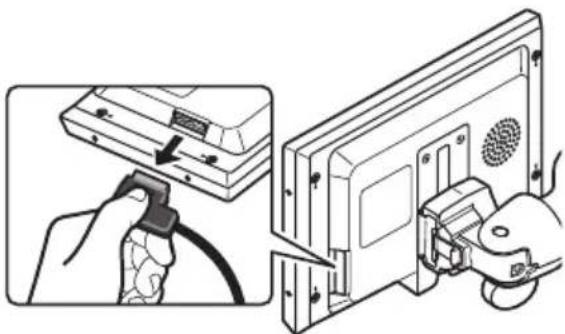
2yctaHOBNTe pbIur 6JOKnPOBKN/CHTNA 6JOKnPOBKN B NIOJOKeHne "CHrTB 6JOKnPOBky",3aTe cDvHbTe dncJIeB CTOPOHy n CHMnTE erO c OCHOBaHHa.

Пара rgузka Мнкрпочeccopa
Bb mokeTe nepe3arpy3nTb Mnkponpoceccop, T06bl BOCCTaHOBNTb ero nepBOHaJaHbIe HacTroKn.
①KhoNka SOURCE/POWER
3TO yCTPOINCTBO BKNIOUaETcR npn BbIbOpe
NCTOuHnKa CnHaJa.HaxMNTe,HTo6bl
Nepe6paTb BCE DOCTyINHbIE NCTOuHNKn CnHnA.
HaxMNTe n ydepxNBaHTe,HTo6bl BBIKIO-
YHTb yCTPOINCTBO.
②KhONKn
C NOMOJIIO 3Tnx KHOJOK IPOUN3BOIDNTcN 3-MeHeHHe HAcTpoEKNpN OTo6paXeHN Ha 3KpaHe yCTaHOBOUHOro MeHIO.
③Khonka WIDE/MENU
HaXMMTe 3Ty KHNKy,HTo6bI Bbl6paTb Heo6xOIMMbI peKIM yBeJIuHEny fOpMaTa n3o6paXeHn c 4:3do 16:9. 4To6bl OTO6pa3ntb Ha 3kpaHe yCTaHOBOUHoe MeHIO,HaXMITE u ydepXnBaIte 3Ty KHONKy.
④Khonka DIMMER
IcnoIb3yeTcI JnpeKJIuOeHnYyPoBnAcOBeUeHHoCTn.
YnpaBHeHne DaHHbIM yCTpoIcTBOM
OchOBhble onepaun
BkIoueHne N BblKlIOUeHne nItaHn
BkIIOUeHne yCTpoiCTBa
HaXMMTe KhoNky SOURCE/POWER, YTO6bl BKNIOHTb yCTPOINCTBO.
YcTpoIcTBO BKIOUHTcra,koIa BblbI6epTe NCTOuHnK CNHaJa.
BbIKJIoueHne yCTpoiCTBa
HaxmTe u ydepXnBaTe KhONky SOURCE/POWER,noka ycTpoNcTBO He BblKlIOHTc.

Примechане
Ipn BkIOueHn NJIY BbIKIOueHn DcNJIe C
MaTe HauHnKn.Ecnn He ChrTb HauHnKnHa
BbICOKO rPOMKoCTN MOKeT 6bItb CblIweH W
BbI6Op nCTOuHnKa cHnHaJa
Bbl MoKeTe Bbl6paTb NCTOuHnK CnHaJa,KoTOpbl Bbl XOTnTe npocnywaTb.
-Данhoe yctpoiCTBO OCHaSeHO DByMaBnDEOBXoJaMn:VIDEO1INPUTNVIDEO2INPUT.
HaxmTe KhoNky SOURCE/POWER, T06bl BbI6paTb NCTOuHNK CnHaJa.
HaxmTe SOURCE/POWERHeCKoIbko pa3, yTo6bl BblpaTb Odn Hn3 CneDyUOux nCTO HNKOB CNrHaHa:
VCR1(BuJeomarHHToΦOH1)-VCR2(BuJeomarHHTOΦOH2)
I3meHHeIe InpokofopMaTHoro peKIma
BbIMoKeTe BbI6paTb Heo6xOaMbI pexm yBeJIuYeHnA φOpMaTa n3O6paXeHnA c 4:3do 16:9.
HaxmTe WIDE/MENUДЯ BbI6opa XeJaemOHacTpoiKN.
HaxmTe WIDE/MENUHeckoJbKO pa3 IJIy Bbl6opa cIeDyUOuX HAcTpoEK:
FULL (BO BeCb 3KpaH)JUST (TOUHbI)CINEMA (KNHO)ZOOM (yBeJIuYeHne)NORMAL(O6blHbI)
FULL(Bo Becb 3KpaH)
ΦopMaT n3o6paXeHn4:3yBeJIuNbAeTCa TOnb-Ko IIO rOpI3oHTaJIn,06ecneuHBa TB n3o6paXeHnE φopMaTa 4:3(HopMaJIbHoE n3o6paXeHnE)
16e3 kaKnx-Jn6o nckaxKeHn.
JUST(Touhbi)
I3o6paKeHne cIeKa yBEnuHbAeTcB UeHTpe, I KO3oΦpHnCHeNT yBEnuHnBaO3paCTaET O T CHTpa K KpaM NO rOpN3oHTaII,06ecNeuVBa FopMaT I3o6paKeHn 4:36e3 HApUeHn Ipo-nOpCuN dJaKe Ha ShnPOKOM əkpaHe.
CINEMA(KnHo)
I3o6paJxHHe yBEnuHbAeTcB ToJ Xe npOpOpUHN,HTO INPn NcNoJIb3OBaHNN FULLNIO ZOOM NO rOpN3OHTaJIH IN B IpOMExKyTOUHO npOpOpUIMeKdy FULLZOOMno BepTKKaJI;NdeaJIbHO IOxODNT DnA I3o6paXeHn AopMaTa KINHO-(WnpOKoΦopMaTHoe I3o6paXeHne),B KOtOpOM HaIncn Ha 3KpaHe OCTaOTc8 3a rpaHnCaMn I3-06paXeHn.
ZOOM(yBennueHne)
I3o6paXeHne fOpMaTa 4:3nponopuHaJbHo
yBeHnUBaETcno TOpN3OHTaIN N NO BepTnKaJN;IeAJIbHO IOXODNT DnA N3o6paXeHnA φopMaTa KInO (UnpOKoΦopMaTHoe N3o6paXeHne).
YnpaBHeHne DaHHbIM YCTpO'CTBOM
NORMAL(o6bIuHbI)
I3o6paXeHneΦopMaTa 4:3oTo6paXaETcBpealbHom MacuTaBe,He co3daBaJ OuUeHnIINcnpOnOpun,NoCKOblKy CoXpaHraOTcR npOpOpun HopMaJIbHorO I3o6paXeHnI.

PpimMeaHnA
-Пи посмOTpe BndeO B shnpokoΦopMaTHOM peXIMe,He COBnaDaiOuIeM C eero NcXoNbIM φOpMaTOM,N3O6paXeHne MOKeT BblJrJaTeb NCKaXeHHbIM.
-ПOMHHTe,уTO nCNoIb3OBAHnE ΦyHKuIN шИpOKoΦopMaTHOrO n3O6paJKeHnB KOMMepueCKnx ZeJIaX IIN dIЯ ObIeCTBeHHOROpocMOTpa MoKET YBJIaTbcR HApUWeHnEM npaB,3aUuIeHHbIX 3aKOHOM o6 aBTOpCKom npaBe.
-При порсмOTpe B ржIMe CINEMAuZOOMn3o6paXeHne 6yIeT 6OJIee 3epHnCTbIM.
BkIoueHne HacTpoiKn peYJrTopa OCBeUeHHOCTN
YTO6bIB TEMHOBpEMyCytOK NIN B CymepKax npKOCTb DnCnIeR He 6bla CnUJKOM BblCOKo,ee MOXHO yMeHbWNTb.
4To6bI Bbl6paTb Heo6xOaHMBiHypoBeHЯPkOCTn,HaxMNTe KhONKy DIMMER.
C NOMOUI KHOPIKIN DIMMERBbI6epnte ODNH n3 cJeDyUoux ypOBHei:
DIMMERHIGH(BbICOKn)—DIMMERMID
(cpeHn)DIMMER LOW (HN3KN)
BRIGHTNESS (ярков), CONTRAST (контраст hoctь), COLOR (цовет) и HUE (OTTEHOK).
14To6bl OTo6pa3NTb Ha 3KpaHe yCTaHOBOUHoe MeHHO,HaKMnTe N ydePKNBaHTe KHonky WIDE/MENU.
Ha dinçnlee nOaBntcnaHadnncb BRIGHTNESS.
2HaXmTe KhoNky WIDE/MENU,yTo6bl OTo6pa3nTb Ha dncJIee Ha3BaHnA ΦyHK- Cn HAcTpoiKn.
Haxmaite KhoNky WIDE/MENU,HTO6bI Bbl-6paTb OndHy n3 CneDyUOuNX φyHKn: BRIGHTNESS (rpkocTB)-CONTRAST (KOH-tpactHOCTb)-COLOR (UBeT)-HUE (OTTeHOK) COLOR SYSTEM (CnCTema UBeTopepea-yn)-BbIXoN i3 yCTaHOBOUHOro MeHIO
3C nOmoIbIO KHOJOK yCTaHOBNTe Heo6xOdMoe 3NaueHne napaMeTpa.
Pn KaJdOM HaxaTn KHOJOK nJn PpOncxOndt yBeJIuYeHne nn yMeHbWeHne 3HaueHna Bbl6paHHoro npaMeTpap.1pn NOBbIeHNn nn noHnxKeHnn ypoBn oTo6paXaOTc3HaueHnO T +24 Do -24.
BRIGHTNESS - Peruginopobka nHTeHcNBHOCTN cepHoro
-CONTRAST-PerynipoBka KOHTpactHoctn
COLOR-PerynpoBka HacbIeHHOCTN UBeTa
HUE-PerynupOBka OTeHka ZBeTa (yBENuHBaETc HAcbIeHHOCTb KpaCHOro nIN 3eJIeHORO ZBeTOB)
■Ecnn HnkaKnx DeiCTBn C 3ToN cyHKnneH He 6yndet BbIIOJHeHO B TeueHne npIMepHo BOCbMn ceKyHd,diCnpei BepHeTcB npeDbIdyuyn peXMM.
Hactpoika
I3MeHeHne Hactpoek n306paXeHnA
Дя кадою nctouнka cnHaJa MoXHo OTperynipobaTb cneDyUOuNe napaMeTpbl:
YnpaBHeHne DaHHbIM yCTpoIcTBOM
Bb6op φopMaTa BndeocnHaJa
IpnnoKlnHueHn DaHHoro yctpOncBa K o6OpydoBaHIO,IpedHa3HaueHHOMy DnB BOCnpoN3BeHeHn ayDnO/BnDeOdaHHbIX,Heo6XoIMo yCTaHOBtBΦOpMat BnDeOcHnHaJa DnA daHHoro o6OpydoBaHn.
14To6bI OTo6pa3NTb Ha 3KpaHe yCTaHOBOUHoe MeHHO,HaXMnTe N yDepXnBaIte KhoNky WIDE/MENU.
Ha nncnnee noaBntcnaHdncb BRIGHTNESS.
2HaXMMTe KhoNky WIDE/MENU,HTo6bI oTo6pa3nTb COLOURSYSTEM.
HaxnmaTe KhoNky WIDE/MENU,HTO6bl Bbl- 6paTb OndHy n3 CJeDyUoXn X cyHKn: BRIGHTNESS (aRkoCTb)-CONTRAST (KOH- TpactHOCTb)-COLOR (uBeT)-HUE (OTTeHOK) COLOR SYSTEM (CnCTema UBeTopepea- nn)-BbIXoI n3 yCTaHOBOUHO MeHIO
3C NOMOUI KHOIOK N BbI6epNTe HyXHbIΦOpMaT BnDeocnHaHa.
Pn KaJdOM HaxaTIN KHOJKN 4nn PpOncxOINT BbIbOp fOpMaTa BNDeOcHHaJa BCneDyUoUeM nopAKe:
AUTO—PAL—PAL-M—SECAM—NTSC
- Ecni BbIbpaHa HacTpoKa AUTO, To NTSC, PAL, PAL-M n SECAM aBtOMaTHueCKn IeHTNΦuHpyIOr c n OTo6paKaIoTc Ra DInCnIee.
- Ecnn BbIbpaHa HacTpoiKa AUTO, To KaueCTBO npnema CnHaJa MoKet 6blx yXke.
Ecn HnKaKnx DeiCTBn C 3ToN FyHKuNeH He 6ydet BbIOnHeHO B TeueHne npIMepHo BOCbMn cekyHd,diCpNei BepHeTcB NpeDbIdyui npexm.

BHHMAHNE
- Kompania PIONEERhe pekomeHdyet ycta-HabnBaTb n npOn3BODnTb 06cnyKnBaHne dncnpe camocToTeJbHo.1pn camoCTOaTeJbHOY cTaHOBKe nnn 06cnyKnBaHn nnHaHHoro n3deJIy cyuEcTByeT onaCHOCTb nopaxeHna 3JeKTpUYeCKM TOKOM nnn noLyHeHn nnbIX TpaBM.DnA yCTaHOBKn nnn 06cnyKnBaHne dncnpe o6paauTecb K TexHHueckm CneuaJINCtAm,ABTOP3OBAH-NbIM KompanHne Pioneer.
-3akpenTe Bce npoBOda npn nOmoU 3axuMOB nnNn30JauHNOHou JeHTbI.He octaBnTe orOJenHHbIe npoBOda 6e3 n30JauuN.
3anpeaaetc npocBepnBaTb OTBepCTna BOTceke DBnIaTeJIg IINI NOkJIIOUeHn JKeJITOro npoBoDa DInCIIeR K aKKyMylrTOpHOIbTaapee ABTomO6nJI.C TeueHHeM BpeMeHNOT Bn6paun DBnIaTeJI MoKET HApUHTcN30JauIpyOBoA B TOUKe BbIXOda N3 NaKnpCKoro OTceKa N BXODa B OTCEK DBnIaTeOco6oe BHImaHne Heo6xOdmo yJeINTbKpenIeHHIO npoBOda. - Y6eIITecb,HTO Ka6eHn He KacaOTcR DBrKyUxxCra YacteY ABTomo6nla,HanpMep, MexaHn3Ma NepeKJIoueHnnepeDaU,CToHocHOro TOpMo3a INm MexaHn3Ma pepyIpOBKn INoJoxEHHn CnDeHn.
He ykopauhBaIte Ka6eII.3To MoKeT Bbl- 3BaTb HeNCnpaBHOCTb cENN 3aUHTbl.
CoeinnHeHn

BaxHo
-Прн установке Дадногу устюства на вотомобил,В кOTOPOM OTCYТСТВЕТ NOLOЖЕНЕ ACC (ДОпОЛнИТeьhoe obOpудовache) KIOUa 3aЖИraHЯ,КpacHyI Ka6eIb DOJXeH 6bITb NOДКПЮчEN K KNeMMe,KOtOpaR onpeDEJIЯET pa6OчEE NOLOЖЕHne KIOUa 3aЖИraHЯ. B npOTINBHom cIyuae MoKet BO3HnKHyTb yTeUka TOKa aKKymIЯTOpHoi 6aTapei.

ПОJOKEнe ACC

IIOXeHne ACCOTcyTCTByET
-3KcNpyataaJaDaHHoro yCTpoiCTBa B ycNo-cca-BnAx,OTnHbIX OT ONcaHHbIX HHXe,MoKeTna. npNBecTN K noXapy nnn c6oB B pa6ote yc-tpOCTBa.
TpaHcnpTHbIe cpeCTBa c 12-BOJbTOBbIM aKKyMnyTopOM n 3a3emJIeHNEm OTpu- taTeJIbHOro NOnIOca.
Bo n36exkHne KopoTKoro 3aMbikHnna, neperpeBa nn HeucnpabHocTe o6raTeNbHo co6IIOdaIte CNe dyuOuine yka3aHnna.
—Ipepe yctaHOBKO OTCOeHNHTe OTpu- taTeNbHyIO KJIemMy aKKyMnyTota.
-3akpenTe npoBoda npn NOMOu 3axu-MOB nINn IN0JauHHOJ neHTbI.ДЯ 3a-ⅢNTbI npoBOKN 3aN3OJIpyuTe npoBODa B MeCTax INx COpNIKOCHOBeHnC MeTaJI-NUueCKMn DeTaNMy.
—Pa3mecnte Bce Ka6enB ydaJIeHnO T NOdBHXbIX DeTaJe,TaKnx KaK pbUar nepeKlnoueHnnepeDau HnnpabJIO- Une CnDeHn.
—Pa3mecntte Bce Ka6enB ydaJeHnO T HarpBaUoXxCa DetanEn,Taknx KaK peuTeKa o6orpeBaTeJ.
—He nponyckaIte XeIbI KabeIb Ype3 OTBepCTne B MOTOpHbI OTcEKN IIN NO- DKJIIOUeHnK AKKyMylTOpY.
—N3OJIpyuIte KOHcbl BCex HenoDcoeINHeHNbIX Ka6eJen N3OJIaUHOHHoJeHTOn.
—He cHmMaTe 3arIyUknc pa3bEmOB RCA, ecnn Ka6eJn RCAHe nCnoJb3yIOTc.
—He ykopauNbaiTe ka6eni.
—HnkOrda He cpe3aTe n3OJauu co shHypa NITaHn DaHHoro ycTpoNCTBa C ceIbIO NOdauN NITaHn Ha dpyroe ycTPOIcTBO.0nyctIma Harpy3ka Ka6eNa NO TOKy OrpaHnueHa.
—NcnoIb3yIte npedeoxpaHnteIb c yka3aHNbIMn napamETpAMn.
Функця кабеля может OTлчаьсь в 3aBN-Cнмoc'tи OT yctpoicTba,daxe ecnl Ka6elNMeet TOT xe cBet.Pn nOДcoeINHnCnCTembl CBepbTeCb CO BCEMn pyKOBODCTBaMn n npabInbHo NOdCoeINHnTe Ka6elN.
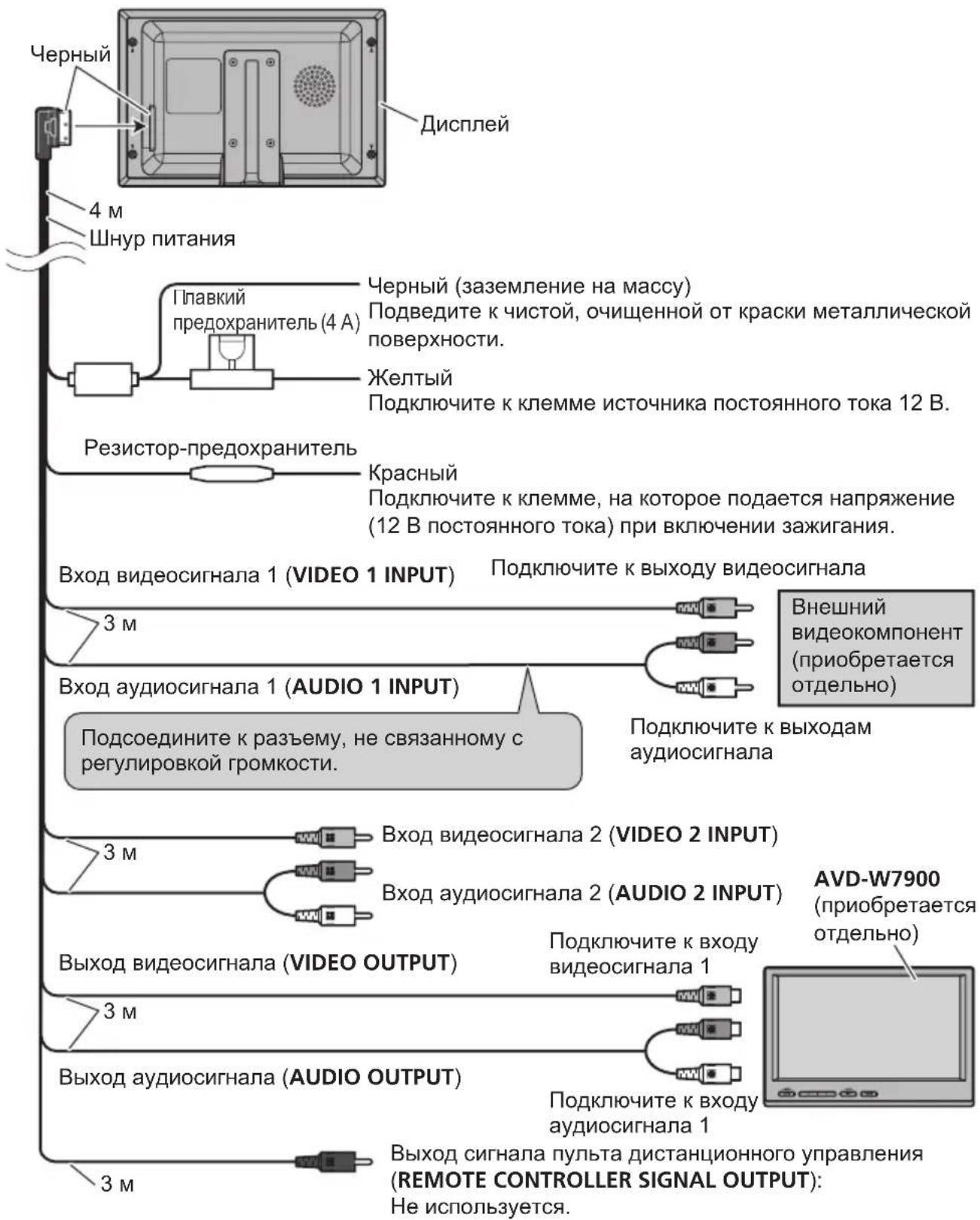
Cxema nodkloueHna

yctahOBka

BaXHo
-Перед OkOHаTeЛьНоуCTaHOBКО npOBeрБТе BCE COeДиЕнЯИ CNTeMbI.
He nCnoB3yIte DeTaN,He pa3peHHe bI npOn3BOAnTeJIeM K nCNoB3OBAHIO.NcNoB- 3OBAHne TaKx DeTaNe MoKeT npNBecTN K HeNCnPaBHOn pa6ote.
- Y3haTe y 6nJkaIeero dInepa KOMnAHIN, Tpe6yET JN yCTaHOBKa CBePJIeHNr OTBepCTNI INI DpyrIX MoIcPnKauN TpaHCnOpTHORO cpeDCTBa.
-He yctaHaBnBaIte DaHHOe yCTpOcTBO B MecTaX,rgde OHO MOKeT: -nomeShaTb ynpaBnEHHIO aBTOMo6nJIem. -TpabMnPoBaTb NaCCaxnpa npN BHe3anHOJ OCTaHOBKe aBTOMo6nJIa.
Демонох Дионпеля
BcTaBbTe nJaCTnHbI dJr ChrTnR dNcPnEe B 3a3Opbl MExdy DnCnJeem N MoHTaxHoJ pAMKoJ.
Pn 3TOM DnCnJe BbIeT n3 Na3OB paMkn.
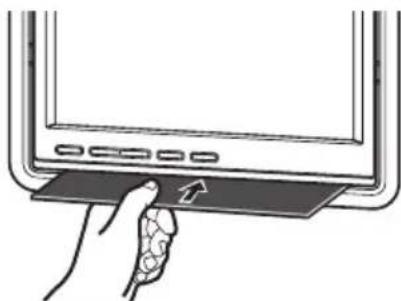
He npnilaraTe n3nHero ycInna K dnCnJIeIO,MOHTaxHoI paMKe IINI pNactINHAM dIChrTNA DnCnJIeRA,TaK KaK 3TO MOXeT Bbl3BaTb NOBpeXdHne nnCnJIeA
YCTaHOBka C NOMOuMoHTaXHOn paMKn
1HaTeXHo 3aKpeNITe MOHTaxHyOpamky B 6e3oNaChOM MecTe C NOMOuBxOJauxx B KOMJIeKT CaMOHaPe3aHOuxBnHTOB (M4×12).
2BcTaBbTe DnCnNe B paMky do ueJyka.
Дононтульнаиформача
ПИКOBЯ amPnIHTyda BxOДHOrO BnDEOCnHana 1,0B/75Ω
MaKcImaHbHa amnHTya BxoHOro ayDIOcHana no HapJxKeHH 1,5B/22kΩ
ПИКOBА amPnIHTyda BbIXoHOrO BnDEOCuRHaHa 1,0B/75Ω
MaKcImaHbHa amnHTyDa BblOHO ayDnOcHHaHa no HapJKeHH 1,5B/1kΩ
Visit www.pioneer.co.uk (or www.pioneer-eur.com) to register your product.
4-1,MEGURO1-CHOME,MEGURO-KU
TOKYO153-8654,JAPAN
PIONEERELECTRONICS(USA)INC.
P.O.Box1540,LongBeach,California90801-1540,U.S.A.
TEL:(800)421-1404
PIONEEREUROPENV
Haven1087,Keetberglaan1,B-9120Melsele,Belgium
TEL:(0)3/570.05.11
PIONEERELECTRONICSASIACENTREPRELTD.
253AlexandraRoad,#04-01,Singapore159936
TEL:65-6472-7555
PIONEERELECTRONICSAUSTRALIAPTY.LTD.
178-184BoundaryRoad,Braeside,Victoria3195,Australia
TEL:(03)9586-6300
PIONEERELECTRONICSOCANADA.INC.
300AllstateParkway,Markham,OntarioL3R0P2,Canada
TEL:1-877-283-5901
PIONEERELECTRONICSDEMEXICO,S.A.deC.V.
PublishedbyPioneerCorporation.
Copyright©2007byPioneerCorporation.
Allrightsreserved.
PubliéparPioneerCorporation.Copyright
©2007parPioneerCorporation.Tous
droitsréservés.
PrintedinTaiwan
ImpriméàTaiwan
- Owner'sManual Moded'employoi
- AVD-W7900
- Precautions
- BeforeYouStart
- Operatingthisunit
- Connectionandinstallation
- AdditionalInformation
- IMPORTANTSAFEGUARDS
- WARNING
- Toensuresafedriving
- Whenusingadisplay connectedtoVIDEOOUTPUT
- Toavoidbatteryexhaustion
- Aboutthisunit
- CAUTION
- Visitourwebsite
- Incaseoftrouble
- ToprotecttheLCDscreen
- ForviewingLCDcomfortably
- Changingthewidescreenshotize
- Changingthepictureadjustment
- Installingandremoving thedisplayunit
- Important
- Installingthedisplayunit
- Removingthedisplayunit
- Resettingthemicroprocessor
- What's What
- Displayunit
- BasicOperations
- PowerON/OFF
- Turningtheuniton
- Turningtheunitoff
- Note
- Selectingasource
- Changingthewidescreenmode
- FULL(full)
- JUST(just)
- CINEMA(cinema)
- ZOOM(zoom)
- NORMAL(normal)
- Notes
- Switchingthedimmersetting
- - PressDIMMERtoselectthedesired level.
- Setup
- Changing the picture adjustment
- 1PressWIDE/MENUandholdtodisplay thesetupmenu.
- 2PressWIDE/MENUtodisplayheadadjustmentfunctionnames.
- 3Pressortoadjusttheselected item.
- Selectingthevideoofformat
- 2PressWIDE/MENUtodisplay COLOURSYSTEM.
- 3Pressor>toselectthedesiredvideo format.
- Connection and installation
- Connections
- Installation
- Mountingwithflushmounting bracket
- Usingthedisplaycorrectly
- Handlingthedisplay
- Liquidcrystalldisplay(LCD)screen
- Keeping the displayingood condition
- Smallfluorescenttube
- Specifications
- General
- Installationbezel
- ParaprogerlapantallaLCD
- Paravirtualizarlapantalla LCDconcomodidad
- Biseldeinstalación
- Nota
- AUTO—PAL—PAL-M—SECAM—NTSC
- ① ToucheSOURCE/POWER
- Remarque
- Bedieningvanhetoestel
- Npeed Hauanom 3Kcnnyataun
- I PENEYPEXDEHNE
- !PPEyIPEXDEHNE
- Для обecпецни 6e3oNaCHOCTN DBNXKeHnA
- I PENEYPEXKDEHNE
- Mepbl npeodctopoxkHOCTN
- IcnoJb30BaHne dncnJe, NOdkJIIOUeHHORO K VIDEOOUTPUT
- PPEyPPEKDEHNE
- Bo n36eXaHne pa3pIaKKymyIaTOPHO 6aTapen
- Демонох диспег
- Пара rgузka Мнкрпочeccopa
- YnpaBHeHne DaHHbIM yCTpoIcTBOM
- OchOBhble onepaun
- BkIoueHne N BblKlIOUeHne nItaHn
- BkIIOUeHne yCTpoiCTBa
- BbIKJIoueHne yCTpoiCTBa
- Примechане
- BbI6Op nCTOuHnKa cHnHaJa
- I3meHHeIe InpokofopMaTHoro peKIma
- CINEMA(KnHo)
- ZOOM(yBennueHne)
- YnpaBHeHne DaHHbIM YCTpO'CTBOM
- NORMAL(o6bIuHbI)
- PpimMeaHnA
- BkIoueHne HacTpoiKn peYJrTopa OCBeUeHHOCTN
- 4To6bI Bbl6paTb Heo6xOaHMBiHypoBeHЯPkOCTn,HaxMNTe KhONKy DIMMER.
- 3C nOmoIbIO KHOJOK yCTaHOBNTe Heo6xOdMoe 3NaueHne napaMeTpa.
- Hactpoika
- I3MeHeHne Hactpoek n306paXeHnA
- Bb6op φopMaTa BndeocnHaJa
- BHHMAHNE
- CoeinnHeHn
- BaxHo
- yctahOBka
- Демонох Дионпеля
- YCTaHOBka C NOMOuMoHTaXHOn paMKn
- Дононтульнаиформача
Brand : PIONEER
Model : AVDW7900
Category : Car entertainment screen