AirCon ST8810 - Thermometer WAECO - Free user manual and instructions
Find the device manual for free AirCon ST8810 WAECO in PDF.


| Product type | Non-contact infrared thermometer |
| Brand | Waeco |
| Model | AirCon ST8810 |
| Dimensions (L x W x H) | 159 x 76 x 57 mm |
| Weight | 180 g (with battery) |
| Power supply | 9 V battery (type 6LR61) |
| Measuring range | -20 °C to +270 °C (-4 °F to +518 °F) |
| Resolution | 1 °C / 1 °F |
| Accuracy | ±2 % of measurement or ±2 °C (whichever is greater) |
| Emissivity | 0.95 fixed |
| Distance factor (D:S) | 8:1 |
| Response time | Approx. 1 second |
| Spectral sensitivity | 6 - 14 μm |
| Auto power off | After approx. 7 seconds of inactivity |
| Display | LCD 3 1/2 digits with backlight |
| Temperature units | °C / °F selectable |
| Laser sight | Built-in, Class II |
| Main functions | Non-contact measurement, display hold, backlight, °C/°F selection, laser sight |
| Maintenance and cleaning | Clean the optics with a soft cloth; replace the battery when the low battery symbol appears |
| Safety | Do not point the laser at eyes; avoid reflective surfaces |
| Spare parts and repairability | Standard 9V battery commercially available |
| Operating temperature | 0 °C to +50 °C |
| Operating humidity | Max. 80% RH |
Frequently Asked Questions - AirCon ST8810 WAECO
User questions about AirCon ST8810 WAECO
0 question about this device. Answer the ones you know or ask your own.
Ask a new question about this device
Download the instructions for your Thermometer in PDF format for free! Find your manual AirCon ST8810 - WAECO and take your electronic device back in hand. On this page are published all the documents necessary for the use of your device. AirCon ST8810 by WAECO.
USER MANUAL AirCon ST8810 WAECO
ST-8810 Safety instructions
Contents
1 Safety instructions 11
2 Technical description 11
3 Measurement Operation 13
4 Battery replacement 15
5 Notes 16
6 Technical data 18
1 Safety instructions

- Use extreme caution when the laser beam is powered on.
- Do not point the laser beam into your eyes, another person's eye or the eye of an animal.
- Make sure that the laser beam pointed on a reflective surface don't strike your eye.
- Do not allow the laser beam pointed on any gas which can explode.
2 Technical description
Features
- Precise non-contact measurements
Built-in laser pointer
Selection of ° C / °F indication
Automatic data hold - Auto power off
- Backlight LCD display
Technical description ST-8810
- At a distance of 200mm the meter can measure targets with a diameter of 25mm (at a distance of 400mm : target diameter ≥ 50mm , etc.; see Fig. 1).
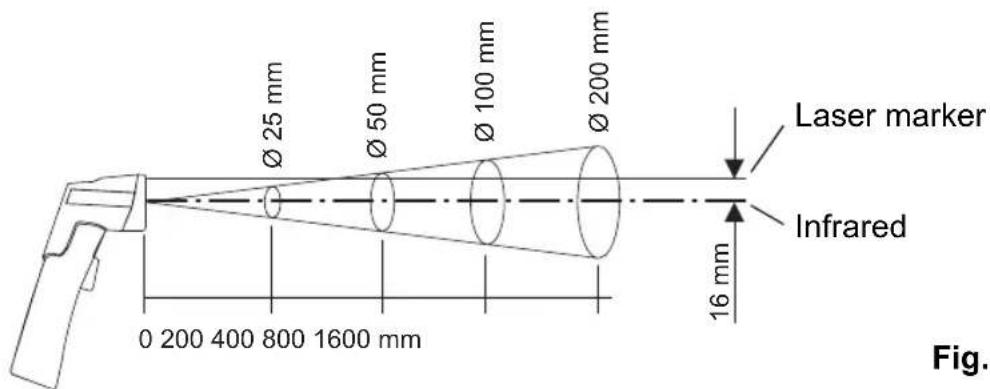
Fig. 1
Wide range application
Food preparation, Safety and Fire inspectors, Plastic molding, Asphalt, Marine and screen printing, measure ink and dryer temperature, Diesel and Fleet maintenance.
2.1 Front panel
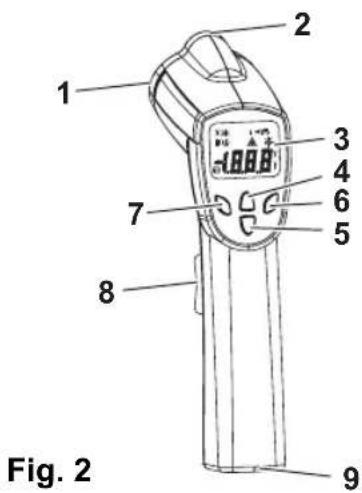
1 IR sensor
2 Laser pointer beam
3 LCD Display
4 "oF"key
5 "C"key
6 "Backlight" key
7 "Laser" key
8 "On/Hold" key (Measuring)
9 Battery compartment
ST-8810 Measurement Operation
2.2 Indicator
1 Digital read-out
2 Temperature ° C (Celsius)
3 Temperature °F (Fahrenheit)
4 Measuring indication
5 Data Hold
6 Low battery indicator
7 Laser Pointer
8 Fixed emissivity (0.95)
9 Backlight
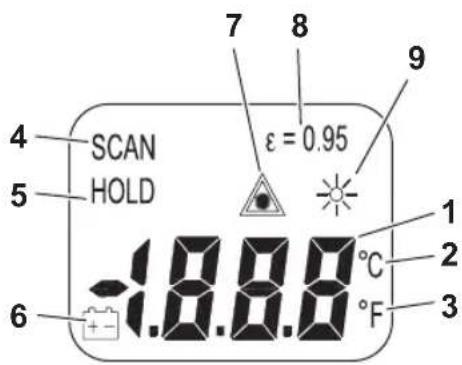
Fig. 3
3 Measurement Operation
3.1 Power ON/OFF
The meter automatically powers up when the key is pressed. Pull the "On/Hold" key to read the display. Read the measured temperature on the LCD (Fig. 4). The meter automatically powers off approximately 7 s after releasing the "On/Hold" key.
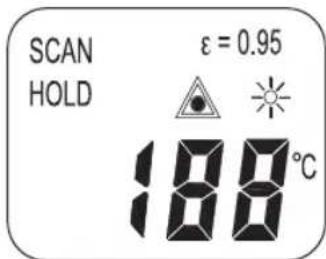
Fig. 4
Measurement Operation ST-8810
3.2 Selecting temperature unit (°C / °F)
Select the temperature unit (degrees ° C or degrees ° F ) by first pressing the "On/Hold" key and then pressing the "°C" or "°F" key. The actual unit will be indicated on the LCD.
Press the "°C" key to set the unit to "degrees °C". (Fig. 5).
Press the "F" key to set the unit to "degrees F" (Fig. 6).
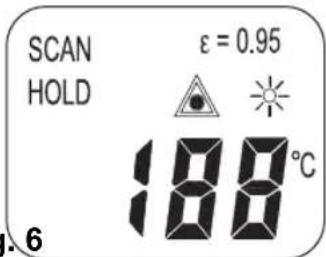
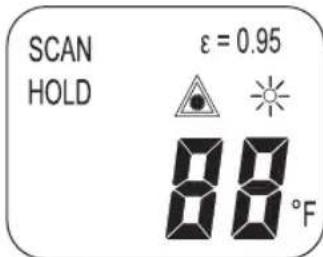
Fig. 5 Fig. 6
3.3 Data hold
The meter automatically maintains the last temperature reading on the LCD for 7 s after releasing the "On/Hold" key. No additional keys are required to freeze the displayed reading (Fig. 7).
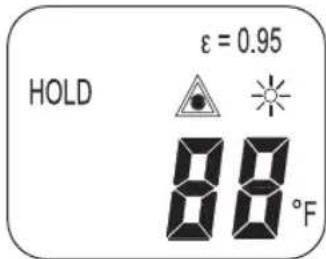
Fig. 7
3.4 Backlight LCD
Turn on the backlight by first pressing the "On/Hold" key and then pressing the "Backlight" key.
Repeat the procedure to turn the backlight off (Fig. 8).
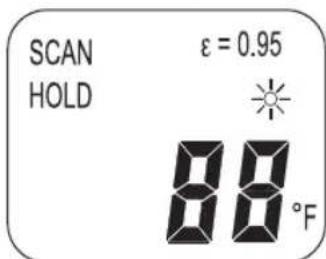
Fig. 8
ST-8810 Battery replacement
3.5 Laser pointer
To turn on the laser pointer, press the "Laser" key while pressing the "On/Hold" key (Fig. 9).
Press the "Laser" key again to turn off the laser (Fig. 10).
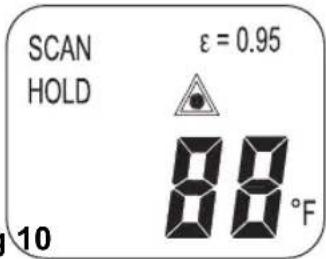
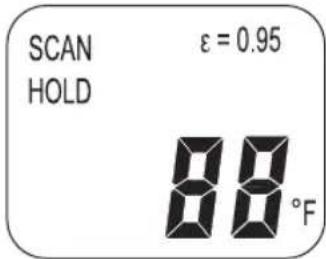
Fig. 9 Fig 10
3.6 Measurement considerations
Hold the meter by its handle, point the IR sensor towards the object whose temperature is to be measured. The meter automatically compensates for temperature deviations from ambient temperature.
Keep in mind that it will take up to 30 minutes to adjust if wide ambient temperatures have been measured. After measuring low temperatures and before measuring high temperature, allow some time (at least several minutes) for the cooling process of the IR sensor.
4 Battery replacement
If the battery power is not sufficient, the LCD will display a battery symbol to indicate that a new 9V battery is required (Fig. 11).
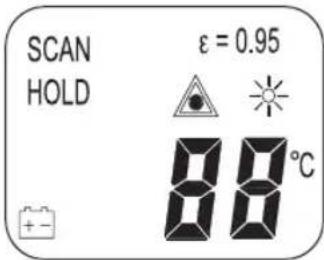
Fig. 11
Open the battery cover. Remove the battery from the meter and replace it with a new 9 Volt battery. Close the battery cover.
Notes ST-8810
5 N o t e s
How it works
Infrared thermometers measure the surface temperature of an object. The meter's optics sense emitted, reflected and transmitted energy, which is collected and focused onto a detector. The meter's electronics translate the information into a temperature reading which is indicated on the display. In meters with a laser, the laser is used for aiming purposes only.
Field of view
Make sure that the target is larger than the unit's spot size. The smaller the target, the closer you should be to it. If accuracy is critical, make sure the target is at least twice as large as the spot size.
Distance and spot size
When the distance from the object increases, the spot size of the area measured by the meter becomes larger (Fig. 1).
Locating a hot spot
To find a hot spot aim the thermometer outside the area of interest, then scan across the area of interest with an up and down motion until you locate the hot spot.
Reminders
- The meter is not recommended for measuring shiny or polished metal surfaces such as stainless steel, aluminium, etc. (see "Emissivity").
- The meter cannot measure through transparent surfaces such as glass. It will measure the surface temperature of the glass instead.
- Steam, dust, smoke, etc., can prevent accurate measurement by obstructing the meter's optics.
Emissivity
Most organic materials and painted or oxidized surfaces (90% of typical applications) have an emissivity of 0.95 (pre-set in the unit). Inaccurate readings will result from measuring shiny or polished metal surfaces. To compensate cover the surface to be measured with masking tape or flat black paint. Allow some time for the tape to reach the same temperature as the material underneath it. Measure the temperature of the tape or painted surface.
ST-8810 Notes
Emissivity values:
| Substance | Thermal emissivity | Substance | Thermal emissivity |
| Asphalt 0.90 to 0.98 | Cloth (black) 0.98 | ||
| Concrete 0.94 Human skin 0.98 | |||
| Cement 0.96 | Lather 0.75 to 0.80 | ||
| Sand 0.90 Charcoal (powder) 0.96 | |||
| Earth 0.92 to 0.96 | Lacquer 0.80 to 0.95 | ||
| Water | 0.92 to 0.96 | Lacquer (matt) | 0.97 |
| Ice | 0.96 to 0.98 | Rubber (black) | 0.94 |
| Snow | 0.83 | Plastic | 0.85 to 0.95 |
| Glass | 0.90 to 0.95 | Timber | 0.90 |
| Ceramic | 0.90 to 0.94 | Paper | 0.70 to 0.94 |
| Marble | 0.94 | Chromium oxides | 0.81 |
| Plaster | 0.80 to 0.90 | Copper oxides | 0.78 |
| Mortar | 0.89 to 0.91 | Iron oxides | 0.78 to 0.82 |
| Brick | 0.93 to 0.96 | Textiles | 0.90 |
Technical data ST-8810
6 Technical data
| Item number ST-8810 | |
| Display 3-1/2 digit (1999) | count) LCD with backlight |
| Measure range | -20 °C to +270 °C (-4 °F to +518 °F) |
| Resolution 1 °C / 1 °F | |
| Accuracy ±2 % of reading | or ±2 °C / ±4 °F • Accuracy is given at 18 °C to 28 °C (64 °F to 85 °F), less than 80 % RH • Specified accuracy is valid for an emissivity of 0.95 |
| Emissivity settings 0.95 fixed | |
| Distance factor distance: | spot = approx. 8 : 1 |
| Sample rate approx. 1 s | |
| Spectral response | 6 – 14 μm |
| Power off | automatic shut off after 7 seconds inactivity |
| Operating temperature | 0 °C to +50 °C (+32 °F to +122 °F) |
| Operating RH% | max. 80 % RH |
| Power supply | 9 V battery |
| Weight | 180 g |
| Size | 159 x 76 x 57 mm |
Versions, technical modifications and delivery options reserved.
2 Description technique
Fonctions
F-60230 Chambly (France)
Fon: +33 1 30282020
Fax: +33 1 30282010
E-Mail: info@waeco.fr

WAECO Finland OY
Mestarintie 4
FIN-01730 Vantaa
Fon: +358 20 7413220
Fax: +358 9 7593700
E-Mail: waeco@waeco.fi

WAECO Italcold SRL
Roman Hill Business Park
UK-Broadmayne
Fon: +44 1305 854000
Fax: +44 1305 854288
E-Mail: sales@waeco.co.uk
Overseas + Middle East

WAECO Pacific Pty. Ltd.
1 John Duncan Court
Varsity Lakes QLD 4227
Fon: +61 7 55076000
Fax:+61755221003
E-Mail: sales@waeco.com.au

WAECO Impex Ltd.
Headquarters
Suites 3210-12·32/F·Tower 2
The Gateway 25 Canton Road
Tsim Sha Tsui·Kowloon
Hong Kong
Fon: +852 2 4632750
Fax: +8 52 2463906;
E-Mail: info@waeco.com.hk

WAECO Impex Ltd.
Taipei Office
2 FL-3 · No. 56 Tunhua South Rd, Sec 2
Taipei 106, Taiwan
Fon: +886 2 27014090
Fax: +886 2 27060119
E-Mail: marketing@waeco.com.tw

WAECOMiddle East FZCO
R/A 8, SD 6
Jebel Ali, Dubai
Fon: +971 4 8833858
Fax: +971 48833868
E-Mail: waeco@emirates.net.ae

WAECO USA, Inc.
8 Heritage Park Road
Clinton, CT 06413
Fon: +1 860 6644911
Fax: +1 860 6644912
E-Mail: customercare@waecousa.com

- CONTENTS
- 1 SAFETY INSTRUCTIONS
- 2 TECHNICAL DESCRIPTION
- FEATURES
- TECHNICAL DESCRIPTION ST-8810
- WIDE RANGE APPLICATION
- 2.1 FRONT PANEL
- ST-8810 MEASUREMENT OPERATION
- 2.2 INDICATOR
- 3 MEASUREMENT OPERATION
- 3.1 POWER ON/OFF
- 3.2 SELECTING TEMPERATURE UNIT (°C / °F)
- 3.3 DATA HOLD
- 3.4 BACKLIGHT LCD
- 3.5 LASER POINTER
- 3.6 MEASUREMENT CONSIDERATIONS
- 4 BATTERY REPLACEMENT
- 5 N O T E S
- HOW IT WORKS
- FIELD OF VIEW
- DISTANCE AND SPOT SIZE
- LOCATING A HOT SPOT
- REMINDERS
- EMISSIVITY
- ST-8810 NOTES
- 6 TECHNICAL DATA
- 2 DESCRIPTION TECHNIQUE
- FONCTIONS
- OVERSEAS + MIDDLE EAST
Brand : WAECO
Model : AirCon ST8810
Category : Thermometer