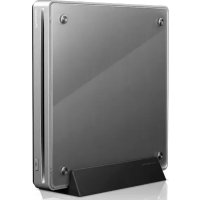
BDRXS05 - DVD Burner PIONEER - Free user manual and instructions
Find the device manual for free BDRXS05 PIONEER in PDF.


| Product Type | External DVD Writer (BD/DVD/CD) |
| Brand | Pioneer |
| Model | BDRXS05 |
| Dimensions (L x W x H) | 135 x 135 x 20.3 mm |
| Weight (drive only) | 0.33 kg |
| Power supply | 5 V DC, 1.0 A (average) via USB or optional AC adapter |
| Interface | USB 3.0 Micro-B (compatible with USB 2.0 and 1.1) |
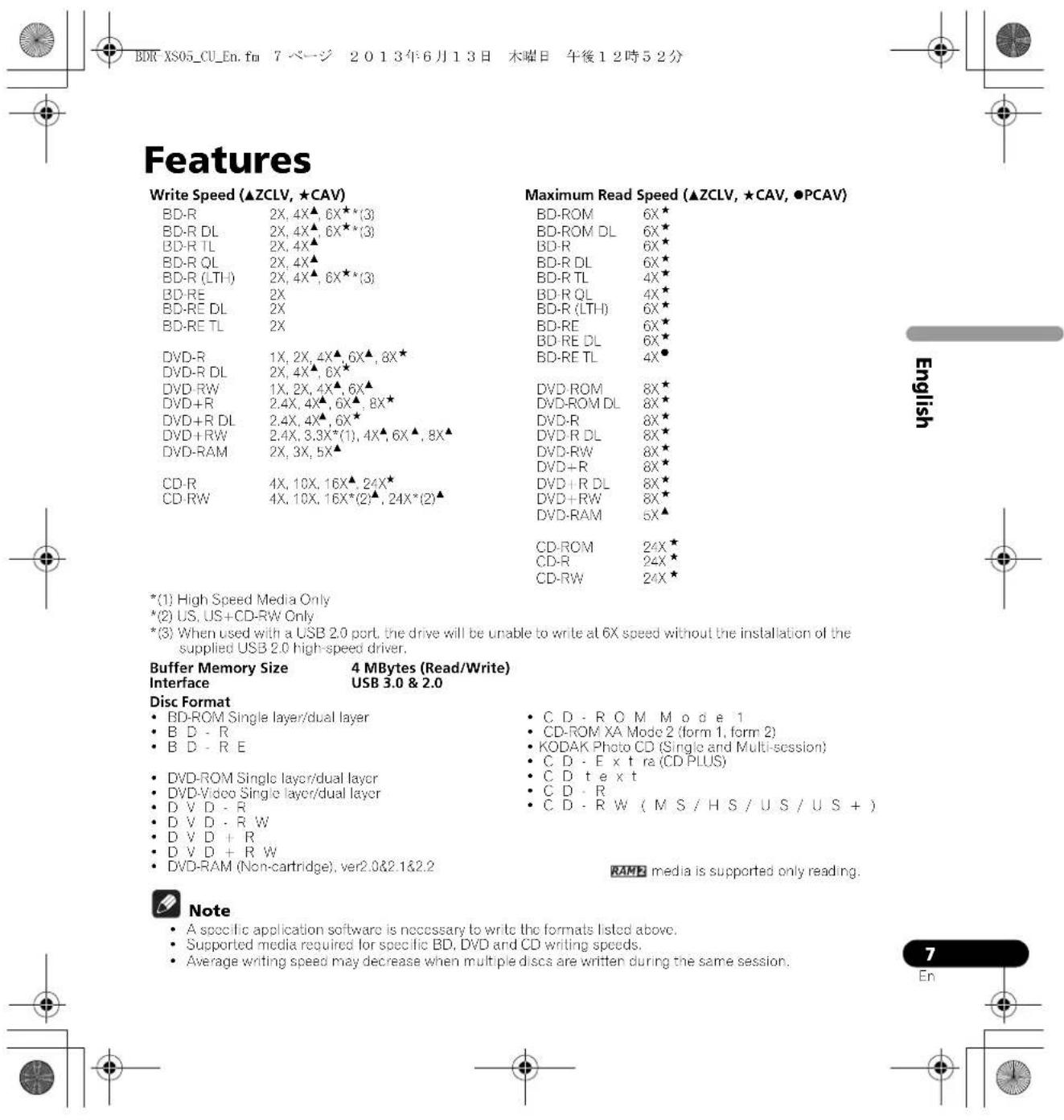
| Read speed (sustained) | BD: 21.06 MB/s, DVD: 8.64 MB/s, CD: 3.24 MB/s |
| Write speed (sustained) | BD-R 6x: 21.06 MB/s, DVD-R 8x: 8.64 MB/s, CD-R 24x: 3.24 MB/s |
| Access time (average random) | BD-ROM: 210 ms, DVD-ROM: 200 ms, CD-ROM: 190 ms |
| Supported disc formats | BD, DVD, CD (12 cm); no non-standard shapes or 8 cm adapter |
| Disc loading | Slot-load, automatic insertion |
| Decorative panel | Removable (4 screws) for inserting decorations |
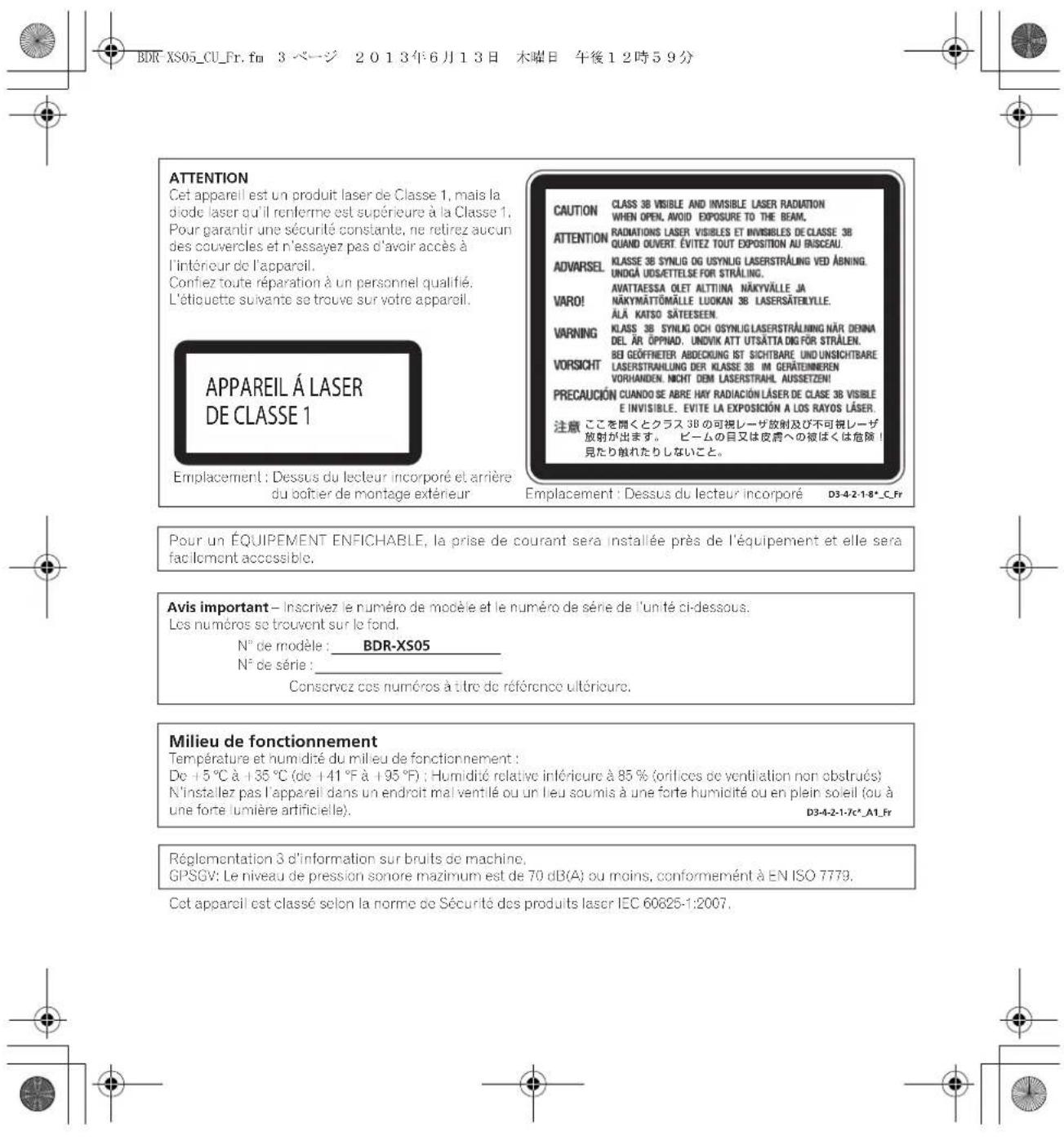
| Operating temperature | +5°C to +35°C |
| Operating humidity | 5% to 85% (no condensation) |
| Included accessories | USB cable, user manual, stand, decorative sheets (x3), software disc, warranty card |
| Maintenance | Clean with a damp cloth; do not use liquids or aerosols |
| Safety | Do not open the case; unplug in case of problem; avoid water and moisture |
| Compatible operating systems | Windows and Mac (with appropriate drivers) |
Frequently Asked Questions - BDRXS05 PIONEER
User questions about BDRXS05 PIONEER
0 question about this device. Answer the ones you know or ask your own.
Ask a new question about this device
Download the instructions for your DVD Burner in PDF format for free! Find your manual BDRXS05 - PIONEER and take your electronic device back in hand. On this page are published all the documents necessary for the use of your device. BDRXS05 by PIONEER.
USER MANUAL BDRXS05 PIONEER
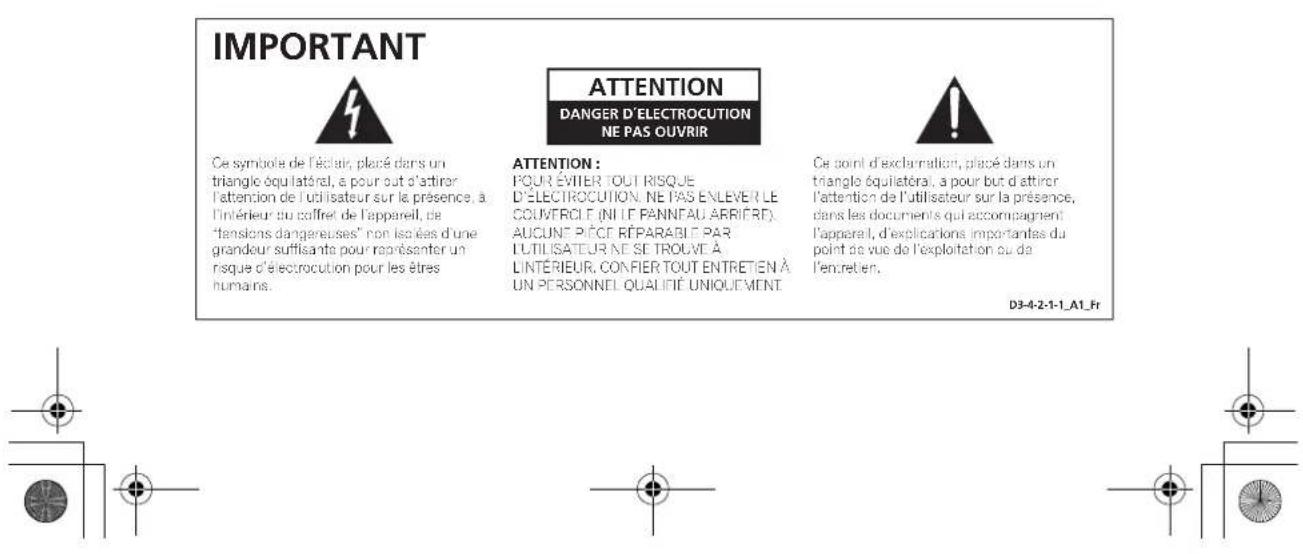
To ensure your personal safety and to maximize the full operating potential of your unit, read and follow these safety instructions.
Read & Retain Instructions - Read all operating and user information provided with this drive.
Cleaning - Use a damp cloth to clean the exterior housing. Avoid using any fluids including liquid, aerosol or alcohol-based cleaning products.
Water or Moisture - Avoid operating or locating this drive near water or other sources of fluid.
Accessories - Do not place this product on an unstable cart, stand, or table. The product may fall and be seriously damaged.
Ventilation - Slots and openings in the chassis are for cooling and proper operation of the unit. Do NOT block or cover the openings. Do NOT place this unit on a bed, rug, etc. as this can block the openings. This unit should not be placed in a built-in installation unless properly ventilated.
Operation - Avoid moving, lifting or reorienting this drive while a disc is rotating inside.
Environment - Avoid installing this drive in a location with exposure to large quantities of dust, high temperatures, high humidity, or subject to excessive vibrations or shocks.
Power Sources - Operate this drive only from the recommended power sources. If you are unsure of the power source, consult an authorized Pioneer representative.
Power-Cord Protection - When unplugging the unit, pull on the plug - not on the cord. Do not handle the cord or plug with wet hands: doing so could cause an electric short or shock. Do not allow anything to pinch or rest on the power cord and do not place in a walkway.
Object & Liquid Entry - Never push inappropriate objects into the device. Avoid spilling any liquids into or on the outside of the drive.
Condensation - Moisture can form in the operating section of the product if the drive is taken from cool surroundings to a room with a warmer temperature. Let the drive stand for one to two hours in the new location before turning it ON.
Servicing - Opening or removing the cover exposes you to possible electrical shock or other danger. Contact a Pioneer authorized service representative for repairing this drive (refer to the enclosed Service & Support Card).
Damage Requiring Service – Unplug the unit and refer servicing to qualified service personnel in the following situations:
- When the power cord, plug, or chassis is damaged.
If liquid has been spilled, or objects have fallen into the video product.
If the product has been exposed to rain or water. - If the product does not operate normally when the operating instructions are followed. Adjust only those controls that are covered by the operating instructions. Improper adjustment of other controls may result in damage and can require extensive work by a qualified technician to restore the unit to its normal operation.
- When the product exhibits a distinct change in performance – this indicates a need for service.
About DualDisc Playback - DualDisc is a two-sided disc with one side containing DVD video/ audio/etc. content and the opposite side containing non-DVD content such as digital audio material. The non-DVD audio side is not compliant with the CD Audio Specification; therefore, may not play. The DVD side of DualDisc media plays in this unit. For more details about the DualDisc specification, please refer to the disc manufacturer or your retailer.
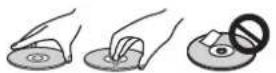
- Avoid touching or scratching the signal surface (shiny side) of the disc.
- Hold the disc by the edges or by the center hold and one edge.
Do not affix paper or labels to the disc.
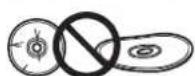
Discard warped or cracked discs as they may cause damage to the drive. - Avoid specially shaped discs such as hearts or polygons.
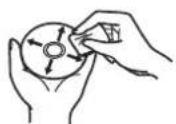
- Remove dust or lint from the disc with a soft cloth by wiping from the inside to the outside edge rather than in a circular motion.
- Do not use record-cleaning or anti-static agents as the solutions may cause damage to a disc.
Always be sure to store your discs in proper disc storage cases when not in use, and always be sure to check for dirt or dust on discs (especially on the recording side) before use.


Note
Some discs may not be playable due to different recording formats or the physical condition of the disc at the time of recording or playback.
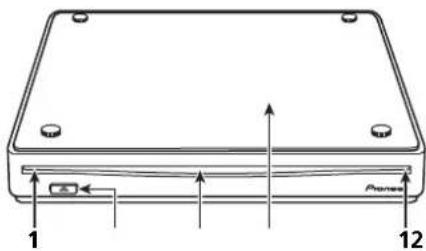
Operation status is indicated as follows:
During Power ON: Flashes slowly
During disc loading/unloading: Flashes
During reading/writing: Lights brightly
2 E j e c a) B u t t o n (
Press to eject a disc.
3 Disc Loading Slot
Insert disc (BD, DVD or CD) slowly with the label surface facing the cosmetic panel side.
When inserted a certain distance, the disc will automatically be pulled into the drive.
The disc should be inserted flatly, parallel with the surface of the drive.
Do not insert objects other than specified discs into the loading slot.
4 Cosmetic Panel
Remove the four screws to remove the clear panel. When the panel is removed, the space between the body and panel can be used to display accessory decoration sheets or your own images, photographs, etc.
Warning
Store screws out of the reach of children and infants.
If accidentally swallowed, contact a doctor immediately.
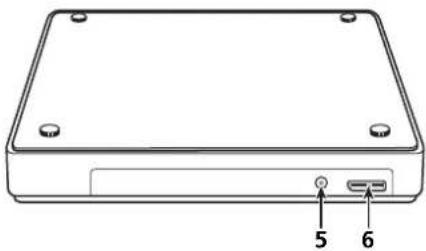
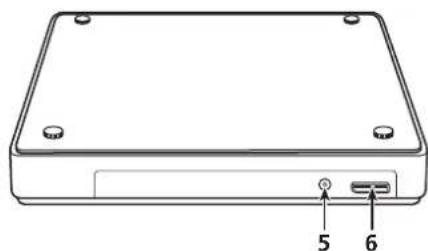
Rear/Bottom view
5

AC Adapter Connector
Some computers may not provide enough power
through two USB ports to operate the drive. An
AC adapter (not included) can be connected to
the drive through the DC IN connector to provide
power. For more details, visit or contact
http://www.pioneerelectronics.com/PUSA/
Phone: 1-800-872-4159
Do not connect any AC adapter other than
specified by Pioneer.
6 USB 3.0
USB 3.0 Micro-B Connector
8
En
- The region code can only be changed five (5) times, including the initial setting. Please be aware that the fifth change becomes PERMANENT. Therefore, avoid changing the region code unless absolutely necessary.
- Region codes are part of the DVD Standard. However, region codes on DVD discs are optional. DVD discs with no specified region code can be played on all compliant players.
English
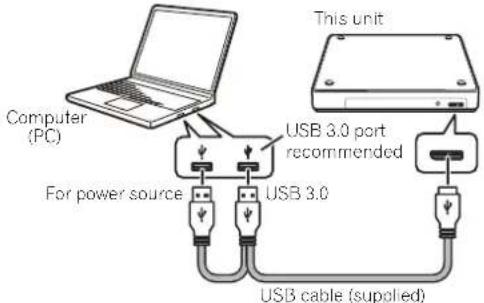
This is a hot-plug unit. Connect the unit to the supplied USB cable.
1 Confirm that your computer (PC) has available USB port.
2 With your Windows® or Mac® operating system running, use the supplied USB cable to connect this unit to the PC.
Caution
- Do not disconnect the USB cable during data transfers.
- Do not disconnect the USB cable during the PC start nor any operation with the unit.
Note
- Connection to a USB 3.0 port is recommended, since when a USB 3.0 cable is connected to a USB 2.0 port, the connection will be limited to USB 2.0 performance standards.
- When connecting the unit to a USB 2.0 port, the USB 2.0 high-speed filter driver should be installed.
This unit can operate with USB 1.1 but will not provide optimum performance. - Connecting this unit through a USB HUB or using unspecified cables may not guarantee proper operation.
-
In some cases, the use of a single USB port may be insufficient for normal operation. Use two USB ports for power enhancement.
If power is insufficient when using two USB ports, connect an AC adapter (not included) through the DC IN connector on the unit's rear panel and plug into a wall outlet to deliver power. Connect the USB cable (included) after connecting the AC adapter for proper operation. For more details about the AC adapter connection, visit or contact http://www.pioneerelectronics.com/PUSA/ Phone: 1-800-872-4159 -
Do not connect any AC adapter other than specified by Pioneer.
- This BD/DVD/CD WRITER is for use only with compatible UL Listed personal computers that have Installation Instructions detailing user installation of USB accessories.
- UL Listed, Class 2 AC Adapter (Output 5 V, min. 1.0 A) shall be used.
The unit writes to BD-R/RE media when the supplied software application is installed on your PC. Writing fails if the PC or operating system does not support the software.
Begin writing to BD-R/RE
1 Connect the necessary USB cable.
2 Turn on the PC.
3 Insert disc slowly with the label facing up.
4 Start the disc-burning application.
End the writing session
1 Quit the disc burning application.
2 Press the eject button ( ).
3 Remove the disc.
4 Shut down the PC.
- For software installation directions, please refer to the manual available on the software disc included with your drive. For assistance with writing or playing back discs, see the HELP function within the software application.
Position. This drive is horizontal or vertical use.
Disc Size 4.72 inch (12 cm)
(Drive does not support non-standard shapes such as business cards, diamond, etc.)
(Drive does not support 8 cm adapter.)
Disc Transfer Rate * Media that is dirty or damaged can affect the transfer rate.
Data Read (sustained) BD .Max.21.06 MBytes/sec
DVD .Max.8.64 MBytes/sec
CD Max. 3.24 MBytes/sec
Data Write(sustained) BD .Max.21.06 MBytes/sec.(6XBD-R)
DVD. Max. 8.64 MBtes/sec. (8X DVD-R)
CD Max. 3.24 MBytes/sec. (24X CD-R)
Access Time/Seek Time (Random Averages)
Access Time BD-ROM 210 ms
DVD-ROM 200 ms
CD-ROM 190 ms
Seek Time BD-ROM 190 ms
DVD-ROM 180 ms
CD-ROM 170 ms
Power
Standby. 0.5W
DC IN Connector
Power Supply. DC-5V,1.0A(AVE)
Physical Information
Dimensions (excluding fool pad) 5.31 inch (W) x 5.31 inch (D) x 0.79 inch (H)/
Weight (Drive only) .0.73 lbs/0.33 kg (Typ.)
Operating Temperature. +41^ to +95^(+5^ to +35^)
Operating Humidity. 5% to 85% (no condensation)
Storage Temperature. -41°F to +140°F (-40°C to -60°C)
Storage Humidity. 5% to 90% (no condensation)
Accessories
Operating Instructions (This document)
USB Cable (PIONEER, ODF8003 or ODF8007)
Stand. 1
3
Software Disc. 1
Warranty Card 1
Note
Specifications and designs are subject to possible modifications without notice, due to improvements.
© 2013 PIONEER CORPORATION.
All rights reserved.

English

1 Voyant Power/Busy (Alimentation/Occupe)
© 2013 PIONEER CORPORATION.
http://www.pioneerelectronics.com/PUSA/
Telf.:1-800-872-4159
Conector USB 3.0 Micro-B

Precaución
© 2013 PIONEER CORPORATION.


Brand : PIONEER
Model : BDRXS05
Category : DVD Burner