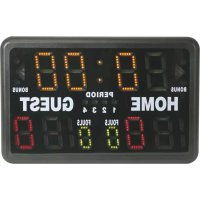
WT3116 - Digital timer switch VELLEMAN - Free user manual and instructions
Find the device manual for free WT3116 VELLEMAN in PDF.



| Product type | Digital sports display board |
| Brand | Velleman |
| Model | WT3116 |
| Power supply | 90~240 VAC, 50/60 Hz |
| Power consumption | Less than 25 W |
| Dimensions (L × H × D) | 620 × 405 × 275 mm |
| Weight | 4.75 kg |
| Display | Dual LED display (top and bottom) |
| Main functions | Timer, score, rounds, electronic metronome, programmable timer, clock/alarm |
| Supported sports | Basketball, handball, volleyball, badminton, table tennis, judo, boxing, etc. |
| Timer | Countdown up to 99:59, with incremental setting |
| Score | Display up to 199 points |
| Rounds | Display up to 99 rounds |
| Metronome | Adjustment of tempo and number of beeps |
| Alarm | Adjustable programmable alarm |
| Clock | 12/24 h display with adjustment |
| Care and cleaning | Clean with a soft dry cloth. Do not use abrasive products or solvents. |
| Safety | Not waterproof; do not expose to moisture. Unplug before cleaning. |
| Included accessories | Power adapter, on/off switch |
| Warranty | 2 years (except damage due to misuse) |
Frequently Asked Questions - WT3116 VELLEMAN
User questions about WT3116 VELLEMAN
0 question about this device. Answer the ones you know or ask your own.
Ask a new question about this device
Download the instructions for your Digital timer switch in PDF format for free! Find your manual WT3116 - VELLEMAN and take your electronic device back in hand. On this page are published all the documents necessary for the use of your device. WT3116 by VELLEMAN.
USER MANUAL WT3116 VELLEMAN
To all residents of the European Union
Important environmental information about this product
This symbol on the device or the package indicates that disposal of the device after its lifecycle could harm the environment.
Do not dispose of the unit (or batteries) as unsorted municipal waste; it should be taken to a specialized
company for recycling.
This device should be returned to your distributor or to a local recycling service.
Respect the local environmental rules.
If in doubt, contact your local waste disposal authorities.
Thank you for choosing Velleman! Please read the manual thoroughly before bringing this device into service. If the device was damaged in transit, don't install or use it and contact your dealer. Damage caused by disregard of certain guidelines in this manual and damage caused by user modifications to the device is not covered by the warranty and the dealer will not accept responsibility for any ensuing defects or problems. Caution: this scoreboard is NOT waterproof.
2.Description
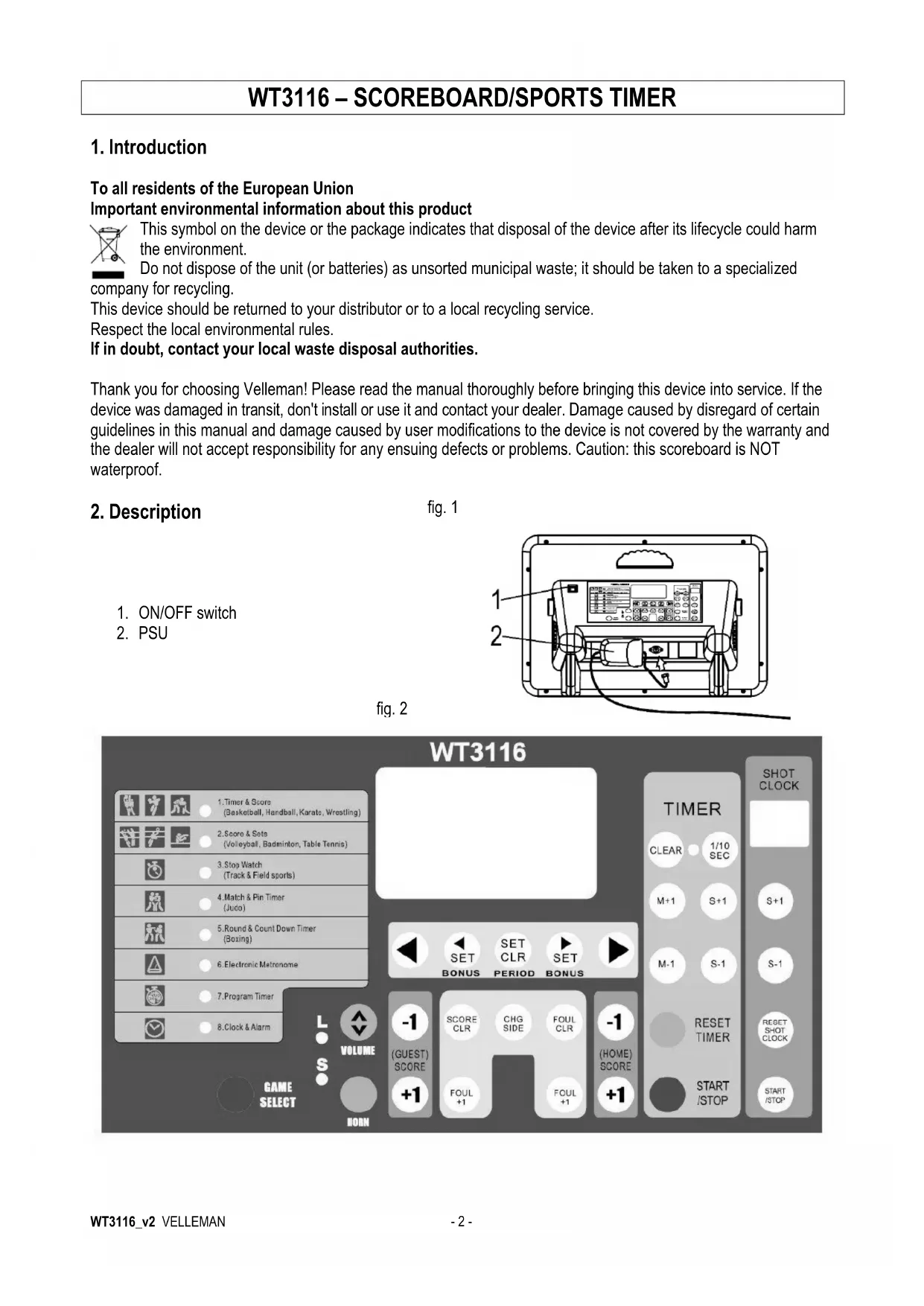
- ON/OFF switch
- PSU
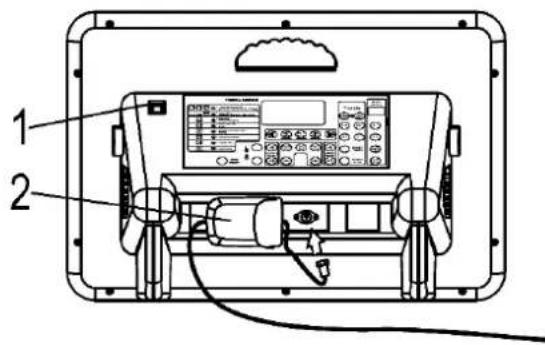
fig.1
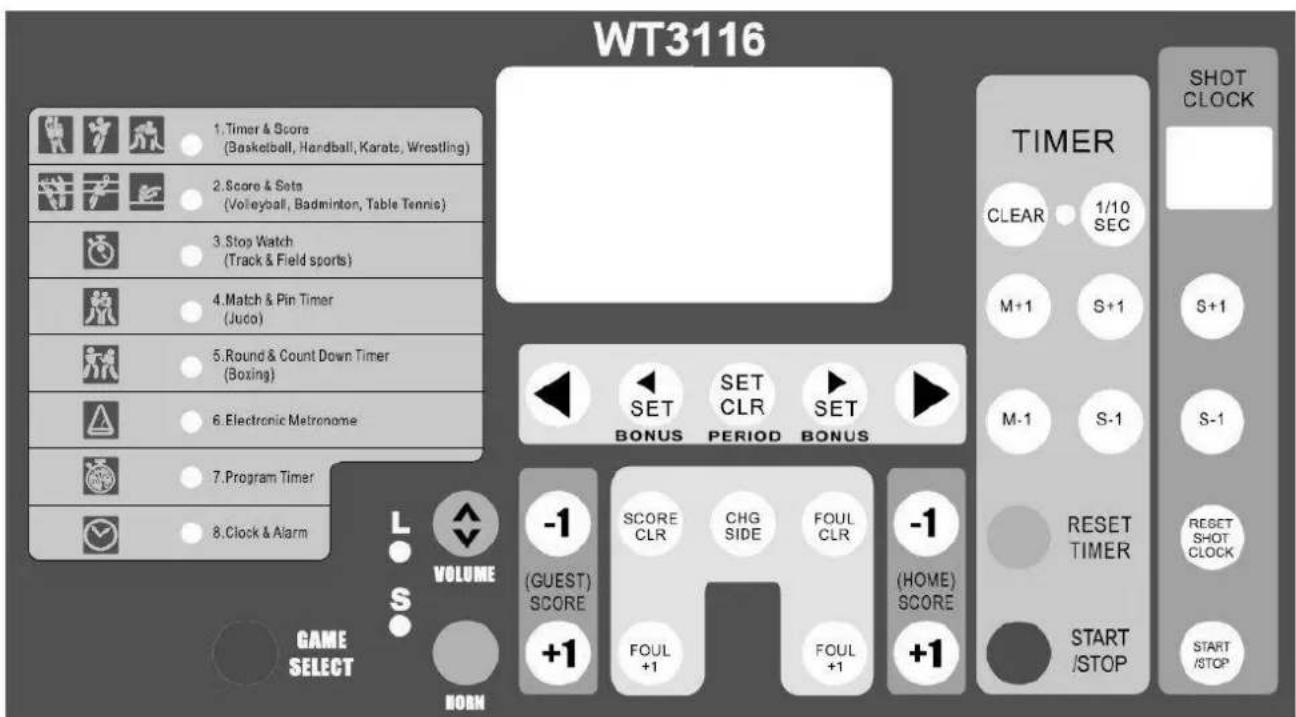
fig. 2
3. Setting up the Scoreboard
- Supply power to the board by connecting the PSU with the power input (see fig. 1). Plug the PSU into the mains.
- Turn on the scoreboard with the ON/OFF switch. It takes a few moments for the board to initialize.
- Press GAME SELECT once. The timer & score mode LED blinks.
- Press CLEAR. Next, set the desired timer with M+1/M-1 and S+1/S-1, and set the shot clock with S+1/S-1 under the shot clock panel.
- Press the timer START/STOP button to start the timer and the shot clock, and let it run for a few seconds. Press the timer START/STOP button again.
- Press RESET TIMER and RESET SHOT CLOCK. The display will show the last memorized data.
- Press GAME SELECT to exit the setup mode.
4. Operation
A. TIMER & SCORER (basketball, handball, karate, wrestling)
This game mode displays the remaining game time and the score.
Upper display: game time (max. 99:59)
Lower display: score (max. 199)
| Operation | Key | Display | Buzzer | |
| Timer | Shot Clock | |||
| 1. Select game | Game Select | 0:00 | ||
| o o | ||||
| 2. Recall last memory | RESET TIMER | RESET SHOT CLOCK | 20:00 | |
| o o | ||||
| 3. Erase previous settings | CLEAR | 0:00 | ||
| o o | ||||
| 4. Set game time (e.g. 20 min) | M+1 M-1 | 20:00 | ||
| o o | ||||
| 5. Set shot clock | S+1 S-1 | 20:00 | ||
| o o | ||||
| 6. Shot clock time is memorized | START/STOP | 19:59 | ||
| o o | ||||
| 7. Set period | SET CLR | 1234 | ||
| ····· | ||||
| 8. Shot hits rim | RESET SHOT CLOCK | 19:58 | ||
| o o | ||||
| 9. Game interrupted | START/STOP | 19:50 | ||
| o o | ||||
| 10. Restart game & shot clock starts | START/STOP | 19:49 | ||
| o o | ||||
| 10.1. 30 seconds expire | 19:28 | |||
| o o | ||||
| 10.2. Reset to 30 seconds | RESET SHOT CLOCK | 19:28 0 0 | ||
| 10.3. Restart game | START STOP | 19:27 0 0 | ||
| 11. Game time expires | 0:00 0 0 | |||
| 12. Reset game time | RESET TIMER | RESET SHOT CLOCK | 20:00 0 0 | |
Game timer stopped too late: use and to adjust the difference.
Press to sound the buzzer.
| Score | ||
| Operation | Key | Display |
| 1. Guest team scores | +1 | 19:20 0 1 |
| 2. Home team scores | +1 | 19:15 1 1 |
| 3. Home team loses point or erroneous point adding | -1 | 19:15 0 1 |
| 4. Reset scores | SCORE CLR | 19:15 0 0 |
| Foul | ||
| Operation | Key | Display |
| 1. Guest team commits foul | FOUL+1 | 19:200 1 |
| 2. Home commits foul | FOUL+1 | 19:151 1 |
| 3. Home commits second foul | FOUL+1 | 19:152 1 |
| 4. Reset | FOULCLR | 19:150 0 |
- Press or to toggle between the home team and the guest team. Press or for bonus points.
| Count-up Game Timer | ||||
| Operation | Key | Display | Buzzer | |
| Timer | Shot Clock | |||
| 1. Select game | Game Select | 20:000 | ||
| 2. Erase previous settings | CLEAR | 0:000 | ||
| 3. Set display to chrono mode | SET CLR | 0:000 | ||
| 4. Set game time (e.g. 20 min) | M+1 M-1 | 20:000 | ||
| 5. Recall shot clock memory | RESET SHOT CLOCK | 20:000 | ||
| 6. Game time returns to 0:00 | RESET TIMER | 0:000 | ||
| 7. Start game & shot clock simultaneously | START /STOP | 0:010 | ||
| 8. Game interrupted | START /STOP | 0:09 | ||
| 0 0 | ||||
| 9. Reset shot clock | RESET SHOT CLOCK | 0:09 0 0 | ||
| 10. Restart game | START /STOP | 0:10 0 0 | ||
| 11. Stop shot clock | START /STOP | 0:19 0 0 | ||
| 12. Game time expires | 20:00 0 0 | |||
| 13. Reset game time | RESET TIMER | 0:00 0 0 | ||
Game timer stopped too late: use _c and to adjust the difference.
Press and then to return to the countdown timer.
B. SCORE & SETS (volleyball, badminton, table tennis)
This game mode displays the sets won and the score.
Upper display: score (max. 99)
Lower display: sets (max. 199)
| Score / Sets / Serve | ||
| Operation | Key | Display |
| 1. Select game | Game Select | ○○○○ |
| 2. Home / guest team gets serve | ▲▲ | ●○○○○ |
| 3. Home team scores | +1 | 10○○ |
| 4. Guest team scores | +1 | 11○○ |
| 5. Guest team wins set | SET BONUS | 1101 |
| 6. Change courts | CHG SIDE | 1110 |
| 7. Reset scores | SCORE CLR | ○○○○ |
- Press to deduct a point.
- Press and add the exact sets in case of error.
C. STOPWATCH
Upper display: minutes and seconds (max. 59:59)
Lower display: hours (max. 199) and 1/100 second (max. 99)
| Stopwatch | ||
| Operation | Key | Display |
| 1. Select mode | Game Select | 0:00 00 |
| 2. Start stopwatch | START /STOP | 0:00 01 |
| 3. Stop stopwatch | START /STOP | 15:24 2 93 |
- Press RESET while the stopwatch is running to stop the time on the display. The stopwatch is keeps running internally. UP will blink on the display. Press to continue.
D. MATCH & PIN TIMER (judo)
This game mode displays the match time and elapsed pinning time.
Upper display: match time (max. 99:59)
Lower display: pinning time (max. 30)
| Match & Pin Timer | |||
| Operation | Key | Display | |
| Timer | Shot Clock | ||
| 1. Select mode | Game Select | 5:00 30 | |
| 2. Set match time (e.g. 5 min) | M+1 M-1 | 5:00 30 | |
| 3. Save pin time into memory | RESET SHOT CLOCK | 5:00 0 | |
| 4. Reset pin time if necessary | S+1 S-1 | ||
| 5. Start match | START/STOP | 5:00 1 | |
| 6. If pin does not begin, pause pin time and reset | START/STOP + RESET SHOT CLOCK | 4:53 0 | |
| 7. Pin begins | START/STOP | 4:53 1 | |
| 8. Stop match during pinning, pause pin timer | START/STOP | 4:35 12 | |
| 9. Restart match, resume pin timer | START/STOP | 4:34 13 | |
| 10. Pin broken free | START/STOP | 4:25 22 | |
| 10.1. Next pin begins | START/STOP | 1:31 1 | |
| 10.2. 30 seconds have elapsed, match time automatically stops, buzzer sounds | 1:00 30 | ||
| 11. Match time expires, buzzer will not sound if pin is in progress | 0:00 22 | ||
| 12. Reset match time | RESET TIMER | 5:00 0 | |
-
Match timer stopped too late: use and to adjust the difference.
-
Pinned judoka already has waza-ari (becomes ippon after 25 seconds): press during pin countdown. 25 will appear on the lower left display and the buzzer will sound after those 25 seconds have elapsed. Press again to cancel the 25-second display.
- Match time reaches 0:00 during a pin: the match will continue without buzzer so the pin count will not be interrupted. When the pin is broken free, press The buzzer will sound and the match will end.
E.ROUND & BREAK COUNTDOWN TIMER (boxing)
This game mode displays the round time and number.
Upper display: round timer (max. 99:59)
Lower display: round number (max. 99)
| Round & Break Countdown Timer | ||||
| Operation | Key | Display | Buzzer | |
| Timer | Shot Clock | |||
| 1. Select game | Game Select | 0:00 0 | ||
| 2. Set round time (e.g. 3 min) | M+1 M-1 | 3:00 0 | ||
| 3. Enter round time into memory | RESET TIMER | 0:00 0 | ||
| 4. Set break time (e.g. 1 min) | M+1 M-1 | 1:00 0 | ||
| 5. Enter break time into memory | RESET TIMER | 0:00 0 | ||
| 6. Set number of rounds (e.g. 3 rounds) | M+1 M-1 | 0:00 3 | ||
| 7. Return to round time display | RESET TIMER | 3:00 1 | ||
| 8. Start match | START /STOP | 2:59 1 | ||
| 9. Interrupt match | START /STOP | 2:35 1 | ||
| 10. Restart match | START /STOP | 2:34 1 | ||
| 11. Knockdown | START /STOP | 1:34 1 | ||
| 12. Match continues | START /STOP | 1:28 1 | ||
| 12.1. Knockdown | START /STOP | 1:20 1 | ||
| 12.2. 10 seconds expire, stop countdown and round timer | START /STOP | START /STOP | 1:10 1 | |
| 12.3. Match over, sound buzzer | HORN | 1:10 1 | ||
| 13. First round completed | 0:00 1 | |||
| 14. Break time | 0:59 1 | |||
| 15. Break time ends | 0:00 1 | |||
| 16. Next round time and number are displayed | 3:00 2 | |||
| 17. Designated number of rounds completed | 0:00 3 | |||
| 18. Begin new match | RESET TIMER | 3:00 1 | ||
- Match timer stopped too late: use + and to adjust the difference; use shot clock + to adjust the round difference.
- Round time reaches 0:00 during countdown: the match will continue without sounding the buzzer so the countdown will not be interrupted.
- Modifying round/break times: press and reset.
- In the final round, the break time will not display.
F. ELECTRONIC METRONOME
Upper display: rhythm
Lower left display: number of buzzes per minute
Lower right display: length of a buzz
| Electronic Metronome | |||
| Operation | Key | Display | Buzzer |
| Set buzz length | M+1 M-1 | o | |
| 120 6 | |||
| Set buzz number | S+1 S-1 | o | |
| π3 6 | |||
| Start metronome | START /STOP | 1 | |
| π3 6 | |||
| Stop metronome | START /STOP | 5 | |
| π3 6 | |||
| Reset metronome | RESET TIMER | o | |
| π3 6 | |||
G. PROGRAM TIMER (interval training)
The timer may be programmed to consecutively count down and display max. 9 time periods.
Upper display: timer (max. 99:59)
Lower left display: number of repetitions (max. 9)
Lower right display: program number (max. 9)
| Program Timer | |||
| Operation | Key | Display | Buzzer |
| 1. Set desired time for program 1 (P1) | M+1 | 5:001 P1 | |
| 2. Enter P1 into memory and enter times for following programs if desired | RESET TIMER | 0:001 P2 | |
| 3. Complete program setting. Set the desired number of repetitions using the shot clock Press and Reset The current round is displayed and the timer will stop. | RESET TIMER | 5:001 P1 | |
| 4. P1 will start counting down and buzzer will sound when it reaches 0:00. P2 will subsequently start. Completion of all programs is considered one round. | START /STOP | 4:591 P10:00 | |
| 1 P23:001 P30:001 P45:001 P5. .4:592 P1 | |||
| 5. Stop | START /STOP | 2:289 P1 | |
| 7. Return to the beginning of the program | RESET TIMER | 5:00o P1 | |
- Change set times: Press and reset timers.
H. CLOCK & ALARM
This scoreboard displays the time in 12h format but displays the time in 24h format when editing.
Upper display: hours and minutes
Lower right display: seconds
| Clock & Alarm | |||
| Operation | Key | Display | |
| Timer | Shot Clock | ||
| 1. Stop clock to adjust time | START/STOP | 0:00 00 | |
| 2. Set hour, use the timer buttons to adjust the hour and minutes, use the shot clock buttons to adjust the seconds | M+1 S+1 M-1 S-1 | S+1 S-1 | 14:49 13 |
| 3. Confirm time | START/STOP | 2:49 13 | |
| 4. Alarm mode | SET | 12:00 AL oF | |
| 5. Alarm on/off | SET | 12:00 AL on | |
| 6. Set alarm time | M+1 S+1 M-1 S-1 | 13:41 AL on | |
| 7. Return the time display | SET | 2:51 25 | |
- The scoreboard will buzz during 5 seconds when the time reaches the alarm time.
- Current time and alarm time will not be memorized in case of a power cut.
I. OTHER FUCNTIONS
- Press to sound the buzzer at any time.
- Adjust the volume of the buzzer with
- Press (when LED is lit) to display the final minute in seconds.
5. Technical Specifications
Power Supply 90~240VAC / 50~60Hz
Power Consumption < 25W
Dimensions 620× 405× 275mm
Total Weight 4.75kg
For more info concerning this product, please visit our website www.velleman.eu.
The information in this manual is subject to change without prior notice.
WT3116 - SCOREBORD/SPORTTIMER
1. Inleiding
- Pulse 📁 🎽 🨀 🤭 🌞 🌞 🌞 🌞 🌞 🌞 🌞 🌞 🌞 🌞 🌞 🌞 🌞 🌞 🌞 🌞 🌞 🌞 🌞 🌞 🌞 🌞 🌞 🌞 🌞 🌞 🌞 🌞 🌞 🌞 🌞 🌞 🌞 🌞 √ 🤭 🤭 🤭 🤭 🤭 🤭 🤭 🤭 🤭 🤭 🤭 🤭 🤭 🤭 🤭 🤭 🤭 🤭 🤭 🤭 🤭 🤭 🤭 🤭 🤭 🤭 🤭 🤭 🤭 🤭 🤭 🤭 🤭 🤭 → → → → → → → → → → → → → → → → → → → → → → → → → → → → → → → → → → → → → → → → → → → → → → → → → → → → → → → → → → → → → → → → → → → → → → → → → → → → → → → → → → → → → → → → → → → → → → → → → → → →
F. ELEKTRONISCHES METRONOM
- To all residents of the European Union
- 2.Description
- Setting up the Scoreboard
- Operation
- SCORE & SETS (volleyball, badminton, table tennis)
- STOPWATCH
- MATCH & PIN TIMER (judo)
- E.ROUND & BREAK COUNTDOWN TIMER (boxing)
- ELECTRONIC METRONOME
- PROGRAM TIMER (interval training)
- CLOCK & ALARM
- OTHER FUCNTIONS
- Technical Specifications
- WT3116 - SCOREBORD/SPORTTIMER
- Inleiding
- ELEKTRONISCHES METRONOM
Brand : VELLEMAN
Model : WT3116
Category : Digital timer switch