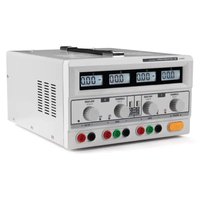
PMK120T - Welding machine VELLEMAN - Free user manual and instructions
Find the device manual for free PMK120T VELLEMAN in PDF.


Pick your language and provide your email: we'll send you a specifically translated version.
| Product Type | Soldering Station |
| Brand | Velleman |
| Model | PMK120T |
| Power Supply | 230 V AC, 50/60 Hz |
| Power Consumption | 120 W |
| Temperature Range | 150 °C – 450 °C |
| Temperature Accuracy | ± 2 °C |
| Display Type | Digital LED |
| Heating Element | Ceramic |
| Tip Compatibility | Standard 900M series |
| Iron Handle | Ergonomic with heat-resistant silicone grip |
| Cable Length | 1.5 m |
| Dimensions (Main Unit) | 170 × 120 × 85 mm |
| Weight | 1.2 kg |
| ESD Safety | Grounded and antistatic body |
| Accessories Included | Soldering iron, stand, sponge, spare tip |
| Temperature Control | Stepless knob with digital readout |
| Standby Mode | Automatic temperature reduction after 30 min |
| Maintenance | Clean the tip with a damp sponge and re-tin after each use |
| Spare Parts Available | Tips, heating elements, handles, fuses |
| Repairability | Modular construction, replaceable core components |
| Usage | Electronics repair, DIY, PCB assembly |
| Certification | CE compliant |
Frequently Asked Questions - PMK120T VELLEMAN
How do I adjust the temperature on the PMK120T soldering station?
Use the temperature control knob on the front panel to set the desired temperature between 150°C and 450°C. The digital display shows the current temperature in real time. Wait for the heater to reach the set temperature before soldering.
What soldering tips are compatible with the PMK120T?
The station uses standard 900M series tips (e.g., conical, chisel, knife). These are widely available and can be replaced without tools. Always use original Velleman tips or equivalent high-quality alternatives to ensure thermal performance.
Can I use lead-free solder with this station?
Yes, the temperature range up to 450°C is sufficient for lead-free solder (typically 300-380°C). Make sure to use a suitable tip and set the temperature according to the solder manufacturer's recommendations.
How should I clean and maintain the soldering iron tip?
Always clean the tip with a damp sponge or brass wool before and after soldering. Re-tin the tip with a thin layer of solder to prevent oxidation. Avoid leaving the iron on for long periods without use, and never file or grind the tip.
What safety precautions should I follow when using the PMK120T?
Connect the station to a properly grounded outlet. Never touch the heating element or tip during operation. Use the iron stand when idle and keep it away from flammable materials. Unplug the station before changing tips or performing any maintenance. The unit is ESD-safe, but still work on an antistatic mat for sensitive components.
Does the PMK120T have an automatic shutdown or standby function?
The PMK120T is designed with a smart standby mode that lowers the tip temperature if the iron is not used for a certain time (usually about 30 minutes). Some versions also feature an auto power-off function. Refer to the manual for exact timing and how to disable it if needed.
Why is my soldering iron not heating up?
Check if the power cord is securely connected and the power switch is on. Verify that the heating element is not burned out by testing with a multimeter. If the handle or connector is damaged, replace it. If the display does not show any reading, the main PCB may need repair.
Can I replace the heating element myself?
Yes, the ceramic heating element is user-replaceable. Disconnect the station, let it cool, then remove the collar of the iron handle and slide out the old heater. Insert the new element (Velleman spare part) and reassemble. For safety, make sure the replacement matches exactly.
What is the recommended temperature for soldering small electronic components?
For most through-hole and SMD components, a temperature of 300°C to 350°C works well. For very delicate circuits, use 260°C to 300°C. Avoid exceeding 400°C to prevent damage to the component or PCB traces.
Does the station come with spare parts or a warranty?
Velleman provides a 2-year warranty against manufacturing defects. Included accessories are the soldering iron, stand, sponge and one tip. Spare tips, heating elements and handles are available from authorised distributors.
User questions about PMK120T VELLEMAN
0 question about this device. Answer the ones you know or ask your own.
Ask a new question about this device
No questions yet. Be the first to ask one.
Download the instructions for your Welding machine in PDF format for free! Find your manual PMK120T - VELLEMAN and take your electronic device back in hand. On this page are published all the documents necessary for the use of your device. PMK120T by VELLEMAN.
USER MANUAL PMK120T VELLEMAN
Manual assistant
Powered by Anthropic
Waiting for your message
Product information
Brand : VELLEMAN
Model : PMK120T
Category : Welding machine