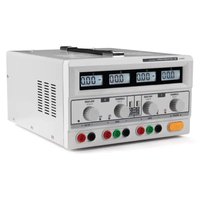
LABPS23023 - Laboratory power supply VELLEMAN - Free user manual and instructions
Find the device manual for free LABPS23023 VELLEMAN in PDF.


Pick your language and provide your email: we'll send you a specifically translated version.
| Product type | Laboratory power supply |
| Brand | Velleman |
| Model | LABPS23023 |
| Output voltage | 0 – 30 V |
| Output current | 0 – 3 A |
| Number of channels | 1 (or 2 depending on variant) |
| Display | LCD digital |
| Resolution | 10 mV / 1 mA |
| Operating mode | Constant voltage (CV) / Constant current (CC) |
| Protection | Overload, short circuit, overheat |
| Input power | 230 VAC, 50 Hz |
| Dimensions (L × W × H) | 200 × 150 × 100 mm |
| Weight | 1.5 kg |
| Main functions | Fine adjustment of voltage and current, lock, floating output |
| Maintenance and cleaning | Disconnect the device, clean with a soft dry cloth |
| Safety | Mandatory grounding, use in a dry environment |
| Spare parts | Replacement fuses (check rating in the manual) |
| Repairability | Removable casing, repair by a professional recommended |
Frequently Asked Questions - LABPS23023 VELLEMAN
How to adjust the output voltage?
Turn the VOLTAGE knob to adjust the desired voltage. The LCD display shows the value in real time. Use the COARSE knob for coarse adjustment and FINE for fine adjustment.
How to set the current limit?
Turn the CURRENT knob to set the maximum current. If the load exceeds this limit, the power supply switches to CC (constant current) mode.
What do CV and CC modes mean?
CV (Constant Voltage) means the voltage is stable and the current varies according to the load. CC (Constant Current) means the current is stable and the voltage adjusts. The active mode is shown on the display.
Can I connect sensitive devices?
Yes, thanks to overload and short-circuit protection. However, always check the maximum voltage and current of your device before connecting.
How to use the lock function?
Press the LOCK button to lock the current settings and prevent accidental changes. Press again to unlock.
What to do if the display shows nothing?
Check that the power supply is plugged in and the fuse has not blown. Replace the fuse if necessary (same type). If the problem persists, contact a repair technician.
What type of cable to use for the output?
Use cables of suitable cross-section (at least 1 mm²) with 4 mm banana plugs. Make sure connections are clean and tight.
Can I connect two power supplies in series or parallel?
Not recommended without external protection. If necessary, use blocking diodes and respect polarities. Consult the manual for more details.
How to clean the device?
Disconnect the power supply. Use a soft, slightly damp cloth (no water) to wipe the casing. Do not use harsh chemicals.
Where to find the electrical diagram?
The electrical diagram is available in the PDF manual downloadable from notice-facile.com. Search for the 'Diagram' or 'Schematic' section.
User questions about LABPS23023 VELLEMAN
0 question about this device. Answer the ones you know or ask your own.
Ask a new question about this device
No questions yet. Be the first to ask one.
Download the instructions for your Laboratory power supply in PDF format for free! Find your manual LABPS23023 - VELLEMAN and take your electronic device back in hand. On this page are published all the documents necessary for the use of your device. LABPS23023 by VELLEMAN.
USER MANUAL LABPS23023 VELLEMAN
Manual assistant
Powered by Anthropic
Waiting for your message
Product information
Brand : VELLEMAN
Model : LABPS23023
Category : Laboratory power supply