E0422 - Thermometer Emos - Free user manual and instructions
Find the device manual for free E0422 Emos in PDF.



| Product Type | Digital indoor/outdoor thermometer |
| Brand | Emos |
| Model | E0422 |
| Power Supply | 2 AAA 1.5 V batteries (alkaline recommended) |
| Indoor Temperature Range | 0 °C to 60 °C |
| Outdoor Temperature Range | -40 °C to 60 °C |
| Accuracy | ±1 °C |
| Resolution | 0.1 °C |
| Outdoor Probe | Wired, waterproof, 0.9 m length |
| Measurement Units | Selectable °C / °F (via switch) |
| Memory Functions | Automatic recording of min/max temperatures, clears every 24 h |
| Display | LCD with separate fields for indoor and outdoor |
| Dimensions (approx.) | 100 × 70 × 20 mm |
| Weight (approx., with batteries) | 100 g |
| Maintenance | Clean with a soft, slightly damp cloth. Do not immerse. |
| Safety | Do not expose to moisture, shocks, or open flames. Keep out of reach of children. |
| Repairability | Do not open or repair yourself. Contact the retailer for any repairs. |
| Used Batteries | Remove exhausted batteries. Do not dispose of in fire. Recycle according to local regulations. |
| Warranty | The warranty is void if opened or misused. |
Frequently Asked Questions - E0422 Emos
User questions about E0422 Emos
0 question about this device. Answer the ones you know or ask your own.
Ask a new question about this device
Download the instructions for your Thermometer in PDF format for free! Find your manual E0422 - Emos and take your electronic device back in hand. On this page are published all the documents necessary for the use of your device. E0422 by Emos.
USER MANUAL E0422 Emos
The thermometer measures indoor and outdoor temperature.
Specifications
Temperature ranges:
Indoor temperature (IN): 0^ to 60^
Outdoor temperature (OUT): -40 °C to 60 °C
Measurement accuracy: ± 1^
Temperature resolution: 0.1^
Temperature probe: outdoor, water-resistant
Wired temperature probe length: 0.9m
Power supply: 2 × 1.5 V AAA
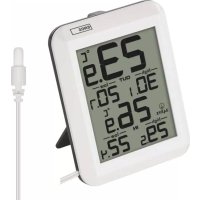
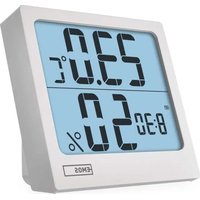
Description of the Thermometer (See Fig. 1)
1 - Unit of outdoor temperature
2 - Minimum outdoor temperature
3 - Unit of indoor temperature
4 - Minimum indoor temperature
5 - Maximum indoor temperature
6 - Automatic deletion of memory of measured values every 24 h
7 - Indoor temperature
8 - Maximum outdoor temperature
9 - Outdoor temperature
10 - Switch for changing unit of temperature ^ C / ^
11 - Stand
12 - Battery compartment
13-Wired outdoor probe
Getting Started
- Remove the battery cover on the back of the device.
- Insert two 1.5 V AAA batteries. Make sure to observe the correct polarity of the batteries according to the drawing on the bottom of the battery compartment. Use 1.5 V alkaline batteries only. Do not use 1.2 V rechargeable batteries.
- Close the battery compartment.
To measure outdoor temperature, pull the wired probe underneath a window which is not frequently used. Frequent opening may damage
or destroy the probe. The outdoor portion of the wired temperature probe must be anchored so as to prevent its tearing off in the wind.
Indoor and Outdoor Temperature
- Outdoor temperature value is shown in the top half of the display in field 9.
- Indoor temperature value is shown in the bottom half of the display in field 7.
Memory of Maximum and Minimum Temperature
The thermometer automatically records the values of maximum and minimum measured temperature.
Values for outdoor temperature (OUT) are displayed in fields 2 and 8.
Values for indoor temperature (IN) are displayed in fields 4 and 5.
Measurement memory is automatically erased every 24 h from the insertion of batteries.
Example: If you insert batteries at 7:00, memory will be erased each following day at 7:00.
Changing ^ C / ^ F Temperature Units
Remove batteries from the thermometer.
Move the switch on the back of the thermometer to either ^ C or ^ F .
Put the batteries back in the thermometer.
Upkeep and Maintenance
The product is designed to serve reliably for many years if used properly. Some advice for
proper operation:
- Read the manual carefully before using this product.
- Do not expose the product to direct sunlight, extreme cold and moisture, and sudden changes in temperature. This would reduce measuring accuracy.
- Do not place the product in locations prone to vibration and shocks; these may cause damage.
- Do not expose the product to excessive force, impacts, dust, high temperatures or humidity. They could cause malfunction, shorter battery life, damage to batteries and deformation of plastic parts.
-
Do not expose the product to rain or moisture, it is not designed for outdoor use.
-
Do not place any open flame sources on the product, e.g. a lit candle, etc.
- Do not place the product in places with inadequate air flow.
- Do not tamper with the internal electric circuits of the product. Doing so might damage it and automatically void the warranty. The product should only be repaired by a qualified professional.
- To clean the product, use a slightly moistened soft cloth. Do not use solvents or cleaning agents, they could scratch the plastic parts and cause corrosion of the electric circuits.
- Do not immerse the product in water or other liquids.
- The product must not be exposed to dripping or splashing water.
- In the event of damage or defect of the product, do not make any repairs by yourself. Have it repaired in the shop where you bought it.
- Place the product out of reach of children; it is not a toy.
- Remove flat batteries; they could leak and damage the product. Use only new batteries of the recommended type and make sure polarity is correct when replacing them.
- Do not throw the accumulator into a fire and do not disassemble or short-circuit it.
This device is not intended for use by persons (including children) whose physical, sensory or mental disability or whose lack of experience or knowledge prevents them from using it safely. Such persons should be instructed in how to use the device and should be supervised by a person responsible for their safety. Children must always be supervised to ensure they do not play with the device.
Do not dispose with domestic waste. Use special collection points for sorted waste. Contact local authorities for information about collection points. If the electronic devices would be disposed on landfill, dangerous substances may reach
groundwater and subsequently food chain, where it could affect human health.
CZ | Teploměr
3aInc MaKcImaJIbHOI Ta MiHimaJIbHOI Tempepatypn
TepMOMeTp aBtOMaTnUHO 3aNcYec BmIpRHi 3HaueHHeMaKcImaJIbHOI Ta MiHIMaJIbHOI TeMnepaTypn.
Pam'Yb BmipIOBaHb aBTOMaTnUHO OUnucaTbcra KoxHi 24 rOuHH 3 MOMeHTy BCTaHOBJIeHHaTapeiOK.
IpnknaI: kio Bn BCTaBnte batapeyn o 7:00 paHky, na'M'ytb bye ouuataTcKoKHOHaCTyHoro dHra 7:00 paHky.
3MiHa OdnHnCi Tempepatypn ^ C / ^
BnIMtB 6aTapeKn 3 TepMOMeTpa.
IpeceHybTe nepemikaH a 3aHni nanei TepMometpa B noJoxeHHA ^ C a6o F.
BctabTe 6aTapeiKn Ha3aJy TepMometp.
IognJaTa 06cnyroByBaHHa
Bnip6 po3p06JIeHn TAK, 106 npn npaBnIbHOMy BnKOpncTaHHi BiH naiHNo npocnyxHB barato pokiv. Ocb kiNbka nopad 1o do npaBnIbHOi ekCnIyatauii:
- Ipeed TmM,Як понete Виробом Користуватия уразно почпайт e inctpykuzio Дпя Користувача.
He nidaabaTe Bnip6 BnNBy npMnx COHnX npomeHIB, CnIbHO- ro xoJOny abo BOnorOCTi, a TakoK p3Knx nepenad IB tempeatypn, ue npu3BeJe Do 3HNKeHHaTOUHOCTi cKaHyBaHHaBmIPIOBaHHa.
Bnpi6 He nomiuaTe y micx, de byBaec Bi6paizy TpncHHa - MoKytb npuHHTN Ioro N0WKoJKeHHa.
He nidaaba Te Bpi6 Hau3BuaHOMy TnCKy, yapam, npoxy, Bncoki Temnepatypia 60 BoIorocti ce Morno 6 npuHHTN 3HHKeHHaYHKciBnOby, KopoTsw eHepreTuHy BnTpIMky, NowkoJxHnBaTapei nn DeOpmaio nlaactMacobnx qactnH.
- Bnpi6 He niiDaaBaiTe douy a6o BOIoroCTi, kUo BiH He np3HaueHn dJa 3OBHIshbOro KOpNCtYBaHHa.
He nomiuaTe Ha Bnpi6 KoDHe DxkepeNo BiKpntoro BorHIO, Hnnp. 3anaEny CBiuKy.
He nomiatae Bupib B Micx, De He doctaTHbo 3abe3neueha cnpkylaiznobitpr.
He BtpyuainTecsy BVHTpiuHi eJeKTPnHi KOHTpynpncTpoIO. LIM MoKeTe NOro NOnIKoDHTu Ta aBtOMaTHUHO CKacCyBaTu rapaHTiHn CTPOK.Bnpi6 NobHHepeMOHTyBaTu TINbKN KBaJIΦikOBaHn φaxiBeub.
- Дя чишени викоростовуіte boIory, м'ягky raHчIPky. He BИКОрстовуіte po3quHHNKи, Hi MИQUci 3axOДN - можуть пошкраТи пл actmacobiЧаCTIHn Ta nopuyшпTи eJektpnHi KOHTypn.
Bupi6 He 3aHypioTe y Body Ta B iHsu piinHy.
Bupi6 He nidaBte 6pn3kam nn KaPnM BOnn.
- Пошкоженчпдфektньи cami He peMOHTyTe, 3aIte Ioro dIpeMOHTy y mara3nH de BV Ioro npud6aII.
36epiraTe Bnpi6 y HeoctynHomy dIaTei Micci, ce He irpaoka.
- BntarHitb po3pIaJxHei 6aTapeKn, BOH MoKytB BNTiKaTu Ta noShkoIaTIu Bnpi6. BnkOpncToByte InSe HObi 6aTapeKn peKoMeHDoBaHO rO TnPy Ta nepeKoHaITeCra, 10 NoJIpaHicTb DOTpIMyETbcr npabNlboHo.
- AkymyliTop He BnKndaTe y BOrOh, He po3bpaTe Ta He po6iTb KOpOTKOro 3aMnKaHHra.
Ley npicpti He npn3naeHnn KOpncTyBaHHa oc6am (BkIIOHO dTe), nKoTpnx cI3nHa, nouyTTeBa nn pO3ymoBa He3di6hictb, nn He doCTaTOK IOCBiNy Ta 3HaHb 3a6opOHc Hm 6e3neuHO KopncTyBaTnCra, kTo Taka oc6ba He 6yde nID DOrJlAOM, nn JaKsO He 6yla npOBedeHa dJa He iHCTpykTaX BiINOCHO KOpncTyBaHHa CNOXNBaUem BiINOBiDHO
ocobio, KoTpa Biinobidae 3a ii 6e3neuHicTB. Heo6xio 3a6e3neuHTn Hargia 3a DiTbMn, 06 BOHN He rpaTmYbC8 3 npncTpOeM.
He BnkyIte eIektpnHi npncTrooi k HecopToBaHi KOMyHaJIbHi BiXoN, KopncTyIeTcB MiczAmN 360py KOMyHaJIbHnx BiXoIDiB. 3a akTuJIbHOIO iHcpOpMaicio Ipo Mlczra 360py 3BepTaIeTcB do yCTaHOB 3a Miczem npoxHBHH. Jkso eIektpnHi npncTopoi
po3miuehi Ha Micx 3 BiXoamn, To He6e3neuHi peOBUHn MOxyTb npOHkATn Do NiI3emHnx BOD i DiCTaTncb Do xapUOBoro o6iry Ta no- WKOJyBaTN BaWe 3Opob'
RO|MD | Termometru
ToHocT Ha n3MepBaHe: ±1°C
TemnepaTyPha pa3dJIteJIHa cnoc6Hoct: 0,1 °C
TemnepaTyPha coHda: BbHsHa, BoOyCToYuBa
Дьлжина на kaбелнatura TempepaTypha coHda: 0,9 m
3axpaHbaHe: 2 6p. 6aTeepn1,5V Tn AAA
OnncahneHaTepmometbpa(Bx.Φnrg.1)
1-EdHHnHa 3a BbHnHaTa TeMnepaTpa
2-MHHMaJIHa BbHsHa TeMnepaTypa
3-EdHHnHa 3a BbTpewHaTa TeMnepaTypa
4-MHHMaJIHa BbTpESha TempepaTpa
5-MakcimannhaBbtpeusha TemnepaTpa
6- ABTOMATNUHO n3TpNBaHe Ha nAmETTa Ha n3MepeHnte cToHocTn Ha BCEKN 24 yaca
7-Bbtpeusha Temnepatypa
8 - MaKcImaHa BbHsHa TeMnepaTypa
9-BbHnHa TeMnepaTypa
10-Превкювateл за смяна на Temпературнite城乡居民 ^ C / ^
11-CToiKa
12-0TeJIeHne 3a 6aTeepnnte
13-Ka6eHa BbHnHa coHda
Hauano
- CbaneTe Kaanayeto Ha OTdJeHneTo 3a 6aTeepn Ha 3aHaTa cTpaHa Ha VCTPOYCTBOTO.
- Пocтавete дve 6р. 6atepnn 1,5 V TnA AAA. YBepTe ce, ue cna3BaTe npabnHaTApnoIrpHocT ha 6atepnte cbrIacHo cxemata BdoJHATA qact Ha OTdJeHneTo 3a 6atepnn. N3noJ3BaIte caMo aIkaJIHn 6atepnn 1,5 V. He n3noJ3BaIte ppezapexJaun ce 6atepnn 1,2 V.
- 3aTbOpTe OTeJeHHeTo 3a 6aTepnIte.
3a n3MepBaHe Ha BbHsHaTa Tempeatypa n3dbpnaTe Ka6enHaTa COHa nOg npo3opeu, KOTo He ce OTbapr qecTo. YecToTo OTbaprHe MoKe Da NOBpei nn yHnOxN CoHdaTa. BbHsHaTa uact Ha Ka6eHnHaTa COHa 3a n3MepBaHe Ha Tempeatypa Tpr6Ba da 6bJe do6pe 3akpeNeHa, 3a Da He Ce OTKbcHe OT Btbpa.
Bbtpeusha n BbHsHa TeMnepaTpa
- BbHnHaTa TempepaTpe noka3aHa B rOpHaTa noNoBnHa Ha IINcPJIe B nOJe 9.
2.Вьтpeшнata TemnepaTypa e noka3aHa BdoHata noOBnHa Ha IINcPJIeB noIe 7.
Памет на мakсималhaТа И МИнмалhaТа OTчeteHa TempepaType
TepMOMeTbpbT aBtOMaTHUHO 3aHNCBA CToHOCHTe Ha MaKcImaJIHaTa I MNHIMaJIHaTA n3MepeHa TempepaTypa.
CtoHocntte Ha BbHnHaTa TemepaTypa (OUT) ce noka3BaT B noIeta 2 n 8.
CtoHocntte Ha BbTpewHaTa TeMnepaTypa (IN) ce noKa3BaT B noneta 4 n 5.
Iametta 3a n3MepBaHnraTa ce n3Tpna aBtOMaTnUHO ha BceKn 24 yaca OT noCTabRHeTo Ha 6aTePnnte.
Приимер: Ако постави te bateри-te B 7:00, паметта ще ce n3trpnaВ BCEKN cIeДВaш DeH B 7:00.
PpomraHa Ha TeMnepaTyphata eHnua ^ C / ^
I3BaTe 6aTepeHnTe OT TepMometbpa.
IpeMeCTeTe IpeBKnIOUbATEnB 3aHaTa YacT Ha TepMOMeTbpa Ha ^ C nnn F.
Ioctabete 6aTepeHnTe o6paTHo B TepMoMeTbpa.
06cnykBaHe n npdpbKka
YpeIbT e npoeKtupan da pa60Tu 6e3npo6mHo B npOdbJxKeHne Ha MHOro rOuHN, aKO ce n3NoJ3Ba npaBnIHO. No-dOly ca npuBeHn HAKO npenOpbKn 3a npaBnHa ekCpIoaTaUria:
- PpOyTeTe BnHMaTeJHo pBkoBOcTBOTO, npEi Da 3aNoUHeTe da N3P0J3BaTe T03n ypei.
He n3naIte ypeHa ha npka cIbHueBa CBeTnHa, npeKoMePHO HnCKa TemnepaTypa, TBbpDe BnCOKa BnaxHoCT n pe3Kn IpomEnB TemnepaTypa. ToBa 6n HaMaJIIno TOnHocTTa Ha n3MepBaHe.
He nocTabYTe ypeHa MeCTa, KbTeTo e Bb3MOxHO da HMa Bn6paunu yapn; Te MoKe da rO nobpeT.
He nojnaarTe ypeHa npeKaen HaTnCK, ynap, npax, Bucokn Temnepatypn nn BnaXnOCT. Te Morat da npuHrT Heun3npaBHOCT, ckbcsBaHe Ha XnBOTa Ha 6aTePnra, nobpeHa 6aTePnnte H deOpMnpaHe Ha nlaCTMaCOBtE qactn.
He n3naIte ypeHa Ha IbKd INn BnaRa, ToH He e npedHa3NaueH 3a N3PON3BaHe Ha OTKpNTO.
He nocTabaIte Bbpxy ypeDa H3TOUHnHa OTKpNTn PnAmbuc, HanpImep 3anaJen CBeuN i dp.
He nocTabraIte ypeHa Ha MeCTa C orpaHnueHa cnpKylaun Ha Bb3dyxa.
He npabete Hnio NO BbTpewHnte eJeKtpueeCKn BepnHa ypea. Moke da ro nobpeinte n rapaunraT ce anylnpa aBTOMaTuHo. B clyuay na nobpeya ypeBt Tp6Ba da ce peMOHTnpa caMo OT npabocnocoben TexnK cbc cbOTBeTHata KBaNΦnKaun. - Почиствашие урEDA с Meka, Лек Навлajх He kbpna. He n3-n0JI3BaIte pa3TBOPHTeN IN OOUCTBaUH INpeNaT, Te MoRat Da NaPacKaT pIaCTMaCobTe qactN I da npuHrT KOpO3nHa eJeKtpnuecknte BepuRn.
He notanayte ypea BbB BOa nn npra TeuhoCT. -
Pa3eTe ypea ot kaneua nnn npbckaasa Boda.
-
Пп поврEDA Или Deфekt Ha урEDA He правete onHTI da ro peMOHTIpate. ПрадTe ro 3a peMOHT B MaRa3nHa, OT KOITTo e 3akynen.
- PanaTe ypeDa naleu OT DoCTbNa Ha deca; ToH He e irpaayka.
- Изваимаугда.Изюшение baери; Te morat da npotekaТа повразура.Изпалзbaит само hoBN bapeи OT npenopbчаня ти и са3baит поярhoeCTta, KORATO rN CMeHЯTe.
He n3rapaTe akymyNatopa, He ro pa3rno6BaTe n He Cbbp3BaTe KJIeMnTe My HaKbCO.
Toba yctpoicTBo He e npedHa3HaeHo 3a n3noJ3BaHe OT Jnca (BkIouHTeJIHO deca), uNTo cH3uueckn, CETNBn IIn yMCTBeHN Cnocobocn, KaKTo n nnncata Ha ONIT INn P03HaHnra, BnxA m NOnpeunn Ha 6e3oNaChOTo My n3noJ3BaHe. TAKBa Jnca Tpr6Ba da 6bDat HHCTpykTnpaHn KAc Da n3noJ3BaT yCTpOcTBOTo n da Ca nDn Hnd30pa Ha JInce, OTROBapraIo 3a TExHaTa 6e3oNaChOcT. DeaT Tpr6Ba BnHaRn Da ce Na6JIIODaBAT n da He ce DoNycka Da cn nIgparT C yCTpOcTBOTO.
He n3xBpIyTe eJektpnueckn ypei n C hecopTnpaHnte domaKHNCKN OTNaDbu; npedabaiTe rB nyHKTOBeTe 3a cbbpaHe Ha copTnpaHn OTNaDbu. AkTyalHa HOpMaunr OTHOCHOyHKTOBeTe 3a cbbpaHne Ha copTnpaHn OTNaDbu MoKe da
IOnyute OT KOMTeHTHnTe MeCTHn OprAHn. Ipn n3XbPJIHe Ha eJekTpueckn ypeiHa CMeTuTa e Bb3MOxHO B NOIOUByHnTe BOi Da INonaHaT OAnCHn BeuEcTBA, KOtO CneD TOBa Da IpemHaT B XpaHnTeHaTa Bepra N da YBpejT 3dpABeTo Ha Xopata.
FR | Thermomètre
- Specifications
- Description of the Thermometer (See Fig. 1)
- Getting Started
- Indoor and Outdoor Temperature
- Memory of Maximum and Minimum Temperature
- Changing ° C / ° F Temperature Units
- Upkeep and Maintenance
- CZ | Teploměr
- 3aInc MaKcImaJIbHOI Ta MiHimaJIbHOI Tempepatypn
- 3MiHa OdnHnCi Tempepatypn ° C / °F
- IognJaTa 06cnyroByBaHHa
- RO|MD | Termometru
- OnncahneHaTepmometbpa(Bx.Φnrg.1)
- Hauano
- Bbtpeusha n BbHsHa TeMnepaTpa
- Памет на мakсималhaТа И МИнмалhaТа OTчeteHa TempepaType
- PpomraHa Ha TeMnepaTyphata eHnua ° C / °F
- 06cnykBaHe n npdpbKka
- FR | Thermomètre
Brand : Emos
Model : E0422
Category : Thermometer