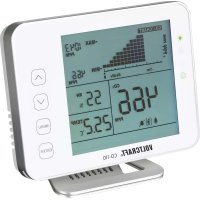
CO110 - Gas detector VOLTCRAFT - Free user manual and instructions
Find the device manual for free CO110 VOLTCRAFT in PDF.
Frequently Asked Questions - CO110 VOLTCRAFT
Download the instructions for your Gas detector in PDF format for free! Find your manual CO110 - VOLTCRAFT and take your electronic device back in hand. On this page are published all the documents necessary for the use of your device. CO110 by VOLTCRAFT.
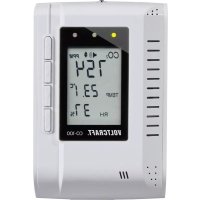
USER MANUAL CO110 VOLTCRAFT
Dear customer, Thank you for purchasing this product. This product complies with the statutory national and European requirements. To maintain this status and to ensure safe operation, you as the user must observe these operating instructions! These operating instructions are part of this product. They contain important notes on commissioning and handling. Also consider this if you pass on the product to any third party. Therefore, retain these operating in- structions for reference! If there are any technical questions, please contact: www.conrad.com/contact
232. Explanation of symbols
The symbol with the lightning in the triangle is used if there is a risk to your health, e.g. due to an electric shock. The symbol with the exclamation mark in the triangle is used to indicate important information in these operating instructions. Always read this information carefully. The arrow symbol indicates special information and advice on operation.
This CO2 monitor features an LED display, provides a visible and audible CO2 warning alarm and also measures temperature and humidity. It is intended for indoor use only. Do not use it outdoors. Contact with moisture, e.g. in bathrooms, must be avoided under all circumstances. For safety and approval purposes, you must not rebuild and/or modify this product. If you use the product for purposes other than those described above, the product may be damaged. In addition, improper use can result in short circuits, res, electric shocks or other hazards. Read the instructions carefully and store them in a safe place. Make this product available to third parties only together with its operating instructions. All company names and product names are trademarks of their respective owners. All rights reserved.
- Operating instructions 1Up-to-date operating instructions Download the latest operating instructions at www.conrad.com/downloads or scan the QR code shown. Follow the instructions on the website.
5. Features and functions
- Touch button operation
- Easy to read 15° bevel
- Low-drift NDIR sensor
- Audible and visible alarms
- Chart with variable time zoom levels
- CO2, RH (humidity) and temperature monitor
- Auto and manual calibration
Read the operating instructions carefully and especially observe the safety information. If you do not follow the safety instructions and information on proper handling in this manual, we assume no liability for any resulting personal injury or damage to property. Such cases will invalidate the warranty/guarantee. a) General information
- The device is not a toy. Keep it out of the reach of children and pets.
- Do not leave packaging material lying around carelessly. This may become dangerous playing material for children.
- Protect the appliance from extreme temperatures, direct sunlight, strong jolts, high humidity, moisture, ammable gases, steam and solvents.
- Do not place the product under any mechanical stress.
- If it is no longer possible to operate the product safely, take it out of operation and protect it from any accidental use. Safe operation can no longer be guaranteed if the product: - is visibly damaged, - is no longer working properly,
27- has been stored for extended periods in poor
ambient conditions or - has been subjected to any serious transport- related stresses.
- Please handle the product carefully. Jolts, impacts or a fall even from a low height can damage the product.
- Consult an expert when in doubt about the operation, safety or connection of the appliance.
- Maintenance, modications and repairs must only be completed by a technician or an authorised repair centre.
- If you have questions that remain unanswered by these operating instructions, contact our technical support service or other technical personnel.
a) Stand installation Insert the stand into the holes as pictured and gently move the stand downwards until it clicks into place. Make sure these clips are correctly inserted. Pinch the clips on both sides to remove the stand. 30b) General setup and settings
- Use the supplied USB cable to connect the device to a power source. When connected, the power indicator and the 3 LEDs will ash one by one. A countdown from 30 will then be displayed, after which the device is ready for use.
- Use the and buttons to switch between the timeline and CO2/RH/TEMP. The trend chart displays the historical records for any of the three parameters.
- To restore factory defaults, hold for 4 seconds until there is an audible beep.
- Press to open the main menu. To select a function, press the / button.
- Select to switch between human and plant modes.
- Select to change the high/low alarms for human and plant modes.
- Select to switch between alarm and mute .
- Select to switch between temperature units. 31c) LCD display
16 CO2/RH/TEMP chart 17 Max chart reading 18 Min chart reading 19 RH reading 20 Temperature reading 21 Main menu 22 Plant mode 23 Human mode 24 Audible alarm On/Off 25 CO2 reading 26 Time per division, indicating the period covered in the chart 32d) Trend chart display This chart displays the past readings for any of the three parameters (CO2/RH/TEMP). Press the key to toggle between CO2, TEMP, RH and Cycle (automatically cycles through CO2/TEMPT/RH) modes. Press Press Press Press Press to toggle the available Zoom Levels for each parameter (Minute/Hour/Day/Week). Press Press Press Press Available Zoom Levels for all parameters and division durations are outlined below. Zoom Level (period) Time per Division 1M (minute) 5 sec/div 1H (hour) 5 m/div 1D (day) 2 h/div 1W (week) 0.5 d/div 33e) Max/min The top-right corner of the display features two numerical indicators for MAX and MIN. As the Zoom Level is changed, the MAX and MIN values will reect the maximum and minimum values on the chart of the selected parameter (CO2, RH and TEMP). f) Main menu functions The main menu functions of can be activated by pressing . Pressing / once will bring up the main menu, with a ashing bar indicating the current function. Press Press Press Press Press Press Press Press Not pressing any button in 1 minute 341 ALARM (main interface) PressPressPress When is displayed, an audible alarm will sound if the CO2 level exceeds the preset CO2 alarm value. indicates that the alarm is muted. 2 PLANT Press Press Press Press PressPress Press Press Press Press Press Press Press Press Main interface Select 0 to enter Human mode (by default, 0 is set to Human mode and cannot be changed). The preset low and high alarms are 800 and 1200 ppm. Enter “ADV” to adjust them if necessary. In Plant mode, you can choose between different types of plants for optimal settings by using / to cycle from 1 to 9. 353 LOG Press Press Press Press Press , right 2nd column ashes Press , right 2nd, 3rd column ashes This function allows the user to see historical data records. 4 CALI Press For 3 seconds to hear buzzer sound (CO2 Level display) (Temperature display) Press (main interface) 36Before calibration, run the device for at least 20 minutes with windows open or in an outdoor environment using a portable battery source to reach an atmosphere with 400 ppm CO2. Wait until the CO2 reading is stable and follow the above steps for calibration. After calibration, wait 10 minutes before normal use. 5 TEMP units Press Press Press
389. Care and cleaning
Do not use any aggressive cleaning agents, rubbing alcohol, or other chemical solutions as they can cause damage to the housing and functioning of the product.
- Disconnect the product from the mains before each cleaning.
- Clean the product with a dry, bre-free cloth.
1Product Electronic devices are recyclable waste and must not be disposed of in the household waste. At the end of its service life, dispose of the product in accordance with applicable regulatory guidelines. You thus fulll your statutory obligations and contribute to the protection of the environment. 3911. Technical data Power consumption ........................ 160 mA (peak) 40 mA (average at 5.0 V) Operating voltage ........................... DC 5 (±0.25) V (via USB Type-C port) CO2 measuring range ....................0-5000 ppm CO2 display resolution ................... 1 ppm (0-1000), 5 ppm (1000-2000), 10 ppm (>2000) Temperature compensation ............ ±0.1% of reading per °C or ±2 ppm per referenced to 25 Warm-up time .................................<20 seconds Response time ................................ <2 mins for 64% of step change or <4.8 mins for 90% step-change Temperature measurement ............ 0 °C to 90 °C operating temp.
0.1 °C display resolution
- Humidity measurement p. 5
- -95% measuring range 1% main interface display resolution ±5% accuracy 40Operating/storage conditions p. 0
- °C to +50 °C (operating) -20 °C to +60 °C (storage) 0 % to 95 % RH (non- condensing) Dimensions (W x H x D) p. 120
- x 90 x 35.5 mm Weight g (with stand) 165 g (without stand) 41Table des matières Page p. 180
EasyManual
