Perfecto IRC5PAW - Oxygen concentrator Invacare - Free user manual and instructions
Find the device manual for free Perfecto IRC5PAW Invacare in PDF.


Frequently Asked Questions - Perfecto IRC5PAW Invacare
User questions about Perfecto IRC5PAW Invacare
0 question about this device. Answer the ones you know or ask your own.
Ask a new question about this device
Download the instructions for your Oxygen concentrator in PDF format for free! Find your manual Perfecto IRC5PAW - Invacare and take your electronic device back in hand. On this page are published all the documents necessary for the use of your device. Perfecto IRC5PAW by Invacare.
USER MANUAL Perfecto IRC5PAW Invacare
User: BEFORE using this product, read this manual and save for future reference.

Yes, you can:
WARNING
DO NOT use this product or any available optional equipment without first completely reading and understanding these instructions and any additional instructional material such as owner's manuals, service manuals or instruction sheets supplied with this product or optional equipment. If you are unable to understand the warnings, cautions or instructions, contact a healthcare professional, dealer or technical personnel before attempting to use this equipment - otherwise, injury or damage may occur.
ACCESSORIES WARNING
Invacare products are specifically designed and manufactured for use in conjunction with Invacare accessories. Accessories designed by other manufacturers have not been tested by Invacare and are not recommended for use with Invacare products.
ACCESSIONS
There are many different types of humidifiers, oxygen tubing, cannulas and masks that can be used with this device. You should contact your local home care provider for recommendations on which of these devices will be best for you. They should also give you advice on the proper usage, maintenance, and cleaning.
The supply accessories (nasal cannula, mask, tubing, humidifier, etc.) used to deliver oxygen to the patient need to include a means to reduce the propagation of fire in the accessories for the safety of the patient and others. If a commercially available, fire-activated flow stop device is used in the accessories setup, it should be placed as close to the patient as practicable.
TABLE OF CONTENTS
ACCESSIONS 2
SPECIAL NOTES 4
LABEL LOCATION 6
SECTION I—GENERAL GUIDELINES 7
Radio Frequency Interference. 8
SECTION 2-FEATURES 10
SECTION 3—HANDLING
Unpacking. 11
Inspection 11
Storage
SECTION 4-TECHNICAL DESCRIPTION 12
Intended Use 12
Technical Description 12
SECTION 5-TYPICAL PRODUCT PARAMETERS .... 13
SECTION 6-OPERATING INSTRUCTIONS 17
Introduction 17
Select a Location 17
Set Up 18
Flowrate. 21
SensO, Oxygen Purity Indicator - Model IRC5PO2AW 22
Initial Startup of the Concentrator 22
Explanation of Indicator Lights - Model IRC5PAW 23
Elapsed Time Meter (Hour Meter) 24
SECTION 7-MAINTENANCE 25
Routine Maintenance 25
SECTION 8-TROUBLESHOOTING GUIDE 28
SECTION 9-OPTIONAL ACCESSORIES 31
RECYCLING INFORMATION 32
CUSTOMER SERVICE AND WARRANTY INFORMATION 222
SPECIAL NOTES
Signal words are used in this manual and apply to hazards or unsafe practices which could result in personal injury or property damage. Refer to the following table for definitions of the signal words.
| SIGNAL WORD MEANING | |
| DANGER | Danger indicates an imminently hazardous situation which, if not avoided, will result in death or serious injury. |
| WARNING | Warning indicates a potentially hazardous situation which, if not avoided, could result in death or serious injury. |
| CAUTION | Caution indicates a potentially hazardous situation which, if not avoided, may result in property damage or minor injury or both. |
NOTICE
The information contained in this document is subject to change without notice.
DANGER
DO NOT SMOKE while using this device. Keep all matches, lit cigarettes or other sources of ignition out of the room in which this product is located and away from where oxygen is being delivered.
NO SMOKING signs should be prominently displayed. Textiles and other materials that normally would not burn are easily ignited and burn with great intensity in oxygen enriched air. Failure to observe this warning can result in severe fire, property damage and cause physical injury or death.
CAUTION
"Caution: Statutory law can restrict this device to sale by or on order of a physician, or any other practitioner licensed by the law of the governmental agency in which he/she practices to use or order the use of this device."
Invacare recommends an alternate source of supplemental oxygen in the event of a power outage, alarm condition or mechanical failure. Consult your physician or equipment provider for the type of reserve system required.
This equipment is to be used as an oxygen supplement and is not considered life supporting or life sustaining.
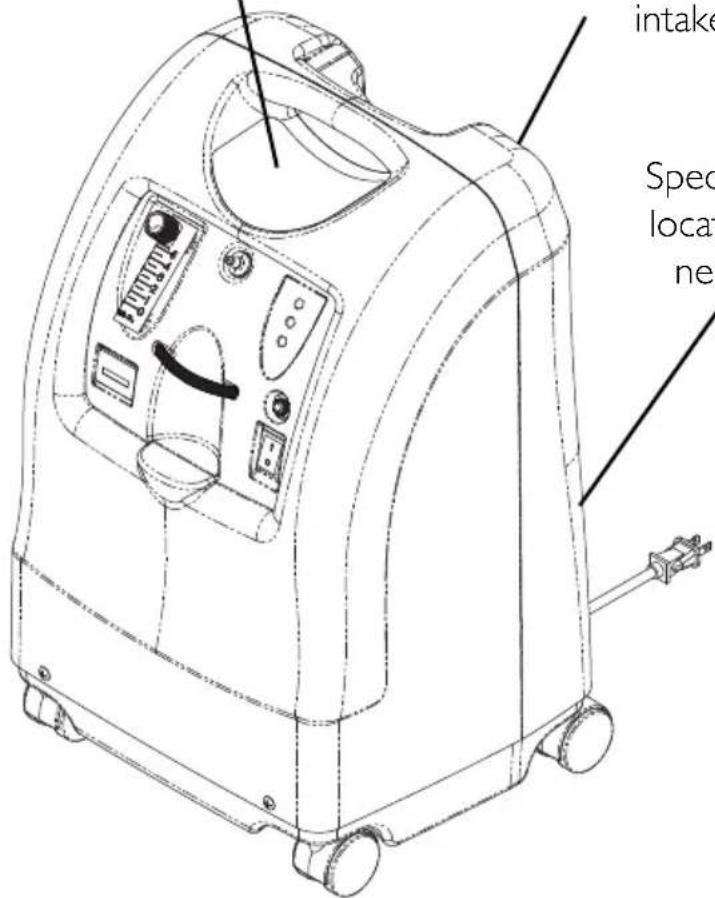
LABEL LOCATION
PerfectoTM
FOR OPERATING INSTRUCTIONS or ALARMS (See User Manual)

DANGER-RISKOFFIRE
NO SMOKING - Keep ALL sources of ignition out of the room in which this product is located and away from areas where oxygen is being delivered. Textiles, oil and other combustibles are easily ignited and burn with great intensity in oxygen enriched air. DANGER - ELECTRIC SHOCK

DO NOT remove cover. Refer servicing to qualified service personnel.

Flowrates below 0.5 L/min will trigger Potential Obstruction Alert (rapid audible alarm).

Set Flowmeter at 2.5 L/min or less when filling HomeFill cylinders.
HomeFillCompatible


Serial Number Label is located on the resonator intake assembly
Specification Label is located on the back near the bottom
SECTION I—GENERAL GUIDELINES
In order to ensure the safe installation, assembly and operation of the Perf ecto_2 concentrator these instructions MUST be followed.
WARNING
This section contains important information for the safe operation and use of this product.
DANGER
Risk of electric shock. DO NOT disassemble. Refer servicing to qualified service personnel. No user serviceable parts.
TO REDUCE THE RISK OF BURNS, ELECTROCUTION, FIRE OR INJURY TO PERSONS.
Avoid using while bathing. If continuous usage is required by the physician's prescription, the concentrator MUST be located in another room at least 2.5m (7 ft) from the bath.
DO NOT come in contact with the concentrator while wet.
DO NOT place or store product where it can drop into water or other liquid.
DO NOT reach for product that has fallen into water. Unplug IMMEDIATELY.
If the concentrator has a damaged cord or plug, if it is not working properly, if it has been dropped or damaged, or dropped into water, call qualified technician for examination and repair.
A spontaneous and violent ignition may occur if oil, grease or greasy substances come in contact with oxygen under pressure. These substances MUST be kept away from the oxygen concentrator, tubing and connections, and all other oxygen equipment. DO NOT use any lubricants unless recommended by Invacare.
Operating Information
For optimum performance, Invacare recommends that each concentrator be on and running for a minimum of 30 minutes at a time. Shorter periods of operation may reduce maximum product life.
Keep the oxygen tubing, cord, and unit out from under such items as blankets, bed coverings, chair cushions, clothing and away from heated or hot surfaces, including space heaters, stoves and similar electrical appliances.
DO NOT move or relocate concentrator by pulling on the power cord.
NEVER drop or insert any object or liquid into any opening. Invacare recommends that Crush-Proof oxygen tubing be used with this product and not exceed 15.2m (50 ft) in length. There are no user serviceable parts. This does not include normal maintenance items. See maintenance section for user maintenance items.
A product should NEVER be left unattended when plugged in. Make sure the Perfecto₂ is Off when not in use.
Close supervision is necessary when this product is used near children or physically-challenged individuals.
Additional monitoring or attention may be required for patients using this device who are unable to hear or see alarms or communicate discomfort.
DO NOT connect the concentrator in parallel or series with other oxygen concentrators or oxygen therapy devices.
Radio Frequency Interference
This equipment has been tested and found to comply with EMC limits specified by IEC/EN 60601-1-2. These limits are designed to provide a reasonable protection against electromagnetic interference in a typical medical installation.
Other devices may experience interference from even the low levels of electromagnetic emissions permitted by the above standards. To determine if the emissions from the Perfecto _2 is causing the interference, turn the Perfecto _2 Off. If the interference with the other device(s) stops, then the Perfecto _2 is causing the interference. In such rare cases, interference may be reduced or corrected by one of the following measures:
- Reposition, relocate, or increase the separation between the equipment.
- Connect the equipment into an outlet on a circuit different from that to which the other device(s) is connected.
Avoid creation of any spark near medical oxygen equipment. This includes sparks from static electricity created by any type of friction.
SECTION 2-FEATURES
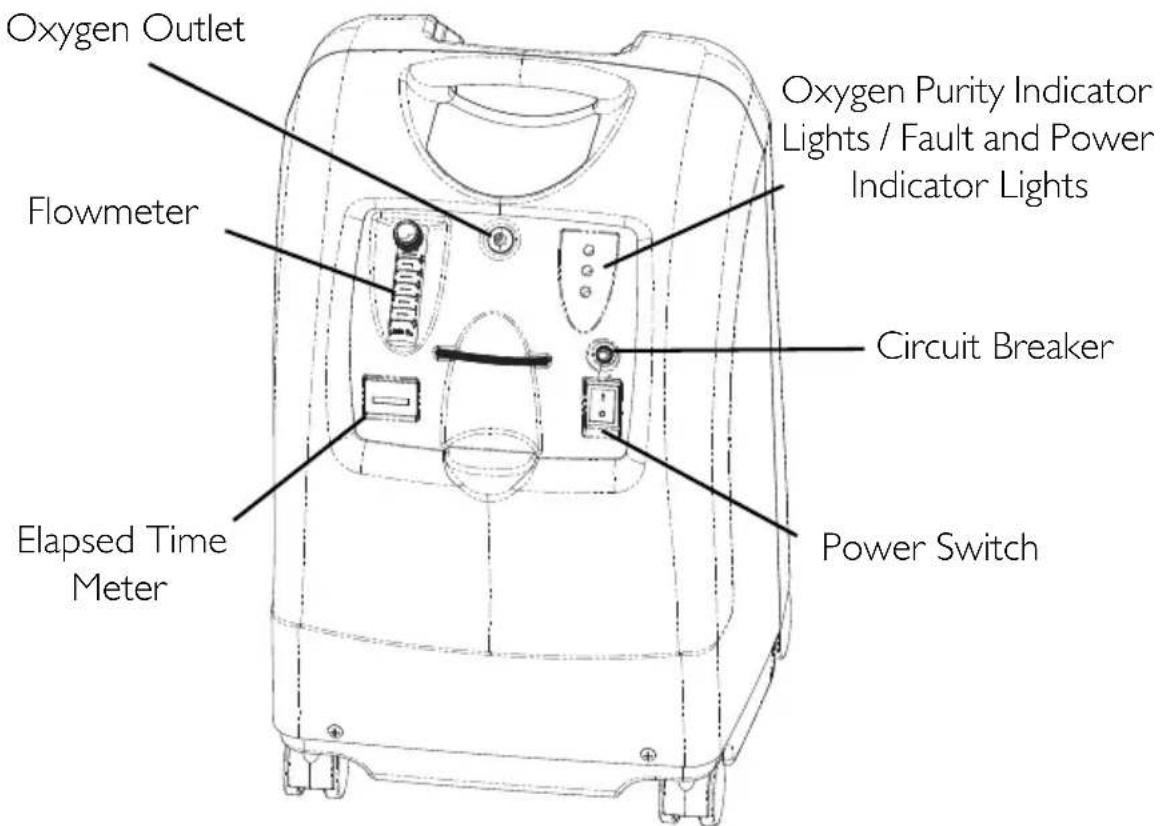
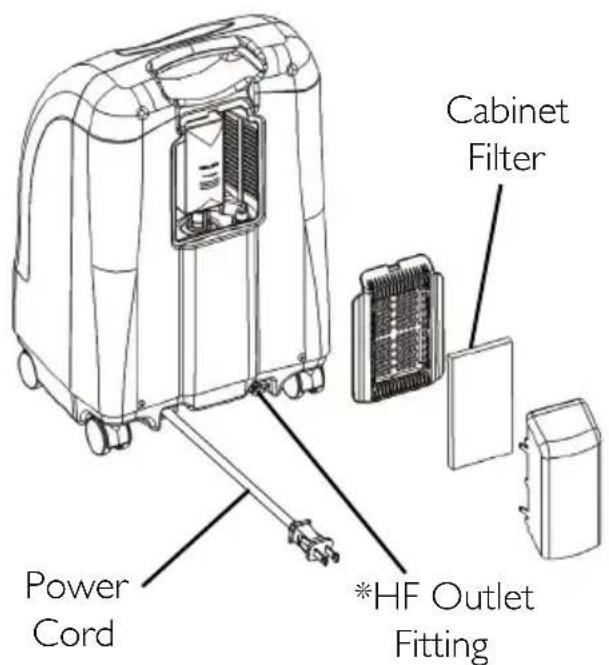
REAR VIEW
*NOTE: This outlet fitting is to be used only for filling oxygen cylinders with the HomeFill home oxygen compressor. The outlet fitting does not affect concentrator performance. Refer to the HomeFill owner's manual, part number 1145805, for connection and operating instructions. When not in use, the plug provided with the concentrator should be inserted into the outlet fitting. For more information about the HomeFill, contact your Invacare dealer.
SECTION 3—HANDLING
The concentrator should ALWAYS be kept in the upright position to prevent cabinet damage while being transported.
If the concentrator is to be reshipped by common carrier, additional cartons are available from Invacare.
Unpacking
NOTE: For this procedure, refer to FIGURE 3.1.
- Check for any obvious damage to the carton or its contents. If damage is evident, notify the carrier, or your local dealer.
- Remove all loose packing from the carton.
- Carefully remove all the components from the carton.
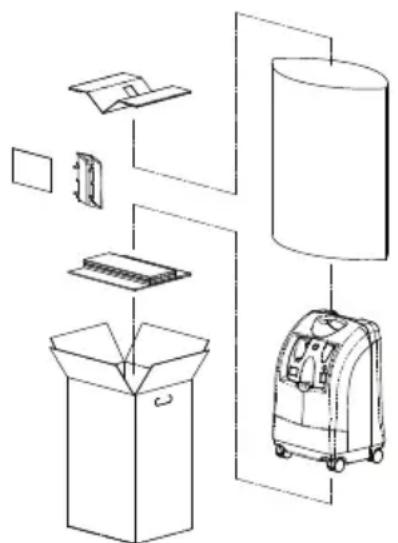
FIGURE 3.1 Unpacking
NOTE: Unless the oxygen concentrator is to be used IMMEDIATELY, leave concentrator in its packaging for storage until use of the concentrator is required.
Inspection
- Inspect/examine exterior of the oxygen concentrator for nicks, dents, scratches or other damages. Inspect all components.
Storage
- Store the repackaged oxygen concentrator in a dry area.
- DO NOT place objects on top of repackaged concentrator.
SECTION 4-TECHNICAL DESCRIPTION
Intended Use
Your oxygen concentrator is intended for individual use by patients with respiratory disorders who require supplemental oxygen. The device is not intended to sustain or support life.
Technical Description
The Invacare Perfecto _2 concentrator is used by patients with respiratory disorders who require supplemental oxygen. The device is not intended to sustain or support life.
The oxygen concentration level of the output gas ranges from 87% to 95.6% . The oxygen is delivered to the patient through the use of a nasal cannula.
The Invacare Perfecto _2 concentrator uses a molecular sieve and pressure swing adsorption methodology to produce the oxygen gas output. Ambient air enters the device, is filtered and then compressed. This compressed air is then directed toward one of two nitrogen adsorbing sieve beds.
Concentrated oxygen exits the opposite end of the active sieve bed and is directed into an oxygen reservoir where it is delivered to the patient.
The Invacare Perfecto _2 concentrator is capable of operation by the patient in a home environment or in an institutional environment. Device operates at a nominal 230 VAC/50 Hertz supply.
Service information will be available upon request to qualified technical personnel only.
SECTION 5-TYPICAL PRODUCT PARAMETERS
| ~ | Alternating Current |
| Type BF equipment | |
| I | Unit running |
| ○ | Unit not running |
| Attention - Consider Accompanying Documents | |
| DO NOT smoke | |
| Class II, Double Insulated | |
| IPX0 | Not Protected |
| CE | This product complies with Directive 93/42/EEC concerning medical devices. The launch date of this product is stated in the CE declaration of conformity. |
| Electrical Requirements: 230 | VAC ± 10% (253 VAC/207 VAC), 50 Hz |
| Rated Current Input: 1.4 A | |
| Sound Level: 39.5 dBA Average | |
| Altitude: Up to 1828 meters (6,000 ft) above sea level without degradation of concentration levels. Not recommended for use above 1828 meters (6,000 ft) | |
| Oxygen Output Concentration Levels: NOTE: Stated concentration levels achieved after initial warm-up period (approximately 30 minutes). | All IRC5PO2AW / IRC5PAW models 87% to 95.6% at 0.5 to 5 L/min |
| Maximum Outlet Pressure: 34.5 kPa ± 3.45 kPa (5 psi ± 0.5 psi) | |
| Flow Range: 0.5 to 5 L/min (maximum). For flowrates less than 1 L/min, we recommend the use of the Invacare Pediatric Flowmeter Accessory (IRCPFI6AW). | |
| Potential Obstruction Alert: | 0 L/min to 0.5 L/min The concentrator detects a condition that may indicate a potential obstruction of the output oxygen. Rapid audible beeping alert (this alert is deactivated when accessories are connected). May be associated with flow setting of 0.5 L/min or less. |
| Average Power Consumption: | 300 W280 W @ 3 L/min |
| Pressure Relief Mechanism Operational at: | 241 kPa ± 24.1 kPa (35 psi ± 3.5 psi) |
| Change in maximum recommended flow when back pressure of 7kPa is applied: | 0.7 L/min |
| Filters: Cabinet, Outlet HEPA | A and Compressor Inlet |
| Safety System: Current over | oad or line surge shutdown. High temperature compressor shutdown. High Pressure Alarm w/compressor shutdown. Low Pressure Alarm w/compressor shutdown. Battery Free Power Loss Alarm. SensO2 Oxygen System Possible Obstruction Alert. |
| Width: 38.1 cm ± 1 cm (15 in ± 3/8 in) | |
| Height: 58.4 cm ± 1 cm (23 in ± 3/8 in) | |
| Depth: 30.5 cm ± 1 cm (12 in ± 3/8 in) | |
| Weight: 20.5 kg ± 1 kg (45 lbs ± 2 lbs) | |
| Shipping Weight: 22.7 kg ± 1 kg (50 lbs ± 2 lbs) | |
| Operating Ambient Temperature: | 10°C - 35°C (50°F - 95°F) at 20-60% relative humidity |
| Exhaust Cooling Air Temperature: | Less than Ambient +19°C (+ 35°F) |
| Oxygen Output Temperature: | Less than Ambient +3°C(+ 6°F) |
| Cabinet: Impact Resistant flame resistant plastic cabinet that conforms to UL 94-V0. | |
| No AP/APG Not suitable for flammable anaesthetic mixture. | |
| Standards and Regulatory Listing: | IRC5PO2AW/IRC5PAW IEC/EN61000-3-2 IEC/EN61000-3-3, IEC/EN 60601-1, A1, A2 IEC/EN 60601-1-2 IRC5PO2AW Models Only ISO8359 MDD 93/42/EEC, Annex I and IX |
| CE marked model IRC5PO2AW | |
| Electrical: No extension cords | |
| Placement: No closer than 30 | 0,5 cm (12 in) from any wall, furniture, draperies, or furniture to assure sufficient air flow. Avoid deep pile carpets and heaters, radiators or hot air registers. Floor location only. |
| Tubing: 2 m (7 ft) cannula with a maximum 15 m (50 ft) of Crush-Proof Tubing (DO NOT pinch) | |
| Time of Operation: Up to 24 hours per day | |
| Recommended Storage and Shipping Temperature: | -29°C to 65°C (-20°F to 150°F) at 15-95% relative humidity |
| Environment: Smoke and soot-free. No confined spaces (Example: No closets). | |
| Minimum Operating Time: 30 Minutes | |
IRC5PO2AW INDICATORS
IRC5PAW INDICATORS
| LABEL SYMBOL | O2 PURITY IND | CATOR LIGHTS (LED) |
| O2 | SYSTEM OKAY O2 over 85% (±2%) | GREEN Indicator Light |
| O2 Between 73% (±3%) to 85% (±2%) | YELLOW Indicator light A. YELLOW Solid B. YELLOW Flashing Sensor Failure Call a qualified technician. | |
| SYSTEM FAILURE O2 Below 73% (±3%) | RED Indicator Light Continuous Audible Alarm Sieve-GARD Compressor Shutdown | |
| LABEL SYMBOL | STATUS INDICATOR LIGHTS (LED) | |
| I/O | SYSTEM OKAY GREEN Indicator Light | |
| SYSTEM FAILURE RED Indicator light Continuous Audible Alarm Sieve-GARD™ Compressor Shutdown Call a qualified technician. | ||
SECTION 6-OPERATING INSTRUCTIONS
Introduction
Your oxygen concentrator is intended for individual use. It is an electronically operated device that separates oxygen from room air. It provides high concentration of oxygen directly to you through a nasal cannula. Clinical studies have documented that oxygen concentrators are therapeutically equivalent to other types of oxygen delivery systems.
Your provider will show you how to use your oxygen concentrator. He/She should be contacted with any questions or problems regarding your oxygen concentrator. This owner's manual will tell you about your concentrator and will serve as a reference as you use your concentrator.
Select a Location
WARNING
NEVER block the air openings of the product or place it on a soft surface, such as a bed or couch, where the air opening may be blocked. Keep the openings free from lint, hair and the like.
Move oxygen concentrator at least 30,5cm (12 inches) away from walls, draperies or furniture.
You may select a room in your house where using your oxygen concentrator would be most convenient. Your concentrator can be easily rolled from room to room on its casters.
Your oxygen concentrator will perform best when operated under the conditions outlined in the Typical Product Parameters on page 13. Usage in environments other than those described may result in the need for increased equipment maintenance. The air intake of the unit should be located in a well ventilated area to avoid airborne pollutants and/or fumes.
Set Up
- Plug in power cord to an electrical outlet.
- Connect Humidifier (If So Prescribed)
WARNING
DO NOT overfill humidifier.
DO NOT reverse the oxygen input and output connections. Water from the humidifier bottle will travel through the cannula back to the patient.
NOTE: For this procedure, refer to FIGURE 6.1, FIGURE 6.2 on page 19, FIGURE 6.3 on page 20.
- Remove cap from bottle.
- Fill humidifier with distilled water to the level indicated by the manufacturer. Replace the humidifier cap and securely tighten.
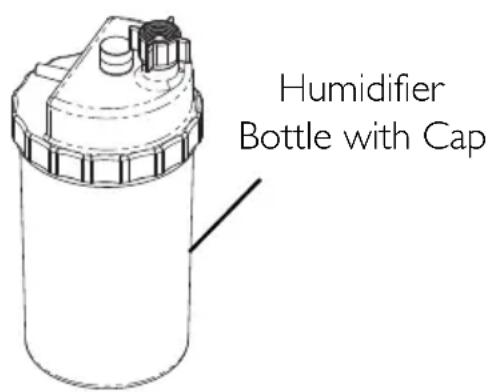
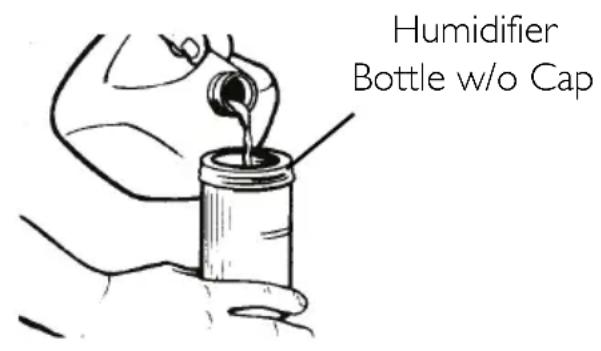
FIGURE 6.1 Filling the Humidifier
- Insert a flathead screwdriver in the plate groove on the top edge of the filter access door and gently pry the filter access door off (FIGURE 6.2).
- Pull up and remove the humidifier bottle adapter (FIGURE 6.2).
- Replace the filter access door and install the air scoop onto the filter access door by inserting the six tabs on the air scoop into the six slots on the sides of the filter access door.
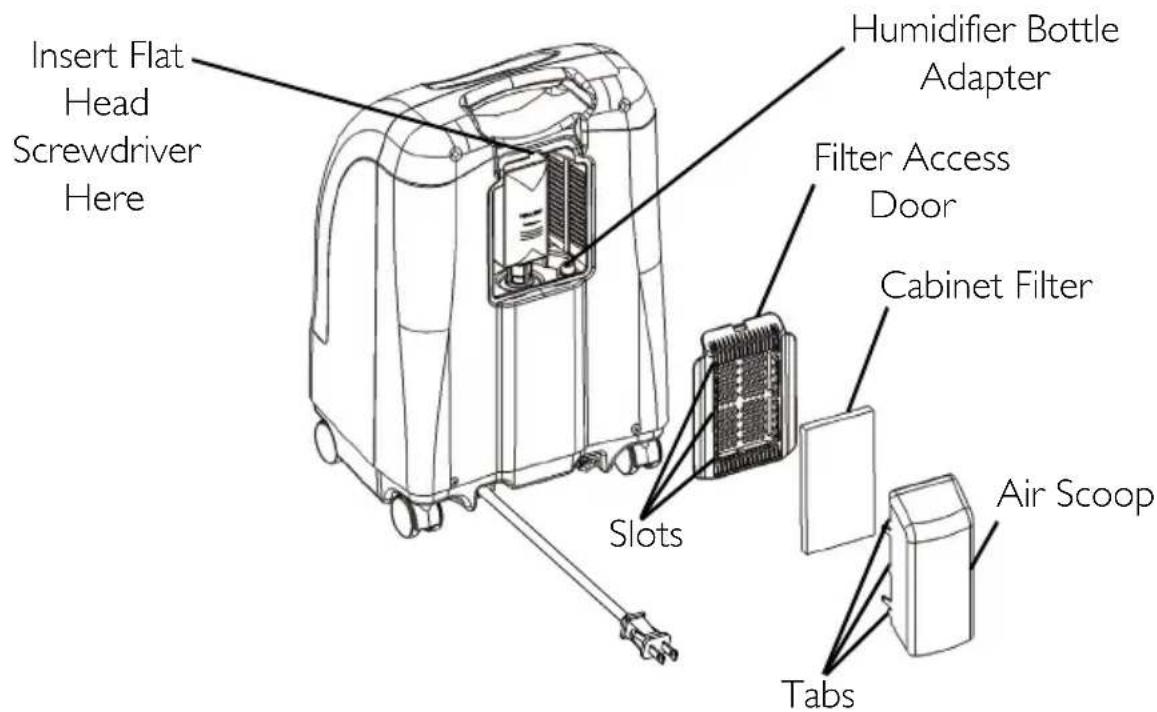
FIGURE 6.2 Humidifer Bottle Adapter
- Attach the humidifier bottle adapter to the humidifier bottle by turning the wing nut on the humidifier bottle counterclockwise until it is securely fastened. See Detail "A" in FIGURE 6.3.
- Place the humidifier bottle/adapter assembly in the humidifier compartment on the concentrator. See Detail "B" in FIGURE 6.3.
- Attach oxygen tubing from the humidifier bottle/adapter assembly to oxygen outlet connector on the concentrator. See Detail "B" in FIGURE 6.3.
- Attach the cannula/patient supply tubing to the humidifier bottle outlet. See Detail "B" in FIGURE 6.3.
- After assembly, ensure that oxygen is flowing through the cannula.
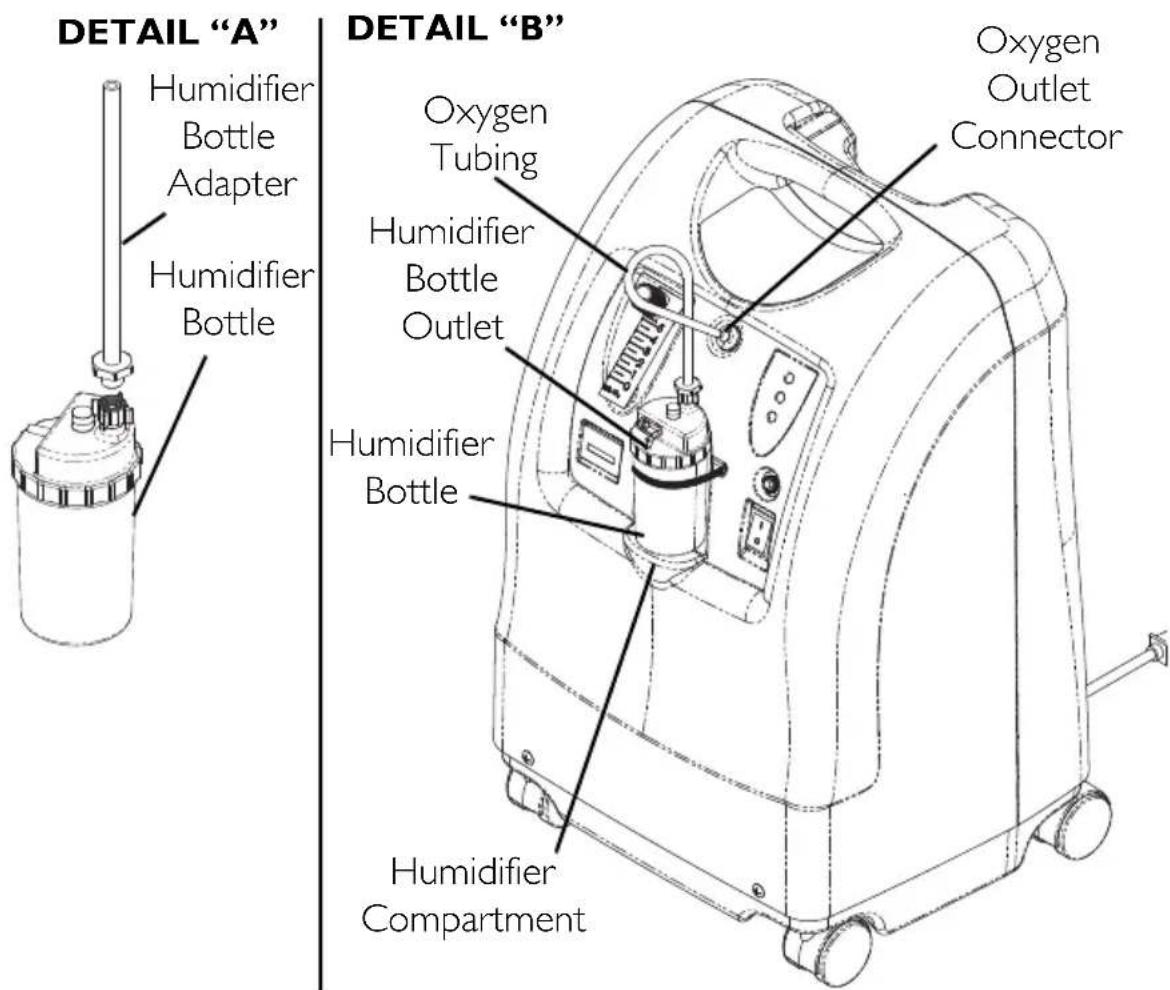
FIGURE 6.3 Humidifier Compartment
Power Switch
NOTE:Forthisprocedure,referto FIGURE 6.4.
- Press power switch to On position. All the panel lights and the audible alarm will come on for one second, indicating that the unit is functioning properly.
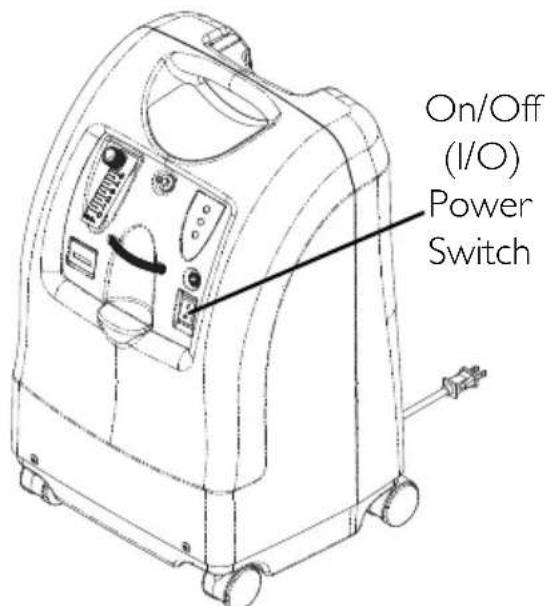
FIGURE 6.4 Power Switch
Flowrate
NOTE: For this procedure, refer to FIGURE 6.5.
NOTE: Take care not to set the flow above RED ring. An oxygen flow greater than 5L / min will decrease the oxygen concentration.
- Turn the flowrate knob to the setting prescribed by your physician or therapist.
WARNING
DO NOT change the L/min setting on the flowmeter unless a change has been prescribed by your physician or therapist.
NOTE: To properly read the flowmeter, locate the prescribed flowrate line on the flowmeter. Next, turn the flow knob until the ball rises to the line. Now, center the ball on the L/min line prescribed.
NOTE: A Potential Obstruction Alert indicates a condition that may be associated with a partial or complete obstruction of oxygen output.
- If the flowrate on the flowmeter ever falls below 0.5L / min more than about one minute, the Potential Obstruction Alert will be triggered. This is a rapid beeping of the audible alarm. Check your tubing or accessories for blocked or kinked tubing or a defective humidifier bottle. After rated flow is restored between 0.5L / min and 0.75L / min , the Potential Obstruction Alert will turn off.
NOTE: The use of some accessories such as the PreciseRx pediatric flowmeter and the HomeFill compressor will deactivate the Potential Obstruction Alert.
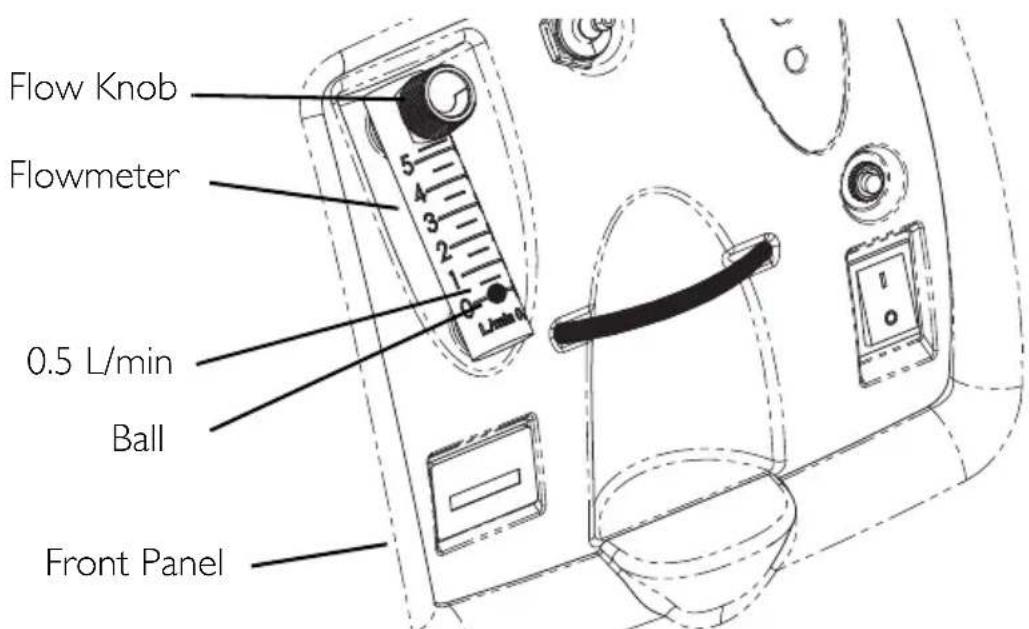
FIGURE 6.5 Flowrate
SensO_2 Oxygen Purity Indicator - Model IRC5PO2AW
This feature monitors the purity of oxygen generated by the oxygen concentrator. If purity falls below factory preset standards, indicator lights on the control panel will illuminate.
Initial Startup of the Concentrator
NOTE: Concentrator may be used during the initial start warm-up time (approximately 30 min.) while waiting for the O_2 purity to reach maximum.
When the unit is turned on, the GREEN light will come on (SYSTEM OK/O₂ greater than 85%). After five minutes, the oxygen sensor will be operating normally and will control the indicator lights depending on oxygen concentration values.
Explanation of Oxygen Purity Indicator Lights - Model IRC5PO2AW
NOTE: For this procedure, refer to FIGURE 6.6 on page 23.
GREEN light (O_2) - Normal Operation.
YELLOW light (A) Immediately call supplier. You may continue to use the concentrator unless instructed otherwise by your supplier. Be certain that backup oxygen is nearby.
RED light (4)- Total unit shutdown. Immediately switch to backup oxygen supply and call supplier.
GREEN light - with YELLOW light flashing - Immediately call supplier. Oxygen sensor malfunctioning; you may continue to use the concentrator.
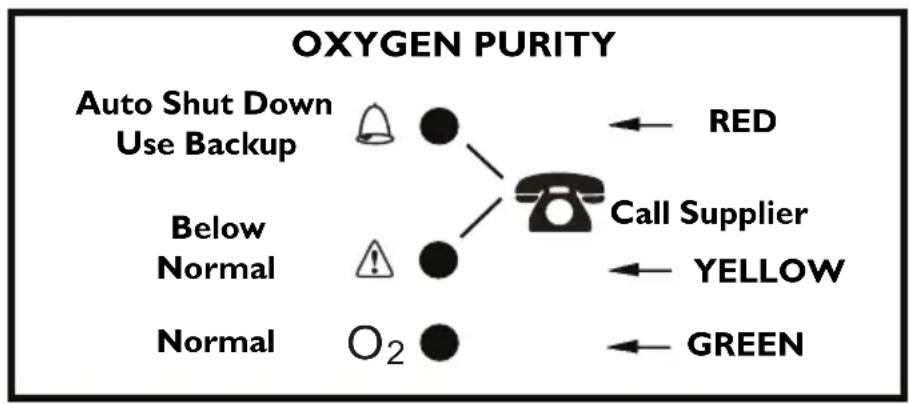
FIGURE 6.6 Explanation of Oxygen Purity Indicator Lights - Model IRC5PO2AW
Explanation of Indicator Lights - Model IRC5PAW
NOTE: For this procedure, refer to FIGURE 6.7.
IRC5PAW Model Indicator Light Explanation
RED light (A) - Total Unit Shut-Down. Immediately switch to a back-up oxygen supply and call supplier.
GREEN light (I/O) - On/Off. System okay.
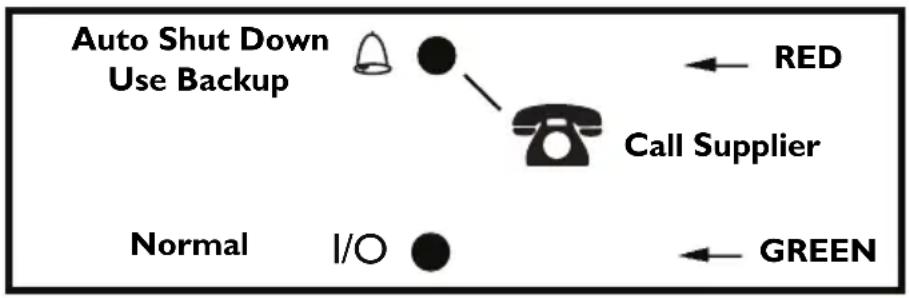
FIGURE 6.7 Explanation of Indicator Lights - Model IRC5PAW
Elapsed Time Meter (Hour Meter)
The hour meter displays the cumulative number of hours the unit has operated.
SECTION 7-MAINTENANCE
WARNING
The Invacare concentrators are specifically designed to minimize routine preventive maintenance. Only qualified personnel should perform preventive maintenance on the concentrator.
Unplug the concentrator when cleaning. To avoid electrical shock, DO NOT remove cabinet.
NOTE: At a minimum, preventive maintenance MUST be performed according to the maintenance record guidelines. In places with high dust or soot levels, maintenance may need to be performed more often. Refer to Preventive Maintenance Record on page 27.
Routine Maintenance
Cleaning the Cabinet Filter
CAUTION
DO NOT operate the concentrator without the filter installed.
NOTE: For this procedure, refer to FIGURE 7.1 on page 26.
NOTE: There is one cabinet filter located on the back of the cabinet.
- Remove the filter and clean as needed.
NOTE: Environmental conditions that may require more frequent inspection and cleaning of the filter include, but are not limited to: high dust, air pollutants, etc.
- Clean the cabinet filter with a vacuum cleaner or wash in warm soapy water and rinse thoroughly.
- Dry the filter thoroughly before reinstallation.
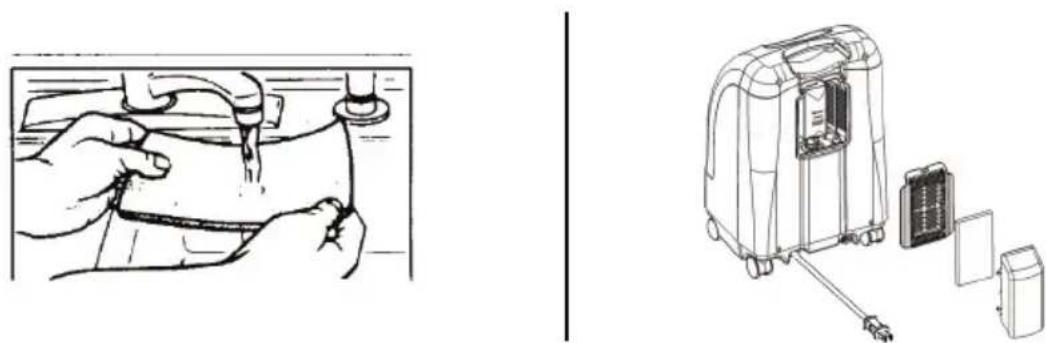
FIGURE 7.1 Cleaning the Cabinet Filter
Cleaning the Cabinet
- Clean the cabinet with a mild household cleaner and non-abrasive cloth or sponge.
Cleaning the Humidifier
NOTE: To clean the oxygen humidifier, follow the instructions provided by the manufacturer. If none are provided, follow these STEPS:
- Clean the humidifier every day.
- Wash it in soapy water and rinse it with a solution of ten parts water and one part vinegar.
- Rinse thoroughly with hot water and refill with distilled water to the level shown on the humidifier.

FIGURE 7.2 Preventive Maintenance Record
MODEL NO. IR C _SERIAL NO.
Yes, you can:
| ON EACH INSPECTION | ||||||||||||||||||
| Record Date of Service | ||||||||||||||||||
| Record Elapsed Hours On Hour Meter | ||||||||||||||||||
| Clean Cabinet Filter(s) | ||||||||||||||||||
| Check Prescribed L/min. Flow Rate | ||||||||||||||||||
| DURING PREVENTIVE MAINTENANCE SCHEDULE, OR BETWEEN PATIENTS | ||||||||||||||||||
| UNITS WITHOUT \( SensO_2 \)-EVERY 4 | 380 HOURS | |||||||||||||||||
| Check Oxygen Concentration | ||||||||||||||||||
| Clean/Replace Cabinet Filter(s) | ||||||||||||||||||
| Check Outlet HEPA Filter* | ||||||||||||||||||
| Check Compressor Inlet Filter* | ||||||||||||||||||
| Check Power Loss Alarm | ||||||||||||||||||
| UNITS WITH \( SensO_2 \)-EVERY 26,280 | HOURS OR 3 YEARS, WHICHEVER COMES FIRST | |||||||||||||||||
| Check Oxygen Concentration | ||||||||||||||||||
| Clean/Replace Cabinet Filter(s) | ||||||||||||||||||
| Check Outlet HEPA Filter* | ||||||||||||||||||
| Check Compressor Inlet Filter* | ||||||||||||||||||
| Check Power Loss Alarm | ||||||||||||||||||
NOTE:
4,380 hours are equivalent to usage 24 hours per day, 7 days per week, for 6 months.
26,280 hours are equivalent to usage 24 hours per day, 7 days per week, for 3 years.
SECTION 8—TROUBLESHOOTING GUIDE
| SYMPTOM: PROBABLE CAUSE: SOLUTION: | ||
| Alarm: Short beeps, long pause | Main Power Loss: 1. Power cord not plugged in. | 1. Insert plug into outlet. |
| Concentrator not operating, power switch On. Beep......Beep...... | 2. No power at outlet. 2. Inspect house circuit breakers or fuses. If problem recurs, use a different outlet. | 3. Push/reset circuit breaker. If problem recurs, call Service Provider. |
| 3. Tripped circuit breaker. | ||
| Alarm: Continuous Concentrator not operating, Power Switch On. Beeeeeeeeep.... | System Failure: 1. Unit overheating due to blocked air intake. | 1a. Remove and clean cabinet filters. 1b. Move oxygen concentrator at least twelve inches away from walls, draperies or furniture. |
| 2. Insufficient power at outlet. | 2. DO NOT use extension cords. Move to another electrical outlet or circuit. | |
| 3. Internal repairs required. | 3. Call Service Provider. | |
| YELLOW or RED light Illuminated. | 1. Low oxygen purity.* 1. Clean or Replace filters. | |
| Alarm: Continuous On RED light only. | 2. Kinked or blocked tubing, cannula or humidifier.* | 2. Inspect for kinks or blockages. Correct, clean or replace item. Once corrected, turn power Off for 60 seconds and then turn power back On. |
| * Only applies to IRC5PO2AW models. | 3. Flowmeter set at 0.5 L/min*. | 3. Check flowmeter is set to 1.0 L/min or more. Refer to Typical Product Parameters on page 13. |
| 4. Unit overheating due to blocked air intake. | 4a. Remove and clean cabinet filters. 4b. Move concentrator at least twelve inches from walls, draperies, and furniture. | |
| 5. Insufficient power at outlet. | 5. DO NOT use extension cords. Move to another electrical outlet or circuit. | |
| 6. Internal repairs required. | 6. Call Service Provider. | |
| GREEN light with YELLOW Light Flashing. | 1. Internal repairs required. | 1. Call Service Provider. |
| Alarm:RapidBeep....Beep...Beep...Beep | Potential ObstructionAlertIa. Possible internal obstruction in the oxygen path.Ib. Kinked or blocked tubing, cannula or humidifier. | 1. Inspect for kinks or blockages. Correct, clean or replace item. Once corrected, turn power Off for 60 seconds and then turn power back ON. |
| 2. Flowmeter set at 0.5 L/min. | 2. Flowrates less than 1 L/min are not recommend.NOTE: The use of the pediatric flowmeter will deactivate the Potential Obstruction Alert. | |
SECTION 9-OPTIONAL ACCESSORIES
The following optional accessories are also available:
- Standard Adult Nasal Cannula, 2.1 m (7 feet)- M3120
- Standard Humidifier - M5120
- PreciseRX™ Pediatric Humidifier/Flowmeter Accessory - IRCPF16AW
- HomeFill home oxygen compressor - IOH200AW
RECYCLING INFORMATION
This product has been supplied from an environmentally aware manufacturer that complies with the Waste Electrical and Electronic Equipment (WEEE) Directive 2002/96/CE.
This product may contain substances that could be harmful to the environment if disposed of in places (landfills) that are not appropriate according to legislation.
The 'crossed out wheelie bin' symbol is placed on this product to encourage you to recycle wherever possible.

Please be environmentally responsible and recycle this product through your recycling facility at its end of life.
SECTION 2-CARACTERISTIQUES
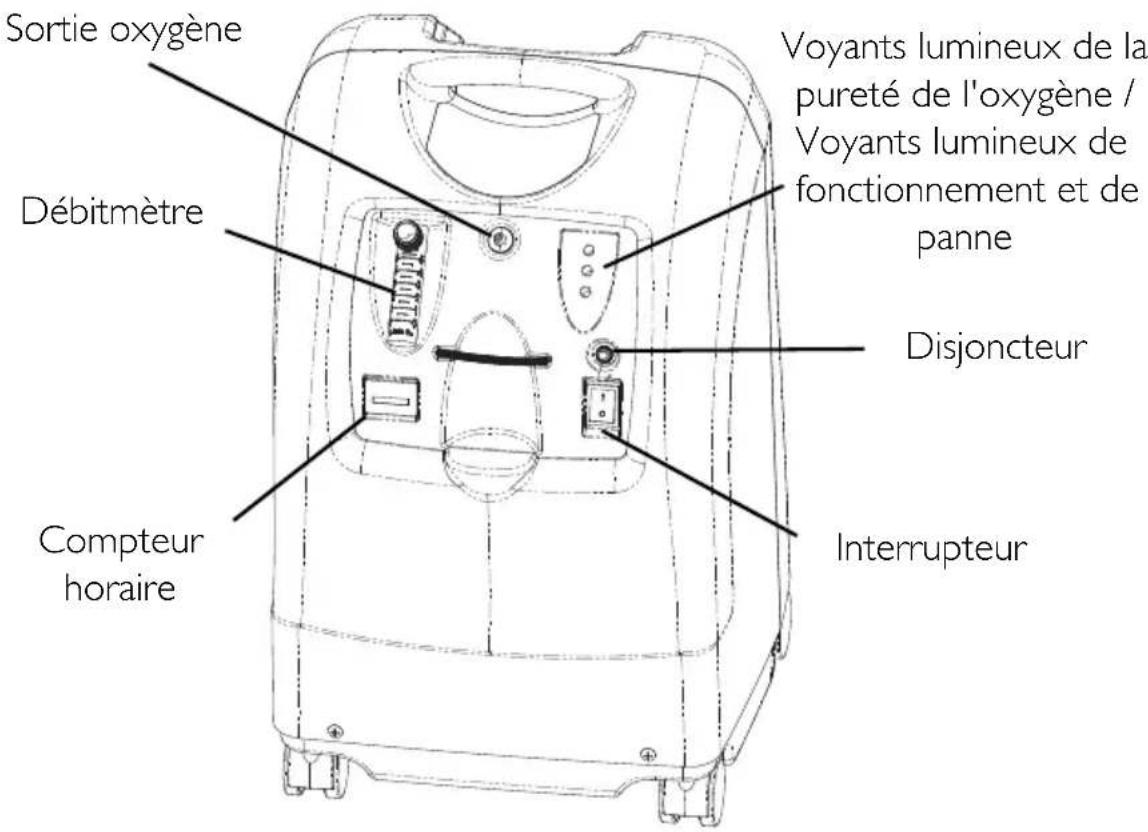
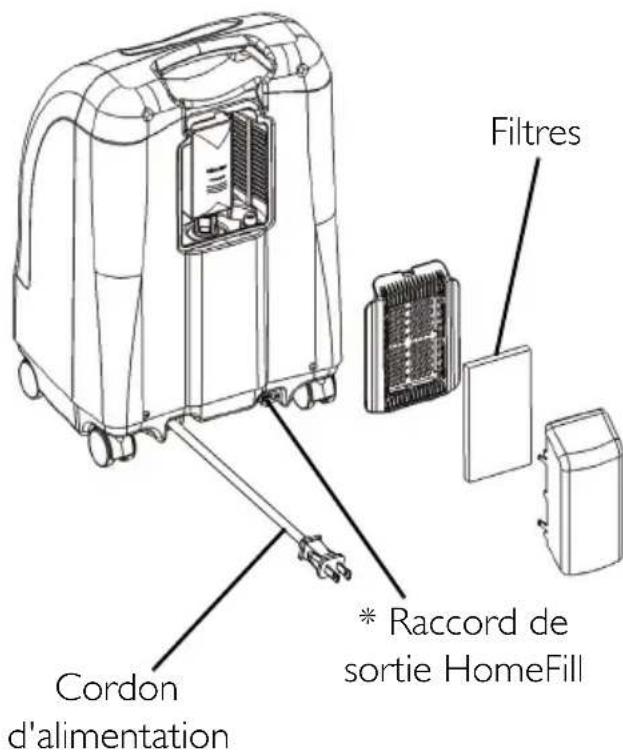
VUE ARRIÈRE
Description Technique
this is a good idea. It's also a good idea to see that the adverb y eligible y lesiones ficas o la muerte.
PRECAUCION
WAARSCHUWING ACCESSOIRES
SECTIE 8-GIDS VOOR PROBLEEMOPLOSING ....... 153
SECTIE 9-OPTIONE ACCESSOIRES 156
RECYCLINGINFORMATIE 157
KLANTENSERVICE- EN GARANTIE-INFORMATIE 222
SPECIAL OPMERKINGEN
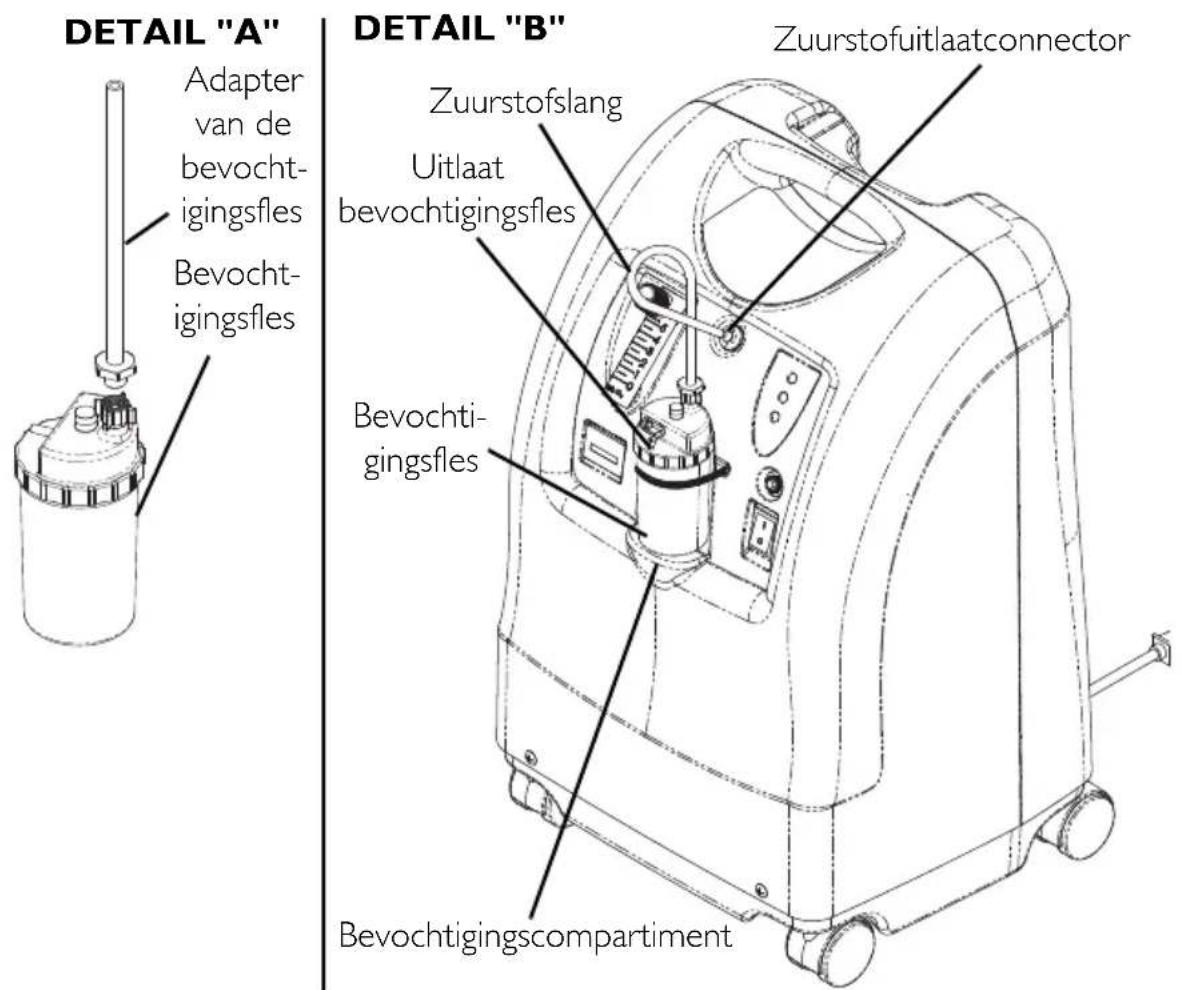
AFBEELDING 6.3 Bevochtigingscompartment
Aan/uitschakelaar
SECTIE 8—GIDS VOOR PROBLEMOPLOSSING
SECTIE 9-OPTIONE ACCESSOIRES
E^ K T E I R C5P02A W
E^ K T E I R C5P A W
APXEIO IPOAHINTIKHCSYNTHPHSEHCS
CUSTOMER SERVICE AND WARRANTY INFORMATION
Terms and conditions of the warranty are part of the general terms and conditions particular to the individual countries in which this product is sold.
SERVICE APRÉS-VENTE ET INFORMATIONS DE GARANTIE
Invacare Ireland Ltd, Unit 5 Seatown Business Campus • Seatown Road, Swords,
County Dublin - Ireland • Tel: (353) 1810 7084 • Fax: (353) 1810 7085 •
ireland@invacare.com • www.invacare.ie
Italia:
Invacare Mecc San s.r.l., Via dei Pini 62, I-36016 Thiene (VI) • Tel: (39) 0445 38 00 59 •
Fax: (39) 0445 38 00 34 • italia@invacare.com • www.invacare.it
Nederland:
Invacare BV, Celsiusstraat 46, NL-6716 BZ Ede • Tel: (31) (0)318 695 757 •
Fax: (31) (0)318 695 758 • nederland@invacare.com • csede@invacare.com •
www.invacare.nl
Norge:
Invacare AS, Grensesvingen 9, Postboks 6230, Etterstad, N-0603 Oslo
Tel: (47) (0)22 57 95 00 • Fax: (47) (0)22 57 95 01 • norway@invacare.com •
island@invacare.com • www.invacare.no
Österreich:
Invacare Austria GmbH, Herzog Odilostrasse 101, A-5310 Mondsee
Tel: (43) 6232 5535 0 • Fax: (43) 6232 5535 4 • info@invacare-austria.com •
www.invacare.at
Sverige & Suomi:
Invacare AB, Fagerstagatan 9, S-163 91 Spånga • Tel: (46) (0)87617090 •
Fax: (46) (0)8761 81 08 • sweden@invacare.com • finland@invacare.com •
www.invacare.se
Switzerland:
Invacare AG, Benkenstrasse 260, CH-4108 Witterswil Tel: (41) (0)61 487 70 80
Fax: (41) (0)61 487 70 81 • switzerland@invacare.com • www.invacare.ch
United Kingdom:
Invacare Limited, Pencoed Technology Park, Pencoed, Bridgend CF35 5HZ
Tel: (44) (0) 1656 776222 • Fax: (44) (0) 1656 776220 • UK@invacare.com •
www.invacare.co.uk
Portugal:
Invacare Rehabilitation
Equipment (Suzhou) Co., Ltd.
No. 435 Xieyu Street, SIP,
Suzhou, Jiangsu, PRC
215026
Tel: 86-512-62586180
Fax: 86-512-62586167


0434
© 2012 Invacare Corporation. All rights reserved. Republication, duplication or modification in whole or in part is prohibited without prior written permission from Invacare. Trademarks are identified by ^TM and ^® . All trademarks are owned by or licensed to Invacare Corporation or its subsidiaries unless otherwise noted.