DS1532 - Electronic dartboard CRIVIT - Free user manual and instructions
Find the device manual for free DS1532 CRIVIT in PDF.


| Product type | Electronic dartboard game |
| Brand | CRIVIT |
| Model | DS-1532 |
| Dimensions (L x H x D) | approx. 420 x 517 x 26 mm |
| Power supply | 9 V DC, 300 mA (via included power adapter) |
| Power adapter | Input 230 V / 50 Hz, Output 9 V = 300 mA |
| Protection classes | Device: class III, Adapter: class II |
| Number of games | 27 (G01 to G27) |
| Number of players | 1 to 8, team play possible (2v2, 3v3, 4v4) |
| Special game modes | Double In / Double Out, Handicap, Cyber Match (virtual opponent) |
| Display | LED screen with scores, segments and indicators |
| Automatic shutdown | After 10 minutes of inactivity (standby mode) |
| Delivery contents | 1 target, 12 darts (shafts, barrels, flights), 112 soft tips, 1 adapter, 4 screws & wall plugs, 1 throw line, 1 drilling template, 1 instruction manual |
| Allowed tip type | Only soft tips |
| Safety | Do not use with metal tips; do not mount on doors; keep away from children under 14 years |
| Use | Indoor only, throwing distance 2.37 m, bullseye height 1.73 m |
| Maintenance | Clean with a damp cloth, disconnect before cleaning |
| Warranty | 3 years |
| Recommended spare parts | Soft tips and original power adapter |
| Estimated weight | Approximately 2.5 kg |
Frequently Asked Questions - DS1532 CRIVIT
User questions about DS1532 CRIVIT
0 question about this device. Answer the ones you know or ask your own.
Ask a new question about this device
Download the instructions for your Electronic dartboard in PDF format for free! Find your manual DS1532 - CRIVIT and take your electronic device back in hand. On this page are published all the documents necessary for the use of your device. DS1532 by CRIVIT.
USER MANUAL DS1532 CRIVIT
Playing and user instructions
Before reading, fold out the ilustration page and go to know of of the functions of your cell.
C3 Instructions and Safety Notice
Page 51
Page 66
DELTA-SPORT HANDELSKONIORGMH
Ww
02397 Hnrberg
Vener 11:2012
In Spes 105.532

IAN75955IAN75955
()()
TNL0
DE AT CH
Lieferumfang 6
Technische Daten 6
Scope of Delivery 66
Technical data 66
Intended use 66
Safety instructions 66-67
Safety instructions power adapter ... 67
Assembly instructions 67
Assembly of the dartboard 67
Assembly of the darts 67
Name and function of parts 68
Operation of the dartboard 68-70
Switching on and off 68
Function keys 68-69
Game selection and list of the
difficulty levels (Table 1) 70
Game rules 71
Games 71-78
Troubleshooting 78-79
Maintenance, care, storage 79
Disposal instructions 79
3 Years Warranty 79
G08 Round the Clock (5, 10, 15, 20)
G09 Round the Clock-Double (205, 210, 215, 220)
G10 Round the Clock-Triple (305, 310, 315, 320)
(3, 5, 7, 9, 11, 13, 15, 17, 19, 21)
(U03, U05, U07, U09, U11, U13, U15, U17, U19, U21)
(H03, H05, H07, H09, H11, H13, H15, H17, H19, H21)
(3,5,7,9,11,13,15,17,19,21)
G19 AI five (51, 61, 71, 81, 91)
G26 Big Little-Hard (H03, H05, H07, H09, H11, H13, H15, H17, H19, H21)
G08 Round the Clock (5, 10, 15, 20)
Option 10: segments 1 - 10
Option 15 : segments 1 - 15
Option 20 : segments 1 - 20
G09 Round the Clock-double (205, 210, 215, 220)
(3, 5, 7, 9, 11, 13, 15, 17, 19, 21)
G12 Legs under (U03, U05, U07, U09, U11, U13, U15, U17, U19, U21)
G14 High Score (H03, H05, H07, H09, H11, H13, H15, H17, H19, H21)
(3, 5, 7, 9, 11, 13, 15, 17, 19, 21)
G19 AI five (51, 61, 71, 81, 91)
(3, 5, 7, 9, 11, 13, 15, 17, 19, 21)
G26 Big Little-Hard (H03, H05, H07, H09, H11, H13, H15, H17, H19, H21)
Se先进技术 are used to improve the performance of the system.
20, 19, 18, 17, 16, 15 e infine Bullseye.
Bullseye, 15, 16, 17, 18, 19, 20.
G08 Round the Clock (5, 10, 15, 20)
G09 Round the Clock-double (205, 210, 215, 220)
(3, 5, 7, 9, 11, 13, 15, 17, 19, 21)
G12 Legs under (U03, U05, U07, U09, U11, U13, U15, U17, U19, U21)
G14 High Score (H03, H05, H07, H09, H11, H13, H15, H17, H19, H21)
(3,5,7,9,11,13,15,17,19,21)
G19 AI five (51, 61, 71, 81, 91)
(3,5,7,9,11,13,15,17,19,21)
G26 Big Little-Hard (H03, H05, H07, H09, H11, H13, H15, H17, H19, H21)
De Dart Finish-function:
G08 Round the Clock (5, 10, 15, 20)
G09 Round the Clock-double (205, 210, 215, 220)
G11 Legs over (3, 5, 7, 9, 11, 13, 15, 17, 19, 21)
G12 Legs under (U03, U05, U07, U09, U11, U13, U15, U17, U19, U21)
G14 High Score (H03, H05, H07, H09, H11, H13, H15, H17, H19, H21)
(3, 5, 7, 9, 11, 13, 15, 17, 19, 21)
G19 AI five (51, 61, 71, 81, 91)
G25 Big Little-Simple (3, 5, 7, 9, 11, 13, 15, 17, 19, 21)
G26 Big Little-Hard (H03, H05, H07, H09, H11, H13, H15, H17, H19, H21)
Congratulations on purchasing this high-quality product. Be sure to familiarise yourself with the assembly instructions prior to use. Please take the time to carefully read through the following assembly instructions and safety notes. Only use the product as described and for the intended use. Please retain these instructions for future reference and ensure that they are passed on to any third party.
Scope of Delivery
1 x playing and user instructions
1 x electronic dartboard
12x shaft
12x grip
12 x flight (each 3 x in blue, green, red and black)
112 x soft tips (tip)
1x poweradapter
4× screws&wall plug
1x scratch line
1 x drilling template
Technical data
Electronic Dartboard
Model: DS-1532
Dimensions:
approx. 420 × 517 × 26mm (W x H x D)
Power rating: 9V DC = 300mA
= Safety class III
Power adapter
Model: EU: YJS003A-0900300G
Model: UK: YJS003A-0900300B
Input: 230V/50Hz
Output: 9V = 300mA
= Safety class II
Intended use
This dartboard product is a sports item and is not suitable for children under 14-years-old! The item contains small parts which could be swallowed by children and, as sports equipment, it requires pin-point accuracy and concentration, as well as a high level of motor skills.
The item has been designed for private use indoors, and is not intended for commercial use or for use outdoors. This item is to be used exclusively with darts fitted with soft tips. If used with darts fitted with steel tips this will cause irreparable damage.
Safety instructions
Danger of injury!
- This item is not suitable for use by people (including children) with limited physical, sensory or mental abilities or with a lack of experience and/or a lack of knowledge, unless they are supervised by a person responsible for their safety, or receive instruction from a responsible person on how to use the apparatus.
Children should be supervised to ensure that they do not play with the item. - Do not throw or aim the darts at people or animals.
- When in use make sure that the dartboard is positioned or arranged in such a way, that as far as possible, people will not wander between the dartboard and the player.
- Do not attach the dartboard to a door!
- Do not use metal tips!
Avoiding material damage!
- Use exclusively proper original replacement tips, in order to avoid the darts ricocheting off the dartboard. We strongly recommend you do not use long tips for electronic dartboards. They quickly buckle and easily break (Removing broken-off tips from the dartboard - Troubleshooting, page 78).
- Do not allow the item to be exposed to extreme weather conditions and temperatures.
- Protect the item from moisture and dampness. The electronics could be damaged.
Safety instructions power adapter
ATTENTION
Important information for use of the adapter!
Note: The device gets warm during normal use.
- Only use the adapter in connection with the Dartboard DS-1532.
- Only use the supplied adapter!
- Only use original spare parts in the event of a defect!
- First unplug the adapter from the wall socket before disconnecting the adapter from the dartboard.
- The adapter is suitable for indoor use only. Keep away from moisture.
- If the housing or the power lead of the device is damaged, discontinue using the adapter.
- Disconnect the device from the mains if not used over a longer period of time.
-
The mains output line is not allowed to be short-circuited.
-
The external connection cable from this transformer cannot be substituted; if the cable is damaged, the transformer will have to be scrapped.
Assembly instructions
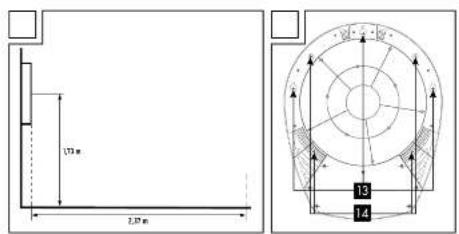
Assembly of the dartboard (Illustration B, C)
- Select a suitable position with approx. 3m free space around it.
- The 'scratch line' must be at a distance of 2.37m from the dartboard. Fix the dart board to the wall so that the centre of the Bullseye is at a height of 1.73m above the ground.
- Using the enclosed drilling template, mark the respective drill holes with a pencil. The markings "+" indicate the direction to mount the dartboard in. The markings "O" indicate openings on the dartboard for permanent wall mounting. Mount the dartboard using either the mounting device (3 screws) or permanent wall mounting (4 screws). The cross at the centre of the drill template indicates the position of the bullseye on the dartboard. Then mount the dartboard using the included screws and wall plugs.
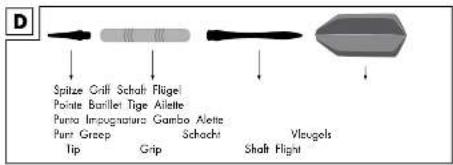
Assembly of the darts (Illustration D)
Screw the tip and shaft together as indicated into the grip and insert the unfolded flight into the cross-slots.
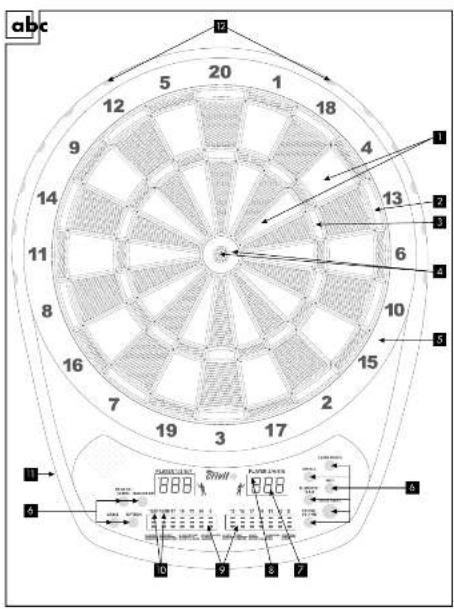
Name and function of parts (Illustration A, C)
Single: Score as indicated
Double: Number of points × 2
3 Triple: Number of points × 3
4 Bullseye: Outer ring is worth 25 points; the inner ring is worth 50 points
5 Catcher: Edge throw, no point
6 Function keys (see Chapter function keys, page 68 - 69)
Results display: Shows in rotation the target / information, hit, total points result, and which player's turn it is
8 Dart indicator: Shows how many throws (darts) the player still has left
9 Scoreboard
Display for Double In (DI), Double Out (DO) and for the game Count Down
Plug for power adapter
Dart holder
3 Bracket
14 Drill holes
Operation of the dartboard Switching on and off
The article is provided with an automatic shut off.
To switch on the article connect the power adapter to the socket and the dartboard. If the article is not used for longer than 10 minutes, the display and systems switch off automatically (standby mode). When the power adapter is plugged in, the article "remembers" the last score. Pressing any button will switch the article on again. Remove the plug to shutdown the article completely.
Function keys (Illustration A)
1 GAME
Press this button to choose a game. On the left results display the game displayed (G01-27, see table 1, page 70); on the right results display the first option of the game is displayed.
2 OPTION
Press this key to select various options within a game (see table 1, page 70).
3 PLAYER - SCORE
Press this button before starting the game to select the number of players.
During a game the score of all players is displayed by pressing the button.
Pressing 1x shows players 1 and 2
(3 red lights on the left scoreboard);
pressing 2x shows players 3 and 4
(6 red lights on the left scoreboard);
pressing 3x shows players 5 and 6
(9 red lights on the left scoreboard);
pressing 4x shows players 7 and 8
(12 red lights on the left scoreboard).
4 HANDICAP
Press this button before starting the game to select the level of difficulty / options for the different players.
Example:
You want to play the game G01 with 3 players (all with a different handicap).
Press the GAME button repeatedly until the game G01 is displayed on the left results display.
Select 3 players by pressing the PLAYER / SCORE button 1x.
By pressing the HANDICAP button 2x set the handicap for player 3 from 101 to 301. Then press the PLAYER / SCORE button 6x to get the setting for player 1 (players 4-8 are skipped). Press the HANDICAP button 1x, to set the handicap of player 1 from 101 to 201. Press the PLAYER / SCORE button 1x to select player 2 and press the HANDICAP button 5x to set the handicap of player 2 from 101 to 601. Press the START/NEXT to start the game.

ELIMINATE / TEAM
Press this button before starting the game for playing in teams (2 vs. 2, 3 vs. 3, 4 vs. 4). During a game the last throw of a player is deleted by pressing the button.

CYBER MATCH
Press this button to play a game against a virtual opponent. By repeatedly pressing the button adjust the skill level of your virtual opponent (C1 = hardest opponent - C5 = easiest opponent).

DOUBLE
Press this key to enable the function Double In or Double Out for game G01.
Press 1x: Double In
(red light on the left scoreboard, 10)
Press 2x: Double Out
(red light on the left scoreboard, 10)
Press 3x: with Double In, Double Out
(two red lights on the left scoreboard, 10)
Press 4x: without double In, double Out
(no red lights)

START/NEXT
Press this button to start a game or to move to the next player during a game.

SOUND / VOLUME
Press this button to set the sound level. There are 7 levels between "SOUND/VOLUME off" and maximum volume.

MISS
Press this button to reduce the number of the remaining darts, when the dartboard is missed.
Game selection and list of the difficulty levels (Table 1)
Each player throws three darts per turn. The rounds of the respective players are displayed in the two result fields. The three little dots over the score indicate how many throws for the round are still left. After the end of a round, the dartboard is automatically set to "hold". By pressing the START/NEXT during the game the next player is selected and the game continues.
Note: The easiest way to remove darts from the board is to pull them out with a slight rotation to the right.
Games
G01 Count Down (101, 201, 301, 401, 501, 601, 701, 801, 901)
In this game the score of each darts per turn (3 throws per player) from (initial) score is (e.g. 301 or 501, etc.) deducted. The player who first reaches zero (and does so exactly) wins the game.
Throwing over:
If a player's score throws over the score necessary for exactly playing down to zero, the round is not counted. The score is reset to that of the previous round. In order to make the game more challenging, the function key DOUBLE can be used. With this feature, additional difficulties for the beginning and the end of the game are set.
Double In: The game starts only when a double is thrown. The previous scores are not counted.
Double Out: To finish the game, the player must get a double which reduces the score to exactly zero. If a 1 remains after the throw, this is considered thrown over.
Double In/Out: The player must start and end the game with a double.
The dart finish-function:
When played down the score reaches the threshold of 180, in this mode it is possible to end the game with three darts. The dartboard calculates the necessary throw results and shows them separately for each dart. If the player misses the displayed target throw but ca still end the game with the two remaining darts, the dartboard now calculates the required throw for the new results. Single, double or triple is indicated by a sign in front of the numbers. Single appears with a low bar, for example ( ___ 18^ ) . Double displays with two bars ( ___ 18^ ) . Triple with 3 bars ( ___ 18^ ) .
Single Bullseye will be shown with the value "25".
G02 Simple Cricket (000, 020, 025)
In this game is played solely with the numbers from 15 to 20 and the Bullseye. The first player to hit all the segments three times is the winner. In order to achieve doubles (one hit counts twice) and triples (one hit counts three times) can be used.
Option 000: the players can hit the segments 15, 16, 17, 18, 19, 20 and the Bullseye in any order.
Option 020: the player must hit the segments in the following order: 20, 19, 18, 17, 16, 15 and finally the Bullseye.
Option 025: the player must hit the segments in the following order: Bullseye, 15, 16, 17, 18, 19, 20.
G03 Scram Cricket (A00 - only for two players)
Also in this game, segments 15 - 20 and the Bullseye are scored. The game consists of two rounds. In the first round, one player tries to close the segments (by three hits). The other player tries to hit the not closed segments as often as possible in order to collect points. Once a segment is closed, the second player to get any points here. When all the segments are closed by player 1, round 1 is completed. Now round two begins and the players swap their roles. Player two tries to close all the segments as quickly as possible and player 1 tries to accumulate points. The game ends when player 2 has closed all the segments. The player with the higher score wins.
G04 Score Cricket (E00, E20, E25)
Also in Score Cricket, only segments 15 - 20 and the Bullseye are scored. E00 - the segments can be hit in any order. E20 - the player must hit the segments in the order 20 - 15 and finally the Bullseye. E25 - the order in which the segments have to be taken is: Bullseye and then 15 - 20. Each segment is "open" when it has been hit three times by one player. If a segment has been hit three times by all players, it is "closed". The player, who "opens" a certain number, then "owns" the number and can continue to collect points at this number until all the players have hit the number three times, thus closing the segment. When all the segments closed the player with the highest score wins.
G05 Cut Throat Cricket (C00, C20, C25)
Also in Cut Throat Cricket, only segments 15 - 20 and the Bullseye are scored.
C00 - the segments can be hit in any order.
C20 - the player must hit the segments in the order 20 - 15 and finally the Bullseye.
C25 - the order in which the segments have to be taken is: Bullseye and then 15 - 20.
After hitting a segment three times this "opens" it and points in this segment can be collected until all players have hit this segment three times. The points that a player throws are credited to the other players. The objective is a pass the other players as many points possible. When all the players have closed all the segments, the player with the lowest score wins.
So the best strategy here is to close all the numbers as fast as possible to prevent the opponent from gaining points for you. At the same time this gives you the chance of landing points for the other players.
Also in Double Score Cricket, only segments 15 - 20 and the Bullseye are scored. d00 - the segments can be hit in any order. d20 - the player must hit the segments in the order 20 - 15 and finally the Bullseye. d25 - the order in which the segments have to be taken is: Bullseye and then 15 - 20. The game continues like "Score Cricket" except that each player must first hit the double zone of each segment before all the other hits count.
G07 Shove-a-penny Cricket (P00, P20, P25 - Two players and up)
Also in Shove-a-penny Cricket, only segments 15 - 20 and the Bullseye are scored. P00 - the segments can be hit in any order P20 - the player must hit the segments in the order 20 - 15 and finally the Bullseye P25 - the order in which the segments have to be taken is: Bullseye and then 15 - 20 Goal of the game is for each player to fill all three bars of each segment. If the player ends the segment of a round with hits in the double and triple zone and it is counted three times, the opponent is credited one bar. In the next round, this segment is closed for the player and the opponent receives no further bars.
G08 Round the Clock (5, 10, 15, 20)
In this game you must hit the following segments:
Option 5: segments 1-5
Option 10: segments 1-10
Option 15: segments 1-15
Option 20: segments 1-20
The player must hit segments displayed by the machine. If the segment was hit, the next segment is displayed and the machine comments with a "Yes" or "No". The first player to hit all the segments is the winner.
G09 Round the Clock-Double (205, 210, 215, 220)
In this game, only the double-zones of the following segments are played:
Option 205: segments 1-5
Option 210: segments 1-10
Option 215: segments 1-15
Option 220: Segments 1-20
The player must hit the double-zone of the segments displayed by the machine. If the segment was hit, the next segment is displayed and the machine comments with a "Yes" or "No". The first player to hit all the segments is the winner.
G10 Round the Clock-Triple (305, 310, 315, 320)
In this game, only the triple-zones of the following segments are played:
Option 305: segments 1-5
Option 310: segments 1-10
Option 315: segments 1-15
Option 320: segments 1-20
The player must hit the triple-zone of the segments displayed by the machine. If the segment was hit, the next segment is displayed and the machine comments with a "Yes" or "No". The first player to hit all the segments is the winner.
G11 Legs over
(3, 5, 7, 9, 11, 13, 15, 17, 19, 21)
Option: 3, 5, 7, 9, 11, 13, 15, 17, 19 or 21 represent the number of lives of a player. Each player starts with the set number of lives available. At the start of the game the machine shows a score on the display for the first player. The player must now try with his three throws to reach or exceed the appropriate score. Should he succeed, he does not lose a life. The following players must attempt to reach a higher score than the previous player. Should they not succeed, they lose a life. The points can be deleted with the "START" button or three misses resulting in a life-point deduction. Once a player has no more life points, he retires. The player, who has the most life points remaining, wins.
G12 Legs under (U03, U05, U07, U09, U11, U13, U15, U17, U19, U21)
Option: U03, U05, U07, U09, U11, U13, U15, U17, U19 or U21 represents the number of lives of a player.
Each player starts with the set number of lives available. At the start of the game the machine shows a score on the display for the first player. The player must now try with his three throws to reach a lower score, should he not succeed he loses a life. The score 0 also results in a life-point deduction.
The following players must attempt to reach a lower score than the previous player; otherwise they lose a life-point. The points can be deleted with the "START" button or three misses, resulting in a life-point deduction. Pressing the "ELIMINATE/TEAM" button deletes the score in the machine and 60 points are added. By pressing the "MISS" button, the machine also adds 60 points. Once a player has no more life points, he retires. The player, who has the most life points remaining, wins.
G13 Count up (100, 200, 300, 400, 500, 600, 700, 800, 900)
You can select the following target numbers: 100, 200, 300, 400, 500, 600, 700, 800, 900. In this game the score hit by each dart is counted. The player who first reaches or exceeds the pre-selected number of points is the winner.
G14 High Score (H03, H05, H07, H09, H11, H13, H15, H17, H19, H21)
Option: H03, H05, H07, H09, H11, H13, H015, H17, H19, H21 specifies the number of rounds. Each player is allowed to throw three darts per round.
The aim of this game is the reach the highest total. The player, who has reached the highest total at the end of the specified number of rounds, wins.
G15 Shoot out
(-03, -05, -07, -09, -11, -13, -15, -17, -19, -21)
Option: -03, -05, -07, -09, -11, -13, -15, -17, -19 or -21 represents the number of lives a player.
A segment appears randomly on the display that must be hit within 10 seconds hitting any other segment is not counted. If a valid segment was hit within the time that a life is subtracted. The winner is the first player to have no remaining lives.
G16 Killer
(3, 5, 7, 9, 11, 13, 15, 17, 19, 21)
Option: 3, 5, 7, 9, 11, 13, 15, 17, 19, 21 represents the number of lives of a player. Each player starts with the set number of lives available. Once the game starts, the display shows "SEL" (Select). The player can choose his points segment by throwing the darts. The first segment is fixed as the points segment. Then press the "NEXT" button and the next player can choose his points of the segment. Once all players have chosen their points segments, the game begins.
Only after a player has made his points segment, can he become the "killer". Once a player who has become a "killer" hits the points segment of another player, that player then loses a life. Should a player who has the status of "killer" hit his own points sector, he forfeits his "killer" status and he loses a life point. To return to be a "killer" the player must hit his original points segment again. The winner is the last player with life points.
The killer status is displayed as "I-"
G17 Killer-Double (203, 205, 207, 209, 211, 213, 215, 217, 219, 221)
Option: 203, 205, 207, 209, 211, 213, 215, 217, 219, 221 represents the number of lives a player. Each player starts with the set number of lives available. Once the game starts, the display shows "SEL" (Select). The players can now play as in the game "killer" and select their respective points segment. Only after a player has hit his points segment in the double ring can he become the "killer". Once a player who has become a "killer" hits the points segment of another player, that player then loses a life. Should a player who has the status of "killer" hit his own points sector, then he forfeits his "killer" status and he loses a life point. To return to be a "killer" the player must hit the double zone of his original points segment. The winner is the last player with life points.
The killer status is displayed as "I-"
G18 Killer-Triple (303, 305, 307, 309, 311, 313, 315, 317, 319, 321)
Option: 303, 305, 307, 309, 311, 313, 315, 317, 319, 321 represents the number of lives a player. Each player starts with the set number of lives available. Once the game starts, the display shows "SEL" (Select). The players can now play as in the game "killer" and select their respective points segment.
Only after a player has made his points segment in the triple ring, can he become the "killer". Once a player who has become a "killer" hits the points segment of another player, that player then loses a life. Should a player who has the status of "killer" hit his own points sector, he forfeits his "killer" status and he loses a life point. To return to be a "killer" the player must hit the triple zone of his original points segment. The winner is the last player with life points. The killer status is displayed as "1-".
G19 AI five (51, 61, 71, 81, 91)
The aim of the game is to reduce in each round the pre-set result of 51, 61, 71, 81 or 91. In order to achieve a result, the total points for each round must be divisible by 5. For example, if a player scored 20 points in a round, the result is 4(20 ÷ 5 = 4) . The results for each round that are not divisible by 5 are not counted. If any of the 3 darts miss, this dart is not counted. First player to reach or exceed the pre-selected number of points is the winner.
G20 Shanghai (1, 5, 10, 15)
Option 1: The segments must be hit in order from 1 - 20 and then the bullseye.
Option 5: The segments must be hit in order from 5 - 20 and then the bullseye.
Option 10: The segments must be hit in order from 10 - 20 and then the bullseye.
Option 15: The segments must be hit in order from 15 - 20 and then the bullseye.
Only hits in the correct order count. The players have only one opportunity to hit the particular segment. If a number is missed, there are no points, and it continues with the next number. The winner is the player who could collect the most points.
G21 Shanghai-Double (201, 205, 210, 215)
Option 201: The segments must be hit in order, 1 - 20, in the double ring, and then the bullseye.
Option 205: The segments must be hit in order, 5 - 20, in the double ring, and then the bullseye.
Option 210: The segments must be hit in order, 10 - 20, in the double ring, and then the bullseye.
Option 215: The segments must be hit in order, 15 - 20, in the double ring, and then the bullseye.
Only hits within the respective double ring count, singles or triples aren't counted. The player with the highest score wins.
G22 Shanghai-Triple (301, 305, 310, 315)
Option 301: The segments must be hit in order from 1 - 20 in the triple zone.
Option 305: The segments must be hit in order from 5 - 20 in the triple zone.
Option 310: The segments must be hit in order from 10 - 20 in the triple zone.
Option 315: The segments must be hit in order from 15 - 20 in the triple zone.
Also this game works like Shanghai G20, but only hits in the triple-zone of each segment are counted. Hits in the single zone or in the double zone are not counted. The winner is the player with the highest score.
G23 Golf (10, 20, 30, 40, 50, 60, 70, 80, 90)
The players aim in successive rounds at the target fields of the numbers 1-18 and must hit them (Round 1 = aim at the target field to the number 1; Round 2 = at the target field of the number 2; etc.). The aim of the game is to get as few points per round as possible.
Hit values:
Triple = 1 point (best possible rating, it is automatically the next player's turn)
Double = 2 points
Single = 3 points
No hits in a given field goal = 5 points The players have 3 throws available for each target field.
Should the player be happy with the double hit in the first throw, he can then immediately pass to the next player, and receives 2 points for the corresponding target field.
Should the player hit the single in the target field with his first throw, he gets 3 points. He can now choose to pass to the next player, or take his second throw. If he misses the target field his score increases from 3 to 5 points. If he improved on the second throw to the double, his points score decreases from 3 to 2 and he is once again faced with the choice to stop or improve with a triple in the third throw (or even to worsen again). The first player to exceed the score selected by the option retires from the game. The winner is the player who remains longest or has the lowest score after 18 target fields.
G24 Bingo (132, 141, 168, 189)
The aim of the game is to make the segment sequence shown in the display. Select from the game options "132", "141", "168" or "189".
For option 132, the segment sequence 15, 4, 8, 14 and 3 must be hit.
For option 141, the segment sequence 17, 13, 9, 7 and 1 must be hit.
For option 168, the segment sequence 20, 16, 12, 6 and 2 must be hit.
For option 189, the segment sequence 19, 10, 18, 5 and 11 must be hit.
Each segment must be hit three times before the display switches to the next segment. Hitting the single segment counts once, double segment counts twice and the triple segment counts three-times.
The player, who has hit all the segments three times, is the winner.
G25 Big Little-Simple (3, 5, 7, 9, 11, 13, 15, 17, 19, 21)
Option 3, 5, 7, 9, 11, 13, 15, 17, 19 or 21 represents the player's number of lives. At the start of the game each player has the set number of lives. The display will show the target for the player to hit (random order). If the player hits the specified target with his first or second dart, he can use his next dart to specify the target for the next player to aim at. If he hits with his 3rd dart, the player doesn't lose a life and the next player has to hit the same target. If the player doesn't hit the specified target with any of his darts he loses a life and it's the next player's turn. The last player with lives remaining wins. In Big Little-Simple only the areas count, there is no differentiation between single, double or triple.
G26 Big Little-Hard (H03, H05, H07, H09, H11, H13, H15, H17, H19, H21)
Option H03, H05, H07, H09, H11, H13, H15, H17, H19 or H21 represents the player's number of lives. At the start of the game each player has the set number of lives. The display will show the target for the player to hit (random order). If the player hits the specified target with his first or second dart, he can use his next dart to specify the target for the next player to aim at. If he hits with his 3rd dart, the player doesn't lose a life and the next player has to hit the same target. If the player doesn't hit the specified target with any of his darts he loses a life and it's the next player's turn. The last player with lives remaining wins.
G27 Gotcha
(101, 201, 301, 401, 501, 601, 701, 801, 901)
In this game the score of each dart per turn (3 throws per player) is added to the starting score of "zero". The player who first throws exactly the previously set target score wins the game.
Throwing over:
If a player overthrows the score necessary for exactly reaching the target score, the round is not counted. The score is reset to that of the previous round.
Returning other players to "zero":
If a player reaches exactly the result which another player has scored before him, the player with the previous result is set to zero.
Example:
Score Player 1:20
Score Player 2:50
Score Player 3: 30
Score Player 4:00
It is player 4's turn and hits with his first dart the 20. Player 1 is therefore reset to zero. Player 4 throws 10 with his second dart and has an overall score of 30. Player 3 is therefore reset to zero. With his 3rd dart player 4 throws a 1 and now has an overall score of 31.
Troubleshooting
No power
Make sure that the adaptor is plugged into an electric socket and that the adaptor is plugged into the connection socket on the dartboard.
No scores
Check whether the game has been set to the 'Settings' mode or to the 'Pause' mode. Then check whether the sensor elements or the function keys are stuck or jammed.
Stuck sensor elements or stuck function keys
During transportation and even during the normal operation of the dartboard it can happen that the sensor elements will occasionally get jammed and will no longer register a hit. In this case a warning signal will be heard, and an indicator will flash, indicating a stuck element. Gentle extraction of the dart from the element, or gently moving the element to and fro using light finger pressure will normally free the element quickly. The game can then be resumed and the scores will continue from exactly the point when they were interrupted.
Removing broken-off dart tips
Soft tips are definitely safer to use, but they do not last forever. Should a tip break off and remain stuck in the dartboard, try to pull it out very carefully with suitable tweezers. Should a tip be broken off so short that it does not protrude beyond the surface of the dartboard, it can also be pushed into the dartboard through the hole. The soft tip cannot damage the electronics located beneath the elements. For this operation however we strongly recommend you use the soft tip of a dart that is in a perfect condition.
Never push a short broken-off tip through the dartboard using a sharp metal object, because a metal tip can easily cause damage to the board if it is inserted too deeply into the dartboard. The heavier the dart, the greater the danger of breaking the tip.
Electric current fluctuations or electro-magnetic interference
In extreme situations, when there is massive electro-magnetic interference, the electrics can fail or give false results.
Examples:
In the case of severe thunder storms, extreme electric current fluctuations, low voltage or positioning the darts game too close to electric motors or near microwave ovens. To reset the normal operation of the item, pull out the mains plug and wait for several seconds before plugging it in again. When doing this you should of course make sure that the cause of the interference is eliminated.
Maintenance, care, storage
IMPORTANT! Before cleaning with a damp cloth, remove the plug from the socket. Clean the dartboard with a damp cloth only! The power adapter must not come into contact with moisture!
With frequent use, the front surface of the item is most likely to become soiled by handling. Clean the front surface, the keys and the screen with a damp cloth. We recommend you use a solution of water with a small amount of gentle detergent. Afterwards, wipe dry with a soft, dry cloth. If you do not use the dartboard for some time it is a good idea to cover the item with cloth to protect it from dust. Always store the item in a dry and clean condition and at room temperature.

Disposal instructions
Dispose of this product and all its associated components through an authorised disposal company or through your local authority waste disposal facility. Be careful to comply with current applicable regulations. If there is any doubt, ask at your disposal facility about environmentally friendly disposal methods. Electrical appliances must not be put in with household rubbish.
3 Years Warranty
The product was produced with great care and under constant supervision. You receive a three-year warranty for this product from the date of purchase. Please retain your receipt.
The warranty applies only to material and workmanship and does not apply to misuse or improper handling. Your statutory rights, especially the warranty rights, are not affected by this warranty.
With regard to complaints, please contact the following service hotline or contact us by e-mail. Our service employees will advise as to the subsequent procedure as quickly as possible. We will be personally available to discuss the situation with you. Any repairs under the warranty, statutory guarantees or through goodwill do not extend the warranty period. This also applies to replaced and repaired parts.
Repairs after the warranty are subject to a charge.
IAN:75955
GB Service Great Britain
Tel.: 0871 5000 720
(£ 0.10/Min.)
E-Mail: deltasport@lidl.co.uk
- DE AT CH
- G08 Round the Clock (5, 10, 15, 20)
- G09 Round the Clock-Double (205, 210, 215, 220)
- G10 Round the Clock-Triple (305, 310, 315, 320)
- (3,5,7,9,11,13,15,17,19,21)
- G19 AI five (51, 61, 71, 81, 91)
- G12 Legs under (U03, U05, U07, U09, U11, U13, U15, U17, U19, U21)
- G14 High Score (H03, H05, H07, H09, H11, H13, H15, H17, H19, H21)
- G26 Big Little-Hard (H03, H05, H07, H09, H11, H13, H15, H17, H19, H21)
- De Dart Finish-function:
- G11 Legs over (3, 5, 7, 9, 11, 13, 15, 17, 19, 21)
- (3, 5, 7, 9, 11, 13, 15, 17, 19, 21)
- G25 Big Little-Simple (3, 5, 7, 9, 11, 13, 15, 17, 19, 21)
- Scope of Delivery
- Technical data
- Electronic Dartboard
- Power adapter
- Intended use
- Safety instructions
- Danger of injury!
- Avoiding material damage!
- Safety instructions power adapter
- ATTENTION
- Important information for use of the adapter!
- Note: The device gets warm during normal use.
- Assembly instructions
- Assembly of the dartboard (Illustration B, C)
- Assembly of the darts (Illustration D)
- Name and function of parts (Illustration A, C)
- Operation of the dartboard Switching on and off
- Function keys (Illustration A)
- GAME
- OPTION
- PLAYER - SCORE
- HANDICAP
- Example:
- ELIMINATE / TEAM
- CYBER MATCH
- DOUBLE
- START/NEXT
- SOUND / VOLUME
- MISS
- Game selection and list of the difficulty levels (Table 1)
- Games
- G01 Count Down (101, 201, 301, 401, 501, 601, 701, 801, 901)
- Throwing over:
- The dart finish-function:
- G02 Simple Cricket (000, 020, 025)
- G03 Scram Cricket (A00 - only for two players)
- G04 Score Cricket (E00, E20, E25)
- G05 Cut Throat Cricket (C00, C20, C25)
- G07 Shove-a-penny Cricket (P00, P20, P25 - Two players and up)
- G11 Legs over
- G13 Count up (100, 200, 300, 400, 500, 600, 700, 800, 900)
- G15 Shoot out
- G16 Killer
- G17 Killer-Double (203, 205, 207, 209, 211, 213, 215, 217, 219, 221)
- G18 Killer-Triple (303, 305, 307, 309, 311, 313, 315, 317, 319, 321)
- G20 Shanghai (1, 5, 10, 15)
- G21 Shanghai-Double (201, 205, 210, 215)
- G22 Shanghai-Triple (301, 305, 310, 315)
- G23 Golf (10, 20, 30, 40, 50, 60, 70, 80, 90)
- G24 Bingo (132, 141, 168, 189)
- G27 Gotcha
- Returning other players to "zero":
- Troubleshooting
- No power
- No scores
- Stuck sensor elements or stuck function keys
- Removing broken-off dart tips
- Electric current fluctuations or electro-magnetic interference
- Examples:
- Maintenance, care, storage
- IMPORTANT! Before cleaning with a damp cloth, remove the plug from the socket. Clean the dartboard with a damp cloth only! The power adapter must not come into contact with moisture!
- Disposal instructions
- Years Warranty
Brand : CRIVIT
Model : DS1532
Category : Electronic dartboard