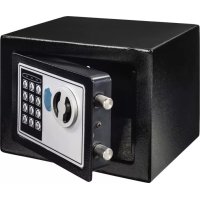
Home EP170 - Safe HAMA - Free user manual and instructions
Find the device manual for free Home EP170 HAMA in PDF.



| Product type | Electronic safe with code + mechanical emergency lock |
| Brand | Hama |
| Model | Home EP170 |
| External dimensions (W x H x D) | 230 x 170 x 170 mm |
| Weight | 3.3 kg |
| Power supply | 4 AA batteries (LR6) 1.5 V |
| Sheet thickness (body) | 1 mm |
| Sheet thickness (door) | 3 mm |
| Locking type | Electronic code + mechanical emergency lock |
| Number of user codes | 1 user code (3 to 8 digits) |
| Master code | Yes, programmable (3 to 8 digits) |
| Emergency keys included | 2 keys |
| Delay after 3 errors | 1st series: 20 seconds; 2nd series: 5 minutes |
| Automatic locking | Yes, after 5 seconds if door not opened |
| Low battery indication | Red and green LED lit simultaneously |
| Wall mounting possible | Yes, mounting kit included (concrete/brick anchors) |
| Installation location | Floor, furniture or wall |
| Package contents | Safe, 2 emergency keys, mounting kit, 4 AA batteries, instruction manual |
| Care and cleaning | Non-linting cloth slightly damp, no harsh detergents |
| Warranty | Legal warranty; exclusion in case of improper use |
| Customer service | Hama GmbH & Co. KG, phone: +49 9091 502-115 (German/English) |
Frequently Asked Questions - Home EP170 HAMA
User questions about Home EP170 HAMA
0 question about this device. Answer the ones you know or ask your own.
Ask a new question about this device
Download the instructions for your Safe in PDF format for free! Find your manual Home EP170 - HAMA and take your electronic device back in hand. On this page are published all the documents necessary for the use of your device. Home EP170 by HAMA.
USER MANUAL Home EP170 HAMA
Operating Instructions
Bedienungsanleitung
Mode d'emploi
PykoBoCTBO no 3KcPnyatauH
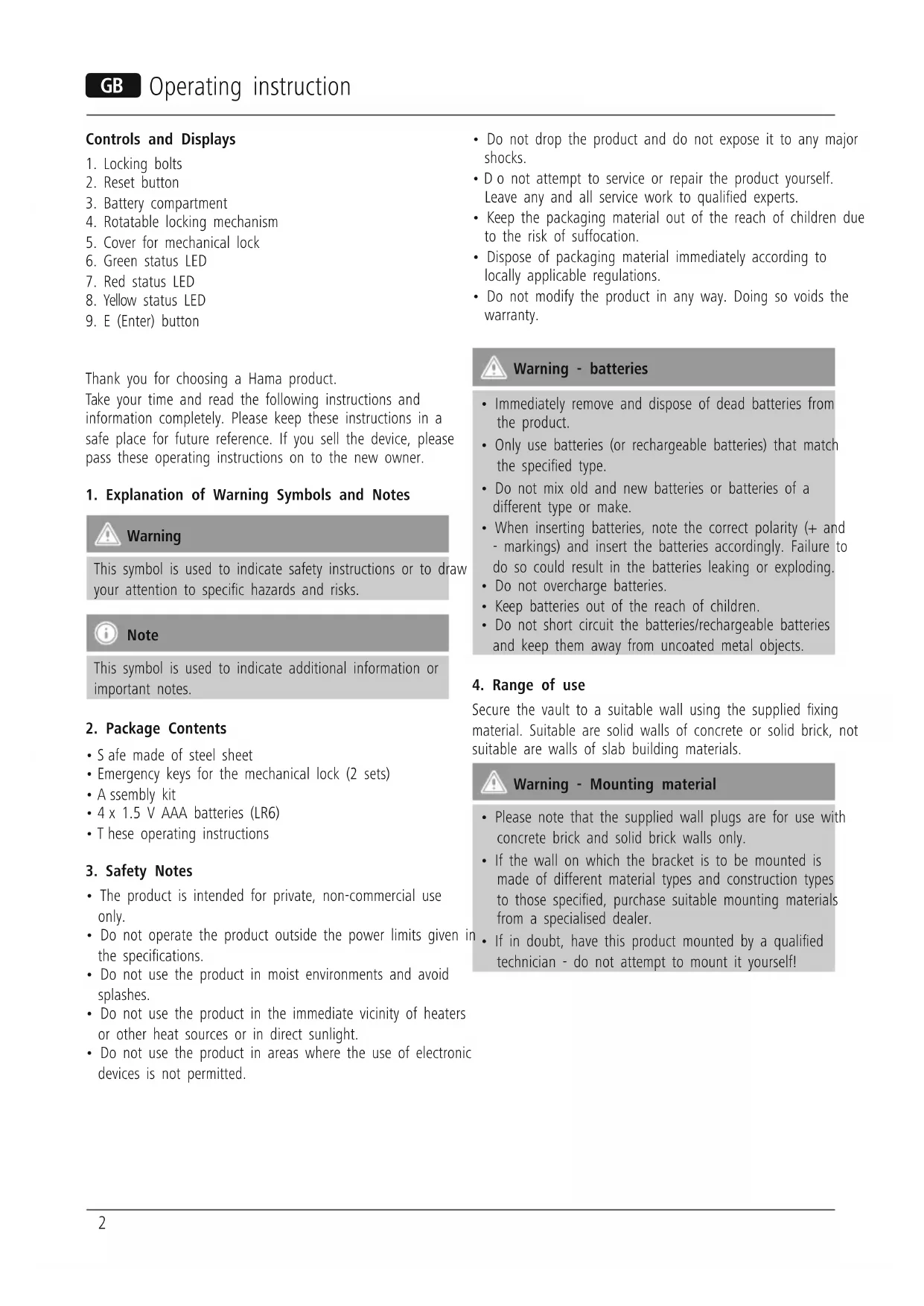
Controls and Displays
- Locking bolts
- Reset button
- Battery compartment
- Rotatable locking mechanism
- Cover for mechanical lock
- Green status LED
- Red status LED
- Yellow status LED
- E (Enter) button
Thank you for choosing a Hama product.
Take your time and read the following instructions and information completely. Please keep these instructions in a safe place for future reference. If you sell the device, please pass these operating instructions on to the new owner.
1. Explanation of Warning Symbols and Notes

Warning
This symbol is used to indicate safety instructions or to draw your attention to specific hazards and risks.

Note
This symbol is used to indicate additional information or important notes.
2. Package Contents
- Safe made of steel sheet
- Emergency keys for the mechanical lock (2 sets)
- A assembly kit
- 4 x 1.5 V AAA batteries (LR6)
- These operating instructions
3. Safety Notes
- The product is intended for private, non-commercial use only.
- Do not operate the product outside the power limits given in the specifications.
- Do not use the product in moist environments and avoid splashes.
- Do not use the product in the immediate vicinity of heaters or other heat sources or in direct sunlight.
-
Do not use the product in areas where the use of electronic devices is not permitted.
-
Do not drop the product and do not expose it to any major shocks.
- D do not attempt to service or repair the product yourself. Leave any and all service work to qualified experts.
- Keep the packaging material out of the reach of children due to the risk of suffocation.
- Dispose of packaging material immediately according to locally applicable regulations.
- Do not modify the product in any way. Doing so voids the warranty.

Warning - batteries
- Immediately remove and dispose of dead batteries from the product.
- Only use batteries (or rechargeable batteries) that match the specified type.
- Do not mix old and new batteries or batteries of a different type or make.
- When inserting batteries, note the correct polarity (+ and - markings) and insert the batteries accordingly. Failure to do so could result in the batteries leaking or exploding.
- Do not overcharge batteries.
- Keep batteries out of the reach of children.
- Do not short circuit the batteries/rechargeable batteries and keep them away from uncoated metal objects.
4. Range of use
Secure the vault to a suitable wall using the supplied fixing material. Suitable are solid walls of concrete or solid brick, not suitable are walls of slab building materials.

Warning - Mounting material
- Please note that the supplied wall plugs are for use with concrete brick and solid brick walls only.
- If the wall on which the bracket is to be mounted is made of different material types and construction types to those specified, purchase suitable mounting materials from a specialised dealer.
-
If in doubt, have this product mounted by a qualified technician - do not attempt to mount it yourself!
-
Do not mount the product above locations where persons might linger.
- Before mounting, check that the wall you have chosen is suitable for the weight to be mounted. Also make sure that there are no electric, water, gas or other lines running through the wall at the mounting site.
- Buy special or suitable installation material from a specialised dealer for wall-mounting.
- After the product has been mounted, check that it is sufficiently secure. You should repeat this check at regular intervals.
5. Getting Started
5.1 Opening the safe for the first time with the emergency keys
- Carefully remove the cover of the mechanical lock (5).
- O pen the lock with one of the emergency keys.
- Turn the locking mechanism (4), which is now unlocked, until it stops and open the door.
- Put the cover back on the mechanical lock.
5.2 Inserting the batteries and programming the user codes
- O pen the battery compartment and insert 4 AA (LR6) batteries with the correct polarity.
- C lose the battery compartment fully and hold the door open(e)
- Press the Reset button (2). The yellow status LED (8) will light up. The input mode remains active for approximately 10 seconds. If no user code is entered within this timeframe, to the yellow status LED will go out and the input mode must be reactivated by pressing the Reset button.
- Enter your chosen 3 to 8-digit code within 10 seconds after pressing the Reset button and confirm by pressing the Enter button (9). Following a successful entry, you will hear a short tone and the yellow status LED will go out.
- Three signal tones and three flashes of the yellow status LED indicate failed code entry - in this case, repeat the previous step.

Note - Keys and codes
- S tore the emergency keys in a secure place and never in the safe!
- A part from the first time opening the safe, only use the emergency keys in an emergency!
- D o not use any personal details that are easy to research as your code, e.g. birthdays, phone numbers, licence plate number, etc.
- A lways test your new code several times with the door open.
- U se multi-digit codes - the more digits, the more secure the code.

Note - Replacing the batteries
- W hen the batteries are almost empty, the red and green status LEDs (6/7) will light up simultaneously.
- C change the batteries immediately when this occurs - all codes must be reentered after the batteries are changed.
- In this case, repeat step 5.2.
6. Operation
This safe can be used by multiple people one after the other (e.g. as a hotel safe), always resetting the user code.
Therefore, it is strongly recommended to enter a master code that overwrites the user code in user code-related emergencies. It to allow a responsible person to open the safe.
6.1 Programming the master code
- Open the door of the safe and press the 0 and Reset buttons twice (2). The yellow status LED (8) will light up. The input mode remains active for approximately 10 seconds. If no master code is entered within this timeframe, the status light LED will light up yellow and the input mode must be reactivated by pressing theReset button.
- Enter your chosen 3 to 8 digit master code within 10 seconds after pressing the Reset button and confirm by pressing the Enter button (9). Following a successful entry, you will hear a short tone and the yellow status LED will go out.
- Three signal tones and three flashes of the yellow status LED indicate failed code entry - in this case, repeat the previous step.
6.2 Opening and closing the door
- Enter the user code and confirm the entry by pressing the Enter button. The green status LED (6) lights up.
- Turn the locking mechanism clockwise until it stops. The door can now be opened within 5 seconds. If the door is not opened within 5 seconds, it locks itself automatically in case you forget that the door is unlocked.
- Close the door and turn the locking mechanism anticlockwise until it stops. Wait 1 to 2 seconds until the door is locked.
6.3 Automatic locking of the door
- Three consecutive incorrect code entries trigger an alarm tone and prevent additional code entries for 20 seconds after the input field has been disabled.
- Three further incorrect code entries trigger an alarm tone and disables the input field for 5 minutes.
- During this time, the door can only be opened with the emergency keys.
6.4 Opening the door with the emergency keys
- Proceed as described in 5.1.

Note - Emergency keys
- S tore the emergency keys in a secure place and never in the safe!
- Write down the 4-digit key number engraved on the emergency keys and keep it in a safe place.
- If you lose the emergency keys, contact Hama Product Consulting with the key number.
7. Care and Maintenance
- O nly clean this product with a slightly damp, lint-free cloth and do not use aggressive cleaning agents.
- Make sure that water does not get into the product.
8. Warranty Disclaimer
Hama GmbH & Co. KG assumes no liability and provides no warranty for damage resulting from improper installation/ mounting, improper use of the product or from failure to observe the operating instructions and/or safety notes.
9. Service and Support
Please contact Hama Product Consulting if you have any questions about this product.
Hotline: +49 9091 502-115 (German/English)
Further support information can be found here:
www.hama.com
10. Technical Data
| Weight | 3,3 kg. |
| Dimensions (LxWxH) | 230 x 170 x 170 mm |
| Batteries 4 x 1,5V | AA (LR6) |
| Material thickness of the body | 1 mm |
| Material thickness of the door | 3 mm |
| Installation site | Ground/furnishings/wall |
6.3 ABToMaTHueCKoe 3aKpbItne DBepuI
B clyuae Tpex CneIyUOuX npyr 3a npyrom HnnpabNbHbIX BBOIOB KoJa AKTNBnpyETc nHaJ TpeBOrn N daJIbHeuWn BBOJ KOJa 6IoknpyETc Ha 20 c nyTeM OTKnHueHn naHeHn BBOJa.
- Ecnn KOn BBOUITcHnnpaBnIbHo eue Tpu pa3a, AKTNBUPyETcCnHAn TpeBOrn n NaHeJIb BBOJa OTKlOuaeTcHa 5 MInHyT.
B TeueHne 3TOrO BpeMeHH ceH MOxHO OTKpbITb TOJIbKO 3aNaCHbIM KJIIOyOM.
6.4 OTKpbTne DBepeBcI c nOmoBIO 3anaCHO KIOHa
- BbINOJIHHTe JeIcTBnB, ONIcaHHbIe B pa3JeIe 5.1.

Yka3aHHe: 3aNaCHo KJIIOU
X paHnTe 3aNaChOH KIOU B 6e3oNaChOM MeCTe. Hn B KOem Cnyae He xpaHnTe erO BHyTpnc eNda!
3 aannnte HaheceHHbIe Ha KJIouN YetbIpex3HaHbIe HOMepa N XpaHInTe INX TAKKe B 6e3OnachOM McTe.
B Cnyuae notepn 3aapancbix Klnouey o6paTntecb B OTden KOHCyIbTnnpoBaHnKOMpAHn Hama n ykaxnte 3TN HOMepa.
7. YxOД n TexHnueckoe obCnyKnBaHne
- UNTky n3dEInna npOn3BOOnTb TObKO 6e3BOPcOBoCnErKa BnaxHoI caNΦeTKo. 3anpeuaetc npImeHAtb arpeccNBhIe uCTaUne cpeCTBa.
CneDnte 3a Tem,TO6bbl B yctpoiCTBO He nonana BOda.
8. Otka3 ot rapaHTmHbIX 06a3aTeJIbCTB
KomnaHnHa Hama GmbH & Co. KG He HeceT OTBeTCTBHeHocTb 3a yuepe6, Bo3HKnUu BCJeCTBue He npabunbHoro MoHTaJa, NOdkJIIOUeHn IcNoIb3OBAHn N3dJIyne He No Ha3HaueHnIO, a TaKxe BCJeCTBue Heco6JIouDeHn INCHtpykCmN PO KcNpyatauN n TexHKn 6e3OnaCHOCTN.
9. OToIe Texo6cLyXkBaHn
IIO BONpocam pemOnTa IIN 3aMeHbI HeNCnPaBbIX N3dJIIN
O6paauTecb K npOdaBuy IIN B cepBnchyIO cnyx6y
KOMNaHm Hama.
Topayan liHnna otJeLa texo6cIyXnBaHnna: +49 9091 502-115 (HeMeucKn, aHrJInckn) Pnpobhee cmoptne 3decb: www.hama.com
10. TexHueckne xapaKTePncTnKn
Note on environmental protection:
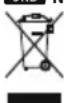
After the implementation of the European Directive 2012/19/EU and 2006/66/EU in the national legal system, the following applies: Electric and electronic devices as well as batteries must not be disposed of with household waste. Consumers are obliged by law to return electrical and electronic devices as well as batteries at the end of their service lives to the public collecting points set up for this purpose or point of sale. Details to this are defined by the national law of the respective country.
This symbol on the product, the instruction manual or the package indicates that a product is subject to these regulations. By recycling, reusing the materials or other forms of utilising old devices/Batteries, you are making an important contribution to protecting our environment.
BG Yka3aHne OTHOCHO 3auNTaTa Ha OKoJIHaTa Cpea:
OT MometHa npnnaarHTo Ha eBpnecknte npeKTHNB 2012/19/EU u 2006/66/EO B hauhoanHto npaBO HA cBoTBHTNE CTPAHN Baxn CneHOTe Eektpncknte H eektpnHNTe yepu H a btePnHTE He 6bMa da ce X3XbpNATC 6bTOBNTE OTnabu. Ipotpe6hteTtE DnBxHEN No zakOH Da Bphe enektpnueeKNTe H eektpoHHNTe yepu H a btePnHTE B kpa H TaXHATA dIyIroTPaHIOCT Ha mRpaJeHNTe 3a CEIIa ObiECTBEHN PnyKTOBe 3a Cb6pAHe Ha OTnABbM NIN HA TbPBOCKN OeKT. IPOpO6HOCTNE NO Bpocca ca perNaMeHTnpaHn B 3aKaHOAnTeCTBTO Ha cBoTBHTata CpTaHa. CmMBonBT Bpyx npOyKa, yNtBAHEn 3a yNtpeBaN NIN onakOBkTa HacOBy KBM Te3n paopeD6ypePeKnnPaHTo, npepaObTKata Ha MaTePmaJIte NIN dpYr H opMn H oONl3OTBopBaHE Ha CTAPte yepu/BaTePNB B ineOpnHACTe 3a aunitaHa H aawaTcOKOnla CpeDa.
UA Yka3iBKn 10o oxopoHn HabKoIuHbOre cepeobua
3 MoHHTy BnpoBaJKeHH CBPOeBcKHX DmpeKTHB 2012/19/EU i 2006/66/EC y HaioaIbHy zakoHOaBHy cInTeMy dIOb HAcTyHni npabHna: EneKtpuHHi eNekTpOHH npCTpOi, HanpNKlAd akymyTApOp, 3aOpOBHeo YtIN3yBAt pAOIm 3noSyOBMM BldXoDAMM. Pclra 3akIHHeHH TepMHy cnykON eNekTPuHHx i eNekTOPHHX npCTpOIB, HanpNKlAd akymyTApOp, KOPcTcyBaH na3akoHOaBHY pBIH 3aDoH 3aDoH 3aDoH 3aDoH 3aDoH 3aDoH 3aDoH 3aDoH 3aDoH 3aDoH 3aDoH 3aDoH 3aDoH 3aDoH 3aDoH 3aDoH 3aDoH 3aDoH 3aDoH 3aDoH 3aDOH 3aDoH 3aDOH 3aDOH 3aDOH 3aDOH 3aDOH 3aDOH 3aDOH 3aDOH 3aDOH 3aDOH 3aDOH 3aDOH 3aDOH 3aDOH 3aDOH 3aDOH 3aDOH 3aDOH 3aDOH 3aDOH 3a DOH 3aDOH 3aDOH 3aDOH 3aDOH 3aDOH 3aDOH 3aDOH 3aDOH 3aDOH 3aDOH 3aDOH 3aDOH 3aDOH 3aDOH 3aDOH 3aDOH 3aDOH 3aDOH 3aDOH 3a
SRB Napomene o ekoloskoj zastiti:
Otdrenkutia primine evropskih Direktiva 2002/96/EZ i 2006/66/EZ u nacionnom pravu: Elektrcn i elektronski uredaji, kao ni baterije ne smeju da se odlau u kuci ot pad. Potroac je zakonski obvezan da elektricne i elektronke ureadej i baterija na kaju njihovog zivotnog veka preda javnim preduzecima za sabiranje opada ili prodajnom mestu. Pojedinosti regulise dotiño nacional pravo. Simbal na proizvodu, uputstvu za upotrebu ili umbalaizukaje na te odredbe. Reciklazom, ponovnim iskoriscenjem materijalil drugim oblicima iskoriscenja starih uredaja/baterija u velkoj meri dopinosite ocuvanju nase zivotne okoline.
All listed brands are trademarks of the corresponding companies. Errors and omissions excepted, and subject to technical changes. Our general terms of delivery and payment are applied.