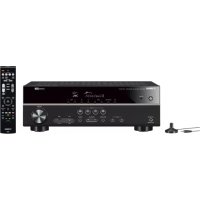
HTR3071 - Home cinema amp YAMAHA - Free user manual and instructions
Find the device manual for free HTR3071 YAMAHA in PDF.



| Product type | Home theater amplifier |
| Brand | YAMAHA |
| Model | HTR3071 |
| Dimensions (W x H x D) | 435 x 151 x 315 mm |
| Weight | 7.5 kg |
| Power supply | 110-120/220-240 V AC, 50/60 Hz |
| Power consumption | 260 W (max) |
| Output power | 5 x 100 W (8 ohms, 1 kHz, 0.9% THD) |
| Number of channels | 5.1 |
| HDMI inputs | 4 (including 1 ARC compatible) |
| HDMI output | 1 (ARC) |
| Analog audio inputs | 4 (including 1 phono) |
| Optical digital audio input | 1 |
| Coaxial digital audio input | 1 |
| Bluetooth | Yes (reception and transmission) |
| USB port | Yes (plays MP3, WMA, AAC files) |
| FM/AM tuner | Yes |
| Acoustic calibration | YPAO (automatic speaker optimization) |
| SCENE function | Yes (4 preset buttons) |
| Sound programs | Cinema, Music, Stereo, etc. |
| Maintenance and cleaning | Clean dry cloth; do not use solvent |
| Safety instructions | Do not expose to water, do not block ventilation, unplug during storms |
| Spare parts and repairability | Refer all repairs to qualified personnel; do not open the device |
Frequently Asked Questions - HTR3071 YAMAHA
User questions about HTR3071 YAMAHA
0 question about this device. Answer the ones you know or ask your own.
Ask a new question about this device
Download the instructions for your Home cinema amp in PDF format for free! Find your manual HTR3071 - YAMAHA and take your electronic device back in hand. On this page are published all the documents necessary for the use of your device. HTR3071 by YAMAHA.
USER MANUAL HTR3071 YAMAHA
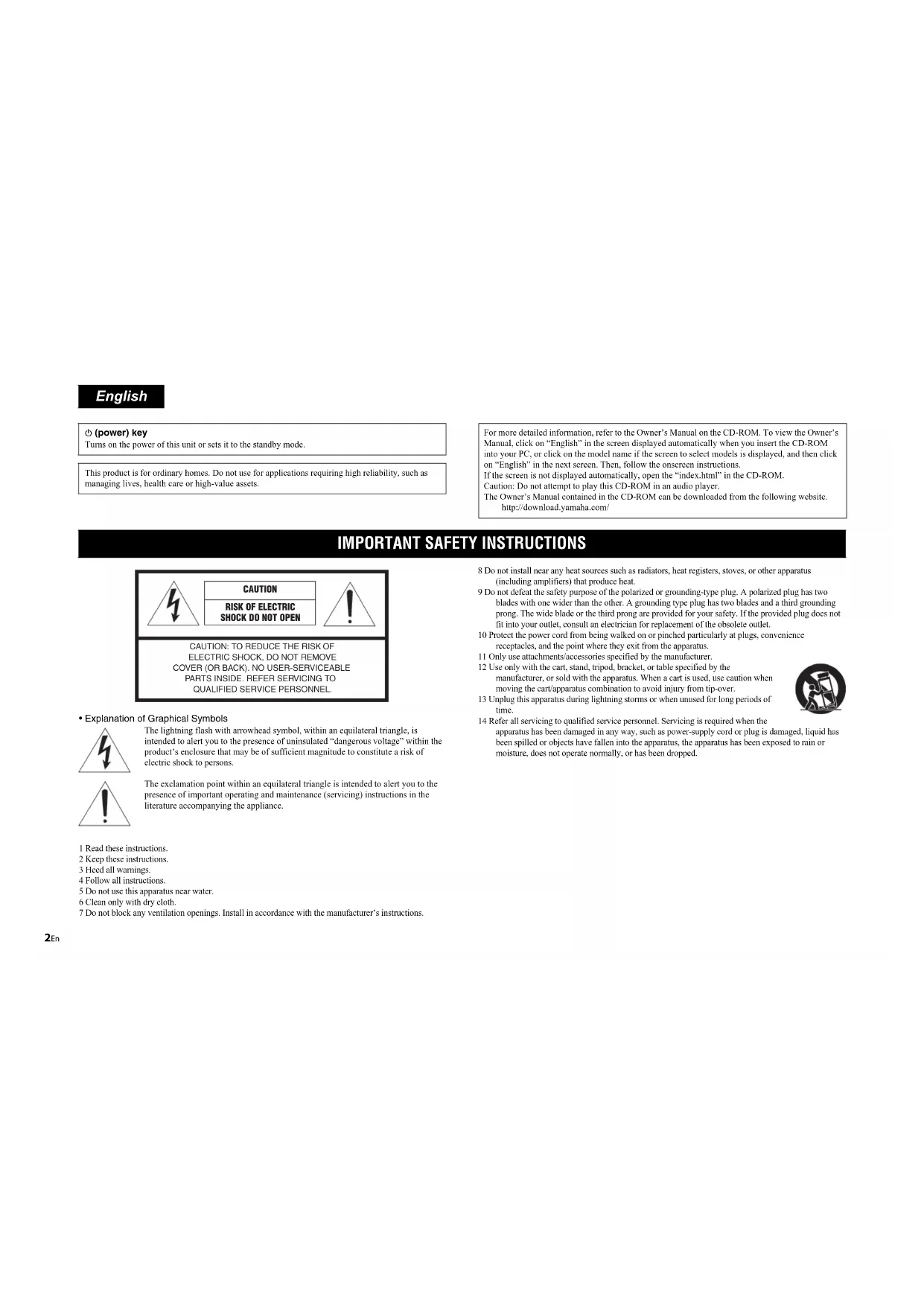
Safety Instructions 2
Connections 5
Basic operations 13
Turns on the power of this unit or sets it to the standby mode.
This product is for ordinary homes. Do not use for applications requiring high reliability, such as managing lives, health care or high-value assets.
For more detailed information, refer to the Owner's Manual on the CD-ROM. To view the Owner's Manual, click on "English" in the screen displayed automatically when you insert the CD-ROM into your PC, or click on the model name if the screen to select models is displayed, and then click on "English" in the next screen. Then, follow the onscreen instructions.
If the screen is not displayed automatically, open the "index.html" in the CD-ROM.
Caution: Do not attempt to play this CD-ROM in an audio player.
The Owner's Manual contained in the CD-ROM can be downloaded from the following website. http://download.yamaha.com/
IMPORTANT SAFETY INSTRUCTIONS
CAUTION
RISK OF ELECTRIC SHOCK DO NOT OPEN

CAUTION: TO REDUCE THE RISK OF
ELECTRIC SHOCK, DO NOT REMOVE COVER (OR BACK). NO USER-SERVICEABLE PARTS INSIDE. REFER SERVICING TO QUALIFIED SERVICE PERSONNEL.
- Explanation of Graphical Symbols
The lightning flash with arrowhead symbol, within an equilateral triangle, is intended to alert you to the presence of uninsulated “dangerous voltage” within the product’s enclosure that may be of sufficient magnitude to constitute a risk of electric shock to persons.
The exclamation point within an equilateral triangle is intended to alert you to the presence of important operating and maintenance (servicing) instructions in the literature accompanying the appliance.
1 Read these instructions.
2 Keep these instructions.
3 Heed all warnings.
4 Follow all instructions.
5 Do not use this apparatus near water.
6 Clean only with dry cloth.
7 Do not block any ventilation openings. Install in accordance with the manufacturer's instructions.
8 Do not install near any heat sources such as radiators, heat registers, stoves, or other apparatus (including amplifiers) that produce heat.
9 Do not defeat the safety purpose of the polarized or grounding-type plug. A polarized plug has two blades with one wider than the other. A grounding type plug has two blades and a third grounding prong. The wide blade or the third prong are provided for your safety. If the provided plug does not fit into your outlet, consult an electrician for replacement of the obsolete outlet.
10 Protect the power cord from being walked on or pinched particularly at plugs, convenience receptacles, and the point where they exit from the apparatus.
11 Only use attachments/accessories specified by the manufacturer.
12 Use only with the cart, stand, tripod, bracket, or table specified by the manufacturer, or sold with the apparatus. When a cart is used, use caution when moving the cart/apparatus combination to avoid injury from tip-over.
13 Unplug this apparatus during lightning storms or when unused for long periods of time.
14 Refer all servicing to qualified service personnel. Servicing is required when the apparatus has been damaged in any way, such as power-supply cord or plug is damaged, liquid has been spilled or objects have fallen into the apparatus, the apparatus has been exposed to rain or moisture, does not operate normally, or has been dropped.

FCC INFORMATION (for US customers)
I IMPORTANT NOTICE: DO NOT MODIFY THIS UNIT!
This product, when installed as indicated in the instructions contained in this manual, meets FCC requirements. Modifications not expressly approved by Yamaha may void your authority, granted by the FCC, to use the product.
2 IMPORTANT: When connecting this product to accessories and/or another product use only high quality shielded cables. Cable/s supplied with this product MUST be used. Follow all installation instructions. Failure to follow instructions could void your FCC authorization to use this product in the USA.
3 NOTE: This product has been tested and found to comply with the requirements listed in FCC Regulations, Part 15 for Class "B" digital devices. Compliance with these requirements provides a reasonable level of assurance that your use of this product in a residential environment will not result in harmful interference with other electronic devices.
This equipment generates/uses radio frequencies and, if not installed and used according to the instructions found in the users manual, may cause interference harmful to the operation of other electronic devices.
Compliance with FCC regulations does not guarantee that interference will not occur in all installations. If this product is found to be the source of interference, which can be determined by turning the unit "OFF" and "ON", please try to eliminate the problem by using one of the following measures:
Relocate either this product or the device that is being affected by the interference.
Utilize power outlets that are on different branch (circuit breaker or fuse) circuits or install AC line filter/s.
In the case of radio or TV interference, relocate/reorient the antenna. If the antenna lead-in is 300 ohm ribbon lead, change the lead-in to coaxial type cable.
If these corrective measures do not produce satisfactory results, please contact the local retailer authorized to distribute this type of product. If you can not locate the appropriate retailer, please contact Yamaha Corporation of America A/V Division, 6600 Orangethorpe Avenue, Buena Park, CA 90620, USA.
The above statements apply ONLY to those products distributed by Yamaha Corporation of America or its subsidiaries.
IMPORTANT
Please record the serial number of this unit in the space below.
MODEL:
Serial No.:
The serial number is located on the rear of the unit. Retain this Owner's Manual in a safe place for future reference.
FOR CANADIAN CUSTOMERS
CAN ICES-3(B)/NMB-3(B).
COMPLIANCE INFORMATION STATEMENT (DECLARATION OF CONFORMITY PROCEDURE)
Responsible Party: Yamaha Corporation of America A/V Division
Address: 6600 Orangethorpe Avenue, Buena Park, CA 90620
Telephone: 714-522-9011
Type of Equipment: AV Receiver
Model Name: RX-V383, HTR-3071
This device complies with Part 15 of FCC Rules and Industry Canada licence-exempt RSS standard(s). Operation is subject to the following two conditions:
(1) this device may not cause interference, and
(2) this device must accept any interference, including interference that may cause undesired operation of this device.
FCC CAUTION
Changes or modifications not expressly approved by the party responsible for compliance could void the user's authority to operate the equipment.
NOTICE
This equipment has been tested and found to comply with the limits for a Class B digital device, pursuant to part 15 of the FCC Rules. These limits are designed to provide reasonable protection against harmful interference in a residential installation. This equipment generates, uses and can radiate radio frequency energy and, if not installed and used in accordance with the instructions, may cause harmful interference to radio communications. However, there is no guarantee that interference will not occur in a particular installation. If this equipment does cause harmful interference to radio or television reception, which can be determined by turning the equipment off and on, the user is encouraged to try to correct the interference by one or more of the following measures:
Reorient or relocate the receiving antenna.
Increase the separation between the equipment and receiver.
- Connect the equipment into an outlet on a circuit different from that to which the receiver is connected.
- Consult the dealer or an experienced radio/TV technician for help.
This equipment complies with FCC/IC radiation exposure limits set forth for an uncontrolled environment and meets the FCC radio frequency (RF) Exposure Guidelines and RSS-102 of the IC radio frequency (RF) Exposure rules. This equipment should be installed and operated keeping the radiator at least 20cm or more away from person's body.
This transmitter must not be co-located or operated in conjunction with any other antenna or transmitter.
Do not use this unit within 22 cm (9 inches) of persons with a heart pacemaker implant or defibrillator implant.

CAUTION: READ THIS BEFORE OPERATING YOUR UNIT.
1 To assure the finest performance, please read this manual carefully. Keep it in a safe place for future reference.
2 Install this sound system in a well ventilated, cool, dry, clean place - away from direct sunlight, heat sources, vibration, dust, moisture, and/or cold. For proper ventilation, allow the following minimum clearances.
Top: 30 cm, Rear: 20 cm, Sides: 20 cm
3 Locate this unit away from other electrical appliances, motors, or transformers to avoid humming sounds.
4 Do not expose this unit to sudden temperature changes from cold to hot, and do not locate this unit in an environment with high humidity (i.e. a room with a humidifier) to prevent condensation inside this unit, which may cause an electrical shock, fire, damage to this unit, and/or personal injury.
5 Avoid installing this unit where foreign object may fall onto this unit and/or this unit may be exposed to liquid dripping or splashing. On the top of this unit, do not place:
- Other components, as they may cause damage and/or discoloration on the surface of this unit.
– Burning objects (i.e. candles), as they may cause fire, damage to this unit, and/or personal injury.
- Containers with liquid in them, as they may fall and liquid may cause electrical shock to the user and/or damage to this unit.
6 Do not cover this unit with a newspaper, tablecloth, curtain, etc. in order not to obstruct heat radiation.
If the temperature inside this unit rises, it may cause fire, damage to this unit, and/or personal injury.
7 Do not plug in this unit to a wall outlet until all connections are complete.
8 Do not operate this unit upside-down. It may overheat, possibly causing damage.
9 Do not use force on switches, knobs and/or cords.
10 When disconnecting the power cable from the wall outlet, grasp the plug; do not pull the cable.
11 Do not clean this unit with chemical solvents; this might damage the finish. Use a clean, dry cloth.
12 Only voltage specified on this unit must be used. Using this unit with a higher voltage than specified is dangerous and may cause fire, damage to this unit, and/or personal injury. Yamaha will not be held responsible for any damage resulting from use of this unit with a voltage other than specified.
13 To prevent damage by lightning, keep the power cable and outdoor antennas disconnected from a wall outlet or this unit during a lightning storm.
14 Do not attempt to modify or fix this unit. Contact qualified Yamaha service personnel when any service is needed. The cabinet should never be opened for any reasons.
15 When not planning to use this unit for long periods of time (i.e. vacation), disconnect the AC power plug from the wall outlet.
16 Be sure to refer to the "Troubleshooting" section of the Owner's Manual on the CD-ROM for common operating errors before concluding that this unit is faulty.
17 Before moving this unit, press Ⓐ to set it to standby mode and disconnect the AC power plug from the wall outlet.
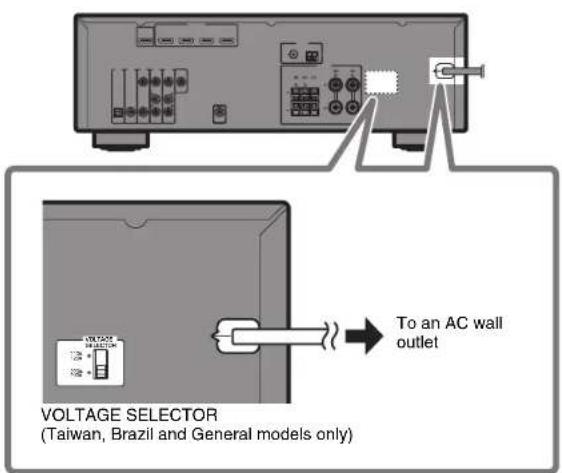
18 VOLTAGE SELECTOR (Taiwan, Brazil and General models)
The VOLTAGE SELECTOR on the rear panel of this unit must be set for your local main voltage BEFORE plugging into the AC wall outlet. Voltages are:
AC 110-120/220-240V, 50/60Hz
19 Condensation will form when the surrounding temperature changes suddenly. Disconnect the power cable from the outlet, then leave this unit alone.
20 When using this unit for a long time, this unit may become warm. Turn the power off, then leave this unit alone for cooling.
21 Install this unit near the AC outlet and where the AC power plug can be reached easily.
22 Excessive sound pressure from earphones and headphones can cause hearing loss.
This unit is not disconnected from the AC power source as long as it is connected to the wall outlet, even if this unit itself is turned off by . This state is called the standby mode. In this state, this unit is designed to consume a very small quantity of power.
WARNING
TO REDUCE THE RISK OF FIRE OR ELECTRIC SHOCK, DO NOT EXPOSE THIS UNIT TO RAIN OR MOISTURE.
■ Notes on remote controls and batteries
-
Do not spill water or other liquids on the remote control.
-
Do not drop the remote control.
-
Do not leave or store the remote control in the following conditions:
-
places of high humidity, such as near a bath
- places of high temperatures, such as near a heater or stove
- places of extremely low temperatures
-
dusty places
-
Insert the battery according to the polarity markings (+ and -).
-
Change all batteries if you notice the following conditions:
- the operation range of the remote control narrows
-
the transmit indicator does not flash or is dim
-
If the batteries run out, immediately remove them from the remote control to prevent an explosion or acid leak.
-
If you find leaking batteries, discard the batteries immediately, taking care not to touch the leaked material. If the leaked material comes into contact with your skin or gets into your eyes or mouth, rinse it away immediately and consult a doctor. Clean the battery compartment thoroughly before installing new batteries.
-
Do not use old batteries together with new ones. This may shorten the life of the new batteries or cause old batteries to leak.
-
Do not use different types of batteries (such as alkaline and manganese batteries) together. Specification of batteries may be different even though they look the same.
-
Before inserting new batteries, wipe the compartment clean.
-
If the remote control is without batteries for more than 2 minutes, or if exhausted batteries remain in the remote control, the contents of the memory may be cleared. In such a case, install new batteries and set the remote control code.
-
Dispose of batteries according to your regional regulations.
-
Keep batteries away from children. If a battery is accidentally swallowed, contact your doctor immediately.
-
When not planning to use the remote control for long periods of time, remove the batteries from the remote control.
-
Do not charge or disassemble the supplied batteries.
-
The batteries shall not be exposed to excessive heat such as sunshine, fire or like.
This document explains basic speaker system setup and unit configuration, followed by step-by-step instructions. Basic operations, such as playing Blu-ray Discs, DVDs, and radio content, are also explained.
The unit is equipped with a number of other functions not described in this booklet. For more information about this product, refer to the Owner's Manual included on the supplied CD-ROM. The latest Owner's Manual can be downloaded from the following website.
http://download.yamaha.com/
[For U.S. customers only]
Visit the following website for additional information, FAQ's, downloads such as "Owner's Manual" and product updates.
http://usa.yamaha.com/support/
![YAMAHA HTR3071 - [For U.S. customers only] - 1](/content/2026/02/421455/images/e9dcb65aa3d0c8c725a4391c8f452cba9d7cf10ba278e89ae056987a27eb36d5.jpg)
AV SETUP GUIDE
AV SETUP GUIDE is an app that guides you through the process of connecting a TV or playback device, such as a BD/DVD or CD player, and speakers to the AV receiver. Search "AV SETUP GUIDE" on the App Store or Google Play for details.
1 Preparation
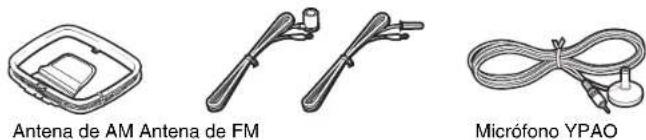
Confirming package contents
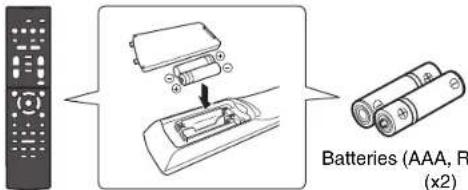
Remote control
Batteries (AAA, R03, UM-4) (x2)
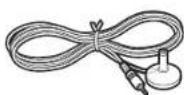
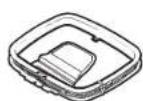
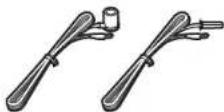
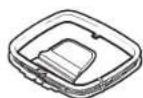
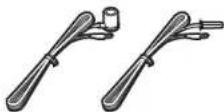
AM antenna FM antenna
YPAO microphone
One of the above is supplied depending on the region of purchase.
CD-ROM (Owner's Manual)
Quick Start Guide (this booklet)
Preparing cables
The following cables (not supplied) are required to build the system described in this document.
- Speaker cables (depending on the number of speakers)
- Audio pin cable (x1)
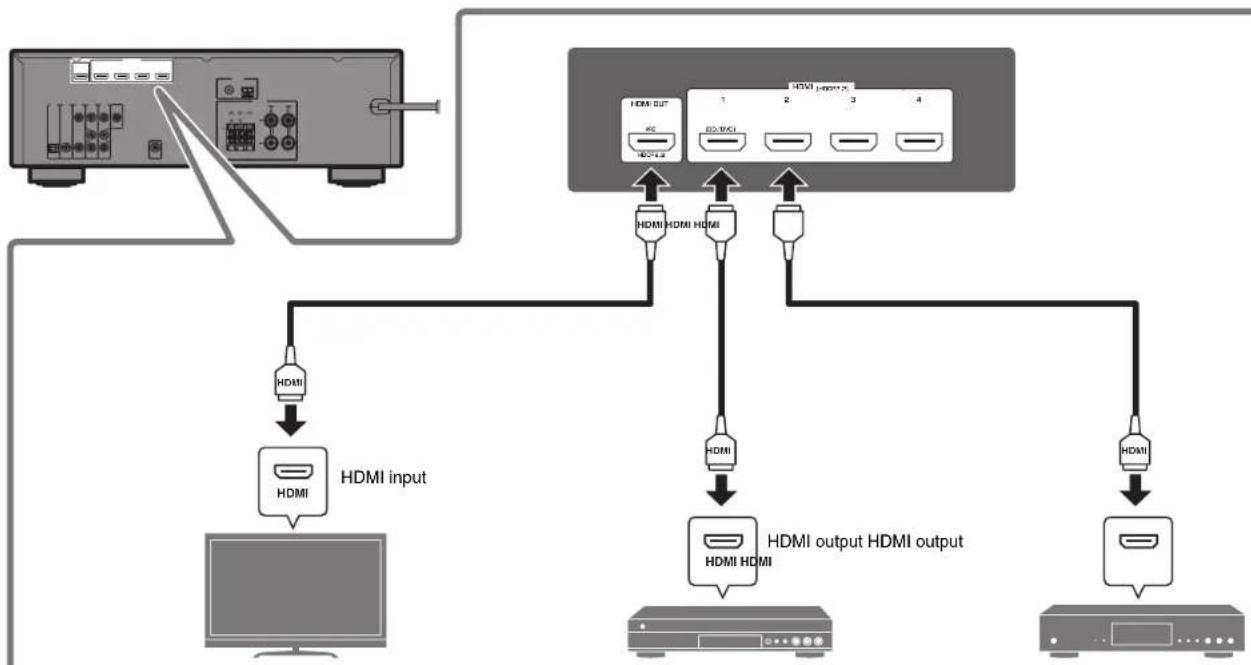
- HDMI cables (x3)
2
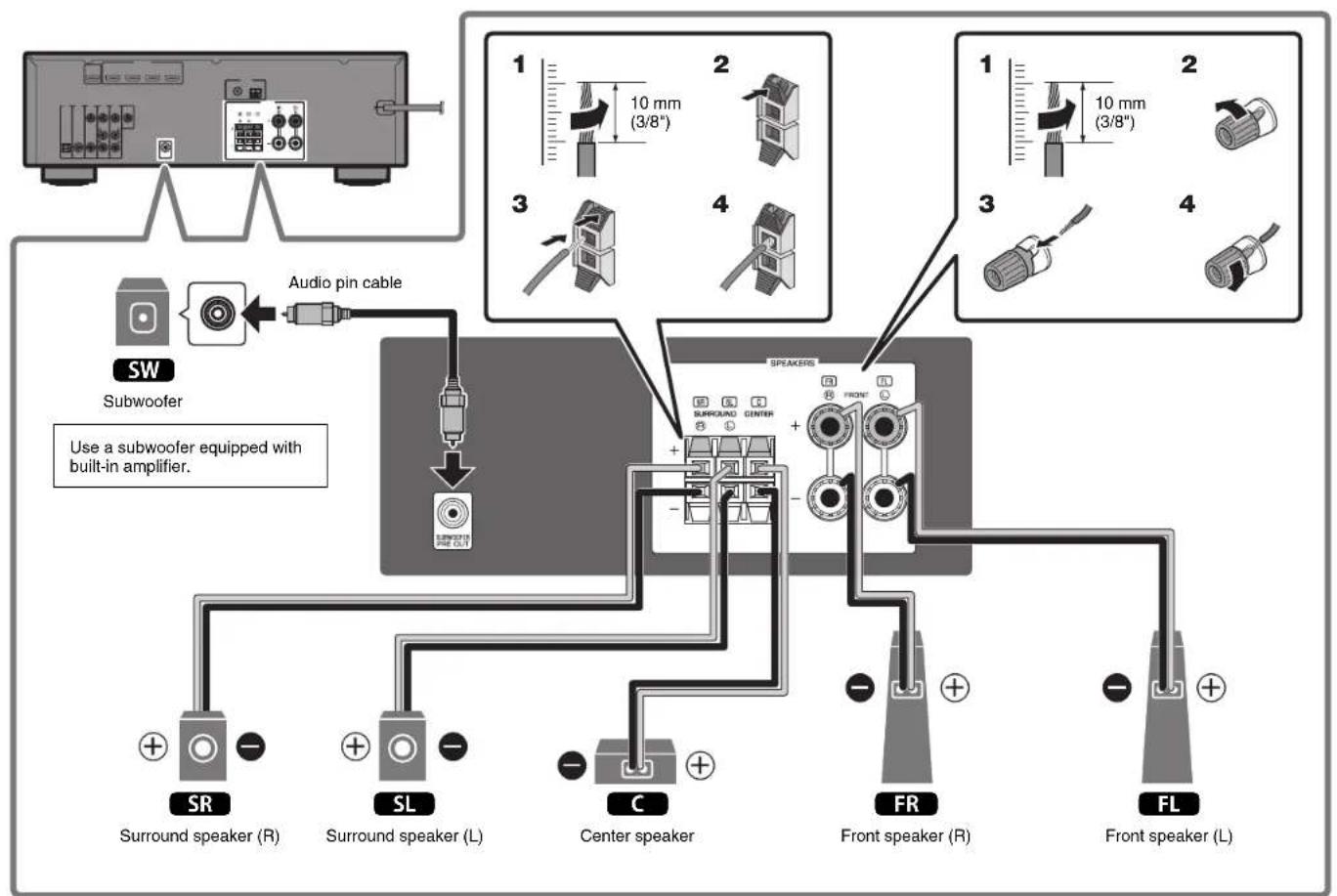
Connecting speakers/subwoofer
Positioning speakers
Use the diagram as a reference for positioning speakers.
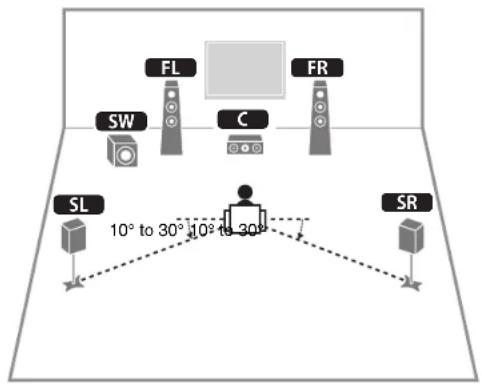
FL Front speaker (L)
FR Front speaker (R)
C Center speaker
SL Surround speaker (L)
SR Surround speaker (R)
SW Subwoofer
When connecting 6-ohm speakers
(U.S.A. and Canada models only)
Set the unit's speaker impedance to "6 Ω MIN". For details, see "Setting the speaker impedance" in the Owner's Manual.
Precautions for connecting speaker cables
- Be sure that the unit and subwoofer are turned off.
- Prepare speaker cables in a place away from the unit, to avoid accidentally dropping wire strands into the unit's interior which could result in a short circuit or malfunction of the unit.
-
Improper connection of speaker cables could cause a short circuit resulting in damage to, or malfunctioning of, the unit or speakers.
-
Carefully remove approximately 10 mm (3/8") of insulation from the speaker-connection ends of the cables, and twist the bare wires of each speaker cable together firmly.
- Do not allow the bare wires of separate speaker cables to come into contact with one another.
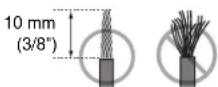
- Do not allow speaker cable bare wires to come into contact with metal parts on the unit (rear panel and screws).
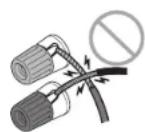
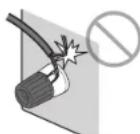
If "Check SP Wires" is shown on the front display when the unit is turned on, turn off the unit and be sure that speaker cables have not caused a short circuit.
3
Connecting external devices
flowchart
graph TD
    A["Input Module"] --> B["HDMI"]
    B --> C["HDMI input"]
    B --> D["HDMI"]
    D --> E["HDMI output HDMI output"]
    E --> F["Output Module"]
    style A fill:#f9f,stroke:#333
    style F fill:#bbf,stroke:#333
TV BD/DVD player Satellite/cable set top box
4
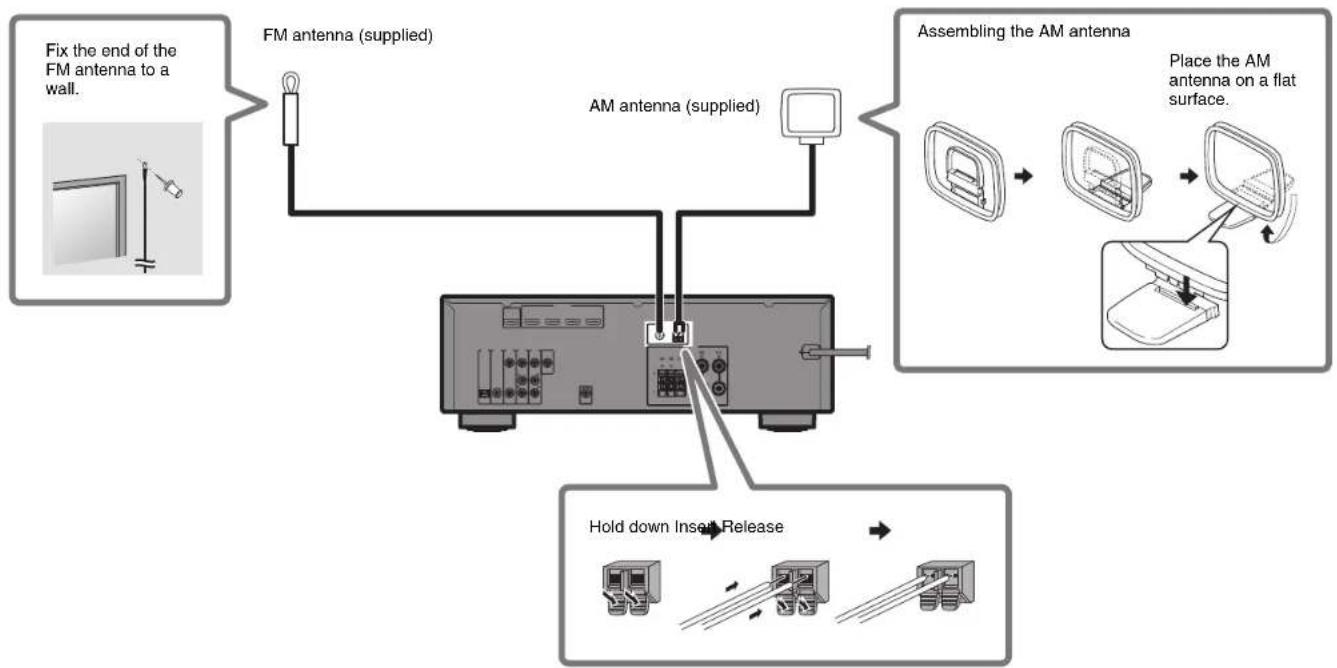
Connecting the FM/AM antennas
flowchart
graph TD
    A["Fix the end of the FM antenna to a wall."] --> B["FM antenna (supplied)"]
    B --> C["AM antenna (supplied)"]
    C --> D["Assembling the AM antenna"]
    D --> E["Place the AM antenna on a flat surface."]
    F["Hold down Insert Release"] --> G["Computer Icon"]
5
Connecting the power cable to an AC wall outlet, and turning on the unit
Before connecting the power cable
(Taiwan, Brazil and General models only)
Set the switch position of VOLTAGE SELECTOR according to your local voltage.
Voltages are AC 110–120/220–240 V, 50/60 Hz.
1 Plug the power cable into an AC wall outlet.
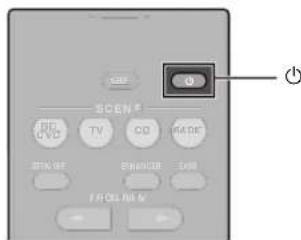
2 Press ⏻ (receiver power) to turn on the unit.
3Turn on the TV and switch the TV input to display video from the unit (HDMI OUT jack).
6
Optimizing the speaker settings automatically (YPAO)
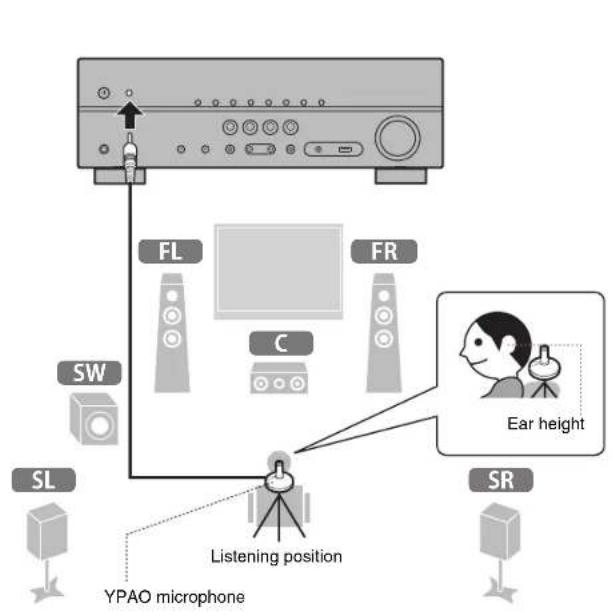
The Yamaha Parametric room Acoustic Optimizer (YPAO) function detects speaker connections, measures the distances from them to your listening position(s), and then automatically optimizes the speaker settings, such as volume balance and acoustic parameters, to suit your room.
flowchart
graph TD
    A["Speaker"] --> B["FL"]
    A --> C["FR"]
    B --> D["C"]
    C --> E["SW"]
    D --> F["Laptop"]
    E --> G["SR"]
    F --> H["Listening position"]
    G --> I["YPAO microphone"]
    H --> J["Ear height"]
    style A fill:#f9f,stroke:#333
    style B fill:#ccf,stroke:#333
    style C fill:#ccf,stroke:#333
    style D fill:#cfc,stroke:#333
    style E fill:#cfc,stroke:#333
    style F fill:#fcc,stroke:#333
    style G fill:#fcc,stroke:#333
    style H fill:#ffc,stroke:#333
    style I fill:#ffc,stroke:#333
Note the following regarding YPAO measurement
• Test tones are output at high volume and may surprise or frighten small children.
- Test tone volume cannot be adjusted.
- Keep the room as quiet as possible.
- Stay in a corner of the room behind the listening position so that you do not become an obstacle between speakers and the YPAO microphone.
- Do not connect headphones.

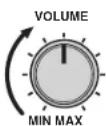
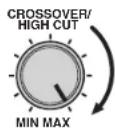
1 Turn on the subwoofer and set the volume to half.
If the crossover frequency is adjustable, set it to maximum.
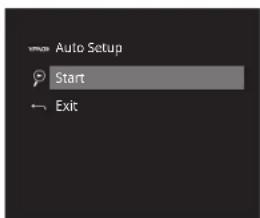
2 Place the YPAO microphone at your listening position and connect it to the YPAO MIC jack on the front panel.
The screen below appears on the TV.
Note
Place the YPAO microphone at your listening position (same height as your ears). We recommend the use of a tripod as a microphone stand. You can use the tripod screws to stabilize the microphone.
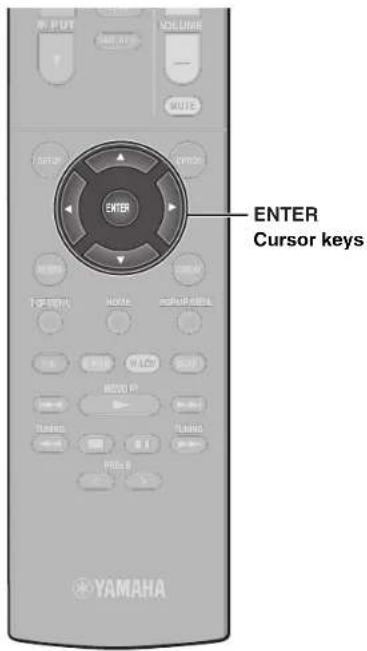
3Press ENTER.
The measurement will start in 10 seconds.
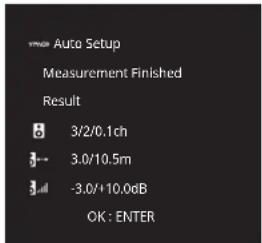
It takes about 3 minutes to measure.
The screen below appears on the TV when the measurement finishes.
Note
If an error message (such as E-1) or warning message (such as W-2) appears, see "Error messages" or "Warning messages" under "Optimizing the speaker settings automatically (YPAO)" in the Owner's Manual.
4 Confirm the results displayed on the screen and press ENTER.
5 Use the cursor keys (◀/▶) to select "SAVE" (Save) and press ENTER.
6 Disconnect the YPAO microphone from the unit.
This completes optimization of the speaker settings.
Basic operations
This section describes basic operations such as playing Blu-ray Discs and DVDs, and tuning into radio stations. Most operations can be performed using the remote control.
Operating the remote control
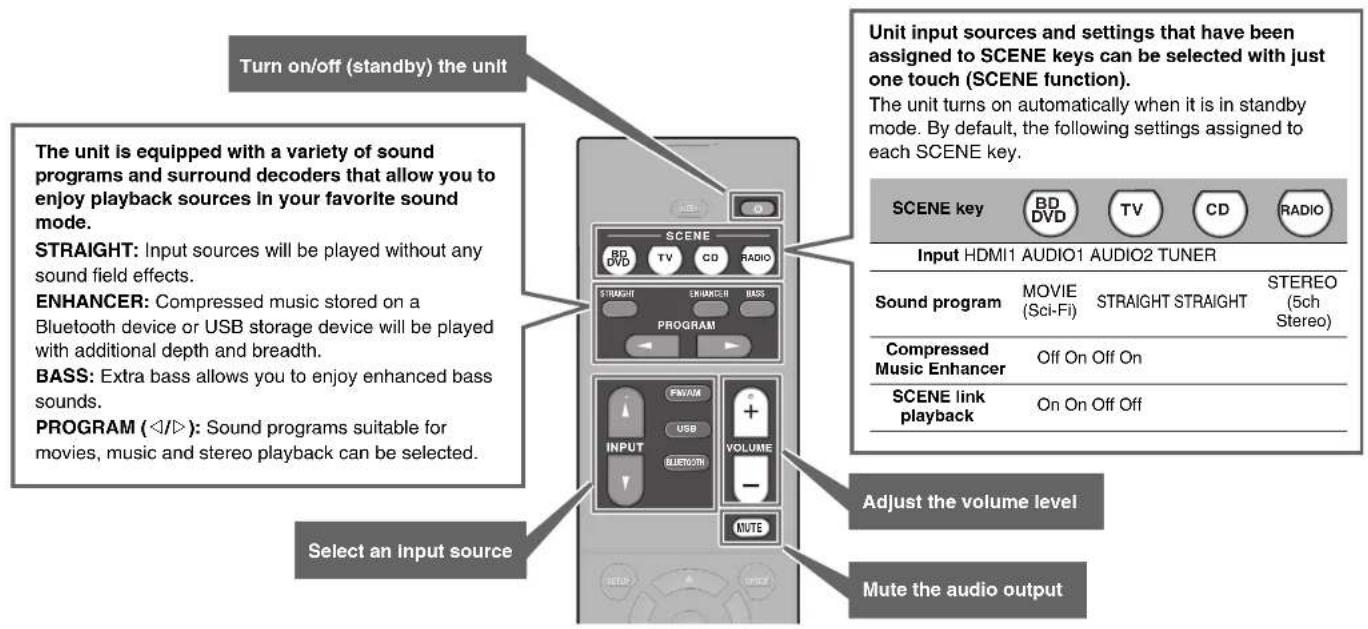
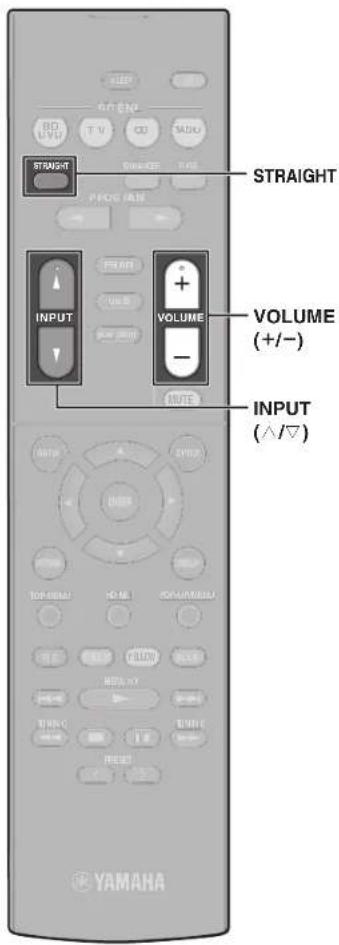
Playing a BD/DVD
We recommend playing back multichannel audio (5.1-channel or more) to feel surround sound produced by the unit.
1 Turn on the BD/DVD player.
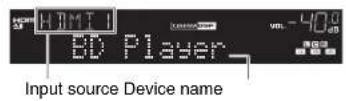
2 Press INPUT ( / ) repeatedly to select "HDMI 1".
The name of the connected device such as "BD player" may be displayed.
3 Start playback on the BD/DVD player.
4Press STRAIGHT to select "STRAIGHT".
Note
When "STRAIGHT" (straight decode) is enabled, each speaker produces each channel audio signal directly (without sound field processing).
5Press VOLUME to adjust the volume.
Note
When sound is not heard, or no sound is output from a specific speaker, see "Troubleshooting" in the Owner's Manual.
Listening to FM/AM radio
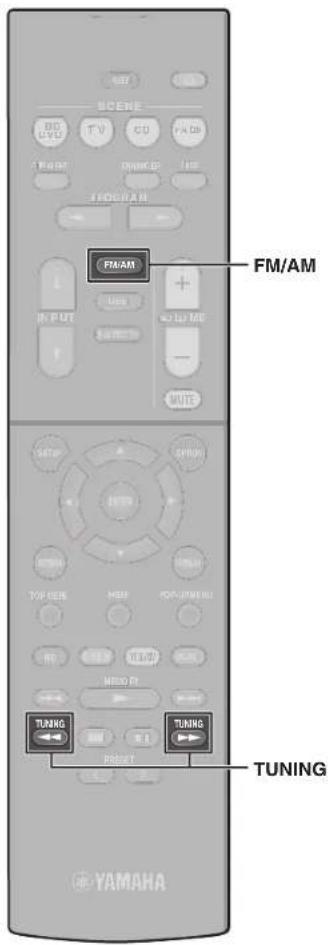
1 Press FM/AM to select a band.
"TUNER" is selected as the input source and then the frequency currently selected is displayed.
2Press TUNING repeatedly to set a frequency.
Hold down the key for about a second to search stations automatically.

"TUNED" lights up when the unit is receiving an FM/AM radio station signal.
"STEREO" lights up when the unit is receiving a stereo FM radio signal.
Settling the frequency steps (Asia, Taiwan, Brazil and General models only)
At the factory, the frequency step setting is set to 50 kHz for FM and 9 kHz for AM.
Depending on your country or region, set the frequency steps to 100 kHz for FM and 10 kHz for AM.
1 Set the unit to standby mode.
2 Hold down STRAIGHT on the front panel and press ⏻ (power).
3 Press PROGRAM on the front panel repeatedly to select "TU".
TU···FM50/AM9
4 Press STRAIGHT on the front panel to select "FM100/AM10".
5 Press ⏻ (power) to set the unit to standby mode and turn it on again.
Playing music stored on a Bluetooth® device
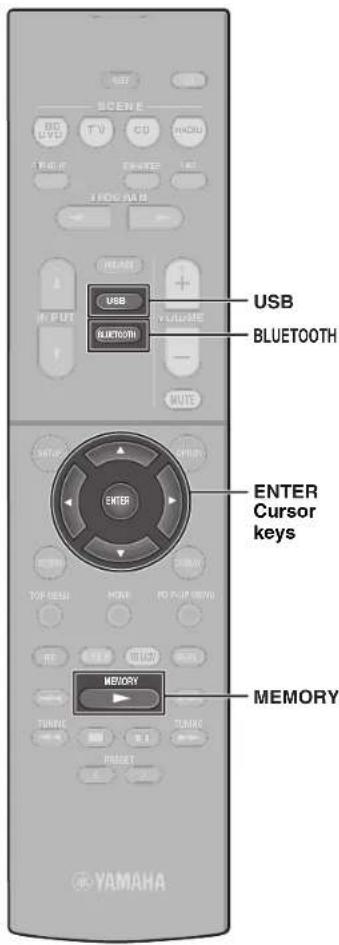
1 Press BLUETOOTH to select "Bluetooth" as the input source.
2Hold down MEMORY for more than 3 seconds.
"Searching..." appears in the front display.
3Turn on the BLUETOOTH function on your device, and select the model name of the unit from the BLUETOOTH device list on your device.
If the pass key is required, enter the number "0000". When the connection is established, the indicator will glow in the front display.
4Select a song and start playback on the Bluetooth device.
Note
Audio playing on the unit can be transmitted to Bluetooth wireless speakers or headphones (except when Bluetooth is selected as the unit's input source). See "Enjoying audio using Bluetooth speakers/headphones" in the Owner's Manual for more information.
Playing music stored on a USB flash drive
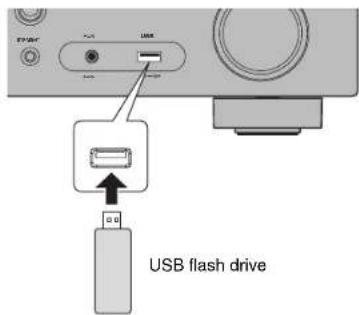
1 Connect the USB flash drive to the USB jack.
Note
Connect the USB flash drive directly to the USB jack. Do not use an extension cable.
2Press USB to select "USB" as the input source.
The browse screen is displayed on the TV.
3Use the cursor keys to select an item and press ENTER.
When a song is selected, playback starts and the playback screen is displayed.

Français
Touche ⏻ (allimentation)
natural_image
Diagram of a device's internal components, showing a box and motor assembly (no text or symbols)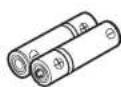
Piles (AAA, R03, UM-4) (x2)
Télécommande
Note
Mando a distancia
FL Altavoz delantero (Izq.)
FR Altavoz delantero (Der.)
C Altavoz central
SL Altavoz surround (lzq.)
SR Altavoz surround (Der.)
SW Altavoz de subgraves
Si conecta altavoces de 6 Ω
Nota
Information for Users on Collection and Disposal of Old Equipment and Used Batteries

These symbols on the products, packaging, and/or accompanying documents mean that used electrical and electronic products and batteries should not be mixed with general household waste.
For proper treatment, recovery and recycling of old products and used batteries, please take them to applicable collection points, in accordance with your national legislation and the Directives 2002/96/EC and 2006/66/EC.

By disposing of these products and batteries correctly, you will help to save valuable resources and prevent any potential negative effects on human health and the environment which could otherwise arise from inappropriate waste handling.
For more information about collection and recycling of old products and batteries, please contact your local municipality, your waste disposal service or the point of sale where you purchased the items.

[Information on Disposal in other Countries outside the European Union] These symbols are only valid in the European Union. If you wish to discard these items, please contact your local authorities or dealer and ask for the correct method of disposal.
Note for the battery symbol (bottom two symbol examples):
This symbol might be used in combination with a chemical symbol. In this case it complies with the requirement set by the Directive for the chemical involved.
SIMPLIFIED EU DECLARATION OF CONFORMITY
Hereby, Yamaha Music Europe GmbH declares that the radio equipment type
[RX-V383, HTR-3071] is in compliance with Directive 2014/53/EU. The full text of the EU
declaration of conformity is available at the following internet address:
https://europe.yamaha.com/en/support/compliance/doc.html
DECLARATION UE DE CONFORMITE SIMPLIFIEE
Important Notice: Guarantee Information for customers in EEA\* and Switzerland
English
For detailed guarantee information about this Yamaha product, and Pan-EEA* and Switzerland warranty service, please either visit the website address below (Printable file is available at our website) or contact the Yamaha representative office for your country. * EEA: European Economic Area
Manual Development Group
© 2017 Yamaha Corporation
Published 05/2017 KS-B0
Printed in Malaysia
ZY76570





- IMPORTANT SAFETY INSTRUCTIONS
- - Explanation of Graphical Symbols
- FCC INFORMATION (for US customers)
- I IMPORTANT NOTICE: DO NOT MODIFY THIS UNIT!
- IMPORTANT
- FOR CANADIAN CUSTOMERS
- COMPLIANCE INFORMATION STATEMENT (DECLARATION OF CONFORMITY PROCEDURE)
- FCC CAUTION
- NOTICE
- CAUTION: READ THIS BEFORE OPERATING YOUR UNIT.
- WARNING
- ■ Notes on remote controls and batteries
- [For U.S. customers only]
- AV SETUP GUIDE
- Preparation
- Confirming package contents
- Preparing cables
- 2
- Connecting speakers/subwoofer
- Positioning speakers
- When connecting 6-ohm speakers
- (U.S.A. and Canada models only)
- Precautions for connecting speaker cables
- 3
- Connecting external devices
- 4
- Connecting the FM/AM antennas
- 5
- Connecting the power cable to an AC wall outlet, and turning on the unit
- 6
- Optimizing the speaker settings automatically (YPAO)
- Turn on the subwoofer and set the volume to half.
- Place the YPAO microphone at your listening position and connect it to the YPAO MIC jack on the front panel.
- Note
- 3Press ENTER.
- Confirm the results displayed on the screen and press ENTER.
- Use the cursor keys (◀/▶) to select "SAVE" (Save) and press ENTER.
- Disconnect the YPAO microphone from the unit.
- Basic operations
- Operating the remote control
- Playing a BD/DVD
- Turn on the BD/DVD player.
- Press INPUT ( / ) repeatedly to select "HDMI 1".
- Start playback on the BD/DVD player.
- 4Press STRAIGHT to select "STRAIGHT".
- 5Press VOLUME to adjust the volume.
- Listening to FM/AM radio
- Press FM/AM to select a band.
- 2Press TUNING repeatedly to set a frequency.
- Settling the frequency steps (Asia, Taiwan, Brazil and General models only)
- Playing music stored on a Bluetooth® device
- Playing music stored on a USB flash drive
- 2Press USB to select "USB" as the input source.
- 3Use the cursor keys to select an item and press ENTER.
- Français
- Touche ⏻ (allimentation)
- Si conecta altavoces de 6 Ω
- Nota
- Information for Users on Collection and Disposal of Old Equipment and Used Batteries
- Note for the battery symbol (bottom two symbol examples):
- SIMPLIFIED EU DECLARATION OF CONFORMITY
- DECLARATION UE DE CONFORMITE SIMPLIFIEE
- Important Notice: Guarantee Information for customers in EEA\* and Switzerland
Brand : YAMAHA
Model : HTR3071
Category : Home cinema amp