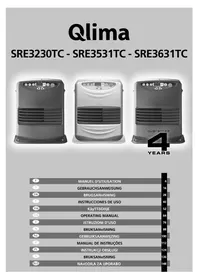
SRE3230TC - Frying Pan QLIMA - Free user manual and instructions
Find the device manual for free SRE3230TC QLIMA in PDF.



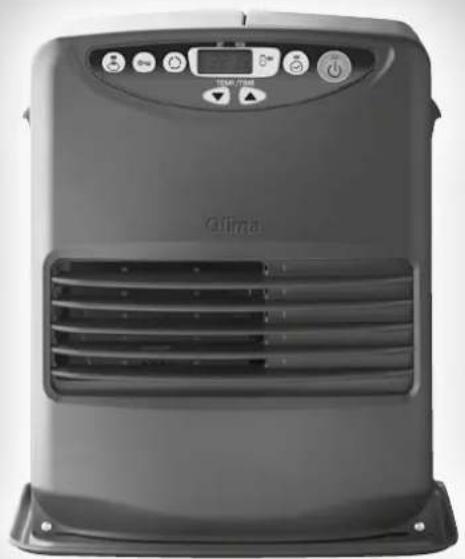
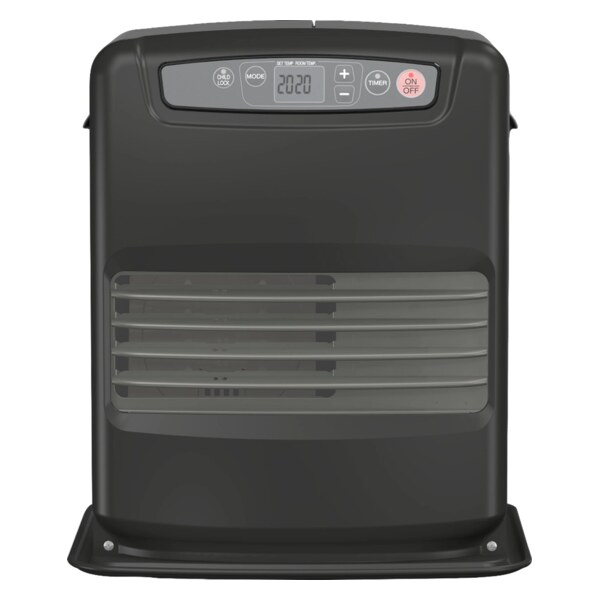
| Product type | Liquid fuel mobile heater (supplementary heating) |
| Brand | Qlima |
| Model | SRE3230TC |
| Recommended fuel | Qlima Premium Quality Fuels (compliant with French decrees of 18/07/2002 and 25/06/2010) |
| Average nominal power | 2040 W (170 g/h) |
| Maximum heat output | 3000 W (250 g/h) |
| Minimum heat output | 1080 W (90 g/h) |
| Recommended room volume | 48 to 120 m³ |
| Fuel consumption | 0.113 to 0.313 L/h |
| Tank autonomy | 16 to 44 hours |
| Removable tank capacity | 5 liters |
| Weight | 8.1 kg |
| Dimensions (L × D × H) | 371 × 294 × 429 mm |
| Power supply | 230 V ~ 50 Hz |
| Power consumption (ignition) | 335 W |
| Power consumption (continuous) | 78 - 123 W |
| Noise level | 28 - 35 dB |
| Adjustable temperature range | 12 °C to 26 °C |
| Child safety | Yes (CHILD LOCK button lock) |
| Timer function | Yes (programming up to 24 h) |
| Economy function | SAVE mode (stops if temperature exceeds set point by 3 °C) |
| Automatic safety shutdown | After 36 hours of continuous operation |
| Safety systems | Anti-shock (E01), incomplete combustion detection (E13), overheating protection (E07, Filter) |
| Maintenance | Cleaning of fuel filter and fan filter |
| Included accessories | Hand pump, transport cap |
| Warranty | 4 years (excluding consumables) |
Frequently Asked Questions - SRE3230TC QLIMA
User questions about SRE3230TC QLIMA
0 question about this device. Answer the ones you know or ask your own.
Ask a new question about this device
Download the instructions for your Frying Pan in PDF format for free! Find your manual SRE3230TC - QLIMA and take your electronic device back in hand. On this page are published all the documents necessary for the use of your device. SRE3230TC by QLIMA.
USER MANUAL SRE3230TC QLIMA
SRE3230TC - SRE3531TC - SRE3631TC
natural_image
Exterior view of a modern air conditioner unit (no visible text or symbols)
natural_image
Front view of a modern Qlima air conditioner unit with control panel and digital display (no visible text or symbols on main body)
| F | MANUEL D'UTILISATION | 4 |
| D | GEBRAUCHSANWEISUNG | 16 |
| DK | BRUGSANvISNING | 28 |
| E | INSTRUCCIONES DE USO | 40 |
| FIN | KäyTTöOHjE | 52 |
| GB | OPERATING MANUAL | 64 |
| I | ISTRUZIONI D'USO | 76 |
| N | BRUKSANvISNING | 88 |
| NL | GEBRUIKSAANWIjZING | 100 |
| P | MANUAL DE INSTRUÇÕES | 112 |
| PL | INSTRUKCji OBSŁUGI | 124 |
| S | BRUKSANvISNING | 136 |
| SLO | NAvODILA ZA UPORABO | 148 |
Chère Madame, Cher Monsieur,
LE COMBUSTIBLE APPROPRIÉ
natural_image
Illustration of a cardboard box with a lid and a separate open box, showing different shapes (no text or symbols)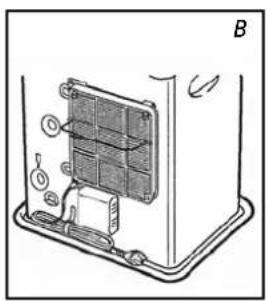
natural_image
Diagram of a device interior showing a panel with labeled components and directional arrows (no text or symbols)
natural_image
Line drawing of a hand inserting a component into a machine with a circular base (no text or symbols)
natural_image
Illustration of a hand holding a knob above a mechanical component (no text or symbols)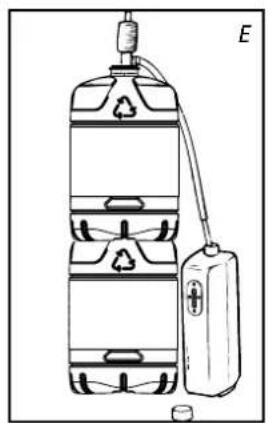
natural_image
Diagram of a water tank with recycling symbol and connected to a battery (no text or labels)C REGLAGE DE L'HEURE


Combustion normale:

F PROGRAMMATION DE L'HEURE DESIREE (TIMER)
natural_image
Simple diagram of a battery and an oval object with radiating lines, no text or symbols present.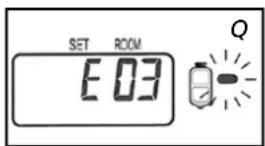
J L'UTILISATION DE LA TOUCHE ÉCONOMIQUE 'SAVE'
natural_image
Illustration of a hand inserting a grid into a device labeled 'R' (no text or symbols on the diagram itself)natural_image
Cross-sectional diagram of a mechanical device with internal components and an arrow indicating direction (no text or symbols)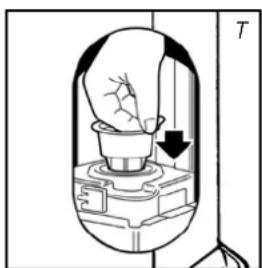
natural_image
Diagram of a mechanical device with a light bulb inside, showing internal components and an arrow indicating motion (no text or symbols)L ENTRETIEN
natural_image
Illustration of a hand using a tool to clean or operate a device with a water bottle and cup nearby (no text or symbols)Bouchon de transport

P CONDITIONS DE GARANTIE
natural_image
Illustration of a cardboard box with an open lid and a separate open box containing a plastic sheet (no text or symbols)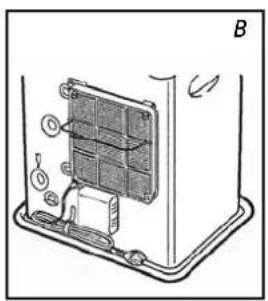
natural_image
Diagram of a device interior showing a panel with labeled components and directional arrows (no text or symbols)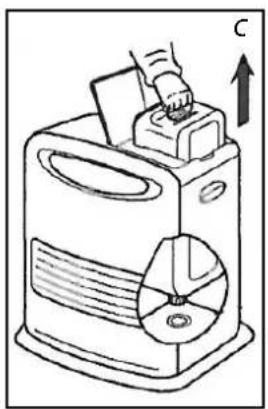
natural_image
Line drawing of a hand inserting a component into a device with an arrow indicating upward motion (no text or symbols)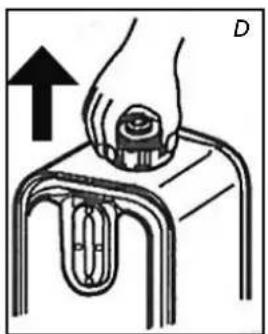
natural_image
Illustration of a hand pressing down on a mechanical component with an arrow indicating upward motion (no text or symbols)
natural_image
Diagram of a water tank with recycling symbol and connected to a battery (no text or labels)GebrauchsanweisunG

A DIE INSTALLATION DES KAMINOFENS
C ZEITEINSTELLUNG


natural_image
Simple diagram showing a battery and an oval object with radiating lines, no text or symbols present.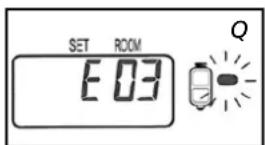
natural_image
Illustration of a hand inserting a grid into a device labeled 'R' (no text or symbols on the diagram itself)Brennstofffilter

natural_image
Cross-sectional diagram of a mechanical device with internal components and an arrow indicating direction (no text or symbols)K DIE BRENNSTOFFANZEIGE „OIL“
natural_image
Diagram of a hand pouring liquid into a container with an arrow indicating direction (no text or symbols)

natural_image
Illustration of a hand using a tool to clean or wash liquid from a water bottle (no text or symbols visible)natural_image
Illustration of a box with an open lid and a separate diagram showing a closed package and sheet (no text or symbols)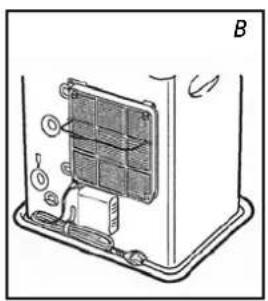
natural_image
Diagram of a device's internal structure with labeled components and directional arrows (no text or symbols)
natural_image
Line drawing of a hand inserting a component into a machine with a circular base (no text or symbols)
natural_image
Illustration of a hand holding a knob above a mechanical component (no text or symbols)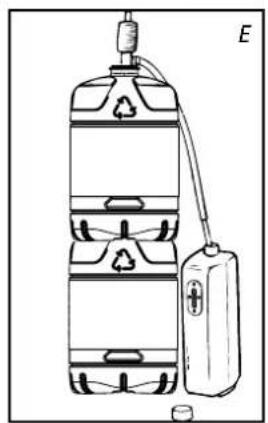
natural_image
Diagram of a water tank with recycling symbol and connected to a battery (no text or labels)veJLedninG

A INSTALLATION AF KAMINEN


E INDSTILLING AF DEN ∅NSKEDE TEMPERATUR
F BRUG AF TIMEREN
natural_image
Simple diagram showing a battery and a sun with rays, no text or symbols present
K 'OIL'-INDIKATOREN
natural_image
Illustration of a hand inserting a grid into a device labeled 'R' (no text or symbols on the diagram itself)Brændstofffiltret
natural_image
Cross-sectional diagram of a mechanical device with internal components and an arrow indicating direction (no text or symbols)L VEDLIGEHOLDELSE
natural_image
Diagram of a light bulb inside a container with an arrow indicating rotation (no text or symbols)natural_image
Illustration of a hand using a tool to clean or operate a device with a cylindrical container nearby (no text or symbols)Transportdækslet

M OPBEvARING (SLUT PÅ FyRINGSSÆSONEN)
natural_image
Illustration of a cardboard box with an open lid and a separate open box containing a plastic sheet (no text or symbols)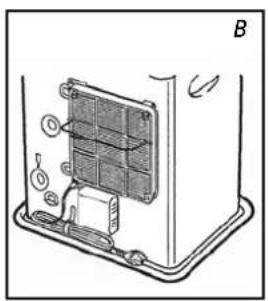
natural_image
Technical diagram of a device rear panel with labeled components and directional arrows (no text or symbols)
natural_image
Line drawing of a hand inserting a component into a machine with a CD inside (no text or symbols)
natural_image
Illustration of a hand holding a knob above a mechanical component (no text or symbols)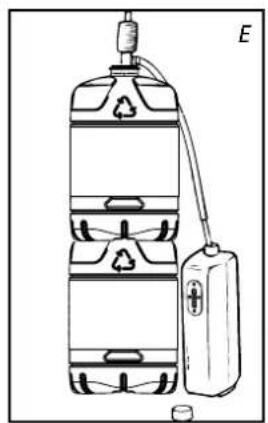
natural_image
Diagram of a water tank with recycling symbol and connected to a battery (no text or labels)manual

A INSTALACION DE LA ESTUFA
C AJUSTE DE HORA


Combustión anómala:
J USO CORRECTO DE LA FUNCION 'SAVE'
natural_image
Simple diagram showing a battery and a light bulb with rays, no text or symbols present
K EL INDICADOR 'OIL'
natural_image
Illustration of a hand inserting a grid into a device labeled 'R' (no text or symbols on the diagram itself)natural_image
Cross-sectional diagram of a mechanical device with internal components and an arrow indicating direction (no text or symbols)L MANTENIMIENTO
natural_image
Illustration of a hand using a tool to clean or operate a device with a water bottle and small cup nearby (no text or symbols)
Tapón de transporte

natural_image
Illustration of a box with an open lid and a separate package, no text or symbols present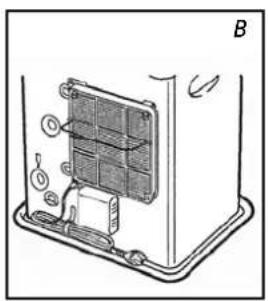
natural_image
Diagram of a device interior showing internal components and a labeled section B (no text or symbols present)
natural_image
Line drawing of a hand inserting a component into a machine with a circular base (no text or symbols)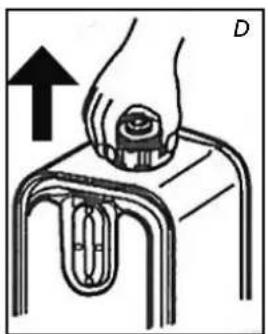
natural_image
Illustration of a hand pressing down on a mechanical component (no text or symbols)
natural_image
Diagram of a water tank with recycling symbol and connected to a battery (no text or labels)KÄyttÖohJeet

A LäMMITTIMEN ASENTAMINEN

D LäMMITTIMEN SyTyTTäMINEN
E vAADITUN LÄMPÖTILAN MääRITTÄMINEN

J 'SAVE'-TOIMINNON OIKEA KÄYTTÖ
natural_image
Simple diagram of a battery with a sun icon and label P, no text or symbols present
K ÖLJYN MERKKIVALO
natural_image
Illustration of a hand inserting a grid into a device labeled 'R' (no text or symbols on the diagram itself)
L KUNNOSSAPITO
natural_image
Cross-sectional diagram of a mechanical device with internal components and an arrow indicating direction (no text or symbols)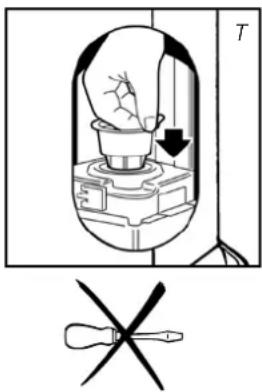
natural_image
Illustration of a hand using a tool to clean or wash a machine, with a water bottle and small cup nearby (no text or symbols)Kuljetussuoja


Congratulations with your purchase of a portable domestic heater. You have purchased a quality product, which will serve you for many years to come. This, of course, provided you use the heater correctly. Please read these Directions for Use first, to ensure maximum lifetime for your heater.
Your heater comes with a 48-month manufacturer's warranty on all defects in materials or workmanship.
We wish you a warm and comfortable time with your heater.
Yours sincerely,
PVG Holding b.v.
Customer Service Department
1 read the directions for use first.
2 in case of any doubt, contact your dealer.
General directions for use
Below you will find the main steps to be taken for using your heater. For more details, please refer to the MANUAL (pages 67 ff.).
1 Remove all packaging materials (refer to Section A, Fig. A).
2 Fill the removable tank ④ (refer to Section B, Fig. C-F).
3 Insert the plug into the wall-socket.
4 Ignite the heater using the ON-OFF key 21 (refer to Section D).
5 If required, change the temperature using the adjustment keys 20 (refer to Section E).
6 Switch off the heater by pressing the ON-OFF key 21.
As a fire precaution, the tank must be filled either when the heater has been switched off or in another room than the room where the heater is installed.
- Always ensure that the tank is closed properly after filling it at a safe distance from all sources of heat and open flames (see chapter B).
- The first time the heater is ignited it will smell like "new" for a short time.
- Store all fuel containers with their original caps and seals in a cool and dark place.
- Fuel ages. Use new fuel at the start of every heating season.
- The use of Qlima Premium Quality Fuels as a heating fuel assures you that you have a good quality fuel.
- Before changing brands and/or types of fuel make sure that the mobile heater first completely empties all of the remaining fuel inside the heater.
MAIN COMPONENTS
① Information display
② Operating keys
③ Tank compartment lid
4 Removable tank
⑤ Metal cap
6 Fuel filter
⑦ Fixed tank
⑧ Flame inspection window
9 Hot air grille
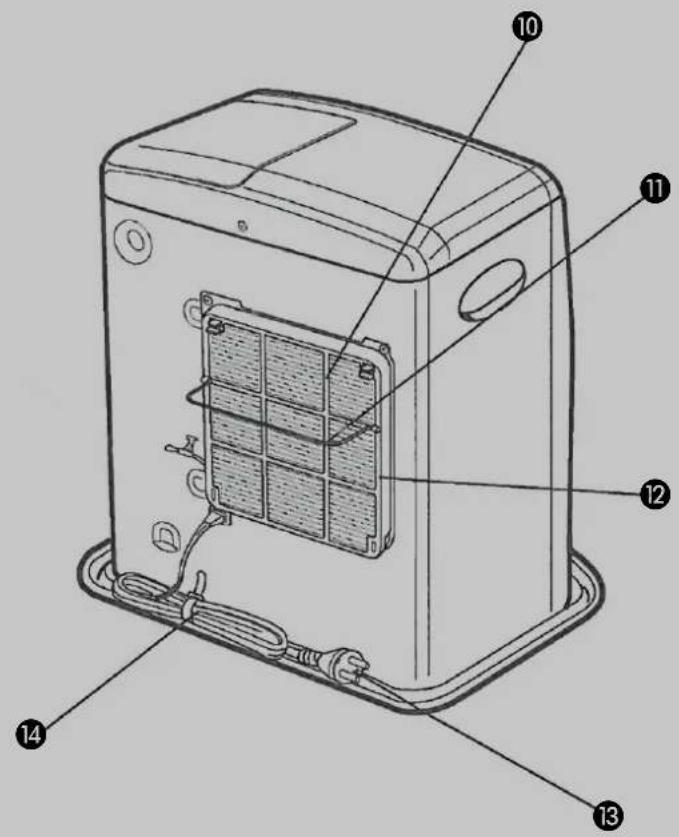
⑩ Air supply
⑪ Safety bracket
12 Filter ventilator
13 Plug
14 Connecting lead
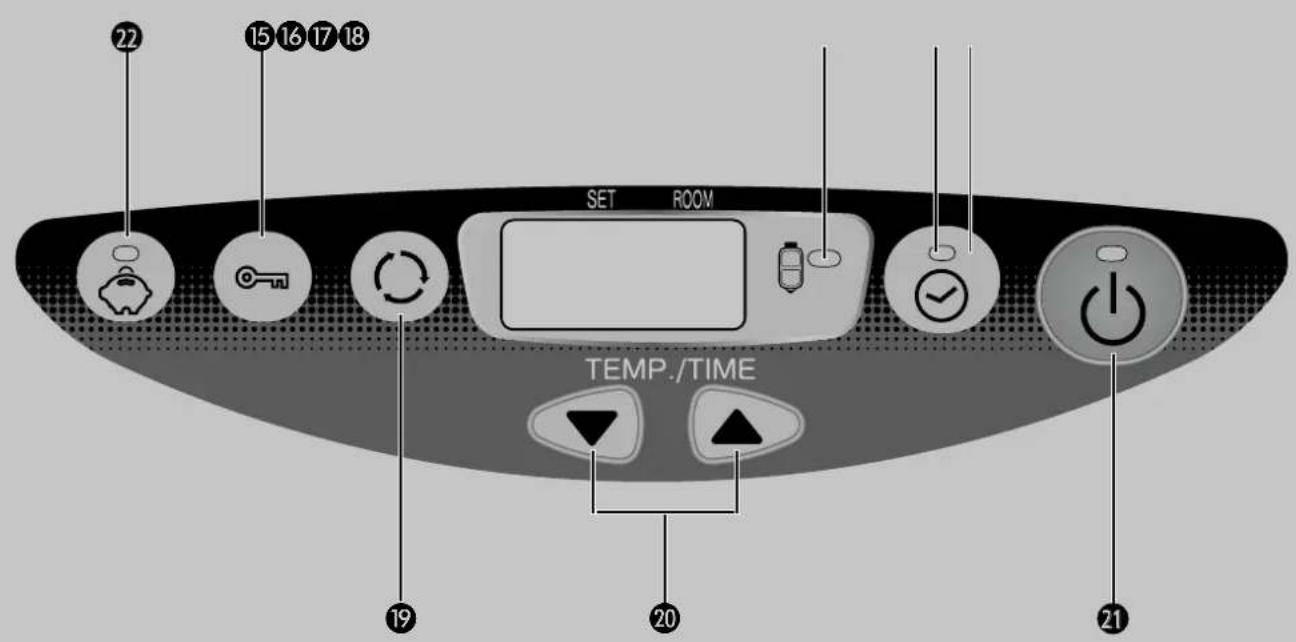
15 Child safety catch key
16 Low fuel level indicator
17 Green timer indicator
18 Timer key
19 Mode key
20 Key to set temperature/time
21 On/off key (red indicator on)
22 SAVE key
what you need to Know in advance
VENTILATE SUFFICIENTLY
Read this user manual carefully before using the appliance and keep it for future reference. Install this device only when it complies with local/national legislation, ordinances and standards. This product is intended to be used as a heater in residential houses and is only suitable for use in dry locations, in normal household conditions, indoors in living room, kitchen and garage.
Regardless of the model, you must always make sure that the heater is used in a room large enough to enable the heater to be used safely without extra ventilation. If the room is smaller than required, you must always open a door or window slightly (ensuring an opening of approx. 2.5 cm). It is important that every room where the heater is used has sufficient air intake and efficient air outflow (both openings must have a minimum cross section of 50 cm ^2 ). No modifications to the safety system are allowed, as that will invalidate the guarantee that the air probe will work properly. Consult your dealer in case of doubt.
Especially for France: Your heater was designed to operate exclusively on fuel for liquid fuel-operated mobile heaters in accordance with the Decrees of 18-07-2002 and 25-06-2010. The use of other fuels is forbidden.
Ask your dealer or check our website for the addresses of our retailers.
The liquid fuel-operated mobile heater is intended as an extra heater, and not as a continuous source of heat.
Especially for United Kingdom: Only use Class C1 paraffin fuel in accordance with BS2869; Part 2, or equivalent.
The user must comply with the following instructions for proper use:
DO NOT
- use the liquid fuel-operated mobile heater in caravans, boats, and vehicle cabins;
- use the liquid fuel-operated mobile heater in insufficiently ventilated rooms (consult the table of properties for the minimum dimensions of the room to be heated), underground rooms and / or at a height of over 1500 metres;
- modify the heater safety features.
The use of this type of heating in public rooms is subject to prior regulatory permission. Obtain proper information on this in advance.
THE RIGHT FUEL
Your heater has been designed for use with high-quality water-free pure paraffin oil, such as Qlima Premium Quality Fuels. Only fuels of this kind will ensure clean and proper burning. Lower quality fuel may result in:
▶ increased possibility of malfunctioning
▶ incomplete combustion
▶ reduced heater lifetime
▶ smoke and/or fumes
▶ deposits on the grid or mantle
Using the right fuel is therefore essential for safe, efficient, and comfortable use of your heater.
Damage and/or malfunctions of the heater due to the use of other than high-quality water-free pure parafine oil is not covered by the warranty.
Always refer to your local dealer for the right fuel for your heater.
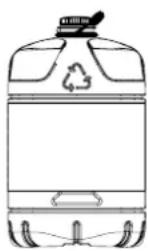
Only the use of the correct fuel will ensure safe, efficient, and comfortable use of your heater.

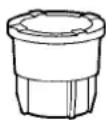
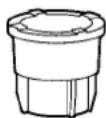
This transportation cap is packed separately in the box. Only this cap ensures trouble-free transportation of the heater after use. Store it well!

natural_image
Illustration of a box with an open lid and a separate diagram showing a closed package and sheet (no text or symbols)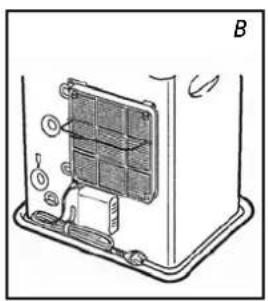
natural_image
Technical diagram of a device showing internal components and a labeled section B (no text or symbols present)
natural_image
Line drawing of a hand inserting a component into a machine with a circular component, labeled 'C' (no text or symbols on the diagram itself)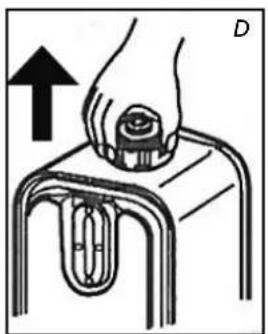
natural_image
Illustration of a hand pressing down on a mechanical component with an arrow indicating upward motion (no text or symbols)
natural_image
Diagram of a water tank with recycling symbol and connected to a battery (no text or labels)manual

A INSTALLING THE HEATER
1 Carefully remove your heater from the box and check the contents. In addition to the heater you also need to have:
▶ a manual fuel pump
▶ a transportation cap
▶ these directions for use
Keep the box and the packaging materials (Fig. A) for storage and/or transportation.
2 Open the lid of the removable tank ③ and remove the piece of cardboard.
3 Fill the removable tank as indicated in Section B.
4 The floor should be firm and completely level. Reposition the heater, when it is not level. Do not try to correct the situation by placing books or other goods under the heater.
5 Use the horizontal safety bracket ⑪ to prevent the curtains from covering the ventilator (Fig. B.).
6 Insert the plug 13 into the wall-socket (230 Volts - AC / 50 Hz) and set the correct time using the adjustment keys 20 (refer to Section C).
7 Your heater is now ready for use.
B FILLING FUEL
Fill the removable tank in a suitable place since there can always be some spillage. Follow the procedure below:
1 Make sure that the heater is switched off.
2 Open the upper lid and lift the removable tank out of the heater (Fig. C). Note: Some drops may leak from the tank. Put down the removable tank (cap pointing upwards, handle on floor and screw off the fuel cap.
3 Remove the metal cap (unscrew). Easy to open by holding the outside (fig. D.).
4 Fill the removable tank using a fuel pump (refer to fuel pump operation instructions.) Make sure that it is in a higher position than the removable tank (Fig. E). Insert the ribbed hose into the opening of the removable tank.
5 Check the removable tank fuel gauge while filling the tank (Fig. F). Stop filling once the gauge indicates that the tank is full. Never overfill the tank, especially not when the fuel is very cold (fuel expands when it heats up).
6 Let the remaining fuel in the pump flow back into the jerrycan and carefully
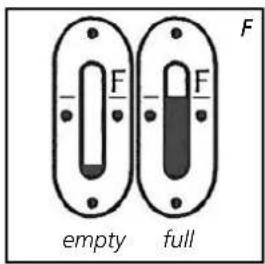
remove the pump. Carefully screw the fuel cap back on the tank. Clean off any spilled fuel.
7 Check whether the fuel cap is straight and tightened properly. Reinstall the removable tank in the heater (cap down). Close the lid.

- Do not move the heater after reinstalling the tank.
- Take care not to damage the cap while filling the tank. Deformation of the cap can lead to fuel leakage.
8 Turn the heater on again.
C SETTING THE TIME
Set the time to use the heater as a clock or if using the timer. You can even set the time when the heater is on.

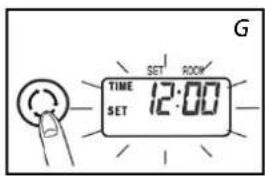
1 Press the mode key ⑲ to set the time (fig. G). Time set and the time flash on the display.

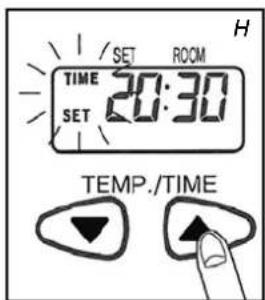
2 Press the buttons (▼) or (▲)20 to set the time. The time displays the numbers 00:00 to 23:59. Press the (▲) button to go forwards and the (▼) button to go backwards. The time will change in one minute steps each time you press one of these 2 buttons. The time on the display will change in ten minute steps if you keep the button pressed (fig. H.).
3 Press the mode key 19 again to activate the timer function. See chapter F.
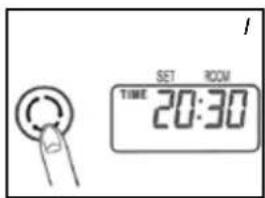
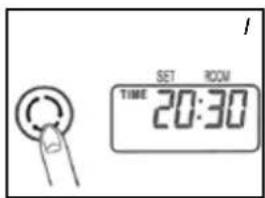
4 Press the mode key ⑲ to display the time (fig. 1.). If the time is not set, the display indicates --:--.
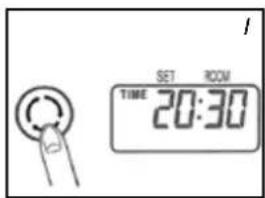

The time must be set again after a power cut or if the plug has been removed from the socket.
D IGNITING THE HEATER
When used for the first time, a new heater may give out a smell for a short while. You should therefore provide extra ventilation.


Always ignite the heater with the ON/OFF button 21. Never use matches or a cigarette lighter.
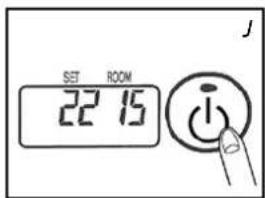
1 Press the ON / OFF button ^21 .
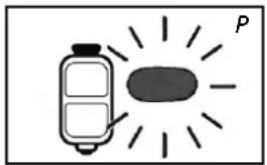
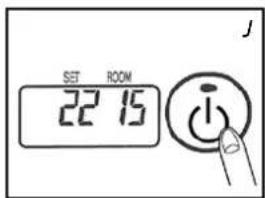
The ignition indicator will light up: the required temperature and the ambient temperature are displayed (fig. J.). The ambient temperature is displayed from 1°C. If the temperature is below 0°C, Lo is displayed. Ignition takes about 45 seconds.
2 Normal combustion:
• The flames are blue
• The burner grille can become red

Abnormal combustion:
- The flame is yellow and blue In this case take appropriate measures.
This heater cannot be switched on continuously for more than 36 hours. After 36 hours it stops automatically, even if the tank has been refilled within this period.
E SETTING THE REQUIRED TEMPERATURE
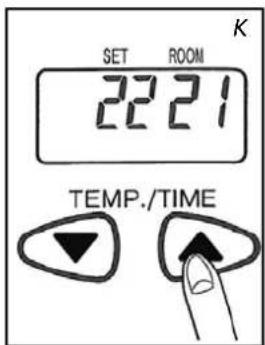
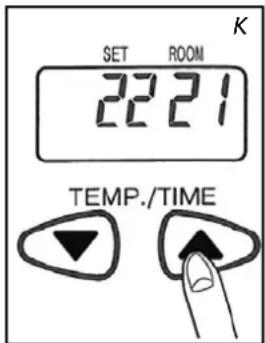
If the heater is on, the required temperature can be changed using the adjustment buttons 20 (fig. K). To increase the temperature, press the ▲ button. To decrease the temperature, press the ▼ button. Each time you press the adjustment button the temperature changes by 1°C. The temperature can be set to a minimum of 12°C and a maximum of 26°C.


- If the heater is used in a small space, in a well-insulated space or if the outside temperature is relatively high, the ambient temperature can become higher than the required temperature. In this case, turn the heater off.
- The displayed temperature is the mean ambient temperature. This temperature may not correspond with that indicated by a thermometer.
F USING THE TIMER
The timer allows you to switch on the heater automatically at a preset time. In order to switch on the timer, the correct time must have been set (refer to Section C) and the heater should be off. Follow the procedure below:
1 Check that the time is set properly (see chapter C).
2 Press the mode button 19 (fig. L) until Timer and Set appear in the display.
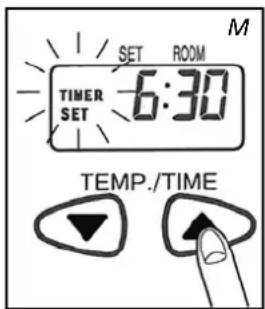
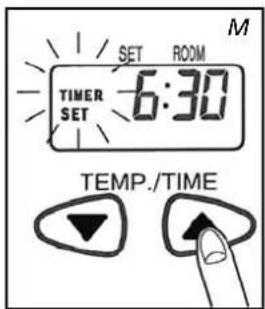
3 Press the (▼) or (▲) buttons 20 to set the required activation time for the heater. Press the (▲) button to go forwards and the (▼) button to go backwards. The time will change in one minute steps each time you press one of these 2 buttons. The time on the display will change in ten minute steps if you keep the button pressed (fig. M).
4 Press the ON / OFF buttons to turn the heater on (the indicator will light up). It is not necessary to press this button if the heater is on.
5 Press the timer button 18. The indicator goes out. The time indicator will light up and the timer is set.
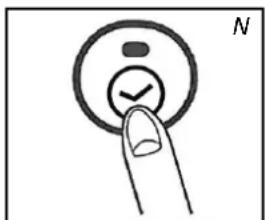

Take care not to press the ON / OFF button 21 again after setting the timer, this will reset the timer.
6 The heater turns on at the time chosen.

- To cancel the timer, press the ON / OFF button 21 (the timer indicator goes out).
- Set the timer and the clock again after a power cut.
- In case of an earthquake, or shocks, code E01 will appear in the display. Reset the error and repeat from point 4 to set the timer again.
G
1 Press the ON / OFF button. The red lamp flashes for about 8 seconds and the heater is turned off. Always check that the flame goes out.

The ventilator continues operating for about 3 minutes after turning off in order to cool the inside of the heater. If you turn off the power earlier, uncontrolled symptoms can occur (release of smoke, smell etc.).
H
IN CASE OF PROBLEMS
The symptoms mentioned above are not faults and not abnormal.
Check the list.
| Symptoms Causes | ||
| While igniting | Igniting is tedious | Igniting takes about 45 seconds. After filling the tank, wait till the fuel has reached the fixed tank. Repeat ignition 2 or 3 times. |
| Crackling sound | This sound is made by the electric ignition. | |
| White smoke | This can happen if the fuel does not circulate past the burner properly | |
| During ignition or turning off | Smoke and an unpleasant smell during first use | That is the protective lacquer getting warm. This soon stops. Give the space more ventilation. |
| The ambient temperature does not increase and the requested temperature is higher. | The space is too large. | |
| The flame glows red. | The ambient air is damp or salty or it contains too many impurities. | |
| The ambient temperature does not decrease and the requested temperature is lower. | The heater is being used in a small insulated space or the outside temperature is relatively high. Turn the heater off. | |
| The displayed ambient temperature is not the same as indicated by a thermometer. | This is because the displayed ambient temperature is an indication of the average temperature of the space. | |
| Small knocking noises when the heater is in operation or immediately after turning off. | This is the sound of the metal expanding. | |
| Noise 8 seconds after turning off. | A ticking sound: can occur when the heater cools off. |
THE INFORMATION DISPLAY
The information display ① not only serves as an indicator of the (set) time and temperature (sections C, E, and F), it also indicates any malfunctioning of the heater. The code on the information display tells you what is the matter:
| Code Information | Action | |
| Time---- | The heater has been automatically turned off by a power cut or bad connection. | Restore power or restore the connection. Press the ON / OFF key 21 again. |
| E01 | An earthquake (magnitude 5 or more), strong vibrations or a shock will ensure that the heater automatically turns off. (The safety system against shocks has worked). | Make sure there are no combustible materials around the heater, or fuel leakages. Press the ON / OFF key 21 again. |
| E02E03 | The heater has been automatically turned off after a fault or during ignition or due to the presence of water or dust in the fuel filter or in the fixed tank. | Remove the water and the dust in the fixed tank. Clean the fuel filter (see chapter L).Press the ON / OFF button 21 again. |
| E07 | An increase in ambient temperature has turned the heater off. (The temperature monitoring system has worked). | Ventilate the space. Let the heater cool off. Press the ON / OFF button 21 again. |
| FilterE09Filter | The heater has been automatically turned off because the hot air stream, the ventilator or the ventilator filter is blocked or hindered by something. (The safety system against overheating has worked). | Remove obstacles from the ventilator opening. Clean the ventilator filter (see chapter L) Press the ON/OFF button 21 again. If the problem occurs again after taking the above measures, contact your dealer. |
| E13 | The heater has been turned off in a closed space. (The safety system against incomplete combustion has worked). | Ventilate the space and press the ON / OFF button 21 again.Ensure the space is sufficiently ventilated. |
| The ON indicator flashes. Err lights up | The heater has automatically stopped because the ON / OFF button was kept pressed in or was blocked. | Remove obstacles from the ventilator opening. Clean the ventilator filter (see chapter L) Press the ON/OFF button 21 again. If the problem occurs again after taking the above measures, contact your dealer. |
| F00 – F30 | Poor functioning. Heater needs maintenance | Note the messages displayed and turn the heater off. Contact your dealer. |
| Symptoms Causes Measures to be taken | ||
| Heater doesn't ignite | The child safety catch lights up | Turn the child safety catch off |
| The fuel indicator lamp doesn't work | The tank is empty Fill the tank | |
| The tank is deformed Replace the tank | ||
| Dirt particles dust or water on the filter and / or in the fixed tank | Clean the fixed tank and the fuel filter. | |
| Power loss | The fuel indicator flashes | |
| The fuel indicator flashes Fill the tank | ||
| A poor quality fuel has been used. | Remove the fuel from the two tanks, then rinse with the correct fuel. | |
| Abnormal combustion | A poor quality fuel has been used. | |
| Poor ventilation Ventilate regularly | ||
| Dust on the ventilator filter Clean the ventilator filter | ||
| Unpleasant smells | A poor quality fuel has been used | Remove the fuel from the two tanks, then rinse with the correct fuel. |
| No fuel in the tank Fill the tank | ||
| Fuel leakage or spilled fuel | Do not use any more and contact your dealer | |
| Fuel leakage | Move the heater, the tank is not empty | |
| A poor quality fuel has been used. | ||
AUTOMATIC DEACTIVATION
This heater is fitted with a safety system that ensures that it switches off automatically after 36 hours continuous operation. If desired, you can switch the heater on again by pressing the ON/OFF button (see section D).

CHILDPROOF LOCK
The childproof lock can be used to prevent children accidentally changing the heater settings. When the heater is burning and the childproof lock is on, the heater can only be switched off. Other functions are blocked then. If the heater has already been switched off, the childproof lock also prevents accidental ignition of the heater. Activate the childproof lock by pressing the CHILDLOCK key 15 and holding it down for more than 3 seconds. The childlock indicator will appear on the information display (Fig. O), indicating that the childproof lock has been activated. Switch off the childproof lock by pressing the CHILDLOCK key 15 and holding it down for more than 3 seconds once again.
j THE CORRECT USE OF 'SAvE'
The 'SAVE' function allows you to limit the temperature. When this function is activated, the heater will automatically switch off, when the room temperature exceeds the set temperature by 3°C. Subsequently, when the room temperature has dropped again to the set temperature, the heater will automatically switch on again. Activate the 'SAVE' setting by pressing the appropriate ② key. The SAVE indicator light will light up. Switch off the function by pressing the SAVE key once again.

Without the 'SAVE' setting your heater will maintain the set temperature by approximation as well, by adjusting its heating capacity. 'SAVE' is an economy setting, which you can use when, for instance, you are not present in the room or to keep it frost-free.
natural_image
Simple diagram showing a battery and a sun with label P (no text or symbols on the diagram itself)
K THE 'OIL' INDICATOR
If the low fuel level indicator 16 lights up in combination with a short tone, then the fuel tank is empty. The heater will automatically burn at its lowest setting for a period of about 80 minutes. The fuel tank must be replenished.
▶ remove the removable tank from the heater and fill it with new fuel (outside the living space in a safe place) (see chapter B)
If you take no action, the fuel tank will be emptied and the display will indicate "E 03" (fig. Q). The heater is automatically turned off.
To ignite the heater once more, fill the tank and wait a few minutes.
Then press the ON / OFF button 21.

natural_image
Illustration of a hand inserting a grid into a device labeled 'R' (no text or symbols on the diagram itself)Fuel filter
natural_image
Cross-sectional diagram of a mechanical device with internal components and an arrow indicating direction (no text or symbols)
natural_image
Diagram of a hand pouring liquid into a container with a downward arrow, labeled 'T' (no text or symbols on the diagram itself)L MAINTENANCE
Switch off the heater and let it cool down, before you start any maintenance work. Also disconnect the plug from the mains. Your heater needs hardly any maintenance.
Clean the ventilator filter:
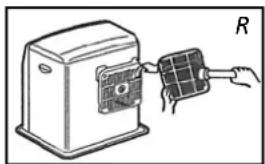
1 Press the buttons on top left and right. Pull the filter 1 cm towards you. Move the filter up so that the two lower fixing points come loose.
2 Clean the ventilator.
3 Replace the ventilator.
Clean the fuel filter:
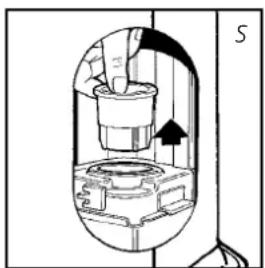
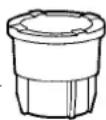
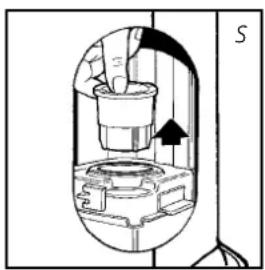
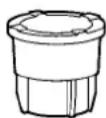
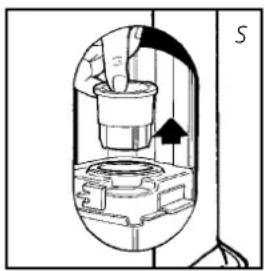
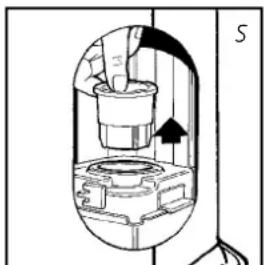
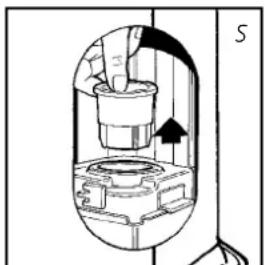
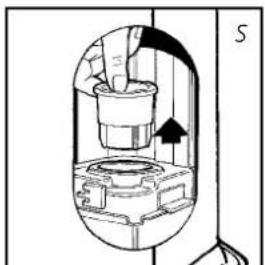
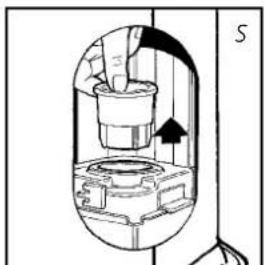
1 Remove the removable tank ④ from the heater and remove the fuel filter (Fig. S). Some drops may leak from the filter; keep a cloth at hand.
2 Remove the dirt by tapping the fuel filter upside-down against a hard surface. (Never clean it with water!)
3 Reinstall the fuel filter into the heater.
We recommend that you remove dust and stains from time to time with a damp cloth, because otherwise these may cause stains that are hard to remove.

Do not use solvents or alcohol to clean the heater: fire hazard. Clean very dirty components with a light synthetic cleaning agent.


Do not remove any heater components yourself. Always contact your dealer for repairs.

When the power cord is damaged, it may only be replaced by an authorised fitter. Use a new cord of the type H05 VV-F.

natural_image
Illustration of a hand using a pipette to clean water from a water tank, with a battery and small cup nearby (no text or symbols)M STORAGE (END OF THE HEATING SEASON)
At the end of the heating season, you must store the heater in a dust-free place, if possible in its original packaging. Unused fuel cannot be used in the next heating season. We therefore recommend that you burn up all fuel. If there is still some fuel left, do not throw it away, but dispose of it in accordance with the local regulations for the disposal of domestic chemical waste.
Always start the new heating season with fresh fuel. When you start re-using the heater follow the instructions again (starting from section A and as specified).
Transport cap

N TRANSPORTATION
Take the following measures to avoid fuel leakage during the transportation of the heater:
1 Let the heater cool down.
2 Remove the removable tank ④ from the heater and remove the fuel filter. Some drops may leak from the filter; keep a cloth at hand. Store the fuel filter and the removable tank outside the heater.
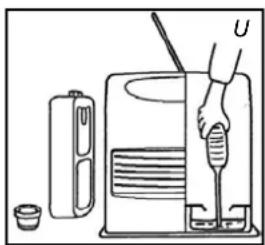
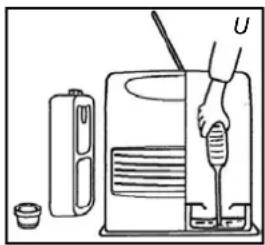
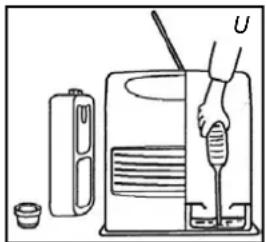
3 Empty the fixed fuel tank (fig. U).
4 Place the transport cap.
5 Always move the heater in an upright position.

Make the fixed tank empty with a fuel pump before transportation or in case of wrong or dirty fuel. First remove the fuel filter and then insert the fuel pump into the empty fixed tank. Follow the same procedure if the fuel tank contains water.
0
SPECIFICATIONS
| SRE 3230 TC SRE 353 | TC SRE 3631 TC | ||
| Ignition electrical | |||
| Fuel paraffin | |||
| Capacity (kW)* 1.08 - 3.00 1.08 - 3.10 | 1.08 - 3.10 | ||
| Suitable space (m3)** 48 - 120 50 - 120 | 50 - 120 | ||
| Fuel consumption (l/hr)* 0.313 0.323 0.323 | |||
| Fuel consumption (g/hr)* 250 258 258 | |||
| Burning time per tank (hr)* 16 15.5 15.5 | |||
| Capacity removable tank (litres) 5 | |||
| Weight (kg) | 8.1 | ||
| Dimensions (mm) (including base plate) | width 371 | ||
| depth 294 | |||
| height 429 | |||
| Accessories | transportation cap, manual fuel pump | ||
| Mains | 230V - AC 50 Hz | ||
| Electrical consumption:IgniterContinuous | 335W78-123W | ||
| Fuse rating | 250V, 5A | ||
* At maximum setting ** Specified values are indicative
The CE marking corresponds with the compliance with the standards EN 60-335 part 1 (1995) and EN 50-165 (08/97)
P
WARRANTy PROVISIONS
Your heater comes with a 48-month warranty starting on the date of purchase. Within this period all defects in material or workmanship will be repaired without any charge. The following provisions shall apply regarding this warranty:
1 We expressly dismiss all other claims for damages, including consequential damages.
2 Any repairs or replacements of components within the term of warranty will not result in an extension of the term of warranty.
3 The warranty shall no longer apply, when the heater has been modified, non-original parts have been used, or when it is repaired by third parties.
4 The warranty shall not apply to parts that are subject to normal wear, such as the manual fuel pump.
5 The warranty shall only apply, when you present the original, dated proof of purchase, provided no changes have been made to it.
6 The warranty shall not apply to damages caused by actions not in compliance with the Directions for Use, neglect, and the use of an incorrect type of fuel, or fuel past its use-by date. The use of incorrect fuel can even be dangerous*.
7 Transportation costs and the risks involved during the transportation of the heater or heater components shall always be at the expense of the purchaser.
In order to avoid unnecessary costs, we recommend that you always read the 'Directions for Use' carefully first. In case they offer no solution, please take the heater to your dealer for repair.
* Highly inflammable substances may induce uncontrollable burning, causing flames to break out. Should this happen, never try to move the heater, but always switch off the heater immediately. In case of emergency you may use a fire extinguisher, but only a type B extinguisher: a carbon dioxide or powder extinguisher.
Egregio Signore, Gentile Signora,
natural_image
Illustration of a cardboard box with an open lid and a separate open box containing a plastic sheet (no text or symbols)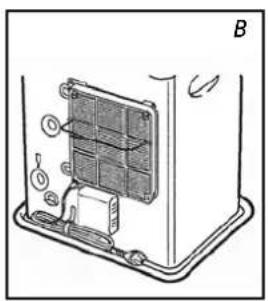
natural_image
Diagram of a device interior showing a panel with labeled components and directional arrows (no text or symbols)
natural_image
Line drawing of a hand inserting a component into a device with an arrow indicating upward motion (no text or symbols)
natural_image
Illustration of a hand holding a knob above a mechanical component (no text or symbols)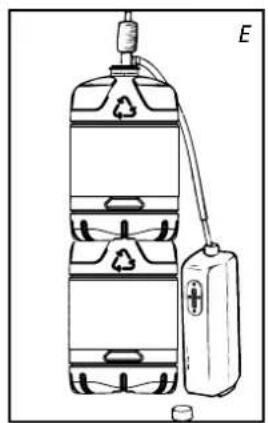
natural_image
Diagram of a water tank with recycling symbol and connected to a battery (no text or labels)istruzioni d'uso


D ACCENSIONE DELLA STUFA



natural_image
Simple diagram showing a battery and a light bulb with rays, no text or symbols present
natural_image
Illustration of a hand inserting a grid into a device labeled 'R' (no text or symbols on the diagram itself)L MANUTENZIONE
natural_image
Cross-sectional diagram of a mechanical device with internal components and directional arrows (no text or symbols)natural_image
Diagram of a hand pouring liquid into a container with a downward arrow, labeled 'T' (no text or symbols on the diagram itself)

natural_image
Illustration of a hand using a tool to clean or wash a container, with a small container nearby (no text or symbols)natural_image
Illustration of a cardboard box with an open lid and a separate open box containing a plastic sheet (no text or symbols)
natural_image
Diagram of a device interior showing internal components and a labeled section B (no text or symbols present)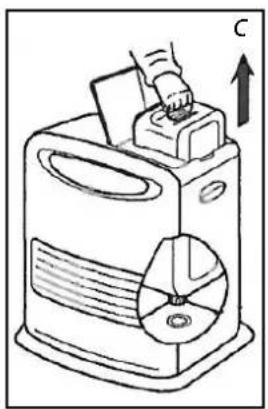
natural_image
Line drawing of a hand inserting a component into a machine with a circular base (no text or symbols)
natural_image
Illustration of a hand holding a knob above a mechanical component (no text or symbols)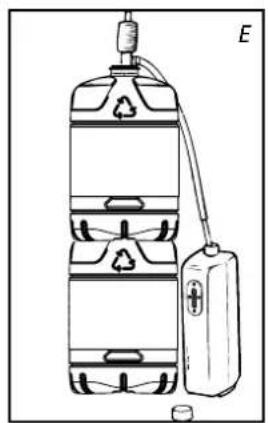
natural_image
Diagram of a water tank with recycling symbol and connected to a battery (no text or labels)hÅndboK

A INSTALLERE OvNEN
C ANGI TIDEN
Angi tiden for å bruke varmeovnen som en klokke eller hvis timeren brukes. Du kan også angi tiden när varmeovnen er på.


Tenn alltid varmeovnen med ON/OFF knappen 21. Du må aldri bruke fyrstikker eller en sigarett.
E ANGI ∅NSKET TEMPERATUR
F BRUKE TIMEREN
Ved hjelp av timeren kan varmeovnen slås på automatisk på et forhåndsinnstilt tidspunkt. For å kunne aktivere timeren må du ha stilt tiden riktig (se avsnitt C) og varmeovnen må være slått av. Følg fremgangsmåten nedenfor:
natural_image
Simple diagram showing a battery and a light bulb with rays, no text or symbols present.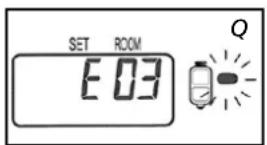

natural_image
Illustration of a hand inserting a grid into a device labeled 'R' (no text or symbols on the diagram itself)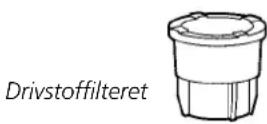
natural_image
Cross-sectional diagram of a mechanical device with internal components and an arrow indicating direction (no text or symbols)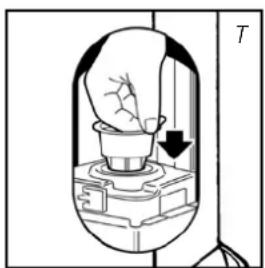
natural_image
Diagram of a hand pouring liquid into a container with a downward arrow, labeled 'T' (no text or symbols on the diagram itself)K "OLJE" INDIKATOREN
natural_image
Illustration of a hand using a tool to clean or operate a device with a container and cup nearby (no text or symbols)Transportlokket


natural_image
Illustration of a box with an open lid and a separate diagram showing a closed package and sheet (no text or symbols)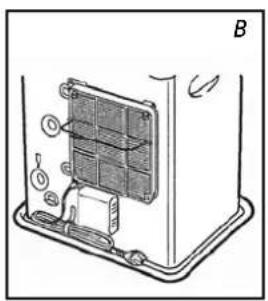
natural_image
Diagram of a device interior showing a panel with labeled components and directional arrows (no text or symbols)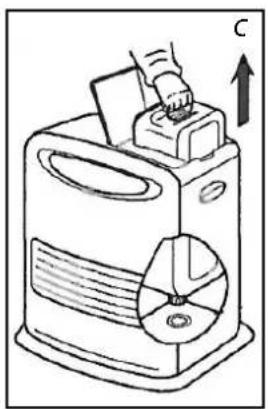
natural_image
Line drawing of a hand inserting a component into a machine with a circular base (no text or symbols)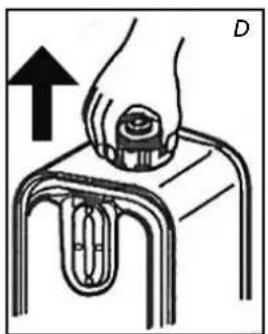
natural_image
Illustration of a hand holding a knob above a mechanical component (no text or symbols)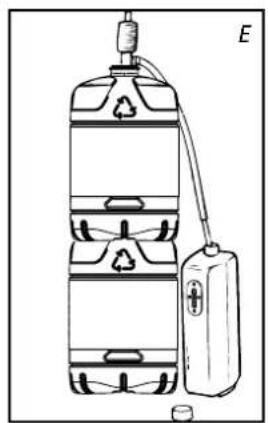
natural_image
Diagram of a water tank with recycling symbol and connected to a battery (no text or labels)handLeidinG
A HET INSTALLEREN vAN DE KACHEL

D HET AANMAKEN vAN DE KACHEL

Abnormale verbranding:
F HET BENUTTEN vAN DE TIMER
natural_image
Simple diagram showing a battery and a light bulb with rays, no text or symbols present.
K DE 'OIL' INDICATOR
natural_image
Illustration of a hand inserting a grid into a device labeled 'R' (no text or symbols on the diagram itself)Brandstofffilter

natural_image
Cross-sectional diagram of a mechanical device with internal components and an arrow indicating direction (no text or symbols)
natural_image
Diagram of a hand pressing down on a mechanical component with a downward arrow, labeled 'T' (no text or symbols on the diagram itself)L ONDERHOUD
natural_image
Illustration of a hand using a tool to clean or prepare a device with a water bottle and cup (no text or symbols)
natural_image
Illustration of a cardboard box with an open lid and a separate open box containing a plastic sheet (no text or symbols)
natural_image
Diagram of a device interior showing a panel with labeled components and directional arrows (no text or symbols)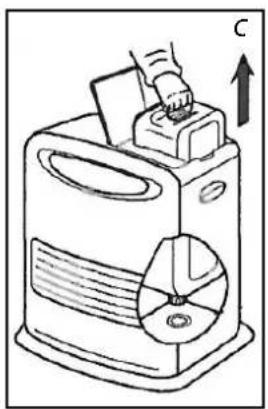
natural_image
Line drawing of a hand inserting a component into a machine with a circular base (no text or symbols)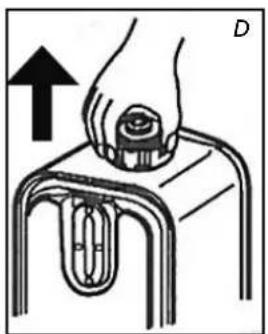
natural_image
Illustration of a hand holding a knob above a mechanical component (no text or symbols)
natural_image
Diagram of a water tank with recycling symbol and connected to a battery (no text or labels)C CONFIGURAR O TEMPO

ACENDER O AQUECEDOR

E CONFIGURAR A TEMPERATURA REQUERIDA
natural_image
Simple diagram of a battery with radiating lines and an oval shape, no text or symbols present.

natural_image
Illustration of a hand inserting a grid into a device labeled 'R' (no text or symbols on the diagram itself)
Tampa de transporte
natural_image
Cross-sectional diagram of a mechanical device with internal components and an arrow indicating direction (no text or symbols)
natural_image
Diagram of a light bulb inside a bell jar with a cup and arrow indicating direction (no text or symbols)K O INDICADOR DE ÓLEO (OIL)
natural_image
Illustration of a hand using a tool to interact with a device, showing no text or symbols present.
Tampa para transporte

natural_image
Illustration of a box with an open lid and a separate package, no text or symbols present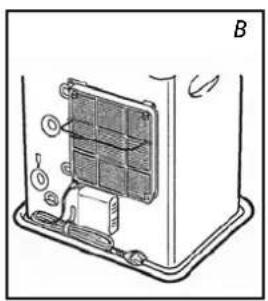
natural_image
Diagram of a device interior showing internal components and a labeled section B (no text or symbols present)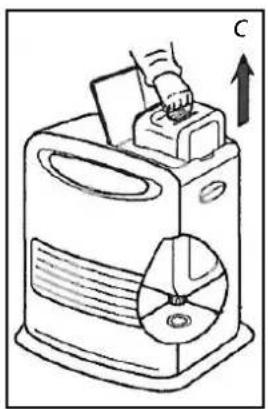
natural_image
Line drawing of a hand inserting a component into a machine with a circular base (no text or symbols)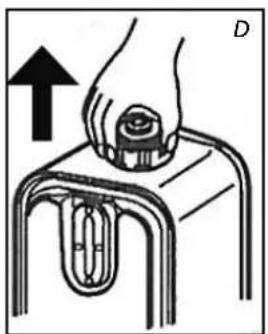
natural_image
Illustration of a hand pressing down on a mechanical component (no text or symbols)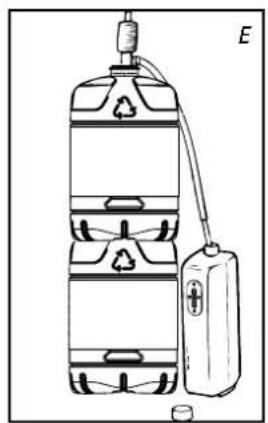
natural_image
Diagram of a water tank with recycling symbol and connected to a battery (no text or labels)INStrUKcJa OBSŁUgI

a INStaLacJa grzeJNIKa


F KOrzyStaNle z PrOgraMatOra czaSU tIMer
natural_image
Simple diagram showing a battery and a sun with rays, no text or symbols present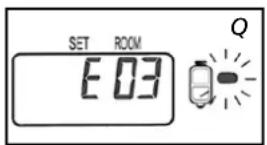
K WSKAŹNIK „OIL”
natural_image
Illustration of a hand inserting a grid into a device labeled 'R' (no text or symbols on the diagram itself)Filtr paliwa

natural_image
Cross-sectional diagram of a mechanical device with internal components and an arrow indicating direction (no text or symbols)L KONSERWACJA
natural_image
Diagram of a mechanical device with a handle and arrow indicating direction (no text or symbols)
natural_image
Illustration of a hand using a tool to clean or prepare a device with a container and small cup (no text or symbols)SE ALLTID TILL ATT DET FINNS TILLRÄCKLIG VENTILATION
natural_image
Line drawing of a plastic bottle with a recycling symbol on the cap (no text or labels)natural_image
Illustration of a cardboard box with an open lid and a separate open box containing a plastic sheet (no text or symbols)
natural_image
Diagram of a device interior showing a panel with labeled components and directional arrows (no text or symbols)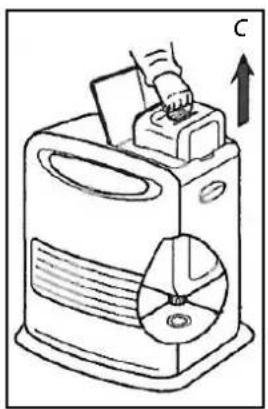
natural_image
Line drawing of a hand inserting a component into a machine with a circular base (no text or symbols)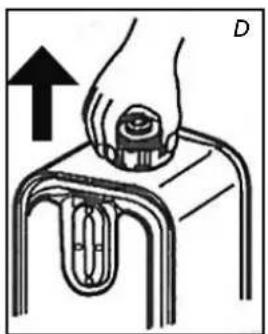
natural_image
Illustration of a hand holding a knob above a mechanical component (no text or symbols)
natural_image
Diagram of a water tank with recycling symbol and connected to a battery (no text or labels)manual

A INSTALLERA väRMAREN

F ANvänDA TIMER
natural_image
Simple diagram showing a battery and a light bulb with rays, no text or symbols present

natural_image
Illustration of a hand inserting a grid into a server unit (no text or symbols)
natural_image
Cross-sectional diagram of a mechanical device with internal components and an arrow indicating direction (no text or symbols)
natural_image
Diagram of a mechanical device with a hand holding a tool, showing internal components and a downward arrow (no text or symbols)K OLJEINDIKATORN
natural_image
Illustration of a hand using a tool to clean or wash a machine, with a small container nearby (no text or symbols)Transportlocket


natural_image
Line drawing of a plastic bottle with a recycling symbol on the cap (no text or labels)natural_image
Illustration of a cardboard box with a lid and a separate open box, showing different shapes (no text or symbols)
natural_image
Diagram of a device interior showing internal components and a labeled section B (no text or symbols present)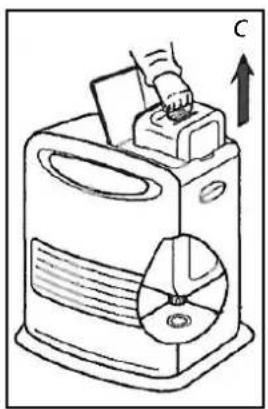
natural_image
Line drawing of a hand inserting a component into a machine with a circular base (no text or symbols)
natural_image
Illustration of a hand pressing down on a mechanical component (no text or symbols)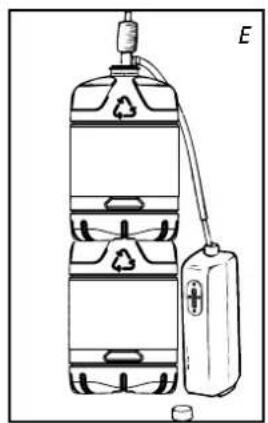
natural_image
Diagram of a water tank with recycling symbol and connected to a battery (no text or labels)NAVODILA ZA UPORABO

A A PRIPRAVA PEČI NA DELOVANJE


E NASTAVLJANJE IZBRANE TEMPERATURE
F UPORABA TIMERJA
natural_image
Simple diagram of a battery and an oval object with radiating lines, no text or symbols present.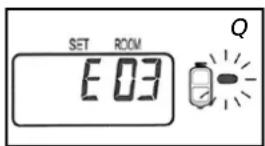
K PRIKAZOVALNIK GORIVA
natural_image
Illustration of a hand inserting a grid into a device labeled 'R' (no text or symbols on the diagram itself)Filter za gorivo

natural_image
Cross-sectional diagram of a mechanical device with internal components and an arrow indicating direction (no text or symbols)
natural_image
Diagram of a hand pouring liquid into a container with a downward arrow, labeled 'T' (no text or symbols on the diagram itself)1 Pritisnite gumba na zgornji strani levo in desno. Filter za 1 cm povlecite proti sebi. Filter premaknite navzgor, tako da se spodnji dve pritrdilni točki snameta.
2 Očistite ventilator.
3 Filter ventilatorja ponovno vstavite nazaj.
natural_image
Illustration of a hand using a tool to clean or prepare a device with a water bottle and cup nearby (no text or symbols)
Pokrovček za prevoz
M SHRANJEVANJE (PO KONČANI GRELNI SEZONI)

Distributed in Europe by PVG Holding B.V.
Benötigen Sie weitere Informationen oder treten Probleme auf, besuchen Sie bitte unsere Website www.qlima.com, oder setzen Sie sich mit unserem Kundendienst in Verbindung (Telefonnummer auf www.qlima.com).
For alle yderligere oplysninger eller ved eventuelle problemer med apparatet henvises til www.qlima.com eller det lokale Kundecenter (telefonnumre findes i www.qlima.com).
⑧Si necesita información o si tiene algún problema, visite nuestra página Web www.qlima.com, o póngase en contacto con el servicio cliente (hallará el número de teléfono en www.qlima.com).
Si vous souhaitez obtenir des informations supplémentaires ou si vous rencontrez un problème, rendez-vous sur notre site Web (www.qlima.com) ou contactez notre service client (vous trouverez l'adresse et numéro de téléphone sur www.qlima.com).
(1) Jos haluat huoltoapua, lisätietoja tai laitteen kanssa tulee ongelmia, tutustu verkkosivustoon osoitteessa www.qlima.com tai kysy neuvoa PVG kuluttajapalvelukeskuksesta (www.qlima.com).
If you need information or if you have a problem, please visit the our website (www.qlima.com) or contact our sales support (you find its phone number on www.qlima.com)
① Per informazioni e in caso di problemi, visitate il sito Web www.qlima.com oppure contattate il Centro Assistenza Clienti (per conoscere il numero di telefono, consultate www.qlima.com).
^① Hvis du trenger informasjon, eller hvis du har et problem med produktet, kan du gå til nettsidene www.qlima.com. Alternativt kan du kontakte med PVG' forbrukertjeneste (telefonnummeret i www.qlima.com).
NL Als u informatie nodig hebt of als u een probleem hebt, bezoek dan de onze website (www.qlima.com) of neem contact op met de afdeling sales support (adres en telefoon op www.qlima.com).
P Se necessitar de informações ou se tiver problemas, visite o Web site www.qlima.com ou contacte o Centro de Assistência (número de telefone o www.qlima.com)
W przypadku problemów i w celu uzyskania szczegółowych informacji odwiedź stronę internetową Qlima dostępną pod adresem www.qlima.com lub skontaktuj się z Centrum kontaktów Qlima (www.qlima.com)
Om du behöver service eller information eller har problem med apparaten kan du besöka www.qlima.com eller kontakta Qlima kundtjänst (du hittar telefonnumret på www.qlima.com).
SLO Če želite dodatne informacije, obiščite spletno mesto podjetja na naslovu www.qlima.com ali pokličite na telefonsko (www.qlima.com).
TR Daha fazla bilgiye ihtiyaç duyarsanız veya bir sorunla karşılaşırsanız, www.qlima.com adresindeki Qlima Internet sitesini ziyaret edin veya ülkenizde bulunan Qlima müşteri merkeziyle iletişim kurun (telefon numarasını: www.qlima.com).


- SRE3230TC - SRE3531TC - SRE3631TC
- LE COMBUSTIBLE APPROPRIÉ
- C REGLAGE DE L'HEURE
- F PROGRAMMATION DE L'HEURE DESIREE (TIMER)
- J L'UTILISATION DE LA TOUCHE ÉCONOMIQUE 'SAVE'
- L ENTRETIEN
- P CONDITIONS DE GARANTIE
- GebrauchsanweisunG
- A DIE INSTALLATION DES KAMINOFENS
- C ZEITEINSTELLUNG
- K DIE BRENNSTOFFANZEIGE „OIL“
- veJLedninG
- A INSTALLATION AF KAMINEN
- E INDSTILLING AF DEN ∅NSKEDE TEMPERATUR
- F BRUG AF TIMEREN
- K 'OIL'-INDIKATOREN
- L VEDLIGEHOLDELSE
- M OPBEvARING (SLUT PÅ FyRINGSSÆSONEN)
- manual
- A INSTALACION DE LA ESTUFA
- C AJUSTE DE HORA
- J USO CORRECTO DE LA FUNCION 'SAVE'
- K EL INDICADOR 'OIL'
- L MANTENIMIENTO
- KÄyttÖohJeet
- A LäMMITTIMEN ASENTAMINEN
- D LäMMITTIMEN SyTyTTäMINEN
- E vAADITUN LÄMPÖTILAN MääRITTÄMINEN
- J 'SAVE'-TOIMINNON OIKEA KÄYTTÖ
- K ÖLJYN MERKKIVALO
- L KUNNOSSAPITO
- General directions for use
- MAIN COMPONENTS
- what you need to Know in advance
- VENTILATE SUFFICIENTLY
- The user must comply with the following instructions for proper use:
- DO NOT
- THE RIGHT FUEL
- A INSTALLING THE HEATER
- B FILLING FUEL
- C SETTING THE TIME
- D IGNITING THE HEATER
- E SETTING THE REQUIRED TEMPERATURE
- F USING THE TIMER
- G
- H
- IN CASE OF PROBLEMS
- THE INFORMATION DISPLAY
- AUTOMATIC DEACTIVATION
- CHILDPROOF LOCK
- j THE CORRECT USE OF 'SAvE'
- K THE 'OIL' INDICATOR
- L MAINTENANCE
- Clean the ventilator filter:
- Clean the fuel filter:
- M STORAGE (END OF THE HEATING SEASON)
- N TRANSPORTATION
- 0
- P
- WARRANTy PROVISIONS
- istruzioni d'uso
- D ACCENSIONE DELLA STUFA
- L MANUTENZIONE
- hÅndboK
- A INSTALLERE OvNEN
- C ANGI TIDEN
- E ANGI ∅NSKET TEMPERATUR
- F BRUKE TIMEREN
- K "OLJE" INDIKATOREN
- handLeidinG
- A HET INSTALLEREN vAN DE KACHEL
- D HET AANMAKEN vAN DE KACHEL
- F HET BENUTTEN vAN DE TIMER
- K DE 'OIL' INDICATOR
- L ONDERHOUD
- C CONFIGURAR O TEMPO
- ACENDER O AQUECEDOR
- E CONFIGURAR A TEMPERATURA REQUERIDA
- K O INDICADOR DE ÓLEO (OIL)
- INStrUKcJa OBSŁUgI
- a INStaLacJa grzeJNIKa
- F KOrzyStaNle z PrOgraMatOra czaSU tIMer
- K WSKAŹNIK „OIL”
- L KONSERWACJA
- SE ALLTID TILL ATT DET FINNS TILLRÄCKLIG VENTILATION
- A INSTALLERA väRMAREN
- F ANvänDA TIMER
- K OLJEINDIKATORN
- NAVODILA ZA UPORABO
- A A PRIPRAVA PEČI NA DELOVANJE
- E NASTAVLJANJE IZBRANE TEMPERATURE
- F UPORABA TIMERJA
- K PRIKAZOVALNIK GORIVA
- M SHRANJEVANJE (PO KONČANI GRELNI SEZONI)
- Distributed in Europe by PVG Holding B.V.
Brand : QLIMA
Model : SRE3230TC
Category : Frying Pan