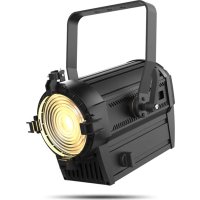
Ovation FD105WW - Camera Chauvet - Free user manual and instructions
Find the device manual for free Ovation FD105WW Chauvet in PDF.



| Product type | Professional LED projector |
| Brand | Chauvet |
| Model | Ovation FD-105WW |
| Light source | Warm white LED (WW) |
| Color temperature | Warm white (not precisely specified) |
| Power supply | 100-240 VAC, 50/60 Hz (universal power supply) |
| Power consumption | Not specified |
| DMX control | Personalities: 1 channel (UNO), 2 channels (DOS), 3 channels (STD.P) |
| Supported protocols | DMX512, RDM (remote device management) |
| Dimmer mode | Standard dimmer, adjustable dimming curves (CURVE1-3), dimming speed (DIM1-4) |
| Strobe | Yes, with random effects |
| PWM frequency | Adjustable: 600 Hz, 1200 Hz, 2000 Hz, 2400 Hz, 6000 Hz, 18 kHz, 25 kHz |
| Master/slave mode | Yes, via DMX connection |
| Protection rating | IP20 (indoor use only) |
| Max ambient temperature | 45 °C |
| Minimum distance from surfaces | 50 cm (20 inches) |
| Mounting | Mounting bracket included; use safety cable when hanging |
| Box contents | Fixture, gel frame (6.25 in/159 mm), Neutrik powerCON power cord, warranty card, reference manual |
| Maintenance | Clean with a soft, dry cloth; avoid moisture |
| Repairability | No user-serviceable parts; contact customer support |
Frequently Asked Questions - Ovation FD105WW Chauvet
User questions about Ovation FD105WW Chauvet
0 question about this device. Answer the ones you know or ask your own.
Ask a new question about this device
Download the instructions for your Camera in PDF format for free! Find your manual Ovation FD105WW - Chauvet and take your electronic device back in hand. On this page are published all the documents necessary for the use of your device. Ovation FD105WW by Chauvet.
USER MANUAL Ovation FD105WW Chauvet
The Ovation FD-105WW Quick Reference Guide (QRG) has basic product information such as connection, mounting, menu options, and DMX values. Download the User Manual from www.chauvetprofessional.com for more details.
Disclaimer
The information and specifications contained in this QRG are subject to change without notice.
Safety Notes
- DO NOT open this product. It contains no user-serviceable parts.
To eliminate unnecessary wear and improve its lifespan, during periods of non-use completely disconnect the product from power via breaker or by unplugging it. - DO NOT look at the light source when the product is on.
- CAUTION: This product's housing may be hot when lights are operating.
- Mount this product in a location with adequate ventilation, at least 20 in (50 cm) from adjacent surfaces.
DO NOT operate this product outdoors or in any location where dust, excessive heat, water, or humidity may affect it. (IP20)
DO NOT leave any flammable material within 50 cm of this product while operating or connected to power. - CAUTION: When transferring product from extreme temperature environments, (e.g., cold truck to warm humid ballroom) condensation may form on the internal electronics of the product. To avoid causing a failure, allow product to fully acclimate to the surrounding environment before connecting it to power.
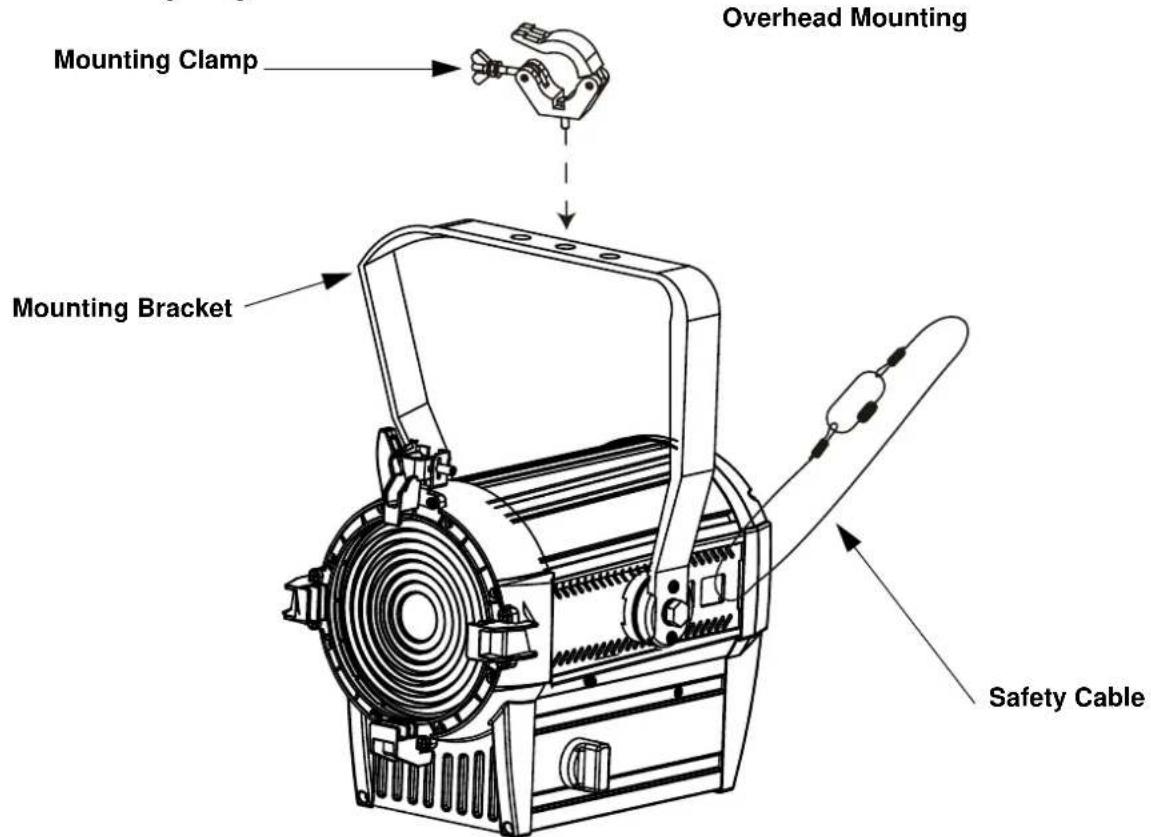
- USE a safety cable when mounting this product overhead.
- DO NOT operate this product if the housing, lenses, or cables appear damaged.
- ONLY connect this product to a grounded and protected circuit.
- ONLY use the hanging/mounting bracket to carry this product.
- In the event of a serious operating problem, stop using immediately.
The maximum ambient temperature is 113°F (45°C) . Do not operate this product at higher temperatures.
Contact
Outside the U.S., United Kingdom, Ireland, Mexico, or Benelux, contact your distributor to request support or return a product. From inside the U.S., UK, Ireland, Mexico, or Benelux, use the information in Contact Us at the end of this QRG.
What is Included
Ovation FD-105WW
- Neutrik® powerCON® power cord
Gel Frame (6.25 in/159mm accessories)
Warranty Card
- Quick Reference Guide
AC Power
This product has a switchable power supply that can work with an input voltage range of 100-240 VAC, 50 / 60Hz
Power Linking
You can link up to 14 Ovation FD-105WW products at 120 VAC or 25 at 230 VAC. Never exceed this number. Power linking cords can be purchased separately.
Dimmer Control
The Ovation FD-105WW may be plugged into and controlled using a regular dimmer. In this mode, the product reacts exactly like an incandescent product. See the User Manual to configure Dimmer Control operation.
AC Plug
| Connection | Wire (U.S.) | Wire (Europe) | Screw Color |
| AC Live Black Brown Yellow/Brass | |||
| AC Neutral White Blue Silver | |||
| AC Ground Green/Yellow | Green/Yellow | Green | |
Replacing The Fuse
- Disconnect this product from power.
- Using a Phillips #2 head screwdriver, unscrew the fuse holder cap from the housing.
- Remove blown fuse and replace with a good fuse of the same type and rating.
- Screw the fuse holder cap back in place and reconnect power.

- To eliminate unnecessary wear and improve its lifespan, during periods of non-use completely disconnect the product from power via breaker or by unplugging it.
DMX Linking
The Ovation FD-105WW will work with a DMX controller using a 3-pin or 5-pin DMX serial connection. A DMX Primer is available from www.chauvetprofessional.com.
DMX Connection
The Ovation FD-105WW uses a 3-pin or 5-pin DMX for its DMX personalities: 1: UNO, 2: DOS, or 3:STD.P. See the User Manual for information about connecting and configuring the product for DMX operation.
Master/Slave Connection
The Ovation FD-105WW uses the DMX data connection for its Master/Slave mode. See the User Manual for information about how to connect and configure the product for master/slave operation.
RDM (Remote Device Management)
Remote Device Management, or RDM, is a standard for allowing DMX-enabled devices to communicate bi-directionally along existing DMX cabling. The Ovation FD-105WW supports RDM protocol that allows feedback to monitor temperature and changes to DMX Address, DMX Personality, Dimmer Mode, and LED Frequency menu options. Download the User Manual from www.chauvetprofessional.com for more details.
Dimmer Control
The Ovation FD-105WW may be plugged into and controlled using a regular dimmer. In this mode, the product reacts exactly like an incandescent product. See the User Manual to configure Dimmer Control operation.
Mounting
Before mounting this product, read the Safety Notes. Use at least one mounting point per product. Make sure the mounting clamps are capable of supporting the weight of the product. For our Chauvet line of mounting clamps, go to http://trusst.com/productcategory/truss-clamps/
Product Mounting Diagram
Passcode
After being prompted, enter the following passcode: <UP> , <DOWN> , <UP> , <DOWN> , <ENTER> . This passcode cannot be changed and must be used whenever prompted.
Control Panel Description
| Button Function | |
| <MENU> Exits from the current menu or function | |
| <ENTER> | Enables the currently displayed menu or sets the currently selected value into the selected function |
| <UP> | Navigates upwards through the menu list or increases the numeric value when in a function |
| <DOWN> | Navigates downwards through the menu list or decreases the numeric value when in a function |
Menu Map
| Main Level Programming Levels Description | |||
| STATIC DIMMER 000-100 Local control of output | |||
| RUN MODE | DMX Sets the mode to DMX control | ||
| SLAVE Sets the mode to master/slave | |||
| DMMR | Sets the mode to dimmer control, which turns off data input | ||
| SENS | Automatically chooses between DMMR and DMX | ||
| ADRESS 000-509 Sets the starting address | |||
| SETTING | KEY | ON | Sets the key lock (Passcode mode) |
| OFF | |||
| DIMMER | OFF No dimmer | ||
| DIM1 | Slow (DIM4) to fast (DIM1) dimmer speeds | ||
| DIM2 | |||
| DIM3 | |||
| DIM4 | |||
| CURVE | OFF No dimmer | ||
| CURVE1 | Large (CURVE3) to small (CURVE1) dimmer curves | ||
| CURVE2 | |||
| CURVE3 | |||
| PERFORM | LIVE | Balances LED cooling using fans and output power level | |
| STUDIO | Maintains LED cooling by limiting power level | ||
| SLOCK | ON | SETTING menu access lock | |
| OFF | |||
| PERSONALITY | UNO | Selects DMX personalityDOS | |
| STD.P | |||
| DMX ERROR | SAVE | Continues last command upon loss of DMX signal | |
| BACK | Blacks out product upon loss of DMX signal | ||
| RESET | Pass code: Resets product to factory defaults | ||
| MODE SETTING | SELF | No DMX output from product in standalone | |
| MASTER | Sends DMX output in standalone mode | ||
| PWM | 600Hz | Selects the PWM output frequency | |
| 1200Hz | |||
| 2000Hz | |||
| 2400Hz | |||
| 6000Hz | |||
| 18KHz | |||
| 25KHz | |||
QUICK REFERENCE GUIDE
EN
| Main Level | Programming Levels | Description | ||
| INFO | VERSION V__Shows total product hours | |||
| RDM | UID __________ Displays product | UID for RDM | ||
| LABEL __________ Displays product label for RDM | ||||
DMX Values
STD.P
| Channel Function Value Percent/Setting | ||
| 1 Dimmer 000 | \Leftrightarrow 255 0-100% | |
| 2 Dimmer Fine 000 | \Leftrightarrow 255 0-100% | |
| 3 | Strobe | 000\Leftrightarrow 009 Open |
| 010\Leftrightarrow 099 Strobe (slow to fast) | ||
| 100\Leftrightarrow 109 Open | ||
| 110\Leftrightarrow 179 Lightning effect (slow to fast) | ||
| 180\Leftrightarrow 189 Open | ||
| 190\Leftrightarrow 255 Random strobe (slow to fast) | ||
DOS
| Channel | Function | Value | Percent/Setting |
| 1 Dimmer 000 | ↔ 255 0-1 | 100% | |
| 2 Dimmer Fine 000 | ↔ 255 0-1 | 100% | |
UNO
| Channel | Function | Value | Percent/Setting |
| 1 Dimmer 000 | ≈ 255 0-100% | ||
Acerca deEsta Guía
BEKNOPTE HANDLEIDING
NL
STD.P
General Information Technical Support
Address: 5200 NW 108th Ave. Voice: (844) 393-7575
Sunrise, FL 33351 Fax: (954) 756-8015
Voice: (954) 577-4455 Email: chauvetcs@chauvetlighting.com
Fax: (954) 929-5560
Website
Toll Free: (800) 762-1084
www.chauvetlighting.com
EUROPE
General Information Technical Support
Address: Stokstraat 18 Email: eutch@chauvetlighting.eu
9770 Kruishoutem
Website
Belgium www.chauvetlighting.eu
Voice: +32 9 388 93 97
General Information Technical Support
Address: Unit 1C Email: uktech@chauvetlighting.com
Brookhill Road Industrial Estate
Pinxton, Nottingham, UK
Website
NG16 6NT www.chauvetlighting.co.uk
Voice: +44 (0) 1773 511115
Fax: +44 (0) 1773 511110
MEXICO
General Information Technical Support
(Entrance by Calle 2)
Zona Industrial Lerma
Lerma, Edo. de Mexico, CP 52000
Website
Voice: +52 (728) 690-2010
www.chauvet.com.mx
Visit the applicable website above to verify our contact information and instructions to request support. Outside the U.S., United Kingdom, Ireland, Mexico or Benelux, contact the dealer of record..

R
us
UL 1573
CSAC22.2No.166
E113093



- DISCLAIMER
- SAFETY NOTES
- CONTACT
- WHAT IS INCLUDED
- AC POWER
- POWER LINKING
- DIMMER CONTROL
- REPLACING THE FUSE
- DMX LINKING
- DMX CONNECTION
- MASTER/SLAVE CONNECTION
- RDM (REMOTE DEVICE MANAGEMENT)
- MOUNTING
- PRODUCT MOUNTING DIAGRAM
- PASSCODE
- QUICK REFERENCE GUIDE
- DMX VALUES
- ACERCA DEESTA GUÍA
- BEKNOPTE HANDLEIDING
- GENERAL INFORMATION TECHNICAL SUPPORT
- EUROPE
- MEXICO
Brand : Chauvet
Model : Ovation FD105WW
Category : Camera