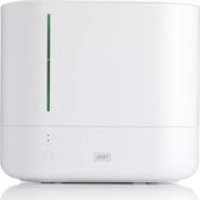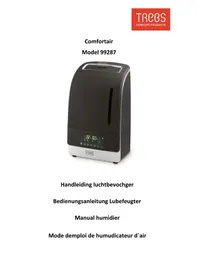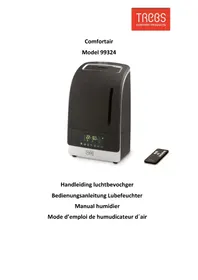
Comfortair 99324 - Humidifier TREBS - Free user manual and instructions
Find the device manual for free Comfortair 99324 TREBS in PDF.



| Product type | Air humidifier |
| Brand | TREBS |
| Model | Comfortair 99324 |
| Power supply | 100-240 V, 50/60 Hz, 105 W |
| Maximum mist output | 400 ml / 16 h |
| Recommended room volume | 50-60 m³ |
| Autonomy with full tank | 7 to 12 hours |
| Main functions | Cool mist, warm mist, timer (1-9 h), auto mode, sleep mode, ionic purification, powerful humidification |
| Mist levels | 3 (light, moderate, high) |
| Built-in humidistat | Yes, adjustable from 40% to 90% |
| Automatic shut-off | Yes, when tank is empty |
| Filter type | Water filter (replaceable) |
| Included accessories | Remote control, water filter, aroma box |
| Tank maintenance | Every 2 to 3 weeks |
| Water bath maintenance | Once a week |
| Warranty | 24 months |
| Repairability | Repairs by qualified personnel only |
Frequently Asked Questions - Comfortair 99324 TREBS
User questions about Comfortair 99324 TREBS
0 question about this device. Answer the ones you know or ask your own.
Ask a new question about this device
Download the instructions for your Humidifier in PDF format for free! Find your manual Comfortair 99324 - TREBS and take your electronic device back in hand. On this page are published all the documents necessary for the use of your device. Comfortair 99324 by TREBS.
USER MANUAL Comfortair 99324 TREBS
Please read the informaon contained herein so that you can become familiar with your device quickly and take advantage of the full scope of its funcons.
2 Safety
This chapter provides you with important safety noces when handling the device. The device corresponds with the required safety regulaons. Improper use can result in personal or property damages.
2.1 Intended use
This device is only intended for use in households in enclosed spaces for
- Humidifying air
Uses for a dierent purpose or for a purpose which exceeds this descrip on are considered incompatible with the intended or designated use.
WARNING
Danger due to unintended use!
Dangers can emanate from the device if it is used for an unintended use and/or a dierent kind of use.
- Use the device exclusively for its intended use.
Observe the procedural methods described in this Operang Manual.
Claims of all kinds due to damages resulting from unintended uses are excluded.
The User bears the sole risk.
2.2 General Safety informaon
- If the supply cord is damaged, it must be replaced by the manufacturer, its service agent or similarly qualified persons in order to avoid a hazard.
- This appliance is not intended for use by persons (including children with reduced physical, sensory or mental capabilities, or lack of experience and knowledge unless they have been given supervision or instrucons concerning the use of the appliance by a person responsible for their safety.
Children should be supervised to ensure that they do not play with the appliance. - Do not dismantle the main base for repair or debug by yourself.
- Do not replace the power cord by yourself.
- Keep any harmful objects, such as cleaning detergent, away from children to avoid entering the unit by mistake.
- Any modicaon or reng to this unit without denite permission of our factory may cause inconvenience and hazard to the user.
- If the unit has abnormal sound or odor in operaoon, please shut it down immediately and disconnect the power plug. Any repair must be done by a professional repairman.
-
Do not get the cleaning agent into mouth or eyes. If the cleaning agent is contacted by mistake, rinse with tap water immediately. In serious cases, take an examinaon at the hospital.
-
Before cleaning or moving the unit, shut the device down or disconnect the plug.
- When the unit is operang,do not touch the water in the water bath or any part in the water
- Do not operate the unit with an empty water bath.
- Do not scratch the ultrasonic oscillator with a hard object.
- Do not clean the transducer with a cleaning agent not manufactured or whose manufacture is supervised by our company.
- Do not let water ow or splash into the base to avoid damaging the internal parts.
-
Pay aenon to the environment of installaon:
-
Put the unit at a rm and at place, avoid inclinaon and keep it steady.
- Place the unit away from any heat source, such as a furnace, avoid direct sunlight.
- Place the unit away from furniture and electric appliances. Avoid direct spraying of mist onto the furniture and electric appliances, otherwise they will become damp or ached with "white powder"
- Place the unit in normal room temperatures. Avoid operang the un in chilly environments to avoid damage to the unit. If there is freezing inside, do not start unit unl the ice has been cleared or melted
2.3 Operang Precauons
- Do not add hot water of above 40^ to the water tank and water bath to avoid discoloraon or distoron.
- Do not let water ow into the body from the air outlet. Wipe o any water outside the body with dry cloth.
- If the room temperature is below 0^ , please empty the water tank and water bath, lest the icing of water should damage the components.
- Do not place metals, chemicals and detergents into the water bath, otherwise there might be poor atomizaon.
- If there is much water in the water bath, do not move it about, otherwise water might overow and ow into the body
- Do not put the unit at a place with strong light or direct hot air radiaon.
- Do not place the unit near an open window and try to keep the device away from furniture and electric appliances.
- Do not add water into the water bath directly.
- If the unit is not to be used for a long me, please cut o the power and unplug the plug(this unit does not have to be grounded).
- Never pour out the water remaining in the water bath without the power turned on, otherwise the transducer will be burned out immediately.
- If the water tank is fully loaded, the unit can operate for 7-12 hours connuously without replenishment.
2.4 Safety Precauons
- Do not turn on the plug with a wet hand, there might be a risk of an electric shock.
If the body is inclined, please handle this with the power cut o. - Do not touch the transducon piece upon starng.
- Do not disassemble the unit without cung o the power to avoid an electric shock.
- Do not replace the power cord without authorization.
3 Commissioning
This chapter provides you with important safety noces during the initial commissioning of the device. Observe the following noces to avoid dangers and damages.
3.1 Safety informaon
WARNING
Personal and property damages can occur during commissioning of the device!
Observe the following safety noces to avoid such dangers:
- Packaging materials may not be used for playing. There is a danger of suocao.
3.2 Delivery scope and transport inspecon
As a rule, the humidier is delivered with the following components:
- Humidier
- Operang Instrucons
Remote control
PLEASE NOTE
Examine the shipment for its completeness and for any visible damages.
- Immediately nofy the supplier about any incomplete shipment or damages as a result of inadequate packaging or due to transportaon.
3.3 Unpacking
Unpack your device as follows:
Take out the device from the box and remove the interior and exterior packaging.
Clean the appliance thoroughly before the rst use. (see chapter Cleaning and maintenance)
3.4 Disposal of the packaging
The packaging protects the device against damages during transportaon. The packaging materials are selected in accordance with environmentally compatible and recycling-related points of view and can therefore be recycled.
Returning the packaging back to the material loop saves raw materials and reduces the quanes of accumulated waste. Take any packaging materials that are no longer required to "Green Dot" recycling collecon points for disposal.
PLEASE NOTE
If possible, keep the original packaging for the device for the duraon of the guarantee period of the device, in order that the device can be re-packaged properly in the event of a guarantee claim.
3.5 Setup locaon requirements:
In order to ensure the safe and trouble-free的操作 of the device, the setup locaon must fulfil the following prerequisites:
- The device must be set up on a rm, at, horizontal surface with sucient load-bearing capacity.
- Choose the setup locaon in such a way that children cannot reach the device.
The device is not intended to be installed in a wall or a built-in cupboard. - Do not set up the device in a hot, wet or extremely damp environment or near ammable material.
The electrical socket must be easily accessible so that the power lead can be disconnected easily, in the case of an emergency. - The installaon and assembly of this device in non-staonary setup locaons (e.g. on ships) must be carried out by specialist companies / electricians, provided they guarantee the prerequisites for the safe use of this device.
3.6 Electrical connecn
In order to ensure the safe and trouble-free operon of the device, the following instrucons must be observed for the electrical connec:
- Before connecng the device, compare the connecn data (voltage and frequency) on the rang plate with those of your electrical network. This data must agree in order that no damages occur in the device If in doubt, ask your qualified electrician.
The electrical outlet must be protected by a 16A safety cut-out switch. - The connecn between the device and the electrical network may employ a 3 meter long (max.) extension cable with a cross-secon of 1.5mm^2 . The use of mulple plugs or gangs is prohibited because of the danger of re that is involved with this.
- Make sure that the power cable is undamaged and has not been installed under the ice maker or over hot or sharp surfaces.
- The electrical safety of the device is only guaranteed if the device is connected to a properly installed protecve conductor system. Operaons using an electrical outlet without a protecve conductor are prohibited. If in doubt, have the house installaon checked over by a qualified electrician. The manufacturer cannot be made responsible for damages that are caused by a missing or damaged protecve conductor.
4 Funcon
In this chapter, you'll nd important informaon on the funcon of the device.
4.1 Overview

- Mist outlet
- Water tank combinaon
- LED display
- Housing
- Water Iter
- Remote control
- Aroma box
4.2 Rang plate
The rang plate with the connecn and performance data can be found underneath the device.
5 Operon and Handing
This chapter provides you with important noces with regard to operang the device. Observe the following noces to avoid dangers and damages:
5.1 Operaon
Warning: before lling the unit with water, turn the power o and unplug unit from the outlet.
- Place the body horizontally at a suitable place.
Take the water tank out and turn the tank over. Screw o the tank cover as indicated by the arrow at "Add Water Here" and insert clean tap water. - Close the water tank, wipe o water drops around the water tank and place the water tank properly.
Before opening the product, please insert the water liter in the base at the circular recess.
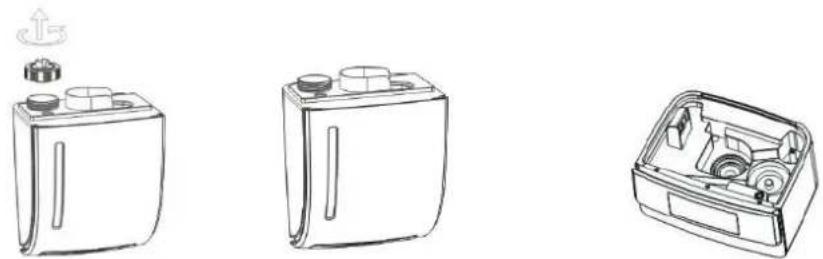
- Connect the unit to an AC power supply, touch the ⑥buon and open the humidicaon funcon. Press this buon again to turn the device o.
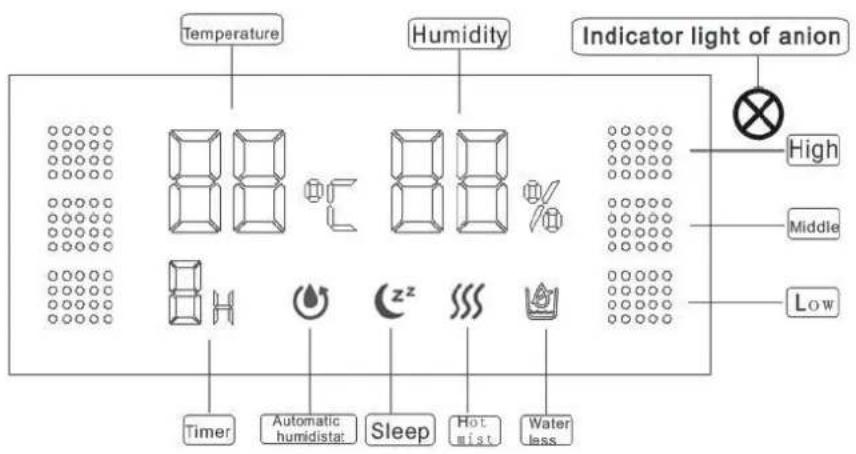
- Humidicaon buon: while operang, you can touch the buon to select the mist you need. There are 3 programs: "Light humidicaon" "Middle humidificaon" "Strong humidicaon". The device can cycle through these programs.
Thermal mist buon: touch the buon to start the hot mist funcon. The cold water will be heated. This will enhance the weng eect. Touch the buon again to stop heang. - Timing funcon: touch the buon to enter the ming opons. The me range is 1-9 hour cycle selecon. Choose to "CH" hours and then cancel this funcon.
- Automac humidistat: touch the buon to enter the automac humidistat opon. The display will show the available moisture percentages. Choose the moisture percentage you want and confirm the operaoa aer 3 seconds. If you want to cancel this funcon, you can select the current ambient humidity.
- Sleep buon: touch thebuon to acvate the sleep funcon. The device will base the humidicaon on the humidity in the room. The humidity will be maintained in the range of 65-70%. If the humidity in the room is higher than 70% , the device will enter the power saving state and the tank nightlight will turned o. If the air humidity is below 65% , the device will automatcally re-operate. Touch this buon again, to turn o this funcon.
- Strong humidicaon and Puricaon funcon: Touch the buon to start the puricaon. This funcon can be used to achieve strong humidicaon. If this funcon is acvated the green indicator light will light up. The device quickly starts the air humidicaon, Itraon and puricaon.
- If this funcon is acvated the air will be itered of dust, bacteria, nicotine and other harmful substances because of the release of a large number of negave ions. Press the buon again to cancel the funcon.
- If the water tank is empty, the built-in safety device will disconnect the atomizaon circuit
automacally. If there is no spray output from the spray nozzle and the water depleteon indicator is illuminated, you need to cut o the power and replenish the water tank to connue the operaoon
WARNING: Before replacing the iter, turn power o and unplug the unit from the outlet.
5.2 Replacement of air Iter
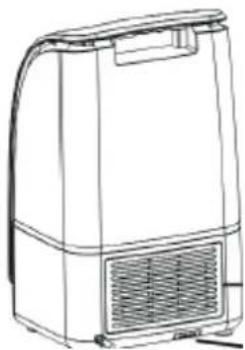
If the humidier is used for a period of me, you need to replace the air Iter. Loosen the two screws that lock the Iter, and install the new Iter. Re-lock the Iter with the screws.
PLEASE NOTE: Before installing the Iter, it must put silicone waterproof seal to prevent water seepage into the machine.
5.3 Use remote control

Within 5 meters range, according to their preferences to select the corresponding funcon
6 Cleaning and Maintenance
This chapter provides you with important noces with regard to cleaning and maintaining the device. Please observe the noces to prevent damages due to cleaning the device incorrectly and to ensure trouble-free operation.
6.1 Safety informaon
ATTENTION
Please observe the safety instrucons, before cleaning your humidier.
Before cleaning switch o the unit and take the power plug out of the outlet.
- Clean the unit with a so cloth.
- Don't clean the humidier with inammable detergents.
Clean the humidier again thoroughly when the machine hasn't been used for a long me.
6.2 Cleaning
- Cleaning of the water tank (once every 2-3 weeks)
Screw o the water tank cover, wipe o the scale and rinse o the tank with water.
- Cleaning of the water bath (once a week)
If there is scale in the water bath, wipe the bath with a so cloth dipped with cleaning detergent, and rinse o with water.
- External cleaning of humidifier
Rinse the so cloth in warm water below 40^ , wipe o the stains from the surface. The spray nozzle can be ushed with water directly.
Storage of humidier
If the unit will not be used for a long me, clean and dry the unit, store at a dry place in the original package.
Keep in Mind:
- Never touch the oscillang transducon piece with a sharp, hard tool. Clean it with a wet cloth only.
- Do not wipe the surface with cloth dipped in chemical solvent, gasoline, kerosene or polishing powder.
- Do not clean the unit with any detergent, preferably use clean water.
- During cleaning, avoid water entry into the body, lest the internal electric components should become damp and faulty.
- Do not remove the body components at will.
7 Security advices
ATTENTION
- Repairs of electrical appliances must be carried out by qualified personnel who are trained by the manufacturer.
- Repairs performed by untrained persons may result in considerable hazards for the user and damage the machine.
8 Disposal of the Old Device

Old electric and electronic devices frequently sll contain valuable materials. However, they also contain damaging substances, which were necessary for their functionality and safety. If these were put in the non-recyclable waste or were handled incorrectly, they could be
detrimental to human health and the environment. Therefore, do not put your old device into the non-recyclable waste under any circumstances.
PLEASE NOTE
- Utilize the collecon point, established in your town, to return and recycle old electric and electronic devices. If necessary, contact your town hall, local refuse collecon service or your dealer for informaon.
Ensure that your old device is stored safely away from children unll it is taken away.
9 Guarantee
We provide a 24 month guarantee for this product, commencing from the date of sale, for faults which are ariable to producon or material faults.
- Your legal guarantee entlements in accordance with § 439. BGB-E remain unacted by this.
The guarantee does not include damages, which were incurred as a result of improper handling or use, as well as malfuncons which only have a minor ect on the funcon or the value of the device. Consumables, transit damages, inasmuch as we are not responsible for these, as well as damages, which were incurred as a result of any repairs that were not performed by us, are also excluded from the guarantee entlements.
This device is designed for use in domesc situaons and has the appropriate performance levels.
- Any use in commercial situacons is only covered under the guarantee to the extent that it would be comparable with the stresses of being used in a domesc situacon. It is not intended for any additional, commercial use.
In the event of jused complaints, we will repair the faulty device at our discretion or replace it with a trouble-free device.
To enforce a guarantee claim, please contact us prior to returning the device (always provide us with proof of purchase).
10 Technical Data
| Device | Humidier |
| Model | 99324 |
| Voltage | 100-240V; 50/60Hz |
| Power consumpon | 105 W |
| Max. mist volume | 400 ml/ 16 h 50-60m3 |
Service
If you have any further quessons about the product aer reading this manual, please contact the
Trebs customer service: info@trebs.nl
Telephone number: 0900-TREBSbv (0900-873 27 28), € 1,00 per talk exclusive the regular telephone costs.
Trebs BV
Thermiekstraat 1a, 6361 HB, Nuth, The Netherlands, Email: info@trebs.nl, Internet: www.trebs.nl
C