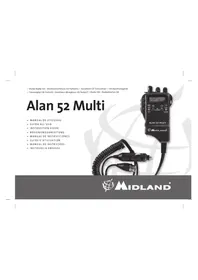
ALAN 52 MULTI - Walkie-talkie MIDLAND - Free user manual and instructions
Find the device manual for free ALAN 52 MULTI MIDLAND in PDF.



| Manufacturer | Midland |
| Model | ALAN 52 MULTI |
| Product type | Walkie-talkie / Portable CB transceiver |
| Dimensions | 30 x 70 x 77 mm |
| Weight | 190 g |
| Power supply | 7.2 - 13.2 V (12 V nominal) |
| Number of channels | 40 (depending on band) |
| Frequency range | 26.565 - 27.99125 MHz |
| Modulation modes | AM (A3E) and FM (F3E) |
| Output power | 4 W (FM) / 1 W (AM) (adjustable to low power: 1 W FM / 0.2 W AM) |
| Receiver - Sensitivity | 0.5 μV (AM) / 0.25 μV (FM) at 10 dB S/N |
| Selectivity | Greater than 60 dB |
| Audio bandwidth | 400 - 2400 Hz |
| Speaker | 8 ohms, 0.5 W |
| Microphone | Condenser type |
| Main functions | Squelch, keypad lock, dual watch, automatic scan, display illumination, battery indicator, band selection, emergency channel (19), AM/FM switching, HI/LO power selection, 10-channel skip |
| Display | Multifunction backlit LCD screen |
| Maintenance and cleaning | Clean with a dry cloth; avoid exposure to moisture, extreme temperatures, and shocks |
| Safety | Use in accordance with national regulations; do not open the device; use original charger |
| Spare parts and repairability | Warranty: 24 months device, 6 months accessories; repair by authorized dealer |
| General information | Compliant with directive 1999/05/EC; usage restrictions by country (license required in Spain, Switzerland, etc.) |
Frequently Asked Questions - ALAN 52 MULTI MIDLAND
User questions about ALAN 52 MULTI MIDLAND
0 question about this device. Answer the ones you know or ask your own.
Ask a new question about this device
Download the instructions for your Walkie-talkie in PDF format for free! Find your manual ALAN 52 MULTI - MIDLAND and take your electronic device back in hand. On this page are published all the documents necessary for the use of your device. ALAN 52 MULTI by MIDLAND.
USER MANUAL ALAN 52 MULTI MIDLAND
- Statie Radio CB - Ricetrasmettitore CB Portatile - Handheld CB Transceiver - CB Handfunkgerat
Transceptor CB Portatil - Emetteur-Recepteur CB Portatif Radio CB Radiotelefon CB
Alan 52 Multi
MANUAL DE UTILIZARE
GUIDA ALL'USO
INSTRUCTION GUIDE
BEDIENUNGSANLEITUNG
MANUAL DE INSTRUCCIONES
GUIDED'UTILISATION
MANUALDEINSTRUÇÖES
INSTRUKCJA OBSLUGI

AIDLAND
Italy - Restrictions on the use - According to the Italian Frequency Allocation Table, issued on the G.U. No. 169 - Supplement 146 - of 20th July 2002 - note 49G, the standard in AM modulation needs a radiating system with a gain not higher than -6dB, such as, for example, with the antenna "PCB" with original cable.
Modul de operare F3E (FM), A3E (AM)
Comanda freventei.. PLL
Sirul temperaturi de fonctionare 10/+55C
Voltajul de intrare DC. 7.2÷13,2 nom 12V
Cicul de lucru 5% TX, 5% RX, 90% Stand-by
Marimea. 30x70x77mm
Greutatea. 190 gr.
RECEPTOR
Sistemul de receptionare. conversie duala superheterodina
Sensibilitatea. 0.5μV (AM), 0.25μV (FM) in Modul FM
Puterea de scoatere audio @10% THD. 8 Ohm 0.5W
Distorsiunea audio la 1000 V .3%
Scurgerea curenta in standby. 100mA
TRANSMITATOR
Puterea de iesire ciclu 10% 4WAM/FM
Modulatia AM: 90% (± 5%)
FM:1,8 KHz±0,2 KHz
Raspunsul freventei. de la 400 Hz la 2.5 KHz
Impedanta de isire. RF 50 Ohm neechilrab
Rata semnalului/ zgomot. 40 dB MIN
Scurgerea curenta. 100mA (pozitia puteri fara modulation)
Toate specificatijile se pot modifica fara preaviz.
Modulazione F3E (FM), A3E (AM)
Altoparlante 8 ohm 0.5W
HOW TO OPERATE WITH YOUR ALAN 52 MULTI 14
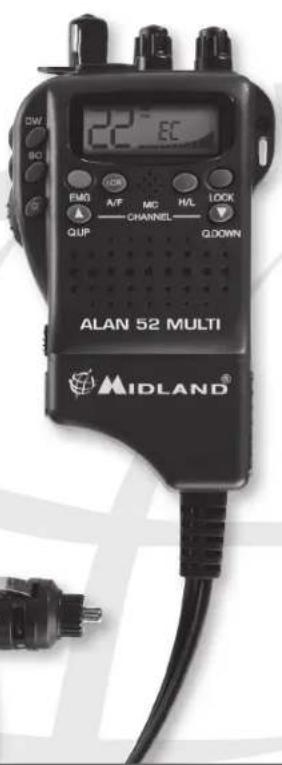
ALAN 52 MULTI is a small-size portable transceiver which guarantees the best performance during the years even under heavy conditions. What is unique to this innovative transceiver is the capability to select any of the European CB bands with an easy and fast procedure.
ALAN 52 MULTI has a built-in Channel Phase Loop synthesizer (PLL) circuit. The wide display can be illuminated and allows the night use. Optional microphones can be connected to the equipment thanks to the external mike plug situated on the upper side of the radio.
The unit is preset at the factory on the "EC" band, 40CH FM 4W.
Important Note
Following national regulations have been modified:
Residents of Spain and Switzerland need a CB licence in their countries, while visitors may use their CB radios in FM free of licence, for AM they should be able to present their home-country's licence document or the "Circulation card". In Italy, even visitors need a valid Italian authorization.
Austria does not accept any multi-standard or programmable CB radio. Please respect this requirement and do not use your radio during driving through Austria.
In Germany transmitting as a base station on channels 41-80 is restricted in some areas along the country borders. No restrictions apply for mobile use. More details can be obtained from the local BNetzA authority office.
CONTENT
1 portable CB transceiver
car adapter with SO 239 external antenna jack
FUNCTION AND LOCATION OF THE CONTROLS
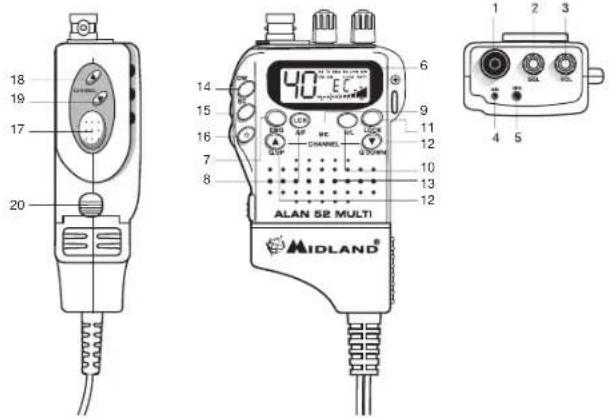
1. Antenna connector
- Squelch Control: this control cancels the background noise of the receiver. By turning the knob to the right the function is activated, by turning the knob to the left the function is deactivated. The knob should be regulated exactly at the point where the receiver background noise disappears.
3. On/Off Volume Control
In "off" position your transceiver is off. Turn this control clockwise to switch on the unit. Turn the knob clockwise a little more to set the audio level, until you get a comfortable reception.
- MIC jack: connect by inserting the loudspeaker mike to the plug.
- External loudspeaker jack: connect by inserting the loudspeaker mike to the plug.
6 Multifunction backlighted display.
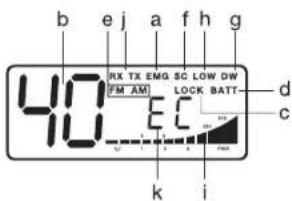
This liquid crystal display has been projected to show the operative modality:
a. EMG function activated
b. Channel selected number( from 1 up to 40)
c. Lock: keyboard lock function activated
d. BATT: Run-down batteries indicator
e. AM/FM mode
f. SC: SCAN function activated
q. DW; DUAL WATCH function
h. LOW function activated
i. The received signal strength and the power of the transmitting signal
j.RX/TX: TX=transmit mode; RX=receive mode
k. Frequency band selected
- EMG button: emergency channel. By pressing this button, the unit automatically skips to Channel 9 (emergency channel). The display will show EMG. It will not be possible to change accidentally the channel. To cancel this function, press the button again.
- A/F-LCR button: to select AM mode or FM mode; the modulation you choose will appear on the display. If you select a frequency band operating in FM mode only, the A/F-LCR button will activate the LCR function (Last Channel Recall).
- Microphone: during transmission, keep your mouth 4cm far from the unit, and speak with a normal tone of voice to the microphone.
- H/L button: it selects the output power level during transmission. When the unit is turned on, it always transmits with high power (4W). By pressing

this button, the unit will transmit with low power (1W). The display will show "LOW". Press again the H/L button to return to "HIGH" power level.
-
LOCK button: it allows you to lock the keyboard, thus avoiding accidental use of the keys.
-
Q.UP - Q.DOWN buttons: to skip 10 channels up (Q.UP) or 10 channels down (Q_DOWN).
13. Loudspeaker
- Dual Watch: this function allows the synchronization on two different channels at the same time. Thanks to this function, you can monitor a second channel. When a signal on the second channel is received, the conversation on the first channel is automatically interrupted and the receiver switches on the second channel. The monitoring starts again 4 seconds after the signal end.
To activate this function, operate as follows:
- Select the desired channel through the channel selector
- Press the DW button.
- Select the second channel
- Press the button DW again
To cancel the function press again the DW button or the PTT button.
-
SCAN button: with this control, you can automatically seek for a busy channel.
-
Turn the Squelch clockwise until the background noise is no longer heard.
- Press the "SCAN" button: the transceiver will scan automatically all the channels until a carrier is being received.
- When it finds the carrier, it stops and starts again some seconds after the end of the communication on the channel.
-
When the radio is transmitting, the scan function is deactivated.
-
button: display lighting. This function allows to operate in darkness conditions. By pressing this button, the backlight will be activated. Push it again to deactivate it.
-
Push to talk button (PTT): Its pressure activates the transmission. When it is released, the receiver is activated.
- Channel UP: to skip to the next channel. Keeping this button pressed, the "autorepeat" function is obtained.
- Channel DOWN: to skip to the previous channel. Keeping this button pressed, the "autorepeat" function is obtained.
- Car adaptor contact: lift the button and take the car adaptor out.
HOW TO OPERATE WITH YOUR ALAN 52 MULTI
- Rotate the ON/OFF volume control clockwise to turn the unit on. Adjust the volume for a normal listening level.
- Adjust the SQUEELCH control
- Select the desired channel by the UP/DOWN or QUICK UP/QUICK/DOWN buttons
Note: if the channel does not change,control that the EMG or LOCK button has not been pressed. In this case, press the EMG or LOCK button to deactivate this function.
As far as the other functions are concerned, refer to previous instructions.
To transmit: press and hold the PTT button, then talk to the microphone.
To receive: simply release the PTT button.
CAUTION: DON'T EXPOSE THE DISPLAY TO EXTREME TEMPERATURES.
The frequency bands must be chosen according to the country you are in. Procedure:
- Switch off the unit.
- Turn it on while pushing the "A/F-LCR" and "SC" buttons.
- By pushing the and buttons, select the desired frequency band (see the chart in the next page).
- To fix your selection, press the "A/F-LCR" button.
NOTE: If you select a frequency band which operates in FM mode only, the "A/F-LCR" control activates the LCR function (Last Channel Recall).
NOTE: In the UK frequency band, you can select directly the EC band by pushing the "AM/FM" button for 2 seconds.
| Displayed digits Country |
| I Italy 40 CH AM/FM 4Watt |
| I2 Italy 34 CH AM/FM 4Watt |
| D Germany 80 CH FM 4Watt / 12 CH AM 1 Watt |
| D2 Germany 40 CH FM 4Watt / 12 CH AM 1 Watt |
| D3 Germany 80 CH FM 4Watt / 40 CH AM 1 Watt |
| D4 Germany 80 CH FM 4Watt / 40 CH AM 4 Watt |
| EU Europe 40 CH FM 4Watt / 40 CH AM 1 Watt |
| EC 40 CH FM 4Watt |
| E Spain 40 CH AM/FM 4Watt |
| F France 40 CH FM 4Watt / 40 CH AM 1 Watt |
| PL Poland 40 CH AM/FM 4Watt |
| UK England 40 CH FM 4Watt English frequencies + EC 40 CH FM 4Watt |
ATTENTION!
The frequency band allowed all over Europe is 40CH FM 4W (EC) - See the "Restrictions on the use" table.
WARRANTY
This product is covered by European warranty rulings and should be returned to the place where purchased for repair or replacement if not repairable. In the event it that it is returned to us by your supplier then we will either repair or replace within 15 working days from receipt. During the Warranty period, the Manufacturer or the authorized customers service will, in accordance with this Limited Warranty, remedy defects by repair or replace the product.
This Limited Warranty is only valid and enforceable in the country where the user has purchased the product.
The warranty period lasts 2 years and starts at the time of product's original purchase by the first end-user.
In the event of a product defect, please return it to the authorized customer service or to the Manufacturer himself.
To make use of this warranty, it is necessary to return to the authorized service centre:
The affected product (or accessory)
The original proof of purchase, which clearly indicates the name and address of the seller and the date and place of purchase.
The warranty does not cover normal wear and tear of the product, defects or damage caused to the Product by misuse with, or connection to, any product, accessory software and/or services not produced or supplied by the manufacturer or by use of the product for any other use than for intended use of the product.
The warranty is not enforceable if the product has been opened, modified or repaired by anyone other than the authorized service centre; if it is repaired using unauthorized spare parts or if the serial number has been removed, erased, defaced, altered or is illegible.
The warranty is not enforceable if the product has been exposed to moisture, to dampness or to extreme thermal or environmental conditions or to corrosion, to oxidation, to spillage of food or liquid or to influence from chemical products.
TECHNICAL SPECIFICATIONS
Channels 40 FM (see the Frequency band chart)
Frequency Range 26.565 - 27.99125 MHz
Operating mode. F3E (FM), A3E (AM).
Antenna impedance .50 Ohm.
Loudspeaker. 8 Ohm 0.5W.
Microphone condenser type
Sensitivity at 10dB S/N. 0.5 V (AM), 0.25 V (FM)
Selectivity more than 60dB
Squelch range 0.25V-500uV
Audio output power. 0.5W 8 ohm (10% distortion)
Distortion at 1000 V . 3%
Audio frequency response. 400-2400 Hz
Intermediate frequency. 10.695 MHz
IIa 455 KHz
Spurious response. more than 60 dB
Current drain at stand-by. 100 mA
TRANSMITTER
RF Output Power.... duty cycle 10% 4W AM/FM
Frequency Tolerance. 0.005%
Harmonic Suppression. more than 70 dB
Current Drain. 900 mA
Modulation. AM 90% (± 5%)
FM dev. 2.0KHz
All specifications are subject to change without notice.
Hereby, CTE International declares that this product is in compliance with the essential
requirements and other relevant provisions of Directive 1999/05/EC
WARNING
Direct plug-in ac/dc power supply must be used for disconnecting the transceiver from the
mains; the desktop charger must be positioned close to the unit and easily accessible.
INHALTSVERZEICHNIS
EINLEITUNG 17
17. Touche Push to talk (PTT)
Modulation F3E (FM), A3E (AM)
Altifalante .8 ohm 0.5W
Modulation AM 90% (±5%)
FM dev. 2.0KHz
Wymiary. 30(L) x 77(H) x 70(D)mm
Waga 190 gr
ODBIORNIK
Czulosc. .0.5uV (AM), 0.25uV (FM) przy 10dB SINAD
Selektywnosc. >60dB
Produced or imported by:
CTE INTERNATIONAL s.r.l.
Via.R.Sevardi 742124 Mancasale Reggio Emilia Italy
The use of this transceiver can be subject to national restrictions.
Read the instructions carefully before installation and use.
WWW.MIDLANDRADIO.EU
C∈0648①

RoHS Compliant



Brand : MIDLAND
Model : ALAN 52 MULTI
Category : Walkie-talkie