
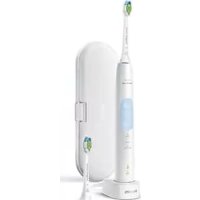
Sonicare ProtectiveClean 5100 - Electric toothbrush PHILIPS - Free user manual and instructions
Find the device manual for free Sonicare ProtectiveClean 5100 PHILIPS in PDF.
 FR
FR
 AZ
AZ
 BG
BG
 CS
CS
 DA
DA
 DE
DE
 EL
EL
 EN
EN
 ES
ES
 ET
ET
 FI
FI
 HE
HE
 HU
HU
 HY
HY
 IT
IT
 KA
KA
 KK
KK
 KY
KY
 LT
LT
 LV
LV
 MK
MK
 NL
NL
 NO
NO
 PL
PL
 PT
PT
 RO
RO
 RU
RU
 SK
SK
 SL
SL
 SQ
SQ
 SV
SV
 TG
TG
 TK
TK
 UK
UK
 UZ
UZ
| Brand | Philips |
| Model | Sonicare ProtectiveClean 5100 |
| Product Type | Electric toothbrush with sonic technology |
| Dimensions (handle) | Approximately 18 cm height, 2.5 cm diameter |
| Weight | Approximately 150 g |
| Power source | Rechargeable lithium-ion battery, mains charger 100-240 V~, 50/60 Hz |
| Battery life | At least 28 two-minute sessions (14 days with twice-daily use) after full charge |
| Charging time | Up to 24 hours for a full charge |
| Brushing modes | 3 modes: Clean (2 min), White (2 min 30 s), Gum Care (3 min) |
| Main features | QuadPacer (4-zone timer), SmartTimer, EasyStart (gradual power increase), pressure sensor, BrushSync technology (brush head replacement reminder) |
| Pressure indicator | Yes, vibration change and orange light when excessive pressure |
| Brush head replacement reminder | Yes, via BrushSync technology (compatible with smart heads) |
| Connectivity | Bluetooth and NFC on some models (optional) |
| Included accessories | 1 handle, 1 charger, 1 smart brush head, 1 travel case, 1 head cap, 1 UV sanitizer (depending on model) |
| Care and cleaning | Rinse the head after each use; clean the handle with a damp cloth; clean the charger when unplugged; UV sanitizer: clean tray and bulb with a damp cloth |
| Head replacement | Every 3 months or sooner if visible wear |
| Batteries and recycling | Integrated rechargeable battery; do not dispose of with household waste; follow recycling instructions |
| Safety | Do not immerse the charger; keep out of reach of children; avoid UV contact; stop use if malfunction |
| Warranty | International warranty (excluding accessories and damage due to misuse) |
| Model number | HX64XX or HX68XX (printed under the handle) |
Frequently Asked Questions - Sonicare ProtectiveClean 5100 PHILIPS
User questions about Sonicare ProtectiveClean 5100 PHILIPS
0 question about this device. Answer the ones you know or ask your own.
Ask a new question about this device
Download the instructions for your Electric toothbrush in PDF format for free! Find your manual Sonicare ProtectiveClean 5100 - PHILIPS and take your electronic device back in hand. On this page are published all the documents necessary for the use of your device. Sonicare ProtectiveClean 5100 by PHILIPS.
USER MANUAL Sonicare ProtectiveClean 5100 PHILIPS
Welcome to the Philips Sonicare family!
This toothbrush enables you to obtain superior plaque removal, whiter teeth and healthier gums. Using
Sonicare's combination of gentle sonic technology and clinically developed and proven features, you can be confident that you're getting the very best clean, every time.
Further support and product registration are available to you at: www.philips.com/support
Important safety information
Only use the product for its intended purpose. Read this important information carefully before you use the product and its batteries and accessories, and save it for future reference. Misuse can lead to hazards or serious injuries.
Warnings
- Keep the charger, travel case, and UV sanitizer away from water.
- After cleaning, make sure the charger, travel case, and UV sanitizer are completely dry before you connect these to the wall socket.
- This appliance can be used by children and persons with reduced physical, sensory or mental capabilities or lack of experience and knowledge if they have been given supervision or instruction concerning use of the appliance in a safe way and understand the hazards involved. Cleaning and user maintenance shall not be made by children without supervision.
- Children shall not play with the appliance.
- Only use original Philips accessories or consumables. If supplied, only use the original USB cable and USB power supply unit.
- This appliance contains no user-serviceable parts. If the appliance is damaged, stop using it and contact the Consumer Care Center in your country (see 'Warranty and support').
- If the USB cable or USB power supply unit is damaged, stop using it.
- Do not use the charger, travel case, and/or UV sanitizer outdoors or near heated surfaces.
- Do not clean any part of the product in the dishwasher.
- This appliance has only been designed for cleaning teeth, gums and tongue.
- Keep the UV sanitizer out of the reach of children at all times.
- Stop using the UV sanitizer if the UV LED/Bulb remains on when the UV sanitizer is open. UV light can be harmful to the human eye and skin.
- Only operate the sanitizer with the protective screen in place.
- Do not touch the UV sanitizer's UV light bulb when it is hot.
- Stop using a brush head with crushed or bent bristles. Replace the brush head every 3 months or sooner if signs of wear appear.
- Avoid direct contact with products that contain essential oils or coconut oil. Contact may result in bristles dislodging.
- The maximum altitude of use is 4500 meters.
MEDICAL WARNINGS
- Stop using the appliance and consult your dentist/doctor if excessive bleeding occurs after use, if bleeding continues to occur after 1 week of use or if you experience discomfort or pain.
- If you have had oral or gum surgery in the previous 2 months, consult your dentist before you use this appliance.
- If you have a pacemaker or other implanted device, contact your doctor or the manufacturer of the implanted device prior to use.
- If you have medical concerns, consult your doctor before you use this appliance.
- This appliance is a personal care device and is not intended for use on multiple patients in a dental practice or institution.
Battery safety instructions
- This appliance contains batteries that are only to be removed by skilled persons.
- Only use the product for its intended purpose. Read this information carefully before you use the product and its batteries and accessories, and save it for future reference. Misuse can lead to hazards or serious injuries. Accessories supplied may vary for different products.
- Only use original Philips accessories and consumables. Only use detachable supply unit TCBxxxx (input ratings: 100 - 240V~; 50/60Hz; 1.5W), HX6100 (input ratings: 100 - 240V~; 50/60Hz; 1.4W), HX6110 (input ratings: 100 - 240V~; 50/60Hz; 1.5W), HX6160 (input ratings: 100 - 240V~; 50/60Hz; 6W), WAAxxxx (input ratings: 100 - 240V~; 50/60Hz; 3.5W).
- Keep product and batteries away from fire and do not expose them to direct sunlight or high temperatures.
- If the product becomes abnormally hot or smelly, changes color or if charging takes longer than usual, stop using and charging the product and contact Philips.
- Do not place products and their batteries in microwave ovens or on induction cookers.
- Do not open, modify, pierce, damage or dismantle the product or battery to prevent batteries from heating up or releasing toxic or hazardous substances. Do not short-circuit, overcharge or reverse charge batteries.
- This appliance contains batteries that are non-replaceable. When the battery is at end of life, the appliance shall be properly disposed of, see section on recycling.
- If batteries are damaged or leaking, avoid contact with the skin or eyes. If this occurs, immediately rinse well with water and seek medical care.
- When you handle batteries, make sure that your hands, the product and the batteries are dry.
- Charge and use the product at a temperature between 0°C and 40°C (32°F and 104°F).
- To avoid accidental short-circuiting of batteries after removal, do not let battery terminals come into contact with metal objects (e.g., coins, hairpins, rings). Do not wrap batteries in aluminum foil. Tape battery terminals or put batteries in a plastic bag before you discard them.
- This appliance contains a Lithium-ion rechargeable cell. MUST BE RECYCLED OR DISPOSED OF PROPERLY.
Storage and transportation conditions
Temperature -10°C to 60°C (14°F to 140°F).
Electromagnetic fields (EMF)
This Philips appliance complies with all applicable standards and regulations regarding exposure to electromagnetic fields.
Radio Equipment Directive
Hereby, Philips declares that electric toothbrushes with radio equipment type (Bluetooth, NFC) are in compliance with Directive 2014/53/EU.
- The Bluetooth radio frequency interface in applicable products operates at 2.4 GHz.
- The maximum output power by the Bluetooth appliance is 3 dBm.
- The NFC radio frequency interface in applicable products operates at 13.56 MHz.
- The maximum RF power transmitted by the appliance is 30.16 dBm.
The full text of the EU declaration of conformity is available at the following internet address:
www.philips.com/support
Note: The features of different models may vary. Some models may not be equipped with Bluetooth or NFC.
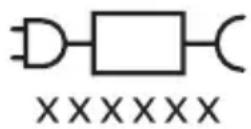
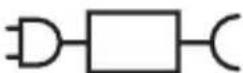
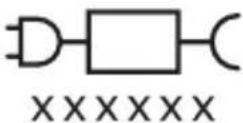
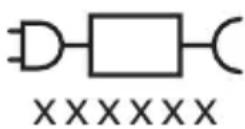
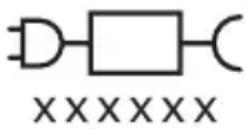
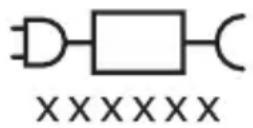
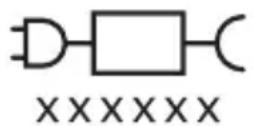
Detachable power supply part: The "xxxxxx" indicates the model number of the approved chargers to be used. (TCBxxxx, HX6100, HX6110, HX6160 or WAAxxxx)

This symbol means read the instructions for use before using the appliance.
Intended use
ProtectiveClean power toothbrushes are intended to remove adherent plaque and food debris from the teeth to reduce tooth decay and improve and maintain oral health. ProtectiveClean power toothbrushes are intended for personal use. Use by children should be with adult supervision.
Your Philips Sonicare (Fig 1.)
1 Handle 2 Power on/off button 3 Mode button 4 Mode indicator 5 Brush Head Replacement Reminder 6 Battery indicator
Accessories:
7 Brush head cap 8 Smart brush head(s) 9 Charging base 10 Travel case 11 UV sanitizer and charger
Note: Accessories included may vary based on the model purchased.
Getting started
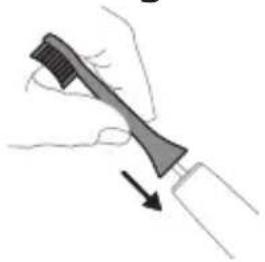
1 Align the brush head so the bristles point in the same direction as the front of the handle.
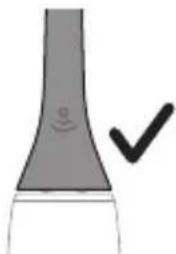
2 Firmly press the brush head down onto the metal shaft until it will not go any further.
Note: It is normal to see a slight gap between the brush head and the handle.
Using your Philips Sonicare toothbrush
If you are using your Sonicare toothbrush for the first time, it is normal to feel more vibration than when using a non-electric toothbrush. It is common for first-time users to apply too much pressure. Only apply gentle pressure and let the toothbrush do the brushing for you. Please follow the brushing instructions below for the best experience. To help you transition to your new Sonicare power toothbrush, it comes with the EasyStart feature activated. This feature gently increases the power over the first 14 brushings to help you adapt to brushing with a Philips Sonicare toothbrush.
Brushing instructions
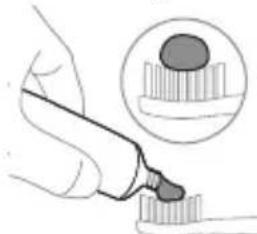
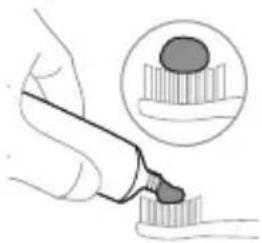
1 Wet the bristles and apply a small amount of toothpaste.
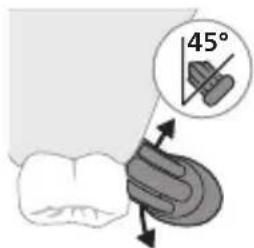
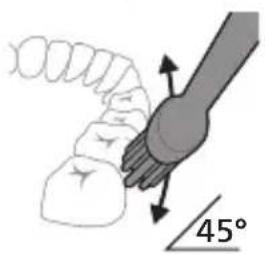
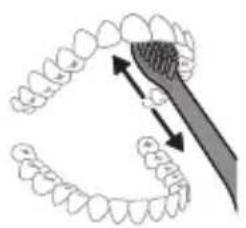
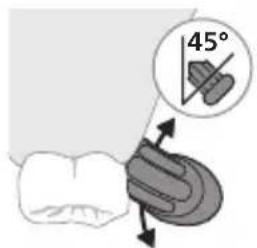
2 Place the toothbrush bristles against the teeth at a slight angle (45 degrees), pressing firmly to make the bristles reach the gumline or slightly beneath the gumline.
Note: Keep the center of the brush in contact with the teeth at all times.
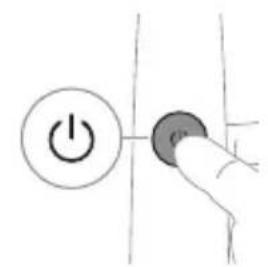
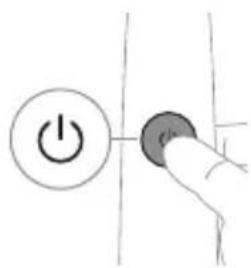
3 Press the power on/off button to switch on the Philips Sonicare.
4 Gently keep the bristles placed on the teeth and in the gumline. Brush your teeth with small back and forth motion so the bristles reach between the teeth. Continue this motion throughout your brushing cycle.
Note: The bristles should slightly flare. It is not recommended to scrub as you would with a manual toothbrush.
Note: If you apply too much pressure, you will be alerted by a change in vibration of the handle and the brush head replacement reminder flashing amber.
5 To clean the inside surfaces of the front teeth, tilt the brush handle semi-upright and make several vertical overlapping brushing strokes on each tooth. 6 After you have completed the brushing cycle, you can spend additional time brushing the chewing surfaces of your teeth and areas where staining occurs. You can also brush your tongue, with the toothbrush switched on or off, as you prefer.
Note: Your Philips Sonicare toothbrush is safe to use on braces (brush heads wear out sooner when used on braces) and dental restorations (fillings, crowns, veneers) if they are properly adhered and not compromised.
QuadPacer
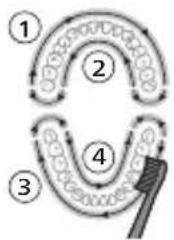
To make sure you brush evenly throughout the mouth, divide your mouth into 4 sections using the QuadPacer feature. The QuadPacer divides the brushing time into 4 equal segments and indicates when you should move to the next area. The segments are indicated with a brief pause in vibration. The toothbrush automatically stops at the end of the brushing session.
Note: Additional time may be added when you use the White or Gum Care Modes.
Modes
Your power toothbrush is equipped with up to 3 modes: Clean, White and Gum Care (specific models only). To change modes, press the mode button while the toothbrush is powered off.
Clean White Gum Care
| Benefit For exceptional everyday clean | Removes surface stains | Gently massages gums |
| Total brushing time | 2 minutes 2 minutes and 30 seconds | 3 minutes |
| How to brush Brush each segment for 30 seconds. | Brush each segment for 30 seconds | Brush each segment for 30 seconds |
| then brush segments 5 and 6 for 15 seconds each to brighten and polish front teeth. | then brush segments 5, 6, 7 and 8 for 15 seconds each to gently stimulate and massage your gums. | |
| 5 | 6 | |
| 6 | 8 |
BrushSync technology
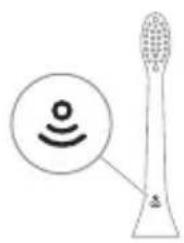
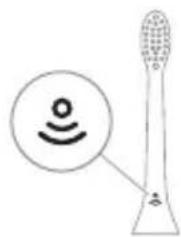
BrushSync technology enables your brush head to communicate with your handle using a microchip. The symbol at the bottom of the brush head indicates that the brush head is equipped with this technology. BrushSync technology enables: - Brush Head Replacement Reminder Philips Sonicare offers a wide range of smart brush heads, equipped with BrushSync technology. To explore our full range of toothbrush brush heads, and find the brush head that is best for you, go to
www.philips.com/toothbrush-heads for more information.
Features
- Pressure Sensor Feedback
- Quadpacer
- Brush head Replacement Reminder
- EasyStart
- SmarTimer
Pressure Sensor Feedback
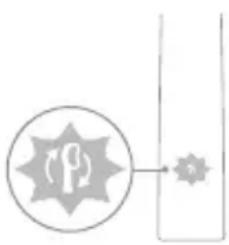
Your Sonicare toothbrush measures the pressure you apply while brushing, to protect your gums and teeth from damage.
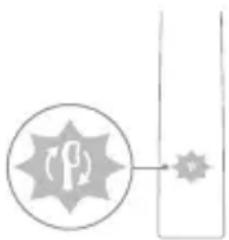
If you apply excess pressure, the handle changes its vibration and the brush head replacement reminder icon flashes amber until you reduce the pressure.
Note: Your product comes with the Pressure Sensor activated. To deactivate this feature (see 'Activating or deactivating features').
Quadpacer
The QuadPacer is an interval timer that helps you to brush evenly through the mouth by dividing your mouth into 4 sections. (see 'Brushing instructions')
Brush Head Replacement Reminder
Your Philips Sonicare is equipped with BrushSync technology that tracks the wear of your brush head.
Note: This feature only works with Philips Sonicare smart brush heads with BrushSync technology.
1 When you attach a new smart brush head for the first time, the handle recognizes that you have a Philips brush head with BrushSync technology and begins tracking brush head wear. 2 Over time, based on the pressure you apply and the total time the brush head has been used, the handle tracks brush head wear in order to determine the optimal time to replace your brush head. This feature guarantees the best cleaning and care of your teeth.
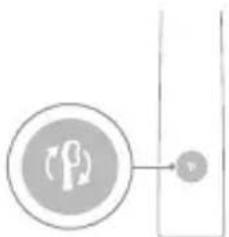
3 When the brush head replacement reminder indicator lights up amber, you should replace your brush head.
All smart brush heads come with the brush head replacement reminder feature activated. To deactivate the brush head replacement reminder see 'Activating or deactivating features'.
EasyStart
This Philips Sonicare model comes with the EasyStart feature activated. The EasyStart feature gently increases the power over the first 14 brushings to help you get used to brushing with the Philips Sonicare.
Disclaimer
When the Philips Sonicare toothbrush is used in clinical studies, it must be used in clean mode at high intensity with the handle fully charged and the EasyStart feature deactivated.
To deactivate EasyStart (see 'Activating or deactivating features').
SmarTimer
The SmarTimer indicates that your brushing cycle is complete by automatically switching off the toothbrush at the end of the brushing cycle.
Dental professionals recommend brushing no less than 2 minutes twice a day.
Note: If you press the power on/off button after you started the brushing cycle, the toothbrush pauses. After a pause of 30 seconds, the SmarTimer resets.
Activating or deactivating features
You can activate or deactivate the following features of your toothbrush:
- EasyStart
- Brush Head Replacement Reminder
- Pressure Sensor Feedback
Note: You can only activate or deactivate the brush head replacement reminder when a smart brush head is on the handle.
Step 1: Place the handle on the plugged in charging stand.

Step 2: Press and hold power on/off button for:
EasyStart Brush head Pressure Sensor replacement Feedback reminder
Up to 3 seconds Up to 5 seconds Up to 7 seconds
Step 3: Let go of the power on/off button when you hear:
1 beep 1 beep and then 1 beep, 2 beeps and 2 beeps then 3 beeps
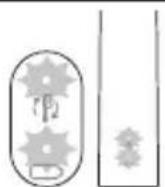
If you see the battery indicator and the brush head replacement reminder light flash green 2 times and hear 3 tones from low to high, then the feature has been activated.
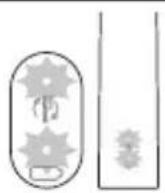
If you see the battery indicator and brush head replacement reminder light flash amber 1 time and hear 3 tones high to low, then the feature has been deactivated.
UV sanitizer
Note: Accessories included may vary based on the model purchased.
With the UV sanitizer you can clean your brush head after every use.
Unplug the sanitizer, discontinue use and call Consumer Care if:
- The UV light bulb remains on when the door is open.
- The window is broken or missing from the sanitizer.
- The sanitizer gives off smoke or a burning smell while it is operating.
Note: UV light can be harmful to the human eye and skin. This device should be kept out of reach of children at all times.
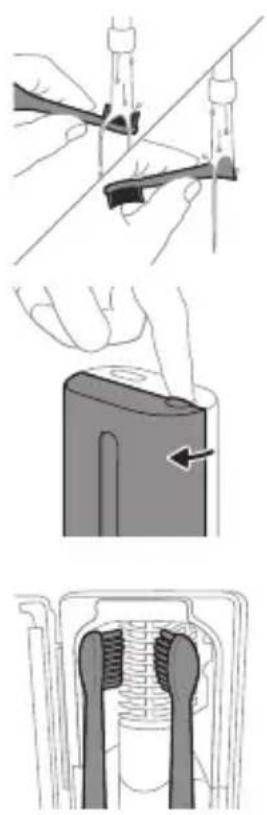
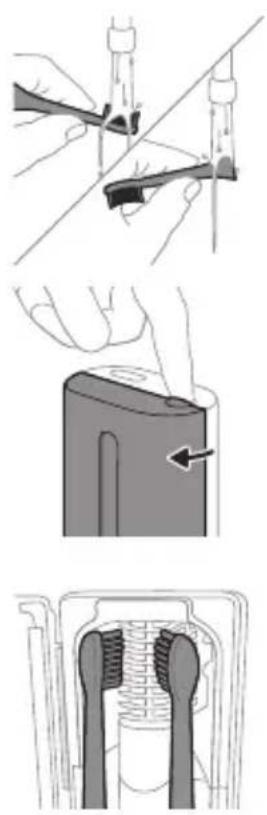
1 After brushing, rinse the brush head and shake off excess water.
Warning: Make sure that the brush head cap is not on the brush head when the brush head is being cleaned in the sanitizer.
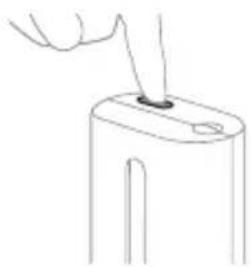
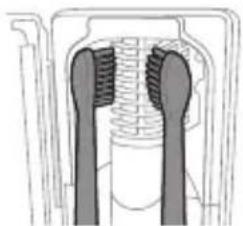
2 Place your finger in the door recess on top of the sanitizer and pull open the door. 3 Place the brush head on one of the 2 pegs in the sanitizer with the bristles facing the light bulb.
Note: Only clean Philips Sonicare snap-on brush heads in the sanitizer.
Note: Do not clean Philips Sonicare for Kids brush heads in the sanitizer.
4 Make sure the sanitizer is plugged into a live outlet of appropriate voltage.
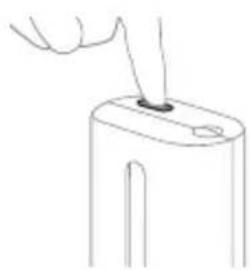
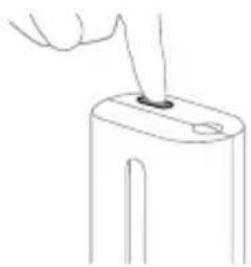
5 Close the door and press the green power on/off button once to select the UV clean cycle.
Note: You can only switch on the sanitizer if the door is properly closed.
Note: The sanitizer stops operating if you open the door during the sanitizer cycle.
Note: The sanitizer cycle takes approximately 10 minutes and then switches off automatically.
The sanitizer is in operation when the light glows through the window.
Charging and battery status
This Philips Sonicare toothbrush is designed to provide at least 28 brushing sessions, each session lasting 2 minutes (14 days if used twice per day) on a fully charged battery. The battery indicator shows the battery status when you complete the 2-minute brushing session, when you pause the toothbrush, or while it is charging.
Note: It can take up to 24 hours to fully charge the battery before first use, but you can use the Philips Sonicare toothbrush before it is fully charged.
Charging
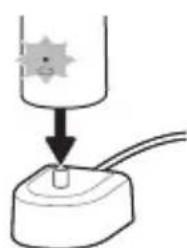
Charging on charger or UV Sanitizer
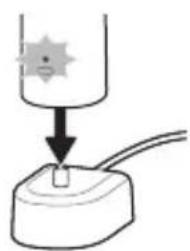
1 Plug the charger or sanitizer into an electrical outlet. 2 Place the handle on the charger or sanitizer. - The handle emits 2 short beeps to confirm that the handle is placed properly. - The flashing light of the battery indicator shows that the toothbrush is charging. - When the handle is fully charged on the charger, the battery indicator lights up green for 30 seconds and then switches off.
Battery status
Battery status (handle on plugged-in charger)
When the handle is placed on the charger, the battery indicator shows the battery level.
Battery status Battery indicator
| Charging Flashes green |
| Full Solid green for 30 seconds and then switches off |
Battery status (when handle is not placed on charger)
When the toothbrush is awake, the battery indicator at the bottom of the handle shows the battery level.
Battery status Battery indicator Sound
| Full Solid green - | |
| Partially full Flashes green - | |
| Low Flashes amber The handle emits 3 | beeps after brushing |
| Empty Flashes amber The handle emits 2 sets | of 5 beeps after brushing |
Note: To save energy, the battery indicator will switch off when not in use.
Note: When the battery is completely empty, the toothbrush switches off. Place the toothbrush on the charger to charge it.
Note: To keep the battery fully charged at all times, you may keep your toothbrush on the charger when not in use.
Cleaning
Toothbrush handle
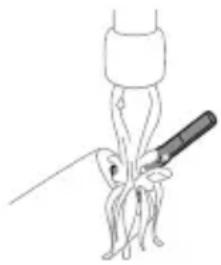
1 Remove the brush head and rinse the metal shaft area with warm water. Make sure you remove any residual toothpaste. Caution: Do not push on the rubber seal on the metal shaft with sharp objects, as this may cause damage. 2 Wipe the entire surface of the handle with a damp cloth.
Note: Do not tap the handle on the sink to remove excess water.
Brush head
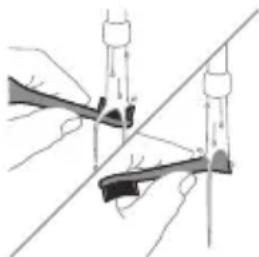
1 Rinse the brush head and bristles after each use. 2 Remove the brush head from the handle and rinse the brush head connection with warm water at least once a week. Rinse the travel cap as often as needed.
Charger
1 Unplug the charger before you clean it. 2 Wipe the surface of the charger with a damp cloth.
Travel case
Rinse with warm water and use a damp cloth to clean the inside of the travel case.
Cleaning the Sanitizer
Warning: Do not immerse the sanitizer in water or rinse it under the faucet.
Warning: Do not clean the sanitizer when the UV light bulb is hot.
For optimal effectiveness, it is recommended to clean your sanitizer weekly.
1. Unplug the sanitizer.
English
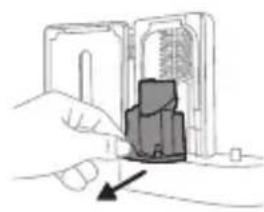
2. Pull the drip tray straight out. Rinse the drip tray and wipe it clean with a damp cloth. 3. Clean all interior surfaces with a damp cloth. 4. Remove the protective screen in front of the UV light bulb.
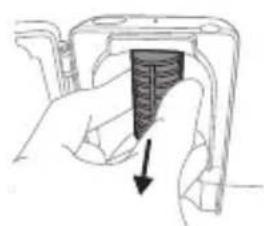
To remove the screen, grasp the edges next to the snaps, gently squeeze, and pull out the protective screen.
5. Remove the UV light bulb. To remove the light bulb, grasp it and pull it out of the metal clasp. 6. Clean the protective screen and the UV light bulb with a damp cloth. 7. Reinsert the UV light bulb. To reinsert the light bulb, align the bottom of the light bulb with the metal clasp and push the bulb into the clasp. 8. Reinsert the protective screen. To reinsert the screen, align the pegs on the screen with the slots on the reflective surface near the UV light bulb. Push the screen straight into the slots on the sanitizer. 9. Place the drip tray back in the UV sanitizer. 10. After cleaning, make sure the sanitizer is completely dry before you connect it to the mains.
Storage
If you are not going to use the product for an extended period of time, unplug it from the electrical outlet, clean it, and store it in a cool and dry place away from direct sunlight.
Replacement
Replace Philips Sonicare brush heads every 3 months to achieve optimal results. Use only Philips Sonicare replacement brush heads.
Locating the model number
Look on the bottom of the Philips Sonicare toothbrush handle for the model number (HX64XX, HX68XX).
Warranty and support
If you need information or support, please visit www.philips.com/support or read the international warranty leaflet.
Warranty exclusions
What is not covered under warranty: - In mouth attachments including brush heads and nozzles. - Damage caused by use of unauthorized replacement parts or unauthorized brush heads. - Damage caused by misuse, abuse, neglect, alterations or unauthorized repair. - Normal wear and tear, including chips, scratches, abrasions, discoloration or fading. UV light bulb.
Recycling
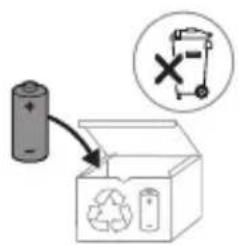
- This symbol means that electrical products and batteries shall not be disposed of with normal household waste.
- Follow your country's rules for the separate collection of electrical products and batteries.
- The UV light bulb of the sanitizer contains mercury. Do not throw the UV light bulb away with the normal household waste at the end of its life. Hand it in at an official collection point for recycling. Information on REACH substances, contained in Philips products, can be found on www.philips.com/REACH
Removing the rechargeable battery
The built-in rechargeable battery must be removed by a qualified professional when the product is discarded.
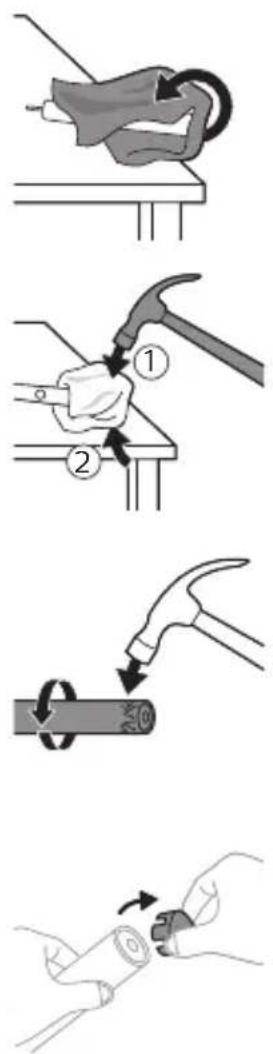
Instructions for removal of built-in rechargeable batteries can be found on www.philips.com/support.
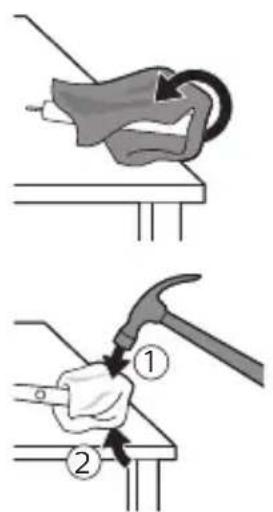
To remove the rechargeable battery, you need a towel or cloth, a hammer and a flat-head (standard) screwdriver. Observe basic safety precautions when you follow the procedure outlined below.
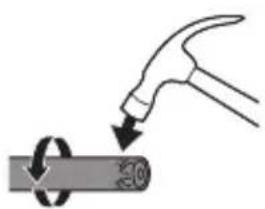
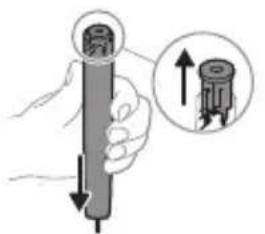
1 To deplete the rechargeable battery of any charge, remove the handle from the charger, turn on the toothbrush and let it run until it stops. Repeat this step until you can no longer turn on the toothbrush. 2 Remove and discard the brush head. Cover the entire handle with a towel or cloth. 3 Hold the top of the handle with one hand and strike the handle housing 0.5 inch above the bottom end. Strike firmly with a hammer on all 4 sides to eject the end cap.
Note: You may have to hit the end several times to break the internal snap connections.
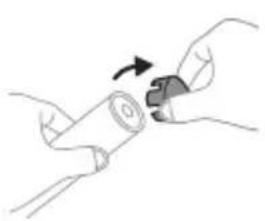
4 Remove the end cap from the toothbrush handle. If the end cap does not release easily from the housing, repeat step 3 until the end cap is released.
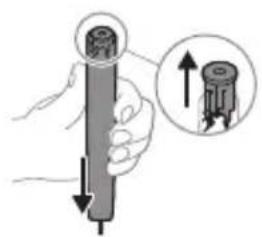
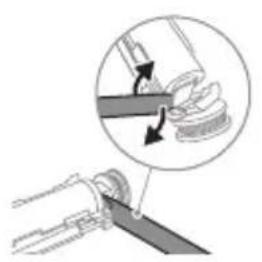
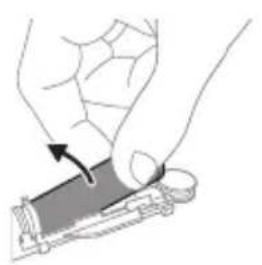
5 Holding the handle upside down, press the shaft down on a hard surface. If the internal components do not easily release from the housing, repeat step 3 until the internal components are released. 6 Wedge the screwdriver between the battery and the black frame at the bottom of the internal components. Then pry the screwdriver away from the battery to break the bottom of the black frame. 7 Insert the screwdriver between the bottom of the battery and the black frame to break the metal tab connecting the battery to the green printed circuit board. This will release the bottom end of the battery from the frame. 8 Grab the battery and pull it away from the internal components to break the second metal battery tab.
Caution: Be aware of the sharp edges of the battery tabs so as to avoid injury to your fingers.
9 Cover the battery contacts with tape to prevent any electrical short from residual battery charge.
The rechargeable battery can now be recycled and the rest of the product discarded appropriately.
Note: Do not throw away the appliance with the normal household waste at the end of its life, but hand it in at an official collection point for recycling. By doing this, you help to preserve the environment.
Introduction
www.philips.com/support
Note: Features may vary by model. Some models may not be equipped with Bluetooth or NFC.

Detachable power supply unit: The model number of the approved charger to be used is indicated by "xxxxxx". (TCBxxx, HX6100, HX6110, HX6160 or WAAxxxx)
Address: www.philips.com/support
www.philips.com/support
xxxxxx
Clean White Gum Care
Clean White Gum Care

Clean White Gum Care
MEDICAL WARNINGS
Clean White Gum Care
MEDICAL CAUTIONS
Clean White Gum Care
Clean White Gum Care
| Prednost Za odlično svakodnevno čišćenje | Uklanjanje povrsinskih mrlja | Nježno masira desni |
| Ukupno vrijeme četkanja | 2 minute 2 minute i 30 sekundi | 3 minute |
| Kako šetkati Četkajte svaki segment 30 sekundi. | šetkajte svaki segment 30 sekundi | šetkajte svaki segment 30 sekundi |
| zatim šetkajte segmente 5 i 6, svakog po 15 sekundi, za posvjeljivanje i poliranje prednjih zuba. | zatim šetkajte segmente 5, 6, 7 i 8, svakog po 15 sekundi, za nježnu stimulaciju i masažu desni. | |
| 5 6 | 5 6 7 8 |
BrushSync technology
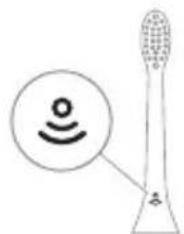
BrushSync technology allows the brush head to communicate with the handle using a microchip. The symbol on the bottom of the brush head indicates that the brush head is equipped with this technology. BrushSync technology enables: a reminder to replace the brush head. Philips Sonicare offers a wide range of smart brush heads equipped with BrushSync technology. To explore the full range of toothbrush heads and find the head
that best suits you, visit www.philips.com/toothbrush-heads for more information.
Features
Clean White Gum Care
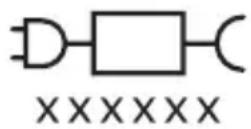
Note: Functions may differ for different models. Some models may not be equipped with Bluetooth or NFC.
Removing the power source part: "xxxxxx" indicates the approved charger model number.
(TCBxxxx, HX6100, HX6110, HX6160 or WAAxxxx)

Clean White Gum Care
| leguvums lzcilai tirišanai katru dienu (noklusejuma režims). | Aplikuma noğemşana no zobu virsmas | Saudziga smaganu masësana | |
| Kopëjais zobu tirišanas laiks | 2 minütes 2 minütes un 30 sekundes | 3 minütes | |
| Kā tīrit tīriet katru segmentu 30 sekundes. | tīriet katru segmentu 30 sekundes. | tīriet katru segmentu 30 sekundes. | |
| Pēc tam 15 sekundes tīriet 5. un 6. segmentu, lái padarītu priekszobus mirdzošakus un gludākus. | Pēc tam 15 sekundes tīriet 5., 6., 7. un 8. segmentu, lái saudzigi stimulētu un masētu smaganas. | ||
| 5 6 7 8 | |||
BrushSync technology
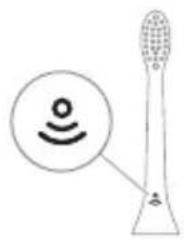
BrushSync technology ensures that the brush head communicates with the handle using a microchip. The symbol on the underside of the brush head indicates that the brush head is equipped with this technology.
BrushSync technology provides the following:
- brush head replacement reminder
Clean "White" "Gum Care"
Clean White Gum Care
Clean White Gum Care
Clean White Gum Care
Using your Philips Sonicare toothbrush
If you are using a Sonicare toothbrush for the first time, it is normal to feel more vibration than with a non-electric toothbrush. First-time users typically apply too much pressure. Press gently and let the toothbrush do the cleaning for you. For the best results, follow the brushing instructions. To help you transition to your new Sonicare power toothbrush, the EasyStart feature is activated.
Clean White Gum Care
| Foydasi Maxsus kundalik tozalah uchun | Yuzadagi dog'larni ketkazadi | Milkarni ohista massaj qiladi |
| Jami tish tozalah vaqti | 2 daqqa 2 daqqa va 30 soniya | 3 daqqa |
| Tozalah usuli Har bir segmentni 30 soniyadan tozalang. | Har bir segmentni 30 soniyadan tozalang | Har bir segmentni 30 soniyadan tozalang |
| keyin old tishlarni oqartirish va jilolash uchun 5- va 6-segmentlarning har birini 15 soniyadan tozalang. | keyin milklaringizni ohista stimullash va massaj qilish uchun 5, 6, 7 va 8-segmentlarning har birini 15 soniyadan tozalang. | |
| 5 6 7 | 5 6 8 |
BrushSync technology
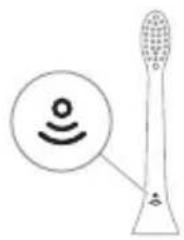
BrushSync technology allows the brush head to communicate with the handle via a microchip.
The symbol under the brush head indicates that the brush head is equipped with this technology.
BrushSync technology activates the following:
- Brush head replacement reminder
Philips Sonicare offers a wide range of smart brush heads with BrushSync technology. To explore the full range of brush heads and find the one that suits you best, visit www.philips.com/toothbrush-heads.
Features
- Pressure sensor alert
- QuadPacer
- Brush head replacement reminder
- EasyStart
- SmarTimer
www.philips.com/support
Clean White Gum Care
www.philips.com/support

xxxxxx
Clean White Gum Care
www.philips.com/support
Important safety information
www.philips.com/support
Clean White Gum Care
www.philips.com/support
Note: Functions may vary for different models. Some models may not be equipped with "Bluetooth" or "NFC".
Detachable power supply unit: "xxxxxx" indicates the model number of approved chargers to be used. (TCBxxxx, HX6100, HX6110, HX6160 or WAAxxxx)

This symbol means "before using the device, read the user instructions".
Intended use
Clean White Gum Care
| Pörfitimi Pör pastrim të jashtëzakonshëm të përditshëm | Heq njollat në sipërfaqe | Masazhon lehtë mishrat e dhëmbëve |
| Koha totale e larjes | 2 minuta 2 minuta e 30 sekonda | 3 minuta |
| Si t'i lani dhëmbët | Pastroni Çdo segment për 30 sekonda. | Lani secilin segment për 30 sekonda |
| 1 2 3 4 5 6 7 8 9 10 11 12 13 14 15 16 17 18 19 20 21 22 23 24 25 26 27 28 29 30 31 32 33 34 35 36 37 38 39 40 41 42 43 44 45 46 47 48 49 50 51 52 53 54 55 56 57 58 59 60 61 62 63 64 65 66 67 68 69 70 71 72 73 74 75 76 77 78 79 80 81 82 83 84 85 86 87 88 89 90 91 92 93 94 95 96 97 98 99 100 101 102 103 104 105 106 107 108 109 110 111 112 113 114 115 116 117 118 119 120 121 122 123 124 125 126 127 128 129 130 131 132 133 134 135 136 137 138 139 140 141 142 143 144 145 146 147 148 149 150 151 152 153 154 155 156 157 158 159 160 161 162 163 164 165 166 167 168 169 170 171 172 173 174 175 176 177 178 179 180 181 182 183 184 185 186 187 188 189 190 191 192 193 194 195 196 197 198 199 200 201 202 203 204 205 206 207 208 209 210 211 212 213 214 215 216 217 218 219 220 221 222 223 224 225 226 227 228 229 230 231 232 233 234 235 236 237 238 239 240 241 242 243 244 245 246 247 248 249 250 251 252 253 254 255 256 257 258 259 260 261 262 263 264 265 266 267 268 269 270 271 272 273 274 275 276 277 278 279 280 281 282 283 284 285 286 287 288 289 290 291 292 293 294 295 296 297 298 299 300 301 302 303 304 305 306 307 308 309 310 311 312 313 314 315 316 317 318 319 320 321 322 323 324 325 326 327 328 329 330 331 332 333 334 335 336 337 338 339 340 341 342 343 344 345 346 347 348 349 350 351 352 353 354 355 356 357 358 359 360 361 362 363 364 365 366 367 368 369 370 371 372 373 374 375 376 377 378 379 380 381 382 383 384 385 386 387 388 389 390 391 392 393 394 395 396 397 398 399 400 401 402 403 404 405 406 407 408 409 410 411 412 413 414 415 416 417 418 419 420 421 422 423 424 425 426 427 428 429 430 431 432 433 434 435 436 437 438 439 440 441 442 443 444 445 446 447 448 449 450 451 452 453 454 455 456 457 458 459 460 461 462 463 464 465 466 467 468 469 470 471 472 473 474 475 476 477 478 479 480 481 482 483 484 485 486 487 488 489 490 491 492 493 494 495 496 497 498 499 500 501 502 503 504 505 506 507 508 509 510 511 512 513 514 515 516 517 518 519 520 521 522 523 524 525 526 527 528 529 530 531 532 533 534 535 536 537 538 539 540 541 542 543 544 545 546 547 548 549 550 551 552 553 554 555 556 557 558 559 560 561 562 563 564 565 566 567 568 569 570 571 572 573 574 575 576 577 578 579 580 581 582 583 584 585 586 587 588 589 590 591 592 593 594 595 596 597 598 599 600 601 602 603 604 605 606 607 608 609 610 611 612 613 614 615 616 617 618 619 620 621 622 623 624 625 626 627 628 629 630 631 632 633 634 635 636 637 638 639 640 641 642 643 644 645 646 647 648 649 650 651 652 653 654 655 656 657 658 659 660 661 662 663 664 665 666 667 668 669 670 671 672 673 674 675 676 677 678 679 680 681 682 683 684 685 686 687 688 689 690 691 692 693 694 695 696 697 698 699 700 701 702 703 704 705 706 707 708 709 710 711 712 713 714 715 716 717 718 719 720 721 722 723 724 725 726 727 728 729 730 731 732 733 734 735 736 737 738 739 740 741 742 743 744 745 746 747 748 749 750 751 752 753 754 755 756 757 758 759 760 761 762 763 764 765 766 767 768 769 770 771 772 773 774 775 776 777 778 779 780 781 782 783 784 785 786 787 788 789 790 791 792 793 794 795 796 797 798 799 800 801 802 803 804 805 806 807 808 809 810 811 812 813 814 815 816 817 818 819 820 821 822 823 824 825 826 827 828 829 830 831 832 833 834 835 836 837 838 839 840 841 842 843 844 845 846 847 848 849 850 851 852 853 854 855 856 857 858 859 860 861 862 863 864 865 866 867 868 869 870 871 872 873 874 875 876 877 878 879 880 881 882 883 884 885 886 887 888 889 890 891 892 893 894 895 896 897 898 899 900 901 902 903 904 905 906 907 908 909 910 911 912 913 914 915 916 917 918 919 920 921 922 923 924 925 926 927 928 929 930 931 932 933 934 935 936 937 938 939 940 941 942 943 944 945 946 947 948 949 950 951 952 953 954 955 956 957 958 959 960 961 962 963 964 965 966 967 968 969 970 971 972 973 974 975 976 977 978 979 980 981 982 983 984 985 986 987 988 989 |
BrushSync technology
www.philips.com/toothbrush-heads for more information.
Functions
- Pressure sensor alert
- Quadpacer
- Brush head replacement reminder
- EasyStart
- SmartTimer
Pressure sensor alert
Clean White Gum Care
www.philips.com/support
Clean White Gum Care
| Pogodnost Za izvanredno svakodnevno pranje | Uklanja mrlje sa povrsina | Nežno masira desni |
| Ukupno vreme pranja zuba | 2 minuta 2 minuta i 30 sekundi | 3 minuta |
| Kako se pere Perite svaki segment 30 sekundi. | perite svaki segment 30 sekundi | perite svaki segment 30 sekundi |
| zatim perite segmente 5 i 6, svaki u trajanju od 15 sekundi, da biste izbeleli i ispolirali prednje zube. | zatim perite segmente 5, 6, 7 i 8, svaki u trajanju od 15 sekundi, za nežno stimulisanje i masiranje desni. | |
| 5 6 | 5 6 7 8 |
BrushSync technology
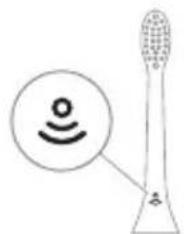
BrushSync technology enables communication between the brush head and the handle using a microchip. The symbol on the bottom of the brush head indicates that the brush head contains this technology.
BrushSync technology enables: - Replacement reminder for brush head. Philips Sonicare has a wide range of smart brush heads with BrushSync technology. For more information about our entire range of toothbrush heads, visit
www.philips.com/toothbrush-heads and find the brush head that suits you best.
Features
- Pressure sensor feedback
- Quadpacer
- Brush head replacement reminder
- EasyStart
- SmartTimer
www.philips.com/support
Clean White Gum Care
Clean White Gum Care
5. The UV lamp is off.
- If bleeding occurs after use, and if bleeding continues for more than 1 week or if you feel discomfort or pain, stop using the device and consult your dentist/physician.
- If you have had oral or gum surgery in the previous 2 months, consult your dentist before using this device.
- If you have a pacemaker or another implanted device, consult your doctor or the manufacturer of the implanted device before using this device.
- If you are medically uncertain, consult your doctor before using this device.
- This product is a personal care device and is not intended for use on multiple patients in a dental clinic or office.
www.philips.com/support
Note: Different models may have different features. Some models may not be equipped with Bluetooth or NFC.
The charging base: "xxxxx" indicates the model number of the approved chargers for use. (TCBxxx, HX6100, HX6110, HX6160 or WAAxxx)

This symbol means: read the user instructions before using the device.
Intended use
ProtectiveClean electric toothbrushes are intended to reduce plaque and maintain oral health by removing dental plaque and food debris. ProtectiveClean electric toothbrushes are intended for personal use. Children should use them under adult supervision.
Your Philips Sonicare device (Fig. 1.)
1 Handle
Clean White Gum Care
Brush head replacement reminder
Your Philips Sonicare is equipped with BrushSync technology that tracks the wear of your brush head.
Note: This feature only works with Philips Sonicare smart brush heads that have BrushSync technology.
1 When you attach a new smart brush head for the first time, the handle recognizes that you have a Philips brush head with BrushSync technology and starts tracking the wear of the brush head.
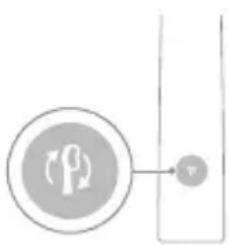
2 Over time, based on your brushing pressure and the total time you have used the brush head, the handle tracks its wear to determine the optimal time to replace the brush head. This feature ensures the best cleaning and care for your teeth. 3 When the brush head replacement reminder light glows amber, it is time to replace the brush head.
The brush head replacement reminder feature is enabled by default. To disable or enable the feature, see the "Enabling or disabling features" section.
EasyStart
This Philips Sonicare model comes with the EasyStart feature enabled. The EasyStart feature gradually increases the power over the first 14 brushing sessions to help you get used to brushing with Philips Sonicare.
1 beep, 1 beep and 1 beep, 2 beeps and then 2 beeps, then 3 beeps

If you see the battery indicator and the brush head replacement reminder light flash green twice and hear 3 beeps from the handle, the feature is enabled.
OR
If you see the battery indicator and the brush head replacement reminder light flash amber once and hear 3 beeps from the handle, the feature is disabled.
UV sanitizer
Note: Accessories may vary by model purchased.
You can clean the brush heads with the UV sanitizer after each use.
If the following situations occur, unplug the disinfectant, stop using it, and call the customer service center:
- The ultraviolet lamp is still glowing while the lid is open.
- The disinfectant's window is broken or missing.
- The disinfectant emits smoke or a burning smell while operating.
Note: The ultraviolet lamp can be harmful to human eyes and skin. Always keep this device out of reach of children.
1 After brushing, rinse the brush head and shake off excess water.
Caution: The nozzle cap must be attached to the nozzle while the nozzle is being cleaned in the disinfectant.
2 Place your finger in the hole on the lid of the cleaner and push to open the lid. 3 Place the brush head into the two slots in the cleaner; the brush head should be facing the UV light.
Note: Only clean brush heads that are designed for Philips Sonicare in the cleaner.
Note: Do not clean Philips Sonicare for Kids nozzles in the disinfectant.
4 Make sure the cleaner is placed on a stable surface and plugged into a working electrical outlet.
5 Close the lid and press the on/off button once to select the UV cleaning cycle.
Note: You can only operate the disinfectant when the lid is properly closed.
Note: If you open the lid during the disinfectant cycle, the disinfectant will stop operating.
Note: The disinfectant cycle lasts approximately 10 minutes and then turns off automatically.
When the handle is placed on the charger, the battery indicator light will blink to indicate that it is charging.
Charging and battery status
This Philips Sonicare toothbrush is designed for at least 28 brushing sessions, with each session lasting 2 minutes on a fully charged battery (if used twice a day, that's 14 days). The battery indicator shows the battery status when you pick up the toothbrush or while it is charging.
Note: Before first use, charging the battery fully may take up to 24 hours, but you can use the Philips Sonicare toothbrush even if it is not fully charged.
Charging
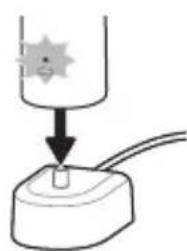
Charging in the charger or in the UV sanitizer
1 Plug the charger or sanitizer into an electrical outlet. 2 Place the toothbrush handle in the charger or sanitizer. - The handle will emit two short beeps to confirm that it is correctly placed on the charger. - The battery indicator light will blink to show that the handle is charging. When the handle is fully charged in the charger, the battery indicator will light up solid green for 30 seconds and then turn off.
Battery status
Battery status (handle placed on the charger)
When the handle is placed on the charger, the battery indicator shows the battery level.
Battery status Battery indicator
Charging Blinking green
Fully charged Solid green for 30 seconds
then turns off
Battery status (when handle is not on the charger)
During charging, the battery indicator below the handle shows the battery level.
Battery status Battery indicator Sound
Full Solid green -
www.philips.com/support
www.philips.com/support
xxxxxx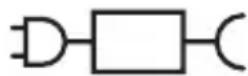
Note: Functions may vary by model. Some models may not have Bluetooth or NFC.

Disposal part of the charging device: "xxxxxx" indicates the model number of the compatible charging device to be used. (TCBxxxx, HX6100, HX6110, HX6160 or WAAxxxx)
This symbol means "Read the instructions for use before using the device".
The ProtectiveClean electric toothbrush heads are designed to remove plaque and stains from teeth, to prevent their buildup and to improve and support oral health. The ProtectiveClean electric toothbrush heads are intended for personal use. Use by children should be under parental supervision.
Your Philips Sonicare (Fig. 1.)
1 Handle 2 Power on/off button 3 Mode button 4 Mode indicator 5 Reminder for brush head replacement 6 Battery indicator
Accessories:
7 Brush head cap 8 Smart brush head 9 Charger 10 Travel cap 11 UV sanitizer 12 Charging device
Note: Accessories may differ depending on the model.
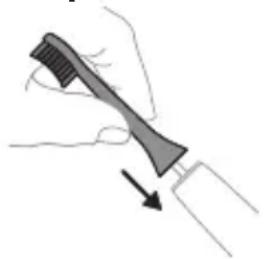
1. Align the brush head so that the bristles face the bristles of the handle.
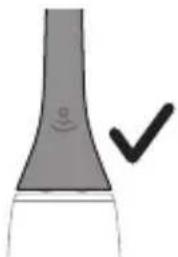
2. Press the brush head onto the metal shaft of the handle until it clicks into place.
Note: It is normal for there to be a small gap between the brush head and the handle.
Your power toothbrush is equipped with up to 3 modes: Clean, White and Gum Care (specific models only). To change modes, press the mode button while the toothbrush is powered off.
Clean White Gum Care
If you press the power button, the handle will switch to the selected mode. The reminder to change the brush head will blink in the handle light until you press it.
Note: Your product is equipped with a pressure sensor. To deactivate this function (see "Activating or deactivating functions").
QuadPacer
QuadPacer is an interval timer that helps you brush your mouth evenly by dividing it into 4 zones.
Brush head replacement reminder
Your Philips Sonicare is equipped with BrushSync technology, which monitors the wear of the brush head.
Note: This function works only with Philips Sonicare brush heads with BrushSync technology.
1. When you attach a new brush head for the first time, the handle recognizes that you have a Philips brush head with BrushSync technology and starts tracking the wear of the brush head. 2. Over time, depending on the pressure applied and the total time of use of the brush head, the handle tracks the wear of the brush head to determine the optimal time to replace it. This function guarantees the best cleaning and care for your teeth. 3. When the brush head replacement reminder light blinks in the handle light, you should replace the brush head.
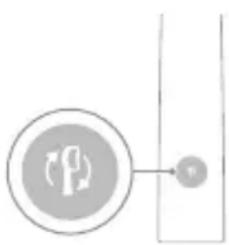
The BrushHead Replacement Reminder function can be activated for a reminder to change the brush head. To activate or deactivate the reminder for changing the brush head, see "Activating or Deactivating Functions".
EasyStart
This Philips Sonicare model is equipped with the EasyStart function. The EasyStart function gradually increases the power of operation during the first 14 sessions, to help you get used to brushing with Philips Sonicare.
Disclaimer
When the Philips Sonicare toothbrush is used in clinical studies, it must be used in Clean mode with high intensity with the handle, when available, and the EasyStart function must be deactivated.
To deactivate EasyStart (see Activating or Deactivating Functions).
SmarTimer
The SmarTimer shows that the recommended brushing time is complete, by automatically turning off the toothbrush at the end.
Dentists recommend brushing teeth for no more than 2 minutes twice a day.
Note: If you press the on/off button during brushing, the toothbrush pauses. After a pause of 30 seconds, the SmarTimer resets.
Activating or Deactivating Functions
You can activate or deactivate the following functions of your toothbrush:
- EasyStart
- BrushHead Replacement Reminder
- Pressure Feedback
3a6eJekka: MoKTe Da aKTbBpuTe nIi De3aKTbBpuTe HaOMHHeTo 3a CMHa Ha rAbaTa Ha YeTKaTa cMo KOrato Ha IpbXkata mMa INHTeJIrEHTHa rAba Ha YeTKaTa.
Step 1: Place the handle on the plugged in charging stand.
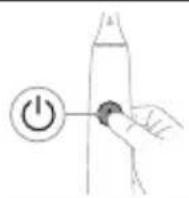
Step 2: Press and hold power on/off button for:
EasyStart Brush head
replacement reminder
Pressure Sensor
Feedback
Up to 3 seconds Up to 5 seconds Up to 7 seconds

Step 3: Let go of the power on/off button when you hear:
1 beep 1 beep and then
2 beeps
1 beep,2beepsand
then 3 beeps

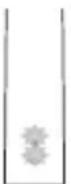
If you see the battery indicator and the brush head replacement reminder light flash green 2 times and hear 3 tones from low to high, then the feature has been activated.
OR


If you see the battery indicator and brush head replacement reminder light flash amber 1 time and hear 3 tones high to low, then the feature has been deactivated.
The brush head replacement reminder
Note: The activation of the accessory may differ depending on the model purchased.
The brush head replacement reminder can help you maintain the quality of your brush head after each use.
Discontinue use of the brush head replacement reminder, stop using it and contact the Consumer Service Center if:
- The control light remains on when the handle is open.
- The brush head replacement reminder is damaged or cracked.
- The brush head replacement reminder emits an abnormal sound during operation.
Note: The control light may be bright for the eyes and skin. This device should be kept away from children at all times.
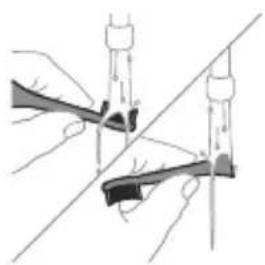
1 After use, rinse the brush head and squeeze out excess water.
Warning: Make sure the brush head cap is not placed on the brush head when the brush head is being rinsed in the brush head replacement reminder.
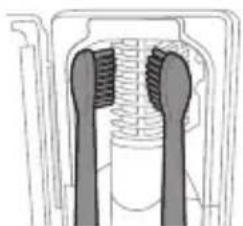
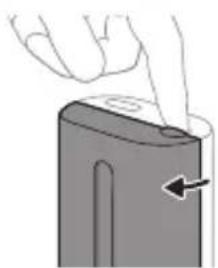
2 Place the handle into the charging base at the top of the brush head replacement reminder and open the handle. 3 Place the brush head on one of the 2 pins in the brush head replacement reminder, with the bristles facing the control light.
Note: In the brush head replacement reminder, only use Philips Sonicare brush heads with a snap-on.
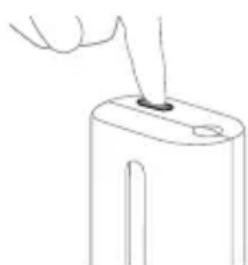
Note: Do not use Philips Sonicare for Kids brush heads in the brush head replacement reminder.
4 Make sure the brush head replacement reminder is plugged into a working outlet with appropriate voltage. 5 Close the handle and press the green button to turn on/off the charging, to select the control cleaning mode.
Warning: The UV sanitizer only works if the handle is properly closed.
Warning: The UV sanitizer will only work if you close the handle during the sanitization cycle.
Warning: The sanitization cycle lasts approximately 10 minutes, after which the device turns off automatically.
The UV sanitizer works when the handle is inserted through the opening, and the lamp lights up.
Charging and battery status
This Philips Sonicare toothbrush is designed to provide up to 28 brushing sessions, each with a duration of 2 minutes (14 days if brushing twice daily) with a fully charged battery. The battery indicator shows the battery status when you finish a 2-minute brushing session, when you place the handle on the charger, or when you charge it.
Note: Full charging may take up to 24 hours before first use, but you can use the Philips Sonicare toothbrush before it is fully charged.
Charging
Charging on charger or UV Sanitizer
1 Plug the charging unit or UV sanitizer into an electrical outlet.
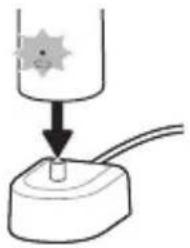
2 Place the handle on the charging unit or UV sanitizer.
- The handle emits two short beeps to confirm it is placed correctly. - The green battery indicator light shows that the toothbrush is charging. - When the handle is fully charged in the charging unit, the battery indicator lights up green for 30 seconds and then turns off.
Battery status
Battery status (handle placed on charging unit that is plugged into an outlet)
When the handle is placed on the charging unit, the battery indicator shows the battery level.
Battery status indicator
Charging
Full charge, steady green for 30
seconds, then turns off
Battery status (when the handle is not placed in the charging device)
When the handle is active, the battery indicator on the handle shows the battery level.
Battery status
Battery indicator
Sound
Full charge, steady
green
Partial charge, blinking green -
Model number
The model number is located on the bottom side of the handle of the Philips Sonicare toothbrush (HX64XX, HX68XX).
Warranty and support
If you need information or support, visit www.philips.com/support or read the international warranty leaflet.
Exclusions from warranty
What is not covered by the warranty:
- Brush heads, including the brush head shaft and caps.
- Damage caused by use of unapproved replacement parts or unauthorized brush heads. Damage caused by incorrect use, use not in accordance with the instructions, negligence, accidents, or unauthorized repairs.
- Normal wear and tear, including chipping, scratching, abrasion, discoloration, or fading.
- The rechargeable battery.
Recycling
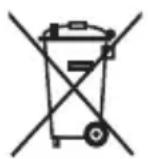
The packaging materials contain low-density polyethylene (LDPE), unless otherwise indicated.

Packaging materials other than plastic contain paper or cardboard.
Removing the built-in rechargeable battery
The built-in rechargeable battery must be removed by a qualified specialist when the product is disposed of. Instructions for removing the built-in rechargeable battery can be found at www.philips.com/support.
Removing the rechargeable battery
To remove the rechargeable battery, you need a flat-head (standard) screwdriver. Observe the basic safety precautions when performing the procedure described below.
1 To fully discharge the rechargeable battery, unplug the charger, turn on the toothbrush, and let it run until it stops. Repeat this step until the toothbrush can no longer be turned on.
2. Pull the brush out of the handle. Cover the opening with a cloth or paper towel.
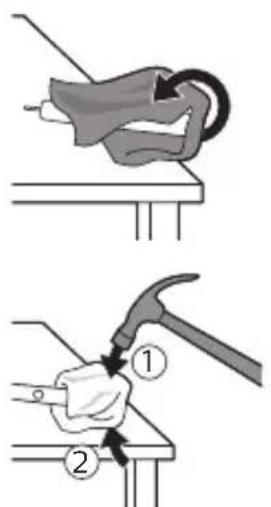
3. Hold the top part of the brush handle with one hand and press the handle against the body of the brush about 1 cm from the end. Press firmly from all 4 sides to release the end cap.
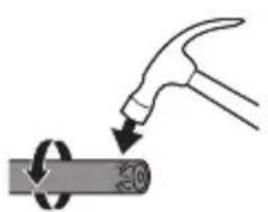
Note: You may need to press the end several times to release the internal locking hooks.
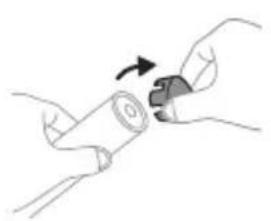
4. Pull the end cap off the top of the toothbrush handle. If it does not come off the body easily, repeat step 3 until it is released.
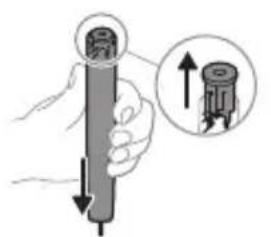
5. While holding the brush with the open end facing up, press the handle down onto a hard surface. If the internal components do not release easily from the body, repeat step 3 until they are released.
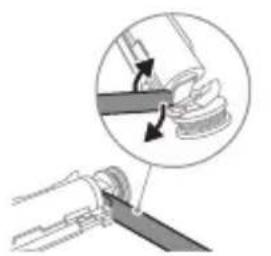
6. Insert the screwdriver between the battery and the metal frame along the side of the internal components. Then pry the screwdriver away from the battery to release the side of the metal frame.
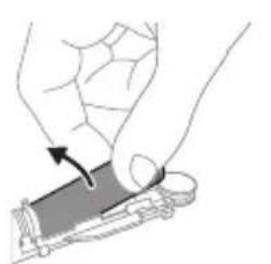
7. Insert the screwdriver between the bottom part of the battery and the metal frame to release the metal clip connecting the battery to the green circuit board. This will release the bottom end of the battery from the frame.
8. Grasp the battery and pull it out of the internal components to release the second metal clip on the battery.
Caution: Be careful of the sharp edges of the battery clips to avoid injury to your fingers.
9. Cover the battery contacts with tape to prevent short-circuiting from residual charge in the battery.
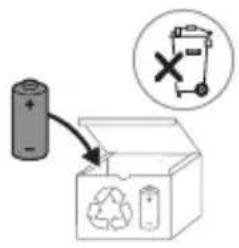
The exhausted battery and the remaining part of the product should be disposed of in a similar manner.
Note: At the end of the product's service life, do not dispose of it with normal household waste, but take it to an official collection point for recycling. In this way you help protect the environment.
www.philips.com/support

Caution: The appliance can be used without accessories. It can also be used with Bluetooth and NFC.

The serial number on the handle is indicated by the number in the "xxxx" column. (TCBxxxx, HX6100, HX6110, HX6160 and WAAxxxx)
This symbol indicates that the user should read the instructions before using the device.
Handle
ProtectiveClean electric toothbrush heads are designed to remove plaque and stains from teeth and to improve oral health. ProtectiveClean electric toothbrush heads are also designed for use with the handle. For best results, use the handle as directed.
Philips Sonicare (Fig. 1)
1 Brush head 2 Power on/off button 3 Mode button 4 Mode indicator 5 Brush head replacement reminder 6 Battery indicator
Accessories:
7 Brush head cap 8 Start/stop button 9 Handle 10 Charging base 11 UV sanitizer
Caution: Accessories may vary by model.
Getting started
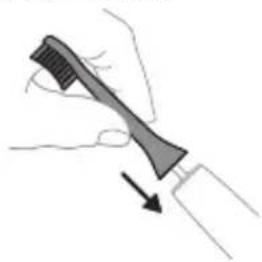
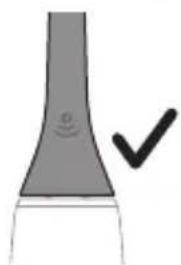
1 Place the brush head on the handle, aligning the bristles with the front of the handle. Press firmly until it clicks into place. 2 Press the power button to turn on the toothbrush.
Caution: There should be a small gap between the brush head and the handle; this is normal.
Philips Sonicare toothbrush handle
If your Sonicare toothbrush handle has a built-in electric toothbrush head, it is normal to feel some vibration when using it. The built-in head is attached to the handle. Before first use, charge the toothbrush fully. Remove the protective cap. The EasyStart function is activated to help you get used to the Sonicare toothbrush. This function gradually increases the power over the first 14 uses.
1. If you are using the toothbrush for the first time, charge it fully.
2. Place the brush head on the handle, aligning it with the 45-degree angle. The brush head should click into place firmly.
Note: The brush head should be replaced every 3 months.
3. For Philips Sonicare, press the power button to turn it on or off.
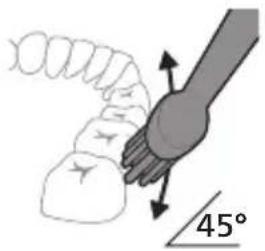
4. When the brush head is new, it will vibrate. To reduce splashing, place the brush head on the teeth at a 45-degree angle before turning it on. Then turn it on and gently move the brush head back and forth.
Note: The brush head should be replaced every 3 months. This will help maintain good oral hygiene and prevent damage to your teeth and gums.
Note: Consult your dentist or hygienist before using the toothbrush if you have had oral surgery or have any dental conditions.
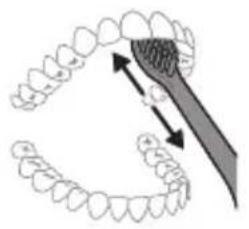
5. To ensure thorough cleaning, hold the brush head at a 45-degree angle against the teeth and gently move it back and forth. 6. After brushing, rinse the brush head and handle with water. Do not immerse the handle in water.
Note: Philips Sonicare toothbrushes are not intended for use by children or persons with reduced physical, sensory, or mental capabilities, or lack of experience and knowledge, unless they have been given supervision or instruction concerning use of the appliance by a person responsible for their safety.
QuadPacer
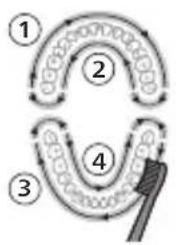
For optimal cleaning, use the QuadPacer feature. It divides your mouth into 4 sections. The QuadPacer will beep every 30 seconds to remind you to move to the next section. The beeps and pauses help you brush evenly. The toothbrush will automatically pause at the end of the 2-minute brushing cycle.
Note: The QuadPacer is available in Clean, White, and Gum Care modes.
Modes
This toothbrush has 3 modes: Clean, White, and Gum Care (depending on the model).
Clean White Gum Care
| Аръкь淋巴дik ΘЗгоч КУншдуК Тазалоу Учн | Сырткы Таektары Кетер | Тиш отун akсырь M reassождай |
| Жалны ТИSTN Тазало убakъсы | 2 мунот 2 мунот жан 30 секунд | 3 мунот |
| Канлны ТИSTN Тазалоо ке配电 | Ap бир сeгментп 30 секундай Тазалань. | Ap бир сeгментп 30 секундай Тазалань. |
| 1 2 3 4 | 1 2 3 4 | |
| aHand Клин 5 жаHA 6-6элкторун ap bирin 15 секунд boю Тазалan, a landiHкы Тишторд Жылърарытьнь. | aHand Клин 5, 6,7жаHA 8-6элкторун ap bирin 15 секунд boю Тазалan, ТИSS элтейнizди akсырьн Стимул栓ялан жаHA М reassождaiь. |
BrushSync Technology
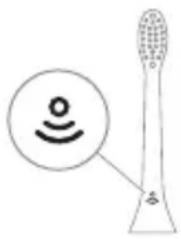
BrushSync Technology indicator light tells you when it is time to replace your brush head. The brush head is an essential part of the brush and works with the technology to provide optimal results.
BrushSync Technology indicator:
- Replacing the brush head when needed
Philips Sonicare BrushSync Technology with
the brush head that has been connected
to the handle. Philips Sonicare BrushSync
Technology with the connected brush head
for optimal care
Visit www.philips.com/toothbrush-heads for more information.
Functions
- Pressure sensor function
- Quadpacer
- Remove
- EasyStart
- Smartimer
Brush head replacement reminder
The Sonicare brush head replacement reminder uses a color change to let you know when it is time to replace your brush head.
After 3 months of normal use, the brush head will change color to remind you to replace it for optimal results.
Note: The brush head replacement reminder is disabled by default. To enable this function, see "Turning functions on or off".
Quadpacer
QuadPacer - this feature helps you brush your teeth in 4 quadrants, with a short interval to remind you to move to the next quadrant.
Replacing the brush head
Your Philips Sonicare brush head is equipped with the BrushSync technology and is made without BPA.
Note: This function works only with Philips Sonicare brush heads that are equipped with the BrushSync technology.
1 To replace the brush head, pull it off the handle and attach a new Philips brush head with BrushSync technology. 2 If you have a brush head with a reminder, the handle will remind you to replace the brush head after 3 months of use. This function gives you a reminder to replace the brush head for optimal results. 3 When the brush head replacement reminder is activated, the brush head will change color to indicate it is time to replace it.
The brush head replacement reminder function is disabled by default. To enable the brush head replacement reminder, see 'Turning functions on or off'.
EasyStart
This Philips Sonicare model has the EasyStart function. The EasyStart function gradually increases the brushing power over the first 14 brushings.
Activating EasyStart:
If the Philips Sonicare toothbrush is used for clinical applications or with a full mouth and gum care, the EasyStart function should be activated before using the intensive Clean mode.
To activate EasyStart (see “Activating or deactivating functions”).
SmartTimer
SmartTimer automatically turns off the toothbrush at the end of the brushing cycle and indicates that the brushing cycle is complete. Dental professionals recommend brushing at least 2 minutes twice a day.
Note: If you pause during the brushing cycle, the toothbrush will beep. After 30 seconds of pausing, the SmartTimer will turn off the toothbrush.
Activating or deactivating functions
You can activate or deactivate the following functions of your toothbrush:
- EasyStart
- Press the power button
Note: When the handle is placed on the charger, you can activate or deactivate the EasyStart function.
Step 1: Place the handle on the charger.
2-kaam: Kyry3yy/eyypyy 6acbuih Ko8 6ep6e 6acbln TypyHy3:
| EasyStart ΜeṭkaHbɪn Башын Дамаштыру Керектугин Эсөртүy | Басьм сенисту Жообу | |
| 3 секундра Чeйин | 5 секундра Чeйин | 7 секундра чeyин |
| ↓ ↓ ↓ | ||
| 3-кадам: Унды уkkанынызда Күлүлүүлүүлүүлүүлүүлүүлүүлүүлүүлүүлүүлүүлүүлүүлүүлүүлүүлүүлүүлүүлүүлүүлүүлүүлүүлүүлүүлүүлүүлүүлүүлүүлүүлүphant. | ||
| 1 сигhal 1 сигhal ожа андан киийн 2 сигhal | 1 сигhal, 2 сигhal ожа андан киийн 3 сигhal | |
| ↓ ↓ ↓ | ||
| 3reрдсиЗбатарейкин Иndикалорун ожа сеTKа алиmaштыругь оcteTKИннхарыгынхашыл түстэ 2 кoly ЖыmbiHддд Күлүлүүлүүлүүлүүлүүлүүлүүлүүлүүлүүлүүлүүлүүлүүлүүлүүлүүлүүлүүлүүлүүлүүлүүлүүлүүлүүлүүлүүлүүлүүлүүлүphant. | 1 cunhal, 2 cunhal ожа андан киийн 3 сигhal | |
| Жштетпгенин 6илдирет. | ||
| XE | ||
| 3reрдсиЗбатарейкин Иndикалорун ожа сеTKа алиmaштыругь оcteTKИннхарыгынхашыл түстэ 1 кoly ЖыmbiHддд Күлүлүүлүүлүүлүүлүүлүүлүүлүүлүүлүүлүүлүүлүүлүүлүүлүүлүүлүүлүүлүүлүүлүүлүүлүүлүүлүүлүүлүү�. | ||
| Жштетпгенин 6илдирет. | ||
yΦ de3nHΦekznaIaIbIy
3ckepTme: KaMtbIraH xa6dyynap caTbI aIbIHraH yIpyre kappa aIbIpMaHaNbIbI MyMKvH.
Ap 6np KOJIOHyydAn KInnH YK caHtai3ep MeHeN TNIU ca6bIbI3dbI Ta3aIaN aIacbl3.
Ie3nHfekznaIarbIcyypyn, KOJIOHyHy TOKTOTyn XaHa KepeKTeeY TeJIooecyHe YalblIbI3, 3rep:
- yΦ xapbIK IaMnacbl ΘuNK aUbIK Ke3de da KynyK 6oynoH kaIca. -Дe3инфекцуларычтbing Tepe3ecn cbihbK Xe KOK 6oJco. -De3nHΦeKzIaIbIuNITenXaTKaHda,aHdaH TYTVH Xe KyuK XbITb YbIKca.
3bIy60nyMmkyH. yI annapaT ap daibM 6aIapdaH aIbIC kepeK.
1 电KaHaHraHKnH 电TkaHbH ca6bI yaKan, aMbKya CyyHy CNKnC aNbHbI3. 3cKeptyy: 6aBbHn KaKarbl 6aBbHaMec KeHH TeKWePn, 6aBbH DeEHΦeKunlaT Ta3aHaHbI3. 2 MaHkaHbI3dbI caHHTaI3epdIN H 3WuRnHH OIOryHa caJIbI, 3WuKTH TaPTbI aUbIbI3. 3 ⅢeTkaHbIH ca6bIH caHHTaI3epdern 2 wTNΦTTIN 6npHHe KblIaPbI KapbIK JAMNaCbHa Kaapan TypraHdaN KblbIn KOHOHy3.
Öskeptme: CanntaJ3epnde Philips Sonicare ybIK 3Tme UeTKa canTapbH rHa Ta3aJaHbI3.
3ckepTme: Ie3nHfekzuaIarbyTa Philips Sonicare for Kids tKa canTapbIH ta3ana6aHbI3.
4 Canntaun3ep TnHnWtyy YbHaanydaRbI po3eTkara TyTaUThbIpblraHbIH TeKwepnH3.
5 YK Ta3aJoo MepuMMH TaHDOO yUyH 3WnKTn Kaan, KaBbI KIyIy3yy/eUypy6acBbIbIH 6acblbI3.
3ckepTme: 3rep 3wnn KaTyy Ka6bIraH 6oIroHdo raHa de3nHΦekCuaRaYtbl KyIgY3e aIacbI3.
3ckepTme:Je3nHΦeKcIyJIOO yUpyHda 3uNKTu aUcaHbI3, Je3nHΦeKcIyJIOO TOKTON KaIaT.
ÖckepTme:Дe3nHΦeKzuaJoo uNKln 6oJxOly MeHeN 10 MYHTke CO3yJyn, aHdaH COH aBTOMaTTbIK TypDe eUyn KaJaT.
Tepe3eH xapbIK yblbn XaTca, caHHTaN3ep NwTeN XaTKaH 6oNt.
Ky6aTTOO XaHa 6aTapeHbIn a6aJIbI
Philips Sonicare TnIu IeTkacbI ToyK KybaTaNbIn TyprHda ap 6npi 2 MyHeTKo Co3yIraH 28 IeTKaNoO ceaHcbH (KeMHne) KepCToYrApHaJIraH (kyHyHe 3Kn XoLy KOJIOHYIraHda 14 KyH). 2 MyHeTTyK IeTKaNoO ceaHcbH 6vTKeHNe, IeTKaHbI TbIHbIpraHaJa Xe KyBaTaN XaTKaHda, 6aTapeR KepCToKyu aHbIH abaIbH KepCToyn TypaT.
3ckepTme: bnpHnKoJy KOJIOHOHDoH MpyH 6aTape 24 caatta TOnyry MeHen Kj6aTTaIbIbIMymkyH, 6nOK aI ToNk Ky6aTTaIraHa ryeHH Philips Sonicare TnW 5eTKacbH KOJDOHO aIacbI3.
Ky6aTTaJyyda
Ky6aTbIyTa JKe YΦ De3nHΦeKcIaIarbIyTa Ky6aTToo
1 KybaTbIbI JxE De3HΦeKcuaIaIbIbI 3JIeKtp pO3ETKaCbHa caBbIbI3.
2 5eTkaHbIH KapMaBbIbH Ky6aTTaBbIcKa Xe de3nHΦeKuŋnaTbIyKa KaIraWtBipbIbI3.
-Can Tyypa KOIOJIraHbIH bIpaCTOO yUyH canTaH 2 Kbicka CnIHJ YbIraT.
-Баразец Индикатopyн Учун-жанган Харыгы TNш ШеткасьнсИн КбattалпхаTKаньн КерсET.
-Can Ky6aTtArbTuToIyK Ky6aTtAJaHdaH KInuH 6atapeHbIH HnIkKatOpTy 30 ceKyHJ XaMbIg 6oIyn KInyI, aHdAn KInH eHT.
Батapestянын aбалы
BaTapeHbIH a6aJIbI (ky6aTTarbIyKa TyTaUStbIPbIJraH can)
TyTkacbl KybaTbIbIka KoIJIraHda, 6atapeaHbIH KepcETKyu6atapeaHbIN DeHr3JInn Kcpctet.
BaTapeHbIn a6aIbI BaTapeKepcETkyu
Press the button to turn on the device.
The device will turn off automatically after 30 seconds.
Press and hold the button to turn off.
Battery indicator (flashes when the battery is low).
The LED indicator lights up when the battery is charging and turns off when fully charged.
Battery indicator and battery compartment
Device off button
| Жарым-жарылай Толук | Жашил Түстө 6үлүүдөгт | - |
| Темен Кочкун capы/Tүстө Бүлүүдөгт | 6үлүүдөгт | Шүtte мени Тазалагандан кини Түkedдд 3 сиrolл Чыгат |
| Бош Кочкун capы/Tүстө Бүлүүдөгт | 6үлүүдөгт | Шүtte мени Тазалагандан кини Түkedдд 5 төн 2 төлтOM Сиrolл Chyrgat |
Warning: Do not dispose of the battery in fire; it may explode.
Warning: Do not use the device near water or moisture. Keep it dry and do not immerse it in water.
Warning: If the battery is fully discharged, the device may not function properly. Charge the battery before use.
Cleaning
Cleaning the LED indicator
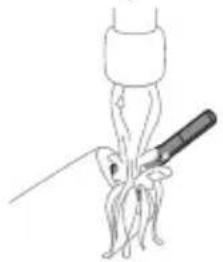
1. Wipe the surface of the device with a soft, dry cloth. Do not use abrasive cleaners.
Do not use: Do not use metal brushes or abrasive pads. They may scratch the surface.
2. Clean the battery contacts with a dry cloth.
Caution: Do not use abrasive cleaners on the sink or bathtub.
Fabric care
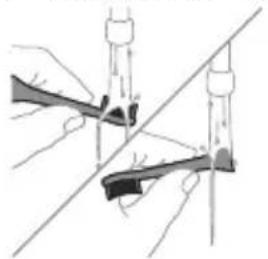
1. Before using the fabric care function, remove all items from the pockets. 2. Remove the fabric care basket from the pocket, place it in the drum, and add one liter of water. Leave it for a short time to soak.
Cleaning
1. Clean the drum with a mild cleaning agent. 2. Wipe the outside of the cleaning agent with a damp cloth.
Descaling procedure
To descale, add a descaling agent to the water and run a cotton cycle.
Cleaning the detergent drawer
Caution: Do not pour detergent into the drawer or rinse it under the tap.
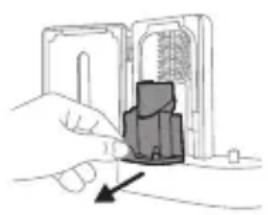
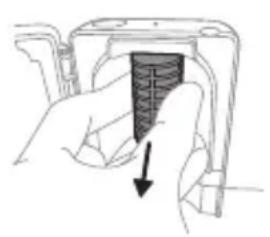
Caution: If the water is hot, do not clean the detergent drawer.
To remove detergent residue, remove the drawer and rinse it under running water.
1. Remove the detergent drawer. 2. Pull out the softener compartment. Rinse the softener compartment with water and clean it with a damp cloth. 3. Clean all parts with a damp cloth. 4. Remove the detergent drawer from the front panel.
To remove the drawer, press the release button on the back of the drawer, pull it out, and remove the drawer.
5. Remove the detergent drawer. To remove the drawer, pull it out by the handle. 6. Clean the drawer and the detergent compartment with a damp cloth. 7. Reinsert the detergent drawer.
To reinsert the detergent drawer, align the drawer with the guides and push it in until it clicks into place.
8. Do not use the device if the screen is damaged. If the screen is damaged, contact qualified personnel to replace the screen filter. Keep the screen away from children. 9. Do not touch the screen with sharp objects. 10. Check the screen and power cord for damage before use.
CAUTION
If the device is dropped or the housing is damaged, unplug it from the power outlet, then check it for damage and have it repaired if necessary.
Charging
For optimal results, charge the Philips Sonicare battery for at least 3 hours before first use. Use the Philips Sonicare charging base.
Using the appliance
Use the Philips Sonicare handle (HX64XX, HX68XX) with the Philips Sonicare brush heads.
Replacement
If you need to replace the brush head, visit www.philips.com/support to find the appropriate replacement.
Replacement parts
Replacement parts: - Brush heads: replace every 3 months for optimal performance. - Charging base: use only the original Philips Sonicare charging base. - Power adapter: use only the original Philips Sonicare power adapter. - Battery: replace only with the original Philips Sonicare battery. - Do not use the device if the battery is damaged.
Disposal
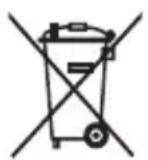
- This symbol means that electrical and electronic products and batteries must not be disposed of with household waste. - Dispose of electrical and electronic products and batteries separately, according to local regulations.
- Remove the battery from the device before disposal. Dispose of the battery separately from household waste. Do not incinerate the battery.
- Philips is committed to the REACH regulation. For more information, visit www.philips.com/REACH.
Charging battery indicator
Before using the appliance for the first time, check if the charging battery indicator is on. If not, charge the batteries.
Visit philips.com/support for more information.
To charge the battery, you need a dry cloth and a standard screwdriver. Follow the procedure carefully to avoid any damage.
1. To remove the battery, press the release button and pull the battery out. If the battery is stuck, gently push it back in. 2. Remove the battery and clean it. Check for any damage. 3. To open the battery compartment, use a screwdriver to gently pry open the cover. 4. To remove the battery, pull it out with the cloth.
Note: You may need to use a few tools for this procedure.
4. Pull the battery out of the compartment. If the battery is stuck, gently push it back in and try again.
5. To open the battery compartment, press the release button and pull the cover off. If the cover is stuck, gently push it back in and try again.
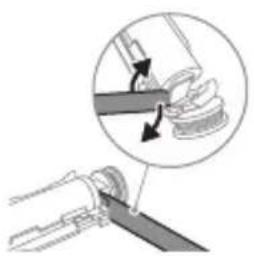
6. Insert the screwdriver into the slot at the bottom of the battery and gently pry it out. To remove the battery, turn the screwdriver.
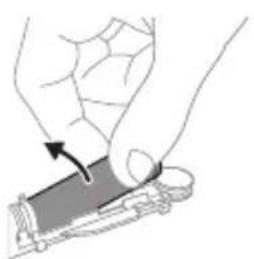
7. To remove the battery, insert the screwdriver into the slot at the bottom of the battery and gently pry it out. Pull the battery out of the compartment.
8. To remove the battery, pull it out of the compartment using the cloth.
Warning: To avoid damage, do not use excessive force when removing the battery.
9. After removing the battery, disconnect the power cord and store the battery in a cool, dry place.
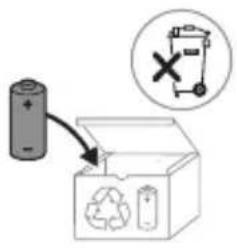
If the battery is damaged, do not use it. Dispose of it properly according to local regulations.
Note: When disposing of the appliance, remove the batteries and dispose of them separately. Follow local regulations for proper disposal.
BoVeI
Welcome to the Philips Sonicare family! With this toothbrush, you can achieve superior cleaning of your teeth and gums, whiter teeth, and healthier gums. By combining Sonicare's unique sonic technology with clinically proven features, you can be confident that you are getting the best cleaning every day. Additional support and product registration can be found at: www.philips.com/support
Important safety information
Use the product only for its intended purpose. Read these important instructions carefully before using the product and its accessories, and keep them for future reference. Incorrect use may lead to danger or serious injury.
Caution
- Check that the charger, charging stand, and UV sanitizer are free from water. - After cleaning, check that the charger, charging stand, and UV sanitizer are dry before connecting them to the power outlet. - This device can be used by children and persons with reduced physical, sensory, or mental capabilities or lack of experience and knowledge, provided they are supervised or have been given instructions on using the device in a safe manner and understand the potential hazards. Children should not play with the device. - Children should not clean or maintain the device without supervision. - Use only original Philips accessories or consumables. If you have them, use only original USB cables and USB power adapters for charging.
- The device contains no user-serviceable parts. If the device is damaged, stop using it and contact the Consumer Care Center in your country (see "Warranty and Support"). - If the USB cable or USB power adapter is damaged, stop using it.
- Do not use the charger, charging stand, and/or UV sanitizer near water.
- Do not clean the device or any part of it in the dishwasher.
- This device is designed for cleaning teeth, not for use on dentures or braces.
- Always keep the UV sanitizer out of reach of children.
- Stop using the UV sanitizer if the UV LED/light stays on when the UV sanitizer is open. UV light can be harmful to eyes and skin.
- Handle the sanitizer only with the protective screen.
- Do not touch the UV light of the UV sanitizer when it is on.
- Stop using the brush head with worn or bent bristles. Replace the brush head every 3 months or sooner if signs of wear appear. - Avoid direct contact with products containing essential oils or coconut oil. Contact may cause damage to the bristles.
- Maximum height of use is 4500 meters.
CHANGES IN THE DEVICE
Before using the device, consult your dentist/doctor if you have bleeding after use, if bleeding continues for more than 1 week after use, or if you feel discomfort or pain.
- If you have had oral surgery or an intervention or treatment on your teeth in the last 2 months, consult your dentist before using the device. - If you have a pacemaker or an implanted device, contact your doctor or the manufacturer of the implanted device before use. - If you have a medical condition, consult your doctor before using the device. - The device is intended for dental care and is not intended for use by more than one person in a dental practice or clinic.
Battery safety instructions
- This device contains batteries that can only be replaced by qualified personnel.
- Use the product only for its intended purpose. Carefully read this information before using the product and keep the batteries for future reference. Incorrect use may lead to hazards or serious damage. Supplied accessories may vary for different products.
- Use only original accessories and consumables from Philips. Use only the charging unit that is supplied (rated input power: 100 - 240 V~; 50/60 Hz; 1.5 W), HX6100 (rated input power: 100 - 240 V~; 50/60 Hz; 1.4 W), HX6110 (rated input power: 100 - 240 V~; 50/60 Hz; 1.5 W), HX6160 (rated input power: 100 - 240 V~; 50/60 Hz; 6 W), WAAXXX (rated input power: 100 - 240 V~; 50/60 Hz; 3.5 W). - Keep the power cord and the appliance away from heated surfaces and direct sunlight.
- If the product gets hot or starts to smell, change the water or if the filling takes longer than usual, stop using and filling the product and contact Philips.
- Do not place the product or its batteries in microwave ovens or on induction cookers.
- Do not open, modify, puncture, damage, or disassemble the product or the battery to prevent the batteries from heating up or leaking toxic or hazardous substances. Do not short-circuit, overcharge, or reverse charge the batteries.
- The device contains batteries that cannot be replaced. When the battery is at the end of its life, the device will be properly disposed of; see the section on recycling. - If the batteries leak or are damaged, avoid contact with skin or eyes. If this happens, rinse thoroughly with water and seek medical help.
- Keep batteries away from heat, fire, and direct sunlight. Do not expose the batteries to temperatures above 40°C. To avoid accidental short-circuiting of the batteries, do not allow the battery terminals to come into contact with metal objects (e.g., coins, hairpins, rings). Do not throw batteries into fire. Dispose of batteries properly or take them to a recycling point.
- This product contains a lithium-ion battery. It must be recycled or disposed of properly.
Storage and transport conditions
Temperature: -10 °C to 60 °C.
Electromagnetic fields (EMF)
This Philips appliance complies with all applicable standards and regulations regarding exposure to electromagnetic fields.
Radio equipment directive
With this, Philips declares that the electric toothbrushes with radio equipment (Bluetooth, NFC) are in compliance with Directive 2014/53/EU.
- The Bluetooth radio frequency interface operates at 2.4 GHz.
- The maximum output power of the Bluetooth transmitter is 3 dBm.
- The NFC radio frequency interface operates at 13.56 MHz.
- The maximum RF power that is present with the device is 30.16 dBm.
The full text of the EU declaration of conformity is available at the following internet address:
www.philips.com/support

The functions of the different models may differ. Some models may not be equipped with Bluetooth or NFC.
Your Philips Sonicare (fig. 1)
1 Handle 2 Brush head on/off button 3 Power button 4 Mode indicator 5 Brush head replacement reminder 6 Battery indicator
Accessories:
7 Brush head shaft 8 Brush head(s) 9 Charging base 10 Charging cup 11 UV sanitizer and holder
Note: The accessories may
differ depending on the model purchased.
Getting started
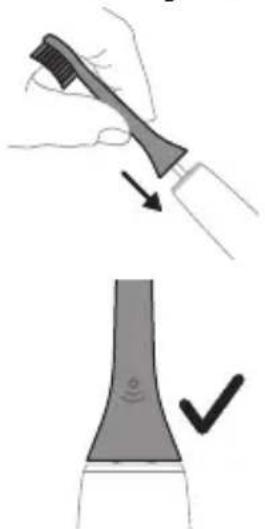
1 Place the brush head on the handle, making sure the bristles are facing the same direction as the front of the handle. 2 Press the brush head onto the metal shaft until it clicks into place.
Note: It is normal for there to be a small gap between the brush head and the handle.
Using your Philips Sonicare toothbrush
If you are using your Sonicare toothbrush for the first time, it is normal to feel more vibration than when using a manual toothbrush. It is common for first-time users to apply too much pressure. Apply only light
pressure and let the toothbrush do the brushing for you. Follow the brushing instructions for the best experience. To help you transition to your new Sonicare electric toothbrush, the EasyStart feature is activated. This function gradually increases the power over the first 14 brushings to help you adapt to brushing with the Philips Sonicare toothbrush.
Brushing instructions
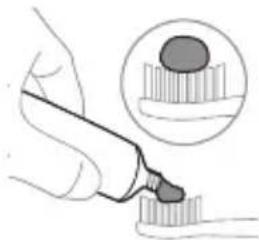
1 Wet the bristles and apply a small amount of toothpaste.
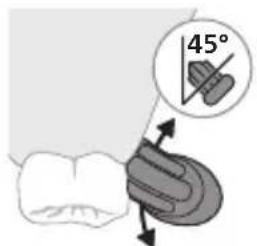
2 Place the brush head at a 45-degree angle to the gum line, gently pressing so the bristles can reach the gum line or slightly below it.
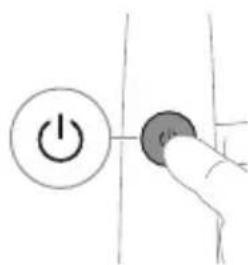
Note: The center of the brush head must stay in contact with the teeth at all times.
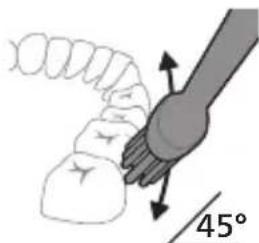
3 Press the on/off button to turn on the Philips Sonicare.
4 Gently place the bristles of the brush head against the teeth and gums. Brush with a gentle back-and-forth motion, so the bristles can reach between the teeth. Continue this motion for the entire brushing time.
Note: The bristles of the brush head should not be pressed too hard. It is not recommended to brush as if with a manual toothbrush.
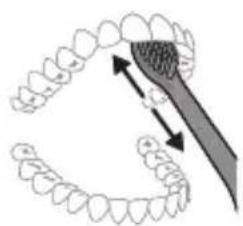
Note: If you apply too much pressure, you will be alerted by a change in the vibrations of the handle, and the indicator for replacing the brush head will light up in an orange color.
5 To clean the inner surfaces of the front teeth, tilt the brush handle vertically and make a few vertical strokes with a brushing motion on each tooth. 6 After you finish the brushing cycle, you can additionally brush the chewing surfaces of the teeth and the areas where stains occur. You can also brush the tongue, with the toothbrush on or off, as you prefer.
Note: The Philips Sonicare toothbrush is safe for use on prosthetics (the bristles wear out faster when used on prosthetics) and dental restorations (fillings, crowns, veneers) as long as they are properly attached and not compromised.
QuadPacer
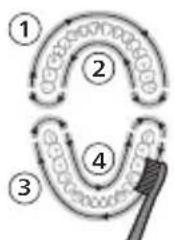
To ensure you brush evenly in the mouth, divide your mouth into 4 sections with the QuadPacer function. QuadPacer divides the brushing time into 4 equal segments and signals when it is time to move to the next area. The segments are indicated by a short pause in the vibrations. The toothbrush automatically stops at the end of the brushing session.
Note: You can add extra time when using the White and Gum Care modes.
Modes
Your toothbrush is equipped with the following modes: Clean, White, and Gum Care (only on specific models). To change the mode, press the mode button while the toothbrush is on.
Clean White Gum Care
| Придобivalka 3а Исклuyчтелно сековдnevно чисhevе | Острава повшински дамки | Нжно ги масURA нецатуа |
| Вкунио врееме на чеканые | 2 минут ni 2 минут ni 30 секун di | 3 минут ni |
| Како дa чеканые | Чекajte ro секoj сегмent 30 секун di. | Чекajte ro секoj сегмent 30 секун di. |
| 1 2 3 4 | 1 2 3 4 | |
| потoa чекajte ги сегмentite 5 ni 6, секoj посебно 15 секун di 3aodia ri обелITE ni полиратe празнite заби. | потoa чекajte ги сегмentite 5, 6, 7 ni 8, секoj посебно 15 секун di 3a нжноodia ri стимулиратe ni масURA. ненцатуа. |
BrushSync technology
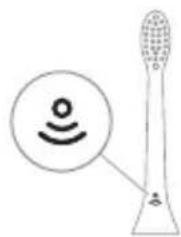
The BrushSync technology on the toothbrush head allows the handle to communicate with the brush head. The symbol on the toothbrush head indicates that the head is equipped with this technology.
The BrushSync technology enables:
A reminder to replace the brush head
Philips Sonicare offers a wide range of brush heads, equipped with BrushSync technology. To explore the full spectrum of brush heads for your teeth and find the brush head that best suits you, visit www.philips.com/toothbrushheads for more information.
Functions
Pressure sensor feedback - Quadpacer - Brush head replacement reminder - EasyStart - SmartTimer
Pressure sensor feedback
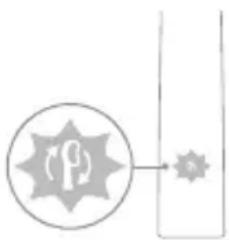
The Sonicare toothbrush measures the pressure you apply while brushing to protect your gums and teeth from damage.
If you apply too much pressure, the handle will change its vibration and the indicator for the brush head replacement will blink in the running water until you find the right pressure.
Note: Your device comes with the pressure sensor activated. To deactivate this function (see "Activating or deactivating functions").
Quadpacer
QuadPacer is an interval timer that helps you brush evenly across your mouth by dividing the mouth into 4 sections.
Brush head replacement reminder
Your Philips Sonicare toothbrush is equipped with BrushSync technology that monitors the wear of the brush head.
Note: This function works only with Philips Sonicare brush heads with BrushSync technology.
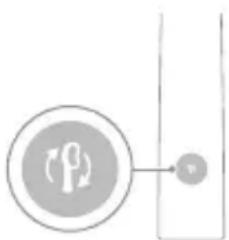
1. The Philips Sonicare brush head replacement reminder uses BrushSync technology and automatically tracks the wear of the brush head. 2. Over time, based on the pressure you apply and the total time you use the brush head, the handle tracks the wear of the brush head to determine the optimal time to replace it. This function guarantees the best cleaning and care for your teeth. 3. When the brush head replacement reminder indicator lights up in an orange color, you should replace the brush head.
The brush head replacement reminder is activated when you use a brush head with the BrushSync function. To deactivate the brush head replacement reminder, see "Activating or deactivating functions".
EasyStart
Your Philips Sonicare model is activated with the EasyStart feature. The EasyStart feature gradually increases the power over the first 14 brushings to help you get used to Philips Sonicare brushing.
Disposal
When the Philips Sonicare toothbrush is used for clinical studies, it must be used in the Clean mode with high intensity, the handle must be fully charged, and the EasyStart function must be deactivated.
Deactivate EasyStart (see "Activating or deactivating functions").
SmarTimer
SmarTimer indicates that the brushing cycle ends with the automatic shut-off of the toothbrush at the end of the brushing cycle. Dental professionals recommend brushing for at least 2 minutes twice a day.
Note: If you press the on/off button after you have started the brushing cycle, the toothbrush pauses. After a pause of 30 seconds, SmarTimer resets.
Activating or deactivating functions
You can activate or deactivate the following functions on your toothbrush:
- EasyStart - Brush head replacement reminder - Pressure sensor information
Note: You can activate or deactivate the brush head replacement reminder when a brush head is attached to the handle.
Step 1: Place the handle on the charging base.
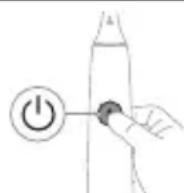
Step 2: Press and hold the button for switching on/off:
| EasyStart ПOTсЕТнИК 3a | Повразни NGФормаци |
| Замена Ha Глиава | Ha сEHЗОРТ 3a |
| На чeТka | ПрINТИСОК |
up to 3 seconds, up to 5 seconds, up to 7 seconds

Step 3: Release the button for switching on/off when you hear:
1 beep, 1 beep, then 1 beep, 2 beeps, then 2 beeps, then 3 beeps

If you see the battery indicator light for replacement of the brush head flashing in one color 2 times and hear tones from low to high, the function is activated.
OR

If you see the battery indicator light for replacement of the brush head flashing in a different color once and hear tones from high to low, the function is deactivated.
UV sterilizer
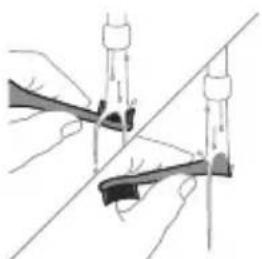
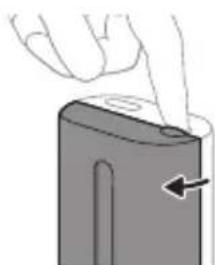
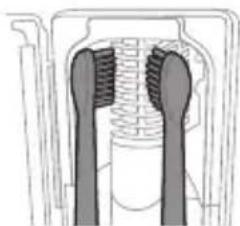
Note: The additional functions may differ depending on the model.
With the UV sterilizer you can clean the brush head after each use.
Remove the sterilizer, stop using it and contact the customer service center if:
- The UV light stays on when the lid is open.
- The transparent cover is damaged by the sterilizer.
- The sterilizer emits a smell or smoke while working.
Note: The UV light can be harmful to the eyes and skin. The device should be kept away from children at all times.
1. Remove the brush head and rinse it under running water.
Warning: Make sure the brush head does not touch the brush head when it is placed in the sterilizer.
2. Place the brush head in the opening of the top part of the sterilizer and close the opening with the lid. 3. Place the brush head on one of the 2 clips of the sterilizer with the bristles facing the UV light.
Note: In the sterilizer, only clean the brush heads of Philips Sonicare that are suitable.
Note: Do not clean the Philips Sonicare brush heads for kids in the sterilizer.
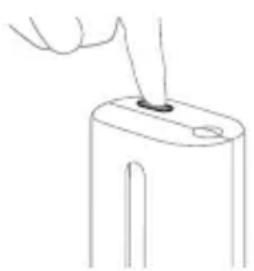
4. Check that the sterilizer is plugged into an outlet with the correct voltage. 5. Close the door and press the green button for on/off once to select the UV disinfection cycle.
Note: You can turn on the sterilizer only when the door is properly closed.
Note: The sterilizer will stop working if you open the door during the sterilizer cycle.
Note: The sterilizer cycle lasts approximately 10 minutes, then it turns off automatically.
The sterilizer works when the light is visible through the window.
Battery status and charging
This Philips Sonicare toothbrush has a battery life of up to 28 brushing sessions, each session lasting 2 minutes (14 days, if used twice daily) when the battery is fully charged. The battery indicator shows the battery status when you finish the 2-minute brushing session, when you pause the toothbrush, or when it is charging.
Note: It takes up to 24 hours for the battery to fully charge before first use, but you can use the Philips Sonicare toothbrush before it is fully charged.
Charging
Charging indicator light on the UV sterilizer
1. Place the device on the sterilizer for electric shavers.
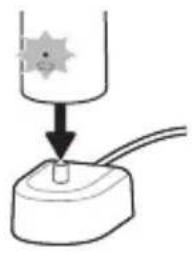
2. Place the shaver on the sterilizer.
- The shaver emits 2 short sound signals to confirm that the shaver is correctly placed.
- The flashing light of the battery indicator shows that the shaver is charging. When the shaver is fully charged, the battery indicator lights up green for a moment, then turns off.
Store the device and batteries away from heat sources and do not expose them to direct sunlight or high temperatures.
- If the device heats up strongly or emits an unpleasant odor, changes color, and also if charging the device takes longer than usual, stop using it and charging it, and contact the Philips Information Center in your country (the center's phone number is indicated on the warranty card).
- It is forbidden to dispose of the device and batteries in microwave ovens or induction cooktops.
- To prevent battery heating or the release of toxic or dangerous substances, do not open, modify, puncture, damage, or disassemble the device or batteries. Do not allow short-circuiting of batteries, do not charge them above the established norm or without observing polarity.
The device contains batteries that are not replaceable. When the battery life comes to an end, the device should be disposed of properly. See the section "Disposal".
- If batteries are damaged or leaking, do not allow contact with skin or eyes. If this does happen, immediately rinse the affected areas thoroughly with water and seek medical help.
When performing any actions with batteries, make sure that your hands, the device, and the batteries are dry. Charging and using the device should be done at a temperature from 0°C to 40°C. To avoid accidental short-circuiting of batteries after their removal, do not allow contact of battery terminals with metal objects (for example, coins, pins, rings). It is forbidden to wrap batteries in aluminum foil. Before disposing of batteries, cover their terminals with adhesive tape or place the batteries in a plastic bag. This device contains a rechargeable lithium-ion power element. This element requires proper disposal.
Transportation
Temperature from -10°C to 60°C
Electromagnetic fields (EMF)
This Philips device complies with all applicable standards and regulations regarding electromagnetic fields.
www.philips.com/support

xxxxxx
Note: Functions of different models may differ. Some models may be equipped with Bluetooth or NFC technology.
Removable power supply: "XXXXXX" indicates the model number of the charging device approved for use. (TCBxxxx, HX6100, HX6110, HX6160 or WAAxxxx)

The symbol means that before using the device, it is necessary to read the information in the user manual.
Intended use
The Sonicare toothbrush is intended for cleaning teeth and removing plaque and food debris from teeth to reduce cavities and improve gum health. The toothbrush with ProtectiveClean is designed for daily use. Use by children is allowed only under adult supervision.
Philips Sonicare toothbrush (fig. 1)
1 Handle 2 Power on/off button 3 Mode selection button 4 Mode indicator 5 Reminder to replace brush head 6 Battery charge level indicator
Additional accessories:
7 Cap for brush head 8 Intelligent brush head 9 Charger 10 Travel case 11 UV sanitizer with charger
www.philips.com/support
Use only the accessories supplied. If you use other accessories, the battery may be damaged and the device may malfunction. Use only the accessories supplied with the device.
Disposal
- When disposing of the device, batteries, and accessories, follow local regulations.
- Before disposing of the device, remove the batteries and follow the instructions for battery disposal. Be aware that the battery may be hazardous if not handled properly.
The device should be kept clean and dry. If it is not cleaned and dried properly, it may not function correctly. Store the device in a safe place and follow the maintenance instructions. Do not use the device if it is damaged.
- Do not use the device if it is damaged.
Only use the original Philips accessories or consumables. If you use other accessories, only use genuine USB cables and USB power adapters.
The device is intended for household use only. If the device is used for professional or commercial purposes, it is not covered by the warranty. Contact the service center in your country for assistance.
- If the USB cable is damaged, stop using it immediately.
When disposing of the device, remove the batteries and dispose of them separately according to local regulations.
Do not attempt to repair the device yourself.
This device is intended for use only with the specified voltage and frequency as indicated on the nameplate.
- Sanitizers UV should always be kept out of reach of children.
- If the sanitizer UV is used incorrectly, it may cause damage to the LED/UV lamp. The manufacturer is not responsible for damage caused by improper use.
- The sanitizer should only be used with the included power adapter.
If the lamp is damaged, it must be replaced by the manufacturer or an authorized service center.
- If the lamp is broken, turn off the device immediately. Replace the lamp only with a new one of the same type and rating, if necessary.
Do not use the device in areas with high humidity or where it may come into contact with water. If the device gets wet, unplug it immediately and do not use it until it is dry.
- The maximum operating altitude is 4500 meters.
POWER
- If the device is used for more than 1 hour continuously, it may overheat. Turn off the device and let it cool down before using it again.
- If the device is used for more than 2 hours continuously, it may cause damage to the device. Turn off the device and let it cool down before using it again.
- If the device is used with a damaged power cord or plug, it may cause damage to the device. Turn off the device and have the power cord or plug replaced by a qualified technician. -This device is intended for use only with the specified voltage and frequency as indicated on the nameplate.
www.philips.com/support

Please read this user manual carefully before using the appliance. Save the manual for future reference.
Register your product at: www.philips.com/welcome to get support. (TCBxxx, HX6100, HX6110, HX6160 and WAAxxxx)

This appliance is intended for oral care. Do not use it for any other purpose.
Intended use
The Sonicare toothbrush is intended for personal oral care to remove plaque and to reduce tooth decay, improve gum health, and enhance oral hygiene. The Sonicare toothbrush with the 'ProtectiveClean' mode is intended for gentle oral care. Use as directed by your dental professional.
Philips Sonicare (Fig. 1)
1 Handle 2 Brush head 3 Brush head release button 4 Power button 5 Mode button 6 Battery indicator
Overview:
7 Brush head cap 8 Brush head holder 9 Charging base 10 Adapter 11 Charging base and holder
Note: The overview may vary by model and country.
Important
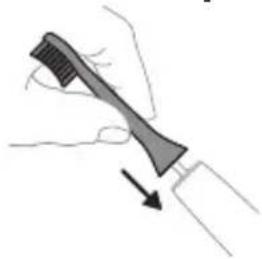
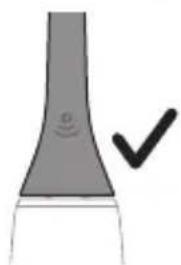
1 Do not use the brush head if it is damaged or if the bristles are bent or broken. 2 Do not use the brush head with metal parts or if it is damaged.
Note: The brush head and handle are not dishwasher safe.
Clean White Gum Care
Before using the device, consult your dentist or doctor if: you experience intense bleeding during or after use; bleeding does not stop after use; you feel pain or discomfort during use. If in the last 2 months you have had surgery in your mouth or jaw, consult your dentist before using the device. If you have a pacemaker or other implant, consult your doctor or the manufacturer of the implanted device before using the device. If you have any medical questions, consult your doctor before using the device. This device is for personal hygiene and is not intended for use by multiple patients in a dental office or clinic.
Battery safety precautions
- This device contains a rechargeable battery. Only qualified personnel should replace the battery.
- Use the device only for its intended purpose. Before using the device, battery, and accessories, carefully read this booklet with information and keep it for future reference. Incorrect use of the device can lead to injury and serious harm. Accessory kits may vary among devices.
- Use only original Philips accessories and consumables. Use only the charging base with model number: TCBxxxx (input power: 100-240 V~; 50/60 Hz; 1.5 W), HX6100 (input power: 100-240 V~; 50/60 Hz; 1.4 W), HX6110 (input power: 100-240 V~; 50/60 Hz; 1.5 W), HX6160 (input power: 100-240 V~; 50/60 Hz; 6 W), or WAAxxxx (input power: 100-240 V~; 50/60 Hz; 3.5 W).
Keep the device and battery away from fire and do not expose them to direct sunlight or high temperatures.
www.philips.com/support
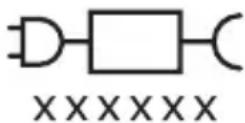
Note: Functions of different models may vary. Some models may not be equipped with Bluetooth or NFC.
Charging base component: 'XXXXX' indicates the model number of the charging device intended for use. (TCBxxxx, HX6100, HX6110, HX6160, or WAAxxxx)

This symbol indicates that you need to read the instructions before using the device.
Intended use
Electric toothbrush ProtectiveClean helps to remove plaque and protect teeth. The electric toothbrush ProtectiveClean is intended for personal use. It should be used only under the supervision of adults.
Philips Sonicare toothbrush (fig. 1)
1 Handle 2 On/Off button 3 Mode button 4 Mode indicator 5 Low charge indicator 6 Charge indicator
Accessories:
7 Brush heads 8 Smart brush heads 9 Charging base 10 Travel caps 11 UV sanitizer with charging unit.
Note: Accessories included in the package may vary depending on the model purchased.
Getting started
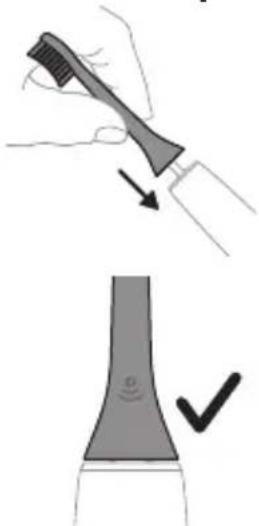
1 Align the brush head so that the bristles are pointing towards the front of the handle. 2 Press the brush head onto the metal shaft and tighten it securely.
Note: There is a small gap between the brush head and the handle. This is normal.
Step 2. Press and hold the On/Off button for the specified time below.
EasyStart low charge indicator "Easy start" for brush head replacement
Reverse connection from pressure sensor
Up to 3 seconds Up to 5 seconds Up to 7 seconds
Step 3. Release the On/Off button when you hear:
Sound signal

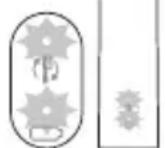
Indicator: battery charge indicator and low battery indicator. Flashes green twice and the handle emits tonal signals (from low to high), indicating that the function is activated.
OR
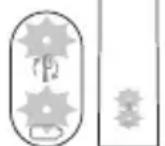
Indicator: battery charge indicator and low battery indicator. Flashes green once and the handle emits tonal signals (from high to low), indicating that the function is deactivated.
Disinfection block with UV lamp
Note: Accessories included in the kit are distinguished depending on the model purchased.
Using the disinfection block with UV lamp, you can disinfect the handle after each use. Connect the disinfection block to the power supply, press it to use, and contact the customer service center if:
- the UV lamp stays on when the door is opened;
- the disinfection block is damaged or missing; - the disinfection block emits smoke or a burning smell when it operates.
Note: The UV light may be bright and harmful to eyes. The disinfection block should be kept away from children.
1. Rinse the handle and shake off excess water.
Battery status: charge indicator sound
Fully charged: green light -
Not fully charged: green light flashes -
The brush handle is completely protected from moisture.
Signal after use
And completely protected from moisture, the brush handle is protected from moisture.
Gives 2 series of 35
acoustic signals
Note. When the battery charge method is used, the battery indicator lights up when the toothbrush is not in use.
Note. When the battery is completely discharged, the toothbrush turns off. Place the toothbrush on the charging device so that it charges.
Note. The battery was fully charged. Keep the toothbrush on the charging device when you are not using it.
Cleaning
Toothbrush handle
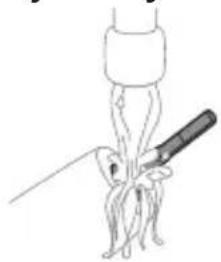
1 Remove the attachment and rinse the metal rod with warm water. Do not forget to rinse the inside parts. Caution! Do not press with sharp objects on the rubber part on the metal rod, as this may cause damage. 2 Wipe the entire surface of the handle with a damp cloth.
Note: Do not tap the handle on the sink to remove water.
Attachment
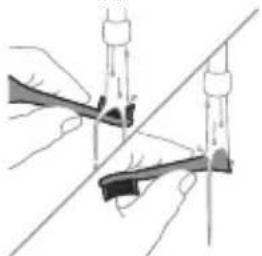
1 Rinse the attachment and bristles after each use. 2 At least once a week, remove the attachment from the handle and rinse the connection area with warm water. Rinse the bristles thoroughly if necessary.
Charging device
1 Unplug the device from the power supply. 2 Wipe the surface with a damp cloth.
Dust filter
Clean the dust filter with water and dry it with a cloth.
Disinfecting unit
Caution. Do not immerse the disinfecting unit in water and do not rinse it under the tap.
Caution. Do not clean the disinfecting unit while the UV lamp is hot.

For optimal effectiveness, we recommend cleaning the disinfecting unit regularly.
1 Unplug the disinfecting unit from the power supply. 2 Remove the drip tray. Rinse and dry it with a cloth. 3 Wipe all internal and external surfaces with a damp cloth. 4 Remove the protective screen in front of the UV lamp.
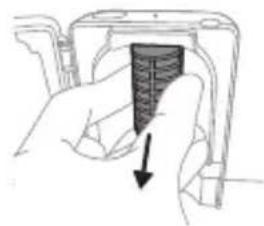
To remove the screen, grasp the edge of the fixator, gently press and pull the protective screen.
5 Remove the UV lamp. To remove the lamp, hold it and pull it out of the metal bracket. 6 Wipe the protective screen and UV lamp with a damp cloth. 7 Insert the UV lamp into place.
To insert the lamp into place, align its bottom with the metal bracket and push it into the bracket.
8 Insert the protective screen into place. To insert the screen into place, align the pins on the screen with the holes on the corresponding surface of the UV lamp. Push the screen straight into the holes on the disinfecting unit. 9 Install the drip tray into place in the disinfecting unit with the UV lamp. 10 Before plugging in the disinfecting unit again, make sure it is completely dry.
Storage
If you do not plan to use the device for a long time, unplug it from the power supply, clean it and store it in a cool, dry place out of direct sunlight.
Replacement
Replace the Philips Sonicare brush head every 3 months. Use only genuine Philips Sonicare replacement heads.
Model number
The model number is indicated on the bottom of the Philips Sonicare toothbrush handle (HX64XX, HX68XX).
Warranty and support
If you need information or support, visit www.philips.com/support or read the warranty leaflet.
Warranty restrictions
The warranty does not cover: - accessories, including brush heads; - damage caused by the use of unauthorized replacement parts or non-genuine brush heads; - damage caused by misuse, abuse, neglect, alterations, or unauthorized repairs; - normal wear and tear, including scratches, chips, discoloration, or stains. - UV lamp.
Disposal
- This symbol means that electrical products and batteries must not be disposed of with normal household waste. Follow local regulations for separate collection of electrical and electronic products and batteries.
- The UV lamp contains mercury. Do not dispose of the UV lamp with normal household waste after the end of its service life. Return it to an official collection point for recycling.
- Information on the content of substances in Philips products, restricted under the REACH regulation, can be found at www.philips.com/REACH
Battery removal
The built-in rechargeable battery must be removed by a qualified professional before disposal. Instructions for removing the built-in battery are available at: www.philips.com/support.
Removing the battery
To remove the rechargeable battery, you need a flathead or Phillips screwdriver, a hammer, and a standard screwdriver. Follow the steps below and observe the basic safety rules.
1 Discharge the battery to any level, remove the handle from the charging device, press the release button and slide it to the full stop. Repeat this operation until the release button pops out.
2 Remove and discard the attachment. Wrap the entire handle in a cloth or towel.
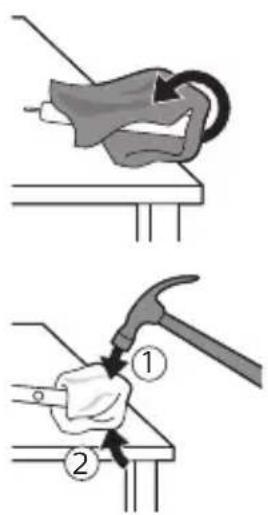
3 Holding the upper part of the handle firmly, hit its body about 1 cm above the lower edge. Hit hard with the hammer on all 4 sides to remove the end cap.
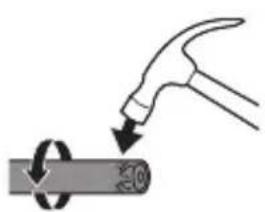
Note: If the internal components do not break, hit the lower edge of the handle several times.
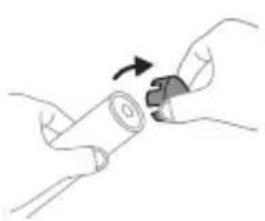
4 Remove the end cap from the handle of the toothbrush. If the end cap is difficult to remove from the body, repeat step 3 until it can be removed.
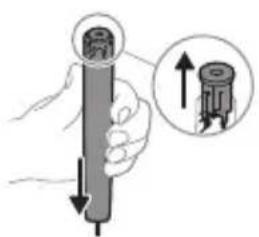
5 Hold the handle upside down and tap it on a hard surface. If the internal components are difficult to remove from the body, repeat step 3 until it can be done.
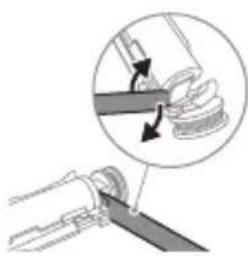
6 Insert the screwdriver between the battery and the frame to pry the internal components. Then use the screwdriver to pry the battery away from the frame and break it.
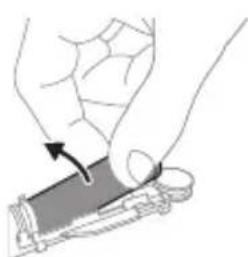
7 Insert the screwdriver between the lower part of the battery and the frame to break the metal tabs that connect the battery to the green frame. In this way, the lower part of the battery is separated from the frame. 8 Take the battery and pull it to break the metal tabs of the battery.
Warning: To avoid injuring your fingers, be careful because the battery has sharp edges.
9 Wrap the contacts of the battery with insulating tape to prevent short circuiting from residual battery charge.
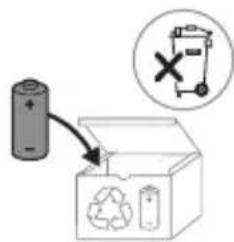
The battery can now be recycled, and the rest of the product can be disposed of properly.
Note: Do not dispose of the product with normal household waste, but take it to an official collection point for recycling. In this way, you help protect the environment.
Kipicne
Philips Sonicare toothbrush!
This toothbrush is intended to be used for cleaning teeth, gums, and tongue. The Sonicare brush head with high-speed technology and clinically proven effectiveness
To avoid possible harm, you should consult your dentist before using it if you have had recent oral surgery.
For accessories and replacement parts, visit: www.philips.com/support
Important safety instructions
Read these instructions carefully before using the appliance and its accessories, and keep them for future reference. Misuse can cause injury or damage.
Experts
-Do not immerse the charger, charging stand, or UV sanitizer in water. -After cleaning, plug the charger into a wall outlet and connect the charging stand and UV sanitizer with a dry cloth. -This appliance can be used by children aged 8 years and above and by persons with reduced physical, sensory, or mental capabilities or lack of experience and knowledge if they have been given supervision or instruction concerning use of the appliance in a safe way and understand the hazards involved. Children shall not play with the appliance. - Cleaning and user maintenance shall not be made by children without supervision.
- Only use original Philips accessories or
consumables.
If the plug is damaged, only use the original USB cable and
USB adapter.
-If the appliance is used for commercial use,
the warranty becomes void. If the appliance is damaged, stop using it and contact the service center (see 'Warranty and support').
- If the USB cable or USB port is closed, stop using them.
- Do not bend or twist the cable.
And/or ultraviolet disinfectant.
Do not touch the outer or inner surfaces with your hands.
Do not use it.
- For cleaning, use only soft cloths, dry wipes, and tongue cleaners.
- Ultraviolet disinfectant is available in all stores.
Keep children away from the device.
- With the ultraviolet disinfectant, always use it with the lid closed.
Disinfectant for the collar. Hot water.
For the collar and the skin, use the disinfectant.
- Disinfectants for the collar
with screen protector.
- Use the disinfectant with hot water
and let it sit.
- If the brush head is damaged or worn, replace it.
The brush head should be replaced every 3 months
or sooner if the bristles are bent or worn.
Replace the brush head.
www.philips.com/support

Note: Some models may have additional features. Some models may support Bluetooth or NFC.
The power rating is indicated on the model plate. The model number is indicated on the label. (TCBxxxx, HX6100, HX6110, HX6160 or WAAxxxx)

This label is located on the bottom of the device. Read the instructions before use.
Intended use
ProtectiveClean toothbrush heads are intended for cleaning teeth and gums and removing stains. The toothbrush heads are intended for cleaning teeth and gums. Users should follow the instructions carefully.
The ProtectiveClean electric toothbrush is intended for cleaning teeth and gums. Users should follow the instructions carefully.
Philips Sonicare (Figure 1)
1 Handle 2 Power on/off button 3 Mode button 4 Mode indicator 5 Brush head attachment shaft 6 Battery indicator
Accessories:
7 Brush head cap 8 Smart brush head detection 9 Charger 10 Travel cap 11 UV sanitizer and charger
Note: Read the user manual.
Included accessories may vary.
Getting started
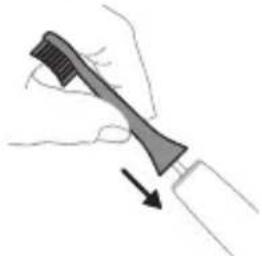
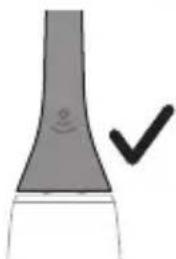
1 Remove the cap, then place the brush head onto the handle. 2 Press the power button to turn on the toothbrush.
Note: There should be a small gap between the brush head and the handle.
Using your Philips Sonicare toothbrush
The Sonicare toothbrush is designed for effective plaque removal. It is more effective than a manual toothbrush. The recommended brushing time is two minutes. With the
brush head, you can customize your brushing experience. For best results, replace the brush head every three months. The Sonicare electric toothbrush comes with the EasyStart feature to help you get used to it. To make brushing easier with the Philips Sonicare toothbrush, this feature gradually increases the power over the first 14 brushing sessions.
Brushing instructions
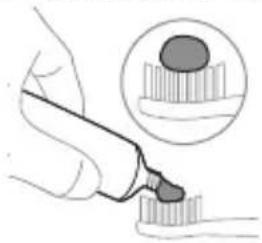
1. The Sonicare toothbrush is a personal care device.
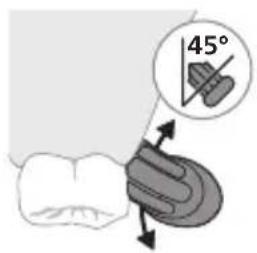
2. Place the brush head at a 45-degree angle against the gumline, gently moving the brush head in a circular motion, ensuring the bristles reach between the teeth and along the gumline.
Note: The brush head should be replaced every 3 months.
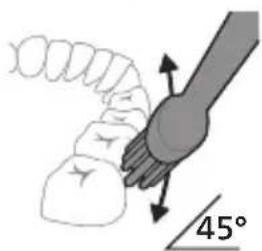
3. For brushing, use the Philips Sonicare brush head.
4. Place the brush head in your mouth before turning on the device. Gently move the brush head between teeth and along the gumline. When using the brush, do not press too hard.
Note: The brush head may wear out. Replace it with a new Philips Sonicare brush head.
Note: If you have sensitive teeth or gums, consult your dentist or doctor.
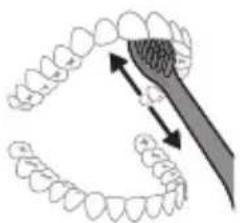
If you experience discomfort, stop using the device and consult a professional.
5. To clean the back of the front teeth, place the brush head vertically and gently brush each tooth one by one. After brushing with the brush, you may also use the brush to clean the tongue and other areas of the mouth. If the brush head becomes worn or damaged, replace it.
Note: If you have braces (where the brush head may get caught) or have recently had dental work (fillings, crowns, veneers), consult your dentist before using the Philips Sonicare toothbrush.
QuadPacer
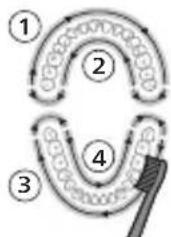
To ensure thorough cleaning, the QuadPacer feature divides your mouth into 4 sections. The QuadPacer signals you to move to the next section every 30 seconds. The sections are indicated by a short pause. At the end of the brushing cycle, the toothbrush will automatically stop.
Note: If you use the White or Gum Care modes, the brushing time may be longer.
Modes
The electric toothbrush has 3 modes: Clean, White, and Gum Care (only on certain models). To switch modes, press the power button while the toothbrush is on.
Clean White Gum Care
| Паадасы Кунделikтite Ерекше Тазалay ушin | Бети徴eri Дактуdi Кетерidi | Кьзblп点点头erpe Жаксы массж Жасайды | |
| Жалны Шетамен Тазалay укыты | 2 минут 2 минут xэне 30 секунд | 3 минут | |
| Шетамен Тазалay anecdici | эрбip 6элikтiti 30 секунд шетамен Тазаланы. | эрбip 6элikтiti 30 секунд шетамен Тазалан одан кейин алдынfvы Ticterdi afapту xэнe харкырату ушin 5 xэнe 6 бөлikтepihi эрkaïсысын 15 секунд шетамен Тазаланы. | эрбip 6элikтiti 30 секунд шетамен Тазалан одан кейин Кьзblл пектерінizdi Жаксы дайындан Жэне массж Жасay ушin 5, 6, 7 xэнe 8 бөлikтepihi эрkaïсысын 15 секунд шетамен Тазаланы. |
BrushSync technology
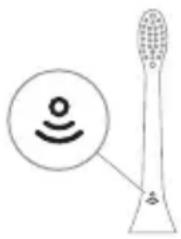
BrushSync technology detects the brush head type and reminds you when to replace it. The brush head type is indicated on the brush head. BrushSync technology reminds you:
- The brush head replacement reminder is indicated by the Philips Sonicare app with BrushSync technology connected smart brush heads. You can check the brush head type and when to replace it by visiting www.philips.com/toothbrush-heads.
Features
- Pressure sensor - Quadpacer - Brush head replacement reminder - EasyStart - SmarTimer
Pressure sensor
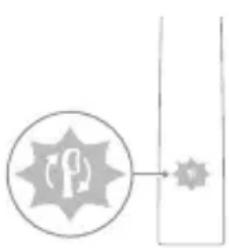
The Sonicare toothbrush measures the pressure you apply while brushing and alerts you when you brush too hard.
If you apply too much pressure, the brush handle will vibrate and the brush head replacement reminder will blink in a different color.
Expert: Do not use the pressure sensor together with the interdental cleaner. To use this feature (see 'Using the interdental cleaner').
Quadpacer
QuadPacer is a timer that helps you brush your teeth evenly in 4 quadrants.
Brush head replacement reminder
The Philips Sonicare brush head replacement reminder is indicated by BrushSync technology.
Expert: This function works only with Philips Sonicare smart brush heads with BrushSync technology.
1. Before first use, the BrushSync technology indicator on your Philips brush handle will blink. 2. After you have used the brush, the brush head will be automatically reminded to replace it. This feature helps you get the most out of your brush head and ensures optimal cleaning. 3. For more information about brush head replacement, see the yellow indicator on the brush head.
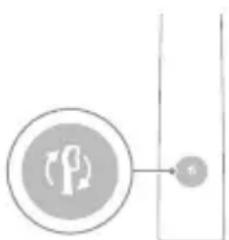
All Sonicare brush handles come with a brush head replacement reminder feature. To turn the brush head replacement reminder on or off, see 'Turning on or off the features'.
EasyStart
Your Philips Sonicare model comes with the EasyStart feature. To help you get used to the Sonicare brushing technique, the EasyStart feature gradually increases the brushing power over the first 14 brushing sessions.
Getting started
If your Philips Sonicare toothbrush is charged, it will start in the Clean mode with the EasyStart feature activated. To change the mode, press the power button.
To turn off EasyStart (see 'Turning on or off the features').
SmarTimer
The SmarTimer feature automatically turns off the toothbrush at the end of the brushing cycle, indicating that the recommended brushing time has been completed.
Dental professionals recommend brushing twice a day for at least 2 minutes.
Note: If you do not press the power button to turn off the toothbrush after starting the brushing cycle, the toothbrush will stop automatically. After 30 seconds, the SmarTimer will turn off.
Turning on or off the features
You can turn the following features on or off on your toothbrush:
- EasyStart
- The brush head replacement reminder is activated by default.
Caution: Do not use the charger near water. Do not place the charger in water or any other liquid.
1st step: Insert the plug into the socket.
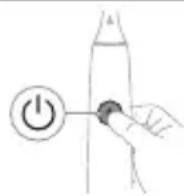
2nd step: Press the power button to turn on the device:
| EasyStart Lüctka 6acbH aybICTbIpy kepektirH ecke caJIbIiS | KbICbIM dαtChrɪnɪh kepi bʌmλnHbIcBi |
| 3 sekyndka deiH | 5 sekyndka deiH |
| ↓ ↓ ↓ | 7 sekyndka deiH |
| 3-kaɪdAm: EctiJrhen Ke3nde, KyaT kocy/əwɪpy Tǔmecɪn Jxɪbepɪnɪz: | |
| 1 дыбыс 1 дыбыс, одан keин 2 дыбыс | 1 дыбыс, 2 дыбыс, одан keин 3 дыбыс |
| ↓ ↓ ↓ | |
| Баразец Иndикаторы мен сетукбасын aybICTbypy Тураль ecke салфышшамы жасын бolyн 2 pet кыпьлбКТаftан Керсанizжане 3 дыбics biptiHdEN kaTTbIpaK, shыfbln ectiNce, фунksця iccke Косылды. | |
| HEMECE | |
| Баразец Иndикаторы мен сетукбасын aybICTbypy Тураль ecke салфышшамы capы 6olyн 1 pet кыпьлбКТаftан Керсанizжане 3 дыбics biptiHgeHreДe ectiCeniz, фунksця ewipilд尼. | |
UV Sanitizer
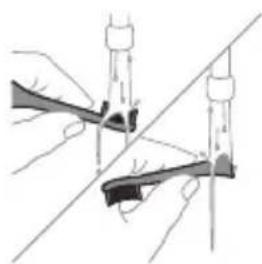
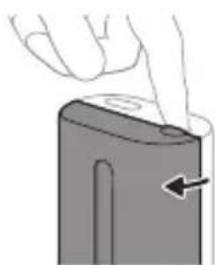
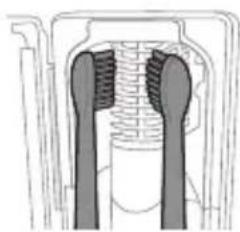
Caution: The charger may become warm during use. This is normal.
UV Sanitizer: After each use, the brush head should be rinsed.
In the following cases, unplug the sanitizer, stop using it, and contact customer service:
- If the power cord is damaged or the plug is broken.
- If the sanitizer emits smoke or a burning smell.
Caution: The UV light may be harmful to eyes and skin. Always keep the lid closed during operation.
1st step: After rinsing, shake off excess water and let it dry.
Caution: When rinsing the brush head, do not let the water run into the opening at the top.
2nd step: Place the brush head on the peg in the sanitizer, with the bristles facing up. 3rd step: Close the lid and press the button to start the sanitizing cycle.
Caution: Only rinse the Philips Sonicare brush heads in the sanitizer.
Caution: Do not rinse the Philips Sonicare for Kids brush heads in the sanitizer.
4 Disinfectant liquid for the brush head.
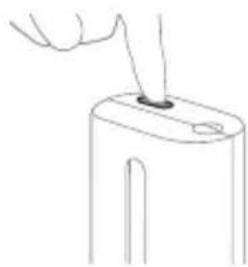
5 If the brush head has been used and is already worn, replace it with a new one.
Note: If the bristles are bent, replace the brush head.
Note: Do not use the brush if the disinfectant is not available; the disinfectant liquid is toxic.
Note: The disinfectant cycle takes 10 minutes, then the device turns off automatically.
After the cycle is complete, the disinfectant liquid is ready for use.
Charging and battery
This Philips Sonicare toothbrush is designed to operate for at least 2 minutes per brushing session, and with two sessions per day, it can last up to 28 days on a full charge. The battery indicator will show the battery level when the toothbrush is turned on or when it is charging.
Note: It may take up to 24 hours to fully charge the battery for the first use, but the Philips Sonicare toothbrush can be used while charging.
Charging
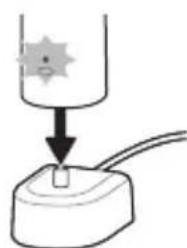
Charging or disinfecting
1 Plug the charger or disinfectant into an electrical outlet. 2 Place the handle on the charger or disinfectant. - The handle will emit a short signal to confirm correct placement. - The battery indicator will light up to show that the toothbrush is charging. - When the handle is placed on the charger, the battery indicator will stay on for 30 seconds and then turn off.
Battery status
Clean White Gum Care
| Unwutunjnu | Pugunhy wubuonju uwpnwu hwun | 3nugunl uwytplunyeh pottn | hujwnupwn utpunl l'unttn |
| hunquutunl nunhuunl duuutul | 2 pnu 2 pnu, 30 | qwnjnuw | 3 pnu t |
| husutu hunquutl | 3nnpwusynn hwunluw hunqwutlp 30 uwnjwut: | 3nnpwusynn hwunluw hunqwutlp 30 uwnjwut | 3nnpwusynn hwunluw hunqwutlp 30 uwnjwut |
| www hunqwutlp 5 u 6 hwnuwrtnn jnpwusynn 15 uwnjwuh npuwgnw wnguh wnwutbn hwtagutini u wugih wjdwv nwnutini hwunw: | www hunqwutlp 5, 6,7 u 8 hwunuwrtnn jnpwusynn 15 uwnjwuh npuwgnw atn juntn hwwnupwn hwawutni u utputni hwun: |
BrushSync indicator
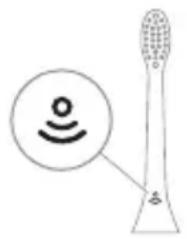
BrushSync technology automatically selects the optimal brushing mode and intensity for your brush head. The brush head will automatically pair with your handle. BrushSync technology is available on select Philips Sonicare handles. To use BrushSync, you need a brush head with the BrushSync icon. For more information about brush heads, visit www.philips.com/toothbrush-heads.
Getting started
- Brushing modes
- Quadpacer
- Brush head replacement reminder
- EasyStart
- SmartTimer
Brushing modes
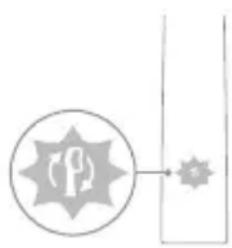
Your Sonicare brush head is designed to deliver superior results when used with your handle. If you do not see the icon, your handle may not support this feature. However, you can still use your brush head with your handle. The handle will operate in the standard mode. For more information, see 'Using your Sonicare'.
Quadpacer
The Quadpacer is a short interval timer that encourages you to brush all four quadrants of your mouth equally.
Brush head replacement reminder
Your Philips Sonicare handle is equipped with BrushSync technology, which reads your brush head's unique serial number.
This feature is only available with Philips Sonicare brush heads that have the BrushSync icon.
1. To activate the brush head replacement reminder, place your brush head on the handle and press the power button. The handle will beep and the brush head will vibrate briefly. 2. After brushing, the handle will beep and the brush head will vibrate to remind you to replace your brush head. This feature is designed to help you maintain optimal brushing performance. 3. The brush head replacement reminder will automatically reset when you install a new brush head.
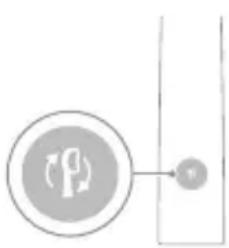
This is a garbled OCR text and cannot be used.
EasyStart
Your Philips Sonicare toothbrush is equipped with the EasyStart feature. The EasyStart feature gradually increases the power over the first 14 uses, helping you get used to using your Philips Sonicare toothbrush.
If you want to use your Philips Sonicare toothbrush at full power
you can turn off the EasyStart feature. This feature is activated by default, but you can easily disable it.
To turn the EasyStart feature on or off (see 'Turning the EasyStart feature on or off'):
SmarTimer
The SmarTimer feature helps you brush for the recommended 2 minutes. It also helps you brush all areas of your mouth evenly. The SmarTimer is set to a 2-minute brushing time. The SmarTimer will automatically turn off after 30 seconds of inactivity.
Turning the EasyStart feature on or off
To turn the EasyStart feature on or off, follow the instructions below.
- EasyStart
- Your Philips Sonicare toothbrush is equipped with the EasyStart feature.
- Using your toothbrush
To turn the EasyStart feature on or off, press and hold the power button for 2 seconds.
Step 1. Place the brush head on the handle.
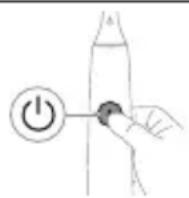
- Use the toothbrush only for its intended purpose.
| EasyStart lunquuulh quhuh yhnhuunhuu hh2gnu | zhuu wu utuunh wnauwuu | |
| Uhug 3 luyjww ununnuaup | Uhug 5 V uwjww ununnuaup | Uhug 7 ljuw ununnuaup |
| ↓ ↓ ↓ | ||
| Pwjl 3. Fug pannp hnuwuph uhwguw/wwguwunw unawu, bpu. | ||
| 1 wqwnu2wu 1 wqwnu2wu, wqww 2 wqwnu2wu | 1 wqwnu2wu, 2 wqwnu2wu, wqww 3 wqwnu2wu | |
| ↓ ↓ ↓ | ||
| Tpa uwnunlng hnqghs n u lunquuwwu h quhluh yhnuwunhuuwwu hh2tgwu u gigns 2 uquw pwnatu yuuw injunu l u bp 3 awjwwu wqwnu2wu' gwong hu puwan, wqww qnnouwnu wlnhucwguwδ t: | ||
| 4uu | ||
| Tpa uwnunlng hnqghs n u lunquuwwu h quhluh yhnuwunhuuwwu hh2tgwu u gigns 1 uquw pwnatu ntnhu injunu l u bp 3 awjwwu wqwnu2wu' puonphg uhuu guo, wqww qnnouwnu wqwwuunhucwguwδ t: | ||
Remove the brush head
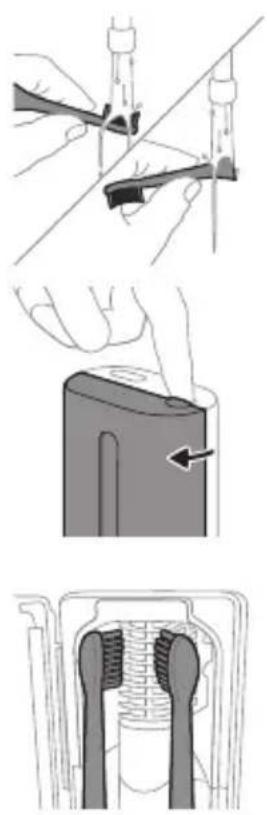
The Philips Sonicare for Kids handle is intended for cleaning teeth and gums:
The brush head is intended for cleaning teeth and gums and is not intended for use by children under three years of age.
Remove the brush head from the handle, rinse it under the tap and shake off excess water.
Do not use the handle with a damaged brush head.
- Replace the brush head every 3 months.
- Do not use the handle if it is damaged or has a cracked or broken part: - If the handle is dropped or damaged, stop using it and contact the Philips Consumer Care Center.
The Philips Sonicare for Kids handle is intended for cleaning teeth and gums and is not intended for use by children under three years of age. Do not use it if the brush head is damaged.
1. Rinse the brush head and bristles thoroughly after each use. 2. Do not use the brush head if the bristles are bent or broken. 3. Do not use the brush head if it is damaged or worn.
Use the Philips Sonicare for Kids brush head only for its intended purpose.
The Philips Sonicare for Kids brush head is intended for cleaning teeth and gums.
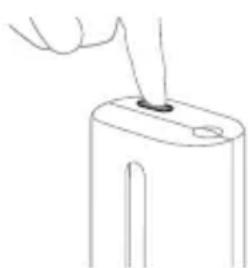
4. Do not use the brush head if it is damaged or worn. 5. Use the brush head only for its intended purpose, and replace it every 3 months.
Do not use the brush head if it is damaged or worn, or if the bristles are bent or broken.
Do not use the handle if it is damaged or has a cracked or broken part.
L2nu'Uhunwhwuwughun ununu 1nnn 10 nwn, wunhtunu hupwptnpwn uugwnunu:
Ununwhuuhn qnnonu 5, np njuun huwunu uwnnhug:
Lhgpunnnu u wunlungh hgh yunquuhaw
Uju Philips Sonicare wunwuh hnquuwuyn wuhwuunluw 5 wunwq u28 hnquwwuwwu hwwwn, jnuwuwynn wngttnnwnu 2 nnu b unnnnyaup (14 on, tba oqnwnnouh onwuu tnu n uquu) nhu hgpwrnnu wunlungnu: Uwnlungh hgh gnighn gnug 5 unhu wunlungh ywnqwhawu, bp wunwnu bp hnquwwu wu 2 nnu Tuug wnngttnnu, bp wugwnu bp hnquwwu, ywu tp wju hgpwrnnu l:
L2nuiuwnn 5 uwhwugulhugu 24 duu, nnuuqhu wunlungu wupnnnjuwup hgpwunnu uwhupwu unwgh ouwnqnnonun, uuwjnu npu wunnnp oqnwwgnol Philips Sonicare wunwuh junwuwu, uwhupwu wju wupnnnuhugpwunpu:
Lhgpuunnniu
Lhgpwnnnnughpwunnhywu nHU Uhuunwhuwsh npw
1 Lhgpwunnhyn ywu wunuwuhuun uhwngntp 1aunnuunigwu wnpnihu:
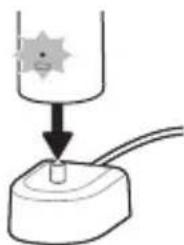
2 Fnuwn unwnntg hgpwnnh yw wunwhuhsh unw:
- Pnuwu 2 ywnw qwnwu2wu 5 rannunu, hnu hwwunwnu 5, np npuyn wun2w ytnwnu unwnnyw 5: -Uwnunyngh gnighsh awnann lnyn gnu g unhu, nn wunwuh hnquuwyn hgpwlnnnu5:
- 6np hgpwnnhshu shwgulp nuwuyu wupnnnjuwup hgpwnnuh, uwnungh gnigh30 uynwuuh npawgpnuu ywnuuh ywnu2 njunu, wuuwugwnuh:
Uwnlungh ywnquuhawu
Uwnlungh hghp yunqwuhawun (puwunpan uhwguw hgpwuunnhun)
tp pruwn ununnnnup 1hgpwnnnhsh unw, uunl nghn gny 1 unhu uunl ngh hph uynwnu:
Uununlugh qunqwhaw Uununlgh gnighs
Lhgpwnnnn wunpanu 1ywnu [nyun]
Lhpu 30 uwnnunu
hwunwnnntu wuwu [nyunj, wuww uugwuunni
Uwnunng h ywnquwhawu (tnp nuwu ng hgpwhnh uww 25)
bnwnwuh hnquuwuyu wunhu uhowynu5, pnuwh uunnhu hwnulwnquntuynn uwnunngh gnghg n gug t unluu uwnunngh ingph uwwunnu:
www.philips.com/support 5nui:
twnghpwunnn unwnlngn htnwgtni hwwn atq hnwnuun n unphs ywu lunnn, unna u hwna qhnun (unwnuunun) wunnunuwwhu: nuhwuuutb wunwnuqnjuu hhuwuw uwhwqqn2wuu uhengutnp np hnunnu bp uunnu 2u puwgulwnqhu:
1 1nuihgpwunnnuwn uwnunngh hgn uuwuntin huun hnugntp nuwyn hgpwunnhsg, uhwgtp wunwuh hnquwuyn u eny unup wju u2huwuh uhuu yuu wut: uuytp wju puJn, uhuu wluu ywnnnwup uhwgtu wunwuh hnquwuyn:
2 3nwngtap luawhtap hnquwuyh quhyn: Uupnnnpuwn ywhyt unphyn yuuynnnnu:
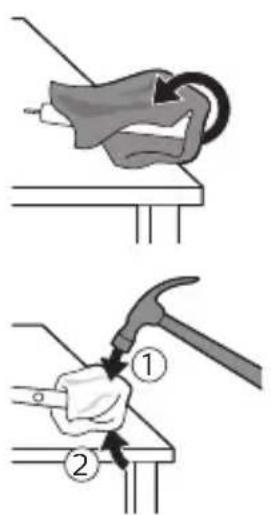
3 Fnuwuh ybnun uh dnnpnu uwhbp u hwnuwotp puwuh wunjuwuhu ubnpuh qanhg 0,5 nnyu puonnnjwu unw: ndan hwnuwotp unpanu pninn 4 ynnubhg bgh ywhunn nnnu hwtin hwun:
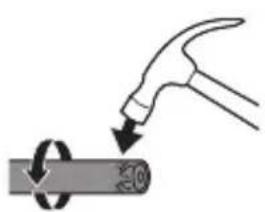
L2nus Rwnwun n uhnuyuol hup uh puwh wquwu hwnuolal owjnhu ubnphu npuwuh uhwgnuiubn hqbin huwun:
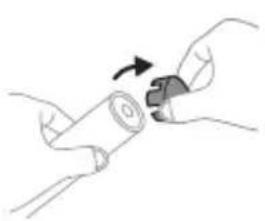
4 3nwnghg: qah ywhunhwnwuh hunquwuh npuwhhg: taqanh ywhunhnh2nnnpwup sh wquwnu wwnjwhg, uputp pui 3-n uhtu tanh ywhunh nnin qu:
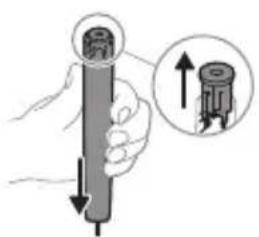
5 Pnun quhuwn uwhtnu hutnp utnp utnup Un2n uuytunnyah unw: tat utnphu puununphutn h2unnu wu wquunnu Wwwunwug, unyutp pwl 3-n uhuu utnphu puununnhutn nninu quu:
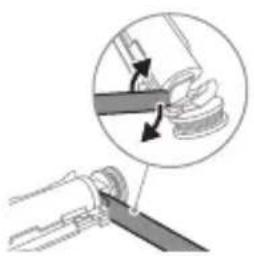
6 Stunwnptp winninwluwhwn uwnlungh u uu 2nguwwuh uhou utnphpuwnwnnhutnh utnpunu: Uunhtbnqnnbhu nwngnbp winnunwluwhwn uwnlngh' u2nguwuh utnpuh hwnuwr hnunnti hwuwn:
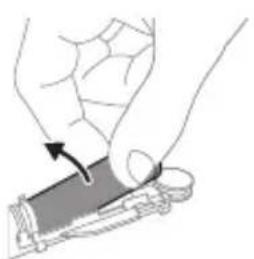
7 Stunnpu winnunwluwhwn uwnlngh utnpuh u uu 2nwwuwh uhu'ynunnti utunwnuwu utnnnnp, nnu uhwgunu 5 uwnlngn yuu unwwu: Uw yugwn hwnlngh utnpuh bann 2nwwuwhg: 8 Fnubuwnunngn u htnwngtp wju utnphu puununnhg, npuuaqh ununnp uwnungh bnynnn utunwnjw utnnhn:
2qni2wgnui 2qni2wgtp uununlngh utnnhnutnh unin tqntnhg, nnuuqh huniuwhtp uwnutnh uuuuuwputnhg:
9 uγt p uwnlngh ununwunutnp duwwuunu uwnlngh uugnnnwhg wnu shugn uuhutni hwuon:
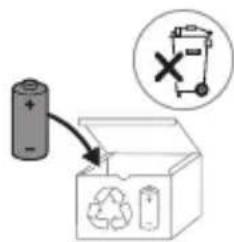
gngpuunnn uwnlngu wdu yunn 5 wunnuynu, hul wnunwnuwuph uwgud uwn wunnuugnuc huuytu hunu:
L2nu'Uh paunnuugntp uynp unnnuwu yugunwhu wnh htn npw 2whuqqnouwu wunhghtinn: Phwnb, wju ununtp paunnuutph huwpuqnuw huannily ytuunnu' utnw2wywu hwwn: Uynhunl nip yoqub wwhuwutl 2n2wuw uhwuwjnn:
a030mn
amagluomgongn Philips Sonicare-nu mtsbann! jz jongnnl 508nnn bn yogmgo 6oym30, on6yn630mgn amammmn 6000n, 3m600n ygmnn ngnnn 00ngmgon 505600n ngmgon. Sonicare-nu 6000n 80mn n 6mnmnns 00 3mn6nmy a2ydo30ygmnn 00 50nmsygmnn 966dugonnu 3mdon6oan nn 6dmny6oan agandmnssn oogm6y6ygmnn nymo, mma 6o6o ym3o m 50m8 Lsngmum. osfoqn an 6boomggtms o 3mmnydn mabn moan md36bn3nu bgaannb63gmans od: www.philips.com/support
6n36mm36n n6gmndosns yogmnbdo b
gdmny6gm 3mmn jon abmnnn gnun 6nabmggonbdojom. ymoggonn 6n2nmbgn 6n 6n36mm36n n6gmndyns 3mmngn, anbn 6nongno 00s ygluyomngn 6ammy6dsqg 00 6sbn nu bsmds3mm dmbdngnbo3nb. 6mmds gdmmy6dsd, ybdmm, dm3s 6mnbdg 00s bmm8m 08n56dsd ang3ny36ml.
803mnbomgdo
Clean White Gum Care
a636: 36n66n60mm Philips Sonicare for Kids- n58mnlnu 033g on 66n6n8m.
1 3mnnn nnnn nn 3b 58mymsy m3mn 6my6gonl aggga. 2 2030000000000000000000000000000000000000000000000000000000000000000000000
0s06n
amggmnb 6mamnub gosmms
Philips Sonicare 3ongmnu 5gmaabnu dmoqgmnu 6maunb 56666000000000000000000000000 (HX64XX, HX68XX).
For more information, please visit www.philips.com/support or contact your local Philips Customer Care Center.
Important safety instructions
Read these instructions carefully:
- Use the appliance only for its intended purpose. - Do not use the appliance if it is damaged or has a malfunction. - Keep the appliance out of reach of children and pets. - Do not immerse the appliance in water or any other liquid. - Do not use the appliance near water or in a bathroom.
30
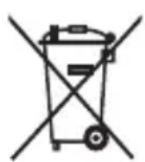
- If the appliance is not working properly, contact the Philips Consumer Care Center in your country.
- For information on REACH regulations, please visit the Philips website: www.philips.com/REACH
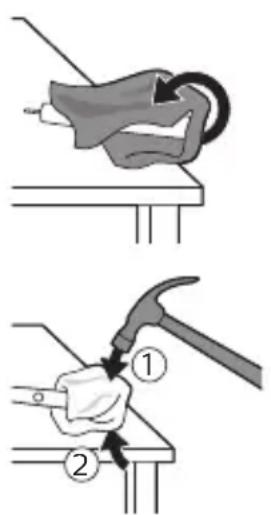
1. This appliance is intended for household use only. It is not intended for commercial use. 2. Do not use the appliance if the cord or plug is damaged. 3. If the supply cord is damaged, it must be replaced by the manufacturer, its service agent, or similarly qualified persons in order to avoid a hazard.
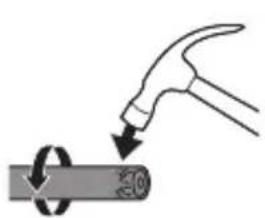
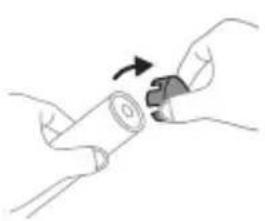
4. The appliance is intended for cleaning teeth and gums. It is not intended for use by children or persons with reduced physical, sensory or mental capabilities, unless they have been given supervision or instruction.
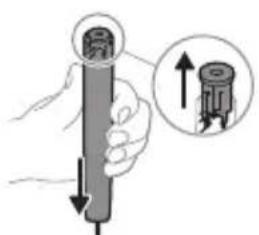
5. Do not use the appliance if the brush head is damaged or worn. Replace the brush head every 3 months or sooner if the bristles are frayed. Do not use the appliance if the handle is damaged.
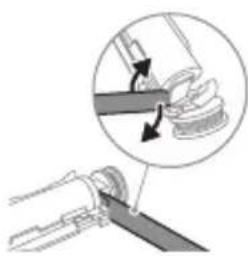
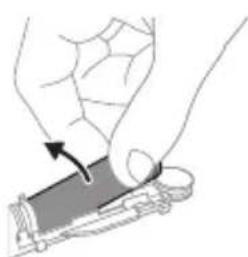
6. Keep the handle, charger, and charging base dry. Do not place or store the appliance where it can fall or be pulled into a tub or sink. Do not place the appliance in water or other liquid. 7. Do not use the appliance with a damaged cord or plug. If the cord is damaged, have it replaced by the manufacturer, its service agent, or similarly qualified persons. 8. Do not use the appliance if it has been dropped or damaged.
Warnings: Keep the appliance out of reach of children. Do not use the appliance if the brush head is damaged.
9. This appliance is intended for household use only. Do not use it outdoors or in a humid environment.
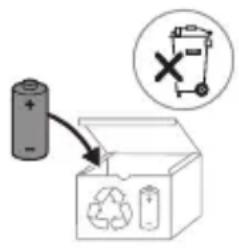
10. Do not immerse the appliance in water or any other liquid. Do not use the appliance with a damaged cord or plug. If the cord is damaged, have it replaced by the manufacturer, its service agent, or similarly qualified persons.
11. The appliance contains a rechargeable battery. Do not dispose of the battery in fire. Do not expose the appliance to high temperatures. Do not attempt to open the handle.
!Philips Sonicare
www.philips.com/support
__SUPPIMER__
Philips USB, model 17910.
USB connection for the device.
The device is powered by USB.
(NIN)
DINDIN DINOWT7XYIN
.090
-UV-nXUNND
.
-11071
Philips CCBxxx 240-100, HX6100, HX6110. Input: 240-100 V, 50/60 Hz, 1.5 A (HX6100), 1.4 A (HX6110).
- 40°C - 10°C
Directive 2014/53/EU (Bluetooth, NFC)
Frequency range
2.4 GHz
Bluetooth
3 dBm
Frequency range
13.56 MHz
-
30.16 dBm
www.philips.com/support
Bluetooth and NFC
For model "Xxxxx"
TCBxxxx, HX6100, HX6110
WAAxxxx and HX6160
xxxxxx

.
TYPING
ProtectiveClean
- 1
| NJNJNJNJNJNJNJNJNJNJNJNJNJNJNJNJNJNJNJNJNJNJNJNJNJNJNJNJNJNJNJNJNJNJNJNJNJNJNJNJNJNJNJNJNJNJNJNJNJNJNJNJNJNJNJNJNJNJNJNJNJNJNJNJNJNJNJNJNJNJNJNJNJNJNJNJNJNJNJNJNJNJNJNJNJNJNJNJNJNJNJNJNJNJNJNJNJNJNJNJJNJNJNJNJNJNJNJNJNJNJNJNJNJNJNJNJNJNJNJNJNJNJNJNJNJNJNJNJNJNJNJNJNJNJNJNJNJNJNJNJNJNJNJNJNJNJNJNJNJNJNJNJNJNJNJNJNJNJNJNJNJNJNJNJNJNJNJNJNJNJNJNJNJNJNJNJNJNJNJNJNJNJNJNJNJNJNJNJNJNJNJNJNJNJNJNJNJNJNJJJNJJJNJJJNJJJNJJJNJJJNJJJNJJJNJJJNJJJNJJJNJJJNJJJNJJJNJJJNJJJNJJJNJJJNJJJNJJJNJJJNJJJNJJJNJJJNJJJNJJJNJJJNJJJNJJJNJJJNJJJNJJJNJJJNJJJNJJJNJJJNJJJNJJJNJJJNJJJNJJJNJJJNJJJNJJJNJJJNJJJNJJJNJJJNJJJNJJJNJjjJJJJJJJJJJJJJJJJJJJJJJJJJJJJJJJJJJJJJJJJJJJJJJJJJJJJJJJJJJJJJJJJJJJJJJJJJJJJJJJJJJJJJJJJJJJJJJJJJJJJJJJJJJJJJJJJJJJJJJJJJJJJJJJJJJJJJJJJJJJJJJJJJJJJJJJJJJJJJJJJJJJJJJJJJJJJJJJJJJJJJJJJJJJJJJJJJJJJJJJJjjJJJJJJJJJJJJJJJJJJJJJJJJJJJJJJJJJJJJJJJJJJJJJJJJJJJJJJJJJJJJJJJJJJJJJJJJJJJJJJJJJJJJJJJJJJJJJJJJJJJJJJJJJJJJJJJJJJJJJJJJJJJJJJJJJJJJJJJJJJJJJJJJJJJJJJJJJJJJJJJJJJJJJJJJJJJJJJJJJJJJJJJJJJJJJJJJJJJJjjjjJJJJJJJJJJJJJJJJJJJJJJJJJJJJJJJJJJJJJJJJJJJJJJJJJJJJJJJJJJJJJJJJJJJJJJJJJJJJJJJJJJJJJJJJJJJJJJJJJJJJJJJJJJJJJJJJJJJJJJJJJJJJJJJJJJJJJJJJJJJJJJJJJJJJJJJJJJJJJJJJJJJJJJJJJJJJJJJJJJJJJJJJJJJJJJJJJJJJ JJJJJJJJJJJJJJJJJJJJJJJJJJJJJJJJJJJJJJJJJJJJJJJJJJJJJJJJJJJJJJJJJJJJJJJJJJJJJJJJJJJJJJJJJJJJJJJJJJJJJJJJJJJJJJJJJJJJJJJJJJJJJJJJJJJJJJJJJJJJJJJJJJJJJJJJJJJJJJJJJJJJJJJJJJJJJJJJJJJJJJJJJJJJJJJJJJJJJJJJ JJjjjjjjjjjjjjjjjjjjjjjjjjjjjjjjjjjjjjjjjjjjjjjjjjjjjjjjjjjjjjjjjjjjjjjjjjjjjjjjjjjjjjjjjjjjjjjjjjjjjjjjjjjjjjjjjjjjjjjjjjjjjjjjjjjjjjjjjjjjjjjjjjjjjjjjjjjjjjjjjjjjjjjjjjjjjjjjjjjjjjjjjjjjjjjjjjjjjjjjjj jjjjjjjjjjjjjjjjjjjjjjjjjjjjjjjjjjjjjjjjjjjjjjjjjjjjjjjjjjjjjjjjjjjjjjjjjjjjjjjjjjjjjjjjjjjjjjjjjjjjjjjjjjjjjjjjjjjjjjjjjjjjjjjjjjjjjjjjjjjjjjjjjjjjjjjjjjjjjjjjjjjjjjjjjjjjjjjjjjjjjjjjjjjjjjjjjjjjjjjjJJJJJJJJJJJJJJJJJJJJJJJJJJJJJJJJJJJJJJJJJJJJJJJJJJJJJJJJJJJJJJJJJJJJJJJJJJJJJJJJJJJJJJJJJJJJJJJJJJJJJJJJJJJJJJJJJJJJJJJJJJJJJJJJJJJJJJJJJJJJJJJJJJJJJJJJJJJJJJJJJJJJJJJJJJJJJJJJJJJJJJJJJJJJJJJJJJjjJJjjJJJJJJJJJJJJJJJJJJJJJJJJJJJJJJJJJJJJJJJJJJJJJJJJJJJJJJJJJJJJJJJJJJJJJJJJJJJJJJJJJJJJJJJJJJJJJJJJJJJJJJJJJJJJJJJJJJJJJJJJJJJJJJJJJJJJJJJJJJJJJJJJJJJJJJJJJJJJJJJJJJJJJJJJJJJJJJJJJJJJJJJJJJJJJJJJJJjjjjjjjjjjjjjjjjjjjjjjjjjjjjjjjjjjjjjjjjjjjjjjjjjjjjjjjjjjjjjjjjjjjjjjjjjjjjjjjjjjjjjjjjjjjjjjjjjjjjjjjjjjjjjjjjjjjjjjjjjjjjjjjjjjjjjjjjjjjjjjjjjjjjjjjjjjjjjjjjjjjjjjjjjjjjjjjjjjjjjjjjjjjjjjjjjjjjjj JJ |
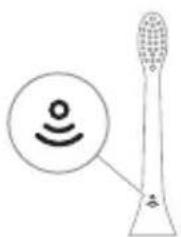
BrushSync
BrushSync
Philips Sonicare
www.philips.com/toothbrush-heads
Quadpacer, EasyStart, SmarTimer
The Sonicare toothbrush is designed to help you brush effectively. It includes features to guide you through your brushing routine.
The handle has a built-in timer (with a 2-minute timer and 30-second intervals).
Quadpacer
The QuadPacer is a short beep that reminds you to move to the next quadrant of your mouth every 30 seconds.
EasyStart
BrushSync technology detects the Philips Sonicare brush head and automatically selects the optimal settings for that head.
(ynnnn nn nnnnnnn) n77ion
n nn nnnn nn 710n, nny nnnn nn
n7n nn nn
777771011nnn77710
-7n7n7n7n
-7n7n7n7n7n
3 7
y
7u 2n7n nnnn7 5
n
1X7X771011n,7X7107T:7n.
.107 7710 77n .nnN 107 77 n nn
nN,ny72n72n72n72n72n72n72n72n72n72n72n72n72n72n72n72n72n72n72n72n72n72n72n72n72n72n72n72n72n72n72n72n72n72n
17
D
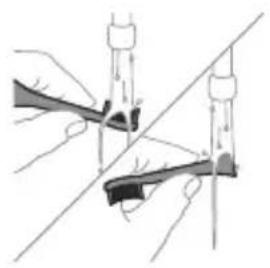
Philips Sonicare 7u
Philips Sonicare 7U
Philips Sonicare 7u
(HX64XX, HX68XX)
www.philips.com/support
N
:nnn nn nnnn 77n nn
.10191
-1N DUNIN
.
-17IND
-1N yX 1U,
.
-UV
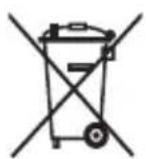
T
n7nn n7109n by nn no7nnn
n177101 D7wn
-1177011
-
-77777
www.philips.com/REACH
Philips
www.philips.com/support
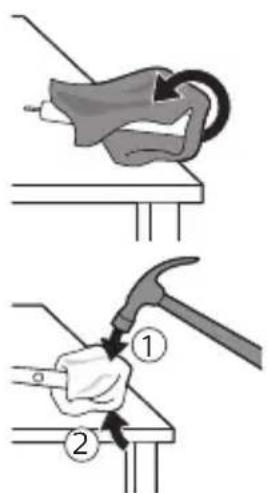
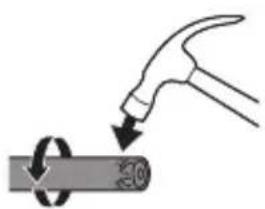
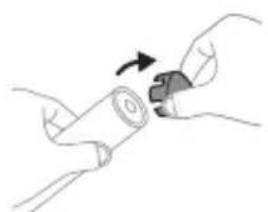
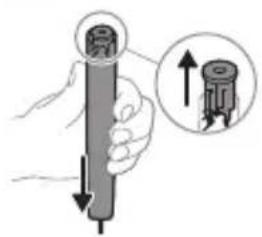
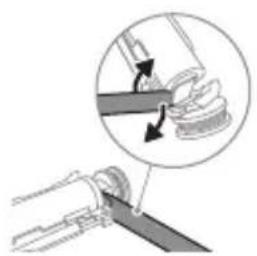
-1
-1
-1
-
-
-1
-
-
EAC UK CA
www.philips.com/Sonicare
©2024 Koninklijke Philips N.V. (KPNV). All rights reserved. Philips and the Philips shield are trademarks of KPNV. Sonicare and the Sonicare logo are trademarks of Philips Oral Healthcare, LLC and/or KPNV. 300008527982 (20/08/2024)
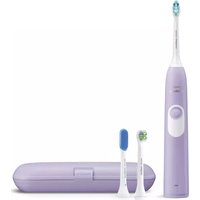


- IMPORTANT SAFETY INFORMATION
- WARNINGS
- MEDICAL WARNINGS
- BATTERY SAFETY INSTRUCTIONS
- STORAGE AND TRANSPORTATION CONDITIONS
- ELECTROMAGNETIC FIELDS (EMF)
- RADIO EQUIPMENT DIRECTIVE
- WWW.PHILIPS.COM/SUPPORT
- INTENDED USE
- YOUR PHILIPS SONICARE (FIG 1.)
- ACCESSORIES
- GETTING STARTED
- USING YOUR PHILIPS SONICARE TOOTHBRUSH
- BRUSHING INSTRUCTIONS
- QUADPACER
- MODES
- BRUSHSYNC TECHNOLOGY
- FEATURES
- PRESSURE SENSOR FEEDBACK
- BRUSH HEAD REPLACEMENT REMINDER
- EASYSTART
- DISCLAIMER
- SMARTIMER
- ACTIVATING OR DEACTIVATING FEATURES
- UV SANITIZER
- CHARGING AND BATTERY STATUS
- CHARGING
- CHARGING ON CHARGER OR UV SANITIZER
- BATTERY STATUS
- BATTERY STATUS (HANDLE ON PLUGGED-IN CHARGER)
- BATTERY STATUS (WHEN HANDLE IS NOT PLACED ON CHARGER)
- CLEANING
- TOOTHBRUSH HANDLE
- BRUSH HEAD
- CHARGER
- TRAVEL CASE
- CLEANING THE SANITIZER
- ENGLISH
- STORAGE
- REPLACEMENT
- LOCATING THE MODEL NUMBER
- WARRANTY AND SUPPORT
- WARRANTY EXCLUSIONS
- RECYCLING
- REMOVING THE RECHARGEABLE BATTERY
- INTRODUCTION
- CLEAN WHITE GUM CARE
- MEDICAL CAUTIONS
- FUNCTIONS
- PRESSURE SENSOR ALERT
- YOUR PHILIPS SONICARE DEVICE (FIG. 1.)
- CHARGING IN THE CHARGER OR IN THE UV SANITIZER
- BATTERY STATUS (HANDLE PLACED ON THE CHARGER)
- BATTERY STATUS BATTERY INDICATOR
- BATTERY STATUS (WHEN HANDLE IS NOT ON THE CHARGER)
- BATTERY STATUS BATTERY INDICATOR SOUND
- YOUR PHILIPS SONICARE (FIG. 1.)
- ACTIVATING OR DEACTIVATING FUNCTIONS
- OR
- THE BRUSH HEAD REPLACEMENT REMINDER
- BATTERY STATUS (HANDLE PLACED ON CHARGING UNIT THAT IS PLUGGED INTO AN OUTLET)
- BATTERY STATUS INDICATOR
- BATTERY STATUS (WHEN THE HANDLE IS NOT PLACED IN THE CHARGING DEVICE)
- MODEL NUMBER
- EXCLUSIONS FROM WARRANTY
- REMOVING THE BUILT-IN RECHARGEABLE BATTERY
- HANDLE
- PHILIPS SONICARE (FIG. 1)
- PHILIPS SONICARE TOOTHBRUSH HANDLE
- REPLACING THE BRUSH HEAD
- ACTIVATING EASYSTART
- SMARTTIMER
- YΦ DE3NHΦEKZNAIAIBIY
- KY6ATTOO XAHA 6ATAPEHBIN A6AJIBI
- KY6ATTAJYYDA
- KY6ATBIYTA JKE YΦ DE3NHΦEKCIAIARBIYTA KY6ATTOO
- БАТAPESTЯНЫН AБАЛЫ
- BATAPEHBIH A6AJIBI (KY6ATTARBIYKA TYTAUSTBIPBIJRAH CAN)
- BATAPEHBIN A6AIBI BATAPEKEPCETKYU
- BATTERY INDICATOR (FLASHES WHEN THE BATTERY IS LOW)
- BATTERY INDICATOR AND BATTERY COMPARTMENT
- CLEANING THE LED INDICATOR
- FABRIC CARE
- DESCALING PROCEDURE
- CLEANING THE DETERGENT DRAWER
- CAUTION: IF THE WATER IS HOT, DO NOT CLEAN THE DETERGENT DRAWER
- CAUTION
- USING THE APPLIANCE
- REPLACEMENT PARTS
- DISPOSAL
- CHARGING BATTERY INDICATOR
- BOVEI
- CHANGES IN THE DEVICE
- STORAGE AND TRANSPORT CONDITIONS
- YOUR PHILIPS SONICARE (FIG. 1)
- UV STERILIZER
- BATTERY STATUS AND CHARGING
- CHARGING INDICATOR LIGHT ON THE UV STERILIZER
- TRANSPORTATION
- PHILIPS SONICARE TOOTHBRUSH (FIG. 1)
- ADDITIONAL ACCESSORIES
- POWER
- OVERVIEW
- IMPORTANT
- BATTERY SAFETY PRECAUTIONS
- DISINFECTION BLOCK WITH UV LAMP
- BATTERY STATUS: CHARGE INDICATOR SOUND
- ATTACHMENT
- CHARGING DEVICE
- DUST FILTER
- DISINFECTING UNIT
- CAUTION. DO NOT CLEAN THE DISINFECTING UNIT WHILE THE UV LAMP IS HOT
- WARRANTY RESTRICTIONS
- BATTERY REMOVAL
- REMOVING THE BATTERY
- KIPICNE
- IMPORTANT SAFETY INSTRUCTIONS
- EXPERTS
- PHILIPS SONICARE (FIGURE 1)
- PRESSURE SENSOR
- TURNING ON OR OFF THE FEATURES
- CHARGING AND BATTERY
- CHARGING OR DISINFECTING
- BRUSHSYNC INDICATOR
- BRUSHING MODES
- TURNING THE EASYSTART FEATURE ON OR OFF
- REMOVE THE BRUSH HEAD
- LHGPUNNNU U WUNLUNGH HGH YUNQUUHAW
- LHGPUUNNNIU
- LHGPWNNNNUGHPWUNNHYWU NHU UHUUNWHUWSH NPW
- UWNLUNGH YWNQUUHAWU
- UWNLUNGH HGHP YUNQWUHAWUN (PUWUNPAN UHWGUW HGPWUUNNHUN)
- UUNUNLUGH QUNQWHAW UUNUNLGH GNIGHS
- UWNUNNG H YWNQUWHAWU (TNP NUWU NG HGPWHNH UWW 25)
- WWW.PHILIPS.COM/SUPPORT 5NUI
- A030MN
- N36MM36N N6GMNDOSNS YOGMNBDO B
- MNBOMGDO
- S06N
- AMGGMNB 6MAMNUB GOSMMS
- TYPING
- BRUSHSYNC
- (YNNNN NN NNNNNNN) N77ION
- NNN
- D
- N
- T
- EAC UK CA
Brand : PHILIPS
Model : Sonicare ProtectiveClean 5100
Category : Electric toothbrush