1499656 - Phone Renkforce - Free user manual and instructions
Find the device manual for free 1499656 Renkforce in PDF.



Frequently Asked Questions - 1499656 Renkforce
User questions about 1499656 Renkforce
0 question about this device. Answer the ones you know or ask your own.
Ask a new question about this device
Download the instructions for your Phone in PDF format for free! Find your manual 1499656 - Renkforce and take your electronic device back in hand. On this page are published all the documents necessary for the use of your device. 1499656 by Renkforce.
USER MANUAL 1499656 Renkforce
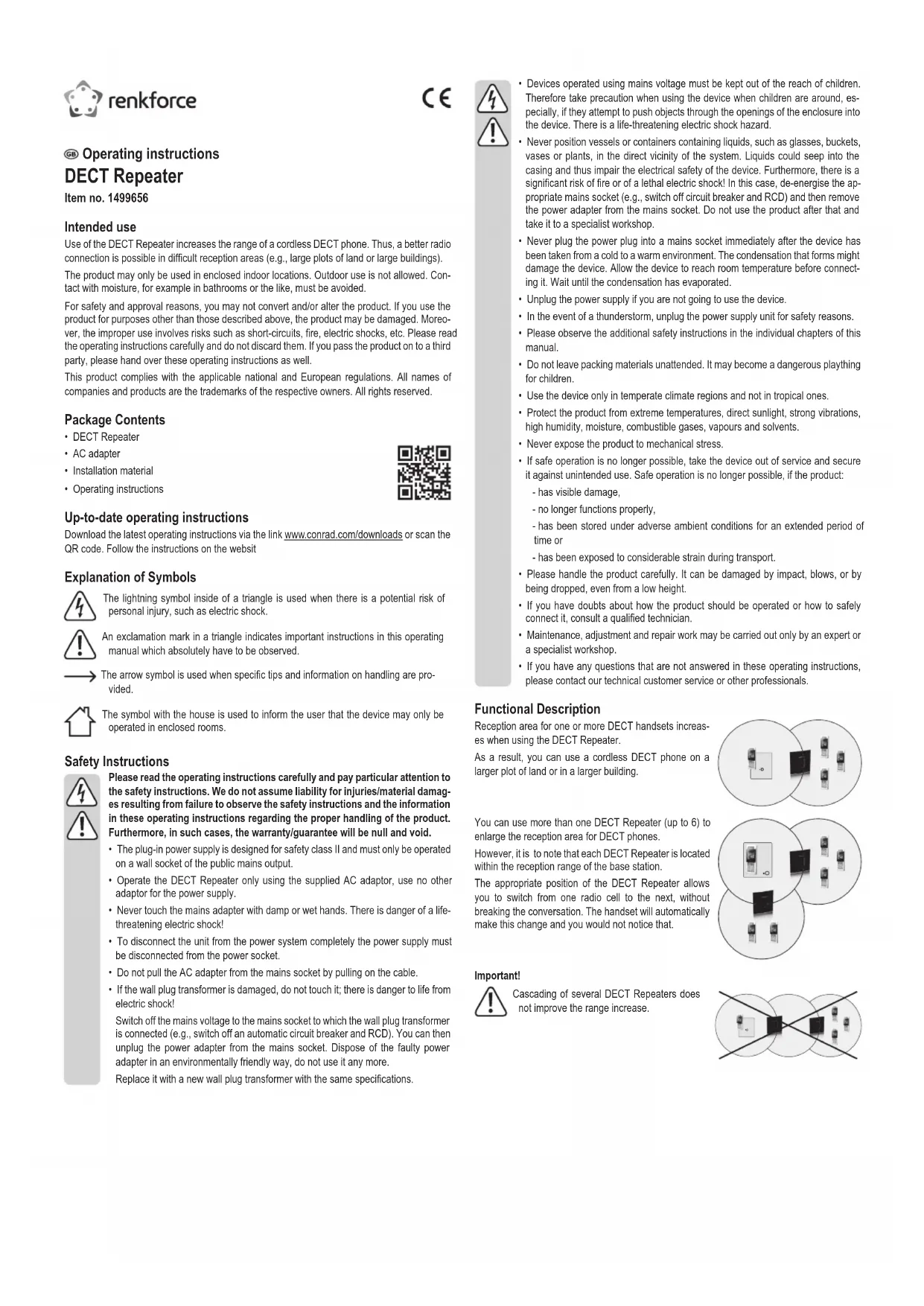
Use of the DECT Repeater increases the range of a cordless DECT phone. Thus, a better radio connection is possible in difficult reception areas (e.g., large plots of land or large buildings).
The product may only be used in enclosed indoor locations. Outdoor use is not allowed. Contact with moisture, for example in bathrooms or the like, must be avoided.
For safety and approval reasons, you may not convert and/or alter the product. If you use the product for purposes other than those described above, the product may be damaged. Moreover, the improper use involves risks such as short-circuits, fire, electric shocks, etc. Please read the operating instructions carefully and do not discard them. If you pass the product on to a third party, please hand over these operating instructions as well.
This product complies with the applicable national and European regulations. All names of companies and products are the trademarks of the respective owners. All rights reserved.
Package Contents
- DECT Repeater
- AC adapter
- Installation material
- Operating instructions
Up-to-date operating instructions
Download the latest operating instructions via the link www.conrad.com/downloads or scan the QR code. Follow the instructions on the website
Explanation of Symbols

The lightning symbol inside of a triangle is used when there is a potential risk of personal injury, such as electric shock.

An exclamation mark in a triangle indicates important instructions in this operating manual which absolutely have to be observed.

The arrow symbol is used when specific tips and information on handling are provided.

The symbol with the house is used to inform the user that the device may only be operated in enclosed rooms.
Safety Instructions
Please read the operating instructions carefully and pay particular attention to the safety instructions. We do not assume liability for injuries/material damages resulting from failure to observe the safety instructions and the information in these operating instructions regarding the proper handling of the product. Furthermore, in such cases, the warranty/guarantee will be null and void.
- The plug-in power supply is designed for safety class II and must only be operated on a wall socket of the public mains output.
- Operate the DECT Repeater only using the supplied AC adaptor, use no other adaptor for the power supply.
- Never touch the mains adapter with damp or wet hands. There is danger of a life-threatening electric shock!
- To disconnect the unit from the power system completely the power supply must be disconnected from the power socket.
- Do not pull the AC adapter from the mains socket by pulling on the cable.
- If the wall plug transformer is damaged, do not touch it; there is danger to life from electric shock!
Switch off the mains voltage to the mains socket to which the wall plug transformer is connected (e.g., switch off an automatic circuit breaker and RCD). You can then unplug the power adapter from the mains socket. Dispose of the faulty power adapter in an environmentally friendly way, do not use it any more.
Replace it with a new wall plug transformer with the same specifications.
Devices operated using mains voltage must be kept out of the reach of children. Therefore take precaution when using the device when children are around, especially, if they attempt to push objects through the openings of the enclosure into the device. There is a life-threatening electric shock hazard.
- Never position vessels or containers containing liquids, such as glasses, buckets, vases or plants, in the direct vicinity of the system. Liquids could seep into the casing and thus impair the electrical safety of the device. Furthermore, there is a significant risk of fire or of a lethal electric shock! In this case, de-energise the appropriate mains socket (e.g., switch off circuit breaker and RCD) and then remove the power adapter from the mains socket. Do not use the product after that and take it to a specialist workshop.
- Never plug the power plug into a mains socket immediately after the device has been taken from a cold to a warm environment. The condensation that forms might damage the device. Allow the device to reach room temperature before connecting it. Wait until the condensation has evaporated.
- Unplug the power supply if you are not going to use the device.
- In the event of a thunderstorm, unplug the power supply unit for safety reasons.
- Please observe the additional safety instructions in the individual chapters of this manual.
- Do not leave packing materials unattended. It may become a dangerous plaything for children.
- Use the device only in temperate climate regions and not in tropical ones.
- Protect the product from extreme temperatures, direct sunlight, strong vibrations, high humidity, moisture, combustible gases, vapours and solvents.
- Never expose the product to mechanical stress
- If safe operation is no longer possible, take the device out of service and secure it against unintended use. Safe operation is no longer possible, if the product:
has visible damage,
- no longer functions properly,
- has been stored under adverse ambient conditions for an extended period of time or
- has been exposed to considerable strain during transport.
- Please handle the product carefully. It can be damaged by impact, blows, or by being dropped, even from a low height.
- If you have doubts about how the product should be operated or how to safely connect it, consult a qualified technician.
- Maintenance, adjustment and repair work may be carried out only by an expert or a specialist workshop.
- If you have any questions that are not answered in these operating instructions, please contact our technical customer service or other professionals.
Functional Description
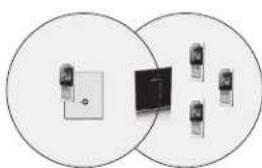
Reception area for one or more DECT handsets increases when using the DECT Repeater.
As a result, you can use a cordless DECT phone on a larger plot of land or in a larger building.
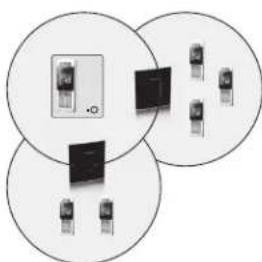
You can use more than one DECT Repeater (up to 6) to enlarge the reception area for DECT phones.
However, it is to note that each DECT Repeater is located within the reception range of the base station.
The appropriate position of the DECT Repeater allows you to switch from one radio cell to the next, without breaking the conversation. The handset will automatically make this change and you would not notice that.
Important!

Cascading of several DECT Repeaters does not improve the range increase.
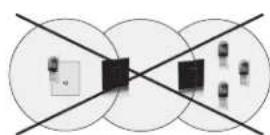
Registration of the DECT Repeater on the DECT Base Station
The DECT Repeater must be registered on your DECT base station first. This procedure works basically as an application for an additional handset on the DECT base station.
Depending on the base station, the automatic or manual registration is required. If the automatic registration fails, perform the manual registration.
Due to the wide range of DECT base stations on the market, some problems with the registration may occur.

Successful registration conditions:
cryption on your phone must be disabled.
Your phone must be Repeater-compatible. This function may need to be activated on the phone.
ECO-mode (Power saving mode must be switched off).
Perform the registration near the DECT base station (at least 1 m distance).
During registration, pay attention to the flashes of the DECT Repeater.
A DECT handset is additionally required for manual registration. Ensure also that the DECT base station connection code is .0000*.
After successful registration, separate the DECT Repeater from the power supply and place it at the desired location. The previous successful registration will not be lost!
a) Automatic Registration
- The DECT Repeater must not be switched on, pull the mains plug of the DECT Repeater from the mains socket.
- Enable the registration mode for handsets on your DECT base station. Usually, a button on the DECT base station is to be pressed for a while. Refer to the operating instructions to your DECT phone for further information.
- Now connect the DECT Repeater to the power supply and the mains plug to a mains socket.
- The DECT Repeater should not be registered on another base station. In such a case, press the button on the back of the DECT Repeater for 10-20 seconds, to put it in automatic registration mode.
- The LED indicator of the DECT Repeater flashes 2x red, makes a pause, flashes again 2x red, etc.
- After some time the LED indicator of the DECT Repeater should glow permanently green. The registration process is complete and the DECT Repeater is ready for use.
If the LED indicator still flashes red, perform the registration process again.
For some DECT base stations no automatic registration is possible. In this case, follow the instructions in the next section .b) Manual Registration".
b) Manual Registration
Therefore, in addition to your DECT base station and the DECT Repeater, also a featured DECT handset is required. Keep also the operating instructions for your phone.
Your phone (DECT base station and DECT handset) must be ready for operation and the DECT handset must be already registered on the DECT base station.
1. Set the DECT Repeater to the registration mode
Hold the button on the back of the DECT Repeater pressed for 2-10 seconds. The LED indicator of the DECT Repeater flashes slowly red.
So, the DECT Repeater is in the registration mode for 5 minutes. If the registration does not happen during this time, repeat the registration process.
2. Enable the registration mode on your DECT base station
Usually, a button on the DECT base station is to be pressed for a while. Refer to the operating instructions for your phone.
3. The LED indicator of the DECT Repeater flashes
- If the LED indicator flashes very fast red (without breaks), proceed to step 5.
- If the LED indicator flashes fast red, but with breaks, proceed to step 4.
- If the LED indicator continues flashing only slow red, no signal was detected. In this case repeat step 2. It helps in some DECT base stations just to turn off the power of the DECT base station, and then to restart the registration mode (step 2).
4. Registration of the handset
The DECT base station connection code is not set to 0000^ , however, it must be set for the DECT Repeater to 0000^ again.
- Reset the connection code to .0000". Refer to the operating instructions for your DECT phone.
- Then the handset must be registered on the base station again, even if it was already registered on the base station.
- Perform the manual registration process for the DECT Repeater again. So, the red LED indicator in step 3 should blink very fast red (without breaks), so that you can now proceed to step 5.
5. Repeater number assigning
- You must now assign a Repeater number to the DECT Repeater (2...7).
Each number can be assigned only once. This Repeater number is independent on the handset number of the registered handsets. Up to 6 repeaters can be registered on one DECT base station. - Lift the handset (as if you would have a telephone conversation).
- The red LED indicator on the DECT Repeater should now stop flashing.
- Press a number between 2 and 7 on the handset.
- If the DECT Repeater has accepted the selected number, the green LED indicator on the DECT Repeater will flash many times. If the selected number was not accepted, it is already busy and you have to choose a different number.
- Finish the registration, by pressing the button _ (star key) on the handset and then disconnect (hang up).
- The DECT Repeater is reset. This LED indicator goes out for about 2 seconds, then flashes short red and after that will light up green.
- With this step the registration of the DECT Repeater is completed and the settings are saved.
- The DECT Repeater can be separated now from the power supply and set to the desired location. The previous successful registration will not be lost!
If you want to use several DECT Repeater, please note that each Repeater must be individually registered on the base station, (2-7) get its own Repeater number and that there is a minimum distance of 10m between two Repeaters (in case of overlapping reception reception range).
Between the DECT base station and the DECT repeaters a distance of at least 10 metres should be also kept, otherwise it may cause the noise within the transfer area between the DECT Repeater and the DECT base station during the phone conversation (the handset switches between DECT repeater(s) and the DECT base station).
c) Switching the Signal Tone on/off
As soon as the handset connects to the base station via the DECT Repeater (located in the extended range), a signal tone can be heard in certain intervals of time from the loudspeaker of the corresponding handset. This tone can or switched on/off.
- To switch on/off the signal tone, hold the button on the back of the DECT Repeater pressed for more than 20 seconds.
- In normal operation, the Green LED indicates whether the signal tone is on or off:
Green LED indicator lights permanently > tone off
Green LED flashes every 5 seconds > tone on
Overview of Key Features
Various functions are activated by different pushing the button on the back of the DECT Repeater.
The following table gives an overview:
| Operation period LED Indicator Function | ||
| 0-2 s | red: offgreen: off | none |
| 2-10 s | red: flashes slowlygreen: off | manual registration |
| 10-20 s | red: flashes 2x with breaksgreen: off | automatic registration |
| 20-60 s | red: offgreen: flashes permanentlygreen: goes out every 5 s | signal tone offsignal tone on |
| 60 s or longer | red: offgreen: off | none |
If one of the two registration functions runs (manually or automatically), already existing registrations will be deleted.
Installation
- After successful registration, the DECT Repeater can be separated from the power supply. Then put it in operation, where you want to improve the reception of DECT handsets.
- Find a place on the edge of the reception range of the base station to extend the range possibly well. To do this, set up a connection to the base station with the handset and stray so far from it that a better reception is possible. This is the best mounting place for the DECT Repeater.
- The DECT Repeater can be suspended to the wall by means of a screw (there is a mounting hole on the back of the DECT Repeater).

Pay attention when drilling/tightening the screws that no power, gas or water pipes are damaged!
Find a place that is not near electrical wires or devices.
Keep sufficient distance to metal parts (e.g., radiators, metal doors).
Mount some DECT Repeaters side by side. Keep a minimum distance of 10 metres between the DECT repeaters and also to the base station (in case of overlapping reception range).
For best reception, the DECT Repeater should be mounted as high as possible.
After mounting and connecting to the power supply, the green LED indicator on the DECT Repeater must flash permanently. If it is flashing red, the reception area is exceeded and the DECT Repeater must be mounted closer to the base station.
Maintenance and Care

Before cleaning the DECT Repeater, disconnect it from the power supply (unplug the power supply unit from the mains socket!).
Absolutely prevent wetness or dampness from penetrating into the device.
- Never use abrasive cleaning agents, rubbing alcohol or other chemical solutions, since these could damage the housing or even impair operation.
- Use a dry, lint-free cloth to clean the product.
Declaration of Conformity (DOC)
We, Conrad Electronic SE, Klaus-Conrad-Straße 1, D-92240 Hirschau, hereby declare that this product conforms to the 2014/53/EU directive.

The full text of the EU conformity declaration is available via the following Internet address: www.conrad.com/downloads
Select language by clicking a flag symbol and enter the order number of the product in the search field; then you will be able to download the EU declaration of conformity in PDF format.
Disposal

Electronic devices are recyclable material and do not belong in the household waste. Dispos of an unserviceable product in accordance with the relevant statutory regulations.
Technical Data
Operating voltage of power adapter. 100-240 VAC, 50/60 Hz
Operating voltage of DECT Repeater.....5.5 V/DC
Range. 50/300 m (Indoor area/free-field conditions)
Transmission standard DECT GAP
Sensitivity. -92 dBm
Operating conditions. -10 to +50^
Dimensions (W x H x D) 120 x 130 x 30 mm
Weight 130g
This is a publication by Conrad Electronic SE, Klaus-Conrad-Str. 1, D-92240 Hirschau (www.conrad.com). All rights including translation reserved. Reproduction by any method, e.g. photocopry, microfilming, or the capture in electronic data processing systems require the prior written approval by the editor. Reprinting, also in part, is prohibited. This publication represent the technical status at the time of printing. © Copyright 2016 by Conrad Electronic SE. 1499656_V1_0916_01_VTP_m_en
Mode d'emploi
Répéteur DECT
N^ de commande 1499656
Dimensions (L x H x P) 120 x 130 x 30 mm
Poids. 130g
Gebruiksaanwijzing
DECT repeater
Bestelnr. 1499656