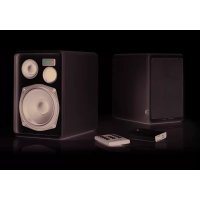
Living LV22 - Loudspeaker AUDIO PRO - Free user manual and instructions
Find the device manual for free Living LV22 AUDIO PRO in PDF.



| Product type | Active DSP wireless speaker, 2-way bass reflex enclosure |
| Model | Living LV22 |
| Brand | Audio Pro |
| Dimensions (H x W x D) | 213 x 148 x 205 mm |
| Power supply | 230 V AC |
| Power consumption | 3.4 W to 60 W max (per speaker), standby 0.3 W |
| Amplifier | 2 x 25 W digital Class D |
| Tweeter | 1" soft dome |
| Woofer | 4.5" paper cone |
| Frequency range | 45 Hz - 22,000 Hz |
| Crossover frequency | 2700 Hz (24 dB/octave) |
| RF band | 2.4 GHz |
| Wireless range (between rooms) | Up to 20 m |
| Wireless range (same room) | Up to 50 m |
| Wireless range (outdoors) | Up to 100 m |
| Audio inputs | USB, combined optical/analog line input |
| Functions | Main volume, zone volume (A/B/C), house code (1/2/3), pairing, satellite/full range mode |
| Remote control | Included |
| Care and cleaning | Use a dry cloth, do not block ventilation openings, leave 10 cm free space around |
| Safety | Read instructions, do not expose to moisture, unplug if not used for long periods, repair by qualified personnel |
| Operating temperature | 5 °C to 40 °C |
| Humidity | 30% to 90% (non-condensing) |
Frequently Asked Questions - Living LV22 AUDIO PRO
User questions about Living LV22 AUDIO PRO
0 question about this device. Answer the ones you know or ask your own.
Ask a new question about this device
Download the instructions for your Loudspeaker in PDF format for free! Find your manual Living LV22 - AUDIO PRO and take your electronic device back in hand. On this page are published all the documents necessary for the use of your device. Living LV22 by AUDIO PRO.
USER MANUAL Living LV22 AUDIO PRO
Audio Pro, the Audio Pro logotype, the 'a' symbol, and acobass are all registered trademarks of Audio Pro AB, Sweden. All rights reserved. Audio Pro follows a policy of continuous advancement in development. Specifications may be changed without notice.
Apple TV, AirPort Express, AirPlay, iPhone, iPod classic, iPod nano, iPod shuffle, iPod touch, iPad and Safari are trademarks of Apple Inc., registered in the U.S. and other countries.
Google, the Google Logo, Google Apps, Android, Android Market, Google Places, Google Maps, YouTube, Google Navigation, Google Calendar, Gmail and Google Search are trademarks of Google Inc. The Android robot is created and shared by Google and used according to the Creative Commons 3.0 Attribution License.


The lightning flash with arrowhead symbol, within an equilateral triangle, is intended to alert the user to the presence of uninsulated "dangerous voltage" within the product's enclosure that may be of sufficient magnitude to constitute a risk of electric shock to persons.

The exclamation point within an equilateral triangle is intended to alert the user to the presence of important operating and maintenance (servicing) instructions in the literature accompanying the appliance.
WARNING:
TO REDUCE THE RISK OF FIRE OR ELECTRIC SHOCK,DO NOT EXPOSE THIS APPARATUS TO RAIN OR MOISTURE.
CAUTION:
TO REDUCE THE RISK OF ELECTRIC SHOCK, DO NOT REMOVE COVER [OR BACK]. NO USER SERVICEABLE PARTS INSIDE. REFER SERVICING TO QUALIFIED SERVICE PERSONNEL
IMPORTANT SAFETY INSTRUCTIONS
- Read these instructions.
- Keep these instructions.
- Heed all warnings.
- Follow all instructions.
- Do not use this apparatus near water.
-
Clean only with dry cloth
-
Do not block any ventilation openings. Install in accordance with the manufacturer's instructions.
- Do not install near any heat sources such as radiators, heater registers, stoves, or other apparatus (including amplifiers) that produce heat.
- Protect the power cord from being walked on or pinched particularly of plugs, convenience receptacles, and the point where they exit from the apparatus.
- Only use attachments/accessories specified by the manufacturer.
- Unplug this apparatus during lightning storms or when unused for long periods of time.
-
Refer all servicing to qualified service personnel. Servicing is required when the apparatus has been damaged in any way, such as power-supply cord or plug is damaged, liquid has been spilled or objects have fallen into the apparatus, the apparatus has been exposed to rain or moisture, does not operate normally, or has been dropped.
-
Damage Requiring Service
Ulug the apparatus from the wall suite and refer servicing to qualified service personnel under those following conditions A. When the power-supply cord or plug is damaged, B. If liquid has been spilled, or objects have fallen into the apparatus,
C. If the apparatus has been exposed to rain or water, D. If the apparatus does not operate normally by following the operating instructions. Adjust only those controls that are covered by the operating instructions as an improper adjustment of other controls may result in damage and will often require extensive work by a qualified technician to restore the apparatus to its normal operation.
E If the apparatus has been dropped or damaged in any way, and F When the apparatus exhibits a distinct change in perfor once this indicates a need for service - Object and Liquid Entry
Never push objects of any kind into the apparatus through openings as they may touch dangerous voltage points or short-out parts that could result in a fire or electric shock. The apparatus shall not be exposed to dripping or splashing and no objects filled with liquids, such as vases shall be placed on the apparatus. Don't put candles or other burning objects on top of this unit. - Batteries
Always consider the environmental issues and follow local regulations when disposing of batteries. - The power supply and power cord for this apparatus is intended for indoor use only.
ENGLISH
SPECIFICATIONS
Type:
Powered wireless loudspeaker system with DSP, 2-way bass reflex cabinet
Amplifier: 2 × 25W digital Class D, left and right speaker
Tweeter: 1" soft dome
Woofer: 4.5" paper cone
Frequency range: 45 - 22.000 Hz
Crossover frequency: 2700 Hz (24 dB/octave L/R)
Dimensions HxWxD mm: 213x148x205
Power consumption: On: 3.4W to 60W max (each speaker) Standby: 0.3W (each speaker)
FEATURES
- Built-in wireless receiver in each speaker
- Wireless full CD quality sound
- Wireless range room to room: Up to 20 m
- Wireless range in some room: Up to 50 m
- Wireless rangein open area: Up to 100 m
- No interference or delays
- Works with both Mac and PC
RF band: 2.4GHz - Sample rate: 48 kHz
Dedicated proprietary protocol
OVERVIEW
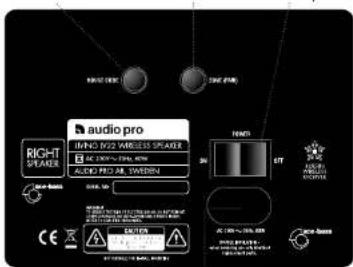
REMOTEREAR PANEL
Main powerHouse Code button Zone/Fair button
To 230V AC outlet
On/OFF
Master volume
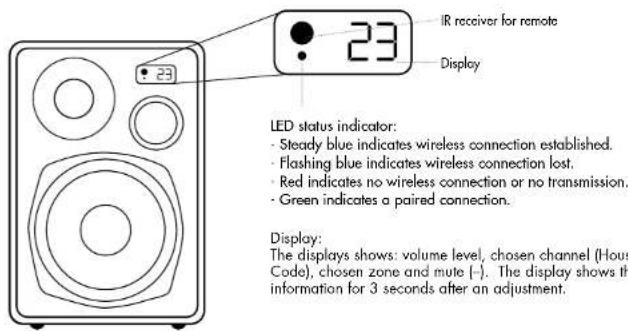
Shows selected House Code in display, 1, 2, 3
Source: Only used in combination with LV-HUB.
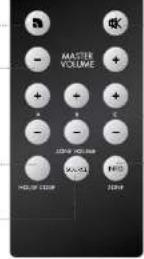
Muto
Zone volume
Shows selected zone in display A.B.C
NOTE:
To use remote, aim at IR-eye on RIGHT speaker. (Only RIGHT speaker can receive remote commands.)
OVERVIEW continued
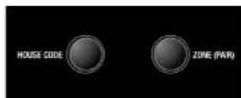
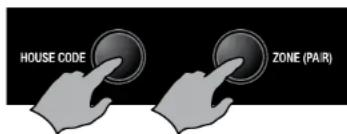
The House Code selection and Zone selection buttons are located on the rear of the LV22 speakers.
- House Code, press once to display the chosen channel (1, 2, 3). Further press changes the channel: 1>2; 3>4 and back to 1.
- Zone, press once to display the chosen volume zone (A, B, C). Further presses change the zone A>B>C and back to A.
TXD200 TRANSMITTER
- House Code selector.
Choose channel for the transmitter. - LED.
Blue indicates connection.
Red indicates no connection
Green indicates paired connection. - Pairing button. Press this on the transmitter and on the speaker(s) to pair.
- USB in. For connecting to a computer
Or to connect a power supply when using an audio source connected to line in. - Line in. Combined optical and analogue. For connecting the transmitter to an audio device other than a computer.

BASIC CONFIGURATION
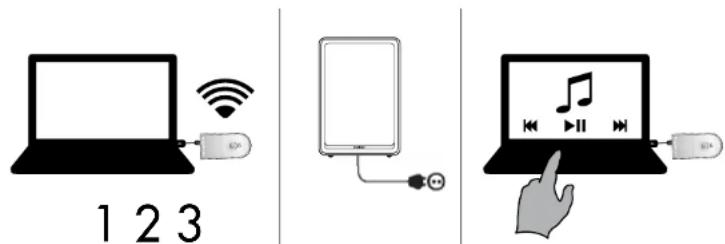
Before connecting to a computer, see Mac or PC setup.
- Connect the TXD200 transmitter to the computer.
- Connect both LV22 speakers to 230V outlet.
- Donel Play your music on your computer.
WIRELESS STATUS:
LED is blue on the speakers and transmitters if a wireless connection has been established.
LED is red on the speakers and transmitters if no wireless connection has been established.
LED is green on the speakers and transmitters if a paired wireless connection has been established.
Note:
- Make sure that the speaker(s) and the transmitter use the same House Code (channel 1, 2 or 3).
- If the speakers are in automatic standby mode, the LED will be red even if a wireless connection has been established. This turns blue when the speakers receive an audio signal.
MAC SETUP
- Connect the TXD200 transmitter to a free USB port.
- Go to System Preferences and choose Sound under Hardware.
- Click Output in the menu and choose "Audio Pro TXD200".
Done! You can now send audio signals from your computer.
PC SETUP
Please carry out the following setup before using music playing software (for example iTunes or Spotify).
- Connect the TXD200 transmitter to a free USB port. Wait until the software has been installed.
[A message window will be displayed in the lower right hand corner when the sound device is ready to use.] Done! You can now send audio signals from your computer.
For some PC computers (e.g. with the Windows 7 operating system) you may also need to perform the following steps:
2. Click Start button, go to Control Panel and choose Sound & Sound devices.
3. Under playback of audio, choose "TXD200" as the default unit.
Done! You can now send audio signals from your computer.
PAIRED AND UNPAIRED MODE

Pairing protects your Audio Pro network from interference from other nearby Audio Pro Wireless networks.
PAIRING YOUR LV22 SPEAKERS WITH THE TXD200 TRANSMITTER
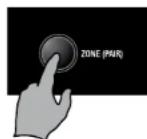
1. Press and hold down the Pairing button on the transmitter for 2 seconds. The LED starts to flash green.
2. Press and hold down the ZONE/PAIR button on the LV22 speaker for 3 seconds. (The button is located on the back of the speaker.) The LED starts to flash green.
3. When the LEDs on the transmitter and the speaker(s) become a steady green, the system is paired.
NOTE:
The Master Volume is disabled in paired mode. Use the A-B-C zone volume controls instead
UNPAIRED MODE
The TXD200/LV-HUB transmitters work in unpaired mode with all Living speakers. The LV22 works with the TX100 transmitter in unpaired mode
UNPAIRING SPEAKERS:
To unpair a system (all the speakers in the same volume zone will be unpaired):
1. Disconnect the TXD200 from the power source.
2. While pressing the pairing button, reconnect the TXD200 to the power source and hold down the pairing button for about 3 seconds. Release the button when the LED turns red (blue
3. Turn the LV22 speaker off using the main switch on the rear panel. While turning the
speaker on again, hold the House Code button pressed down.
USE LV22 WITH LV-SUB FLAT SUBWOOFER
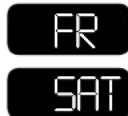
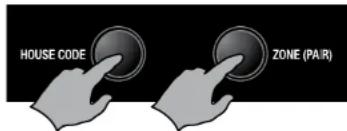
The LV22 can be used in two modes, SATELLITE or FULLRANGE.
The satellite mode is adapted for use together with the Living LV-SUB
FLAT SUBWOOFER.
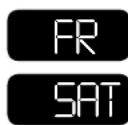
Push and hold down both the House Code and the Zone buttons for 3 seconds; SAT will appear on the display. Repeat the same procedure to switch to fullrange. Repeat the procedure on both speakers.
Note: In satellite mode, frequencies under 80Hz are disregarded for LV22 playback. When LV22 is used in satellite mode together with LV-SUB, you can play at a considerably higher volume.
OPERATING WITH THE LV-HUB
The Living LV-HUB (sold separately) provides convenient features such as listening to different sources in different rooms. The sources connected to the LV-HUB can also be changed via the speakers, using the remote control.
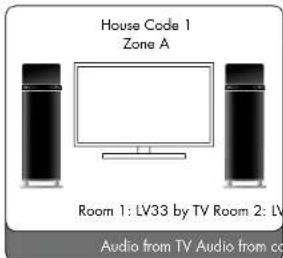
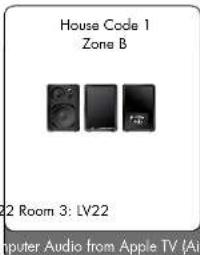
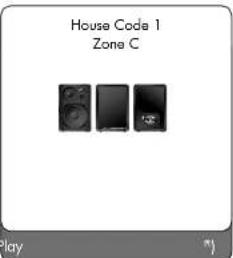
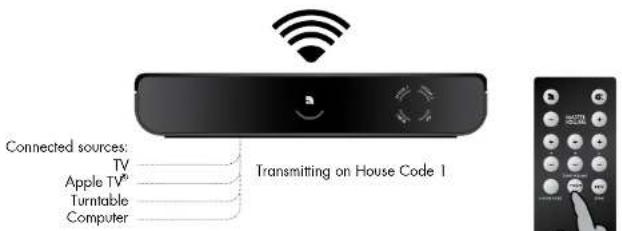
- Set all the speakers and the LV-HUB to the same House Code.
- Set the speakers in each room to zone A, B or C.
- Pair the LV-HUB with all the speakers (See Pairing in the relevant speaker manual.)
- Connect up to 4 sources to the LV-HUB
You can now play to any of the speakers (even in different zones) from any source that is connected to the LV-HUB.
Changing the source: use the remote control and aim it at the speaker in order to change the source. You can change the source in each room via the speakers, using the remote control, and listen to different sources in different rooms at the same time. Example:
- Watch a film with wireless sound in Room 1.
- Listen to music on a computer in Room 2.
- Listen to music via AirPlay® (via Apple TV®) in Room 3.
The speaker display will show the following for the sources: USB-LI-OP1-OP2
PAIRED & UNPAIRED MODE WITH THE LIVING LV-HUB
Unpaired mode:
- Works with all Living speakers.
- Change source on the LV-HUB using the remote control.
- The LV-HUB is set to the same House Code as the speakers.
Paired mode:
- Works with LV22 and LV33 speakers.
- Change source on speakers (LV-HUB can thus be concealed).
- Network is protected from possible other Audio Pro networks nearby.
Note:
- In paired mode: The source selection applies to the ZONE, i.e. all speakers set to the same zone will play from same source.
- If you add a TXD200 transmitter, and this is paired, you can also change the House Code on the speakers in order to choose different Transmitters from which to listen (for example, HC1 on LV-HUB and HC2 on TXD200).
RESETTING THE SPEAKERS
Return to factory settings (volume 17, boss EQ 0):
Turn off the speakers using the remote control. Turn on the speakers again and press MUTE on the remote control while the LED flashes. Press MUTE again. Now all the paired speakers (or all the speakers in same zone) will have returned to the default settings.
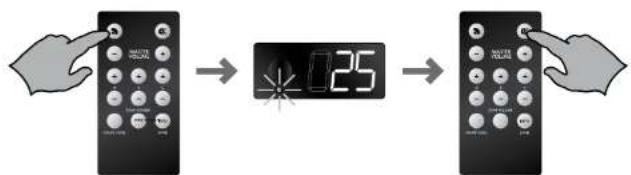
ADJUST VOLUME SEPARATELY IN DIFFERENT ZONES
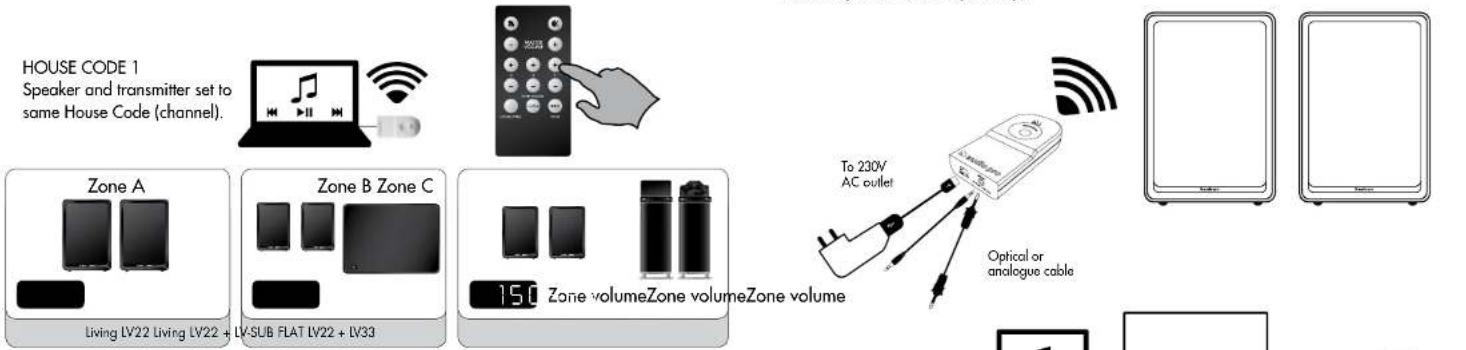
In order to be able to have the same music at different volumes in different rooms/areas, you can divide each House Code into 3 different volume zones. Each zone can have a different volume. This is very useful if, for example, you want to have one volume level in the living room and a somewhat lower volume in the kitchen. You can have as many LIVING speakers in each zone as you want, or just one pair. The zone volume can easily be controlled from the remote control unit.
PLAYING WIRELESSLY FROM OTHER AUDIO SOURCES
The TXD200 transmitter has a combined analogue/optical sound input. Any optical or analogue device with audio output can be connected to the transmitter. Examples include computers, mp3-players, iPod/iPhone/iPad docking stations, mobile telephones, stereo/receivers, CD players and radios etc. The TXD200 contains an advanced Burr-Brown A/D converter for optimal sound reproduction. The TXD200 transmitter must be powered by an Audio Pro USB power adaptor if connected by cable (solid separately).
Note:
- All the LV22 speakers are assigned to Zone A and have a volume level of 17 by default.
- Each House Code (1, 2 and 3) can be split into up to 3 zones (A, B and C).
- You can have as many speakers as you like on each House Code, and as many as you want in each zone.
A zone does not have to be just one room, but can, for example, be a whole floor in a house.
USING MULTIPLE TRANSMITTERS AND SPEAKERS SIMULTANEOUSLY WITH HOUSE CODE 1, 2 OR 3
Transmitter: House Code 1
Speakers: House Code
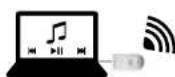

Transmitter: House Code 3
Speakers: House Code 3
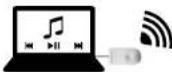
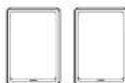
The House Codes (channels) can be used to share the wireless network between up to two separate networks. This makes it possible to simultaneously play music from various audio sources from two different transmitters on different pairs of LIVING speakers.
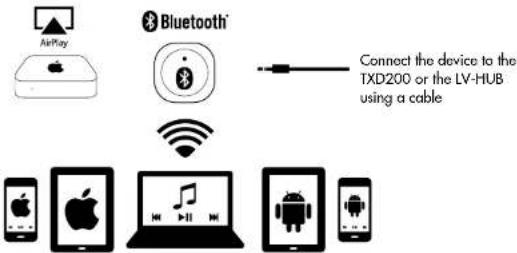
In order to play from handheld devices, connect an AirPort® Express unit or Bluetooth® receiver unit to your Audio Pro transmitter. Set up the AirPlay® or Bluetooth® device according to the relevant user manual.
TROUBLESHOOTING
THE SPEAKERS PLAY AT DIFFERENT VOLUMES
Use the zone-volume buttons for the zone that is set on the speakers, adjust the volume up or down with the remote, and all speakers will be synchronised to the same volume level in the entire zone.
ONE SPEAKER IS ON, THE OTHER OFF
If one of the speakers is disconnected from the power supply whereas others are connected to the power supply, the On/Off function may get out of sync. Proceed as follows in such cases: switch off the main power switch on the left speaker. Depending on the status, switch on or off the right speaker (main speaker with receiver for remote control). Then switch on the power switch on the left speaker again and start up the system with the remote control on the right speaker (while doing this, you should play music so that the speakers are receiving an audio signal).
NETWORK TROUBLESHOOTING
Is the LED light on the transmitter blue?
If the light is red, try moving the transmitter and receiver closer together. Does this turn the LED blue?
Are you using more than one TX100/TXD200 transmitter?
Make sure that the TX100/TXD200's aren't running on the same House Code. If more than one TX100/TXD200 uses the same House Code, interference may occur. Disconnect one transmitter, or change the House Code.
Are you using the same House Code on transmitter and receiver?
Make sure the same House Code is set on both the transmitter and the receiver.
How far apart are the transmitter and receiver?
If distance between the transmitter and receiver is too far, the, connection might be lost.
Try placing the transmitter and receiver in closer proximity, does this help?
Are there wolls between the transmitter and receiver?
If your home has thick concrete walls, or walls of plaster with wire lath, the wireless range will
decrease. Try placing transmitter and receiver in the same room, does this help?
Are there more wireless networks in the area?
If there are many wifi networks running in the area, wireless range can decrease. There are useful apps for iPhone/iPad/iPod touch and Android to detect local wifi networks, and see which channel might be crowded. You can also try to change the channel on your wireless router to improve Audio Pro network range and your own home network wifi performance. (Audio Pro network transmits on channel 1, 6 or 11.)
Is your computer connected to the internet via cable or wifi?
The Audio Pro network can weaken a local wifi network (but not weaken itself). If possible, you should change channel on your wireless router, the Audio Pro network transmits on channel 1, 6, or 11. Choose a new channel on your router, for example 3, 8 or 13. (in total there are 13 channels on the 2.4 GHz band.) There are useful apps for iPhone/iPad/iPod touch and Android to detect local wifi networks, and see which channel might be crowded. If you cannot change the channel on your wireless router, try connecting computer via Ethernet cable instead. Does this help?
Are there Bluetooth units active in the area?
Shut down all active Bluetooth devices. Does this help?
Windows 7 and Mac OS, sound output
When connecting the TX100 transmitter to a computer using Windows 7 or Mac OS, you need to select the sound output. Go to: system settings, find sound settings, and select USB HEADSET as your sound output. (In older Windows OS there is no need for this, TX100 will take over automatically as the sound output device.)

4
2x25W digital Class D
PARALV22MEDTXD200SANDAREN
ATT ANVANDALV22 MED LV-SUB FLAT SUBWOOFER

HÖGTALARNA SPELAR PÁ OLKA VOLYM
The lightning flash with arrowhead symbol, within an equilateral triangle, is intended to alert the user to the presence of uninsulated "dangerous voltage" within the product's enclosure that may be of sufficient magnitude to constitute a risk of electric shock to persons.

The exclamation point within an equilateral triangle is intended to alert the user to the presence of important operating and maintenance [servicing] instructions in the literature accompanying the appliance.
WARNING:
TO REDUCE THE RISK OF FIRE OR ELECTRIC SHOCK,DO NOT EXPOSE THIS APPARATUS TO RAIN OR MOISTURE.
CAUTION:
TO REDUCE THE RISK OF ELECTRIC SHOCK, DO NOT REMOVE COVER [OR BACK]. NO USER-SERVICEABLE PARTS INSIDE. REFER SERVICING TO QUALIFIED SERVICE PERSONNEL
IMPORTANT SAFETY INSTRUCTIONS
- Read these instructions.
- Keep these instructions.
- Heed all warnings.
- Follow all instructions.
- Do not use this apparatus near water.
-
Clean only with dry cloth.
-
Do not block any ventilation openings. Install in accordance with the manufacturer's instructions.
-
Do not install near any heat sources such as radiators, heat registers, sloves, or other apparatus (including amplifiers) that produce heat.
-
Protect the power cord from being walked on or pinched particularly at plugs, convenience receptacles, and the point where they exit from the apparatus.
- Only use attachments/accessories specified by the manufacturer.
- Unplug this apparatus during lightning storms or when unused for long periods of time.
-
Refer all servicing to qualified service personnel. Servicing is required when the apparatus has been damaged in any way, such as power-supply cord or plug is damaged, liquid has been spilled or objects have fallen into the apparatus, the apparatus has been exposed to rain or moisture, does not operate normally, or has been dropped.
-
Damage Requiring Service
Unplug the apparatus from the wall outlet and refer servicing to qualified service personnel under the following conditions A.When the power-supply cord or plug is damaged, B. If liquid has been spilled, or objects have fallen into the apparatus,
C. If the apparatus has been exposed to rain or water, D. If the apparatus does not operate normally by following the operating instructions. Adjust only those controls that are covered by the operating instructions as an improper adjustment of other controls may result in damage and will often require extensive work by a qualified technician to restore the apparatus to its normal operation.
E If the apparatus has been dropped or damaged in any way, and F When the apparatus exhibits a distinct change in perforance this indicates a need for service.
- Object and Liquid Entry
Never push objects of any kind into the apparatus through openings as they may touch dangerous voltage points or short-out parts that could result in a fire or electric shock. The apparatus shall not be exposed to dripping or splashing and no objects filled with liquids, such as vases shall be placed on the apparatus. Don't put candles or other burning objects on top of this unit.
- Batteries
Always consider the environmental issues and follow local regulations when disposing of batteries.
- The power supply and power cord for this apparatus is intended for indoor use only.
ESPANOL
ESPECIFICACIONES
Modelo:
Huringa tai hairiota aengess?
Onko lhein klykety toistetovc ana letteseen sekai USBliantan, etta analogiseau AUXliantan? I helen tulee klyke erillisen USB-virtahteeseen koytendess anologista liantana (esim IV:n kulokelitantaa) hainoiden viltemiseks
- IMPORTANT SAFETY INSTRUCTIONS
- ENGLISH
- SPECIFICATIONS
- FEATURES
- OVERVIEW
- TXD200 TRANSMITTER
- BASIC CONFIGURATION
- WIRELESS STATUS
- NOTE
- MAC SETUP
- PC SETUP
- PAIRED AND UNPAIRED MODE
- UNPAIRED MODE
- USE LV22 WITH LV-SUB FLAT SUBWOOFER
- OPERATING WITH THE LV-HUB
- PAIRED & UNPAIRED MODE WITH THE LIVING LV-HUB
- RESETTING THE SPEAKERS
- ADJUST VOLUME SEPARATELY IN DIFFERENT ZONES
- PLAYING WIRELESSLY FROM OTHER AUDIO SOURCES
- USING MULTIPLE TRANSMITTERS AND SPEAKERS SIMULTANEOUSLY WITH HOUSE CODE 1, 2 OR 3
- TROUBLESHOOTING
- THE SPEAKERS PLAY AT DIFFERENT VOLUMES
- ONE SPEAKER IS ON, THE OTHER OFF
- NETWORK TROUBLESHOOTING
- IS THE LED LIGHT ON THE TRANSMITTER BLUE
- ARE YOU USING MORE THAN ONE TX100/TXD200 TRANSMITTER
- ARE YOU USING THE SAME HOUSE CODE ON TRANSMITTER AND RECEIVER
- HOW FAR APART ARE THE TRANSMITTER AND RECEIVER
- ARE THERE WOLLS BETWEEN THE TRANSMITTER AND RECEIVER
- ARE THERE MORE WIRELESS NETWORKS IN THE AREA
- IS YOUR COMPUTER CONNECTED TO THE INTERNET VIA CABLE OR WIFI
- ARE THERE BLUETOOTH UNITS ACTIVE IN THE AREA
- WINDOWS 7 AND MAC OS, SOUND OUTPUT
- 4
- PARALV22MEDTXD200SANDAREN
- ATT ANVANDALV22 MED LV-SUB FLAT SUBWOOFER
- HÖGTALARNA SPELAR PÁ OLKA VOLYM
- WARNING
- CAUTION
- ESPANOL
- ESPECIFICACIONES
Brand : AUDIO PRO
Model : Living LV22
Category : Loudspeaker