Drumfire D1 - Loudspeaker AUDIO PRO - Free user manual and instructions
Find the device manual for free Drumfire D1 AUDIO PRO in PDF.


| Product type | Amplified stereo speaker with bass-reflex |
| Amplifier | Class D, 2×20W + 60W |
| Tweeter | 2 × 3/4" (19 mm) fabric dome |
| Woofer | 2 × 4.5" (114 mm) |
| Frequency response | 45 - 22,000 Hz |
| Crossover frequency | 2,500 Hz |
| Dimensions (W × H × D) | 365 × 155 × 190 mm |
| Network connectivity | Wi-Fi 802.11 b/g/n 2.4 GHz, Bluetooth V4.0 |
| Audio inputs | Line in RCA and 3.5 mm stereo |
| Output | Sub out (RCA) |
| Supported audio formats | MP3, WMA, AAC, FLAC, Apple Lossless |
| Power consumption (WiFi / STB / ON) | 1.75 W / 0.48 W / 7.4 W |
| Operating temperature | 5 to 40 °C |
| Operating humidity | 30% to 90% (non-condensing) |
| Power supply | Provided AC adapter, indoor use only |
| Apple AirPlay compatibility | Yes, but streaming limited to a single speaker |
| Speaker grouping | Up to 6 speakers per group via the app |
| Cleaning | Dry cloth only |
| Maintenance | Do not block ventilation slots, leave 10 cm clearance |
| Repairability | Repair by qualified personnel only |
Frequently Asked Questions - Drumfire D1 AUDIO PRO
User questions about Drumfire D1 AUDIO PRO
0 question about this device. Answer the ones you know or ask your own.
Ask a new question about this device
Download the instructions for your Loudspeaker in PDF format for free! Find your manual Drumfire D1 - AUDIO PRO and take your electronic device back in hand. On this page are published all the documents necessary for the use of your device. Drumfire D1 by AUDIO PRO.
USER MANUAL Drumfire D1 AUDIO PRO
The Audio Pro Connected HiFi products lets you enjoy wireless multiroom sound that enables you to enjoy your favorite music anywhere and everywhere around your home.
By utilizing your existing home network and the Audio Pro app on your iOS or Android™ device, you can explore, browse, and play music from your own music library or from many online streaming music services.
In addition to easy wifi connection there is also Bluetooth wireless technology if you don't have a network. You can also connect your TV, turntable or cd-player by cable to enjoy all your music.
The legendary Audio Pro sound quality is included.

Your new speaker has Spotify Connect built in.
You need a Spotify Premium subscription to take advantage of
Spotify Connect. Spotify Connect lets you control the music playing on your device, using the Spotify app on your mobile, tablet or PC. Listening is seamless. You can take calls, play games, even switch your phone off - all without interrupting the music. Learn more at Spotify.com/connect
The Spotify software is subject to third party licenses found here: www.spotify.com/connect/third-party-licenses

Apple, the Apple logo, Airplay, iPad, iPhone, and iPod touch are trademarks of Apple Inc., registered in the U.S. and other countries. App Store is a service mark of Apple Inc.
Bluetooth 4.0
The Bluetooth® word mark and logos are registered trademarks owned by Bluetooth SIG, Inc. and any use of such marks by AUDIO PRO AB, is under license. Other trademarks and tradenames are those of thier respective owners.
Works with
Android
Google, the Google logo, Google Apps, Android, Android Market, Google Places, Google Maps, YouTube, Google Navigation, Google Calendar, Gmail and Google Search are trademarks of Google Inc. Android™ is a trademark of Google, Inc. The Android robot is created and shared by Google and used according to the Creative Commons 3.0 Attribution License.
The Wi-Fi CERTIFIED Logo is a certification mark of the Wi-Fi Alliance.
audio pro
© AUDIO PRO AB, SWEDEN. ALL RIGHTS RESERVED.
TRADEMARKS ARE THE PROPERTY OF AUDIO PRO AB, SWEDEN.
Audio Pro, Box 22272, Garnisonsgatan 52, SE-250 24 Helsingborg, Sweden
©1978-2018 Audio Pro AB Sweden.
Audio Pro®, the Audio Pro logotype, the 'a' symbol, and ace-bass® are all registered trademarks of Audio Pro AB, Sweden. All rights reserved. Audio Pro follows a policy of continuous advancement in development. Specifications may be changed without notice.
All other products and services mentioned may be trademarks or service marks of their respective owners.
THIS DOCUMENT CONTAINS INFORMATION THAT IS
SUBJECT TO CHANGE WITHOUT NOTICE.
Anslut till natverk
Connect to network
- NETWORK: Your network must have a high-speed internet connection, as the Audio Pro system is designed to utilise free, online software updates.
PLEASE NOTE:
Audio Pro speakers communicate via a 2.4GHz home network with support for 802.11 b/g/n wireless technology. 5GHz networks are not supported in an Audio Pro setup.
- ROUTER: High-speed DSL/cable modem, or fibre-to-the-home broadband connection for proper playback of internet-based music services.
Different routers provide different levels of performance. Please use a good wireless router to achieve the best possible performance.
Wireless router with internet connection.
iOS or Android device connected to your network.
Character set UTF8 for password is supported. (Not Åö or special characters).
Place the speaker close to the router when carrying out the setup. You can subsequently view the signal strength in the app in order to test other positions.
Connect to a wired network with an Ethernet cable.
Press and hold down the speaker field while dragging it onto the other field in order to group.
To ungroup, press and hold down the speaker field while dragging it under the dotted line.
The speaker onto which you release the speaker field becomes the master speaker. Music will play on all speakers in a group. Their volumes can be adjusted separately. Up to 6 speakers can be combined in one group.
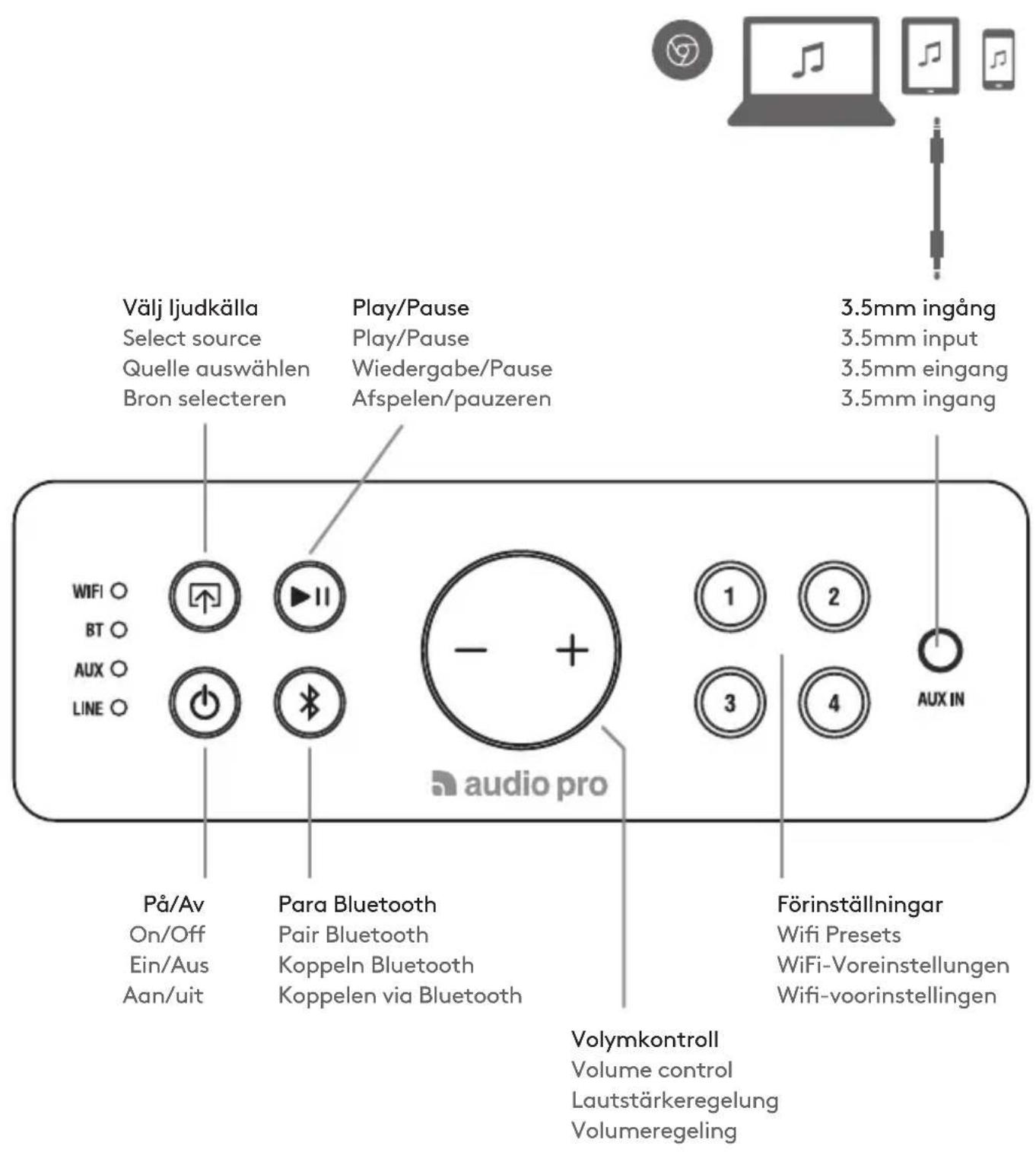
Play content in the app. Press the preset button for approx. 3 s until sound is heard. Done!
When in the app using the various services, press the speaker icon.
Connected devices sound can be played to more speakers wirelessly. Choose master speaker in group to play.
You can connect Drumfire to your TV with a cable (3.5mm stereo or RCA).
However, lip sync will not work if you choose to stream wirelessly from a Drumfire to more speakers in a group. Only the speaker you connect with cable will play the TV sound in sync.
Listen out loud with Spotify Connect:
- Connect your Audio Pro speaker to your wifi network
- Open up the Spotify app on your phone, tablet or laptop using same wifi network.
- Play a song and select Available Devices.
- Select your Audio Pro speaker and start listening.
You need a Spotify Premium subscription to take advantage of Spotify Connect.
Spotify app launches
Spotify starten
Start de Spotify-app
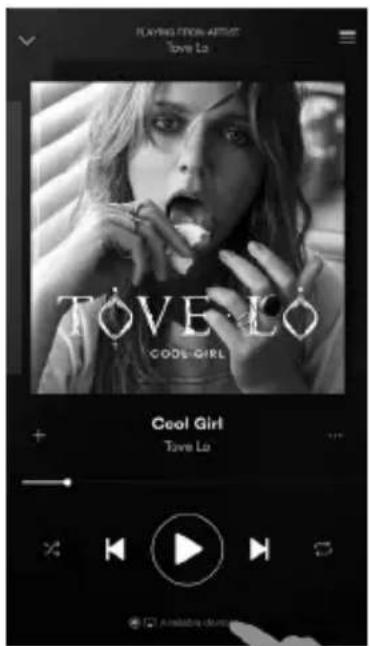
Spela musik
Play music
Musik wiedergeben
Speel muziek af
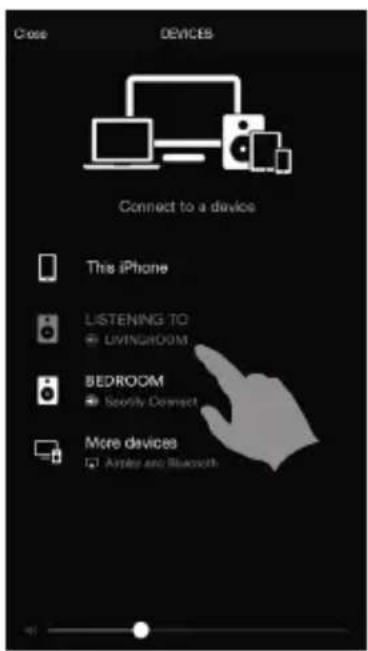
Väj din högtalare.
Choose your speaker.
Go back to the Audio Pro app.
SPELA FRÁN APPLE MUSIC MED AIRPLAY
PLAYING FROM APPLE MUSIC USING AIRPLAY WIEDERGABE VON APPLE MUSIC MIT AIRPLAY AFSPELEN VANUIT APPLE MUSIC VIA AIRPLAY
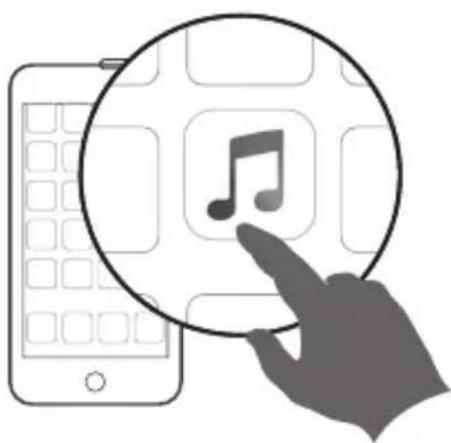
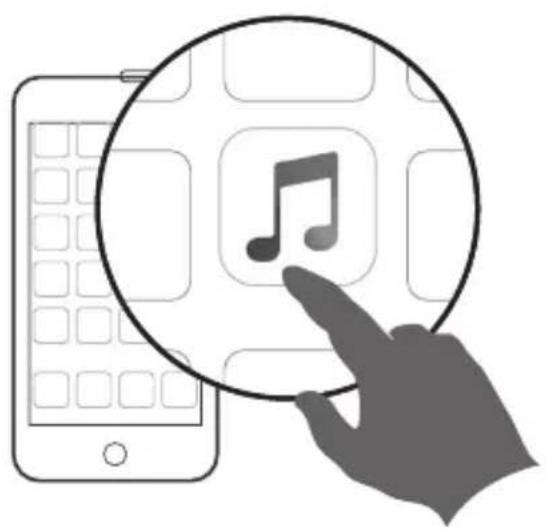
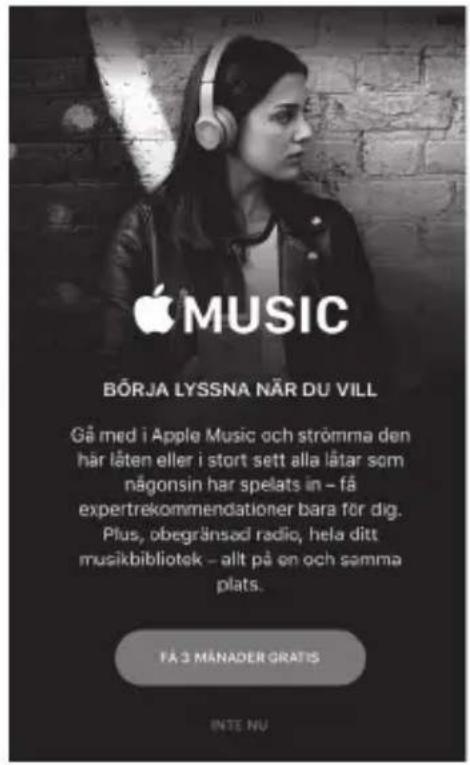
Apple Music öppnas
Apple Music launches
Die Apple-Music-App starten
Apple Music wordt gestart
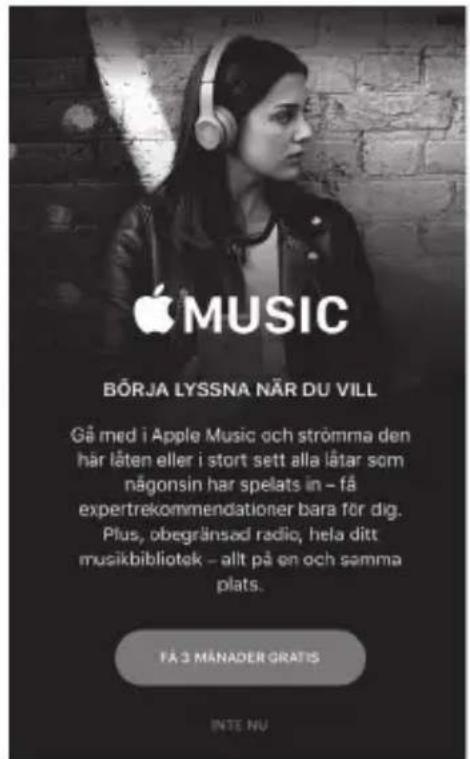
According to Apple regulations, you can only play music to one speaker at a time. Multiroom playback not possible with Airplay.
On your iOS device, swipe up from the bottom of the screen to open the Control Centre. Tap AirPlay, and choose the speaker.
Go back to the Audio Pro app and manage your music.
- Make sure your mobile device is connected to your wireless network before you try to connect your speaker.
- Place the speaker close to the router when carrying out the setup. You can subsequently view the signal strength for other positions in the app.
- Our speakers can only connect to a 2.4 GHz wireless network.
- Try connecting the speaker with an Ethernet cable.
I GET THEMESSAGE "DEVICE CONNECTION Failed"
- Move the speaker closer to the router.
Make sure your mobile device is connected to the same network. - Press the "Wi-Fi Connect" button on the rear of the speaker and press the "Add Speaker" icon in the app.
MUSIC CUTS OUT/STUTTERS OR EXPERIENCES DELAYS
- Make sure your internet connection is working correctly.
- Check for other devices in the network, they might be using a lot of bandwidth. Especially downloads or the streaming of high resolution video.
- Check the signal strength in the Audio Pro app; if the signal strength is low, move closer to the router or connect using an Ethernet cable.
More FAQs and help can be found on audiopro.com/support/
"DEVICE CONNECTION Failed"
Powered stereo speaker with bass reflex
Amplifier: Digital Class D, 2x20W + 60W
Tweeter: 2 × 1'' textile dome tweeter
Woofer: 2 × 4.5''
Frequency range: 45-22.000Hz
Crossover frequency: 2.500Hz
Dimensions HxWxD: 155 × 365 × 190 mm
Inputs: WiFi, Bluetooth V4.0, RCA in and
Aux In 3.5mm stereo
Outputs: RCA Sub output
Wireless network compatibility:
802.11 b/g/n, 2.4GHz only
Supported audio formats:
MP3, WMA, AAC, FLAC, Apple Lossless
Power consumption WiFi/STB/ON:
1.75W/0.48W/7.4W
TECHNISCHE DATEN
LAUTSPRECHER D-1
Typ:
EN: The lightning flash with arrowhead symbol, within an equilateral triangle, is intended to alert the user to the presence of uninsulated "dangerous voltage" within the product's enclosure that may be of sufficient magnitude to constitute a risk of electric shock to persons.
EN: The exclamation point within an equilateral triangle is intended to alert the user to the presence of important operating and maintenance (servicing) instructions in the literature accompanying the appliance.
TO REDUCE THE RISK OF FIRE OR ELECTRIC SHOCK,DO NOT EXPOSE THIS APPARATUS TO RAIN OR MOISTURE.
CAUTION:
TO REDUCE THE RISK OF ELECTRIC SHOCK, DO NOT REMOVE COVER (OR BACK). NO USER-SERVICEABLE PARTS INSIDE. REFER SERVICING TO QUALIFIED SERVICE PERSONNEL.
WAARSCHUWING:
STEL DIT APPARAAT NIET BLOOT AAN REGEN OF VOCHT OM HET RISICO OP BRAND OF EEN ELEKTRISCHE SCHOK TE VERMINDEREN.
OPGELET:
VERWIJDER DE BEHUIZING (OF ACHTERZIJDE) NIET OM HET RISICO OP EEN ELEKTRISCHE SCHOK TE VERMINDEREN. ER ZIJN GEEN ONDERDELEN DIE DOOR DE GEBRUIER KUNNEN WORDEN ONDERHOUDEN. LAAT ONDERHOUD UITVOEREN DOOR BEVOEGDE SERVICEMEDEW-ERKERS.
VIKTIGA SÄKERHETSFORESKRIFTER
IMPORTANT SAFETY INSTRUCTIONS
- Read these instructions.
- Keep these instructions.
- Heed all warnings.
- Follow all instructions.
- Do not use this apparatus near water.
- Clean only with dry cloth.
- Operating temperature (°C) 5-40
Humidity (%) no condensation 30-90 - Do not block any ventilation openings. Install in accordance with the manufacturer's instructions.
- Minimum distances around the apparatus for sufficient ventilation, 10cm
- The ventilation should not be impeded by covering the ventilation openings with items, such as newspapers, table-cloths, curtains, etc.
- Do not install near any heat sources such as radiators, heat registers, stoves, or other apparatus (including amplifiers) that produce heat.
- Protect the power cord from being walked on or pinched particularly at plugs, convenience receptacles, and the point where they exit from the apparatus.
- Only use attachments/accessories specified by the manufacturer.
- Unplug this apparatus during lightning storms or when unused for long periods of time.
- Refer all servicing to qualified service personnel. Servicing is required when the apparatus has been damaged in any way, such as power-supply cord or plug is damaged, liquid has been spilled or objects have fallen into the apparatus, the apparatus has been exposed to rain or moisture, does not operate normally, or has been dropped.
- Damage Requiring Service
Unplug the apparatus from the wall outlet and refer servicing to qualified service personnel under thee following conditions:
A. When the power-supply cord or plug is dam
aged,
B. If liquid has been spilled, or objects have fallen into the apparatus,
C. If the apparatus has been exposed to rain or water,
D. If the apparatus does not operate normally by following the operating instructions. Adjust only those controls that are covered by the operating instructions as an improper adjustment of other controls may result in damage and will often require extensive work by a qualified technician to restore the apparatus to its normal operation, E. If the apparatus has been dropped or damaged in any way, and
F. When the apparatus exhibits a distinct change in performance this indicates a need for service.
17. Object and Liquid Entry
Never push objects of any kind into the apparatus through openings as they may touch dangerous voltage points or short-out parts that could result in a fire or electric shock. The apparatus shall not be exposed to dripping or splashing and no objects filled with liquids, such as vases shall be placed on the apparatus. No naked flame sources such as lighted candles etc., should never be placed on the apparatus.
18. Batteries
Always consider the environmental issues and follow local regulations when disposing of batteries.
19. The power supply and power cord for this apparatus is intended for indoor use only.
THIS DEVICE COMPLIES WITH PART 15 OF THE FCC RULES. OPERATION IS SUBJECT TO THE FOLLOWING TWO CONDITIONS:
1 - THIS DEVICE MAY NOT CAUSE HARMFUL INTERFERENCE.
2 - THIS DEVICE MUST ACCEPT INTERFERENCE RECEIVED, INCLUDING INTERFERENCE THAT MAY CAUSE UNDESIRED OPERATION.
MODEL: D1. FCC ID: 2AGNC - D1
FCC WARNING
Any Changes or modifications not expressly approved by the party responsible for compliance could void the user's authority to operate the equipment. This device complies with part 15 of the FCC Rules. Operation is subject to the following two conditions:
(1) This device may not cause harmful interference, and
(2) this device must accept any interference received, including interference that may cause undesired operation.
This equipment complies with FCC radiation exposure limits set forth for an uncontrolled environment. Note: This equipment has been tested and found to comply with the limits for a Class B digital device, pursuant to part 15 of the FCC Rules. These limits are designed to provide reasonable protection against harmful interference in a residential installation.
This equipment generates, uses and can radiate radio frequency energy and, if not installed and used in accordance with the instructions, may cause harmful interference to radio communications. However, there is no guarantee that interference will not occur in a particular installation. If this equipment does cause harmful interference to radio or television reception, which can be determined by turning the equipment off and on, the user is encouraged to try to correct the interference by one or more of the following measures:
- Reorient or relocate the receiving antenna.
- Increase the separation between the equipment and receiver.
- Connect the equipment into an outlet on a circuit different
IC
This device complies with Industry Canada licence-exempt RSS standard(s). Operation is subject to the following two conditions: (1) This device may not cause interference, and (2) This device must accept any interference, including interference that may cause undesired operation of the device.
The Audio Pro Connected HiFi products lets you enjoy wireless multiroom sound that enables you to enjoy your favorite music anywhere and everywhere around your home.
By utilizing your existing home network and the Audio Pro app on your iOS or Android™ device, you can explore, browse, and play music from your own music library or from many online streaming music services.
In addition to easy wifi connection there is also Bluetooth wireless technology if you don't have a network. You can also connect your TV, turntable or cd-player by cable to enjoy all your music.
The legendary Audio Pro sound quality is included.

Your new speaker has Spotify Connect built in.
You need a Spotify Premium subscription to take advantage of
Spotify Connect. Spotify Connect lets you control the music playing on your device, using the Spotify app on your mobile, tablet or PC. Listening is seamless. You can take calls, play games, even switch your phone off - all without interrupting the music. Learn more at Spotify.com/connect
The Spotify software is subject to third party licenses found here: www.spotify.com/connect/third-party-licenses
Apple, the Apple logo, Airplay, iPad, iPhone, and iPod touch are trademarks of Apple Inc., registered in the U.S. and other countries. App Store is a service mark of Apple Inc.
Bluetooth 4.0
The Bluetooth® word mark and logos are registered trademarks owned by Bluetooth SIG, Inc. and any use of such marks by AUDIO PRO AB, is under license. Other trademarks and tradenames are those of thier respective owners.
Works with
Android
Google, the Google logo, Google Apps, Android, Android Market, Google Places, Google Maps, YouTube, Google Navigation, Google Calendar, Gmail and Google Search are trademarks of Google Inc. Android™ is a trademark of Google, Inc. The Android robot is created and shared by Google and used according to the Creative Commons 3.0 Attribution License.
The Wi-Fi CERTIFIED Logo is a certification mark of the Wi-Fi Alliance.
audio pro
© AUDIO PRO AB, SWEDEN. ALL RIGHTS RESERVED.
TRADEMARKS ARE THE PROPERTY OF AUDIO PRO AB, SWEDEN.
Audio Pro, Box 22272, Garnisonsgatan 52, SE-250 24 Helsingborg, Sweden
©1978-2018 Audio Pro AB Sweden.
Audio Pro®, the Audio Pro logotype, the 'a' symbol, and ace-bass® are all registered trademarks of Audio Pro AB, Sweden. All rights reserved. Audio Pro follows a policy of continuous advancement in development. Specifications may be changed without notice.
All other products and services mentioned may be trademarks or service marks of their respective owners.
THIS DOCUMENT CONTAINS INFORMATION THAT IS
SUBJECT TO CHANGE WITHOUT NOTICE.
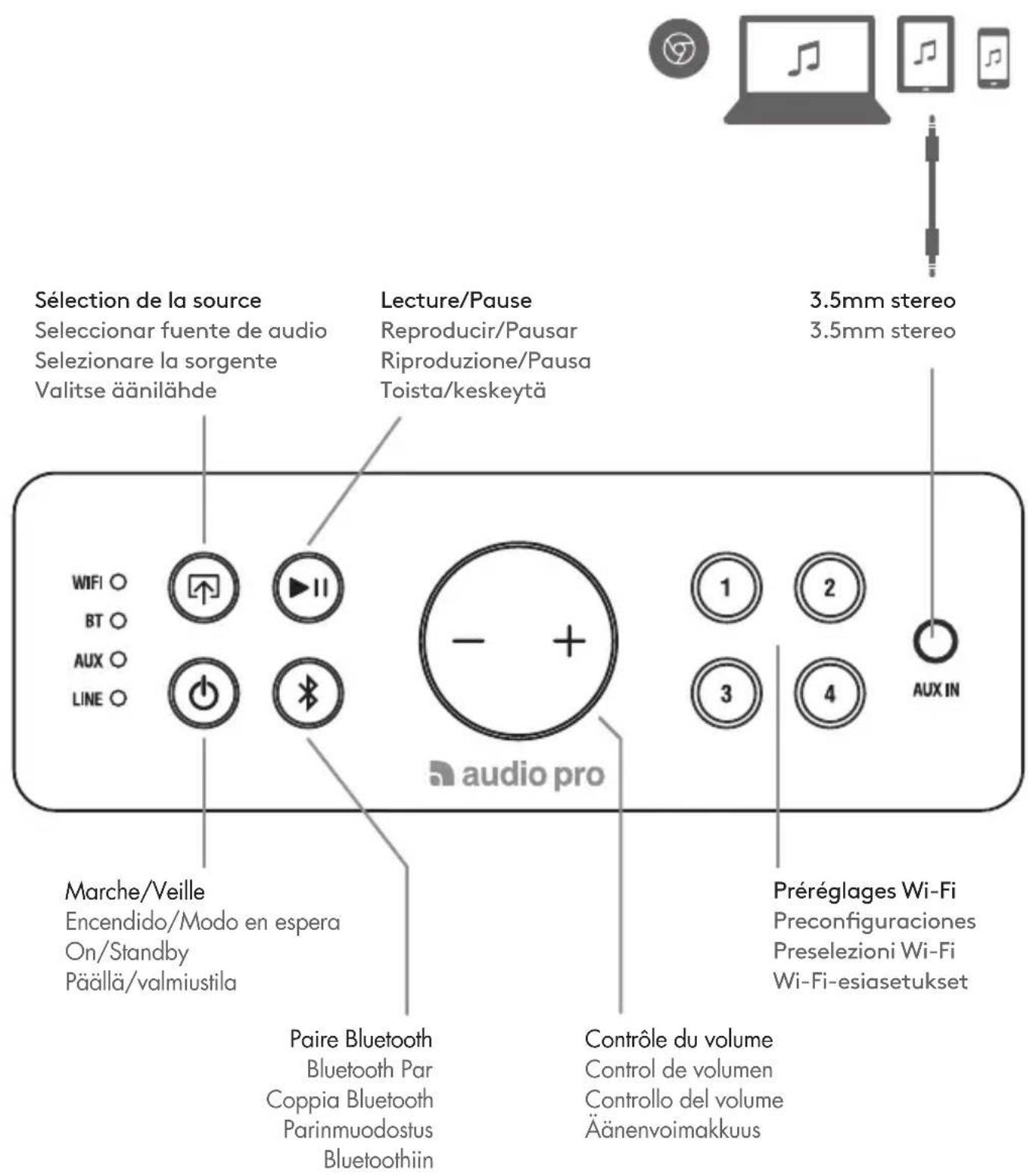
CONNEXION | CONEXION | COLLEGAMENTO | LIITÄNTÄ VUE ARRIÈRE | VISTA TRASERA | VISTA POSTERIORE | TAKANÄKYMÄ
LECTURE DEPUIS APPLE MUSIC AVEC AIRPLAY REPRODUCIR DESDE APPLE MUSIC USANDO AIRPLAY RIPRODUZIONE DA APPLE MUSIC USANDO AIRPLAY TOISTO APPLE MUSICISTA AIRPLAYN VALITYKSELLA
Tweeter: 2 × 3/4'' a cupola in tessuto
Woofer: base da 1 × 4.5''
THIS DEVICE COMPLIES WITH PART 15 OF THE FCC RULES. OPERATION IS SUBJECT TO THE FOLLOWING TWO CONDITIONS:
1 - THIS DEVICE MAY NOT CAUSE HARMFUL INTERFERENCE.
2 - THIS DEVICE MUST ACCEPT INTERFERENCE RECEIVED, INCLUDING INTERFERENCE THAT MAY CAUSE UNDESIRED OPERATION.
MODEL: D1. FCC ID: 2AGNC - D1
FCC WARNING
Any Changes or modifications not expressly approved by the party responsible for compliance could void the user's authority to operate the equipment. This device complies with part 15 of the FCC Rules. Operation is subject to the following two conditions:
(1) This device may not cause harmful interference, and
(2) this device must accept any interference received, including interference that may cause undesired operation.
This equipment complies with FCC radiation exposure limits set forth for an uncontrolled environment. Note: This equipment has been tested and found to comply with the limits for a Class B digital device, pursuant to part 15 of the FCC Rules. These limits are designed to provide reasonable protection against harmful interference in a residential installation.
This equipment generates, uses and can radiate radio frequency energy and, if not installed and used in accordance with the instructions, may cause harmful interference to radio communications. However, there is no guarantee that interference will not occur in a particular installation. If this equipment does cause harmful interference to radio or television reception, which can be determined by turning the equipment off and on, the user is encouraged to try to correct the interference by one or more of the following measures:
- Reorient or relocate the receiving antenna.
- Increase the separation between the equipment and receiver.
- Connect the equipment into an outlet on a circuit different
IC
This device complies with Industry Canada licence-exempt RSS standard(s). Operation is subject to the following two conditions: (1) This device may not cause interference, and (2) This device must accept any interference, including interference that may cause undesired operation of the device.
- BLUETOOTH 4.0
- WORKS WITH
- ANDROID
- AUDIO PRO
- PLEASE NOTE
- SPELA FRÁN APPLE MUSIC MED AIRPLAY
- I GET THEMESSAGE "DEVICE CONNECTION FAILED
- MUSIC CUTS OUT/STUTTERS OR EXPERIENCES DELAYS
- DEVICE CONNECTION FAILED
- TECHNISCHE DATEN
- LAUTSPRECHER D-1
- CAUTION
- WAARSCHUWING
- OPGELET
- VIKTIGA SÄKERHETSFORESKRIFTER
- IMPORTANT SAFETY INSTRUCTIONS
- THIS DEVICE COMPLIES WITH PART 15 OF THE FCC RULES. OPERATION IS SUBJECT TO THE FOLLOWING TWO CONDITIONS
- MODEL: D1. FCC ID: 2AGNC - D1
- FCC WARNING
- IC
- CONNEXION | CONEXION | COLLEGAMENTO | LIITÄNTÄ VUE ARRIÈRE | VISTA TRASERA | VISTA POSTERIORE | TAKANÄKYMÄ
- LECTURE DEPUIS APPLE MUSIC AVEC AIRPLAY REPRODUCIR DESDE APPLE MUSIC USANDO AIRPLAY RIPRODUZIONE DA APPLE MUSIC USANDO AIRPLAY TOISTO APPLE MUSICISTA AIRPLAYN VALITYKSELLA
Brand : AUDIO PRO
Model : Drumfire D1
Category : Loudspeaker