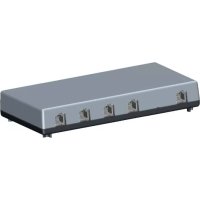
OpenStage Phone Adapter - Switch Unify - Free user manual and instructions
Find the device manual for free OpenStage Phone Adapter Unify in PDF.



| Product type | Telephone adapter (switch) |
| Brand | Unify |
| Model | OpenStage Phone Adapter |
| Power supply | External power supply unit included |
| Interfaces | 1 U_P0 input, 1 U_P0 Master output, 1 U_P0 Slave output, 1 analog a/b output |
| Max. cable length | 10 meters between adapter and each terminal |
| Operating temperature | 5 °C to 40 °C |
| Max. relative humidity | 95% |
| Installation conditions | Indoors only, no exposure to sunlight, heat, extreme cold, humidity or liquids |
| System phone compatibility | OpenStage 20 T, 40 T, 60 T, 80 T; optiPoint 500; Optiset E (on U_P0 Slave output) |
| Analog terminal compatibility | DTMF phones (e.g., Euroset 5020, Gigaset A160), Group 3 fax, modem |
| Main functions | Extension of a U_P0 or analog interface to connect a second terminal on a single line |
| Mode switch | Selects between U_P0 Slave or analog output |
| Package contents | PhoneAdapter, power supply unit, connection cables (L=6m) |
| Safety | Standard EN 60950, CE marking, do not open, use only original Siemens accessories |
| Maintenance and cleaning | Protect from humidity and liquids, do not use aggressive cleaning agents |
| Disposal | Do not dispose with household waste, follow European WEEE directives |
Frequently Asked Questions - OpenStage Phone Adapter Unify
User questions about OpenStage Phone Adapter Unify
0 question about this device. Answer the ones you know or ask your own.
Ask a new question about this device
Download the instructions for your Switch in PDF format for free! Find your manual OpenStage Phone Adapter - Unify and take your electronic device back in hand. On this page are published all the documents necessary for the use of your device. OpenStage Phone Adapter by Unify.
USER MANUAL OpenStage Phone Adapter Unify
OpenStage PhoneAdapter
Montageanleitung
Installation instructions
Notice de montage
Montage-instructie
Communication for the open minded
Siemens Enterprise Communications
Package contents: 12
Installation notes 12
Installation. 13
Characteristics of the a/b interface. 14

François
Pourvoiresecurite 15
Remarques importantes. 15
Emplacement de I'accessoire. 16
Marquage CE 16
This OpenStage accessory complies with the European standard EN 60 950, which deals with the safety of information technology appliances including electronic office equipment. This device has been designed with safety in mind to protect both humans and objects from damage.
The OpenStage phones and key modules conform to mandatory standards and security guidelines (CE).
Location

The OpenStage PhoneAdapter may only be connected to an in-house communication systems, which means that no terminal cables may lead outside the building. Failure to comply with this restriction will void the operating license.
To comply with radio interference standards (EN55022), the following restrictions apply to the u_p0 Master, u_p0 Slave and analog a/b Slave output sockets of the OpenStage PhoneAdapter:
There is a maximum line length of 10 meters for terminals attached to any of these output sockets.
We recommend that you use the 6-meter connection cables supplied.
- Do not expose the device to direct sunlight or sources of extreme heat or cold. The ambient operating temperature must be between 5^ and 40^ , and the relative humidity must not exceed 95% . The device is not suitable for use in the open.
- Protect the device against dampness and moisture. Avoid contact with aggressive liquids or dyes (such as tea, coffee, fruit juice or soft drinks).
- There is always a danger of small objects being swallowed by young children. Please ensure that such items are not accessible to children.
- Protect the device against inflammable materials, excessive dust, vibrations and mechanical stress.
- Do not place the device in the vicinity of live cables and avoid installation in a switching cabinet.
Important information
| Do not operate the telephone in potentially explosive environments. | |
| For safety reasons, the device should only be operated with the appropriate power supply unit! Never open the power supply unit housing. | |
| ORIGINAL | Use only original Siemens accessories. The use of other accessories may be dangerous and will render the warranty and the CE marking invalid. |
| Never open the telephone or any accessory! Should you encounter any problems, contact the responsible service personnel. Do not insert objects into any device opening. | |
| Never operate the device in environments where it may be exposed to moisture or steam (e.g. bathroom). |
Symbols
Description of symbols on the underside of the PhoneAdapter.

The device conforms to the EU directive 1999/5/EC as attested by the CE marking.

All electrical and electronic products should be disposed of separately from normal household waste at suitable collection facilities designated by the local authorities.
Proper disposal and separate collection of your old appliance will help prevent potential damage to the environment and human health. It is a prerequisite for reuse and recycling of used electrical and electronic equipment.
For more detailed information about disposal of your old appliance, please contact your city office, waste disposal service, the shop where you purchased the product or your sales representative.
The statements quoted above are only fully valid for equipment which is installed and sold in the countries of the European Union and is covered by the directive 2002/96/EC. Countries outside the European Union may impose other regulations regarding the disposal of electrical and electronic equipment.
Possible uses
The OpenStage PhoneAdapter gives users an additional U p 0 or analog connection to the HiPath communication platform. It can be used to connect up a second OpenStage phone or an analog device to the telephone network.
Advantage:
Two devices can be connected to the phone network using a single line. No extra cables are necessary - extremely easy to install.

The PhoneAdapter requires its own external power supply unit.
Some system devices attached to the PhoneAdapter will require their own power supply unit, see below for details.
The following terminals can be connected to the PhoneAdapter:
- U_p0 system telephone:
OpenStage 20 T
OpenStage 40 T
OpenStage 60 T and 80 T (require their own power supply unit)
optiPoint 500 (must be connected to U_D0 Slave output socket)
Optiset E (must be connected to _ 0 Slave output socket)
- Analog device:
Phone with MFV tone dialing (e. g. Euroset 5020 or a cordless phone such as Gigaset
A160), a Group 3 fax Gr. 3 or a modem.
Package contents:
- 1 OpenStage PhoneAdapter
- 2 connection cables (6-meter)
Installation notes
Use only the supplied cables to attach devices to the OpenStage PhoneAdapter. Cables to connected terminals must not exceed a length of 10 meters.
The PhoneAdapter can be used in the following configurations only:
One U 0 system telephone (U0 Master)
T w system telephones (U0 Master, U0 Slave)
One U ^pp 0 system telephone and one analog terminal (Up0 Master, a/b)
It is not possible to operate two _ 0 system telephones and one analog device.
Installation
Prerequisite: One operational OpenStage T system telephone.
The PhoneAdapter is installed between the phone and the connection cable.
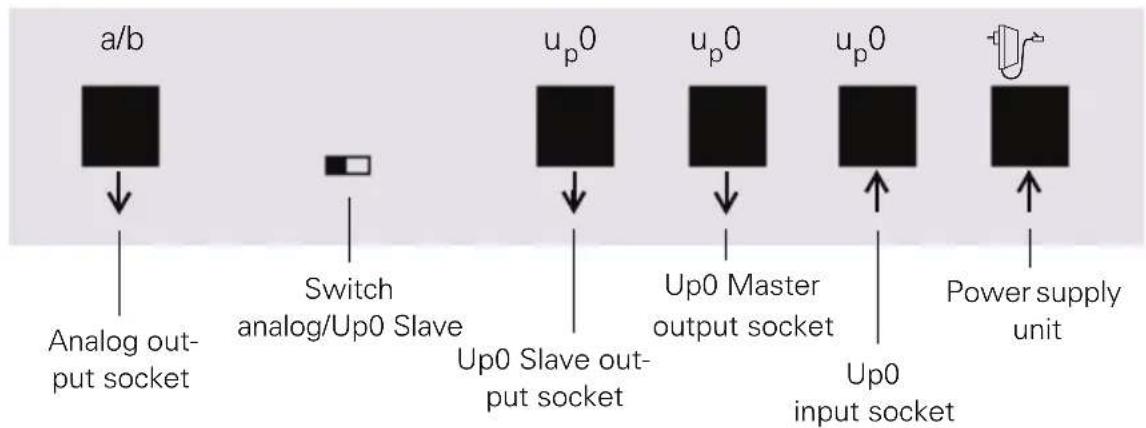
This is a front view of the PhoneAdapter:
- Connect the power supply unit to the power source and plug the other end into the socket in the PhoneAdapter.
- Place your OpenStage phone on a soft surface with the keyboard facing downwards.
- Remove the cable from the socket on your phone and plug it into the "u _p0 input socket" on the PhoneAdapter.
- Using the supplied cable, connect the socket on your OpenStage phone to the "U p 0 Master output socket" on the PhoneAdapter. Your phone is now operational again.
- Push the "Analog/Up0 Slave" switch to the right if you want to connect a further Up0 phone or to the left if you want to attach an analog terminal.
- Now connect the additional device as follows using the second cable supplied.
Connection of an additional U_p0 system telephone:
Using the supplied cable, connect the Socket on the telephone to the "U 0 Slave output socket" on the PhoneAdapter
or
Connection of an analog terminal:
Connect the terminal to the "Analog output socket" on the PhoneAdapter. Use a cable suitable for the analog device (max. length of 10 meters). Only cables with a suitable western jack (e. g. not TAE) can be used. You may be able to use the cable supplied with the PhoneAdapter, see "Characteristics of the a/b interface" Seite 14.

You must connect an OpenStage phone to the "U_p0 Master" socket in order to be able to operate devices on the "U_p0 Slave" and "Analog" output sockets.
Characteristics of the a/b interface
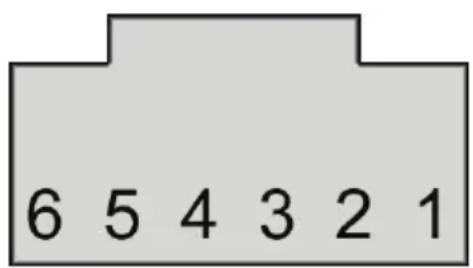
The pin assignment in the jacks can differ from analog device to analog device. Compare the pin assignment below with the pin assignment of your analog device. To do this, consult the operating manual of the analog device or ask the responsible support staff.
If the pins (3 + 4) of your analog device are suitable, you can use the cable supplied with the PhoneAdapter.
Western plug (RJ12)
Pin assignment
1 free
2 free
3a
4b
5 free
6 free
Supply current 22.9 mA
- Busy signal if both B channels are busy
Ring sequence: 2.2
Supports DTMF with flash only
- No ground signaling allowed
- Does not support:
Entrance telephone, VoiceMail server with a/b interface, message waiting lamp, dictating equipment, loudspeaker, announcement device (such as start/stop).
Pour votre sécurité
- 1 OpenStage PhoneAdapter
- 2 câbles de raccordement (6 metres chaque)
Communication for the open minded
Siemens Enterprise Communications
The information provided in this document contains merely general descriptions or characteristics of performance which in case of actual use do not always apply as described or which may change as a result of further development of the products. An obligation to provide the respective characteristics shall only exist if expressly agreed in the terms of contract. Subject to availability, Right of modification reserved. The trademarks used are owned by Siemens Enterprise
Communications GmbH & Co. KG or their respective owners.