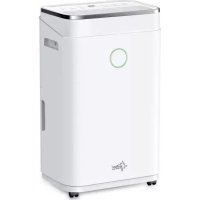
DryFix 20 Design - Humidifier SUNTEC - Free user manual and instructions
Find the device manual for free DryFix 20 Design SUNTEC in PDF.



| Product Type | Dehumidifier |
| Brand | Suntec |
| Model | DryFix 20 Design |
| Dehumidification Capacity | 20 L/24h at 30°C and 80% RH |
| Refrigerant | R290, 58 g |
| Power Supply | 220-240 V ~ 50 Hz |
| Rated Power | 250 W (estimated) |
| Dimensions (W x D x H) | 35 x 28 x 50 cm (estimated) |
| Net Weight | 12 kg (estimated) |
| Tank Type | Removable tank |
| Tank Capacity | 3.5 L (estimated) |
| Noise Level | ~45 dB (estimated) |
| Operating Temperature Range | 5 °C to 35 °C |
| Integrated Timer | Yes, 0-24 h (on/off) |
| Fan Speed | 2 speeds (high and low) |
| Special Functions | Auto mode, sleep mode, child lock, filter indicator |
| Tank Full Indicator | Yes, with audible alarm |
| Humidity Indicator | LED (blue <45%, green 45-65%, red >65%) |
| Filter Maintenance | Clean every 2 weeks, reset after 600 h |
| Warranty | 24 months |
Frequently Asked Questions - DryFix 20 Design SUNTEC
User questions about DryFix 20 Design SUNTEC
0 question about this device. Answer the ones you know or ask your own.
Ask a new question about this device
Download the instructions for your Humidifier in PDF format for free! Find your manual DryFix 20 Design - SUNTEC and take your electronic device back in hand. On this page are published all the documents necessary for the use of your device. DryFix 20 Design by SUNTEC.
USER MANUAL DryFix 20 Design SUNTEC
Thank you for buying this product from Suntec Wellness. Please read the manual carefully before using the appliance. Retain this manual for future reference.
SAFETY INFORMATION
This appliance can be used by children aged from 8 years and above and persons with reduced physical, sensory and mental capabilities or lack of experience and knowledge if they have been given supervision or instruction concerning use of the appliance in a safe way and understand the hazards involved. Cleaning and user maintenance shall not be made by children without supervision. Children of less than 3 years should be kept away unless continuously supervised.
Children aged from 3 years and less than 8 years shall only switch on/off the appliance provided that it has been placed or installed in its intended normal operating position and they have been given supervision or instruction concerning use of the appliance in a safe way and understand the hazards involved.
Children aged from 3 years and less than 8 years shall not plug in, regulate and clean the appliance or perform user maintenance.
-
Please read the operating instructions carefully before using your dehumidifier for the first time and keep them in a safe place.
-
Never immerse the appliance in water or other liquids.
- Place the unit on a stable flat surface to avoid loud noises and vibrations.
- Never operate the appliance if a cable or connector has been damaged, after appliance malfunction or if the appliance was dropped or otherwise damaged.
- The appliance may only be repaired by qualified personal, improper repair work can be a source of considerable danger for the users.
- Pull out the power plug before transporting it and / or before cleaning.
- Operate the appliance only at the voltage specified on the rating label.
- The device may not be connected to a power strip with other household appliances.
- Use the appliance only in the household, and only for the purpose it was developed for.
- Do not operate this unit near heating appliances and flammable or dangerous objects.
- If the dehumidifier is operated in a room with gas driven devices, so the room must be aired regularly and often.
- Please empty and dry the water tank and the appliance if it will not be used for a long time.
This will prevent mould growth and unpleasant odours inside the appliance.
- Do not place heavy objects on the appliance.
- Do not hang curtains or wet clothes in front of the air outlet, this will overload the device.
- The drainage hose may not be installed outdoors at low temperatures.
- To prevent spillage, empty the water tank before relocating the appliance.
- Do not tip the appliance to any side as escaping water could damage the appliance.
- If the supply cord is damaged, it must be replaced by a qualified person to avoid a hazard.
- If you smell the smoke during start-up or if you can see the smoke, immediately disconnect the power plug out and contact your dealer.
- The unit should be installed with a minimum distance of 50 cm from the wall or other obstacles.
Important.
The appliance must always be stored and transported in an upright position.
If in doubt, we recommend that you wait at least 24 hours before switching the hours before switching the unit on again.
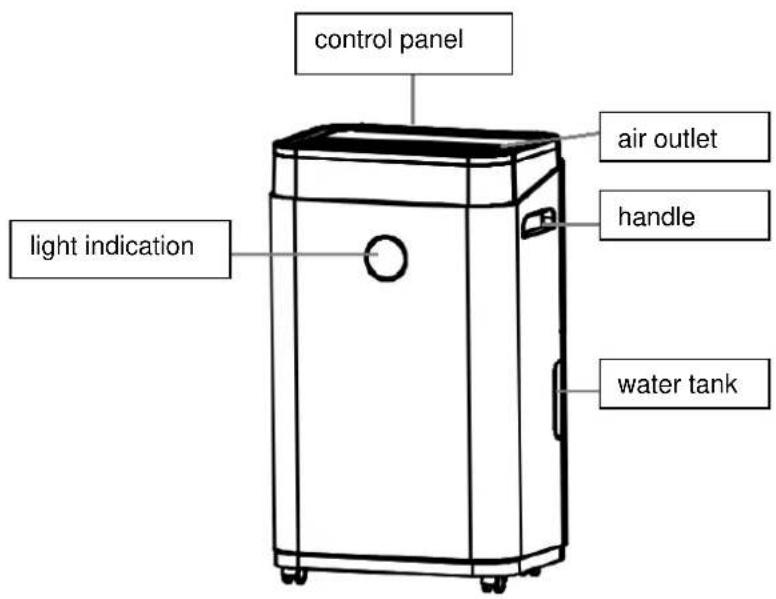
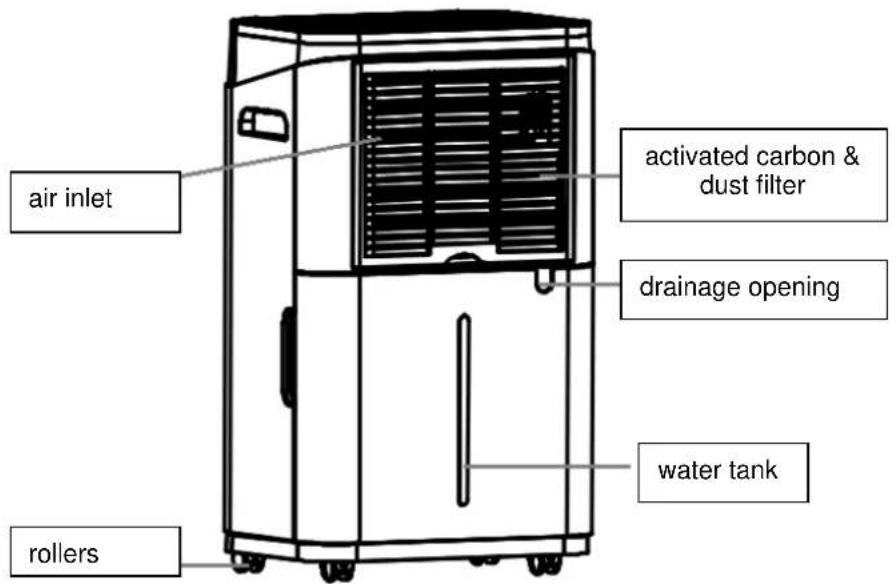
COMPONENTS
Front:
Back:
CONTROL PANEL
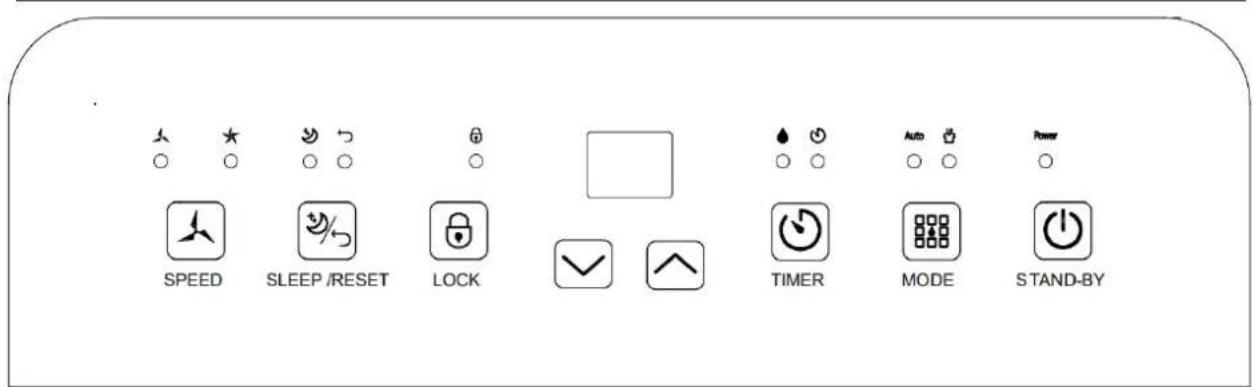
STAND-BY: Press the button to turn the unit on or off
MODE: Please press the button to select between auto dehumidification and manual dehumidification.
TIMER: You can determine the switch-on or switch-off time by entering the desired number of hours (0-24) with the key. If you select "00", the timer is deactivated.
LOCK: Child lock. Please press and hold the button to unlock/lock all buttons.
SPEED: Please press this key to select the desired fan speed.
SLEEP / Please press this button to switch on the sleep mode or hold the button for 3
RESET: seconds to reset the filter change indicator.
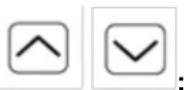
Press these buttons to change the timer or humidity level settings.
OPERATION INSTRUCTIONS
Switching the device on/off
- Please plug in the power plug of the dehumidifier.
- Please press the STAND-BY button to turn on the device.
- The unit will start with high fan speed and humidity level setting of 50% .
- Please press the STAND-BY button again to deactivate the unit. The fan will continue to run for 30 seconds.
Timer
Power off time:
- Please press the TIMER button while the unit is running to set the off time.
- The time can be set by the hour (0-24h) with the up / down " " buttons.
Switch-on time:
- Please press the TIMER key while the device is switched off to determine the switch-on time.
- The time can be set by the hour (0-24h) with the up / down keys " "
Deactivate timer:
- Please press the up / down button repeatedly until '00' is shown on the display.
Continuous dehumidification - Auto dehumidification
- Please press the MODE button to select between continuous and auto dehumidification mode.
- In continuous dehumidification mode, the unit is always set to high ventilation speed and 20% humidity. This cannot be changed in this mode.
- In automatic dehumidification mode, the unit automatically starts with a dehumidification level of 50% . You can set the desired dehumidification level by operating the keys.
If the relative humidity in the room is higher than the set dehumidification level (+3%) , the unit runs at a higher fan speed.
If the relative humidity in the room is lower than the set dehumidification level (-3%) , the dehumidification function switches off and the fan runs for 30 seconds.

Up/down keys
- Please press these buttons to set the desired humidity level or timer.
- Up button adds 5% (30% - 80%) humidity or adds 1 hour at timer.
- Down key subtracts 5% (30% - 80%) humidity or subtracts 1 hour from the timer.
Child Lock
- Press and hold this button for 3 seconds to turn the child lock on and off.
Sleep / Reset
Sleep
Please press the Sleep / Reset button, the display will light up and activate the sleep mode; touch the button again to exit the function.
In sleep mode, the fan speed will be automatically switched to the low speed, and after no operation for 10 seconds, except for the sleep mode, operation, water tank full and child lock indicator light, all other indicator lights and the screen will be turned off.
When the room humidity rises above 57% , the compressor will stop operating and the fan will stop operating after 30 seconds.
When the room humidity drops below 63% , the fan starts working and the compressor follows working after 3 seconds.
The fan speed and humidity setting function is not available in this mode, you cannot set the humidity value and fan speed.
When the water tank is full in sleep mode, the unit will not sound an alarm, but the full water tank indicator light ( ) will light up (red) to remind you that the water tank is full and you need to empty the water tank to continue operation.
Reset
Please press and hold the Sleep / Reset button for 3 seconds to reset the air filter. When the unit has been operating for 600 hours, the air filter indicator will light up to remind you to clean the air filter. Please note that the unit will not work until you clean the air filter and long press the button to reset the air filter.
Light indication
- If the ambient humidity is below 45% , the indicator light will turn blue.
- If the ambient humidity is between 45% and 65% , the indicator light will be in green.
- If the ambient air humidity is above 65% , the control light is red.
CONDENSATION WATER DRAINAGE
Water tank:
- As soon as the water tank is full, a warning tone sounds five times and the symbol above the timer
button lights up on the display. - The machine stops operating.
- Please turn off the power and unplug the power cord.
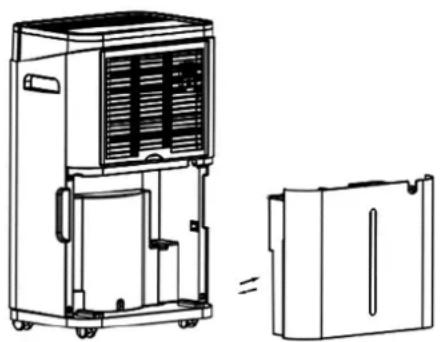
- Pull out the water tank carefully, remove the tank lid and tilt the water out.
- Then put the lid back on and slide the water tank carefully into the device.
Continuous drainage
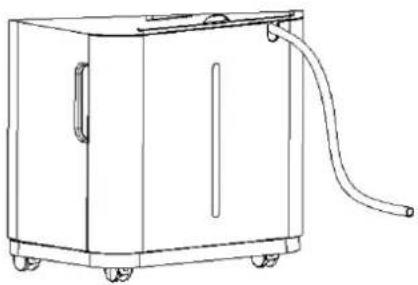
- Take the drainage hose out from the water tank.
Find the drainage opening on the back of the device. -
Put the drainage hose into the opening, put the other end of the hose into a collecting vessel and pour out the water.
-
Make sure that the hose is securely connected to prevent leakage of water.
- Please always unplug the unit before cleaning.
- Please note that only the dust filter may be cleaned.
3.
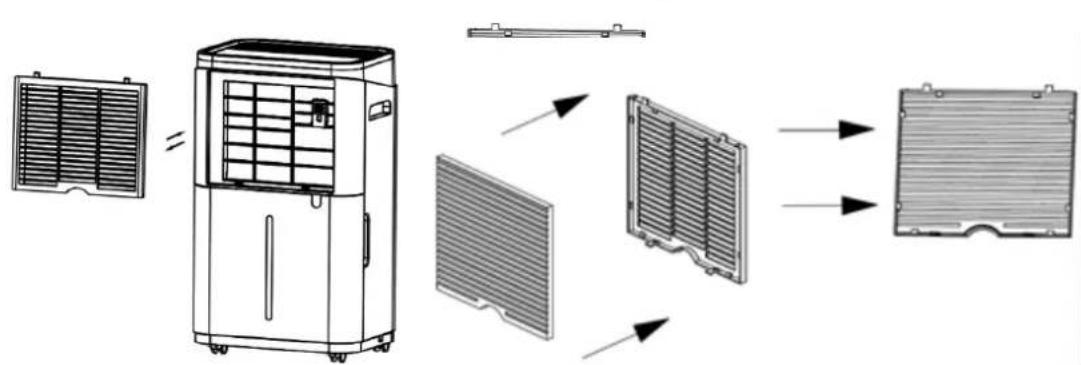
- If the filter is only slightly dusty, you can quickly and easily clean it with a vacuum cleaner.
- If you are using an activated carbon filter, carefully remove the dirt and then put the filter back into the appliance together with the dust filter.
- Once the filter is cleaned, use the reset button to reset the filter change indicator.
- Rinse the filter under running water (max. 40°C ) and dry it with a soft cloth.
- Clean the appliance with a damp cloth and then wipe with a dry cloth.
- Do not use chemical solvents (such as benzene, alcohol) or hot water.
- If the unit will not be used over longer period, please turn the power off, unplug the power cord and take the unit in a dry, cool and safe place
TROUBLESHOOTING
| Problem | Cause | Solution |
| Hot air comes from the air outlet | -------- | The dehumidifier has no cooling function; the air comes out of the condenser. This is not a defect. |
| The unit does not work. | Is the unit plugged in? | Plug in the unit. |
| Check the ambient temperature. | The temperature should be between 5 - 35°C. | |
| Does the "tank full" indicator (water tank is full or misplaced) light up? | Empty the water tank and set it to the correct position again. | |
| The device does not dehumidify. | Is the air inlet or outlet blocked? | Check the air inlet and outlet and remove any obstructions. |
| Is the ambient temperature or relative humidity too low? | Please check the settings on the unit. If the set humidity is below the ambient humidity and / or 20%, the unit stops dehumidifying. |
| The air does not flow out. | Is the air filter dirty? | Clean the air filter as described in the manual. | |
| Is the air inlet or outlet blocked? | Check the air inlet and outlet and remove any obstructing objects if necessary. | ||
| Loud noises during start up. | If the device was placed awry or unstable? | Place the unit on a stable flat surface. | |
| Is the air filter dirty? | Clean the air filter as described in the manual. | ||
| Error Code | E2 | Humidity sensor damaged or failed. | Please contact your dealer. |
| CL | Room temperature is below 5°C. | The compressor and the fan switch off under this condition. | |
| CH | Room temperature is above 35°C. | The compressor and the fan switch off under this condition. | |
| LO | If the relative humidity in the room is below 20%. | The compressor and the fan switch off under this condition. | |
| HI | When the relative humidity in the room is above 90%. | The compressor and fan continue to run under this condition. | |
In case of complaint
- You can claim the device within 24 months from date of purchase (receipt).
- A free replacement or repair will be excluded from prior improper product handling.
- Defects in wear parts, consumables, as well as cleaning, maintenance or replacement of said parts are therefore with costs.
If you want to make a complaint, please bring the entire device in its original packaging and with proof of purchase to your dealer. For a timely and convenient service register, visit our website www.suntec-wellness.de and learn more. - Without a proof of purchase, generally there will be no repair or replacement.
- In the event that the complaint case is analogous to our terms of service, all defects of the device or its accessories due to material or manufacturing defects will be eliminated by repair or, at our discretion, replacing the unit.
- The damage of accessories does not automatically lead to a free exchange of the whole device. In these cases, please contact your dealer. Glass breakage, or breakage of plastic parts are always to charge.
The dealer or repair service can perform the repair after the expiration of warranty against charge.
EC-Declaration of Conformity
The unit complies with the essential health and safety requirements of the European Union. The EC declaration of conformity is the basis for the CE marking of this unit.
With the publication of this manual, all previous are not valid. SUNTEC, SUNTEC Wellness,
KLIMATRONIC and the Sun logo are registered trademarks. © 2021 SUNTEC WELLNESS GMBH
REFRIGERANT
(CE) N 842/2006: This dehumidifier contains the refrigerant R290. The amount of refrigerant is less than 1kg , and is in a closed cooling circuit. The coolant does have zero ozone depletion potential, but is a so-called greenhouse gases under the Kyoto Protocol and may thus contribute to global warming, if it is released to the atmosphere. Therefor only trained technicians with refrigerant certificate make a filling or emptying. Suntec your dehumidifier does not have to use if used properly and undamaged coolant circuit can be refilled with refrigerant.
R290, GWP: 3, 58g = 0.000174t CO2e
NOTE CONCERNING PROTECTION OF ENVIRONMENT
This product must not be disposed of via normal household waste after its service life, but must be taken to a collection station for the recycling of electrical and electronic devices. The symbol on the product, the operating instructions or the packaging indicate such disposal procedures. The materials are recyclable in accordance with their respective symbols. By means of re-use, material recycling or any other form of recycling old appliances you are making an important contribution to the protection of our environment. Please ask your local council where your nearest disposal station is located.
No liability is assumed for printing errors and mistakes.
R290, GWP: 3, 58G = 0.000174T CO2E
AVVERTENZE PER LA TUTELA AMBIENTALE
INSTRUÇÉS DE MANUTENÇAO
For this appliance we assure 24 months warranty.
During the 24 months warranty we guarantee to repair your appliance free of charge or to provide your seller the spare parts free of charge if the appliance fails to work due to production failure.
Other claims are excluded from this warranty. We will not be liable for any defects caused by acts of nature, improper use, negligence of the instruction manual, damage from continuous use and damages during transportation.
This warranty card is only applicable with the according invoice.
In case of service please bring your purchased product to your seller.
Product name:
Serial number:
Name of buyer:
Date of purchase:
Stamp and signature of seller:
Manufacturer:
Suntec Wellness GmbH
Holzstraße 2
40221 Dusseldorf
Germany
- SAFETY INFORMATION
- IMPORTANT
- COMPONENTS
- CONTROL PANEL
- OPERATION INSTRUCTIONS
- SWITCHING THE DEVICE ON/OFF
- TIMER
- POWER OFF TIME
- SWITCH-ON TIME
- DEACTIVATE TIMER
- CONTINUOUS DEHUMIDIFICATION - AUTO DEHUMIDIFICATION
- UP/DOWN KEYS
- CHILD LOCK
- SLEEP / RESET
- SLEEP
- RESET
- LIGHT INDICATION
- CONDENSATION WATER DRAINAGE
- WATER TANK
- CONTINUOUS DRAINAGE
- TROUBLESHOOTING
- IN CASE OF COMPLAINT
- EC-DECLARATION OF CONFORMITY
- REFRIGERANT
- NOTE CONCERNING PROTECTION OF ENVIRONMENT
- AVVERTENZE PER LA TUTELA AMBIENTALE
- INSTRUÇÉS DE MANUTENÇAO
Brand : SUNTEC
Model : DryFix 20 Design
Category : Humidifier