
Fornarina 73980 - Bread maker TERMOZETA - Free user manual and instructions
Find the device manual for free Fornarina 73980 TERMOZETA in PDF.


| Product Type | Bread Machine |
| Brand | Termozeta |
| Model | Fornarina 73980 |
| Dimensions (approx.) | 30 x 25 x 35 cm |
| Weight (approx.) | 5 kg |
| Power Supply | 220-240 V ~ 50 Hz, 650 W |
| Bread Capacity | 750 g or 1 kg |
| Number of Programs | 12 programs |
| Main Functions | Kneading, rising, baking, keep warm, timer up to 13 h |
| Browning Levels | 3 levels: light, medium, dark |
| Special Programs | Basic, French, Whole Wheat, Rapid, Sweet, Dough, Jam, Cake, Sandwich, Bake Only |
| Display | Digital display with countdown |
| Bowl Material | Non-stick |
| Included Accessories | Bowl, kneading paddle, measuring cup, scoop |
| Care and Cleaning | Clean bowl and paddle with non-abrasive sponge; do not wash in dishwasher; do not immerse the body |
| Safety | Do not use barefoot or with wet hands; do not immerse in water; use on a stable, heat-resistant surface |
| Spare Parts and Repairability | Contact an authorized Termozeta service center for repair and original spare parts |
| General Information | Household use only; keep out of reach of children; store in a dry place |
Frequently Asked Questions - Fornarina 73980 TERMOZETA
User questions about Fornarina 73980 TERMOZETA
0 question about this device. Answer the ones you know or ask your own.
Ask a new question about this device
Download the instructions for your Bread maker in PDF format for free! Find your manual Fornarina 73980 - TERMOZETA and take your electronic device back in hand. On this page are published all the documents necessary for the use of your device. Fornarina 73980 by TERMOZETA.
USER MANUAL Fornarina 73980 TERMOZETA
-
Kneading blade
-
Lid
- Viewing window
5.Appliance body - Basket
- Graduated cup
-
Measuring spoons
-
Tableau de commandes
Touches:
a. Avvio/arresto
b. Menu
c. Doratura
d. Timer +
e. Timer -
f.Quantita
g. Afficheur
This booklet is an integral part of the appliance. Read carefully before use since it provides important information on the installation, safety, use and maintenance of the appliance. Keep in a safe place.
- After removing the packaging check that the appliance is undamaged and that no parts are missing. If in doubt, do not use and contact an authorised TERMOZETA service centre.
2.Do not leave parts of packaging (plastic bags, foam polystyrene, nails, etc) within reach of children or unqualified persons since they are potential sources of danger.
-
If the appliance comes with an earth plug, the electrical safety is ensured only when this plug is correctly connected to an effective earthing system in compliance with the existing electrical safety standards. TERMOZETA shall not be held responsible for any damages caused by the lack of an earthing system.
-
Before connecting the plug to the power outlet make sure the operating voltage of the appliance corresponds to the voltage of your mains supply. If in doubt, contact a qualified technician.
5.Do not use adaptors, multiple plugs and extension leads. If necessary, only use devices that conform to the current safety standards making sure they are compatible with the power of the appliance. If in doubt, contact a professionally qualified technician.
6.Any installation not conforming to the above instructions may compromise the safety of the appliance and cancel the guarantee.
- The appliance was exclusively designed for domestic use to cook food.
8.For safety reasons:
do not use the appliance with bare feet and wet hands or feet do not use the appliance outside the home
do not leave the appliance exposed to atmospheric agents (sun, rain...)
do not let children or unqualified people use the appliance
Never pull on the power cord or on the appliance itself to disconnect the plug from the power outlet.
Never immerse the appliance in water or other liquids.
The power cord of the appliance must not be replaced by the user. If necessary, contact an authorised TERMOZETA service centre or a professionally qualified technician.
Switch off and do not tamper with the appliance should it breakdown and/or not function properly. Contact an authorised TERMOZETA service centre for any repairs and ask for original spare parts.
Make the appliance unserviceable at the end of its running life by unplugging it from the power outlet and cutting the power cord. Abide by the existing standards in your country for instructions on its disposal.
Temozeta shall not be held responsible for any damages to persons, animals or objects caused by incorrect installation or due to improper, incorrect and negligent use.
INSTRUCTIONS FOR USE
INSERTING/REMOVAL OF BASKET (6) AND BLADE (2)
ASSEMBLY
Open the lid (3).
Insert the basket (6) into the baking chamber inside the appliance and turn in a clockwise direction until it locks into place: do not use the handle to turn the basket.
Place the kneading blade (2) into the centre of the basket by inserting it onto the shaft.
DISASSEMBLY
Open the lid (3).
Lift the kneading blade (2) and remove.
Turn the basket (6) in a counter-clockwise direction and lift it using the handle.
ATTENTION: use oven mitts when the appliance is hot, since the basket and kneading blade can become very hot.
Always make sure the plug is disconnected from the power outlet when carrying out these operations.
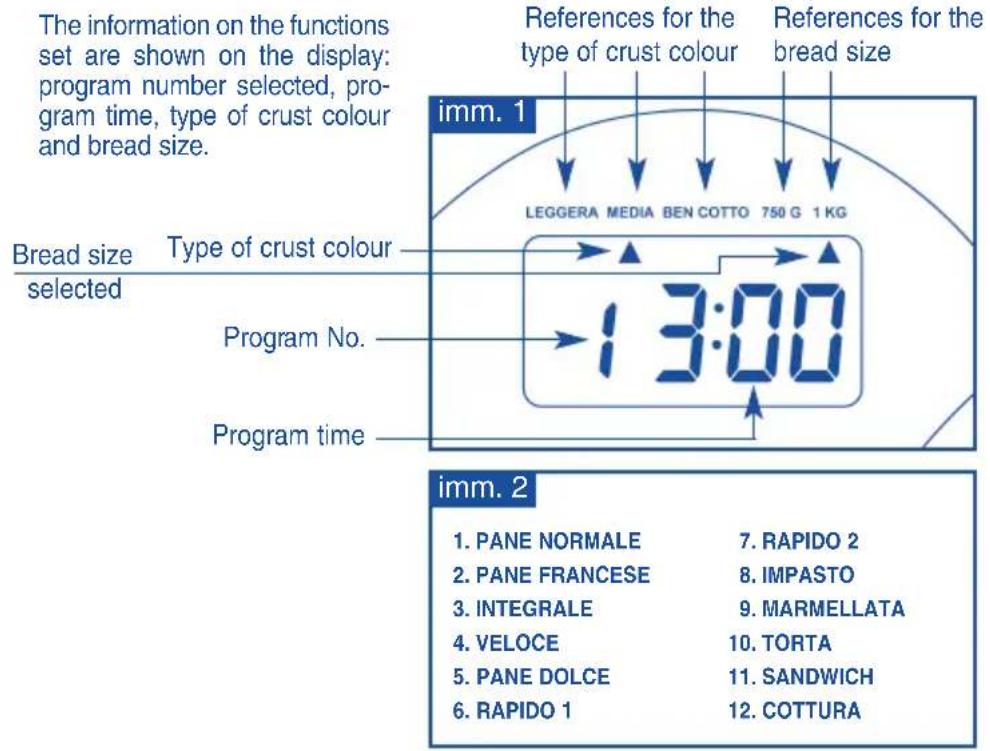
DISPLAY(g)
KEY FUNCTIONS ON THE CONTROL PANEL
The control panel has six keys with the following functions:
START/STOP key (a):
START: keep the START/STOP key (a) pressed for one second to start the program.
STOP: keep the START/STOP key (a) pressed to stop a program in operation.
MENUKe(yb):
allows to select the desired program (see table), choosing from the twelve available programs. The 12 programs are shown on the control panel.
The program number selected is shown on the display (PHOTO 1).
Crust colour key (c):
three crust colours for the bread can be selected: light, medium or dark. A triangle appears on the display that positions itself in correspondence of the selected crust colour (Imm. 1). This function cannot be used in the following programs: QUICK, RAPID 1, RAPID 2, DOUGH, MARMALADE, CAKE, BAKE
these keys set the timer for starting and automatically turning off the appliance (refer to the paragraph on "Timer function").
This function cannot be used in the following programs: RAPID 1 AND RAPID 2.
Size key (f):
the bread size is selected with this key by choosing between 750g or 1 kg. A triangle appears on the display positioning itself in correspondence of the pre-selected quantity (Imm. 1).
This function cannot be used in the following programs: QUICK, RAPID 1, RAPID 2, DOUGH, MARMALADE, CAKE, BAKE
PROGRAMS THAT CAN BE SELECTED WITH THE MENU KEY
The baking machine has 12 programs that are described below:
Table A
| PROGRAM No. | TYPE OF BREAD - FUNCTION | DURATION and WEIGHT | CRUST COLOUR |
| 1 Pane normale | Normal bread: kneading, rising and baking of the bread | for 1Kg: 3 hours for 750g: 2 hours 53'. | Can be set |
| 2 Pane francese | French bread: kneading, extended rising and baking of the bread | for 1Kg: 3 hours 50'. for 750g: 3 hours 40'. | Can be set |
| 3 Pane integrale | Wholemeal bread: kneading, rising and baking | for 1Kg: 3 hours and 40' for 750g: 3 hours 32' | Can be set |
| 4 Velocce | Quick: kneading, rising and baking of the bread with baking powder | 1 hour and 40'. weight reset and cannot be changed (see recipe) | Can be set |
| 5 Dolce | Sweet: kneading, rising and baking of sweet bread. | for 1Kg: 2 hours and 55'. for 750g: 2 hours and 50'. | Can be set |
| 6 Rapido 1 | Rapid 1: Rapid kneading, rising and baking of 750g bread loaf. | 58' Weight reset and cannot be changed | Can be set |
| 7 Rapido 2 | Rapid 2: rapid kneading, rising and baking of 1kg bread loaf. | 58' Weight reset and cannot be changed | Can be set |
| 8 Impasto | Dough: kneading and rising without baking. | 1 hour and 30' weight reset and cannot be changed (see recipe) | Weight reset and cannot be changed |
| 9 Marmellata | Marmalade: kneading and cooking of marmalade. | 1 hour and 20' weight reset and cannot be changed (see recipe) | Weight reset and cannot be changed |
| 10 Torta | Cake: kneading, rising and baking of cake with baking powder | 2 hours and 50' weight reset and cannot be changed (see recipe) | Weight reset and cannot be changed |
| 11 Sandwich | Sandwich: kneading, rising and baking of sandwich bread | for 1Kg: 3 hours for 750g: 2 hours and 55' | Weight reset and cannot be changed |
| 12 Cottura | only baking | 1 hour weight reset and cannot be changed (see recipe) | Weight reset and cannot be changed |
All programs can be replaced with the quick, rapid 1 and rapid 2 program: in this case the brewer's yeast must be replaced with baking powder and the liquid ingredients must be warmed.
FUNCTION FOR KEEPING WARM
This function, which is activated automatically and lasts for 1 hour, allows the bread to be kept warm at the end of the set program. To remove this function simply press the START/STOP key (a) for a few seconds after the program has ended. A prolonged beep will confirm the removal of this function.
TIMER FUNCTION
This function allows to set the time if you want to have freshly baked bread at a certain time, taking into consideration the preset times for each program as indicated in table A
The maximum time that can be set is 13 hours.
Set the crust colour (c), bread size (f) and program 1 (b) to display the duration of the actual program.
Press the TIMER + key (d) to set the time delay or when you want the selected program to end (current time + execution time).
Each time the TIMER + key (d) or the TIMER - (e) is pressed the selected program time increases or decreases by 10 minutes, accompanied by a beep. Keep the key pressed to advance the time continuously, no beep is emitted.
EXAMPLE:
it is 20:00 and you want the bread ready for 7:00 the following morning, that is, 11 hours after the current time. Press the TIMER + (d) key until 11 hours appears on the display. Then press the START/STOP (a) key. The timer has been set. Attention: the required time is not calculated automatically, but must be done by the user. This number of hours must be set on the display, which nevertheless is not a clock.
To remove the timer function, keep the START/STOP (a) key pressed for 2-3 seconds until a beep confirms that the function has been removed.
NOTE:
When setting the timer function, do not use ingredients that easily deteriorate like milk, eggs, fruit or vegetable purees.
USING THE APPLIANCE FOR THE FIRST TIME
-
Wash all the parts that come into contact with food: blade (2), basket (6), graduated cup (7) and small measuring spoons (8) according to the instructions in the "CLEANING" section.
-
Replace the basket (6) and blade (2) in the appliance.
3.Grease these parts with oil and allow the appliance to operate for around ten minutes on empty : select program No. 12 - BAKING via the MENU key (for further information refer to the section "Putting into operation"). - On completion, wash the parts oiled beforehand.
5.During these operations make sure all the other parts of the appliance are dry.
Attention: never run the appliance when it is empty for longer that the period indicated.
- Place the appliance on a stable and heat resistant surface, away from heat sources and inflammable materials.
- Completely unwind the power cord and do not let it hang from the resting surface of the appliance.
- Place ingredients in the basket (6), close the lid (3) and insert the plug into the power outlet. A beep will be emitted and the initial screen "1 3:00" will appear on the display.
-
The two dots “:” between “hour” and “minutes” are lit up to indicate that the appliance is ready to be put into operation. 1 – Pane Normale, medium crust colour and 1 kg size will be automatically displayed.
-
Select the type of program by pressing the MENU key (b): a beep will be emitted each time the key is pressed, the program will change and the corresponding number will be displayed on the screen (Table A).
- At this point, select the crust colour preferred and the bread size using the crust colour (c) and quantità (f) keys respectively. The methods selected will be displayed on the display with two small triangles (Imm. 1).
7.If desired, the timer can be set according to the methods described in the section "Timer Function". - Press the START/STOP key to start the program. The program set starts immediately, accompanied by a beep. The ":" on the display will start to flash and the display will signal the countdown (decreasing as the program proceeds)
- To interrupt a program while it is in operation, press the START/STOP key for two-three seconds until a long beep confirms the interruption.
- The initial screen "1 3:00" will once again appear on the display.
- At the end of the kneading, rising and baking cycle, the appliance lets out a series of 10 beeps.
- At the end of the program, the appliance keeps the bread warm for roughly an hour and turns off automatically. If you do not require this function, press the START/STOP (a) key for a few seconds and then disconnect the plug from the power outlet.
NOTE WELL:
If the appliance is started with an incorrect setting, press the Start/Stop key to stop the program. Enter the correct setting and restart.
During the baking phase, steam may escape from the air holes of the lid, this is normal.
FOR SAFETY REASONS:
The inside of the appliance becomes very hot during baking: use oven mitts to prevent burns.
During baking, do not open the lid (3) of the appliance and check the program through the viewing window (4).
Do not obstruct the air holes positioned on the sides and lid of the appliance
Leave sufficient space around the appliance to allow for heat dispersion.
Never set or insert the appliance in a cabinet or wall unit.
Be careful and do not touch moving parts.
Do not leave the appliance connected to mains power when not in use.
AFTER USE
- Open the lid (3) and remove the basket (6). Use oven mitts to prevent burns since the inside parts become very hot during baking.
2.Remove the basket (6) by turning it in a counter clockwise direction and lift it by the handle. - Turn the basket upside down and shake it lightly to let the bread fall out.
4.The kneading blade always remains inside the finished product. Remove the kneading blade (2) from the food using a normal kitchen knife.
IMPORTANT
Do not let the bread cool inside the appliance.
SUGGESTIONS ON PREPARING THE BREAD
- Place all the ingredients in the basket (6) according to the order indicated in the specific recipe. Add the yeast last, placing it inside a small hole at the centre of the flour.
- All the ingredients, including the liquids, must be at room temperature.
Two rising phases are available for the NORMAL, FRENCH, WHOLEMEAL, SWEET and SANDWICH programs. At the beginning of the second rising cycle, the appliance emits a series of beeps. Fruit, nuts or special ingredients must be added during the second rising phase.
- The appliance can work optimally at different room temperatures, but the temperature difference between a cold environment and a hot one can influence the size and quality of the bread because of the rising. It is recommended to use the appliance in a tempered environment.
- Given the many factors that go into making bread (type of yeast, room temperature, air humidity...etc) any 'bad' results are not attributable to the malfunctioning of the appliance but to these factors. Carry out various tests to acquire suitable experience.
- During the initial kneading, the dry ingredients may accumulate in an angle of the container and may not amalgamate well. If this occurs, help the machine with the kneading to avoid flour lumps from forming using a plastic/wooden spatula so as not to
scratch the non-stick surface. Be careful and do not touch the moving parts.
BAKING WITH THE QUICK PROGRAM (nr. 4)
Use baking powder when baking bread using the quick program.
Place the liquid ingredients on the bottom of the basket and the solid ingredients on top.
BAKING WITH THE RAPID PROGRAM (nr. 6 and 7)
Use hot water at a temperature of 48 - 50^ for these programs and always use baking powder.
This type of cooking produces a doughier bread.
DOUGH (nr. 8)
Different types of bread dough can be prepared that can then be kneaded and baked in the oven.
In the dough program, the times are the same for 750g and 1kg sizes, therefore the weight cannot be selected.
MARMALADE (nr. 9)
Follow these instructions to make marmalade:
wash the fresh fruit; peel the apples, pears, peaches and other type of fruit with skin. always use the doses recommended in the recipes otherwise the marmalade may boil too much or too little.
weigh the fruit and cut into small pieces (1 cm max)
add the sugar and the gelatine/isinglass (in the proportion of 2:1)
mix the fruit with the sugar and start the program
on completion, pour the marmalade into hot containers.
SPECIAL SIGNALS ON THE DISPLAY
When "H:HH" appears on the display (g) after the appliance has been turned on, the temperature inside the machine is still too high for a new preparation. Turn the appliance off, open the lid (3) and let it cool.
When "E:EE" appears on the display after the appliance has been turned on, the temperature sensor is damaged and must be replaced.
Contact an authorised Termozeta service centre.
CLEANING
Before carrying out any cleaning operation, always disconnect the plug from the power outlet and wait for the appliance to cool.
Clean the basket (6) and the kneading blade (2) with a normal non-abrasive sponge and dishwashing liquid, do not scratch the non-stick surface. Once finished, dry all the parts thoroughly. Do not place the basket and the kneading blade into the dishwasher.
Clean the outside and inside of the appliance body with a slightly damp sponge.
Do not use chemical substances or abrasives.
Do not immerse the body of the appliance in water or other liquids.
Keep the appliance in a dry place.
RECOMMANDATIONS GENERALES

- INSTRUCTIONS FOR USE
- INSERTING/REMOVAL OF BASKET (6) AND BLADE (2)
- ASSEMBLY
- DISASSEMBLY
- DISPLAY(g)
- KEY FUNCTIONS ON THE CONTROL PANEL
- START/STOP key (a):
- MENUKe(yb):
- Crust colour key (c):
- Size key (f):
- PROGRAMS THAT CAN BE SELECTED WITH THE MENU KEY
- FUNCTION FOR KEEPING WARM
- TIMER FUNCTION
- EXAMPLE:
- NOTE:
- USING THE APPLIANCE FOR THE FIRST TIME
- NOTE WELL:
- FOR SAFETY REASONS:
- AFTER USE
- IMPORTANT
- SUGGESTIONS ON PREPARING THE BREAD
- BAKING WITH THE QUICK PROGRAM (nr. 4)
- BAKING WITH THE RAPID PROGRAM (nr. 6 and 7)
- DOUGH (nr. 8)
- MARMALADE (nr. 9)
- SPECIAL SIGNALS ON THE DISPLAY
- CLEANING
- RECOMMANDATIONS GENERALES
Brand : TERMOZETA
Model : Fornarina 73980
Category : Bread maker