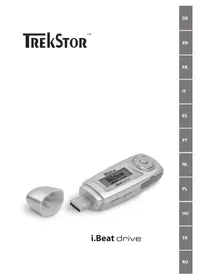
I.Beat drive - Mp3 player TrekStor - Free user manual and instructions
Find the device manual for free I.Beat drive TrekStor in PDF.



| Product Type | MP3 Player |
| Brand | TrekStor |
| Model | i.Beat drive |
| Power Source | AA battery (battery compartment) |
| Storage Capacity | Slot for SD/MMC card and internal memory (not specified) |
| Supported Audio Formats | MP3, WMA |
| Main Functions | Music playback, voice recording, equalizer, repeat, track preview (10s), delete, memory info |
| Recording Function | Voice recording via built-in microphone |
| Display | LCD display |
| Connectivity | USB (USB port) |
| Supported Memory Cards | SD/MMC |
| Hold Switch | Yes (HOLD) |
| Included Accessories | Shoulder strap loop |
| Care and Cleaning | Clean with a soft dry cloth. Avoid moisture. |
| Safety | Do not use USB cable longer than 3 m. Turn off before disconnecting. |
| Spare Parts and Repairability | Not applicable (parts not supplied) |
| General Information | USB mass storage device. Compatible with Windows 98/2000/ME/XP. |
Frequently Asked Questions - I.Beat drive TrekStor
User questions about I.Beat drive TrekStor
0 question about this device. Answer the ones you know or ask your own.
Ask a new question about this device
Download the instructions for your Mp3 player in PDF format for free! Find your manual I.Beat drive - TrekStor and take your electronic device back in hand. On this page are published all the documents necessary for the use of your device. I.Beat drive by TrekStor.
USER MANUAL I.Beat drive TrekStor
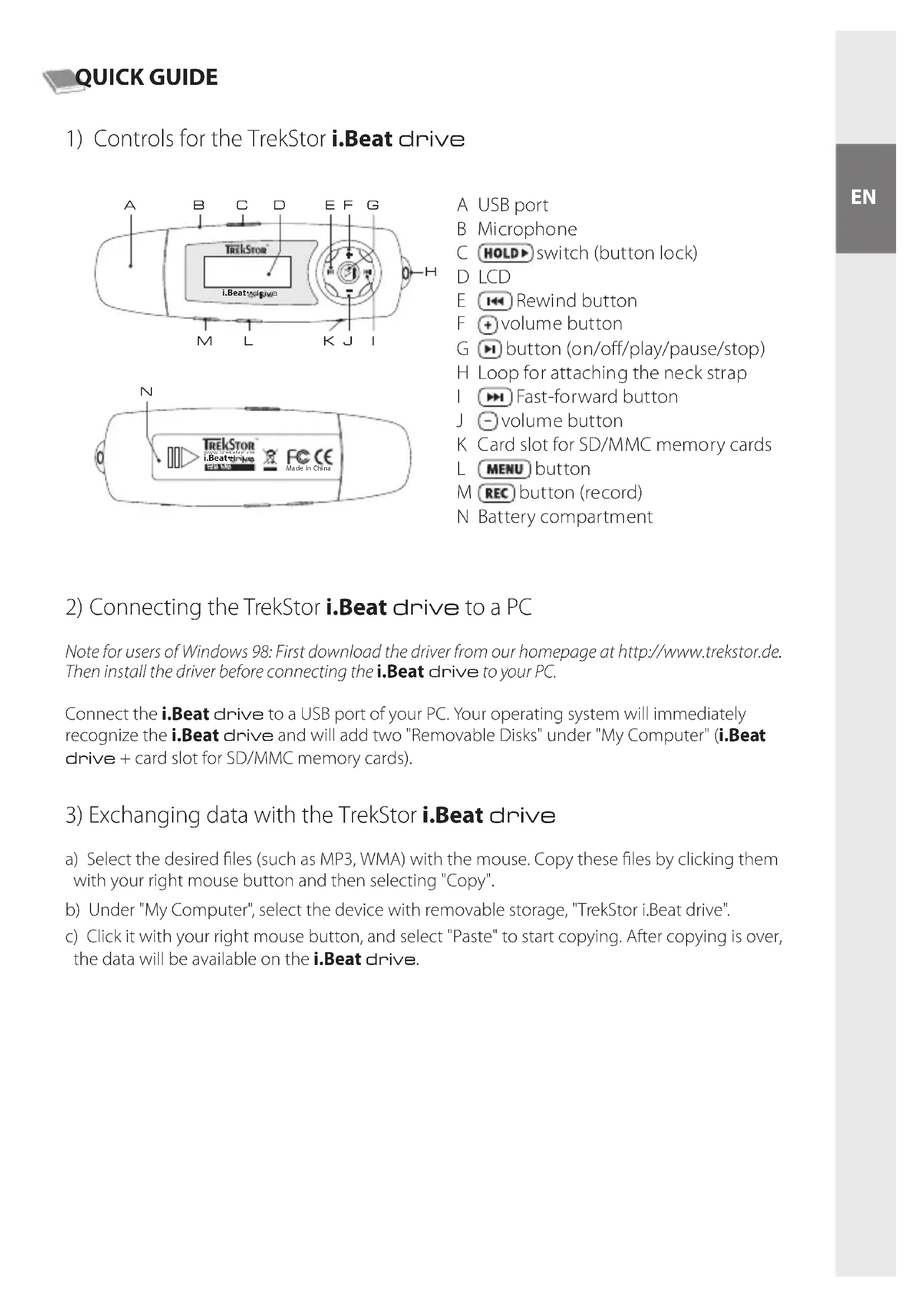
A USB port
B Microphone
C HOLD switch (button lock)
D LCD
E Rewind button
F volume button
G button (on/off/play/pause/stop)
H Loop for attaching the neck strap
Fast-forward button
J volume button
K Card slot for SD/MMC memory cards
L MENU button
M REC button (record)
N Battery compartment
2) Connecting the TrekStor i.Beat drive to a PC
Note for users of Windows 98: First download the driver from our homepage at http://www.trekstor.de. Then install the driver before connecting the i.Beat drive to your PC.
Connect the i.Beat drive to a USB port of your PC. Your operating system will immediately recognize the i.Beat drive and will add two "Removable Disks" under "My Computer" (i.Beat drive + card slot for SD/MMC memory cards).
3) Exchanging data with the TrekStor i.Beat drive
a) Select the desired files (such as MP3, WMA) with the mouse. Copy these files by clicking them with your right mouse button and then selecting "Copy".
b) Under "My Computer", select the device with removable storage, "TrekStor i.Beat drive".
c) Click it with your right mouse button, and select "Paste" to start copying. After copying is over, the data will be available on the i.Beat drive.
4) Logging off the TrekStor i.Beat drive and disconnecting from the PC
Windows 98 (SE) Look for i.Beat drive under "Device Manager" (under "Drives"), and click the device with the left mouse button. Select the menu item "Remove". You can now disconnect the i.Beat drive from the PC.
Windows 2000/ME/XP At the bottom right on the task bar, click your right mouse button on the symbol "Safely remove hardware". In the context menu that appears, click the left mouse button on "Safely Remove Mass Storage Device - Drive" to select it. You can now disconnect the i.Beat drive from the PC.
Note: Please follow the recommended logoff procedure to prevent damage to the device or data loss.
5) Using the TrekStor i.Beat drive
Turning the device on and off
Turn on the i.Beat drive by briefly pressing the button. To turn off the i.Beat drive, hold the button for approximately 3 seconds.
Note: Make sure that the Holsch has been moved to the left, i.e., that the button lock is turned off. If the button lock is activated, the button lock symbol or a corresponding message will appear.
Different modes
The i.Beat drive has different modes (Music playback, Voice recording, Settings, Preview song, Delete, Memory information). To go to a mode, hold the MENU button for approximately one second. Push the OK button to the right or left to select the desired mode, and confirm by pressing the MENU button again.
Mode: Music playback
Switch to "Play Music" mode.
- Playback Briefly press the
Button to start playing an audio file. - Pause
- Briefly press the button to stop playing the file. Repress the button to continue playing the file.
- Stop Press the button for approximately 1 second to stop playing the file. Repress the button to start playing the beginning of the song.
- Change song You can change the current song by briefly pressing the button to the left or right. Press the button to select the next song. Press the button to select the previous song.
- Rewind/fast-forward within a song
- You can navigate within a song by holding down the button in one direction or the other. Hold down the button to fast-forward. Hold down the button to rewind.
Note: The longer you hold the button in one direction, the faster the device will go forward or rewind.
- Increase/decrease volume
You can adjust the volume by holding down the or button. Briefly press the or buttons to raise or lower the volume.
Mode: Voice recording
Switch to the "Voice" mode.
You can record your voice using the integrated microphone. Hold the button for approximately 2 seconds to start recording. Stop recording by again pressing the button for approximately 2 seconds.
Note: All voice recordings are saved in the "VOICE" folder, and can only be displayed and played in "Voice" mode.
Mode: Settings
Switch to the "Settings" mode.
This mode allows you to set the equalizer, various repeat functions, contrast, the duration of background illumination, eco mode (automatic shutoff), recording quality and the language of the i.Beat drive.
Press the button to select the desired setting, and confirm by pressing the button.
Mode: Preview Song
Change to "Preview" mode to play each song for just 10 seconds. Press the button to turn off the preview function.
Mode:Delete
Switch to the "Delete" mode. Briefly press the button to confirm the deletion of the displayed song.
Mode:Memory information
Switch to the "About" mode. In this mode, you can display the entire memory and free memory of the i.Beat drive.
The manufacturer retains the right to continuously improve the product. These changes may be made without being directly described in these brief instructions. For this reason, the information provided in these brief instructions may not reflect the current state of the art.
The manufacturer only guarantees suitability for the product's intended purpose. In addition, the manufacturer is not responsible for damages or loss of data and subsequent consequences.
Copyright © 2005 TrekStor GmbH & Co. KG. All rights retained. Other cited product or company names may be trademarks or brand names of the respective owner.
Note: Do not use USB cables longer than 3 meters.
Mode:Lecturemusicale
Mode: Enregistrement vocal
A工程技术 of the microfondo is an integrated system that aims to realize the integration of the microfondo and the microfondo. The integration process is a combination of two stages: first, the microfondo is integrated into the microfondo; second, the microfondo is integrated into the microfondo.
G gomb (Be/Ki/Play/Pause)
H ful a nyakpant rogzitéséhez
Pexm pa60tbl: ydaeneHne
Ipeennte, noxanyiSta, B pexm "Delete". HaxmTe KOpOTKO KhoNkH UTO6bl NOITBepnTb ydaJIeHne oTo6paXaemoro TpeKa.
Pexm pa60tI: Hhopmaun o namrtn
Ipeennte, noxanynta, B pexim "About". 3decb moxno nolyuHTb INHOpmaunO cymmapHO n CBO6oHNo namrTu yCTpoiCTBa i.Beat drive.
Ipon3BODNTenb octabnre 3a cobn npabo Ha nocToHHoe ycOBepseHCTBOBaHne n3denn. N3meHnmaOryT 6bITb OcyuectBHe b6e onncAHn IN B hactoAem KpaTkom pyKOBoDCTBe. IOnrmy HOpMaunB hactoAem KpaTkom pyKOBOCTBE MOKET He COOTBcTcBOBaTb yPOBHIO TEXHNueCKORO NCONHHeHn.
PpOIN3BOIDNTeB rapaHTnpuyET npirooHocb 3TOrO n3dennr TOnkO nIcNoJIb3OBaHNr NO Ha3HaueHHIO. NOMMO 3TOr, npOIN3BOIDNTeB He Hecet OTBeCTBeHHOCn 3a NoBpeXJeHne nn NoTeepIO daHHbx IN KocBeHHbYuep6.
Copyright © 2005 TrekStor GmbH & Co. KG. Bce npaba 3aunuenebl. B cnuyae npyunx ynomnhytbx Ha3BaHn n3deennn nn pnpM, BO3MOXHO, peb ndet O TOBapHbIX 3hakx nnn fnpMeHHbIX Mapkax COOTBeTCTByoUnx BnaDeIbueB.
Yka3aHue: He pekomehdyemr npumeHmB USB-ka6enu dnuho 6ooe 3 M.
Support
Hotline E-Mail Language
+49 431 - 24 89 45 70** support.at@trekstor.de German
+49 431 - 24 89 45 80** support.en@trekstor.de English
+49 431 - 24 89 45 73** support.ch@trekstor.de German
DE
01805 - 87 35 78 67* support.de@trekstor.de German
+49 431 - 24 89 45 76** support.es@trekstor.de Spanish
FR
+49 431 - 24 89 45 79** support.en@trekstor.de English
+49 431 - 24 89 45 75** support.it@trekstor.de Italian
LU
+49 431 - 24 89 45 81** support.en@trekstor.de English
PL +49 431 - 24 89 45 77** support.pl@trekstor.de Polish
PT
+49 431 - 24 89 45 71** support.en@trekstor.de English